warning MERCEDES-BENZ CLA COUPE 2016 Owners Manual
[x] Cancel search | Manufacturer: MERCEDES-BENZ, Model Year: 2016, Model line: CLA COUPE, Model: MERCEDES-BENZ CLA COUPE 2016Pages: 345, PDF Size: 12.41 MB
Page 184 of 345
Parking tips:
R on narrow roads, drive as closely as possible
past the parking space
R parking spaces that are littered or overgrown
might be identified or measured incorrectly
R parking spaces that are partially occupied by
trailer drawbars might not be identified as
such or be measured incorrectly
R snowfall or heavy rain may lead to a parking
space being measured inaccurately
R pay attention to the Parking Assist
PARKTRONIC warning messages
(Y page 178) during the parking procedure
R you can intervene in the steering procedure to
correct it at any time. Parking Pilot will then be cancelled
R when transporting a load that protrudes from
your vehicle, you should not use Parking Pilot
R never use Parking Pilot when snow chains are
fitted
R make sure that the tyre pressures are always
correct. This has a direct influence on the
parking characteristics of the vehicle
Use Parking Pilot for parking spaces that are:
R parallel or at right angles to the direction of
travel
R on straight roads, not bends
R on the same level as the road, e.g. not on the
pavement
For vehicles with the trailer tow hitch folded out,
the minimum length for parking spaces is
slightly longer.
If you have attached a trailer to your vehicle, you
should not use Parking Pilot. Once the electrical
connection is established between your vehicle
and the trailer, Parking Pilot is no longer availa- ble. Parking Assist PARKTRONIC is deactivated
for the rear area.
Detecting parking spaces Objects located above the detection range of
Parking Pilot will not be detected when the park-
ing space is measured. These are not taken into
account when the parking procedure is calcula- ted, e.g. overhanging loads, tail sections or load-
ing ramps of goods vehicles. G
WARNING
If there are objects above the detection range:
R Parking Pilot may steer in too early
R the vehicle may not stop in front of these
objects
This could cause a collision. There is a risk of
an accident.
If objects are located above the detection
range, stop and deactivate Parking Pilot.
Further information on the detection range
(Y page 177).
Parking Pilot does not assist you parking in
spaces at right angles to the direction of travel if:
R two parking spaces are located directly next
to one another
R the parking space is directly next to a low
obstacle such as a low kerb
R you forward-park
Parking Pilot does not assist you parking in
spaces parallel or at right angles to the direction of travel if:
R the parking space is on a kerb
R the system reads the parking space as being
blocked, such as by foliage or grass paving
blocks
R the area is too small for the vehicle to
manoeuvre into
R the parking space is bordered by an obstacle,
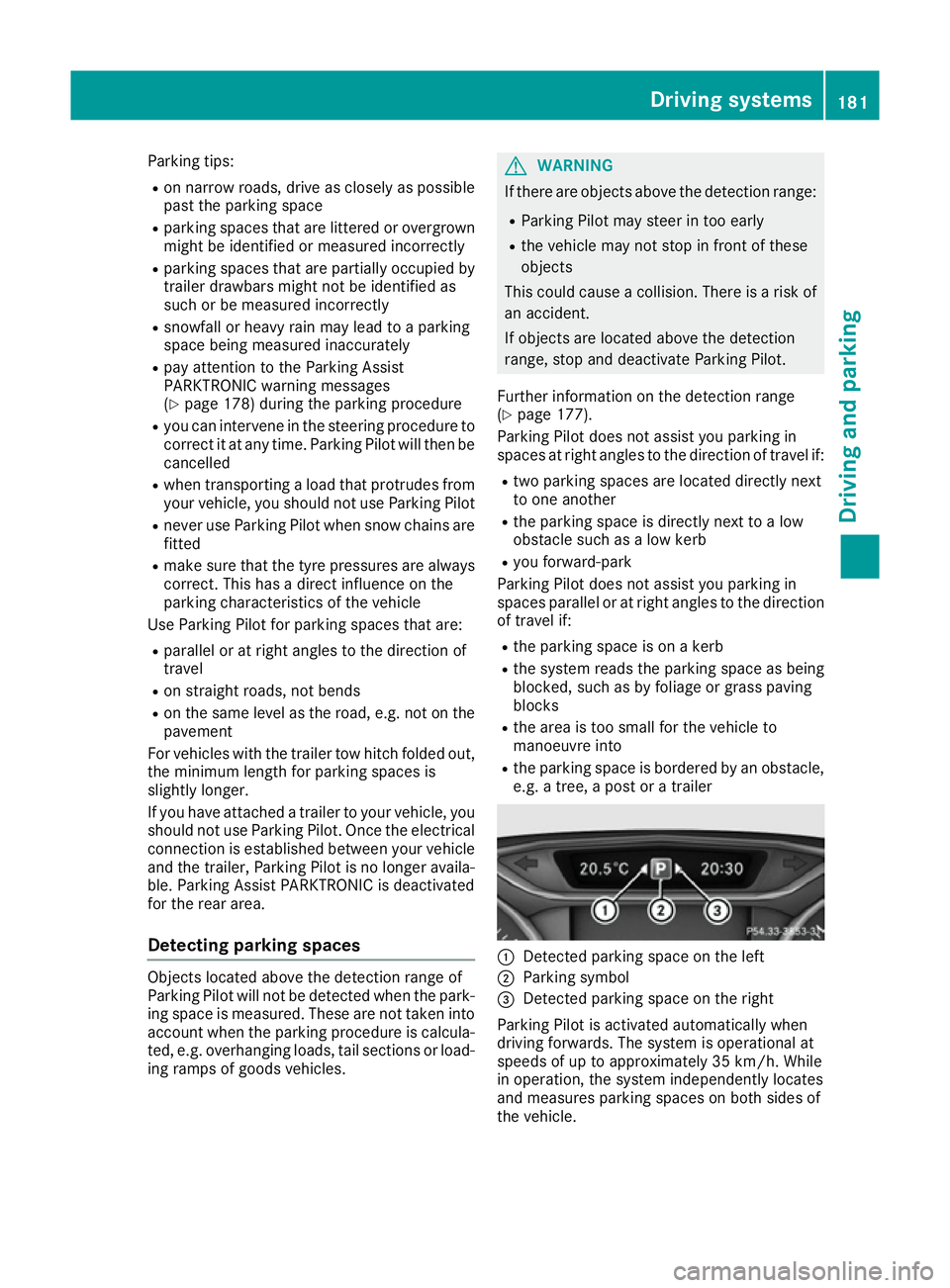
e.g. a tree, a post or a trailer :
Detected parking space on the left
; Parking symbol
= Detected parking space on the right
Parking Pilot is activated automatically when
driving forwards. The system is operational at
speeds of up to approximately 35 km/h. While
in operation, the system independently locates
and measures parking spaces on both sides of
the vehicle. Driving systems
181Driving and parking Z
Page 185 of 345
Parking Pilot will detect only parking spaces
which are:
R parallel or at right angles to the direction of
travel
R that are parallel to the direction of travel and
are at least 1.5 m wide
R that are parallel to the direction of travel and
at least 1.0 m longer than your vehicle
R that are at right angles to the direction of
travel and at least 1.0 mwider than your vehi-
cle
i Note that Parking Pilot cannot measure the
length of a parking space if it is at right angles to the direction of travel. You will need to
judge whether your vehicle will fit in the park-
ing space.
When driving at speeds below 30 km/h, you will
see parking symbol ;as a status indicator in
the instrument cluster. When a parking space
has been detected, an arrow towards the right or the left also appears. Parking Pilot displays only
parking spaces on the front-passenger side as
standard. Parking spaces on the driver's side
are displayed as soon as the turn signal on the
driver's side is activated. When parking on the
driver's side, this must remain activated until
you confirm the use of Parking Pilot by pressing the a button on the multifunction steering
wheel. The system automatically determines
whether the parking space is parallel or at right
angles to the direction of travel.
A parking space is displayed while you are driv- ing past it, and until you are approximately 15 m
away from it.
Parking G
WARNING
If you leave the vehicle when it is only being
braked by Parking Pilot, it could roll away if:
R there is a malfunction in the system or in
the voltage supply.
R the electrical system in the engine com-
partment, the battery or the fuses are tam-
pered with.
R the battery is disconnected
R the vehicle is accelerated, e.g. by a vehicle
occupant.
There is a risk of an accident. Before leaving the vehicle, always secure it
against rolling away.
i Vehicles with automatic transmission:
If Parking Assist PARKTRONIC detects obsta-
cles, Parking Pilot brakes automatically whilst
the vehicle is parking. You are responsible for
braking in good time.
X Stop the vehicle when the parking symbol
shows the desired parking space in the instru-
ment cluster.
X Vehicles with automatic transmission:
shift the transmission to position
R.
Vehicles with manual transmission: shift
to reverse gear.
The Start Parking Pilot?
Start Parking Pilot? Yes: OK Yes: OKNo:
No:
% message appears in the multifunction
display.
X To cancel the procedure: press the%
button on the multifunction steering wheel or
pull away.
or X To park using Parking Pilot: press thea
button on the multifunction steering wheel.
The Parking Pilot active Accelerate Parking Pilot active Accelerate
and brake
and brake Observe surroundings
Observe surroundings mes-
sage appears in the multifunction display.
X Release the multifunction steering wheel.
X Reverse the vehicle, being ready to brake at
all times. When reversing, drive at a speed
below 10 km/h. Otherwise Parking Pilot is
cancelled.
Vehicles with automatic transmission:
Parking Pilot brakes the vehicle to a standstill
when the vehicle approaches the rear border
of the parking space.
Manoeuvring may be required in tight parking spaces.
X Vehicles with manual transmission: stop
when Parking Assist PARKTRONIC sounds the continuous warning tone, if not before.
Manoeuvring may be required in tight parking
spaces.
Vehicles with automatic transmission: the
Parking Pilot active Select D Parking Pilot active Select D Observe
Observe
surroundings
surroundings message appears in the multi-
function display.
Vehicles with manual transmission: the
Parking Pilot active Engage forward Parking Pilot active Engage forward
gear gear Observe surroundings
Observe surroundings message
appears in the multifunction display. 182
Driving systemsDriving and parking
Page 186 of 345
X
Vehicles with automatic transmission:
select transmission position
Dwhile the vehi-
cle is stationary.
Vehicles with manual transmission: shift
to first gear while the vehicle is stationary.
Parking Pilot immediately steers in the other
direction.
The Parking Pilot active Accelerate Parking Pilot active Accelerate
and brake
and brake Observe surroundings
Observe surroundings mes-
sage appears in the multifunction display.
i You will achieve the best results by waiting
for the steering procedure to complete before
pulling away.
X Drive forwards and be ready to brake at all
times.
Vehicles with automatic transmission:
Parking Pilot brakes the vehicle to a standstill
when the vehicle approaches the front border
of the parking space.
Manoeuvring may be required in tight parking spaces.
X Vehicles with manual transmission: stop
when Parking Assist PARKTRONIC sounds the continuous warning tone, if not before.
Vehicles with automatic transmission: the
Parking Pilot active Select R
Parking Pilot active Select R Observe Observe
surroundings
surroundings message appears in the multi-
function display.
Vehicles with manual transmission: the
Parking Pilot active Engage reverse Parking Pilot active Engage reverse
gearObserve surroundings gearObserve surroundings message
appears in the multifunction display.
As soon as the parking procedure is complete,
the Parking Parking Pilot
Pilotended
endedmessage appears in
the multifunction display and a warning tone
sounds. The vehicle is now parked.
Vehicles with automatic transmission: the
vehicle is kept stationary without the driver hav-
ing to depress the brake pedal. The braking
effect is cancelled when you depress the accel- erator pedal.
Parking Pilot no longer supports you with steer-
ing interventions and brake applications. When
Parking Pilot is ended, you must steer and brake again yourself. Parking Assist PARKTRONIC is
still available.
Parking tips:
R The way your vehicle is positioned in the park-
ing space after parking is dependent on vari-
ous factors. These include the position and
shape of the vehicles parked in front of and behind it and the conditions of the location. It
may be the case that Parking Pilot guides you
too far into a parking space, or not far enough
into it. In some cases, it may also lead you
across or onto the kerb. If necessary, you
should abort the parking procedure with Park-
ing Pilot.
R You can also preselect transmission position
D. The vehicle redirects and does not drive as
far into the parking space. Should the trans-
mission change take place too early, the park-
ing procedure will be cancelled. A sensible
parking position can no longer be achieved
from this position.
Exiting a parking space In order that Parking Pilot can support you when
exiting the parking space:
R you need to have parked using Parking Pilot
R the border of the parking space must be high
enough at the front and the rear. A kerb stoneis too small, for example.
R the border of the parking space must not be
too wide, as the position of the vehicle must
not exceed an angle of 45° to the starting
position as it is manoeuvred into the parking
space.
R a manoeuvring distance of at least 1.0 mmust
be available.
Parking Pilot can assist you with exiting a park-
ing space only if you have parked the vehicle
parallel to the direction of travel using the Park-
ing Pilot
i Vehicles with automatic transmission:
If Parking Assist PARKTRONIC detects obsta-
cles, Parking Pilot brakes automatically whilst the vehicle is exiting the parking space. You
are responsible for braking in good time.
X Start the engine.
X Release the electric parking brake.
X Switch on the turn signal in the direction you
will drive out of the parking space.
X Vehicles with automatic transmission:
shift the transmission to position
Dor R.
Vehicles with manual transmission: shift
to forward or reverse gear.
The Start Parking Pilot?
Start Parking Pilot? Yes: OK Yes: OKNo:
No:
% message appears in the multifunction
display. Driving systems
183Driving and parking Z
Page 187 of 345
X
To cancel the procedure:press the %
button on the multifunction steering wheel or pull away.
or
X To exit a parking space using Parking
Pilot:
press the abutton on the multi-
function steering wheel.
The Parking Pilot active Accelerate
Parking Pilot active Accelerate
and brake
and brake Observe surroundings Observe surroundings mes-
sage appears in the multifunction display.
X Release the multifunction steering wheel.
X Pull away, being ready to brake at all times. Do
not exceed a maximum speed of approx-
imately 10 km/h when exiting a parking
space. Otherwise, Parking Pilot is cancelled.
X Vehicles with manual transmission: stop,
when Parking Assist PARKTRONIC sounds the continuous warning tone, if not before.
X Vehicles with automatic transmission:
depending on the message or as required,
shift the transmission to position
Dor R.
Vehicles with manual transmission:
depending on the message or as required,
engage forward or reverse gear.
Parking Pilot steers immediately in the other
direction. The Parking Pilot active
Parking Pilot active
Accelerate and brake
Accelerate and brake Observe sur‐ Observe sur‐
roundings
roundings message appears in the multi-
function display.
i You will achieve the best results by waiting
for the steering procedure to complete before
pulling away.
If you reverse after activation, the steering
wheel is moved to the straight-ahead posi-
tion.
X Drive forwards and reverse as prompted by
the Parking Assist PARKTRONIC warning dis-
plays, several times if necessary.
Once you have exited the parking space com-
pletely, the steering wheel is moved to the
straight-ahead position. You hear a tone and the
Parking
Parking Pilot Pilotended
endedmessage appears in the
multifunction display. You will then have to steer
and merge into traffic on your own. Parking
Assist PARKTRONIC is still available. You can
take over the steering before the vehicle has
exited the parking space completely. This is
useful, for example, when you recognise that it
is already possible to pull out of the parking
space. Cancelling Parking Pilot X
Stop the movement of the multifunction
steering wheel or steer yourself.
Parking Pilot is cancelled at once. The Park‐ Park‐
ing Pilot cancelled ing Pilot cancelled message appears in
the multifunction display.
or X Press the PARKTRONIC button (Y page 179).
Parking Assist PARKTRONIC is switched off
and Parking Pilot is immediately cancelled.
The Parking Pilot cancelled
Parking Pilot cancelled message
appears in the multifunction display.
Parking Pilot is cancelled automatically when:
R the electric parking brake is applied
R transmission position Pis selected in vehicles
with automatic transmission
R parking with Parking Pilot is no longer possi-
ble
R you are driving faster than 10 km/h
R a wheel spins and ESP ®
intervenes or fails. In
such cases the ÷warning lamp lights up in
the instrument cluster.
A warning tone sounds. The parking symbol dis-
appears and the multifunction display shows the
Parking Pilot cancelled Parking Pilot cancelled message.
When Parking Pilot is cancelled, you must steer
and brake again yourself.
If a system malfunction occurs, the vehicle is
braked to a standstill. To drive on, depress the
accelerator pedal again. Reversing camera
General notes Reversing camera
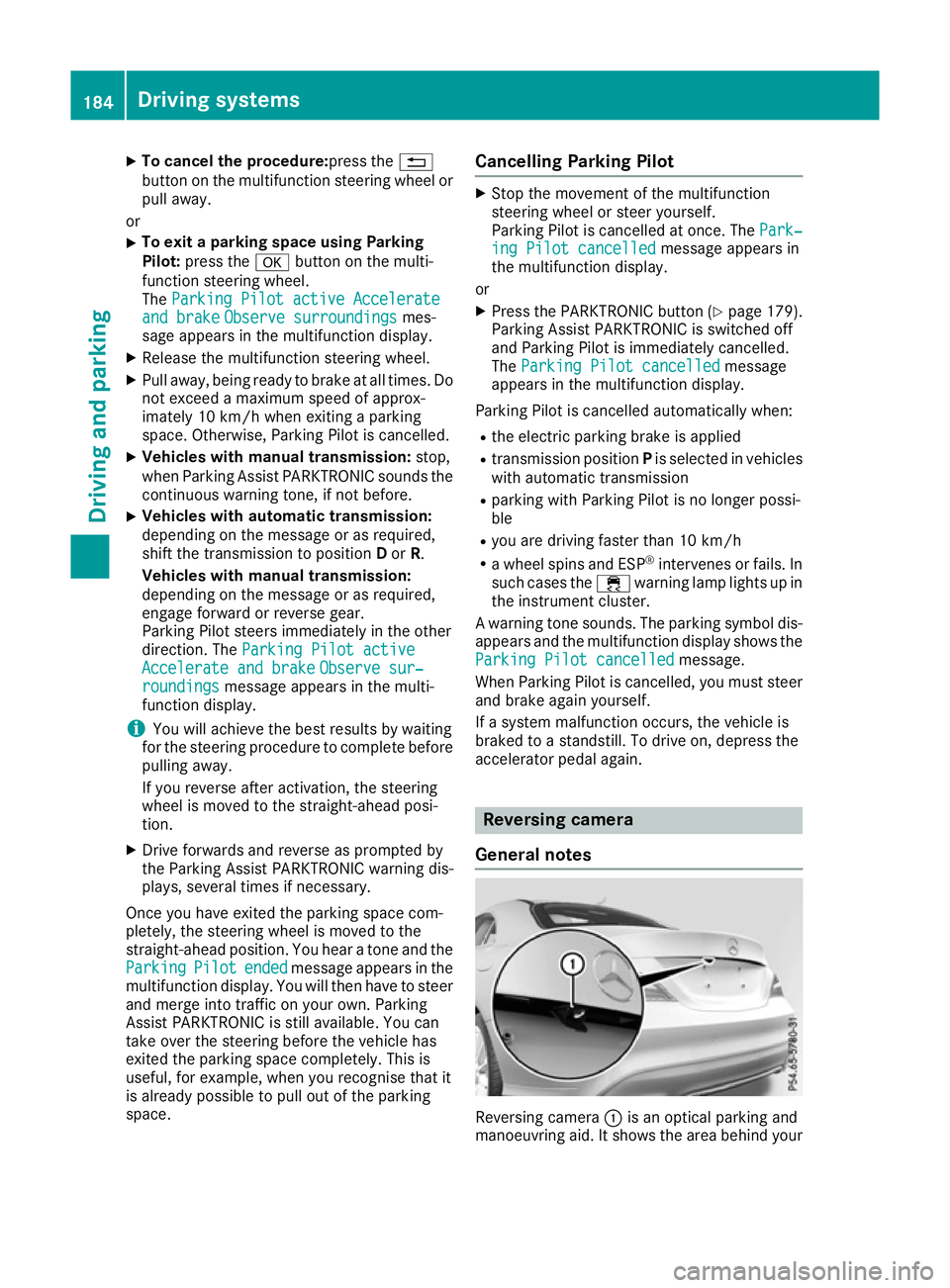
:is an optical parking and
manoeuvring aid. It shows the area behind your 184
Driving systemsDriving an
d parking
Page 189 of 345
R
the ball coupling of a trailer tow hitch
R the rear section of an HGV
R a slanted post
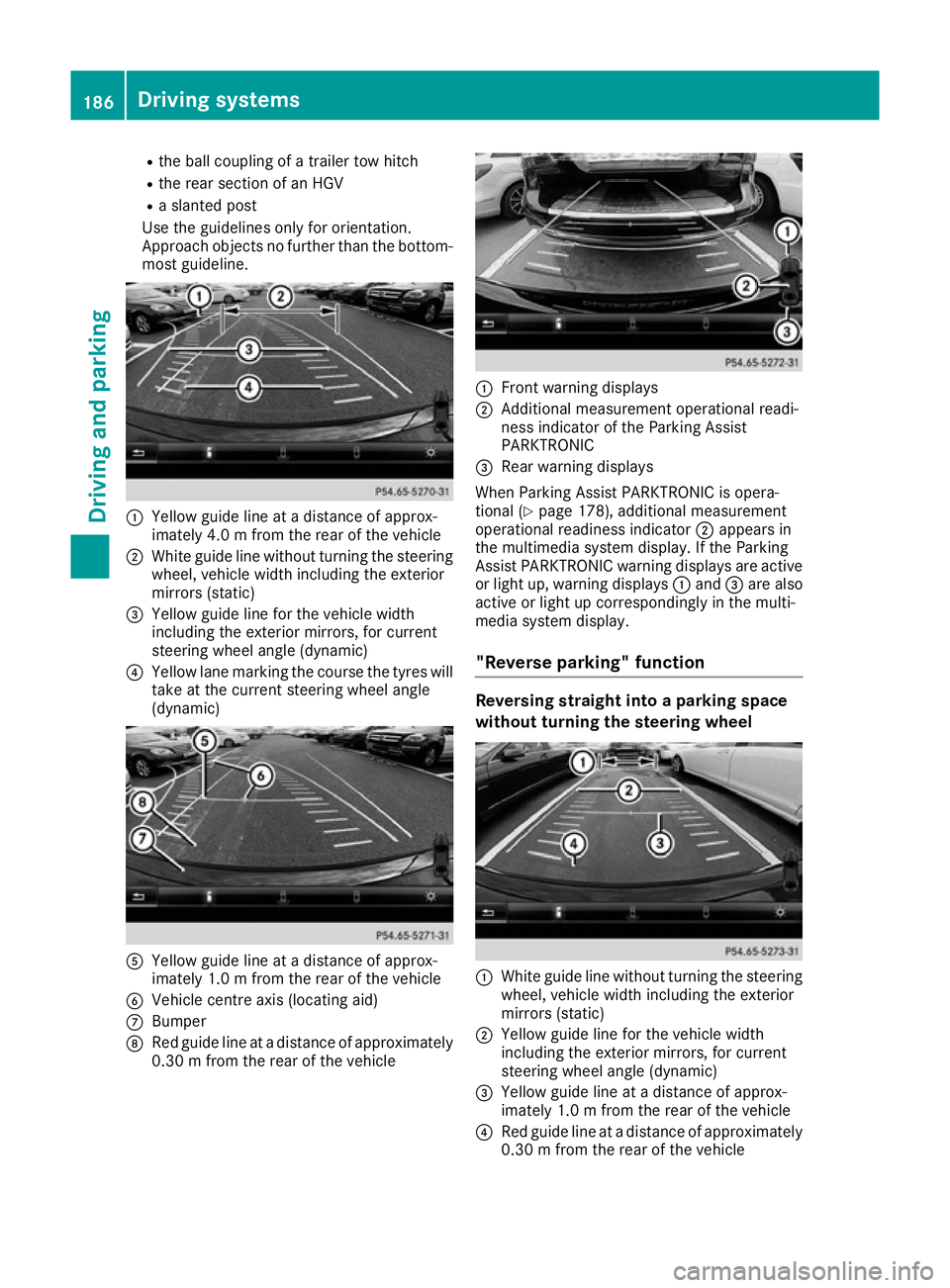
Use the guidelines only for orientation.
Approach objects no further than the bottom- most guideline. :
Yellow guide line at a distance of approx-
imately 4.0 m fromthe rear of the vehicle
; White guide line without turning the steering
wheel, vehicle width including the exterior
mirrors (static)
= Yellow guide line for the vehicle width
including the exterior mirrors, for current
steering wheel angle (dynamic)
? Yellow lane marking the course the tyres will
take at the current steering wheel angle
(dynamic) A
Yellow guide line at a distance of approx-
imately 1.0 m fromthe rear of the vehicle
B Vehicle centre axis (locating aid)
C Bumper
D Red guide line at a distance of approximately
0.30 m from the rear of the vehicle :
Front warning displays
; Additional measurement operational readi-
ness indicator of the Parking Assist
PARKTRONIC
= Rear warning displays
When Parking Assist PARKTRONIC is opera-
tional (Y page 178), additional measurement
operational readiness indicator ;appears in
the multimedia system display. If the Parking
Assist PARKTRONIC warning displays are active
or light up, warning displays :and =are also
active or light up correspondingly in the multi-
media system display.
"Reverse parking" function Reversing straight into a parking space
without turning the steering wheel :
White guide line without turning the steering
wheel, vehicle width including the exterior
mirrors (static)
; Yellow guide line for the vehicle width
including the exterior mirrors, for current
steering wheel angle (dynamic)
= Yellow guide line at a distance of approx-
imately 1.0 m fromthe rear of the vehicle
? Red guide line at a distance of approximately
0.30 m from the rear of the vehicle 186
Driving systemsDriving an
d parking
Page 191 of 345
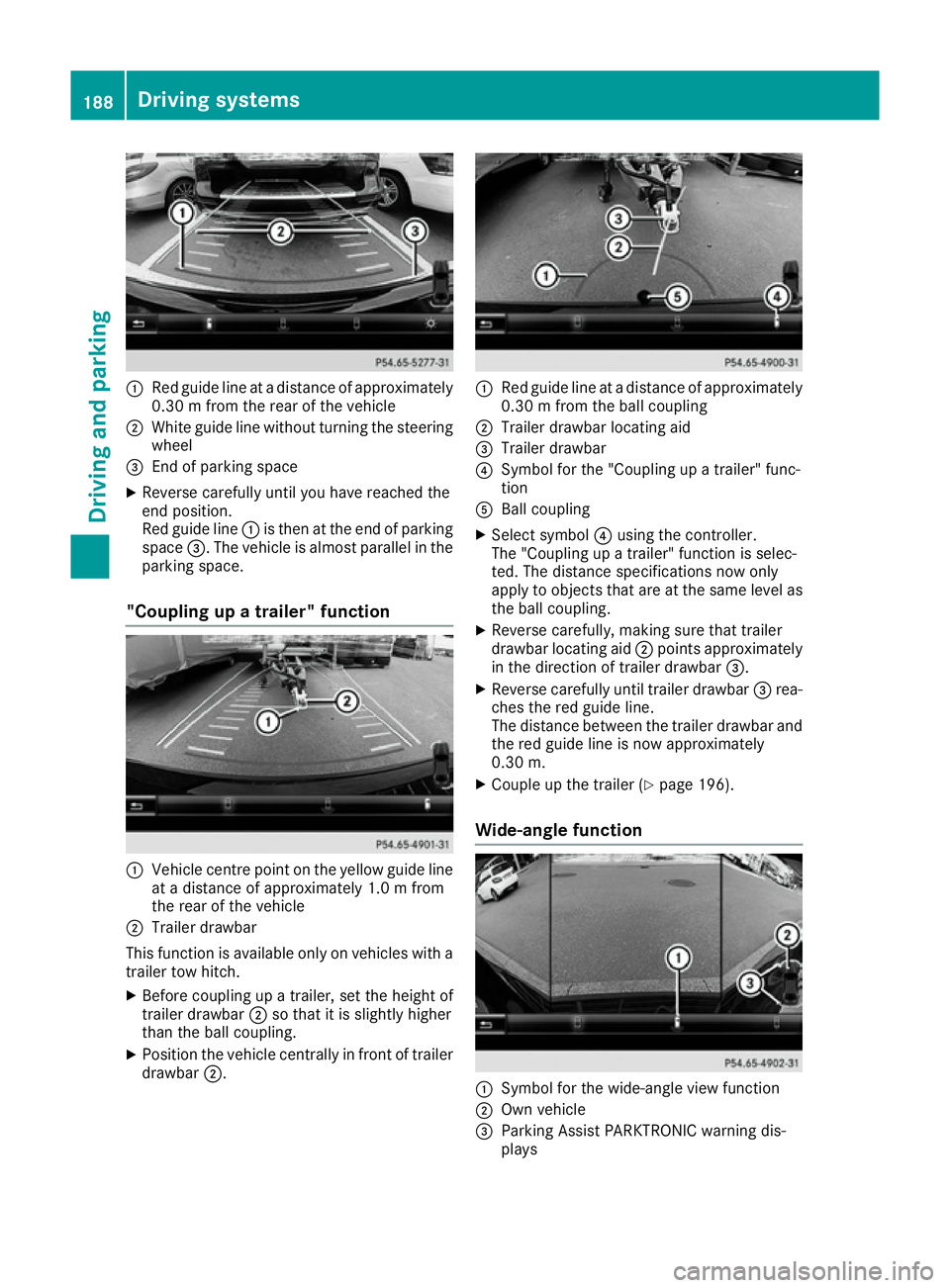
:
Red guide line at a distance of approximately
0.30 m from the rear of the vehicle
; White guide line without turning the steering
wheel
= End of parking space
X Reverse carefully until you have reached the
end position.
Red guide line :is then at the end of parking
space =. The vehicle is almost parallel in the
parking space.
"Coupling up a trailer" function :
Vehicle centre point on the yellow guide line
at a distance of approximately 1.0 m from
the rear of the vehicle
; Trailer drawbar
This function is available only on vehicles with a
trailer tow hitch.
X Before coupling up a trailer, set the height of
trailer drawbar ;so that it is slightly higher
than the ball coupling.
X Position the vehicle centrally in front of trailer
drawbar ;. :
Red guide line at a distance of approximately
0.30 m from the ball coupling
; Trailer drawbar locating aid
= Trailer drawbar
? Symbol for the "Coupling up a trailer" func-
tion
A Ball coupling
X Select symbol ?using the controller.
The "Coupling up a trailer" function is selec-
ted. The distance specifications now only
apply to objects that are at the same level as the ball coupling.
X Reverse carefully, making sure that trailer
drawbar locating aid ;points approximately
in the direction of trailer drawbar =.
X Reverse carefully until trailer drawbar =rea-
ches the red guide line.
The distance between the trailer drawbar and
the red guide line is now approximately
0.30 m.
X Couple up the trailer (Y page 196).
Wide-angle function :
Symbol for the wide-angle view function
; Own vehicle
= Parking Assist PARKTRONIC warning dis-
plays 188
Driving systemsDriving and pa
rking
Page 192 of 345
Select this view when you are driving out of an
exit and the view of crossing traffic is restricted,
for example. ATTENTION ASSIST
General notes ATTENTION ASSIST helps you during long,
monotonous journeys such as on motorways
and trunk roads. It is active in the 60 km/h to
200 km/h speed range. If ATTENTION ASSIST
detects typical indicators of fatigue or increas-
ing lapses in concentration on the part of the
driver, it suggests taking a break.
Important safety notes ATTENTION ASSIST is only an aid. It may not
always detect fatigue or lapses in concentration
until too late, or may not detect them at all. The system is not a substitute for a well-rested and
attentive driver.
The functionality of ATTENTION ASSIST is
restricted, and warnings may be delayed or not
occur at all in the following situations:
R the length of the journey is less than approx-
imately 30 minutes
R if the road condition is poor, e.g. if the surface
is uneven or contains potholes
R in case of strong side winds
R if you have adopted a sporty driving style with
high cornering speeds or high rates of accel-
eration
R if you are predominantly driving at a speed
below 60 km/h or above 200 km/h
R if the time has been set incorrectly
R in active driving situations, such as when you
change lanes or change your speed
ATTENTION ASSIST is reset and starts assessing your tiredness again when you continue your
journey if:
R you switch off the engine
R you take off your seat belt and open the driv-
er's door, e.g. for a change of drivers or to
take a break Displaying the attention level
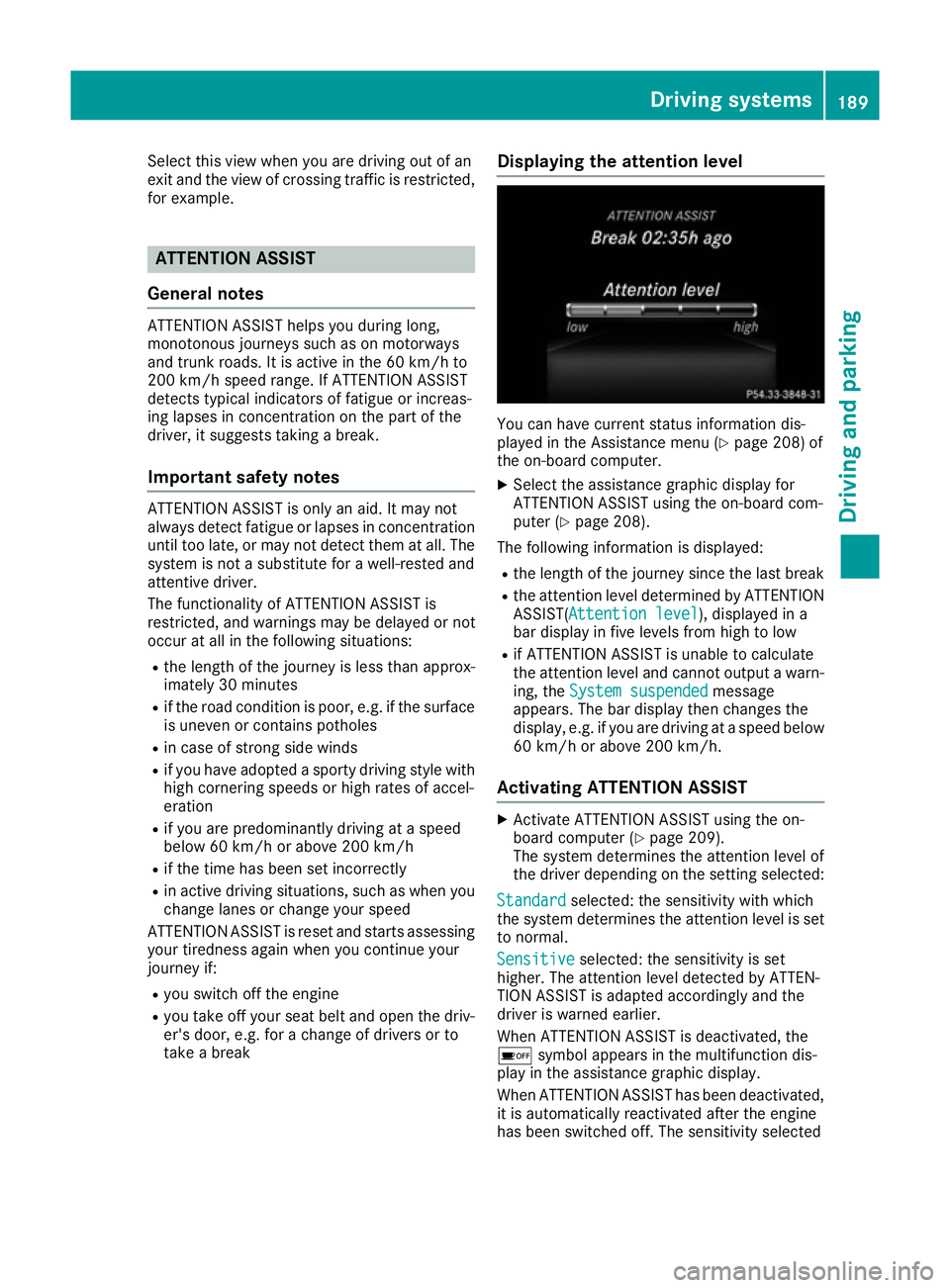
You can have current status information dis-
played in the Assistance menu (Y
page 208) of
the on-board computer.
X Select the assistance graphic display for
ATTENTION ASSIST using the on-board com-
puter (Y page 208).
The following information is displayed: R the length of the journey since the last break
R the attention level determined by ATTENTION
ASSIST( Attention level
Attention level), displayed in a
bar display in five levels from high to low
R if ATTENTION ASSIST is unable to calculate
the attention level and cannot output a warn-
ing, the System suspended System suspended message
appears. The bar display then changes the
display, e.g. if you are driving at a speed below 60 km/h or above 200 km/h.
Activating ATTENTION ASSIST X
Activate ATTENTION ASSIST using the on-
board computer (Y page 209).
The system determines the attention level of
the driver depending on the setting selected:
Standard Standard selected: the sensitivity with which
the system determines the attention level is set to normal.
Sensitive Sensitive selected: the sensitivity is set
higher. The attention level detected by ATTEN-
TION ASSIST is adapted accordingly and the
driver is warned earlier.
When ATTENTION ASSIST is deactivated, the
é symbol appears in the multifunction dis-
play in the assistance graphic display.
When ATTENTION ASSIST has been deactivated,
it is automatically reactivated after the engine
has been switched off. The sensitivity selected Driving systems
189Driving and parking Z
Page 193 of 345
corresponds to the last selection activated
(standard/sensitive).
Warning on the multifunction display If fatigue or increasing lapses in concentration
are detected, a warning appears in the multi-
function display: ATTENTION ASSIST
ATTENTION ASSIST Take a
Take a
break!
break!
In addition to the message shown on the multi-
function display, you will then hear a warning
tone.
X If necessary, take a break.
X Confirm the message by pressing the a
button on the steering wheel.
On long journeys, take regular breaks that allow
for adequate recuperation. If you do not take a
break and ATTENTION ASSIST still detects
increasing lapses in concentration, you will be
warned again after 15 minutes at the earliest.
This will happen only if ATTENTION ASSIST still
detects typical indicators of fatigue or increas-
ing lapses in concentration.
Vehicles with multimedia system COMAND
Online: if a warning is output in the multifunc-
tion display, a service station search is per-
formed in the multimedia system. You can
select a service station and you will then be
navigated to this service station. This function
can be activated and deactivated in the multi-
media system; see Digital Owner's Manual. Traffic Sign Assist
General notes Traffic Sign Assist displays the maximum speed
permitted and overtaking restrictions to the
driver in the instrument cluster. Driving onto a
section of road in the wrong direction triggers a warning. Traffic Sign Assist detects traffic signs
with multifunction camera :attached at the
top of the windscreen. The data and general
traffic regulations stored in the navigation sys-
tem are also used to determine the current
speed limit.
If a traffic sign that is relevant to your vehicle is
passed, the display of the speed limits and over- taking restrictions is updated.
The display can also be updated without a visible
traffic sign in the following situations:
R The vehicle changes roads (e.g. motorway
exit or slip road)
R A village or town boundary that is stored in the
digital map is passed
R The last traffic sign detected by the camera
has not been repeated
If a sign indicating the end of a restriction (speed limit or overtaking restriction) is passed, the
sign is displayed for five seconds. The currently
applicable traffic regulation continues to be
shown in the assistance graphic display
(Y page 208).
The camera also detects traffic signs with a
restriction indicated by an additional sign (e.g. in
wet conditions).
The traffic signs are only displayed with the
restriction if:
R The regulation must be observed with the
restriction, or
R Traffic Sign Assist is unable to determine
whether the restriction applies
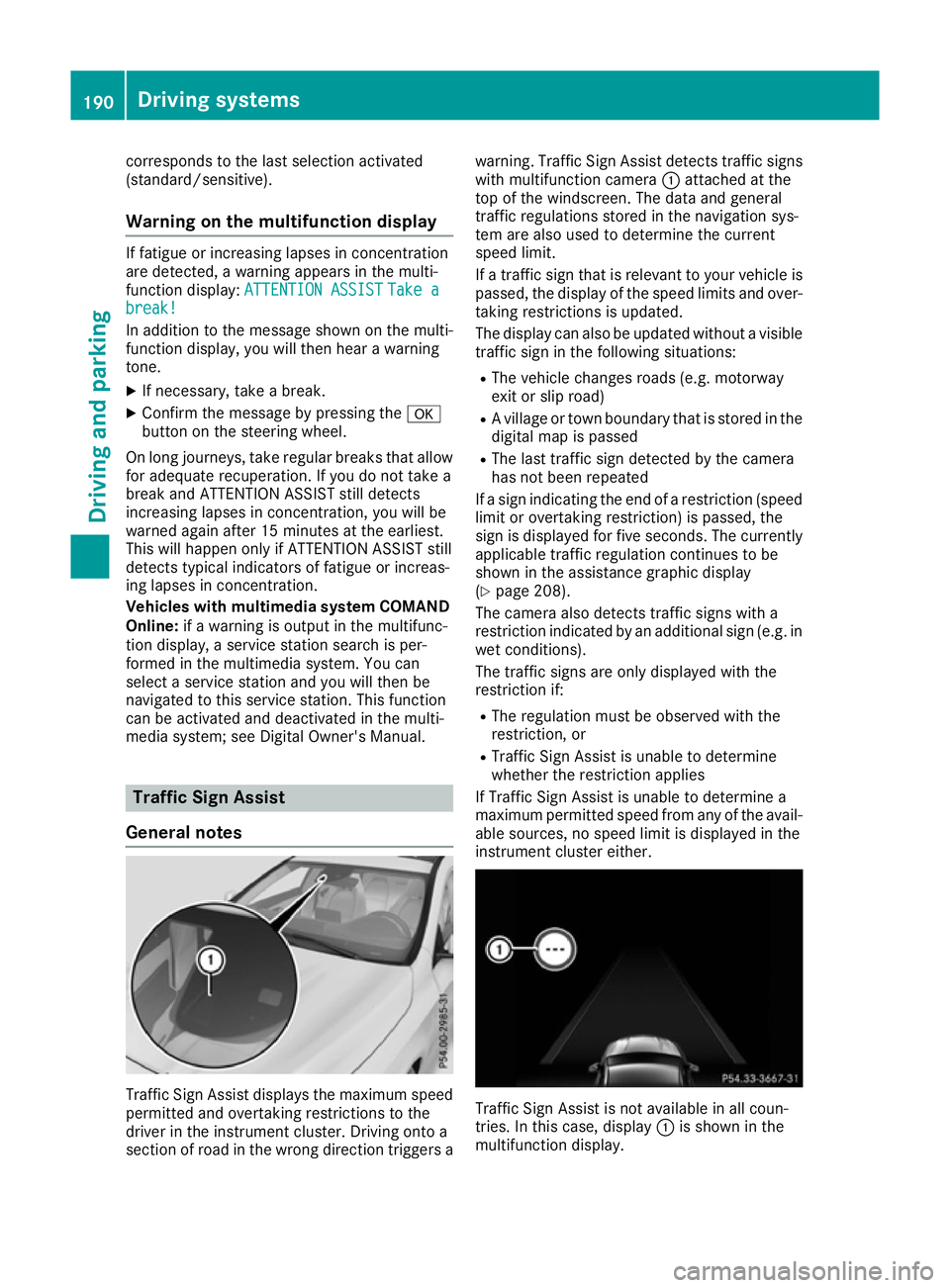
If Traffic Sign Assist is unable to determine a
maximum permitted speed from any of the avail- able sources, no speed limit is displayed in the
instrument cluster either. Traffic Sign Assist is not available in all coun-
tries. In this case, display
:is shown in the
multifunction display. 190
Driving systemsDriving and parking
Page 194 of 345
Important safety notes
Traffic Sign Assist is only an aid and is not always
able to correctly display speed limits and over-
taking restrictions. Traffic signs always have pri-
ority over the Traffic Sign Assist display.
The system may be either functionally impaired
or temporarily unavailable in the following sit-
uations:
R Visibility is poor, e.g. due to snow, rain, fog or
spray
R Glare, e.g. from the sun being low in the sky
R Dirt, ice or misting on the windscreen in the
vicinity of the camera
R Traffic signs are hard to detect (dirt, ice,
snow)
R The traffic signs are insufficiently lit at night
R Signs are ambiguous (e.g. traffic signs on con-
struction sites or in adjacent lanes)
R The information in the digital street map of the
navigation system is incorrect or out of date
Activating Traffic Sign Assist If you have activated the Traffic Sign Assist dis-
play in the on-board computer, the traffic regu-
lations (speed limits and overtaking restrictions)
are displayed in the instrument cluster for five
seconds in each case. The wrong-way warning
and the traffic sign display for speed limits and
overtaking restrictions remain active in the
assistance graphic even when the display has
been deactivated.
X Activate the Traffic Sign Assist display using
the on-board computer (Y page 208).
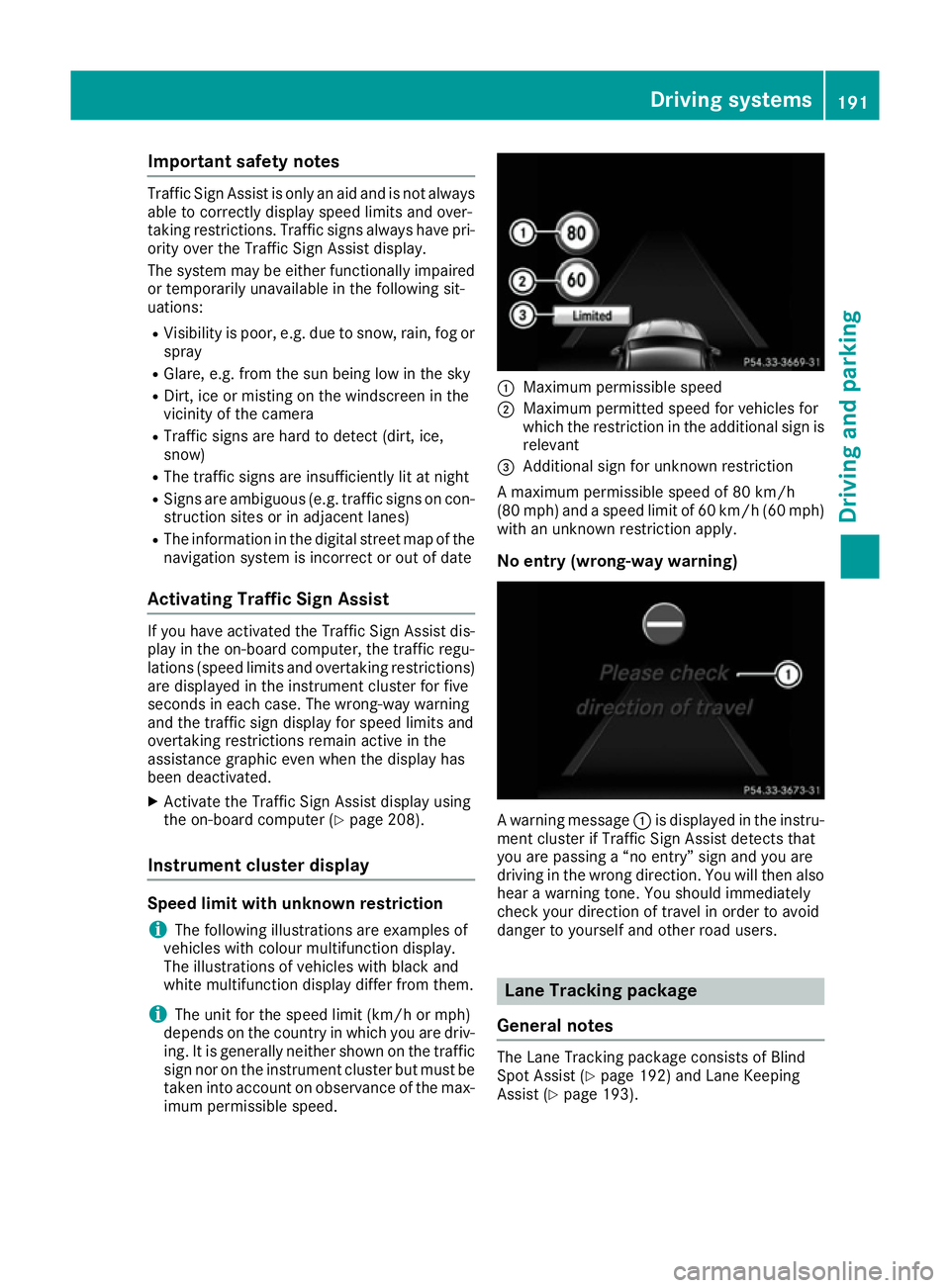
Instrument cluster display Speed limit with unknown restriction
i The following illustrations are examples of
vehicles with colour multifunction display.
The illustrations of vehicles with black and
white multifunction display differ from them.
i The unit for the speed limit (km/h or mph)
depends on the country in which you are driv-
ing. It is generally neither shown on the traffic
sign nor on the instrument cluster but must be taken into account on observance of the max-
imum permissible speed. :
Maximum permissible speed
; Maximum permitted speed for vehicles for
which the restriction in the additional sign is
relevant
= Additional sign for unknown restriction
A maximum permissible speed of 80 km/h
(80 mp h) and a speed li mit of 60 km/h (60 mph)
with an unknown restriction apply.
No entry (wrong-way warning) A warning message
:is displayed in the instru-
ment cluster if Traffic Sign Assist detects that
you are passing a “no entry” sign and you are
driving in the wrong direction. You will then also hear a warning tone. You should immediately
check your direction of travel in order to avoid
danger to yourself and other road users. Lane Tracking package
General notes The Lane Tracking package consists of Blind
Spot Assist (Y
page 192) and Lane Keeping
Assist (Y page 193). Driving systems
191Driving and parking Z
Page 195 of 345
Blind Spot Assist
General notes
Blind Spot Assist monitors the areas on either
side of the vehicle that are not visible to the
driver with two lateral, rear-facing radar sen-
sors. A warning display in the exterior mirrors
draws your attention to vehicles detected in the
monitored area. If you then switch on the cor-
responding turn signal to change lanes, you will also receive a visual and audible warning.
Blind Spot Assist supports you from a speed of
approximately 30 km/h.
Important safety notes G
WARNING
Blind Spot Assist does not react to vehicles:
R overtaken too closely on the side, placing
them in the blind spot area
R when the difference in the speed of
approach and overtaking is too great
As a result, Blind Spot Assist cannot warn
drivers in these situations. There is a risk of an accident.
Always pay careful attention to the traffic sit- uation and maintain a safe distance at the side
of the vehicle.
Blind Spot Assist is only an aid. It may fail to
detect some vehicles and is not a substitute for
attentive driving. Always ensure that there is
sufficient distance to the side for other road
users and obstacles.
Radar sensors The radar sensors for Blind Spot Assist are inte-
grated into the rear bumper. Make sure that the
bumpers are free from dirt, ice or slush. The
sensors must not be covered, e.g. by cycle racks
or overhanging loads. Following a severe impact or in the event of damage to the bumpers, havethe function of the radar sensors checked at a
qualified specialist workshop. Blind Spot Assist
may no longer work properly in such cases. Monitoring range of the sensors
In particular, the detection of obstacles can be
impaired in the following situations:
R dirt on the sensors or obscured sensors
R poor visibility, e.g. due to fog, heavy rain or
snow
R a narrow vehicle travelling in front, e.g. a
motorcycle or a bicycle
R very wide lanes
R narrow lanes
R vehicles not driving in the middle of their lane
R barriers or other road boundaries
Vehicles in the monitoring range are then not
indicated.
Blind Spot Assist monitors an area up to 3.0 m
behind your vehicle and directly next to your
vehicle.
If the lanes are narrow, vehicles driving in the
lane beyond the lane next to your vehicle may be
indicated, especially if the vehicles are not driv-
ing in the middle of their lane. This may be the
case if the vehicles are driving on the inner side of their lane.
Due to the nature of the system:
R warnings may be issued in error when driving
close to crash barriers or similar solid boun-
daries
R warnings may be interrupted when you are
driving alongside particularly long vehicles,
for example lorries, for a prolonged time
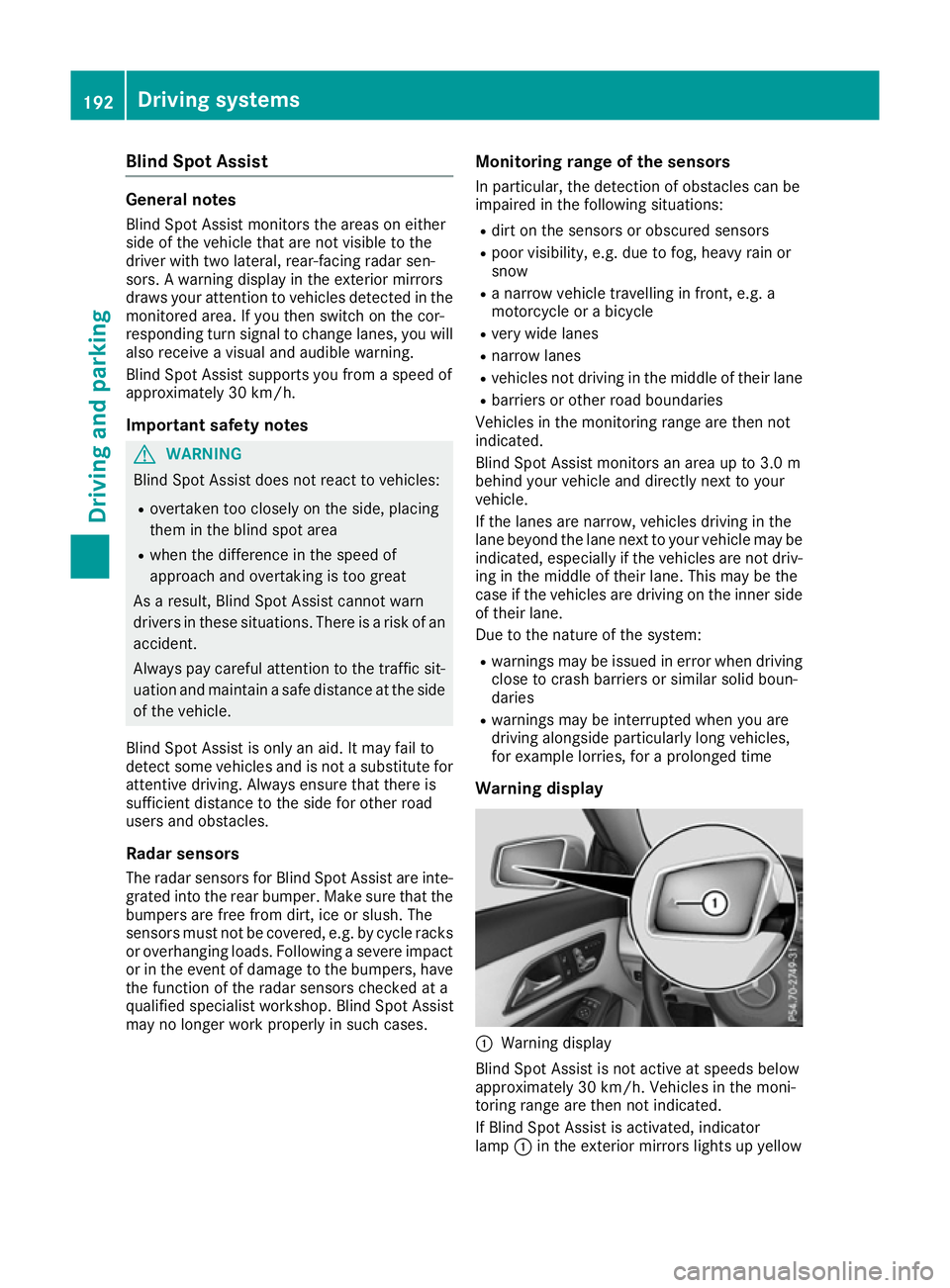
Warning display :
Warning display
Blind Spot Assist is not active at speeds below
approximately 30 km/h. Vehicles in the moni-
toring range are then not indicated.
If Blind Spot Assist is activated, indicator
lamp :in the exterior mirrors lights up yellow 192
Driving systemsDriving an
d parking