light MERCEDES-BENZ CLA COUPE 2016 User Guide
[x] Cancel search | Manufacturer: MERCEDES-BENZ, Model Year: 2016, Model line: CLA COUPE, Model: MERCEDES-BENZ CLA COUPE 2016Pages: 345, PDF Size: 12.41 MB
Page 19 of 345
Applying or releasing manuall
y...... 157
Display message ............................ 219
Electric parking brake .................... 157
Emergency braking ........................ 158
General information ....................... 157
Releasing automaticall y................. 158
Warning lamp ................................. 254
Parking lamps
Display message ............................ 229
Switching on/of f........................... 108
Parking Pilot
Cancelling ...................................... 184
Detecting parking spaces .............. 181
Display Message ............................ 235
Exiting a parking space .................. 183
Function/note s............................. 180
Important safety notes .................. 180
Parking .......................................... 182
Towing a trailer .............................. 180
PASSENGER AIR BAG
Display message ............................ 226
Indicator lamps ................................ 40
Problems (malfunctions) ................ 226
Petrol .................................................. 328
Pets in the vehicle ............................... 65
Phone book
See also Digital Owner's Manua l... 259
Plastic trim (cleaning instruc-
tions) .................................................. 290
Power socket
Boot ............................................... 276
Power windows
see Side windows
Pre-Crash Safety System
see PRE-SAFE ®
(anticipatory
occupant protection)
PRE-SAFE ®
(anticipatory occupant
protection)
Operation ......................................... 53
PRE-SAFE ®
(preventive occupant
safety system)
Display message ............................ 223
Protection against theft
ATA (Anti-Theft Alarm system) ......... 73
Immobiliser ...................................... 73
Interior motion sensor ..................... 75
Tow-away protection ........................ 74 Protection of the environment
General notes .................................. 24
Pulling away
Automatic transmission ................. 135
General notes ................................ 135
Hill start assist ............................... 136
Manual transmission ...................... 135
Trailer ............................................ 136 Q
QR code Mercedes-Benz Guide App ................. 1
Rescue card ..................................... 28
Qualified specialist workshop ........... 27 R
RACE START important safety notes ................... 174
RACE START (Mercedes-AMG vehi-
cles) .................................................... 174
RACETIMER (on-board computer) .... 214
Radio
Selecting a station ......................... 206
see separate operating instructions
Radio mode
See also Digital Owner's Manua l... 259
Radio-based vehicle components
Declaration of conformity ................ 26
Rain closing feature (panorama
sliding sunroof) ................................... 94
Reading lamp ..................................... 110
Rear bench seat
Folding the backrest forwards/
back ............................................... 271
Rear compartment
Setting the air vents ...................... 131
Rear foglamp
Changing the bulb .......................... 113
Display message ............................ 229
Switching on/of f........................... 108
Rear lamps
see Lights
Rear window heating
Problem (fault) ............................... 124
Switching on/of f........................... 124 16
Index
Page 22 of 345
SPORT handling mode
Deactivating/activating
(Mercedes-AMG vehicles) ................71
Warning lamp ................................. 253
Start-off assist
Activating ....................................... 174
Important safety notes .................. 174
Start/Stop button
Removing ....................................... 134
Starting the engine ........................ 135
Start/stop function
see ECO start/stop function
Starting (engine) ................................ 134
STEER CONTROL ..................................73
Steering
Display message ............................2 45
Steering assistant STEER CON-
TROL
see STEER CONTROL
Steering wheel
Adjusting (manually) ...................... 102
Button overview ............................... 33
Buttons (on-board computer) ......... 201
Cleaning ......................................... 291
Gearshift paddle s........................... 150
Important safety notes .................. 102
Steering wheel gearshift paddles .... 150
Stopwatch (RACETIMER) ................... 214
Stowage compartment
Map pockets .................................. 270
Stowage compartments
Armrest (front) ............................... 269
Armrest (under) ............................. 270
Centre console .............................. 269
Centre console (rear) ..................... 270
Cup holde r..................................... 273
Glove compartment ....................... 269
Important safety information ......... 268
Spectacles compartment ............... 269
Under driver's seat/front-
passenger sea t.............................. 270
Stowage net ....................................... 270
Stowage space
Stowage net ................................... 270
Stowage well beneath the boot
floor .................................................... 272
Summer tyres .................................... 312 Sun visor
............................................ 275
Suspension
Adaptive Damping System ............. 176
Suspension settings
AMG RIDE CONTROL sports sus-
pension .......................................... 175
Switching on media mode
Via the device list .......................... 266 T
Tail lamps Display message ............................ 229
see Lights
Tank
see Fuel tank
Technical data
Capacities ...................................... 327
Information .................................... 325
Trailer load s................................... 334
Tyres/wheels ................................. 323
Vehicle data ................................... 333
Telephone
Accepting a call (multifunction
steering wheel) .............................. 207
Authorising a mobile phone (con-
necting) ......................................... 263
Connecting a Mobile phone (gen-
eral information) ............................ 262
Display message ............................ 246
Introduction ................................... 207
Menu (on-board computer) ............ 207
Number from the phone book ........ 207
Redialling ....................................... 208
Rejecting/ending a call ................. 207
See also Digital Owner's Manua l... 259
Switching between mobile
phones ........................................... 263
Telephone compartment ................ 270
Telephone module with Bluetooth ®
(SAP profile) Activating and connecting the
module ........................................... 264
Charging a mobile phone ............... 266
Connecting the mobile phone ........ 265
Connecting the module via a USB
cable .............................................. 264
Data modem mode ........................ 265 Index
19
Page 23 of 345
Installing the module .....................2
64
Introduction ................................... 263
Saving/deleting the PIN for the
SIM card ........................................ 266
Settings ......................................... 266
SIM card mode .............................. 265
Text messages ............................... 266
Transferring the phone book .......... 266
Temperature
Coolant .......................................... 201
Coolant (on-board computer,
Mercedes-AMG vehicles) .............. .213
Engine oil (on-board computer,
Mercedes-AMG vehicles) .............. .213
Outside temperature ..................... .200
Setting (climate control) ................ 122
Transmission oil (on-board com-
puter, Mercedes-AMG vehicles) ..... 213
TEMPOMAT
Function/notes ............................ .162
Text messages
Telephone module with Blue-
tooth ®
(SAP profile) ....................... 266
Through-loading ................................ 271
Timing (RACETIMER) ......................... 214
TIREFIT kit .......................................... 296
Declaration of conformity ................ 27
Important safety notes .................. 296
Storage location ............................ 294
Tyre pressure not reached ............. 297
Tyre pressure reached ................... 298
Top Tether ............................................ 56
Total distance recorder .................... 203
Tow-away protection
Activating ......................................... 74
Deactivating ..................................... 74
Function .......................................... .74
Tow-starting
Emergency engine starting ............ 307
Fitting the towing ey e.................... 305
Important safety notes .................. 304
Removing the towing eye ............... 305
Towing
Important safety notes .................. 304
Notes for 4MATIC vehicles ............ 307
Transporting the vehicle ................ 307 Towing a trailer
Axle load, permissibl e.................... 334
ESP ®
(Electronic Stability Pro-
gram) ............................................... 72
Failure check for LEDs ................... 199
General notes ................................ 196
Parking Pilot .................................. 180
Pulling away with a traile r.............. 136
Trailer tow hitch display message .. 245
Towing away
Fitting the towing ey e.................... 305
Removing the towing eye ............... 305
With both axles on the ground ....... 306
With front axle raised ..................... 306
Towing eye ......................................... 294
Traffic Sign Assist
Activating ....................................... 191
Activating/deactivating the warn- ing function .................................... 208
Display message ............................ 236
Function/note s............................. 190
Important safety notes .................. 191
Instrument cluster display ............. 191
Trailer
Folding the ball coupling in/out ..... 197
Trailer coupling
see Towing a trailer
Trailer towing
7-pin connecto r............................. 199
Blind Spot Assist ............................ 193
Cleaning the trailer tow hitch ......... 290
Coupling up a traile r...................... 198
Decoupling a trailer ....................... 198
Driving tip s.................................... 196
Folding in the ball coupling ............ 197
Folding out the ball coupling .......... 197
Important safety notes .................. 194
Lights display message .................. 228
Power supply ................................. 198
Trailer load s................................... 334
Transmission
see Automatic transmission
see Manual transmission
Transmission position display
(DIRECT SELECT lever) ...................... 144
Transporting the vehicle .................. 30720
Index
Page 31 of 345
vehicle. This particularly applies to work rele-
vant to safety.
Observe the notes in the Service Booklet.
Always have the following work carried out at a
qualified specialist workshop:
R work relevant to safety
R service and maintenance work
R repair work
R modifications, installations and conversions
R work on electronic components
Mercedes-Benz recommends that you use a
Mercedes-Benz Service Centre. Vehicle registration
Mercedes-Benz may ask its Service Centres to
carry out technical inspections on certain vehi-
cles. The quality or safety of the vehicle is
improved as a result of the inspection.
Mercedes-Benz can only inform you about vehi-
cle checks if it has your registration data.
It is possible that your vehicle has not yet been
registered in your name in the following cases:
R if your vehicle was not purchased at an
authorised specialist dealer
R if your vehicle has not yet been inspected at a
Mercedes-Benz Service Centre
It is advisable to register your vehicle with a
Mercedes-Benz Service Centre.
Inform Mercedes-Benz as soon as possible
about any change in address or vehicle owner-
ship. You can do this at a Mercedes-Benz Ser-
vice Centre, for example. Correct use
If you remove any warning stickers, you or oth-
ers could fail to recognise certain dangers.
Leave warning stickers in position.
Observe the following information when driving
your vehicle:
R the safety notes in this manual
R technical data for the vehicle
R traffic rules and regulations
R laws and safety standards pertaining to motor
vehicles Implied warranty
! Follow the instructions in this manual about
the proper operation of your vehicle as well as about possible vehicle damage. Damage to
your vehicle that arises from culpable contra- ventions against these instructions are not
covered either by Mercedes-Benz implied
warranty or by the New or Used-Vehicle War-
ranty. QR code for rescue card
The QR code is secured in the fuel filler flap and
on the opposite side on the B-pillar. In the event of an accident, rescue services can use the QR
code to quickly find the appropriate rescue card
for your vehicle. The current rescue card con-
tains, in a compact form, the most important
information about your vehicle, e.g. the routing
of the electric cables.
You can find more information under
www.mercedes-benz.de/qr-code. Data stored in the vehicle
Many of the electronic components in your vehi- cle can store data.
These data memories temporarily or perma-
nently store technical information about:
R the vehicle's operating state
R events
R faults
In general, this technical information docu-
ments the state of a component, a module, a
system or the surroundings.
This includes, for example:
R operating conditions of system components,
e.g. fluid levels
R status messages concerning the vehicle and
its individual components, e.g. number of
wheel revolutions/speed, deceleration in
movement, lateral acceleration, accelerator
pedal position
R malfunctions and defects in important system
components, e.g. lights, brakes
R vehicle reactions and operating conditions in
special driving situations, e.g. airbag deploy- 28
Data stored in the vehicleIntroduction
Page 33 of 345
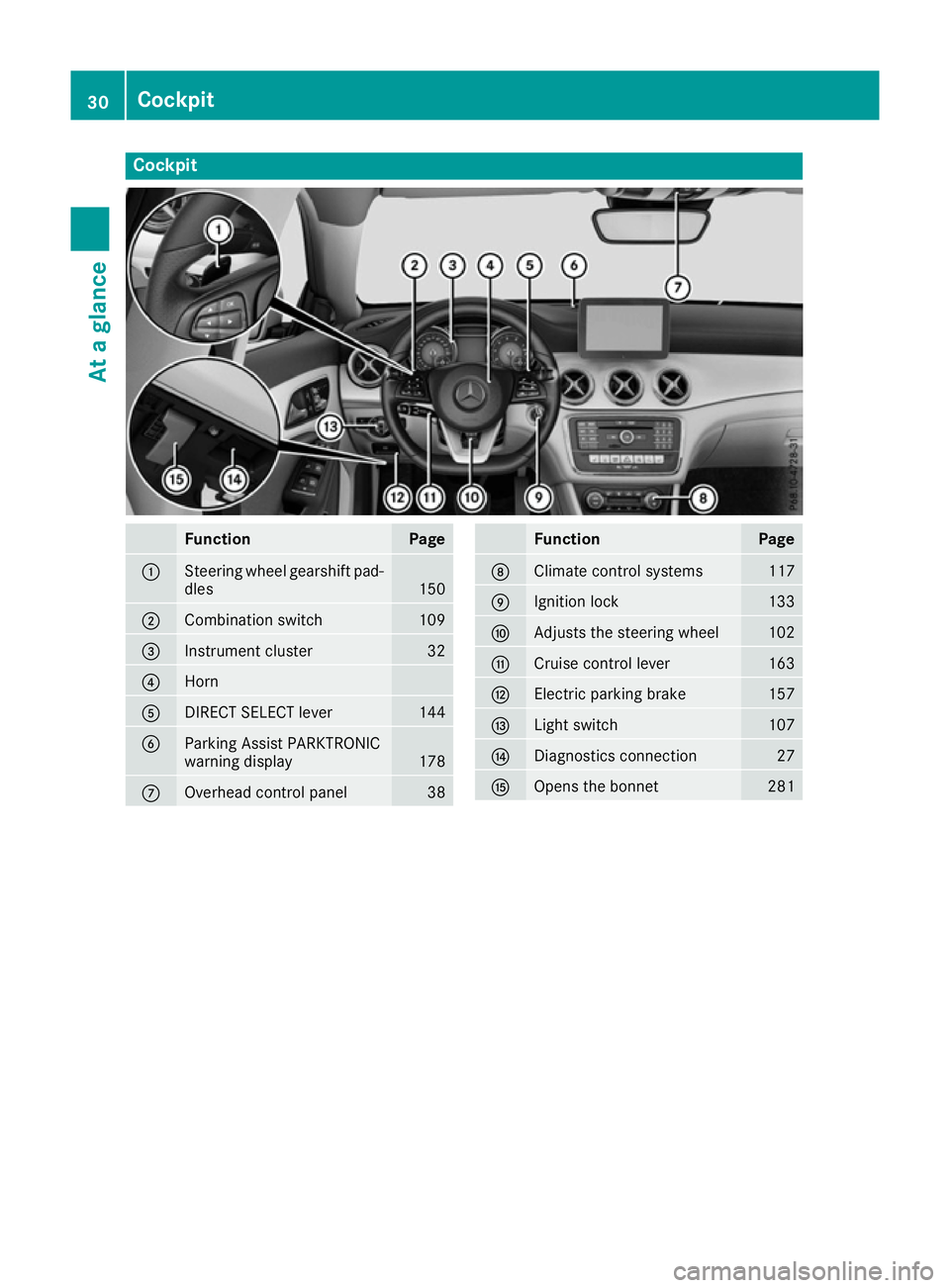
Cockpit
Function Page
:
Steering wheel gearshift pad-
dles 150
;
Combination switch 109
=
Instrument cluster 32
?
Horn
A
DIRECT SELECT lever 144
B
Parking Assist PARKTRONIC
warning display
178
C
Overhead control panel 38 Function Page
D
Climate control systems 117
E
Ignition lock 133
F
Adjusts the steering wheel 102
G
Cruise control lever 163
H
Electric parking brake 157
I
Light switch 107
J
Diagnostics connection 27
K
Opens the bonnet 28130
CockpitAt a glance
Page 34 of 345
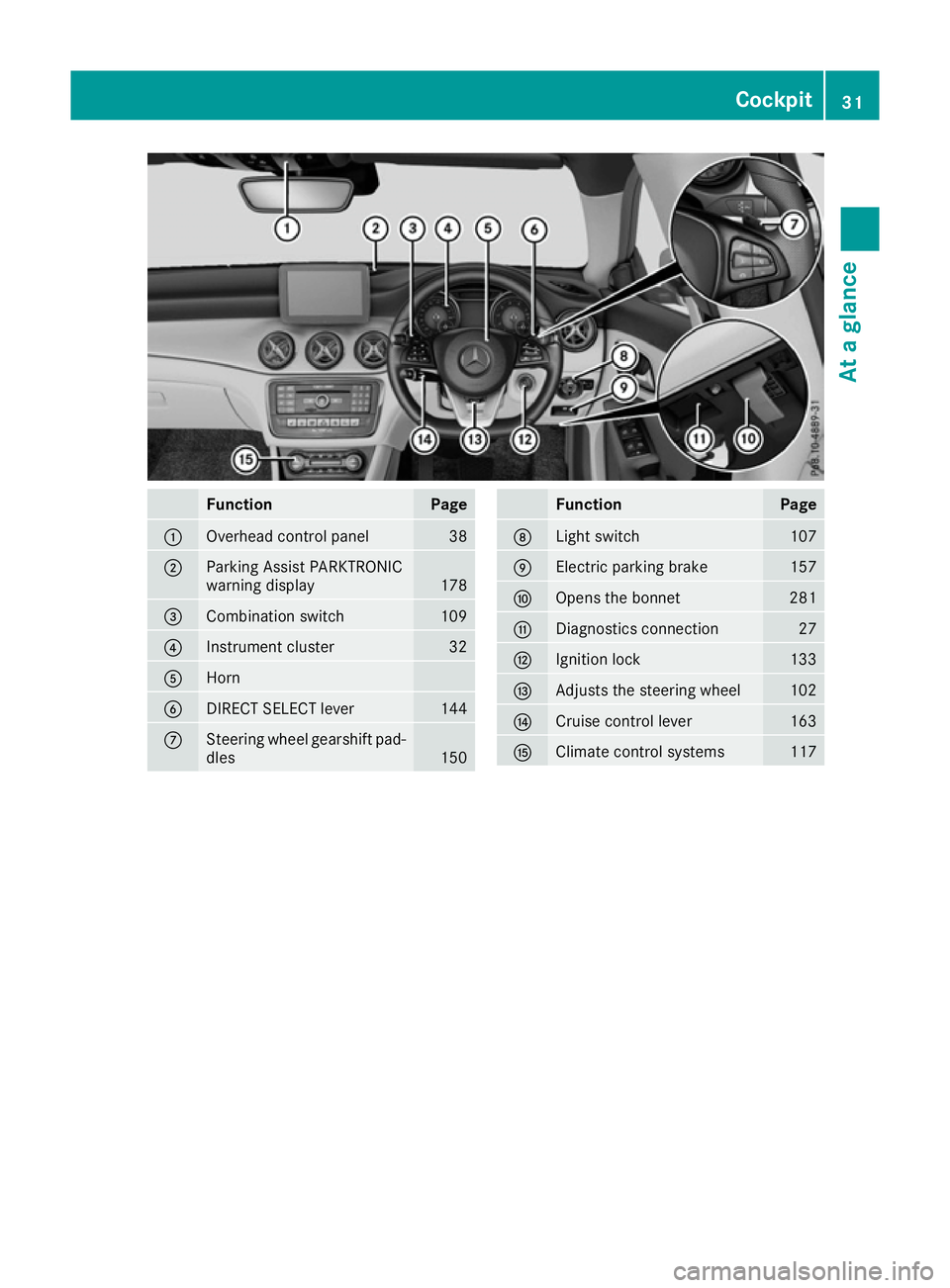
Function Page
:
Overhead control panel 38
;
Parking Assist PARKTRONIC
warning display
178
=
Combination switch 109
?
Instrument cluster 32
A
Horn
B
DIRECT SELECT lever 144
C
Steering wheel gearshift pad-
dles 150 Function Page
D
Light switch 107
E
Electric parking brake 157
F
Opens the bonnet 281
G
Diagnostics connection 27
H
Ignition lock 133
I
Adjusts the steering wheel 102
J
Cruise control lever 163
K
Climate control systems 117Cockpit
31At a glance
Page 38 of 345
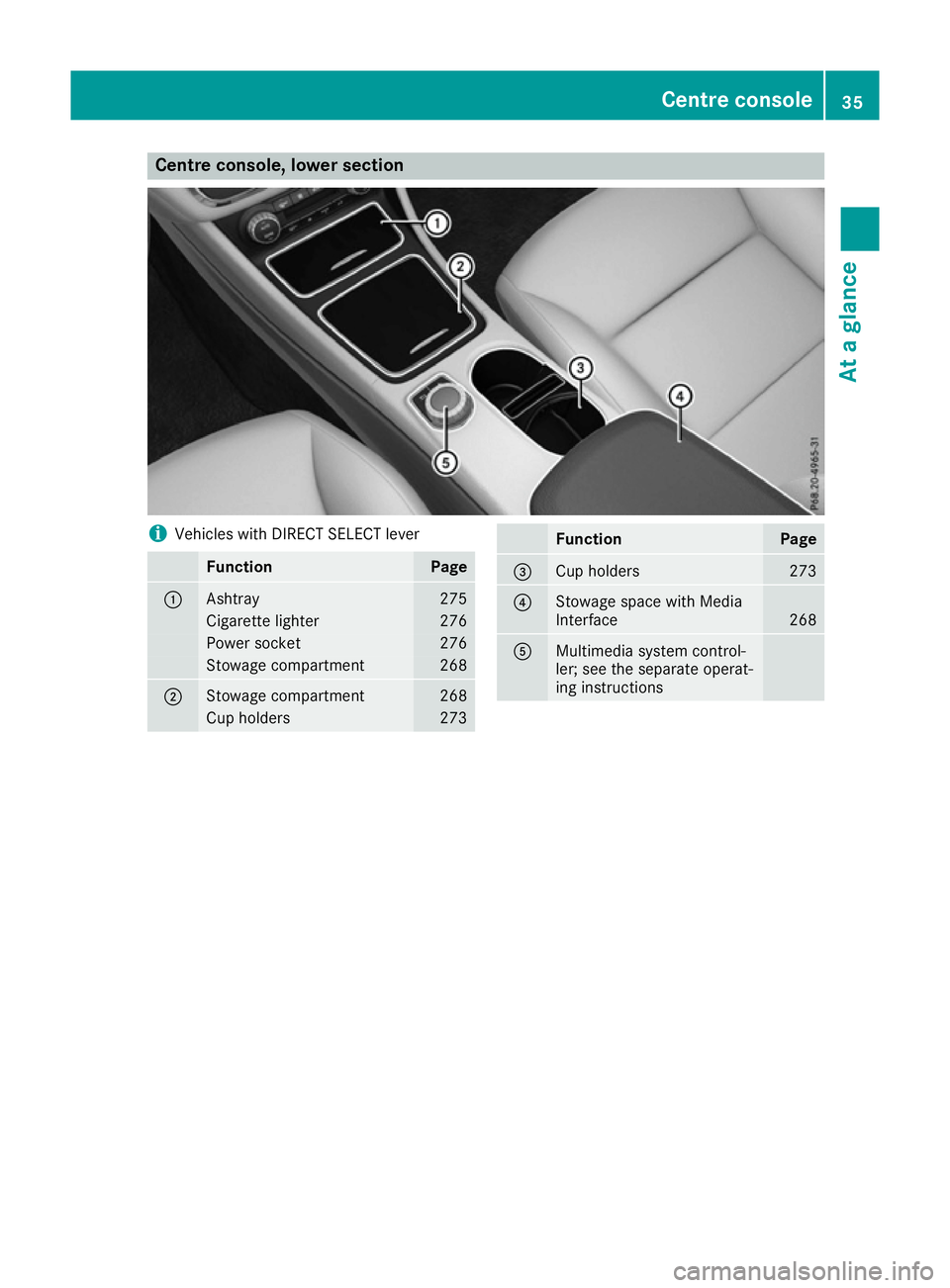
Centre console, lower section
i
Vehicles with DIRECT SELECT lever Function Page
:
Ashtray 275
Cigarette lighter 276
Power socket 276
Stowage compartment 268
;
Stowage compartment 268
Cup holders 273 Function Page
=
Cup holders 273
?
Stowage space with Media
Interface
268
A
Multimedia system control-
ler; see the separate operat-
ing instructions Centre console
35At a glance
Page 39 of 345
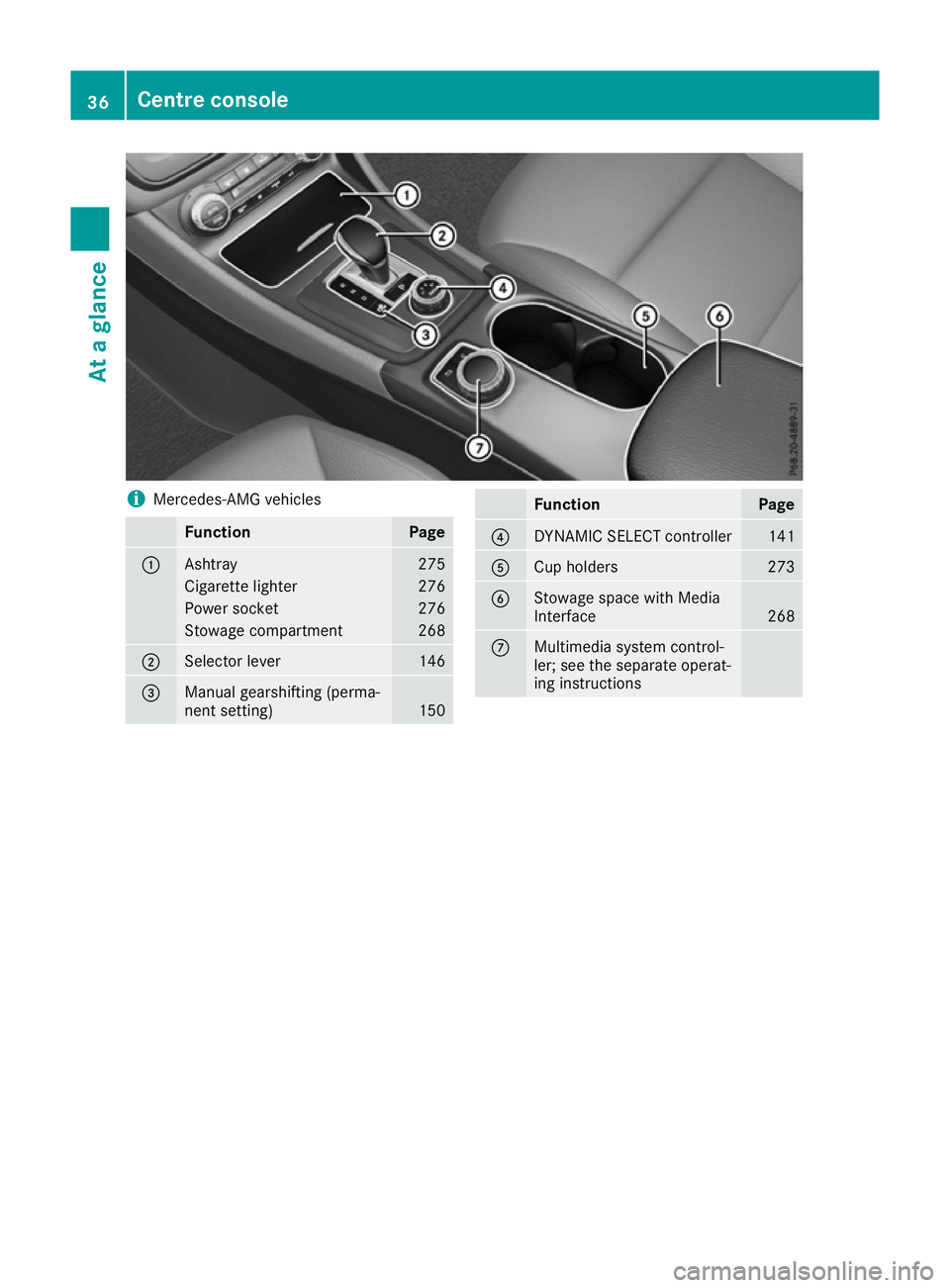
i
Mercedes-AMG vehicles Function Page
:
Ashtray 275
Cigarette lighter 276
Power socket 276
Stowage compartment 268
;
Selector lever 146
=
Manual gearshifting (perma-
nent setting)
150 Function Page
?
DYNAMIC SELECT controller 141
A
Cup holders 273
B
Stowage space with Media
Interface
268
C
Multimedia system control-
ler; see the separate operat-
ing instructions36
Centre consoleAt a glance
Page 41 of 345
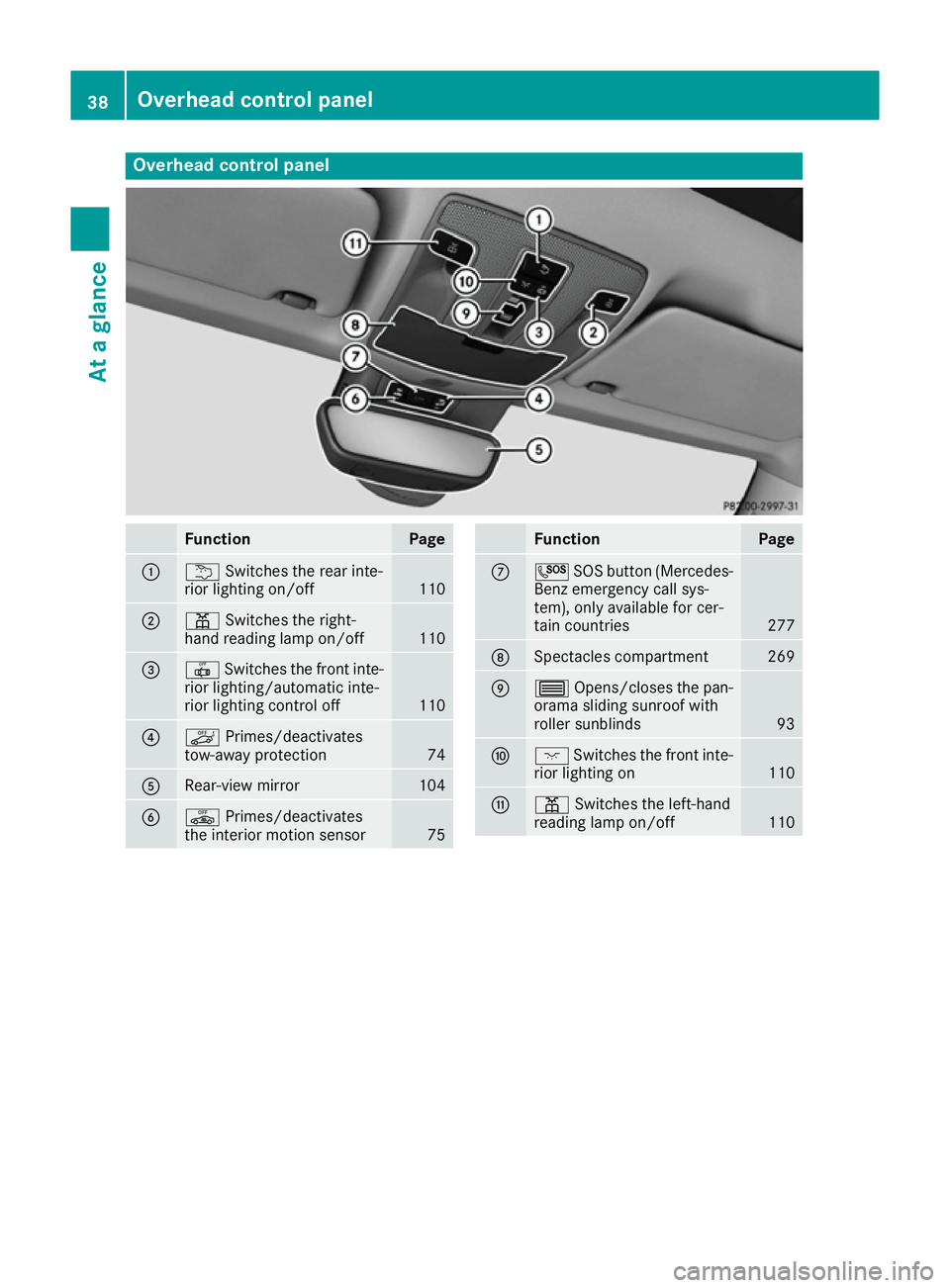
Overhead control panel
Function Page
:
u
Switches the rear inte-
rior lighting on/off 110
;
p
Switches the right-
hand reading lamp on/off 110
=
|
Switches the front inte-
rior lighting/automatic inte-
rior lighting control off 110
?
ë
Primes/deactivates
tow-away protection 74
A
Rear-view mirror 104
B
ê
Primes/deactivates
the interior motion sensor 75 Function Page
C
G
SOS button (Mercedes-
Benz emergency call sys-
tem), only available for cer-
tain countries 277
D
Spectacles compartment 269
E
3
Opens/closes the pan-
orama sliding sunroof with
roller sunblinds 93
F
c
Switches the front inte-
rior lighting on 110
G
p
Switches the left-hand
reading lamp on/off 11038
Overhead control panelAt a glance
Page 43 of 345
Mercedes-Benz recommends that you use only
driving aids that have been approved specifi-
cally for your vehicle by Mercedes-Benz. Restraint system warning lamp
The functions of the restraint system are
checked after the ignition is switched on and at regular intervals while the engine is running.
Therefore, malfunctions can be detected in
good time.
The 6 restraint system warning lamp on the
instrument cluster lights up when the ignition is
switched on. It goes out no later than a few sec- onds after the vehicle is started. The compo-
nents of the restraint system are in operational
readiness.
A malfunction has occurred if the 6restraint
system warning lamp:
R does not light up after the ignition is switched
on
R does not go out after a few seconds with the
engine running
R lights up again while the engine is running G
WARNING
If the restraint system is malfunctioning,
restraint system components may be trig-
gered unintentionally or may not deploy as
intended during an accident. This may affect
the seat belt tensioner or airbag, for example. This poses an increased risk of injury or even
fatal injury.
Have the restraint system checked and
repaired immediately at a qualified specialist
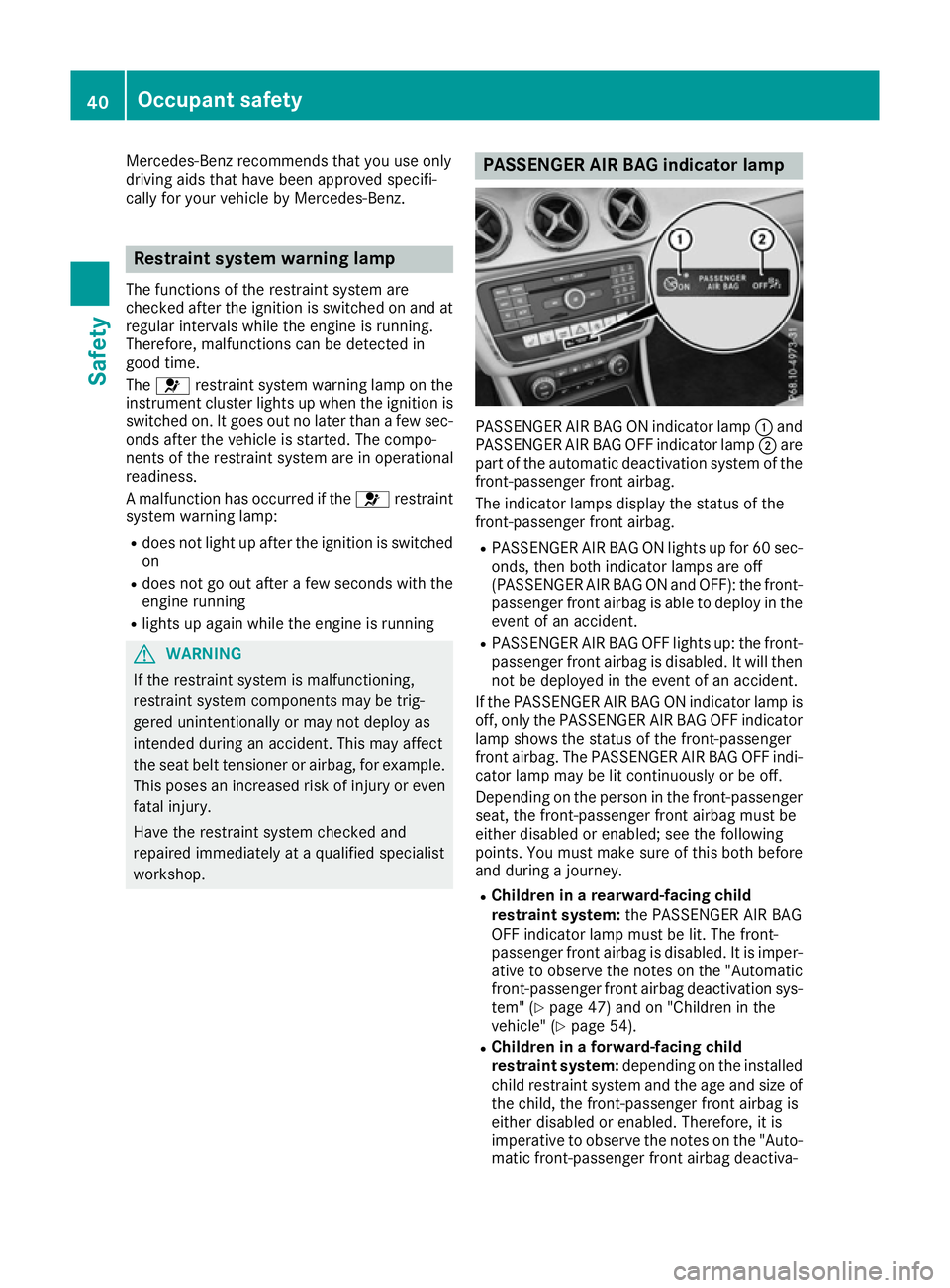
workshop. PASSENGER AIR BAG indicator lamp
PASSENGER AIR BAG ON indicator lamp
:and
PASSENGER AIR BAG OFF indicator lamp ;are
part of the automatic deactivation system of the front-passenger front airbag.
The indicator lamps display the status of the
front-passenger front airbag.
R PASSENGER AIR BAG ON lights up for 60 sec-
onds, then both indicator lamps are off
(PASSENGER AIR BAG ON and OFF): the front-
passenger front airbag is able to deploy in the event of an accident.
R PASSENGER AIR BAG OFF lights up: the front-
passenger front airbag is disabled. It will then
not be deployed in the event of an accident.
If the PASSENGER AIR BAG ON indicator lamp is off, only the PASSENGER AIR BAG OFF indicator
lamp shows the status of the front-passenger
front airbag. The PASSENGER AIR BAG OFF indi-
cator lamp may be lit continuously or be off.
Depending on the person in the front-passenger seat, the front-passenger front airbag must be
either disabled or enabled; see the following
points. You must make sure of this both before
and during a journey.
R Children in a rearward-facing child
restraint system: the PASSENGER AIR BAG
OFF indicator lamp must be lit. The front-
passenger front airbag is disabled. It is imper-
ative to observe the notes on the "Automatic front-passenger front airbag deactivation sys-
tem" (Y page 47) and on "Children in the
vehicle" (Y page 54).
R Children in a forward-facing child
restraint system: depending on the installed
child restraint system and the age and size of the child, the front-passenger front airbag is
either disabled or enabled. Therefore, it is
imperative to observe the notes on the "Auto-
matic front-passenger front airbag deactiva- 40
Occupant safetySafety