Guide MERCEDES-BENZ CLA COUPE 2018 User Guide
[x] Cancel search | Manufacturer: MERCEDES-BENZ, Model Year: 2018, Model line: CLA COUPE, Model: MERCEDES-BENZ CLA COUPE 2018Pages: 326, PDF Size: 5.59 MB
Page 58 of 326
Child restraint system
The use of seat beltsand child restraint systems
is required by law in:
Rall 50 states
Rth eU .S.t erri tories
RtheD istrict of Columbia
Rall Canadian provinces
If you install arearward-facing child restraint
system on th ecente rrear seat,t herear arm rest
must be folded back as far as possible.
You can obtain further informatio nabout the
correc tchild restraint system from any author-
ize dM ercedes-Ben zCenter.
GWARNING
If th echild restraint system is installed incor-
rectly on asuitable seat,itc annotprotect as
intended. The child canno tthe nber estrained
in th eevent of an accident, heavyb raking or
suddenc hanges of direction.T hereisan
increased ris kofinjury, possibly eve nfatal.
Makes ure that you observ ethe child restraint
system manufacturer'si nstallationinstruc-
tions and th enotes on use. Pleasee nsure,
that th ebase of th echild restraint system is
always restin gcompletely on th eseat cush-
ion.N ever placeo bjects, e.g.cushions, under
or behindt hechild restraint system. Only use
child restraint systems witht heoriginal cover
designe dfor them. Only replace damaged
covers withg enuine covers.
GWARNING
If th echild restraint system is installed incor-
rectly or is no tsecured, it can com eloosei n
th ee vent of an accident, heavyb raking or a
suddenc hang eind irection.T he child
restraint system coul dbethrown about,s trik-
ing vehicle occupants. Thereisani ncreased
ris kofi njury, possibly eve nfatal.
Always install child restraint systems prop-
erly, eve niftheya re no tbeingu sed. Make
sure that you observ ethe child restraint sys-
te mm anufacturer'si nstallationinstructions.
You will fin dfurther informatio nonstowing
objects, luggageorl oads under"Loading guide-
lines" (
Ypage 237).
GWARNING
Child restraint systems or their securin gsys-
tems whichh ave been damaged or subjected
to aload in an accidentc an no longer protect
as intended. The child canno tthe nb e
restraine dintheevent of an accident, heavy
braking or suddenc hanges of direction.T here
is an increased ris kofinjury, possibly even
fatal.
Replacec hild restraint systems whichh ave
been damaged or subjected to aload in an
accidentass oon as possible. Hav ethe secur-
ing systems on th echild restraint system
checked at aqualified specialist workshop,
before you install achild restraint system
again.
The securin gsystems of child restraint systems
are:
Rth es eat belt system
RtheL ATCH-type (ISOFIX) securin grings
RtheT op Tether anchorages
If it is absolutely necessary to carry achild on
th ef ront-pa ssenger seat,bes ure to observethe
informatio nonthe"Occupan tClassification
Syste m(OCS)" (
Ypage 47) .Therey ou will also
fin dinformatio nondeactivatin gthe front-
passenger fronta ir bag.
All child restraint systems must mee tthe fol-
lowings tandards:
RU.S. Federal Motor Vehicle SafetyS tandards
21 3a nd 225
RCanadian Motor Vehicle SafetyS tandards
21 3a nd 210.2
Confirmation that th echild restraint system cor-
responds to th estandards can be foun donan
ins truc
tion label on th
echild restraint system.
This confirmation can also be foun dintheinstal-
lation instructionst hata re included witht he
child restraint system.
Observ ethe warning labels in th evehicle inte-
rior and on th echild restraint system.
56Children in th evehicle
Safety
Page 61 of 326
Rearward-facingchild restraint system
If it is absolutely necessary to install arearward-
facing child restraint system on the front-
passenger seat, always make sure that the
front-passenger front ai rbag is deactivated.
Only if the PASSENGER AIR BAG OFF indicator
lamp is permanently li t(
Ypage 41)ist he front-
passenger front ai rbag deactivated.
Alway sobserve the child restraint system man-
ufacturer's installation and operating instruc-
tions.
Forward-facing child restraint system
If it is absolutely necessary to install aforward-
facing child restraint system on the front-
passenger seat, always move the front-
passenger seata sfar back as possible .Fully
retract the seatc ushionlen gth. The entir ebase
of the child restraint system mus talway sresto n
the seatc ushionofthe front-passenger seat.
The backrest of the child restraint system must
li easf lata sp ossible against the backrest of the
front-passenger seat. The child restraint system
mus tnot touch the rooforbes ubjecte dtoal oad
by the headr estraint. Adjust the angle of the
seatb ackrest and the headr estraint position
accordingly .Alway smake sure that the shoul-
der bel tstrapisc orrectly routed from the vehi-
cle bel toutlet to the shoulder bel tguide on the
child restraint system. The shoulder bel tstrap
mus tberouted forward and dow nfrom the vehi-
cle bel toutlet. If necessary, adjust the vehicle
bel toutlet and the front-passenger seata ccord-
ingly.
Alway sobserve the child restraint system man-
ufacturer's installation and operating instruc-
tions.
Child-proof locks
Important safety notes
GWARNING
If children are traveling in the vehicle, they
could:
Rope ndoors, thuse ndangering otherp eople
or roadu sers
Rexitt he vehicl eand be caught by oncoming
traffic
Roperate vehicl eequipment and become
trapped
There is ariskofana ccident and injury.
Alway sactivate the child-proof locks and
overrid efeature if children are traveling in the
vehicle. Whenl eaving the vehicle, always take
the key with yo uand lock the vehicle. Never
leave children unattende dinthe vehicle.
Overrid efeature for:
Rthe reard oors (Ypage 60)
Rthe rearsidew indow s(Ypage 60)
GWARNING
If yo ulea ve children unsupervised in the vehi-
cle ,they could set it in motion by ,for example:
Rrelease the parking brake.
Rshift the automatic transmissio noutof the
parking position P.
Rstartthe engine.
In addition, they may operate vehicl eequip-
ment and become trapped .There is arisko f
an accident and injury.
Whenl eaving the vehicle, always take the
SmartKey with yo uand lock the vehicle. Never
leave children unsupervised in the vehicle.
GWARNING
If persons,p articularly children are subjected
to prolonged exposure to extreme heato r
cold, there is ariskofi njury, possibly even
fatal. Neverl eave children unattende dinthe
vehicle.
Childrenint he vehicle59
Safety
Z
Page 75 of 326
SmartKey battery
Important safety notes
GWARNING
Batteries contain toxic and corrosive substan- ces. If batteries are swallowed, it can result in
severe health problems. There is arisk of fatal
injury.
Keep batteries out of the reach of children. If
ab attery is swallowed, seek medical attention
immediately.
The SmartKey batteries contain perchlorate
material, which may require special handling
and regard for the environment. National guide-
lines must be observed during disposal. In Cal-
ifornia, see www.dtsc.ca.gov/
HazardousWaste/Perchlorate/index.cfm.
Mercedes-Benz recommends that you have the
battery replaced at aqualified specialist work-
shop.
Checking the battery
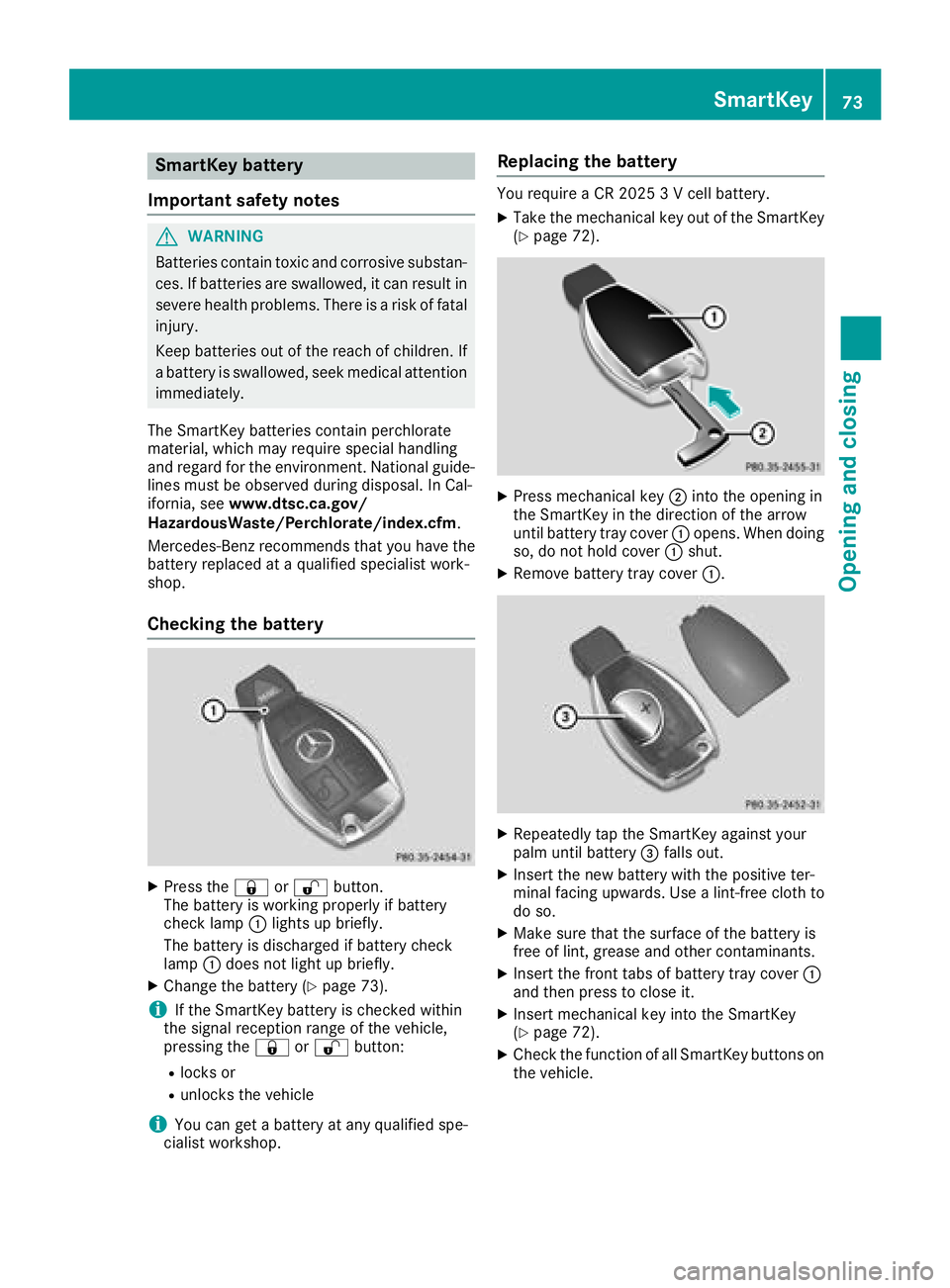
XPress the &or% button.
The battery is working properly if battery
check lamp :lights up briefly.
The battery is discharged if battery check
lamp :does not light up briefly.
XChange the battery (Ypage 73).
iIf the SmartKey battery is checked within
the signal reception range of the vehicle,
pressing the &or% button:
Rlocks or
Runlocks the vehicle
iYou can get abattery at any qualified spe-
cialist workshop.
Replacing the battery
You require aCR20253Vc ell battery.
XTake the mechanical key out of the SmartKey
(Ypage 72).
XPress mechanical key ;into the opening in
the SmartKey in the direction of the arrow
until battery tray cover :opens. When doing
so, do not hold cover :shut.
XRemove battery tray cover :.
XRepeatedly tap the SmartKey against your
palm until battery=falls out.
XInsert the new battery with the positive ter-
minal facing upwards. Use alint-free cloth to
do so.
XMake sure that the surface of the battery is
free of lint, grease and other contaminants.
XInsert the front tabs of battery tray cover :
and then press to close it.
XInsert mechanical key into the SmartKey
(Ypage 72).
XCheck the function of all SmartKey buttons on
the vehicle.
SmartKey73
Opening and closing
Z
Page 78 of 326

Doors
Important safet ynotes
GWARNING
If children are lef tunsupervised in th evehicle,
they could:
Rope nthe doors ,thu se ndangerin gother
people or road users.
Rget out and disrup ttraffic .
Roperat ethe vehicle' sequipment.
Additionally, children could set th evehicle in
motion if, fo rexample, they:
Rrelease th eparking brake .
Rshiftingthe automatic transmissio nout of
par kposition P
RStart th eengine.
There is ariskofana ccidentand injury.
Whe nleavin gthe vehicle, always take th e
SmartKey wit hyou and loc kthe vehicle. Never
leav echildren or animals unattended in th e
vehicle. Always keep th eSmartKey out of
reach of children .
You should preferably plac eluggage or load sin
th ec argo compartment. Observ ethe loadin g
guidelines (
Ypage 237).
Unlockingand opening doors from
th ei nside
!
The sid ewindows will no topen/close if th e
battery is discharged or if th esidew indows
hav eicedu p. It will then no tbepossible to
close th edoor. Do no tattemp ttoforce the
doo rclosed. You could otherwise damage th e
doo rort hesidew indow.
Whe nad ooriso pened, th esidew indow on that
sid eo pens slightly. Whe nthe doo risc losed, th e
sid ew indow close sagain .
XTo unlock an dopenaf ront door: pull door
handle ;.
If th edoorisl ocked, locking knob :pop sup.
The doo risunlocke dand opens .
XTo unlock areard oor: pull up locking
knob :.
The doo risunlocke dand can be opened.
XTo ope nareard oor: pull doo rhandle ;.
You can ope nadoorfromi nsidet he vehicle
eve nifith as bee nlocked. You can only ope nthe
rea rdoors from insid ethe vehicle if they are no t
secure dbythechild-proof locks (
Ypage 60).
If th evehicle has previously bee nlocke dwith
th eS martKey from th eoutside, opening adoor
from th einsidew ill trigger th eanti-thef talarm
system. Switc hoffthea larm(
Ypage 68).
Centrally locking an dunlocking th e
vehicle from th einside
You can centrall yloc koru nlockthe vehicle from
th ei ns ide. Thi scan be useful if you wish to loc k
th ev ehicle befor epulling away, fo rexample.
XTo unlock :press butto n:.
XTo lock :press butto n;.
If all th edoors and th etrunk lid are closed, th e
vehicle locks .
76Doors
Opening andclosing
Page 80 of 326
XPress the lockingbutton on the driver’s door
(Ypage 76).
XCheck whether the lockin gknobs on the
front-passenger door and the rear doors are
still visible. Press down the lockin gknobs by
hand, if necessary.
XClose the driver's door.
XTake the mechanical key out of the SmartKey
(Ypage 72).
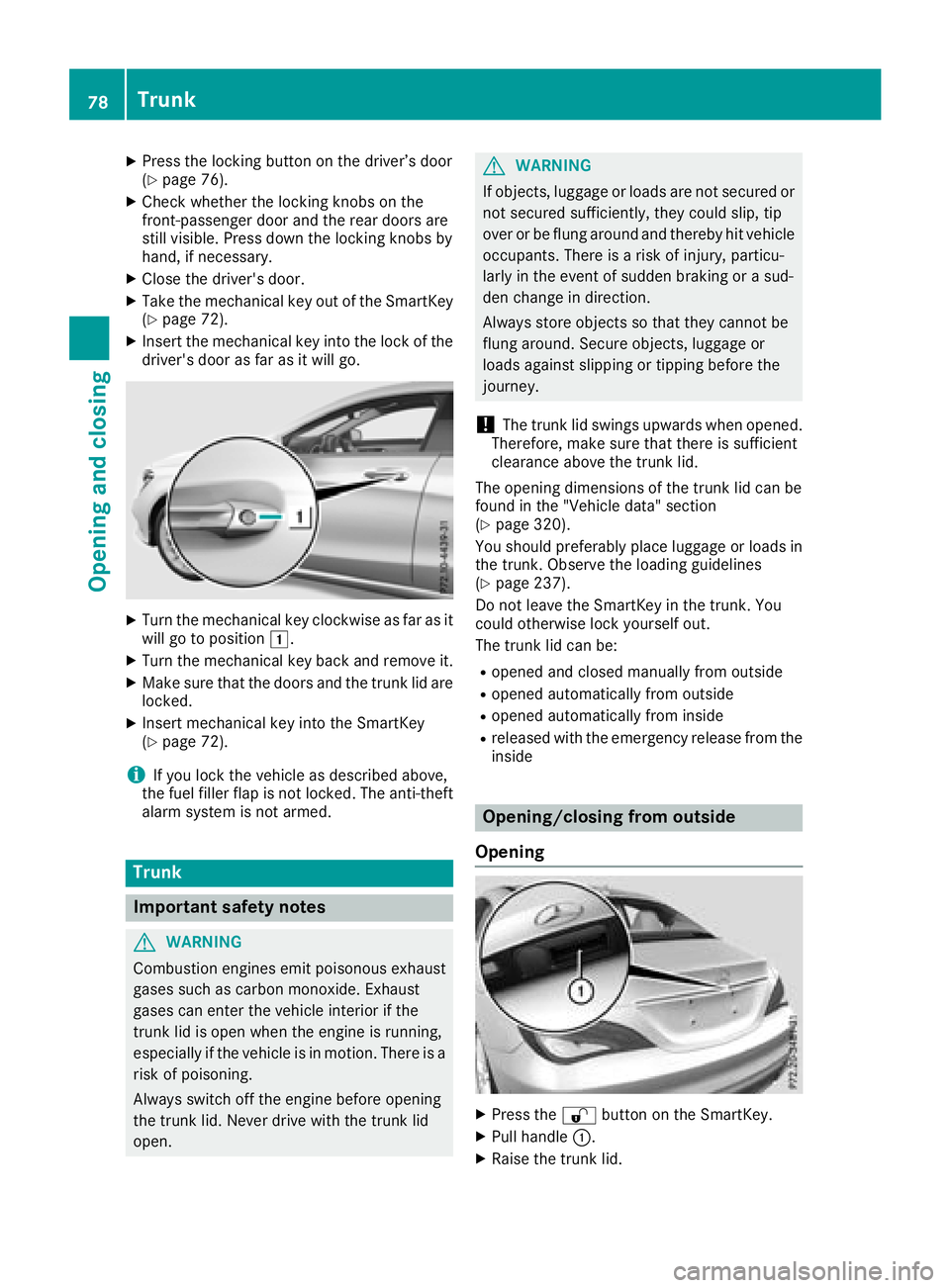
XInsert the mechanical key into the lock of the
driver's door as far as it will go.
XTurn the mechanical key clockwise as far as it
will go to position 1.
XTurn the mechanical key back and remove it.
XMake sure that the doors and the trunk lid are
locked.
XInsert mechanical key into the SmartKey
(Ypage 72).
iIf you lock the vehicle as described above,
the fuel filler flap is not locked. The anti-theft
alarm system is not armed.
Trunk
Important safety notes
GWARNING
Combustion engines emit poisonous exhaust
gases such as carbon monoxide. Exhaust
gases can enter the vehicle interior if the
trunk lid is open when the engine is running,
especially if the vehicle is in motion .There is a
risk of poisoning.
Always switch off the engine before opening
the trunk lid. Never drive with the trunk lid
open.
GWARNING
If objects, luggage or loads are not secured or
not secured sufficiently, they could slip, tip
over or be flung around and thereby hit vehicle
occupants. There is arisk of injury, particu-
larly in the event of sudden braking or asud-
den change in direction.
Always store object ssothat they cannot be
flung around. Secure objects, luggage or
loads against slipping or tipping before the
journey.
!The trunk lid swings upwards when opened.
Therefore, make sure that there is sufficient
clearance above the trunk lid.
The opening dimensions of the trunk lid can be
found in the "Vehicle data" section
(
Ypage 320).
You should preferably place luggage or loads in
the trunk .Observe the loading guidelines
(
Ypage 237).
Do not leave the SmartKey in the trunk .You
could otherwise lock yourself out.
The trunk lid can be:
Ropened and closed manually from outside
Ropened automatically from outside
Ropened automatically from inside
Rreleased with the emergencyr elease from the
inside
Opening/closing from outside
Opening
XPress the %button on the SmartKey.
XPull handle :.
XRaise the trunk lid.
78Trunk
Opening and closing
Page 87 of 326
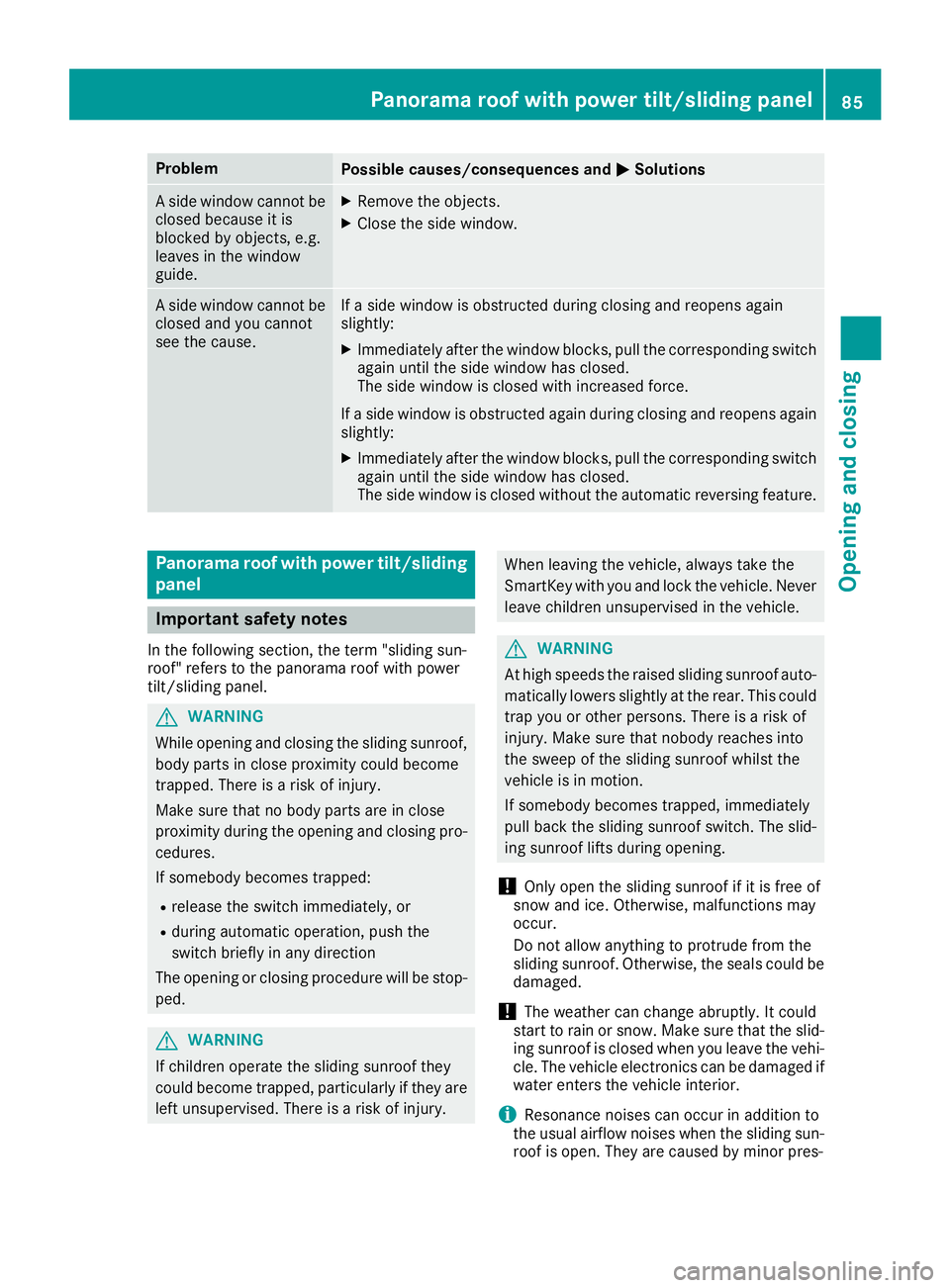
ProblemPossible causes/consequences andMSolutions
Aside window cannot be
closed because it is
blocked by objects, e.g.
leaves in the window
guide.XRemove the objects.
XClose the side window.
As ide window cannot be
closed and you cannot
see the cause.If as ide window is obstructed during closing and reopens again
slightly:
XImmediately after the window blocks, pull the correspondings witch
again until the side window has closed.
The side window is closed with increased force.
If as ide window is obstructed again during closing and reopens again
slightly:
XImmediately after the window blocks, pull the correspondings witch
again until the side window has closed.
The side window is closed without the automatic reversing feature.
Panoramar oof with power tilt/sliding
panel
Important safety notes
In the following section, the term "sliding sun-
roof" refers to the panorama roof with power
tilt/sliding panel.
GWARNING
While opening and closing the sliding sunroof, body parts in close proximity could become
trapped. There is arisk of injury.
Make sure that no body parts are in close
proximity during the opening and closing pro-
cedures.
If somebody becomes trapped:
Rrelease the switch immediately, or
Rduring automatic operation, push the
switch briefly in any direction
The opening or closing procedure will be stop- ped.
GWARNING
If children operate the sliding sunroof they
could become trapped, particularly if they are left unsupervised. There is arisk of injury.
When leaving the vehicle, always take the
SmartKey with you and lock the vehicle. Never
leave children unsupervised in the vehicle.
GWARNING
At high speeds the raised sliding sunroof auto-
matically lowers slightly at the rear. This could
trap you or other persons. There is arisk of
injury. Make sure that nobody reaches into
the sweep of the sliding sunroof whilst the
vehicle is in motion.
If somebody becomes trapped, immediately
pull back the sliding sunroof switch. The slid-
ing sunroof lifts during opening.
!Only open the sliding sunroof if it is free of
snow and ice. Otherwise, malfunctions may
occur.
Do not allow anything to protrude from the
sliding sunroof. Otherwise, the seals could be
damaged.
!The weather can change abruptly. It could
start to rain or snow. Make sure that the slid- ing sunroof is closed when you leave the vehi-
cle. The vehicle electronics can be damaged if
water enters the vehicle interior.
iResonance noises can occur in addition to
the usual airflow noises when the sliding sun- roof is open. They are caused by minor pres-
Panoramar oof with power tilt/sliding panel85
Opening and closing
Z
Page 92 of 326
Correct driver's seat position
GWARNING
You coul dlose control of your vehicle if you do
th ef ollowingw hile driving:
Radjust thedriver'ss eat,head restraint,
steering wheel or mirrors
Rfasten th eseat belt
Thereisar iskofana ccident.
Adjust th edriver'ss eat,head restraint ,steer-
ing wheel and mirror and fasten your seat belt before starting th eengine.
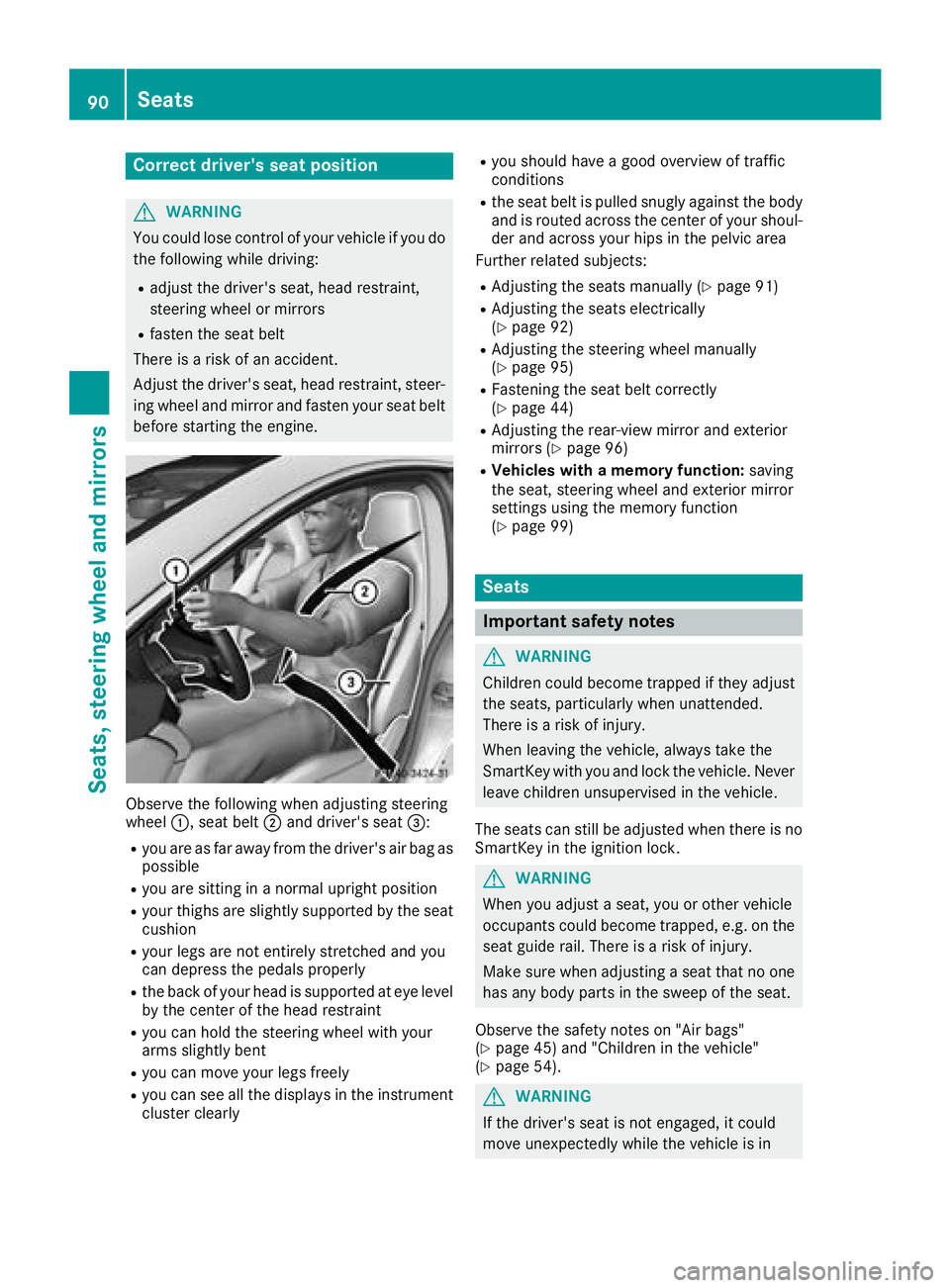
Observ ethe followingw hen adjusting steering
wheel :,seat belt ;and driver'ss eat=:
Ryou are as far away from th edriver'sa ir bag as
possible
Ryou are sittin ginanormalupright position
Ryour thighs are slightly supported by th eseat
cushion
Ryour legs are no tentirely stretched and you
can depress th epedals properly
Rtheb ack of your head is supported at eye level
by th ecente roft hehead restraint
Ryou can hold th esteering wheel withy our
arm sslightly bent
Ryou can mov eyour legs freely
Ryou can see all th edisplays in th einstrument
cluste rclearly
Ryou should have agood overview of traffic
conditions
Rth es eat belt is pulled snugly against th ebody
and is routed across th ecente rofy our shoul-
der and across your hips in th epelvic area
Further related subjects:
RAdjustin gthe seatsm anually (Ypage 91)
RAdjustin gthe seatse lectrically
(Ypage 92)
RAdjustin gthe steering wheel manually
(Ypage 95)
RFastenin gthe seat belt correctly
(Ypage 44)
RAdjustin gthe rear-view mirror and exterior
mirror s(Ypage 96)
RVehicles with amemory function: saving
th es eat,s teering wheel and exterior mirror
settings usingt hememory function
(
Ypage 99)
Seats
Important safety notes
GWARNING
Children coul dbecome trapped if they adjust
th es eats, particularly when unattended.
Thereisar iskofi njury.
When leaving th evehicle ,always tak ethe
SmartKey withy ou and lockthevehicle .Never
leave childre nunsupervised in th evehicle.
The seatsc an still be adjusted when there is no
SmartKey in th eignition lock.
GWARNING
When you adjust aseat,y ou or other vehicle
occupants coul dbecome trapped, e.g .onthe
seat guide rail. Thereisar iskofi njury.
Makes ure when adjusting aseat that no one
has any body part sinthesweep of th eseat.
Observ ethe safety note son"Air bags"
(
Ypage 45 )and "Children in th evehicle"
(Ypage 54).
GWARNING
If th edriver'ss eat is no tengaged,itc ould
mov eunexpectedly while th evehicle is in
90Seats
Seats, steerin gwheel and mirrors
Page 166 of 326
Parking Pilot
General notes
Parking Pilot is an electronic parking aid with
ultrasound. It measures the road on both sides
of the vehicle. Aparking symbol indicates asuit-
able parking space. Active steering intervention
and brake application can assist you during
parking and when exiting aparking space. Park-
ing Assist PARKTRONIC is also available
(
Ypage 161).
Important safety notes
Parking Pilot is only an aid. It is not areplace-
ment for your attention to your immediate sur-
roundings. You are always responsible for safe
maneuvering, parking and exiting aparking
space. Make sure that no persons, animals or
object sare in the maneuvering range.
When Parking Assist PARKTRONIC is deactiva-
ted, Parking Pilot is also unavailable.
GWARNING
While parking or pulling out of aparking
space, the vehicle swings out and can drive
onto areas of the oncomingl ane. This could
result in acollision with another road user.
There is arisk of an accident.
Pay attention to other road users. Stop the
vehicle if necessary or cancel the Parking Pilot
parking procedure.
!If unavoidable,y ou should drive over obsta-
cles such as curbs slowly and not at asharp
angle. Otherwise, you may damage the
wheels or tires.
Parking Pilot may also display spaces not suita-
ble for parking, e.g.:
Rwhere parking or stopping is prohibited
Rin front of driveways or entrances and exits
Ron unsuitable surfaces
Parking tips:
ROn narrow roads, drive as close to the parking
space as possible.
RParking spaces that are littered or overgrown
might be identified or measured incorrectly.
RParking spaces that are partially occupied by
trailer drawbars might not be identified as
such or be measured incorrectly.
RSnowfall or heavy rain may lead to aparking
space being measured inaccurately.
RPay attention to the warning messages of
Parking Pilot PARKTRONIC during the parking
procedure (
Ypage 162).
RYou can intervene to correct the steering pro-
cedure at any time. Parking Pilot will then be
canceled.
RWhen transporting aload that protrudes from
your vehicle, you must not use Parking Pilot.
RNever use Parking Pilot when snow chains are
mounted.
RMake sure that the tire pressures are always
correct.T his hasadirect influence on the
parking characteristics of the vehicle.
Use Parking Pilot for parking spaces that are:
Rthat are paralleloratr ight-angles to the direc-
tion of travel
Ron straight roads, not bends
Ron the same level as the road, e.g. not on the
pavement
Detecting parking spaces
Object slocated above the detection range of
Parking Pilot will not be detected when the park-
ing space is measured. These are not taken into
account when the parking procedure is calcula-
ted, e.g. overhanging loads, truck overhangs or
loading ramps. Parking Pilot may therefore
guide you into the parking space too early.
Parking Pilot does not assist you parking in
spaces perpendicular to the direction of travel if:
Rtwo parking spaces are located directly next
to one another
Rthe parking space is directly next to alow
obstacle such as alow curb
Ryou forward-park
Parking Pilot does not assist you parking in
spaces parallelorp erpendicular to the direction
of travel if:
Rthe parking space is on acurb
Rthe system reads the parking space as being
blocked, for example by foliage or grass pav-
ing blocks
Rthe area is too small for the vehicle to maneu-
ver into
Rthe parking space is bordered by an obstacle,
e.g. atree, apost or atrailer
For further information on the detection range
(
Ypage 161).
164Driving systems
Driving and parking
Page 170 of 326
for safe maneuvering and parking. Make sure
that there are no persons, animals or objects in
the maneuvering area while maneuvering and
parking in parking spaces.
Under the following circumstances, the rear
view camera willnot function, or wil lfunction in
al imited manner:
Rif the trunk lid is open
Rin heavy rain, snow or fog
Rat night or in very dark places
Rif the camera is exposedtov ery bright light
Rif the area is lit by fluorescent bulbs or LED
lighting (the display may flicker)
Rif there isasudden change in temperature,
e.g. when driving into aheated garage in win-
ter
Rif the camera lens is dirty or obstructed.
Observe the notes on cleaning
(
Ypag e265)
Rif the rear of you rvehicleisd amaged. In this
case, have the camera position and setting
checked at aqualified specialist workshop
The fieldofv ision and other functions of the rear
view camera may be restricted due to additional
accessories on the rear of the vehicle( e.g.
license plate holder, rear bicycle rack).
Activating/deactivating the rear view
camera
XTo activate: make sure that the SmartKey is
in position 2in the ignition lock.
XMake sure that the Activation byRgearfunction is selected in the multimedias ystem;
see the Digita lOperator's Manual.
XEngage reverse gear.
The area behind the vehicleiss hownwith
guide lines in the multimedias ystem display.
The image from the rear view camera is avail-
abl ethroughoutt he maneuvering process.
To deactivate: the rear view camera deacti-
vates if you shift the transmission to jor after
driving forwards ashort distance.
Messages in the multimedia system dis-
play
The rear view camera may show adistorted view
of obstacles, show them incorrectly or not at all.
The rear view camera does not show objects in
the following positions:
Rvery close to the rear bumper
Runder the rear bumper
Rin close range above the handl eonthe trunk
lid
!Objects not at ground levelm ay appear to
be further away than they actually are, e.g.:
Rthe bumper of aparked vehicle
Rthe drawbar of atrailer
Rthe bal lcoupling of atrailer tow hitch
Rthe rear section of an HGV
Ras lanted post
Use the guidelines only for orientation.
Approach objects no further than the bottom-
most guideline.
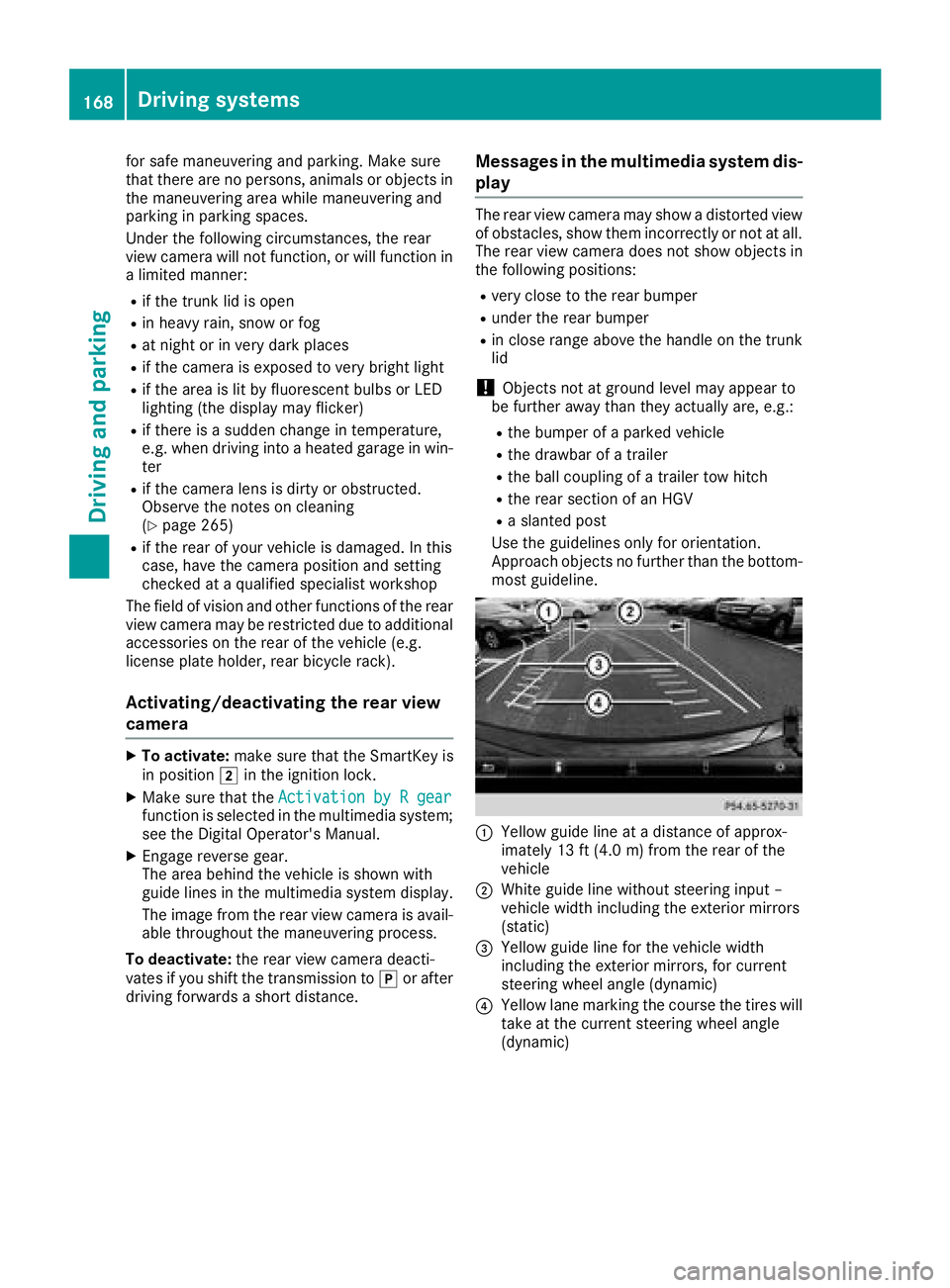
:Yellow guide line at adistance of approx-
imately 13 ft (4.0 m) from the rear of the
vehicle
;White guide line without steering input–
vehiclew idth including the exterior mirrors
(static)
=Yellow guide line for the vehiclew idth
including the exterior mirrors, for current
steering wheela ngle (dynamic)
?Yellow lane marking the course the tires will
take at the current steering wheela ngle
(dynamic)
168Driving systems
Driving and parking
Page 171 of 326
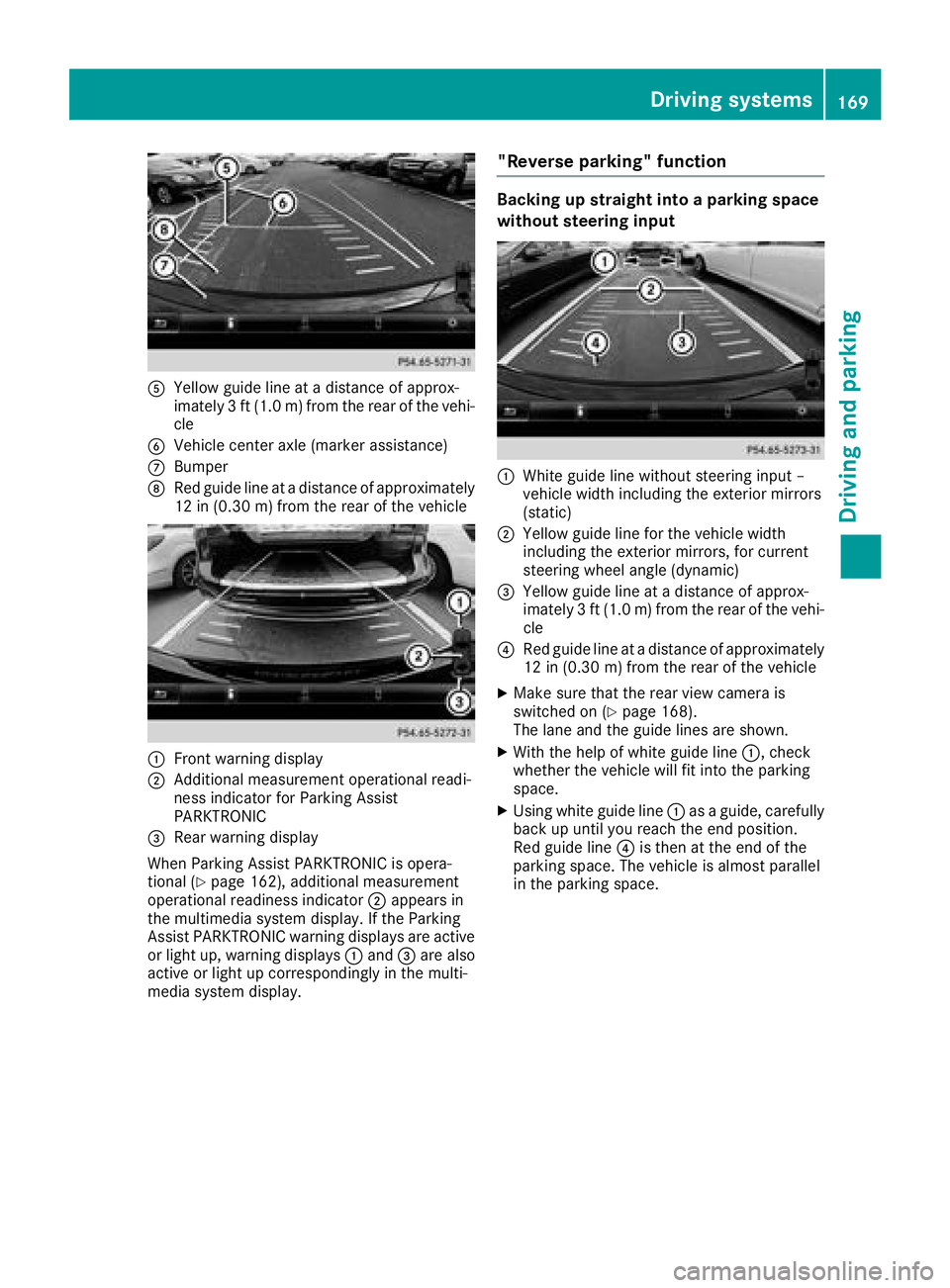
AYellow guide line atadistance of approx-
imately 3ft(1.0m)f rom the rear of the vehi-
cle
BVehicle center axle (marker assistance)
CBumper
DRed guide line at adistance of approximately
12 in (0.3 0m)from the rear of the vehicle
:Front warnin gdisplay
;Additional measurement operational readi-
ness indicator for Parking Assist
PARKTRONIC
=Rear warnin gdisplay
When Parking Assist PARKTRONIC is opera-
tional (
Ypage 162),a dditional measurement
operational readiness indicator ;appears in
the multimedia syste mdisplay. If the Parking
Assist PARKTRONIC warnin gdisplays are active
or light up, warnin gdisplays :and =are also
active or light up correspondingly in the multi-
media syste mdisplay.
"Reverse parking" function
Backing up straight into aparkin gspace
withou tsteering input
:Whiteg uide line without steeringi nput –
vehicle width including the exterior mirrors
(static)
;Yellow guide line for the vehicle width
including the exterior mirrors, for current
steeringw heel angle (dynamic)
=Yellow guide line at adistance of approx-
imately 3ft(1.0m )from the rear of the vehi-
cle
?Red guide line at adistance of approximately
12 in (0.30 m) from the rear of the vehicle
XMake sure that the rear view camer ais
switched on (Ypage 168).
The lane and the guide lines are shown.
XWith the help of white guide line :,check
whether the vehicle will fit int othe parking
space.
XUsingw hite guide line :asag uide, carefully
back up until you reach the end position.
Red guide line ?is the natthe end of the
parking space. The vehicle is almost parallel
in the parking space.
Driving systems169
Driving and parking
Z