Guide MERCEDES-BENZ CLA COUPE 2018 Owner's Guide
[x] Cancel search | Manufacturer: MERCEDES-BENZ, Model Year: 2018, Model line: CLA COUPE, Model: MERCEDES-BENZ CLA COUPE 2018Pages: 326, PDF Size: 5.59 MB
Page 172 of 326
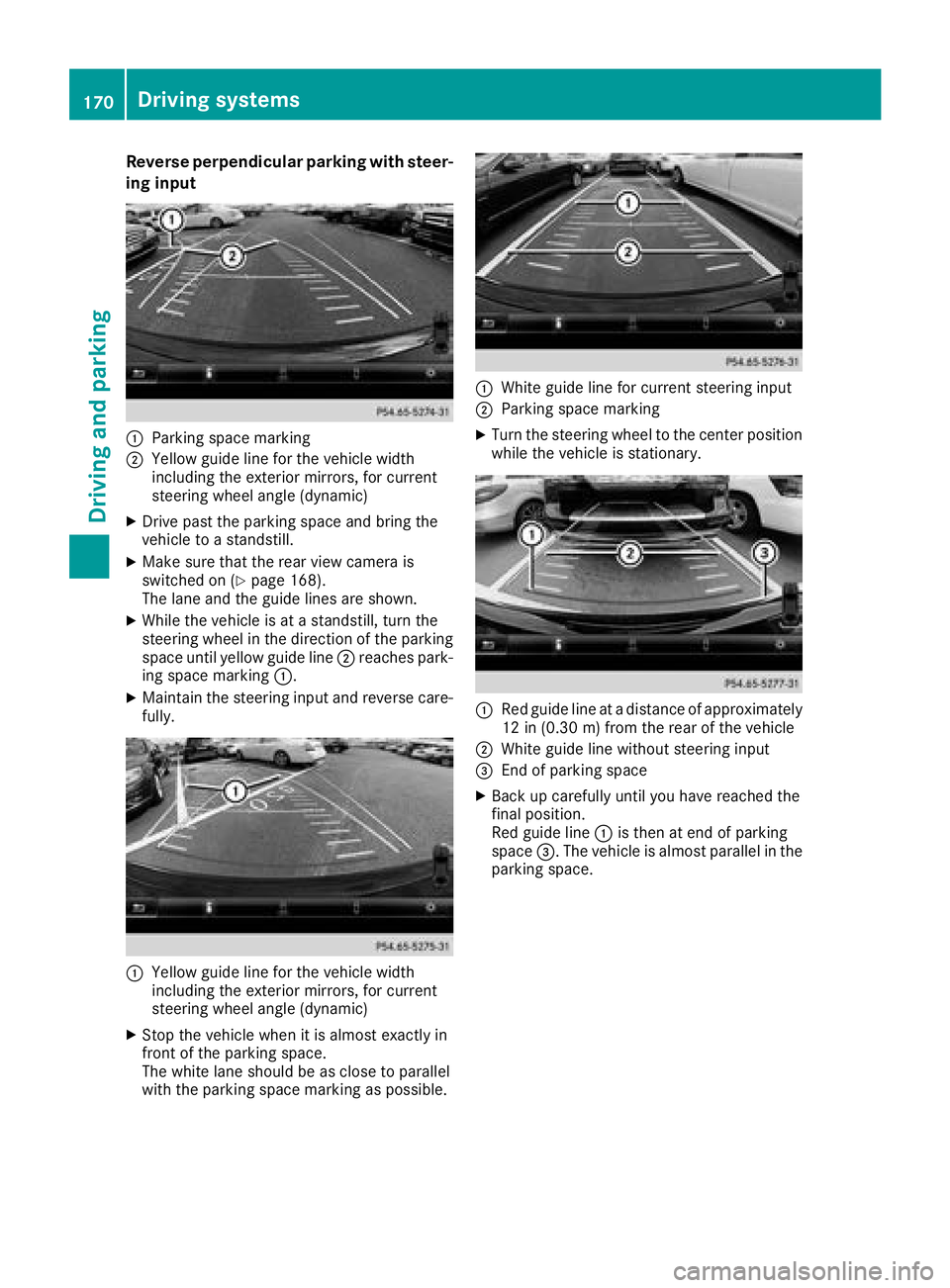
Reverse perpendicular parkingwiths teer-
in gi np ut
:Parking space marking
;Yellow guid elinef or the vehicle width
including the exterior mirrors, for current
steering wheel angle (dynamic)
XDrive past the parking space and bring the
vehicle to astandstill.
XMake sure that the rearv iewc amera is
switched on (Ypage 168).
The lane and the guid elines are shown.
XWhile the vehicle is at astandstill, turn the
steering wheel in the direction of the parking
space unti lyello wguide line;reaches park-
ing space marking :.
XMaintain the steering input and reverse care-
fully.
:Yellow guidelinef or the vehicle width
including the exterior mirrors, for current
steering wheel angle (dynamic)
XStop the vehicle whe nitisalmost exactly in
front of the parking space.
The white lane shoul dbeasclose to parallel
with the parking space marking as possible.
:White guid elinef or current steering input
;Parking space marking
XTurn the steering wheel to the center position
while the vehicle is stationary.
:Re dg uide line at adistance of approximately
12 in (0.30 m) fromthe rearofthe vehicle
;White guid elinew ithou tsteering input
=End of parking space
XBac kupcarefull yuntilyou have reache dthe
final position.
Re dg uide line:is thenate nd of parking
space =.The vehicl eisalmostp aralle linthe
parking space.
170Driving system s
Driving an dparking
Page 231 of 326
General notes
The multimedia system section in this Opera-
tor's Manualdescribes the basicp rinciples for
operation. More information can be found in the Digital Operator's Manual.
Important safety notes
GWARNING
If you operate information systems and com-
municatio nequipment integrated in the vehi-
cle when driving, you may be distracted from
the traffic situation. You could also lose con-
trol of the vehicle.T here isarisk of an acci-
dent.
Only operate this equipment when the traffic
situation permits. If you are not sure that this
is possible, park the vehicle paying attention
to traffic conditions and operate the equip-
ment when the vehicle is stationary.
You must observe the legalr equirements for the
country in which you are currently driving when
operating the multimedia system.
The multimedia system calculates the route to
the destination withoutt aking the following into
account, for example:
Rtraffic lights
Rstop and yield signs
Rparking or stopping restrictions
Rroad narrowing
Rother road and traffic rule sand regulations
The multimedia system may give incorrect nav-
igation recommendations if the actual street/
traffic situation does not correspond with the
digital map's data.
For example:
Rad iverted route
Rthe road layout or the direction of aone-way
street has been changed
For this reason, you must alwayso bserve road
and traffic rule sand regulations during your
journey. Roa dand traffic rule sand regulations
alwaysh ave priority over multimedia system
driving recommendations. Navigation announcements are intended to
direct you whiled
riving withoutdiverting your
attention from the road and driving.
Please alwaysu se this feature instead of con-
sulting the map display for directions. Looking
at the icons or map display can distract you from
traffic conditions and driving, and increase the
risk of an accident.
This equipment complies with FCC radiation
exposure limits set forth for uncontrolled equip-
ment and meets the FCC radiof requency (RF)
Exposure Guidelines in Supplement CtoOET65.
This equipment has very low levelsofRFe nergy
that is deemedtoc omply withoutmaximum
permissive exposure evaluation (MPE). How-
ever, it is recommended to insta
ll it atadistance
of at least 8inches (approx. 20 cm) betweent he
radiation source and aperson's body (not
including limbss uch as hands, wrists, feet and
legs).
GWARNING
Modifications to electronic components, their software as wellasw iring can impair their
function and/or the function of other net-
worked components. In particular, systems
relevant to safety could also be affected. As a
result, these may no longer function as inten-
ded and/or jeopardize the operating safety of
the vehicle.T here is an increasedr isk of an
accident and injury.
Never tamper with the wiring as wellase lec-
tronic components or their software .You
shoul dhave all work to electricala nd elec-
tronic equipment carried out at aqualified
specialist workshop.
Function restrictions
For safety reasons, some functions are restric-
ted or unavailable whilet he vehicle is in motion.
You willn otice this, for example, because either
you willn ot be abletos elect certain menu items
or am essag ewillappear to this effect.
Function restrictions229
Multimedia system
Z
Page 239 of 326
Loading guidelines
GWARNING
If objects, luggage or loads are not secured or
not secured sufficiently, they could slip, tip
over or be flun garounda nd thereb yhit vehicle
occupants. Thereisar isk of injury, particu-
larly in th eeventofs udden braking or asud-
den change in direction.
Always store object ssothatthe yc annot be
flun garound. Secure objects, luggage or
loads against slippingort ipping before the
journey.
GWARNING
Combustio nengine semit poisonous exhaust
gases such as carbon monoxide. Exhaust
gases can enter th evehicle interio rifthe
trunk lid is open when th eengine is running,
especially if th evehicle is in motion.T hereisa
risk of poisoning.
Always switch off th eengine before opening
th et runk lid. Never drivew ith thetrunk lid
open.
GWARNING
The exhaust tail pipe and tail pipe trim can
become veryh ot.Ifyou com eintoc ontact
with these partsoft hevehicle ,you could burn
yourself. Thereisar isk of injury.
Always be particularly careful aroundt he
exhaust tail pipe and th etail pipe trim. Allow
these component stocooldown before touch-
ing them.
The handlingc haracteristicsofaladen vehicle
are dependentont hedistribution of th eload
within th evehicle.
Observe th efollowing notes when loadinga nd
transporting aload:
RNever exceed th emaximum permissible
gross vehicle mass or th egross axle weight
rating for th evehicle (includingo ccupants).
The values are specified on th evehicle iden- tification plateont
heB-pillar of th edriver's
door.
RThe trunk is th epreferred place to carry
objects.
RPosition heavy loads as far forwards as pos-
sible and as low down in th etrunk as possible.
RThe load must not protrude above th eupper
edge of th eseat backrests.
RAlways place th eload against th erear or front
seat backrests .Makes ure that th eseat
backrests are securely locked int oplace.
RAlways place th eload behindu noccupied
seatsifp ossible.
RUse thecargo tie-down rings and th eparcel
net stot ransport loads and luggage.
RUse cargo tie-down rings and fastening mate-
rials appropriatef or theweight and sizeoft he
load.
RSecure th eload with sufficiently stronga nd
wear-resistant tie -downs.Pad sharpe dges for
protection.
Stowage areas
Stowage spaces
Important safety notes
GWARNING
If object sinthepassenge rcompartmenta re
stowed incorrectly, they can slide or be
thrown arounda nd hit vehicle occupants. In
addition,c upholders, open stowage spaces
and mobile phoneb racketscannot always
retain all object stheyc ontain .Thereisar isk
of injury, particularly in th eeventofs udden
braking or asudden change in direction.
RAlways stow object ssothatthe yc annot be
thrown aroundins uch situations.
RAlways makesure that objectsdonot pro-
trude fro mstowage spaces, parcel net sor
stowage nets.
RClose th elockable stowage spaces before
starting ajou rney.
RAlways stow and secure heavy, hard, poin-
ted ,sharp-edged, fragile or bulky object sin
th et runk.
Observe th eloadingg uidelines (
Ypage 237).
Stowage areas237
Stowage and features
Z
Page 241 of 326
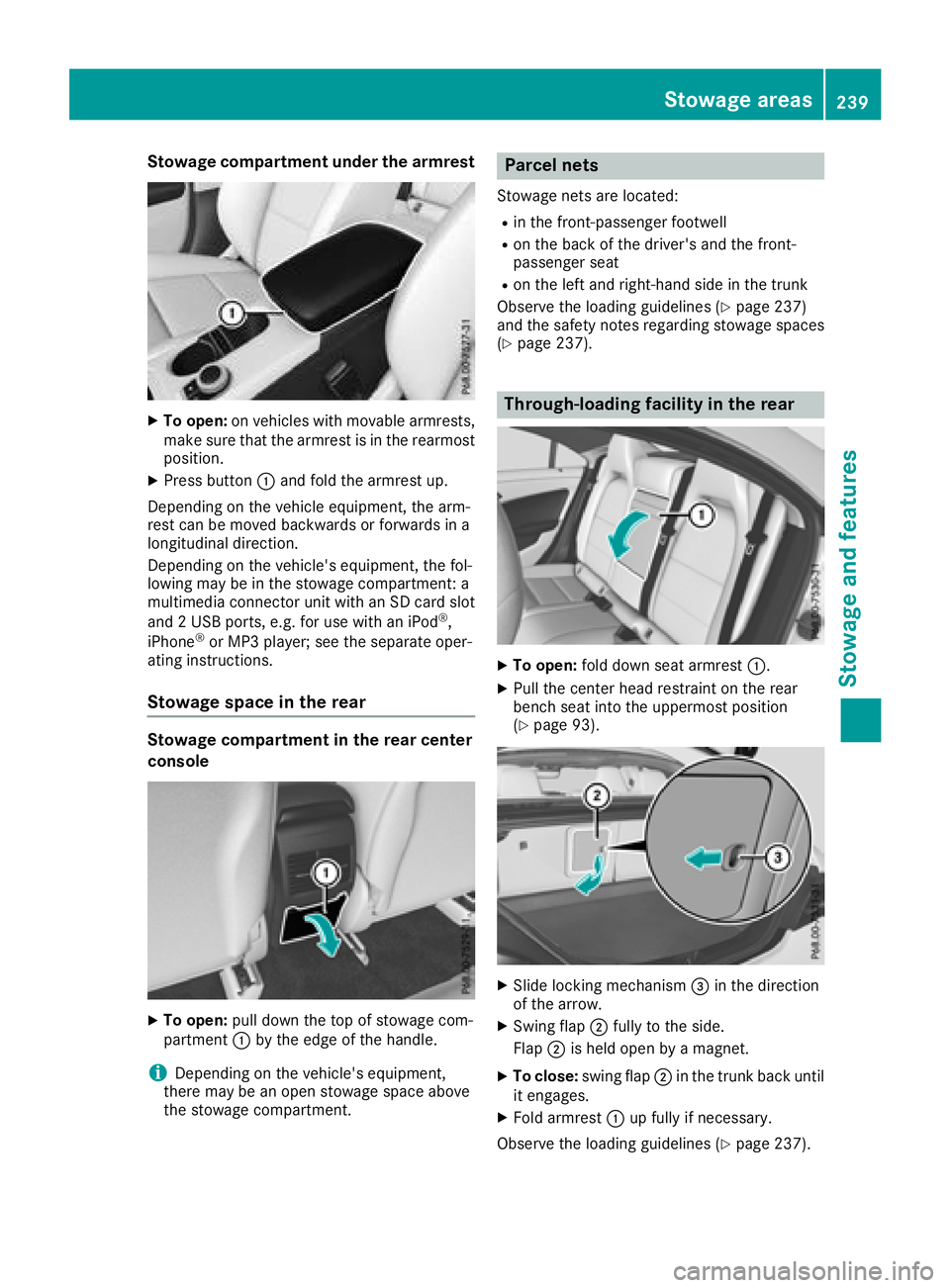
Stowage compartment under the armrest
XTo open:on vehicles with movable armrests,
make sure that the armrest is in the rearmost
position.
XPress button :and fold the armrest up.
Depending on the vehicle equipment, the arm-
rest can be moved backwards or forwards in a
longitudinal direction.
Depending on the vehicle's equipment, the fol-
lowing may be in the stowage compartment: a
multimedia connector unit with an SD card slot
and 2USB ports, e.g. for use with an iPod
®,
iPhone®or MP3 player; see the separate oper-
ating instructions.
Stowage space in the rear
Stowage compartment in the rear center
console
XTo open: pull down the top of stowage com-
partment :by the edge of the handle.
iDepending on the vehicle's equipment,
there may be an open stowage space above
the stowage compartment.
Parcel nets
Stowage nets are located:
Rin the front-passenger footwell
Ron the back of the driver's and the front-
passenger seat
Ron the left and right-hand side in the trunk
Observe the loading guidelines (
Ypage 237)
and the safety notes regarding stowage spaces
(
Ypage 237).
Through-loading facility in the rear
XTo open: fold down seat armrest :.
XPull the center head restraint on the rear
bench seat into the uppermost position
(
Ypage 93).
XSlide locking mechanism =in the direction
of the arrow.
XSwing flap ;fully to the side.
Flap ;is held open by amagnet.
XTo close: swing flap ;in the trunk back until
it engages.
XFold armrest :up fully if necessary.
Observe the loading guidelines (
Ypage 237).
Stowage areas239
Stowage and features
Z
Page 243 of 326
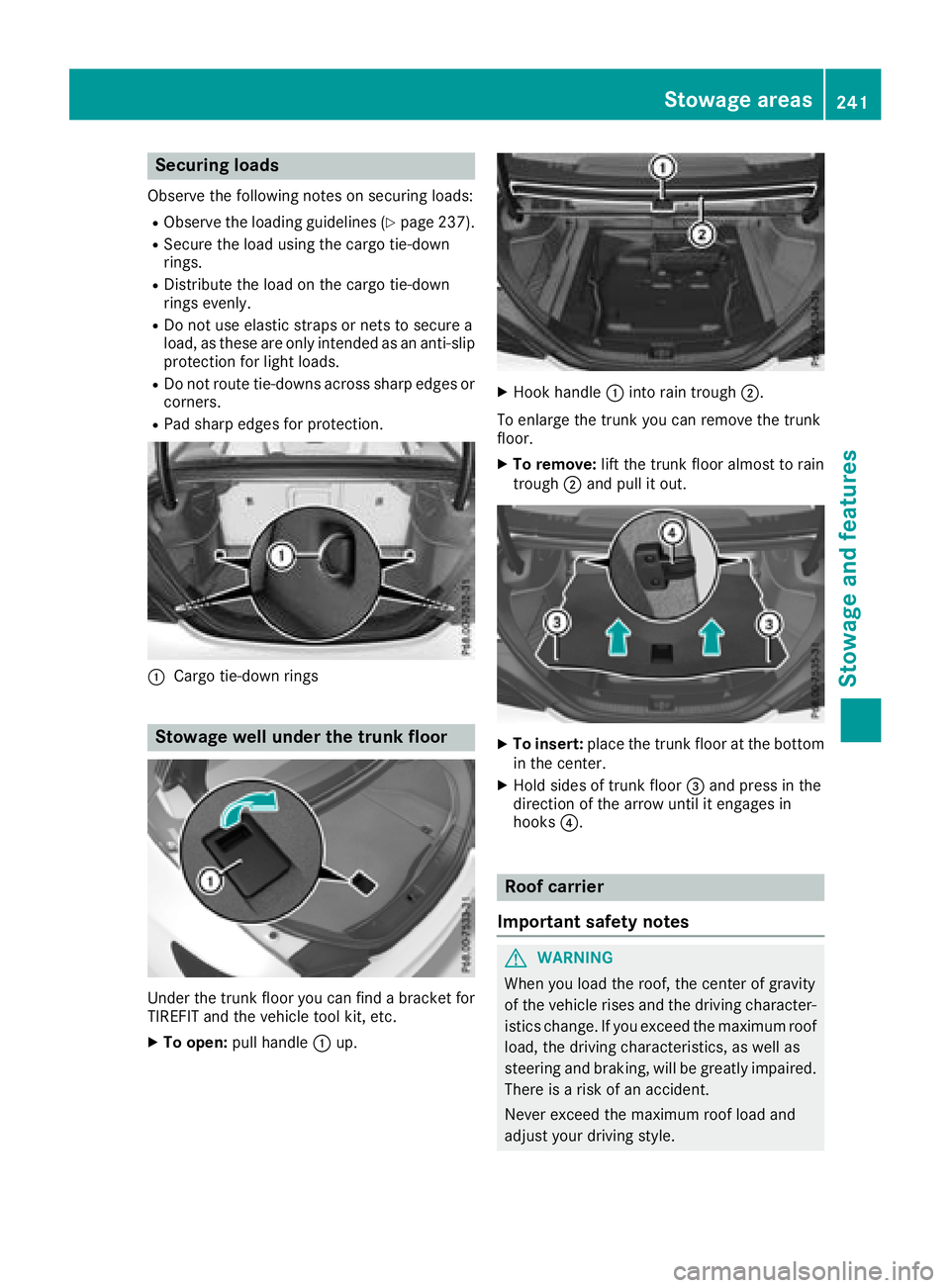
Securing loads
Observe the following notes on securing loads:
RObserve the loading guidelines (Ypage 237).
RSecure the load using the cargo tie-down
rings.
RDistribute the load on the cargo tie-down
rings evenly.
RDo not use elastic straps or nets to secure a
load, as these are only intended as an anti-slip
protection for light loads.
RDo not route tie-downs across sharp edges or
corners.
RPad sharp edges for protection.
:Cargo tie-down rings
Stowage well under the trunk floor
Under the trunk floor you can findabracket for
TIREFIT and the vehicle tool kit, etc.
XTo open: pull handle :up.
XHook handle :into rain trough ;.
To enlarge the trunk you can remove the trunk
floor.
XTo remove: lift the trunk floor almost to rain
trough ;and pull it out.
XTo insert: place the trunk floor at the bottom
in the center.
XHold sides of trunk floor =and press in the
direction of the arrow until it engages in
hooks ?.
Roof carrier
Important safety notes
GWARNING
When you load the roof, the center of gravity
of the vehicle rises and the driving character-
istics change. If you exceed the maximum roof
load, the driving characteristics, as well as
steering and braking, will be greatly impaired.
There is arisk of an accident.
Never exceed the maximum roof load and
adjust your driving style.
Stowage areas241
Stowage and features
Z
Page 244 of 326
!Mercedes-Benz recommends that you only
use roof carriers that have been tested and
approved for Mercedes-Benz vehicles. This
helps to prevent damage to the vehicle.
Position the load on the roof rack in such a
way that the vehicle will not sustain damage
even when it is in motion.
Depending on the vehicle equipment, ensure
that when the roof carrier is installed you can:
Ropen the panorama roof with power tilt/
sliding panel fully
Ropen the trunk lid fully
You will find information on the maximum roof
load in the "Technical data" section
(
Ypage 320).
An incorrectly secured roof carrier or roof load
may become detached from the vehicle. You
must therefore ensure that you observe the roof
carrier manufacturer's installation instructions.
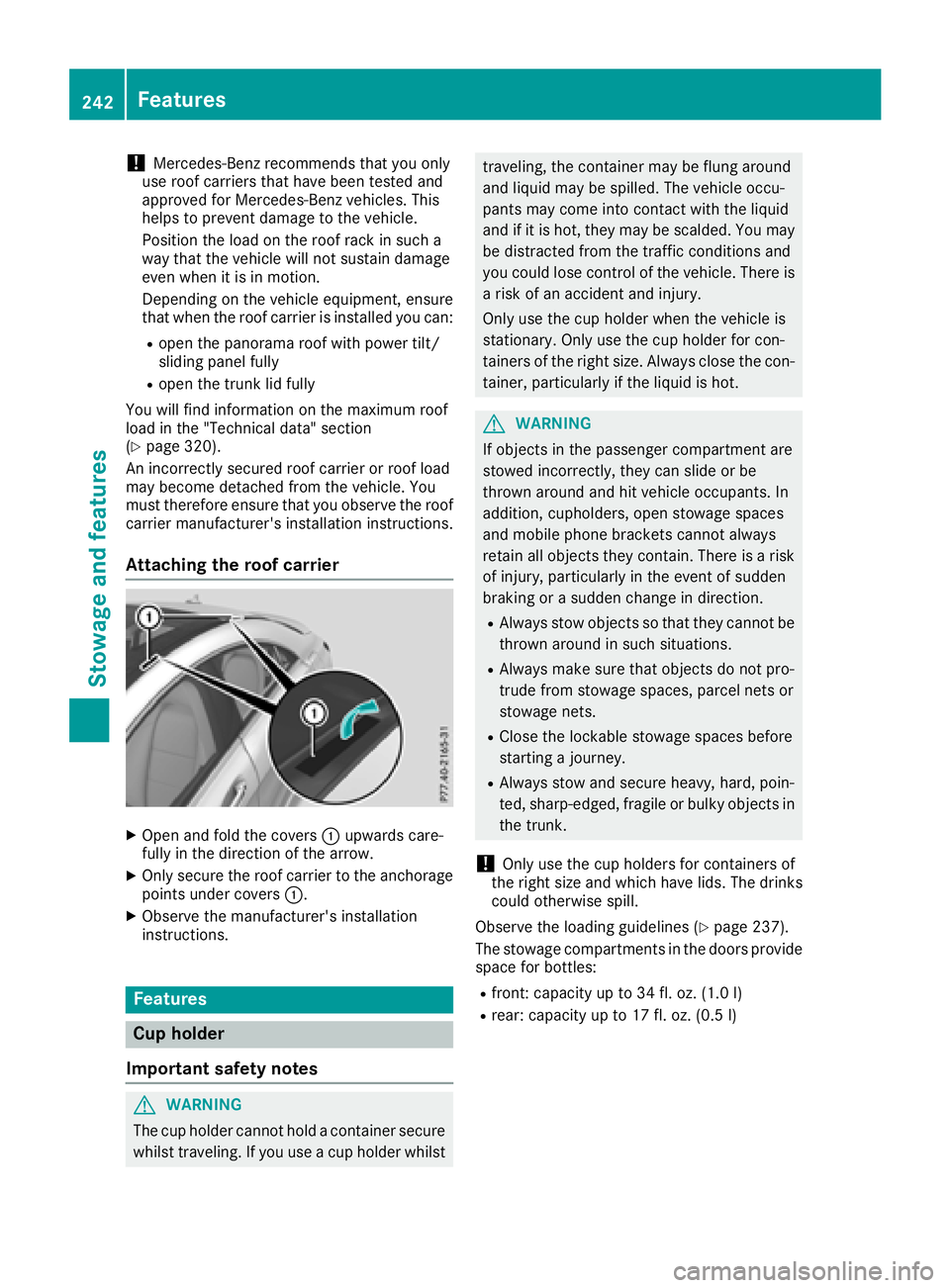
Attaching the roof carrier
XOpen and fold the covers :upwards care-
fully in the direction of the arrow.
XOnly secure the roof carrier to the anchorage
points under covers :.
XObserve the manufacturer's installation
instructions.
Features
Cup holder
Important safety notes
GWARNING
The cup holder cannot hold acontainer secure
whilst traveling. If you use acup holder whilst
traveling, the container may be flung around
and liquid may be spilled. The vehicle occu-
pants may come into contact with the liquid
and if it is hot, they may be scalded. You may
be distracted from the traffic conditions and
you could lose control of the vehicle. There is
ar isk of an accident and injury.
Only use the cup holder when the vehicle is
stationary. Only use the cup holder for con-
tainers of the right size. Alwaysc lose the con-
tainer, particularlyift he liquid is hot.
GWARNING
If objects in the passenger compartment are
stowed incorrectly, they can slide or be
thrown around and hit vehicle occupants. In
addition, cupholders, open stowage spaces
and mobile phone brackets cannot always
retain all objects they contain. There is arisk
of injury, particularlyint he event of sudden
braking or asudden change in direction.
RAlwayss tow objects so that they cannot be
thrown around in such situations.
RAlwaysm ake sure that objects do not pro-
trude from stowage spaces, parcel nets or
stowage nets.
RClose the lockable stowage spaces before
starting ajourney.
RAlwayss tow and secure heavy, hard, poin-
ted, sharp-edged, fragile or bulky objects in
the trunk.
!Only use the cup holders for containers of
the right size and which have lids. The drinks
could otherwise spill.
Observe the loading guidelines (
Ypage 237).
The stowage compartmentsint he doors provide
space for bottles:
Rfront:c apacity up to 34 fl. oz. (1.0 l)
Rrear: capacity up to 17 fl. oz. (0.5 l)
242Features
Stowage and features
Page 251 of 326
The destination download function is available
if:
Rthe vehicle is equipped withanavigation sys-
tem.
Rthe relevant mobile phone network is availa-
ble and data transfer is possible.
Route Assistance
This service is part of the mbrace PLUS Package
and cannot be purchased separately.
You can use the Route Assistance function even
if the vehicle is not equipped with anavigation
system.
Within the framework of this service, you receive
ap rofessional and reliable form of navigation
support without having to leave your vehicle.
The customer service representative finds a
suitable route depending on your vehicle's cur-
rent position and the desired destination. You
will then be guided live through the current route
section.
Search and Send
General notes
To use "Search &Send", your vehicle must be
equipped with mbrace and anavigation system.
Additionally, an mbrace service subscription
must be completed.
"Search &Send" is adestination entr yservice. A
destination address found on Google Maps™
can be transferred via mbrace directly to your
vehicle's navigation system.
Specifying and sending the destination
address
XGo to the website http://maps.google.com
and enter adestination address into the entry
field.
XTo send the destination address to the e-
mail address of your mbrace account:
click on the corresponding button on the web-
site.
Example:
If you select 'Send to vehicle' and then
'Mercedes-Benz', the destination address will
be sent to your vehicle.
XWhen the "Send" dialog window appears: Enter the e-mail address you specified when
setting up your mbrace account into the cor-
responding field.
XClick "Send".
Information on specific commands such as
"Address entry" or "Send" can be found on the
website.
Calling up atransmitted destination
address
XTurn the SmartKey to position 2in the igni-
tion lock (Ypage 122).
The transmitted destination address is loaded
into the vehicle's navigation system.
Ad isplay message appears, asking whether
navigation should be started.
XSelect Yesby turning 3or sliding 1
the controller and confirm with 7.
The system calculates the route and subse-
quently start sthe route guidance with the
address entered.
If you select No
the address can be stored in
the address book.
If you have sent more than one destination
address, each individual destination must be
confirmed separately.
Destination addresses are loaded in the same
order as the order in which they were sent.
If you own multiple Mercedes-Benz vehicles with
mbrace and activated mbrace accounts:
If multiple vehicles are registered under the
same e-mail address, the destination will be
sent to all the vehicles.
Vehicle remot eopening
You can use the vehicle remote opening if you
have unintentionally locked your vehicle and a
replacement SmartKey is not available.
The vehicle can be opened by the Mercedes-
Benz Customer Assistance Center.
The vehicle can be immediately opened
remotely within four days of the ignition being
turned off. After this time, the remote unlocking
may be delayed by 15 to 60 minutes. After
30 days, the vehicle can no longer be opened
remotely.
The vehicle remote unlockingf eature is availa-
ble if the relevant mobile phone network is avail-
able and adata connection is possible.
XContact the following service hotlines:
Features249
Stowage and features
Z
Page 252 of 326
Mercedes-BenzCustomer Assistanc eCenter
at 1-800-FOR-MERCedes (1-800-367-6372)
or 1-866-990-9007
You will be asked for your password.
XReturn to your vehicle at the time agreed upon
with the Mercedes-BenzC ustomer Assis-
tance Center.
Alternatively, the vehicle can be opened via:
Rthe Internet, under the "Owners Online" sec-
tion
Rtelephone applications (e.g. for iPhone®,
Android™)
To do this, you will need your identification num-
ber and password.
Vehicle remote closing
The vehicle remote-closing feature can be used
when you have forgotten to lock the vehicle and
you are no longer nearby.
The vehicle can then be locked by the Mercedes-
Benz Customer Assistanc eCenter.
The vehicle can be immediately remotely locked
within four days of the ignition being turned off.
After this time, remote closing may be delayed
by 15 to 60 minutes. After 30 days the vehicle
can no longer be valet locked remotely.
The vehicle remote closing feature is available if
the relevant mobile phone network is available
and adata connection is possible.
XContact the following service hotlines:
Mercedes-BenzC ustomer Assistanc eCenter
at 1-800-FOR-MERCedes (1-800-367-6372)
or 1-866-990-9007
You will be asked for your password.
The next time you are inside the vehicle and you
switch on the ignition, the Doors Locked
Remotelymessage appears in the multifunction
display.
Alternatively, the vehicle can be locked via:
Rthe Internet, under the "Owners Online" sec-
tion
Rtelephone applications (e.g. for iPhone®,
Android™)
To do this, you will need your identification num- ber and password.
Stolen vehicle recovery service
If your vehicle has been stolen:
XNotify the police.
The police will issue anumbered incident
report.
XThis number will be forwarded to the
Mercedes-BenzC ustomer Assistanc eCenter
together with your PIN.
The Mercedes-BenzC ustomer Assistance
Center then tries to locate the system. The
Mercedes-BenzC ustomer Assistanc eCenter
contacts you and the local law enforcement
agency if the vehicle is located.
However, only the law enforcement agency is informed of the location of the vehicle.
If the anti-theft alarm system is activated for
longer than 30 seconds, the Mercedes-Benz
Customer Assistanc eCenter is automatically
notified.
Vehicle Health Check
With the Vehicle Health Check, the Customer
Assistanc eCenter can provide improved sup-
port for problems with your vehicle. During an
existing call, vehicle data is transferred to the
Customer Assistanc eCenter.
The customer service representative can use
the received data to decide what kind of assis-
tance is required. You are then, for example,
guided to the nearest Mercedes-BenzS ervice
Center or arecovery vehicle is called.
If vehicle data needs to be transferred during an
MB Info call or aRoadside Assistanc ecall, this is
initiated by the Customer Assistanc eCenter.
The Roadside Assistance Connected
mes-
sage appears in the display.Ift he Vehicle Health
Check can be started, the Request
forVehi‐cle Diagnostics Received Start vehi‐cle diagnostics?message appears in the
display.
XPress the Yesbutton to confirm the message.
XWhen the Vehicle Diagnostics PleaseStart Ignitionmessage appears: turn the
SmartKey to position 2in the ignition lock
(
Ypage 122).
XIf the Please follow the instructionsreceivedbyphoneandmoveyourvehi‐cle to asafe position.message
appears: please follow the instructions
250Features
Stowage and features
Page 261 of 326
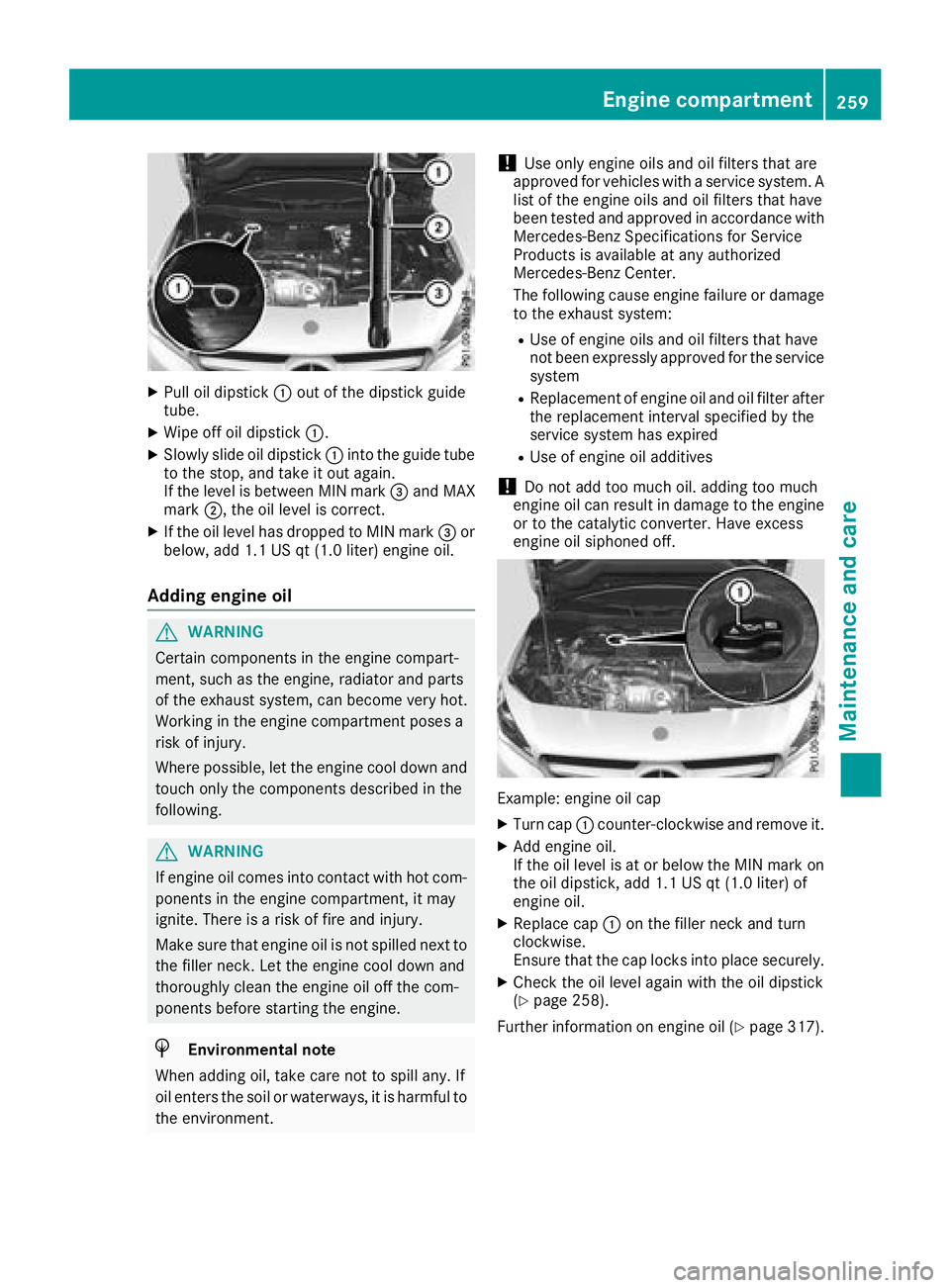
XPull oil dipstick:out of the dipstick guide
tube.
XWipe off oil dipstick :.
XSlowly slide oil dipstick :into the guide tube
to the stop, and take it out again.
If the level is between MIN mark =and MAX
mark ;,the oil level is correct.
XIf the oil level has dropped to MIN mark =or
below, add 1.1 US qt (1.0 liter) engine oil.
Adding engine oil
GWARNING
Certain components in the engine compart-
ment ,such as the engine, radiator and parts
of the exhaust system, can become very hot.
Workingint he engine compartment poses a
risk of injury.
Where possible, let the engine cool down and touch only the components described in the
following.
GWARNING
If engine oil comes into contact with hot com- ponentsint he engine compartment ,itmay
ignite. There is arisk of fire and injury.
Make sure that engine oil is not spilled next to
the filler neck.L et the engine cool down and
thoroughly clean the engine oil off the com-
ponentsb efore starting the engine.
HEnvironmenta lnote
When adding oil, take care not to spill any. If
oil enter sthe soil or waterways, it is harmful to
the environment.
!Use only engine oils and oil filters that are
approved for vehicles with aservice system. A
list of the engine oils and oil filters that have
been tested and approved in accordancew ith
Mercedes-Benz Specifications for Service
Products is availableata ny authorized
Mercedes-Benz Center.
The following cause engine failure or damage
to the exhaust system:
RUse of engine oils and oil filters that have
not been expressly approved for the service
system
RReplacement of engine oil and oil filter after
the replacement interval specified by the
service system has expired
RUse of engine oil additives
!Do not add too much oil. adding too much
engine oil can result in damage to the engine
or to the catalytic converter. Have excess
engine oil siphoned off.
Example: engine oil cap
XTurn cap :counter-clockwise and remove it.
XAdd engine oil.
If the oil level is at or below the MIN mark on
the oil dipstick ,add 1.1 US qt (1.0 liter) of
engine oil.
XReplace cap :on the filler neck and turn
clockwise.
Ensure that the cap locks into place securely.
XCheck the oil level again with the oil dipstick
(Ypage 258).
Further information on engine oil (
Ypage 317).
Engine compartment259
Maintenance and care
Z
Page 311 of 326
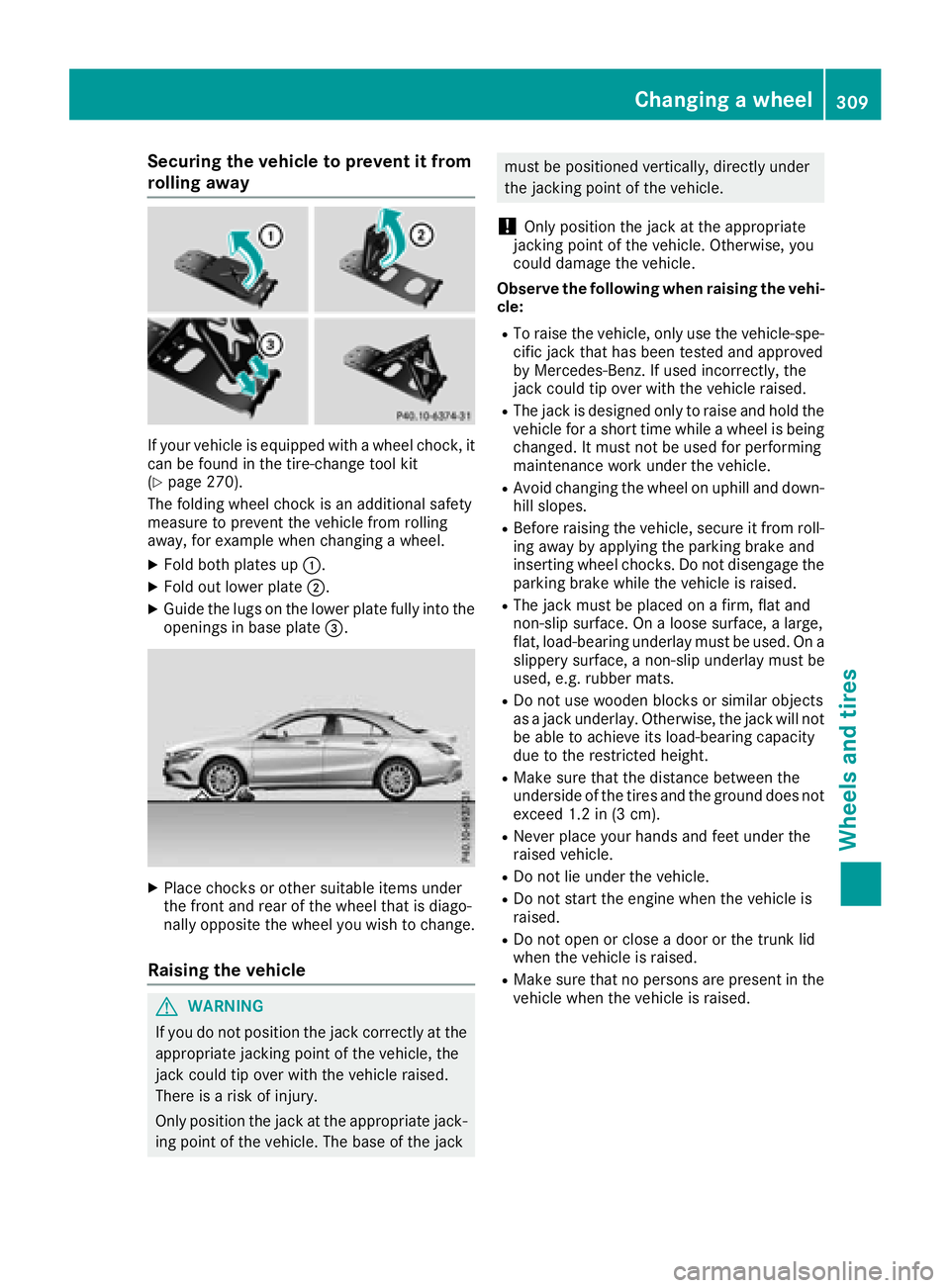
Securing the vehicle to prevent it from
rolling away
If your vehicle is equippedwithaw heel chock,i t
can be found in the tire-change tool kit
(
Ypage 270).
The folding wheel chock is an additional safety
measure to prevent the vehicle from rolling
away,f or example when changing awheel.
XFold both plates up :.
XFold out lower plate ;.
XGuide the lugs on the lower plate fully into the
openings in base plate =.
XPlace chocksorother suitable items under
the front and rear of the wheel that is diago-
nally opposite the wheel you wish to change.
Raising the vehicle
GWARNING
If you do not position the jack correctly at the
appropriate jackingp oint of the vehicle, the
jack could tip over with the vehicle raised.
There is arisk of injury.
Only position the jack at the appropriate jack-
ing point of the vehicle. The base of the jack
must be positioned vertically, directly under
the jackingp oint of the vehicle.
!Only position the jack at the appropriate
jackingp oint of the vehicle. Otherwise, you
could damage the vehicle.
Observe the following when raising the vehi-
cle:
RTo raise the vehicle, only use the vehicle-spe-
cific jack that has been tested and approved
by Mercedes-Benz. If used incorrectly, the
jack could tip over with the vehicle raised.
RThe jack is designed only to raise and hold the
vehicle for ashort time while awheel is being
changed. It must not be used for performing
maintenance work under the vehicle.
RAvoid changing the wheel on uphill and down-
hill slopes.
RBefore raising the vehicle, secure it from roll-
ing away by applying the parking brake and
insertingw heel chocks. Do not disengage the
parking brake while the vehicle is raised.
RThe jack must be placed on afirm, flat and
non-slip surface. On aloose surface, alarge,
flat, load-bearing underlay must be used. On a
slippery surface, anon-slip underlay must be
used, e.g. rubber mats.
RDo not use wooden blocks or similar objects
as ajack underlay. Otherwise, the jack will not
be able to achieve its load-bearing capacity
due to the restricted height.
RMake sure that the distance between the
underside of the tires and the ground does not
exceed 1.2 in (3 cm).
RNever place your hands and feet under the
raised vehicle.
RDo not lie under the vehicle.
RDo not start the engine when the vehicle is
raised.
RDo not open or close adoor or the trunk lid
when the vehicle is raised.
RMake sure that no persons are present in the
vehicle when the vehicle is raised.
Changing awheel309
Wheels and tires
Z