climate control MERCEDES-BENZ CLA COUPE 2019 User Guide
[x] Cancel search | Manufacturer: MERCEDES-BENZ, Model Year: 2019, Model line: CLA COUPE, Model: MERCEDES-BENZ CLA COUPE 2019Pages: 645, PDF Size: 10.94 MB
Page 158 of 645
#
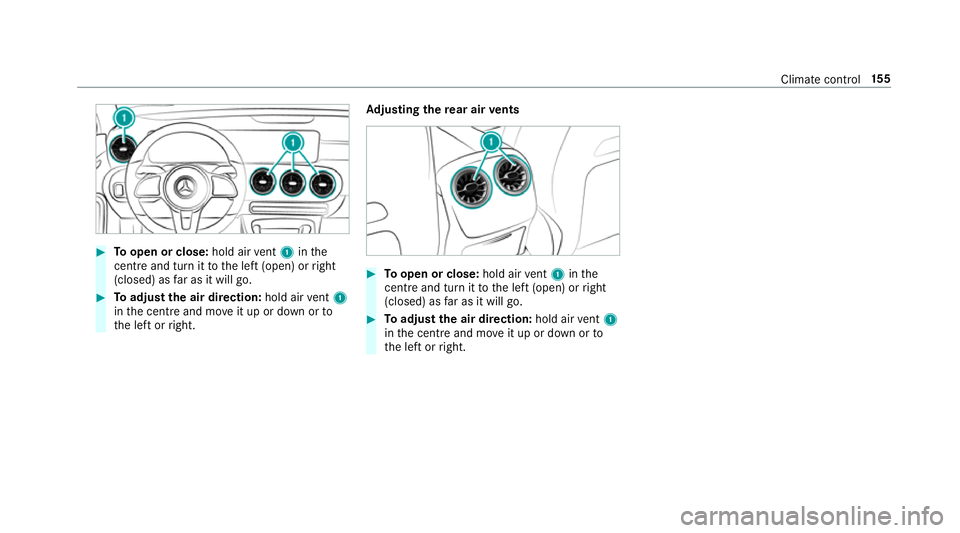
Toopen or close: hold airvent 1 inthe
centre and turn it tothe left (open) or right
(closed) as far as it will go. #
Toadjust the air direction: hold airvent 1
in the cent reand mo veit up or down or to
th e left or right. Ad
justing the rear air vents #
Toopen or close: hold airvent 1 inthe
centre and turn it tothe left (open) or right
(closed) as far as it will go. #
Toadjust the air direction: hold airvent 1
in the cent reand mo veit up or down or to
th e left or right. Climate control
15 5
Page 291 of 645
Vo
ice command Colloquialexample Function
Automatic climate control driver on I would like to switch on the auto- matic climate control for the driv-
er's seatSwitches on automatic climate cont
rolfo rth e driver's or front passenger
side.
Ambient light blue Switch ambient light to blueSwitches
the ambiance light, e.g. toblue.
Wave massage driver on I would like to switch on the wave
massage for the driver's seatSwitches on
thewav e massage forth e driver's or front passenger seat.
Massage driver's seat off Switch the driver's side massage
offSwitches off
the massage function forth e driver's or front passenger seat.
Seat heating driver on I would like to switch on the seat
heating for the driver's seatSwitches on
the seat heating forth e driver's or front passenger seat.
Seat heating front passenger level
2 Seat heating front-passenger on
level 2Sets
the seat heating forth e driver's or front passenger seat toleve l 2.
Current speed limit I would like to hear the speed limitCalls up
the cur rent speed limit.
Outside temperature I would like to find out what the
temperature outside is likeCalls up
the outside temp erature.
Average consumption I would like to know the average
fuel consumptionCalls up
average consu mption. 288
LINGU ATRO NIC
Page 292 of 645
Vo
ice command Colloquialexample Function
Vehicle data Can you please display the vehicle
data menu?Calls up
theve hicle data.
Range Tell me the current rangeCalls up
the cur rent range da ta.
Assistance menu Show me the driver assistance set-
tings Displ
aysth e assis tance settings.
Climate control menu Jump to the climate control menuDispla
ys the climate control settings.
Light menu Switch to the light settingsDispla
ys the light settings.
Seats menu I would like to switch to seat menuDispla
ys the seat adjustment settings.
Massage menu Could you please switch to the
massage seat menu?Displa
ys the massage settings.
Next servic eT ell me my next service appoint-
ment Calls up
the next service due date. LINGU
ATRO NIC 289
Page 304 of 645
Ac
tivating co verch ange in thera dio menu
and media menu
The MBUX in-car assis tant reduces the number
of operating steps. #
Movea hand towa rdsth eto uchsc reen or
to uchpad.
The cur rent information, e.g. about thera dio
st ation, track and artist are hidden. Co ver
ch ange is activated. #
Continue operation and select a co ver. #
Asthe hand is mo vedaw ay from the
to uchsc reen or touchpad, the cur rent infor‐
mation is shown again.
% Further information on thera dio menu
(/ page 439) and the media menu
(/ page 433).
Showing the navigation menu on the map
The MBUX in-car assis tant sho ws the navigation
menu. #
Movea hand towa rdsth eto uchsc reen or
to uchpad.
The navigation menu is shown. #
Continue operation and select a symbol. #
Asthe hand is mo vedaw ay from the
to uchsc reen or touchpad, the media display
hides the navigation menu.
% Further information on the navigation menu
(/ page 341).
Showing operating symbols in theAc tive
Pa rking Assist camera ima ge(only from driv‐
er's seat)
The MBUX in-car assis tant facilitates quick-
access forth e driver tovarious camera vie ws. #
With th eAc tive Parking Assist display active,
mo vethe hand in the direction of the
to uchsc reen.
The camera operation symbols are displa yed. #
Continue operation and display the desired
front, rear, left and right camera vie ws.
% Further information on Active Parking Assist
functions (/ page 234).
Operating functions using poses
Re quirements:
R Tocall up favo urites: there is at least one
fa vo urite. R
The area forre cognition of thefa vo urite's
pose is abo vethe cent reconsole at the
height of the climate control vents and the
media displa y.The hand should ha vea dis‐
ta nce of at least 10cm from the media dis‐
pla y.
R The pose is held for a brief time.
Calling up favo urites
A pose calls up a favo urite.
The driver and front passen ger can connect two
dif fere nt favo urites with the V pose.
% If afavo urite has not yet been sa ved and
connec ted with the MBUX in-car assis tant,
th e multimedia sy stem will assist you. MBUX multimedia sy
stem 301
Page 307 of 645
If
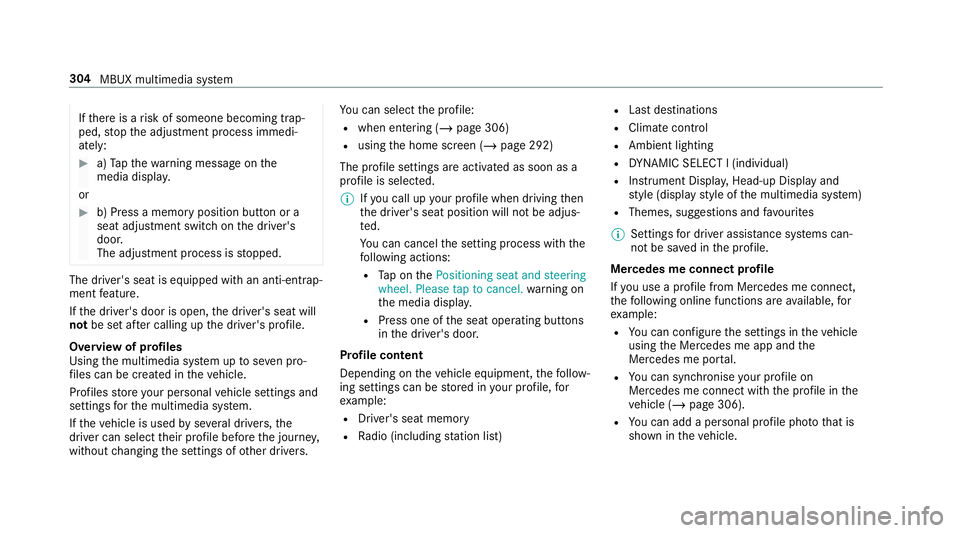
th ere is a risk of someone becoming trap‐
ped, stop the adjustment process immedi‐
ately: #
a)Tapth ewa rning message on the
media displa y.
or #
b) Press a memory position button or a
seat adjustment switch on the driver's
door.
The adjustment process is stopped. The driver's seat is equipped with an anti-entrap‐
ment feature.
If th e driver's door is open, the driver's seat will
not be set af ter calling up the driver's profile.
Overview of profiles
Using the multimedia sy stem up toseven pro‐
fi les can be created in theve hicle.
Profiles store your personal vehicle settings and
settings forth e multimedia sy stem.
If th eve hicle is used byseveral drivers, the
driver can select their profile before the journe y,
without changing the settings of other drivers. Yo
u can select the profile:
R when entering (/ page 306)
R using the home screen (/ page 292)
The profile settings are activated as soon as a
profile is selected.
% Ifyo u call up your profile when driving then
th e driver's seat position will not be adjus‐
te d.
Yo u can cancel the setting process with the
fo llowing actions:
R Tap on thePositioning seat and steering
wheel. Please tap to cancel. warning on
th e media displa y.
R Press one of the seat operating buttons
in the driver's door.
Profile content
Depending on theve hicle equipment, thefo llow‐
ing settings can be stored in your profile, for
ex ample:
R Driver's seat memory
R Radio (including station list) R
Last destinations
R Climate control
R Ambient lighting
R DYNA MIC SELECT I (individual)
R Instrument Displa y,Head-up Display and
st yle (display style of the multimedia sy stem)
R Themes, suggestions and favo urites
% Settings for driver assi stance sy stems can‐
not be sa ved in the profile.
Mercedes me connect profile
If yo u use a profile from Mercedes me connect,
th efo llowing online functions are available, for
ex ample:
R You can configure the settings in theve hicle
using the Mercedes me app and the
Mercedes me por tal.
R You can syn chronise your profile on
Mercedes me connect with the profile in the
ve hicle (/ page 306).
R You can add a personal profile pho tothat is
shown in theve hicle. 304
MBUX multimedia sy stem
Page 601 of 645
Ad
justing treble, mid- range and bass
settings
Adva nced sound sy stem ......................4 44
Burmes ter®
sur round sound sy stem ... 442
Ad vanced sound sy stem
Ac tivating/deactivating au tomatic
vo lume adjustment .............................. 444
Ad justing the balance/fader ............... 444
Ad justing treble, mid-range and bass
settings ............................................... 444
Calling up the sound menu .................. 443
Information .......................................... 443
Af ter-sales service centre
see ASS YST PLUS
Air conditioning menu Calling up ............................................ 14 8
Air conditioning sy stem
see Climate control
Air distribution Setting ................................................ .146
Setting (multimedia sy stem) ................1 48
Air inl et
see Air-water duct Air pressure
see Tyre pressure
Air vents ................................................... 154
Ad justing (front) .................................. 154
Ad justing (rear) .................................... 15 5
Air vents
see Air vents
Ai r-re circulation mode ............................ 14 9
Air-water duct .......................................... 452
Ke eping free ........................................4 52
Airbag ........................................................ .41
Ac tivation .............................................. 35
Fr ont airbag (driver, front passenger) ..... 41
Ins tallation locations .............................. 41
Knee airbag ............................................ 41
Overview ................................................ 41
PA SSENGER AIR BAG indicator lamp .... .46
Pr otection ..............................................42
Re duced pr otection ...............................43
Side impact airbag ................................. 41
Wi ndow airbag ....................................... 41
Airflow Setting ................................................ .146 Alarm sy
stem
see ATA (anti-theft alarm sy stem)
All-wheel drive see 4MATIC
Alternative route
see Route
Ambient lighting Setting (multimedia sy stem) ................1 36
Android Auto ............................................ 407
Connecting a mobile phone ................. 408
Ending ................................................. 409
Information .......................................... 408
Overview ............................................. 407
Sound settings .................................... 408
Tr ans ferred vehicle data ......................4 09
Android Auto™
Control using the application buttons
.............................................................4 09
Animals Pets in theve hicle ................................. 75
Anti-lock braking sy stem
see ABS (Anti-lock Braking Sy stem) 598
Index
Page 603 of 645
Au
tomatic front passen ger front air‐
bag shu toff .......................................... 44, 46
Fu nction of the automatic front
passenger front airbag deactivation
sy stem ................................................... 44
PA SSENGER AIR BAG indicator lamp .... .46
Au tomatic mir rorfo lding function
Ac tivating/deactivating ...................... .144
Au tomatic transmission
DIRECT SELECT le ver ........................... 17 0
Drive program display .......................... 16 6
Drive programs .................................... 16 6
DY NA MIC SELECT switch .................... 16 6
Engaging drive position ........................ 172
Engaging neutral .................................. 171
Engaging pa rkposition ........................ 171
Engaging reve rsege ar .......................... 171
Kickdown ............................................. 173
Manual gear changing .......................... 172
St eering wheel gearshift paddles ........ .172
Tr ansmission position display .............. 17 0
Tr ansmission positions ........................ 17 0
Au tomatic transmission (problem)
see Transmission (problem) Axle load
Perm issible .......................................... 512
Tr ailer operation .................................. 526 B
Baidu CarLife Trans ferred vehicle data ......................4 09
Ball neck Folding out/in .................................... .252
BA S (Brake Assist Sy stem) .................... .192
Battery Cha rging (Remo teOnline) .................... 16 0
Ke y ........................................................ 78
Re mo tecontrol (s tationary heater) ...... 15 3
Battery see Battery (vehicle)
Battery (vehicle) ...................................... 475
Charging .............................................. 474
Charging (Remo teOnline) .................... 16 0
No tes ................................................... 470
No tes (s tarting assis tance and
ch arging) ............................................ .472
Re placing .............................................4 75
St arting assis tance .............................. 474Belt
see Seat belt
Bic ycle rack
Tr ailer operation .................................. 255
Blind Spot Assist .................................... .246
Ac tivating/deactivating ...................... .249
Fu nction .............................................. 24 6
Sy stem limitations ...............................2 46
Blo wer
see Climate control
BlueTEC see AdBlue ®
Blue tooth ®
............................................... 328
Information .......................................... 328
Setting up an Internet connection ....... 422
Switching on/off ................................. 328
Bonnet Resetting (active bonnet) .................... 446
Boot lid Closing .................................................. 87
HANDS-FREE ACCESS .......................... .87
Opening .................................................85
Opening dimensions ............................5 23600
Index
Page 606 of 645
Child
ren
Av oiding dangers in theve hicle .............. 51
Basic instructions .................................. 50
Cho ck....................................................... 499
St orage location ..................................4 99
Cho ck
see Chock
Cigar ette lighter
Fr ont centre console ............................ 121
City lighting ............................................ .132
Cleaning see Care
Climate control ........................................ 14 6
Ac tivating/deactivating the A/C
function (cont rol panel) ...................... .147
Ac tivating/deactivating the A/C
function (multimedia sy stem) .............. 14 8
Ac tivating/deactivating the synchro‐
nisation function (cont rol panel) .......... 14 9
Ac tivating/deactivating the synchro‐
nisation function (multimedia sys‐
te m) ..................................................... 14 9
Air di stribution settings .......................1 48
Air-recirculation mode ......................... 14 9Au
tomatic control ................................ 14 8
Calling up the air conditioning menu ... 14 8
Defrosting the windscreen ...................1 46
Demisting wind ows............................. 14 9
Fr ont air vents ..................................... 154
No te .................................................... 14 6
Re ar air vents ...................................... 15 5
Re sidual heat ....................................... 14 9
Sets the air flow ................................... 14 6
Setting (multimedia sy stem) ................1 48
Setting the air distribution ...................1 46
Setting thete mp erature ......................1 46
St ationary heater/ ventilation .............. 14 9
Switching on/off ................................. 147
Switching there ar wind owheater
on/off .................................................1 46
THERMATIC control panel .................... 14 6
THERMOTRONIC contro l panel ............14 6
Ve ntilating theve hicle (con venience
opening) ................................................ 90
Co ckpit ......................................................... 6
Overview ................................................. 6
Co ffee cup symbol
see ATTENTION ASSIST Collapsible spare wheel
.......................... 507
Inflating ............................................... 508
No tes ................................................... 507
Re moving ............................................ 508
Combination switch ................................13 0
Compass .................................................. 380
Compu ter
see On-board computer
Connection status
Displ aying ............................................ 424
Overview ............................................ .424
Connectivity Swit ching transmission of theve hicle
position on/off .................................... 328
Contacts ................................................... 394
Calling up ............................................ 394
Deleting ............................................... 396
Deleting favo urites .............................. 397
Downloading (from mobile phone) ...... .394
Importing ............................................ 395
Importing (o verview) .......................... .395
Information .......................................... 394
Making a call ....................................... 395
Na me form at ...................................... .395 Index
603
Page 607 of 645
Options ................................................ 396
Saving as a favo urite .......................... .397
Selecting options for suggestions ........ 396
St oring ................................................ 395
Con venience closing ................................. 91
Con venience opening ................................ 90
Coolant (engine) Check le vel .......................................... 451
No tes ................................................... 521
Cooling see Climate control
Co pyright ...................................................33
Cornering light ........................................ .132
Cross Traf fic Alert .................................. .240
Crosswind Assist Function/no tes ................................... 19 6
Cruise control .......................................... 203
Ac tivating ............................................ 205
Buttons ................................................ 205
Calling up a speed ............................... 205
Deactivating ........................................ 205
Fu nction .............................................. 203
Re quirements ...................................... 205 Selecting ............................................
.205
Setting a speed ................................... 205
St oring a speed ................................... 205
Sy stem limitations ...............................2 03
Cup holder ......................................... 116, 11 8
Fitting/removing (centre console)
....................................................... 116, 11 8
Re ar .................................................... .120 D
Damage de tection (pa rked vehicle) .......189
Damping adjustment ............................... 221
Dash cam Starting/ending a video recording ...... 384
Dashboard see Co ckpit
Dashboard lighting see Instrument lighting
Dashcam Configuring the settings ......................3 85
Deleting a video recording ................... 385
Selecting a USB device ....................... 384 Data acquisition
Vehicle .................................................. 30
Data import/export ................................ 332
Fu nction/no tes ................................... 332
Importing/exporting ........................... 333
Data storage
Electronic control units ........................ .30
Online services ...................................... 32
Ve hicle .................................................. 30
Date Setting the time and date automati‐
cally ..................................................... 327
Deactivating the alarm (A TA).................... 98
Dealership see Qualified specialist workshop
Declaration of conformity Electromagnetic compatibility ............... 24
Jack ...................................................... .27
TIREFIT kit ............................................. 28
Wi reless vehicle components ................24
Decorative foil (cleaning instructions)
.................................................................. .456 604
Index