display MERCEDES-BENZ CLA COUPE 2019 Owner's Manual
[x] Cancel search | Manufacturer: MERCEDES-BENZ, Model Year: 2019, Model line: CLA COUPE, Model: MERCEDES-BENZ CLA COUPE 2019Pages: 645, PDF Size: 10.94 MB
Page 161 of 645
If
th eve hicle still does not start, one of thefo l‐
lowing display messages appears in the multi‐
function display: #
Place the key in the marked space See Own-
er's Manual :st art theve hicle in emer gency
operation mode (/ page 159).
or #
Key not detected Place smartphone in charg-
ing bracket: place the mobile phone in the
mar ked space (/ page126).
Yo u can swit choff the engine while driving by
pressing button 1for about thre e seconds or
by pressing button 1thre e times within a sec‐
ond. Be sure toobser vethe saf ety no tes under
"Driving tips".
St arting theve hicle with a Digital Vehicle
Key
Requ irements:
R one of thefo llowing versions of the Digital
Ve hicle Key is available:
- suitable mobile phone
- Digital Vehicle Keyst icker R
theve hicle is equipped with the "Digital Vehi‐
cle Key" function.
R the "Digital Vehicle Key" function is activated
via Mercedes me connec t:http://
www.mercedes.me.
R the mobile phone is suf ficiently charge d.
% You can check the suitability of your mobile
phone byentering the phone number at
http://www.mercedes.me.
Information about suitable mobile phones
can be obtained from your Mercedes-Benz
Service Centre or at http://www.mercedes-
benz.com/connect.
% Mercedes-Benz recommends that you car ry
th e emer gency key in case of function
re strictions.
% The function is only available in combination
with Mercedes me connect and on lyin cer‐
ta in countries.
% Protective cases around the mobile phone
can impair the functionality. Using
the Digital Vehicle Keyfo r the first
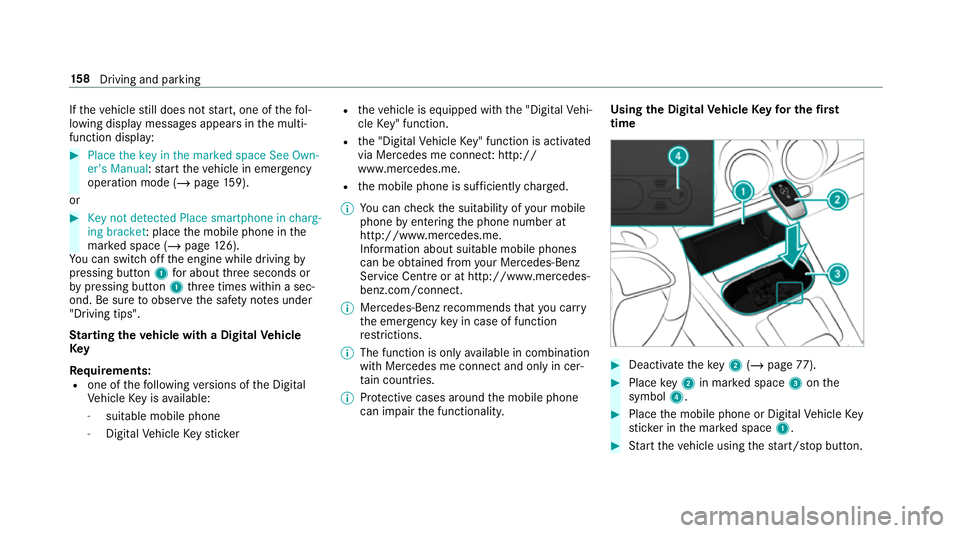
time #
Deactivate theke y2 (/ page 77). #
Place key2 in mar ked space 3onthe
symbol 4. #
Place the mobile phone or Digital Vehicle Key
st icke r in the mar ked space 1. #
Start theve hicle using thest art/ stop button. 15 8
Driving and pa rking
Page 167 of 645
if
yo u swit chon the HOLD function in transmis‐
sion position hori, the engine will automati‐
cally stop in thefo llowing situations:
R youstop behind a vehicle that is pulling
aw ay.
R youstop at a stop sign when there is no vehi‐
cle in front of you.
R you turn thesteering wheel hard at a low
speed.
% In transmission position k,the engine is
not switched off automatically even when
th e HOLD function is switched on.
The engine is restar ted automatically if:
R vehicles with automatic transmission: in
transmission position h,youre lease the
brake pedal when the HOLD function is not
active.
R vehicles with automatic transmission:
yo u shift into transmission position hor
k.
R you depress the accelera tor pedal.
R youch ange theve hicle le vel. R
an automatic engine start is necessar y.
ECO start/ stop function symbols in the multi‐
function display:
R the symbol è(green) appears when the
ve hicle is at a standstill: the engine was
switched off bythe ECO start/ stop function.
R the symbol ç(yellow) appears when the
ve hicle is at a standstill: not all vehicle condi‐
tions for an engine stop ha vebeen met.
R neither the symbol ènorç appears
when theve hicle is at a standstill: an intelli‐
ge nt stop inhibitor was de tected, e.g. a stop
sign.
R the symbol ç(yellow) appears: the ECO
st art/ stop function is deactivated or there is
a malfunction.
% If, in spite of an intelligent stop inhibitor, the
engine should be switched off bythe ECO
st art/ stop function, you ha vethefo llowing
options:
R switch on the HOLD function in transmis‐
sion position hori.
R engage transmission position j.If
th e engine was switched off bythe ECO start/
st op function and you lea vetheve hicle, a warn‐
ing tone sounds and the engine is not restar ted.
The display message Vehicle is operational
Switch off the ignition before exiting also
appears in the multifunction displa y.Ifyo u do
not swit choff the ignition, the ignition is auto‐
matically switched off af terth re e minutes. 16 4
Driving and pa rking
Page 168 of 645
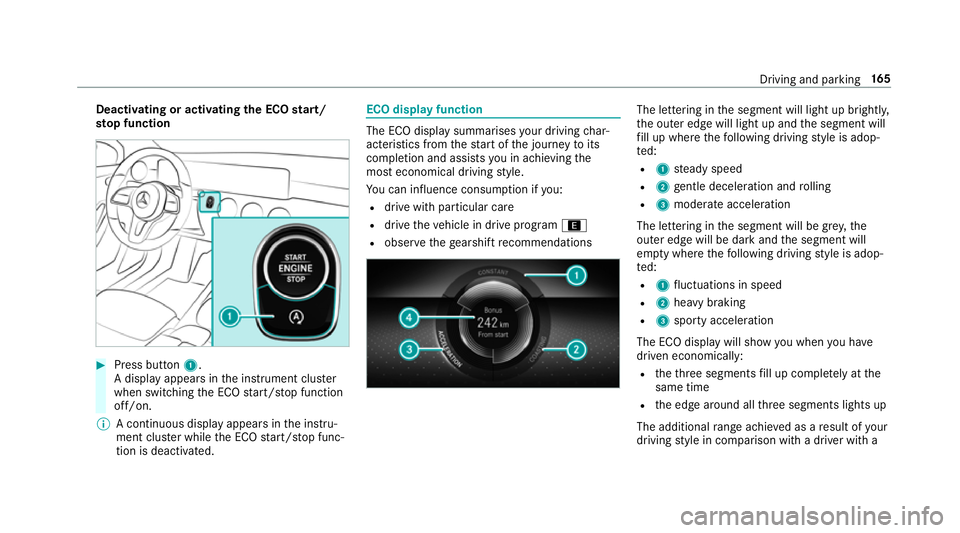
Deactivating or activating
the ECO start/
sto p function #
Press button 1.
A displ ayappears in the instrument clus ter
when swit ching the ECO start/ stop function
off/on.
% A continuous display appears in the instru‐
ment clus ter while the ECO start/ stop func‐
tion is deactivated. ECO display function
The ECO display summarises
your driving char‐
acteristics from thest art of the journey toits
completion and assists you in achieving the
most economical driving style.
Yo u can influence consum ption if you:
R drive with particular care
R drive theve hicle in drive program ;
R obser vethege arshift recommendations The lettering in
the segment will light up brightl y,
th e outer edge will light up and the segment will
fi ll up where thefo llowing driving style is adop‐
te d:
R 1 steady speed
R 2 gentle deceleration and rolling
R 3 moderate acceleration
The lettering in the segment will be gr ey,the
outer edge will be dark and the segment will
em pty where thefo llowing driving style is adop‐
te d:
R 1 fluctuations in speed
R 2 heavy braking
R 3 sporty acceleration
The ECO displ aywill show you when you ha ve
driven economically:
R theth re e segments fill up comple tely at the
same time
R the edge around all thre e segments lights up
The additional range achi eved as a result of your
driving style in comparison with a driver with a Driving and parking
16 5
Page 169 of 645
ve
ry sporty driving style is shown in the cent re
of the display 4. Therange displ ayed does not
indicate a fixe dre duction in consum ption. DY
NA MIC SELECT switch Fu
nction of theDY NA MIC SELECT switch Mercedes-AMG
vehicles: observeth e no tes in
th e Supplement. Otherwise, you may failto rec‐
ognise dangers.
Use theDY NA MIC SELECT switch tochange
between thefo llowing drive programs:
= (Individual) : individual settings
C (Sport): sporty driving style
A (Comfort): comfortable and economical
driving style
; (Eco):particularly economical driving
st yle
% The drive program selected appears in the
multifunction display of the on-board com‐
puter. Depending on
the drive prog ram, thefo llowing
sy stems change their characteristics:
R drive
-
engine and transmission management
- Active Dis tance Assi stDISTRONIC
R ESP ®
R vehicles with adaptive damping adjust‐
ment: suspension
R electric po werst eering Note
s onthero of load display Cer
tain drive programs and ESP ®
settings are
unsuitable for transporting a roof load.
When setting or selecting these drive prog rams,
a crossed-through vehicle with a roof load is
shown as a warning. When this symbol is shown,
th e selected drive program is not suitable for
transpo rting a load on thero of.
The following drive programs are af fected:
R Sport drive program R
Individual drive program wi th the Sport
ESP ®
setting
% The symbol is also shown in thefo llowing sit‐
uations:
R Within theth emes if a cor responding
drive program is sa ved
Fo r more information on themes see
(/ page 307).
R Within there set display if the pr eviously
active drive prog ram is unsui tableforthe
transpo rtof a roof load
Fo r fur ther information on there set dis‐
pla y,see (/ page167). Selec
ting the drive prog ram %
Depending on the equipment, theve hicle is
fi tted wi theither a switch or a button. 16 6
Driving and pa rking
Page 170 of 645
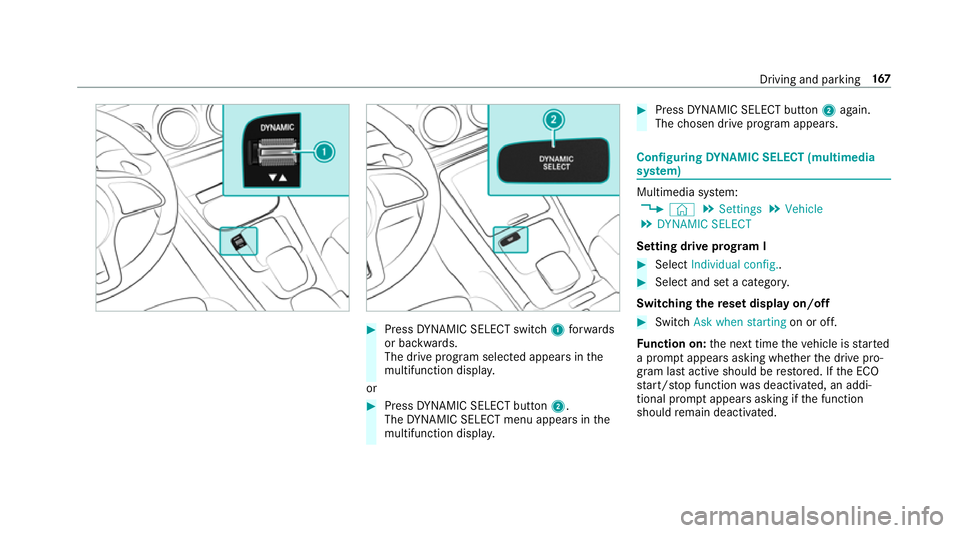
#
Press DYNA MIC SELECT switch 1forw ards
or backwards.
The drive prog ram selected appears in the
multifunction displa y.
or #
Press DYNA MIC SELECT button 2.
The DYNA MIC SELECT menu appears in the
multifunction displa y. #
Press DYNA MIC SELECT button 2again.
The chosen drive program appears. Configuring
DYNA MIC SELECT (multimedia
sy stem) Multimedia sy
stem:
4 © 5
Settings 5
Vehicle
5 DYNAMIC SELECT
Setting drive prog ram I #
Select Individual config.. #
Select and set a categor y.
Switching there set display on/off #
Switch Ask when starting on or off.
Fu nction on: the next time theve hicle is star ted
a prom ptappears asking whe ther the drive pro‐
gram last active should be restored. If the ECO
st art/ stop function was deactivated, an addi‐
tional prom ptappears asking if the function
should remain deactivated. Driving and parking
167
Page 171 of 645
%
The prom ptappears on ly ifthe pr eviously
active settings deviate from thest andard
settings.
Fu nction off: the next time theve hicle is star‐
te dth eComfort drive program is set automati‐
cally. The ECO start/ stop function is activated
automaticall y.
% This function must be activated for each user
profile sepa rately. Only when this function is
activated will the drive prog ram and Eco
st art/ stop setting forth e pr evious journey
be sa vedfo rth ere spective user profile. Displaying
vehicle data Multimedia sy
stem:
4 © 5
Info #
Select Vehicle.
The vehicle data is displa yed. Displaying engine data
Multimedia sy
stem:
4 © 5
Info #
Select Engine.
The engine data is displa yed.
% The values for engine output and engine tor‐
qu e may deviate from the nominal values.
Items that can influence this are, forex am‐
ple:
R Sea le vel
R Fuel grade
R Outside temp erature Calling up fuel consum
ption indicator Multimedia sy
stem:
4 © 5
Info #
Select Consumption.
The cur rent and average fuel consum ption is
displa yed. Manual transmission
Operating
thege arshift le ver &
WARNING Risk of accident and inju ry
due tochildren left unat tended in the
ve hicle
If ch ildren are left unat tended in theve hicle,
th ey could:
R Open doo rs,th ereby endangering other
persons or road users.
R Get out and be stru ck byoncoming traf‐
fi c.
R Ope rate ve hicle equipment and become
trapped, forex ample.
In addition, thech ildren could also set the
ve hicle in motion, forex ample by:
R Releasing the parking brake.
R Changing the transmission position.
R Starting theve hicle. #
Never lea vechildren unat tended in the
ve hicle. 16 8
Driving and pa rking
Page 174 of 645
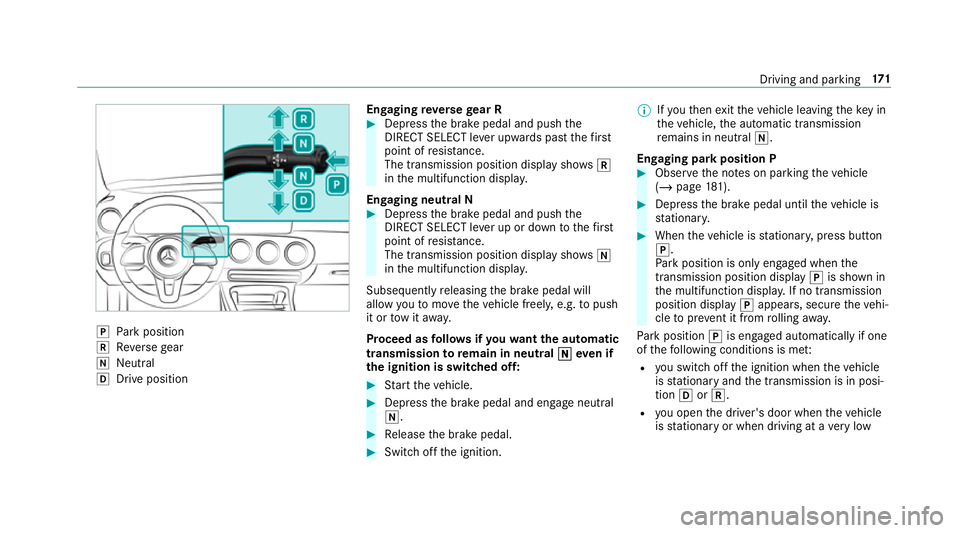
j
Park position
k Reversege ar
i Neut ral
h Drive position En
gaging reve rsege ar R #
Depress the brake pedal and push the
DIRECT SELECT le ver upwards past thefirst
point of resis tance.
The transmission position displ aysho wsk
in the multifunction displa y.
Engaging neut ral N #
Depress the brake pedal and push the
DIRECT SELECT le ver up or down tothefirst
point of resis tance.
The transmission position displ aysho wsi
in the multifunction displa y.
Subsequently releasing the brake pedal will
allow youto mo vetheve hicle freel y,e.g. topush
it or tow it away.
Proceed as follo ws ifyo uwa ntthe automatic
transmission toremain in neutral i
i eve n if
th e ignition is switched off: #
Start theve hicle. #
Depress the brake pedal and engage neutral
i. #
Release the brake pedal. #
Switch off the ignition. %
Ifyo uth en exitth eve hicle leaving theke y in
th eve hicle, the automatic transmission
re mains in neutral i.
Engaging park position P #
Obser vethe no tes on parking theve hicle
(/ page 181). #
Depress the brake pedal until theve hicle is
st ationar y. #
When theve hicle is stationar y,press button
j.
Pa rk position is only engaged when the
transmission position display jis shown in
th e multifunction displa y.If no transmission
position display jappears, secure theve hi‐
cle topreve nt it from rolling away.
Pa rk position jis engaged automatically if one
of thefo llowing conditions is me t:
R you swit choff the ignition when theve hicle
is stationary and the transmission is in posi‐
tion hork.
R you open the driver's door when theve hicle
is stationary or when driving at a very low Driving and parking
171
Page 183 of 645
R
Refill AdBlue See Owner’s Manual . The
Ad Blue ®
tank is down tothere ser veleve l.
R AdBlue system fault Perf. reduced in XXX
miles See Owner's Manual .Yo u can on ly
drive theve hicle overth e dis tance shown.
The AdBlue ®
tank is down tothere ser ve
le ve l.
R Top up AdBlue Perf. reduced: XXX km/h No
start in XXX km You can on ly drivetheve hi‐
cle at the speed shown and over the dis tance
shown. Refill Ad Blue ®
as soon as possible.
R Refill AdBlue No start in XXX miles. You can
on lydrive theve hicle overth e dis tance
shown. Refill Ad Blue ®
as soon as possible.
R Refill AdBlue Engine start not possible. The
vehicle can no longer be star ted.
Yo u can see theAd Blue ®
ra nge and le vel in the
multifunction display (/ page 264).
% The AdBlue ®
ra nge shown depends strongly
on the driving style and operating condi‐
tions. The actual range can therefore deviate
from the calculated range. Opening the
AdBlue ®
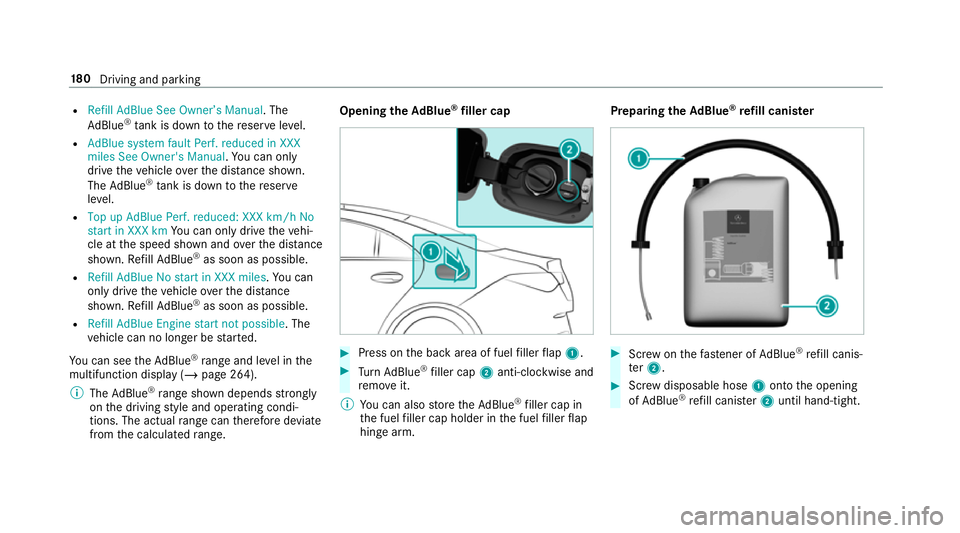
filler cap #
Press on the back area of fuel filler flap 1. #
Turn AdBlue ®
filler cap 2anti-clockwise and
re mo veit.
% You can also store theAd Blue ®
filler cap in
th e fuel filler cap holder in the fuel filler flap
hin gearm. Prepa
ring theAd Blue ®
re fill canis ter #
Screw onthefast ener of AdBlue ®
re fill canis‐
te r2. #
Screw disposable hose 1onto the opening
of Ad Blue ®
re fill canis ter2 until hand-tight. 18 0
Driving and pa rking
Page 197 of 645
It may be best
todeactivate ESP ®
in thefo llow‐
ing situations:
R When using snow chains.
R In deep sn ow.
R On sand or gr avel.
% Spinning the wheels results in a cutting
action, which enhances traction.
If th e÷ ESP®
wa rning lamp lights up continu‐
ousl y,ESP ®
is not available due toa malfunction. Obse
rveth efo llowing information:
R Warning and indicator lamps (/ page 581)
R Display messages (/ page 527)
ETS/4ETS (Electronic Traction Sy stem)
ETS/4E TStraction control is pa rtof ESP ®
and
makes it possible topull away and accelerate on
a slippe rycar riag ew ay.
ETS/4ETS can impr ovetheve hicle's traction by
inter vening in thefo llowing ways:
R The drive wheels are braked individually if
they spin. R
More drive torque is transferred tothe wheel
or wheels with traction.
Influence of drive prog rams on ESP ®
The drive programs enable ESP ®
to adapt todif‐
fe re nt we ather and road conditions as well as
th e driver's prefer red driving style. You can
select the drive prog rams using theDY NA MIC
SELECT switch (/ page166). 194
Driving and pa rking
Page 198 of 645
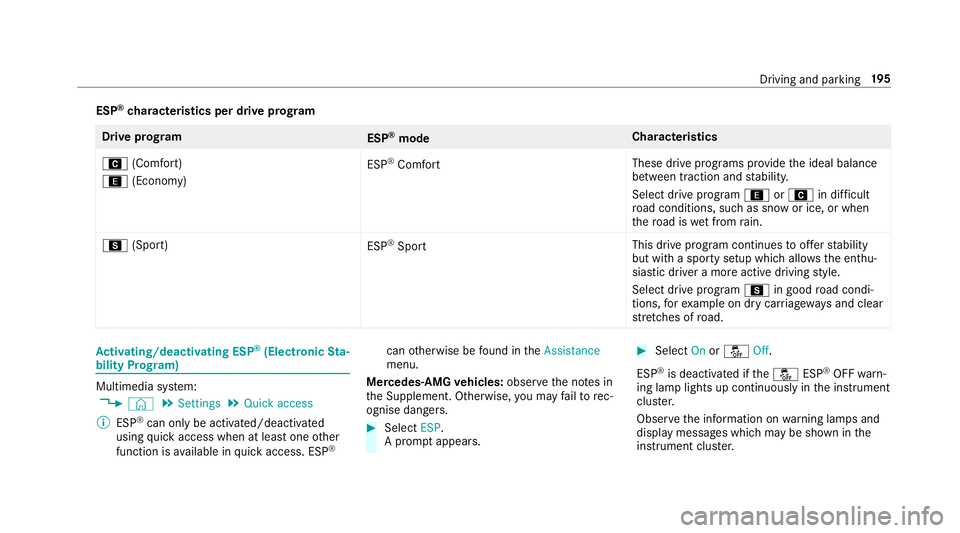
ESP
®
ch aracteristics per drive prog ramDrive prog
ram
ESP®
mode Cha
racteristics
A (Comfort)
; (Economy) ESP
®
Comfort These drive prog
rams pr ovide the ideal balance
between traction and stabilit y.
Select drive program ;orA in difficult
ro ad conditions, such as sn owor ice, or when
th ero ad is wet from rain.
C (Sport)
ESP®
Sport This drive program continues
toofferst ability
but with a sporty setup which allo wsthe enthu‐
siastic driver a more active driving style.
Select drive program Cin good road condi‐
tions, forex ample on dry car riag ewa ysand clear
st re tches of road. Ac
tivating/deactivating ESP ®
(Electronic Sta‐
bility Prog ram) Multimedia sy
stem:
4 © 5
Settings 5
Quick access
% ESP®
can only be activated/deactivated
using quick access when at least one other
function is available in quick access. ESP ®can
otherwise be found in theAssistance
menu.
Mercedes‑AMG vehicles: observeth e no tes in
th e Supplement. Otherwise, you may failto rec‐
ognise dangers. #
Select ESP.
A prom ptappears. #
Select Onorå Off.
ESP ®
is deactivated if theå ESP®
OFF warn‐
ing lamp lights up continuously in the instrument
clus ter.
Obser vethe information on warning lamps and
display messages which may be shown in the
instrument clus ter. Driving and pa
rking 19 5