display MERCEDES-BENZ CLK-CLASS 2001 Manual PDF
[x] Cancel search | Manufacturer: MERCEDES-BENZ, Model Year: 2001, Model line: CLK-CLASS, Model: MERCEDES-BENZ CLK-CLASS 2001Pages: 325, PDF Size: 8.4 MB
Page 85 of 325
82 Instrument cluster
Te ch n ica l
data Instruments
and controlsOperationDrivingInstrument
cluster displayPractical hints Car care Index
Instrument cluster
ProCarManuals.com
Page 86 of 325
83 Instrument cluster
Te ch n ica l
data Instruments
and controlsOperationDrivingInstrument
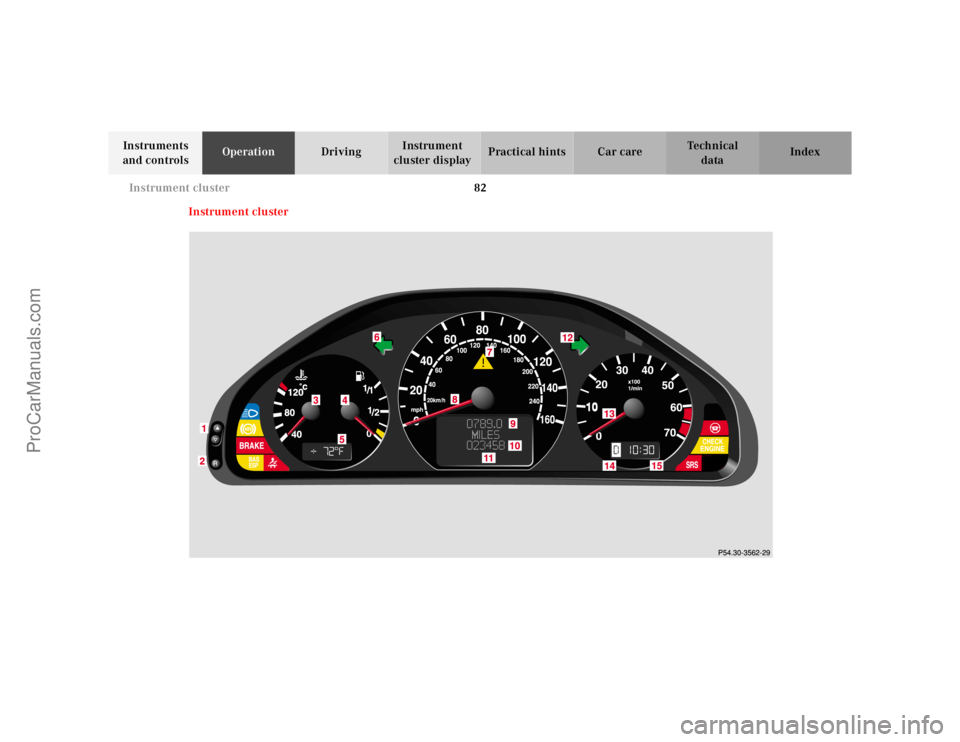
cluster displayPractical hints Car care Index 1Push buttons V and W for intensity of
instrument lamps, see page 85
2Push button J for resetting trip odometer, see
page 87, or to acknowledge a malfunction or
warning message, see page 87
3Coolant temperature gauge, see page 86
4Fuel gauge with reserve and fuel cap placement
warning lamp, see page 228
5Outside temperature indicator, see page 86
6Left turn signal indicator lamp, see combination
switch on page 117
7ESP warning lamp, see page 2298Speedometer
9Trip odometer, see page 87
10Main odometer
11Multifunction indicator, see page 231
or FSS indicator, see page 109
or engine oil level indicator, see page 112
12Right turn signal indicator lamp, see combination
switch on page 117
13Tachometer, see page 87
14Gear range indicator display, see selector lever
positions on page 194
15Clock, see page 106
ProCarManuals.com
Page 87 of 325
84 Instrument cluster
Te ch n ica l
data Instruments
and controlsOperationDrivingInstrument
cluster displayPractical hints Car care Index
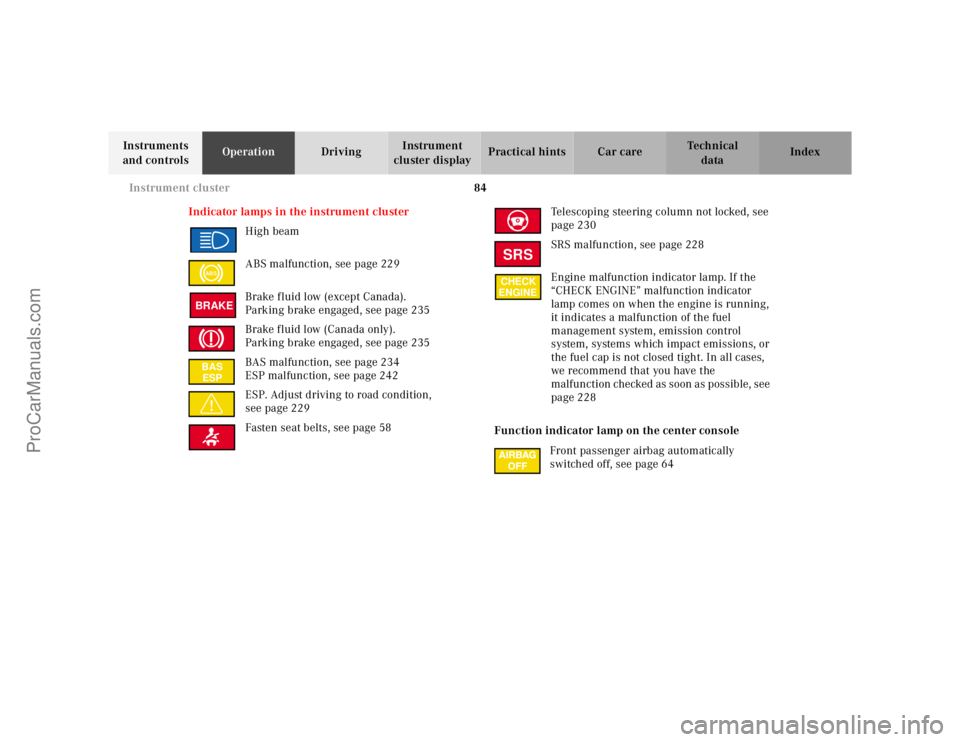
Indicator lamps in the instrument cluster
High beam
ABS malfunction, see page 229
Brake fluid low (except Canada).
Parking brake engaged, see page 235
Brake fluid low (Canada only).
Parking brake engaged, see page 235
BAS malfunction, see page 234
ESP malfunction, see page 242
ESP. Adjust driving to road condition,
see page 229
Fasten seat belts, see page 58Telescoping steering column not locked, see
page 230
SRS malfunction, see page 228
Engine malfunction indicator lamp. If the
“CHECK ENGINE” malfunction indicator
lamp comes on when the engine is running,
it indicates a malfunction of the fuel
management system, emission control
system, systems which impact emissions, or
the fuel cap is not closed tight. In all cases,
we recommend that you have the
malfunction checked as soon as possible, see
page 228
Function indicator lamp on the center console
Front passenger airbag automatically
switched off, see page 64
ABSBRAKEBAS
ESP
SRSCHECK
ENGINE
ProCarManuals.com
Page 88 of 325
85 Instrument cluster
Te ch n ica l
data Instruments
and controlsOperationDrivingInstrument
cluster displayPractical hints Car care Index Activating instrument cluster display
The instrument cluster is activated by:
•Opening the door.
•Pressing button J, V or W on the instrument
cluster.
•Turning the electronic key in steering lock to
position 1 or 2.
•Switching on the exterior lamps.
Display illumination
The display for temperature, odometer, multifunction
indicator, FSS indicator and clock is illuminated briefly
when opening the driver’s door.
The display illumination brightness responds
automatically according to changes in the surrounding
light sensitivity.
To briefly illuminate the display (with electronic key
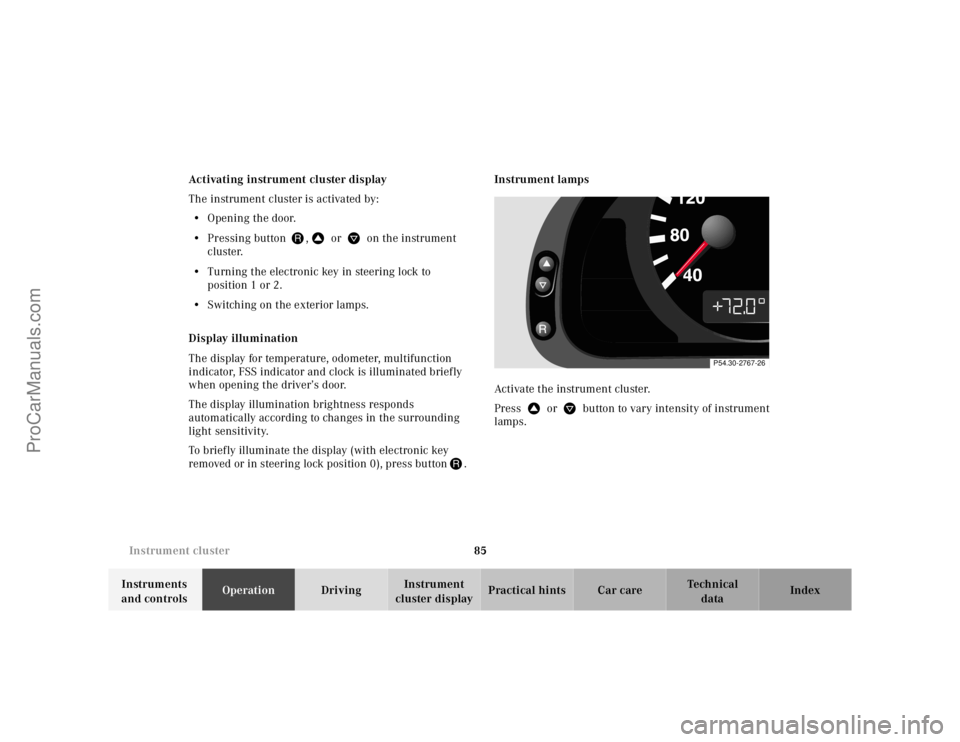
removed or in steering lock position 0), press buttonJ.Instrument lamps
Activate the instrument cluster.
Press V or W button to vary intensity of instrument
lamps.
P54.30-2767-26
ProCarManuals.com
Page 89 of 325
86 Instrument cluster
Te ch n ica l
data Instruments
and controlsOperationDrivingInstrument
cluster displayPractical hints Car care Index
Coolant temperature gauge (3)
During severe operating conditions and stop-and-go city
traffic, the coolant temperature may rise close to the red
marking.
The engine should not be operated with the coolant
temperature in the red zone. Doing so may cause
serious engine damage which is not covered by the
Mercedes-Benz Limited Warranty.Outside temperature indicator (5)
The temperature sensor is located in the front bumper
area. Due to its location, the sensor can be affected by
road or engine heat during idling or slow driving. This
means that the accuracy of the displayed temperature
can only be verified by comparison to a thermometer
placed next to the sensor, not by comparison to external
displays (e.g. bank signs etc.).
Adaptation to ambient temperature takes place in steps
and depends on the prevailing driving conditions (stop-
and-go or moderate, constant driving) and amount of
temperature change.
Wa r n i n g !
• Driving when your engine is badly overheated
can cause some fluids which may have leaked
into the engine compartment to catch fire. You
could be seriously burned.• Steam from an overheated engine can cause
serious burns and can occur just by opening
the engine hood. Stay away from the engine if
you see or hear steam coming from it.Turn off the engine, get out of the vehicle and do
not stand near the vehicle until it cools down.
Wa r n i n g !
The outside temperature indicator is not designed
to serve as an Ice-Warning Device and is therefore
unsuitable for that purpose. Indicated
temperatures just above the freezing point do not
guarantee that the road surface is free of ice.
ProCarManuals.com
Page 90 of 325
87 Instrument cluster
Te ch n ica l
data Instruments
and controlsOperationDrivingInstrument
cluster displayPractical hints Car care Index Trip odometer (9)
To reset to “0” miles/km:
Activate the instrument cluster if it is not already
activated by pressing the J button on the instrument
cluster.
Press button è or ÿ on the multifunction
steering wheel repeatedly until the trip odometer
appears if it is not displayed. See page 92.
Press button J on the instrument cluster to reset trip
odometer.Tachometer (13)
The red marking on tachometer denotes excessive
engine speed.
Avoid this engine speed, as it may result in serious
engine damage that is not covered by the
Mercedes-Benz Limited Warranty.
To help protect the engine, the fuel supply is interrupted
if the engine is operated within the red marking.
ProCarManuals.com
Page 91 of 325
88 Multifunction steering wheel, multifunction display
Te ch n ica l
data Instruments
and controlsOperationDrivingInstrument
cluster displayPractical hints Car care Index
Multifunction steering wheel, multifunction display
ProCarManuals.com
Page 92 of 325
89 Multifunction steering wheel, multifunction display
Te ch n ica l
data Instruments
and controlsOperationDrivingInstrument
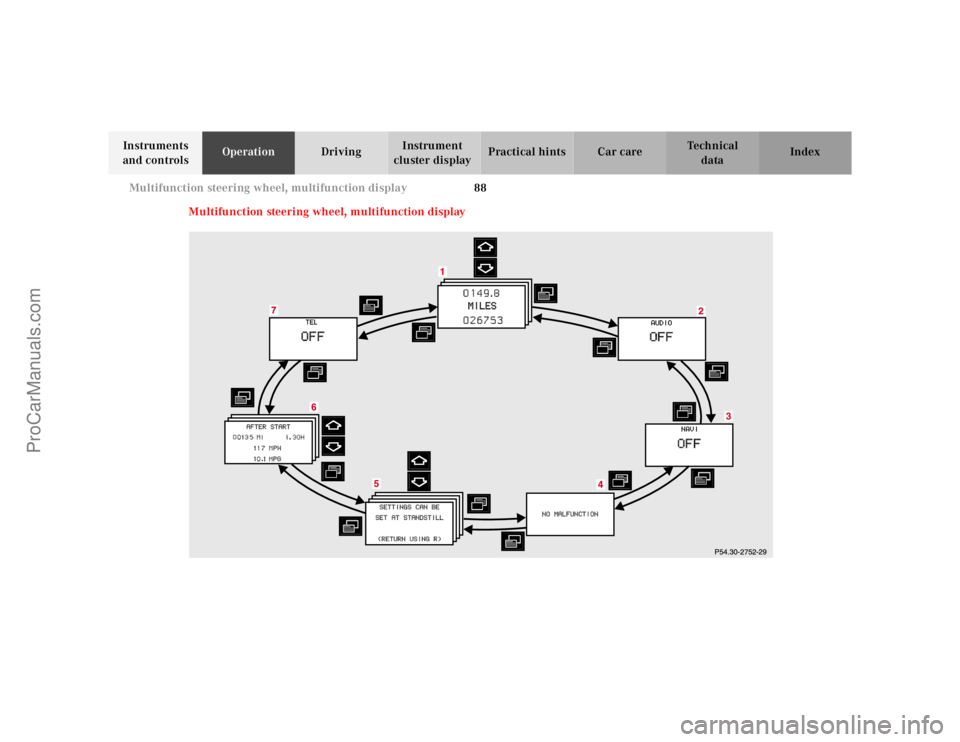
cluster displayPractical hints Car care Index Depending on your vehicle’s equipment, you may use
the buttons on the multifunction steering wheel to call
up, control and set the following systems in the
multifunction display:
1Trip odometer and main odometer, see page 92
Vehicle speed, see page 92
Flexible service system (FSS), see page 109
Engine oil level indicator, see page 112
2Audio systems, see page 93
Radio, see page 93
CD player (optional), see page 94
Cassette player, see page 95
3Navigation system (optional), see page 101
4Malfunction message memory, see page 104
5Individual settings, see page 106
6Trip computer, see page 102
After start
After reset
Fuel tank content
7Telephone (if so equipped), see page 96Press the è or ÿ button repeatedly until the
required system is displayed.
Pressing the è button advances the display to the
next system.
Pressing the ÿ button returns the display to the
previous system.
You may call up additional displays within some of these
categories by pressing the j or k button.
Wa r n i n g !
A driver’s attention to the road must always be his/
her primary focus when driving. For your safety and the safety of others, selecting
features through the multifunction steering wheel
should only be done by the driver when traffic and
road conditions permit it to be done safely.
Programming individual settings in the system can
only be made while the vehicle is at standstill.
ProCarManuals.com
Page 93 of 325
90 Multifunction steering wheel, multifunction display
Te ch n ica l
data Instruments
and controlsOperationDrivingInstrument
cluster displayPractical hints Car care Index
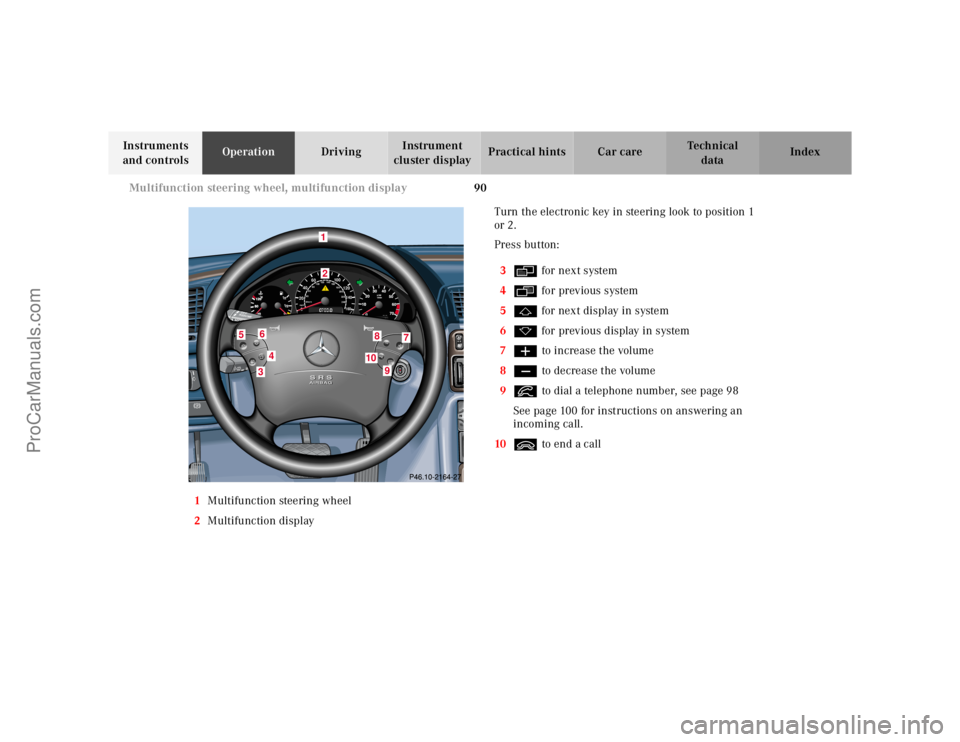
1Multifunction steering wheel
2Multifunction displayTurn the electronic key in steering look to position 1
or 2.
Press button:
3è for next system
4ÿ for previous system
5j for next display in system
6k for previous display in system
7æ to increase the volume
8ç to decrease the volume
9í to dial a telephone number, see page 98
See page 100 for instructions on answering an
incoming call.
10ì to end a call
10
040608060
40mph20km/h20100
120
140160
80100VDO
180
200
220
240 160 120 140
9
9
TE
L
OFF
RESUME
12
3
4
5
6
7
810
1
34
5
6
8
7
9
10
ProCarManuals.com
Page 94 of 325
91 Multifunction steering wheel, multifunction display
Te ch n ica l
data Instruments
and controlsOperationDrivingInstrument
cluster displayPractical hints Car care Index Press the è or ÿ button repeatedly until the
required system is displayed.
Pressing the è advances the display to the next
system.
Pressing the ÿ returns the display to the previous
system.
You may call up additional displays in some systems by
pressing the j or k button.Notes:
The displays in the multifunction display can be set to
German, English, French, Italian or Spanish language.
See the “TEXT” individual setting on page 106 for
instructions on changing the language setting.
The displays for the audio systems (radio, CD player,
cassette player) will appear in English, regardless of the
language selected.
ProCarManuals.com