reset MERCEDES-BENZ CLK COUPE 2004 User Guide
[x] Cancel search | Manufacturer: MERCEDES-BENZ, Model Year: 2004, Model line: CLK COUPE, Model: MERCEDES-BENZ CLK COUPE 2004Pages: 453, PDF Size: 14.93 MB
Page 138 of 453
135
Controls in detail
Operating system i
Ifyou press the jork button for
mo rethan one sec ond,the op erating syst em
scrolls through the names rapidly. Releasing the
button stops the rapid scroll.
If you do not wish to make a call, press the ì
button.
6 Press the íbutton.
The operating system dials the appro-
priate telephone number. If ther eis:
! an audio system installed, theDIALINGmessage appears in the
display
! a COMAND* system installed, the
CONNECTING CALLmessage appears
in the display If a connection is mad
e,you will see the
name of the person you are calling and the
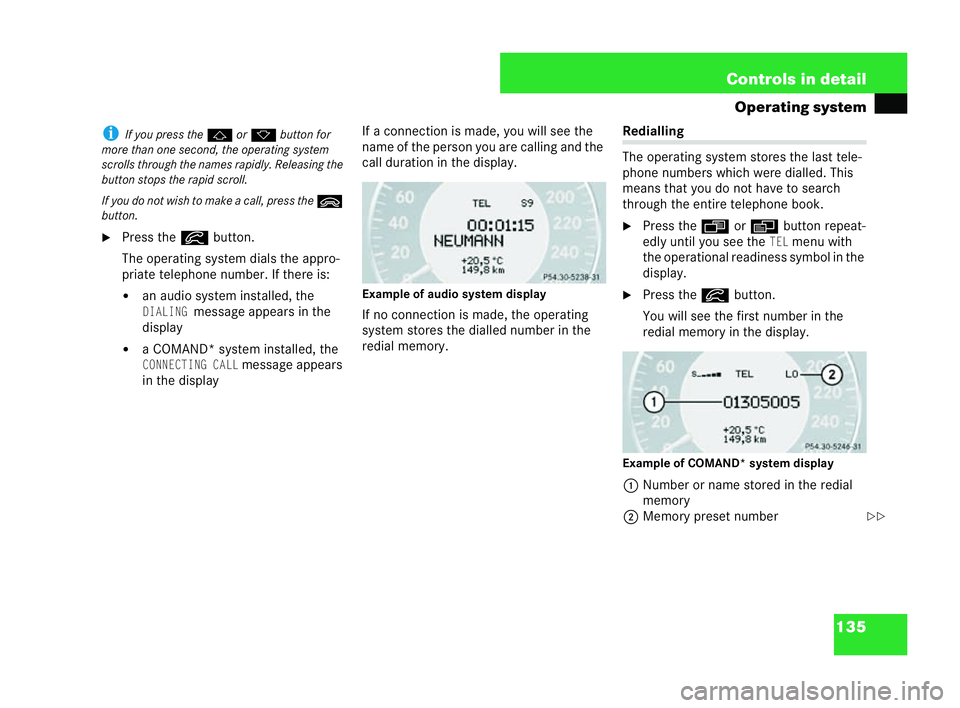
call duration in the display.
Example ofaudio system display
If no connection is made, the operating
system stores the dialled number in the
red ialmemor y. Red
ialling
The operating system sto res the last tele-
phone numbers whi chwere dialled. This
means that you do not have to search
through the entire telephone book.
6 Pres s the ÿ orè button repeat-
edly until you see the
TELmenu with
the operational readiness symbol in the
display.
6 Press the íbutton.
You will see the first number in the
redial memory in the display.
Ex am ple of COM AND* system display
1 Number or name store din the redial
mem ory
2 Memo ry preset number
P54.30-5238-31 P54.30-5246-31
==209en_d2.boo Seite
135 Dienstag, 25. Mai 2004 7:26 19
Page 139 of 453
136 Controls in detail
Operating system
6
Press the jork button repeat-
edly until the number you are looking
for is shown inthe display.
i Ifyou do not wish to make a call, press
the ì button.
6 Press the íbutton.
Th e operating system dials the appro-
pri ate telephone number.
If a connection ismade, you will see the
call dur ationa nd:
! the name in the display, if it is stored in
the telephone book
or
! the number of the person you are call-
ing Memory
preset number
The last numbers dialled are always
stored. The numbe rofst ored numbers
depends on the type of telephone you are
using.
Most recently dial led numbe r:
! Audio system displ ay:L1
! COMAND* system display:
LO
Numbers dialled previously:
!Audio system disp lay:
L2toLn
! COMAND* system display:
L1toLn 209en_d2.boo Seite
136 Dienstag, 25. Mai 2004 7:26 19
Page 183 of 453
180 Controls in detail
Open-air
Clo sing all side windows
6 Pullthe soft top switch twice. Pull it
brie fly the first tim eand then pull and
hold until the side windows have
reached the desired hei ght. Resetting the side windows
The side windows must be reset if the bat-
tery was disconnected or discharged.
i Each side window must be reset separately.
6 Switch on the ignition.
6 Pull switch 1,2 ,3 or4 up until the
wi ndow is closed and hold the switch in
this posit ion for approximately one sec-
ond.
!Onlyopen the sliding /tilting sunroof if itis
free of snow and ice, otherwise malfunctions
may occur.
Do no tallow sharp-edged objects to protrude
th ro ugh the sliding /tilting sunroof. You could
otherwise damage the seals. i
From the outside it is also possible to:
! open the side windows usingth e summer
opening feature ( =page 183)
! closethe side windows using the conve n-
ience closing feature (
=page 184)
Opening and closing the sliding /tilti ng sunroof
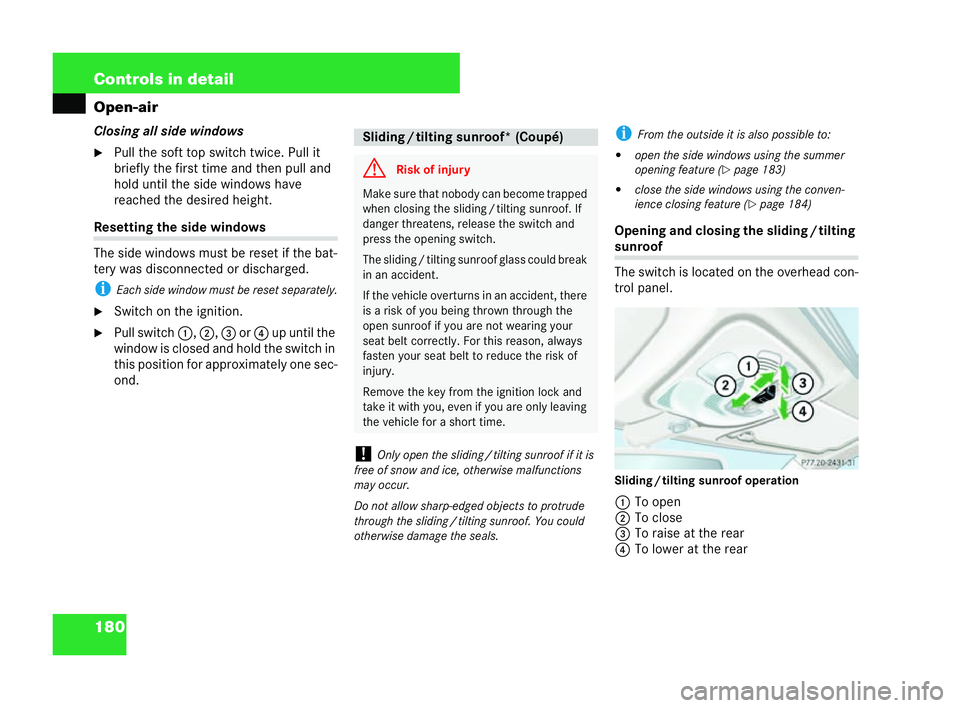
The switch is located on the overhead con-
trol panel.
Sliding
/tilting sun roof operation
1 To open
2 To close
3 To raise at the rear
4 Tolower at the rear Sliding
/tilti ng sunroof* (Coup é) G
Risk of injury Make sure that nobody can become trapped
when closing the slidin
g/tilting sunroof. If
danger threatens, release the switch and
press the opening switch.
The sliding /tilting sunr oofglas s coul d break
in an accident.
If the vehicle overturns in an accident, there
is a risk of you being thrown through the
open sunroof ifyo u are not wearing your
seat belt correctly. For this reason, always
fast en your seat belt to reduce the ris kof
injury.
Remove the key from th eignition lock and
take it with you, even if you are only leavi ng
the vehicle for a short time. P77.20-2431-31209en
_d2.boo Seite 180 Dienstag, 25. Mai 2004 7:26 19
Page 186 of 453
183
Controls in detail
Open-air Resetting the sliding
/tilting sunroof
The slidin g/tilting sunroof mus tbe reset
if:
! the battery was disconnected or dis-
charged
! the sliding /tilti ng sunroof was closed
manual ly(emergency operation)
(= page 343)
! the sliding /tilti ng sunroof can only be
opened with a jerk
! there was a mal function
6 Switch on the ignition.
6 Press the switch ( =pa ge 181) in the
direction of arrow 3unti lthe sliding /
tilting sunroof is fully raised at the rear. 6
Keep the switch pressed for approxi-
mately one secon dafter the sunroof is
raised.
6 Check that the slidin g/tilting sunroof
can (automatically) be fully opened
aga in (
=pa ge 180).
If you cannot (aut omatically) open the
sliding /tilti ng sunroof fully:
6 Reset the slidin g/tilting sunroof.
In warm weather, you may wish to ventilate
the vehicle before driv ing off. To do this,
the remote control can be used to simulta-
neously open:
! the slidin g/tilting sunroof* and
! the side windows
i Thesumm er opening feature can onl ybe
ac tivat edusing the remote control. 6
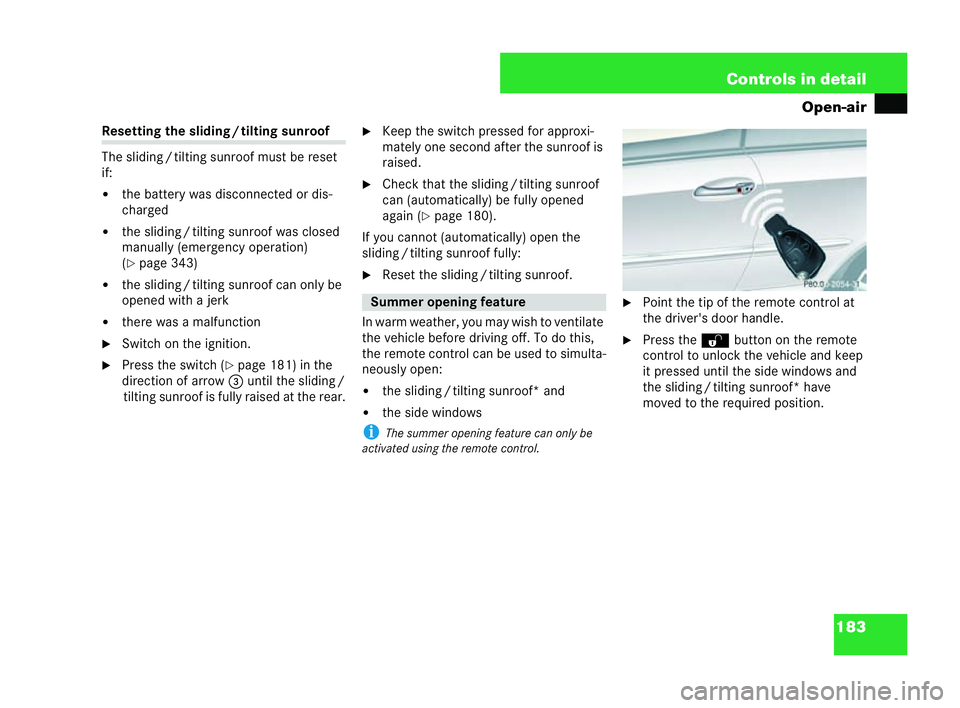
Point the tip of the remote control at
the driver's door handle.
6 Pres s the Πbutton on the remote
co ntro l to unlock thevehicle an dke ep
it pressed until the side windows and
the sliding /tilting sunroof* have
moved to the required position. Summer opening feature P8
0.00-2054 -31 209en_d2.boo Seite
183 Dienstag, 25. Mai 2004 7:26 19
Page 200 of 453
197
Controls in detail
Driving systems
Distronic assists you when driving on
motorways or high-speed ma jor roads.
! If a slower vehicle is detected ahead,
Distronic causes your vehicle to brake
and maintain a preset distance from
the vehicle infront.
! If there is no vehicle in front, Distronic
ope rates in the same way as cruise
control* ( =page 197). Distronic*
G
Risk ofinjury Do not place your foot und
erthe brake
pedal, as it coul dbecome trapped. Distronic
may apply the brakes to prevent the vehicle
fro mexceeding the setsp eed. When this
happens, Distronic depresses the brake
pedal. G
Risk of accident Distronic cannot take account
ofroad and
tra ffic conditions.
Always pay attent ion to road and traffic con-
di tions, even when Distronic is activated.
Distronic is onlyan aid desig ned to assist
you when driving. You are respon sible for
maintaining a suffi cient distanc efro mother
vehicles, for driv ing at anappropriate speed
an d for bra king in good time.
Do not activate Distronic:
! if road and traffic conditi onsdonot per-
mit a constant driving speed to be main-
tained (e.g .dense traffic or winding
ro ad s). You could otherwise causean
accident
! on slippery road surfaces. The drive
whe elsmay lose their grip when braking
or acceleratin gand the vehicle could
skid
! when visibility is bad, e.g. infog, heavy
rain or snow G
Risk of accident Deactivate Distronic:
!
when chan ging fro mthe outside lan eto
the inside lane if vehicles on the outside
la ne are travelling more slowly
! when driving in a filter lane or mot orway
exit
! when dri ving incomplex road and traffic
co nd ition s,such as throu ghmotorway
roadworks
Otherwise, Dis tronic ma intains the stored
speed.
Distronic do esnot react:
! toas tationary obstacle, e.g. in a traffic
jam, or to a vehicle which has bro ken
do wn
! toan oncoming vehic lein the same lane
Distronic causes your vehicle to brake at a
maximum of 2 m/s2
. This is approximately
20% of the maximum braking force of your
vehicle. If this deceleration isinsufficient,
you will have to use the brake pedal to avoid
a collision. 209en_d2.boo Seite
197 Dienstag, 25. Mai 2004 7:26 19
Page 268 of 453
265
Operation
Service
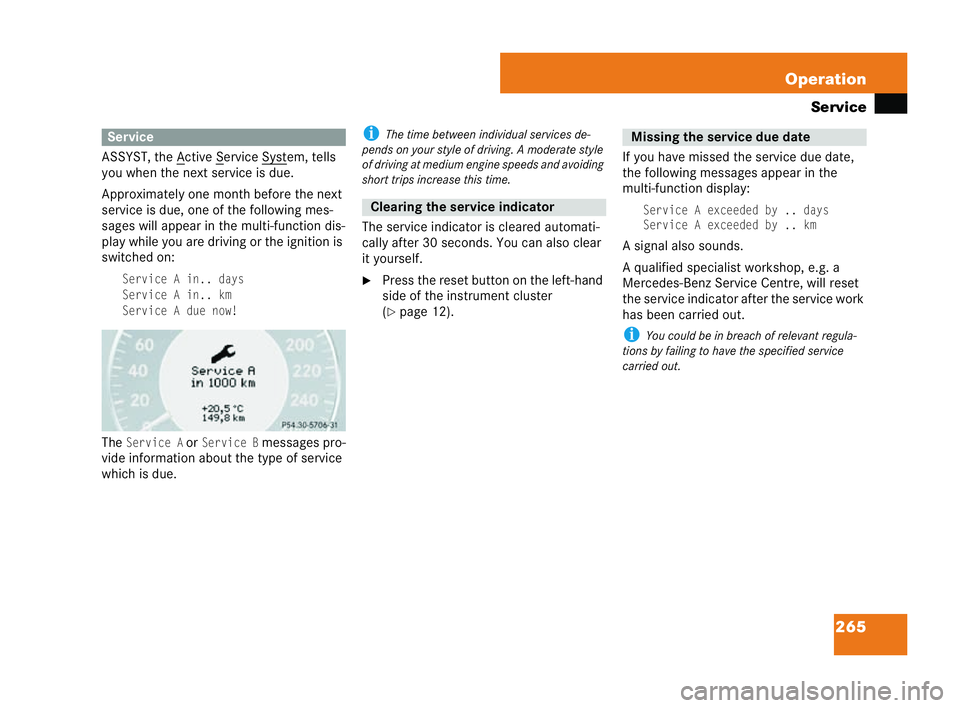
ASSYST, the A ctive S ervice Syst em, tells
you when the next service is due.
Approximately one month before the next
service is due ,one of the following mes-
sages will appear in the multi-function dis-
play while you are driving or the ignition is
switched on:Se rvice A in.. days
Se rvice A in.. km
Se rvice A due now!
TheService AorService Bmessages pro-
vi de information about the type of service
which is due. i
Thetime between individual services de-
pends on your sty leof driving. Amoderate style
of driving atmedium engine speeds and avoidi ng
short trips increase this time.
The service indicator is cleared automati-
cally after 30 seconds. You can also clear
it yourself.
6 Press the reset button on the left-hand
side of the instrument cluster
(
= page 12). If you have missed the service due date,
the following messages appear in the
multi-function display:
Service
A exceededby.. days
Service A exceededby.. km
A signal also sounds.
A qual ified specialist workshop, e.g. a
Mercedes-Benz Serv ice Centre, will reset
the service indicator after the service work
has been carr ied out.
i You could be in breach of rele vant regula-
tions by failing tohave the spe cified service
carried out. Service
P54.30-5239-31 Clearing the service indicator Missi
ngthe service due date 209en_d2.boo Seite
265 Dienstag, 25. Mai 2004 7:26 19
Page 269 of 453
266 Operation
Service
6
Switch on the ignition.
The standard display appears in the mul ti-
function display (= page 120).
6 Pres s the k orj button on the
mu lti-function steering wheel repeat-
edly until the 9or´ service
symbol appears in the multi-function
display with the service due date.
i Periods when the battery isdisconnected
ar en ot recorde dbythe timed service indicator.
Yo u must therefore subtract such periods from
the ser vice due dat eyourself.
Do not confuse the service indicator with the
: engine oil level display. If your vehicle is ever service
dother than
at a Mercedes-Benz Serv ice Ce ntre, you
can reset the service indicator yoursel f.
6 Switch on the ignition.
The standard displ ayappears in the multi-
function display (= page 120).
6 Press the korj button on the
multi-function steering wheel repeat-
edly until the 9or´ service
symbol appears in the mul ti-function
display with the service due date.
6 Press and hold the reset button on the
left in the instrument cluster for about
four seconds. The following message appears
inthe
display:Re set service interval?
To confirm pr ess reset button
6To confirm, press and hold the reset
button until asignal sou nds.
The service indicator now displays the
new value.
i Ifyou have reset the service indicator acci-
dentally, a qualified specialist workshop, e.g. a
Mercedes-Benz Service Centre, will beableto
upda te itagain. Calling up the
service due date Resetti
ngthe service indic ator 209en_d2.boo Seite
266 Dienstag, 25. Mai 2004 7:26 19
Page 283 of 453
280 Practical advice
Display
messages
The operating system shows warnings or
malfunct ions in the multi-function display.
Certain messages are accompanied by an
audible warning signal or a continuous
tone.
High-priority messages are highlighted in
red in the display. These messages are
printed inred in the following tables.
Please respond inaccordance with the
messages and follow the additional notes
in this Owner's Manual.
! You can acknowledge low-priority mes-
sages by pressing the è,· ,
j ork buttons on the multi-
fun ction steering wheel or the reset
button on the left in the instrument
cluster. They will then be stored in the
malfunction memor y.
! Highest-priority messages cannot be
acknow ledged and are automatically
stored in the malfunction memory. If you select
the malfunction memory
menu in the operating system, the ac-
knowledged and unacknowledged mes-
sages will appear ( =page 116).
! Malfunctions and faults are only indicated
and dis play ed bycertain systems. The messages
se rve merelyto make sure that the vehicle oper-
ates safel y. i
Turning the key to position 2in the ignition
lock or pressing the KEYLESS GO* button twice
activates all the warni ngand indicator lamps
(except for the turn signal indicator lamps) and
the multi-function display. Please check that
the yare working properly before commencing a
journey.
The following tables show all the display
messages. The messages are divided into
sections to make it easier to find the rele-
va nt message:
! Text-style messages from
(=
page 281) onwards are displayed
alphabetically
! Symbol messages from ( =pa ge 293)
onwards Display messages
G
Riskofaccident No
messages are displayed if the instrument
clu ster or multi-function display fails. Other
systems which significantly affect the vehi-
cle's han dling characteristics may have
failed.
Contact a qualified spec ialist workshop im-
me diate lywhich hast he nece ssary special-
ist knowledge and tools to carry out the
work requi red. Mercedes-Benz recommends
that you use a Mercedes-Benz Service Cen-
tre for this purpose. In parti cular, work rele-
va nt to safety or onsafety-relate dsystems
must be carried out at a quali fied specialist
wor kshop. 209en_d2.boo Seite
280 Dienstag, 25. Mai 2004 7:26 19
Page 347 of 453
344 Practical advice
Openin
g/clo sing in an emergency
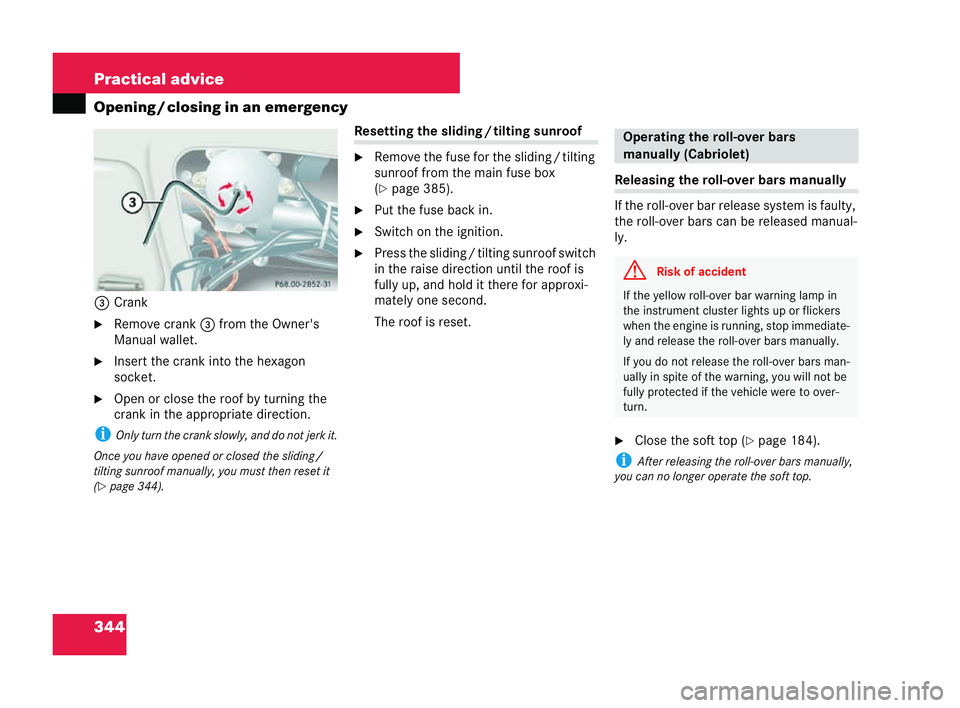
3 Crank
6 Remove crank 3from the Owner's
Manual wallet.
6 Insert the crank into the hexagon
socket.
6 Open or clos ethe roof by turning the
crank inthe appro priate direction.
i Only turn the cra nkslowly, and do not jerk it.
Once you have opened or closed the slidin g/
tilting sunroof manuall y,you must then reset it
(= page 344). Resetting
thesliding /tilti ng sunroof
6 Remove the fuse for the sliding /tilting
sunroof from the main fuse box
(= page 385).
6 Put the fuse back in.
6 Switch on the igniti on.
6 Press the sliding /tilting sunroof switch
in the raise direction until the roof is
fully up, and hold itthere for approxi-
mately on esecond.
The roof is reset. Releasing
the roll-over bars manually
If the roll-over bar release system isfaulty,
the roll-over bars can be released manual-
ly.
6 Close the soft top ( =page 184).
i After relea sing the roll-over bars manually,
yo u can no lo nger op eratethe soft top.
P 68
.00-2852-31 Operating the rol
l-ov er bars
manually (Cabriolet) G
Risk of accident If the yellow roll-over bar warning lamp in
the instrument cluster li
ghtsup or fl ickers
when the engine is ru nning,sto pimmediate-
ly and release the roll-over bars manually.
If yo u do not release the roll-over bars man-
ually in spite of the warning, you will not be
fully prote cted ifthe ve hicle were to over-
turn. 209en_d2.boo Seite
344 Dienstag, 25. Mai 2004 7:26 19
Page 434 of 453
431
Index
Ch assis num ber.. . . . .... . . . ...393
Exp lanation . . . . . . . .. . . . . . . ... 420
Child seat
Automatic recognition . . . . . . . .. ..64
Au tomatic rec ognition (fault) . . . ..309
ISOFIX . . . . ..... . . ..... . . . ....65
Po sition . . . ..... . . ..... . . . ....62
Re arward -facing .. . . . .... . . . ....64
Re commendations . . . ..... . . ....63
Child-proof locks Re ar sid ewindows . . . ..... . . ....67
Childr en
In the vehicle . . . . . . .. . . . . . . .. ..60
Re straint syst ems . . . ..... . . ....61
Chock, folding .... . . . .... . . . ...279
Cigare ttelighter .. . . . .... . . . ...230
Cleaning Ve hic le. . . . .... . . . ..... . . . ...268
Cleaning – see Care
Clock Se tting (operating syste m). . . . . . .121
Closing (vehicle) .. . . . .... . . . ....44
COC papers (EC CERTIFICATE OF
CONFORMITY) .... . . . .... . . . ...411
Co ckpit
Exp lanation . . . . . . . .. . . . . . . ... 420
Overview . .. . . . . . . .. . . . . . . .. . .. 8 Cold start
. . .. . . . . . . . . . . .. . . . . ..38
Co llapsible spare wheel
Inflating . . . . . . .. . . . . . . .. . . . .. 372
Sto rage location .. . . . . . . .. . . . .. 278
Co mbination switch . .. . . . . . . . .. 102
Constan theadlamp mode .. . . . .. 100
Setting (operating system) . . . . . . .122
Consumption statistics Calling up /rese tting
(operating system) . . . . . . . . . . . . .131
Resetting . . . . . .. . . . . . . .. . . . .. 132
Convenience clo sing feature . . ... 184
Convenience openin g/
closing feature Air-re circulation mode
(The rmatic) . . . . .. . . . . . . .. . . . .. 161
Air-re circulation mode
(The rmotronic) . .. . . . . . . .. . . . .. 170
Coolant ..... . . . ..... . . . ...247 ,415
Checking the level . . . . . . .. . . . .. 247
Display message . . . . . . . .. . . . .. 298
Gau gehigh . . . . .. . . . . . . .. . . . .. 325
Mix ture . . . . . . . .. . . . . . . .. . . . .. 415
Tem perature gauge . . . . . .. . . . .. 107
War ning lamp . . .. . . . . . . .. . . . .. 314 Co
oling
Therm atic . . . .... . . . . .... . . . . .161
Therm otronic .... . . . . .... . . . . .172
Corrosion inhibitor
con centration .... . . . . .... . . . . .415
Crank (sliding /tilting sunroof) . ..3 44
Cruise control .... . . . . .... . . . . .191
Display messag e. . . . . .... . . . . .292
Expl anation . .... . . . . .... . . . . .420
Cup holder Cockpit . . . . . .... . . . . .... . . . . .228
Rear ... . . . . .... . . . . .... . . . . .229 D
Demist bu tton
Thermatic . . . .... . . . . .... . . . . .159
Therm otronic .... . . . . .... . . . . .169
Diesel Consumption .... . . . . .... . . . . .411
Low outside tem peratures .. . . . . .243
Mix ing ratio . .... . . . . .... . . . . .243
Diese lengine
Winter driving .... . . . . .... . . . . .243
Digital speedometer . . .... . . . . . .113 209en_d2.boo Seite
431 Dienstag, 25. Mai 2004 7:26 19