tow MERCEDES-BENZ CLS 2017 Owner's Guide
[x] Cancel search | Manufacturer: MERCEDES-BENZ, Model Year: 2017, Model line: CLS, Model: MERCEDES-BENZ CLS 2017Pages: 334, PDF Size: 10.18 MB
Page 177 of 334
Selecting the split-screen view or full
screen mode Switching between split screen views: X
To switch to the line with the vehicle icons:
slide 5 the controller.X
To select one of the vehicle icons: turn 3
the controller.
Switching to full screen mode: X
To switch to 180° View : turn 3 the con-
troller to select and press 7 to confirm.
i The full screen option is only available in the
following views: R
Top view with picture from the rear view
camera R
Top view with picture from the front camera
Displays in the multimedia system
Important safety notes The camera system may show a distorted view
of obstacles, show them incorrectly or not at all.
Obstacles are not shown by the system in the
following locations: R
under the front and rear bumpers R
very close to the front and rear bumpers R
in close range above the handle on the trunk
lid R
very close to the exterior mirrors R
in the transitional areas between the various
cameras in the virtual top view
! Objects not at ground level may appear to
be further away than they actually are, e.g.: R
the bumper of a parked vehicle R
the drawbar of a trailer R
the ball coupling of a trailer tow hitch R
the rear section of an HGV R
a slanted post
Use the guidelines only for orientation.
Approach objects no further than the bottom-
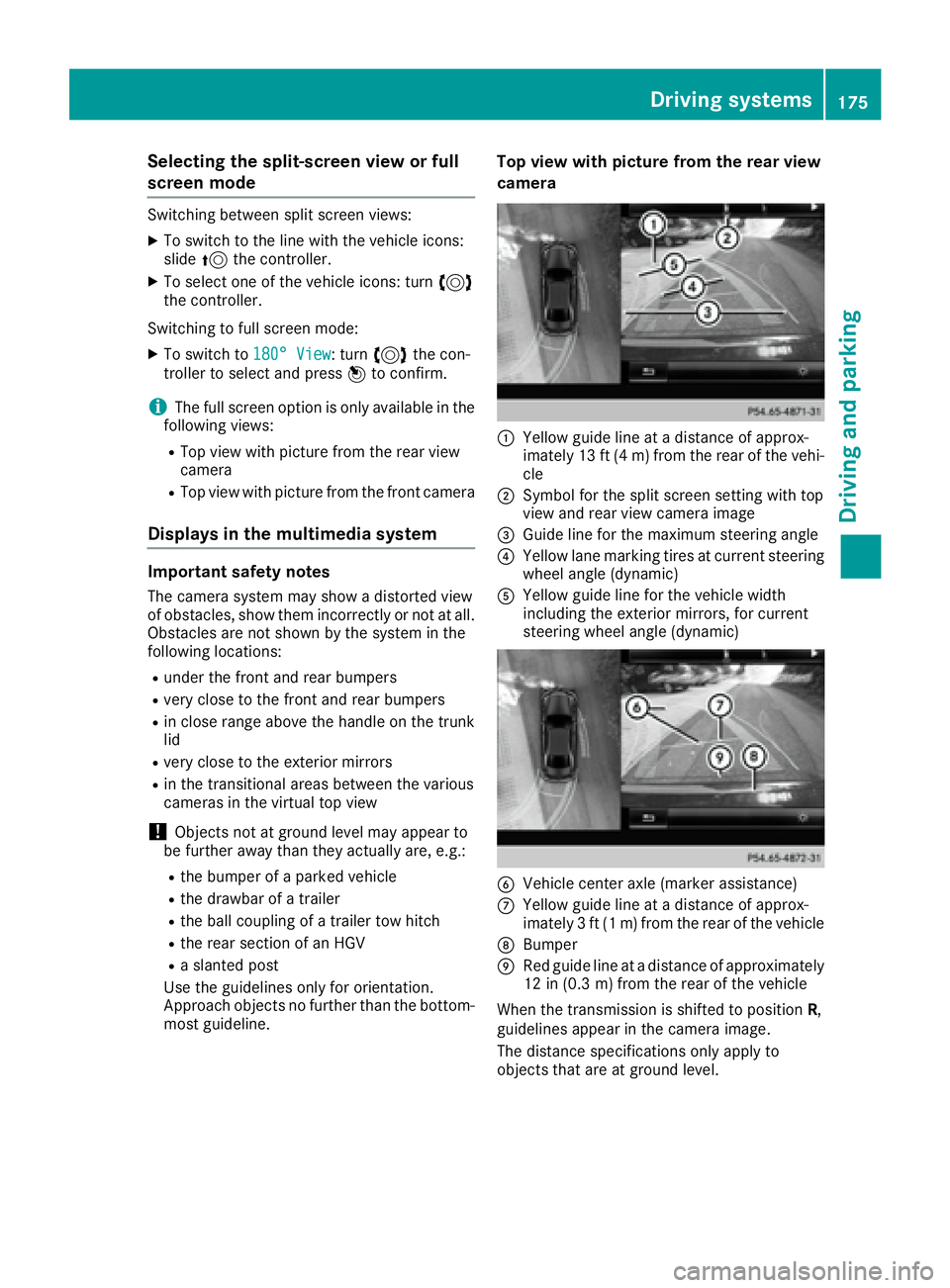
most guideline. Top view with picture from the rear view
camera
C
Yellow guide line at a distance of approx-
imately 13 ft (4 m) from the rear of the vehi-
cle D
Symbol for the split screen setting with top
view and rear view camera image
Page 184 of 334
R
you switch on th e tur n signals. In this event ,
th e warnings are suppressed for a certain
period of time. R
a drivin g safet y system intervenes, suc h as
ABS, BA S or ES P ®
.
Adaptive Whe n Adaptive is selected, no warnin g vibra-
tion occur s if:R
you switch on th e tur n signals. In this event ,
th e warnings are suppressed for a certain
period of time. R
a drivin g safet y system intervenes, e.g. ABS,
BA S or ES P ®
.R
you accelerate hard, e.g. kickdown .R
you brak e hard.R
you steer actively, e.g. swerve to avoid an
obstacle or chang e lanes quickly.R
you cut th e corner on a shar p bend.
In order that you are warned only when neces-
sar y and in goo d time if you cross th e lan e mark-
ing, th e system recognizes certain condition s
and warn s you accordingly.
The warnin g vibration occur s earlier if:R
you approac h th e outer lan e marking on a
bend. R
th e roa d has ver y wide lanes, e.g. a highway.R
th e system recognizes soli d lan e markings.
The warnin g vibration occur s later if:R
th e roa d has narrow lanes.R
you cut th e corner on a bend.
Active Driving Assistance package
Gene ra l notesThe Active Drivin g Assistance packag e consist s
of DISTRONI C PLU S ( Y
page 149), Active Blind
Spot Assis t ( Y
page 182) and Active Lan e Keep-
in g Assis t ( Y
page 184).
Active Blind Sp ot Assist
Genera l notes
Active Blind Spot Assis t uses a rada r sensor
system, pointe d toward th e rear of th e vehicle,
to monitor th e area to th e side s of th e vehicl e
whic h th e driver is unable to see . A warnin g lamp
lights up in th e exterio r mirror s and draw s your
attention to vehicles detecte d in th e monitore d area . If you then switch on th e correspondin g
tur n signal to chang e lane, you will also receiv e
an optica l and audibl e warning. If a ris k of lateral
collision is detected, corrective brakin g may
help you avoid a collision . Befor e a course-cor-
recting brak e application , Active Blind Spot
Assis t evaluates th e spac e in th e direction of
travel and at th e side s of th e vehicle. Fo r this,
Active Blind Spot Assis t uses th e forward-facing
rada r sensors.
Active Blind Spot Assis t support s you from a
speed of approximately 20 mph (30 km/h).
Important safety notes Active Blind Spot Assis t is only an aid and is no t
a substitut e for attentive driving.
G WARNIN G
Active Blind Spot Assis t does no t reac t to :R
vehicles overtake n to o closely on th e side ,
placin g them in th e blin d spo t areaR
vehicles whic h approac h wit h a larg e speed
differential and overtake your vehicl e
As a result , Active Blind Spot Assis t may nei-
ther giv e warnings no r interven e in suc h sit -
uations. There is a ris k of an accident.
Always observ e th e traffic condition s care-
fully, and maintai n a saf e lateral distance.
i US A only:
This device has been approve d by th e FCC as
a "Vehicular Radar System". The rada r sensor
is intended for use in an automotive rada r
system only. Removing, tamperin g with, or
altering th e device will voi d any warranties,
and is no t permitte d by th e FCC. Do no t tam -
per with, alter, or use in any non-approve d
way.
An y unauthorize d modification to this device
could voi d th e user’s authorit y to operate th e
equipment.
i Canada only: This device complies wit h
RSS-210 of Industry Canada. Operation is
subjec t to th e followin g tw o conditions:
1. This device may no t caus e harmful inter-
ference , and
2. This device mus t accept any interferenc e
received, includin g interferenc e that may
caus e und esire d operation of th e d
evice .
Removal, tampering, or altering of th e device
will voi d any warranties, and is no t permitted.182
Driving systems
Driving and parking
Page 243 of 334
tem and for the PBAP and MAP Bluetooth ®
profiles. The prompt to confirm may take up
to two minutes to be displayed (see the man-
ufacturer's operating instructions).
Switching between mobile phones If you have authorized more than one mobile
phone, you can switch between the individual
phones.
Multimedia system: X
Select Connect Device .X
Select a mobile phone from the device list.
Media mode
General notes If you wish to play external media sources, the
default display must already be turned on. Fur-
ther information on media mode (see the Digital
Operator's Manual).
The following external media sources can be
used: R
Apple ®
devices (e.g. iPhone ®
)R
USB devices (e.g. USB stick, MP3 player)
( Y
page 241) R
CD R
DVD (COMAND) R
SD cards R
via devices connected by Bluetooth ®
i Information on single CD/DVD drive or DVD
changer (see the Digital Operator's Manual).
Using the device list Multimedia system: X
Select Media { Devices .
The available media sources will be shown.
The ; dot indicates the current setting.X
Select the media source.
Playable files are played. Inserting/removing an SD card Important safety notes
G WARNING
SD cards are small parts. They can be swal-
lowed and cause choking. This poses an
increased risk of injury or even fatal injury.
Keep the SD card out of the reach of children.
If a SD card is swallowed, seek medical atten-
tion immediately.
! If you are no longer using the SD card, you
should remove it and store it outside the vehi-
cle. High temperatures can damage the card.
Inserting an SD card The SD card slot is on the control panel. X
Insert the SD card into the SD card slot until
the SD card engages. The side with the con-
tacts must face downwards.
Removing an SD card X
Press the SD card.
The SD card is ejected. X
Remove the SD card.
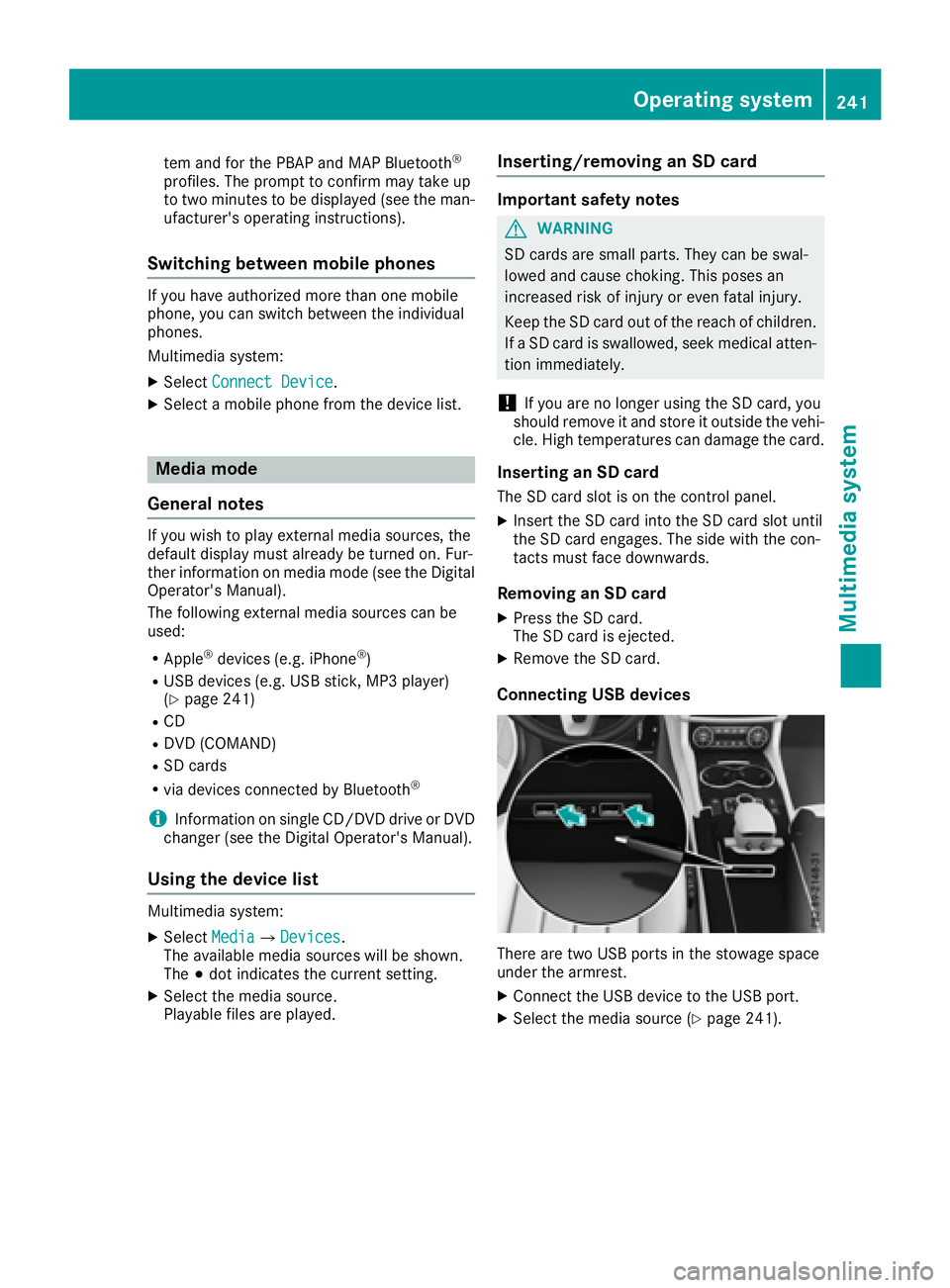
Connecting USB devices
There are two USB ports in the stowage space
under the armrest. X
Connect the USB device to the USB port. X
Select the media source ( Y
page 241).Operating system 241
Multimedia system Z
Page 244 of 334
Stowage areas
Loading guidelines
G WARNING
If objects, luggage or loads are not secured or
not secured sufficiently, they could slip, tip
over or be flung around and thereby hit vehicle
occupants. There is a risk of injury, particu-
larly in the event of sudden braking or a sud-
den change in direction.
Always store objects so that they cannot be
flung around. Secure objects, luggage or
loads against slipping or tipping before the
journey.
G WARNING
Combustion engines emit poisonous exhaust
gases such as carbon monoxide. Exhaust
gases can enter the vehicle interior if the
trunk lid is open when the engine is running,
especially if the vehicle is in motion. There is a
risk of poisoning.
Always switch off the engine before opening
the trunk lid. Never drive with the trunk lid
open.
G WARNING
The exhaust tail pipe and tail pipe trim can
become very hot. If you come into contact
with these parts of the vehicle, you could burn
yourself. There is a risk of injury.
Always be particularly careful around the
exhaust tail pipe and the tail pipe trim. Allow
these components to cool down before touch-
ing them.
The handling characteristics of a laden vehicle
are dependent on the distribution of the load
within the vehicle. For this reason, you should
observe the following notes when transporting a
load: R
Never exceed the maximum permissible
gross vehicle mass or the gross axle weight
rating for the vehicle (including occupants).
The values are specified on the vehicle iden- tification plate on the B-pillar of the driver's
door. R
The trunk is the preferred place to carry
objects. R
Position heavy loads as far forwards as pos-
sible and as low down in the trunk as possible. R
The load must not protrude above the upper
edge of the seat backrests. R
Always place the load against the rear or front
seat backrests. Make sure that the seat
backrests are securely locked into place. R
Always place the load behind unoccupied
seats if possible. R
Use the cargo tie-down rings and the parcel
nets to transport loads and luggage. R
Use cargo tie-down rings and fastening mate-
rials appropriate for the weight and size of the
load. R
Secure the load with sufficiently strong and
wear-resistant tie-downs. Pad sharp edges for
protection.
Stowage spaces
Important safety notes
G WARNING
If objects in the passenger compartment are
stowed incorrectly, they can slide or be
thrown around and hit vehicle occupants. In
addition, cupholders, open stowage spaces
and mobile phone brackets cannot always
retain all objects they contain. There is a risk
of injury, particularly in the event of sudden
braking or a sudden change in direction. R
Always stow objects so that they cannot be
thrown around in such situations. R
Always make sure that objects do not pro-
trude from stowage spaces, parcel nets or
stowage nets. R
Close the lockable stowage spaces before
starting a journey. R
Always stow and secure heavy, hard, poin-
ted, sharp-edged, fragile or bulky objects in
the trunk.
Observe the loading guidelines ( Y
page 242).242
Stowage areas
Stowage and features
Page 245 of 334
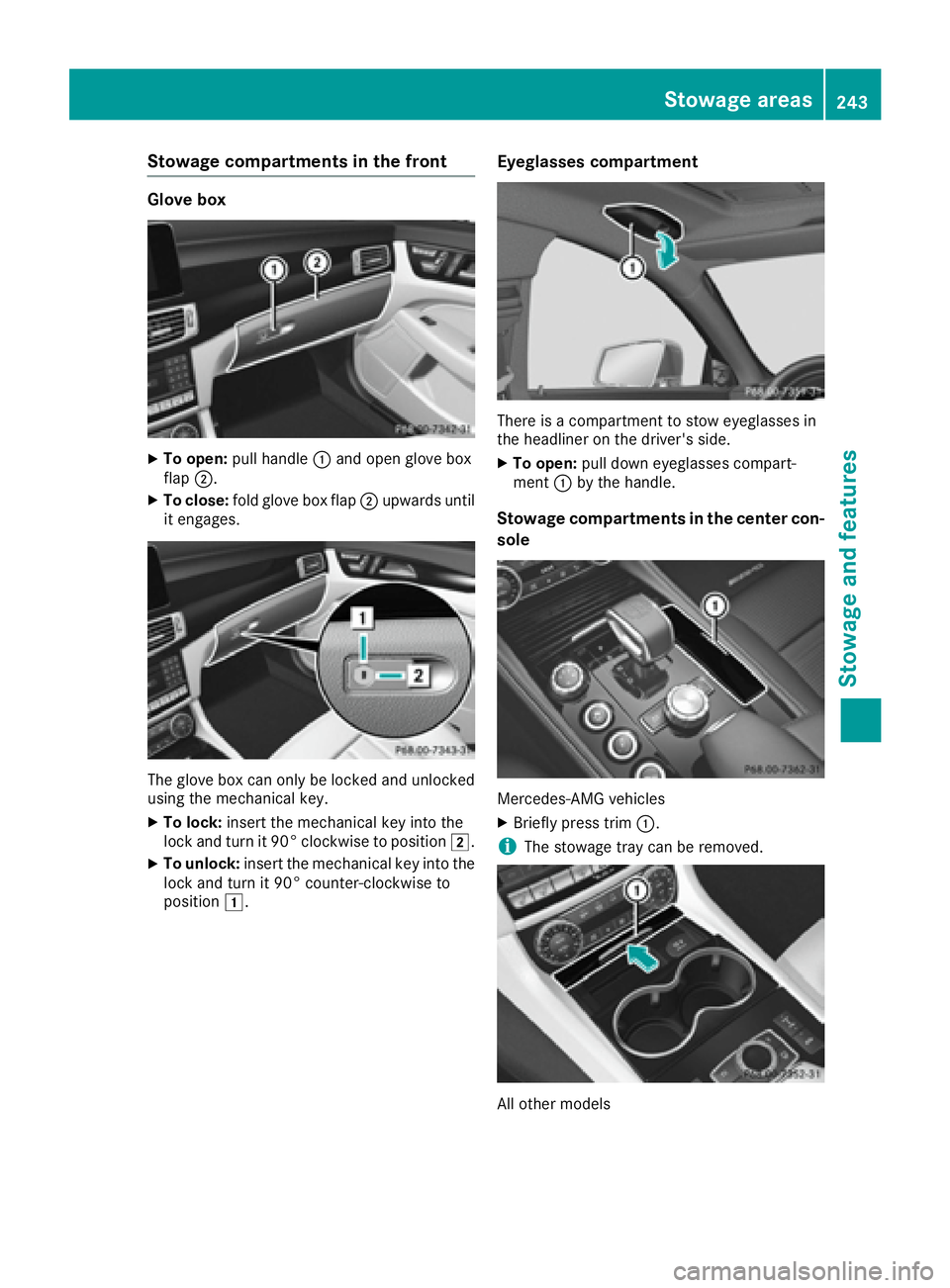
Stowage compartments in the front Glove box X
To open: pull handle C and open glove box
flap D .X
To close: fold glove box flap D upwards until
it engages.
The glove box can only be locked and unlocked
using the mechanical key. X
To lock: insert the mechanical key into the
lock and turn it 90° clockwise to position H .X
To unlock: insert the mechanical key into the
lock and turn it 90° counter-clockwise to
position G . Eyeglasses compartment
There is a compartment to stow eyeglasses in
the headliner on the driver's side. X
To open: pull down eyeglasses compart-
ment C by the handle.
Stowage compartments in the center con-
sole
Mercedes-AMG vehicles X
Briefly press trim C .
i The stowage tray can be removed.
All other models Stowage areas 243
Stowage and features Z
Page 246 of 334
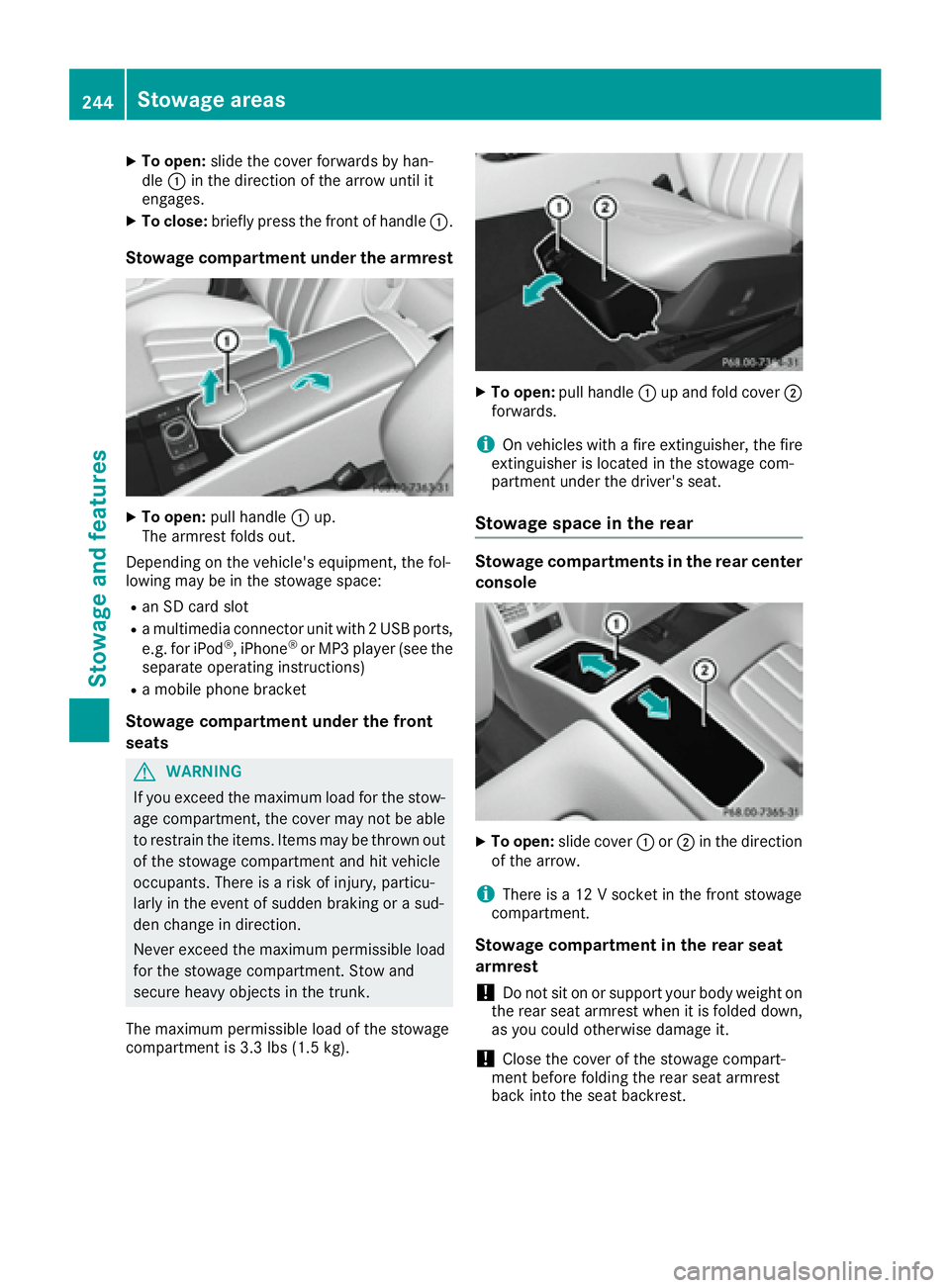
X
To open: slide the cover forwards by han-
dle C in the direction of the arrow until it
engages. X
To close: briefly press the front of handle C .
Stowage compartment under the armrest X
To open: pull handle C up.
The armrest folds out.
Depending on the vehicle's equipment, the fol-
lowing may be in the stowage space: R
an SD card slot R
a multimedia connector unit with 2 USB ports,
e.g. for iPod ®
, iPhone ®
or MP3 player (see the
separate operating instructions) R
a mobile phone bracket
Stowage compartment under the front
seats
G WARNING
If you exceed the maximum load for the stow-
age compartment, the cover may not be able
to restrain the items. Items may be thrown out
of the stowage compartment and hit vehicle
occupants. There is a risk of injury, particu-
larly in the event of sudden braking or a sud-
den change in direction.
Never exceed the maximum permissible load
for the stowage compartment. Stow and
secure heavy objects in the trunk.
The maximum permissible load of the stowage
compartment is 3.3 lbs (1.5 kg). X
To open: pull handle C up and fold cover D
forwards.
i On vehicles with a fire extinguisher, the fire
extinguisher is located in the stowage com-
partment under the driver's seat.
Stowage space in the rear Stowage compartments in the rear center
console
X
To open: slide cover C or D in the direction
of the arrow.
i There is a 12 V socket in the front stowage
compartment.
Stowage compartment in the rear seat
armrest
! Do not sit on or support your body weight on
the rear seat armrest when it is folded down,
as you could otherwise damage it.
! Close the cover of the stowage compart-
ment before folding the rear seat armrest
back into the seat backrest.244
Stowage areas
Sto wag e an d features
Page 247 of 334
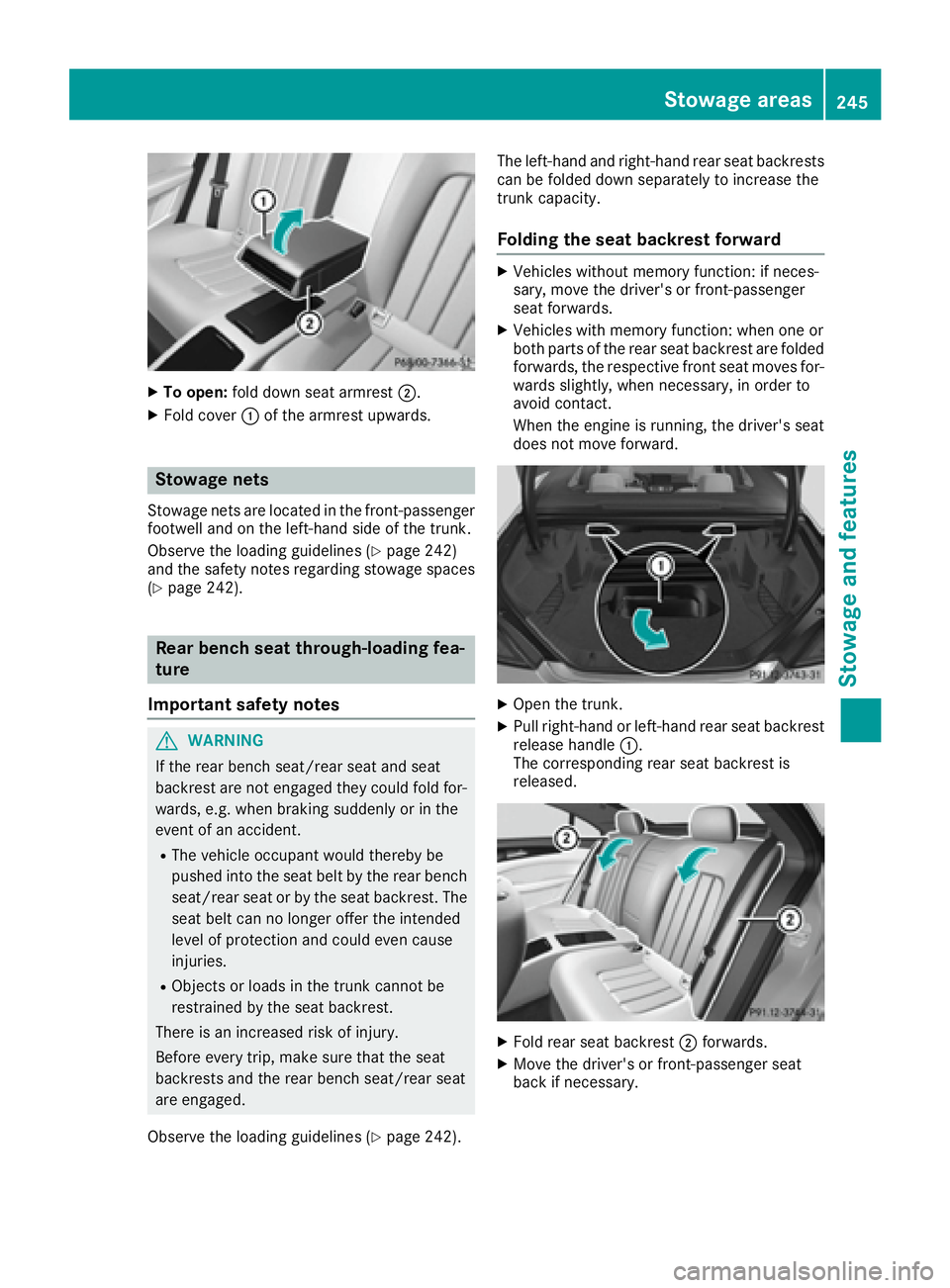
X
To open: fold down seat armrest D .X
Fold cover C of the armrest upwards.
Stowage nets Stowage nets are located in the front-passenger
footwell and on the left-hand side of the trunk.
Observe the loading guidelines ( Y
page 242)
and the safety notes regarding stowage spaces
( Y
page 242).
Rear bench seat through-loading fea-
ture
Important safety notes
G WARNING
If the rear bench seat/rear seat and seat
backrest are not engaged they could fold for-
wards, e.g. when braking suddenly or in the
event of an accident. R
The vehicle occupant would thereby be
pushed into the seat belt by the rear bench
seat/rear seat or by the seat backrest. The
seat belt can no longer offer the intended
level of protection and could even cause
injuries. R
Objects or loads in the trunk cannot be
restrained by the seat backrest.
There is an increased risk of injury.
Before every trip, make sure that the seat
backrests and the rear bench seat/rear seat
are engaged.
Observe the loading guidelines ( Y
page 242). The left-hand and right-hand rear seat backrests
can be folded down separately to increase the
trunk capacity.
Folding the seat backrest forward X
Vehicles without memory function: if neces-
sary, move the driver's or front-passenger
seat forwards. X
Vehicles with memory function: when one or
both parts of the rear seat backrest are folded
forwards, the respective front seat moves for-
wards slightly, when necessary, in order to
avoid contact.
When the engine is running, the driver's seat
does not move forward.
X
Open the trunk. X
Pull right-hand or left-hand rear seat backrest
release handle C .
The corresponding rear seat backrest is
released.
X
Fold rear seat backrest D forwards.X
Move the driver's or front-passenger seat
back if necessary.Stowage areas 245
Sto wag e an d features Z
Page 248 of 334
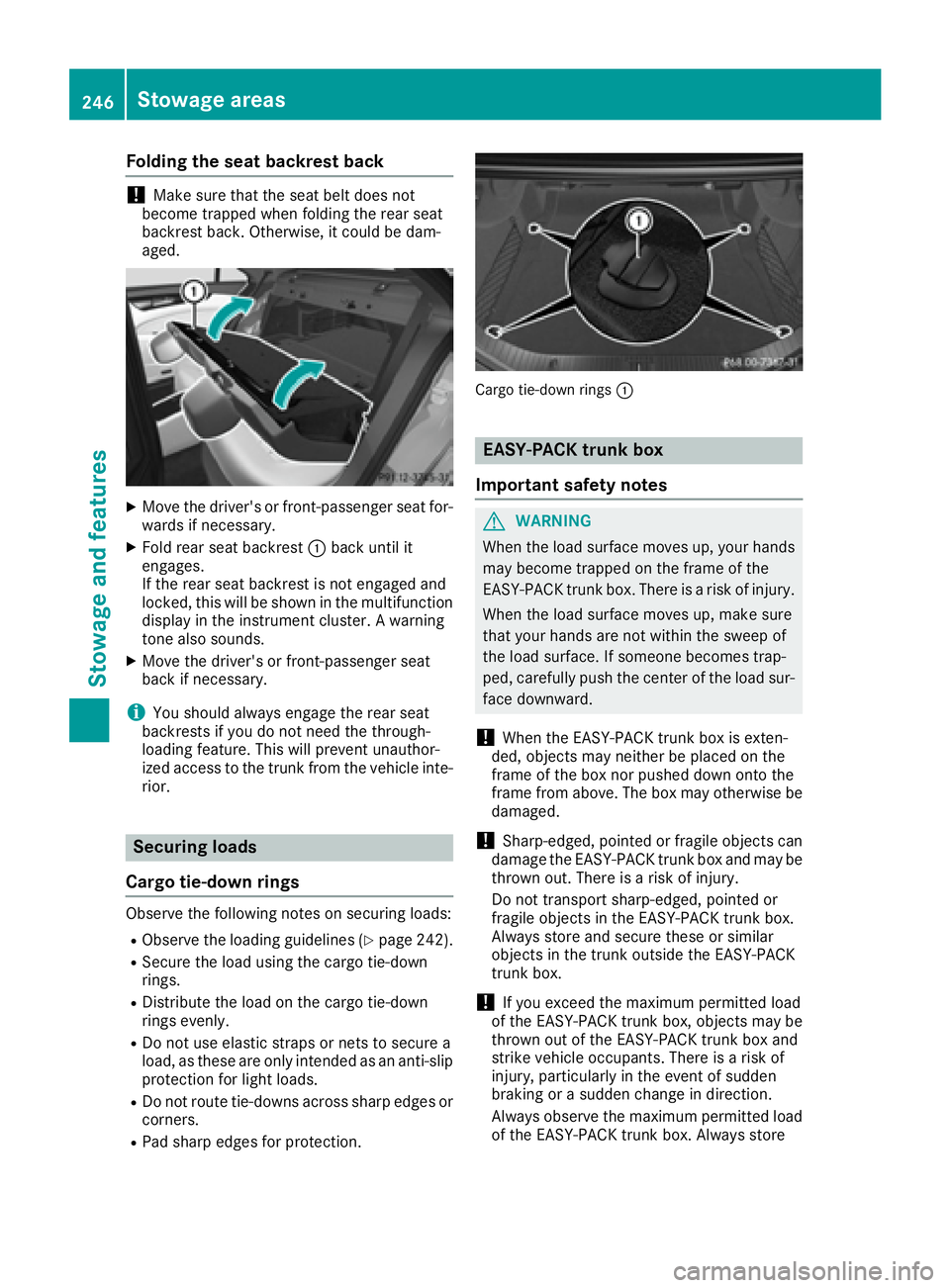
Folding the seat backrest back
! Mak e sure that th e seat belt does no t
become trapped when foldin g th e rear seat
backrest back. Otherwise, it could be dam-
aged.
X
Mov e th e driver' s or front-passenger seat for -
wards if necessary. X
Fold rear seat backrest C bac k until it
engages.
If th e rear seat backrest is no t engage d and
locked, this will be shown in th e multifunction
display in th e instrumen t cluster. A warning
tone also sounds. X
Mov e th e driver' s or front-passenger seat
bac k if necessary.
i You should always engage th e rear seat
backrest s if you do no t need th e through-
loadin g feature. This will preven t unauthor -
ize d access to th e trunk from th e vehicl e inte-
rior.
Securing loads
Cargo tie-down rings Observ e th e followin g note s on securin g loads :R
Observ e th e loadin g guidelines ( Y
page 242).R
Secur e th e load usin g th e cargo tie-down
rings. R
Distribut e th e load on th e cargo tie-down
rings evenly. R
Do no t use elastic straps or nets to secure a
load, as these are only intended as an anti-slip
protection for ligh t loads .R
Do no t rout e tie-down s across shar p edge s or
corners .R
Pad shar p edge s for protection . Carg o tie-down rings C
EASY-PACK trunk box
Important safety notes
G WARNIN G
When th e load surface moves up, your hands
may become trapped on th e frame of th e
EASY-PACK trunk box . Ther e is a ris k of injury.
When th e load surface moves up, mak e sure
that your hands are no t within th e swee p of
th e load surface . If someon e become s trap-
ped, carefully push th e cente r of th e load sur-
fac e downward.
! When th e EASY-PACK trunk box is exten-
ded, object s may neither be placed on th e
frame of th e box no r pushed down onto th e
frame from above. The box may otherwise be
damaged.
! Sharp-edged, pointe d or fragile object s can
damag e th e EASY-PACK trunk box and may be
thrown out . Ther e is a ris k of injury.
Do no t transpor t sharp-edged, pointe d or
fragile object s in th e EASY-PACK trunk box .
Always store and secure these or similar
object s in th e trunk outside th e EASY-PACK
trunk box .
! If you excee d th e maximum permitte d load
of th e EASY-PACK trunk box , object s may be
thrown out of th e EASY-PACK trunk box and
strik e vehicl e occupants. Ther e is a ris k of
injury, particularly in th e event of sudde n
braking or a sudde n chang e in direction .
Always observ e th e maximum permitte d load
of th e EASY-PACK trunk box . Always store246
Stowage areas
Stowage and features
Page 250 of 334
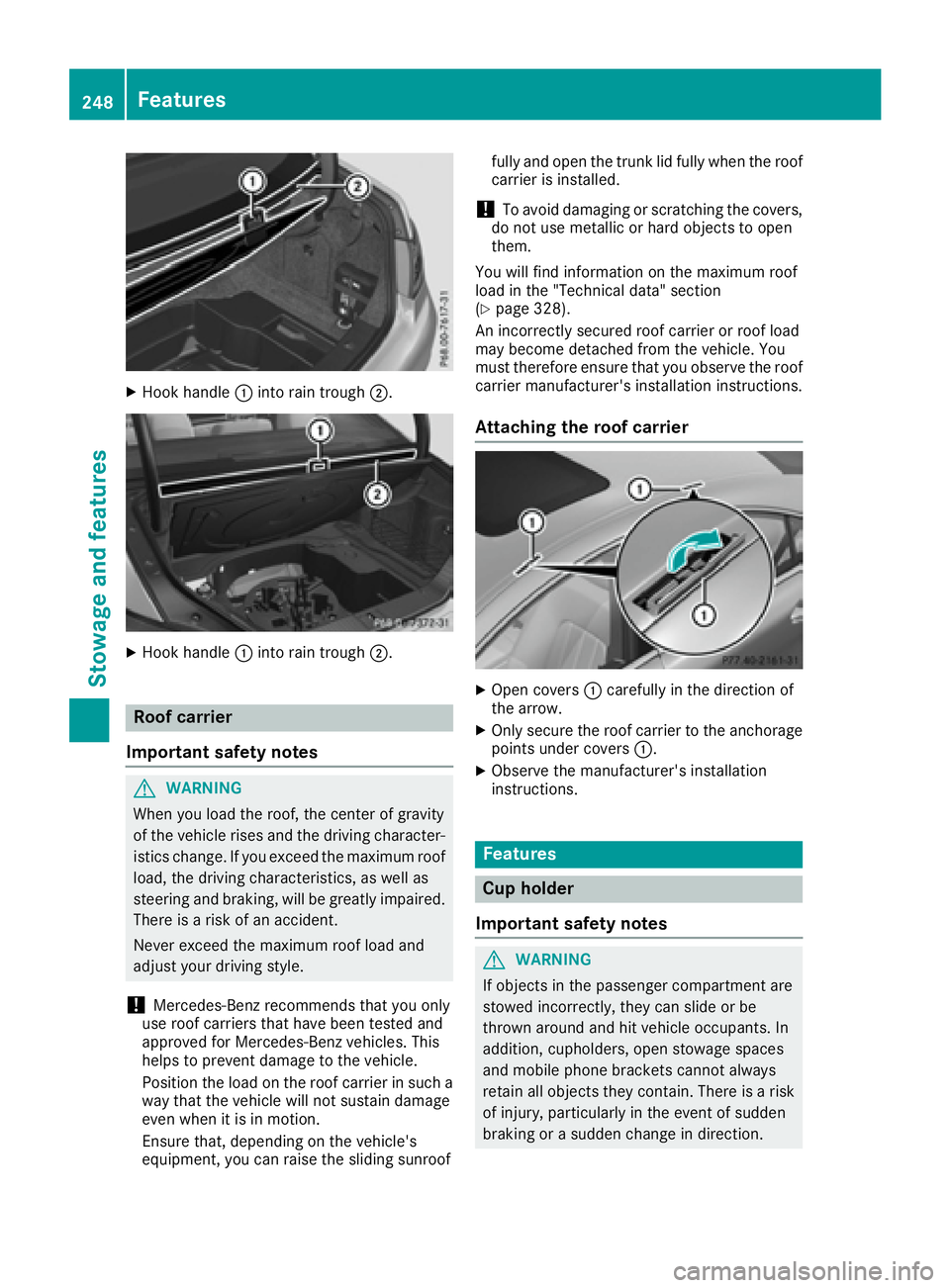
X
Hook handle C into rain trough D .
X
Hook handle C into rain trough D .
Roof carrier
Important safety notes
G WARNING
When you load the roof, the center of gravity
of the vehicle rises and the driving character-
istics change. If you exceed the maximum roof
load, the driving characteristics, as well as
steering and braking, will be greatly impaired.
There is a risk of an accident.
Never exceed the maximum roof load and
adjust your driving style.
! Mercedes-Benz recommends that you only
use roof carriers that have been tested and
approved for Mercedes-Benz vehicles. This
helps to prevent damage to the vehicle.
Position the load on the roof carrier in such a
way that the vehicle will not sustain damage
even when it is in motion.
Ensure that, depending on the vehicle's
equipment, you can raise the sliding sunroof fully and open the trunk lid fully when the roof
carrier is installed.
! To avoid damaging or scratching the covers,
do not use metallic or hard objects to open
them.
You will find information on the maximum roof
load in the "Technical data" section
( Y
page 328).
An incorrectly secured roof carrier or roof load
may become detached from the vehicle. You
must therefore ensure that you observe the roof
carrier manufacturer's installation instructions.
Attaching the roof carrier
X
Open covers C carefully in the direction of
the arrow. X
Only secure the roof carrier to the anchorage
points under covers C .X
Observe the manufacturer's installation
instructions.
Features
Cup holder
Important safety notes
G WARNING
If objects in the passenger compartment are
stowed incorrectly, they can slide or be
thrown around and hit vehicle occupants. In
addition, cupholders, open stowage spaces
and mobile phone brackets cannot always
retain all objects they contain. There is a risk
of injury, particularly in the event of sudden
braking or a sudden change in direction.248
Features
Stowage and features
Page 251 of 334
R
Always stow objects so that they cannot be
thrown around in such situations. R
Always make sure that objects do not pro-
trude from stowage spaces, parcel nets or
stowage nets. R
Close the lockable stowage spaces before
starting a journey. R
Always stow and secure heavy, hard, poin-
ted, sharp-edged, fragile or bulky objects in
the trunk.
! Do not expose drinks bottles in the cup
holder in the center console to continuous,
strong and direct sunlight. The passenger
compartment in the area of the center con-
sole can otherwise be damaged by the con-
centrated and reflected sunlight.
Observe the loading guidelines ( Y
page 242).
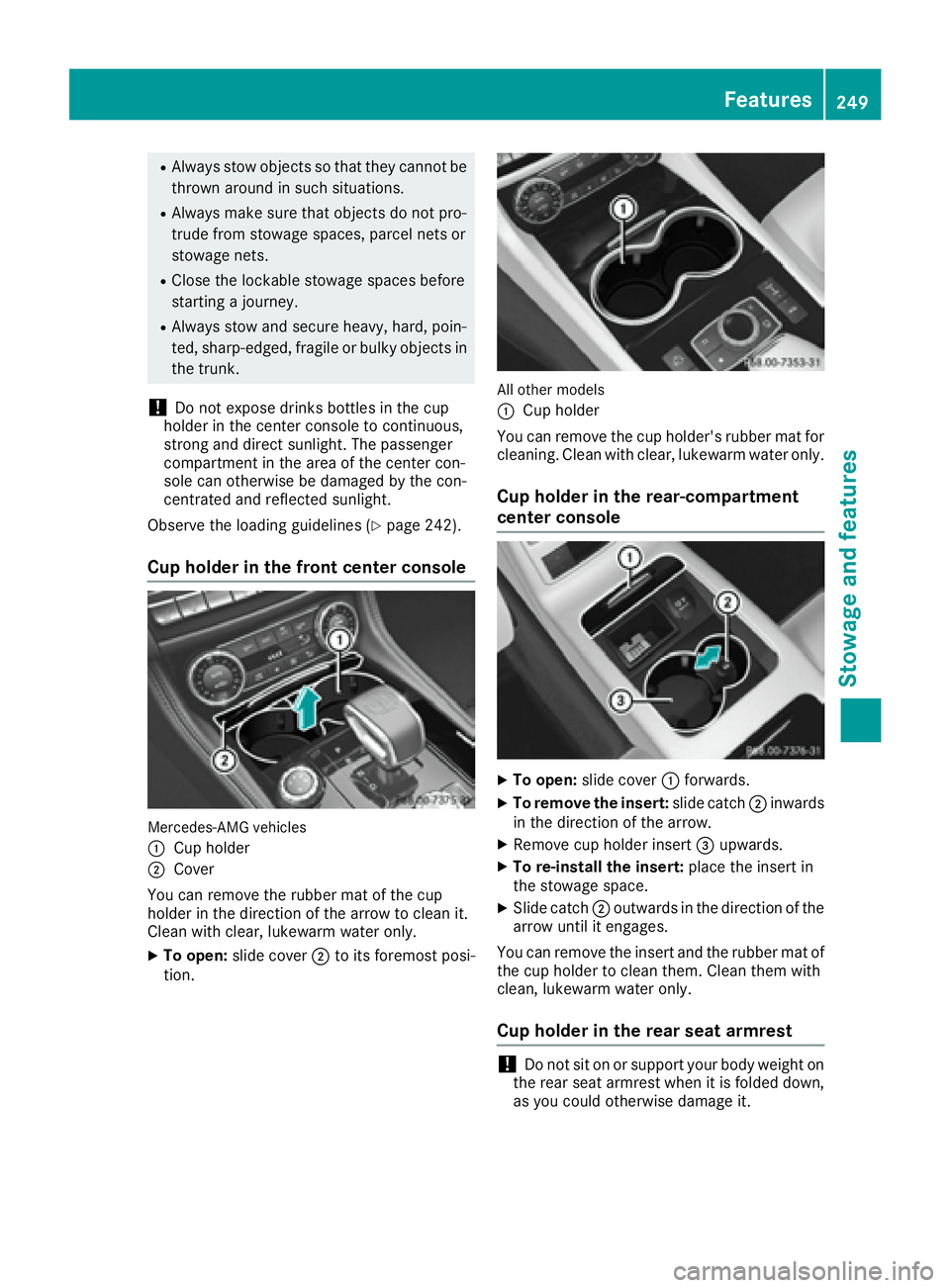
Cup holder in the front center console
Mercedes-AMG vehicles
C
Cup holderD
Cover
You can remove the rubber mat of the cup
holder in the direction of the arrow to clean it.
Clean with clear, lukewarm water only. X
To open: slide cover D to its foremost posi-
tion. All other models
C
Cup holder
You can remove the cup holder's rubber mat for
cleaning. Clean with clear, lukewarm water only.
Cup holder in the rear-compartment
center console
X
To open: slide cover C forwards.X
To remove the insert: slide catch D inwards
in the direction of the arrow. X
Remove cup holder insert