turn signal MERCEDES-BENZ CLS-Class 2013 W218 Owner's Guide
[x] Cancel search | Manufacturer: MERCEDES-BENZ, Model Year: 2013, Model line: CLS-Class, Model: MERCEDES-BENZ CLS-Class 2013 W218Pages: 376, PDF Size: 13.45 MB
Page 238 of 376
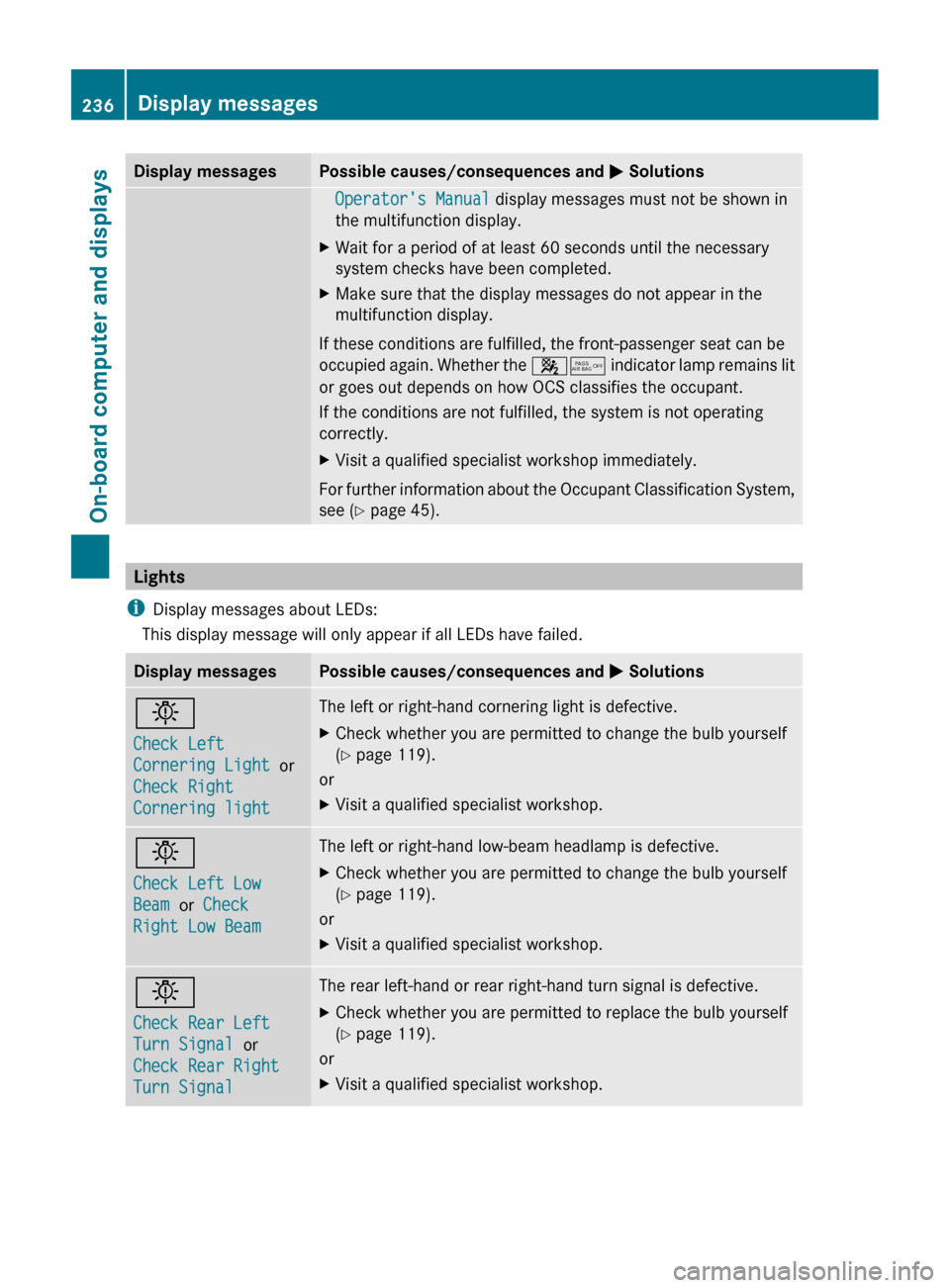
Display messages Possible causes/consequences and
M SolutionsOperator's Manual display messages must not be shown in
the multifunction display.
X Wait for a period of at least 60 seconds until the necessary
system checks have been completed.
X Make sure that the display messages do not appear in the
multifunction display.
If these conditions are fulfilled, the front-passenger seat can be
occupied again. Whether the 45 indicator lamp remains lit
or goes out depends on how OCS classifies the occupant.
If the conditions are not fulfilled, the system is not operating
correctly.
X Visit a qualified specialist workshop immediately.
For further information about the Occupant Classification System,
see ( Y page 45). Lights
i Display messages about LEDs:
This display message will only appear if all LEDs have failed. Display messages Possible causes/consequences and
M Solutionsb
Check Left
Cornering Light
or
Check Right
Cornering light The left or right-hand cornering light is defective.
X
Check whether you are permitted to change the bulb yourself
(Y page 119).
or
X Visit a qualified specialist workshop. b
Check Left Low
Beam or Check
Right Low Beam The left or right-hand low-beam headlamp is defective.
X
Check whether you are permitted to change the bulb yourself
(Y page 119).
or
X Visit a qualified specialist workshop. b
Check Rear Left
Turn Signal or
Check Rear Right
Turn Signal The rear left-hand or rear right-hand turn signal is defective.
X
Check whether you are permitted to replace the bulb yourself
(Y page 119).
or
X Visit a qualified specialist workshop.236
Display messages
On-board computer and displays
Page 239 of 376
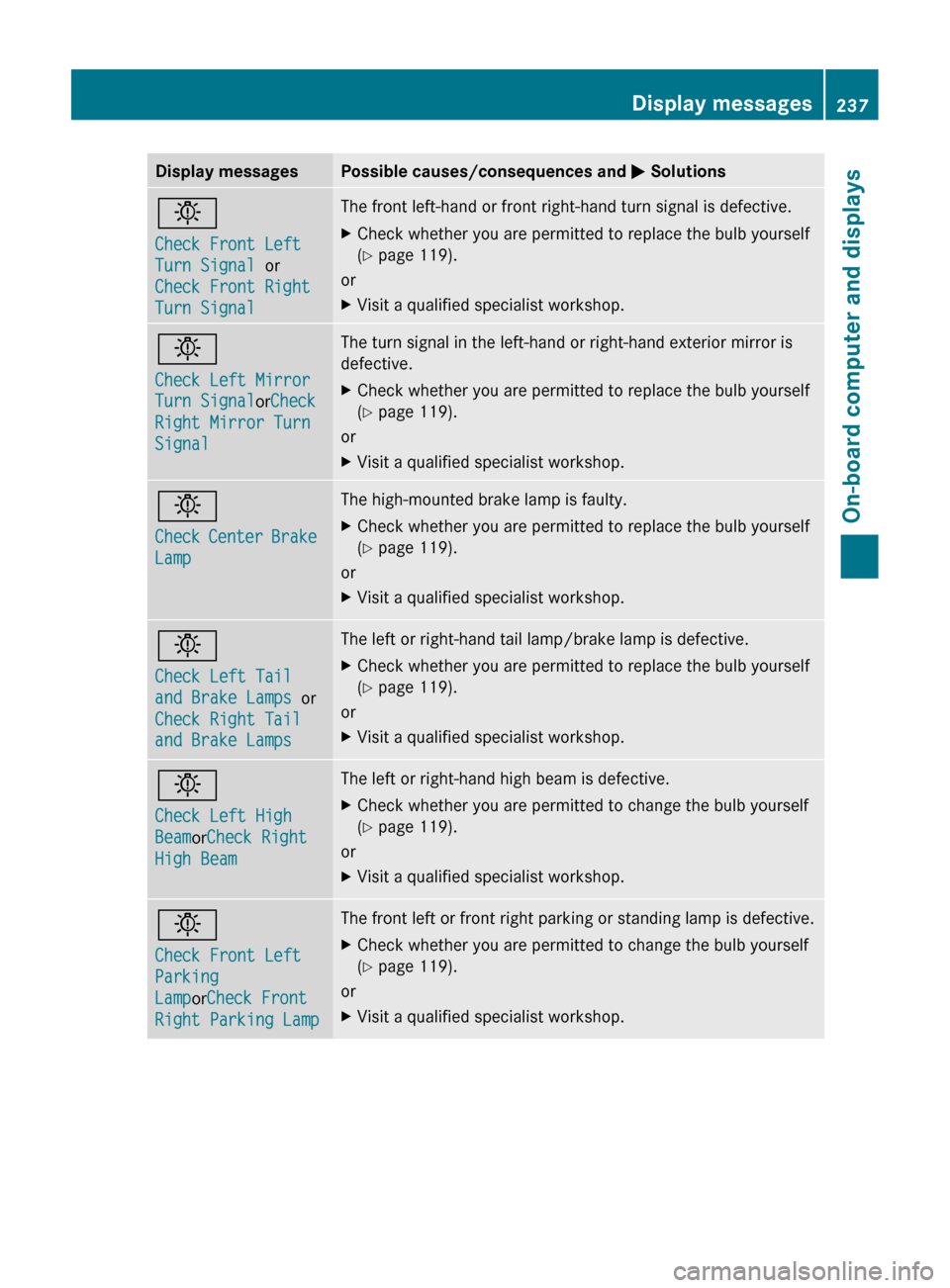
Display messages Possible causes/consequences and
M Solutionsb
Check Front Left
Turn Signal or
Check Front Right
Turn Signal The front left-hand or front right-hand turn signal is defective.
X
Check whether you are permitted to replace the bulb yourself
(Y page 119).
or
X Visit a qualified specialist workshop. b
Check Left Mirror
Turn Signal
orCheck
Right Mirror Turn
Signal The turn signal in the left-hand or right-hand exterior mirror is
defective.
X
Check whether you are permitted to replace the bulb yourself
(Y page 119).
or
X Visit a qualified specialist workshop. b
Check
Center Brake
Lamp The high-mounted brake lamp is faulty.
X
Check whether you are permitted to replace the bulb yourself
(Y page 119).
or
X Visit a qualified specialist workshop. b
Check Left Tail
and Brake Lamps
or
Check Right Tail
and Brake Lamps The left or right-hand tail lamp/brake lamp is defective.
X
Check whether you are permitted to replace the bulb yourself
(Y page 119).
or
X Visit a qualified specialist workshop. b
Check Left High
BeamorCheck Right
High Beam The left or right-hand high beam is defective.
X
Check whether you are permitted to change the bulb yourself
(Y page 119).
or
X Visit a qualified specialist workshop. b
Check Front Left
Parking
LamporCheck Front
Right Parking Lamp The front left or front right parking or standing lamp is defective.
X
Check whether you are permitted to change the bulb yourself
(Y page 119).
or
X Visit a qualified specialist workshop. Display messages
237On-board computer and displays Z
Page 257 of 376
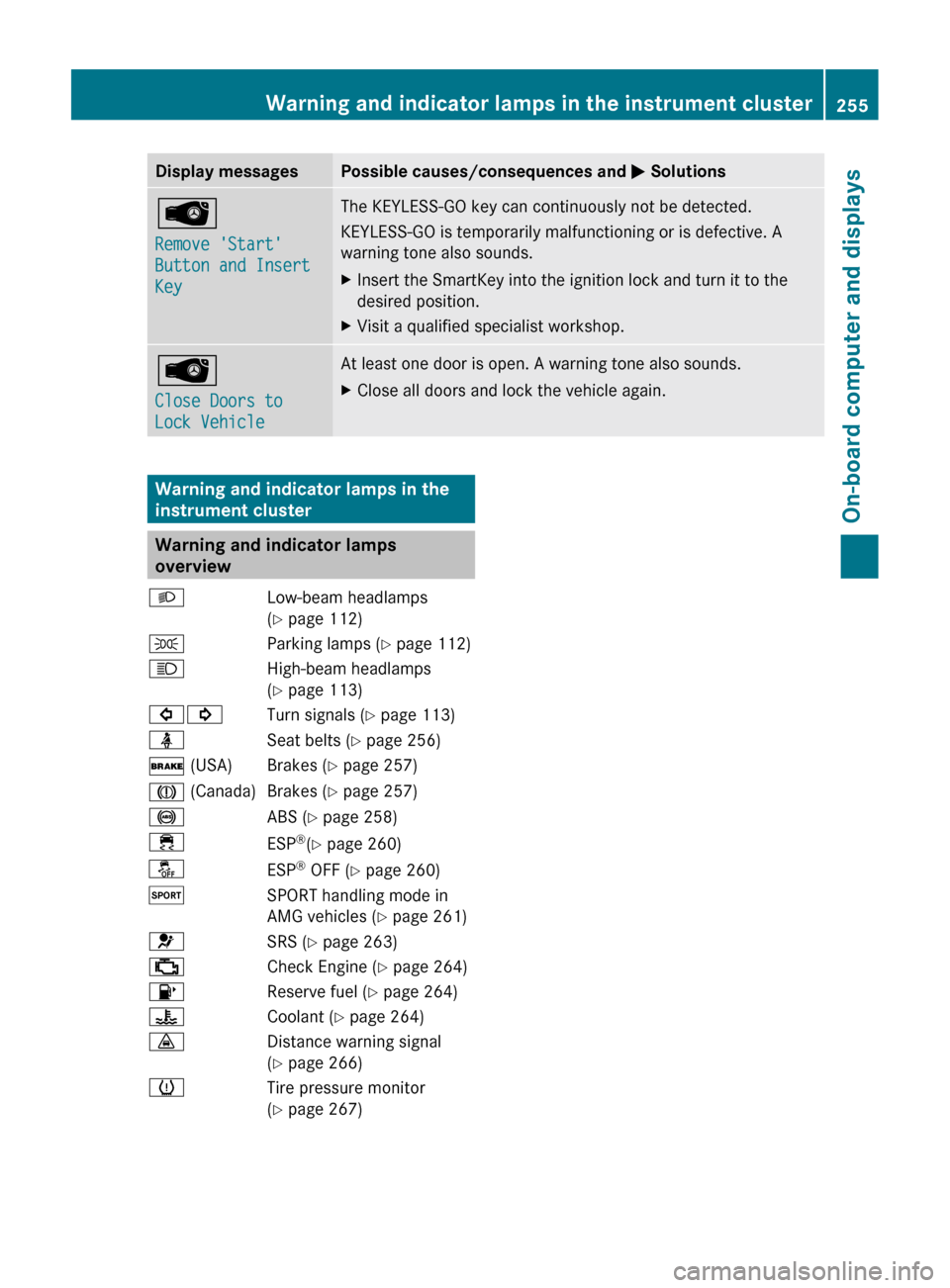
Display messages Possible causes/consequences and
M SolutionsÂ
Remove 'Start'
Button and Insert
Key The KEYLESS-GO key can continuously not be detected.
KEYLESS-GO is temporarily malfunctioning or is defective. A
warning tone also sounds.
X
Insert the SmartKey into the ignition lock and turn it to the
desired position.
X Visit a qualified specialist workshop. Â
Close Doors to
Lock Vehicle At least one door is open. A warning tone also sounds.
X
Close all doors and lock the vehicle again. Warning and indicator lamps in the
instrument cluster
Warning and indicator lamps
overview
L Low-beam headlamps
(Y page 112)
T Parking lamps (Y page 112)
K High-beam headlamps
(Y page 113)
#! Turn signals (Y page 113)
ü Seat belts (Y page 256)
$ (USA) Brakes (Y page 257)
J (Canada) Brakes (Y page 257)
! ABS (Y page 258)
÷ ESP®
(Y page 260)
å ESP®
OFF (Y page 260)
M SPORT handling mode in
AMG vehicles (Y page 261)
6 SRS (Y page 263)
; Check Engine (Y page 264)
8 Reserve fuel (Y page 264)
? Coolant (Y page 264)
· Distance warning signal
(Y page 266)
h Tire pressure monitor
(Y page 267) Warning and indicator lamps in the instrument cluster
255On-board computer and displays Z
Page 295 of 376
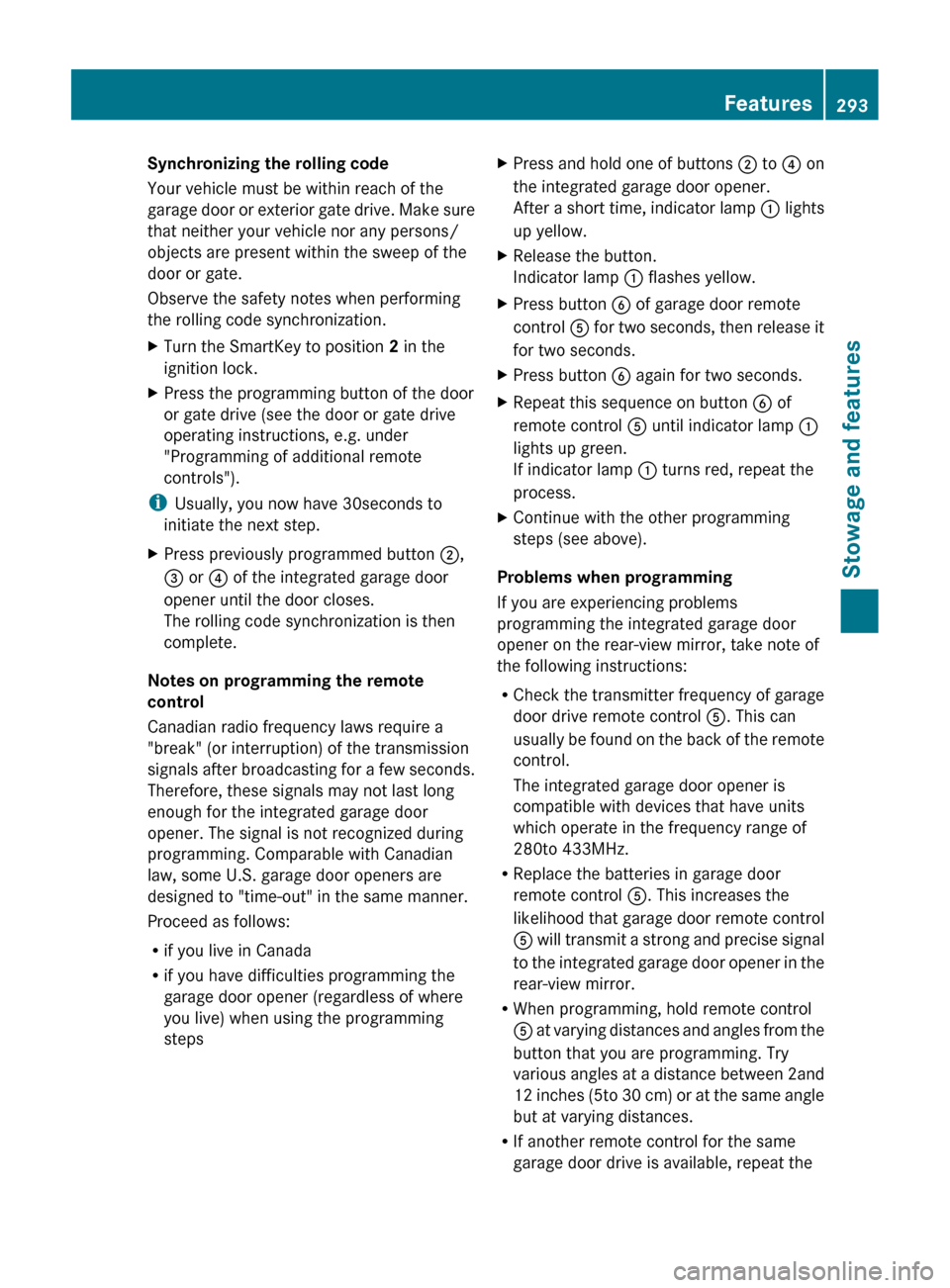
Synchronizing the rolling code
Your vehicle must be within reach of the
garage
door or exterior gate drive. Make sure
that neither your vehicle nor any persons/
objects are present within the sweep of the
door or gate.
Observe the safety notes when performing
the rolling code synchronization.
X Turn the SmartKey to position 2 in the
ignition lock.
X Press the programming button of the door
or gate drive (see the door or gate drive
operating instructions, e.g. under
"Programming of additional remote
controls").
i Usually, you now have
30seconds to
initiate the next step.
X Press previously programmed button ;,
= or ? of the integrated garage door
opener until the door closes.
The rolling code synchronization is then
complete.
Notes on programming the remote
control
Canadian radio frequency laws require a
"break" (or interruption) of the transmission
signals
after broadcasting for a few seconds.
Therefore, these signals may not last long
enough for the integrated garage door
opener. The signal is not recognized during
programming. Comparable with Canadian
law, some U.S. garage door openers are
designed to "time-out" in the same manner.
Proceed as follows:
R if you live in Canada
R if you have difficulties programming the
garage door opener (regardless of where
you live) when using the programming
steps X
Press and hold one of buttons ; to ? on
the integrated garage door opener.
After
a short time, indicator lamp : lights
up yellow.
X Release the button.
Indicator lamp : flashes yellow.
X Press button B of garage door remote
control A
for two seconds, then release it
for two seconds.
X Press button B again for two seconds.
X Repeat this sequence on button B of
remote control A until indicator lamp :
lights up green.
If indicator lamp : turns red, repeat the
process.
X Continue with the other programming
steps (see above).
Problems when programming
If you are experiencing problems
programming the integrated garage door
opener on the rear-view mirror, take note of
the following instructions:
R Check
the transmitter frequency of garage
door drive remote control A. This can
usually be found on the back of the remote
control.
The integrated garage door opener is
compatible with devices that have units
which operate in the frequency range of
280to 433MHz.
R Replace the batteries in garage door
remote control A. This increases the
likelihood that garage door remote control
A will transmit a strong and precise signal
to the integrated garage door opener in the
rear-view mirror.
R When programming, hold remote control
A at varying distances and angles from the
button that you are programming. Try
various angles at a distance between 2and
12 inches (5to 30 cm) or at the same angle
but at varying distances.
R If another remote control for the same
garage door drive is available, repeat the Features
293Stowage and features Z
Page 296 of 376
same programming steps with this remote
control. Before performing these steps,
make sure that new batteries have been
installed in garage door drive remote
control
A.
R Note that some remote controls only
transmit for a limited amount of time (the
indicator lamp on the remote control goes
out). Press button B on remote control
A again before transmission ends.
R Align
the antenna cable of the garage door
opener unit. This can improve signal
reception/transmission.
Opening/closing the garage door After it has been programmed, the integrated
garage door opener performs the function of
the garage door system remote control.
Please also read the operating instructions
for the garage door system.
X
Turn the SmartKey to position 2 in the
ignition lock.
X Press button ;, = or ? which you have
programmed to operate the garage door.
Garage door system with a fixed code:
indicator lamp : lights up green.
Garage door system with a rolling code:
indicator lamp : flashes green.
i The transmitter will transmit a signal as
long as the button is pressed. The
transmission is halted after a maximum of
ten seconds and indicator lamp : lights
up
yellow. Press button ;, = or ? again
if necessary.
Clearing the memory X
Turn the SmartKey to position 2 in the
ignition lock.
X Press buttons ; and ?.
The indicator lamp lights up yellow.
X Press and hold buttons ;
and ? until the
indicator lamp turns green. i
Make sure that you clear the memory of
the integrated garage door opener before
selling the vehicle. Compass
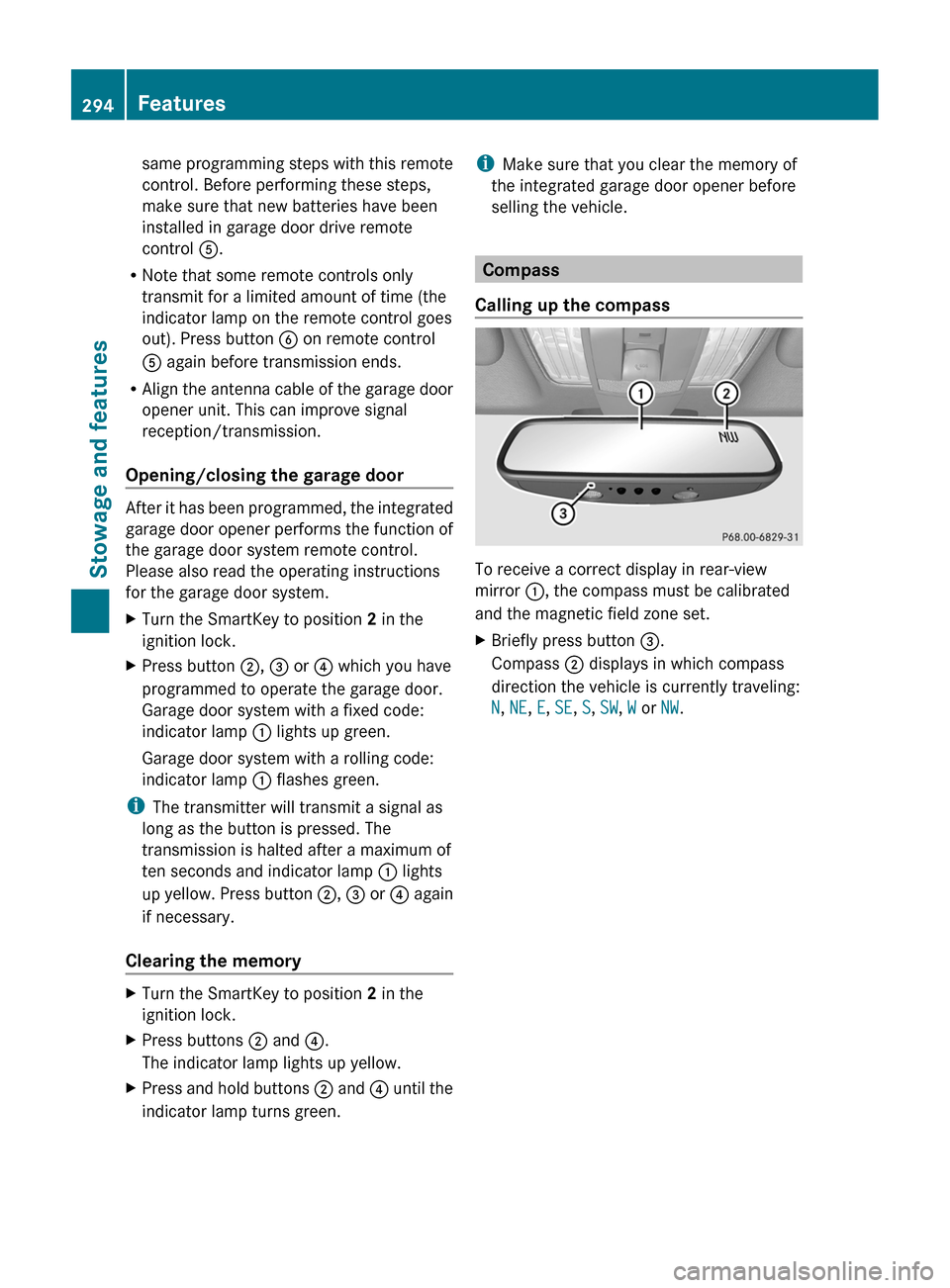
Calling up the compass To receive a correct display in rear-view
mirror :, the compass must be calibrated
and the magnetic field zone set.
X
Briefly press button =.
Compass ; displays in which compass
direction the vehicle is currently traveling:
N, NE, E, SE, S, SW, W or NW. 294
Features
Stowage and features
Page 309 of 376
X
Clean the plastic lenses of the exterior
lighting using a wet sponge and a mild
cleaning agent, e.g. Mercedes-Benz car
shampoo or cleaning cloths.
Mirror turn signals !
Only use cleaning agents or cleaning
cloths that are suitable for plastic lenses.
Unsuitable cleaning agents or cleaning
cloths
could scratch or damage the plastic
lenses of the mirror turn signals.
X Clean the plastic lenses of the mirror turn
signals
in the exterior mirror housing using
a wet sponge and mild cleaning agent, e.g.
Mercedes-Benz car shampoo or cleaning
cloths.
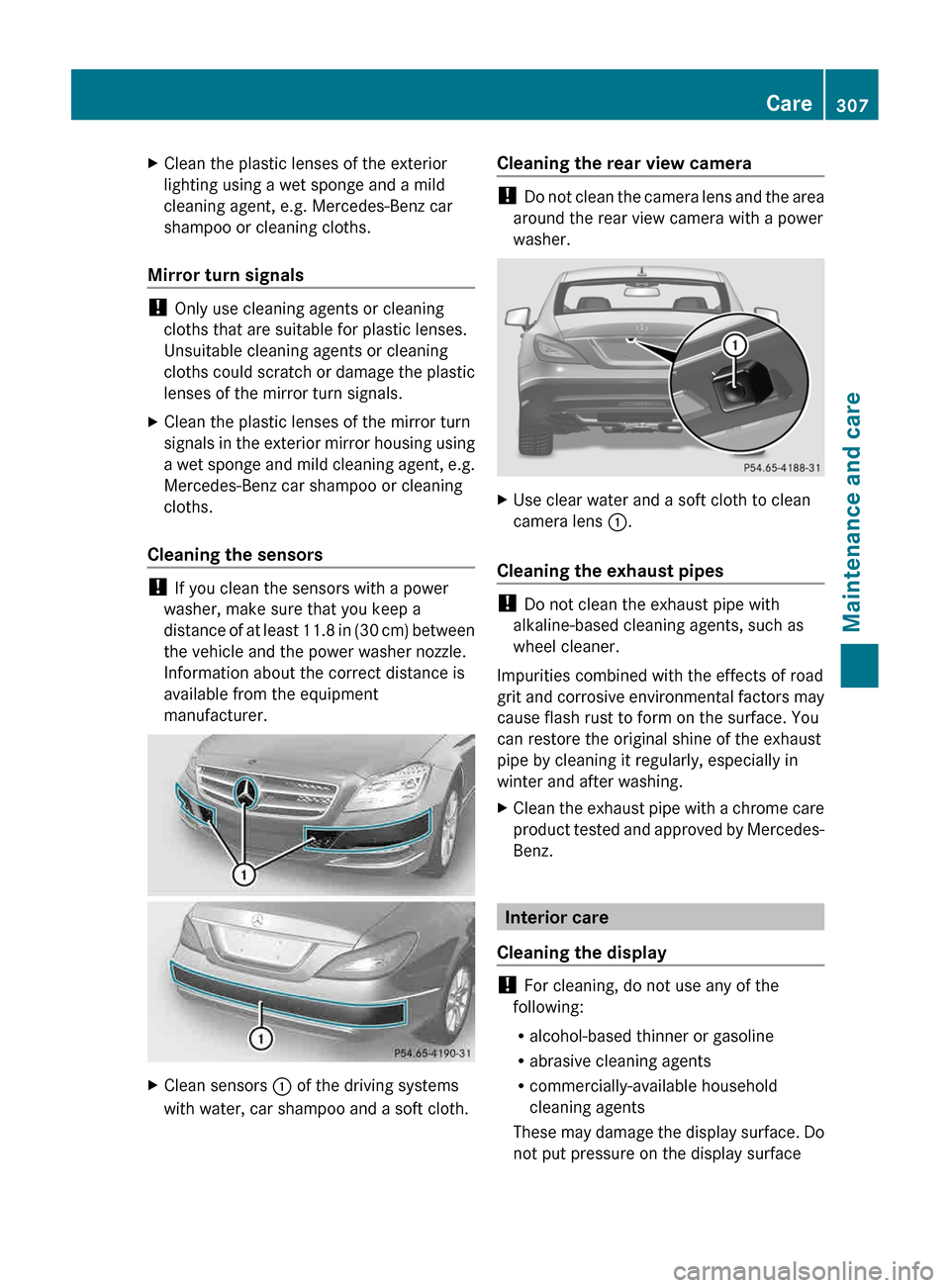
Cleaning the sensors !
If you clean the sensors with a power
washer, make sure that you keep a
distance
of at least 11.8 in (30 cm) between
the vehicle and the power washer nozzle.
Information about the correct distance is
available from the equipment
manufacturer. X
Clean sensors : of the driving systems
with water, car shampoo and a soft cloth. Cleaning the rear view camera !
Do
not clean the camera lens and the area
around the rear view camera with a power
washer. X
Use clear water and a soft cloth to clean
camera lens :.
Cleaning the exhaust pipes !
Do not clean the exhaust pipe with
alkaline-based cleaning agents, such as
wheel cleaner.
Impurities combined with the effects of road
grit
and corrosive environmental factors may
cause flash rust to form on the surface. You
can restore the original shine of the exhaust
pipe by cleaning it regularly, especially in
winter and after washing.
X Clean the exhaust pipe with a chrome care
product
tested and approved by Mercedes-
Benz. Interior care
Cleaning the display !
For cleaning, do not use any of the
following:
R alcohol-based thinner or gasoline
R abrasive cleaning agents
R commercially-available household
cleaning agents
These
may damage the display surface. Do
not put pressure on the display surface Care
307
Maintenance and care Z
Page 323 of 376
It is important that you observe the safety
instructions when towing away your vehicle
(Y page 318).
The automatic transmission automatically
shifts
to position P when you open the driver's
or front-passenger door or when you remove
the SmartKey from the ignition lock. In order
to ensure that the automatic transmission
stays in position N when towing the vehicle,
you must observe the following points:
X Make sure that the vehicle is stationary and
the SmartKey in the ignition lock is in
position 0.
X Turn the SmartKey to position 2 in the
ignition lock.
On vehicles with KEYLESS-GO, use the
SmartKey
instead of the Start/Stop button
(Y page 139).
X Depress and hold the brake pedal.
X Shift the automatic transmission to
position N.
X Release the brake pedal.
X Release the parking brake.
X Switch on the hazard warning lamps
(Y page 114).
X Leave the SmartKey in position 2 in the
ignition lock.
i When towing with the hazard warning
lamps switched on, use the combination
switch as usual to signal a change of
direction.
In this case, only the turn signals
for the desired direction flash. When the
combination switch is reset, the hazard
warning lamps start flashing again. Transporting the vehicle
! Only
lash the vehicle down by the wheels
or wheel rims, not by parts of the vehicle
such as axle or steering components.
Otherwise, the vehicle could be damaged.
The towing eye can be used to pull the vehicle
onto a trailer or transporter for transporting
purposes. X
Turn the SmartKey to position 2 in the
ignition lock.
X Shift the automatic transmission to
position N.
As soon as the vehicle is loaded:
X Prevent the vehicle from rolling away by
applying the parking brake.
X Shift the automatic transmission to
position P.
X Turn the SmartKey to position 0 in the
ignition lock and remove the SmartKey
from the ignition lock.
X Secure the vehicle. Notes for 4MATIC vehicles
! Vehicles
with 4MATIC must not be towed
with either the front or the rear axle raised,
as doing so will damage the transmission.
If the vehicle has transmission damage or
damage to the front or rear axle, have it
transported on a transporter or trailer.
In the event of damage to the electrical
system
If the battery is defective, the automatic
transmission will be locked in position P. To
shift the automatic transmission to position
N, you must provide power to the vehicle's
electrical system in the same way as when
jump-starting (Y page 317).
Have the vehicle transported on a transporter
or trailer. Tow-starting (emergency starting)
! Vehicles with automatic transmission
must not be started by tow-starting. This
could otherwise damage the transmission.
You can find information on "Jump-starting"
at (Y page 317). Towing and tow-starting
321
Breakdown assistance Z