cd playe MERCEDES-BENZ CLS-Class 2013 W218 Owner's Manual
[x] Cancel search | Manufacturer: MERCEDES-BENZ, Model Year: 2013, Model line: CLS-Class, Model: MERCEDES-BENZ CLS-Class 2013 W218Pages: 376, PDF Size: 13.45 MB
Page 8 of 376
Maintenance
.................................. 162
Parking brake ................................ 158
Warning lamp .................................
257
Breakdown
see Flat tire
see Towing away
Bulbs
see Changing bulbs C
California Important notice for retail
customers and lessees ....................22
Calling up a malfunction
see Display messages
Car
see Vehicle
Care
Carpets .......................................... 309
Car wash ........................................ 303
Display ........................................... 307
Exterior lights ................................ 306
Gear or selector lever ....................309
Interior ........................................... 307
Matte finish ................................... 305
Night View Assist Plus ...................308
Notes ............................................. 303
Paint .............................................. 305
Plastic trim .................................... 308
Power washer ................................ 304
Rear view camera .......................... 307
Roof lining ...................................... 309
Seat belt ........................................ 309
Seat cover ..................................... 309
Sensors ......................................... 307
Steering wheel ............................... 309
Tail pipes ....................................... 307
Trim pieces .................................... 309
Washing by hand ........................... 304
Wheels ........................................... 306
Windows ........................................ 306
Wiper blades .................................. 306
Wooden trim .................................. 309
Cargo tie down rings .........................274
Car wash (care) ................................. 303
CD player/CD changer (on-board
computer) .......................................... 215Center console
Lower section .................................. 33
Lower section (AMG vehicles) ..........34
Upper section .................................. 32
Central locking
Automatic locking (on-board
computer) ...................................... 222
Locking/unlocking (SmartKey)
........75
Changing bulbs
Important safety notes .................. 119
Overview of bulb types ..................119
Reversing lamps ............................ 120
Child-proof locks
Important safety notes .................... 62
Rear doors ....................................... 63
Children
In the vehicle ................................... 58
Restraint systems ............................ 58
Special seat belt retractor ............... 60
Child seat
LATCH-type (ISOFIX) child seat
anchors ............................................ 61
Top Tether ....................................... 61
Cigarette lighter ................................ 280
Cleaning Mirror turn signal ........................... 307
Climate control
Automatic climate control (3-
zone) .............................................. 127
Controlling automatically ...............129
Cooling with air dehumidification ..128
Defrosting the windows ................. 132
Defrosting the windshield .............. 131
Dual-zone automatic climate
control ........................................... 125
Important safety notes .................. 124
Indicator lamp ................................ 129
Information on using 3-zone
automatic climate control .............. 128
Maximum cooling .......................... 131
Notes on using automatic climate
control ........................................... 126
Overview of systems ......................124
Problems with cooling with air
dehumidification ............................ 129
Problem with the rear window
defroster ........................................ 132
Rear control panel .........................1276
Index
Page 73 of 376
In order to maintain the appropriate distance
to the vehicle in front and thus prevent a
collision,
you must apply the brakes yourself.
X To activate/deactivate: activate or
deactivate PRE-SAFE ®
Brake in the on-
board computer ( Y page 218).
When PRE-SAFE ®
Brake is activated, the
Ä symbol appears in the multifunction
display, as long as the HOLD function is
deactivated (Y
page 178). On vehicles with
the Active Parking Assist driving system,
the Ä symbol is displayed when position
P is engaged or you are driving faster than
22 mph (35 km/h).
For PRE-SAFE ®
Brake to assist you when
driving, the radar sensor system must be
switched on (Y page 223) and be
operational.
Following damage to the front end of the
vehicle,
have the configuration and operation
of the radar sensors checked at a qualified
specialist workshop. This also applies to
collisions at low speeds where there is no
visible damage to the front of the vehicle.
i USA only: This device has been approved
by the FCC as a "Vehicular Radar System".
The radar sensor is intended for use in an
automotive radar system only. Removing,
altering or tampering with the device will
void any warranties, and is not permitted
by the FCC. Do not tamper with, alter, or
use the device in any non-approved way.
Any unauthorized modification to this
device could void the user's authority to
operate the equipment.
i Canada only: This device complies with
RSS-210 of Industry Canada. Operation is
subject to the following two conditions:
1. This device may not cause interference,
and
2. this device must accept any interference
received, including interference that may
cause undesired operation of the device.
Removal, tampering, or altering of the
device will void any warranties, and is not permitted. Do not tamper with, alter, or use
the device in any non-approved way.
Any unauthorized modification to this
device could void the user's authority to
operate the equipment.
Theft deterrent locking system
Immobilizer
X To activate with the SmartKey: remove
the SmartKey from the ignition lock.
X To activate with KEYLESS-GO:
switch the
ignition off and open the driver's door.
X To deactivate: switch on the ignition.
The immobilizer prevents your vehicle from
being started without the correct SmartKey.
When leaving the vehicle, always take the
SmartKey with you and lock the vehicle.
Anyone can start the engine if a valid
SmartKey has been left inside the vehicle.
i The immobilizer is always deactivated
when you start the engine.
In the event that the engine cannot be
started when the starter battery is fully
charged, the immobilizer may be faulty.
Contact an authorized Mercedes-Benz
Center
or call 1-800-FOR-MERCedes (in the
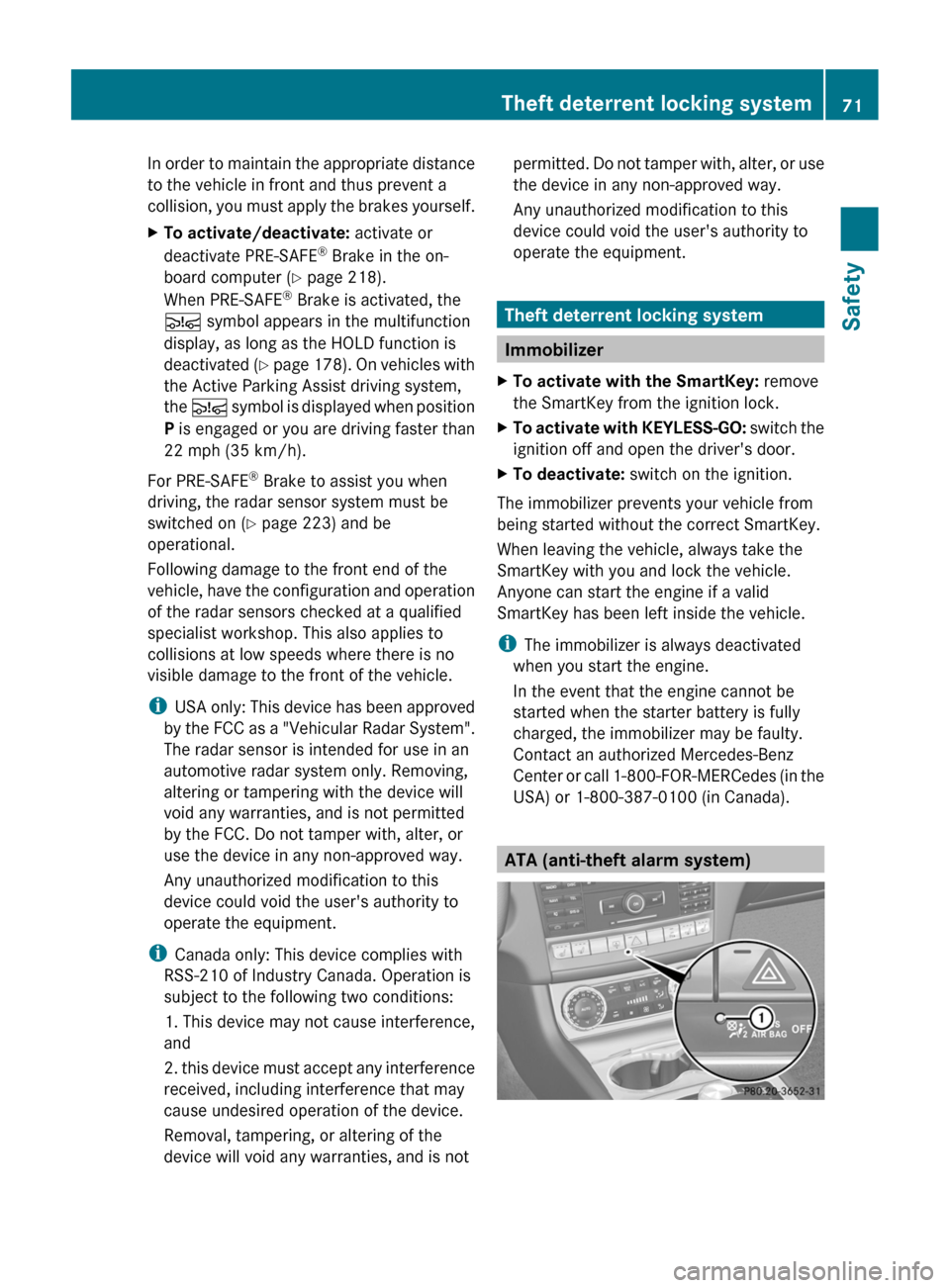
USA) or 1-800-387-0100 (in Canada). ATA (anti-theft alarm system)Theft deterrent locking system
71
Safety Z
Page 145 of 376
malfunction has caused the system to be
deactivated, the ¤ symbol is not
displayed.
AMG vehicles:
in the AMG menu on the
multifunction display, the Stop/Start
active or Stop/Start inactive display
message disappears.
If the engine is switched off and the ¤
symbol
is shown in green in the multifunction
display, the engine has been switched off
automatically. However, all vehicle systems
remain active.
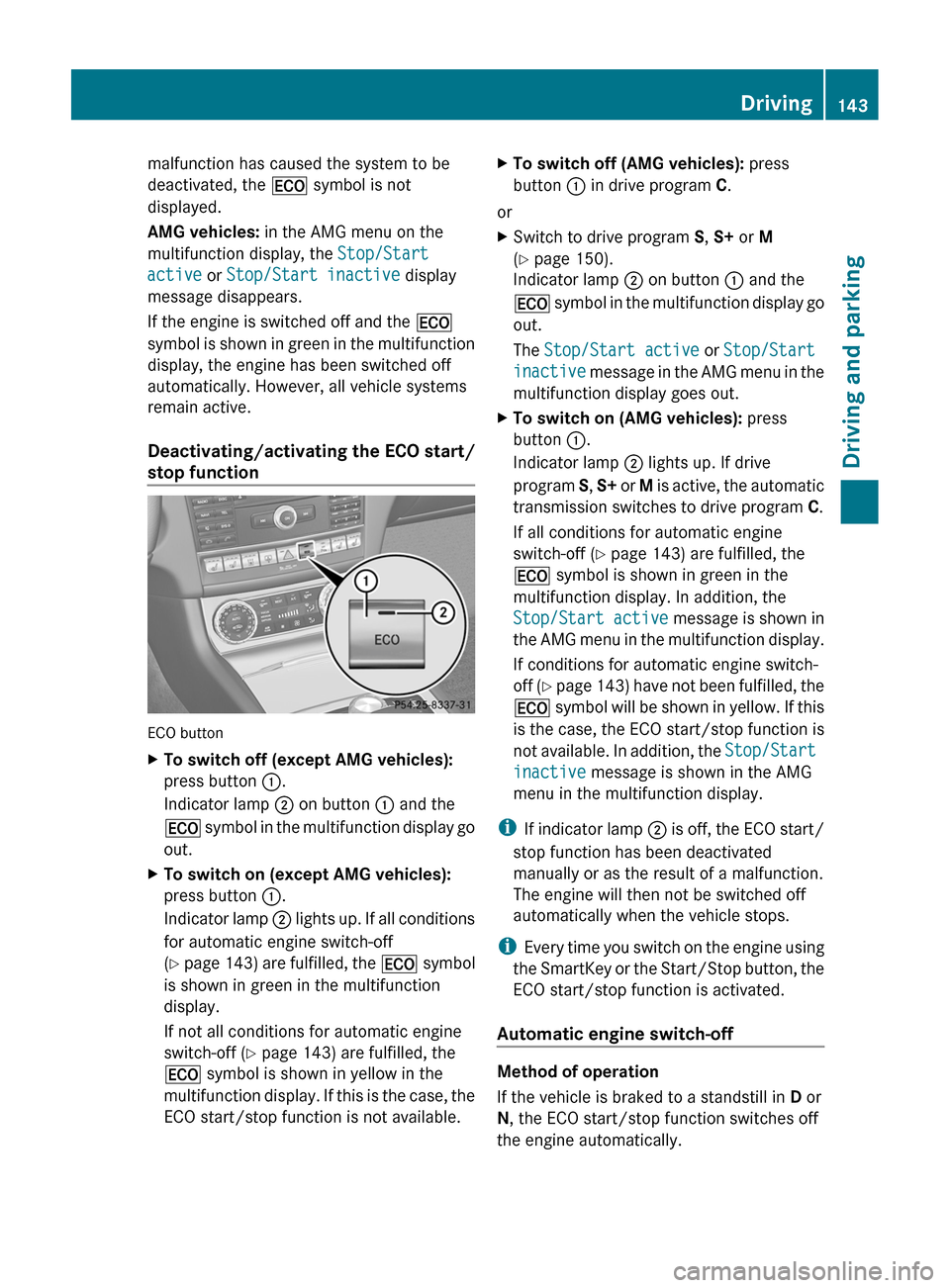
Deactivating/activating the ECO start/
stop function ECO button
X
To switch off (except AMG vehicles):
press button :.
Indicator lamp ; on button : and the
¤
symbol in the multifunction display go
out.
X To switch on (except AMG vehicles):
press button :.
Indicator
lamp ; lights up. If all conditions
for automatic engine switch-off
(Y page 143) are fulfilled, the ¤ symbol
is shown in green in the multifunction
display.
If not all conditions for automatic engine
switch-off ( Y page 143) are fulfilled, the
¤ symbol is shown in yellow in the
multifunction display. If this is the case, the
ECO start/stop function is not available. X
To switch off (AMG vehicles): press
button : in drive program C.
or
X Switch to drive program S, S+ or M
(Y page 150).
Indicator lamp ; on button : and the
¤
symbol in the multifunction display go
out.
The Stop/Start active or Stop/Start
inactive message in the AMG menu in the
multifunction display goes out.
X To switch on (AMG vehicles): press
button :.
Indicator lamp ; lights up. If drive
program S, S+
or M is active, the automatic
transmission switches to drive program C.
If all conditions for automatic engine
switch-off ( Y page 143) are fulfilled, the
¤ symbol is shown in green in the
multifunction display. In addition, the
Stop/Start active message is shown in
the AMG menu in the multifunction display.
If conditions for automatic engine switch-
off (Y page 143) have not been fulfilled, the
¤ symbol will be shown in yellow. If this
is the case, the ECO start/stop function is
not available. In addition, the Stop/Start
inactive message is shown in the AMG
menu in the multifunction display.
i If
indicator lamp ; is off, the ECO start/
stop function has been deactivated
manually or as the result of a malfunction.
The engine will then not be switched off
automatically when the vehicle stops.
i Every time you switch on the engine using
the SmartKey or the Start/Stop button, the
ECO start/stop function is activated.
Automatic engine switch-off Method of operation
If the vehicle is braked to a standstill in
D or
N, the ECO start/stop function switches off
the engine automatically. Driving
143
Driving and parking Z
Page 146 of 376
The ECO start/stop function is operational
and the
¤ symbol is displayed in green in
the multifunction display, if:
R the indicator lamp in the ECO button is lit
green.
R the vehicle is stationary.
R the outside temperature is within the
comfort range.
R the engine is at normal operating
temperature.
R the
set temperature for the vehicle interior
has been reached.
R the battery is sufficiently charged.
R the system detects that the windshield is
not fogged up when the air-conditioning
system is switched on.
R the hood is closed.
R the driver's door is closed and the driver's
seat belt is fastened.
If conditions for automatic engine switch-off
have not been fulfilled, the ¤ symbol will
be shown in yellow.
AMG vehicles: the AMG menu in the
multifunction display additionally shows the
Stop/Start inactive message.
i If you shift the transmission from R to D,
the ECO start/stop function is available
again once the ¤ symbol reappears in
green in the multifunction display.
i You can still activate the HOLD function
when the vehicle is stationary, even if the
engine has been switched off
automatically. It is then not necessary to
continue applying the brakes during the
automatic stop phase. When you depress
the accelerator pedal, the engine starts
automatically and the braking effect of the
HOLD function is deactivated. Depress the
accelerator pedal carefully, as the engine
must be started first.
i During automatic engine switch-off, the
climate control system only operates at a
reduced capacity. If you require full climate
control capacity, the ECO start/stop function can be deactivated by pressing the
ECO button (
Y page 143).
Automatic engine start The engine starts automatically if:
R
you
switch off the ECO start/stop function
by pressing the ECO button.
R you release the brakes when in
transmission position D or N and when the
HOLD function is not active.
R you depress the accelerator pedal.
R you engage reverse gear R.
R you move the transmission out of position
P.
R you switch to drive program S, S+ or M
(AMG vehicles).
R you unfasten your seat belt or open the
driver's door.
R the vehicle starts to roll.
R the brake system requires this.
R the temperature in the vehicle interior
deviates from the set range.
R the system detects moisture on the
windshield when the air-conditioning
system is switched on.
R the charge level of the battery is too low.
i Shifting the transmission to position P
does not start the engine. 144
Driving
Driving and parking
Page 157 of 376
Refueling
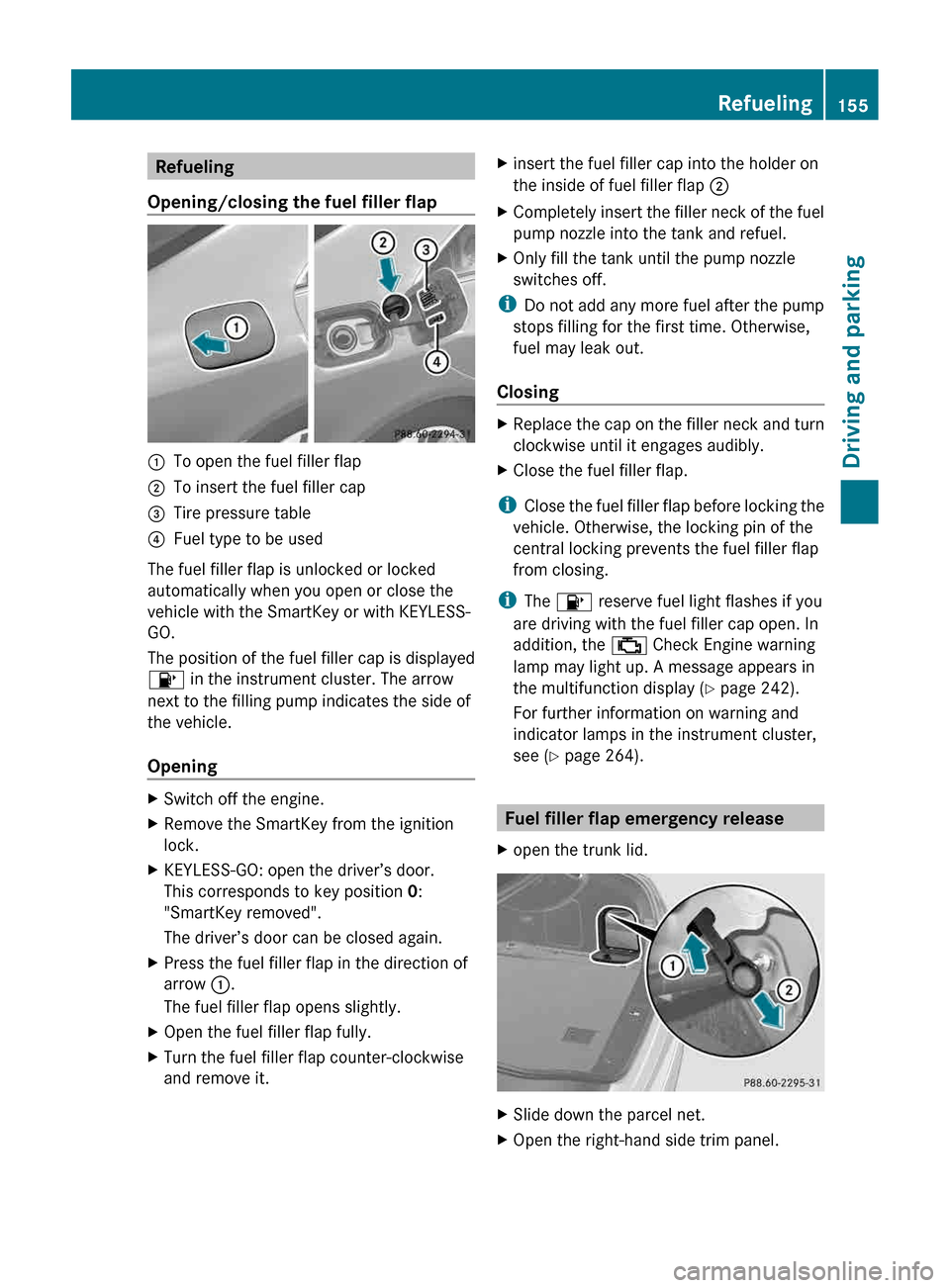
Opening/closing the fuel filler flap :
To open the fuel filler flap
; To insert the fuel filler cap
= Tire pressure table
? Fuel type to be used
The fuel filler flap is unlocked or locked
automatically when you open or close the
vehicle with the SmartKey or with KEYLESS-
GO.
The position of the fuel filler cap is displayed
8 in the instrument cluster. The arrow
next to the filling pump indicates the side of
the vehicle.
Opening X
Switch off the engine.
X Remove the SmartKey from the ignition
lock.
X KEYLESS-GO: open the driver’s door.
This corresponds to key position 0:
"SmartKey removed".
The driver’s door can be closed again.
X Press the fuel filler flap in the direction of
arrow :.
The fuel filler flap opens slightly.
X Open the fuel filler flap fully.
X Turn the fuel filler flap counter-clockwise
and remove it. X
insert the fuel filler cap into the holder on
the inside of fuel filler flap ;
X Completely insert the filler neck of the fuel
pump nozzle into the tank and refuel.
X Only fill the tank until the pump nozzle
switches off.
i Do not add any more fuel after the pump
stops filling for the first time. Otherwise,
fuel may leak out.
Closing X
Replace the cap on the filler neck and turn
clockwise until it engages audibly.
X Close the fuel filler flap.
i Close the fuel filler flap before locking the
vehicle. Otherwise, the locking pin of the
central locking prevents the fuel filler flap
from closing.
i The 8 reserve fuel light flashes if you
are driving with the fuel filler cap open. In
addition, the ; Check Engine warning
lamp may light up. A message appears in
the multifunction display (Y page 242).
For further information on warning and
indicator lamps in the instrument cluster,
see ( Y page 264). Fuel filler flap emergency release
X open the trunk lid. X
Slide down the parcel net.
X Open the right-hand side trim panel. Refueling
155
Driving and parking Z
Page 173 of 376
X
Briefly pull the cruise control lever towards
you ?, or press it up : or down ;.
DISTRONIC PLUS is selected.
X Press the cruise control lever repeatedly
up : or down ; until the desired speed
is set.
X Remove your foot from the accelerator
pedal.
Your
vehicle adapts its speed to that of the
vehicle in front, but only up to the desired
stored speed.
When driving at speeds below 20 mph
(30 km/h),
you can only activate DISTRONIC
if the vehicle in front has been detected and
is shown in the multifunction display. If the
vehicle in front is no longer detected and
displayed, DISTRONIC PLUS switches off and
a tone sounds.
i If you do not fully release the accelerator
pedal, the DISTRONIC PLUS Override
message appears in the multifunction
display. The set distance to a slower-
moving vehicle in front will then not be
maintained. You will be driving at the speed
you determine by the position of the
accelerator pedal.
Activating when driving towards a
stationary vehicle
X Briefly pull the cruise control lever towards
you ?, or press it up : or down ;.
DISTRONIC PLUS is selected.
X Press the cruise control lever repeatedly
up : or down ; until the desired speed
is set.
If the vehicle in front of you is stationary, you
can
only activate DISTRONIC PLUS once your
vehicle is stationary as well.
i DISTRONIC PLUS can only be activated at
under 20 mph (30km/h) if a vehicle in front
has been detected. Therefore, the
DISTRONIC PLUS distance display in the
instrument cluster should be activated
(Y page 217). i
You
can use the cruise control lever to set
the stored speed and the control on the
cruise control lever to set the specified
minimum distance (Y page 174).
Pulling away and driving G
WARNING
When you step on the brake pedal, you switch
off the DISTRONIC PLUS except when the
vehicle
is at a standstill. The DISTRONIC PLUS
will no longer brake your vehicle. You are
always responsible for maintaining a distance
from other vehicles, observing road speeds
and braking well in advance.
X If the vehicle in front pulls away:
remove
your foot from the brake pedal.
X Briefly pull the cruise control lever towards
you ?, or press it up : or down ;.
or
X Accelerate briefly.
Your vehicle pulls away and adapts its
speed to that of the vehicle in front.
If there is no vehicle in front, DISTRONIC
PLUS operates in the same way as cruise
control.
If DISTRONIC PLUS detects that the vehicle
in front has slowed down, it brakes your
vehicle. In this way, the distance you have
selected is maintained.
If DISTRONIC PLUS detects that the vehicle
in front is driving faster, it accelerates your
vehicle, but only up to the speed you have
stored.
Changing lanes G
WARNING
DISTRONIC PLUS and Active Blind Spot Assist
are only aids designed to assist driving.
They do not relieve you of the responsibility
of paying attention. The driver remains fully
responsible for the vehicle's distance from
other vehicles, the vehicle's speed and for
braking
in good time. Always pay attention to
traffic conditions and your surroundings. Driving systems
171
Driving and parking
Z
Page 177 of 376
DISTRONIC PLUS displays in the
speedometer
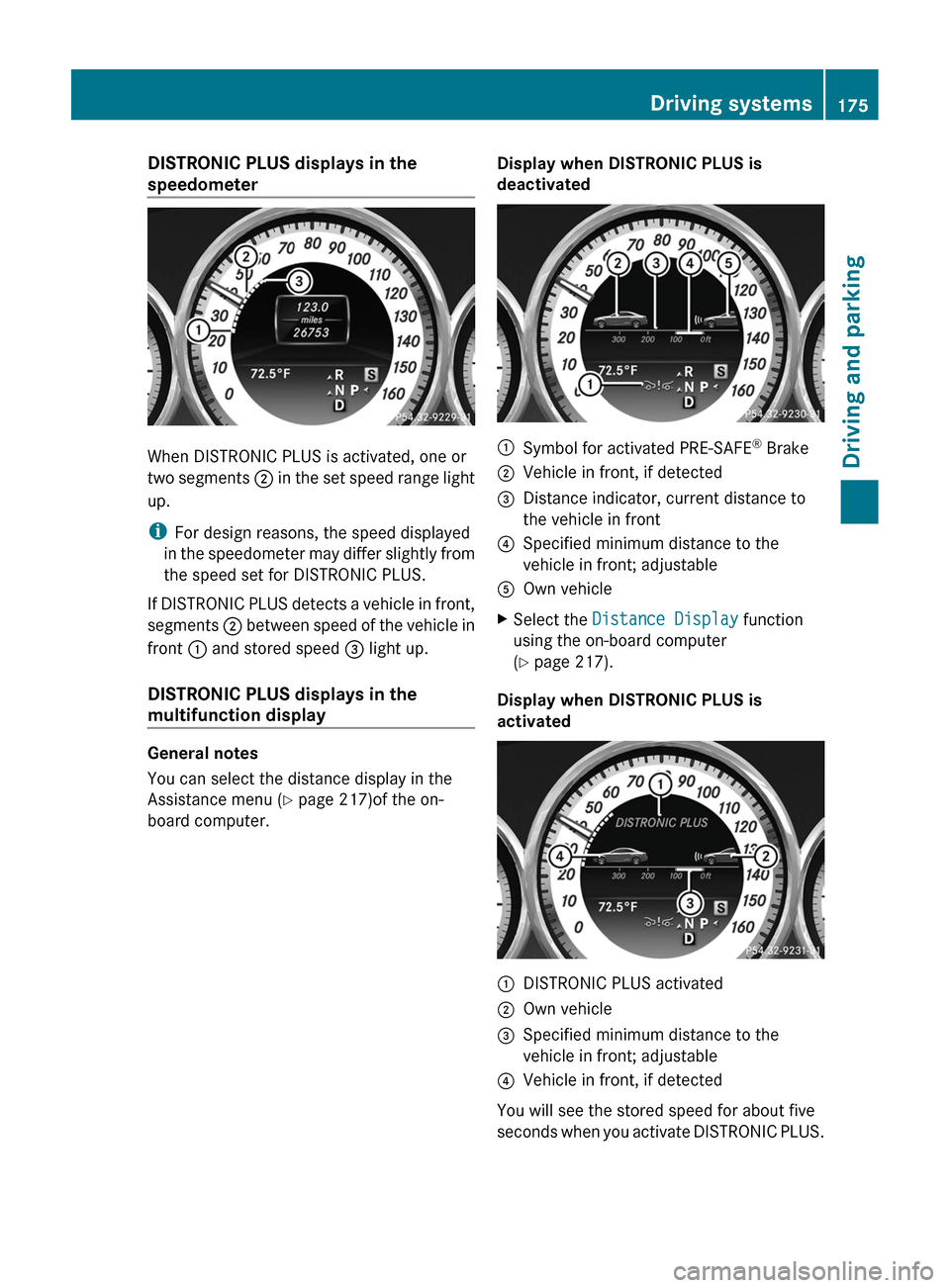
When DISTRONIC PLUS is activated, one or
two
segments ; in the set speed range light
up.
i For design reasons, the speed displayed
in the speedometer may differ slightly from
the speed set for DISTRONIC PLUS.
If DISTRONIC PLUS detects a vehicle in front,
segments ; between speed of the vehicle in
front : and stored speed = light up.
DISTRONIC PLUS displays in the
multifunction display General notes
You can select the distance display in the
Assistance menu (
Y page 217)of the on-
board computer. Display when DISTRONIC PLUS is
deactivated :
Symbol for activated PRE-SAFE ®
Brake
; Vehicle in front, if detected
= Distance indicator, current distance to
the vehicle in front
? Specified minimum distance to the
vehicle in front; adjustable
A Own vehicle
X Select the Distance Display function
using the on-board computer
(Y page 217).
Display when DISTRONIC PLUS is
activated :
DISTRONIC PLUS activated
; Own vehicle
= Specified minimum distance to the
vehicle in front; adjustable
? Vehicle in front, if detected
You will see the stored speed for about five
seconds
when you activate DISTRONIC PLUS. Driving systems
175
Driving and parking Z
Page 190 of 376
Detecting a parking space
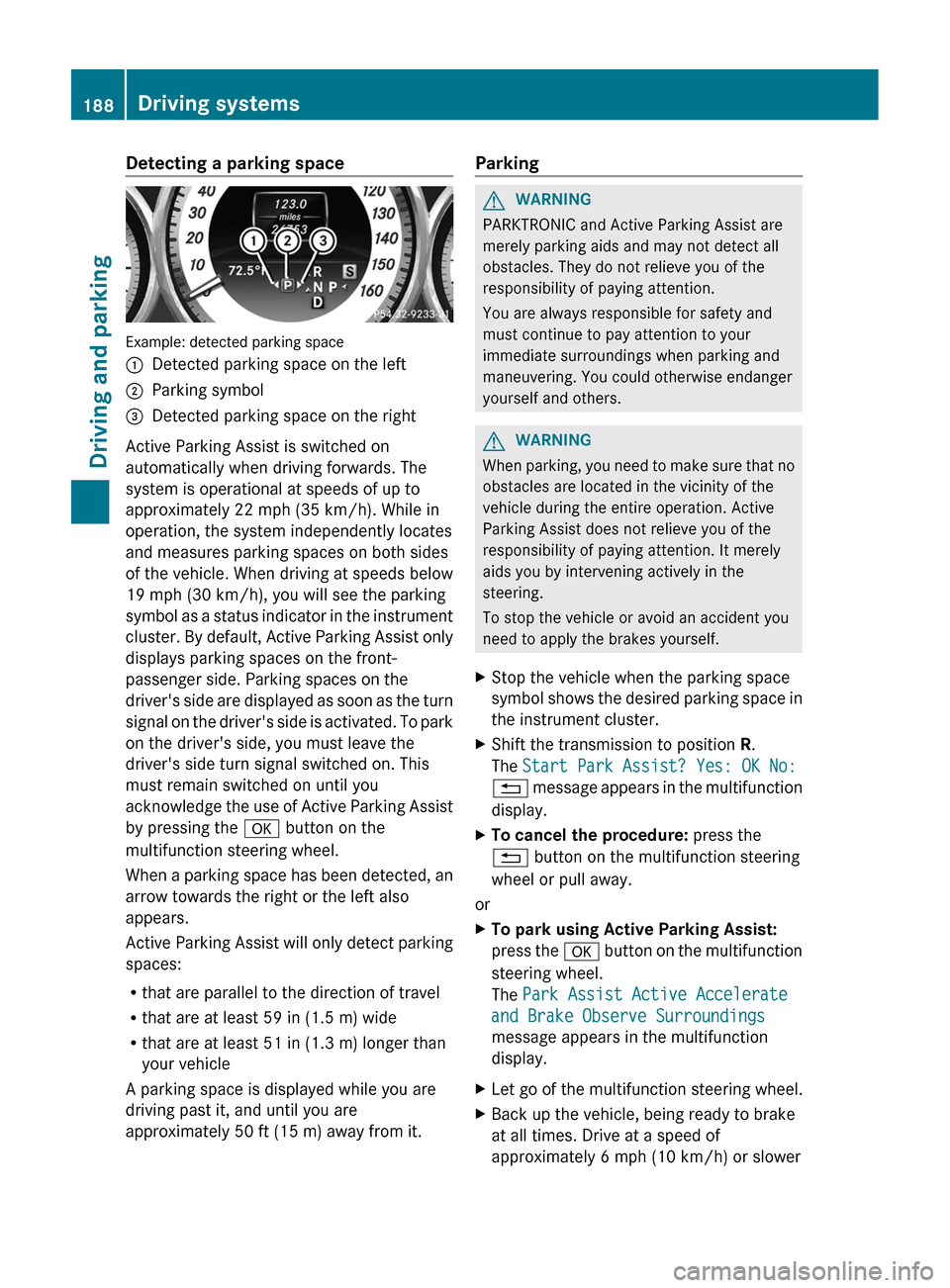
Example: detected parking space
:
Detected parking space on the left
; Parking symbol
= Detected parking space on the right
Active Parking Assist is switched on
automatically when driving forwards. The
system is operational at speeds of up to
approximately
22 mph (35 km/h). While in
operation, the system independently locates
and measures parking spaces on both sides
of the vehicle. When driving at speeds below
19 mph (30 km/h), you will see the parking
symbol as a status indicator in the instrument
cluster. By default, Active Parking Assist only
displays parking spaces on the front-
passenger side. Parking spaces on the
driver's side are displayed as soon as the turn
signal on the driver's side is activated. To park
on the driver's side, you must leave the
driver's side turn signal switched on. This
must remain switched on until you
acknowledge the use of Active Parking Assist
by pressing the a button on the
multifunction steering wheel.
When a parking space has been detected, an
arrow towards the right or the left also
appears.
Active Parking Assist will only detect parking
spaces:
R that are parallel to the direction of travel
R that are at least 59 in (1.5 m) wide
R that are at least 51 in (1.3 m) longer than
your vehicle
A parking space is displayed while you are
driving past it, and until you are
approximately 50 ft (15 m) away from it. Parking G
WARNING
PARKTRONIC and Active Parking Assist are
merely parking aids and may not detect all
obstacles. They do not relieve you of the
responsibility of paying attention.
You are always responsible for safety and
must continue to pay attention to your
immediate surroundings when parking and
maneuvering. You could otherwise endanger
yourself and others. G
WARNING
When parking, you need to make sure that no
obstacles are located in the vicinity of the
vehicle during the entire operation. Active
Parking Assist does not relieve you of the
responsibility of paying attention. It merely
aids you by intervening actively in the
steering.
To stop the vehicle or avoid an accident you
need to apply the brakes yourself.
X Stop the vehicle when the parking space
symbol
shows the desired parking space in
the instrument cluster.
X Shift the transmission to position R.
The Start Park Assist? Yes: OK No:
%
message appears in the multifunction
display.
X To cancel the procedure: press the
% button on the multifunction steering
wheel or pull away.
or
X To park using Active Parking Assist:
press
the a button on the multifunction
steering wheel.
The Park Assist Active Accelerate
and Brake Observe Surroundings
message appears in the multifunction
display.
X Let go of the multifunction steering wheel.
X Back up the vehicle, being ready to brake
at all times. Drive at a speed of
approximately
6 mph (10 km/h) or slower188
Driving systems
Driving and parking
Page 191 of 376
when backing up. Otherwise, Active
Parking Assist will be deactivated.
i In tight parking spaces, you will achieve
the best parking results by backing up as
far as possible. When doing so, also
observe the PARKTRONIC messages.
X Stop as soon as PARKTRONIC sounds the
continuous warning tone, if not before.
Maneuvering may be required in tight
parking spaces.
The Park Assist Active Select D
Observe Surroundings message appears in
the multifunction display.
X Shift the transmission to position D while
the vehicle is stationary.
Active
Parking Assist immediately steers in
the other direction.
The Park Assist Active Accelerate
and Brake Observe Surroundings
message appears in the multifunction
display.
i You will achieve the best results by
waiting for the steering procedure to
complete before pulling away.
X Drive forwards and be ready to brake at all
times.
X Stop as soon as PARKTRONIC sounds the
continuous warning tone, if not before.
The Park Assist Active Select R
Observe
Surroundings message appears in
the multifunction display.
Further transmission shifts may be
necessary.
As soon as the parking procedure is
complete, the Park Assist Finished
message appears in the multifunction
display. PARKTRONIC continues to be
available.
X Maneuver if necessary.
X Always observe the warning messages
displayed by PARKTRONIC
(Y page 185). Canceling Active Parking Assist You can cancel Active Parking Assist at any
time.
X
Stop the movement of the multifunction
steering wheel or steer yourself.
Active Parking Assist will be canceled at
once. The Park Assist Canceled
message appears in the multifunction
display.
or
X Press the PARKTRONIC button on the
center console
(Y page 185).
PARKTRONIC is switched off and Active
Parking Assist is immediately canceled.
The Park Assist Canceled message
appears in the multifunction display.
Active Parking Assist is canceled
automatically if:
R the transmission is shifted too early.
R parking using Active Parking Assist is no
longer possible.
R you are driving faster than 6mph
(10 km/h).
R a
wheel spins, ESP ®
intervenes or fails. The
ä warning lamp lights up in the
instrument cluster.
A warning tone sounds. The parking symbol
disappears and the multifunction display
shows the Park Assist Canceled
message.
When Active Parking Assist is canceled, you
must steer again yourself. Rear view camera
Important safety notes G
WARNING
Make sure that no persons or animals are in
the maneuvering range. Otherwise, they
could be injured. Driving systems
189
Driving and parking Z
Page 192 of 376
General notes
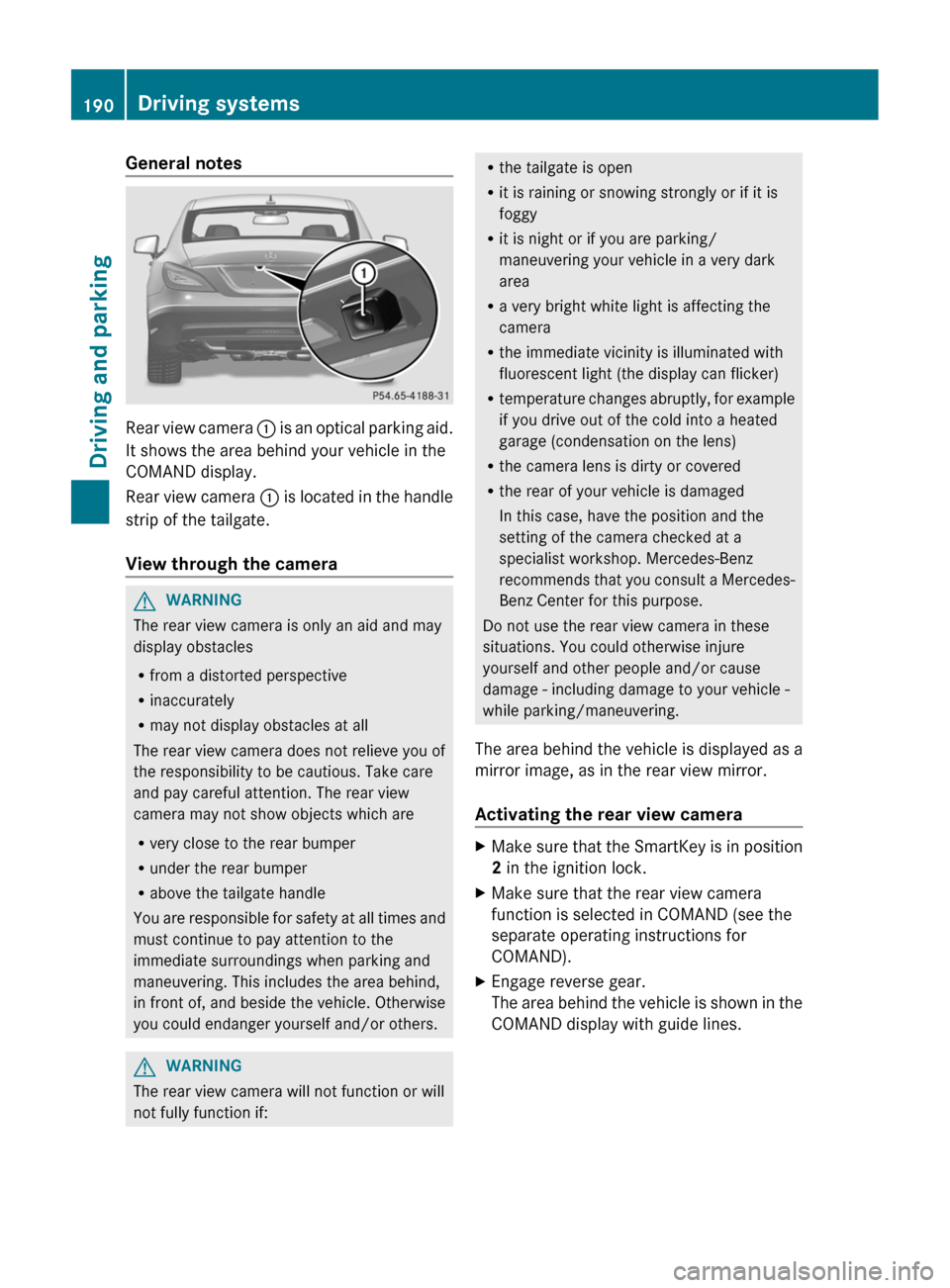
Rear view camera
: is an optical parking aid.
It shows the area behind your vehicle in the
COMAND display.
Rear view camera : is located in the handle
strip of the tailgate.
View through the camera G
WARNING
The rear view camera is only an aid and may
display obstacles
R from a distorted perspective
R inaccurately
R may not display obstacles at all
The rear view camera does not relieve you of
the responsibility to be cautious. Take care
and pay careful attention. The rear view
camera may not show objects which are
R very close to the rear bumper
R under the rear bumper
R above the tailgate handle
You
are responsible for safety at all times and
must continue to pay attention to the
immediate surroundings when parking and
maneuvering. This includes the area behind,
in front of, and beside the vehicle. Otherwise
you could endanger yourself and/or others. G
WARNING
The rear view camera will not function or will
not fully function if: R
the tailgate is open
R it is raining or snowing strongly or if it is
foggy
R it is night or if you are parking/
maneuvering your vehicle in a very dark
area
R a very bright white light is affecting the
camera
R the immediate vicinity is illuminated with
fluorescent light (the display can flicker)
R temperature
changes abruptly, for example
if you drive out of the cold into a heated
garage (condensation on the lens)
R the camera lens is dirty or covered
R the rear of your vehicle is damaged
In this case, have the position and the
setting of the camera checked at a
specialist workshop. Mercedes-Benz
recommends that you consult a Mercedes-
Benz Center for this purpose.
Do not use the rear view camera in these
situations. You could otherwise injure
yourself and other people and/or cause
damage - including damage to your vehicle -
while parking/maneuvering.
The area behind the vehicle is displayed as a
mirror image, as in the rear view mirror.
Activating the rear view camera X
Make sure that the SmartKey is in position
2 in the ignition lock.
X Make sure that the rear view camera
function is selected in COMAND (see the
separate operating instructions for
COMAND).
X Engage reverse gear.
The
area behind the vehicle is shown in the
COMAND display with guide lines. 190
Driving systems
Driving and parking