interior lights MERCEDES-BENZ CLS-Class 2013 W218 Owner's Manual
[x] Cancel search | Manufacturer: MERCEDES-BENZ, Model Year: 2013, Model line: CLS-Class, Model: MERCEDES-BENZ CLS-Class 2013 W218Pages: 376, PDF Size: 13.45 MB
Page 8 of 376
Maintenance
.................................. 162
Parking brake ................................ 158
Warning lamp .................................
257
Breakdown
see Flat tire
see Towing away
Bulbs
see Changing bulbs C
California Important notice for retail
customers and lessees ....................22
Calling up a malfunction
see Display messages
Car
see Vehicle
Care
Carpets .......................................... 309
Car wash ........................................ 303
Display ........................................... 307
Exterior lights ................................ 306
Gear or selector lever ....................309
Interior ........................................... 307
Matte finish ................................... 305
Night View Assist Plus ...................308
Notes ............................................. 303
Paint .............................................. 305
Plastic trim .................................... 308
Power washer ................................ 304
Rear view camera .......................... 307
Roof lining ...................................... 309
Seat belt ........................................ 309
Seat cover ..................................... 309
Sensors ......................................... 307
Steering wheel ............................... 309
Tail pipes ....................................... 307
Trim pieces .................................... 309
Washing by hand ........................... 304
Wheels ........................................... 306
Windows ........................................ 306
Wiper blades .................................. 306
Wooden trim .................................. 309
Cargo tie down rings .........................274
Car wash (care) ................................. 303
CD player/CD changer (on-board
computer) .......................................... 215Center console
Lower section .................................. 33
Lower section (AMG vehicles) ..........34
Upper section .................................. 32
Central locking
Automatic locking (on-board
computer) ...................................... 222
Locking/unlocking (SmartKey)
........75
Changing bulbs
Important safety notes .................. 119
Overview of bulb types ..................119
Reversing lamps ............................ 120
Child-proof locks
Important safety notes .................... 62
Rear doors ....................................... 63
Children
In the vehicle ................................... 58
Restraint systems ............................ 58
Special seat belt retractor ............... 60
Child seat
LATCH-type (ISOFIX) child seat
anchors ............................................ 61
Top Tether ....................................... 61
Cigarette lighter ................................ 280
Cleaning Mirror turn signal ........................... 307
Climate control
Automatic climate control (3-
zone) .............................................. 127
Controlling automatically ...............129
Cooling with air dehumidification ..128
Defrosting the windows ................. 132
Defrosting the windshield .............. 131
Dual-zone automatic climate
control ........................................... 125
Important safety notes .................. 124
Indicator lamp ................................ 129
Information on using 3-zone
automatic climate control .............. 128
Maximum cooling .......................... 131
Notes on using automatic climate
control ........................................... 126
Overview of systems ......................124
Problems with cooling with air
dehumidification ............................ 129
Problem with the rear window
defroster ........................................ 132
Rear control panel .........................1276
Index
Page 14 of 376
Lane Keeping Assist
Activating/deactivating .................219
Display message ............................ 244
Function/information .................... 197
Lane Tracking package .....................195
Lap time (RACETIMER) ......................225
LATCH-type (ISOFIX) child seat
anchors ................................................ 61
Light function, active Display message ............................ 238
Lights
Activating/deactivating the
interior lighting delayed switch-off . 222
Active light function .......................115
Automatic headlamp mode ............ 111
Cornering light function .................114
Driving abroad ............................... 110
Hazard warning lamps ................... 114
High beam flasher .......................... 114
High-beam headlamps ...................113
Light switch ................................... 110
Low-beam headlamps .................... 112
Parking lamps ................................ 112
Setting the brightness of the
ambient lighting (on-board
computer) ...................................... 221
Setting the brightness of the
display/switch (on-board
computer) ...................................... 220
Setting the color of the ambient
lighting (on-board computer) ......... 221
Standing lamps .............................. 112
Switching Adaptive Highbeam
Assist on/off ................................. 221
Switching the daytime running
lamps on/off (on-board
computer) ...................................... 221
Switching the exterior lighting
delayed switch-off on/off (on-
board computer) ............................ 221
Switching the surround lighting
on/off (on-board computer) ..........221
Turn signals ................................... 113
see Changing bulbs
see Interior lighting
Light sensor (display message) .......238
Loading guidelines ............................270Locking
see Central locking
Locking (doors)
Automatic ........................................ 81
Emergency locking ........................... 82
From inside (central locking
button) ............................................. 81
Locking centrally
see Central locking
Locking verification signal (on-
board computer) ............................... 222
Low-beam headlamps Display message ............................ 236
Setting for driving abroad
(symmetrical) ................................. 110
Switching on/off ........................... 112
Lumbar support
Adjusting the 4-way lumbar
support .......................................... 101
Luxury head restraints .......................99 M
M+S tires ............................................ 328
Malfunction message see Display messages
Massage function (PULSE) ...............101
Matte finish (cleaning
instructions) ...................................... 305
mbrace Call priority .................................... 286
Display message ............................ 232
Downloading destinations
(COMAND) ..................................... 287
Downloading routes .......................290
Emergency call .............................. 284
Geo fencing ................................... 290
Important safety notes .................. 282
Locating a stolen vehicle ............... 289
MB info call button ........................ 286
Remote vehicle locking .................. 288
Roadside Assistance button .......... 285
Search & Send ............................... 287
Self-test ......................................... 283
Speed alert .................................... 290
System .......................................... 283
Triggering the vehicle alarm ........... 291 12
Index
Page 41 of 376
tamper with electronic components or their
software.
In this section, you will learn the most
important facts about the restraint system
components of the vehicle.
The restraint system consists of:
R seat belts
R child restraint systems
R LATCH-type (ISOFIX) child seat anchors
Additional protection is provided by:
R SRS (Supplemental Restraint System)
R NECK-PRO head restraints/NECK-PRO
luxury head restraints
R PRE-SAFE ®
R air bag system components with:
-PASSENGER
AIR BAG OFF indicator lamp
- front-passenger seat with Occupant
Classification System (OCS)
The different air bag systems work
independently of each other. The protective
functions of the system work in conjunction
with each other. Not all air bags are deployed
in an accident.
i See "Children in the vehicle" for
information on infants and children
traveling with you in the vehicle restraint
systems for infants and children
(Y page 58). SRS (Supplemental Restraint System)
Introduction SRS consists of:
R
6 SRS warning lamp
R Air bags
R Air bag control unit with crash sensors
R Emergency Tensioning Devices
R Belt force limiters
SRS reduces the risk of occupants coming
into contact with the vehicle's interior in the
event of an accident. It can also reduce the effect of the forces to which occupants are
subjected during an accident.
SRS warning lamp
G
WARNING
The SRS self-check has detected a
malfunction if the 6 SRS indicator lamp:
R does not light up at all
R does not go out after approximately four
seconds after the engine is started
R lights
up after the engine is started or while
the vehicle is in motion
For your safety, Mercedes-Benz strongly
recommends that you have the system
checked as soon as possible at a qualified
specialist workshop. SRS may otherwise fail
to activate when it is needed in the event of
an accident, which could lead to serious or
fatal injuries. SRS might also be activated
unexpectedly and unnecessarily, which could
also result in injury.
In addition, work carried out improperly on
SRS may render SRS inoperative or cause
unintended air bag deployment. Work on the
SRS system should only be carried out by
qualified specialist personnel. Consult a
qualified specialist workshop.
If it is necessary to modify an air bag system
to accommodate a person with disabilities,
contact an authorized Mercedes-Benz Center
for details. USA only: for further information,
contact our Customer Assistance Center at
1-800-FOR-MERCedes (1-800-367-6372).
SRS functions are checked regularly when
you switch on the ignition and when the
engine is running. Therefore, malfunctions
can be detected in good time.
The 6 SRS warning lamp in the instrument
cluster lights up when the ignition is switched
on. It goes out no later than a few seconds
after the engine is started.
The SRS components are in operational
readiness when the SRS 6 indicator lamp
goes out while the engine is running. Occupant safety
39
Safety Z
Page 105 of 376
Steering wheel
Important safety notes
G
WARNING
Do not adjust the steering wheel while driving.
Adjusting the steering wheel while driving
could cause the driver to lose control of the
vehicle.
The electrical steering wheel adjustment
feature can be operated at any time.
Therefore, do not leave children unattended
in the vehicle, or with access to an unlocked
vehicle. A child's unsupervised access to a
vehicle could result in an accident and/or
serious personal injury. Adjusting the steering wheel
electrically
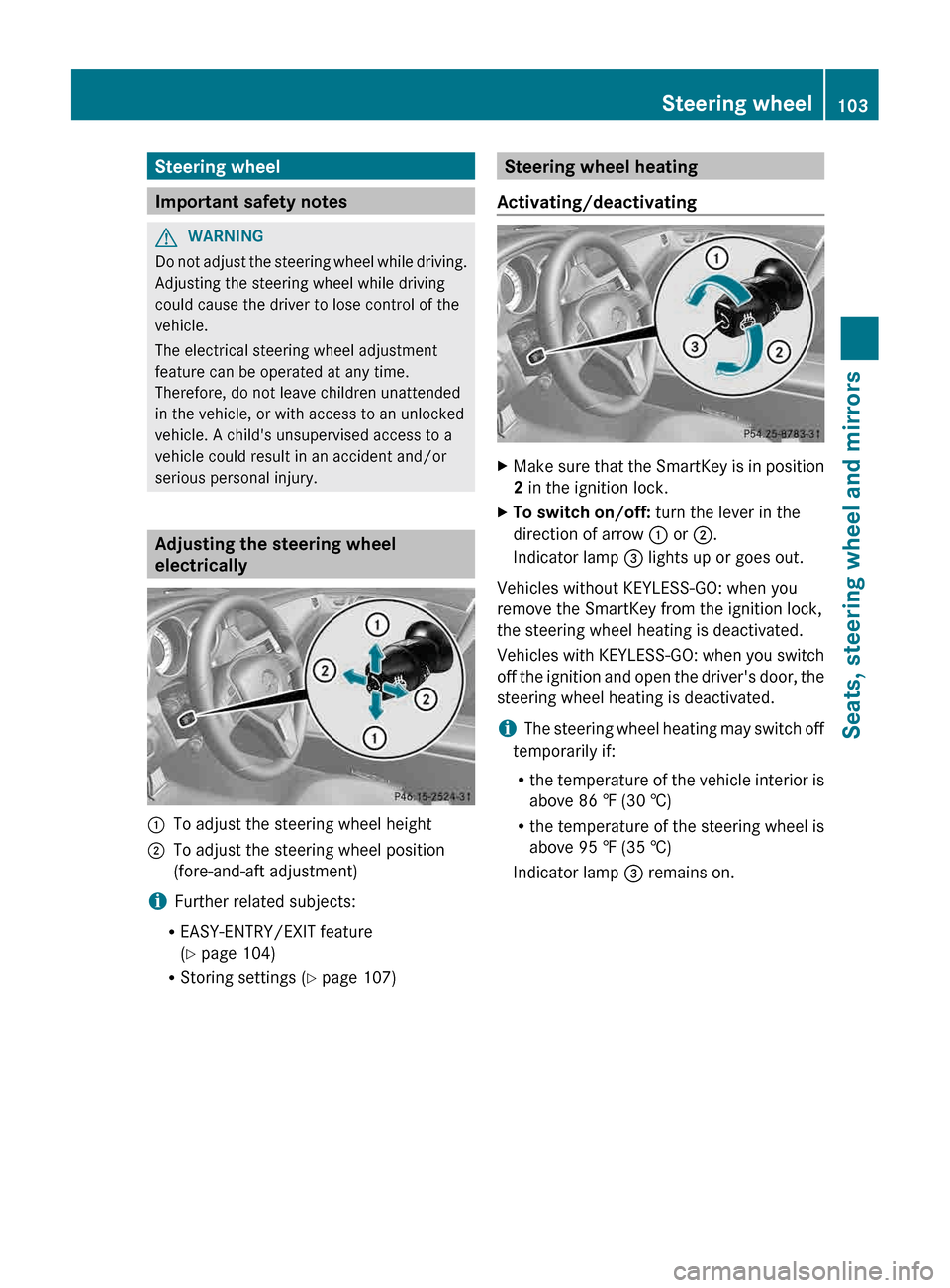
:
To adjust the steering wheel height
; To adjust the steering wheel position
(fore-and-aft adjustment)
i Further related subjects:
R EASY-ENTRY/EXIT feature
(Y page 104)
R Storing settings
(Y page 107) Steering wheel heating
Activating/deactivating X
Make sure that the SmartKey is in position
2 in the ignition lock.
X To switch on/off: turn the lever in the
direction of arrow : or ;.
Indicator lamp = lights up or goes out.
Vehicles without KEYLESS-GO: when you
remove the SmartKey from the ignition lock,
the steering wheel heating is deactivated.
Vehicles
with KEYLESS-GO: when you switch
off the ignition and open the driver's door, the
steering wheel heating is deactivated.
i The steering wheel heating may switch off
temporarily if:
R the temperature of the vehicle interior is
above 86 ‡ (30 †)
R the temperature of the steering wheel is
above 95 ‡ (35 †)
Indicator lamp = remains on. Steering wheel
103
Seats, steering wheel and mirrors Z
Page 111 of 376
Useful information ............................
110
Exterior lighting ................................ 110
Interior lighting ................................. 117
Replacing bulbs ................................. 119
Windshield wipers ............................120 109Lights and windshield wipers
Page 119 of 376
the instrument cluster goes out. The
_
indicator lamp in the multifunction display
remains lit.
X To deactivate: move the combination
switch back to its normal position.
The _ indicator lamp in the instrument
cluster goes out. Headlamps fogged up on the inside
The headlamps may fog up on the inside if
there is high atmospheric humidity.
X Switch on the light and drive off.
The level of moisture diminishes,
depending
on the length of the journey and
the weather conditions (humidity and
temperature).
If the level of moisture does not diminish:
X Have the headlamps checked at a qualified
specialist workshop. Interior lighting
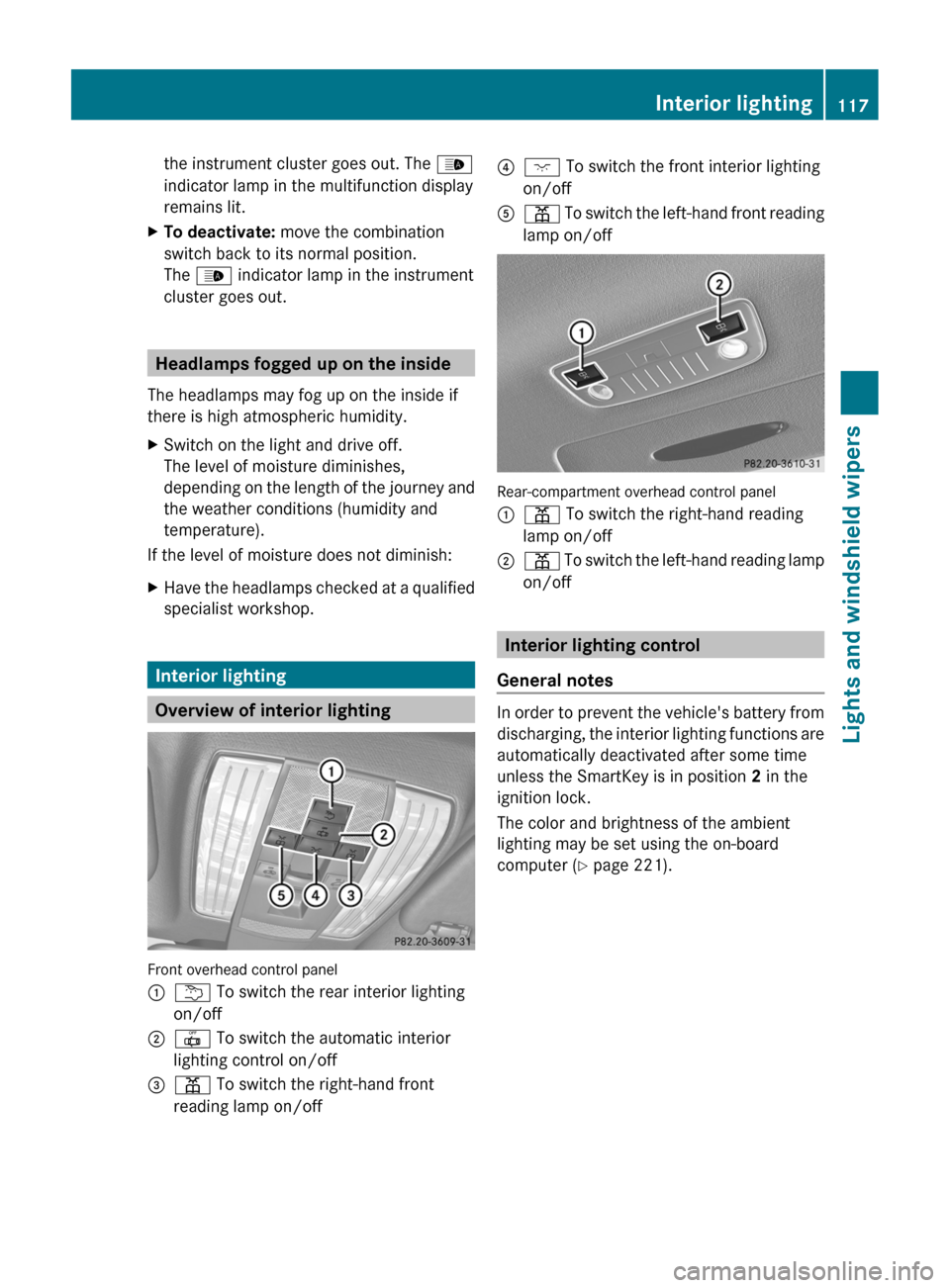
Overview of interior lighting
Front overhead control panel
:
u To switch the rear interior lighting
on/off
; | To switch the automatic interior
lighting control on/off
= p To switch the right-hand front
reading lamp on/off ?
c To switch the front interior lighting
on/off
A p
To switch the left-hand front reading
lamp on/off Rear-compartment overhead control panel
:
p To switch the right-hand reading
lamp on/off
; p
To switch the left-hand reading lamp
on/off Interior lighting control
General notes In order to prevent the vehicle's battery from
discharging,
the interior lighting functions are
automatically deactivated after some time
unless the SmartKey is in position 2 in the
ignition lock.
The color and brightness of the ambient
lighting may be set using the on-board
computer (Y page 221). Interior lighting
117
Lights and windshield wipers Z
Page 120 of 376
Automatic interior lighting control
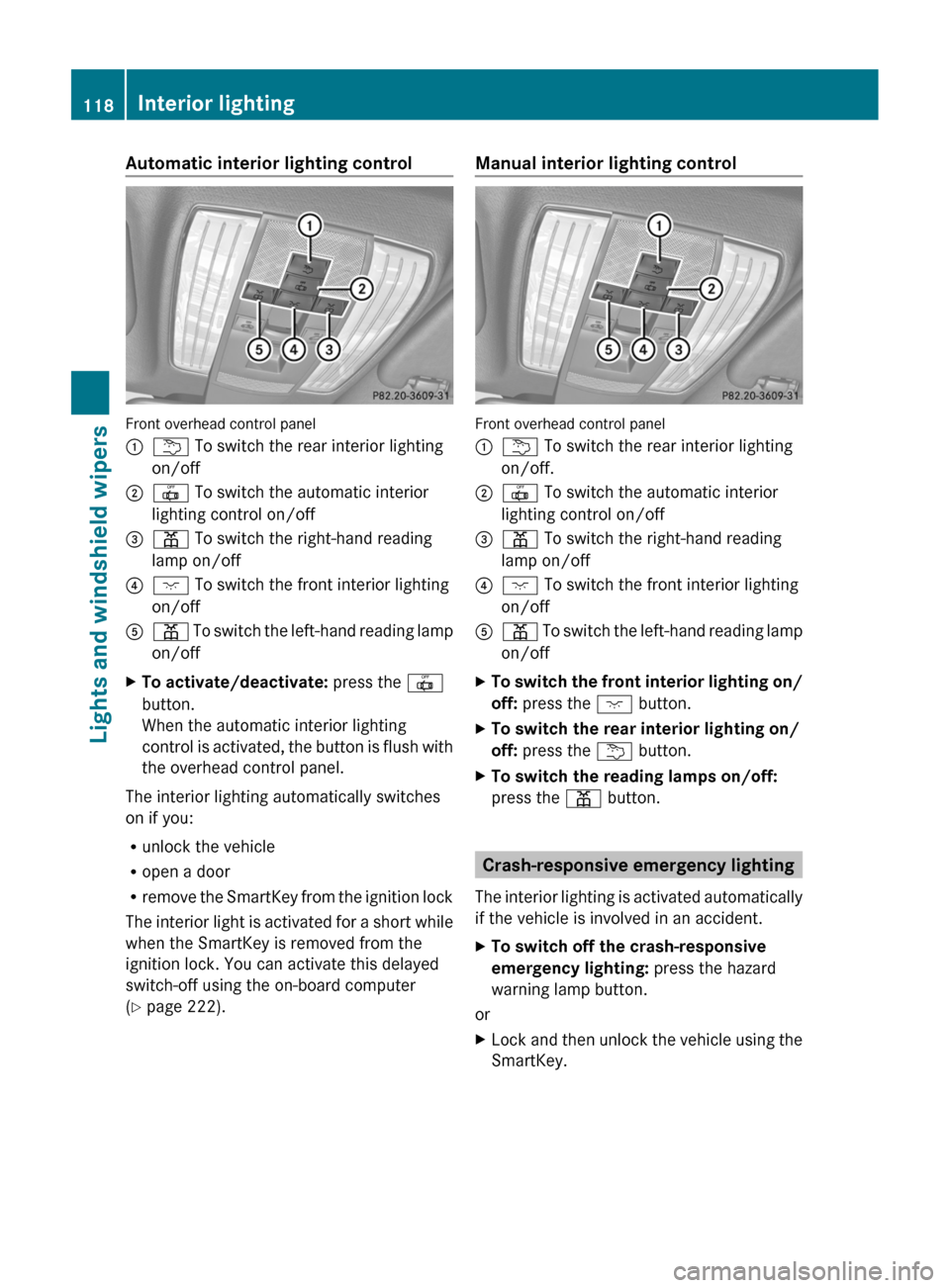
Front overhead control panel
:
u To switch the rear interior lighting
on/off
; | To switch the automatic interior
lighting control on/off
= p To switch the right-hand reading
lamp on/off
? c To switch the front interior lighting
on/off
A p To switch the left-hand reading lamp
on/off
X To activate/deactivate: press the |
button.
When the automatic interior lighting
control
is activated, the button is flush with
the overhead control panel.
The interior lighting automatically switches
on if you:
R unlock the vehicle
R open a door
R remove
the SmartKey from the ignition lock
The interior light is activated for a short while
when the SmartKey is removed from the
ignition lock. You can activate this delayed
switch-off using the on-board computer
(Y page 222). Manual interior lighting control
Front overhead control panel
:
u To switch the rear interior lighting
on/off.
; | To switch the automatic interior
lighting control on/off
= p To switch the right-hand reading
lamp on/off
? c To switch the front interior lighting
on/off
A p
To switch the left-hand reading lamp
on/off
X To switch the front interior lighting on/
off: press the c button.
X To switch the rear interior lighting on/
off: press the u button.
X To switch the reading lamps on/off:
press the p button. Crash-responsive emergency lighting
The
interior lighting is activated automatically
if the vehicle is involved in an accident.
X To switch off the crash-responsive
emergency lighting: press the hazard
warning lamp button.
or
X Lock and then unlock the vehicle using the
SmartKey.118
Interior lighting
Lights and windshield wipers
Page 130 of 376
Information about using 3-zone
automatic climate control
The following contains instructions and
recommendations to enable you to get the
most out of your automatic climate control.
R Activate
climate control using the à and
¿ buttons. The indicator lamps above
the à and ¿ buttons light up.
R In automatic mode, you can also use the
ñ button to set a climate mode
(FOCUS/MEDIUM/DIFFUSE). The
MEDIUM level is recommended.
R Set the temperature to 72 ‡ (22 †).
R Only use the "defrosting" function briefly
until the windshield is clear again.
R Only use "air-recirculation" mode briefly,
e.g. if there are unpleasant outside odors
or when in a tunnel. The windows could
otherwise fog up, since no fresh air is drawn
into the vehicle in air-recirculation mode.
R Use the ZONE function to adopt the
temperature settings on the driver's side
for the front-passenger side and the rear
compartment as well. The indicator lamp
above the á button goes out.
R Use the residual heat function if you want
to heat or ventilate the vehicle interior
when the ignition is switched off. The
"residual heat" function can only be
activated or deactivated with the ignition
switched off. Operating the climate control
systems
Activating/deactivating climate
control
Points to observe before use G
WARNING
When the climate control system is
deactivated, the outside air supply and
circulation are also deactivated. Only choose
this setting for a short time. Otherwise the windows could fog up, impairing visibility and
endangering you and others.
i Switch on climate control primarily using
the à button ( Y page 129).
Activating/deactivating X
Turn the SmartKey to position 2 in the
ignition lock.
X To switch on: press the à button.
The
indicator lamp in the à button lights
up. Airflow and air distribution are set to
automatic mode.
or
X Press the ^ button.
The
indicator lamp in the ^ button goes
out. The previously selected settings are
restored.
X To switch off: press the ^ button.
The
indicator lamp in the ^ button lights
up. Activating/deactivating cooling with
air dehumidification
Points to observe before use G
WARNING
If you switch off the cooling function, the
vehicle will not be cooled when weather
conditions
are warm. The windows can fog up
more quickly. This may prevent you from
observing the traffic conditions, thereby
causing an accident.
The cooling with air dehumidification function
is only available when the engine is running.
The air inside the vehicle is cooled and
dehumidified according to the temperature
selected.
Condensation may drip from the underside of
the vehicle when it is in cooling mode. This is
normal and not a sign that there is a
malfunction. 128
Operating the climate control systems
Climate control
Page 134 of 376
X
To activate: press the Ù button.
The indicator lamp in the button lights up.
X To activate: press off-road button Ù
again.
The
indicator lamp goes out. The previously
selected settings are restored.
When you activate MAX COOL, climate
control switches to the following functions:
R maximum cooling
R maximum airflow
R air-recirculation mode on Defrosting the windows
Windows fogged up on the inside X
Activate the ¿ cooling with air
dehumidification function.
X Activate automatic mode Ã.
X If the windows continue to fog up, activate
the defrosting function
(Y page 131).
i You should only select this setting until
the windshield is clear again.
Windows fogged up on the outside X
Press the _ button repeatedly until the
P or O symbol appears in the
display.
i You should only select this setting until
the windshield is clear again. Rear window defroster
Activating/deactivating G
WARNING
Clear all windows of ice or snow before setting
off. Otherwise, impaired visibility could
endanger you and others.
The
rear window defroster has a high current
draw. You should therefore switch it off as
soon as the rear window is clear. Otherwise, the rear window defroster switches off
automatically after several minutes.
If the battery voltage is too low, the rear
window defroster may switch off.
X
Turn the SmartKey to position 2 in the
ignition lock.
X Press the ¤ button.
The
indicator lamp in the ¤ button lights
up or goes out.
Problems with the rear window
defroster The rear window defroster has deactivated
prematurely or cannot be activated.
X
Switch off any consumers that are not
required, e.g. reading lamps or interior
lighting.
When the battery is sufficiently charged,
the rear window defroster is activated
again automatically. Activating/deactivating air-
recirculation mode
G
WARNING
At low outside temperatures, only switch over
to air-recirculation mode for brief periods.
Otherwise, the windows could fog up, thus
impairing visibility and endangering yourself
and others. This may prevent you from
observing the traffic conditions and thereby
cause an accident.
You can deactivate the flow of fresh air if
unpleasant odors are entering the vehicle
from outside. The air already inside the
vehicle will then be recirculated.
The
operation of air-recirculation mode is the
same for all control panels. 132
Operating the climate control systems
Climate control
Page 135 of 376
X
Turn the SmartKey to position 2 in the
ignition lock.
X To activate: press the g button.
The indicator lamp in the g button lights
up.
i In
the event of high pollution levels 1
or at
high outside temperatures, air-
recirculation mode is automatically
activated. When air-recirculation mode is
activated automatically, the indicator lamp
above the g button does not light up.
Outside air is added after about
30 minutes.
X To deactivate: press the g button.
The
indicator lamp in the g button goes
out.
i Air-recirculation mode deactivates
automatically:
R after approximately five minutes at
outside temperatures below
approximately
41 ‡ (5 †)
R after approximately five minutes if
cooling with air dehumidification is
deactivated
R after approximately 30 minutes at
outside temperatures above
approximately 41 ‡ (5 †) Activating/deactivating the residual
heat function
The
residual heat function is only available in
vehicles for Canada with automatic climate
control.
It is possible to make use of the residual heat
of the engine to continue heating the
stationary vehicle for up to 30 minutes after
the engine has been switched off. The heating
time depends on the temperature that has
been set. X
To activate: press the Ì button.
The
indicator lamp in the Ì button lights
up.
i The blower will run at a low speed
regardless of the airflow setting.
i If you activate the residual heat function
at high temperatures, only the ventilation
will be activated. The blower runs at
medium speed.
X To deactivate: press the Ì button.
The
indicator lamp in the Ì button goes
out.
i It is possible that the residual heat
function
may be activated automatically an
hour after the SmartKey is removed. The
vehicle is then ventilated for 30 minutes to
dry the air-conditioning system.
Residual heat is deactivated automatically:
R after approximately 30 minutes
R when the ignition is switched on
R if the battery voltage drops Setting the air vents
Important safety notes
G
WARNING
Very hot or very cold air can flow from the air
vents. This could cause burns or frostbite to
bare skin in the immediate vicinity of the
vents. Keep bare skin away from these air
vents.
If necessary, direct the airflow away to
a different area of the vehicle interior.
In order to ensure the direct flow of fresh air
through the air vents into the vehicle interior,
please observe the following notes:
R keep the air inlet between the windshield
and the hood free of blockages, such as ice,
snow or leaves.
R never cover the air vents or air intake grilles
in the vehicle interior.
1 Automatic climate control only. Setting the air vents
133
Climate control Z