turn signal MERCEDES-BENZ CLS-Class 2013 W218 Owner's Manual
[x] Cancel search | Manufacturer: MERCEDES-BENZ, Model Year: 2013, Model line: CLS-Class, Model: MERCEDES-BENZ CLS-Class 2013 W218Pages: 376, PDF Size: 13.45 MB
Page 8 of 376
Maintenance
.................................. 162
Parking brake ................................ 158
Warning lamp .................................
257
Breakdown
see Flat tire
see Towing away
Bulbs
see Changing bulbs C
California Important notice for retail
customers and lessees ....................22
Calling up a malfunction
see Display messages
Car
see Vehicle
Care
Carpets .......................................... 309
Car wash ........................................ 303
Display ........................................... 307
Exterior lights ................................ 306
Gear or selector lever ....................309
Interior ........................................... 307
Matte finish ................................... 305
Night View Assist Plus ...................308
Notes ............................................. 303
Paint .............................................. 305
Plastic trim .................................... 308
Power washer ................................ 304
Rear view camera .......................... 307
Roof lining ...................................... 309
Seat belt ........................................ 309
Seat cover ..................................... 309
Sensors ......................................... 307
Steering wheel ............................... 309
Tail pipes ....................................... 307
Trim pieces .................................... 309
Washing by hand ........................... 304
Wheels ........................................... 306
Windows ........................................ 306
Wiper blades .................................. 306
Wooden trim .................................. 309
Cargo tie down rings .........................274
Car wash (care) ................................. 303
CD player/CD changer (on-board
computer) .......................................... 215Center console
Lower section .................................. 33
Lower section (AMG vehicles) ..........34
Upper section .................................. 32
Central locking
Automatic locking (on-board
computer) ...................................... 222
Locking/unlocking (SmartKey)
........75
Changing bulbs
Important safety notes .................. 119
Overview of bulb types ..................119
Reversing lamps ............................ 120
Child-proof locks
Important safety notes .................... 62
Rear doors ....................................... 63
Children
In the vehicle ................................... 58
Restraint systems ............................ 58
Special seat belt retractor ............... 60
Child seat
LATCH-type (ISOFIX) child seat
anchors ............................................ 61
Top Tether ....................................... 61
Cigarette lighter ................................ 280
Cleaning Mirror turn signal ........................... 307
Climate control
Automatic climate control (3-
zone) .............................................. 127
Controlling automatically ...............129
Cooling with air dehumidification ..128
Defrosting the windows ................. 132
Defrosting the windshield .............. 131
Dual-zone automatic climate
control ........................................... 125
Important safety notes .................. 124
Indicator lamp ................................ 129
Information on using 3-zone
automatic climate control .............. 128
Maximum cooling .......................... 131
Notes on using automatic climate
control ........................................... 126
Overview of systems ......................124
Problems with cooling with air
dehumidification ............................ 129
Problem with the rear window
defroster ........................................ 132
Rear control panel .........................1276
Index
Page 14 of 376
Lane Keeping Assist
Activating/deactivating .................219
Display message ............................ 244
Function/information .................... 197
Lane Tracking package .....................195
Lap time (RACETIMER) ......................225
LATCH-type (ISOFIX) child seat
anchors ................................................ 61
Light function, active Display message ............................ 238
Lights
Activating/deactivating the
interior lighting delayed switch-off . 222
Active light function .......................115
Automatic headlamp mode ............ 111
Cornering light function .................114
Driving abroad ............................... 110
Hazard warning lamps ................... 114
High beam flasher .......................... 114
High-beam headlamps ...................113
Light switch ................................... 110
Low-beam headlamps .................... 112
Parking lamps ................................ 112
Setting the brightness of the
ambient lighting (on-board
computer) ...................................... 221
Setting the brightness of the
display/switch (on-board
computer) ...................................... 220
Setting the color of the ambient
lighting (on-board computer) ......... 221
Standing lamps .............................. 112
Switching Adaptive Highbeam
Assist on/off ................................. 221
Switching the daytime running
lamps on/off (on-board
computer) ...................................... 221
Switching the exterior lighting
delayed switch-off on/off (on-
board computer) ............................ 221
Switching the surround lighting
on/off (on-board computer) ..........221
Turn signals ................................... 113
see Changing bulbs
see Interior lighting
Light sensor (display message) .......238
Loading guidelines ............................270Locking
see Central locking
Locking (doors)
Automatic ........................................ 81
Emergency locking ........................... 82
From inside (central locking
button) ............................................. 81
Locking centrally
see Central locking
Locking verification signal (on-
board computer) ............................... 222
Low-beam headlamps Display message ............................ 236
Setting for driving abroad
(symmetrical) ................................. 110
Switching on/off ........................... 112
Lumbar support
Adjusting the 4-way lumbar
support .......................................... 101
Luxury head restraints .......................99 M
M+S tires ............................................ 328
Malfunction message see Display messages
Massage function (PULSE) ...............101
Matte finish (cleaning
instructions) ...................................... 305
mbrace Call priority .................................... 286
Display message ............................ 232
Downloading destinations
(COMAND) ..................................... 287
Downloading routes .......................290
Emergency call .............................. 284
Geo fencing ................................... 290
Important safety notes .................. 282
Locating a stolen vehicle ............... 289
MB info call button ........................ 286
Remote vehicle locking .................. 288
Roadside Assistance button .......... 285
Search & Send ............................... 287
Self-test ......................................... 283
Speed alert .................................... 290
System .......................................... 283
Triggering the vehicle alarm ........... 291 12
Index
Page 21 of 376
Opening/closing (automatically
from outside)
................................... 84
Opening/closing (manually from
outside) ............................................
83
Trunk lid
Display message ............................ 252
Opening/closing .............................. 82
Opening dimensions ...................... 371
Trunk load (maximum) ...................... 371
Turn signals Display message ............................ 236
Switching on/off ........................... 113
Type identification plate
see Vehicle identification plate U
Unlocking Emergency unlocking .......................82
From inside the vehicle (central
unlocking button) ............................. 81V
Vanity mirror (in the sun visor) ........
278
Vehicle Data acquisition ............................... 25
Display message ............................ 251
Equipment ....................................... 21
Individual settings ..........................219
Limited Warranty ............................. 25
Loading .......................................... 337
Locking (in an emergency) ............... 82
Locking (SmartKey) .......................... 75
Lowering ........................................ 352
Maintenance .................................... 22
Parking for a long period ................ 159
Pulling away ................................... 141
Raising ........................................... 350
Reporting problems .........................24
Securing from rolling away ............349
Towing away .................................. 318
Transporting .................................. 321
Unlocking (in an emergency) ........... 82
Unlocking (SmartKey) ......................75
Vehicle data ................................... 371
Vehicle data ....................................... 371
Vehicle dimensions ...........................371Vehicle emergency locking
................82
Vehicle identification number see VIN
Vehicle identification plate ..............365
Vehicle level AIRMATIC ...................................... 180
Vehicle level (display message) .......243
Vehicle tool kit .................................. 312
Video Operating the DVD ......................... 216
VIN ...................................................... 365 W
Warning and indicator lamps ABS
................................................ 258
Brakes ........................................... 257
Check Engine ................................. 264
Coolant .......................................... 264
Distance warning ........................... 266
DISTRONIC PLUS ........................... 266
ESP ®
.............................................. 260
ESP ®
OFF ....................................... 261
Fuel tank ........................................ 264
Overview .................................. 30, 255
PASSENGER AIR BAG OFF
indicator lamp .................................. 45
Reserve fuel ................................... 264
Seat belt ........................................ 256
SPORT handling mode ................... 261
SRS ................................................ 263
Tire pressure monitor .................... 267
Warranty ............................................ 364
Washer fluid Display message ............................ 253
Wheel bolt tightening torque ...........352
Wheel chock ...................................... 349
Wheels Changing a wheel .......................... 348
Checking ........................................ 327
Cleaning ......................................... 306
Cleaning (warning) .........................348
Emergency spare wheel ................. 357
Important safety notes .................. 326
Interchanging/changing ................348
Mounting a new wheel ................... 351
Mounting a wheel .......................... 349
Removing a wheel ..........................351 Index
19
Page 32 of 376
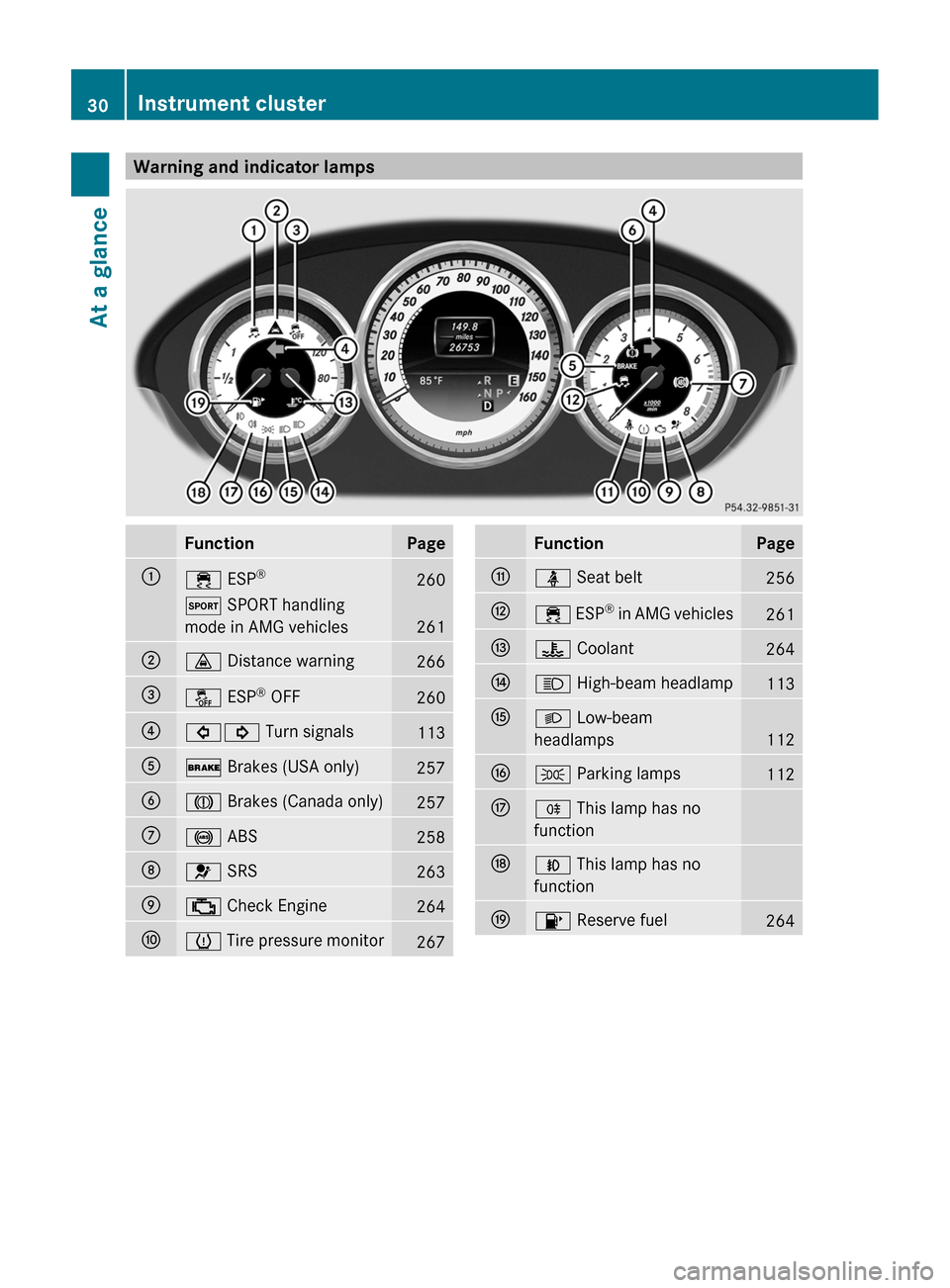
Warning and indicator lamps
Function Page
:
÷ ESP
® 260
M SPORT handling
mode in AMG vehicles
261
;
· Distance warning
266
=
å ESP
®
OFF 260
?
#! Turn signals
113
A
$ Brakes (USA only)
257
B
J Brakes (Canada only)
257
C
! ABS
258
D
6 SRS
263
E
; Check Engine
264
F
h Tire pressure monitor
267 Function Page
G
ü Seat belt
256
H
÷
ESP
®
in AMG vehicles 261
I
? Coolant
264
J
K High-beam headlamp
113
K
L Low-beam
headlamps
112
L
T Parking lamps
112
M
R This lamp has no
function
N
N This lamp has no
function
O
8 Reserve fuel
26430
Instrument cluster
At a glance
Page 77 of 376
The Product label with FCC ID and IC
certification number can be found in the
battery case of the SmartKey.
R Do not keep the SmartKey:
-with electronic devices, e.g. a mobile
phone or another SmartKey
- with
metallic objects, e.g. coins or metal
foil
- inside metallic objects, e.g. a metal case
This can affect the SmartKey's
functionality.
Keep the SmartKey away from strong
magnetic fields. Otherwise, the remote
control function could be affected. SmartKey functions
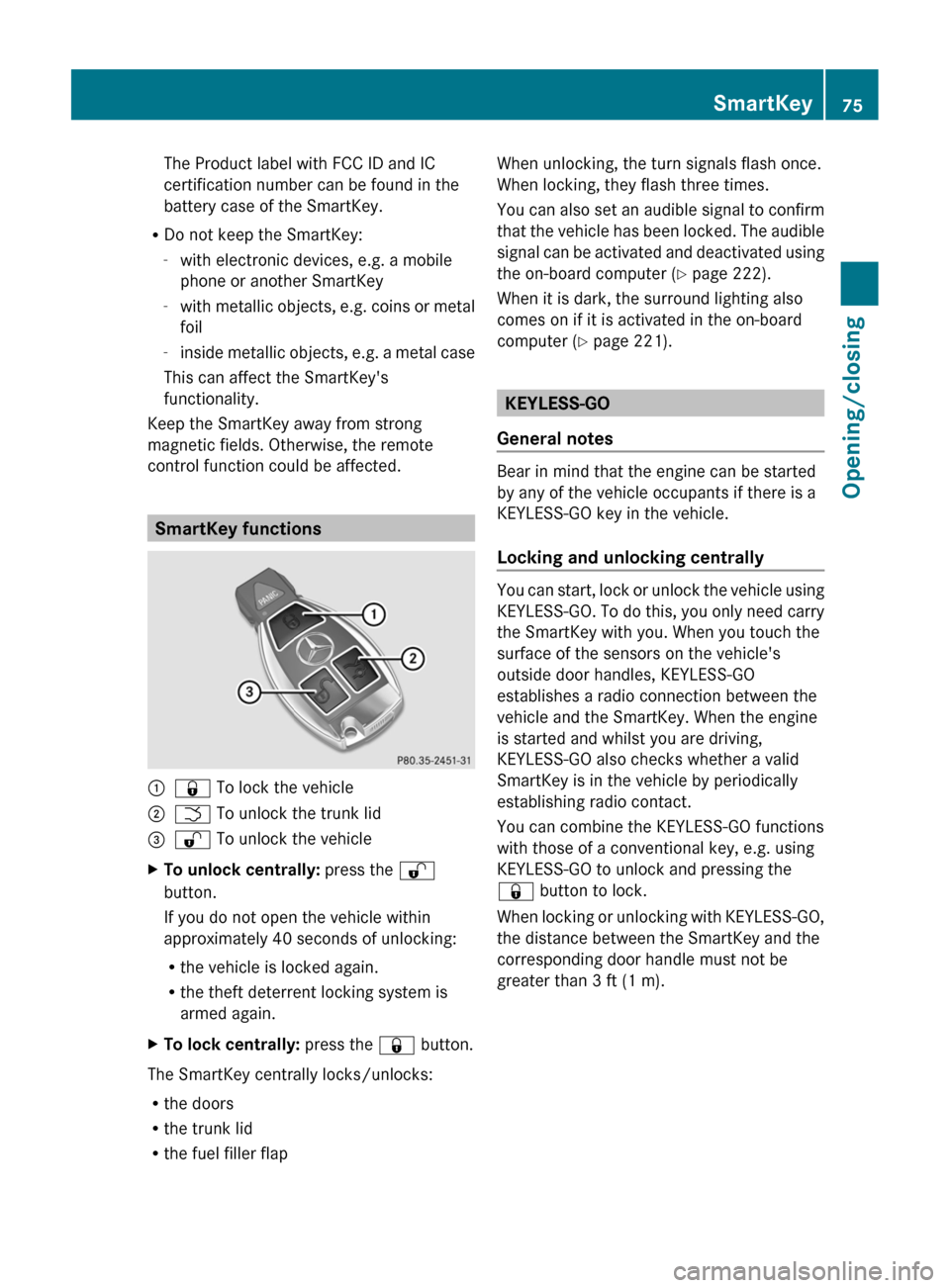
:
& To lock the vehicle
; F To unlock the trunk lid
= % To unlock the vehicle
X To unlock centrally: press the %
button.
If you do not open the vehicle within
approximately
40 seconds of unlocking:
R the vehicle is locked again.
R the theft deterrent locking system is
armed again.
X To lock centrally: press the & button.
The SmartKey centrally locks/unlocks:
R the doors
R the trunk lid
R the fuel filler flap When unlocking, the turn signals flash once.
When locking, they flash three times.
You
can also set an audible signal to confirm
that the vehicle has been locked. The audible
signal can be activated and deactivated using
the on-board computer (Y page 222).
When it is dark, the surround lighting also
comes on if it is activated in the on-board
computer (Y page 221). KEYLESS-GO
General notes Bear in mind that the engine can be started
by any of the vehicle occupants if there is a
KEYLESS-GO key in the vehicle.
Locking and unlocking centrally
You can start, lock or unlock the vehicle using
KEYLESS-GO.
To do this, you only need carry
the SmartKey with you. When you touch the
surface of the sensors on the vehicle's
outside door handles, KEYLESS-GO
establishes a radio connection between the
vehicle and the SmartKey. When the engine
is started and whilst you are driving,
KEYLESS-GO also checks whether a valid
SmartKey is in the vehicle by periodically
establishing radio contact.
You can combine the KEYLESS-GO functions
with those of a conventional key, e.g. using
KEYLESS-GO to unlock and pressing the
& button to lock.
When locking or unlocking with KEYLESS-GO,
the distance between the SmartKey and the
corresponding door handle must not be
greater than 3 ft (1 m). SmartKey
75
Opening/closing Z
Page 78 of 376
X
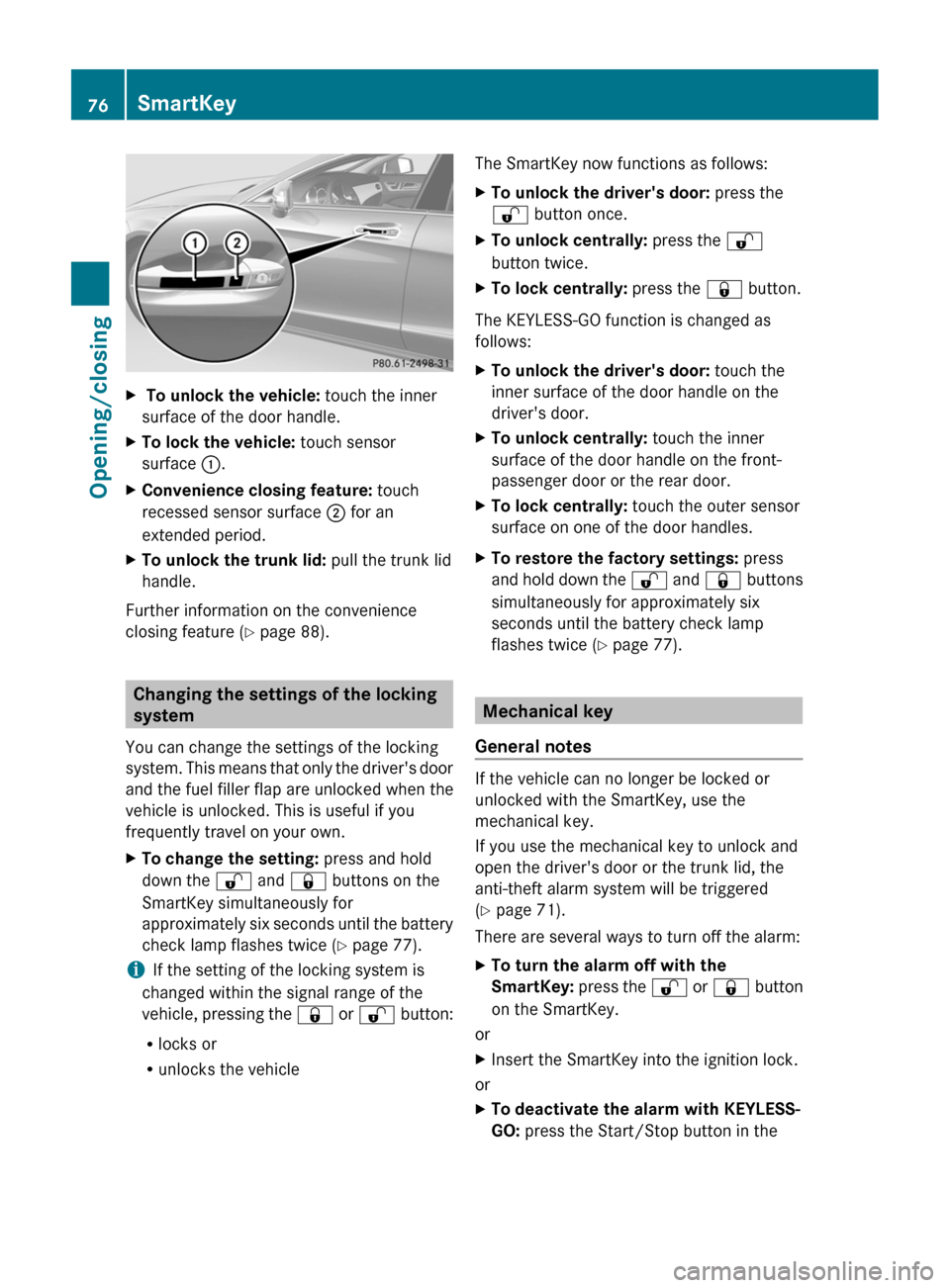
To unlock the vehicle: touch the inner
surface of the door handle.
X To lock the vehicle: touch sensor
surface :.
X Convenience closing feature: touch
recessed sensor surface ; for an
extended period.
X To unlock the trunk lid: pull the trunk lid
handle.
Further information on the convenience
closing feature ( Y page 88).Changing the settings of the locking
system
You can change the settings of the locking
system.
This means that only the driver's door
and the fuel filler flap are unlocked when the
vehicle is unlocked. This is useful if you
frequently travel on your own.
X To change the setting: press and hold
down the % and & buttons on the
SmartKey simultaneously for
approximately
six seconds until the battery
check lamp flashes twice ( Y page 77).
i If the setting of the locking system is
changed within the signal range of the
vehicle,
pressing the & or % button:
R locks or
R unlocks the vehicle The SmartKey now functions as follows:
X
To unlock the driver's door: press the
% button once.
X To unlock centrally: press the %
button twice.
X To lock centrally: press the & button.
The KEYLESS-GO function is changed as
follows:
X To unlock the driver's door: touch the
inner surface of the door handle on the
driver's door.
X To unlock centrally: touch the inner
surface of the door handle on the front-
passenger door or the rear door.
X To lock centrally: touch the outer sensor
surface on one of the door handles.
X To restore the factory settings: press
and
hold down the % and & buttons
simultaneously for approximately six
seconds until the battery check lamp
flashes twice ( Y page 77). Mechanical key
General notes If the vehicle can no longer be locked or
unlocked with the SmartKey, use the
mechanical key.
If you use the mechanical key to unlock and
open the driver's door or the trunk lid, the
anti-theft alarm system will be triggered
(Y page 71).
There are several ways to turn off the alarm:
X
To turn the alarm off with the
SmartKey:
press the % or & button
on the SmartKey.
or
X Insert the SmartKey into the ignition lock.
or
X To deactivate the alarm with KEYLESS-
GO: press the Start/Stop button in the76
SmartKey
Opening/closing
Page 115 of 376
3T
Parking lamps, license plate and
instrument cluster lighting
4Ã Automatic headlamp mode,
controlled by the light sensor
5L Low-beam/high-beam headlamps
Switching on the parking lamps ensures the
corresponding side of the vehicle is
illuminated.
X To switch on the standing lamps: the
SmartKey is not in the ignition lock or it is
in position 0.
X Turn the light switch to W (left-hand side
of the vehicle) or X (right-hand side of
the vehicle). Combination switch
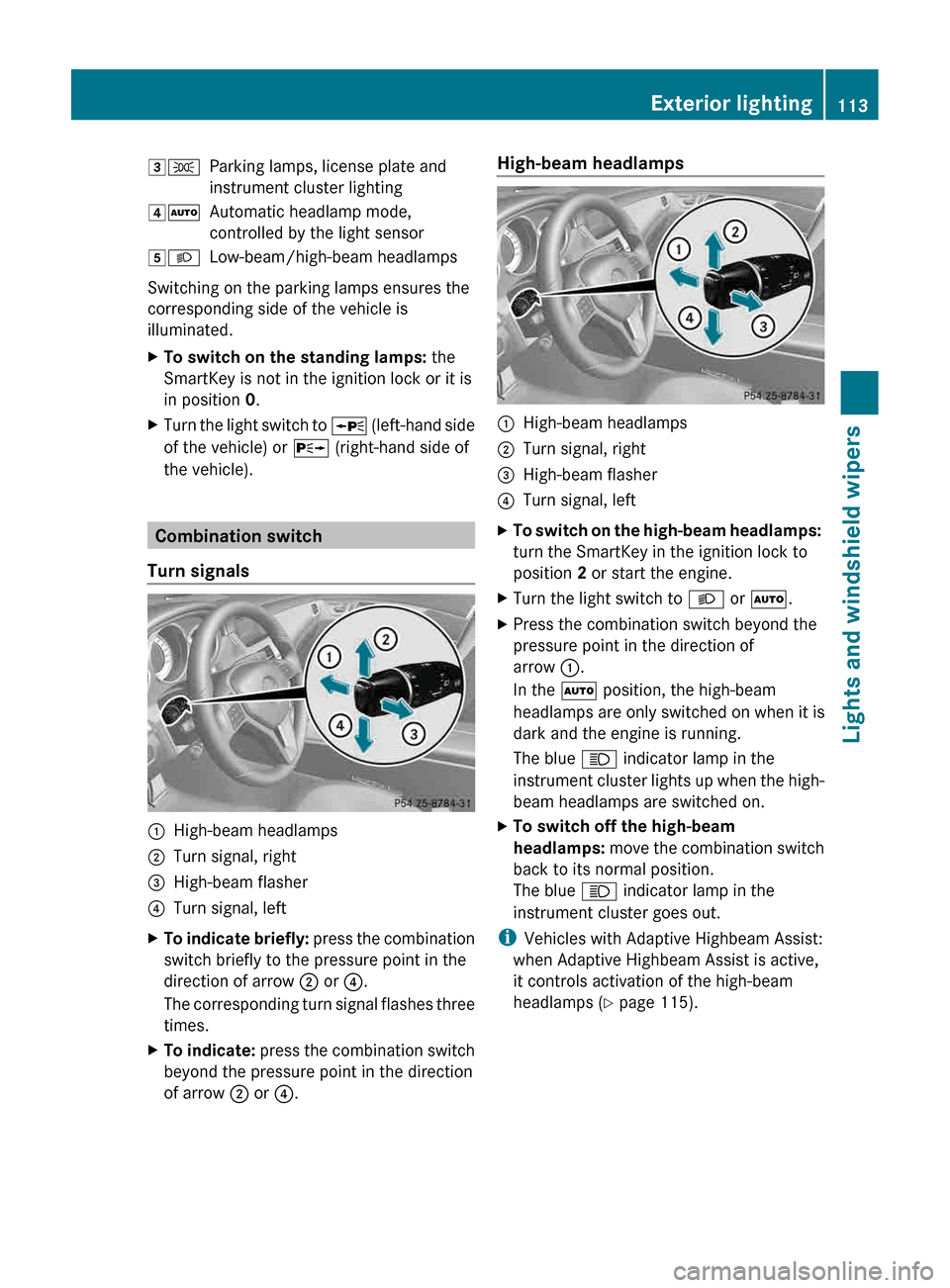
Turn signals :
High-beam headlamps
; Turn signal, right
= High-beam flasher
? Turn signal, left
X To indicate briefly: press
the combination
switch briefly to the pressure point in the
direction of arrow ; or ?.
The corresponding turn signal flashes three
times.
X To indicate: press
the combination switch
beyond the pressure point in the direction
of arrow ; or ?. High-beam headlamps
:
High-beam headlamps
; Turn signal, right
= High-beam flasher
? Turn signal, left
X To switch on the high-beam headlamps:
turn the SmartKey in the ignition lock to
position 2 or start the engine.
X Turn the light switch to L or Ã.
X Press the combination switch beyond the
pressure point in the direction of
arrow :.
In the à position, the high-beam
headlamps are only switched on when it is
dark and the engine is running.
The blue K indicator lamp in the
instrument
cluster lights up when the high-
beam headlamps are switched on.
X To switch off the high-beam
headlamps: move
the combination switch
back to its normal position.
The blue K indicator lamp in the
instrument cluster goes out.
i Vehicles with Adaptive Highbeam Assist:
when Adaptive Highbeam Assist is active,
it controls activation of the high-beam
headlamps
(Y page 115). Exterior lighting
113
Lights and windshield wipers Z
Page 116 of 376
High-beam flasher
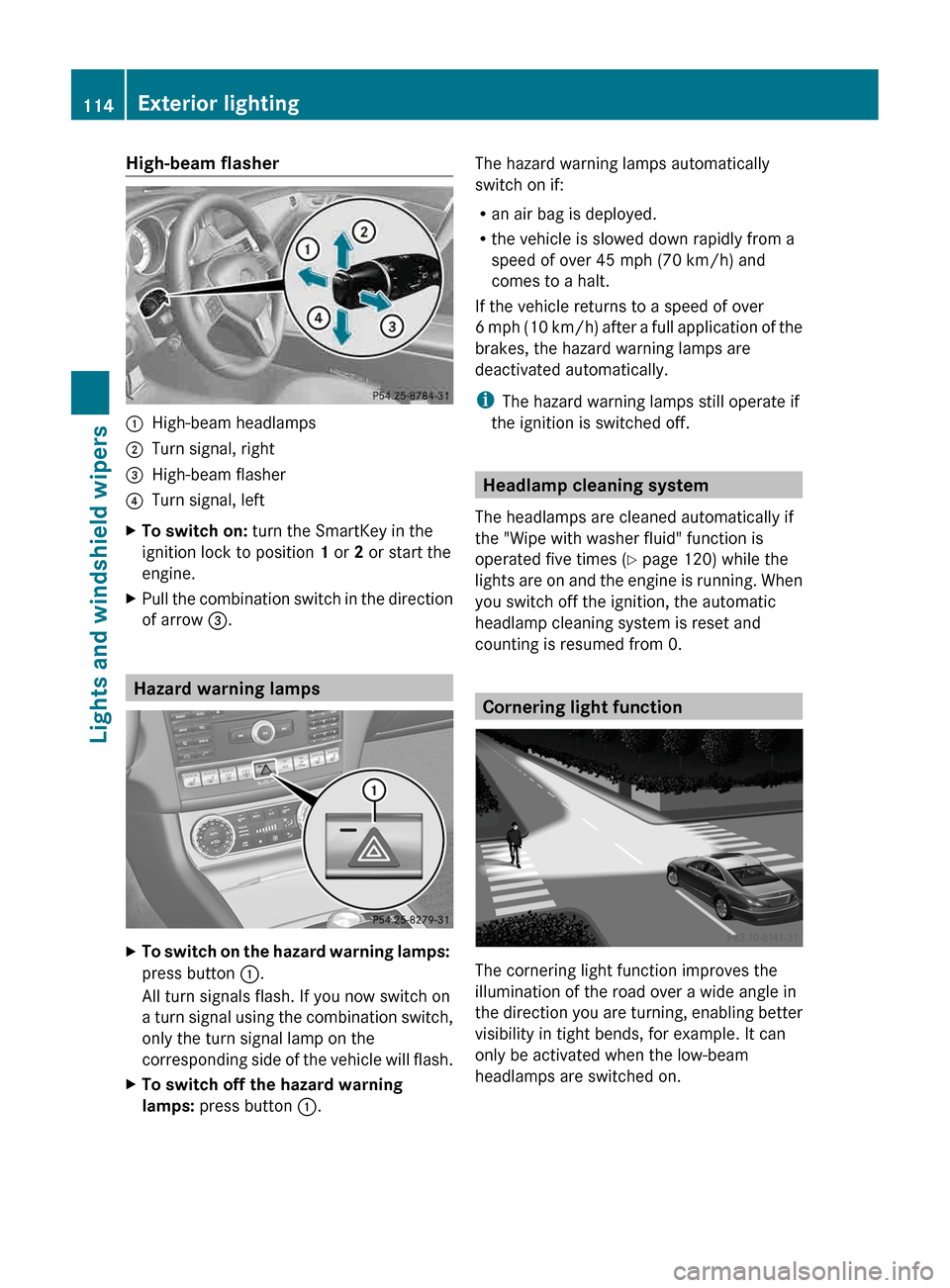
:
High-beam headlamps
; Turn signal, right
= High-beam flasher
? Turn signal, left
X To switch on: turn the SmartKey in the
ignition lock to position 1 or 2 or start the
engine.
X Pull the combination switch in the direction
of arrow =. Hazard warning lamps
X
To switch on the hazard warning lamps:
press button :.
All turn signals flash. If you now switch on
a
turn signal using the combination switch,
only the turn signal lamp on the
corresponding side of the vehicle will flash.
X To switch off the hazard warning
lamps: press button :. The hazard warning lamps automatically
switch on if:
R
an air bag is deployed.
R the vehicle is slowed down rapidly from a
speed of over 45 mph (70 km/h) and
comes to a halt.
If the vehicle returns to a speed of over
6
mph (10 km/h) after a full application of the
brakes, the hazard warning lamps are
deactivated automatically.
i The hazard warning lamps still operate if
the ignition is switched off. Headlamp cleaning system
The headlamps are cleaned automatically if
the "Wipe with washer fluid" function is
operated five times ( Y page 120) while the
lights
are on and the engine is running. When
you switch off the ignition, the automatic
headlamp cleaning system is reset and
counting is resumed from 0. Cornering light function
The cornering light function improves the
illumination of the road over a wide angle in
the
direction you are turning, enabling better
visibility in tight bends, for example. It can
only be activated when the low-beam
headlamps are switched on. 114
Exterior lighting
Lights and windshield wipers
Page 117 of 376
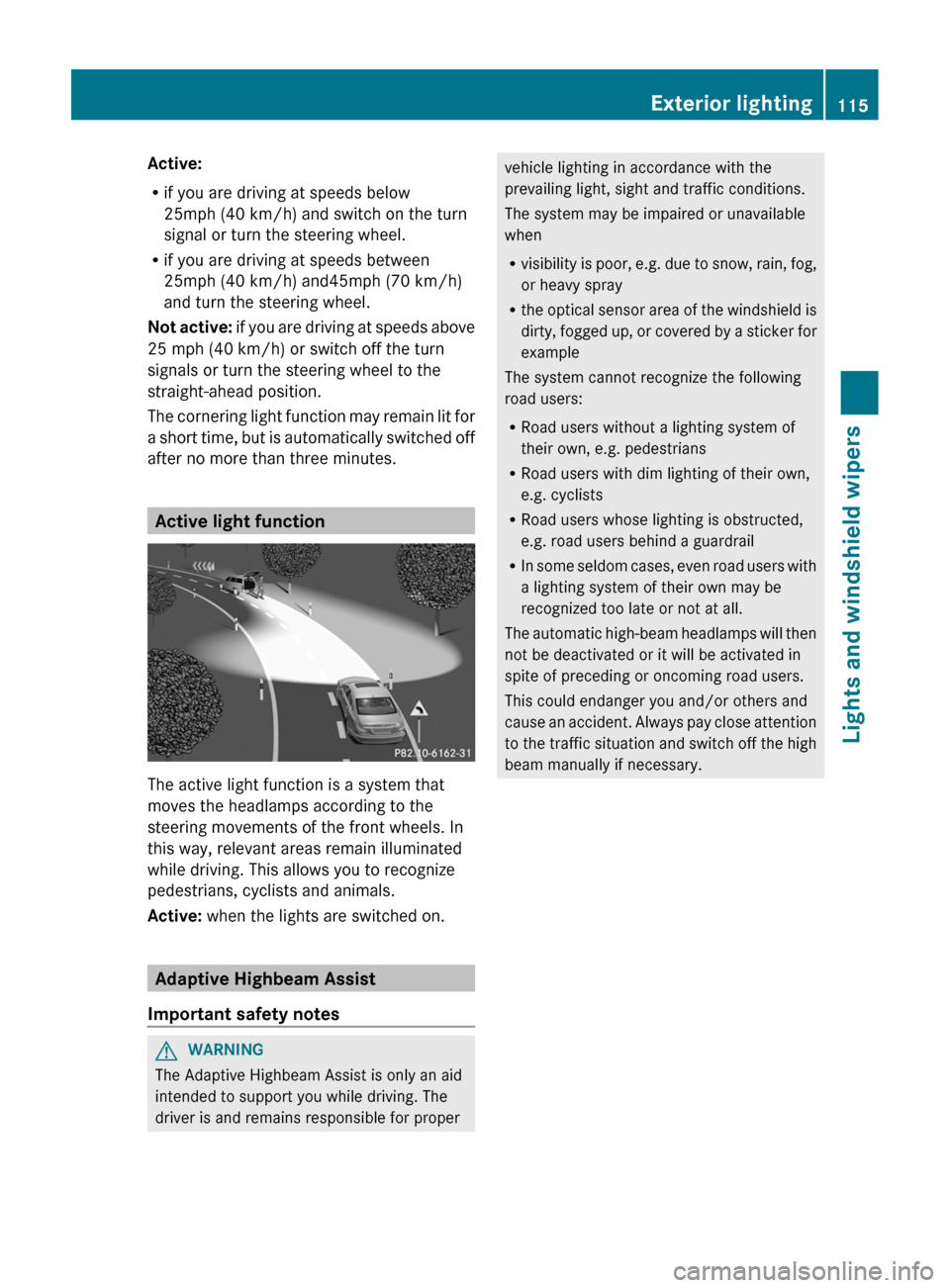
Active:
R
if you are driving at speeds below
25mph (40 km/h) and switch on the turn
signal or turn the steering wheel.
R if you are driving at speeds between
25mph (40 km/h) and45
mph (70 km/h)
and turn the steering wheel.
Not active: if you are driving at speeds above
25 mph (40 km/h) or switch off the turn
signals or turn the steering wheel to the
straight-ahead position.
The cornering light function may remain lit for
a short time, but is automatically switched off
after no more than three minutes. Active light function
The active light function is a system that
moves the headlamps according to the
steering movements of the front wheels. In
this way, relevant areas remain illuminated
while driving. This allows you to recognize
pedestrians, cyclists and animals.
Active:
when the lights are switched on. Adaptive Highbeam Assist
Important safety notes G
WARNING
The Adaptive Highbeam Assist is only an aid
intended to support you while driving. The
driver is and remains responsible for proper vehicle lighting in accordance with the
prevailing light, sight and traffic conditions.
The system may be impaired or unavailable
when
R
visibility
is poor, e.g. due to snow, rain, fog,
or heavy spray
R the optical sensor area of the windshield is
dirty, fogged up, or covered by a sticker for
example
The system cannot recognize the following
road users:
R Road users without a lighting system of
their own, e.g. pedestrians
R Road users with dim lighting of their own,
e.g. cyclists
R Road users whose lighting is obstructed,
e.g. road users behind a guardrail
R In some seldom cases, even road users with
a lighting system of their own may be
recognized too late or not at all.
The automatic high-beam headlamps will then
not be deactivated or it will be activated in
spite of preceding or oncoming road users.
This could endanger you and/or others and
cause an accident. Always pay close attention
to the traffic situation and switch off the high
beam manually if necessary. Exterior lighting
115
Lights and windshield wipers Z
Page 118 of 376
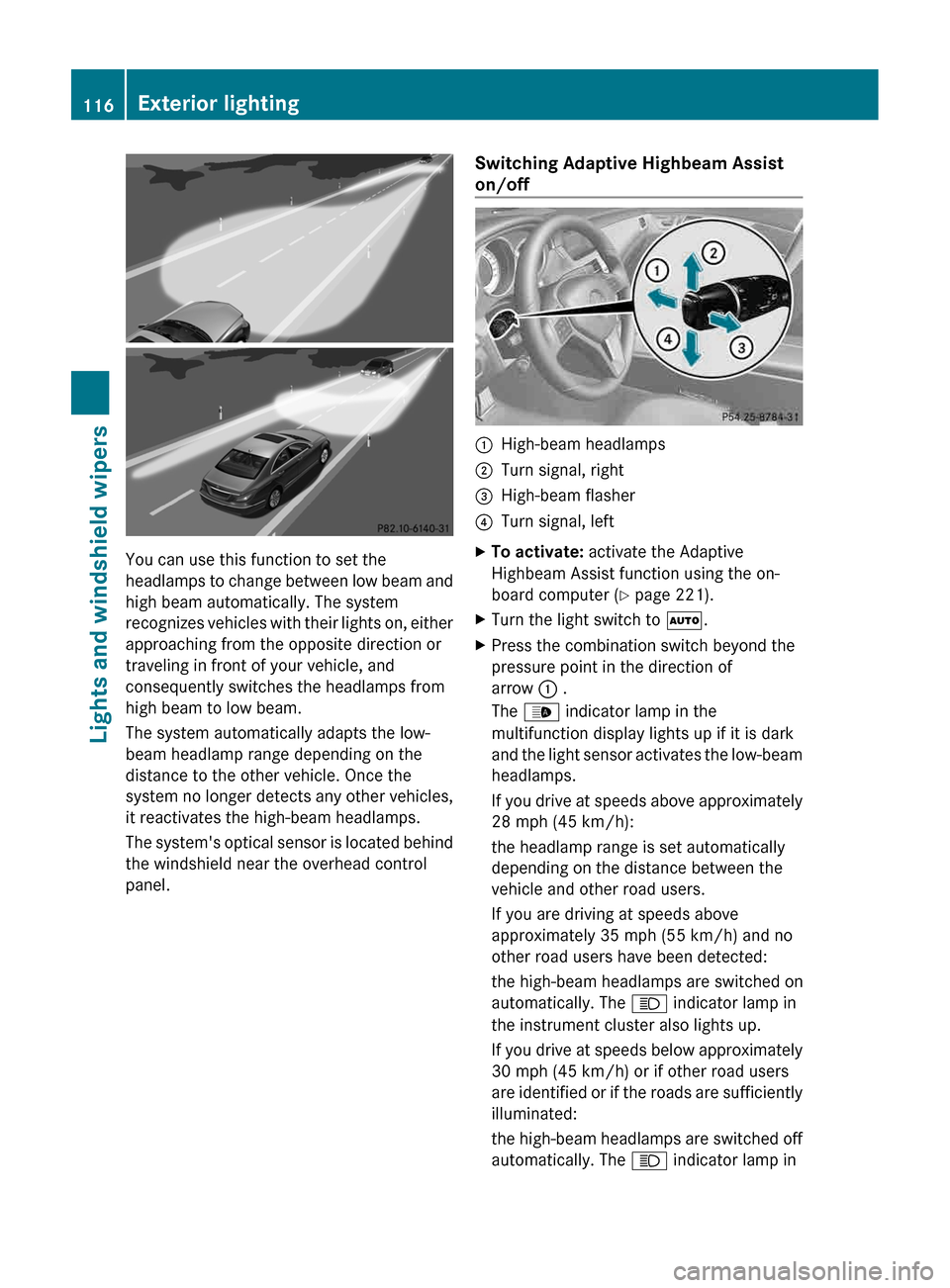
You can use this function to set the
headlamps
to change between low beam and
high beam automatically. The system
recognizes vehicles with their lights on, either
approaching from the opposite direction or
traveling in front of your vehicle, and
consequently switches the headlamps from
high beam to low beam.
The system automatically adapts the low-
beam headlamp range depending on the
distance to the other vehicle. Once the
system no longer detects any other vehicles,
it reactivates the high-beam headlamps.
The system's optical sensor is located behind
the windshield near the overhead control
panel. Switching Adaptive Highbeam Assist
on/off :
High-beam headlamps
; Turn signal, right
= High-beam flasher
? Turn signal, left
X To activate: activate the Adaptive
Highbeam Assist function using the on-
board computer ( Y page 221).
X Turn the light switch to Ã.
X Press the combination switch beyond the
pressure point in the direction of
arrow : .
The _ indicator lamp in the
multifunction display lights up if it is dark
and
the light sensor activates the low-beam
headlamps.
If you drive at speeds above approximately
28 mph (45 km/h):
the headlamp range is set automatically
depending on the distance between the
vehicle and other road users.
If you are driving at speeds above
approximately 35 mph (55 km/h) and no
other road users have been detected:
the high-beam headlamps are switched on
automatically. The K indicator lamp in
the instrument cluster also lights up.
If you drive at speeds below approximately
30 mph (45 km/h) or if other road users
are identified or if the roads are sufficiently
illuminated:
the high-beam headlamps are switched off
automatically. The K indicator lamp in116
Exterior lighting
Lights and windshield wipers