phone MERCEDES-BENZ CLS-Class 2014 W218 Comand Manual
[x] Cancel search | Manufacturer: MERCEDES-BENZ, Model Year: 2014, Model line: CLS-Class, Model: MERCEDES-BENZ CLS-Class 2014 W218Pages: 270, PDF Size: 5.76 MB
Page 40 of 270
If there are several entries for a city or if sev-
eral cities of the same name are stored, then
0054 is highlighted in the character bar.
X Press 0098the COMAND controller. Option 2: city list as selection list
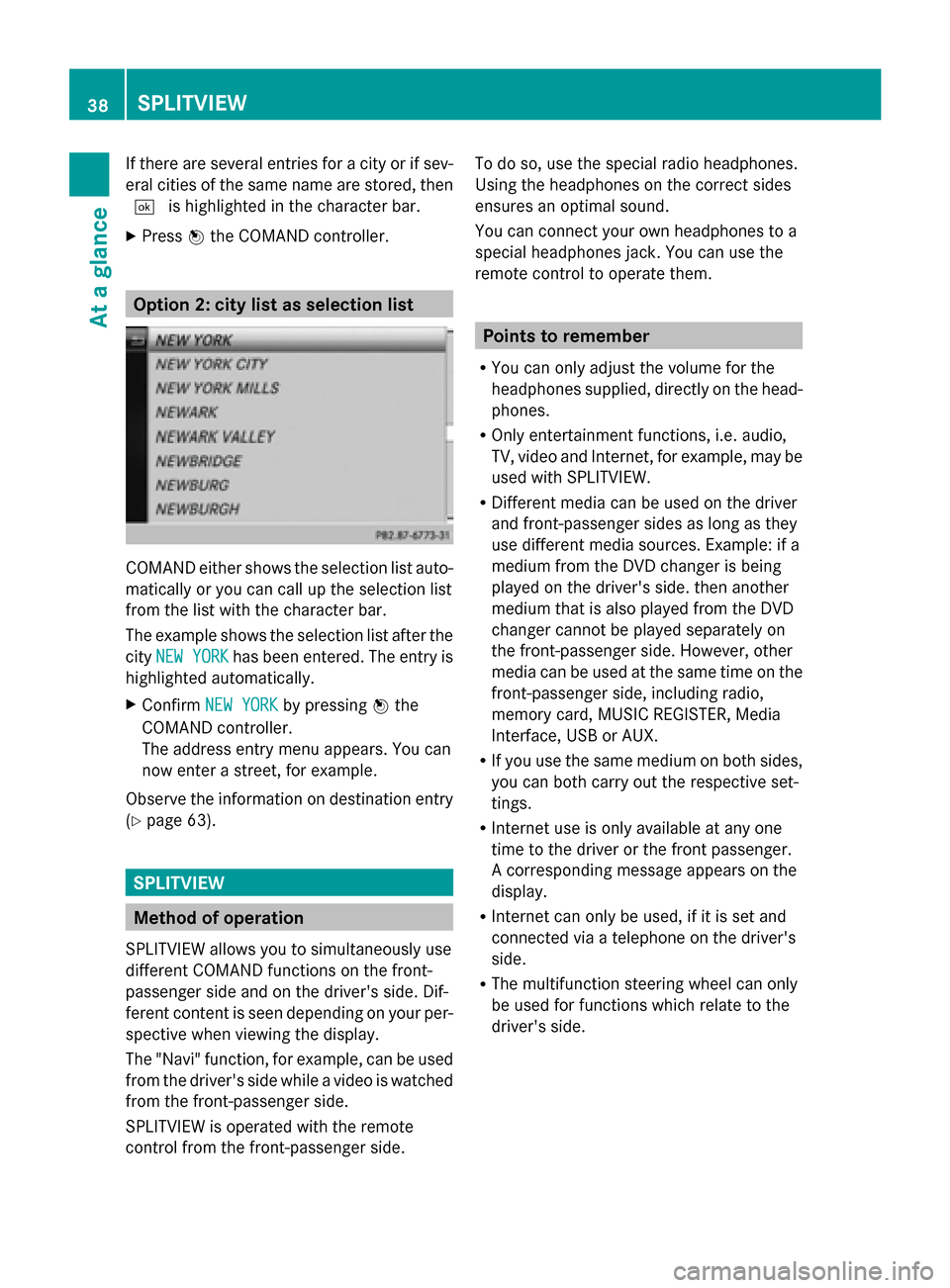
COMAND either shows the selection list auto-
matically or you can call up the selection list
from the list with the character bar.
The example shows the selection list after the
city NEW YORK
NEW YORK has been entered. The entry is
highlighted automatically.
X Confirm NEW YORK NEW YORK by pressing 0098the
COMAND controller.
The address entry menu appears. You can
now enter a street, for example.
Observe the information on destination entry
(Y page 63). SPLITVIEW
Method of operation
SPLITVIEW allows you to simultaneously use
different COMAND functions on the front-
passenger side and on the driver's side. Dif-
ferent content is seen depending on your per-
spective when viewing the display.
The "Navi" function, for example, can be used
from the driver's side while a video is watched
from the front-passenger side.
SPLITVIEW is operated with the remote
control from the front-passenger side. To do so, use the special radio headphones.
Using the headphones on the correct sides
ensures an optimal sound.
You can connect your own headphones to a
special headphones jack. You can use the
remote control to operate them. Points to remember
R You can only adjust the volume for the
headphones supplied, directly on the head-
phones.
R Only entertainment functions, i.e. audio,
TV, video and Internet, for example, may be
used with SPLITVIEW.
R Different media can be used on the driver
and front-passenger sides as long as they
use different media sources. Example: if a
medium from the DVD changer is being
played on the driver's side. then another
medium that is also played from the DVD
changer cannot be played separately on
the front-passenger side. However, other
media can be used at the same time on the
front-passenger side, including radio,
memory card, MUSIC REGISTER, Media
Interface, USB or AUX.
R If you use the same medium on both sides,
you can both carry out the respective set-
tings.
R Internet use is only available at any one
time to the driver or the front passenger.
A corresponding message appears on the
display.
R Internet can only be used, if it is set and
connected via a telephone on the driver's
side.
R The multifunction steering wheel can only
be used for functions which relate to the
driver's side. 38
SPLITVIEWAt a glance
Page 46 of 270
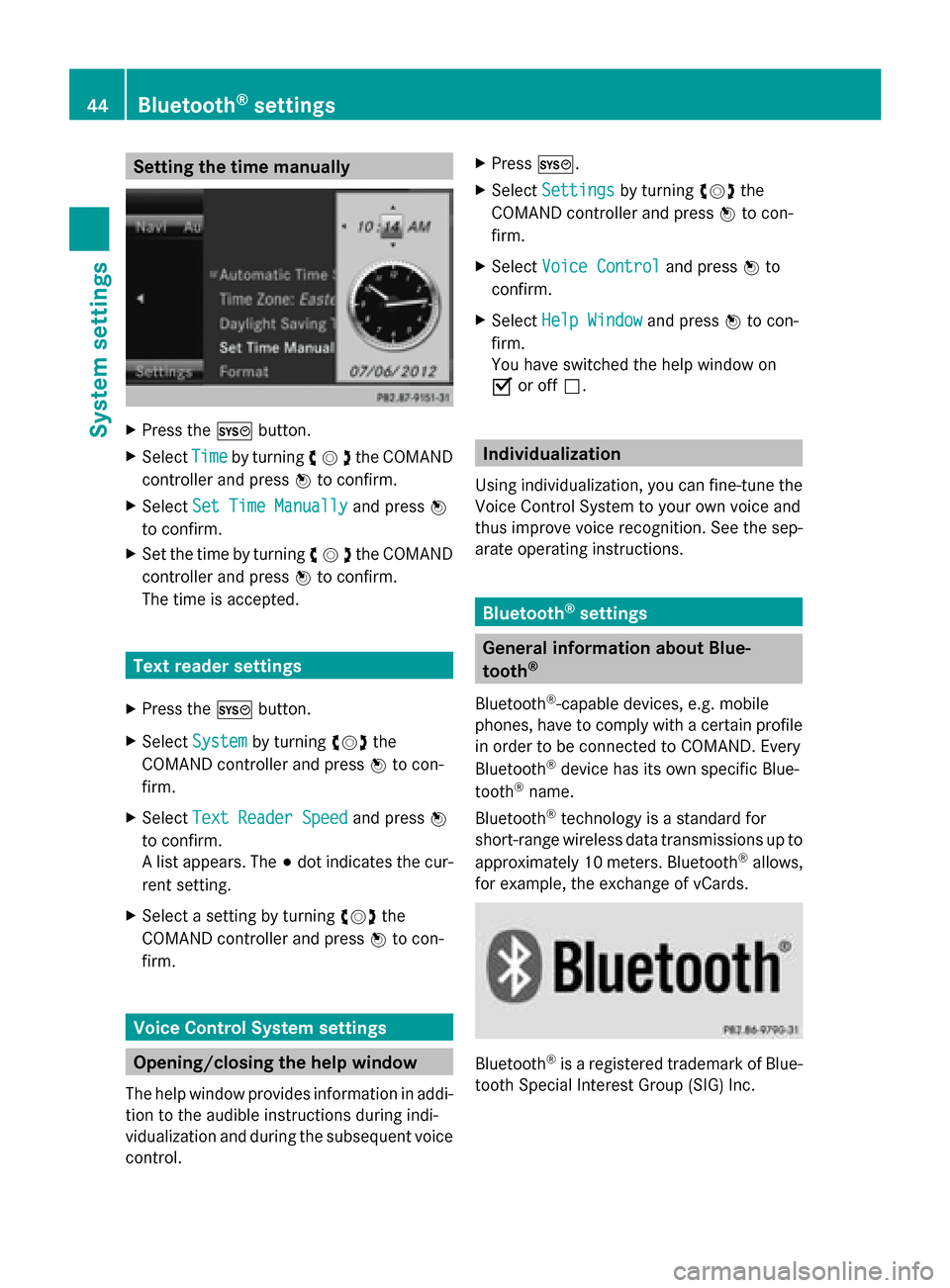
Setting the time manually
X
Press the 0066button.
X Select Time
Timeby turning 00790052007Athe COMAND
controller and press 0098to confirm.
X Select Set Time Manually
Set Time Manually and press0098
to confirm.
X Set the time by turning 00790052007Athe COMAND
controller and press 0098to confirm.
The time is accepted. Text reader settings
X Press the 0066button.
X Select System System by turning 00790052007Athe
COMAND controller and press 0098to con-
firm.
X Select Text Reader Speed Text Reader Speed and press0098
to confirm.
A list appears. The 003Bdot indicates the cur-
rent setting.
X Select a setting by turning 00790052007Athe
COMAND controller and press 0098to con-
firm. Voice Control System settings
Opening/closing the help window
The help window provides information in addi-
tion to the audible instructions during indi-
vidualization and during the subsequent voice
control. X
Press 0066.
X Select Settings
Settings by turning 00790052007Athe
COMAND controller and press 0098to con-
firm.
X Select Voice Control
Voice Control and press0098to
confirm.
X Select Help Window Help Window and press0098to con-
firm.
You have switched the help window on
0073 or off 0053. Individualization
Using individualization, you can fine-tune the
Voice Control System to your own voice and
thus improve voice recognition. See the sep-
arate operating instructions. Bluetooth
®
settings General information about Blue-
tooth
®
Bluetooth ®
-capable devices, e.g. mobile
phones, have to comply with a certain profile
in order to be connected to COMAND. Every
Bluetooth ®
device has its own specific Blue-
tooth ®
name.
Bluetooth ®
technology is a standard for
short-range wireless data transmissions up to
approximately 10 meters. Bluetooth ®
allows,
for example, the exchange of vCards. Bluetooth
®
is a registered trademark of Blue-
tooth Special Interest Group (SIG) Inc. 44
Bluetooth ®
settingsSystem settings
Page 62 of 270
Your COMAND equipment
These operating instructions describe all the
standard and optional equipment for your
COMAND system, as available at the time of
going to print. Country-specific differences
are possible. Please note that your
COMAND system may not be equipped with
all the features described. Introduction
Important safety notes
G
WARNING
If you operate information systems and com-
munication equipment integrated in the vehi-
cle while driving, you will be distracted from
traffic conditions. You could also lose control
of the vehicle. There is a risk of an accident.
Only operate the equipment when the traffic
situation permits. If you are not sure that this
is possible, park the vehicle paying attention
to traffic conditions and operate the equip-
ment when the vehicle is stationary.
You must observe the legal requirements for
the country in which you are currently driving
when operating COMAND.
COMAND calculates the route to the destina-
tion without taking account of the following,
for example:
R traffic lights
R stop and yield signs
R merging lanes
R parking or stopping in a no parking/no
stopping zone
R other road and traffic rules and regulations
R narrow bridges
COMAND can give incorrect navigation com-
mands if the actual street/traffic situation
does not correspond with the digital map's
data. Digital maps do not cover all areas nor
all routes in an area. For example, a route may have been diverted or the direction of a one-
way street may have changed.
For this reason, you must always observe
road and traffic rules and regulations during
your journey. Road and traffic rules and reg-
ulations always have priority over the sys-
tem's driving recommendations.
Navigation announcements are intended to
direct you while driving without diverting your
attention from the road and driving.
Please always use this feature instead of con-
sulting the map display for directions. Look-
ing at the icons or map display can distract
you from traffic conditions and driving, and
increase the risk of an accident.
General notes
Operational readiness of the navigation
system The navigation system must determine the
position of the vehicle before first use or
whenever operational status is restored.
Therefore, you may have to drive for a while
before precise route guidance is possible.
GPS reception Among other things, correct functioning of
the navigation system depends on GPS recep-
tion. In certain situations, GPS reception may
be impaired, there may be interference or
there may be no reception at all, e.g. in tun-
nels or parking garages.
i Using roof carriers may impair the correct
functioning of a roof antenna (phone, sat-
ellite radio, GPS).
Entry restriction On vehicles for certain countries, there is a
restriction on entering data.
The restriction is active from a vehicle speed
of above approximately 3 mph (5 km/h). As
soon as the speed falls below approximately 60
Int
roductionNavigation
Page 77 of 270
X
To accept the way point: confirmOK
OKby
pressing 0098.
Once you have accepted the way point, it
is entered in the way point menu.
X To display the details: selectDetails
Details by
turning 00790052007Athe COMAND controller and
press 0098to confirm.
X To make a call: selectCall Callwith the
COMAND controller and press 0098to con-
firm. COMAND switches to telephone
mode (Y page 132).
i This menu item is available if the way
point has a telephone number and if a
mobile phone is connected to COMAND
(Y page 126).
X To call up the map: selectMap
Map with the
COMAND controller and press 0098to con-
firm.
X You can move the map and select the des-
tination.
X To store the way point in the destina-
tion memory: selectPresets
Presets with the
COMAND controller and press 0098to con-
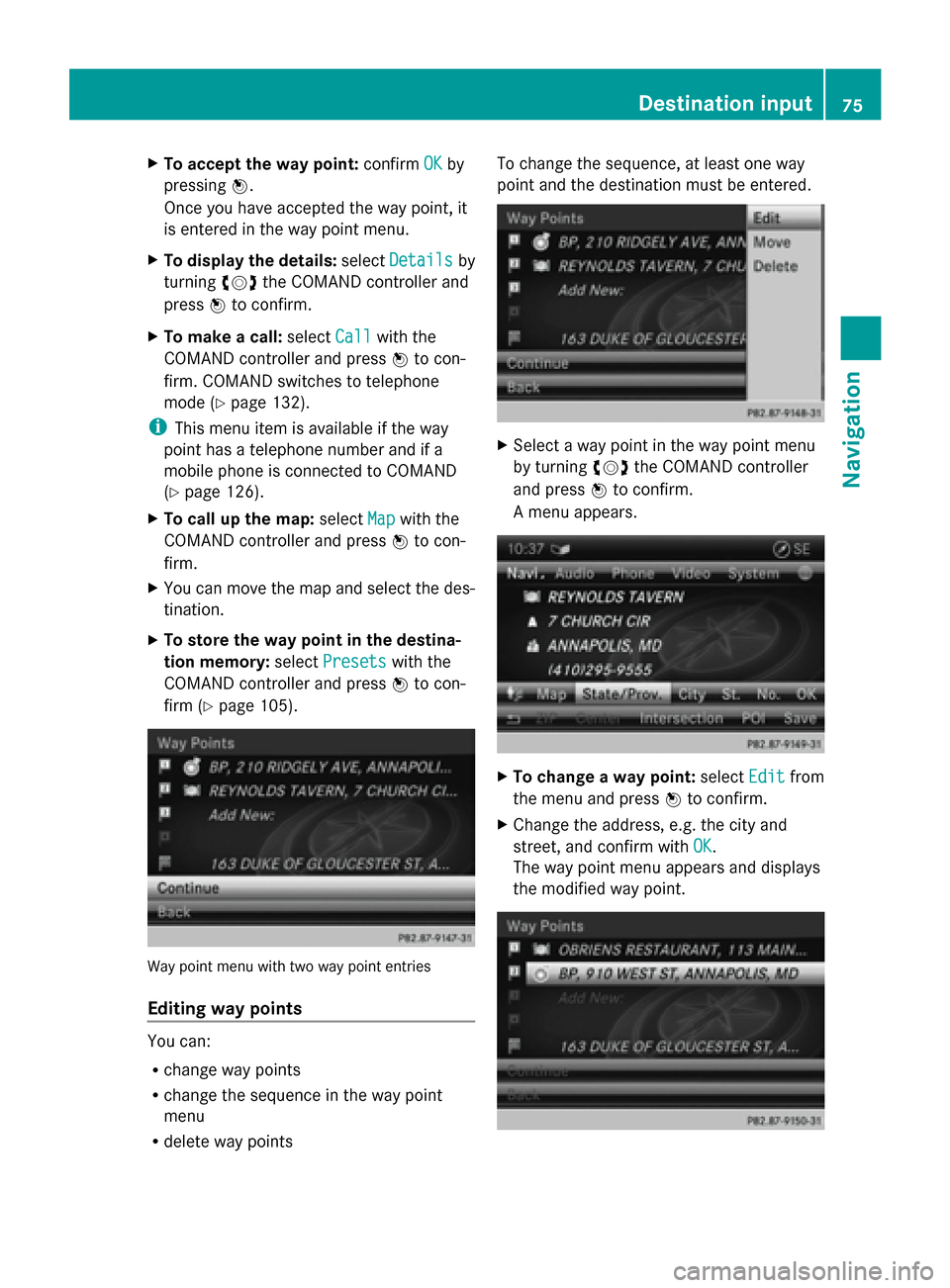
firm (Y page 105). Way point menu with two way point entries
Editing way points You can:
R
change way points
R change the sequence in the way point
menu
R delete way points To change the sequence, at least one way
point and the destination must be entered.
X
Select a way point in the way point menu
by turning 00790052007Athe COMAND controller
and press 0098to confirm.
A menu appears. X
To change a way point: selectEdit Editfrom
the menu and press 0098to confirm.
X Change the address, e.g. the city and
street, and confirm with OK OK.
The way point menu appears and displays
the modified way point. Destination input
75Navigation Z
Page 80 of 270
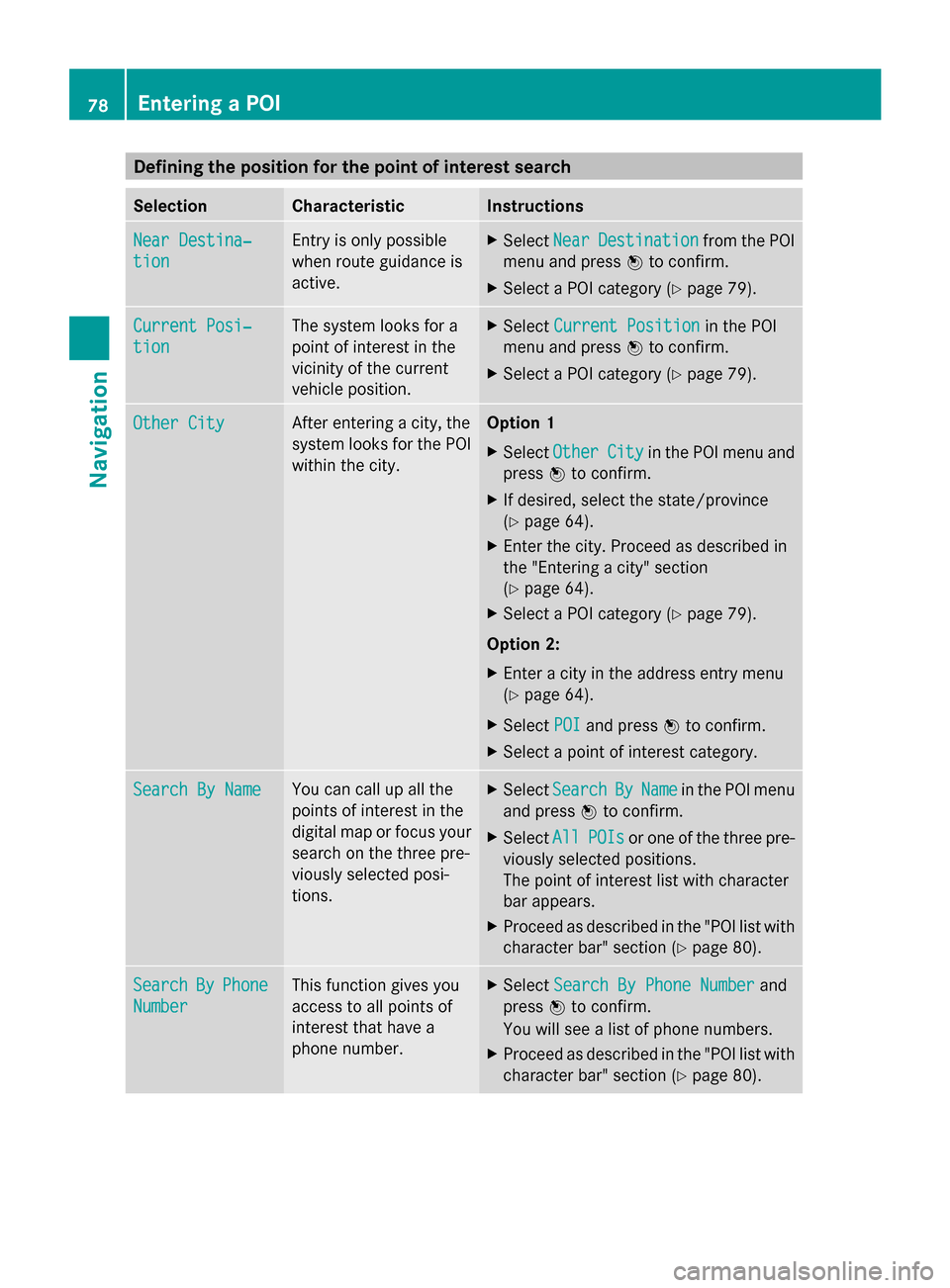
Defining the position for the point of interest search
Selection Characteristic Instructions
Near Destina‐
Near Destina‐
tion tion Entry is only possible
when route guidance is
active. X
Select Near NearDestination
Destination from the POI
menu and press 0098to confirm.
X Select a POI category (Y page 79).Current Posi‐
Current Posi‐
tion tion The system looks for a
point of interest in the
vicinity of the current
vehicle position. X
Select Current Position Current Position in the POI
menu and press 0098to confirm.
X Select a POI category (Y page 79).Other City
Other City After entering a city, the
system looks for the POI
within the city. Option 1
X Select Other Other City
Cityin the POI menu and
press 0098to confirm.
X If desired, select the state/province
(Y page 64).
X Enter the city. Proceed as described in
the "Entering a city" section
(Y page 64).
X Select a POI category (Y page 79).
Option 2:
X Enter a city in the address entry menu
(Y page 64).
X Select POI
POI and press 0098to confirm.
X Select a point of interest category. Search By Name Search By Name You can call up all the
points of interest in the
digital map or focus your
search on the three pre-
viously selected posi-
tions. X
Select Search Search By
ByName
Name in the POI menu
and press 0098to confirm.
X Select All
AllPOIs
POIs or one of the three pre-
viously selected positions.
The point of interest list with character
bar appears.
X Proceed as described in the "POI list with
character bar" section (Y page 80).Search Search
By
ByPhone
Phone
Number
Number This function gives you
access to all points of
interest that have a
phone number. X
Select Search By Phone Number Search By Phone Number and
press 0098to confirm.
You will see a list of phone numbers.
X Proceed as described in the "POI list with
character bar" section (Y page 80).78
Entering a POINavigation
Page 82 of 270
The search results display the following infor-
mation:
R an arrow that shows the linear direction to
the point of interest
R the linear distance to the point of interest
R the name of the point of interest
i The arrow and linear distance to the des-
tination are not visible if you have entered
a POI after entering another city.
The arrow is also not shown when search-
ing for a POI in the vicinity of the destina-
tion.
Depending on the POI selected, COMAND
uses different reference points in deter-
mining the linear distance to the destina-
tion:
R vicinity of current position: the linear dis-
tance is the distance of the point of inter-
est from the current vehicle position.
R vicinity of destination: the linear distance
is the distance from the destination
entered to the point of interest.
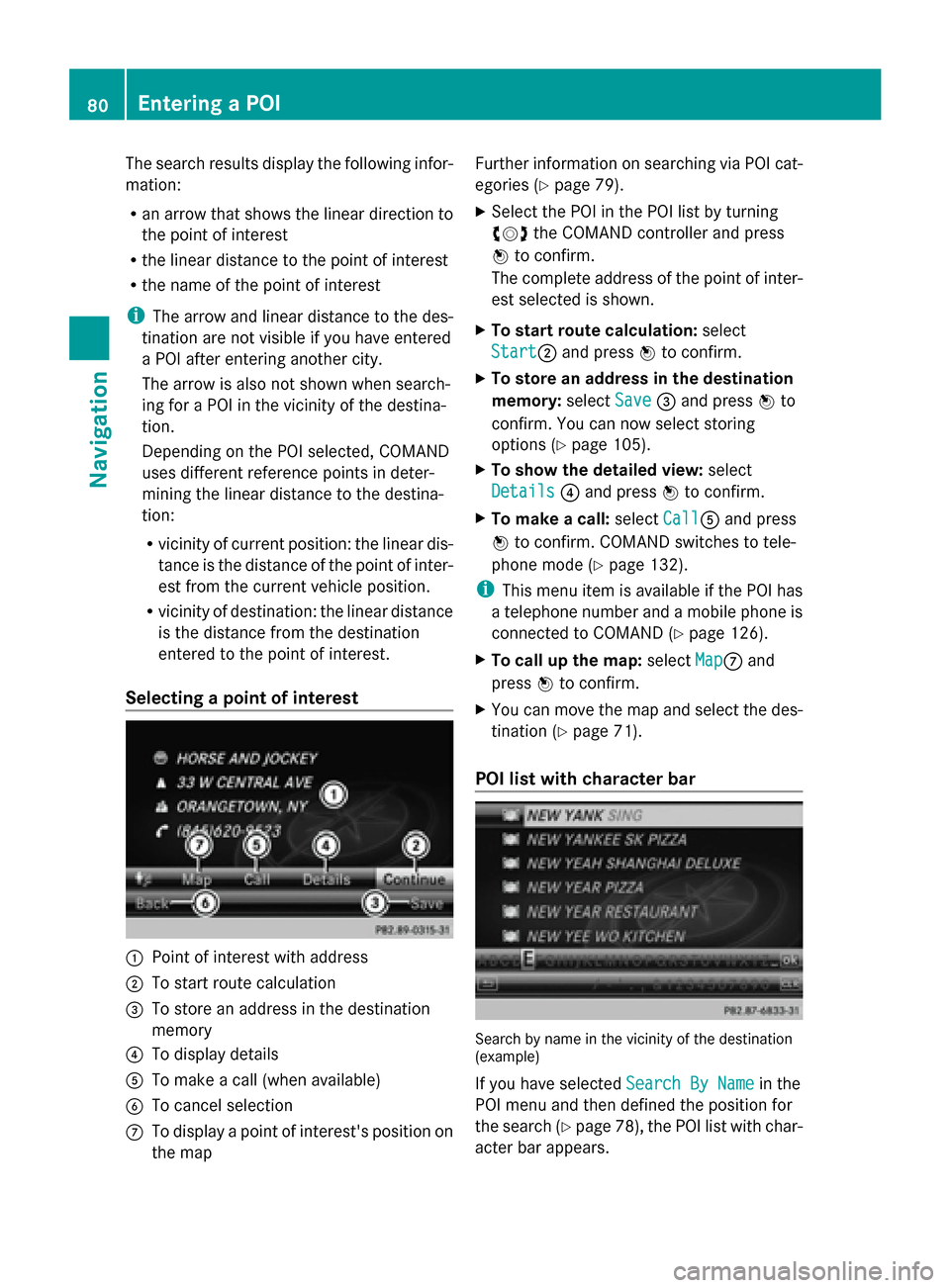
Selecting a point of interest 0043
Point of interest with address
0044 To start route calculation
0087 To store an address in the destination
memory
0085 To display details
0083 To make a call (when available)
0084 To cancel selection
006B To display a point of interest's position on
the map Further information on searching via POI cat-
egories (Y page 79).
X Select the POI in the POI list by turning
00790052007A the COMAND controller and press
0098 to confirm.
The complete address of the point of inter-
est selected is shown.
X To start route calculation: select
Start
Start0044 and press 0098to confirm.
X To store an address in the destination
memory: selectSave Save0087and press 0098to
confirm. You can now select storing
options (Y page 105).
X To show the detailed view: select
Details Details 0085and press 0098to confirm.
X To make a call: selectCall
Call0083 and press
0098 to confirm. COMAND switches to tele-
phone mode (Y page 132).
i This menu item is available if the POI has
a telephone number and a mobile phone is
connected to COMAND (Y page 126).
X To call up the map: selectMap Map006B and
press 0098to confirm.
X You can move the map and select the des-
tination (Y page 71).
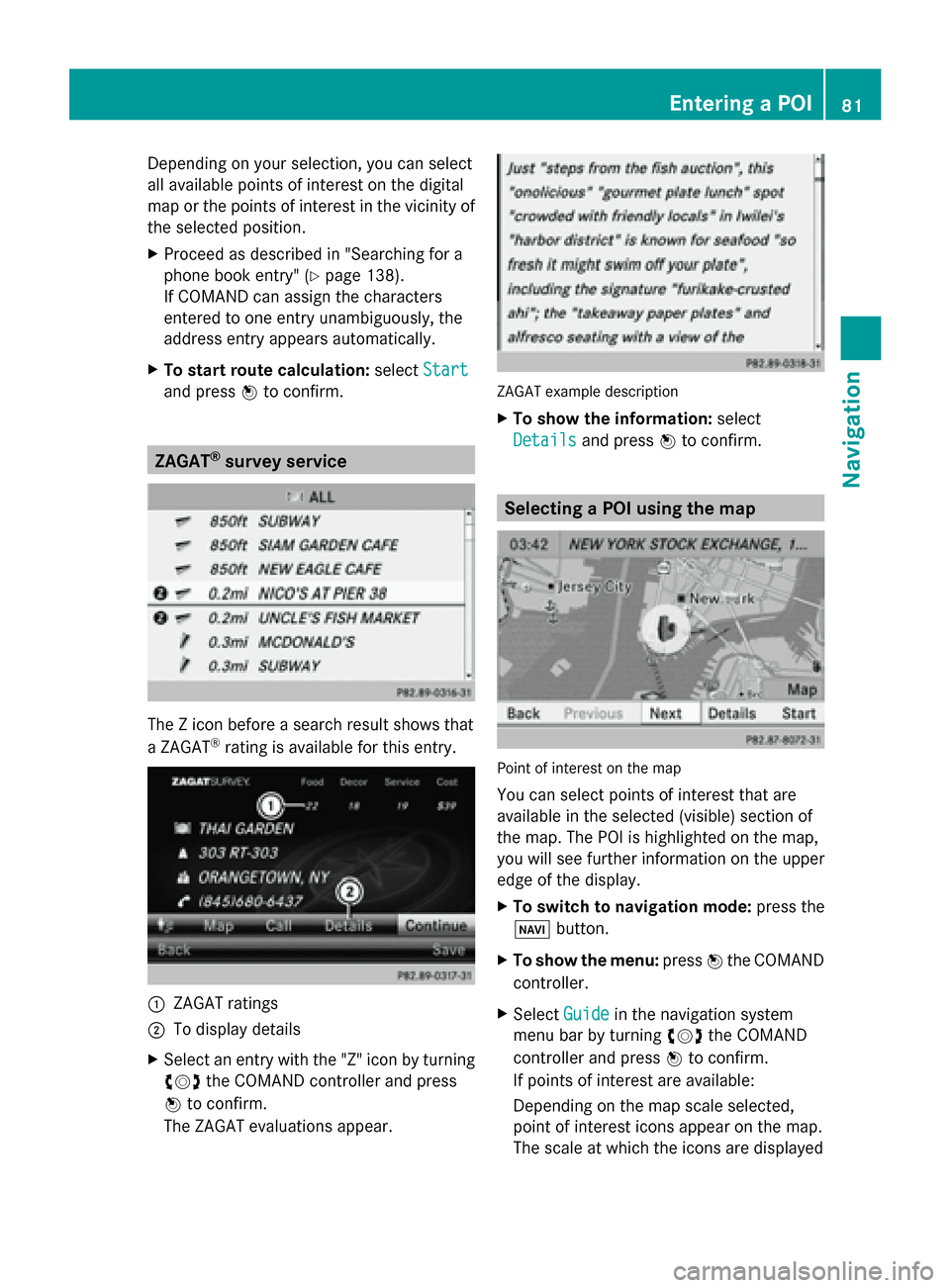
POI list with character bar Search by name in the vicinity of the destination
(example)
If you have selected
Search By Name Search By Namein the
POI menu and then defined the position for
the search (Y page 78), the POI list with char-
acter bar appears. 80
Entering a POINavigation
Page 83 of 270
Depending on your selection, you can select
all available points of interest on the digital
map or the points of interest in the vicinity of
the selected position.
X Proceed as described in "Searching for a
phone book entry" (Y page 138).
If COMAND can assign the characters
entered to one entry unambiguously, the
address entry appears automatically.
X To start route calculation: selectStart
Start
and press 0098to confirm. ZAGAT
®
survey service The Z icon before a search result shows that
a ZAGAT ®
rating is available for this entry. 0043
ZAGAT ratings
0044 To display details
X Select an entry with the "Z" icon by turning
00790052007A the COMAND controller and press
0098 to confirm.
The ZAGAT evaluations appear. ZAGAT example description
X
To show the information: select
Details Details and press 0098to confirm. Selecting a POI using the map
Point of interest on the map
You can select points of interest that are
available in the selected (visible) section of
the map. The POI is highlighted on the map,
you will see further information on the upper
edge of the display.
X
To switch to navigation mode: press the
00BE button.
X To show the menu: press0098the COMAND
controller.
X Select Guide
Guide in the navigation system
menu bar by turning 00790052007Athe COMAND
controller and press 0098to confirm.
If points of interest are available:
Depending on the map scale selected,
point of interest icons appear on the map.
The scale at which the icons are displayed Entering a POI
81Navigation Z
Page 88 of 270
Selection Explanation
Not Classi‐
Not Classi‐
fied fied Standard entry for per-
sonal points of interest.
COMAND COMAND
Online Online Personal POIs which you
have imported via the
online function
(Y
page 163). Coffee Coffee
Shops Shops Symbol and category that
you have created yourself
(Y
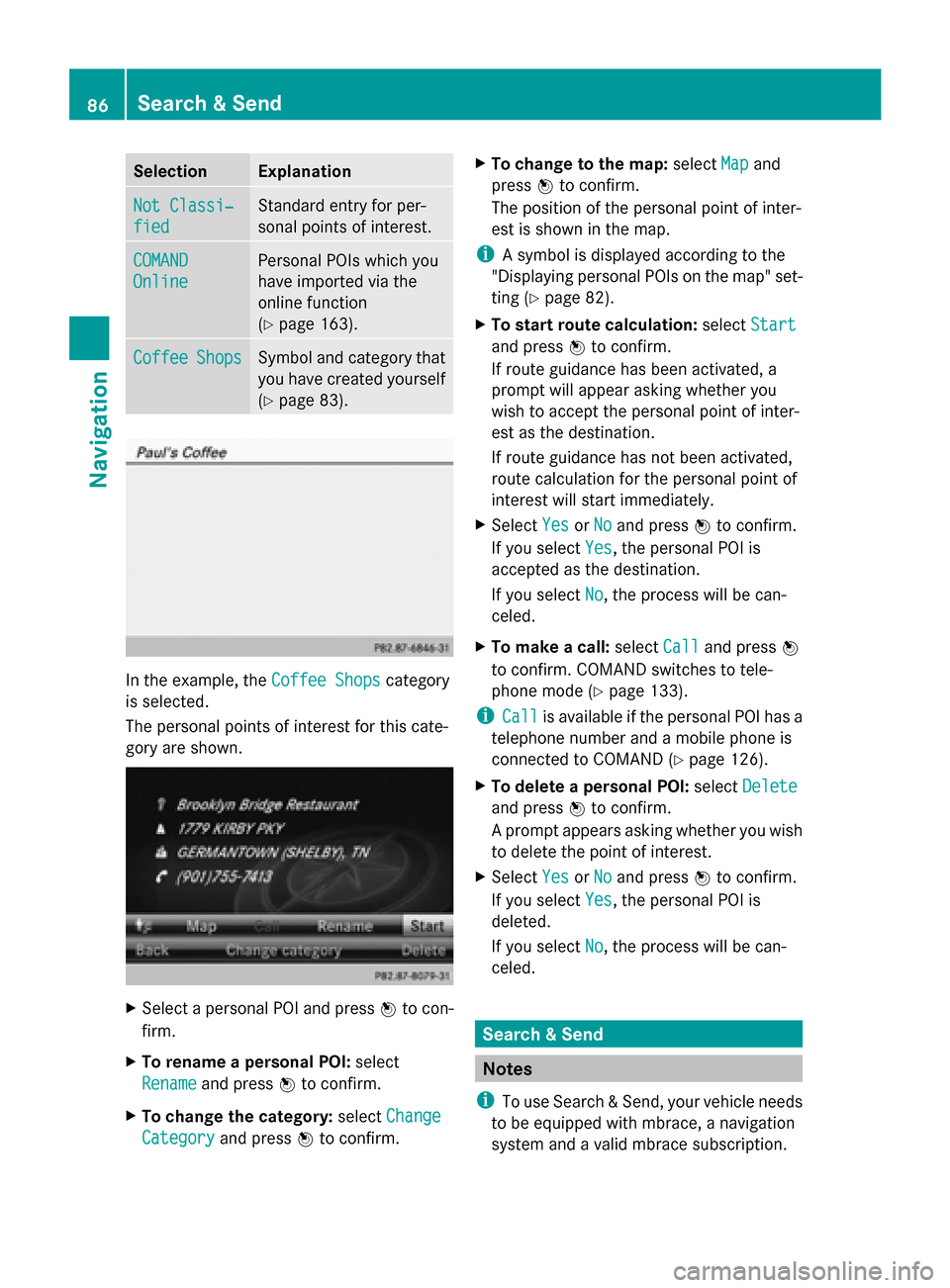
page 83). In the example, the
Coffee Shops Coffee Shopscategory
is selected.
The personal points of interest for this cate-
gory are shown. X
Select a personal POI and press 0098to con-
firm.
X To rename a personal POI: select
Rename
Rename and press 0098to confirm.
X To change the category: selectChange Change
Category
Category and press0098to confirm. X
To change to the map: selectMap
Mapand
press 0098to confirm.
The position of the personal point of inter-
est is shown in the map.
i A symbol is displayed according to the
"Displaying personal POIs on the map" set-
ting (Y page 82).
X To start route calculation: selectStart Start
and press 0098to confirm.
If route guidance has been activated, a
prompt will appear asking whether you
wish to accept the personal point of inter-
est as the destination.
If route guidance has not been activated,
route calculation for the personal point of
interest will start immediately.
X Select Yes
Yes orNo No and press 0098to confirm.
If you select Yes
Yes, the personal POI is
accepted as the destination.
If you select No No, the process will be can-
celed.
X To make a call: selectCall
Calland press 0098
to confirm. COMAND switches to tele-
phone mode (Y page 133).
i Call Call is available if the personal POI has a
telephone number and a mobile phone is
connected to COMAND (Y page 126).
X To delete a personal POI: selectDelete Delete
and press 0098to confirm.
A prompt appears asking whether you wish
to delete the point of interest.
X Select Yes YesorNo
No and press 0098to confirm.
If you select Yes
Yes, the personal POI is
deleted.
If you select No No, the process will be can-
celed. Search & Send
Notes
i To use Search & Send, your vehicle needs
to be equipped with mbrace, a navigation
system and a valid mbrace subscription. 86
Search & SendNavigation
Page 93 of 270
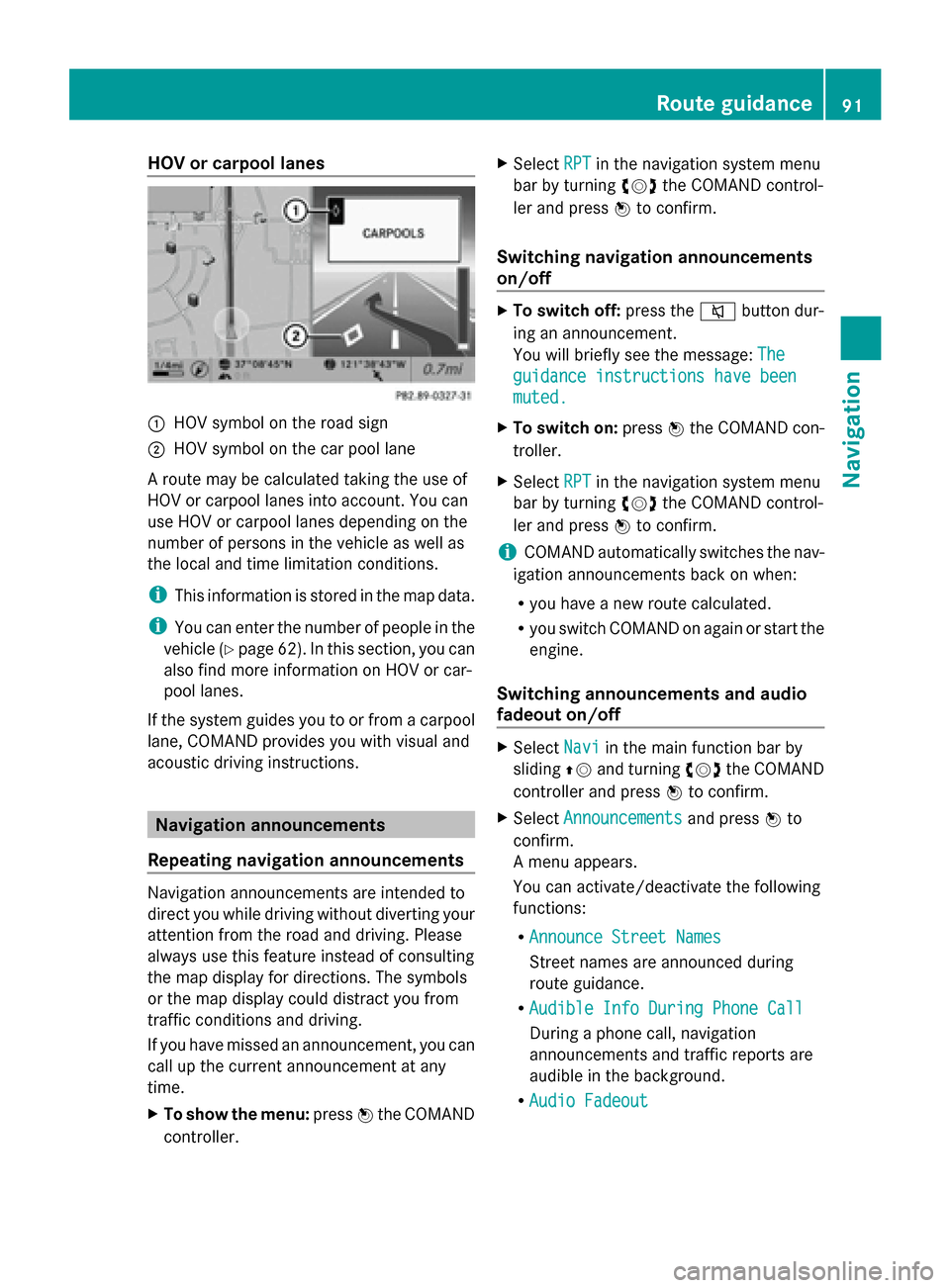
HOV or carpool lanes
0043
HOV symbol on the road sign
0044 HOV symbol on the car pool lane
A route may be calculated taking the use of
HOV or carpool lanes into account. You can
use HOV or carpool lanes depending on the
number of persons in the vehicle as well as
the local and time limitation conditions.
i This information is stored in the map data.
i You can enter the number of people in the
vehicle (Y page 62). In this section, you can
also find more information on HOV or car-
pool lanes.
If the system guides you to or from a carpool
lane, COMAND provides you with visual and
acoustic driving instructions. Navigation announcements
Repeating navigation announcements Navigation announcements are intended to
direct you while driving without diverting your
attention from the road and driving. Please
always use this feature instead of consulting
the map display for directions. The symbols
or the map display could distract you from
traffic conditions and driving.
If you have missed an announcement, you can
call up the current announcement at any
time.
X To show the menu: press0098the COMAND
controller. X
Select RPT
RPT in the navigation system menu
bar by turning 00790052007Athe COMAND control-
ler and press 0098to confirm.
Switching navigation announcements
on/off X
To switch off: press the0063button dur-
ing an announcement.
You will briefly see the message: The
The
guidance instructions have been guidance instructions have been
muted. muted.
X To switch on: press0098the COMAND con-
troller.
X Select RPT
RPTin the navigation system menu
bar by turning 00790052007Athe COMAND control-
ler and press 0098to confirm.
i COMAND automatically switches the nav-
igation announcements back on when:
R you have a new route calculated.
R you switch COMAND on again or start the
engine.
Switching announcements and audio
fadeout on/off X
Select Navi Naviin the main function bar by
sliding 00970052and turning 00790052007Athe COMAND
controller and press 0098to confirm.
X Select Announcements
Announcements and press0098to
confirm.
A menu appears.
You can activate/deactivate the following
functions:
R Announce Street Names Announce Street Names
Street names are announced during
route guidance.
R Audible Info During Phone Call Audible Info During Phone Call
During a phone call, navigation
announcements and traffic reports are
audible in the background.
R Audio Fadeout Audio Fadeout Route guidance
91Navigation Z
Page 96 of 270
Menu functions
X
To select the next or previous alterna-
tive route: selectNext NextorPrevious
Previous and
press 0098to confirm.
X To start route guidance using the
selected alternative route: selectStart
Start
and press 0098to confirm.
COMAND begins route guidance on the
selected alternative route. Route information
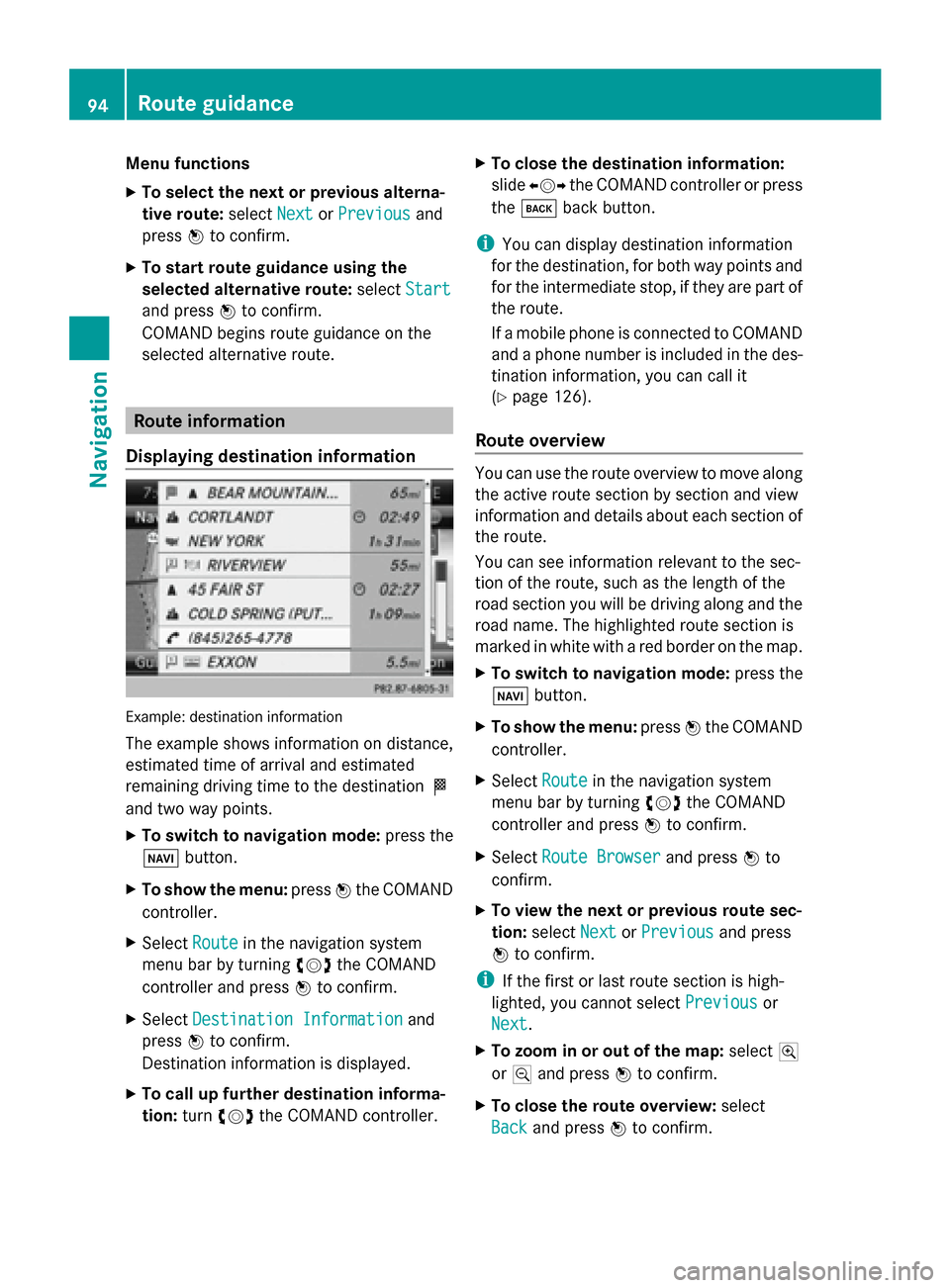
Displaying destination information Example: destination information
The example shows information on distance,
estimated time of arrival and estimated
remaining driving time to the destination 004B
and two way points.
X To switch to navigation mode: press the
00BE button.
X To show the menu: press0098the COMAND
controller.
X Select Route
Route in the navigation system
menu bar by turning 00790052007Athe COMAND
controller and press 0098to confirm.
X Select Destination Information Destination Information and
press 0098to confirm.
Destination information is displayed.
X To call up further destination informa-
tion: turn00790052007A the COMAND controller. X
To close the destination information:
slide 009500520096 the COMAND controller or press
the 003D back button.
i You can display destination information
for the destination, for both way points and
for the intermediate stop, if they are part of
the route.
If a mobile phone is connected to COMAND
and a phone number is included in the des-
tination information, you can call it
(Y page 126).
Route overview You can use the route overview to move along
the active route section by section and view
information and details about each section of
the route.
You can see information relevant to the sec-
tion of the route, such as the length of the
road section you will be driving along and the
road name. The highlighted route section is
marked in white with a red border on the map.
X To switch to navigation mode: press the
00BE button.
X To show the menu: press0098the COMAND
controller.
X Select Route Routein the navigation system
menu bar by turning 00790052007Athe COMAND
controller and press 0098to confirm.
X Select Route Browser
Route Browser and press0098to
confirm.
X To view the next or previous route sec-
tion: select Next NextorPrevious
Previous and press
0098 to confirm.
i If the first or last route section is high-
lighted, you cannot select Previous
Previousor
Next
Next.
X To zoom in or out of the map: select004A
or 0049 and press 0098to confirm.
X To close the route overview: select
Back
Back and press 0098to confirm. 94
Route guidanceNavigation