lane assist MERCEDES-BENZ CLS-Class 2014 W218 Owner's Manual
[x] Cancel search | Manufacturer: MERCEDES-BENZ, Model Year: 2014, Model line: CLS-Class, Model: MERCEDES-BENZ CLS-Class 2014 W218Pages: 382, PDF Size: 5.36 MB
Page 6 of 382
1, 2,
3...
12 Vsocket
see Sockets
4ETS
see ETS/4ETS (Electronic
Tractio nSystem)
4MATIC (permanent four-wheel
drive) .................................................. 193
4MATIC off-road system ...................193 A
ABS (Anti-lock Braking System) Display message ............................ 238
Function/notes ................................ 66
Important safety notes ....................66
Warning lamp ................................. 267
Activating/deactivating cooling
with air dehumidification .................136
Active Blin dSpot Assist
Activating/deactivating (on-
board computer) ............................ 228
Display message ............................ 254
Function/informatio n.................... 211
Active Driving Assistanc epackage .211
Active Lane Keepin gAssist
Activating/deactivating (on-
board computer) ............................ 229
Display message ............................ 253
Function/informatio n.................... 214
Active light function .........................121
Active multicontour seat Adjusting (on the seat) ..................103
Active Parking Assist
Detecting parking spaces ..............197
Display message ............................ 254
Function/notes ............................. 196
Important safety notes ..................196
Parking .......................................... 198
ADAPTIVE BRAKE ................................. 72
Adaptive Dampin gSyste m(ADS) .....1 90
Adaptive Highbeam Assist Display message ............................ 248
Function/notes ............................. 121
Additives (engine oil) ........................376Airb
ags
Display message ............................ 244
Front airb ag (driver, front
passenger )....................................... 44
Important safety notes ....................42
Knee bag .......................................... 45
PASSENGER AIR BAG OFF
indicator lamp .................................. 47
Pelvis airb ag................................... 46
Safety guidelines ............................. 41
Side impact airb ag.......................... 45
Windo wcurtain air bag .................... 47
Air-conditionin gsystem
see Climate control
AIRF LOW ........................................... 137
AIRMATIC Display message ............................ 252
Function/notes ............................. 189
Airv ents
Glove box ....................................... 142
Important safet ynotes .................. 142
Rea r............................................... 143
Setting ........................................... 142
Setting the center airv ents........... 142
Setting the sid eairvents ............... 142
Ambient lighting
Setting the brightness (on-board
computer) ...................................... 231
Setting the color (on-board
computer) ...................................... 231
AMG adaptive sport suspension
system ................................................ 190
Ashtray ............................................... 287
Assistanc edisplay (on-board
computer) .......................................... 227
Assistanc emenu (on-board
computer) .......................................... 227
ASSYST PLUS Displaying aservice message ........310
Hiding aservice message ..............310
Notes ............................................. 309
Resetting the service interval
displa y........................................... 310
Service message ............................ 309
Specia lservice requirements ......... 310 4
Index
Page 10 of 382
Display messages
ASSYST PLU S................................ 309
Calling up (on-board computer) .....237
Driving systems ............................. 251
Engine ............................................ 248
General notes ................................ 237
Hiding (on-board computer) ...........237
KEYLESS-GO .................................. 262
Lights ............................................ .245
Safety systems .............................. 238
SmartKey ....................................... 262
Tire s............................................... 258
Vehicle .......................................... .260
Distanc erecorder ............................. 222
see Trip odometer
Distanc ewarning (warning lamp) ....275
DISTRONIC PLUS Activating ....................................... 180
Activatio ncondition s..................... 180
Deactivating ................................... 184
Display message ............................ 255
Displaysint he multifunction
displa y........................................... 184
Function/notes ............................. 177
Important safety notes ..................177
Setting the specified minimum
distance ......................................... 183
Warning lamp ................................. 275
Doors
Automatic locking (on-board
computer) ...................................... 232
Automatic locking (switch) .............. .83
Central locking/unlocking
(SmartKey) ...................................... .76
Control panel ................................... 38
Display message ............................ 261
Emergency locking ........................... 84
Emergency unlocking .......................84
Important safety notes ....................82
Opening (from inside) ......................82
Drinking and driving .........................170
Drinks holder see Bottle holder
Driv eprogram
Automatic ...................................... 160
Display ........................................... 155
Display (DIREC TSELECT lever) ......156
Manual .......................................... .161 Manual (AMG vehicles)
..................162
Manual (vehicle swithS ports
package AMG) ............................... 162
SETUP (on-board computer) ..........234
Driv eprogram selector .....................159
Driver's door see Doors
Driving abroad
Mercedes-Benz Service .................311
Symmetrical low bea m.................. 116
Driving on flooded roads ..................174
Driving safety systems ABS (Anti-lock Braking System) .......66
ADAPTIVE BRAKE ............................. 72
BAS (Brake Assist System) ..............67
BAS PLUS (Brake Assist System
PLUS) .............................................. .67
Electroni cbrake force distributio n... 71
ESP ®
(Electronic Stability
Program) .......................................... 68
ETS/4ETS (Electroni cTraction
System) ........................................... 69
Important safety information ...........66
Overview .......................................... 66
PRE-SAFE ®
Brake ............................ .72
Driving systems
Active Blind Spot Assis t................. 211
Active Driving Assistance
package ......................................... 211
Active Lane Keeping Assist ............214
Active Parking Assist .....................196
AIRMATIC ...................................... 189
AMG adaptive sport suspension
system ........................................... 190
ATTENTION ASSIST ........................203
Blind Spot Assist ............................ 207
Cruise control ................................ 175
Display message ............................ 251
DISTRONI CPLUS ........................... 177
HOLD function ............................... 186
Lane Keeping Assist ......................209
Lane Tracking package ..................207
Nigh tView Assist Plus ...................204
PARKTRONI C................................. 193
RAC ESTART (AMG vehicles) ..........188
Rea rview camera .......................... 1998
Index
Page 13 of 382
Headlamps
Adding flui dtocleaning system .....309
Cleaning system (function) ............120
Cleaning system (notes) ................378
Fogging up ..................................... 122
see Automatic headlamp mode
Head restraints
Adjusting ....................................... 100
Adjusting (electrically). ..................101
Adjusting (rear) .............................. 101
Installing/removing (rear) ..............102
Luxury ............................................ 101
Heating
see Climate control
High-beam headlamps
Display message ............................ 246
Switching Adaptive Highbeam
Assist on/off ................................. 122
Switching on/off ........................... 119
Hill start assist .................................. 150
HOLD function Display message ............................ 252
Function/notes ............................. 186
Hood
Closing .......................................... .307
Display message ............................ 261
Important safety notes ..................306
Opening ......................................... 306
Hydroplaning ..................................... 174I
Ignitio nlock
see Key positions
Immobilizer .......................................... 73
Indicator lamps see Warning and indicator lamps
Instrument cluster
Overview .................................. 31, 219
Settings ......................................... 229
Warning and indicator
lamps ...................................... .32, 264
Instrument cluster lighting ..............230
Interior lighting ................................. 123
Automatic control ..........................123
Delayeds witch-off (on-board
computer) ...................................... 232
Emergency lighting ........................124Manual control ............................... 124
Overview
........................................ 123
Reading lamp ................................. 123
Setting the brightness of the
ambient lighting (on-board
computer) ...................................... 231
Setting the brightness of the
display/switch (on-board
computer) ...................................... 230
Setting the color of the ambient
lighting (on-board computer) .........231 J
Jack Storage location ............................ 320
Using ............................................. 359
Jump starting (engine) ......................326 K
KEYLESS-GO Convenience closing feature ............90
Display message ............................ 262
Locking ............................................ 77
Start/Stop button .......................... 147
Starting the engine ........................149
Unlocking ......................................... 77
Keyp ositions
KEYLESS-GO .................................. 147
SmartKey ....................................... 147
Kickdown
Driving tips .................................... 159
Manual drive program ....................163
Kne ebag.............................................. 45 L
Lamps see Warning and indicator lamps
Lane Keepin gAssist
Activating/deactivating .................229
Display message ............................ 253
Function/informatio n.................... 209
Lane Tracking package .....................207
Lap time (RACETIMER) ......................235
LATCH-type (ISOFIX) child seat
anchors ................................................ 63 Index
11
Page 187 of 382
There are several ways to deactivate
DISTRONIC PLUS:
X
Briefly press the cruise control lever
forwards 001A.
or
X Brake, unless the vehicle is stationary.
When you deactivate DISTRONIC PLUS, you
will see the DISTRONIC PLUS Off message
in the multifunction display for approximately
five seconds.
i The last speed stored remains stored until
you switch off the engine.
i DISTRONIC PLUS is not deactivated if you
depress the accelerator pedal.
DISTRONIC PLUS is automatically
deactivated if:
R you engage the parking brake
R you are driving slower than 15 mph
(25 km/h) and there is no vehicle in front,
or if the vehicle in frontisnol onger
detected
R ESP ®
intervenes or you deactivate ESP ®
R the transmission is in the P,Ror Nposition
R you pull the cruise control lever towards
you in order to pull away and the front-
passenger door or one of the rear doors is
open
R the vehicle has skidded
R you activat eActive Parking Assist
If DISTRONIC PLUS is deactivated, you will
hear awarning tone. You will see the
DISTRONIC PLUS Off message in the
multifunction display for approximately five
seconds.
Tips for driving with DISTRONIC PLUS General notes
Pay particular attention in the following traffic
situations:
R Cornering, going into and coming out of a
bend
R Vehicles traveling on adifferent line R
Other vehicles changin glanes
R Narrow vehicles
R Obstructions and stationary vehicles
R Crossing vehicles
In such situations, brake if necessary.
DISTRONIC PLUS is then deactivated.
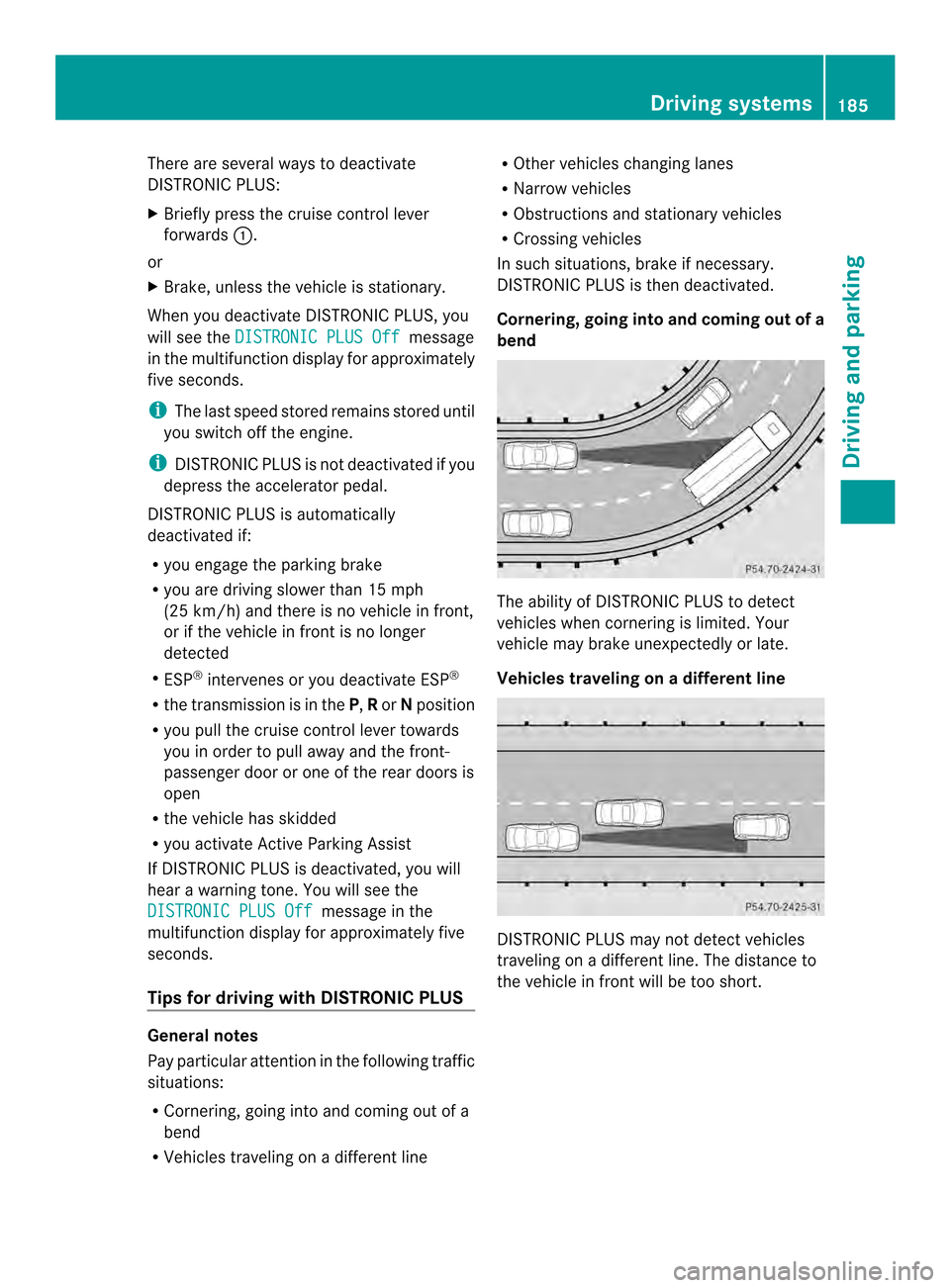
Cornering, going into and coming out of a
bend The ability of DISTRONIC PLUS to detect
vehicles when cornering is limited. Your
vehicle may brake unexpectedly or late.
Vehicles traveling on
adifferent line DISTRONIC PLUS may not detec
tvehicles
traveling on adifferent line. The distance to
the vehicle in fron twill be too short. Driving systems
185Driving and parking Z
Page 188 of 382
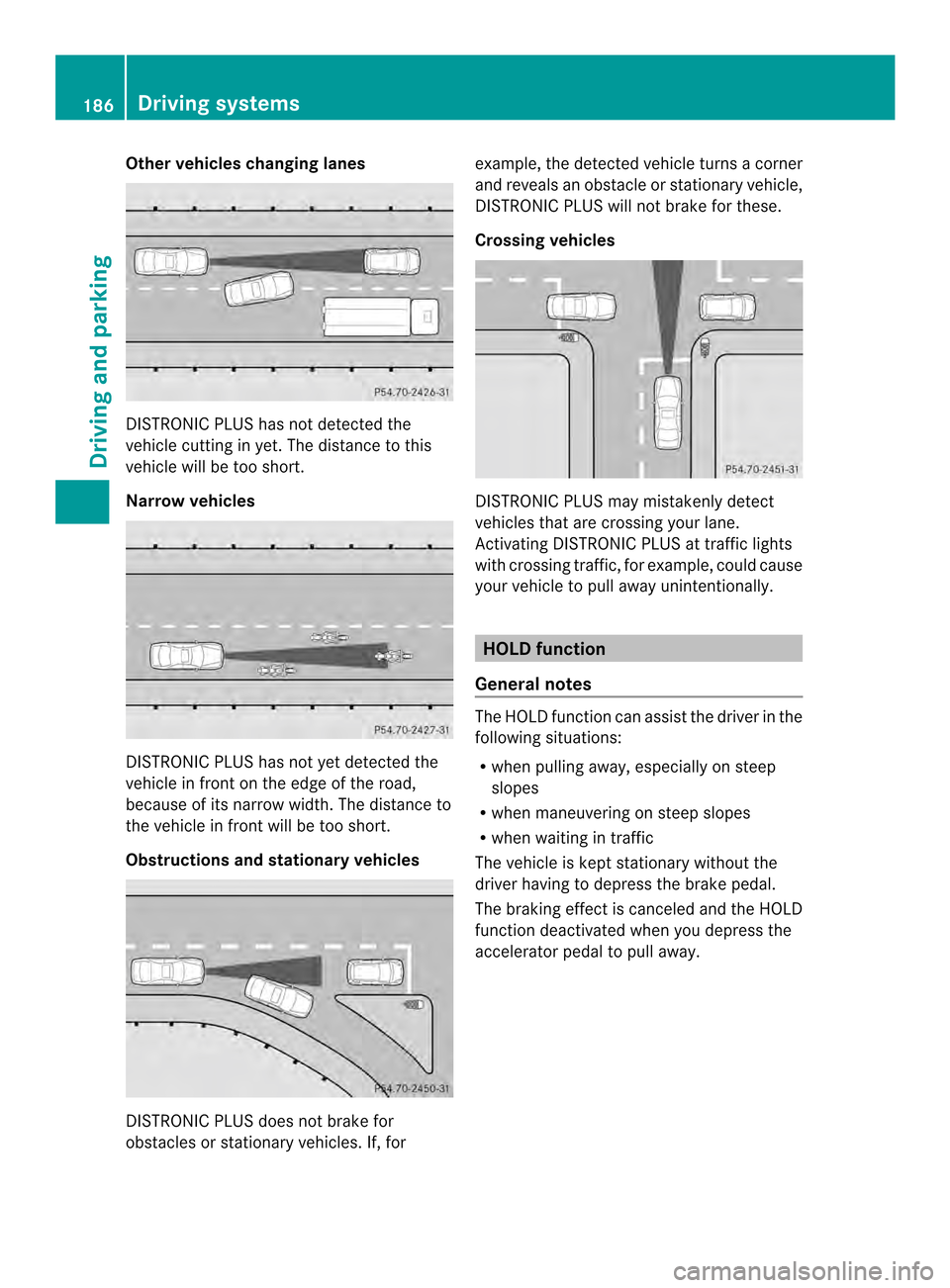
Other vehicles changing lanes
DISTRONIC PLUS has not detected the
vehicle cutting in yet. The distanc etothis
vehicle will be too short.
Narrow vehicles DISTRONIC PLUS has not yet detected the
vehicle in fron tonthe edge of the road,
because of its narrow width. The distance to
the vehicle in front will be too short.
Obstructions and stationary vehicles DISTRONIC PLUS does not brake for
obstacles or stationary vehicles. If, for example, the detected vehicle turns
acorner
and reveals an obstacle or stationary vehicle,
DISTRONIC PLUS will not brake for these.
Crossing vehicles DISTRONIC PLUS may mistakenly detect
vehicles that are crossing your lane.
Activating DISTRONIC PLUS at traffic lights
with crossing traffic, for example, could cause
your vehicle to pull away unintentionally.
HOLD function
General notes The HOLD function can assist the driver in the
following situations:
R
when pulling away,e speciallyonsteep
slopes
R when maneuvering on steep slopes
R when waiting in traffic
The vehicle is kept stationary without the
driver having to depress the brake pedal.
The braking effect is canceled and the HOLD
function deactivated when you depress the
accelerator pedal to pull away. 186
Driving systemsDriving and parking
Page 198 of 382
Problems with PARKTRONIC
Problem Possible causes/consequences and
000B Solutions
Only the red segments
in the PARKTRONIC
warning displaysa
re lit.
You also hear awarning
tone for approximately
two seconds.
PARKTRONIC is then
deactivated and the
indicator lamp on the
PARKTRONIC button
lights up. PARKTRONIC has malfunctioned and has switched off.
X
If problems persist, have PARKTRONIC checked at aqualified
specialist workshop. Only the red segments
in the PARKTRONIC
warning displaysa
re lit.
PARKTRONIC is then
deactivated. The PARKTRONIC sensors are dirty or there is interference.
X
Cleant he PARKTRONIC sensors (Y page 315).
X Switch the ignition back on. The problem may be caused by an external source of radio or
ultrasound waves.
X
See if PARKTRONIC functions in adifferent location. Active Parking Assist
General notes Active Parking Assist is an electronic parking
aid with ultrasound. It measures the road on
both sides of the vehicle. Aparking symbol
indicates asuitable parking space. Active
steering interventio ncan assis tyou during
parking. You may also use PARKTRONIC
(Y page 193).
Important safety notes Active Parking Assist is merely an aid. It is not
ar
eplacement for your attention to your
immediate surroundings. You are always
responsible for safe maneuvering, parking
and exitin gaparking space. Make sure that
no persons, animals or object sare in the
maneuvering range.
When PARKTRONIC is switched off, Active
Parking Assist is also unavailable. G
WARNING
The vehicle swings out when parking and in
doing so could cross into the opposite lane.
This could result in acollision with another
road user. There is arisk of an accident.
Pay attention to other road users when
parking. Stop the vehicle if necessary or
cancel the Active Parking Assist parking
procedure.
! If unavoidable, you should drive over
obstacles such as curbs slowly and not at
as harp angle. Otherwise, you may damage
the wheels or tires.
Active Parking Assist may possibly indicate
parking spaces which are not suitable for
parking, for example:
R where parking or stopping is prohibited
R in front of driveways or entrances and exits
R on unsuitable surfaces 196
Driving systemsDriving and parking
Page 203 of 382
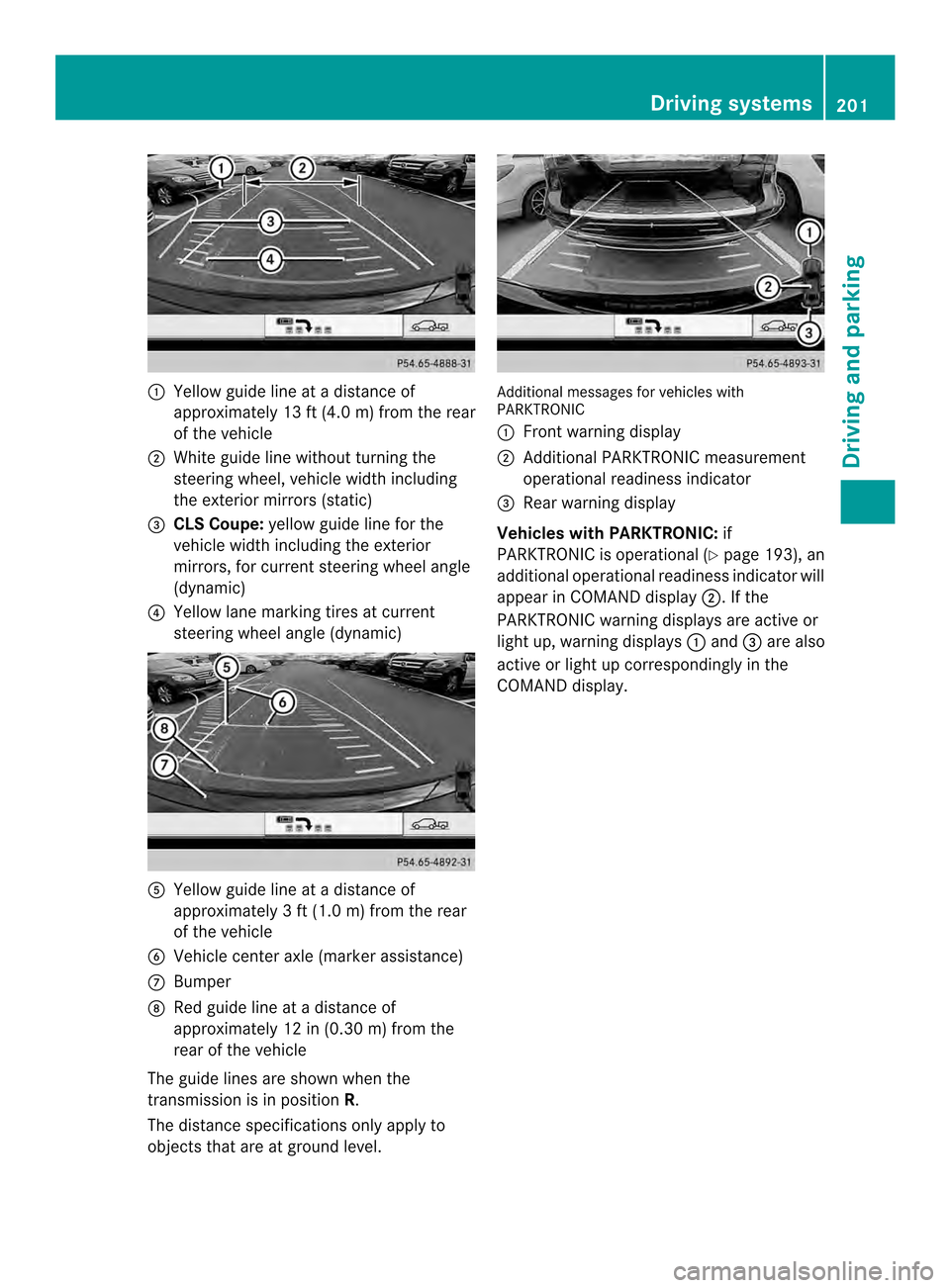
001A
Yellow guide line at adistanc eof
approximately 13 ft (4.0 m) from the rear
of the vehicle
0010 White guide line without turning the
steering wheel, vehicle width including
the exterior mirrors (static)
0024 CLSC oupe: yellow guide line for the
vehicle width including the exterior
mirrors ,for current steering wheel angle
(dynamic)
0021 Yellow lane marking tires at current
steering wheel angl e(dynamic) 001E
Yellow guide line at adistance of
approximately 3ft(1.0 m) from the rear
of the vehicle
0025 Vehicle center axle (marker assistance)
0009 Bumper
0016 Red guide line at adistance of
approximately 12 in (0.30 m) from the
rear of the vehicle
The guide line sare show nwhen the
transmission is in position R.
The distance specifications only apply to
objectst hat are at ground level. Additional messages for vehicles with
PARKTRONIC
001A
Front warning display
0010 Additional PARKTRONIC measurement
operational readiness indicator
0024 Rear warning display
Vehicles with PARKTRONIC: if
PARKTRONIC is operational (Y page 193), an
additional operational readiness indicator will
appearinC OMAND display 0010.Ifthe
PARKTRONIC warning displays are active or
light up, warning displays 001Aand 0024are also
active or light up correspondingly in the
COMAND display. Driving systems
201Driving and parking Z
Page 205 of 382
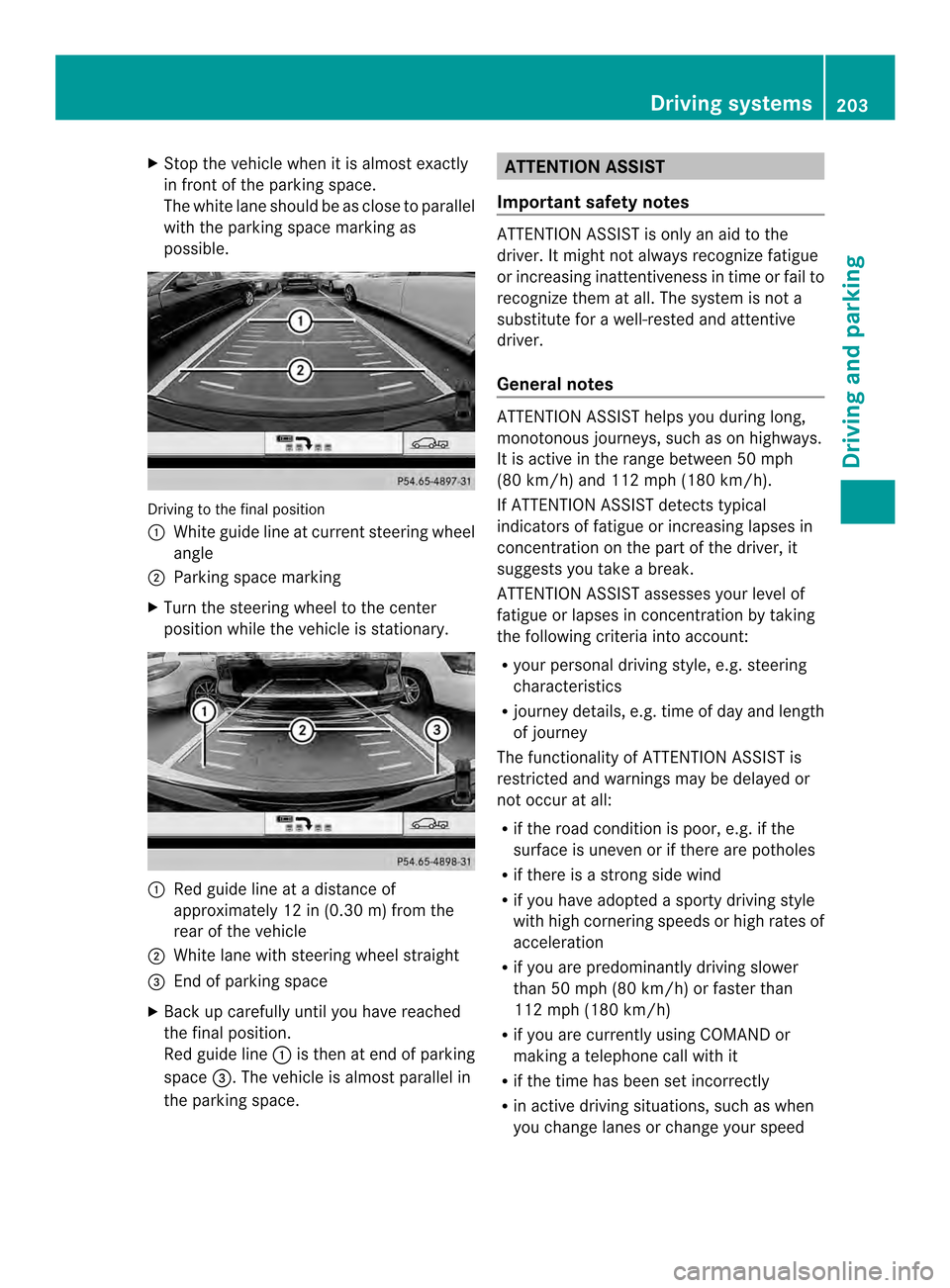
X
Stop the vehicl ewhenitisa lmoste xactly
in front of the parking space.
The white lane shoul dbeasclose to parallel
with the parking space marking as
possible. Driving to the fina
lposition
001A White guid elineatc urrent steering wheel
angle
0010 Parking space marking
X Turn the steering whee ltothe center
positio nwhile the vehicle is stationary. 001A
Red guide line at adistance of
approximately 12 in (0.30 m) from the
rear of the vehicle
0010 White lane with steering wheel straight
0024 End of parking space
X Back up carefully until you have reached
the final position.
Red guide line 001Ais then at end of parking
space 0024.The vehicle is almost parallel in
the parking space. ATTENTION ASSIST
Important safety notes ATTENTION ASSIST is only an aid to the
driver. It might not always recognizef
atigue
or increasing inattentiveness in time or fail to
recognizet hem at all. The system is not a
substitute for awell-rested and attentive
driver.
General notes ATTENTION ASSIST helps you during long,
monotonous journeys, such as on highways.
It is active in the range between 50 mph
(80 km/h) and 112 mph (180 km/h).
If ATTENTION ASSIST detects typical
indicators of fatigue or increasing lapses in
concentration on the part of the driver, it
suggests you take abreak.
ATTENTION ASSIST assesses your level of
fatigue or lapses in concentration by taking
the following criteria into account:
R your personal driving style, e.g. steering
characteristics
R journey details, e.g. time of day and length
of journey
The functionality of ATTENTION ASSIST is
restricted and warnings may be delayed or
not occur at all:
R if the road condition is poor, e.g. if the
surface is uneven or if there are potholes
R if there is astrongs ide wind
R if you have adopted asporty driving style
with high cornering speeds or high rates of
acceleration
R if you are predominantly driving slower
than 50 mph (80 km/h) or faster than
112 mph (180 km/h)
R if you are currently using COMAND or
making atelephone call with it
R if the time has been set incorrectly
R in active driving situations, such as when
you change lanes or change your speed Driving systems
203Driving and parking Z
Page 209 of 382
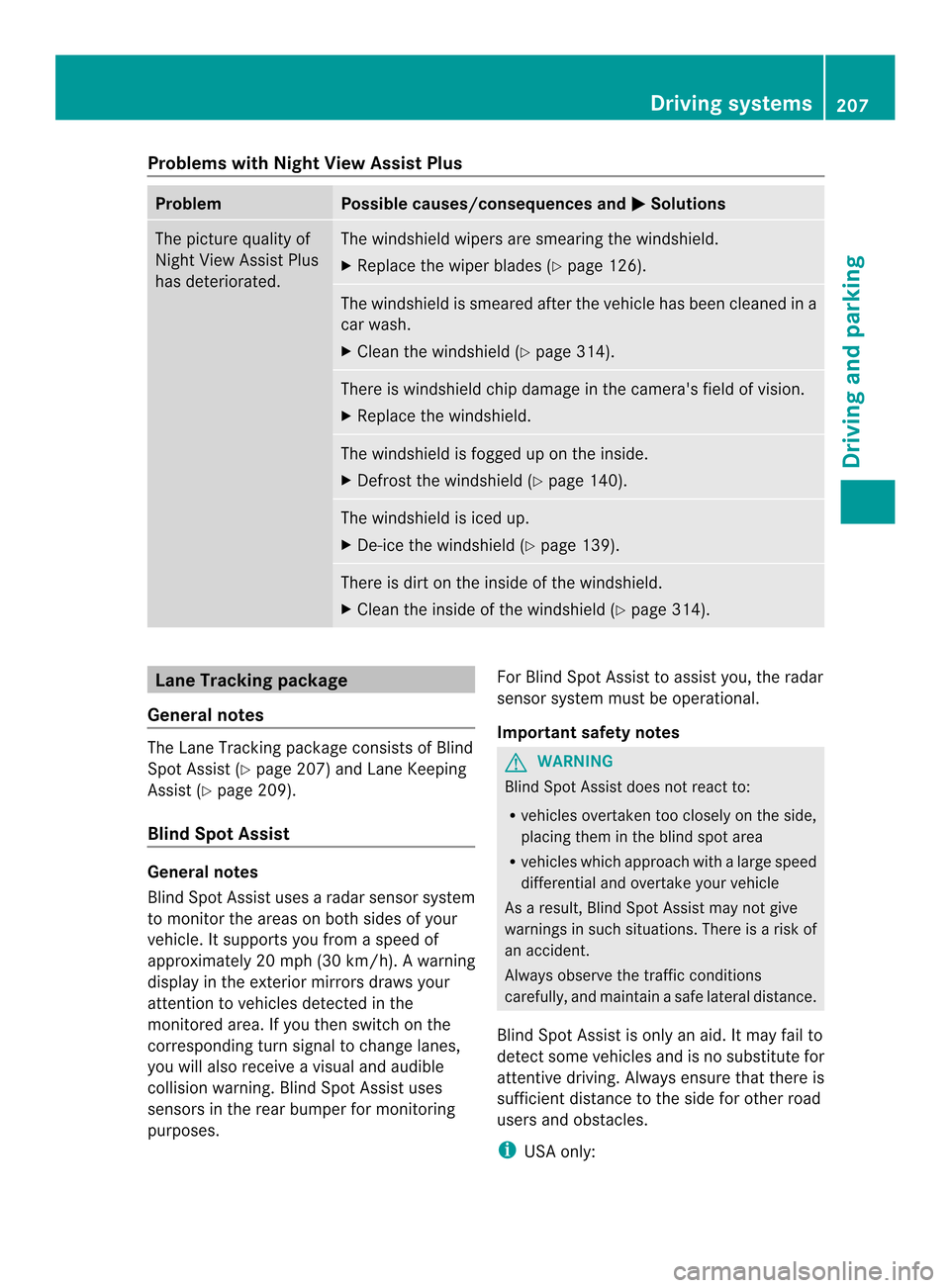
Problems with Night View Assist Plus
Problem Possible causes/consequences and
000B Solutions
The picture quality of
Night View Assist Plus
has deteriorated. The windshield wipers are smearing the windshield.
X
Replace the wiper blades (Y page 126). The windshield is smeared after the vehicle has been cleaned in a
car wash.
X
Cleant he windshield (Y page 314). There is windshield chip damage in the camera's field of vision.
X
Replace the windshield. The windshield is fogged up on the inside.
X
Defrost the windshield (Y page 140). The windshield is iced up.
X
De-ice the windshield (Y page 139). There is dirt on the inside of the windshield.
X
Cleant he inside of the windshield (Y page 314).Lane Tracking package
General notes The Lane Tracking package consistsofB
lind
Spot Assist (Y page 207) and Lane Keeping
Assist (Y page 209).
Blind Spot Assist General notes
Blind Spot Assist uses
aradar sensor system
to monitor the areas on both sides of your
vehicle. It supports you from aspeed of
approximately 20 mph (30k m/h). Awarning
displa yinthe exterio rmirrors draws your
attention to vehicles detected in the
monitored area. If you the nswitc hont he
correspondin gturns ignal to change lanes,
you will also receive avisual and audible
collision warning. Blin dSpot Assist uses
sensors in the rear bumper for monitoring
purposes. For Blin
dSpot Assist to assist you, the radar
sensor system must be operational.
Important safety notes G
WARNING
Blin dSpot Assist does not reac tto:
R vehicles overtaken too closely on the side,
placin gthemint he blind spot area
R vehicles which approach with alarge speed
differential and overtake your vehicle
As aresult, Blind Spot Assist may not give
warnings in such situations. There is arisk of
an accident.
Always observe the traffic conditions
carefully, and maintain asafe lateral distance.
Blind Spot Assist is only an aid. It may fail to
detect some vehicles and is no substitute for
attentive driving. Always ensure that there is
sufficient distance to the side for other road
users and obstacles.
i USA only: Driving systems
207Driving and parking Z
Page 210 of 382

This device has been approved by the FCC
as
a"Vehicular RadarS ystem". The radar
sensor is intended fo ruse in an automotive
radar system only. Removing, tampering
with, or altering the device will void any
warranties, and is not permitted by the
FCC. Do not tamper with, alter, or use in
any non-approved way.
Any unauthorized modification to this
device could void the user’s authority to
operate the equipment.
Monitoring range of the sensors
In particular, the detection of obstacles can
be impaired if:
R dirt on the sensors or anything else
covering the sensors
R poor visibility, e.g. due to fog, heavy rain,
snow or spray
R narrow vehicles, e.g. motorcycles or
bicycles
R the road has very wide lanes
R the road has narrow lanes
R you are not driving in the middle of the lane
R there are barriers or similarl ane borders
Vehicle sinthemonitorin grang eare then not
indicated. Blin
dSpotA ssist monitors the area up to
10 ft (3 m) behind your vehicle and directly
next to your vehicle, as shown in the diagram. If the lanes are narrow, vehicles driving in the
lane beyond the lane next to your vehicle may
be indicated, especially if the vehicles are not
driving in the middle of their lane. This may
be the case if there are vehicles driving at the
inner edge of their lanes.
Due to the nature of the system:
R
warnings may be issued in error when
driving close to crash barriers or similar
solid lane borders.
R the warning is canceled when driving for an
extended period next to long vehicles, such
as trucks.
The two radar sensors for Blind Spot Assist
are integrated into the sides of the rear
bumper. Make sure that the bumper is free of
dirt, ice or slush in the vicinity of the sensors.
The sensors must not be covered, for
example by cycle racks or overhanging loads.
Following asevere impact or in the event of
damage to the bumpers, have the function of
the sensors checked at aqualified specialist
workshop. Blind Spot Assist may otherwise
not work properly.
Indicator and warning display 001A
Yellowi ndicator lamp/red warning lamp
Active Blind Spot Assist is not active at
speeds below approximately 20 mph
(30 km/h). Vehicles in the monitoring range
are then not indicated.
When Blind Spot Assist is activated, indicator
lamp 001Ain the exterior mirrors lights up
yellow at speeds of up to 20 mph (30k m/h).
At speeds above 20 mph (30 km/h) the 208
Driving systemsDriving and parking