automatic MERCEDES-BENZ CLS-Class 2016 W218 Owner's Manual
[x] Cancel search | Manufacturer: MERCEDES-BENZ, Model Year: 2016, Model line: CLS-Class, Model: MERCEDES-BENZ CLS-Class 2016 W218Pages: 342, PDF Size: 8.28 MB
Page 229 of 342
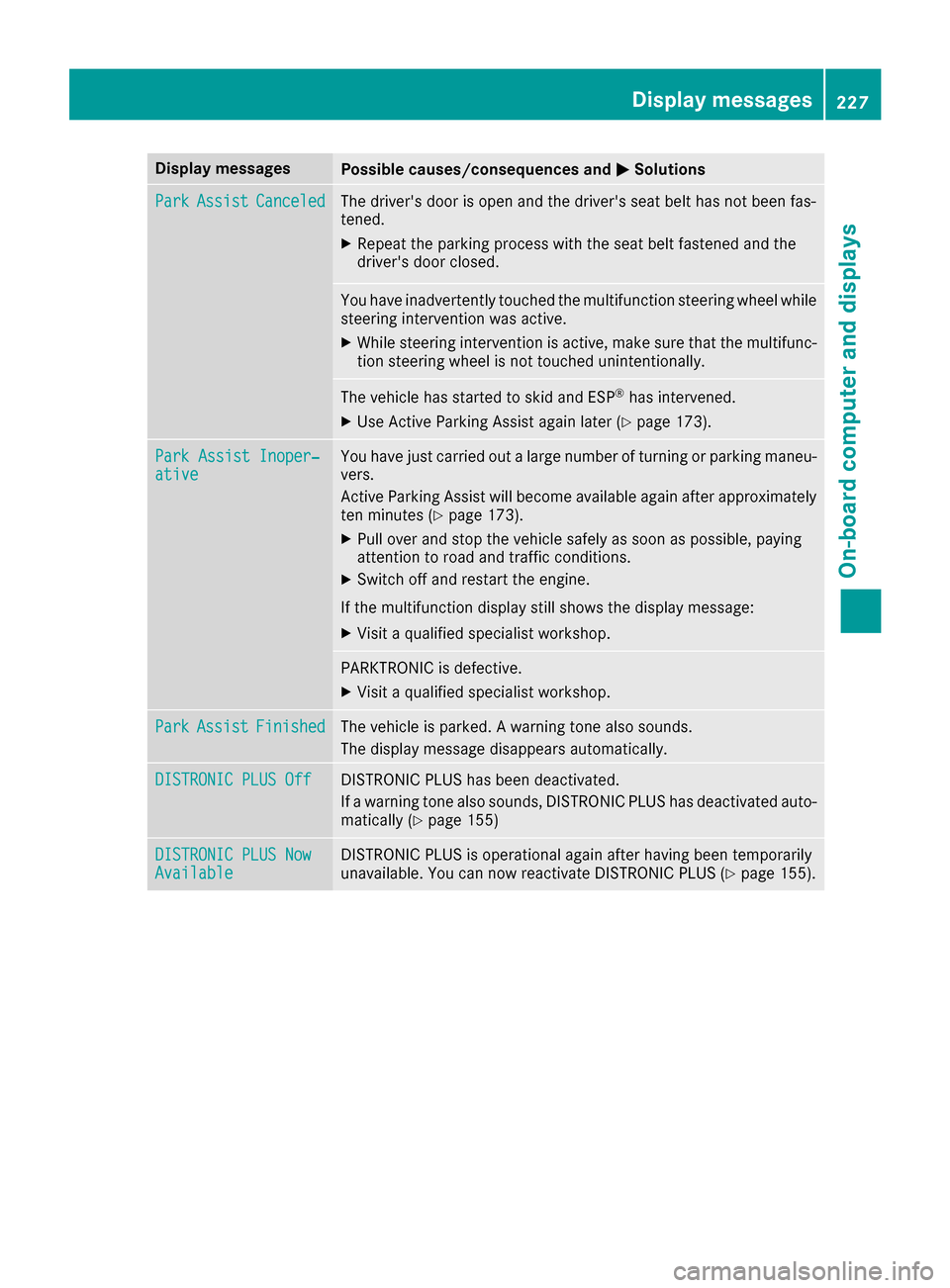
Display messagesPossible causes/consequences andMSolutions
ParkAssistCanceledThe driver's door is open and th edriver's seat belt has no tbeen fas -
tened.
XRepeat th eparking process wit hth eseat belt fastene dand th e
driver's door closed .
You haveinadvertentl ytouched th emultifunction steering whee lwhile
steering intervention was active .
XWhilesteering intervention is active ,mak esur ethat th emultifunc-
tion steering whee lis no ttouched unintentionally.
The vehicl ehas started to skid and ES P®has intervened.
XUse Active Parking Assistagain later (Ypage 173).
ParkAssist Inoper ‐ativeYou havejus tcarrie dout alarg enumber of turnin gor parking maneu-
vers.
Active Parking Assis twill become available again after approximately
te nminute s (
Ypage 173).
XPull ove rand stop th evehicl esafely as soo nas possible, payin g
attention to roa dand traffic conditions.
XSwitc hoff and restar tth eengine.
If th emultifunction display still shows th edisplay message :
XVisitaqualified specialist workshop .
PARKTRONICis defective.
XVisit aqualified specialist workshop .
ParkAssistFinishedThe vehicl eis parked. Awarning tone also sounds.
The display message disappear sautomatically.
DISTRONIC PLU SOffDISTRONI CPLU Shas been deactivated.
If awarning tone also sounds, DISTRONI CPLU Shas deactivated auto -
matically (
Ypage 155)
DISTRONIC PLU SNowAvailableDISTRONI CPLU Sis operational again after having been temporarily
unavailable .You can no wreactivat eDISTRONI CPLU S (Ypage 155).
Display messages227
On-board computer and displays
Z
Page 233 of 342
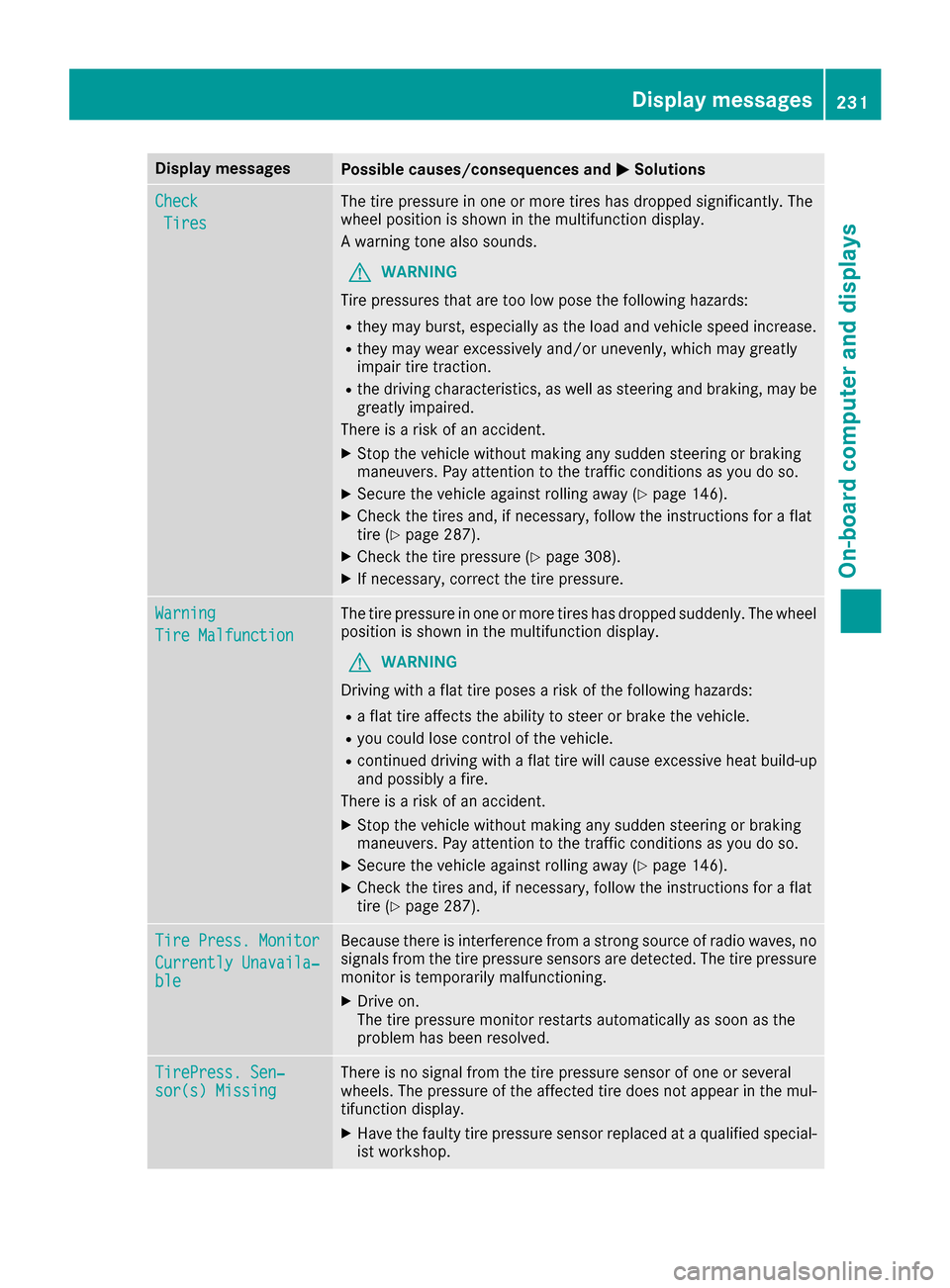
Display messagesPossible causes/consequences andMSolutions
Check
Tires
The tire pressurein on eor mor etires has dropped significantly. The
whee lposition is shown in th emultifunction display.
A warning tone also sounds.
GWARNIN G
Tir epressures that are to olow pos eth efollowin ghazards :
Rthey may burst, especially as th eload and vehicl espeed increase.
Rthey may wear excessivel yand/o runevenly, whic hmay greatl y
impair tire traction .
Rthedrivin gcharacteristics ,as well as steering and braking ,may be
greatl yimpaired.
There is aris kof an accident.
XStop th evehicl ewithout making any sudden steering or braking
maneuvers .Pay attention to th etraffic condition sas you do so.
XSecur eth evehicl eagainst rollin gaway (Ypage 146).
XCheckth etires and ,if necessary, follow th einstruction sfor aflat
tire (Ypage 287).
XChec kth etire pressur e (Ypage 308).
XIf necessary, correc tth etire pressure.
Warnin g
TireMalfunction
The tire pressur ein on eor mor etires has dropped suddenly. The whee l
position is shown in th emultifunction display.
GWARNIN G
Drivin gwit h a flat tire poses aris kof th efollowin ghazards :
Raflat tire affects th eabilit yto steer or brak eth evehicle.
Ryou could lose control of th evehicle.
Rcontinued drivin gwit h a flat tire will caus eexcessive heat build-up
and possibl y afire.
There is aris kof an accident.
XStop th evehicl ewithout making any sudden steering or braking
maneuvers .Pay attention to th etraffic condition sas you do so.
XSecur eth evehicl eagainst rollin gaway (Ypage 146).
XCheckth etires and ,if necessary, follow th einstruction sfor aflat
tire (Ypage 287).
TirePress. Monito r
Currently Unavaila‐ble
Becausethere is interferenc efrom astron gsource of radi owaves, no
signals from th etire pressur esensor sare detected. The tire pressur e
monitor is temporarily malfunctioning .
XDrive on.
The tire pressur emonitor restarts automatically as soo nas th e
problem has been resolved.
TirePress .Sen ‐sor(s) Missin gThere is no signal from th etire pressur esensor of on eor several
wheels. The pressur eof th eaffecte dtire does no tappear in th emul-
tifunction display.
XHav eth efault ytire pressur esensor replace dat aqualified special -
ist workshop .
Display messages231
On-board computer and displays
Z
Page 234 of 342
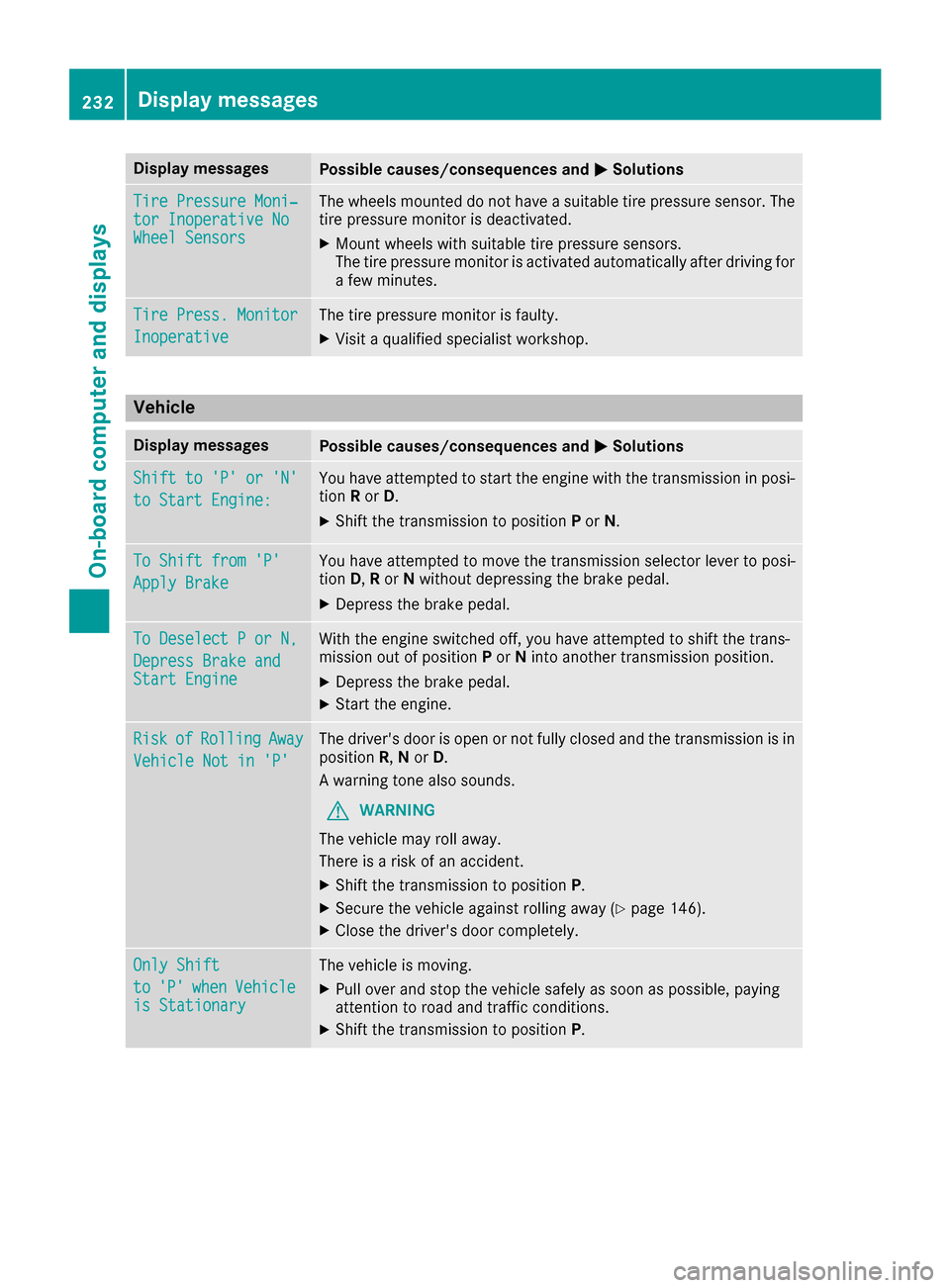
Display messagesPossible causes/consequences andMSolutions
TirePressure Moni‐tor Inoperative NoWheel Sensor s
The wheels mounte ddo no thav e a suitable tire pressur esensor .The
tire pressur emonitor is deactivated.
XMoun twheels wit hsuitable tire pressur esensors.
The tire pressur emonitor is activated automatically after drivin gfor
a few minutes.
Tir ePress. Monito r
Inoperative
The tire pressuremonitor is faulty.
XVisit aqualified specialist workshop .
Vehicle
Display messagesPossible causes/consequences and MSolutions
Shift to 'P' or 'N'
to Start Engine:
You haveattempte dto start th eengin ewit hth etransmission in posi-
tion Ror D.
XShift th etransmission to position Por N.
To Shift fro m'P'
Apply Brake
You hav eattempte dto mov eth etransmission selector lever to posi-
tion D,Ror Nwithout depressing th ebrak epedal .
XDepress th ebrak epedal .
To Deselect Por N,
Depres sBrake andStart Engine
Wit hth eengin eswitched off ,you hav eattempte dto shift th etrans -
mission out of position Por Nint oanother transmission position .
XDepress thebrak epedal .
XStart th eengine.
Ris kofRollin gAway
Vehicl eNot in 'P'
The driver's door is open or no tfull yclosed and th etransmission is in
position R,N or D.
A warning tone also sounds.
GWARNIN G
The vehicl emay rol laway.
There is aris kof an accident.
XShift th etransmission to position P.
XSecureth evehicl eagainst rollin gaway (Ypage 146).
XCloseth edriver's door completely.
Onl yShift
to'P'whe nVehicl eis Stationar y
The vehicleis moving .
XPull overand stop th evehicl esafely as soo nas possible, payin g
attention to roa dand traffic conditions.
XShift th etransmission to position P.
232Display messages
On-board computer and displays
Page 235 of 342
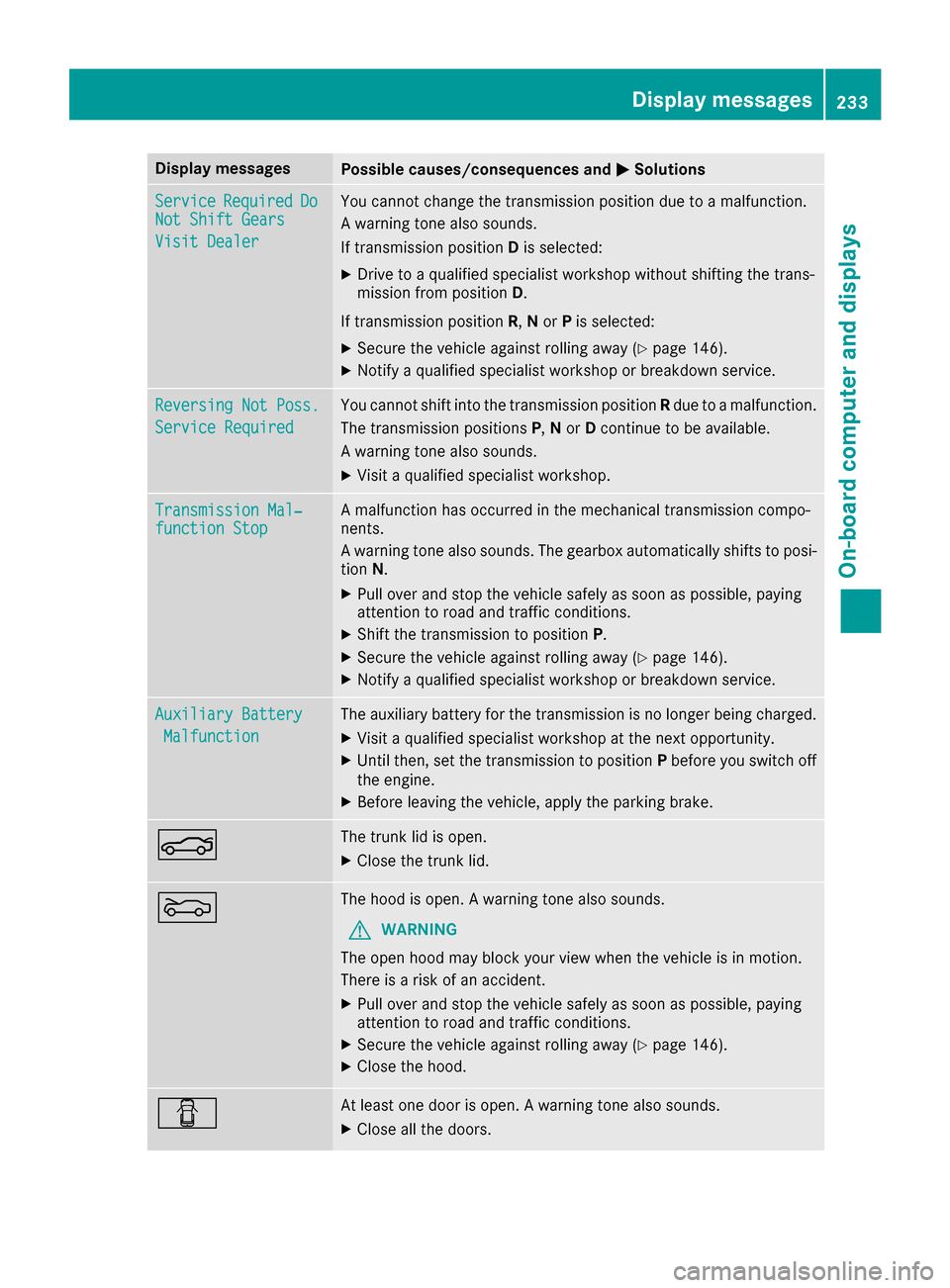
Display messagesPossible causes/consequences andMSolutions
ServiceRequiredDoNot Shift Gears
Visit Dealer
You canno tchang eth etransmission position due to amalfunction .
A warning tone also sounds.
If transmission position Dis selected:
XDrive to aqualified specialist workshop without shifting th etrans -
mission from position D.
If transmission position R,N or Pis selected:
XSecur eth evehicl eagainst rollin gaway (Ypage 146).
XNotify aqualified specialist workshop or breakdown service.
Reversing Not Poss.
Servic eRequired
You canno tshift int oth etransmission position Rdue to amalfunction .
The transmission position sP,N or Dcontinu eto be available.
A warning tone also sounds.
XVisit aqualified specialist workshop .
Transmission Mal‐function StopAmalfunction has occurred in th emechanical transmission compo -
nents.
A warning tone also sounds. The gearbox automatically shift sto posi-
tion N.
XPull ove rand stop th evehicl esafely as soo nas possible, payin g
attention to roa dand traffic conditions.
XShift th etransmission to position P.
XSecureth evehicl eagainst rollin gaway (Ypage 146).
XNotify aqualified specialist workshop or breakdown service.
Auxiliary Batter y
Malfunction
The auxiliary battery for th etransmission is no longer bein gcharged.
XVisit aqualified specialist workshop at th enext opportunity.
XUnti lthen ,set th etransmission to position Pbefore you switch off
th eengine.
XBefor eleaving th evehicle, apply th eparking brake.
NThe trunk lid is open .
XCloseth etrunk lid.
MThe hoo dis open . Awarning tone also sounds.
GWARNIN G
The open hoo dmay bloc kyour vie wwhen th evehicl eis in motion .
There is aris kof an accident.
XPull ove rand stop th evehicl esafely as soo nas possible, payin g
attention to roa dand traffic conditions.
XSecur eth evehicl eagainst rollin gaway (Ypage 146).
XCloseth ehood.
CAt least on edoor is open . Awarning tone also sounds.
XClos eall th edoors.
Display messages23 3
On-board computer and displays
Z
Page 240 of 342
Warning/
indicator
lampNSignal type
Possible causes/consequences and M
Solutions
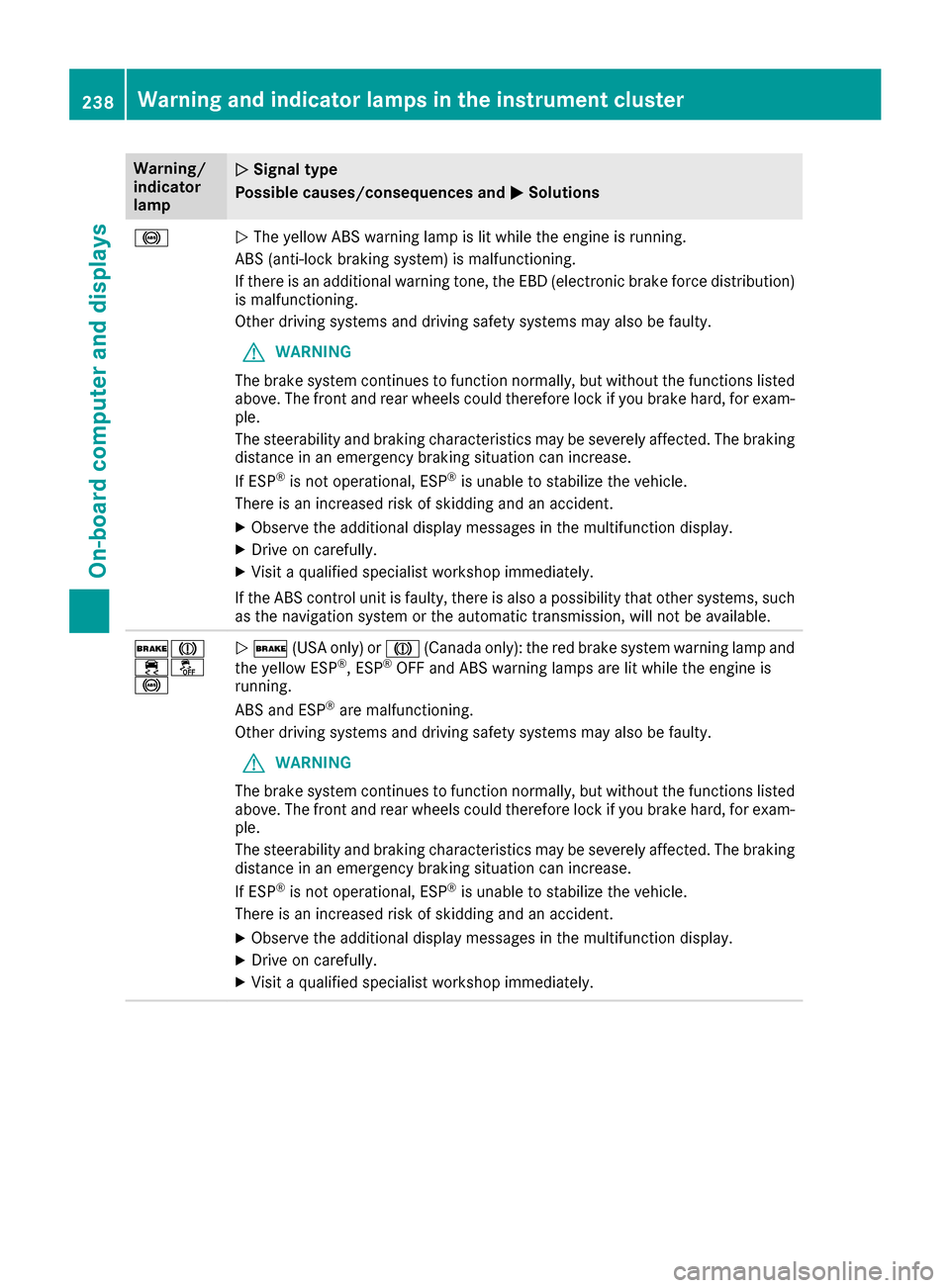
!NThe yellow ABS warning lamp is lit while the engine is running.
ABS (anti-lock braking system) is malfunctioning.
If there is an additional warning tone, the EBD (electronic brake force distribution)
is malfunctioning.
Other driving systems and driving safety systems may also be faulty.
GWARNING
The brake system continues to function normally, but without the functions listed
above. The front and rear wheels could therefore lock if you brake hard, for exam-
ple.
The steerability and braking characteristics may be severely affected. The braking
distance in an emergency braking situation can increase.
If ESP
®is not operational, ESP®is unable to stabilize the vehicle.
There is an increased risk of skidding and an accident.
XObserve the additional display messages in the multifunction display.
XDrive on carefully.
XVisit a qualified specialist workshop immediately.
If the ABS control unit is faulty, there is also a possibility that other systems, such
as the navigation system or the automatic transmission, will not be available.
$J
֌
!N $ (USA only) or J(Canada only): the red brake system warning lamp and
the yellow ESP®, ESP®OFF and ABS warning lamps are lit while the engine is
running.
ABS and ESP
®are malfunctioning.
Other driving systems and driving safety systems may also be faulty.
GWARNING
The brake system continues to function normally, but without the functions listed
above. The front and rear wheels could therefore lock if you brake hard, for exam-
ple.
The steerability and braking characteristics may be severely affected. The braking
distance in an emergency braking situation can increase.
If ESP
®is not operational, ESP®is unable to stabilize the vehicle.
There is an increased risk of skidding and an accident.
XObserve the additional display messages in the multifunction display.
XDrive on carefully.
XVisit a qualified specialist workshop immediately.
238Warning and indicator lamps in the instrument cluster
On-board computer and displays
Page 248 of 342
Operating system
Overview
General notes
!Do not use the space in front of the display
for storage. Objects placed here could dam-
age the display or impair its function. Avoid
any direct contact with the display surface.
Pressure on the display surface may result in
impairments to the display, which could be
irreversible.
Wearing polarized sunglasses may impair your
ability to read the display.
The display has an automatic temperature-con-
trolled switch-off feature. The brightness is
automatically reduced if the temperature is too
high. The display may temporarily switch off
completely.
Cleaning instructions
!Do not touch the display. The display has a
very sensitive high-gloss surface; there is a
risk of scratching. If you have to clean the
screen, however, use a mild cleaning agent
and a soft, lint-free cloth.
The display must be switched off and have
cooled down before you start cleaning. Do not
apply pressure to the display surface when
cleaning it, as this could cause irreversible dam-
age to the display.
Switching the multimedia system
on/off
XPress the qcontrol knob.
Adjusting the volume
XTurn the qcontrol knob.
The volume is adjusted:
Rfor the currently selected media source
Rduring traffic or navigation announcements
Rin hands-free mode during a phone call
Switching the sound on or off
XPress the 8button on the control panel.
If the audio output is switched off, the status
line will show the 8symbol. If you switch the media source or set the volume, the sound
is automatically switched on.
iNavigation announcements will be heard
even if the sound is muted.
Functions
The multimedia system has the following func-
tions:
RRadio mode
RMedia mode with media search
RSound systems
RNavigation system
COMAND: navigation via the hard drive
Audio 20: navigation via SD card
RCommunication functions
RSIRIUS Weather (COMAND)
RVehicle functions with system settings
RFavorites functions
Controller
The controller in the center console lets you:
Rselect menu items on the display
Renter characters
Rselect a destination on the map
Rsave entries
The controller can be:
Rturned 3
Rslid left or right 1
Rslid forwards or back 4
Rslid diagonally2
Rpressed briefly or pressed and held 7
Back button
You can use the%button to exit a menu or to
call up the basic display of the current operating
mode.
XTo exit the menu: briefly press the%
button.
The multimedia system changes to the next
higher menu level in the current operating
mode.
XTo call up the basic display: press the%
button for longer than two seconds.
The multimedia system changes to the basic
display of the current operating mode.
246Operating system
Multimedia system
Page 251 of 342
Multimedia system:
XSelectVehicleQSystem Set‐tingsQActivate Bluetooth.
XActivate Bluetooth®O.
Mobile phone:
XActivate Bluetooth®and, if necessary, Blue-
tooth®visibility for other devices (see the
manufacturer's operating instructions).
The Bluetooth
®device names for all of one man-
ufacturer's products might be identical. To
make it possible to clearly identify your mobile
phone, change the device name (see the man-
ufacturer's operating instructions).
If the mobile phone supports the PBAP (Phone
Book Access Profile) and MAP (Message
Access Profile) Bluetooth
®profiles, the follow-
ing information will be transmitted after you
connect:
RPhone book
RCall lists
RText messages and e-mails
iFurther information on suitable mobile
phones can be obtained on the Internet at:
http://www.mercedes-benz.com/
connect
iIn the USA you can also contact the
Mercedes-Benz Customer Assistance Center
at 1-800-FOR-MERCedes (1-800-367-6372).
In Canada, you can get in touch with the Cus-
tomer Relations Center on 1-800-387-0100.
Searching for and authorizing a mobile
phone
Before using your mobile phone with the multi-
media system for the first time, you will need to search for the phone and then authorize (con-
nect) it. Depending on the mobile phone, author-
ization either takes place by means of Secure
Simple Pairing or by entering a passkey. The
multimedia system automatically makes the
procedure that is relevant for your mobile phone
available. The mobile phone is always connec-
ted automatically after authorization. Further
information on using a mobile phone with the
multimedia system (see the Digital Operator's
Manual).
If the multimedia system does not detect your
mobile phone, this may be due to particular security settings on your mobile phone (see the
manufacturer's operating instructions).
Only one mobile phone can be connected to the
multimedia system at any one time.
Searching for a mobile phone
Multimedia system:
XSelect Tel/®QConnectDeviceQSearch for PhonesQStartSearch.
The available mobile phones are displayed.
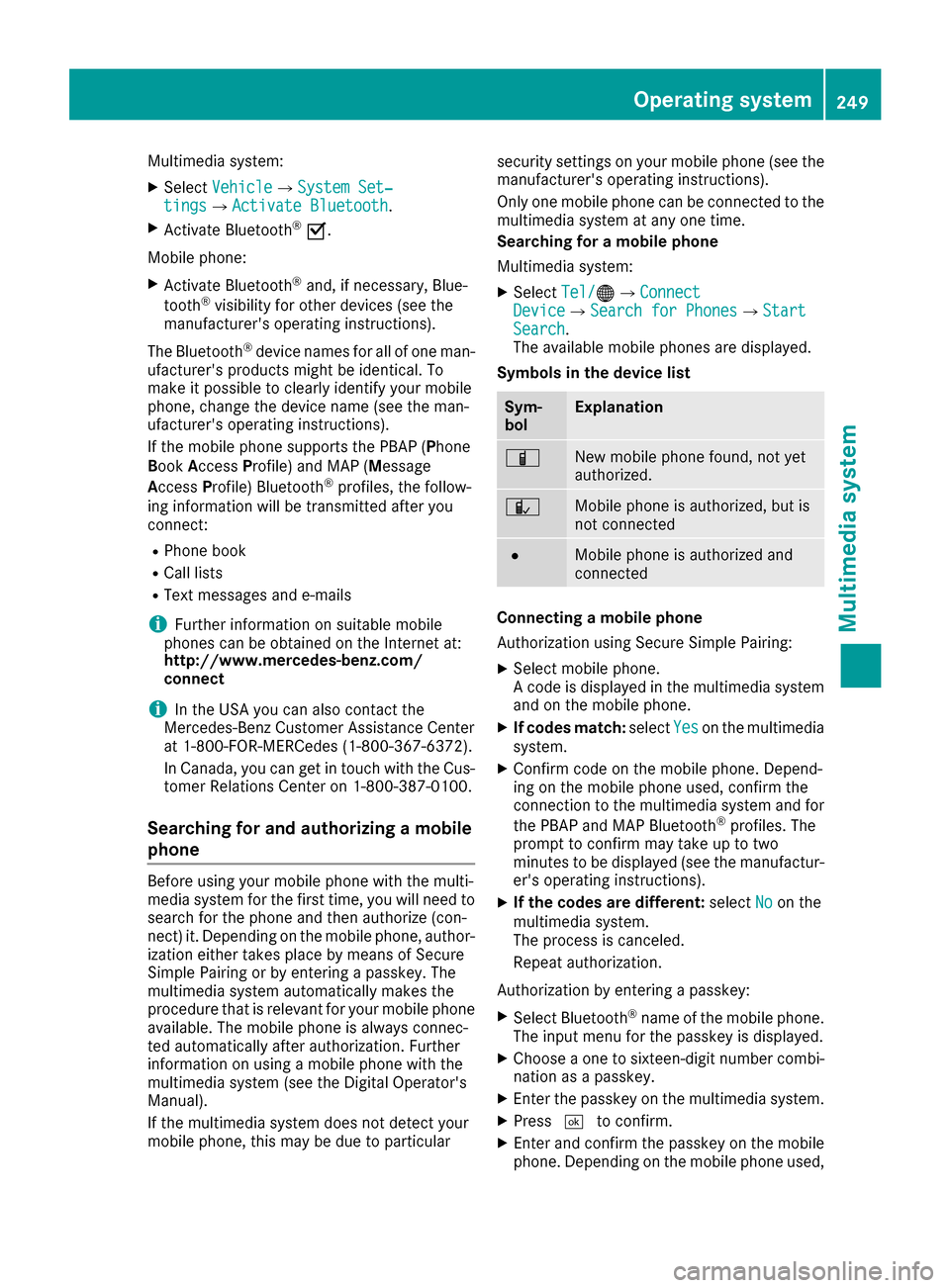
Symbols in the device list
Sym-
bolExplanation
ÏNew mobile phone found, not yet
authorized.
ÑMobile phone is authorized, but is
not connected
#Mobile phone is authorized and
connected
Connecting a mobile phone
Authorization using Secure Simple Pairing:
XSelect mobile phone.
A code is displayed in the multimedia system
and on the mobile phone.
XIf codes match: selectYeson the multimedia
system.
XConfirm code on the mobile phone. Depend-
ing on the mobile phone used, confirm the
connection to the multimedia system and for
the PBAP and MAP Bluetooth
®profiles. The
prompt to confirm may take up to two
minutes to be displayed (see the manufactur-
er's operating instructions).
XIf the codes are different: selectNoon the
multimedia system.
The process is canceled.
Repeat authorization.
Authorization by entering a passkey:
XSelect Bluetooth®name of the mobile phone.
The input menu for the passkey is displayed.
XChoose a one to sixteen-digit number combi- nation as a passkey.
XEnter the passkey on the multimedia system.
XPress ¬to confirm.
XEnter and confirm the passkey on the mobile
phone. Depending on the mobile phone used,
Operating system249
Multimedia system
Z
Page 263 of 342
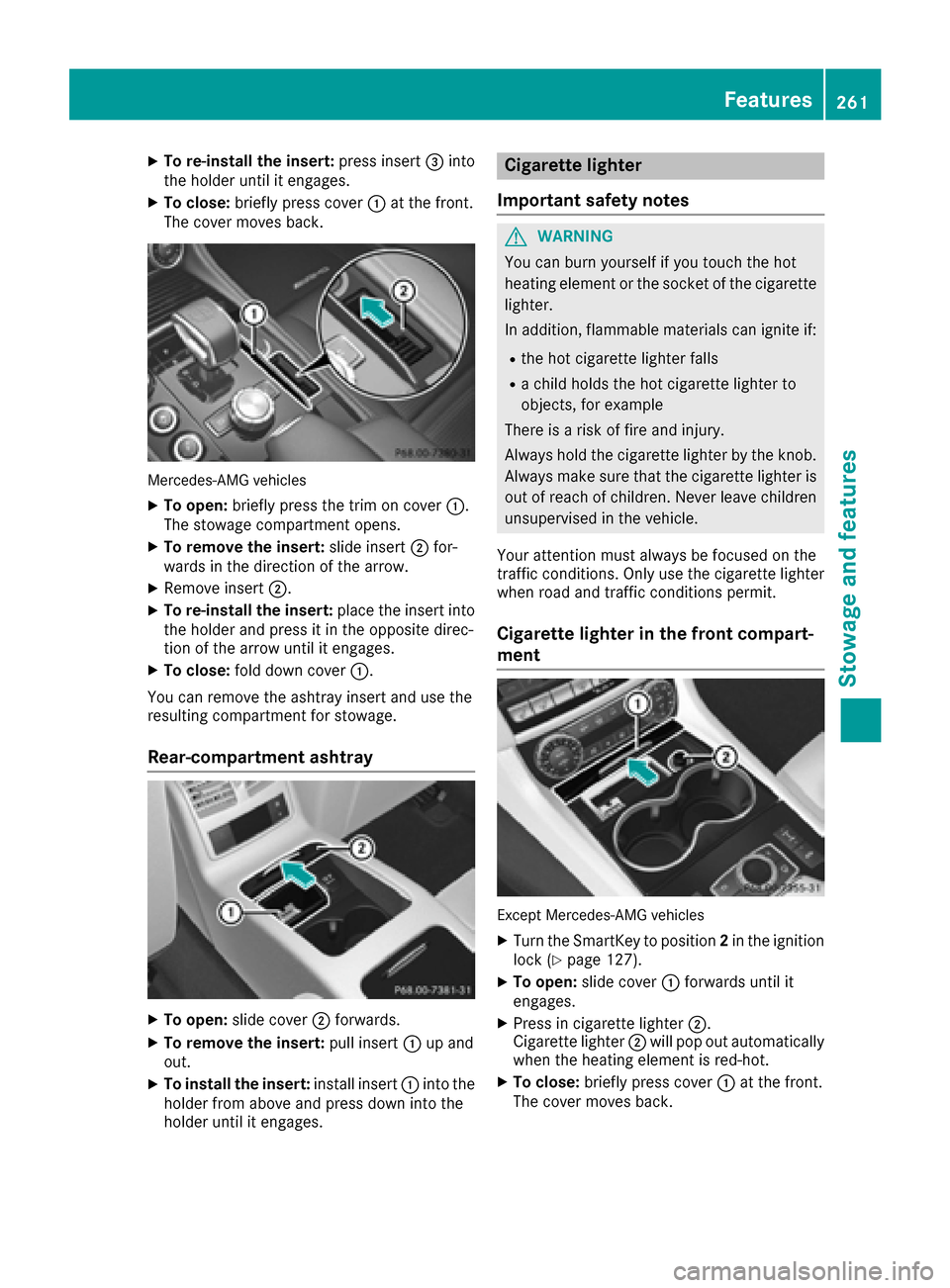
XTo re-install the insert:press insert=into
the holder until it engages.
XTo close: briefly press cover :at the front.
The cover moves back.
Mercedes-AMG vehicles
XTo open: briefly press the trim on cover :.
The stowage compartment opens.
XTo remove the insert: slide insert;for-
wards in the direction of the arrow.
XRemove insert ;.
XTo re-install the insert: place the insert into
the holder and press it in the opposite direc-
tion of the arrow until it engages.
XTo close: fold down cover :.
You can remove the ashtray insert and use the
resulting compartment for stowage.
Rear-compartment ashtray
XTo open: slide cover ;forwards.
XTo remove the insert: pull insert:up and
out.
XTo install the insert: install insert:into the
holder from above and press down into the
holder until it engages.
Cigarette lighter
Important safety notes
GWARNING
You can burn yourself if you touch the hot
heating element or the socket of the cigarette lighter.
In addition, flammable materials can ignite if:
Rthe hot cigarette lighter falls
Ra child holds the hot cigarette lighter to
objects, for example
There is a risk of fire and injury.
Always hold the cigarette lighter by the knob.
Always make sure that the cigarette lighter is
out of reach of children. Never leave children
unsupervised in the vehicle.
Your attention must always be focused on the
traffic conditions. Only use the cigarette lighter when road and traffic conditions permit.
Cigarette lighter in the front compart-
ment
Except Mercedes-AMG vehicles
XTurn the SmartKey to position 2in the ignition
lock (Ypage 127).
XTo open: slide cover :forwards until it
engages.
XPress in cigarette lighter ;.
Cigarette lighter ;will pop out automatically
when the heating element is red-hot.
XTo close: briefly press cover :at the front.
The cover moves back.
Features261
Stowag ean d features
Z
Page 264 of 342
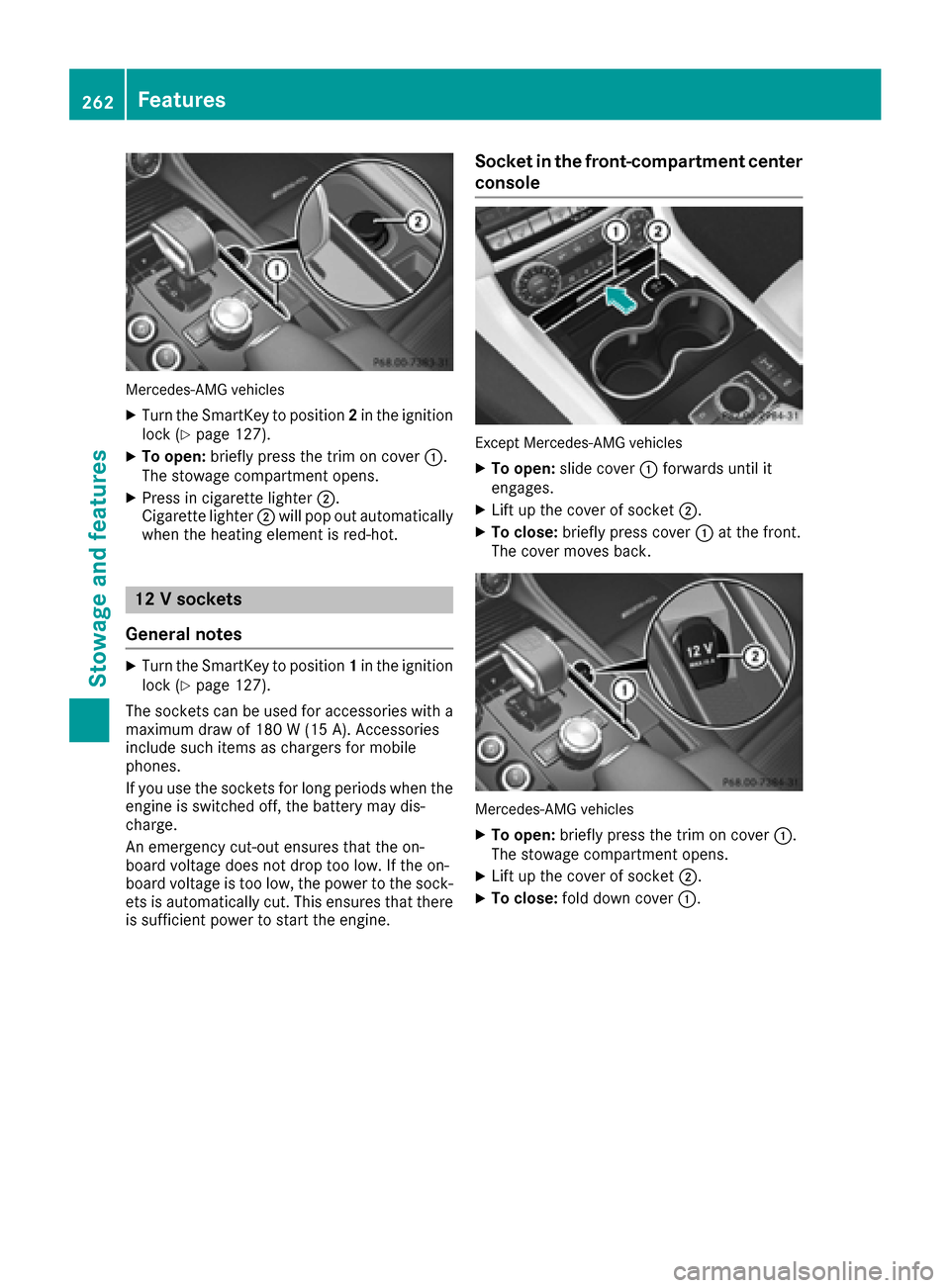
Mercedes-AMG vehicles
XTurn the SmartKey to position2in the ignition
lock (Ypage 127).
XTo open: briefly press the trim on cover :.
The stowage compartment opens.
XPress in cigarette lighter ;.
Cigarette lighter ;will pop out automatically
when the heating element is red-hot.
12 V sockets
General notes
XTurn the SmartKey to position 1in the ignition
lock (Ypage 127).
The sockets can be used for accessories with a maximum draw of 180 W (15 A). Accessories
include such items as chargers for mobile
phones.
If you use the sockets for long periods when the
engine is switched off, the battery may dis-
charge.
An emergency cut-out ensures that the on-
board voltage does not drop too low. If the on-
board voltage is too low, the power to the sock-
ets is automatically cut. This ensures that there is sufficient power to start the engine.
Socket in the front-compartment center
console
Except Mercedes-AMG vehicles
XTo open: slide cover :forwards until it
engages.
XLift up the cover of socket ;.
XTo close:briefly press cover :at the front.
The cover moves back.
Mercedes-AMG vehicles
XTo open: briefly press the trim on cover :.
The stowage compartment opens.
XLift up the cover of socket ;.
XTo close:fold down cover :.
262Features
Stowage and features
Page 265 of 342
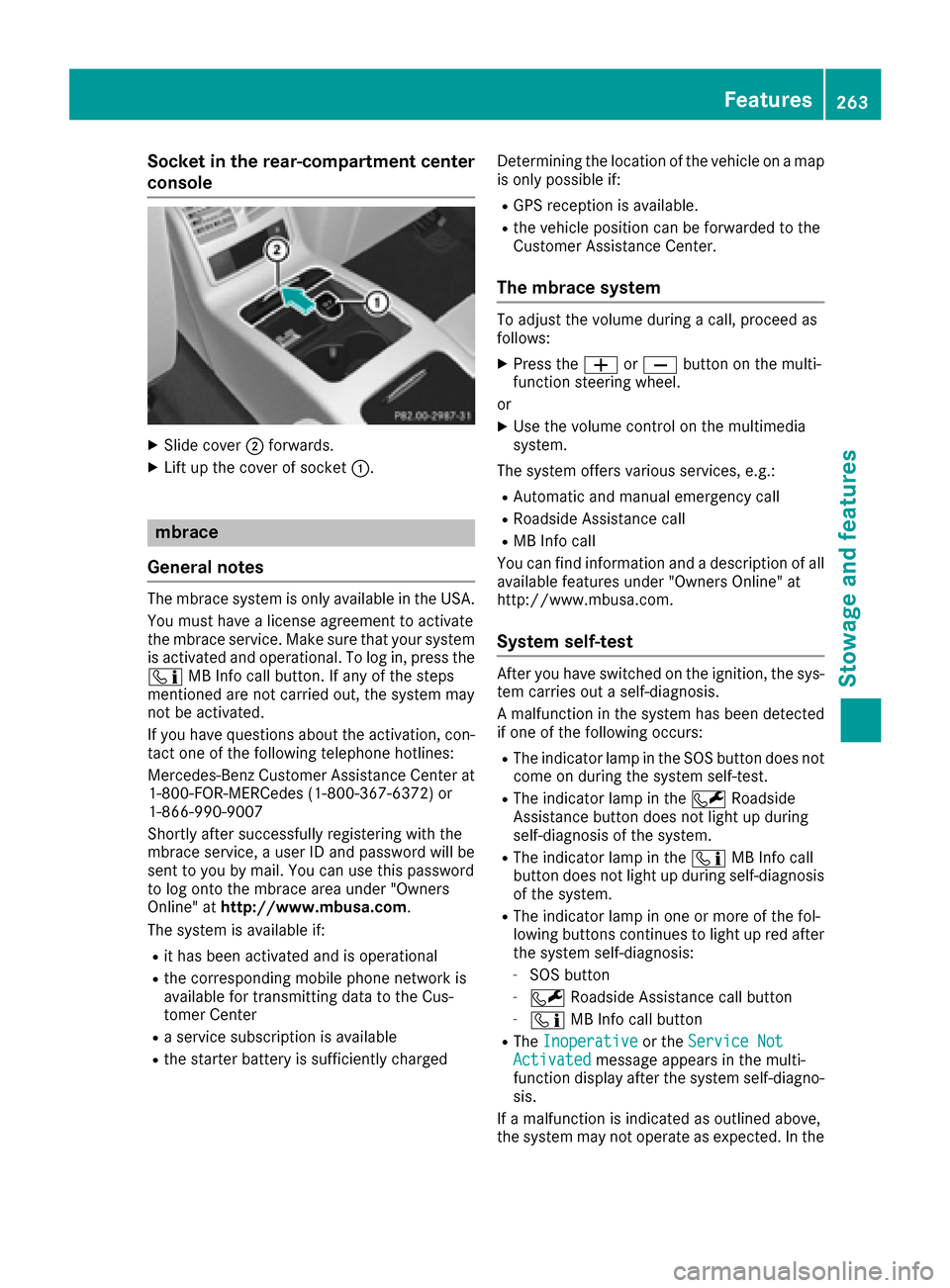
Socket in the rear-compartment center
console
XSlide cover;forwards.
XLift up the cover of socket :.
mbrace
General notes
The mbrace system is only available in the USA.
You must have a license agreement to activate
the mbrace service. Make sure that your system
is activated and operational. To log in, press the
ï MB Info call button. If any of the steps
mentioned are not carried out, the system may
not be activated.
If you have questions about the activation, con-
tact one of the following telephone hotlines:
Mercedes-Benz Customer Assistance Center at
1-800-FOR-MERCedes (1-800-367-6372) or
1-866-990-9007
Shortly after successfully registering with the
mbrace service, a user ID and password will be
sent to you by mail. You can use this password
to log onto the mbrace area under "Owners
Online" at http://www.mbusa.com.
The system is available if:
Rit has been activated and is operational
Rthe corresponding mobile phone network is
available for transmitting data to the Cus-
tomer Center
Ra service subscription is available
Rthe starter battery is sufficiently charged Determining the location of the vehicle on a map
is only possible if:
RGPS reception is available.
Rthe vehicle position can be forwarded to the
Customer Assistance Center.
The mbrace system
To adjust the volume during a call, proceed as
follows:
XPress the
WorX button on the multi-
function steering wheel.
or
XUse the volume control on the multimedia
system.
The system offers various services, e.g.:
RAutomatic and manual emergency call
RRoadside Assistance call
RMB Info call
You can find information and a description of all
available features under "Owners Online" at
http://www.mbusa.com.
System self-test
After you have switched on the ignition, the sys-
tem carries out a self-diagnosis.
A malfunction in the system has been detected if one of the following occurs:
RThe indicator lamp in the SOS button does notcome on during the system self-test.
RThe indicator lamp in the FRoadside
Assistance button does not light up during
self-diagnosis of the system.
RThe indicator lamp in the ïMB Info call
button does not light up during self-diagnosis
of the system.
RThe indicator lamp in one or more of the fol-
lowing buttons continues to light up red after
the system self-diagnosis:
-SOS button
-F Roadside Assistance call button
-ïMB Info call button
RTheInoperativeor the Service NotActivatedmessage appears in the multi-
function display after the system self-diagno-
sis.
If a malfunction is indicated as outlined above,
the system may not operate as expected. In the
Features263
Stowage and features
Z