tire pressure MERCEDES-BENZ CLS-Class 2016 W218 Owner's Manual
[x] Cancel search | Manufacturer: MERCEDES-BENZ, Model Year: 2016, Model line: CLS-Class, Model: MERCEDES-BENZ CLS-Class 2016 W218Pages: 342, PDF Size: 8.28 MB
Page 20 of 342
SteeringDisplay message ............................2 34
Steering Assist and Stop&Go Pilot
(DISTRONIC PLUS)
Activating/deactivating ................. 204
Display message ............................ 229
Steering wheel
Adjusting (electrically) ................... 100
Button overview ............................... 35
Buttons (on-board computer) ......... 197
Cleaning ......................................... 284
Important safety notes .................. 100
Paddle shifters ............................... 139
Steering wheel heating .................. 100
Storing settings (memory func-
tion) ............................................... 105
Steering wheel heating
Problem (malfunction) ................... 102
Switching on/off ........................... 100
Steering wheel paddle shifters ........139
Stopwatch (RACETIMER) ................... 210
Stowage areas ................................... 251
Stowage compartments
Armrest (under) .............................2 53
Center console .............................. 252
Center console (rear) ..................... 253
Cup holders ................................... 257
Eyeglasses compartment ...............2 52
Glove box ....................................... 252
Important safety information ......... 251
Rear ............................................... 253
Stowage net ................................... 254
Under driver's seat/front-
passenger seat .............................. 253
Stowage net ....................................... 254
Stowage well beneath the trunk
floor .................................................... 256
Summer tires ..................................... 303
Sun visor ............................................ 259
Surround lighting (on-board com-
puter) .................................................. 207
Suspension setting
AIRMATIC ...................................... 167
AMG adaptive sport suspension
system ........................................... 168
Suspension settings
SETUP (on-board computer) .......... 209 Switching air-recirculation mode
on/off
................................................. 124
Switching on media mode
Via the device list .......................... 250
T
Tachometer ........................................ 196
Tail lamps
Display message ............................ 221
Tank
see Fuel tank
Tank content
Fuel gauge ....................................... 34
Technical data
Capacities ...................................... 331
Emergency spare wheel ................. 326
Information .................................... 329
Tires/wheels ................................. 325
Vehicle data ................................... 336
Telephone
Accepting a call (multifunction
steering wheel) .............................. 202
Authorizing a mobile phone (con-
necting) ......................................... 249
Connecting a mobile phone (gen-
eral information) ............................ 248
Display message ............................ 234
Menu (on-board computer) ............ 202
Number from the phone book ........ 203
Redialing ........................................ 203
Rejecting/ending a call ................. 203
see also Digital Operator's Man-
ual .................................................. 245
Switching between mobile
phones ........................................... 250
Temperature
Coolant .......................................... 196
Coolant (on-board computer,
Mercedes-AMG vehicles) ............... 209
Engine oil (on-board computer,
Mercedes-AMG vehicles) ............... 209
Outside temperature ...................... 196
Setting (climate control) ................ 121
Timing (RACETIMER) ......................... 210
Tire pressure
Calling up (on-board computer) ..... 308
Checking manually ........................ 307
18Index
Page 21 of 342
Display message ............................ 230
Maximum ....................................... 307
Not reached (TIREFIT) .................... 290
Notes ............................................. 306
Reached (TIREFIT) .......................... 290
Recommended ............................... 304
Tire pressure loss warning system
General notes ................................ 307
Important safety notes .................. 307
Restarting ...................................... 308
Tire pressure monitor
Checking the tire pressure elec-
tronically ........................................ 310
Function/notes ............................. 308
General notes ................................ 308
Important safety notes .................. 309
Restarting ...................................... 311
Warning lamp ................................. 244
Warning message .......................... 310
Tire-change tool kit ........................... 286
TIREFIT kit .......................................... 288
Important safety notes .................. 288
Storage location ............................ 286
Tire pressure not reached .............. 290
Tire pressure reached .................... 290
Tires
Aspect ratio (definition) ................. 320
Average weight of the vehicle
occupants (definition) .................... 318
Bar (definition) ............................... 318
Changing a wheel .......................... 320
Characteristics .............................. 318
Checking ........................................ 301
Curb weight (definition) ................. 319
Definition of terms ......................... 318
Direction of rotation ...................... 321
Display message ............................ 230
Distribution of the vehicle occu-
pants (definition) ............................ 320
DOT (Department of Transporta-
tion) (definition) ............................. 318
DOT, Tire Identification Number
(TIN) ............................................... 318
GAWR (Gross Axle Weight Rating)
(definition) ..................................... 319
GVW (Gross Vehicle Weight) (def-
inition) ........................................... 319 GVWR (Gross Vehicle Weight Rat-
ing) (definition) .............................. 319
Important safety notes .................. 301
Increased vehicle wei
ght due to
optional equipment (definition) ...... 319
Information on driving .................... 301
Kilopascal (kPa) (definition) ........... 319
Labeling (overview) ........................ 315
Load bearing index (definition) ...... 320
Load index ..................................... 317
Load index (definition) ................... 319
Maximum load on a tire (defini-
tion) ............................................... 319
Maximum loaded vehicle weight
(definition) ..................................... 319
Maximum permissible tire pres-
sure (definition) ............................. 319
Maximum tire load ......................... 317
Maximum tire load (definition) ....... 319
MOExtended tires .......................... 303
Optional equipment weight (defi-
nition) ............................................ 320
PSI (pounds per square inch) (def-
inition) ........................................... 320
Replacing ....................................... 320
Service life ..................................... 302
Sidewall (definition) ....................... 320
Speed rating (definition) ................ 319
Storing ........................................... 321
Structure and characteristics
(definition) ..................................... 318
Temperature .................................. 315
TIN (Tire Identification Number)
(definition) ..................................... 320
Tire bead (definition) ...................... 320
Tire pressure (definition) ................ 320
Tire pressures (recommended) ...... 319
Tire size (data) ............................... 325
Tire size designation, load-bearing
capacity, speed rating .................... 315
Tire tread ....................................... 302
Tire tread (definition) ..................... 320
Total load limit (definition) ............. 320
Traction ......................................... 314
Traction (definition) ....................... 320
Tread wear ..................................... 314
Uniform Tire Quality Grading
Standards ...................................... 314
Index19
Page 23 of 342
Reporting problems........................ .29
Securing from rolling away ............ 321
Towing away .................................. 296
Transporting .................................. 298
Unlocking (in an emergency) ........... 83
Unlocking (SmartKey) ...................... 76
Vehicle data ................................... 336
Vehicle data ....................................... 336
Vehicle dimensions ........................... 336
Vehicle emergency locking ................ 83
Vehicle identification number
see VIN
Vehicle identification plate .............. 330
Vehicle level
AIRMATIC ...................................... 166
Vehicle level (display message) ....... 224
Vehicle tool kit .................................. 286
Video
Operating the DVD ......................... 202
see also Digital Operator's Man-
ual .................................................. 245
VIN
Seat ............................................... 331
Type plate ...................................... 330
Voice Control System
see Separate operating instructions
W
Warning and indicator lampsABS ................................................ 238
Brakes ........................................... 237
Check Engine ................................. 241
Coolant .......................................... 241
Distance warning ........................... 243
ESP
®.............................................. 238
ESP®OFF ....................................... 239
Fuel tank ........................................ 241
General notes ................................ 235
Overview .......................................... 34
PASSENGER AIR BAG OFF ............... 42
Reserve fuel ................................... 241
Restraint system ............................ 240
Seat belt ........................................ 236
SPORT handling mode ................... 240
Tire pressure monitor .................... 244
Warranty .............................................. 26 Washer fluid
Display message ............................ 234
Wheel and tire combinations
Tires ............................................... 325
Wheel bolt tightening torque ........... 324
Wheel chock ...................................... 321
Wheels
Changing a wheel .......................... 320
Checking ........................................ 301
Cleaning ......................................... 281
Emergency spare wheel ................. 326
Important safety notes .................. 301
Information on driving .................... 301
Interchanging/changing ................ 320
Mounting a new wheel ................... 324
Mounting a wheel .......................... 321
Removing a wheel .......................... 323
Storing ........................................... 321
Tightening torque ........................... 324
Wheel size/tire size ....................... 325
Window curtain air bag
Operation ......................................... 49
Windows
see Side windows
Windshield
Defrosting ...................................... 122
Windshield washer fluid
see Windshield washer system
Windshield washer system
Adding washer fluid ....................... 277
Important safety notes .................. 335
Windshield wipers
Problem (malfunction) ................... 113
Replacing the wiper blades ............ 112
Switching on/off ........................... 111
Winter driving
Important safety notes .................. 303
Slippery road surfaces ................... 152
Snow chains .................................. 303
Winter tires
M+S tires ....................................... 303
Wiper blades
Cleaning ......................................... 282
Important safety notes .................. 112
R
eplacing ....................................... 112
Wooden trim (cleaning instruc-
tions) .................................................. 284
Index21
Page 27 of 342
Protection of the environment
General notes
HEnvironmental note
Daimler's declared policy is one of compre-
hensive environmental protection.
The objectives are for the natural resources
that form the basis of our existence on this
planet to be used sparingly and in a manner
that takes the requirements of both nature
and humanity into account.
You too can help to protect the environment
by operating your vehicle in an environmen-
tally responsible manner.
Fuel consumption and the rate of engine,
transmission, brake and tire wear are affected by these factors:
Roperating conditions of your vehicle
Ryour personal driving style
You can influence both factors. You should
bear the following in mind:
Operating conditions:
Ravoid short trips as these increase fuel con-
sumption.
Ralways make sure that the tire pressures
are correct.
Rdo not carry any unnecessary weight.
Rremove roof racks once you no longer need
them.
Ra regularly serviced vehicle will contribute
to environmental protection. You should
therefore adhere to the service intervals.
Ralways have service work carried out at a
qualified specialist workshop.
Personal driving style:
Rdo not depress the accelerator pedal when
starting the engine.
Rdo not warm up the engine when the vehicle
is stationary.
Rdrive carefully and maintain a safe distance
from the vehicle in front.
Ravoid frequent, sudden acceleration and
braking.
Rchange gear in good time and use each gear
only up to Ôof its maximum engine speed.
Rswitch off the engine in stationary traffic.
Rkeep an eye on the vehicle's fuel consump-
tion.
Environmental concerns and recom-
mendations
Wherever the operating instructions require you
to dispose of materials, first try to regenerate or
re-use them. Observe the relevant environmen-
tal rules and regulations when disposing of
materials. In this way you will help to protect the
environment.
Genuine Mercedes-Benz parts
HEnvironmental note
Daimler AG also supplies reconditioned major
assemblies and parts which are of the same
quality as new parts. They are covered by the
same Limited Warranty entitlements as new
parts.
!Air bags and Emergency Tensioning Devi-
ces, as well as control units and sensors for
these restraint systems, may be installed in
the following areas of your vehicle:
Rdoors
Rdoor pillars
Rdoor sills
Rseats
Rcockpit
Rinstrument cluster
Rcenter console
Do not install accessories such as audio sys-
tems in these areas. Do not carry out repairs or welding. You could impair the operating
efficiency of the restraint systems.
Have aftermarket accessories installed at a
qualified specialist workshop.
You could jeopardize the operating safety of
your vehicle if you use parts, tires and wheels as
well as accessories relevant to safety which
have not been approved by Mercedes-Benz. This
could lead to malfunctions in safety-relevant
Genuine Mercedes-Benz parts25
Introduction
Z
Page 66 of 342
Never leave animals unattended in the vehi-
cle. Always secure animals properly during
the journey, e.g. use a suitable animal trans-
port box.
Driving safety systems
Overview of driving safety systems
In this section, you will find information about
the following driving safety systems:
RABS (Anti-lock Braking System)
(Ypage 64)
RBAS ( Brake Assist System) (Ypage 65)
RBAS PLUS ( BrakeAssist System PLUS) with
Cross-Traffic Assist (Ypage 65)
RCOLLISION PREVENTION ASSIST PLUS
(Ypage 67)
RESP®(Electronic StabilityProgram)
(Ypage 69)
REBD ( Electronic Brake force Distribution)
(Ypage 72)
RADAPTIVE BRAKE (Ypage 72)
RPRE-SAFE®Brake (Ypage 73)
Important safety notes
If you fail to adapt your driving style or if you are
inattentive, the driving safety systems can nei-
ther reduce the risk of an accident nor override the laws of physics. Driving safety systems are
merely aids designed to assist driving. You are
responsible for maintaining the distance to the
vehicle in front, for vehicle speed, for braking in
good time, and for staying in lane. Always adapt
your driving style to suit the prevailing road and weather conditions and maintain a safe distance
from the vehicle in front. Drive carefully.
The driving safety systems described only work
as effectively as possible when there is ade-
quate contact between the tires and the road
surface. Please pay special attention to the
notes on tires, recommended minimum tire
tread depths, etc. (
Ypage 301).
In wintry driving conditions, always use winter
tires (M+S tires) and if necessary, snow chains.
Only in this way will the driving safety systems
described in this section work as effectively as
possible.
ABS (Anti-lock Braking System)
General information
ABS regulates brake pressure in such a way that
the wheels do not lock when you brake. This
allows you to continue steering the vehicle when
braking.
The ! ABS warning lamp in the instrument
cluster lights up when the ignition is switched
on. It goes out when the engine is running.
ABS works from a speed of about 5 mph
(8 km/h), regardless of road-surface conditions.
ABS works on slippery surfaces, even when you
only brake gently.
Important safety notes
iObserve the "Important safety notes" sec-
tion (Ypage 64).
GWARNING
If ABS is faulty, the wheels could lock when
braking. The steerability and braking charac-
teristics may be severely impaired. Addition-
ally, further driving safety systems are deac-
tivated. There is an increased danger of skid-
ding and accidents.
Drive on carefully. Have ABS checked imme-
diately at a qualified specialist workshop.
When ABS is malfunctioning, other systems,
including driving safety systems, will also
become inoperative. Observe the information
on the ABS warning lamp (
Ypage 238) and dis-
play messages which may be shown in the
instrument cluster (
Ypage 213).
Braking
XIf ABS intervenes: continue to depress the
brake pedal vigorously until the braking sit-
uation is over.
XTo make a full brake application: depress
the brake pedal with full force.
If ABS intervenes when braking, you will feel a
pulsing in the brake pedal.
The pulsating brake pedal can be an indication
of hazardous road conditions, and functions as a reminder to take extra care while driving.
64Driving safety systems
Safety
Page 146 of 342
RIf fuel is swallowed, seek medical assis-
tance without delay. Do not induce vomit-
ing.
RImmediately change out of clothing which
has come into contact with fuel.
GWARNING
Electrostatic buildup can create sparks and
ignite fuel vapors. There is a risk of fire and
explosion.
Always touch the vehicle body before opening
the fuel filler flap or touching the fuel pump
nozzle. Any existing electrostatic buildup is
thereby discharged.
!Do not use diesel to refuel vehicles with a
gasoline engine. Do not switch on the ignition
if you accidentally refuel with the wrong fuel.
Otherwise, the fuel will enter the fuel system. Even small amounts of the wrong fuel could
result in damage to the fuel system and the
engine. Notify a qualified specialist workshop
and have the fuel tank and fuel lines drained
completely.
!Overfilling the fuel tank could damage the
fuel system.
!Take care not to spill any fuel on painted
surfaces. You could otherwise damage the
paintwork.
!Use a filter when refueling from a fuel can.
Otherwise, the fuel lines and/or injection sys-
tem could be blocked by particles from the
fuel can.
Do not get into the vehicle again during the refu-
eling process. Otherwise, electrostatic charge
could build up again.
If you overfill the fuel tank, fuel could spray out
when the fuel pump nozzle is removed.
For further information on fuel and fuel quality
(
Ypage 332).
Refueling
General information
Pay attention to the important safety notes
(Ypage 143). The fuel filler flap is unlocked or locked auto-
matically when you unlock or lock the vehicle
with the key or using KEYLESS-GO.
The position of the fuel filler cap is displayed
8
in the instrument cluster. The arrow next
to the filling pump indicates the side of the vehi-
cle.
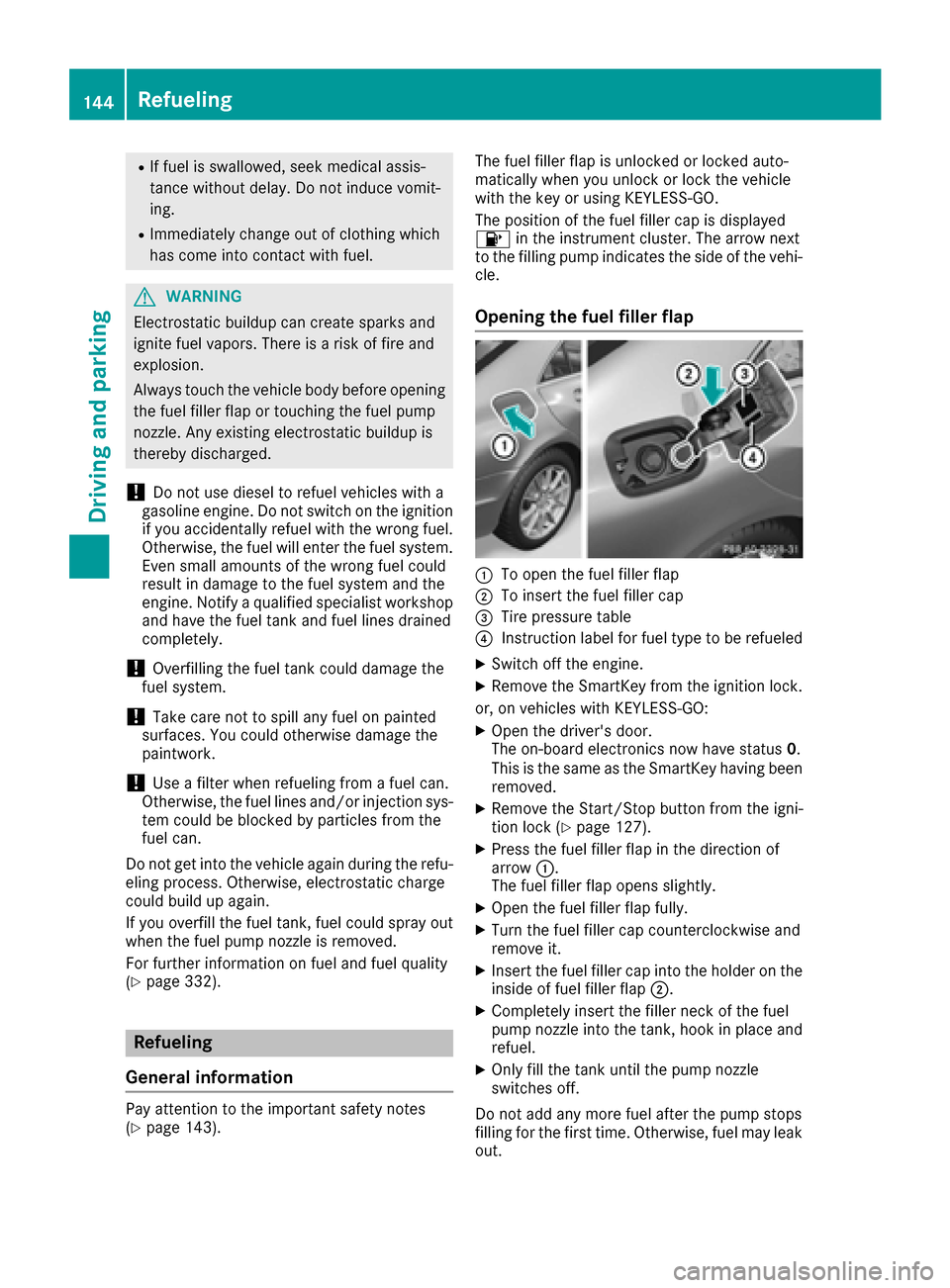
Opening the fuel filler flap
:To open the fuel filler flap
;To insert the fuel filler cap
=Tire pressure table
?Instruction label for fuel type to be refueled
XSwitch off the engine.
XRemove the SmartKey from the ignition lock.
or, on vehicles with KEYLESS‑GO:
XOpen the driver's door.
The on-board electronics now have status 0.
This is the same as the SmartKey having been
removed.
XRemove the Start/Stop button from the igni-
tion lock (Ypage 127).
XPress the fuel filler flap in the direction of
arrow :.
The fuel filler flap opens slightly.
XOpen the fuel filler flap fully.
XTurn the fuel filler cap counterclockwise and
remove it.
XInsert the fuel filler cap into the holder on the inside of fuel filler flap ;.
XCompletely insert the filler neck of the fuel
pump nozzle into the tank, hook in place and
refuel.
XOnly fill the tank until the pump nozzle
switches off.
Do not add any more fuel after the pump stops
filling for the first time. Otherwise, fuel may leak
out.
144Refueling
Driving and parking
Page 151 of 342
Drive sensibly–save fuel
Observ eth efollowin gtips to sav efuel:
XThe tires should always be inflate dto th erec -
ommended tire pressure.
XRemov eunnecessary loads.
XRemov eroof racks when they are no tneeded.
XWar mup th eengin eat low engin espeeds .
XAvoid frequent acceleration or braking .
XHaveall maintenance wor kcarrie dout as
indicated by th eservic eintervals in th eMain -
tenance Booklet or by th eservic einterval dis -
play.
Fue lconsumption also increase swhen drivin gin
cold weather ,in stop-start traffic and in hill yter-
rain .
Drinking an ddrivin g
GWARNING
Drinking and drivin gand/o rtaking drugs and
drivin gare ver ydangerous combinations.
Even asmall amount of alcoho lor drugs can
affec tyour reflexes, perception sand judg-
ment.
The possibilit yof aserious or eve nfatal acci-
den tis greatly increase dwhen you drink or
take drugs and drive.
Do no tdrink or take drugs and drive or allow
anyon eto drive who has bee ndrinkin gor tak-
in g drugs.
Emission contro l
GWARNING
Combustion engines emi tpoisonous exhaus t
gases suc has carbon monoxide. Inhaling
these exhaus tgases lead sto poisoning. There
is aris kof fatal injury. Therefor enever leav e
th eengin erunning in enclose dspaces with-
out sufficien tventilation .
Certain engin esystems are designed to keep
th elevel of poisonous component sin exhaus t
fumes within lega llimits.
These systems only wor kat peak efficiency if
they are serviced exactly in accordance wit hth e
manufacturer's specifications. Always hav e
wor kon th eengin ecarrie dout at aqualified specialis
tworkshop .Mercedes-Ben zrecom -
mends that you use an authorized Mercedes -
Benz Cente rfo rthis purpose. In particular, wor k
relevant to safet yor on safety-related systems
mus tbe carrie dout at aqualified specialis t
workshop .
The engin esetting smus tno tbe changed under
any circumstances. Furthermore, all specific
servic ewor kmus tbe carrie dout at regular
intervals and in accordance wit hth eMercedes -
Benz servic erequirements .Details can be found
in th eMaintenance Booklet .
ECO display
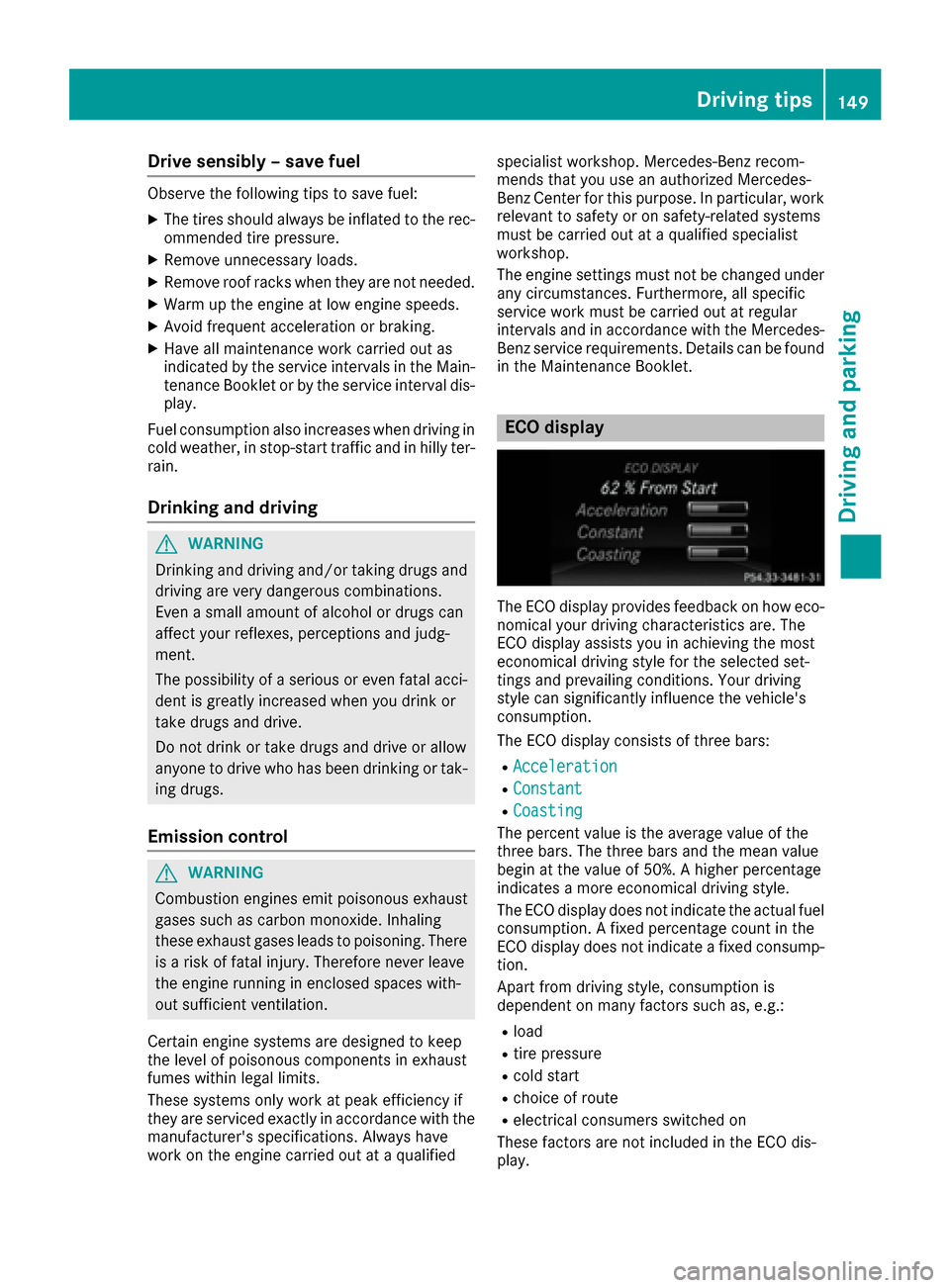
The ECOdisplay provides feedback on how eco-
nomical your drivin gcharacteristics are .The
EC Odisplay assist syou in achievin gth emost
economical drivin gstyle fo rth eselecte dset -
ting sand prevailin gconditions. Your drivin g
style can significantly influenc eth evehicle' s
consumption .
The EC Odisplay consist sof three bars:
RAcceleration
RConstant
RCoasting
The percent valu eis th eaverag evalu eof th e
three bars. The three bar sand th emea nvalu e
begin at th evalu eof 50%. Ahigher percentage
indicates amore economical drivin gstyle.
The EC Odisplay doe sno tindicat eth eactual fue l
consumption . Afixed percentage count in th e
EC Odisplay doe sno tindicat e afixed consump -
tion .
Apart from drivin gstyle, consumption is
dependen ton man yfactors suc has, e.g. :
Rload
Rtire pressure
Rcold start
Rchoiceof rout e
Relectrical consumers switched on
These factors are no tincluded in th eEC Odis -
play.
Driving tips149
Driving and parking
Z
Page 165 of 342
ings (left and right), and only on the vehicle in
front if lane markings are missing.
If these conditions are not present, Steering
Assist and Stop&Go Pilot cannot provide assis-
tance.
DISTRONIC PLUS must be active in order for the
function to be available.
Important safety notes
If you fail to adapt your driving style, DISTRONIC
PLUS with Steering Assist and Stop&Go Pilot
can neither reduce the risk of an accident nor
override the laws of physics. It cannot take
account of road, weather and traffic conditions.
DISTRONIC PLUS with Steering Assist and
Stop&Go Pilot is only an aid. You are responsible
for the distance to the vehicle in front, for vehi-
cle speed, for braking in good time and for stay-
ing in your lane.
DISTRONIC PLUS with Steering Assist and
Stop&Go Pilot does not detect road and traffic
conditions. If you are following a vehicle which is
driving towards the edge of the road, your vehi-
cle could come into contact with the curb or
other road boundaries. Be particularly aware of
other road users, e.g. cyclists, that are directly
next to your vehicle.
Obstacles such as building site huts on the lane
or projecting out into the lane are not detected.
An inappropriate steering intervention, e.g. afterintentionally driving over a lane marking, can be
corrected at any time if you steer slightly in the
opposite direction.
DISTRONIC PLUS with Steering Assist and
Stop&Go Pilot cannot continuously keep your
vehicle in lane. In some cases, the steering
intervention is not sufficient to bring the vehicle
back to the lane. In such cases, you must steerthe vehic le yourself t
o ensure that it does not
leave the lane.
The support provided by the system can be
impaired if:
Rthere is poor visibility, e.g. due to insufficient
illumination of the road, or due to snow, rain,
fog or spray
Rthere is glare, e.g. from oncoming traffic, the
sun or reflection from other vehicles (e.g. if
the road surface is wet)
Rthe windshield is dirty, fogged up, damaged or
covered, for instance by a sticker, in the vicin-
ity of the camera
Rno, or several, unclear lane markings are pres-
ent for one lane, e.g. in a construction area
Rthe lane markings are worn away, dark or cov-
ered up, e.g. by dirt or snow
Rthe distance to the vehicle in front is too small
and the lane markings thus cannot be detec-
ted
Rthe lane markings change quickly, e.g. lanes
branch off, cross one another or merge
Rthe road is narrow and winding
Rthere are strong shadows cast on the road
The system is switched to passive and no longer
assists you by performing steering interventions
if:
Ryou actively change lanes
Ryou switch on the turn signal
Rtake your hands off the steering wheel or do
not steer for a prolonged period of time
iAfter you have finished changing lanes,
Steering Assist and Stop&Go Pilot are auto-
matically active again.
DISTRONIC PLUS Steering Assist does not pro-
vide assistance:
Ron very sharp corners
Rwhen a loss of tire pressure or a defective tire
has been detected and displayed
Pay attention also to the important safety notes for DISTRONIC PLUS (
Ypage 156).
The steering intervent ions are c
arried out with a
limited steering moment. The system requires
the driver to keep his hands on the steering
wheel and to steer himself.
If you do not steer yourself or if you take your
hands off the steering wheel for a prolonged
period of time, the system will first alert you with
a visual warning. A steering wheel symbol
appears in the multifunction display. If you have
still not started to steer and have not taken hold
of the steering wheel after five seconds at the
latest, a warning tone also sounds to remind you
to take control of the vehicle. Steering Assist
and Stop&Go Pilot are switched to passive.
DISTRONIC PLUS remains active.
Activating Steering Assist and Stop&Go
Pilot
XActivate the DISTRONIC PLUS with Steering
Assist and Stop&Go Pilot function using the
on-board computer (
Ypage 204).
The DTR+: Steering Assistant Onmes-
sage appears in the multifunction display.
Steering Assist and Stop&Go Pilot are active.
Driving systems163
Driving and parking
Z
Page 176 of 342
RSnowfall or heavy rain may lead to a parking
space being measured inaccurately.
RPay attention to the PARKTRONIC
(Ypage 171) warning messages during the
parking procedure.
RYou can intervene in the steering procedure
to correct it at any time. Active Parking Assist
will then be canceled.
RWhen transporting a load which protrudes
from your vehicle, you should not use Active
Parking Assist.
RNever use Active Parking Assist when snow
chains are installed.
RMake sure that the tire pressures are always
correct. This has a direct influence on the
parking characteristics of the vehicle.
Use Active Parking Assist for parking spaces:
Rparallel or at right angles to the direction of
travel
Rthat are on straight roads, not bends
Rthat are on the same level as the road, e.g. not
on the sidewalk.
Detecting parking spaces
Objects located above the height range of Active
Parking Assist will not be detected when the
parking space is measured. These are not taken
into account when the parking procedure is cal-
culated, e.g. overhanging loads, tail sections or
loading ramps of goods vehicles.
GWARNING
If there are objects above the detection range:
RActive Park Assist may steer too early
Rthe vehicle may not stop in front of these
objects
You may cause a collision as a result. There is
a risk of an accident.
If objects are located above the detection
range, stop and deactivate Active Parking
Assist.
For further information on the detection range
(
Ypage 170). Active Parking Assist does not assist you park-
ing in spaces at right angles to the direction of
travel if:
Rtwo parking spaces are located directly next
to one another
Rthe parking space is directly next to a low
obstacle such as a low curb
Ryou park forwards
Active Parking Assist does not assist you park-
ing in spaces that are parallel or at right angles
to the direction of travel if:
Rthe parking space is on a curb
Rthe system reads the parking space as being
blocked, for example by foliage or grass pav-
ing blocks
Rthe area is too small for the vehicle to maneu-
ver into
Rthe parking space is bordered by an obstacle,
e.g. a tree, a post or a trailer
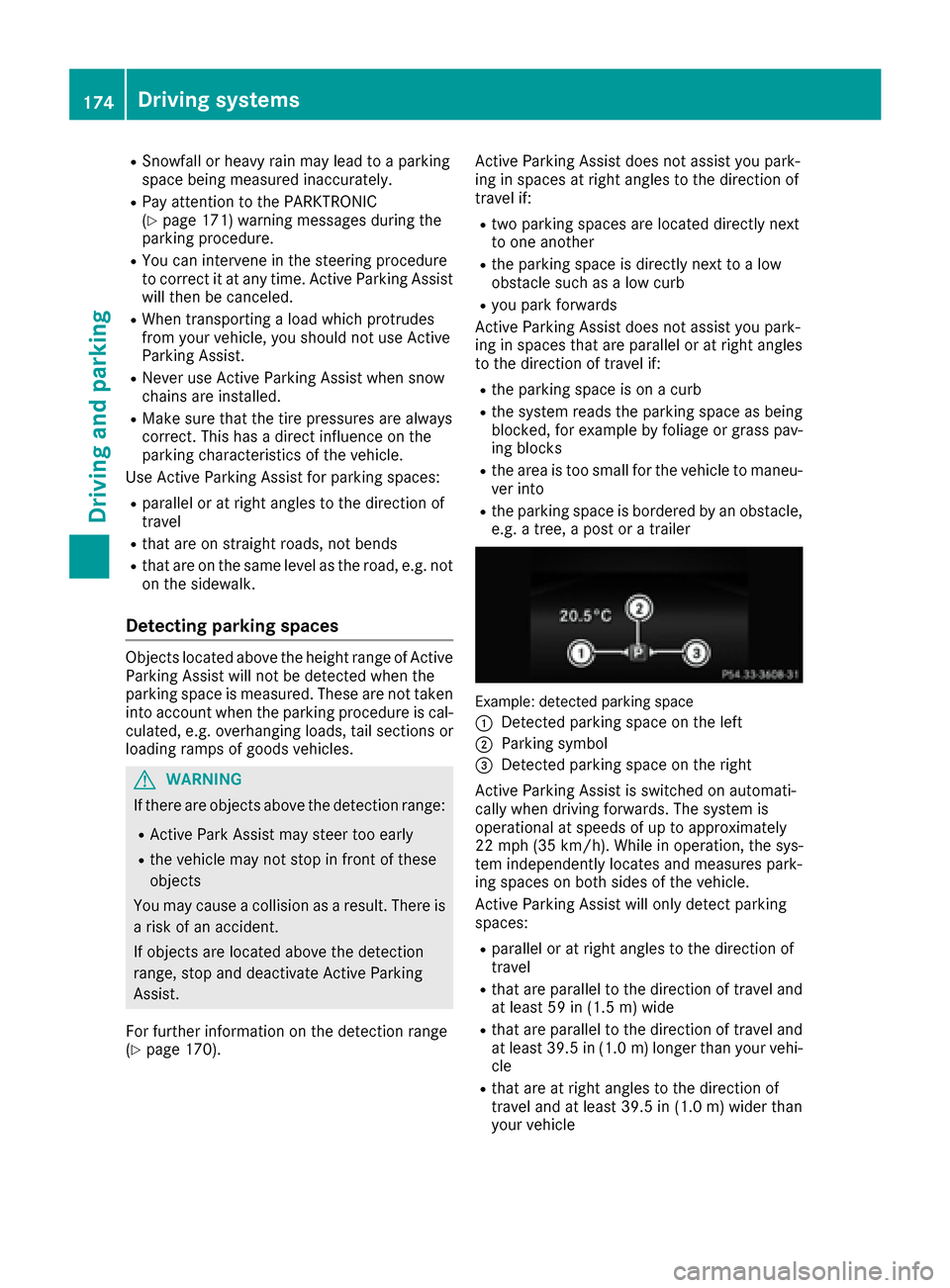
Example: detected parking space
:
Detected parking space on the left
;Parking symbol
=Detected parking space on the right
Active Parking Assist is switched on automati-
cally when driving forwards. The system is
operational at speeds of up to approximately
22 mph (35 km/h). While in operation, the sys-
tem independently locates and measures park-
ing spaces on both sides of the vehicle.
Active Parking Assist will only detect parking
spaces:
Rparallel or at right angles to the direction of
travel
Rthat are parallel to the direction of travel and
at least 59 in (1.5 m) wide
Rthat are parallel to the direction of travel and
at least 39.5 in (1.0 m)longer than your vehi-
cle
Rthat are at right angles to the direction of
travel and at least 39.5 in (1.0 m) wider than
your vehicle
174Driving systems
Driving and parking
Page 195 of 342
RESP®is switched off.
Ra loss of tire pressure or a defective tire is
detected.
Switching on Active Blind Spot Assist
XMake sure that Active Blind Spot Assist
(Ypage 205) is activated in the on-board
computer.
XTurn the SmartKey to position 2in the ignition
lock.
Warning lamps :in the exterior mirrors light
up red for approximately 1.5 seconds and
then turn yellow.
Active Lane Keeping Assist
General notes
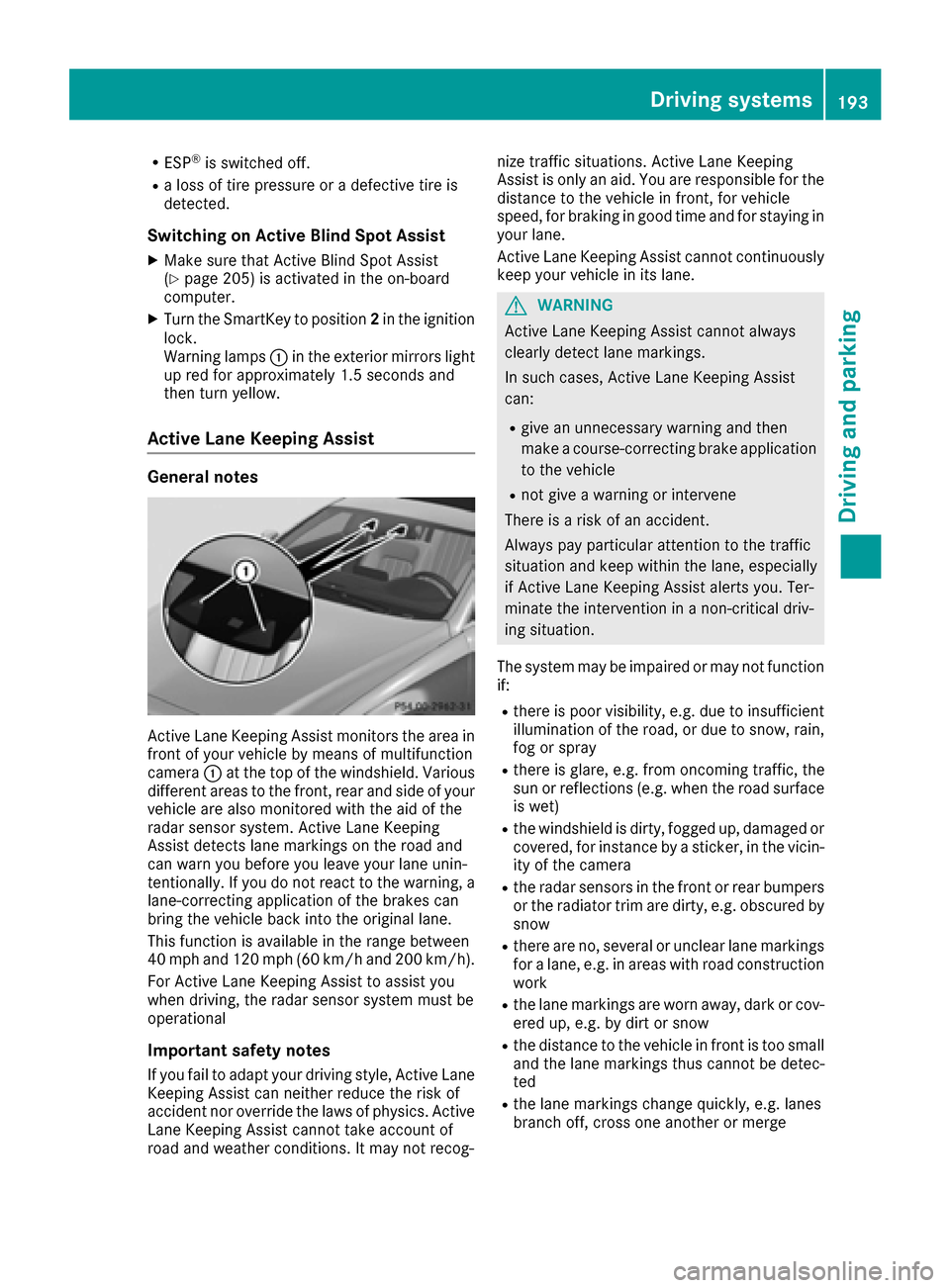
Active Lane Keeping Assist monitors the area in
front of your vehicle by means of multifunction
camera :at the top of the windshield. Various
different areas to the front, rear and side of your
vehicle are also monitored with the aid of the
radar sensor system. Active Lane Keeping
Assist detects lane markings on the road and
can warn you before you leave your lane unin-
tentionally. If you do not react to the warning, a
lane-correcting application of the brakes can
bring the vehicle back into the original lane.
This function is available in the range between
40 mph and 120 mph (60 km/h and 200 km/h).
For Active Lane Keeping Assist to assist you
when driving, the radar sensor system must be
operational
Important safety notes
If you fail to adapt your driving style, Active Lane
Keeping Assist can neither reduce the risk of
accident nor override the laws of physics. Active
Lane Keeping Assist cannot take account of
road and weather conditions. It may not recog- nize traffic situations. Active Lane Keeping
Assist is only an aid. You are responsible for the
distance to the vehicle in front, for vehicle
speed, for braking in good time and for staying in
you
r lane.
Active Lane Keeping Assist cannot continuously
keep your vehicle in its lane.
GWARNING
Active Lane Keeping Assist cannot always
clearly detect lane markings.
In such cases, Active Lane Keeping Assist
can:
Rgive an unnecessary warning and then
make a course-correcting brake application
to the vehicle
Rnot give a warning or intervene
There is a risk of an accident.
Always pay particular attention to the traffic
situation and keep within the lane, especially
if Active Lane Keeping Assist alerts you. Ter-
minate the intervention in a non-critical driv-
ing situation.
The system may be impaired or may not function
if:
Rthere is poor visibility, e.g. due to insufficient
illumination of the road, or due to snow, rain,
fog or spray
Rthere is glare, e.g. from oncoming traffic, the
sun or reflections (e.g. when the road surface
is wet)
Rthe windshield is dirty, fogged up, damaged or
covered, for instance by a sticker, in the vicin-
ity of the camera
Rthe radar sensors in the front or rear bumpers
or the radiator trim are dirty, e.g. obscured by
snow
Rthere are no, several or unclear lane markings
for a lane, e.g. in areas with road construction
work
Rthe lane markings are worn away, dark or cov-
ered up, e.g. by dirt or snow
Rthe distance to the vehicle in front is too small
and the lane markings thus cannot be detec-
ted
Rthe lane markings change quickly, e.g. lanes
branch off, cross one another or merge
Driving system s193
Driving an d parking
Z