light MERCEDES-BENZ CLS-Class 2017 W218 Manual Online
[x] Cancel search | Manufacturer: MERCEDES-BENZ, Model Year: 2017, Model line: CLS-Class, Model: MERCEDES-BENZ CLS-Class 2017 W218Pages: 334, PDF Size: 8.22 MB
Page 163 of 334
XPress button:.
Indicator lamp =lights up. Comfort tuning is
selected.
The AIRMATIC COMFORT
message appears in
the multifunction display.
AMG adaptive sport suspension sys-
tem
Important safety notes
GWARNING
When the vehicle is being lowered, people
could become trapped if their limbs are
between the vehicle body and the wheels or
underneath the vehicle. There is a risk of
injury.
Make sure no one is underneath the vehicle or
in the immediate vicinity of the wheel arches
when the vehicle is being lowered.
GWARNING
Vehicles with level control:
The vehicle is slightly lowered if:
Ryou have selected comfort suspension tun-
ing and
Ryou lock the vehicle within approximately
60 seconds of switching off the engine
You and people in the vicinity of the wheel
arch or the underbody may thus become trap-
ped. There is a risk of injury.
Make sure that nobody is in the vicinity of the
wheel arch or the underbody when you lock
the vehicle.
!The vehicle is lowered by about 0.8 in
(20 mm) if:
Ryou have selected "Comfortable tuning"
Ryou switch off the engine and then
Ryou lock the vehicle within approximately
60 seconds
When parking, position your vehicle so that it does not make contact with the curb as the
vehicle is lowered. Your vehicle could other-
wise be damaged.
Suspension tuning
General notes
The electronically controlled damping system
works continuously. This improves driving
safety and ride comfort.
The damping is tuned individually to each wheel
and depends on:
Ryour driving style, e.g. sporty
Rthe road surface condition, e.g. bumps
Ryour individual selection of Sport, Sport + or
Comfort
Sport mode
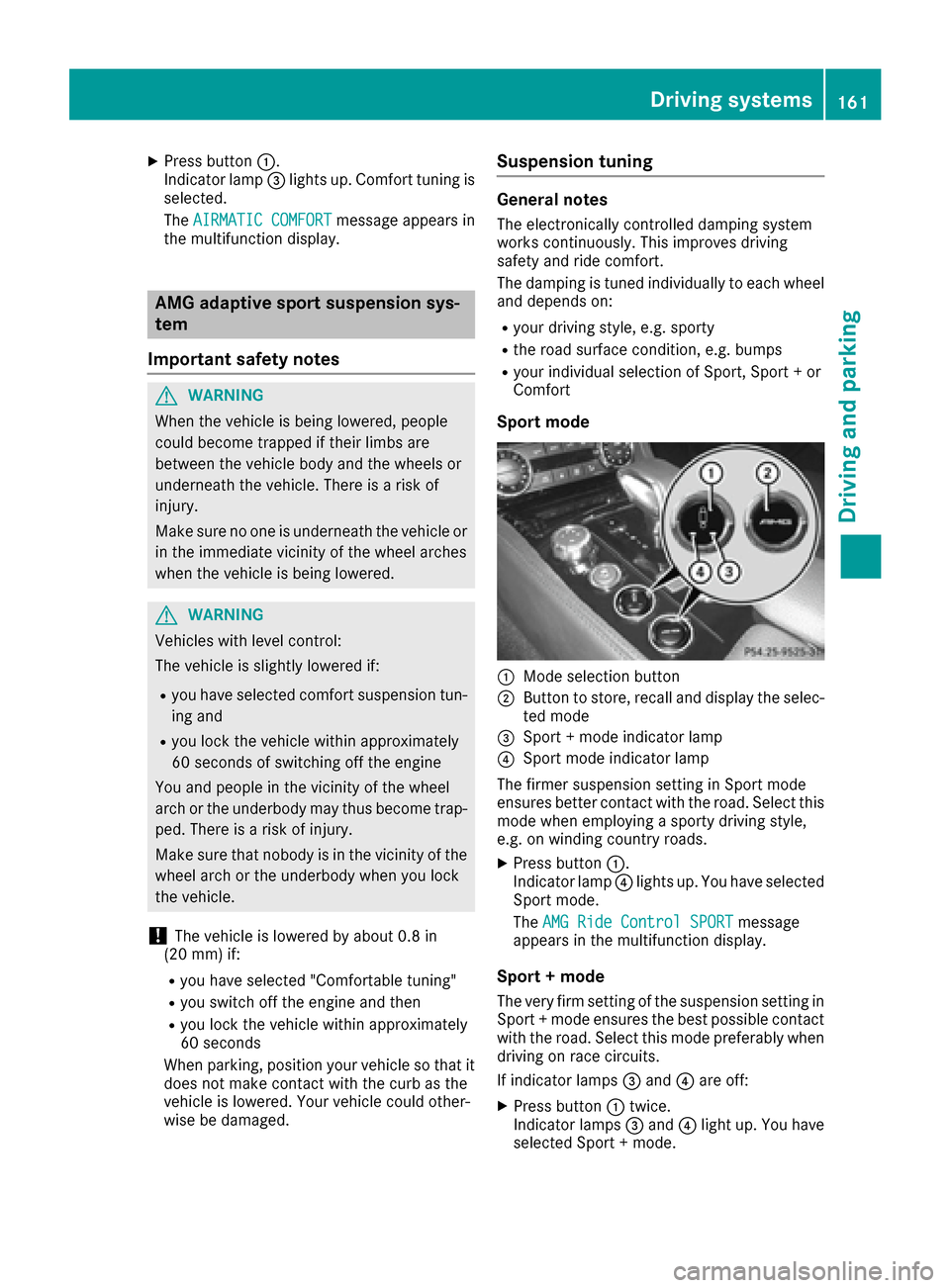
:Mode selection button
;Button to store, recall and display the selec-
ted mode
=Sport + mode indicator lamp
?Sport mode indicator lamp
The firmer suspension setting in Sport mode
ensures better contact with the road. Select this
mode when employing a sporty driving style,
e.g. on winding country roads.
XPress button :.
Indicator lamp ?lights up. You have selected
Sport mode.
The AMG Ride Control SPORT
message
appears in the multifunction display.
Sport + mode
The very firm setting of the suspension setting in
Sport + mode ensures the best possible contact
with the road. Select this mode preferably when
driving on race circuits.
If indicator lamps =and ?are off:
XPress button :twice.
Indicator lamps =and ?light up. You have
selected Sport + mode.
Driving systems161
Driving and parking
Z
Page 164 of 334
TheAMG Ride Control SPORT +message
appears in the multifunction display.
If indicator lamp ?lights up:
XPress button :once.
Second indicator lamp =lights up. You have
selected Sport + mode.
The AMG
SuspensionSystemSPORT +mes-
sage appears in the multifunction display.
Comfort mode
When comfort mode is selected, the driving
characteristics of your vehicle are more com-
fortable. Select this mode if you favor a comfort-
oriented driving style. Select comfort mode also
when driving fast on straight roads, e.g. on
straight stretches of highway.
XPress button :repeatedly until indicator
lamps =and ?go out.
You have selected Comfort mode.
The AMG
SuspensionSystemCOMFORTmes-
sage appears in the multifunction display.
Storing and calling up settings
Once the suspension setting and drive program
have been selected, you can store and call up
your settings using AMG button ;.
XTo store:press and hold AMG button ;until
you hear a tone.
XTo call up: press AMG button ;.
The stored suspension setting and drive pro-
gram are selected.
XTo display: briefly press AMG button ;.
Your selection appears in the multifunction
display.
Vehicle level
Important safety notes
GWARNING
When the vehicle is being lowered, people
could become trapped if their limbs are
between the vehicle body and the wheels or
underneath the vehicle. There is a risk of
injury.
Make sure no one is underneath the vehicle or
in the immediate vicinity of the wheel arches
when the vehicle is being lowered. The vehicle may be lowered if you press the sus-
pension setting selector button or the AMG but-
ton. The vehicle also lowers if it is stationary.
!If Sport or Sport + suspension tuning has
been selected, the vehicle's ground clearance
decreases. Make sure that no objects
become trapped or that the vehicle does not
become damaged, for example, on the curb.
iThe vehicle level may change visibly at the
rear axle if you park the vehicle and the out-
side temperature changes. If the temperature
drops, the vehicle level lowers; with an
increase in temperature, the vehicle level
rises.
Changing the rear axle ride height
This function is only available on the Mercedes-
AMG CLS 63 4MATIC.
The vehicle level at the rear axle depends on the
selected suspension mode and the vehicle
speed.
The vehicle level at the rear axle changes while
driving depending on which suspension mode is
selected:
RComfort: +0.4 in (+10 mm)
RSport + and Sport: -0.6 in (-15 mm)
When changing from Comfort to Sport or Sport
+, the rear axle is lowered by approximately
1.0 in (25 mm). When changing from Sport or
Sport + to Comfort, the rear axle is raised by
approximately 1.0 in (25 mm). This level change
also takes place when the vehicle is stationary.
If you drive faster than 105 mph (170 km/h) , the
rear axle level is set to a middle level. This
increases driving safety and reduces air resist-
ance. If you then drive slower than 93 mph
(150 km/h), the level of the rear axle is again
adjusted to correspond to the selected suspen-
sion mode.
Load compensation
The vehicle can compensate differences in the
vehicle level by raising or lowering the rear axle.
This is the case, for example, if people get out or
if luggage is being loaded.
Load c
ompensation takes place if:
Ra door or the trunk lid is opened
Rthe parked vehicle is unlocked
For larger level changes, the engine must be
running.
162Driving systems
Driving and parking
Page 166 of 334
Range
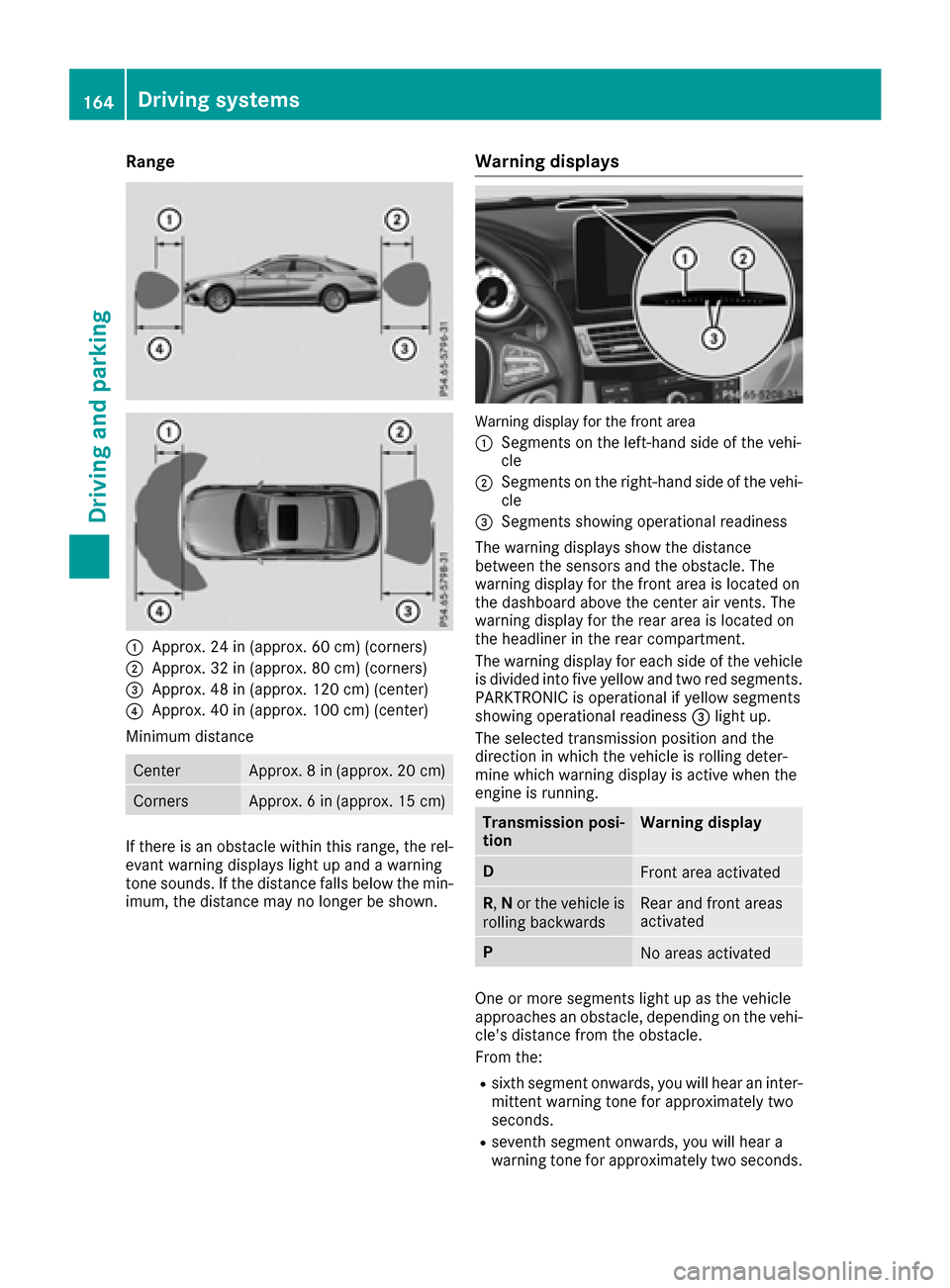
:Approx. 24 in (approx. 60 cm) (corners)
;Approx. 32 in (approx. 80 cm) (corners)
=Approx. 48 in (approx. 120 cm) (center)
?Approx. 40 in (approx. 100 cm) (center)
Minimum distance
CenterApprox. 8 in (approx. 20 cm)
CornersApprox. 6 in (approx. 15 cm)
If there is an obstacle within this range, the rel-
evant warning displays light up and a warning
tone sounds. If the distance falls below the min-
imum, the distance may no longer be shown.
Warning displays
Warning display for the front area
:
Segments on the left-hand side of the vehi-
cle
;Segments on the right-hand side of the vehi- cle
=Segments showing operational readiness
The warning displays show the distance
between the sensors and the obstacle. The
warning display for the front area is located on
the dashboard above the center air vents. The
warning display for the rear area is located on
the headliner in the rear compartment.
The warning display for each side of the vehicle
is divided into five yellow and two red segments.
PARKTRONIC is operational if yellow segments
showing operational readiness =light up.
The selected transmission position and the
direction in which the vehicle is rolling deter-
mine which warning display is active when the
engine is running.
Transmission posi-
tionWarning display
DFront area activated
R, Nor the vehicle is
rolling backwardsRear and front areas
activated
PNo areas activated
One or more segments light up as the vehicle
approaches an obstacle, depending on the vehi-
cle's distance from the obstacle.
From the:
Rsixth segment onwards, you will hear an inter-
mittent warning tone for approximately two
seconds.
Rseventh segment onwards, you will hear a
warning tone for approximately two seconds.
164Driving systems
Driving and parking
Page 167 of 334
This indicates that you have now reached the
minimum distance.
Deactivating/activating PARKTRONIC
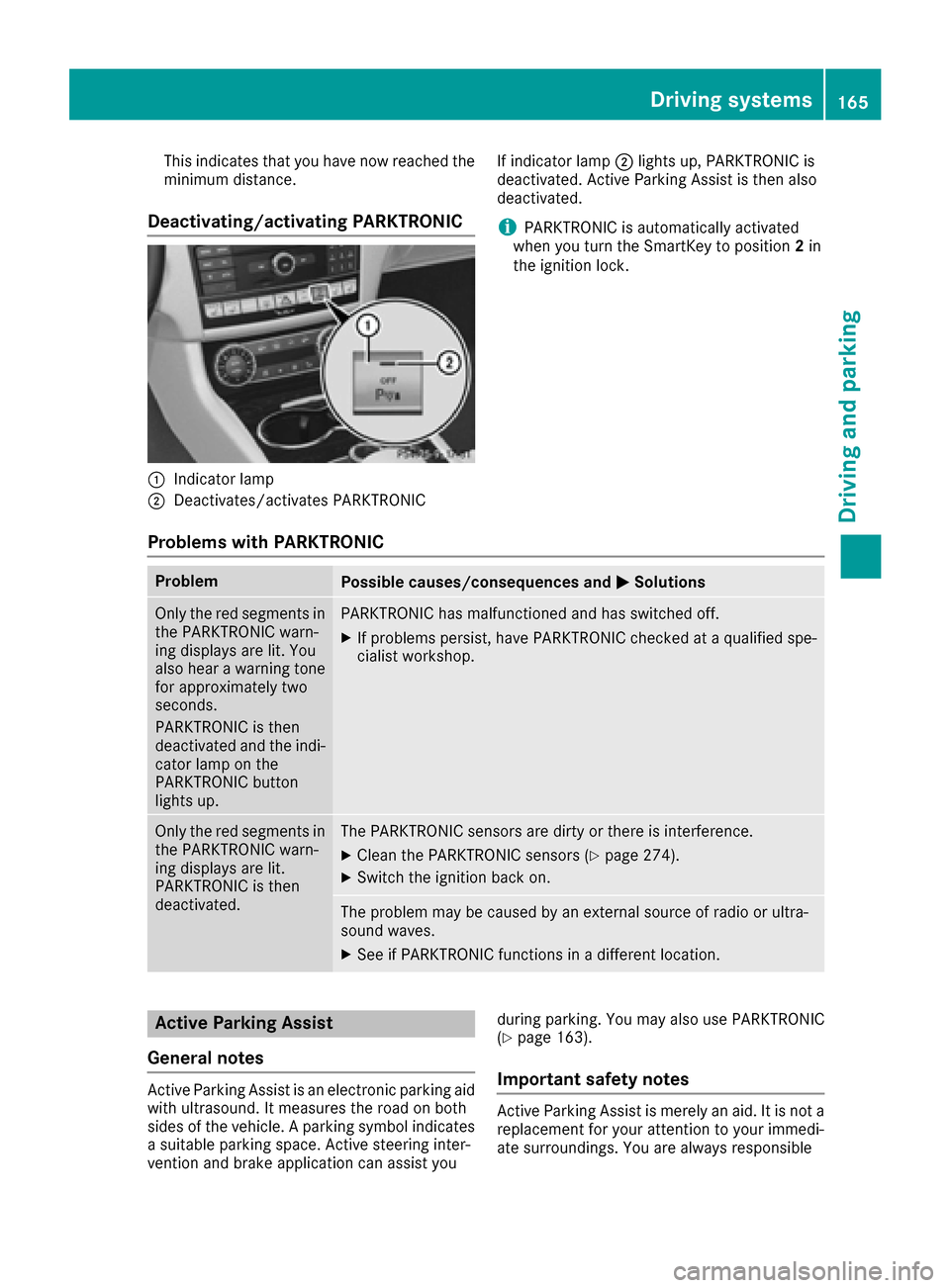
:Indicator lamp
;Deactivates/activates PARKTRONICIf indicator lamp
;lights up, PARKTRONIC is
deactivated. Active Parking Assist is then also
deactivated.
iPARKTRONIC is automatically activated
when you turn the SmartKey to position 2in
the ignition lock.
Problems with PARKTRONIC
ProblemPossible causes/consequences and MSolutions
Only the red segments in
the PARKTRONIC warn-
ing displays are lit. You
also hear a warning tone
for approximately two
seconds.
PARKTRONIC is then
deactivated and the indi-
cator lamp on the
PARKTRONIC button
lights up.PARKTRONIC has malfunctioned and has switched off.
XIf problems persist, have PARKTRONIC checked at a qualified spe-
cialist workshop.
Only the red segments in
the PARKTRONIC warn-
ing displays are lit.
PARKTRONIC is then
deactivated.The PARKTRONIC sensors are dirty or there is interference.
XClean the PARKTRONIC sensors (Ypage 274).
XSwitch the ignition back on.
The problem may be caused by an external source of radio or ultra-
sound waves.
XSee if PARKTRONIC functions in a different location.
Active Parking Assist
General notes
Active Parking Assist is an electronic parking aid
with ultrasound. It measures the road on both
sides of the vehicle. A parking symbol indicates a suitable parking space. Active steering inter-
vention and brake application can assist you during parking. You may also use PARKTRONIC
(
Ypage 163).
Important safety notes
Active Parking Assist is merely an aid. It is not a
replacement for your attention to your immedi-
ate surroundings. You are always responsible
Driving systems165
Driving and parking
Z
Page 171 of 334
XTo exit a parking space using Active Park-
ing Assist:press theabutton on the mul-
tifunction steering wheel.
The Park Assist Active Accelerate
and Brake Observe Surroundingsmes-
sage appears in the multifunction display.
XLet go of the multifunction steering wheel.
XPull away, being ready to brake at all times. Do
not exceed a maximum speed of approx-
imately 6 mph (10 km/h) when exiting a park-
ing space. Otherwise Active Parking Assist
will be canceled.
XShift the transmission to position Dor Ras
required or according to the message when
the vehicle is stationary.
Active Parking Assist immediately steers in
the other direction. The Park Assist
ActiveAccelerateandBrakeObserveSurroundingsmessage appears in the mul-
tifunction display.
iYou will achieve the best results by waiting
for the steering procedure to complete before
pulling away.
If you back up after activation, the steering
wheel is moved to the straight-ahead posi-
tion.
XDrive forwards and back up as prompted by
the PARKTRONIC warning displays, several
times if necessary.
Once you have exited the parking space com-
pletely, the steering wheel is moved to the
straight-ahead position. You hear a tone and the
Park Assist Finished
message appears in
the multifunction display. You will then have to
steer and merge into traffic on your own.
PARKTRONIC is still available. You can take over
the steering before the vehicle has exited the
parking space completely. This is useful if you
recognize that it is already possible to pull out of the parking space.
Canceling Active Parking Assist
You can cancel Active Parking Assist at any
time.
XStop the movement of the multifunction
steering wheel or steer yourself.
Active Parking Assist will be canceled at once.
The Park Assist Canceled
message appears in the multifunction display and a
warning tone sounds.
or
XPress the PARKTRONIC button in the center
console (Ypage 165).
PARKTRONIC is switched off and Active Park-
ing Assist is immediately canceled. The Park
Assist Canceledmessage appears in the
multifunction display and a warning tone
sounds.
Active Parking Assist is canceled automatically
if:
Rthe transmission is shifted too early
Rtransmission position Pis selected
Rparking using Active Parking Assist is no lon-
ger possible
Ryou are driving faster than 6 mph (10 km/h)
Ra wheel spins, ESP®intervenes or fails. In
such cases the ÷warning lamp lights up in
the instrument cluster.
A warning tone sounds. The parking symbol dis-
appears and the multifunction display shows the
Park Assist Canceled
message.
When Active Parking Assist is canceled, you
must steer and brake again yourself.
If a system malfunction occurs, the vehicle is
braked to a standstill. To drive on, depress the
accelerator again.
Rear view camera
General notes
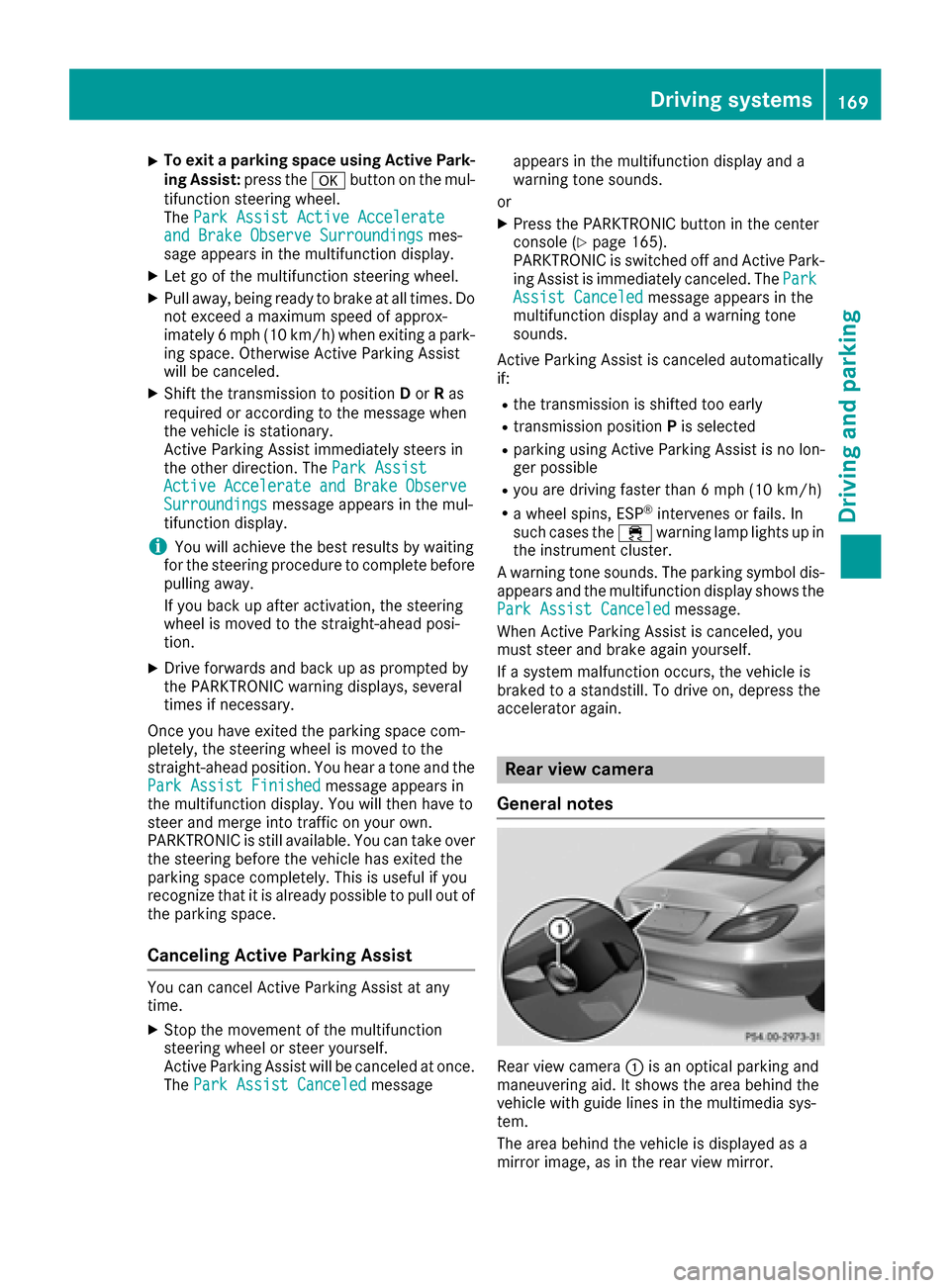
Rear view camera :is an optical parking and
maneuvering aid. It shows the area behind the
vehicle with guide lines in the multimedia sys-
tem.
The area behind the vehicle is displayed as a
mirror image, as in the rear view mirror.
Driving systems169
Driving an d parking
Z
Page 172 of 334
iThe text shown in the multimedia system
depends on the language setting. The follow-
ing are examples of rear view camera displays
in the multimedia system.
Important safety notes
The rear view camera is only an aid. It is not a
replacement for your attention to your immedi-
ate surroundings. You are always responsible
for safe maneuvering and parking. When maneu-
vering or parking, make sure that there are no
persons, animals or objects in the area in which you are maneuvering.
Under the following circumstances, the rear
view camera will not function, or will function in
a limited manner:
Rif the trunk lid is open
Rin heavy rain, snow or fog
Rat night or in very dark places
Rif the camera is exposed to very bright light
Rif the area is lit by fluorescent bulbs or LED
lighting (the display may flicker)
Rif there is a sudden change in temperature,
e.g. when driving into a heated garage in win- ter
Rif the camera lens is dirty or obstructed
Observe the notes on cleaning
(
Ypage 274)
Rif the rear of your vehicle is damaged. In this
event, have the camera position and setting
checked at a qualified specialist workshop
The field of vision and other functions of the rear
view camera may be restricted due to additional
accessories on the rear of the vehicle (e.g.
license plate holder, bicycle rack).
On vehicles with height-adjustable chassis,
leaving the standard height can result in inac-
curacies in the guide lines, depending on tech-
nical conditions.
iThe rear view camera is protected from rain-
drops and dust by means of a flap. When the
rear view camera is activated, this flap opens.
The flap closes again when:
Ryou have finished the maneuvering process
Ryou switch off the engine
Ryou open the trunk
Observe the notes on cleaning (
Ypage 274).
For technical reasons, the flap may remain
open briefly after the rear view camera has
been deactivated.
Switching the rear view camera on/off
XTo switch on: make sure that the Activa‐
tion by R gearfunction is selected in the
multimedia system (see Digital Operator's
Manual).
XEngage reverse gear.
The rear view camera flap opens. The multi-
media system shows the area behind the vehi-
cle with guide lines.
The image from the rear view camera is avail-
able throughout the maneuvering process.
XTo switch off: shift the transmission to posi-
tion P.
or
XDrive forwards a short distance.
Displays in the multimedia system
The rear view camera may show a distorted view
of obstacles, show them incorrectly or not at all.
The rear view camera does not show objects in
the following positions:
Rvery close to the rear bumper
Runder the rear bumper
Rin the area immediately above the tailgate
handle
!Objects not at ground level may appear to
be further away than they actually are, e.g.:
Rthe bumper of a parked vehicle
Rthe drawbar of a trailer
Rthe ball coupling of a trailer tow hitch
Rthe rear section of an HGV
Ra slanted post
Use the guidelines only for orientation.
Approach objects no further than the bottom-
most guideline.
170Driving systems
Driving and parking
Page 173 of 334
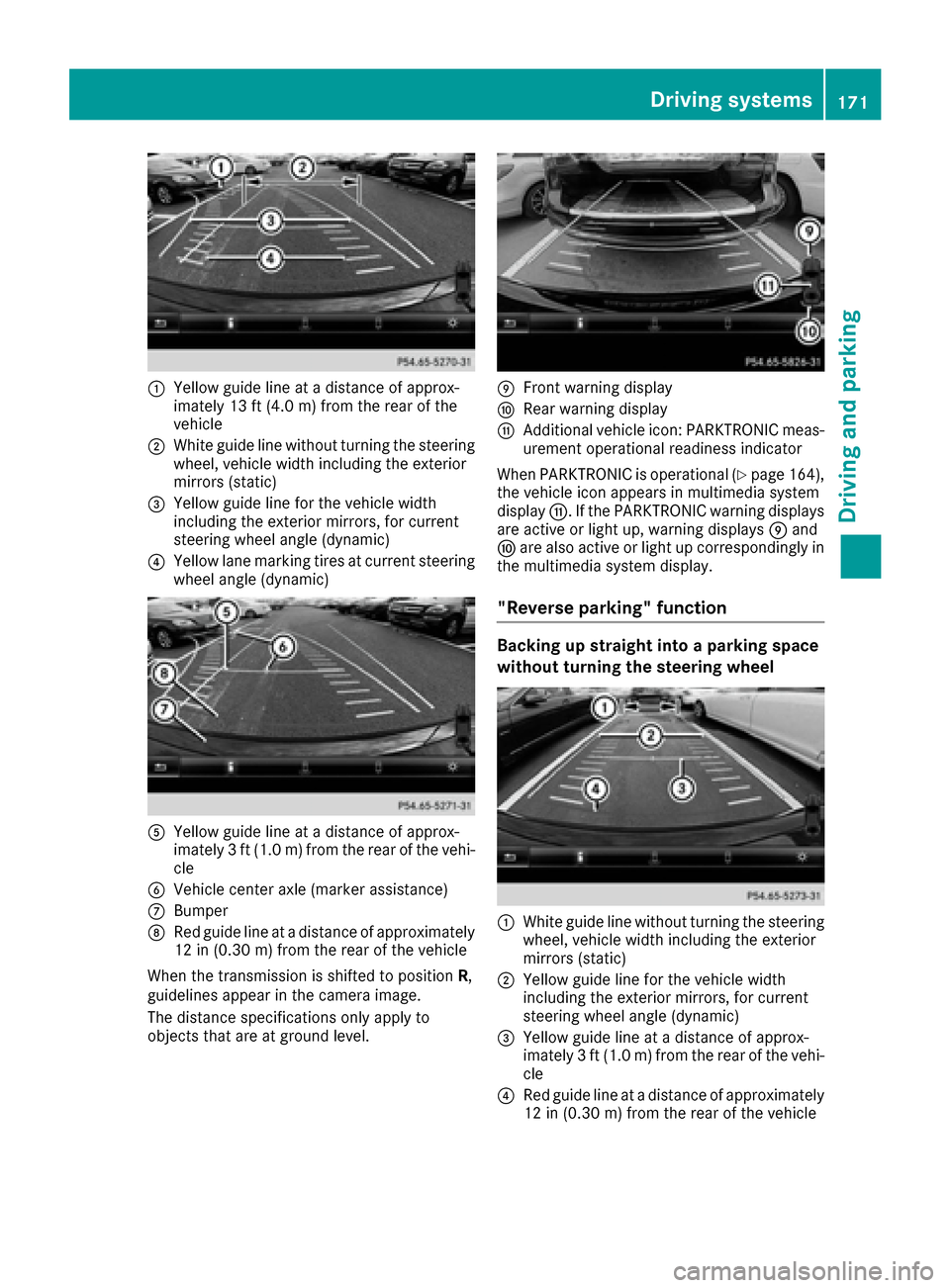
:Yellow guide line at a distance of approx-
imately 13 ft (4.0 m) from the rear of the
vehicle
;White guide line without turning the steering
wheel, vehicle width including the exterior
mirrors (static)
=Yellow guide line for the vehicle width
including the exterior mirrors, for current
steering wheel angle (dynamic)
?Yellow lane marking tires at current steering
wheel angle (dynamic)
AYellow guide line at a distance of approx-
imately 3 ft (1.0 m) from the rear of the vehi-
cle
BVehicle center axle (marker assistance)
CBumper
DRed guide line at a distance of approximately
12 in (0.30 m) from the rear of the vehicle
When the transmission is shifted to position R,
guidelines appear in the camera image.
The distance specifications only apply to
objects that are at ground level.
EFront warning display
FRear warning display
GAdditional vehicle icon: PARKTRONIC meas-
urement operational readiness indicator
When PARKTRONIC is operational (
Ypage 164),
the vehicle icon appears in multimedia system
display G. If the PARKTRONIC warning displays
are active or light up, warning displays Eand
F are also active or light up correspondingly in
the multimedia system display.
"Reverse parking" function
Backing up straight into a parking space
without turning the steering wheel
:White guide line without turning the steering
wheel, vehicle width including the exterior
mirrors (static)
;Yellow guide line for the vehicle width
including the exterior mirrors, for current
steering wheel angle (dynamic)
=Yellow guide line at a distance of approx-
imately 3 ft (1.0 m) from the rear of the vehi-
cle
?Red guide line at a distance of approximately
12 in (0.30 m) from the rear of the vehicle
Driving systems171
Driving and parking
Z
Page 175 of 334
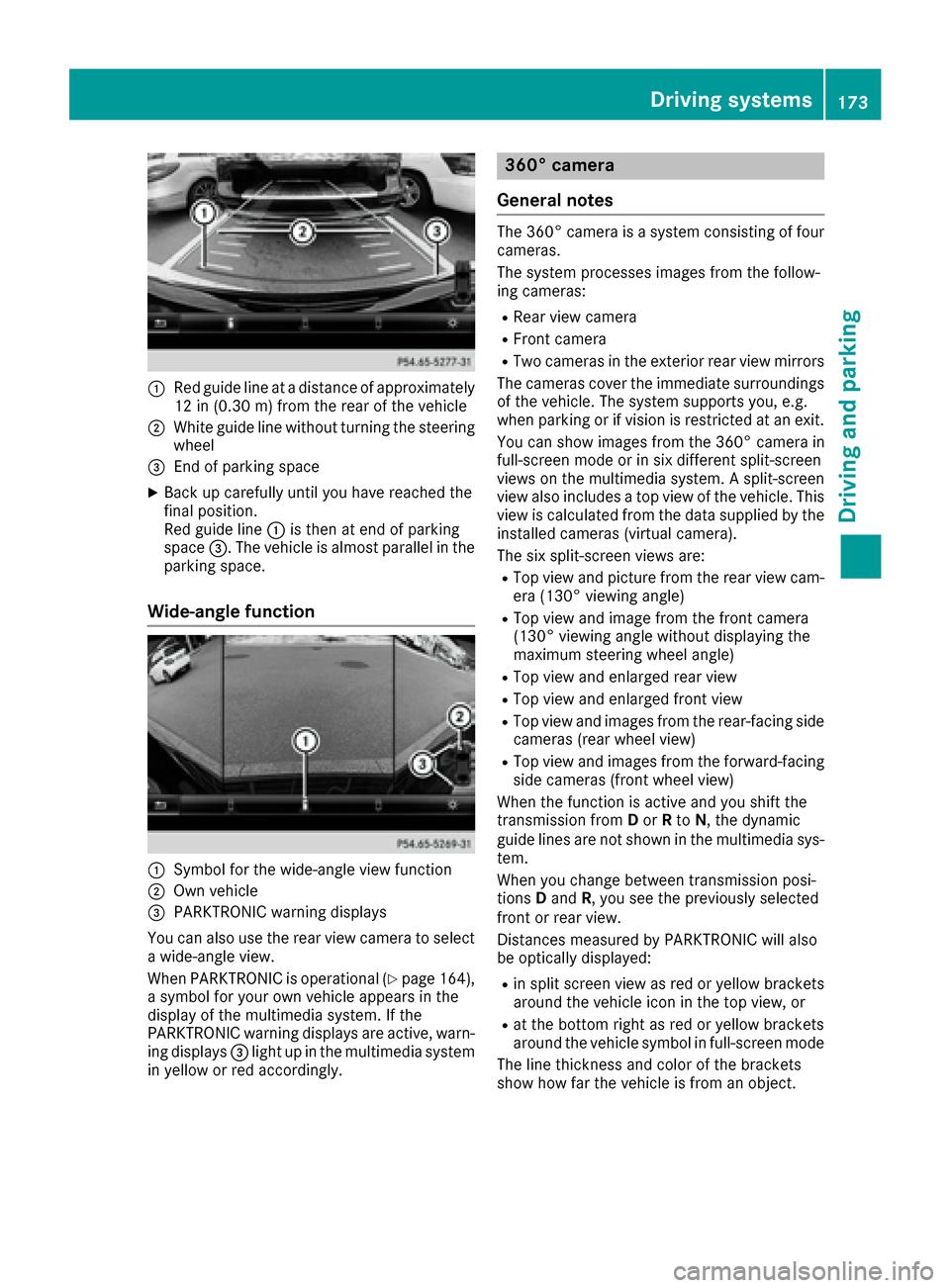
:Red guide lineat adistanc eof approximately
12 in (0.30m) from the rear of the vehicle
;White guide line without turning the steering
wheel
=End of parking space
XBack up carefully until you have reached the
final position.
Red guide line :is then at end of parking
space =. The vehicle is almost parallel in the
parking space.
Wide-angle function
:Symbol for the wide-angle view function
;Own vehicle
=PARKTRONIC warning displays
You can also use the rear view camera to select
a wide-angle view.
When PARKTRONIC is operational (
Ypage 164),
a symbol for your own vehicle appears in the
display of the multimedia system. If the
PARKTRONIC warning displays are active, warn-
ing displays =light up in the multimedia system
in yellow or red accordingly.
360° camera
General notes
The 360° camera is a system consisting of four
cameras.
The system processes images from the follow-
ing cameras:
RRear view camera
RFront camera
RTwo cameras in the exterior rear view mirrors
The cameras cover the immediate surroundings
of the vehicle. The system supports you, e.g.
when parking or if vision is restricted at an exit.
You can show images from the 360° camera in
full-screen mode or in six different split-screen
views on the multimedia system. A split-screen
view also includes a top view of the vehicle. This
view is calculated from the data supplied by the installed cameras (virtual camera).
The six split-screen views are:
RTop view and picture from the rear view cam-
era (130° viewing angle)
RTop view and image from the front camera
(130° viewing angle without displaying the
maximum steering wheel angle)
RTop view and enlarged rear view
RTop view and enlarged front view
RTop view and images from the rear-facing sidecameras (rear wheel view)
RTop view and images from the forward-facing
side cameras (front wheel view)
When the function is active and you shift the
transmissi on from
Do
r Rto N, the dynamic
guide lines are not shown in the multimedia sys-
tem.
When you change between transmission posi-
tions Dand R, you see the previously selected
front or rear view.
Distances measured by PARKTRONIC will also
be optically displayed:
Rin split screen view as red or yellow brackets around the vehicle icon in the top view, or
Rat the bottom right as red or yellow brackets
around the vehicle symbol in full-screen mode
The line thickness and color of the brackets
show how far the vehicle is from an object.
Driving system s173
Driving an d parking
Z
Page 176 of 334
Ryellowbrackets wit hthin lines: PARKTRONI C
is active
Ryello wbrackets wit hnormal lines: an objec tis
presen tin close range of th evehicl e
Rred line: an objec tis presen tin th eimmediat e
close range of th evehicl e
Impor tant safety notes
The 360°camera is only an aid and may sho w a
distorted vie wof obstacles, sho wthem incor-
rectl yor no tat all. The 360°camera is no t a
substitut efor attentive driving.
You are always responsibl efor saf emaneuver-
in gand parking. Whe nmaneuverin gor parking,
mak esur ethat there are no persons, animals or
objects in th earea in whic hyou are maneuver-
ing.
You are always responsibl efor safety, and mus t
always pay attention to your surroundings when
parkin gand maneuvering. This applies to th e
area sbehind ,in fron tof and beside th evehicle.
You could otherwise endanger yourself and oth-
ers .
The 360° camera will no tfunction or will func-
tion in alimite dmanner:
Rif th edoors are open
Rif th eexterio rmirror sare folded in
Rif th etrunk lid is open
Rin heav yrain ,snow or fog
Rat night or in ver ydark places
Rif th ecameras are exposed to ver ybright ligh t
Rif thearea is lit by fluorescent bulbs or LE D
lighting (the display may flicker)
Rif there is asudden chang ein temperature,
e.g. when drivin ginto aheated garage in win -
te r
Rif th ecamera lenses are dirty or covered
Rif th evehicl ecomponent sin whic hth ecam -
eras are installed are damaged. In this eve nt,
h
av eth ecamera position and setting checke d
at aqualified specialist workshop
Do no tuse th e360° camera in this case. You
can otherwise injur eother sor caus edamage to
objects or th evehicle.
Guide lines are always shown at roa dlevel.
The field of vision and other function sof th e
camera system may be restricted due to addi-
tional attachments (e.g. license plat eholder,
rear bicycle carrier). On vehicles wit
hheight-adjustable chassis,
dependin gon technical conditions, leavin gth e
standard height can result in :
Rinaccuracies in theguide lines
Rinaccuracies in th edisplay of generated
images (top view)
Activati onconditions
The imag efrom th e360° camera appears if:
Rth emultimedia system is switched on
Rth e360 °Camerafunction is switched on
Switching onthe 360° camera
XPress th eØ buttonin th ecenter console
for longer than tw oseconds.
Dependin gon whether position Dor Ris
engaged, th efollowin gis shown:
Raspli tscree nwit hto pvie wand th eimag e
from th efron tcamera or
Ra spli tscree nwit hto pvie wand th eimag e
from th erear vie wcamera
or
XBriefly press th eØ buttonin th ecenter
console.
The vehicl emen uis displayed.
XSelec t360 °Cameraand press 7to confirm .
Dependin gon whether position Dor Ris
engaged, th efollowin gis shown:
Raspli tscree nwit hto pvie wand th eimag e
from th efron tcamera or
Ra spli tscree nwit hto pvie wand th eimag e
from th erear vie wcamera
Activating the 360°camera using
re verse gear
The 360° camera images can be automatically
displayed by engagin grevers egear .
XMakesur ethat th eActivatio nby Rgea rfunction is selected in th emultimedia system
(see Digital Operator' sManual).
XTo sho wthe360° camera image :engage
revers egear .
The multimedia system shows th earea
behind th evehicl ein split-scree nmode. You
see th eto pvie wof th evehicl eand th eimag e
from th erear vie wcamera.
174Driving systems
Driving and parking
Page 181 of 334

Speed limit with unknown restriction
:Maximum permitted speed
;Maximum permitted speed for vehicles for
which the restriction in the additional sign isrelevant
=Additional sign for unknown restriction
A maximum permitted speed of 100 mph
(100 km/h) and a speed limit of 80 km/h
(80 mph) apply with an unknown restriction.
Lane Tracking package
General notes
The Lane Tracking package consists of Blind
Spot Assist (Ypage 179) and Lane Keeping
Assist (Ypage 181).
Blind Spot Assist
General notes
Blind Spot Assist monitors the areas on either
side of the vehicle that are not visible to the
driver with two lateral, rear-facing radar sen-
sors. A warning lamp lights up in the exterior
mirrors and draws your attention to vehicles
detected in the monitored area. If you then
switch on the corresponding turn signal to
change lane, you will also receive an optical and
audible warning.
Blind Spot Assist supports you from a speed of
approximately 20 mph (30 km/h).
Important safety notes
GWARNING
Blind Spot Assist does not react to:
Rvehicles overtaken too closely on the side,
placing them in the blind spot area
Rvehicles which approach with a large speed
differential and overtake your vehicle
As a result, Blind Spot Assist may not give
warnings in such situations. There is a risk of
an accident.
Always observe the traffic conditions care-
fully, and maintain a safe lateral distance.
Blind Spot Assist is only an aid. It may fail to
detect some vehicles and is no substitute for
attentive driving. Always ensure that there is
sufficient distance to the side for other road
users and obstacles.
iUSA only:
This device has been approved by the FCC as
a "Vehicular Radar System". The radar sensor
is intended for use in an automotive radar
system only. Removing, tampering with, or
altering the device will void any warranties,
and is not permitted by the FCC. Do not tam-
per with, alter, or use in any non-approved
way.
Any unauthorized modification to this device
could void the user’s authority to operate the
equipment.
Radar sensors
The two radar sensors for Blind Spot Assist are
integrated into the sides of the rear bumper.
Make sure that the bumper is free of dirt, ice or
slush in the vicinity of the sensors. The sensors
must not be covered, for example by cycle racks
or overhanging loads. Following a severe impact
or in the event of damage to the bumpers, have
the function of the sensors checked at a quali-
fied specialist workshop. Blind Spot Assist may
otherwise not work properly.
Monitoring area
In particular, the detection of obstacles can be
impaired if:
Rthere is dirt on the sensors or anything else
covering the sensors
Rthere is poor visibility, e.g. due to fog, heavy
rain, snow or spray
Rthere are narrow vehicles, e.g. motorcycles or
bicycles
Rthe road has very wide lanes
Rthe road has narrow lanes
Ryou are not driving in the middle of the lane
Rthere are barriers or similar lane borders
Vehicles in the monitoring range are then not
indicated.
Driving systems179
Driving and parking
Z