interior lights MERCEDES-BENZ CLS-Class 2017 W218 Owner's Manual
[x] Cancel search | Manufacturer: MERCEDES-BENZ, Model Year: 2017, Model line: CLS-Class, Model: MERCEDES-BENZ CLS-Class 2017 W218Pages: 334, PDF Size: 8.22 MB
Page 4 of 334
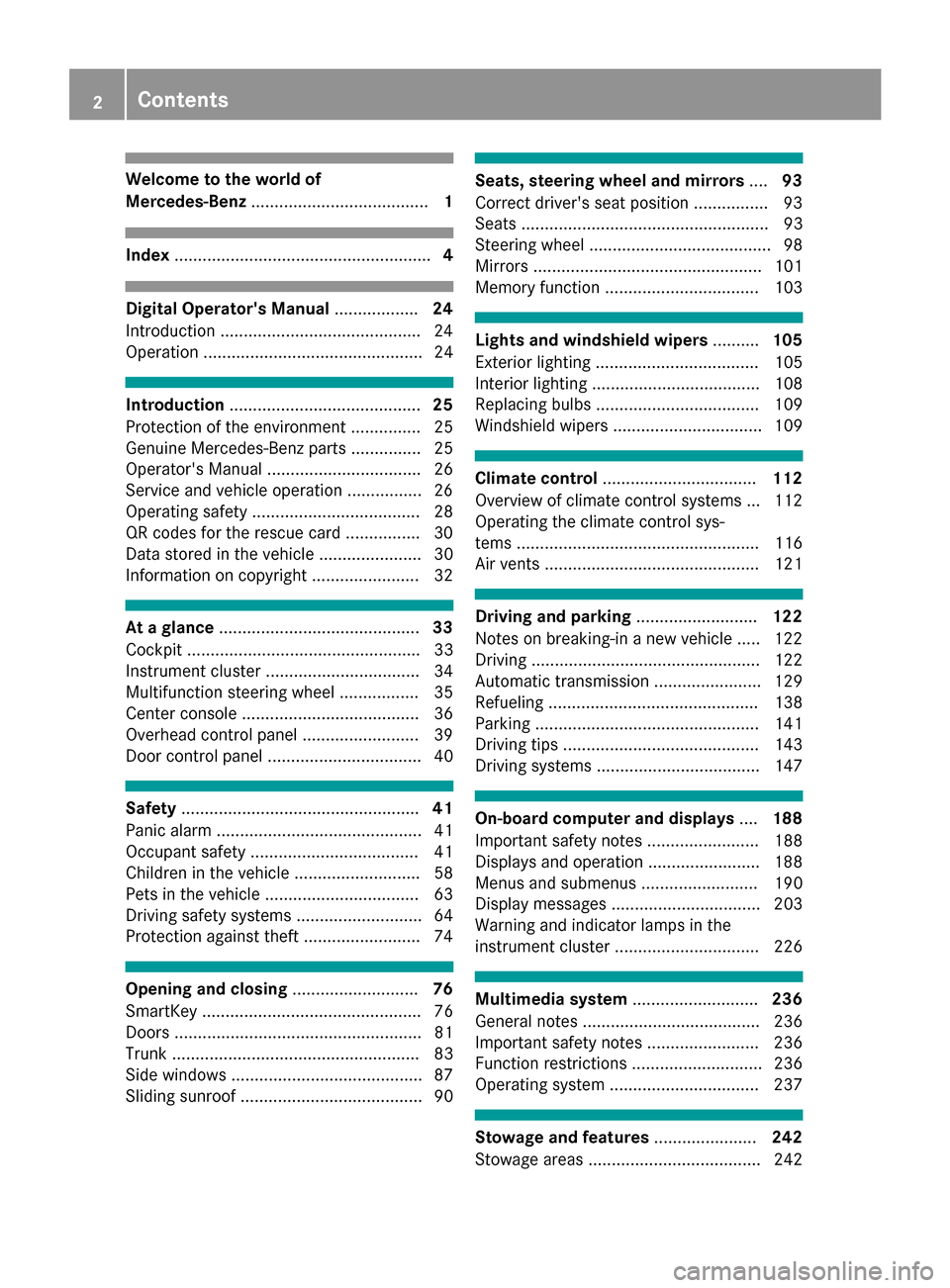
Welcome to the world of
Mercedes-Benz...................................... 1
Index....................................................... 4
Digital Operator's Manual..................24
Introduction ...........................................2 4
Operation ............................................... 24
Introduction ......................................... 25
Protection of the environment ............... 25
Genuine Mercedes-Benz parts ............... 25
Operator's Manual ................................. 26
Service and vehicle operation ................2 6
Operating safety .................................... 28
QR codes for the rescue card ................3 0
Data stored in the vehicle ...................... 30
Information on copyright ....................... 32
At a glance ........................................... 33
Cockpit .................................................. 33
Instrument cluster ................................. 34
Multifunction steering wheel ................. 35
Center console ...................................... 36
Overhead control panel .........................3 9
Door control panel ................................. 40
Safety ................................................... 41
Panic alarm ............................................ 41
Occupant safety .................................... 41
Children in the vehicle ........................... 58
Pets in the vehicle ................................. 63
Driving safety systems ........................... 64
Protection against theft .........................7 4
Opening and closing...........................76
SmartKey ............................................... 76
Doors ..................................................... 81
Trunk ..................................................... 83
Side windows ......................................... 87
Sliding sunroof ....................................... 90
Seats, steering wheel and mirrors ....93
Correct driver's seat position ................9 3
Seats ..................................................... 93
Steering wheel ....................................... 98
Mirrors ................................................. 101
Memory function ................................. 103
Lights and windshield wipers ..........105
Exterior lighting ................................... 105
Interior lighting .................................... 108
Replacing bulbs ................................... 109
Windshield wipers ................................ 109
Climate control ................................. 112
Overview of climate control systems ... 112
Operating the climate control sys-
tems .................................................... 116
Air vents .............................................. 121
Driving and parking ..........................122
Notes on breaking-in a new vehicle ..... 122
Driving ................................................. 122
Automatic transmission ....................... 129
Refueling ............................................. 138
Parking ................................................ 141
Driving tips .......................................... 143
Driving systems ................................... 147
On-board computer and displays ....188
Important safety notes ........................ 188
Displays and operation ........................ 188
Menus and submenus ......................... 190
Display messages ................................ 203
Warning and indicator lamps in the
instrument cluster ............................... 226
Multimedia system ...........................236
General notes ...................................... 236
Important safety notes ........................ 236
Function restrictions ............................ 236
Operating system ................................ 237
Stowage and features ......................242
Stowage areas ..................................... 242
2Contents
Page 8 of 334
BAS PLUS (Brake Assist System
PLUS) with Cross-Traffic AssistFunction/notes ................................ 65
BAS PLUS with Cross-Traffic Assist
(Brake Assist PLUS with Cross-
Traffic Assist)
Important safety notes .................... 65
Battery (SmartKey)
Checking .......................................... 79
Important safety notes .................... 78
Replacing ......................................... 79
Battery (vehicle)
Charging ........................................ 284
Display message ............................ 214
Important safety notes .................. 282
Jump starting ................................. 285
Belt
see Seat belts
Blind Spot Assist
Activating/deactivating (on-
board computer) ............................ 196
Display message ............................ 217
Notes/function .............................. 179
see Active Blind Spot Assist
Blootooth
®
Connecting a different mobile
phone ............................................ 241
Bluetooth
®
Searching for a mobile phone ........ 240
see also Digital Operator's Man-
ual .................................................. 236
Telephony ...................................... 239
Box (trunk) ......................................... 246
Brake Assist
see BAS (Brake Assist System)
Brake fluid
Display message ............................ 206
Notes ............................................. 326
Brake force distribution
see EBD (electronic brake force
distribution)
Brake lamps
Display message ............................ 212
Brakes
ABS .................................................. 64
Adaptive Brake Assist ...................... 68
BAS .................................................. 65 BAS PLUS with Cross-Traffic
Assist ............................................... 65
Brake fluid (notes) ......................... 326
Display message ............................ 204
High-performance brake system .... 146
HOLD function ............................... 157
Important safety notes .................. 145
Maintenance .................................. 145
Parking brake ................................ 142
Riding tips ...................................... 145
Warning lamp ................................. 228
Breakdown
Where will I find...? ........................ 277
see Flat tire
see Towing away
Brightness control (instrument
clus
ter lighting) ................................... 34
C
California
Important notice for retail cus-
tomers and lessees .......................... 26
Calling up a malfunction
see Display messages
Car
see Vehicle
Care
360° camera ................................. 274
Car wash ........................................ 270
Carpets .......................................... 276
Display ........................................... 274
Exhaust pipe .................................. 274
Exterior lights ................................ 273
Interior ........................................... 274
Matte finish ................................... 272
Notes ............................................. 270
Paint .............................................. 272
Plastic trim .................................... 275
Power washer ................................ 271
Rear view camera .......................... 274
Roof lining ...................................... 276
Seat belt ........................................ 276
Seat cover ..................................... 275
Selector lever ................................ 275
Sensors ......................................... 274
Steering wheel ............................... 275
Trim pieces .................................... 275
6Index
Page 10 of 334
Controller.......................................... .237
Convenience box ............................... 246
Convenience closing feature .............. 88
Convenience opening feature ............ 88
Coolant (engine)
Checking the level ......................... 268
Display message ............................ 213
Filling capacity ............................... 327
Important safety notes .................. 326
Temperature (on-board computer,
Mercedes-AMG vehicles) ...............2 01
Temperature gauge ........................ 188
Warning lamp ................................. 232
Cooling
see Climate control
Copyright ............................................. 32
Cornering light function
Display message ............................ 212
Function/notes .............................1 07
Cruise control
Activation conditions ..................... 148
Cruise control lever ....................... 148
Deactivating ................................... 149
Display message ............................ 220
Driving system ............................... 148
Function/notes .............................1 48
Important safety notes .................. 148
Setting a speed .............................. 149
Storing and maintaining current
speed ............................................. 148
Cup holder
Center console .............................. 249
Center console in the rear com-
partment ........................................ 249
Important safety notes .................. 248
Rear compartment ......................... 249
Customer Assistance Center
(CAC) ..................................................... 29
Customer Relations Department ....... 29
D
Dashboard
see Instrument cluster
Data
see Technical data
Data carrier
Selecting ........................................ 193 Daytime running lamps
Display message ............................ 212
Function/notes .............................1 05
Switching on/off (on-board com-
puter) ............................................. 198
Declarations of conformity ................. 28
Delayed switch-off
Exterior lighting (on-board com-
puter) ............................................. 198
Interior lighting .............................. 199
Diagnostics connection ......................29
Digital Operator's Manua l
Help ................................................ .24
Introduction .....................................2 4
Digital speedomete r........................ .191
DIRECT SELECT lever
Automatic transmission ................. 130
Display messages
ASSYST PLUS ................................ 269
Calling up (on-board computer) ..... 203
Driving systems .............................2 15
Engine ............................................ 213
General notes ................................ 203
Hiding (on-board computer) ........... 203
KEYLESS-GO .................................. 225
Lights ............................................. 212
Safety systems .............................. 204
SmartKey ....................................... 225
Tires ............................................... 221
Vehicle ...........................................2 23
Distance recorder .............................1 90
Distance warning (warning lamp) .... 234
Distance warning function
Function/notes ................................ 68
DISTRONIC PLUS
Activating ....................................... 151
Activation conditions ..................... 151
Deactivating ................................... 155
Display message ............................ 218
Displays in the multifunction dis-
play ................................................ 154
Function/note s ............................. 149
Imp
ortant safety notes .................. 150
Setting the specified minimum
distance ......................................... 153
Stopping ........................................ 153
8Index
Page 15 of 334
KickdownDrivin g tips .................................... 133
Manual drive program .................... 137
Knee bag .............................................. 47
L
Lamps
see Warning and indicator lamps
Lane Keeping Assist
Activating/deactivating ................ .197
Display message ............................ 217
Function/information .................... 181
Lane Tracking package ..................... 179
Lap time (RACETIMER) ...................... 201
LATCH-type (ISOFIX) child seat
anchors ................................................ 60
License plate lamp (display mes-
sage) ................................................... 212
Light function, active
Display message ............................ 212
Light sensor (display message) ....... 212
Lights
Activating/deactivating the inte-
rior lighting delayed switch-off ....... 199
Adaptive Highbeam Assist ............. 107
Automatic headlamp mode ............ 105
Cornering light function ................. 107
Fogged up headlamps .................... 108
General notes ................................ 105
Hazard warning lamps ................... 107
High beam flasher .......................... 106
High-beam headlamps ................... 106
Light switch ................................... 105
Low-beam headlamps .................... 106
Parking lamps ................................ 106
Setting exterior lighting ................. 105
Setting the brightness of the
ambient lighting (on-board com-
puter) ............................................. 198
Setting the brightness of the dis-
play/switch (on-board computer) .. 198
Setting the color of the ambient
lighting (on-board computer) ......... 198
Standing lamps .............................. 106
Switching the daytime running
lamps on/off (on-board com-
puter) ............................................. 198 Switching the exterior lighting
delayed switch-off on/off (on-
board computer) ............................ 198
Switching the surround lighting
on/off (on-board computer) .......... 198
Turn signals ................................... 106
see Interior lighting
Loading guidelines ............................ 242
Loc
king
see Central locking
Locking (doors)
Automatic ........................................ 82
Emergency locking ........................... 83
From inside (central locking but-
ton) .................................................. 82
Locking centrally
see Central locking
Locking verification signal (on-
board computer) ............................... 199
Low-beam headlamps
Display message ............................ 212
Switching on/off ........................... 106
Lumbar support
Adjusting the 4-way lumbar sup-
port .................................................. 97
Luxury head restraints ....................... 95
M
M+S tires............................................ 294
Malfunction message
see Display messages
Matte finish (cleaning instruc-
tions) .................................................. 272
mbrace
Call priority .................................... 257
Display message ............................ 206
Downloading destinations
(COMAND) ..................................... 257
Downloading routes ....................... 260
Emergency call .............................. 255
General notes ................................ 254
Geo fencing ................................... 261
Locating a stolen vehicle ............... 259
MB info call button ........................ 257
Remote fault diagnosis .................. 259
Remote vehicle locking .................. 259
Roadside Assistance button .......... 256
Index13
Page 44 of 334
Restraint system warning lamp
The functions of the restraint system are
checked after the ignition is switched on and at
regular intervals while the engine is running.
Therefore, malfunctions can be detected in
good time.
The6 restraint system warning lamp in the
instrument cluster lights up when the ignition is
switched on. It goes out no later than a few sec-
onds after the vehicle is started. The compo-
nents of the restraint system are in operational
readiness.
A malfunction has occurred if the 6restraint
system warning lamp:
Rdoes not light up after the ignition is switched
on
Rdoes not go out after a few seconds with the
engine running
Rlights up again while the engine is running
GWARNING
If the restraint system is malfunctioning,
restraint system components may be trig-
gered unintentionally or may not deploy as
intended during an accident. This can affect
for example the Emergency Tensioning
Device or the air bag. This poses an increased
risk of injury or even fatal injury.
Have the restraint system checked and
repaired in a qualified specialist workshop as
soon as possible.
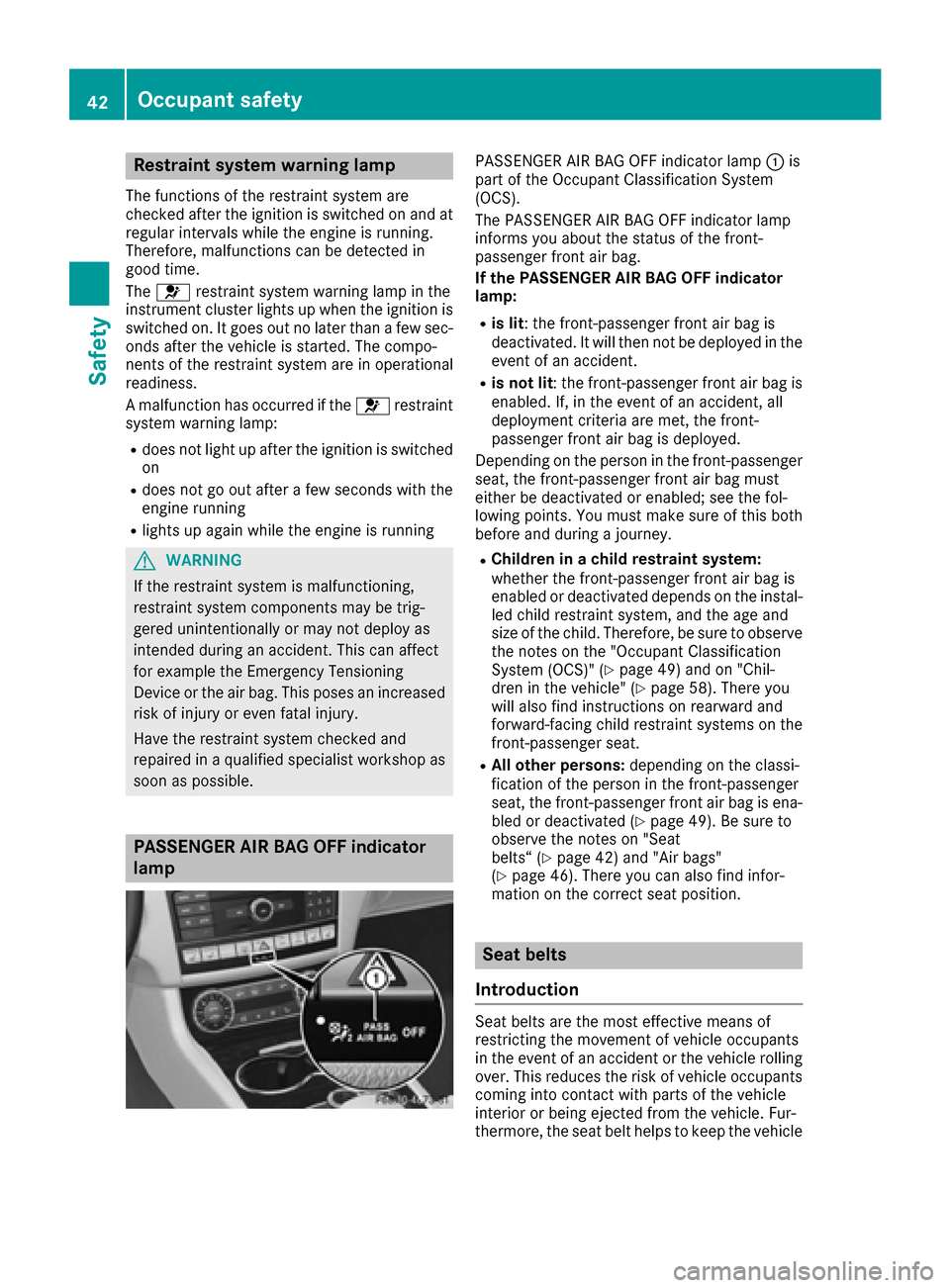
PASSENGER AIR BAG OFF indicator
lamp
PASSENGER AIR BAG OFF indicator lamp :is
part of the Occupant Classification System
(OCS).
The PASSENGER AIR BAG OFF indicator lamp
informs you about the status of the front-
passenger front air bag.
If the PASSENGER AIR BAG OFF indicator
lamp:
Ris lit: the front-passenger front air bag is
deactivated. It will then not be deployed in the
event of an accident.
Ris not lit : the front-passenger front air bag is
enabled. If, in the event of an accident, all
deployment criteria are met, the front-
passenger front air bag is deployed.
Depending on the person in the front-passenger
seat, the front-passenger front air bag must
either be deactivated or enabled; see the fol-
lowing points. You must make sure of this both
before and during a journey.
RChildren in a child restraint system:
whether the front-passenger front air bag is
enabled or deactivated depends on the instal-
led child restraint system, and the age and
size of the child. Therefore, be sure to observe the notes on the "Occupant Classification
System (OCS)" (
Ypage 49) and on "Chil-
dren in the vehicle" (Ypage 58). There you
will also find instructions on rearward and
forward-facing child restraint systems on the
front-passenger seat.
RAll other persons: depending on the classi-
fication of the person in the front-p assenger
seat, the front-passenger front air bag is ena-
bled or deactivated (
Ypage 49). Be sure to
observe the notes on "Seat
belts“ (
Ypage 42) and "Air bags"
(Ypage 46). There you can also find infor-
mation on the correct seat position.
Seat belts
Introduction
Seat belts are the most effective means of
restricting the movement of vehicle occupants
in the event of an accident or the vehicle rolling
over. This reduces the risk of vehicle occupants coming into contact with parts of the vehicle
interior or being ejected from the vehicle. Fur-
thermore, the seat belt helps to keep the vehicle
42Occupant safety
Safety
Page 101 of 334
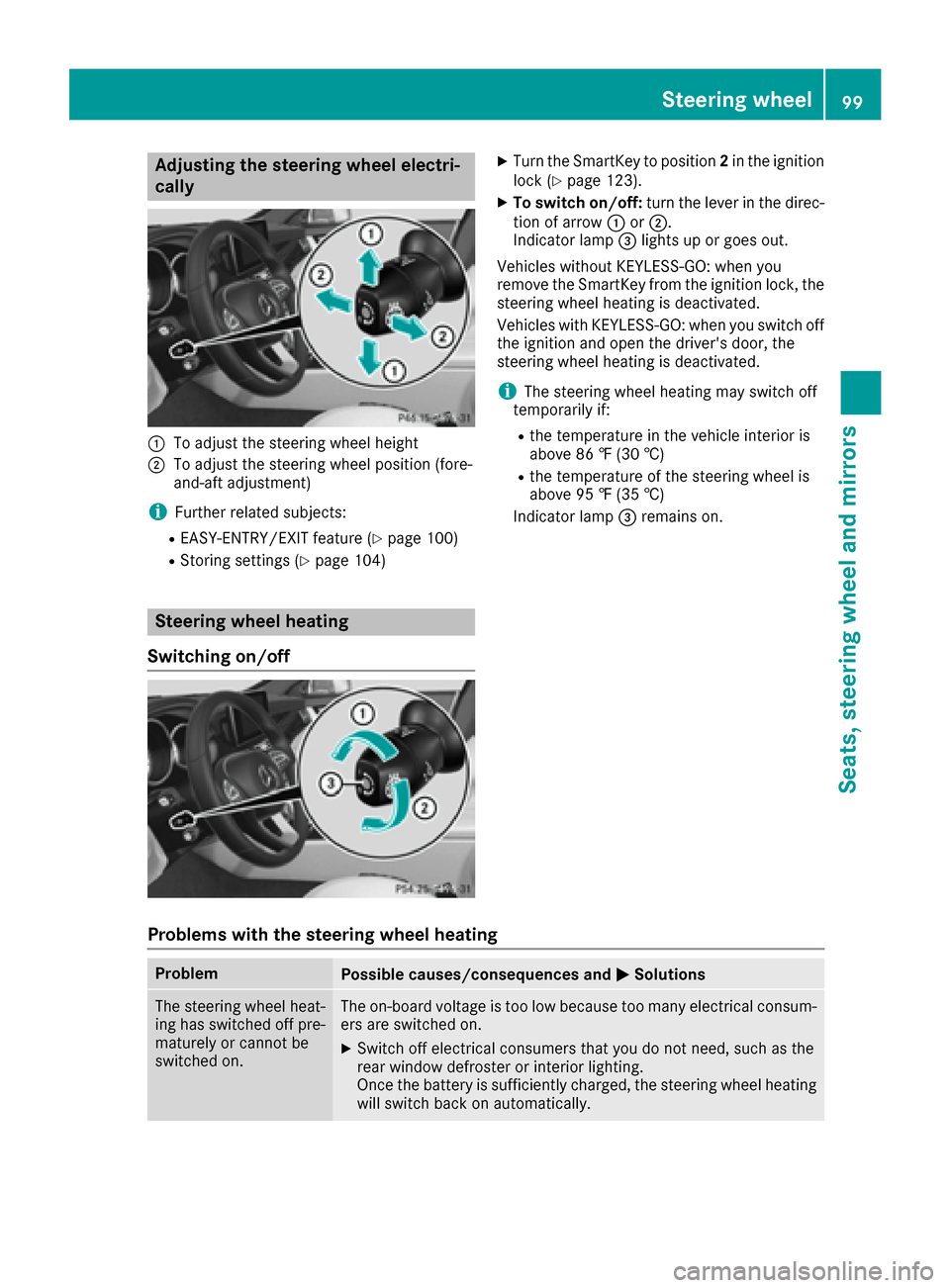
Adjusting the steering wheel electri-
cally
:To adjust th esteering whee lheight
;To adjust th esteering whee lposition (fore-
and-af tadjustment)
iFurther relate dsubjects :
REASY-ENTRY/EXIT feature (Ypage 100)
RStoring settings (Ypage 104)
Steering wheel heating
Switching on/off
XTurn th eSmartKey to position 2in th eignition
loc k (Ypage 123).
XTo switch on/off: turnth elever in th edirec -
tion of arrow :or;.
Indicato rlamp =lights up or goes out .
Vehicles without KEYLESS-GO :when you
remove th eSmartKey from th eignition lock, th e
steering whee lheating is deactivated.
Vehicles wit hKEYLESS-GO :when you switch off
th eignition and open th edriver's door ,th e
steering whee lheating is deactivated.
iThe steering whee lheating may switch off
temporarily if:
Rth etemperature in th evehicl einterior is
abov e86 ‡(30 †)
Rthetemperature of th esteering whee lis
abov e95 ‡(35 †)
Indic ator lamp =remains on.
Problems with the steering wheel heating
ProblemPossible causes/consequences and MSolutions
The steering wheel heat-
ing has switched off pre-
maturely or cannot be
switched on.The on-board voltage is too low because too many electrical consum-
ers are switched on.
XSwitch off electrical consumers that you do not need, such as the
rear window defroster or interior lighting.
Once the battery is sufficiently charged, the steering wheel heating
will switch back on automatically.
Steering wheel99
Seats, steering wheel and mirrors
Z
Page 110 of 334
late. In this, or in similar situations, the auto-
matic high-beam headlamps will not be deac-tivated or will be activated regardless. There is
a risk of an accident.
Always carefully observe the traffic conditions
and switch off the high-beam headlamps in
good time.
Adaptive Highbeam Assist cannot take into
account road, weather or traffic conditions.
Adaptive Highbeam Assist is only an aid. You are
responsible for adjusting the vehicle's lighting
to the prevailing light, visibility and traffic con-
ditions.
In particular, the detection of obstacles can be
impaired if:
Rthere is poor visibility, e.g. due to fog, heavy
rain or snow
Rthere is dirt on the sensors or anything else
covering the sensors
Switching Adaptive Highbeam Assist
on/off
XTo switch on: turn the light switch to the
à position.
XPress the combination switch forwards
beyond the pressure point (Ypage 106).
The _ indicator lamp in the multifunction
display lights up when it is dark and the light
sensor switches on the low-beam headlamps.
If you are driving at speeds above approx-
imately 16 mph (25 km/h):
The headlamp range is set automatically
depending on the distance between the vehi-
cle and other road users.
If you are driving at speeds above approx-
imately 19 mph (30 km/h) and no other road
users have been detected:
The high-beam headlamps are switched on
automatically. The Kindicator lamp in the
instrument cluster also lights up.
If you are driving at speeds below approx-
imately 16 mph (25 km/h) or other road users have been detected or the roads are ade-
quately lit:
The high-beam headlamps are switched off
automatically. The Kindicator lamp in the
instrument cluster goes out. The _indi- cator lamp in the multifunction display
remains lit.
XTo switch off:move the combination switch
back to its normal position or move the light
switch to another position.
The
K indicator lamp on the instrument
cluster goes out.
Headlamps fogged up on the inside
Certain climatic and physical conditions may
cause moisture to form in the headlamp. This
moisture does not affect the functionality of the
headlamp.
Interior lighting
Overview of interior lighting
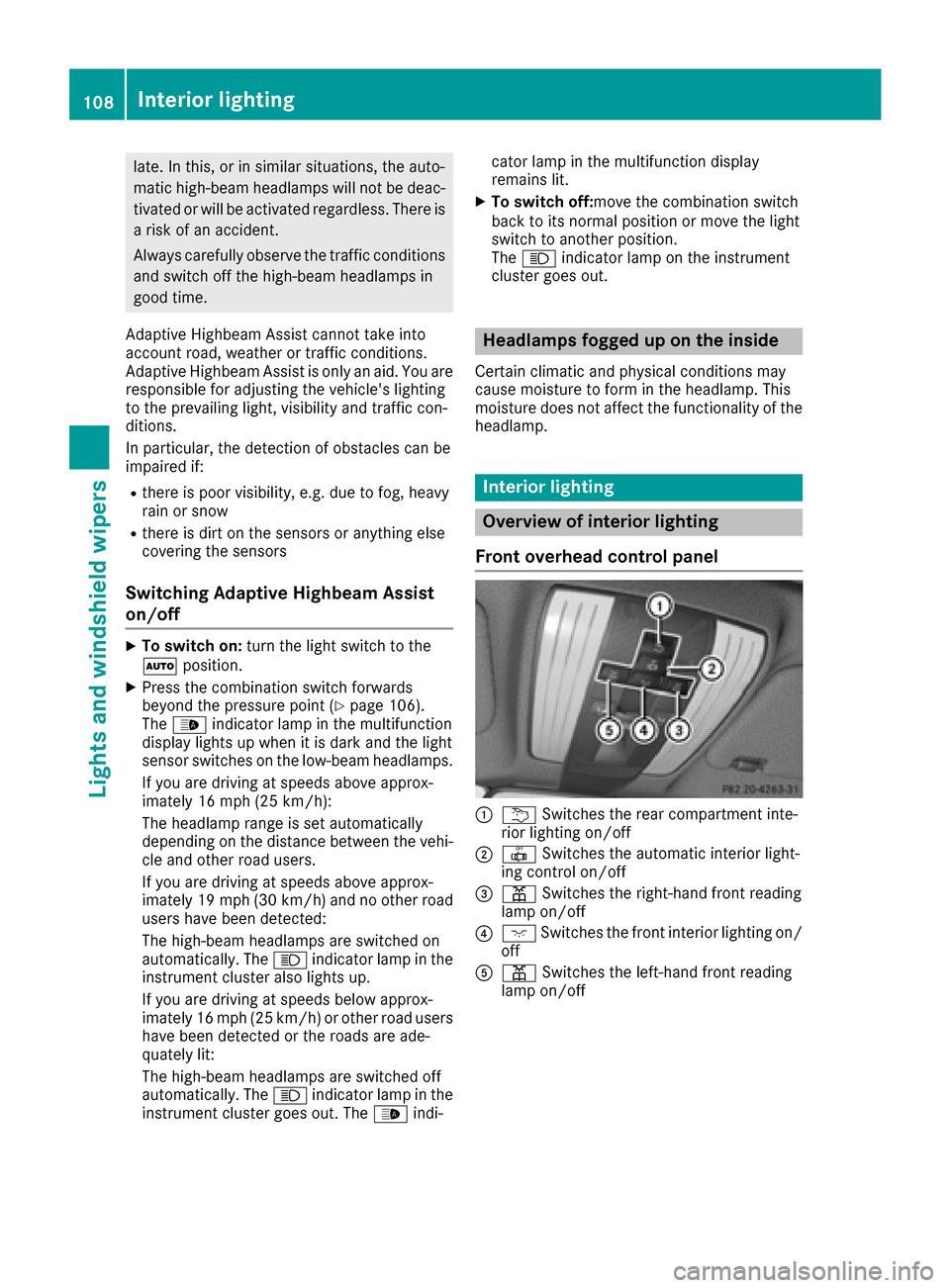
Front overhead control panel
:u Switches the rear compartment inte-
rior lighting on/off
;| Switches the automatic interior light-
ing control on/off
=p Switches the right-hand front reading
lamp on/off
?c Switches the front interior lighting on/
off
Ap Switches the left-hand front reading
lamp on/off
108Interior lighting
Lights and windshield wipers
Page 111 of 334
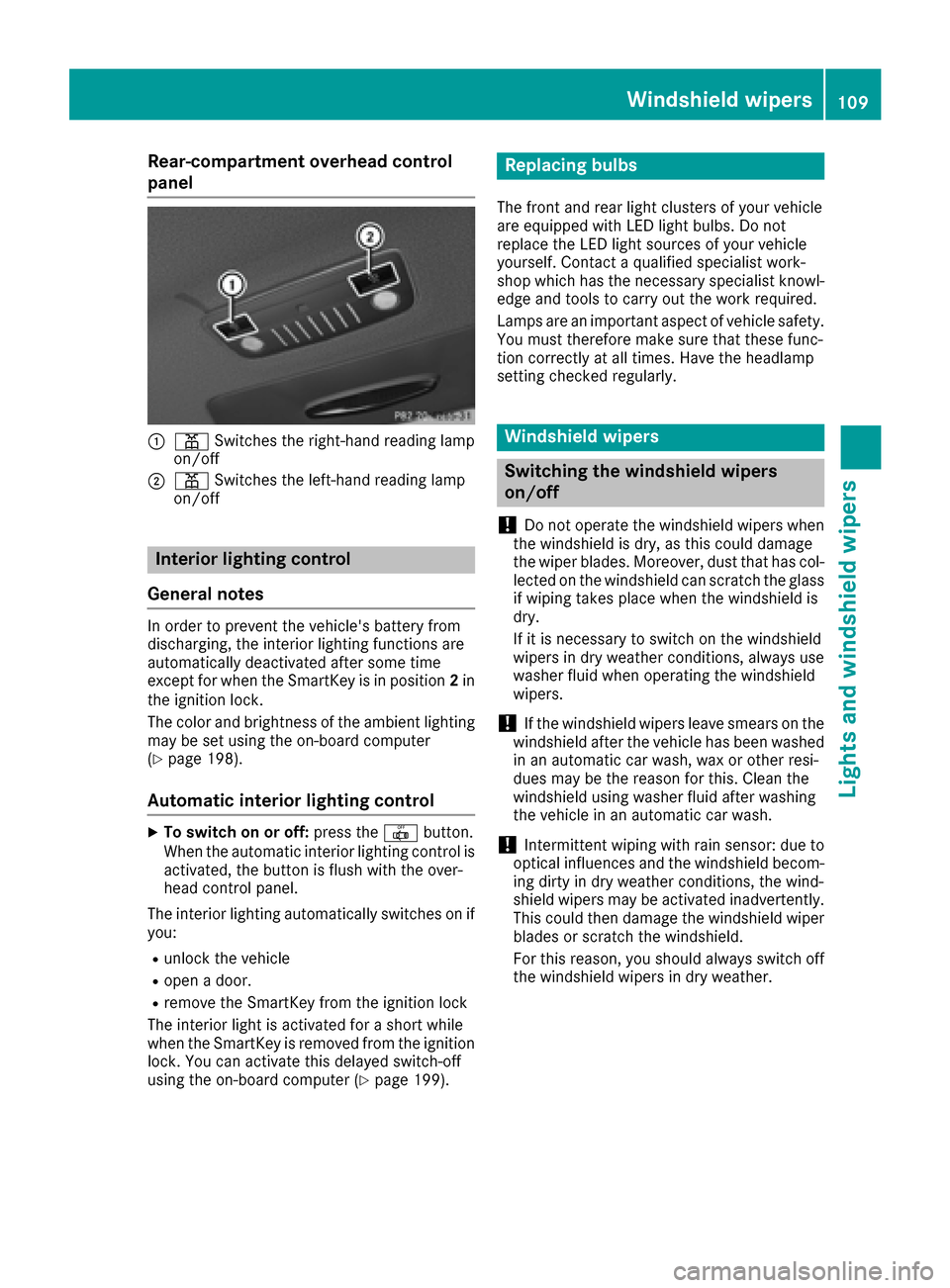
Rear-compartment overhead control
panel
:pSwitches the right-hand reading lamp
on/off
;p Switches the left-hand reading lamp
on/off
Interior lighting control
General notes
In order to prevent the vehicle's battery from
discharging, the interior lighting functions are
automatically deactivated after some time
except for when the SmartKey is in position 2in
the ignition lock.
The color and brightness of the ambient lighting
may be set using the on-board computer
(
Ypage 198).
Automatic interior lighting control
XTo switch on or off: press the|button.
When the automatic interior lighting control is
activated, the button is flush with the over-
head control panel.
The interior lighting automatically switches on if
you:
Runlock the vehicle
Ropen a door.
Rremove the SmartKey from the ignition lock
The interior light is activated for a short while
when the SmartKey is removed from the ignition
lock. You can activate this delayed switch-off
using the on-board computer (
Ypage 199).
Replacing bulbs
The front and rear light clusters of your vehicle
are equipped with LED light bulbs. Do not
replace the LED light sources of your vehicle
yourself. Contact a qualified specialist work-
shop which has the necessary specialist knowl-
edge and tools to carry out the work required.
Lamps are an important aspect of vehicle safety.
You must therefore make sure that these func-
tion correctly at all times. Have the headlamp
setting checked regularly.
Windshield wipers
Switching the windshield wipers
on/off
!
Do not operate the windshield wipers when
the windshield is dry, as this could damage
the wiper blades. Moreover, dust that has col-
lected on the windshield can scratch the glass
if wiping takes place when the windshield is
dry.
If it is necessary to switch on the windshield
wipers in dry weather conditions, always use
washer fluid when operating the windshield
wipers.
!If the windshield wipers leave smears on the
windshield after the vehicle has been washed
in an automatic car wash, wax or other resi-
dues may be the reason for this. Clean the
windshield using washer fluid after washing
the vehicle in an automatic car wash.
!Intermittent wiping with rain sensor: due to
optical influences and the windshield becom-
ing dirty in dry weather conditions, the wind-
shield wipers may be activated inadvertently.
This could then damage the windshield wiper
blades or scratch the windshield.
For this reason, you should always switch off
the windshield wipers in dry weather.
Windshield wipers109
Lights and windshield wipers
Z
Page 118 of 334
ROnly use the "Windshield defrosting" function
briefly until the windshield is clear again.
ROnly use air-recirculation mode briefly, e.g. if
there are unpleasant outside odors or when in
a tunnel. The windows could otherwise fog up,
since no fresh air is drawn into the vehicle in
air-recirculation mode.
RUse the ZONE function to adopt the temper-
ature settings on the driver's side for the
front-passenger side and the rear compart-
ment as well. The indicator lamp above the
á button goes out.
RVehicles with 3-zone automatic climate con-
trol: use the residual heat function if you want
to heat or ventilate the vehicle interior when
the ignition is switched off. The residual heat
function can only be activated or deactivated with the ignition switched off.
RIf you change the settings of the climate con-
trol system, the climate status display
appears for approximately three seconds at
the bottom of the screen in the multimedia
system display. You will see the current set-
tings of the various climate control functions.
ECO start/stop function
During automatic engine switch-off, the climate
control system only operates at a reduced capa- city. If you require the full climate control output,
you can switch off the ECO start/stop function
by pressing the ECO button (
Ypage 127).
Operating the climate control sys-
tems
Activating/deactivating climate con-
trol
General notes
When the climate control is switched off, the air
supply and air circulation are also switched off.
The windows could fog up. Therefore, switch off
climate control only briefly
iActivate climate control primarily using the
à button (Ypage 117).
Activating/deactivating
XTurn the SmartKey to position 2in the ignition
lock (Ypage 123).
XTo activate: press theÃbutton.
The indicator lamp in the Ãbutton lights
up. Airflow and air distribution are set to auto-
matic mode.
XTo deactivate: press the^button.
The indicator lamp in the ^button lights
up.
Switching cooling with air dehumidification on/off
General notes
If you deactivate the "Cooling with air-dehumidification" function, the air inside the vehicle will not
be cooled. The air inside the vehicle will also not be dehumidified. The windows can fog up more
quickly. Therefore, deactivate the cooling with air-dehumidification function only briefly.
The "Cooling with air dehumidification" function is only available when the engine is running. The air
inside the vehicle is cooled and dehumidified according to the temperature selected.
Condensation may drip from the underside of the vehicle when it is in cooling mode. This is normal
and not a sign that there is a malfunction.
Activating/deactivating
XTo activate: press the¿button.
The indicator lamp in the ¿button lights up.
XTo deactivate: press the¿button.
The indicator lamp in the ¿button goes out. The "Cooling with air dehumidification" function
has a delayed switch-off feature.
116Operating the climate control systems
Climate control
Page 122 of 334
Problems with the rear window defroster
ProblemPossible causes/consequences andMSolutions
The rear window
defroster has deactiva-
ted prematurely or can-
not be activated.The battery has not been sufficiently charged.
XSwitch off any consumers that are not required, e.g. reading lamps,
interior lighting or the seat heating.
When the battery is sufficiently charged, the rear window defroster
can be activated again.
Switching air-recirculation mode
on/off
General notes
You can deactivate the flow of fresh air if
unpleasant odors are entering the vehicle from
outside. The air already inside the vehicle will
then be recirculated.
If you switch on air-recirculation mode, the win-
dows can fog up more quickly, in particular at
low temperatures. Only use air-recirculation
mode briefly to prevent the windows from fog-
ging up.
Activating/deactivating
XTurn the SmartKey to position 2in the ignition
lock (Ypage 123).
XTo activate: press thegbutton.
The indicator lamp in the gbutton lights
up.
Dual-zone automatic climate control: air-recir-
culation mode is automatically activated at high outside temperatures.
3-zone automatic climate control: air-recircula-
tion mode is automatically activated at high lev-
els of pollution or at high outside temperatures.
When air-recirculation mode is activated auto-
matically, the indicator lamp above the g
button does not light up. Outside air is added
after approximately 30 minutes.
XTo deactivate: press thegbutton.
The indicator lamp in the gbutton goes
out. Air-recirculation mode deactivates automati-
cally:
Rafter approximately five minutes at outside
temperatures below approximately 41 ‡
(5 †)
Rafter approximately five minutes if cooling
with air dehumidification is deactivated
Rafter approximately 30 minutes at outside
temperatures above approximately 41 ‡
(5 †) if the "Cooling with air dehumidifica-
tion" function is activated
Switching the residual heat on or off
General notes
The residual heat function is only available with
3-zone automatic climate control.
It is possible to make use of the residual heat of
the engine to continue heating the vehicle for
approximately 30 minutes after the engine has
been switched off. The heating time depends on
the set interior temperature.
Activating/deactivating
XTurn the SmartKey to position 0in the ignition
lock or remove it (Ypage 123).
XTo switch on: press theÌbutton.
The indicator lamp in the Ìbutton lights
up.
If the residual heat function is activated, the
windows may fog up on the inside.
The blower will run at a low speed regardless of
the airflow setting.
If you activate the residual heat function at high
temperatures, only the ventilation will be acti-
vated. The blower runs at medium speed.
120Operating the climate control systems
Climate control