lock MERCEDES-BENZ CLS COUPE 2008 Owner's Guide
[x] Cancel search | Manufacturer: MERCEDES-BENZ, Model Year: 2008, Model line: CLS COUPE, Model: MERCEDES-BENZ CLS COUPE 2008Pages: 329, PDF Size: 29.26 MB
Page 74 of 329
Opening and closing
71
i
Do not leave the key in the boot. You
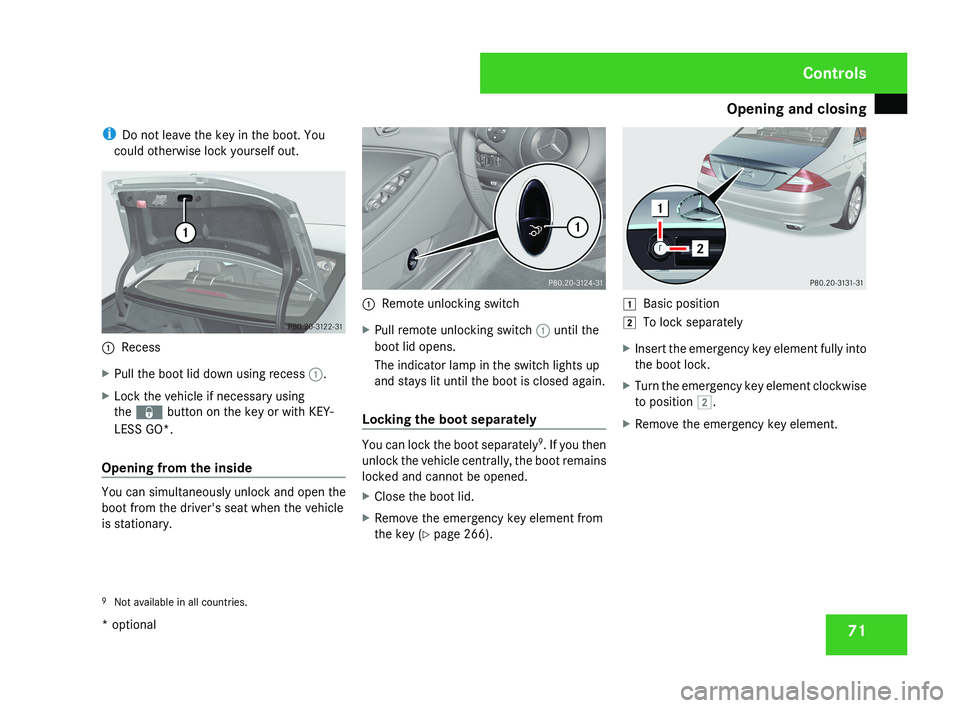
could otherwise lock yourself out.1 Recess
X Pull the boot lid down using recess 1.
X Lock the vehicle if necessary using
the j button on the key or with KEY-
LESS GO*.
Opening from the inside
You can simultaneously unlock and open the
boot from the driver's seat when the vehicle
is stationary.
1 Remote unlocking switch
X Pull remote unlocking switch 1 until the
boot lid opens.
The indicator lamp in the switch lights up
and stays lit until the boot is closed again.
Locking the boot separately
You can lock the boot separately 9
. If you then
unlock the vehicle centrally, the boot remains
locked and cannot be opened.
X Close the boot lid.
X Remove the emergency key element from
the key (Y page 266).
$ Basic position
% To lock separately
X Insert the emergency key element fully into
the boot lock.
X Turn the emergency key element clockwise
to position %.
X Remove the emergency key element.
9 Not available in all countries.
Controls
* optional
219_AKB; 2; 4, en-GB
mkalafa,
2007-11-13T09:28:36+01:00 - Seite 71
Page 75 of 329
Opening and closing
72 Boot (vehicles with remote boot lid
closing feature*)
The remote boot lid closing feature* opens
and closes the boot lid automatically. You can
stop the automatic opening and closing pro-
cedure at any time:
R by pulling or pressing the remote operating
switch at the driver's seat
R by pressing the i button on the key
R by pulling the handle on the boot lid
R by pressing the closing button in the boot
lid G
Risk of poisoning
Exhaust fumes could enter the vehicle inte-
rior if the engine is running and the boot lid
is open. This could poison you. Therefore,
you should make sure that the boot lid is
always closed when the engine is running.
! The boot lid swings upwards when
opened. Therefore, make sure that there is
enough space above the boot lid.
Opening from the outside You can only open the boot lid after unlocking
it first. X
To unlock centrally: press the k but-
ton on the key. 1
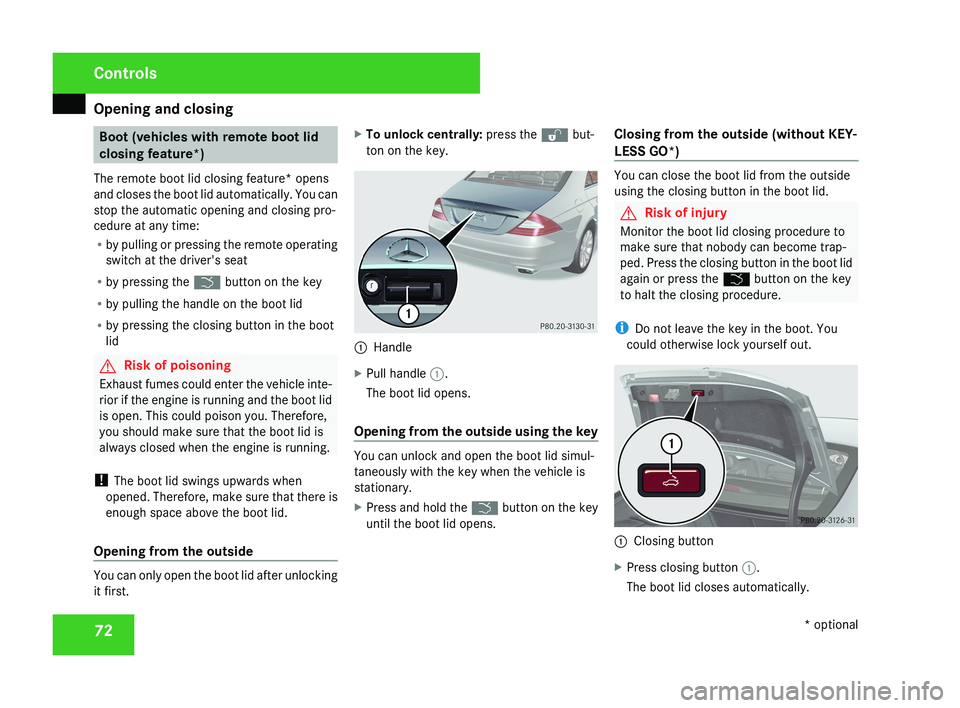
Handle
X Pull handle 1.
The boot lid opens.
Opening from the outside using the key You can unlock and open the boot lid simul-
taneously with the key when the vehicle is
stationary.
X
Press and hold the i button on the key
until the boot lid opens. Closing from the outside (without KEY-
LESS GO*) You can close the boot lid from the outside
using the closing button in the boot lid.
G
Risk of injury
Monitor the boot lid closing procedure to
make sure that nobody can become trap-
ped. Press the closing button in the boot lid
again or press the i button on the key
to halt the closing procedure.
i Do not leave the key in the boot. You
could otherwise lock yourself out. 1
Closing button
X Press closing button 1.
The boot lid closes automatically. Controls
* optional
219_AKB; 2; 4, en-GB
mkalafa,
2007-11-13T09:28:36+01:00 - Seite 72
Page 76 of 329
Opening and closing
73
Closing from the outside and locking
centrally (using KEYLESS GO*) You can close the boot lid from the outside
using the closing button in the boot lid, or you
can close and centrally lock the vehicle simul-
taneously with the KEYLESS GO button*.
G
Risk of injury
Monitor the boot lid closing procedure to
make sure that nobody can become trap-
ped. Press the closing button in the boot lid
again or press the i button on the key
to halt the closing procedure.
i Do not leave the key in the boot. You
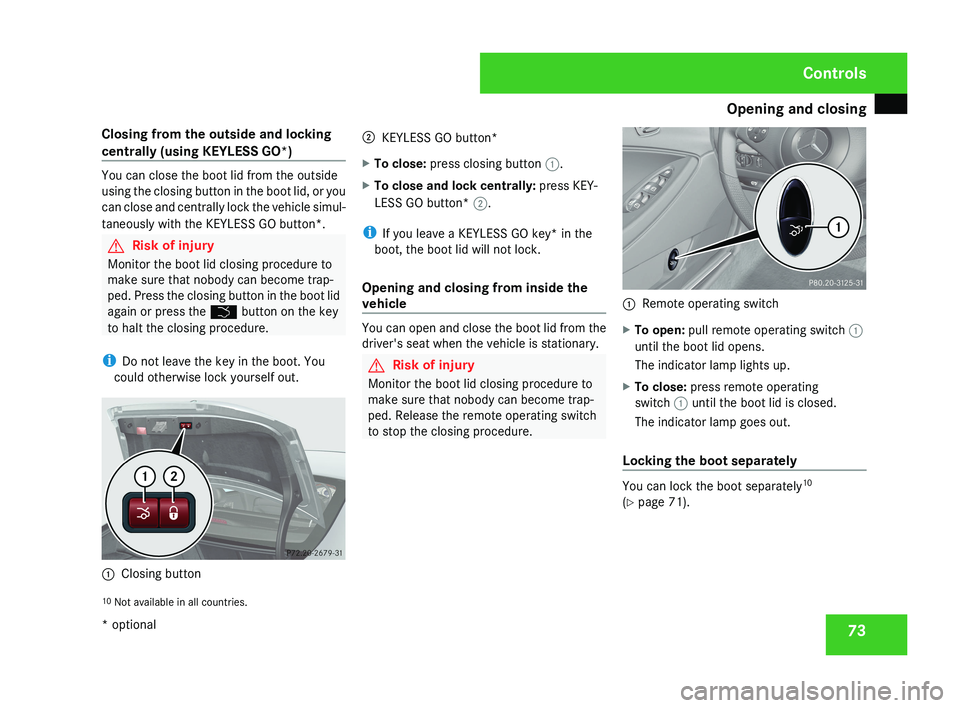
could otherwise lock yourself out. 1
Closing button 2
KEYLESS GO button*
X To close: press closing button 1.
X To close and lock centrally: press KEY-
LESS GO button* 2.
i If you leave a KEYLESS GO key* in the
boot, the boot lid will not lock.
Opening and closing from inside the
vehicle You can open and close the boot lid from the
driver's seat when the vehicle is stationary.
G
Risk of injury
Monitor the boot lid closing procedure to
make sure that nobody can become trap-
ped. Release the remote operating switch
to stop the closing procedure. 1
Remote operating switch
X To open: pull remote operating switch 1
until the boot lid opens.
The indicator lamp lights up.
X To close: press remote operating
switch 1 until the boot lid is closed.
The indicator lamp goes out.
Locking the boot separately You can lock the boot separately
10
(Y page 71).
10 Not available in all countries. Controls
* optional
219_AKB; 2; 4, en-GB
mkalafa,
2007-11-13T09:28:36+01:00 - Seite 73
Page 77 of 329
Key positions
74 Key positions
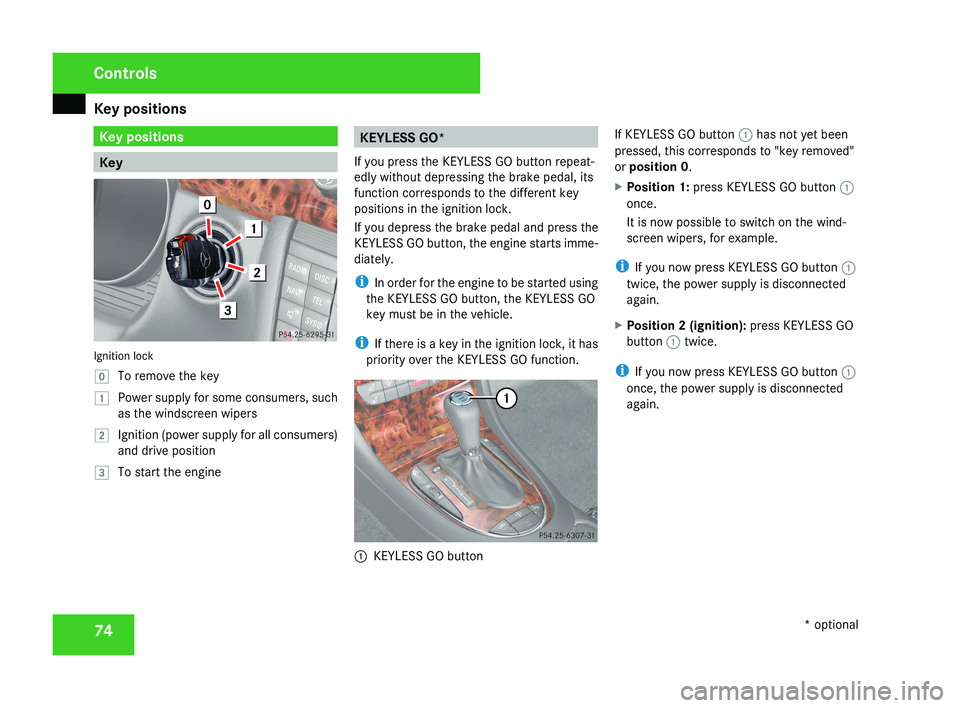
KeyIgnition lock
}
To remove the key
$ Power supply for some consumers, such
as the windscreen wipers
% Ignition (power supply for all consumers)
and drive position
& To start the engine
KEYLESS GO*
If you press the KEYLESS GO button repeat-
edly without depressing the brake pedal, its
function corresponds to the different key
positions in the ignition lock.
If you depress the brake pedal and press the
KEYLESS GO button, the engine starts imme-
diately.
i In order for the engine to be started using
the KEYLESS GO button, the KEYLESS GO
key must be in the vehicle.
i If there is a key in the ignition lock, it has
priority over the KEYLESS GO function.
1 KEYLESS GO button If KEYLESS GO button
1 has not yet been
pressed, this corresponds to "key removed"
or position 0 .
X Position 1: press KEYLESS GO button 1
once.
It is now possible to switch on the wind-
screen wipers, for example.
i If you now press KEYLESS GO button 1
twice, the power supply is disconnected
again.
X Position 2 (ignition): press KEYLESS GO
button 1 twice.
i If you now press KEYLESS GO button 1
once, the power supply is disconnected
again.
Controls
* optional
219_AKB; 2; 4, en-GB
mkalafa,
2007-11-13T09:28:36+01:00 - Seite 74
Page 78 of 329
Seats
75Seats
Depending on the vehicle's equipment, seat
adjustments can be made either manually/
electrically or electrically*. G
Risk of injury
The seats can still be adjusted when there
is no key in the ignition lock. For this rea-
son, children should never be left unsuper-
vised in the vehicle. They could become
trapped by a seat adjustment movement. G
Risk of accident
Only adjust the driver's seat when the vehi-
cle is stationary. You will otherwise be dis-
tracted from the road and traffic conditions
and you could lose control of the vehicle as
a result of the seat moving. This could
cause an accident. G
Risk of injury
Make sure that nobody can become trap-
ped as you adjust the seat.
Observe the notes concerning the airbag
system.
Secure children as recommended; see the
"Children in the vehicle" section. !
When you move the seats, make sure that
there are no objects in the footwell or
behind the seats. Otherwise, you could
damage the seats and the objects.
i The head restraints in the front seats are
fitted with the NECK-PRO system
(Y page 49). For this reason, it is not pos-
sible to remove the head restraints from
the front seats.
For design reasons, the rear-compartment
head restraints cannot be removed.
Please contact a Mercedes-Benz Service
Centre for more information. Adjusting the seats manually and
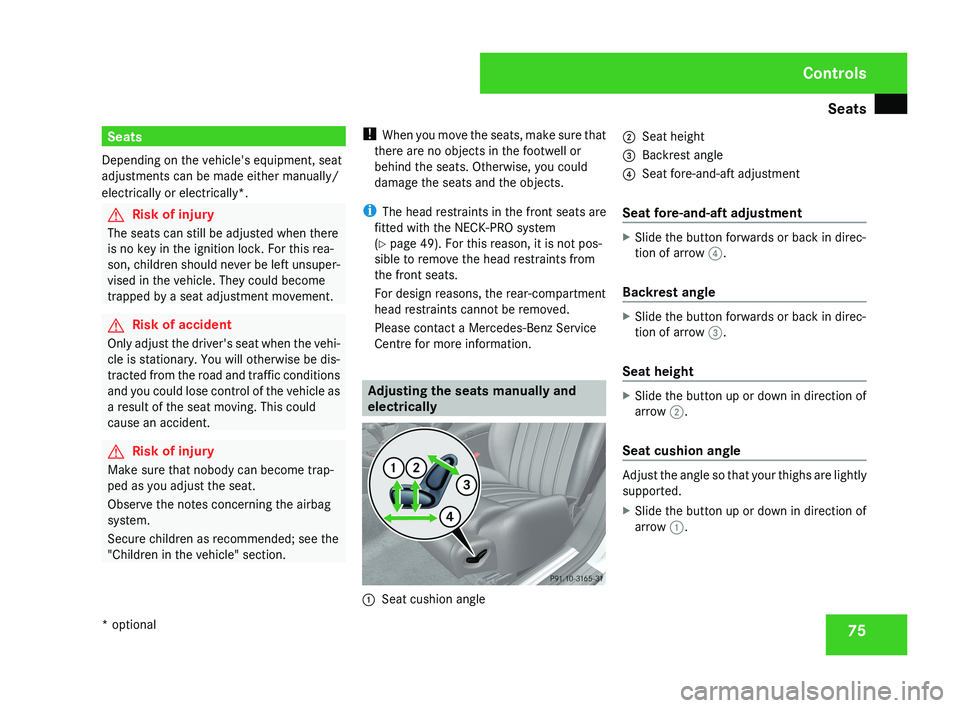
electrically1
Seat cushion angle 2
Seat height
3 Backrest angle
4 Seat fore-and-aft adjustment
Seat fore-and-aft adjustment
X Slide the button forwards or back in direc-
tion of arrow 4.
Backrest angle
X Slide the button forwards or back in direc-
tion of arrow 3.
Seat height
X Slide the button up or down in direction of
arrow 2.
Seat cushion angle
Adjust the angle so that your thighs are lightly
supported.
X Slide the button up or down in direction of
arrow 1.
Controls
* optional
219_AKB; 2; 4, en-GB
mkalafa,
2007-11-13T09:28:36+01:00 - Seite 75
Page 82 of 329
Seats
79
Folding back the head restraints from
the front
1
Button for folding back the rear seat head
restraints
X Make sure that the key is in position 2 in
the ignition lock.
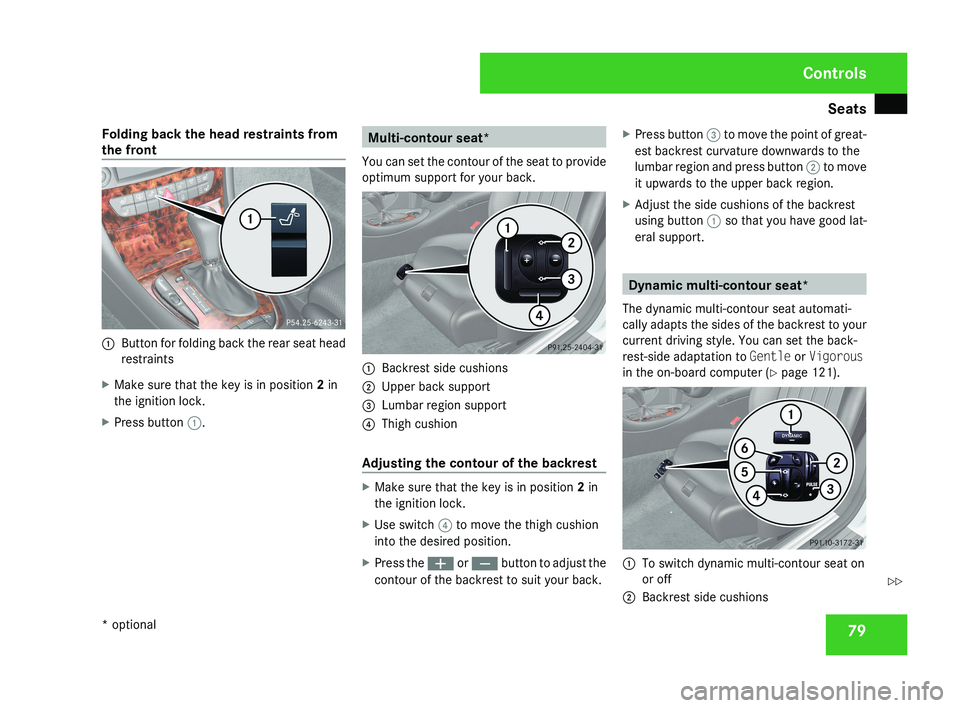
X Press button 1. Multi-contour seat*
You can set the contour of the seat to provide
optimum support for your back. 1
Backrest side cushions
2 Upper back support
3 Lumbar region support
4 Thigh cushion
Adjusting the contour of the backrest X
Make sure that the key is in position 2 in
the ignition lock.
X Use switch 4 to move the thigh cushion
into the desired position.
X Press the æ or ç button to adjust the
contour of the backrest to suit your back. X
Press button 3 to move the point of great-
est backrest curvature downwards to the
lumbar region and press button 2 to move
it upwards to the upper back region.
X Adjust the side cushions of the backrest
using button 1 so that you have good lat-
eral support. Dynamic multi-contour seat*
The dynamic multi-contour seat automati-
cally adapts the sides of the backrest to your
current driving style. You can set the back-
rest-side adaptation to Gentle or Vigorous
in the on-board computer (Y page 121). 1
To switch dynamic multi-contour seat on
or off
2 Backrest side cushions Controls
* optional
219_AKB; 2; 4, en-GB
mkalafa,
2007-11-13T09:28:36+01:00 - Seite 79 Z
Page 83 of 329
Seats
80
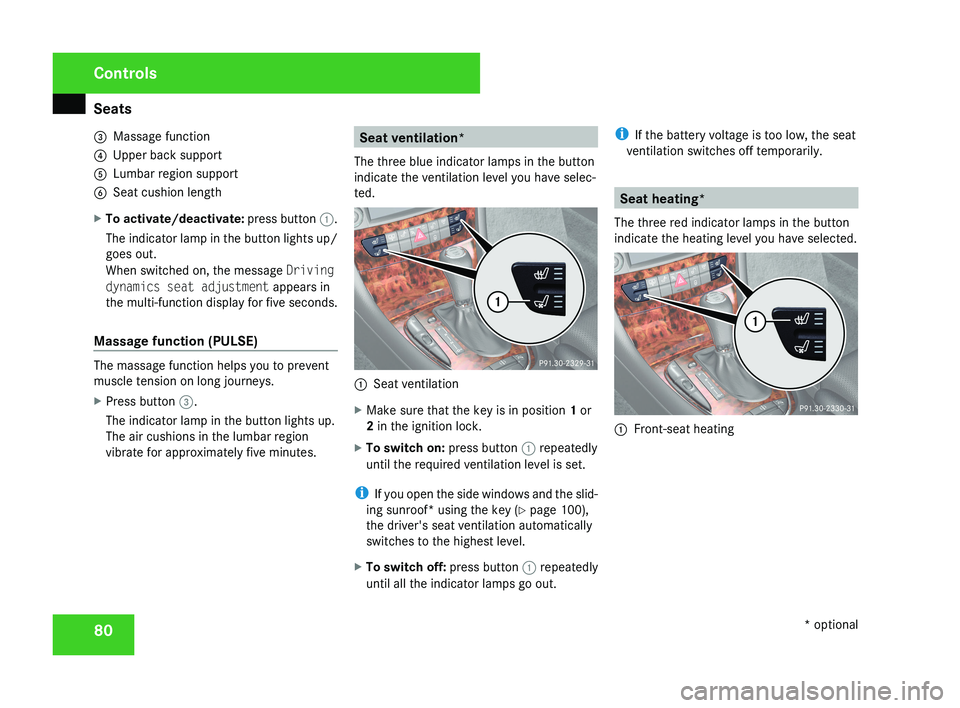
3
Massage function
4 Upper back support
5 Lumbar region support
6 Seat cushion length
X To activate/deactivate: press button 1.
The indicator lamp in the button lights up/
goes out.
When switched on, the message Driving
dynamics seat adjustment appears in
the multi-function display for five seconds.
Massage function (PULSE) The massage function helps you to prevent
muscle tension on long journeys.
X
Press button 3.
The indicator lamp in the button lights up.
The air cushions in the lumbar region
vibrate for approximately five minutes. Seat ventilation*
The three blue indicator lamps in the button
indicate the ventilation level you have selec-
ted. 1
Seat ventilation
X Make sure that the key is in position 1 or
2 in the ignition lock.
X To switch on: press button 1 repeatedly
until the required ventilation level is set.
i If you open the side windows and the slid-
ing sunroof* using the key ( Y page 100),
the driver's seat ventilation automatically
switches to the highest level.
X To switch off: press button 1 repeatedly
until all the indicator lamps go out. i
If the battery voltage is too low, the seat
ventilation switches off temporarily. Seat heating*
The three red indicator lamps in the button
indicate the heating level you have selected. 1
Front-seat heating Controls
* optional
219_AKB; 2; 4, en-GB
mkalafa,
2007-11-13T09:28:36+01:00 - Seite 80
Page 84 of 329
Steering wheel
811
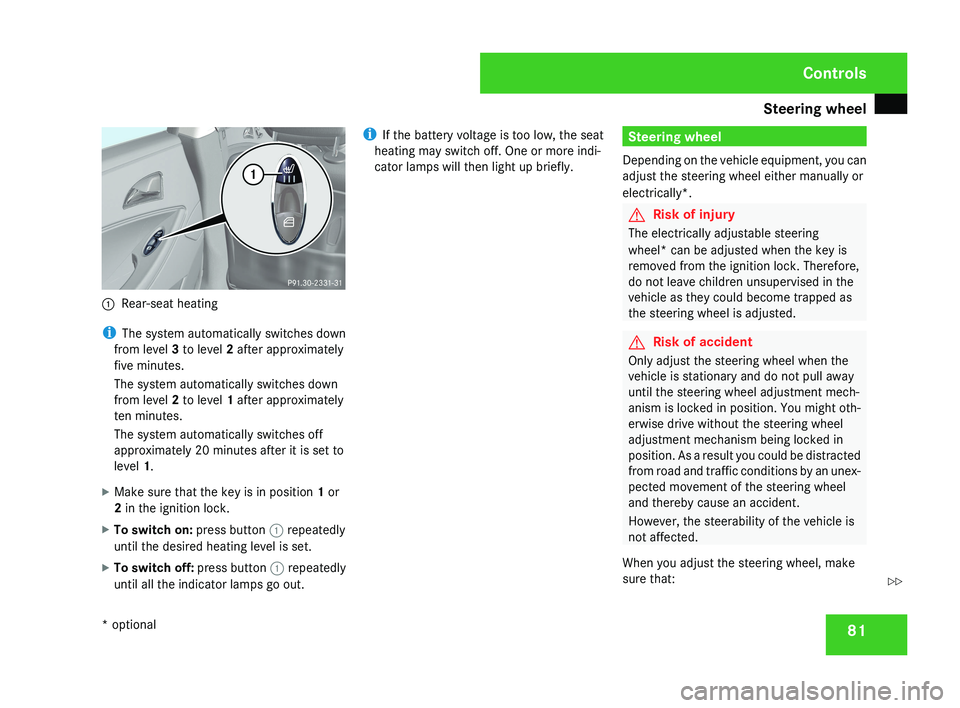
Rear-seat heating
i The system automatically switches down
from level 3 to level 2 after approximately
five minutes.
The system automatically switches down
from level 2 to level 1 after approximately
ten minutes.
The system automatically switches off
approximately 20 minutes after it is set to
level 1.
X Make sure that the key is in position 1 or
2 in the ignition lock.
X To switch on: press button 1 repeatedly
until the desired heating level is set.
X To switch off: press button 1 repeatedly
until all the indicator lamps go out. i
If the battery voltage is too low, the seat
heating may switch off. One or more indi-
cator lamps will then light up briefly.
Steering wheel
Depending on the vehicle equipment, you can
adjust the steering wheel either manually or
electrically*.
G Risk of injury
The electrically adjustable steering
wheel* can be adjusted when the key is
removed from the ignition lock. Therefore,
do not leave children unsupervised in the
vehicle as they could become trapped as
the steering wheel is adjusted.
G Risk of accident
Only adjust the steering wheel when the
vehicle is stationary and do not pull away
until the steering wheel adjustment mech-
anism is locked in position. You might oth-
erwise drive without the steering wheel
adjustment mechanism being locked in
position. As a result you could be distracted
from road and traffic conditions by an unex-
pected movement of the steering wheel
and thereby cause an accident.
However, the steerability of the vehicle is
not affected.
When you adjust the steering wheel, make
sure that:
Controls
* optional
219_AKB; 2; 4, en-GB
mkalafa,
2007-11-13T09:28:36+01:00 - Seite 81
Z
Page 85 of 329
Steering wheel
82
R
the steering wheel can be reached with
your arms slightly bent
R you can move your legs freely
R you can see all the displays in the instru-
ment cluster clearly Adjusting the steering wheel man-
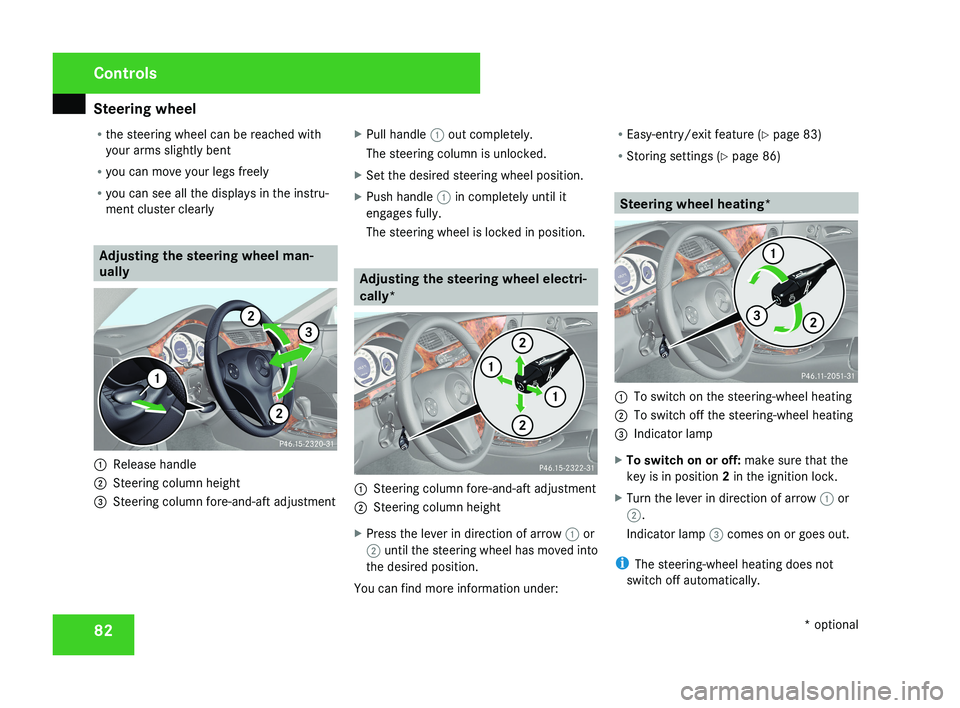
ually1
Release handle
2 Steering column height
3 Steering column fore-and-aft adjustment X
Pull handle 1 out completely.
The steering column is unlocked.
X Set the desired steering wheel position.
X Push handle 1 in completely until it
engages fully.
The steering wheel is locked in position.
Adjusting the steering wheel electri-
cally*
1 Steering column fore-and-aft adjustment
2 Steering column height
X Press the lever in direction of arrow 1 or
2 until the steering wheel has moved into
the desired position.
You can find more information under: R
Easy-entry/exit feature ( Y page 83)
R Storing settings ( Y page 86)
Steering wheel heating*
1
To switch on the steering-wheel heating
2 To switch off the steering-wheel heating
3 Indicator lamp
X To switch on or off: make sure that the
key is in position 2 in the ignition lock.
X Turn the lever in direction of arrow 1 or
2.
Indicator lamp 3 comes on or goes out.
i The steering-wheel heating does not
switch off automatically.
Controls
* optional
219_AKB; 2; 4, en-GB
mkalafa,
2007-11-13T09:28:36+01:00 - Seite 82
Page 86 of 329
Mirrors
83Easy-entry/exit feature*
The Easy-entry/exit feature makes getting in
and out of your vehicle easier.
The steering wheel swings upwards when
you:
R remove the key from the ignition lock
R open the driver's door when the key is in
the ignition lock or in position 1
The steering wheel is moved automatically to
the position previously set when the key is
inserted into the ignition lock with the driver's
door closed. G
Risk of injury
Make sure that nobody can become trap-
ped when you activate the easy-entry/exit
feature.
If there is a risk of becoming trapped, stop
the adjustment procedure. To halt the pro-
cedure:
R press the steering-column adjustment
switch
R press one of the memory function posi-
tion buttons
The steering column stops moving immedi-
ately. Never leave children unsupervised in the
vehicle. They could open the driver's door
and thereby unintentionally activate the
easy-entry feature and become trapped.
The most recent position of the steering
wheel is stored when you switch off the igni-
tion or when you store a memory position
(Y page 86).
You can activate and deactivate the Easy-
entry/exit feature via the on-board computer
(Y page 128). Mirrors
Before starting off, adjust the mirrors in such
a way that you can get a good overview of
road and traffic conditions. Rear-view mirror
X Adjust the rear-view mirror manually.
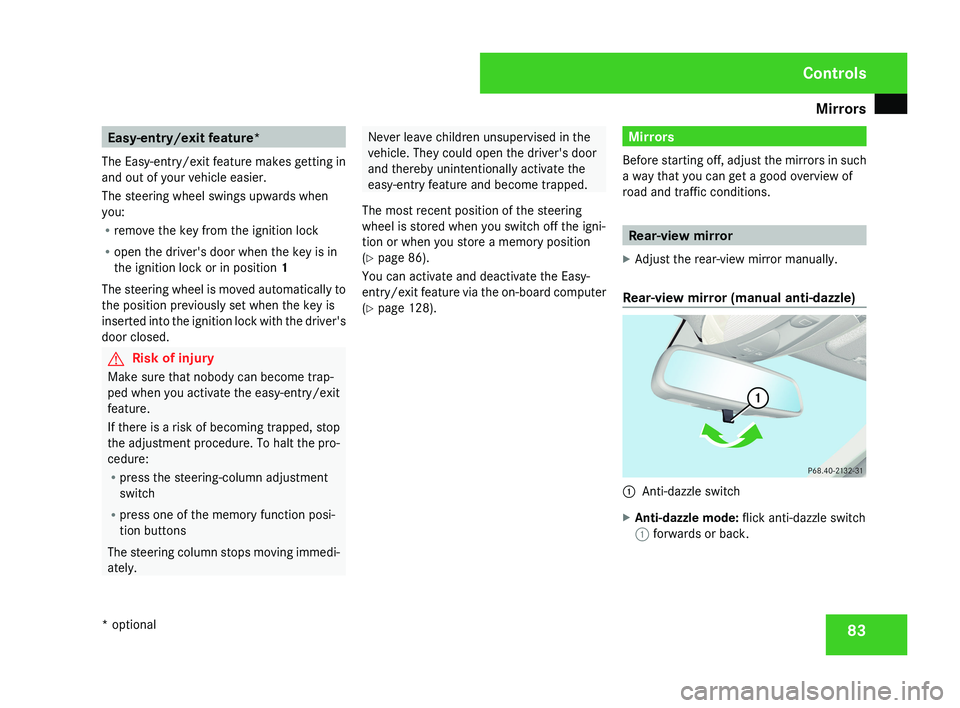
Rear-view mirror (manual anti-dazzle) 1
Anti-dazzle switch
X Anti-dazzle mode: flick anti-dazzle switch
1 forwards or back. Controls
* optional
219_AKB; 2; 4, en-GB
mkalafa,
2007-11-13T09:28:36+01:00 - Seite 83