boot MERCEDES-BENZ CLS COUPE 2010 Owners Manual
[x] Cancel search | Manufacturer: MERCEDES-BENZ, Model Year: 2010, Model line: CLS COUPE, Model: MERCEDES-BENZ CLS COUPE 2010Pages: 337, PDF Size: 7.36 MB
Page 9 of 337
Bel
ttensioner
Activation ........................................ .35
Function ........................................... 45
Blin dSpot Assist
Activating/deactivating (on-
board computer) ............................ 204
Display message ............................ 229
Function/notes ............................. 183
Bonnet
Closing .......................................... .267
Display message ............................ 235
Opening ......................................... 266
Boot
Automatic opening ........................... 76
Emergency release ..........................77
Important safety guidelines .............75
Opening automatically from
insid e............................................... 77
Boot lid
Display message ............................ 235
Opening dimensions ......................326
Boot load (maximum) ........................ 323
Bottle holder ...................................... 256
Box (boot) .......................................... .252
Brake fluid Notes ............................................. 322
Brake lamps
Adaptive .......................................... .58
Display message ............................ 222
Brakes
ABS .................................................. 57
BAS .................................................. 57
BAS PLUS ........................................ 57
Brake fluid (notes) .........................322
Display message ............................ 220
High-performance brake system ....150
Important safety notes ..................149
Parking brake ................................ 148
Warning lamp ................................. 238
Breakdown
see Flat tyre
Bulbs
Overview ........................................ 105 C
Care Automatic car wash .......................271
Display ........................................... 274
Exterior lighting ............................. 273
High-pressure cleaner .................... 272
Matt paintwork .............................. 272
Nigh tView Assist Plus ...................274
Notes ............................................. 270
Paint .............................................. 272
Plastic trim .................................... 275
Reversing camera ..........................274
Seat bel t........................................ 276
Seat covers .................................... 275
Sensors ......................................... 274
Tai lpipes ....................................... 274
Trim strips ..................................... 275
Wheels ........................................... 272
Windows ........................................ 273
Wiper blades .................................. 273
Wooden trim .................................. 275
CD player/CD changer(on-board
computer) .......................................... 201
Central locking Automatic locking (on-board com-
puter) ............................................. 209
Key .................................................. 68
Central unlocking
Key .................................................. 68
Centre console ..................................... 30
Changing bulbs Headlamps ..................................... 104
Changing gears .................................. 138
Child-proof locks Rea rdoors ....................................... 55
Children
In the vehicle ................................... 46
Restraint systems ............................ 46
Child seat
Automatic recognition .....................48
Display message ............................ 217
ISOFIX .............................................. 49
On the front-passenger sea t............ 47
Recommendations ...........................54
Suitable positions ............................ 52
Troubleshooting ............................... 51
Cigarette lighter ................................ 2586
Index
Page 12 of 337
EBD (Electronic Brake-force Distri-
bution) Display message ............................ 220
Function/notes ................................ 61
ECO start/stop function
General information .......................131
Switching on/off (AMG vehicles) ...133
Switching on/off (except AMG
vehicles) ........................................ 133
Electrical fuses
see Fuses
Electronic Brake-force Distribution
see EBD
Electronic Stability Program
see ESP ®
Electronic Traction System see ETS/4ETS
Emergency key element
Function/notes ................................ 69
Emergency locking
Vehicle ............................................. 75
Emergency release
Fuel filler fla p................................. 145
Emergency running mode
Automatic transmission .................142
Emergency spare wheel
Inflating the collapsible spare
wheel ............................................. 288
Notes/data .................................... 313
Storage location ............................ 280
Stowing .......................................... 280
Emergency unlocking
Boot ................................................. 77
Vehicle ............................................. 75
Engine
Running irregularl y......................... 134
Starting problems ..........................134
Starting the engine with the key ....130
Starting with KEYLESS GO .............130
Stopping ........................................ 148
Warning lamp (engine diagnos-
tics) ............................................... 244
Engine electronics .............................316
Malfunction ................................... .134
Engine number .................................. 319Engine oil
Additives ........................................ 321
Checking the oil level ..................... 267
Display message ............................ 225
Filling capacity ............................... 321
Notes about oil grades ................... 320
Temperature (on-board computer) .212
Topping up ..................................... 268
Viscosity ........................................ 321
Environmental protection
Note ................................................ .19
Returning an end-of-life vehicle .......19
Error messages
see Display messages
ESP ®
(Electronic Stability Pro-
gram) Activating/deactivating (AMG
vehicles) .......................................... 60
Activating/deactivating (except
AMG vehicles) .................................. 59
Activating/deactivating (on-
board computer) ............................ 204
ETS/4ETS ........................................ 59
Important safety guidelines .............58
Warning lamp ................................. 242
ETS/4ETS (Electronic Traction Sys-
tem) ...................................................... 59
Exhaus ttail pipe (cleaning instruc-
tions) .................................................. 274
Exterior mirrors Adjusting ......................................... 93
Anti-dazzle mode (automatic) ..........94
Folding in/ou t(automatically) .........93
Folding in/ou t(electrically) .............93
Folding in whe nlocking (on-board
computer) ...................................... 211
Out of position ................................. 94
Parking position ............................... 94
Resetting ......................................... 93
Storing settings (memory func-
tion) ................................................. 95 F
Fatigue Assist see ATTENTION ASSIST
Fire extinguisher ............................... 278
First-aid kit ......................................... 278 Index
9
Page 13 of 337
Flat tyre
Changing a wheel/fitting the
spar ewheel ................................... 284
MOExtended tyres (tyre swith run-
flat characteristics) ........................289
Preparing the vehicle .....................281
Raising the vehicle .........................285
TIREFIT kit ...................................... 281
Floormat ............................................ .264
Frequencies Garage door opene r....................... 264
Mobile phone ................................. 317
Two-way radio ................................ 317
Fuel
Notes ............................................. 319
Notes about consumption .............320
Refuelling ...................................... .142
Tank content/reserve fuel .............319
Troubleshooting ............................. 146
Fuel consumption
Current (on-board computer) .........198
see Technical data
Fuel filler flap
Emergency release ........................145
Opening/closing ............................ 144
Fuel filte r(white display message) .225
Fuel level Calling up the range (on-board
computer) ...................................... 198
Gauge .............................................. 26
Fuel tank
Capacity ........................................ 319
Fuse allocation chart (vehicle tool
kit) ...................................................... 279
Fuses Fuse box in the boot ......................299
Fuse box in the engine compart-
ment .............................................. 299
Notes ............................................. 298G
Garage door opener Clearing the memory .....................263
Frequencies ................................... 264
Notes ............................................. 261Opening/closing the garage door
..262
Programming (button in the rear-
view mirror) ................................... 261
Gear indicator (on-board com-
puter) ................................................. .212
Genuine Mercedes-Benz parts .........316
Genuine wood trim and trim strips
(cleaning instructions) ......................275
Glove compartment ..........................248 H
Hazard warning lamps ......................101
Headlamp cleaning system ..............102
Headlamp flasher .............................. 101
Headlamps Misting up ...................................... 103
Head restraints
Adjusting (electrically). ....................86
Adjusting (manually )........................ 86
Adjusting (rear) ................................ 87
Fitting/removing (rear) ....................87
Luxury .............................................. 87
see NECK-PRO head restraints/
NECK-PRO luxury head restraints
Heating
see Air conditioning
High-pressure cleaners ....................272
Hill start assist .................................. 131
HOLD function Display message ............................ 227
Function/notes ............................. 165 I
Immobiliser .......................................... 63
Indicator and warning lamps ABS ................................................ 241
Brakes ........................................... 238
Coolant .......................................... 244
Distance warning signa l................. 246
DISTRONI CPLUS ........................... 246
Engine diagnostics .........................244
ESP ®
.............................................. 242
ESP ®
OFF ....................................... 243
Fuel tank ........................................ 244
Overview .......................................... 28
Reserve fuel ................................... 24410
Index
Page 19 of 337
Starting the engine
Important safety notes ..................130
Station
see Radio
Steering (display message) ..............235
Steering wheel Adjusting (electrically). ....................91
Adjusting (manually). .......................91
Buttons (on-board computer) ......... 195
Important safety instructions ...........90
Memory function (storing set-
tings) ................................................ 91
Steering wheel heating ....................91
Storing settings (memory func-
tion) ................................................. 95
Steering wheel gearshift paddles ....139
Steering wheel heating Malfunction indicator lamp ..............92
Stowage compartments
Armrest (under) ............................. 249
Centre console .............................. 249
Centre console (rea rcompart-
ment). ............................................ 250
Cuph older..................................... 255
Glove compartment .......................248
Rea r............................................... 250
Under driver's seat/front-
passenger sea t.............................. 250
Stowage space
Important safety information .........248
Stowage well
Boot floo r(underneath) ................. 254
Submenu (on-board computer)
Convenience .................................. 211
Factory setting ............................... 212
Heating .......................................... 210
Instrument cluster .........................205
Lights ............................................ .207
Standard displa y............................ 198
Time/Date ..................................... 206
Vehicle .......................................... .209
Summer opening
see Convenience opening feature
Summer tyres .................................... 303
Sun visor ............................................ 256
Supplemental Restraint System see SRS Surround lighting (on-board com-
puter)
................................................. .208
Suspension tuning ....................168, 169
Switching off the alarm (ATA) ............63 T
Tail lamp (display message) .............222
Technical data CLS 250 CDI BlueEFFICIENCY .......324
CLS 350 BlueEFFICIENCY ..............323
CLS 350 CDI 4MATIC BlueEFFI-
CIENC Y.......................................... 325
CLS 350 CDI BlueEFFICIENCY .......325
CLS 500 4MATIC BlueEFFI-
CIENC Y.......................................... 323
CLS 500 BlueEFFICIENCY ..............323
CLS 63 AMG .................................. 324
Notes ............................................. 316
Tyres/wheels ................................. 310
Telephone
Accepting acall............................. 202
Menu (on-board computer) ............201
Number from the phone book ....... .202
Redialling ....................................... 203
Rejecting/ending acall................. 202
Telephone compartment ..................249
Temperature Coolant .......................................... 194
Coolant (on-board computer) ......... 212
Engine oil (on-board computer) ...... 212
Outside temperature ..................... .195
Setting ........................................... 115
TEMPOMAT
Function/notes ............................. 152
Through-loading feature ...................251
Tilt/sliding sunroof see Sliding sunroof
Time (on-board computer) ................206
Timer (on-board computer) ..............212
TIREFIT kit .......................................... 281
Top Tether ............................................ 50
Total distance recorder ....................198
Tow-away protection ..........................64
Towing Important safety notes ..................29516
Index
Page 35 of 337
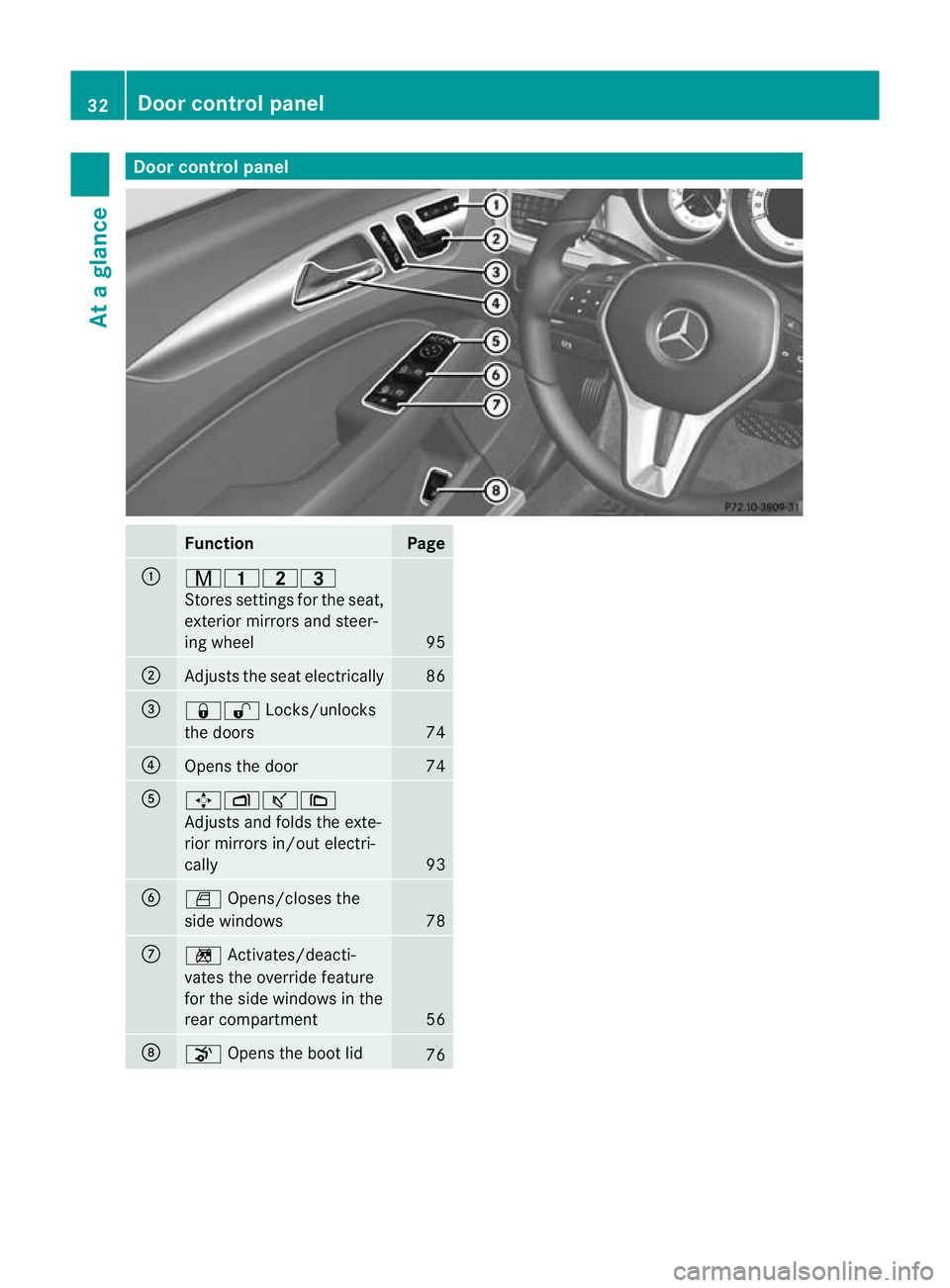
Door control panel
Function Page
:
r45=
Stores settings fo
rthe seat,
exterior mirrors and steer-
ing wheel 95
;
Adjusts the seat electrically 86
=
&%
Locks/unlocks
the doors 74
?
Opens the door 74
A
7Zª\
Adjusts and folds the exte-
rior mirrors in/out electri-
cally
93
B
W
Opens/closes the
side windows 78
C
n
Activates/deacti-
vates the override feature
for the side windows in the
rear compartment 56
D
o
Opens the boot lid 7632
Doorc
ontrol panelAt a glance
Page 66 of 337
At speeds up to approximately 70 km/h,
PRE-SAFE ®
Brake may also detect stationary
obstacles, for example stoppe dorparked
vehicles. G
Ris
kofa ccident
If, in a critical driving situation, you do not
receive a visual and acoustic warning:
R PRE-SAFE ®
Brake did no tdetec tthe risk of
a collision
R PRE-SAFE ®
Brake is switched off
R PRE-SAFE ®
Brake has failed
You must then brake to avoid a collision.
X To activate/deactivate: activate or deac-
tivate PRE-SAFE ®
Brake in the on-board
computer (Y page 204).
After activation, the Äsymbol is dis-
played on the left in the instrumentc luster.
The radar sensor system is switched off auto-
matically in the vicinity of radio telescope
facilities ( Ypage 327).
Vehicles without COMAND and navigation,
and vehicles for Australia: near radio tele-
scope installations, the radar sensor system
must be switched off with the on-board com-
puter (Y page 210).
For PRE-SAFE ®
Brake to assist you when driv-
ing, the radar sensor system must be
switched on (Y page 210) and operational.
PRE-SAFE ®
Brake does not always detect
complex traffic situations properly. You can
terminate the braking action of PRE-SAFE ®
Brake in a non-critical driving situation at any
time if:
R an acoustic and visual warning occurs.
R the vehicle brakes.
To end this, you can either depress the accel-
erator pedal further, activate kickdown or
release the brake pedal. The braking action of PRE-SAFE
®
Brake is
ended automatically if:
R you manoeuvre to avoid the obstacle.
R you drive slower than approximately
15 km/h.
R there is no longer an obstacle detected in
front of your vehicle.
R there is no longer any dange rofacollision.
Following a collisio norcollision-related dam-
age to the front end of the vehicle, have the
configuration and operation of the radar sen-
sors checked. Choose a qualified specialist
workshop which has the necessary specialist
knowledge and tools for the work required.
Mercedes-Benz recommends that you use a
Mercedes-Benz Service Centre for this pur-
pose. Anti-theft systems
Immobiliser
The immobiliser prevents your vehicle from
being started without the correc tkey.
X To activate with the key: remove the key
from the ignition lock.
X To activate with KEYLESS-GO: switch the
ignition off and open the driver's door.
X To deactivate: switch on the ignition.
i The immobiliser is always deactivated
when you start the engine. ATA (Anti-Theft Alarm system)
Av isual and audible alarm is triggered if the
alarm system is primed and you open:
R a door
R the vehicle with the emergency key ele-
ment
R the boot lid
R the bonnet
The alarm is not switched off, even if you
close the open door that has triggered it, for
example. Anti-theft systems
63Safety Z
Page 68 of 337
the vehicle is locked
.This occurs if someone
reaches into the vehicle interior, for example.
To activate:
X Make sure that:
R
the side windows are closed.
R the sliding sunroof is closed.
R there are no objects, e.g. mascots, hang-
ing on the rear-view mirror or on the grab
handles on the roof trim.
This will prevent false alarms.
X Make sure that all the doors and the tail-
gate are closed.
X Lock the vehicle with the key or KEYLESS-
GO.
To deactivate:
X Unlock the vehicle with the key or KEY-
LESS-GO.
The interior motion sensor is deactivated
automatically.
To prevent a false alarm, deactivate the inte-
rior motion sensor if you lock your vehicle
and:
R people or animals remain in the vehicle.
R the side windows remain open.
R the sliding sunroof remains open.
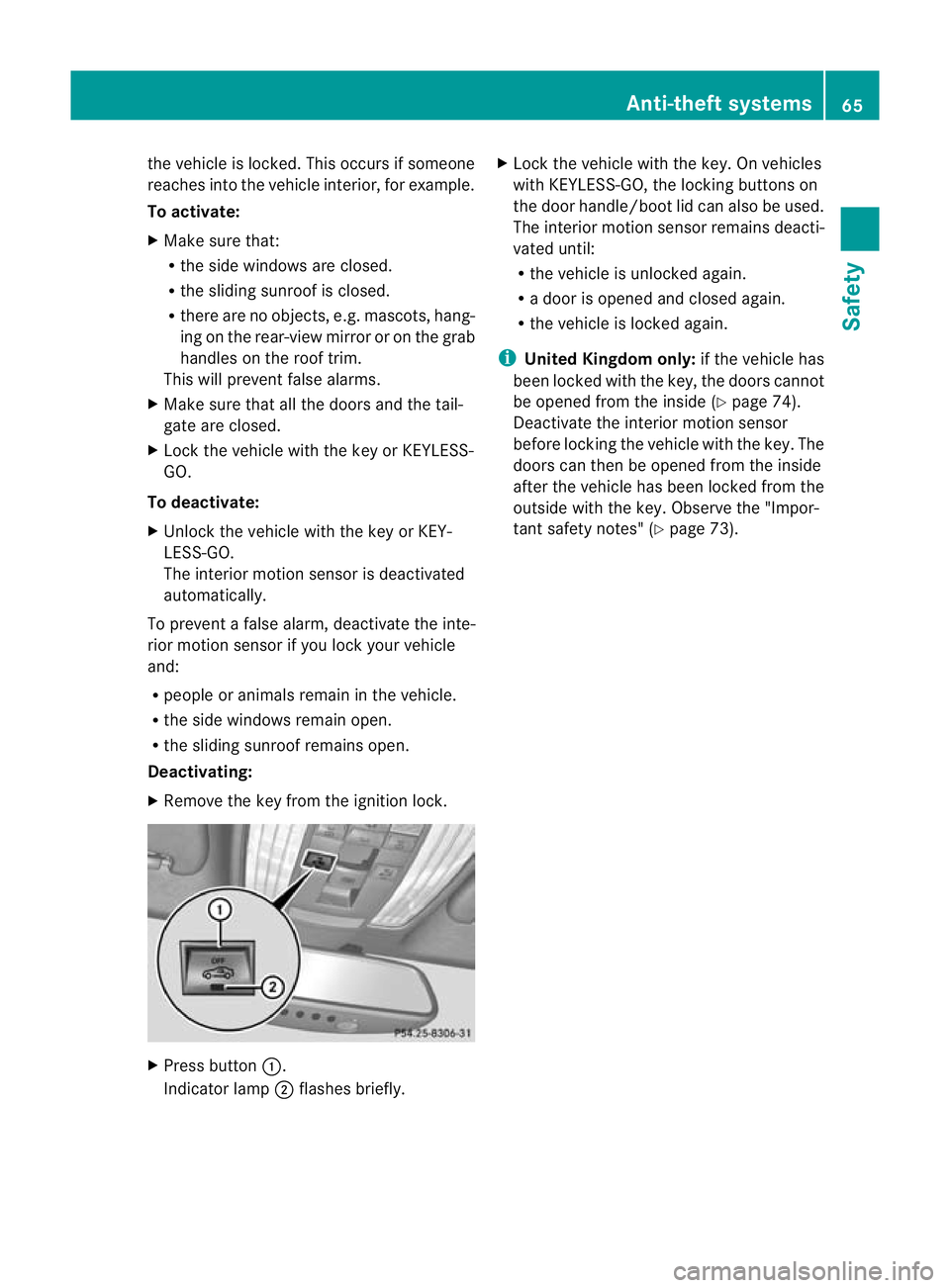
Deactivating:
X Remove the key from the ignition lock. X
Press button :.
Indicator lamp ;flashes briefly. X
Lock the vehicle with the key. On vehicles
with KEYLESS-GO, the locking buttons on
the door handle/boot lid can also be used.
The interior motion sensor remains deacti-
vated until:
R the vehicle is unlocked again.
R a door is opened and closed again.
R the vehicle is locked again.
i United Kingdom only: if the vehicle has
been locked with the key, the doors cannot
be opened from the inside (Y page 74).
Deactivate the interior motion sensor
before locking the vehicle with the key. The
doors can then be opened from the inside
after the vehicle has been locked from the
outside with the key. Observe the "Impor-
tant safety notes" (Y page 73). Anti-theft systems
65Safety Z
Page 70 of 337
Vehicle equipment
..............................68
Key ....................................................... 68
Doors .................................................... 73
Boot ...................................................... 75
Side windows ...................................... 78
Sliding sunroof .................................... 80 67Opening and closing
Page 71 of 337
Vehicle equipment
i This manual describes all the standard
and optional equipment of your vehicle
available at the time of publicatio nofthe
Owner's Manual. Country-specific differen-
ces are possible. Please note that your
vehicle may not be equipped with all fea-
tures described. This also applies to safety-
relevant systems and functions. Key
Key functions
Locking and unlocking centrally The key centrally locks/unlocks:
R
the doors
R the boot lid
R the fuel filler flap G
Risk of injury
Only for the United Kingdom: if the vehicle
has been locked with the key, the double lock
function is activated as standard. It is then not
possible to open the doors from inside the
vehicle.
Therefore, do not leave any people behind in
the vehicle, particularly children, elderly peo-
ple or people requiring special assistance, if
the vehicle has been locked with the key. As
a result, they may not be able to free them-
selves in the event of an emergency. They
could be seriously or even fatally injured by
prolonged exposure to extremely high or low
temperatures, for example. In this case, res-
cuing people from outside the vehicle is diffi-
cult.
Deactivate the interior motion sensor before
you lock the vehicle with the key. The doors
can then be opened from the inside after the
vehicle has been locked from the outside with
the key. If the vehicle has been locked with KEYLESS-
GO, the doors can be opened from inside the
vehicle. G
Risk of accident
If children are left unsupervised in the vehicle,
they could:
R open a door from inside the vehicle at any
time, even if it has been locked
R start the vehicle using akey which has been
left in the vehicle
R release the parking brake
They could thereby endanger themselves and
others. Never leave children unsupervised in
the vehicle. Always take the key with you
when leaving the vehicle, even if you are only
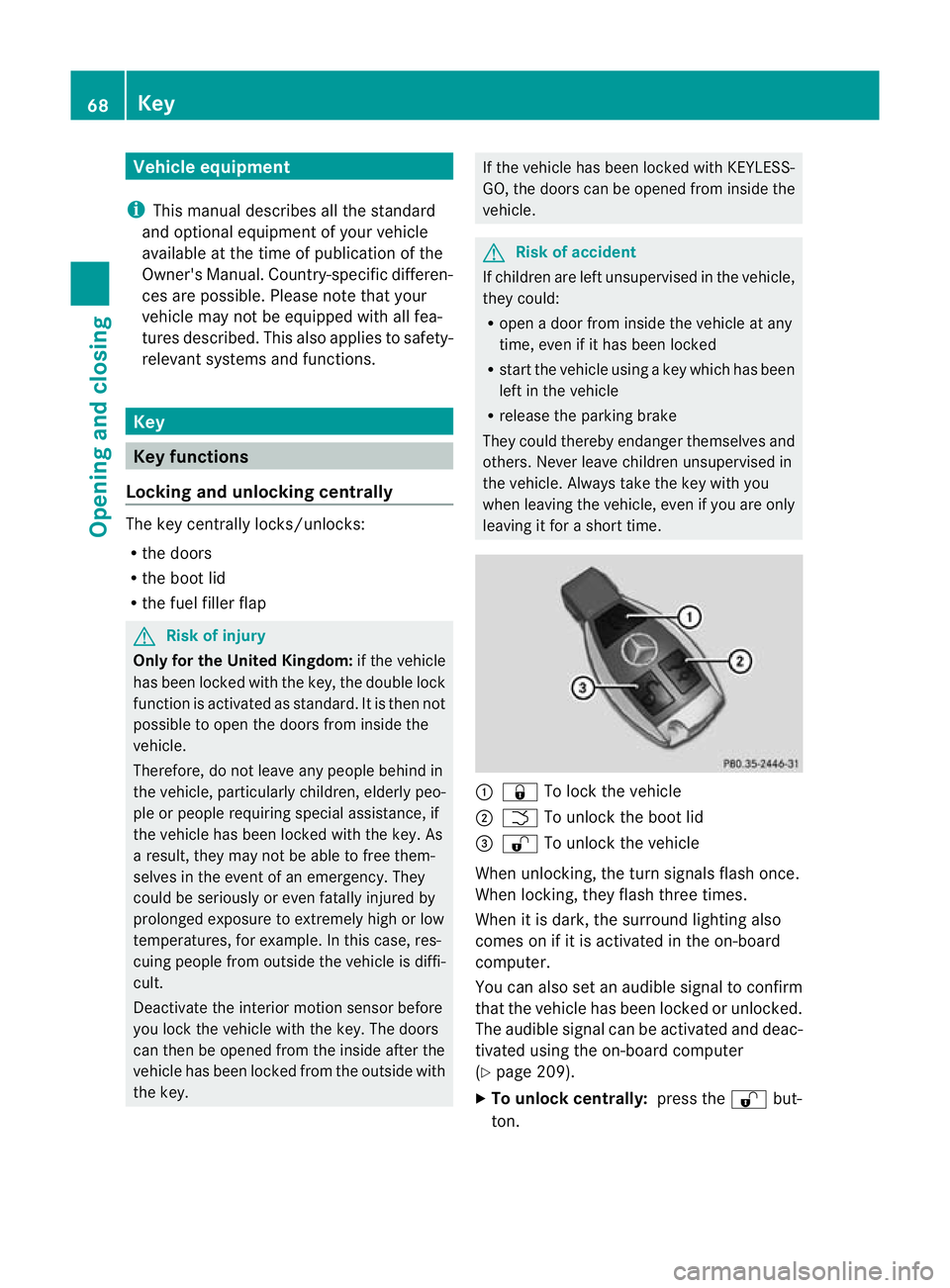
leaving it for a short time. :
& To lock the vehicle
; F To unlock the boot lid
= % To unlock the vehicle
When unlocking, the turn signals flash once.
When locking, they flash three times.
When it is dark, the surround lighting also
comes on if it is activated in the on-board
computer.
You can also set an audible signal to confirm
that the vehicle has been locked or unlocked.
The audible signal can be activated and deac-
tivated using the on-board computer
(Y page 209).
X To unlock centrally: press the%but-
ton. 68
KeyOpening and closing
Page 72 of 337
If you do not open
adoor or the boot lid within
approximately 40 seconds of unlocking the
vehicle:
R the vehicle is locked again.
R the anti-theft system is primed again.
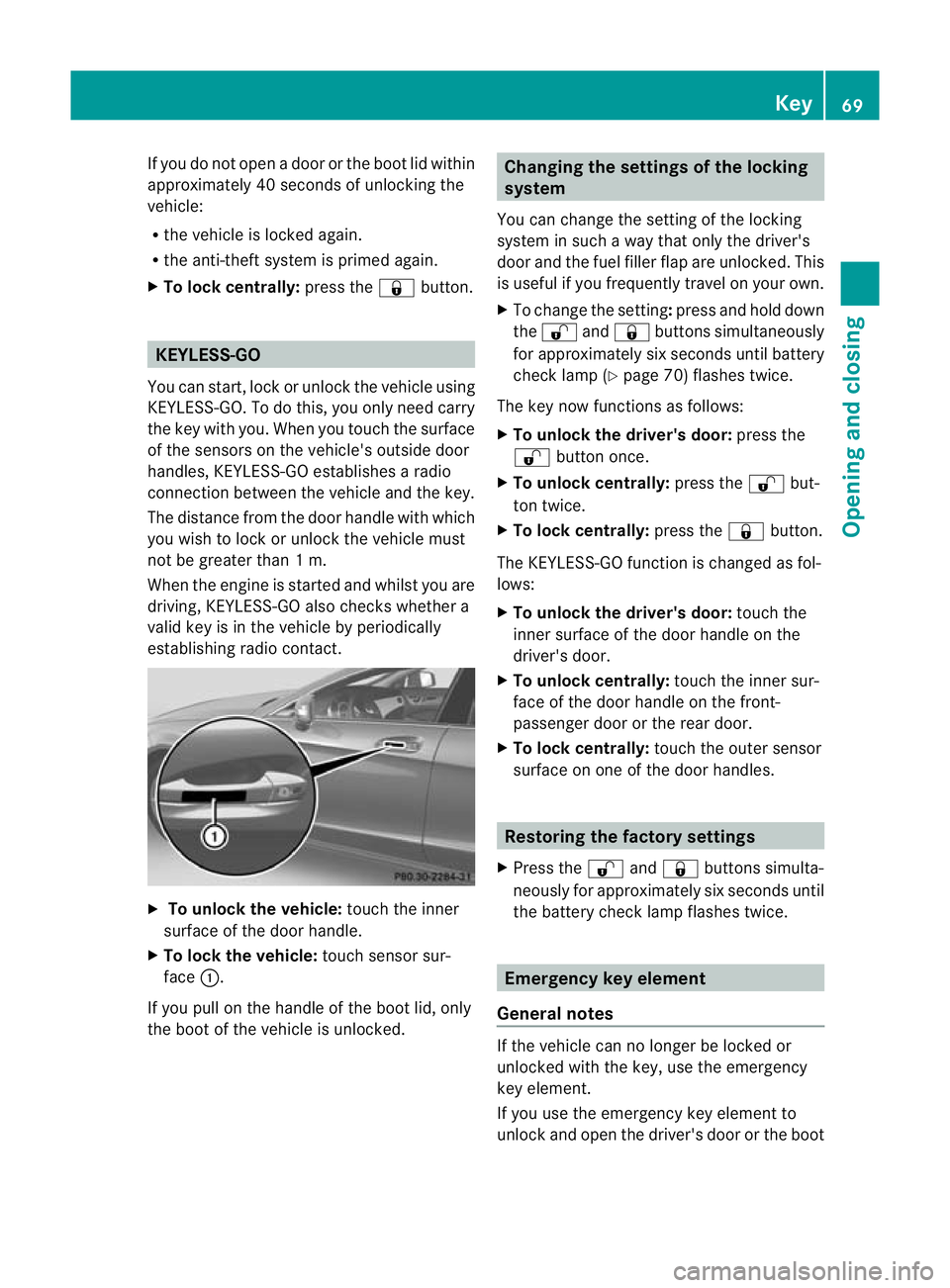
X To lock centrally: press the&button. KEYLESS-GO
You can start, lock or unlock the vehicle using
KEYLESS-GO. To do this, you only need carry
the key with you. When you touch the surface
of the sensors on the vehicle's outside door
handles, KEYLESS-GO establishes a radio
connection between the vehicle and the key.
The distance from the door handle with which
you wish to lock or unlock the vehicle must
not be greater than 1 m.
When the engine is started and whilst you are
driving, KEYLESS-GO also checks whether a
valid key is in the vehicle by periodically
establishing radio contact. X
To unlock the vehicle: touch the inner
surface of the door handle.
X To lock the vehicle: touch sensor sur-
face :.
If you pull on the handle of the boot lid, only
the boot of the vehicle is unlocked. Changing the settings of the locking
system
You can change the setting of the locking
system in such a way that only the driver's
door and the fuel filler flap are unlocked. This
is useful if you frequently travel on your own.
X To change the setting: press and hold down
the % and& buttons simultaneously
for approximately six seconds until battery
check lamp (Y page 70) flashes twice.
The key now functions as follows:
X To unlock the driver's door: press the
% button once.
X To unlock centrally: press the%but-
ton twice.
X To lock centrally: press the&button.
The KEYLESS-GO function is changed as fol-
lows:
X To unlock the driver's door: touch the
inner surface of the door handle on the
driver's door.
X To unlock centrally: touch the inner sur-
face of the door handle on the front-
passenger door or the rear door.
X To lock centrally: touch the outer sensor
surface on one of the door handles. Restoring the factory settings
X Press the %and& buttons simulta-
neously for approximately six seconds until
the battery check lamp flashes twice. Emergency key element
General notes If the vehicle can no longer be locked or
unlocked with the key, use the emergency
key element.
If you use the emergenc
ykey element to
unlock and open the driver's door or the boot Key
69Opening and closing Z