warning MERCEDES-BENZ CLS COUPE 2011 Repair Manual
[x] Cancel search | Manufacturer: MERCEDES-BENZ, Model Year: 2011, Model line: CLS COUPE, Model: MERCEDES-BENZ CLS COUPE 2011Pages: 337, PDF Size: 7.37 MB
Page 208 of 337
X
Press a.
The curren tselection is displayed.
X To activate/deactivate: pressa
again.
Activating/deactivating Lane Keeping
Assist You can use the
Lane Keep. Asst. function
to activate/deactivate Lane Keeping Assist
(Y page 185) or Active Lane Keeping Assist
(Y page 189).
X Press =or; on the steering wheel
to select the Assist. menu.
X Press 9or: to select Lane Keep.
Asst. .
X Press a.
If the function is activated, the road mark-
ings are shown in red in the multifunction
display.
X To activate/deactivate: pressa
again.
When Lane Keeping Assist or Active Lane
keeping Assist is activated, the multifunction
display shows the Ãsymbol when the igni-
tion is switched on. Service menu
In the
Service menu you can:
R call up display messages ( Ypage 215)
R reset the tyre pressure loss warning system
(Y page 306) or check the tyre pressure
electronically (Y page 307)
R call up the service due date (Y page 270) Setup menu
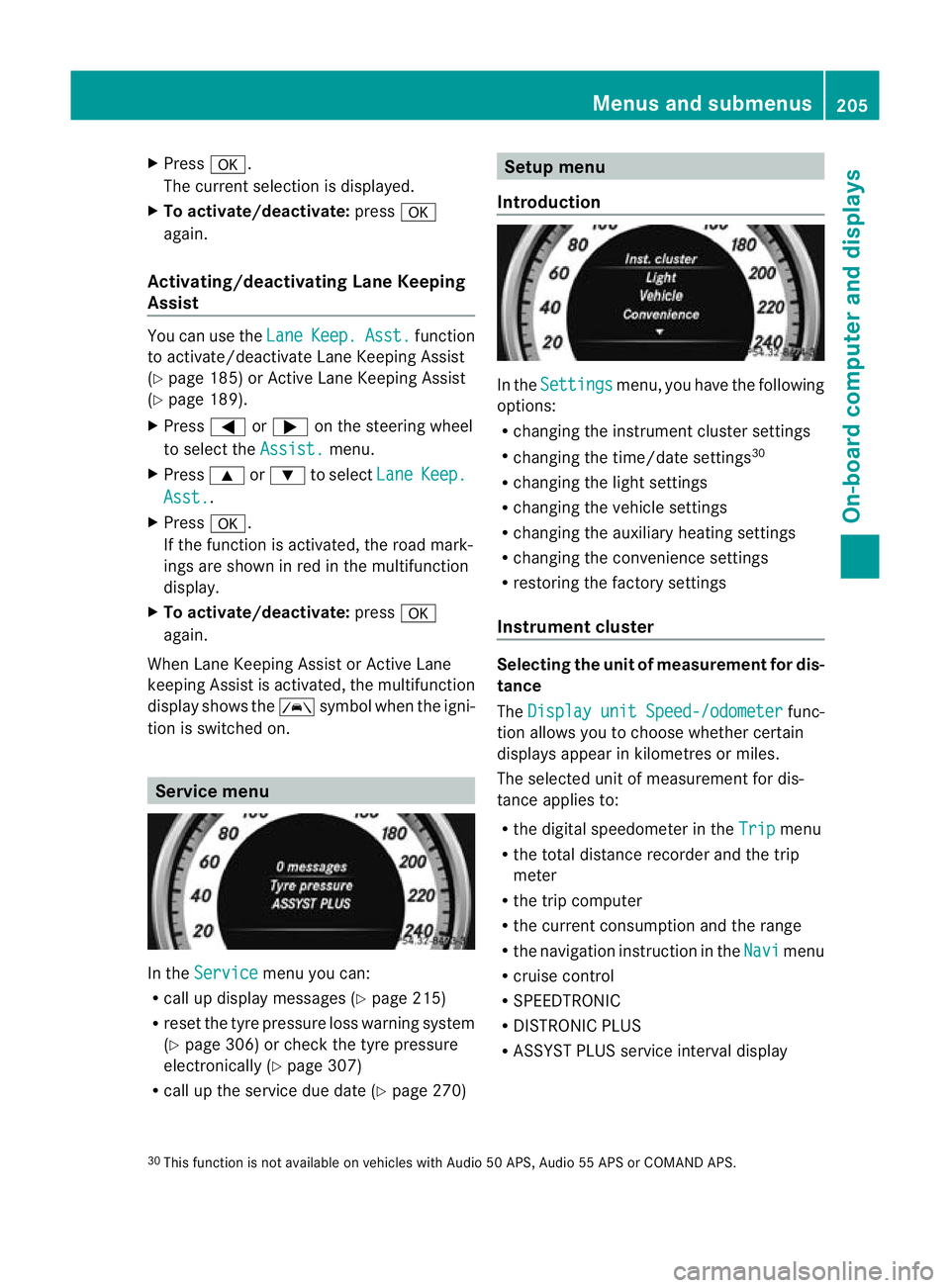
Introduction In the
Settings menu, you have the following
options:
R changing the instrument cluster settings
R changing the time/date settings 30
R changing the light settings
R changing the vehicle settings
R changing the auxiliary heating settings
R changing the convenience settings
R restoring the factory settings
Instrument cluster Selecting the unit of measurement for dis-
tance
The
Display unit Speed-/odometer func-
tion allows you to choose whether certain
displays appear in kilometres or miles.
The selected unit of measuremen tfor dis-
tance applies to:
R the digital speedometer in the Trip menu
R the total distance recorder and the trip
meter
R the trip computer
R the current consumption and the range
R the navigation instruction in the Navi menu
R cruise control
R SPEEDTRONIC
R DISTRONIC PLUS
R ASSYST PLUS service interval display
30 This function is not available on vehicles with Audio 50 APS, Audio 55 APS or COMAND APS. Menus and submenus
205On-board computer and displays Z
Page 218 of 337
Display messages
Hiding display messages
Display messages appear in th emultifunction display.
X Press the aor% buttonont he steering wheel to hide the display message.
The display message is cleared.
The multifunction display shows high-priority display messages in red.
You cannot hide display messages of the highest priority. The multifunction display shows
these messages continuously until the causes for the messages have been remedied.
Certain display messages are accompanied by an audible warning tone or a continuous tone.
Please respond in accordance with the display messages and follow the additional notes in
this Owner's Manual. Message memory
The on-board computer saves certain display messages. You can call up the display messages
in the message memory.
X Press the =or; button on the steering wheel to select the Serv. menu.
If there are display messages, the multifunction displays hows, for example,2 messages .
X Press the 9or: button to select the entry, e.g. 2 messages .
X Confirm with a.
X Press the 9or: button to scroll through the display messages.
When the ignition is switched off, all display messages are deleted apart from some high-
priority display messages. Once the causes of the high-priority display messages have been
rectified, the corresponding display messages are also deleted. Safety systems
Display messages Possible causes/consequences and
M Solutions
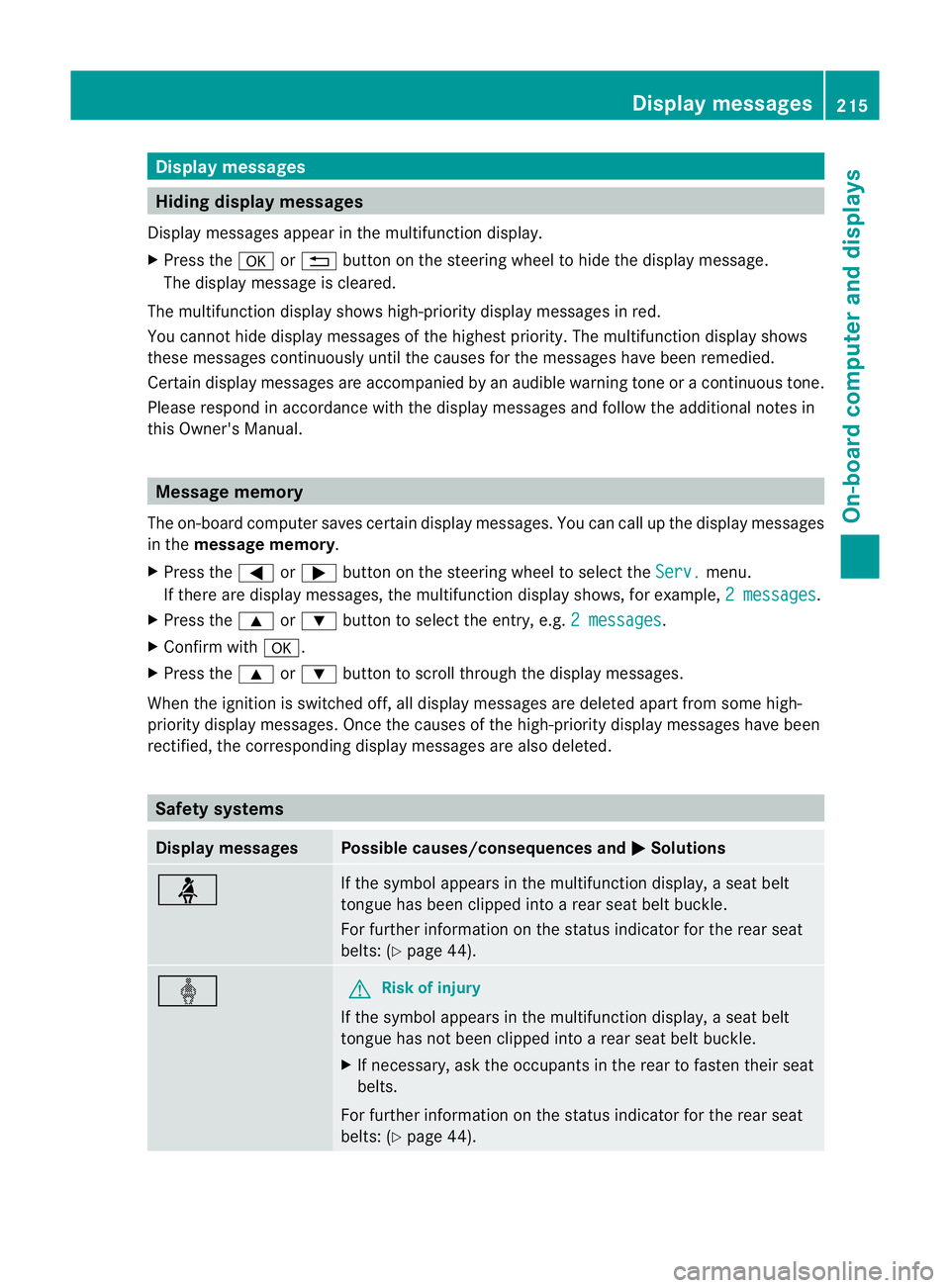
ü If the symbol appears in the multifunction display,
aseat belt
tongue has been clipped into a rear seat belt buckle.
For further information on the status indicator for the rear seat
belts: (Y page 44). ý G
Risk of injury
If the symbol appears in the multifunction display, aseat belt
tongue has not been clipped into a rear seat belt buckle.
X If necessary, ask the occupants in the rear to fasten their seat
belts.
For further information on the status indicator for the rear seat
belts: (Y page 44). Display messages
215On-board computer and displays Z
Page 219 of 337
Display messages Possible causes/consequences and
M Solutions
÷
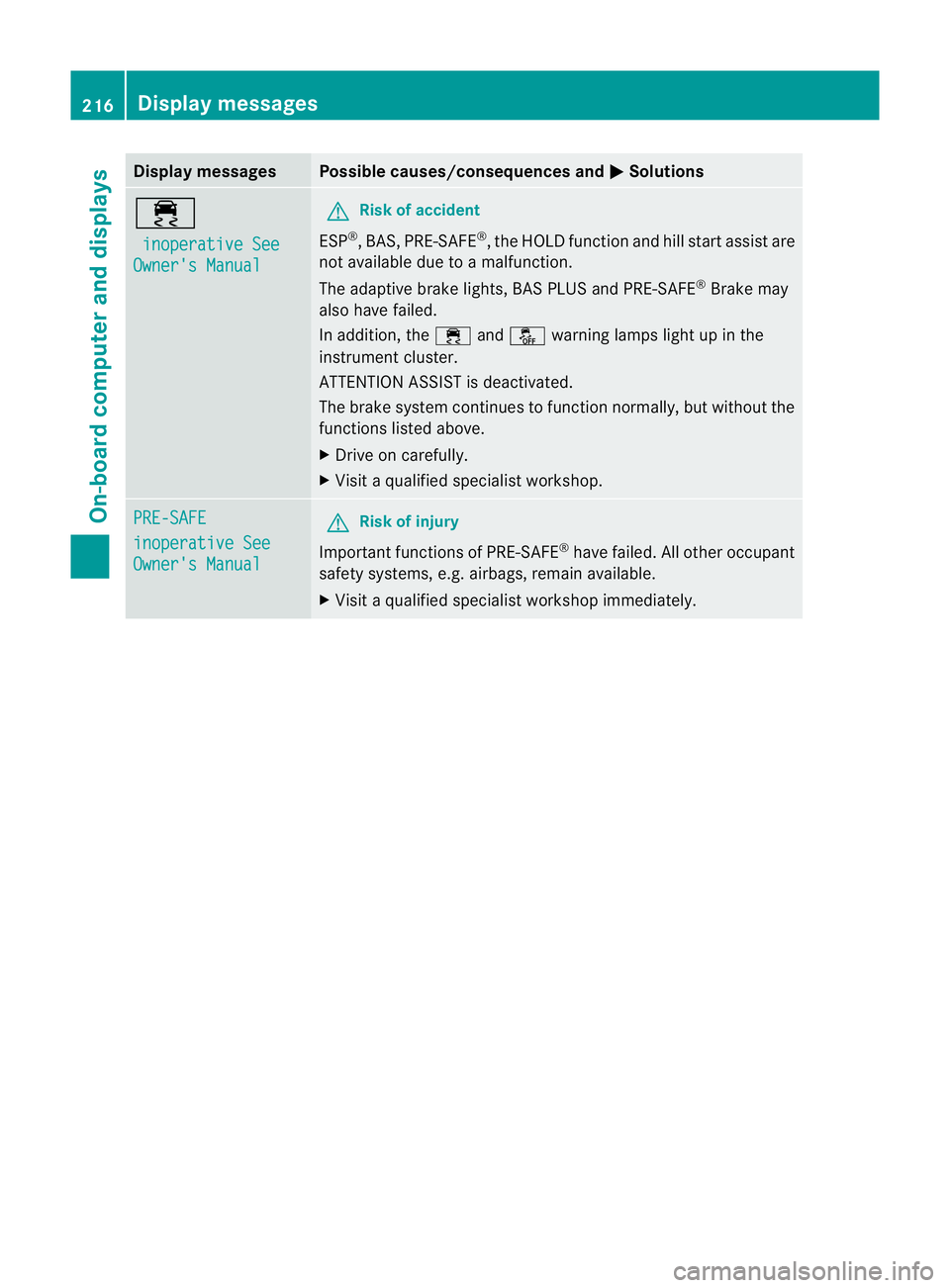
inoperative See Owner's Manual G
Risk of accident
ESP ®
,B AS, PRE-SAFE ®
, the HOLD functio nand hill start assist are
not available due to a malfunction.
The adaptive brake lights, BAS PLUS and PRE-SAFE ®
Brake may
also have failed.
In addition, the ÷andå warning lamps light up in the
instrument cluster.
ATTENTION ASSIST is deactivated.
The brake system continue sto function normally, but without the
functions listed above.
X Drive on carefully.
X Visit a qualified specialist workshop. PRE-SAFE
inoperative See
Owner's Manual G
Risk of injury
Important functions of PRE-SAFE ®
have failed. All other occupant
safety systems, e.g. airbags, remain available.
X Visit a qualified specialist workshop immediately. 216
Display messagesOn-board computer and displays
Page 220 of 337
Display messages Possible causes/consequences and
M Solutions
PRE-SAFE
Functions cur‐
rently limited See
Owner's Manual G
Risk of accident
PRE-SAFE ®
Brake is temporarily inoperative if:
R the DISTRONIC PLUS cover in the radiator grille is dirty.
R the sensors in the bumpers are dirty.
R its function is impaired due to heavy rain or snow.
R the rada rsensor system is temporarily inoperative, e.g. due to
electromagnetic radiation emitted by nearby TV or radio sta-
tions or other sources of electromagnetic radiation.
R you deactivate ESP ®33
R the system is outside the operating temperature range.
R the on-board voltage is too low.
PRE-SAFE ®
Brake is operational again and the display message
disappears if:
R the dirt (e.g. slush) drops away while the vehicle is in motion.
R the system detects that the sensors are fully available again.
R Reactivate ESP ®33
.
R the system is within the operating temperature range.
If the display message continues to be displayed:
X Clean the DISTRONIC PLUS cover in the radiator grille
(Y page 274).
X Clean the bumpers (Y page 274).
X Restart the engine.
X Wait until the battery is sufficiently charged. PRE-SAFE
Functions limited
See Owner's Manual G
Risk of accident
PRE-SAFE ®
Brake is faulty. BASP LUS or the distance warning sig-
nal may also have failed.
X Visit a qualified specialist workshop. Child seat in
wrong position
See Owner's Manual G
Risk of injury
Vehicles with automatic child seat recognition on the front-
passenger seat: the child seat is positioned incorrectly.
X Fit the child seat in the correct position. 33
AMG vehicles only. Display messages
217On-board computer and displays Z
Page 221 of 337
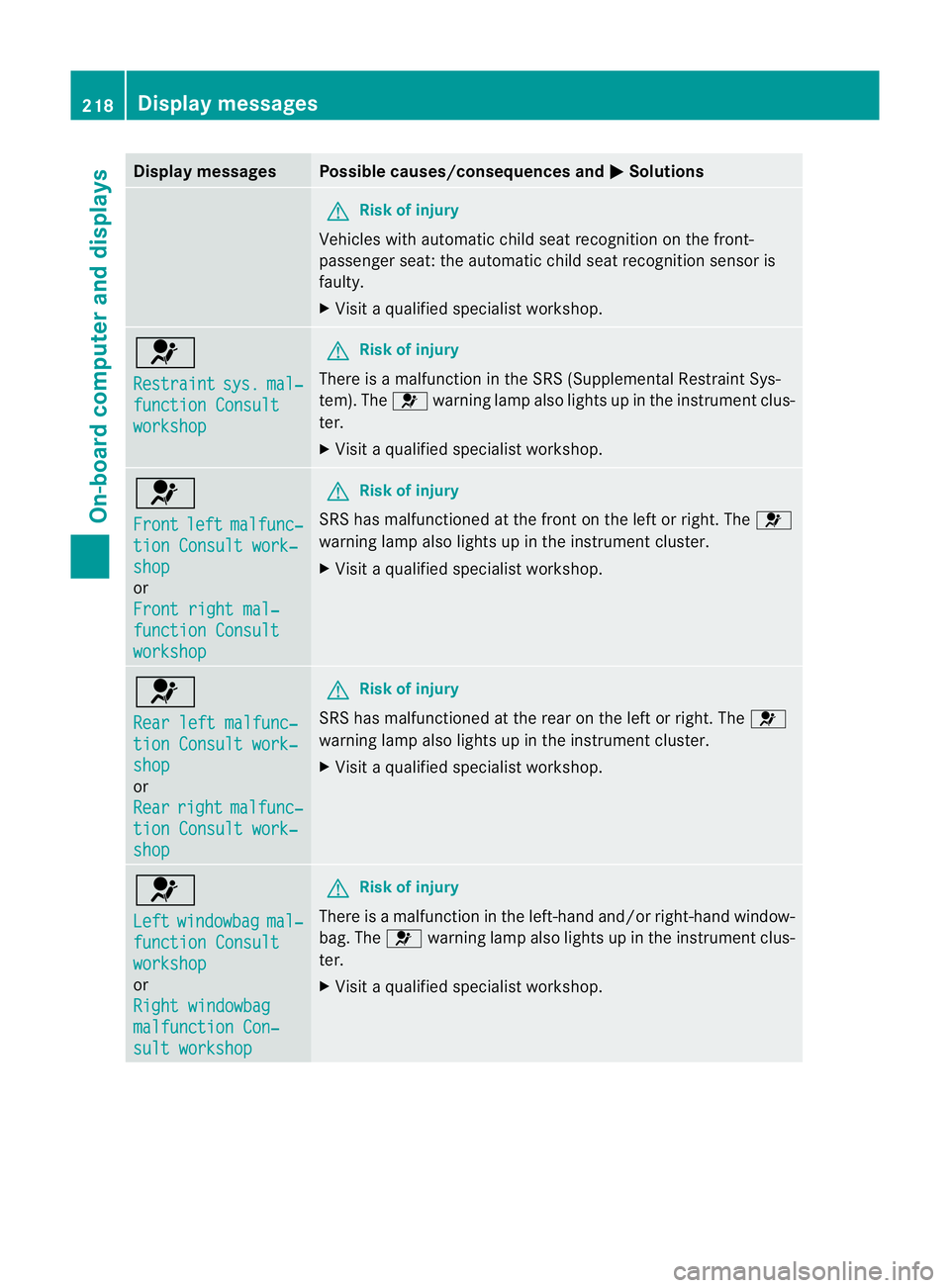
Display messages Possible causes/consequences and
M Solutions
G
Risk of injury
Vehicles with automati cchild seat recognition on the front-
passenger seat: the automatic child seat recognition sensor is
faulty.
X Visit a qualified specialist workshop. 6
Restraint
sys. mal‐
function Consult
workshop G
Risk of injury
There is a malfunction in the SRS (Supplemental Restraint Sys-
tem). The 6warning lamp also lights up in the instrumentc lus-
ter.
X Visit a qualified specialist workshop. 6
Front
left malfunc‐
tion Consult work‐
shop
or
Front right mal‐
function Consult
workshop G
Risk of injury
SRS has malfunctione dat the front on the left or right. The 6
warning lamp also lights up in the instrument cluster.
X Visi taqualified specialist workshop. 6
Rear left malfunc‐
tion Consult work‐
shop
or
Rear
right malfunc‐
tion Consult work‐
shop G
Risk of injury
SRS has malfunctioned at the rear on the left or right. The 6
warning lamp also lights up in the instrument cluster.
X Visit a qualified specialist workshop. 6
Left
windowbag mal‐
function Consult
workshop
or
Right windowbag
malfunction Con‐
sult workshop G
Risk of injury
There is a malfunction in the left-hand and/or right-hand window-
bag. The 6warning lamp also lights up in the instrument clus-
ter.
X Visit a qualified specialist workshop. 218
Display messagesOn-board computer and displays
Page 222 of 337
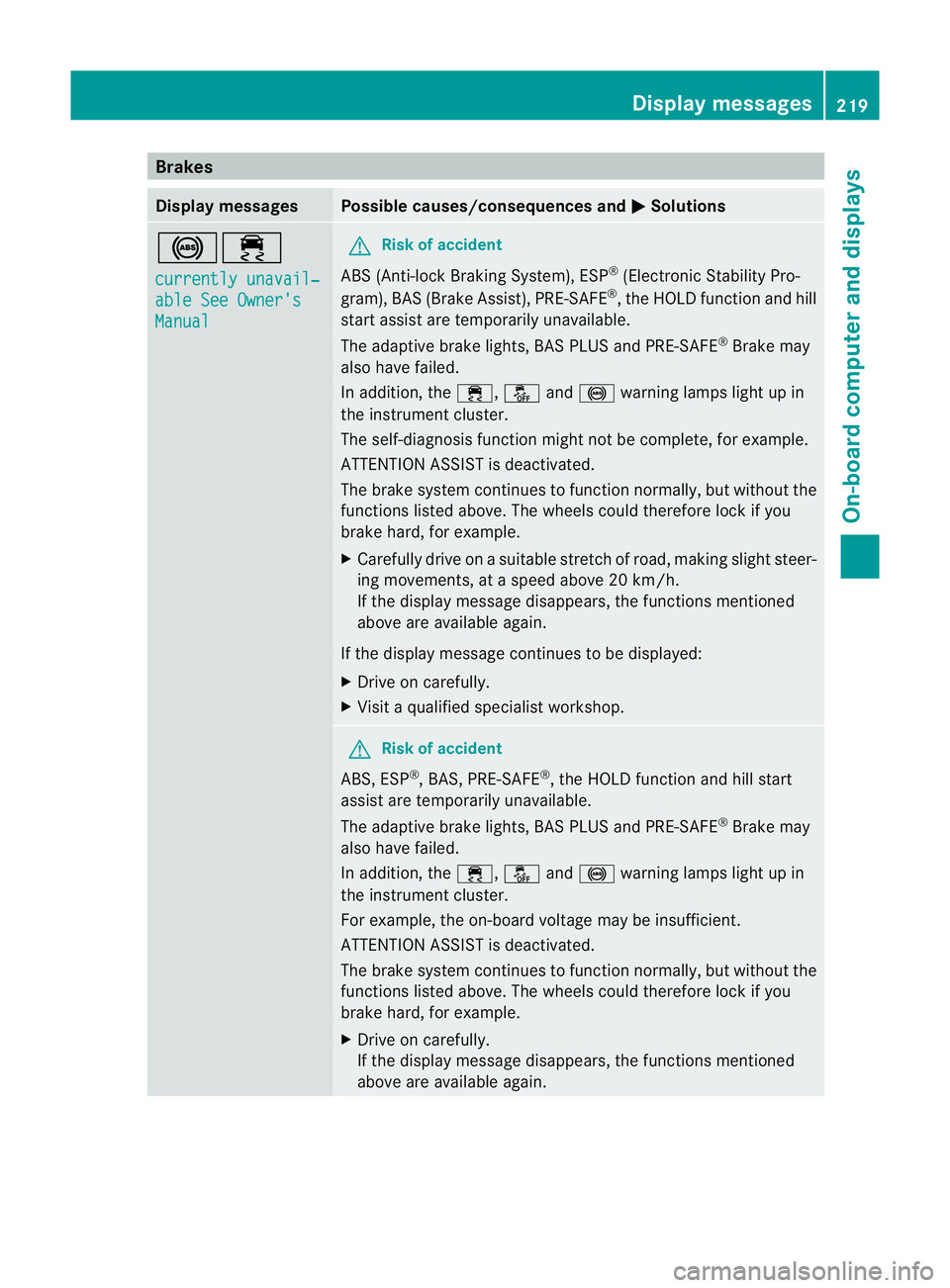
Brakes
Display messages Possible causes/consequences and
M Solutions
!÷
currently unavail‐
able See Owner's
Manual G
Ris
kofa ccident
ABS (Anti-lock Braking System), ESP ®
(Electronic Stability Pro-
gram), BA S(Brake Assist), PRE-SAFE ®
, the HOLD function and hill
star tassist are temporarily unavailable.
The adaptive brake lights, BAS PLUS and PRE-SAFE ®
Brake may
also have failed.
In addition, the ÷,åand! warning lamps light up in
the instrument cluster.
The self-diagnosis function might not be complete, for example.
ATTENTION ASSIST is deactivated.
The brake system continues to function normally, but without the
functions listed above. The wheels could therefore lock if you
brake hard, for example.
X Carefully drive on a suitable stretch of road, making slight steer-
ing movements, at a speed above 20 km/h.
If the display message disappears, the functions mentioned
above are available again.
If the display message continues to be displayed:
X Drive on carefully.
X Visit a qualified specialist workshop. G
Risk of accident
ABS, ESP ®
, BAS, PRE-SAFE ®
, the HOLD function and hill start
assist are temporarily unavailable.
The adaptive brake lights, BAS PLUS and PRE-SAFE ®
Brake may
also have failed.
In addition, the ÷,åand! warning lamps light up in
the instrument cluster.
For example, the on-board voltage may be insufficient.
ATTENTION ASSIST is deactivated.
The brake system continues to function normally, but without the
functions listed above. The wheels could therefore lock if you
brake hard, for example.
X Drive on carefully.
If the display message disappears, the functions mentioned
above are available again. Display messages
219On-board computer and displays Z
Page 223 of 337
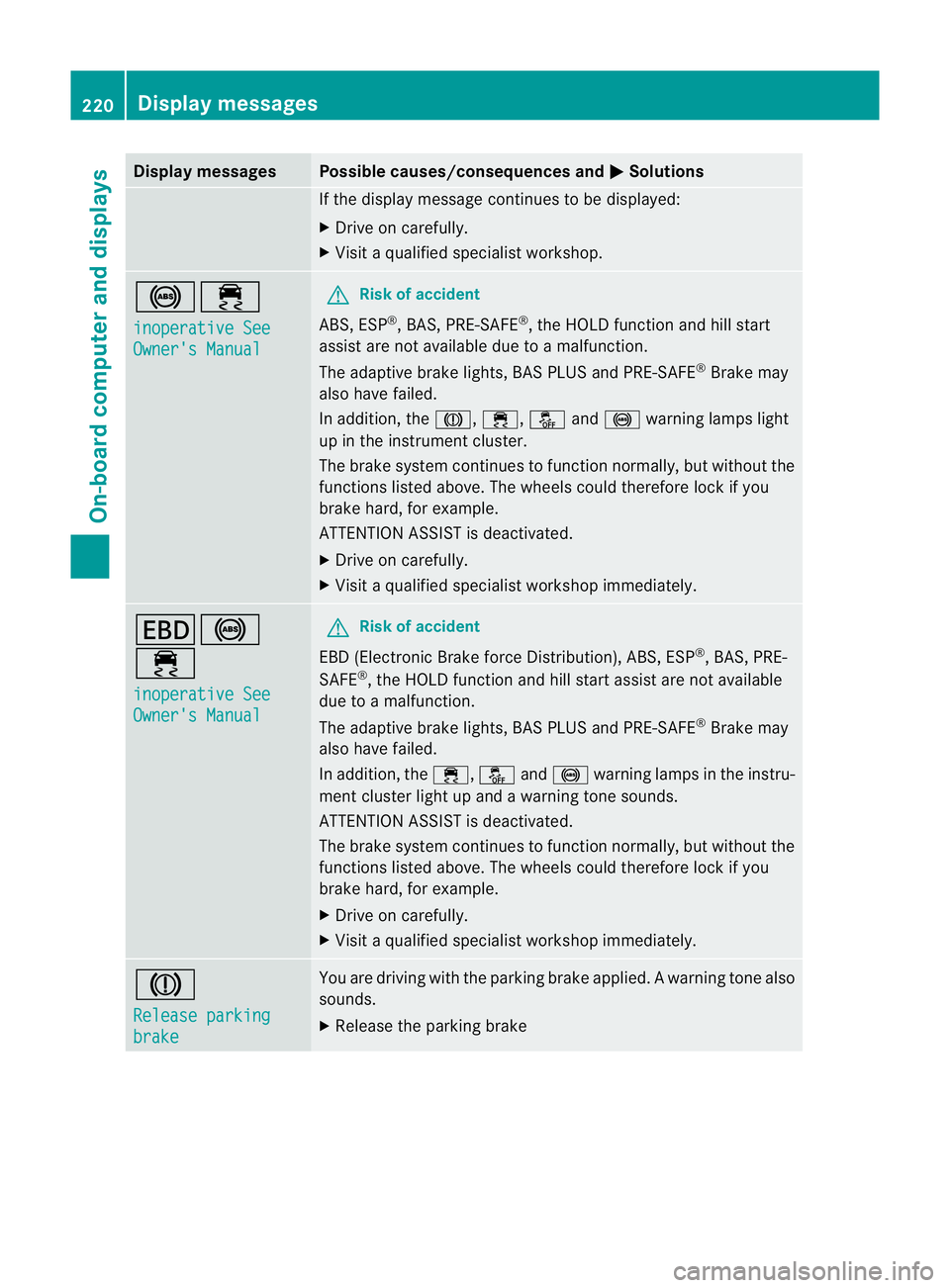
Display messages Possible causes/consequences and
M Solutions
If the display message continues to be displayed:
X
Drive on carefully.
X Visit a qualified specialist workshop. !÷
inoperative See
Owner's Manual G
Risk of accident
ABS, ESP ®
, BAS, PRE-SAFE ®
, the HOLD function and hill start
assist are no tavailable due to a malfunction.
The adaptive brake lights, BAS PLUS and PRE-SAFE ®
Brake may
also have failed.
In addition, the J,÷,åand! warning lamps light
up in the instrument cluster.
The brake system continues to function normally, but without the
functions listed above. The wheels could therefore lock if you
brake hard, for example.
ATTENTION ASSIST is deactivated.
X Drive on carefully.
X Visi taqualified specialist workshop immediately. T!
÷
inoperative See
Owner's Manual G
Risk of accident
EBD (Electronic Brake force Distribution), ABS, ESP ®
, BAS, PRE-
SAFE ®
, the HOLD function and hill start assist are not available
due to a malfunction.
The adaptive brake lights, BAS PLUS and PRE-SAFE ®
Brake may
also have failed.
In addition, the ÷,åand! warning lamps in the instru-
ment cluster light up and a warning tone sounds.
ATTENTION ASSIST is deactivated.
The brake system continues to function normally, but without the
functions listed above. The wheels could therefore lock if you
brake hard, for example.
X Drive on carefully.
X Visit a qualified specialist workshop immediately. J
Release parking
brake You are driving with the parking brake applied.
Awarning tone also
sounds.
X Release the parking brake 220
Display messagesOn-board computer and displays
Page 224 of 337
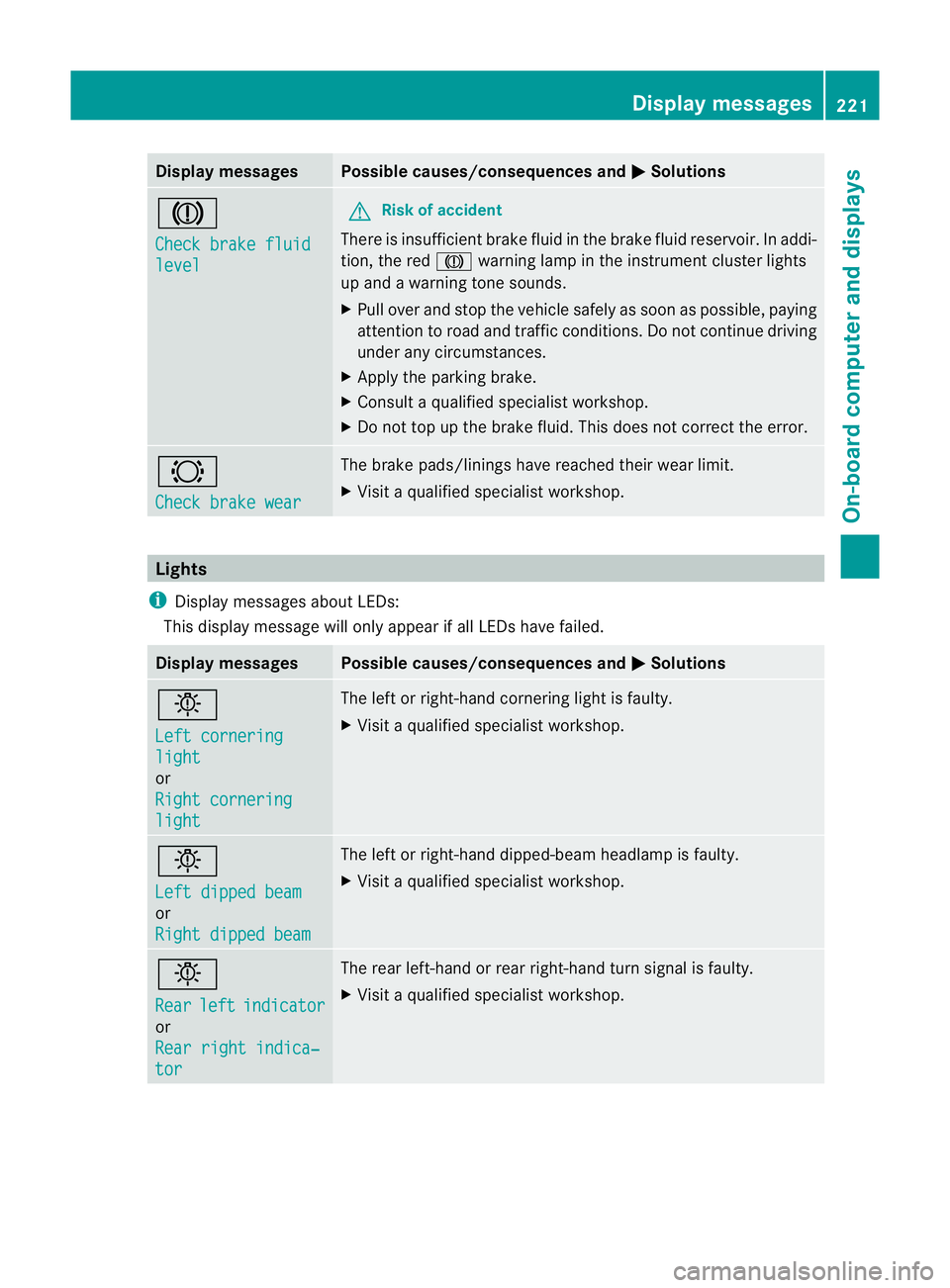
Display messages Possible causes/consequences and
M Solutions
J
Check brake fluid
level G
Risk of accident
There is insufficien tbrake fluid in the brake fluid reservoir. In addi-
tion, the red Jwarning lamp in the instrument cluster lights
up and a warning tone sounds.
X Pull over and stop the vehicle safely as soon as possible, paying
attention to road and traffic conditions. Do not continue driving
under any circumstances.
X Apply the parking brake.
X Consult a qualified specialist workshop.
X Do not top up the brake fluid. This does not correct the error. #
Check brake wear The brake pads/linings have reached their wearl
imit.
X Visit a qualified specialist workshop. Lights
i Display messages about LEDs:
This display message will only appear if all LEDs have failed. Displa
ymessages Possible causes/consequences and
M Solutions
b
Left cornering
light
or
Right cornering
light The left or right-hand cornering light is faulty.
X
Visit a qualified specialist workshop. b
Left dipped beam
or
Right dipped beam The left or right-hand dipped-beam headlamp is faulty.
X
Visit a qualified specialist workshop. b
Rear
left indicator
or
Rear right indica‐
tor The rear left-hand or rear right-hand tur
nsignal is faulty.
X Visit a qualified specialist workshop. Display messages
221On-board computer and displays Z
Page 226 of 337
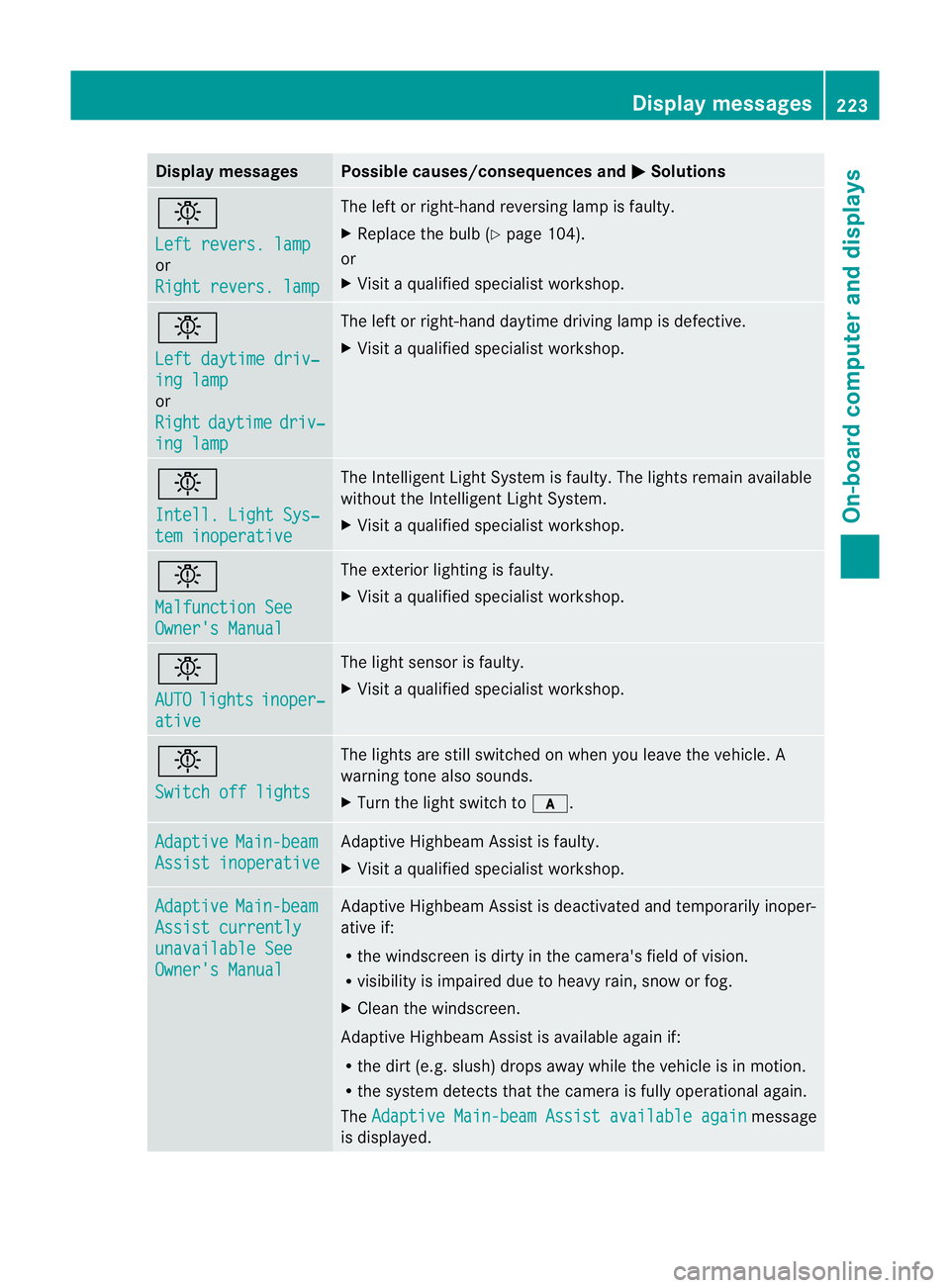
Display messages Possible causes/consequences and
M Solutions
b
Left revers. lamp
or
Right revers. lamp The lef
torright-hand reversing lamp is faulty.
X Replace the bulb (Y page 104).
or
X Visit a qualified specialist workshop. b
Left daytime driv‐
ing lamp
or
Right
daytime driv‐
ing lamp The left or right-hand daytime driving lamp is defective.
X
Visit a qualified specialist workshop. b
Intell. Light Sys‐
tem inoperative The Intelligent Light System is faulty. The lights remain available
without the Intelligent Light System.
X
Visit a qualified specialist workshop. b
Malfunction See
Owner's Manual The exterior lighting is faulty.
X
Visit a qualified specialist workshop. b
AUTO
lights inoper‐
ative The light sensor is faulty.
X
Visit a qualified specialist workshop. b
Switch off lights The lights are still switched on when you leave the vehicle. A
warning tone also sounds.
X
Turn the light switch to c.Adaptive Main-beam
Assist inoperative Adaptive Highbeam Assist is faulty.
X
Visit a qualified specialist workshop. Adaptive Main-beam
Assist currently
unavailable See
Owner's Manual Adaptive Highbeam Assist is deactivated and temporarily inoper-
ative if:
R
the windscreen is dirty in the camera's field of vision.
R visibility is impaired due to heavy rain, snow or fog.
X Clean the windscreen.
Adaptive Highbeam Assist is available again if:
R the dirt (e.g .slush) drops away while the vehicle is in motion.
R the system detects that the camera is fully operational again.
The Adaptive Main-beam Assist available again message
is displayed. Display messages
223On-board computer and displays Z
Page 227 of 337
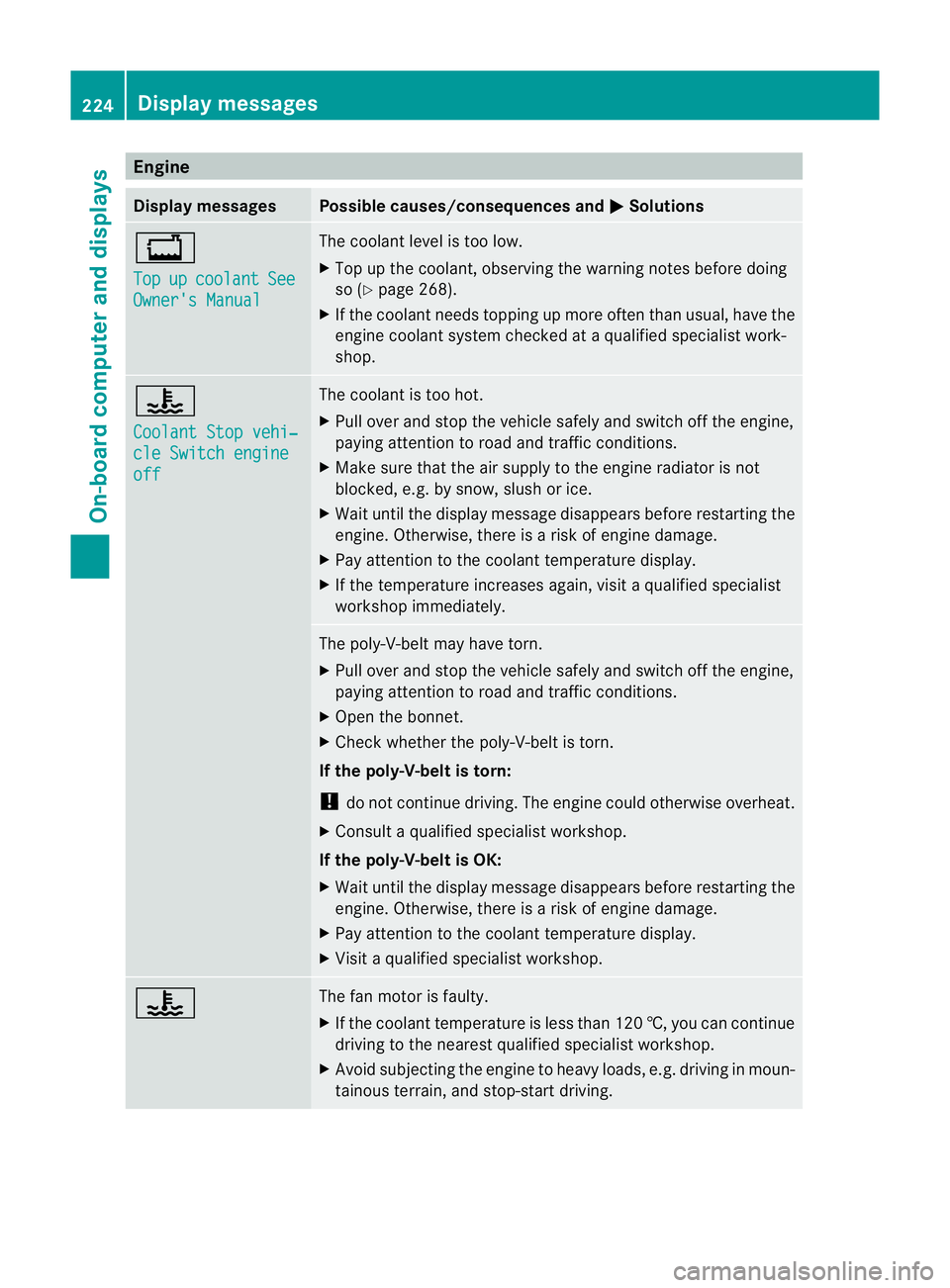
Engine
Display messages Possible causes/consequences and
M Solutions
+
Top
up coolant See
Owner's Manual The coolant level is too low.
X
Top up the coolant, observing the warning notes before doing
so (Y page 268).
X If the coolant needs topping up more often than usual, have the
engine coolant system checked at a qualified specialist work-
shop. ?
Coolant Stop vehi‐
cle Switch engine
off The coolant is too hot.
X
Pull ove rand stop the vehicle safely and switch off the engine,
paying attention to road and traffic conditions.
X Make sure tha tthe air supply to the engine radiator is not
blocked, e.g. by snow, slush or ice.
X Wait until the display message disappears before restartingt he
engine. Otherwise, there is a risk of engine damage.
X Pay attention to the coolant temperature display.
X If the temperature increases again, visit a qualified specialist
workshop immediately. The poly-V-belt may have torn.
X
Pull over and stop the vehicle safely and switch off the engine,
paying attention to road and traffic conditions.
X Open the bonnet.
X Check whether the poly-V-belt is torn.
If the poly-V-belt is torn:
! do not continue driving. The engine could otherwise overheat.
X Consult a qualified specialist workshop.
If the poly-V-belt is OK:
X Wait until the display message disappears before restartingt he
engine. Otherwise, there is a risk of engine damage.
X Pay attention to the coolant temperature display.
X Visit a qualified specialist workshop. ? The fan motor is faulty.
X
If the coolant temperature is less than 120 †, you can continue
driving to the nearest qualified specialist workshop.
X Avoid subjecting the engine to heavy loads, e.g. driving in moun-
tainous terrain, and stop-start driving. 224
Display messagesOn-board computer and displays