light MERCEDES-BENZ CLS COUPE 2012 Owners Manual
[x] Cancel search | Manufacturer: MERCEDES-BENZ, Model Year: 2012, Model line: CLS COUPE, Model: MERCEDES-BENZ CLS COUPE 2012Pages: 373, PDF Size: 9.12 MB
Page 190 of 373
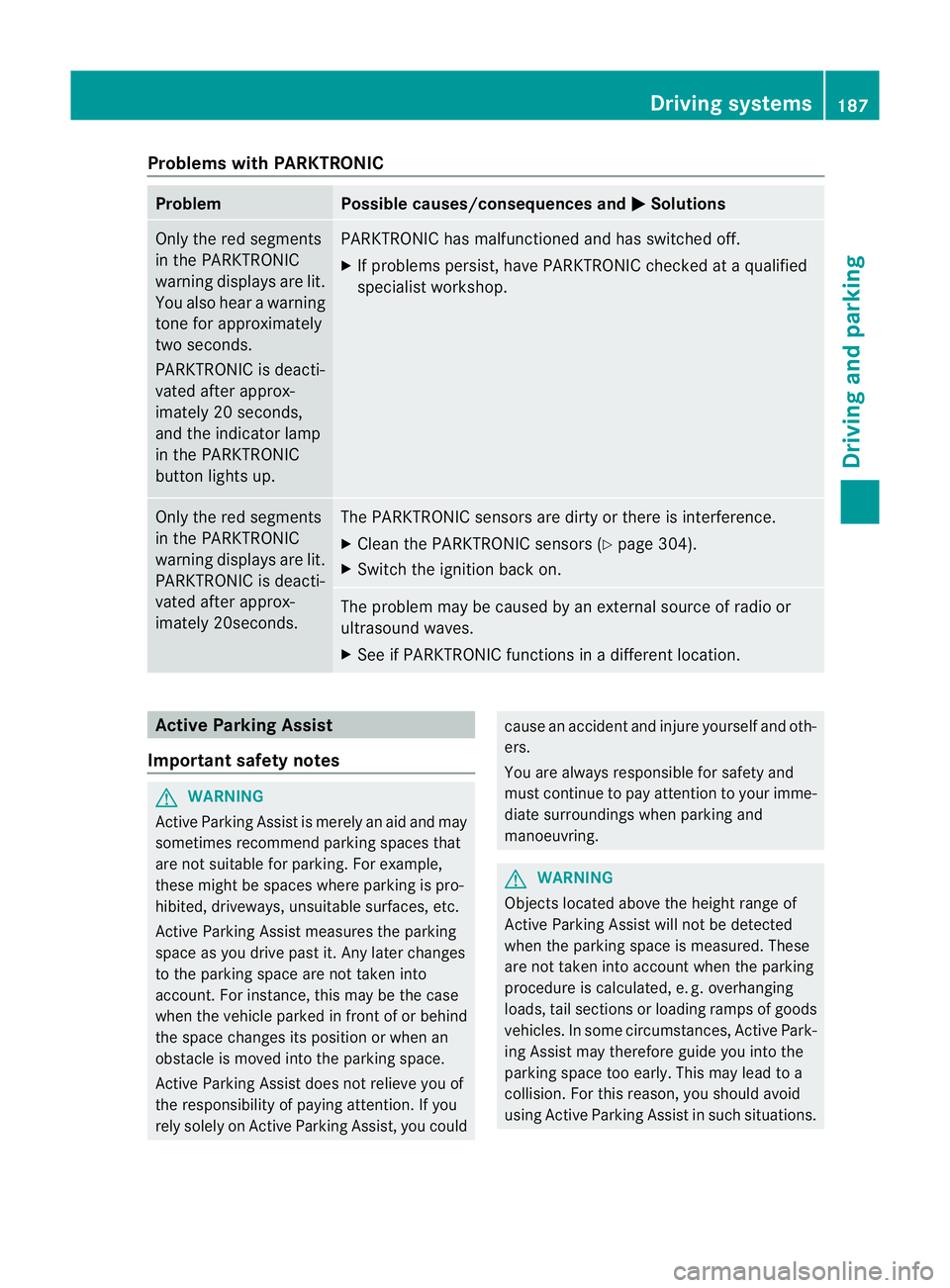
Problems with PARKTRONIC
Problem Possible causes/consequences and
M Solutions
Only the red segments
in the PARKTRONIC
warning displaysa
re lit.
You also hear awarning
tone for approximately
two seconds.
PARKTRONIC is deacti-
vated after approx-
imately 20 seconds,
and the indicator lamp
in the PARKTRONIC
button lights up. PARKTRONIC has malfunctioned and has switched off.
X
If problems persist, have PARKTRONIC checked at aqualified
specialist workshop. Only the red segments
in the PARKTRONIC
warning displaysa
re lit.
PARKTRONIC is deacti-
vated after approx-
imately 20seconds. The PARKTRONIC sensors are dirty or there is interference.
X
Cleant he PARKTRONIC sensors (Y page 304).
X Switch the ignition back on. The problem may be caused by an external source of radio or
ultrasound waves.
X
See if PARKTRONIC functions in adifferent location. Active Parking Assist
Important safety notes G
WARNING
Active Parking Assist is merely an aid and may
sometimes recommendp arking spaces that
are not suitable for parking. For example,
these might be spaces where parking is pro-
hibited, driveways, unsuitable surfaces, etc.
Active Parking Assist measures the parking
space as you drive past it. Any later changes
to the parking space are not taken into
account. For instance, this may be the case
when the vehicle parked in front of or behind
the space changes its position or when an
obstacle is moved into the parking space.
Active Parking Assist does not relieve you of
the responsibility of paying attention. If you
rely solely on Active Parking Assist, you could cause an accident and injure yourself and oth-
ers.
You are always responsible for safety and
must continue to pay attention to your imme-
diate surroundings when parking and
manoeuvring.
G
WARNING
Objectsl ocated above the height range of
Active Parking Assist will not be detected
when the parking space is measured. These
are not taken into account when the parking
procedure is calculated, e. g. overhanging
loads, tail sections or loading ramps of goods
vehicles. In some circumstances, Active Park-
ing Assist may therefore guide you into the
parking space too early. This may lead to a
collision. For this reason, you should avoid
using Active Parking Assist in such situations. Driving systems
187Driving and parking Z
Page 193 of 373
i
In tight parking spaces, you willa chieve
the best parking results by backing up as
far as possible. When doing so, also
observe the PARKTRONIC messages.
X Stop as soon as PARKTRONIC sounds the
continuous warning tone, if not before.
Manoeuvring may be required in tight park-
ing spaces.
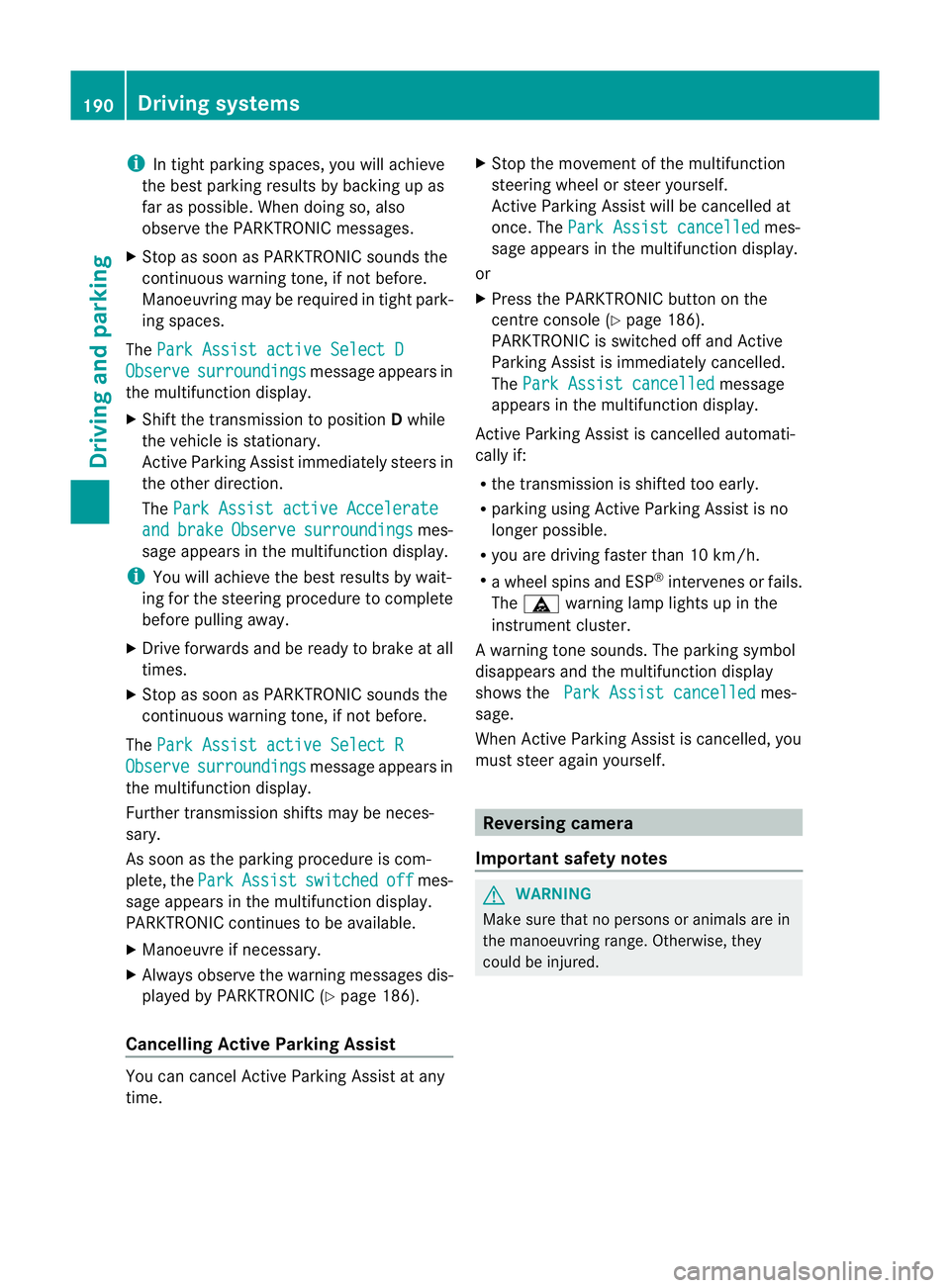
The Park Assist active Select D Observe surroundings messag
eappears in
the multifunction display.
X Shift the transmission to position Dwhile
the vehicle is stationary.
Active Parking Assist immediately steers in
the other direction.
The Park Assist active Accelerate and brake Observe surroundings mes-
sage appears in the multifunction display.
i You willa chieve the best results by wait-
ing for the steering procedure to complete
before pulling away.
X Drive forward sand be ready to brake at all
times.
X Stop as soon as PARKTRONIC sounds the
continuous warning tone, if not before.
The Park Assist active Select R Observe surroundings messag
eappears in
the multifunction display.
Further transmission shifts may be neces-
sary.
As soon as the parking procedure is com-
plete, the Park Assist switched off mes-
sage appears in the multifunction display.
PARKTRONIC continues to be available.
X Manoeuvre if necessary.
X Alwayso bserve the warning messages dis-
played by PARKTRONIC (Y page 186).
Cancelling Active Parking Assist You can cancel Active Parking Assist at any
time. X
Stop the movement of the multifunction
steering wheelors teer yourself.
Active Parking Assist willbec ancelled at
once. The Park Assist cancelled mes-
sage appears in the multifunction display.
or
X Press the PARKTRONIC button on the
centre console (Y page 186).
PARKTRONIC is switched off and Active
Parking Assist is immediately cancelled.
The Park Assist cancelled message
appears in the multifunction display.
Active Parking Assist is cancelled automati-
cally if:
R the transmission is shifted too early.
R parking using Active Parking Assist is no
longer possible.
R you are driving faster than 10 km/h.
R aw hee lspins and ESP ®
intervenes or fails.
The ä warning lamp lights up in the
instrument cluster.
Aw arning tone sounds. The parking symbol
disappears and th emultifunction display
shows the ParkA ssist cancelled mes-
sage.
When Activ eParking Assist is cancelled, you
must steer again yourself. Reversing camera
Important safety notes G
WARNING
Mak esure that no person soranimals are in
th em anoeuvrin grange. Otherwise, they
could be injured. 190
Driving systemsDriving and parking
Page 194 of 373
General notes
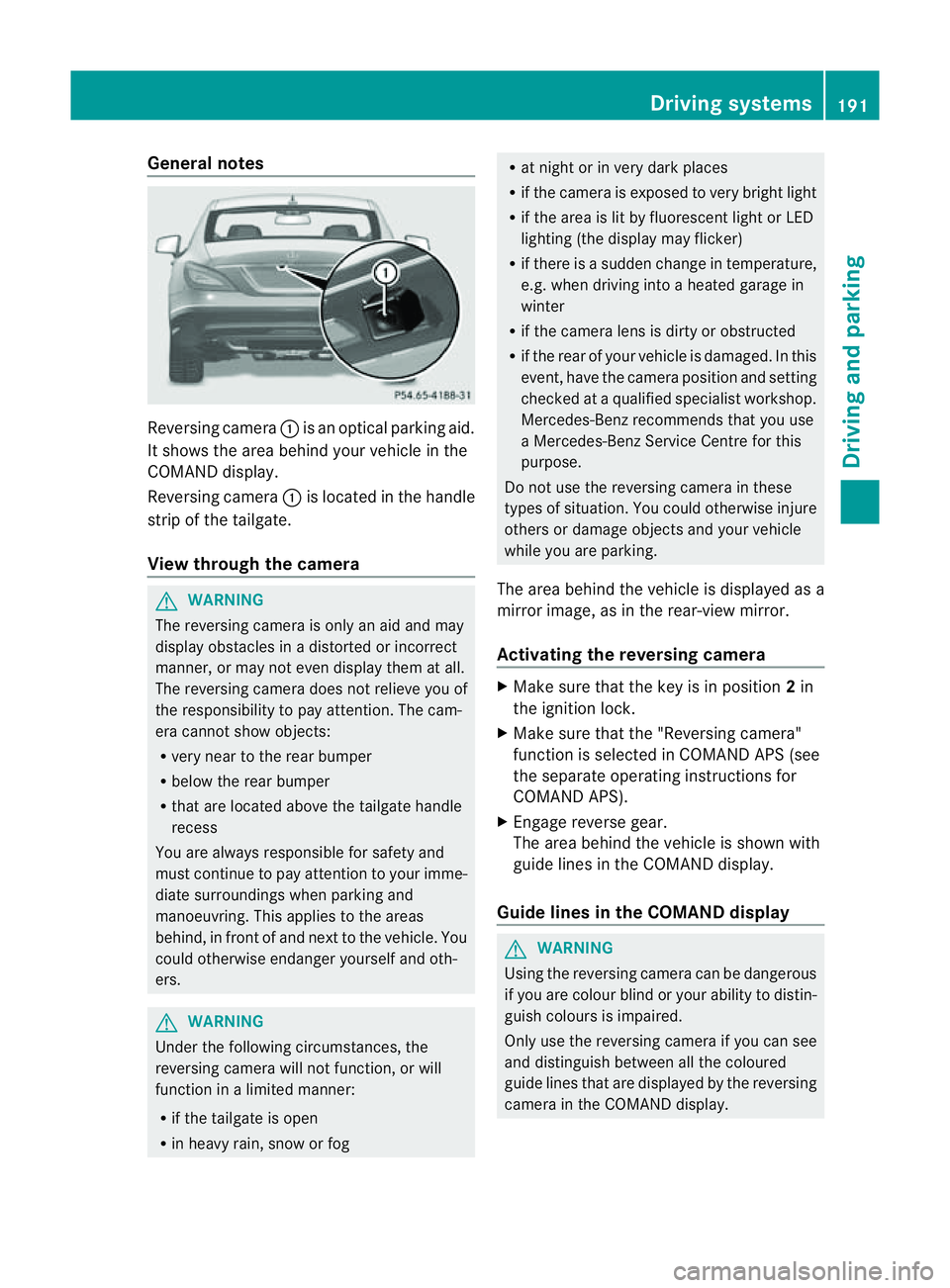
Reversing camera
:is an optical parking aid.
It shows the area behind yourv ehicle in the
COMAND display.
Reversing camera :is located in the handle
strip of the tailgate.
View through the camera G
WARNING
The reversing camera is only an aid and may
display obstacles in adistorted or incorrect
manner, or may not even display them at all.
The reversing camera does not relieve you of
the responsibility to pay attention .The cam-
era cannot show objects:
R very near to the rear bumper
R below the rear bumper
R that are located above the tailgate handle
recess
You are always responsible for safety and
must continue to pay attention to your imme-
diate surroundings when parking and
manoeuvring. This applies to the areas
behind, in front of and next to the vehicle. You
could otherwise endanger yourself and oth-
ers. G
WARNING
Under the following circumstances, the
reversing camera will not function, or will
function in alimited manner:
R if the tailgate is open
R in heavy rain, snow or fog R
at night or in very dark places
R if the camera is exposed to very bright light
R if the area is lit by fluorescent light or LED
lighting (the display may flicker)
R if there is asudden change in temperature,
e.g. when driving into aheated garage in
winter
R if the camera lens is dirty or obstructed
R if the rear of your vehicle is damaged. In this
event, have the camera position and setting
checked at aqualified specialist workshop.
Mercedes-Ben zrecommends that you use
aM ercedes-Benz Service Centr efor this
purpose.
Do not use the reversin gcamera in these
types of situation .You could otherwise injure
others or damage object sand your vehicle
while you are parking.
The area behind the vehicle is displayed as a
mirror image, as in the rear-view mirror.
Activating the reversing camera X
Make sure that the key is in position 2in
the ignition lock.
X Make sure that the "Reversing camera"
function is selected in COMAND APS (see
the separate operating instructions for
COMAND APS).
X Engage reverse gear.
The area behind the vehicle is shown with
guide lines in the COMAND display.
Guide lines in the COMAND display G
WARNING
Using the reversing camera can be dangerous
if you are colour blind or your ability to distin-
guish colours is impaired.
Only use the reversing camera if you can see
and distinguish between all the coloured
guide lines that are displayed by the reversing
camera in the COMAND display. Driving systems
191Driving and parking Z
Page 198 of 373
The system may be impaired or may not func-
tion if:
R there is poor visibility, e.g. due to snow,
rain, fog or spray.
R the windscreen is dirty, misted up or cov-
ered, for instance by asticker, in the vicinity
of the camera.
R on bends, on uphill gradients or downhill
gradients. G
WARNING
Night View Assist Plus does not detect
object sinthe immediate vicinit yofthe vehi-
cle. Look through the windscreen when
manoeuvring. Make sure that there are no
people or animals in the area in which you are
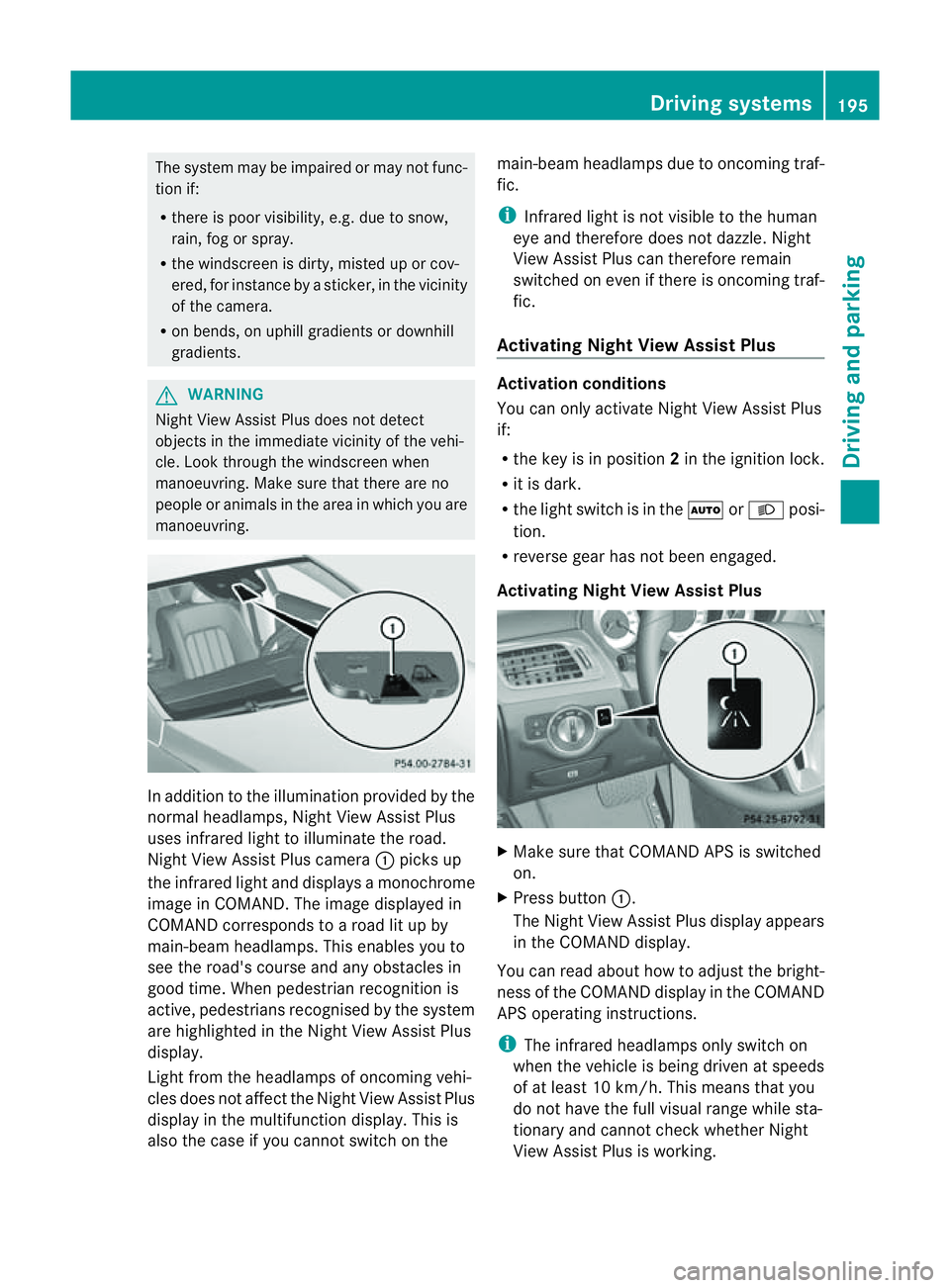
manoeuvring. In addition to the illumination provided by the
normal headlamps, Night View Assist Plus
uses infrared light to illuminate the road.
Night View Assist Plus camera :picks up
the infrared light and display samonochrome
image in COMAND .The image displayed in
COMAND corresponds to aroad lit up by
main-beam headlamps. This enables you to
see the road's course and any obstacles in
good time. When pedestrian recognition is
active, pedestrians recognised by the system
are highlighted in the Night View Assist Plus
display.
Light from the headlamps of oncomingv ehi-
cles does not affect the Night View Assist Plus
displayint he multifunction display. This is
also the case if you cannot switch on the main-beam headlamps due to oncomingt
raf-
fic.
i Infrared light is not visible to the human
eye and therefore does not dazzle. Night
View Assist Plus can therefore remain
switched on even if there is oncomingt raf-
fic.
Activating Night View Assist Plus Activation conditions
You can only activate Night View Assist Plus
if:
R
the key is in position 2in the ignition lock.
R it is dark.
R the light switch is in the ÃorL posi-
tion.
R reverse gear has not been engaged.
Activating Night View Assist Plus X
Make sure that COMAND APS is switched
on.
X Press button :.
The Night View Assist Plus displaya ppears
in the COMAND display.
You can read about how to adjust the bright-
ness of the COMAND displayint he COMAND
APS operating instructions.
i The infrared headlamps only switch on
when the vehicle is being driven at speeds
of at least 10 km/h. This means that you
do not have the full visual range while sta-
tionary and cannot check whether Night
View Assist Plus is working. Driving systems
195Driving and parking Z
Page 199 of 373
Pedestrian recognition
G
WARNING
Pedestrian recognition may be impaired or
inoperative if:
R pedestrians are partially or entirely
obscured by objects, e.g. by parked vehi-
cles.
R the silhouette of the pedestrian in the Night
View Assist Plus display is incomplete or
interrupted, e.g. by powerful light reflec-
tions.
R pedestrians do not contrast with the sur-
roundings.
R pedestrians are not in an upright position,
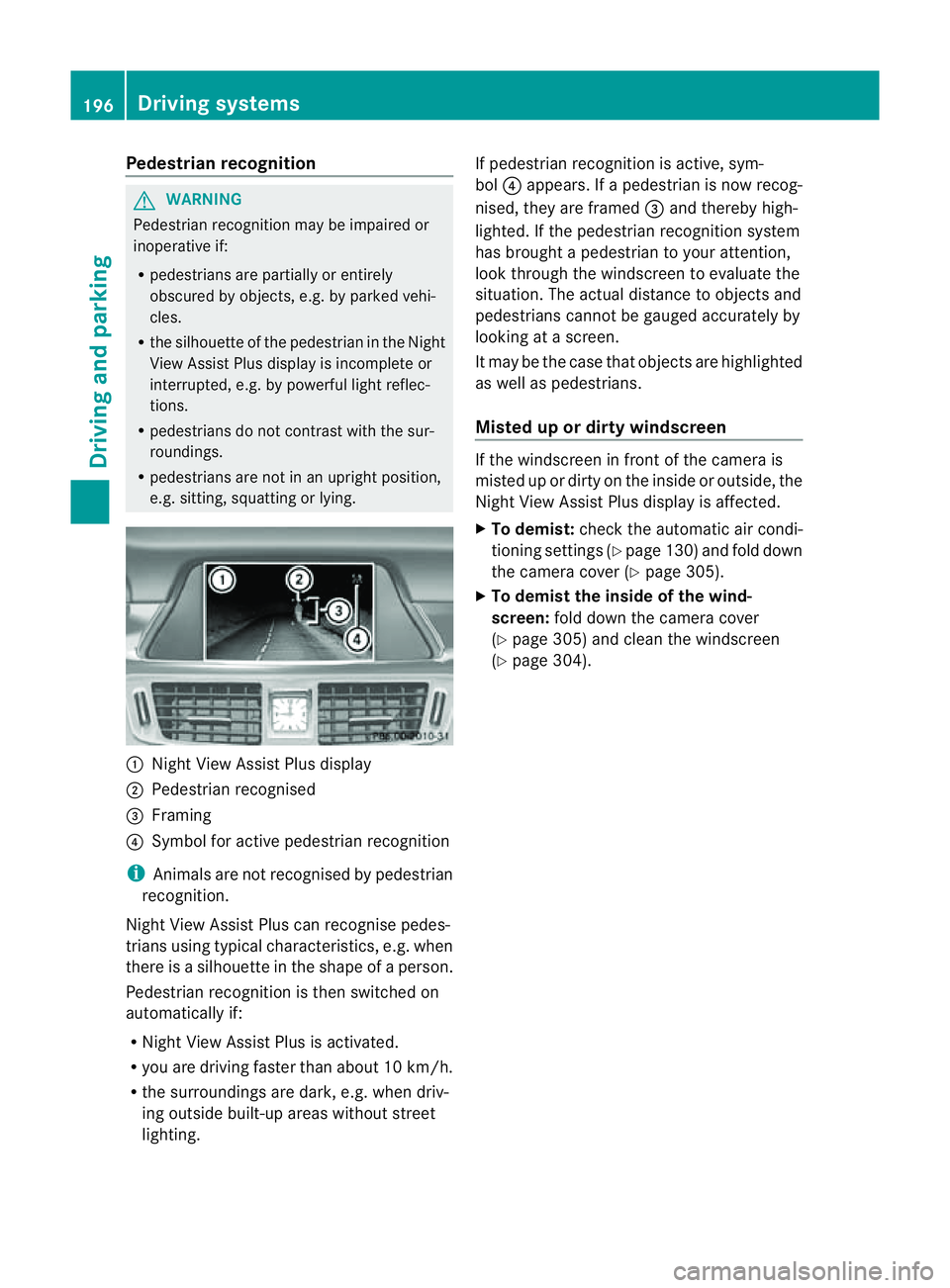
e.g. sitting, squatting or lying. :
Night View Assist Plus display
; Pedestrian recognised
= Framing
? Symbol for active pedestrian recognition
i Animals are not recognised by pedestrian
recognition.
Night View Assist Plus can recognise pedes-
trians using typical characteristics, e.g. when
there is asilhouette in the shape of aperson.
Pedestrian recognition is then switched on
automatically if:
R Night View Assist Plus is activated.
R you are driving faster than about 10 km/h.
R the surrounding saredark, e.g .when driv-
ing outside built-up areas without street
lighting. If pedestrian recognition is active, sym-
bol
?appears. If apedestrian is now recog-
nised, they are framed =and thereby high-
lighted. If the pedestrian recognition system
has brought apedestrian to your attention,
look through the windscreen to evaluate the
situation. The actual distance to objectsa nd
pedestrians cannot be gauged accurately by
looking at ascreen.
It may be the case that objectsa re highlighted
as well as pedestrians.
Misted up or dirtyw indscreen If the windscreen in front of the camera is
misted up or dirty on the inside or outside, the
Night View Assist Plus displayisa
ffected.
X To demist: check the automatic air condi-
tioning settings (Y page 130) and fold down
the camera cover (Y page 305).
X To demist the inside of the wind-
screen: fold down the camera cover
(Y page 305) and clean the windscreen
(Y page 304). 196
Driving systemsDriving and parking
Page 201 of 373
Monitoring range of the sensors
G
WARNING
Blind Spot Assist monitors certain area sinthe
immediate vicinity of yourv ehicle. Vehicles
that approach and drive past at high speeds
are not detected. There is no display and no
warning.
If the lanes are very wide, it may not be pos-
sible to monitor the complet ewidth of the
neighbourin glane. For this reason, vehicles in
the nextl ane may no tbedetected, especially
if they are driving in astaggered formation in
differen tlanes .This may be the case if vehi-
cles are driving at the edge of their lane that
is furthest away from your vehicle.
Always pay attention to traffic conditions and
your surroundings. Otherwise, you may fail to
recognise dangers in time, cause an accident
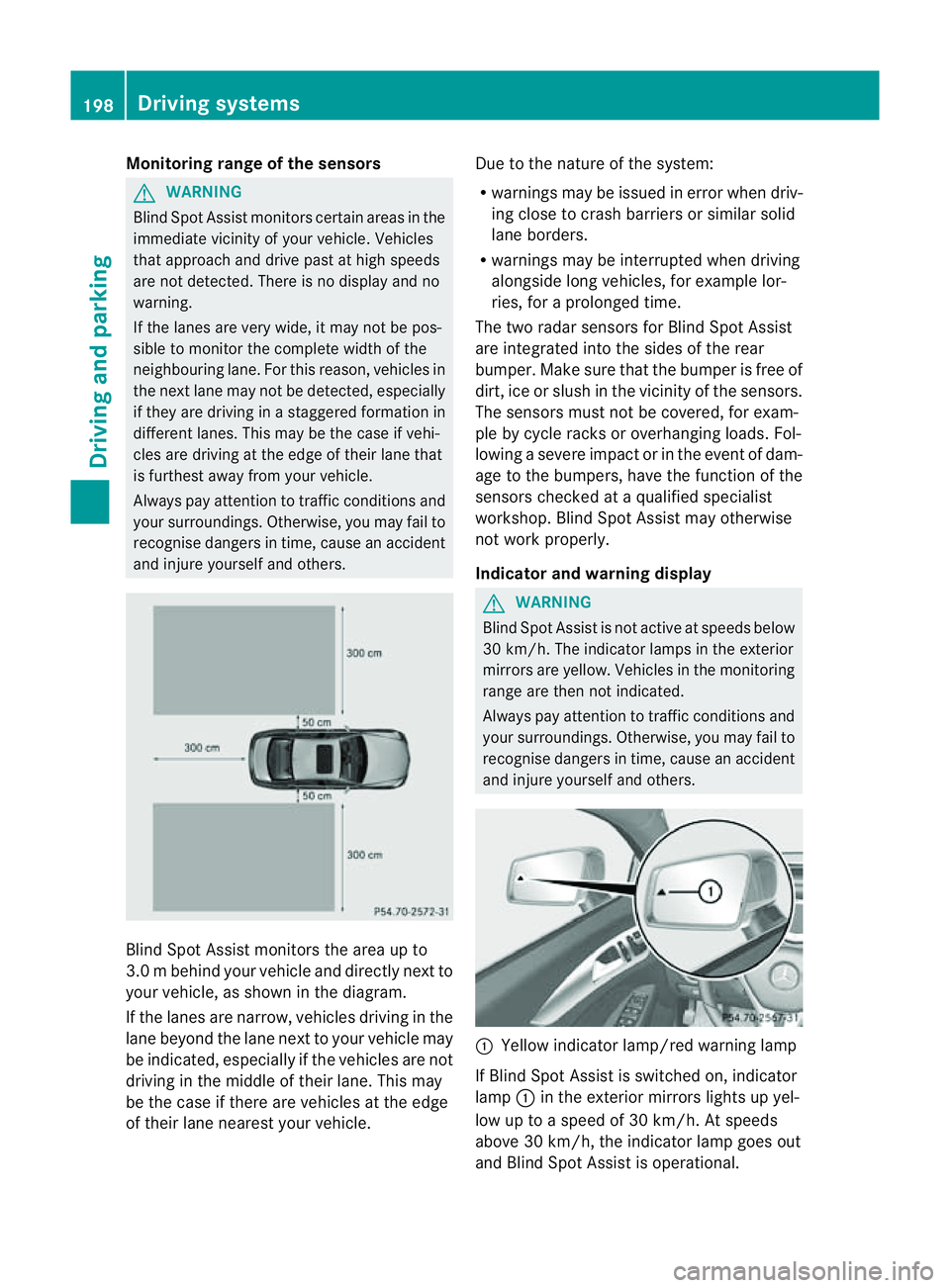
and injure yourself and others. Blind Spot Assist monitors the area up to
3.0 mbehind your vehicle and directly nextto
your vehicle, as shown in th ediagram.
If th elanes are narrow ,vehicles drivin ginthe
lan ebeyond th elan en exttoy our vehicl emay
be indicated, especially if th evehicles are not
drivin ginthemiddle of their lane. This may
be th ecaseift here are vehicles at th eedge
of their lan enearest your vehicle. Due to th
enature of th esystem:
R warnings may be issued in error when driv-
ingc lose to crash barrier sorsimilar solid
lane borders.
R warnings may be interrupted when driving
alongside long vehicles, for example lor-
ries, for aprolonged time.
The two radar sensors for Blin dSpot Assist
are integrated int othe sides of the rear
bumper .Make sure that th ebumpe risfree of
dirt, ice or slush in the vicinity of the sensors.
The sensors must not be covered, for exam-
ple by cycle racks or overhanging loads. Fol-
lowing asevere impact or in the event of dam-
age to the bumpers, have the function of the
sensors checked at aqualified specialist
workshop. Blind Spot Assist may otherwise
not work properly.
Indicator and warning display G
WARNING
Blind Spot Assist is not active at speeds below
30 km/h. The indicator lamps in the exterior
mirrors are yellow. Vehicles in the monitoring
range are then not indicated.
Always pay attention to traffic conditions and
your surroundings. Otherwise, you may fail to
recognise dangers in time, cause an accident
and injure yourselfa nd others. :
Yellow indicator lamp/red warning lamp
If Blind Spo tAssist is switched on, indicator
lamp :in the exterior mirrors lights up yel-
low up to aspeed of 30 km/h. At speeds
above 30 km/h, the indicator lamp goes out
and Blind Spot Assist is operational. 198
Driving systemsDriving and parking
Page 202 of 373
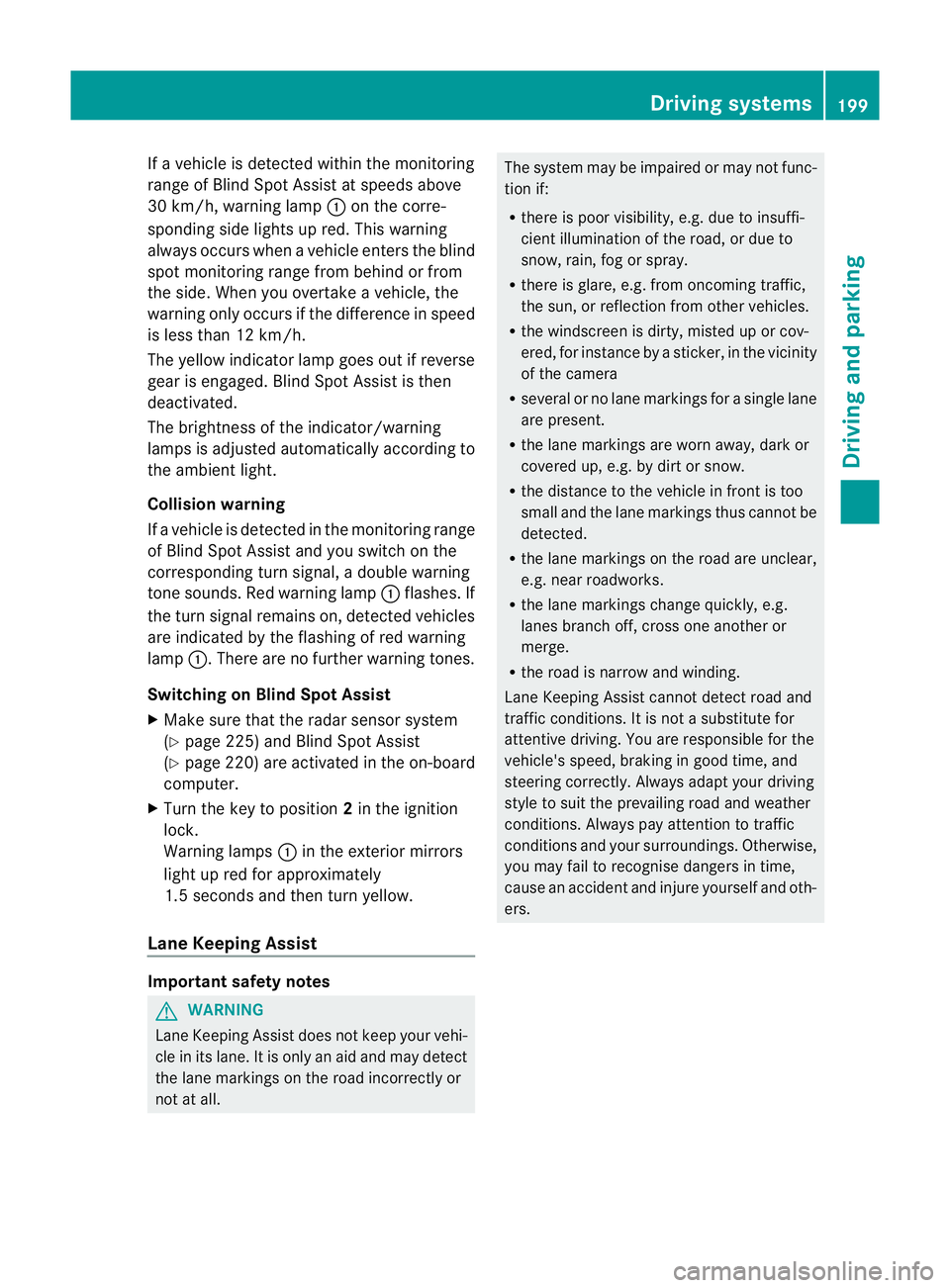
If
av ehicle is detected within the monitoring
range of Blind Spot Assist at speedsa bove
30 km/h, warning lamp :on the corre-
sponding side lights up red. This warning
alwayso ccurs when avehicle enters the blind
spot monitoring range from behind or from
the side. When you overtake avehicle ,the
warning only occurs if the difference in speed
is less than 12 km/h.
The yellow indicator lamp goes out if reverse
gear is engaged. Blind Spot Assist is then
deactivated.
The brightness of the indicator/warning
lampsisa djusted automaticall yaccording to
the ambient light.
Collision warning
If av ehicle is detected in the monitoring range
of Blind Spot Assist and you switch on the
corresponding turn signal ,adouble warning
tone sounds. Red warning lamp :flashes. If
the turn signal remains on, detected vehicles
are indicated by the flashing of red warning
lamp :.There are no further warning tones.
Switching on Blind Spot Assist
X Make sure that the radar sensor system
(Y page 225) and Blind Spot Assist
(Y page 220) are activated in the on-board
computer.
X Turn the key to position 2in the ignition
lock.
Warning lamps :in the exterior mirrors
light up red for approximately
1.5 seconds and then turn yellow.
Lane Keeping Assist Important safety notes
G
WARNING
Lane Keeping Assist does not keep your vehi-
cle in its lane. It is only an aid and may detect
the lane markings on the road incorrectly or
not at all. The system may be impaired or may not func-
tion if:
R
there is poor visibility, e.g. due to insuffi-
cient illumination of the road, or due to
snow, rain, fog or spray.
R there is glare, e.g. from oncomingt raffic,
the sun, or reflection from other vehicles.
R the windscreen is dirty, misted up or cov-
ered, for instancebyas ticker, in the vicinity
of the camera
R several or no lane markings for asingle lane
are present.
R the lane markings are worn away,d ark or
covered up, e.g. by dirt or snow.
R the distance to the vehicle in front is too
small and the lane markings thus cannot be
detected.
R the lane markings on the road are unclear,
e.g. near roadworks.
R the lane markings change quickly, e.g.
lanes branch off, cross one another or
merge.
R the road is narrow and winding.
Lane Keeping Assist cannot detect road and
traffic conditions. It is not asubstitute for
attentive driving. You are responsible for the
vehicle's speed, braking in good time, and
steering correctly. Always adapt your driving
style to suit the prevailing road and weather
conditions. Always pay attention to traffic
conditionsa nd your surroundings. Otherwise,
you may fail to recognise dangers in time,
cause an accident and injure yourself and oth-
ers. Driving systems
199Driving and parking Z
Page 205 of 373
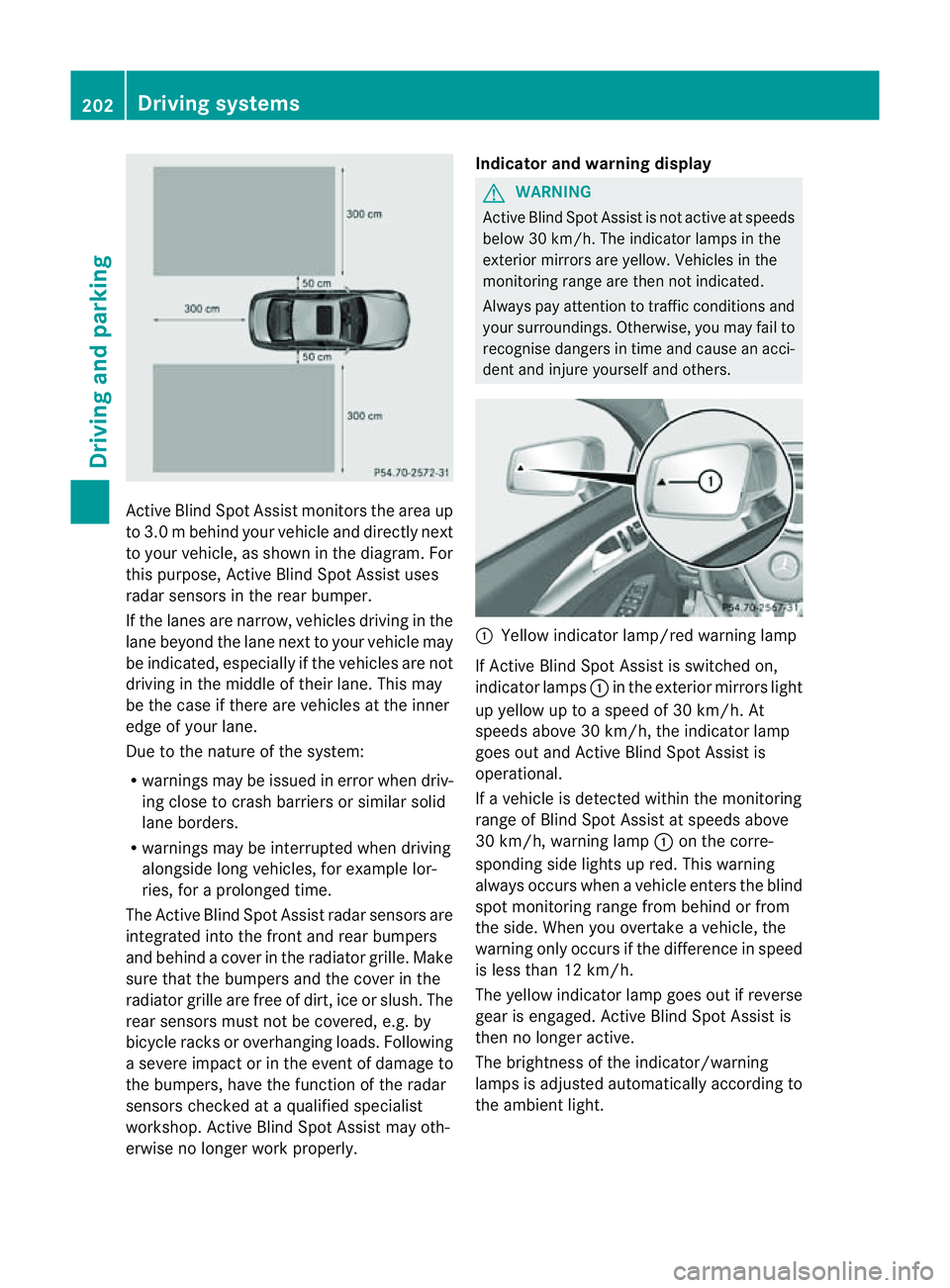
Activ
eBlind Spo tAssist monitors the area up
to 3.0 mbehind your vehicle and directly next
to your vehicle, as shown in the diagram. For
this purpose, Active Blind Spot Assist uses
radar sensors in the rear bumper.
If the lanes are narrow, vehicles driving in the
lane beyond the lane next to your vehicle may
be indicated, especially if the vehicles are not
driving in the middle of their lane. This may
be the case if there are vehicles at the inner
edge of your lane.
Due to the nature of the system:
R warnings may be issued in error when driv-
ing close to crash barriers or similars olid
lane borders.
R warnings may be interrupted when driving
alongside long vehicles, for example lor-
ries, for aprolonged time.
The Active Blind Spot Assist radar sensors are
integrated into the front and rear bumpers
and behind acover in the radiator grille. Make
sure that the bumpers and the cover in the
radiator grille are free of dirt, ice or slush. The
rear sensors must not be covered, e.g. by
bicycle racks or overhanging loads. Following
as evere impact or in the event of damage to
the bumpers, have the function of the radar
sensors checked at aqualified specialist
workshop. Active Blind Spot Assist may oth-
erwise no longer work properly. Indicator and warning display G
WARNING
Active Blind Spot Assist is not active at speeds
below 30 km/h. The indicator lamps in the
exterior mirrors are yellow .Vehicles in the
monitoring range are then not indicated.
Always pay attention to traffic conditions and
your surroundings. Otherwise, you may fail to
recognise dangers in time and cause an acci-
dent and injure yourself and others. :
Yellow indicator lamp/red warning lamp
If Active Blind Spot Assist is switched on,
indicator lamps :in the exterior mirror slight
up yellow up to aspeed of 30 km/h. At
speeds above 30 km/h, the indicator lamp
goes out and Active Blind Spot Assist is
operational.
If av ehicle is detected within the monitoring
range of Blind Spot Assist at speeds above
30 km/h, warning lamp :on the corre-
spondin gside lights up red. This warning
alway soccurs when avehicle enters the blind
spot monitoring range from behind or from
the side. When you overtake avehicle, the
warning only occurs if the difference in speed
is less than 12 km/h.
The yellow indicator lamp goes out if reverse
gear is engaged. Active Blind Spot Assist is
then no longer active.
The brightness of the indicator/warning
lamps is adjusted automatically according to
the ambient light. 202
Driving systemsDriving and parking
Page 207 of 373
R
ESP ®
is deactivated.
R al os soft yrep ressure or adefective tyr eis
detected.
Activatin gActiveB lind Spo tAssist
X Make sure that the radar sensor system
(Y page 225) and Active Blind Spot Assist
(Y page 220) are activated in the on-board
computer.
X Turn the key to position 2in the ignition
lock.
Warning lamps :in the exterior mirrors
light up red for approximately
1.5 seconds and then turn yellow.
Active Lane Keeping Assist Important safety notes
G
WARNING
Active Lane Keeping Assist does not keep
your vehicle in its lane. It is only an aid and
may detect the lane markings on the road
incorrectly or not at all.
The system may be impaired or may not func-
tion if:
R there is poor visibility, e.g. due to inade-
quate illumination of the road surface,
snow, rain, fog or spray.
R there is glare, e.g. from oncoming traffic,
the sun, or reflection from other vehicles.
R the windscreen is dirty, fogged up or cov-
ered, for instance by asticker, in the vicinity
of the camera.
R several or no lane markings for asingle lane
are present.
R the lane markings are worn away, dark or
covered up, e.g. by dirt or snow.
R the distanc etothe vehicle in fron tistoo
small and as aresult the lane markings can-
not be recognised.
R the lane markings on the road are unclear,
e.g. near roadworks. R
the lane markings change quickly, e.g.
branch off, cross, or merge.
R the road is narrow and winding.
Active Lane Keeping Assist cannot detect
road and traffic conditions. It is not asubsti-
tute for attentive driving. You are responsible
for the vehicle's speed, braking in good time,
and steerin gcorrectly. Always adapt your
driving style to suit the prevailing road and
weather conditions. Always pay attention to
traffic conditions and your surroundings. Oth-
erwise, you may fail to recognise dangers in
time, cause an accident and injure yourself
and others.
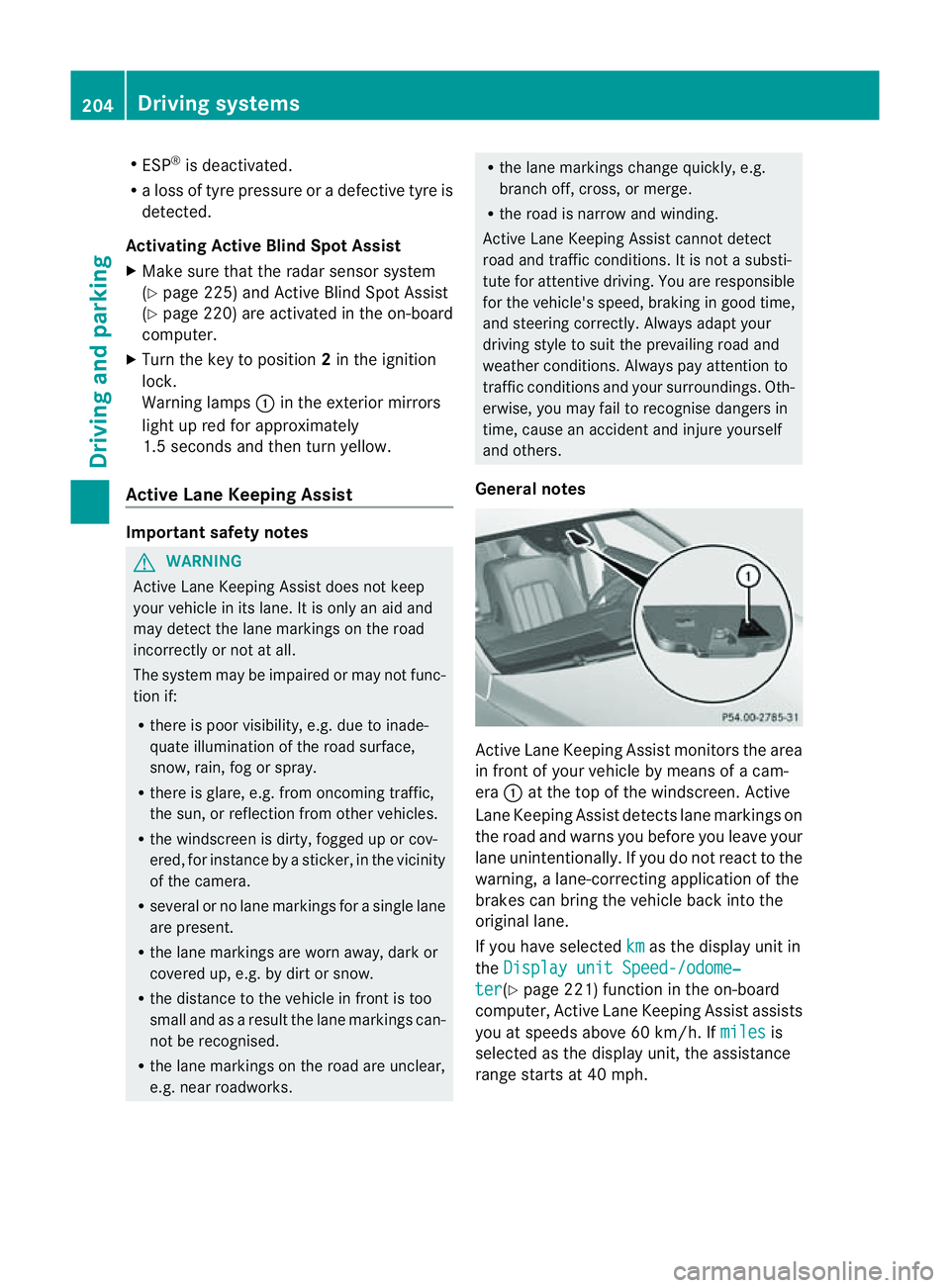
General notes Active Lane Keeping Assist monitors the area
in fron
tofyour vehicle by means of acam-
era :at the top of the windscreen .Active
Lane Keeping Assist detect slane markings on
th er oad and warn syou before you leave your
lane unintentionally. If you do no treact to the
warning, alane-correctinga pplication of the
brakes can bring the vehicle back intot he
original lane.
If you have selected km as the display unit in
the Display unit Speed-/odome‐ ter (Y
page 221)f unction in the on-board
computer, Active Lane Keeping Assist assists
you at speeds above 60 km/h. If miles is
selected as the display unit, the assistance
range start sat40mph. 204
Driving systemsDriving and parking
Page 208 of 373
Warning vibratio
ninthe steering wheel
Aw arning may be given if afront wheel
passes over alane marking. It willw arny ou
by means of intermittent vibration in the
steering wheel for up to 1.5 seconds.
In order that you are warned only whenn ec-
essary and in good time if you cross the lane
marking, the system recognises certain con-
ditions and warns you accordingly.
The warning vibration occur searlier if:
R you approach the outer lane markin gona
bend.
R the road has very wide lanes, e.g. amotor-
way.
R the system recognises solid lane markings.
The warning vibration occur slater if:
R the road has narrow lanes.
R you cut the corner on abend.
Lane-correcting brak eapplication G
WARNING
Active Lane Keeping Assist does not keep
your vehicle in its lane. It is only an aid
designed to assist driving. It is not asubstitute
for attentive driving. Corrective braking may
not alway sbesufficien ttoreturn your vehicle
to its original lane. In such cases, you must
steer the vehicle yourself to ensure that it
does not leave the lane.
Active Lane Keeping Assist cannot detect the
current traffic situation or other road users.
Ensure at all times that there is sufficient lat-
eral distance between you and other road
users or obstacles. In rare cases, broken lines
or certain structures on the road surface may
be detected by the system as solid lane mark-
ings. You can, for example, countersteer gen-
tly at any time to cancel inappropriate braking
action, e.g. if you intentionally drive across a
solid lane marking.
Active Lane Keeping Assist cannot take
weather conditions into account.
You are responsible for the vehicle's speed,
correc tsteerin gand for braking in good time.
Alway sadapt your drivin gstyle to suit the prevailing road and weather conditions.
Always pay attention to traffic conditions and
your surroundings. Otherwise, you may fail to
recognise dangers in time, cause an accident
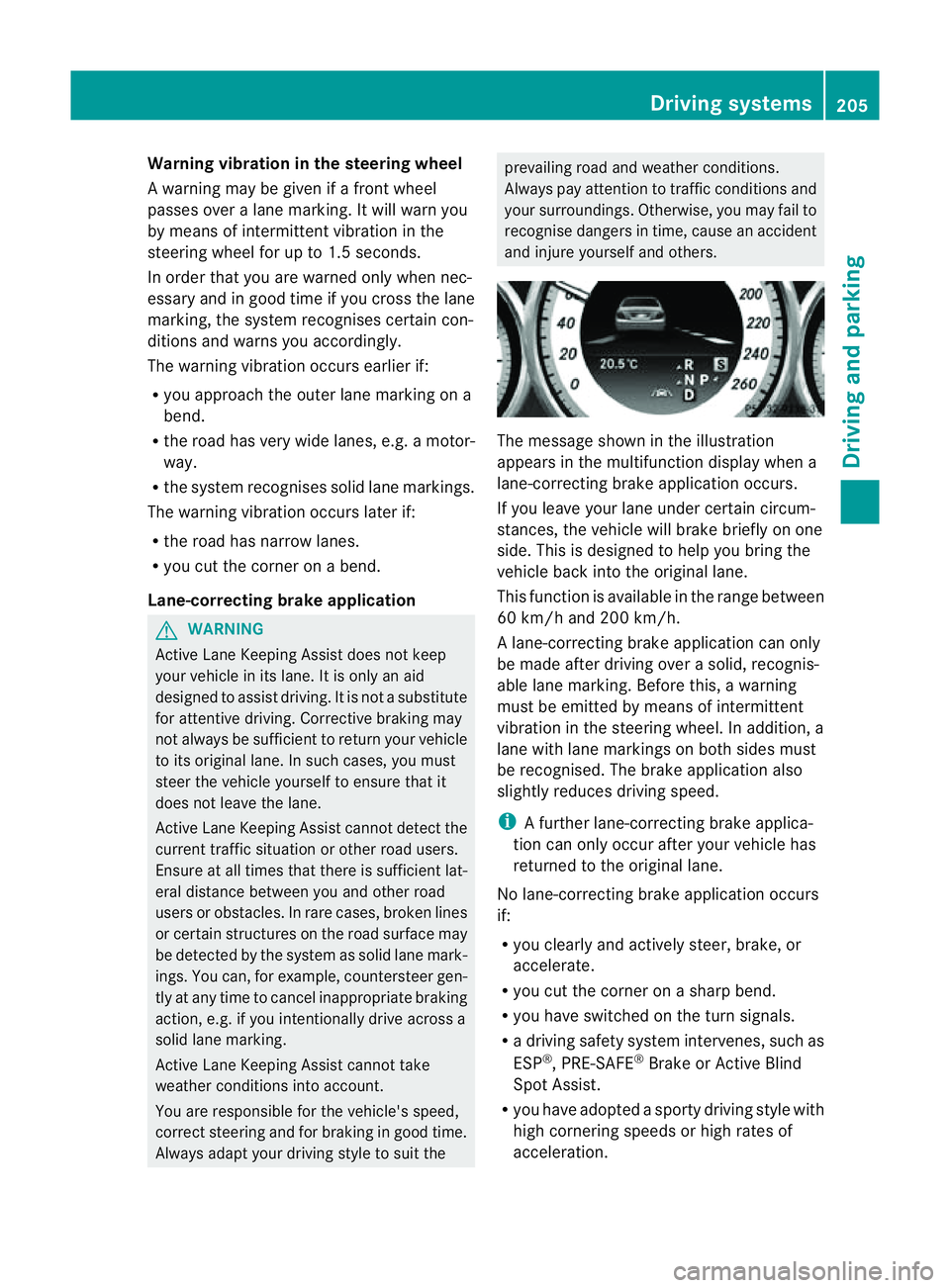
and injure yourself and others. The message shown in the illustration
appears in the multifunction display when a
lane-correcting brake application occurs.
If you leave your lane under certain circum-
stances, the vehicle will brake briefly on one
side. This is designed to help you bring the
vehicle back into the original lane.
This function is available in the range between
60 km/ha nd 200 km/h.
Al ane-correcting brake application can only
be made after driving over asolid, recognis-
able lane marking. Before this, awarning
must be emitted by means of intermittent
vibration in the steering wheel. In addition, a
lane with lane markings on both sides must
be recognised. The brake application also
slightly reduces driving speed.
i Afurther lane-correcting brake applica-
tion can only occur after your vehicle has
returned to the original lane.
No lane-correcting brake application occurs
if:
R you clearly and actively steer, brake, or
accelerate.
R you cut the corner on asharp bend.
R you have switched on the turn signals.
R ad riving safety system intervenes, such as
ESP ®
,P RE-SAFE ®
Brake or Active Blind
Spot Assist.
R you have adopted asporty driving style with
high cornering speeds or high rates of
acceleration. Driving systems
205Driving and parking Z