ECU MERCEDES-BENZ CLS COUPE 2012 Owner's Manual
[x] Cancel search | Manufacturer: MERCEDES-BENZ, Model Year: 2012, Model line: CLS COUPE, Model: MERCEDES-BENZ CLS COUPE 2012Pages: 373, PDF Size: 9.12 MB
Page 162 of 373
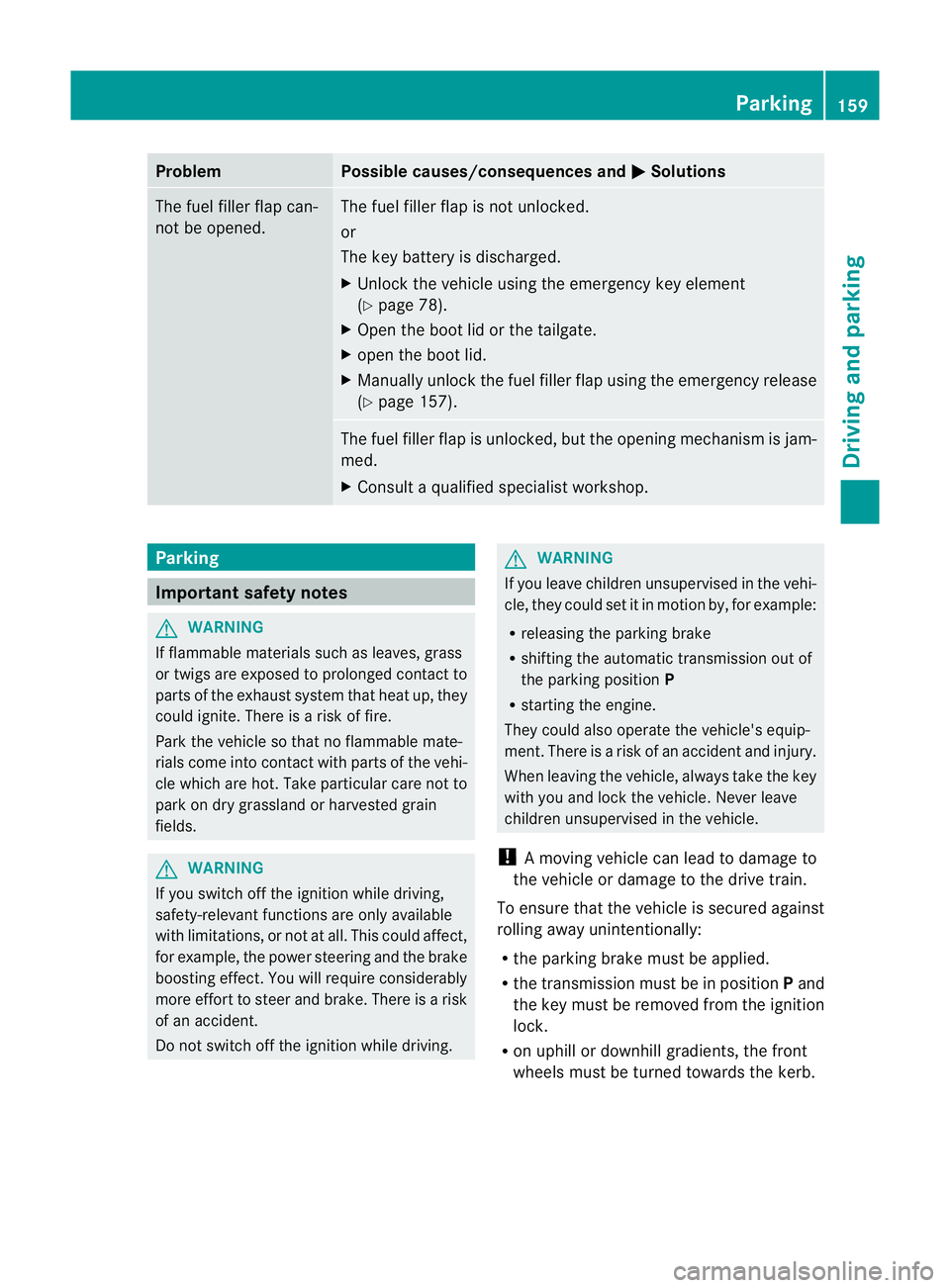
Problem Possible causes/consequences and
M Solutions
The fuel filler flap can-
not be opened. The fuel filler flap is not unlocked.
or
The key battery is discharged.
X
Unlock the vehicle using the emergency key element
(Y page 78).
X Open the boot lid or the tailgate.
X open the boot lid.
X Manuallyu nlock the fuel filler flap using the emergency release
(Y page 157). The fuel filler flap is unlocked, but the opening mechanism is jam-
med.
X
Consult aqualified specialist workshop. Parking
Important safety notes
G
WARNING
If flammable materials such as leaves, grass
or twigs are exposed to prolonged contact to
parts of the exhaust system that heat up, they
could ignite. There is arisk of fire.
Park the vehicle so that no flammable mate-
rials come into contact with parts of the vehi-
cle which are hot. Take particular care not to
park on dry grassland or harvested grain
fields. G
WARNING
If you switch off the ignition while driving,
safety-relevant functions are only available
with limitations, or not at all. This could affect,
for example, the power steering and the brake
boosting effect.Y ou will require considerably
more effort to steer and brake. There is arisk
of an accident.
Do not switch off the ignition while driving. G
WARNING
If you leave children unsupervised in the vehi-
cle, they could set it in motion by, for example:
R releasing the parking brake
R shifting the automatic transmission out of
the parking position P
R starting the engine.
They could also operate the vehicle's equip-
ment.T here isarisk of an accident and injury.
When leaving the vehicle, always take the key
with you and lock the vehicle. Never leave
children unsupervised in the vehicle.
! Am oving vehicle can lead to damage to
the vehicle or damage to the drive train.
To ensure that the vehicle is secured against
rolling away unintentionally:
R the parking brake must be applied.
R the transmission must be in position Pand
the key must be removed from the ignition
lock.
R on uphill or downhill gradients, the front
wheels must be turned towards the kerb. Parking
159Driving and parking Z
Page 169 of 373
A
To switch between cruise control and var-
iable SPEEDTRONIC
B To deactivate cruise control
You can operate cruise control and variable
SPEEDTRONIC with the cruise control lever.
The LIM indicator lamp on the cruise control
lever indicates which system you have selec-
ted:
R LIM indicator lamp off: cruise control is
selected.
R LIM indicator lamp on: variable SPEED-
TRONIC is selected.
When you activat ecruise control, the stored
speed is shown in the multifunction display
for five seconds. In the multifunction display,
the segment sbetween the stored speed and
the maximum speed light up.
Activation conditions To activat
ecruise control, all of the following
activation conditions must be fulfilled:
R the parking brake must be released.
R you must be driving faster than 30 km/h.
R ESP ®
must be switched on, but not inter-
vening.
R the transmission must be in position D.
R the cruise control function must be selec-
ted (Y page 166).
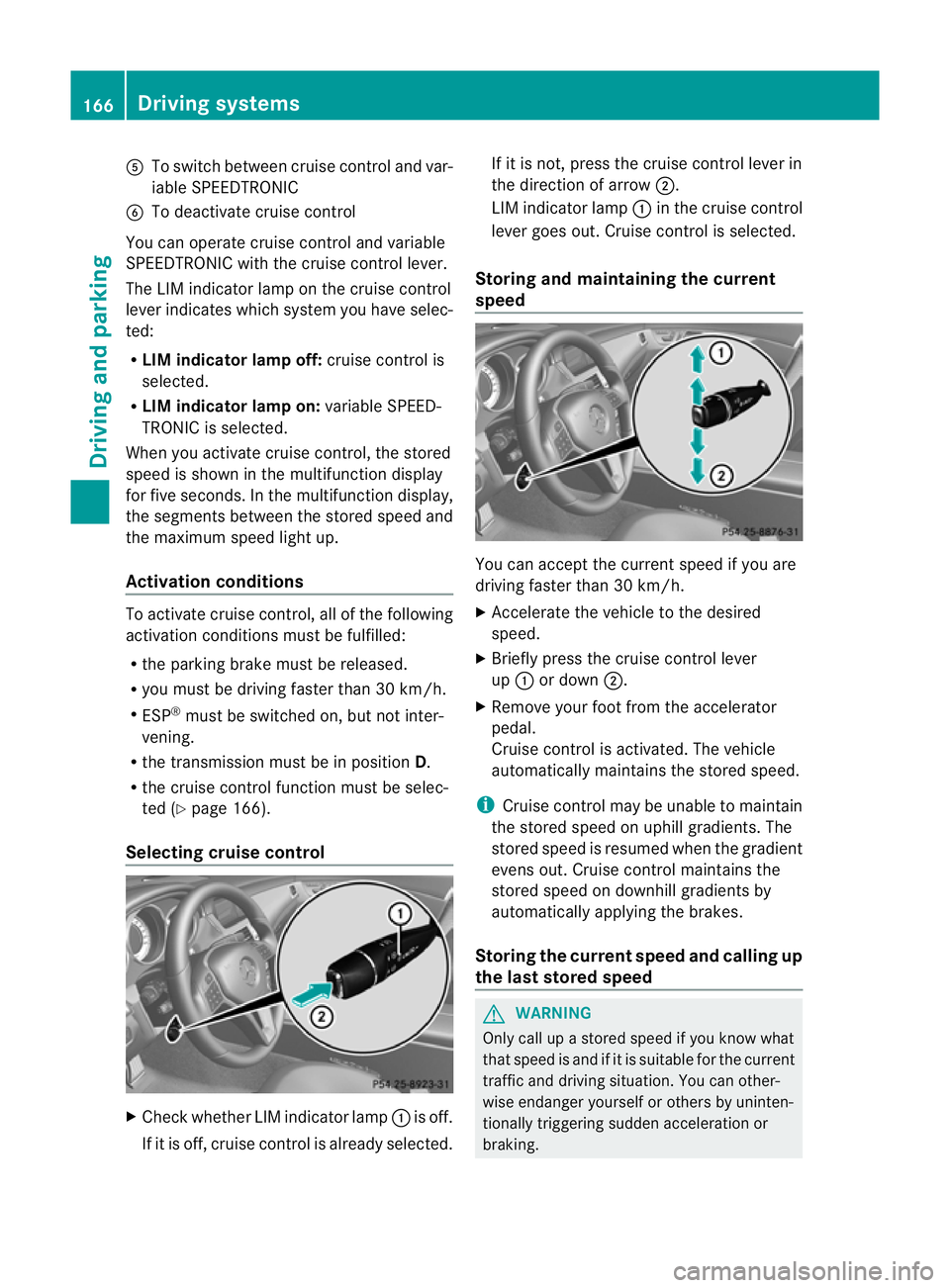
Selecting cruise control X
Check whether LIM indicator lamp :is off.
If it is off, cruise control is already selected. If it is not,p
ress the cruise control lever in
the direction of arrow ;.
LIM indicator lamp :in the cruise control
lever goes out. Cruise control is selected.
Storing and maintaining the current
speed You can accept the curren
tspeed if you are
driving faster than 30 km/h.
X Accelerat ethe vehicle to the desired
speed.
X Briefly press the cruise contro llever
up : or down ;.
X Remove your foot from the accelerator
pedal.
Cruise contro lisactivated. The vehicle
automatically maintains the stored speed.
i Cruise contro lmay be unable to maintain
the stored speed on uphill gradients. The
stored speed is resumed when the gradient
evens out. Cruise contro lmaintains the
store dspee dond ownhill gradients by
automaticall yapplyin gthe brakes.
Storing th ecurren tspee dand calling up
the last stored speed G
WARNING
Only call up astored speed if you know what
that speed is and if it is suitable for the current
traffic and driving situation .You can other-
wise endanger yourself or other sbyuninten-
tionally triggering sudden acceleration or
braking. 166
Driving systemsDriving and parking
Page 175 of 373
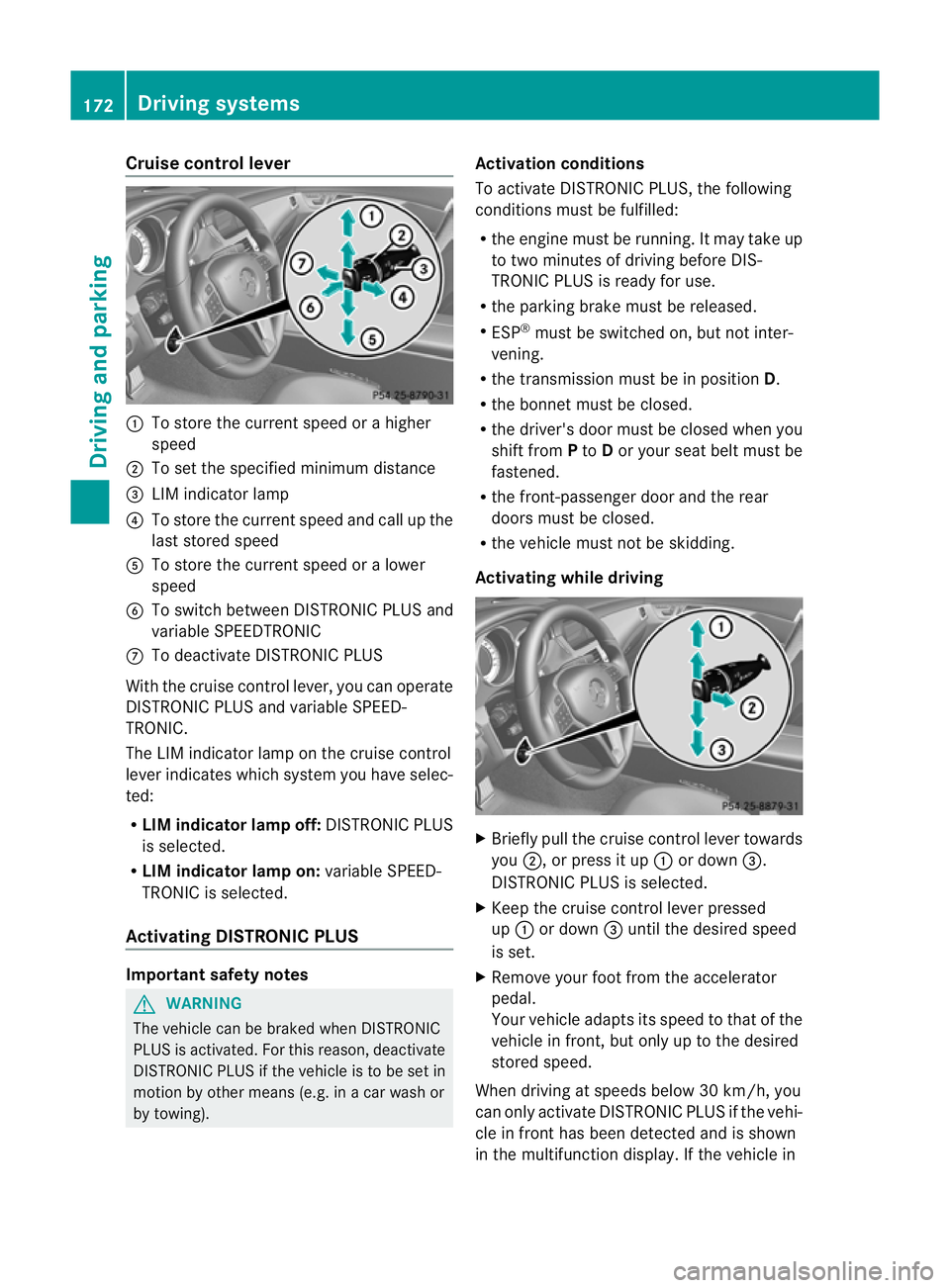
Cruise control lever
:
To store th ecurren tspeed or ahigher
speed
; To set the specified minimum distance
= LIM indicator lamp
? To stor ethe curren tspeed and call up the
last stored speed
A To stor ethe curren tspeed or alower
speed
B To switc hbetween DISTRONIC PLUS and
variable SPEEDTRONIC
C To deactivate DISTRONIC PLUS
With the cruise contro llever, you can operate
DISTRONIC PLUS and variable SPEED-
TRONIC.
The LIM indicator lamp on the cruise control
lever indicates which system you have selec-
ted:
R LIM indicator lamp off: DISTRONIC PLUS
is selected.
R LIM indicator lamp on: variable SPEED-
TRONIC is selected.
Activating DISTRONIC PLUS Important safet
ynotes G
WARNING
The vehicle can be braked when DISTRONIC
PLUS is activated. For this reason, deactivate
DISTRONIC PLUS if the vehicle is to be set in
motion by other means (e.g. in acar wash or
by towing). Activation conditions
To activate DISTRONIC PLUS
,the following
condition smust be fulfilled:
R the engin emust be running. It may tak eup
to two minutes of drivin gbefore DIS-
TRONIC PLUS is ready for use.
R the parkin gbrake must be released.
R ESP ®
must be switched on, but not inter-
vening.
R the transmission must be in position D.
R the bonnet must be closed.
R the driver' sdoor must be closed when you
shift from Pto Dor your seat belt must be
fastened.
R the front-passenger door and the rear
doors must be closed.
R the vehicle must not be skidding.
Activating while driving X
Briefly pull the cruise contro llever towards
you ;,orp ress it up :or down =.
DISTRONIC PLUS is selected.
X Keep the cruise contro llever pressed
up : or down =until the desired speed
is set.
X Remove your foot from the accelerator
pedal.
Your vehicle adapts its speed to that of the
vehicle in front, but only up to the desired
stored speed.
When drivin gatspeeds below 30 km/h, you
can only activate DISTRONIC PLUS if the vehi-
cle in fron thas been detected and is shown
in th emultifunction display. If th evehicle in 172
Driving systemsDriving and parking
Page 177 of 373
tanc
ebetween your vehicl eand the vehicl ein
front become stoo small.
i Whe nchanging lanes, DISTRONIC PLUS
monitors the left lane for left-hand-drive
vehicles and the right lane for right-hand-
drive vehicles.
Vehicles with COMAND Online
i The following function is not operational
in all countries.
DISTRONIC PLUS uses additional information
from your navigation system so that it can
react appropriately to certain traffic situa-
tions. This is the case if, while following a
vehicle, DISTRONIC PLUS is active and you:
R approach or drive around aroundabout
R approach aT-junction
R turn off at amotorway exit
Even if the vehicle in front leaves the detec-
tion range, DISTRONIC PLUS temporarily
maintains the current driving speed and does
not accelerate. This is based on the current
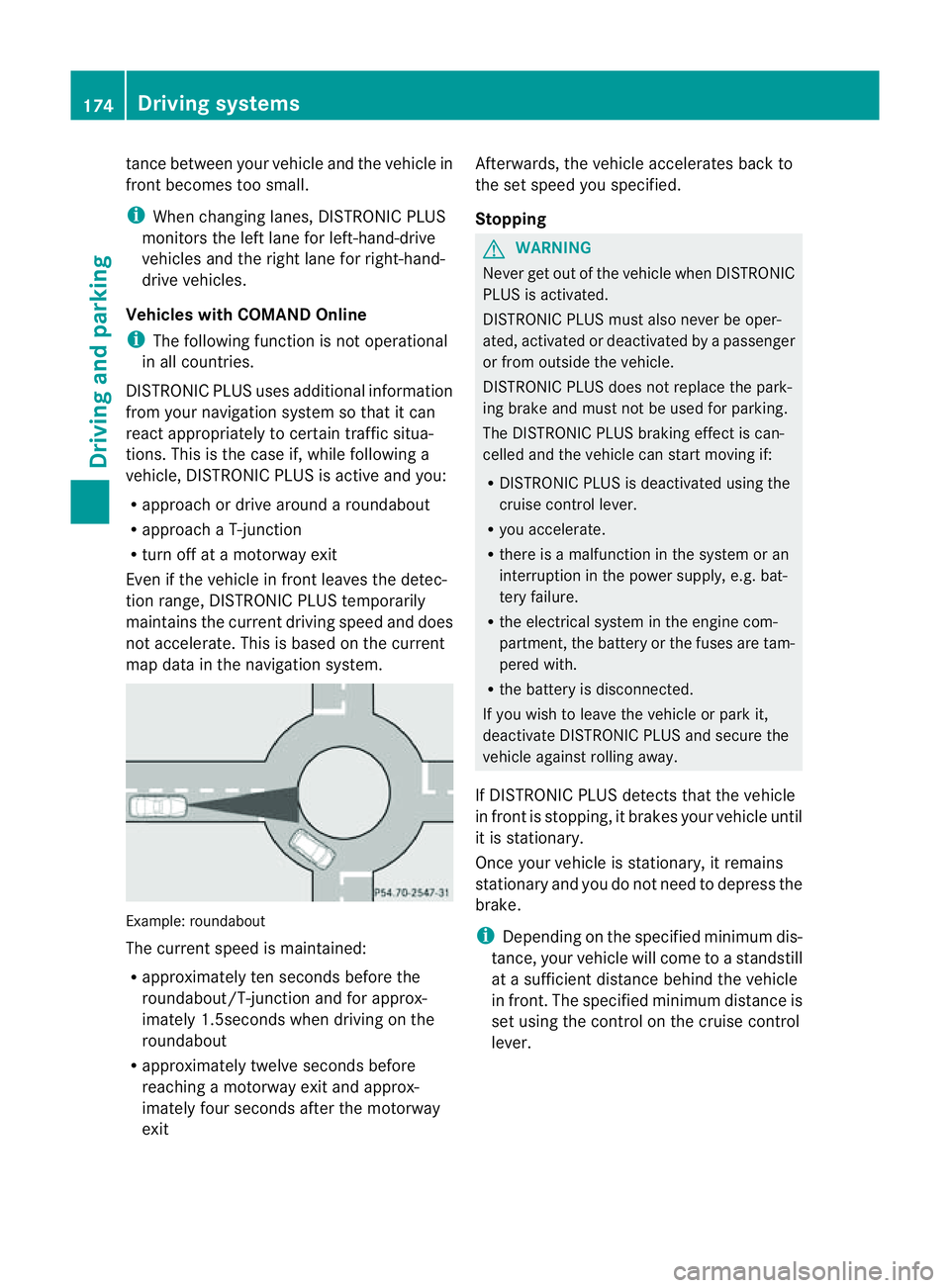
map data in the navigation system. Example: roundabout
The current speed is maintained:
R
approximately ten seconds before the
roundabout/T-junction and for approx-
imately 1.5seconds when driving on the
roundabout
R approximately twelve seconds before
reaching amotorway exit and approx-
imately four seconds after the motorway
exit Afterwards, the vehicle accelerates back to
the set speed you specified.
Stopping G
WARNING
Never get out of the vehicle when DISTRONIC
PLUS is activated.
DISTRONIC PLUS must also never be oper-
ated, activated or deactivated by apassenger
or from outside the vehicle.
DISTRONIC PLUS does not replace the park-
ing brake and must not be used for parking.
The DISTRONIC PLUS braking effect is can-
celled and the vehicle can start moving if:
R DISTRONIC PLUS is deactivated using the
cruise control lever.
R you accelerate.
R there is amalfunction in the system or an
interruption in the power supply,e .g. bat-
tery failure.
R the electrical system in the engine com-
partment,t he battery or the fuses are tam-
pered with.
R the battery is disconnected.
If you wish to leave the vehicle or park it,
deactivate DISTRONIC PLUS and secure the
vehicle against rolling away.
If DISTRONIC PLUS detectst hat the vehicle
in front is stopping, it brakes your vehicle until
it is stationary.
Once your vehicle is stationary, it remains
stationary and you do not need to depress the
brake.
i Depending on the specified minimum dis-
tance, your vehicle will come to astandstill
at as ufficient distance behind the vehicle
in front.T he specified minimum distance is
set using the control on the cruise control
lever. 174
Driving systemsDriving and parking
Page 183 of 373
Deactivating th
eHOLDf unction G
WARNING
Never get out of th evehicle when th eHOLD
function is activated.
The HOLD function mus tnever be operated
or deactivated by apassenger or from outside
th ev ehicle.
The HOLD function doe snot replac ethe park-
ing brake and must not be used for parking.
The braking effec tofthe HOLD function is
cancelled and the vehicle could roll away if:
R the HOLD function is deactivated by
depressing the accelerator pedal or the
brake pedal.
R there is amalfunction in the system or an
interruption in the power supply, e.g. bat-
tery failure.
R the electrical system in the engine com-
partment, the batter yorthe fuses are tam-
pered with.
R the batter yisdisconnected.
If you leave the vehicle or park it, deactivate
the HOLD function and secure the vehicle
against rolling away.
The HOLD function is deactivated automati-
cally if:
R you accelerat eand the transmission is in
position Dor R.
R you shift the transmission to position P.
R you depress the brake pedal again with a
certain amount of pressure until ëdis-
appears from the multifunction display.
R you activat eDISTRONIC PLUS.
When the HOLD function is activated, the
transmission is shifted automatically to posi-
tion Pif:
R the driver's door is open and the driver's
seat belt is unfastened.
R the engine is switched off, unless it is auto-
matically switched off by the ECO start/
stop function.
R the bonnet is opened. R
as ystem fault occurs.
R the power supply is not sufficient. RACE START
Important safety notes G
WARNING
RACE START is only available when SPORT
handling mode is activated. SPORT handling
mode will only be able to stabilise the vehicle
to alimited degree if the vehicle start stoskid
or aw heel start stospin. The vehicle is there-
fore harder to control at the threshold range.
You could lose control of the vehicle and
cause an accident.
RACE START should only be used on closed
off circuits. Always adapt your driving style to
suit the prevailing road and weather condi-
tions.
i RACE START is only available in AMG vehi-
cles.
RACE START enables optimum acceleration
from astanding start .The precondition for
this is asuitable high-grip road surface.
Activation conditions You can activat
eRACE START if:
R the doors are closed.
R the engine is running and it has reached an
operatin gtemperature of approximately
80 †. This is the case when the engine oil
temperature in the multifunction display
stops flashing.
R SPORT handling mode is activated
(Y page 66).
R the steerin gwheel is in the straight-ahead
position.
R the vehicle is stationary and the brake
pedal is depressed (left foot).
R the transmission is in position D.180
Driving systemsDriving and parking
Page 220 of 373
X
To select the next or previous scene:
briefl ypress the 9or: button.
X To select ascene from th escene list
(rapid scrolling): press and hold the
9 or: buttonuntil desired
scene :hasb eenr eached. Telephon
emenu
Introduction G
WARNING
Observ ethe lega lrequirements of the country
in which yo uarecurrentl ydriving regarding
the us eofm obilephonesint he vehicle.
If it is permitted to us emobilephonesw hile
the vehicl eisinmotion, yo ushoul donlyu se
them when the roa dand traffi cconditions
allow. Otherwise, yo umaybe distracted from
the traffi cconditions, cause an accident and
injure yoursel fand others.
X Switch on the mobil ephone (se ethe sep-
arate operating instructions).
X Switch on the audi osystem or COMAND
Online ;see the separate operating instruc-
tions.
X Insert the mobil ephone into the bracket
(Y page 286).
or
X Establis haBluetooth ®
connectio ntothe
audi osystem or COMAND Online ;see the
separate operating instructions.
X Press the =or; button on the steer-
ing whee ltoselect the Tel menu.
Yo uw ills ee one of the following display mes-
sages in the multifunctio ndisplay:
R Please enter PIN :t
he mobile phone has
been placed in the mobile phone bracket
and the PIN has not been entered.
When you enter your PIN via the mobile
phone, LINGUATRONIC, the audios ystemor COMAND Online, the mobile phone
searches for
anetwork.
R Telephone ready or the name of the net-
work provider: the mobile phone has found
an etwork and is ready to receive.
R Telephone No service :t
here is no net-
work available or the mobile phone is
searching for anetwork.
i You can obtain further information about
suitable mobile phones and connecting
mobile phones via Bluetooth ®
:
R from any Mercedes Benz Service Centre
R on the Internet at: http://
www.mercedes-benz.com/connect
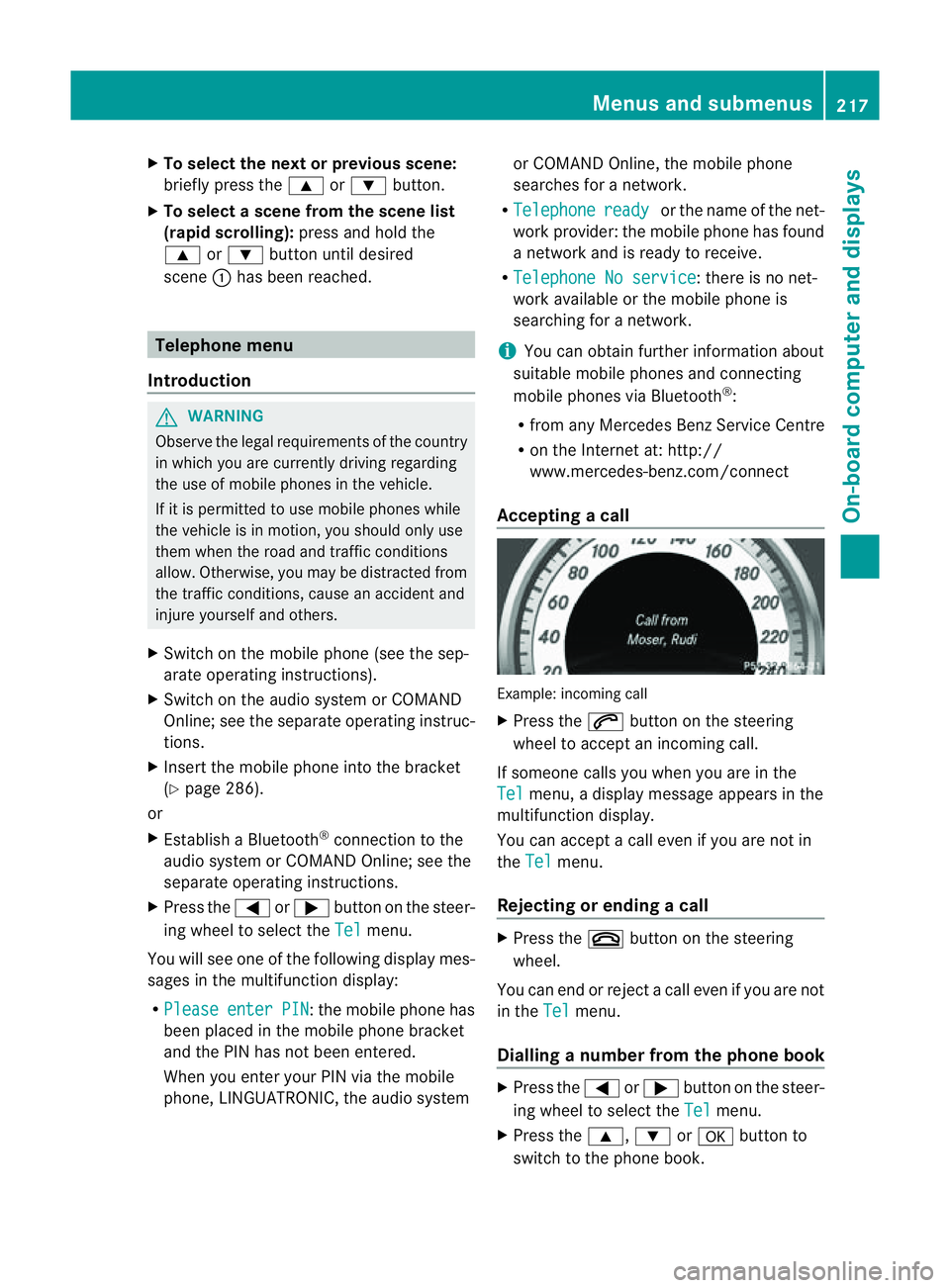
Accepting acall Example: incoming call
X
Press the 6button on the steering
wheel to accep tanincoming call.
If someone calls yo uwheny ou areint he
Tel menu
,adisplay message appear sinthe
multifunctio ndisplay.
You can accept acall even if you are not in
the Tel menu.
Rejecting or ending acall X
Press the ~button on the steering
wheel.
You can end or reject acall even if you are not
in the Tel menu.
Dialling anumber from the phone book X
Press the =or; button on the steer-
ing wheel to select the Tel menu.
X Press the 9,:ora button to
switch to the phone book. Menus and submenus
217On-board computer and displays Z
Page 229 of 373
!
Operating the auxiliary heating/ventila-
tion draws on the vehicle battery. After you
have heated or ventilated the vehicle a
maximum of two times, drive for alonger
distance.
This function is only available on vehicles with
auxiliary heating (Y page 132).
In the Heating submenu, you can select a
stored departure time or change adeparture
time.
The auxiliary heating timer function calcu-
lates the switch-on time according to the out-
side temperature so that the vehicle is pre-
heated by the departure time. When the
departure time is reached, the auxiliary heat-
ing continues to heat for afurther five
minutes and then switches off. The auxiliary
heating adopts the THERMATIC or
THERMOTRONIC temperature setting.
You can switch off the auxiliary heating by
using the remote control or the auxiliary heat-
ing button on the centre console.
i Switch the auxiliary heating on regularly
once amonth for aboutt en minutes.
Selecting the departure time or deactivat-
ing aselected departure time
X Press the =or; button on the steer-
ing wheel to select the Settings menu.
X Press the :or9 button to select the
Heating submenu.
X Press ato confirm.
You will see the selected setting.
X Press ato confirm.
X Press the :or9 button to select
one of the three departure times or Timeroff (no timer active).
X Press ato confirm.
If ad eparture time is selected, the yellow
indicator lamp lights up on the auxiliary
heating button. Changing the departure time
X
Press the =or; button on the steer-
ing wheel to select the Settings menu.
X Press the :or9 button to select the
Heating submenu.
X Press ato confirm.
You will see the selected setting.
X Press ato confirm.
X Press the :or9 button to select A ,
B or
Change C .
X Press ato confirm.
You can now change the departure time.
X Press the =or; button to select the
displaytobec hanged: hours, minutes.
X Press the :or9 button to set the
selected display.
X Press the abutton to store the entry.
The yellow indicator lamp on the auxiliary
heating button lights up.
Convenience Activating/deactivating the EASY-
ENTRY/EXIT feature
G
WARNING
The steering wheel moves when the EASY-
ENTRY/EXIT feature is active. There is arisk
of occupants becoming trapped. Before acti-
vating the EASY-ENTRY/EXIT feature, make
sure that nobody can become trapped.
Do not leave children unsupervised in the
vehicle, even if they are secured in achild
restraint system. The children could open the
driver's door and thereby unintentionally acti-
vate the EASY-ENTRY/EXIT feature and
become trapped.
X Press the =or; button on the steer-
ing wheel to select the Settings menu.
X Press the :or9 button to select the
Convenience submenu.
X Press ato confirm. 226
Menus and submenusOn-board computer and displays
Page 232 of 373
X
Press the =or; button to select
Interm. Time .
X Press ato confirm.
The intermediate time is displaye dfor five
seconds.
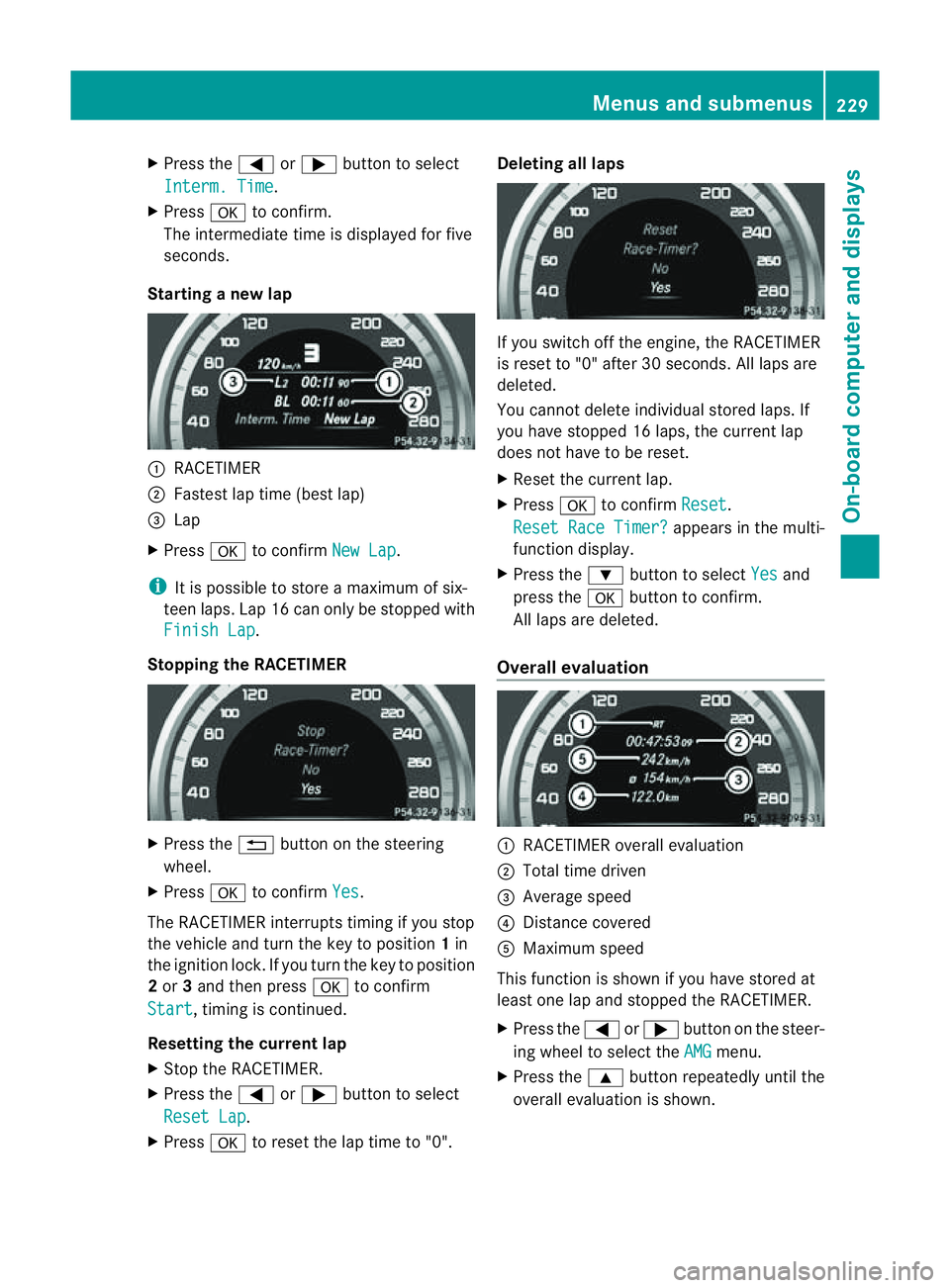
Starting anew lap :
RACETIMER
; Fastest lap time (best lap)
= Lap
X Press ato confirm New Lap .
i It is possible to store amaximum of six-
teen laps. Lap 16 can only be stopped with
Finish Lap .
Stopping the RACETIMER X
Press the %button on the steering
wheel.
X Press ato confirm Yes .
The RACETIME Rinterrupts timing if you stop
the vehicle and turn the key to position 1in
the ignition lock. If you turn the key to position
2 or 3and then press ato confirm
Start ,t
iming is continued.
Resetting the current lap
X Stop the RACETIMER.
X Press the =or; button to select
Reset Lap .
X Press ato reset the lap time to "0". Deleting all laps
If you switch off the engine, the RACETIMER
is reset to "0" after 30 seconds. All laps are
deleted.
You cannot delete individual stored laps. If
you have stopped 16 laps, the curren tlap
does no thave to be reset.
X Reset th ecurren tlap.
X Press ato confirm Reset .
Reset Rac eTimer? appear
sinthemulti-
function display.
X Press the :buttontos electYes and
pres sthe a buttontoc onfirm.
All laps are deleted.
Overall evaluation :
RACETIMER overall evaluation
; Total tim edriven
= Averag espeed
? Distance covered
A Maximum speed
This function is shown if you have store dat
least on elap and stopped th eRACETIMER.
X Press the =or; button on the steer-
ing whee ltoselect the AMG menu.
X Press the 9button repeatedly unti lthe
overall evaluation is shown. Menus and submenus
229On-board computer and displays Z
Page 237 of 373
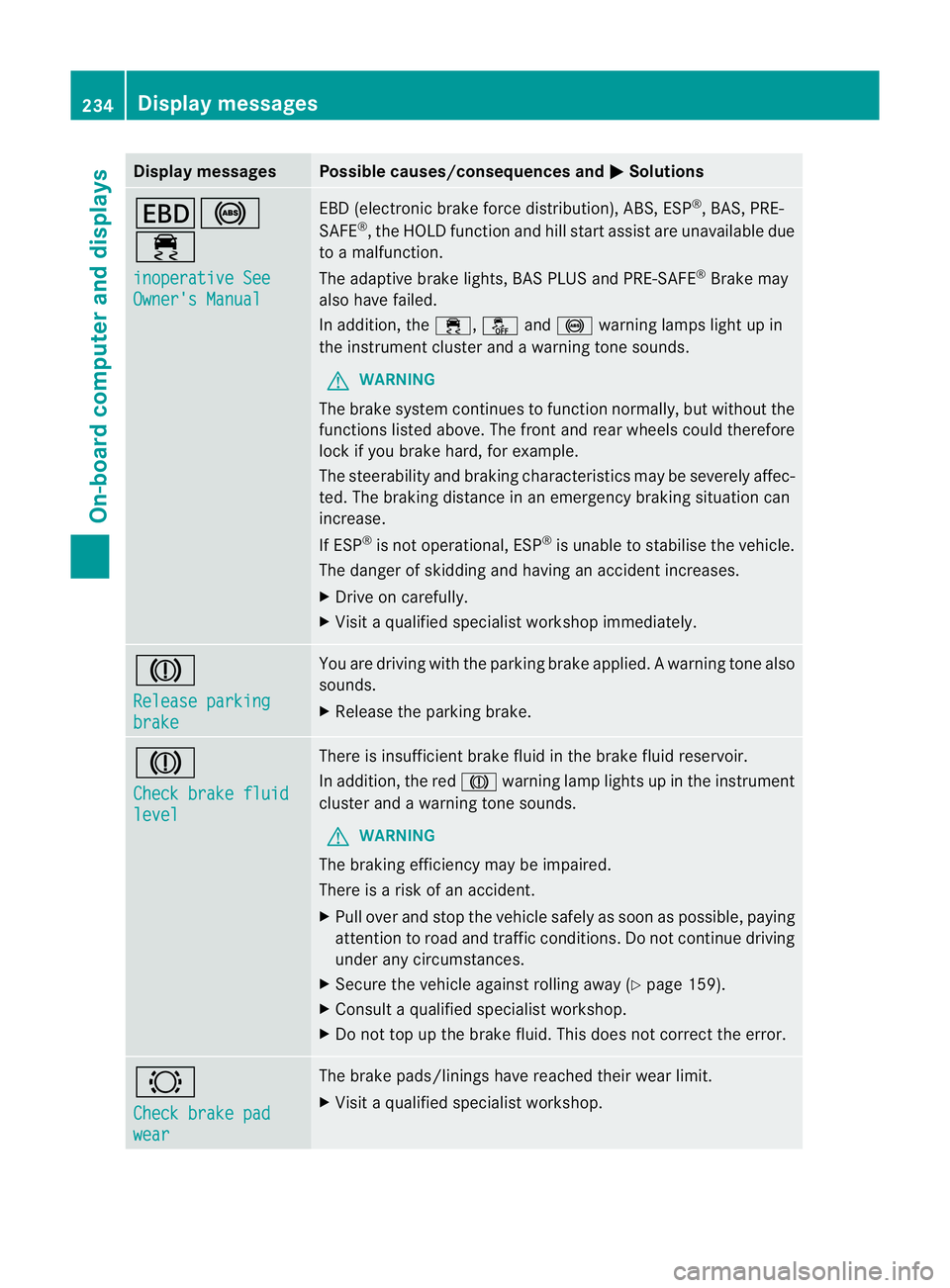
Display messages Possible causes/consequences and
M Solutions
T!
÷
inoperative See
Owner'
sManual EB
D( electronic brak eforce distribution), ABS, ESP ®
,B AS ,PRE-
SAFE ®
,t he HOLD function and hill start assist are unavailable due
to am alfunction.
The adaptive brak elights ,BAS PLU Sand PRE-SAFE ®
Brake may
also hav efailed.
In addition ,the ÷ ,å and! warnin glamp sligh tupin
the instrument cluster and awarning ton esounds.
G WARNING
The brake system continues to function normally, but without the
function slisted above. The fron tand rea rwheels could therefore
lock if you brake hard, for example.
The steerability and braking characteristics may be severely affec-
ted. The braking distance in an emergency braking situation can
increase.
If ESP ®
is not operational, ESP ®
is unable to stabilise the vehicle.
The danger of skidding and having an accident increases.
X Drive on carefully.
X Visit aqualified specialist workshop immediately. J
Release parking
brake You are driving with the parking brake applied.
Awarning tone also
sounds.
X Release th eparking brake. J
Check brake fluid
level Ther
eisi nsufficient brak efluid in the brak efluid reservoir.
In addition, the red Jwarnin glamp light supinthe instrument
cluster and awarnin gtones ounds.
G WARNING
The braking efficiency may be impaired.
There is arisk of an accident.
X Pull over and stop the vehicle safely as soon as possible ,paying
attention to road and traffic conditions. Do not continue driving
under any circumstances.
X Secure the vehicle against rollin gaway (Y page 159).
X Consult aqualified specialist workshop.
X Do not top up the brak efluid. This does not correc tthe error. #
Chec
kbrakep ad wear The brak
epads/linings have reached their wear limit.
X Visit aqualified specialist workshop. 234
Display messagesOn-board computer and displays
Page 238 of 373
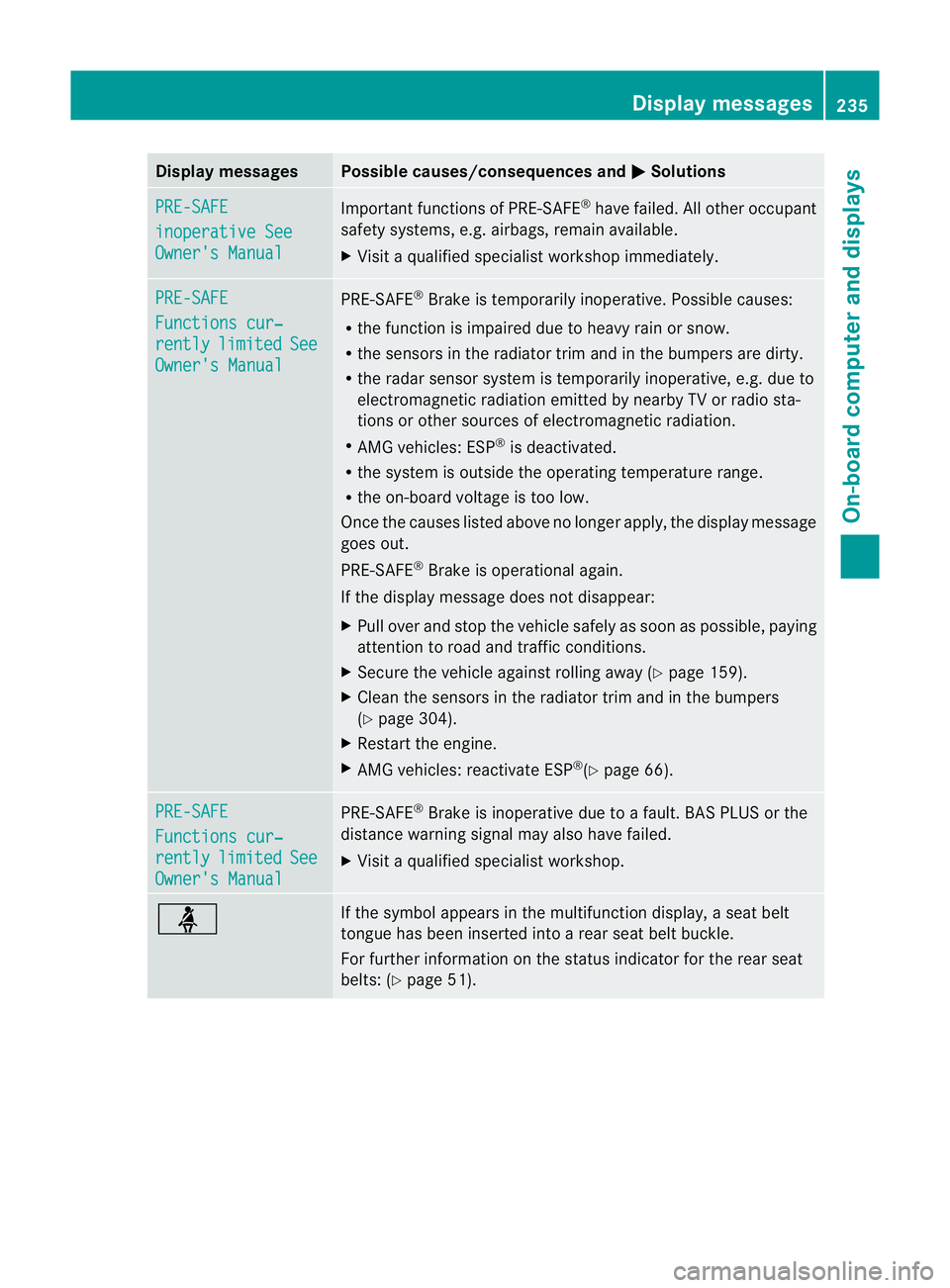
Display messages Possible causes/consequences and
M Solutions
PRE-SAFE
inoperative See
Owner'
sManual Importan
tfunction sofPRE-SAFE ®
have failed .All other occupant
safet ysystems, e.g. airbags, remain available.
X Visit aqualified specialist workshop immediately. PRE-SAFE
Function
scur‐ rently limited See
Owner's Manual PRE-SAFE
®
Brake is temporarily inoperative. Possible causes:
R the function is impaired due to heavy rain or snow.
R the sensors in the radiator trim and in the bumper sare dirty.
R the radar sensor system is temporarily inoperative, e.g. due to
electromagnetic radiation emitted by nearby TV or radio sta-
tion soro ther sources of electromagnetic radiation.
R AMG vehicles: ESP ®
is deactivated.
R the system is outside the operating temperature range.
R the on-board voltage is too low.
Onc ethe causes listed above no longer apply, the display message
goes out.
PRE-SAFE ®
Brake is operational again.
If the display message does not disappear:
X Pull over and stop the vehicle safely as soon as possible ,paying
attention to road and traffic conditions.
X Secure the vehicle against rollin gaway (Y page 159).
X Clean the sensors in the radiator trim and in the bumpers
(Y page 304).
X Restar tthe engine.
X AMG vehicles: reactivate ESP ®
(Y page 66). PRE-SAFE
Functions cur‐
rently limited See
Owner's Manual PRE-SAFE
®
Brake is inoperative due to afault. BAS PLUS or the
distance warning signal may also have failed.
X Visit aqualified specialist workshop. ü If the symbol appears in the multifunction display,
aseat belt
tongue has been inserted intoar ear seat belt buckle.
For further information on the status indicator for the rear seat
belts: (Y page 51). Display messages
235On-boardcomputer and displays Z