belt MERCEDES-BENZ CLS COUPE 2012 Owner's Manual
[x] Cancel search | Manufacturer: MERCEDES-BENZ, Model Year: 2012, Model line: CLS COUPE, Model: MERCEDES-BENZ CLS COUPE 2012Pages: 373, PDF Size: 9.12 MB
Page 100 of 373
settings with the memory function
(Y
page 107). Seats
Important safety notes
G
WARNING
The seats can still be adjusted when there is
no key in the ignition lock. For this reason,
children should never be left unsupervised in
the vehicle. They could adjust the seats and
become trapped. G
WARNING
Only adjust the driver's seat when the vehicle
is stationary. You will otherwise be distracted
from the road and traffic conditions and you
could lose control of the vehicle as aresult of
the seat moving. This could cause an acci-
dent. G
WARNING
If you adjust the seat height carelessly,y ou or
others could be trapped and thereby injured.
Children in particular could unintentionally
press the buttons to electrically adjust the
seats and become trapped.
Take care that:
R while moving the seats, your hands do not
get under the lever assembly of the seat
adjustment system.
R children in the vehicle do not slide their
hands under the levers. G
WARNING
Make sure that nobody can become trapped
when adjusting the seats.
Observe the notes on airbags.
Secure children as recommended; see the
"Children in the vehicle" section. G
WARNING
Make sure that the back of your head is sup-
ported at eye level by the central area of the head restraint. If your head is not supported
correctly by the head restraint, you could suf-
fer asevere neck injury in the event of an
accident. Never drive if the head restraints are
not engaged and set correctly. G
WARNING
As eat belt can only offer its intended degree
of protection when the backrest is almost ver-
tical and the occupant is sitting upright. Avoid
seat position sthat do not allow the seat belt
to be routed correctly. Adjust the backrest so
that it is as upright as possible. Never travel
with the backrest reclined too far backwards.
You could otherwise be seriously or even
fatally injured in the event of an acciden tor
sudden braking.
! To avoid damage to the seats and the seat
heating, observe the following information:
R do not spill any liquids on the seats. If
liquid is spilled on the seats, dry them as
soon as possible.
R if the seat cover sare damp or wet, do not
switch on the seat heating. The seat
heating should also not be used to dry
the seats.
R clean the seat cover sasrecommended;
see the "Interior care" section.
R do not transport heavy loads on the
seats. Do not place sharp objects on the
seat cushions ,e.g. knives, nails or tools.
The seats should only be occupied by
passengers, if possible.
R when the seat heating is in operation ,do
not cover the seats with insulating mate-
rials, e.g. blankets, coats, bags, seat cov-
ers, child seats or booster seats.
! To avoid damage to the seats and the seat
heating, observe the following information:
R do not spill any liquids on the seats. If
liquid is spilled on the seats, dry them as
soon as possible.
R if the seat cover sare damp or wet, do not
switch on the seat heating. The seat Seats
97Seats, steering wheel and mirrors Z
Page 149 of 373
R
the se ttemperature for the vehicle interior
has been reached.
R the batter yissufficiently charged.
R the system detects that the windscreen is
not misted up when the air-conditioning
system is switched on.
R the bonnet is closed.
R the driver's door is closed and the driver's
seat belt is fastened.
If conditions for automatic engin eswitch-off
have not been fulfilled, the ¤symbol will
be shown in yellow.
AMG vehicles: the AMG menu in the multi-
function display additionally shows the Stop/Start inactive message.
i If you shift the transmission from Rto D,
the ECO start/stop function is available
again oncet he¤ symbol reappears in
green in the multifunction display.
i All vehicles (except AMG vehicles):
automatic engin eswitch-off can take place
am aximum of four times consecutively (ini-
tial stop and three subsequent stops). The
¤ symbol is shown in yellow in the mul-
tifunction display after the engin ehas been
started automatically for the fourt htime.
The automatic engin eswitch-off is availa-
ble oncea gain when the ¤symbol is
shown in green in the multifunction display.
i AMG vehicles: times which the engine
can be automatically switched off.
i You can also activat ethe HOLD function
when the vehicle is stationary if the engine
has been switched off automatically. It is
then not necessary to continue applying
the brakes during the automatic stop
phase. When you depress the accelerator
pedal, the engin estart sautomatically and
the brakin geffec toft he HOLD function is
deactivated. Depress the accelerator pedal
gently, as the engin emust be started first.
i Durin gautomatic engin eswitch-off ,the
climate control system only operates at a
reduced capacity. If you require full climate control capacity, the ECO start/stop func-
tion can be deactivated by pressing the
ECO button (Y
page 145).
Automatic engine start The engin
eisstarted automatically if:
R you switch off the ECO start/stop function
by pressing the ECO button.
R you release the brakes when in transmis-
sion position Dor N,w hen the HOLD func-
tion is not active.
R you depress the accelerator pedal.
R you engage revers egear R.
R you move the transmission out of position
P.
R you switch to drive program S,S+ orM
(AMG vehicles).
R you unfasten your seat belt or open the
driver's door.
R the vehicle start storoll.
R the brake system requires this.
R the temperature in the vehicle interior devi-
ates from the set range.
R the system detects moisture on the wind-
screen when the air-conditionin gsystem is
switched on.
R the battery's charge status is too low.
i Shifting the transmission to position P
does not start the engine. 146
DrivingDriving and parking
Page 175 of 373
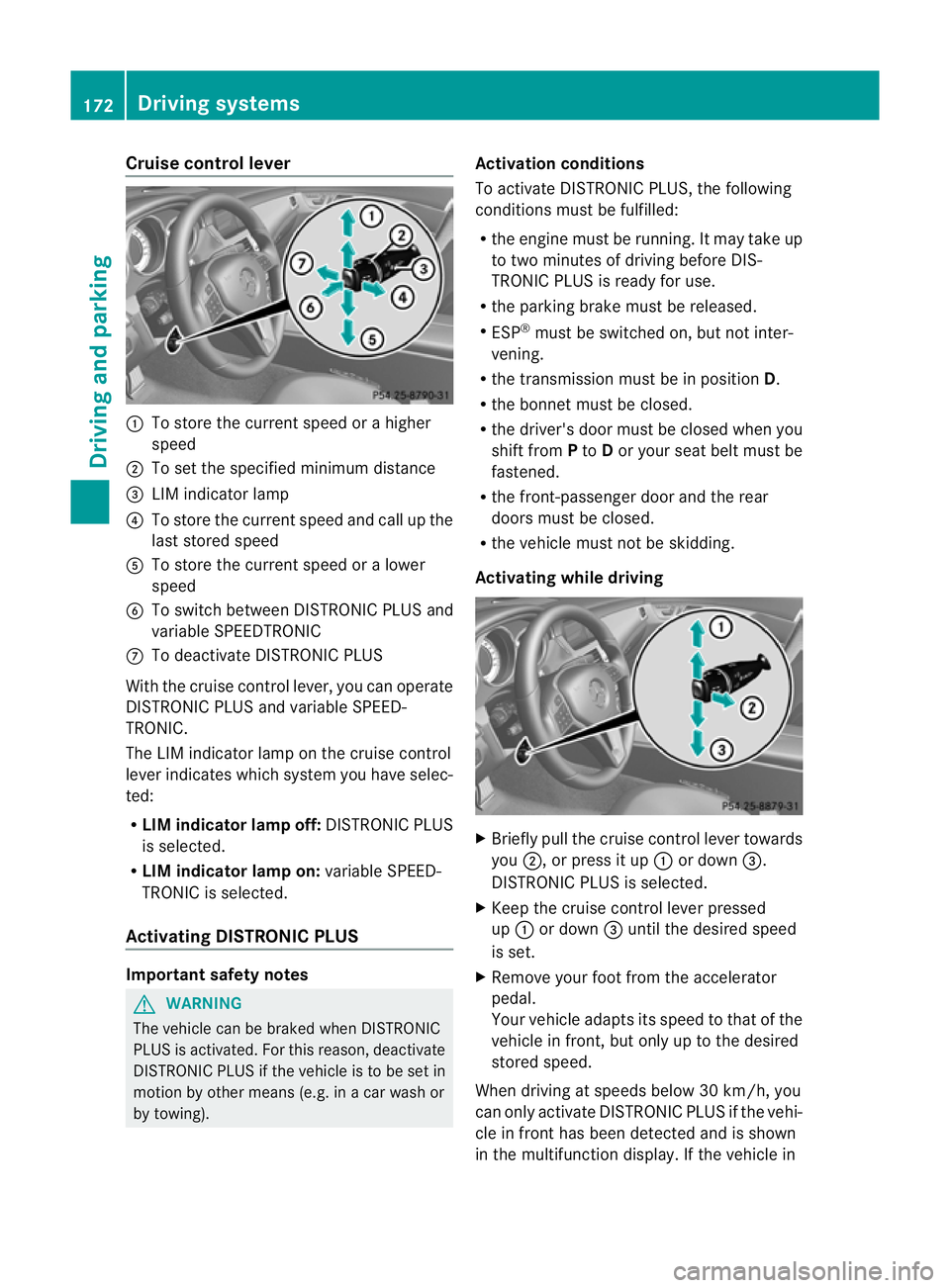
Cruise control lever
:
To store th ecurren tspeed or ahigher
speed
; To set the specified minimum distance
= LIM indicator lamp
? To stor ethe curren tspeed and call up the
last stored speed
A To stor ethe curren tspeed or alower
speed
B To switc hbetween DISTRONIC PLUS and
variable SPEEDTRONIC
C To deactivate DISTRONIC PLUS
With the cruise contro llever, you can operate
DISTRONIC PLUS and variable SPEED-
TRONIC.
The LIM indicator lamp on the cruise control
lever indicates which system you have selec-
ted:
R LIM indicator lamp off: DISTRONIC PLUS
is selected.
R LIM indicator lamp on: variable SPEED-
TRONIC is selected.
Activating DISTRONIC PLUS Important safet
ynotes G
WARNING
The vehicle can be braked when DISTRONIC
PLUS is activated. For this reason, deactivate
DISTRONIC PLUS if the vehicle is to be set in
motion by other means (e.g. in acar wash or
by towing). Activation conditions
To activate DISTRONIC PLUS
,the following
condition smust be fulfilled:
R the engin emust be running. It may tak eup
to two minutes of drivin gbefore DIS-
TRONIC PLUS is ready for use.
R the parkin gbrake must be released.
R ESP ®
must be switched on, but not inter-
vening.
R the transmission must be in position D.
R the bonnet must be closed.
R the driver' sdoor must be closed when you
shift from Pto Dor your seat belt must be
fastened.
R the front-passenger door and the rear
doors must be closed.
R the vehicle must not be skidding.
Activating while driving X
Briefly pull the cruise contro llever towards
you ;,orp ress it up :or down =.
DISTRONIC PLUS is selected.
X Keep the cruise contro llever pressed
up : or down =until the desired speed
is set.
X Remove your foot from the accelerator
pedal.
Your vehicle adapts its speed to that of the
vehicle in front, but only up to the desired
stored speed.
When drivin gatspeeds below 30 km/h, you
can only activate DISTRONIC PLUS if the vehi-
cle in fron thas been detected and is shown
in th emultifunction display. If th evehicle in 172
Driving systemsDriving and parking
Page 178 of 373
When DISTRONIC PLUS is activated, the
transmission is shifted automatically to posi-
tion Pif:
R the driver's door is open and the driver's
seat belt is unfastened.
R the engine is switched off, unless it is auto-
matically switched off by the ECO start/
stop function.
R the bonnet is opened.
R as ystem fault occurs.
R the power supply is not sufficient.
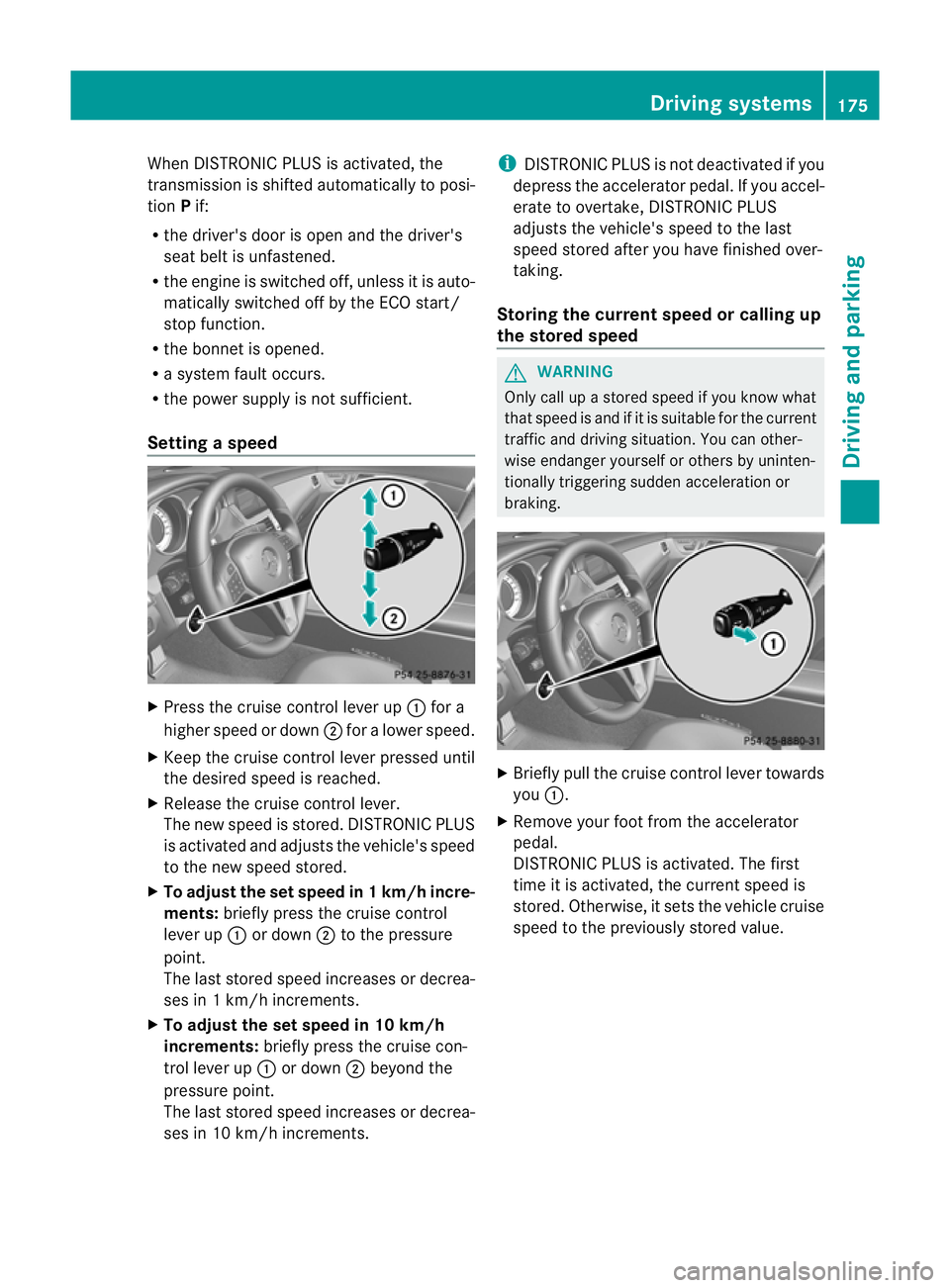
Setting aspeed X
Press the cruise control lever up :for a
highe rspeed or down ;for alower speed.
X Keep the cruise contro llever pressed until
the desired speed is reached.
X Release the cruise contro llever.
The new speed is stored. DISTRONIC PLUS
is activated and adjusts the vehicle's speed
to the new speed stored.
X To adjust the set speed in 1km/h incre-
ments: briefly press the cruise control
lever up :or down ;to the pressure
point.
The last stored speed increases or decrea-
ses in 1km/ hincrements.
X To adjust the set speed in 10 km/h
increments: briefly press the cruise con-
tro llever up :or down ;beyond the
pressure point.
The last stored speed increases or decrea-
ses in 10 km/ hincrements. i
DISTRONIC PLUS is not deactivated if you
depress the accelerator pedal. If you accel-
erate to overtake, DISTRONIC PLUS
adjusts the vehicle's speed to the last
speed stored after you have finished over-
taking.
Storing the current speed or calling up
the stored speed G
WARNING
Only call up astored speed if you know what
that speed is and if it is suitable for the current
traffic and drivin gsituation .You can other-
wise endanger yourself or other sbyuninten-
tionally triggering sudden acceleration or
braking. X
Briefly pull the cruise contro llever towards
you :.
X Remove your foot from the accelerator
pedal.
DISTRONIC PLUS is activated. The first
time it is activated, the curren tspeed is
stored. Otherwise, it sets the vehicle cruise
speed to the previously stored value. Driving systems
175Driving and parking Z
Page 182 of 373
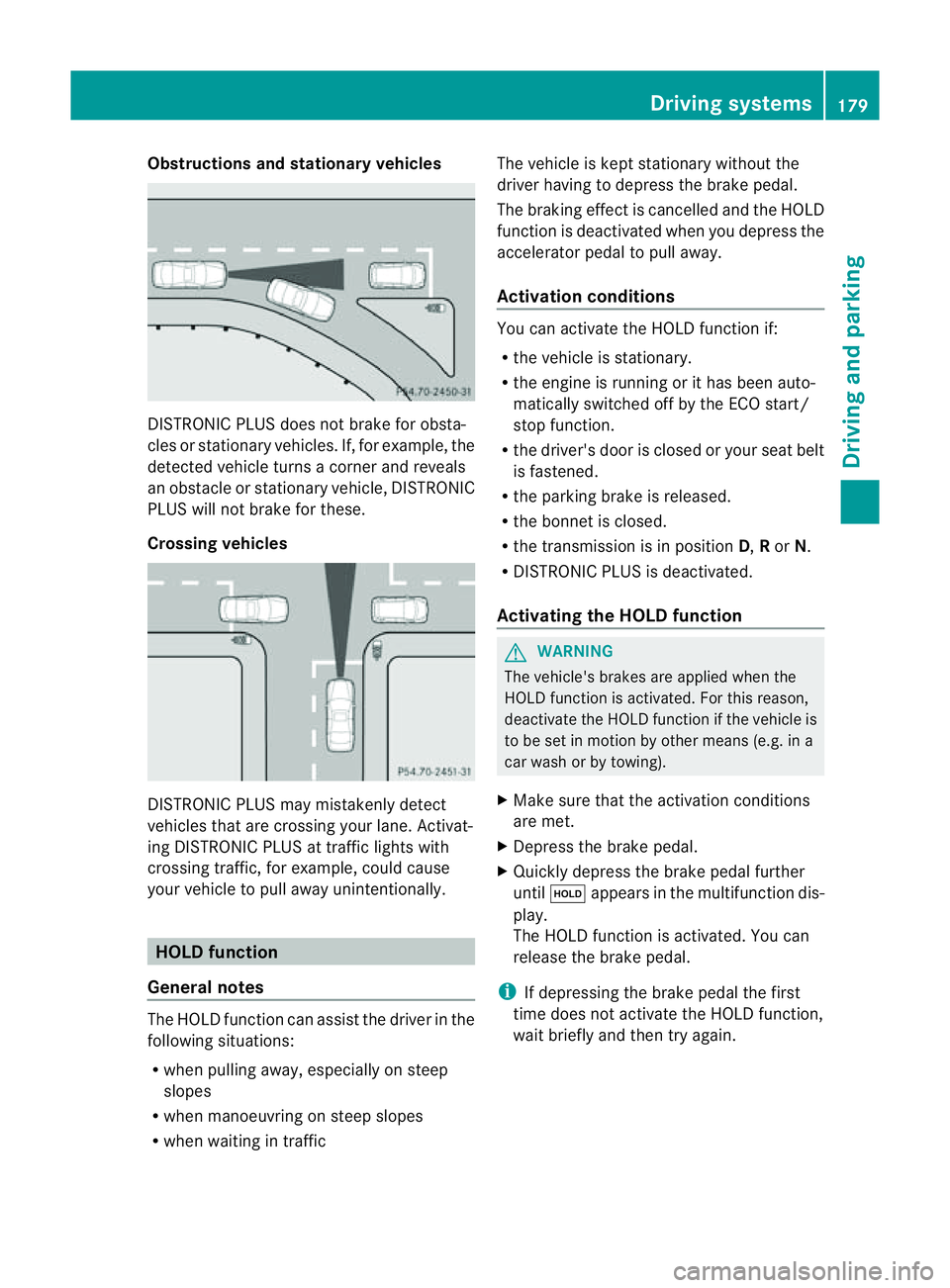
Obstructions and stationary vehicles
DISTRONIC PLUS does not brake for obsta-
cles or stationary vehicles. If, for example, the
detected vehicle turn sacorner and reveals
an obstacle or stationary vehicle, DISTRONIC
PLUS will not brake for these.
Crossing vehicles DISTRONIC PLUS may mistakenly detect
vehicles that are crossing your lane. Activat-
ing DISTRONIC PLUS at traffic lights with
crossing traffic, for example, could cause
your vehicle to pull away unintentionally. HOLD function
General notes The HOLD function can assist the driver in the
following situations:
R when pulling away ,especially on steep
slopes
R when manoeuvrin gonsteep slopes
R when waiting in traffic The vehicle is kept stationary without the
driver having to depress the brake pedal.
The braking effec tiscancelled and the HOLD
function is deactivated when you depress the
accelerator pedal to pull away.
Activation conditions You can activate the HOLD function if:
R
the vehicle is stationary.
R the engine is running or it has been auto-
matically switched off by the ECO start/
stop function.
R the driver's door is closed or your seat belt
is fastened.
R the parking brake is released.
R the bonnet is closed.
R the transmission is in position D,Ror N.
R DISTRONIC PLUS is deactivated.
Activating the HOLD function G
WARNING
The vehicle's brakes are applied when the
HOLD function is activated. For this reason,
deactivate the HOLD function if the vehicle is
to be set in motion by other means (e.g. in a
car wash or by towing).
X Make sure that the activation conditions
are met.
X Depress the brake pedal.
X Quickly depress the brake pedal further
until ë appears in the multifunction dis-
play.
The HOLD function is activated. You can
release the brake pedal.
i If depressing the brake pedal the first
time does not activate the HOLD function,
wait briefly and then try again. Driving systems
179Driving and parking Z
Page 183 of 373
Deactivating th
eHOLDf unction G
WARNING
Never get out of th evehicle when th eHOLD
function is activated.
The HOLD function mus tnever be operated
or deactivated by apassenger or from outside
th ev ehicle.
The HOLD function doe snot replac ethe park-
ing brake and must not be used for parking.
The braking effec tofthe HOLD function is
cancelled and the vehicle could roll away if:
R the HOLD function is deactivated by
depressing the accelerator pedal or the
brake pedal.
R there is amalfunction in the system or an
interruption in the power supply, e.g. bat-
tery failure.
R the electrical system in the engine com-
partment, the batter yorthe fuses are tam-
pered with.
R the batter yisdisconnected.
If you leave the vehicle or park it, deactivate
the HOLD function and secure the vehicle
against rolling away.
The HOLD function is deactivated automati-
cally if:
R you accelerat eand the transmission is in
position Dor R.
R you shift the transmission to position P.
R you depress the brake pedal again with a
certain amount of pressure until ëdis-
appears from the multifunction display.
R you activat eDISTRONIC PLUS.
When the HOLD function is activated, the
transmission is shifted automatically to posi-
tion Pif:
R the driver's door is open and the driver's
seat belt is unfastened.
R the engine is switched off, unless it is auto-
matically switched off by the ECO start/
stop function.
R the bonnet is opened. R
as ystem fault occurs.
R the power supply is not sufficient. RACE START
Important safety notes G
WARNING
RACE START is only available when SPORT
handling mode is activated. SPORT handling
mode will only be able to stabilise the vehicle
to alimited degree if the vehicle start stoskid
or aw heel start stospin. The vehicle is there-
fore harder to control at the threshold range.
You could lose control of the vehicle and
cause an accident.
RACE START should only be used on closed
off circuits. Always adapt your driving style to
suit the prevailing road and weather condi-
tions.
i RACE START is only available in AMG vehi-
cles.
RACE START enables optimum acceleration
from astanding start .The precondition for
this is asuitable high-grip road surface.
Activation conditions You can activat
eRACE START if:
R the doors are closed.
R the engine is running and it has reached an
operatin gtemperature of approximately
80 †. This is the case when the engine oil
temperature in the multifunction display
stops flashing.
R SPORT handling mode is activated
(Y page 66).
R the steerin gwheel is in the straight-ahead
position.
R the vehicle is stationary and the brake
pedal is depressed (left foot).
R the transmission is in position D.180
Driving systemsDriving and parking
Page 196 of 373
R
if you are predominantly drivin gslower
than 80 km/h or faster than 180 km/h
R if you are currently using COMAND APS or
making atelephon ecall with COMAND APS
R if the tim ehas been set incorrectly
R in active drivin gsituations, such as when
you change lanes or change your speed
Warning and display messages in the
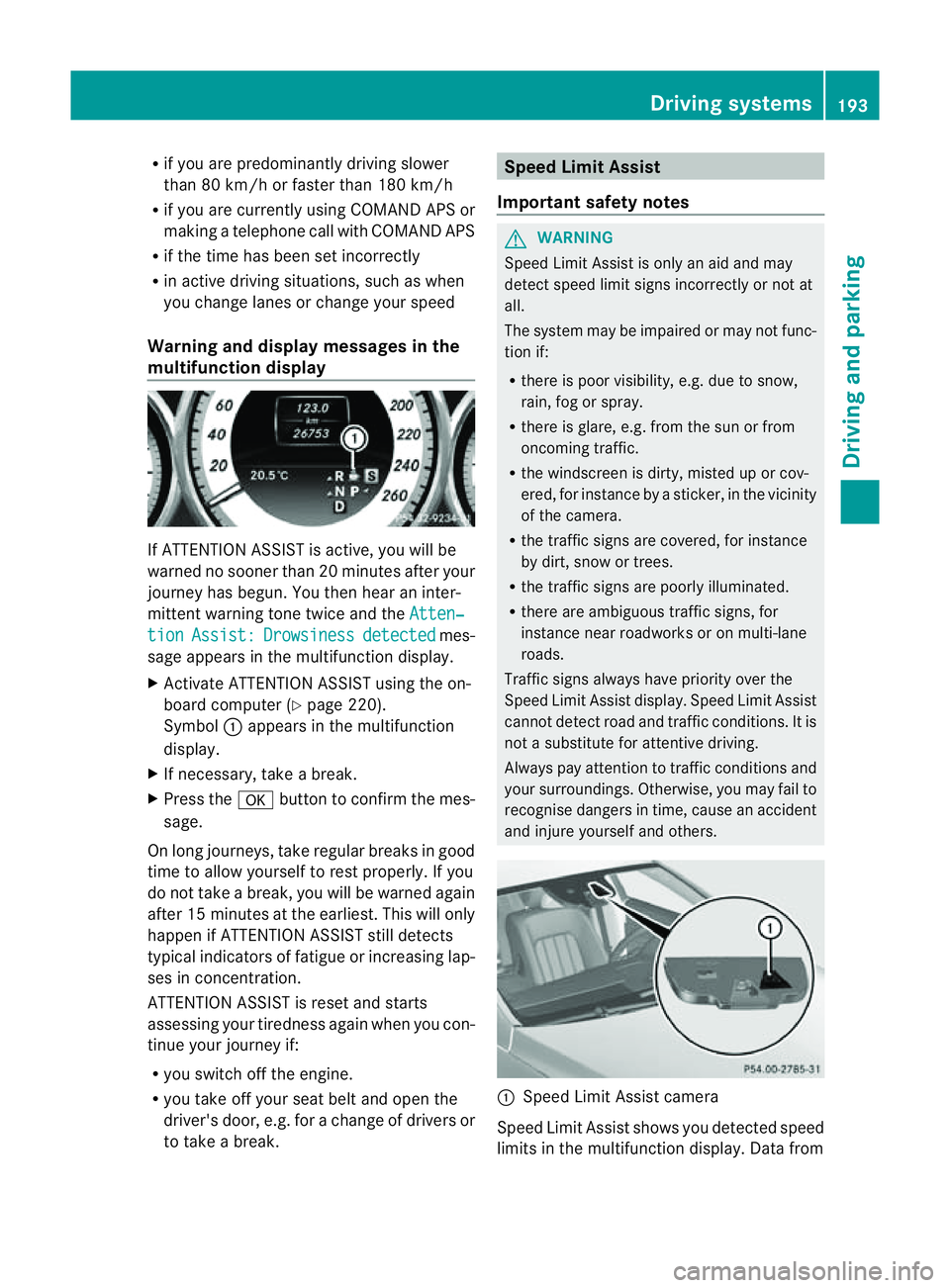
multifunction display If ATTENTION ASSIS
Tisactive, you will be
warne dnosooner than 20 minutes after your
journey has begun. You the nhear an inter-
mittent warning tonet wice and theAtten‐ tion Assist: Drowsiness detected mes-
sage appears in the multifunction display.
X Activat eATTENTION ASSISTu sing the on-
board computer (Y page 220).
Symbol :appears in the multifunction
display.
X If necessary, take abreak.
X Press the abutton to confirm the mes-
sage.
On long journeys, take regular breaks in good
time to allow yourself to rest properly. If you
do not take abreak, you will be warned again
after 15 minutes at the earliest. This will only
happen if ATTENTION ASSISTs till detects
typical indicators of fatigue or increasing lap-
ses in concentration.
ATTENTION ASSISTisr eset and starts
assessing your tiredness again when you con-
tinue your journey if:
R you switch off the engine.
R you take off your seat belt and open the
driver's door, e.g. for achange of drivers or
to take abreak. Speed Limit Assist
Important safet ynotes G
WARNING
Speed Limit Assist is only an aid and may
detec tspeed limit signs incorrectly or not at
all.
The system may be impaired or may not func-
tion if:
R ther eisp oor visibility, e.g. due to snow,
rain, fog or spray.
R ther eisg lare, e.g. from the sun or from
oncoming traffic.
R the windscreen is dirty, misted up or cov-
ered, for instance by asticker, in the vicinity
of the camera.
R the traffic signs are covered, for instance
by dirt, snow or trees.
R the traffic signs are poorly illuminated.
R ther eare ambiguous traffic signs, for
instance near roadworks or on multi-lane
roads.
Traffic signs always have priorit yover the
Speed Limit Assist display. Speed Limit Assist
cannot detec troad and traffic conditions. It is
not asubstitute for attentive driving.
Always pay attention to traffic condition sand
your surroundings. Otherwise, you may fail to
recognise dangers in time, cause an accident
and injure yourself and others. :
Speed Limit Assist camera
Speed Limit Assist shows you detected speed
limits in the multifunction display. Dat afrom Driving systems
193Driving and parking Z
Page 230 of 373
X
Press the :or9 button to select the
Easy Entry/Exit: function.
If the Easy Entry/Exit function is activa-
ted, the vehicle steerin gwheel is displayed
in red in the multifunction display.
X Press the abutton to save the setting.
Further information on the EASY-ENTRY/EXIT
feature (Y page 104).
Switching the belt adjustment on/off
X Press the =or; button on the steer-
ing wheel to select the Settings menu.
X Press the :or9 button to select the
Convenience submenu.
X Press ato confirm.
X Press the :or9 button to select the
Belt adjustment function.
When the Belt adjustment function is
activated, the vehicle seat belt is displayed
in red in the multifunction display.
X Press the abutton to save the setting.
For further information on belt adjustment,
see (Y page 50).
Switching the fold-in mirrors when lock-
ing function on/off
This function is only availabl eonvehicles with
Memory Function (Y page 107).
When you activat ethe Auto. fold in func-
tion, the exterior mirrors are folded in when
the vehicle is locked. When you unlock the
vehicle and then open adoor, the exterior
mirrors fold out again.
X Press the =or; button on the steer-
ing wheel to select the Settings menu.
X Press the :or9 button to select the
Convenience submenu.
X Press ato confirm.
X Press the :or9 button to select the
Auto. fold in function.
If the Auto. fold in function is activated,
the vehicle's exterior mirror is displaye din
red in the multifunction display.
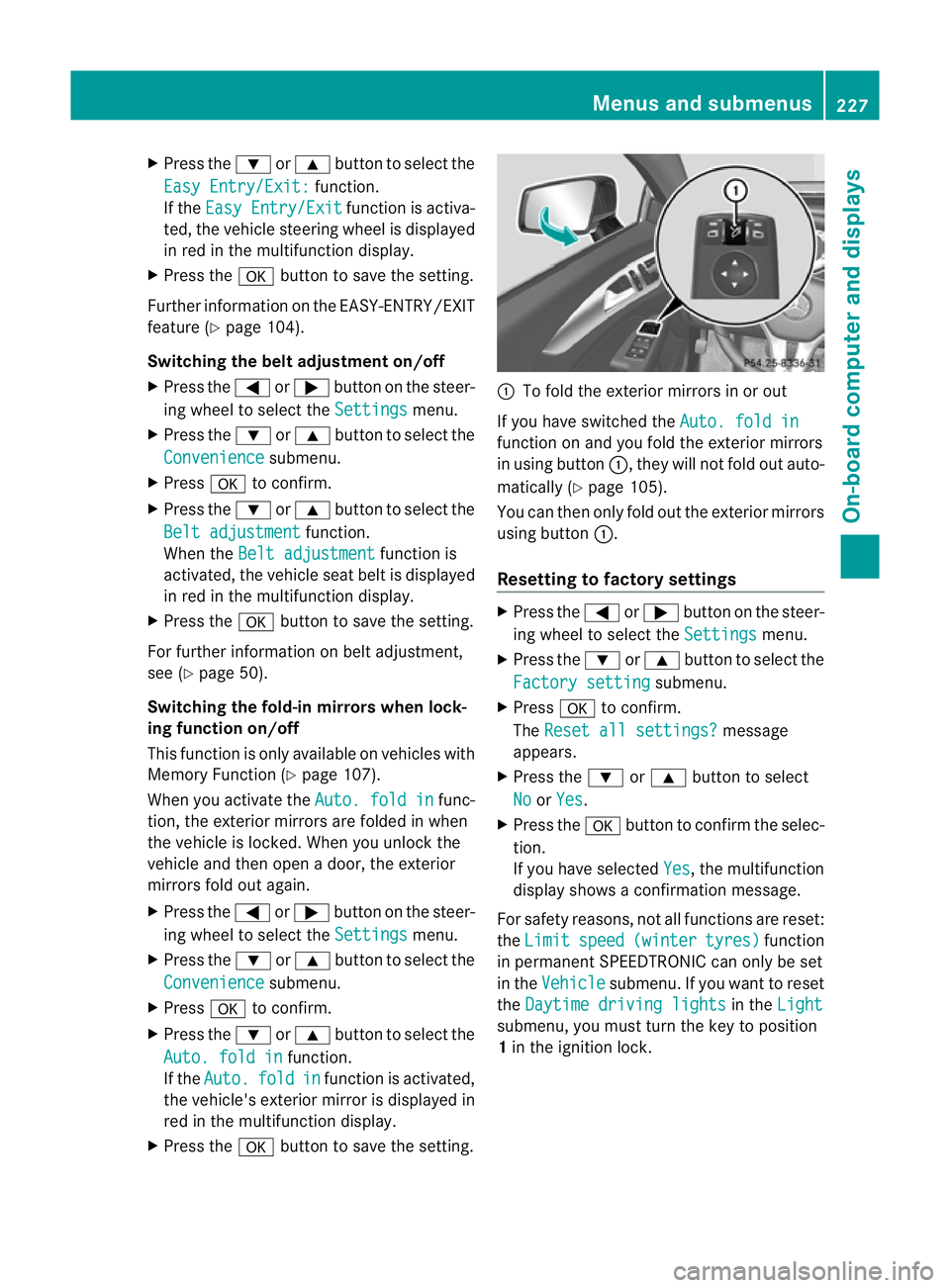
X Press the abutton to save the setting. :
To fold the exterior mirrors in or out
If you have switched the Auto. fold in function on and you fold the exterior mirrors
in using button
:,they will not fold out auto-
matically (Y page 105).
You can then only fold out the exterior mirrors
using button :.
Resetting to factor ysettings X
Pres sthe = or; button on th esteer-
ing wheel to selec tthe Settings menu.
X Press the :or9 button to select the
Factory setting submenu.
X Press ato confirm.
The Reset all settings? message
appears.
X Press the :or9 button to select
No or
Yes .
X Press the abutton to confirm the selec-
tion.
If you have selected Yes ,t
he multifunction
displays howsaconfirmation message.
For safety reasons, not all functions are reset:
the Limit speed (winter tyres) function
in permanent SPEEDTRONIC can only be set
in the Vehicle submenu. If you want to reset
the Daytime driving lights in the
Light submenu, you must turn the key to position
1
in the ignition lock. Menus and submenus
227On-board computer and displays Z
Page 238 of 373
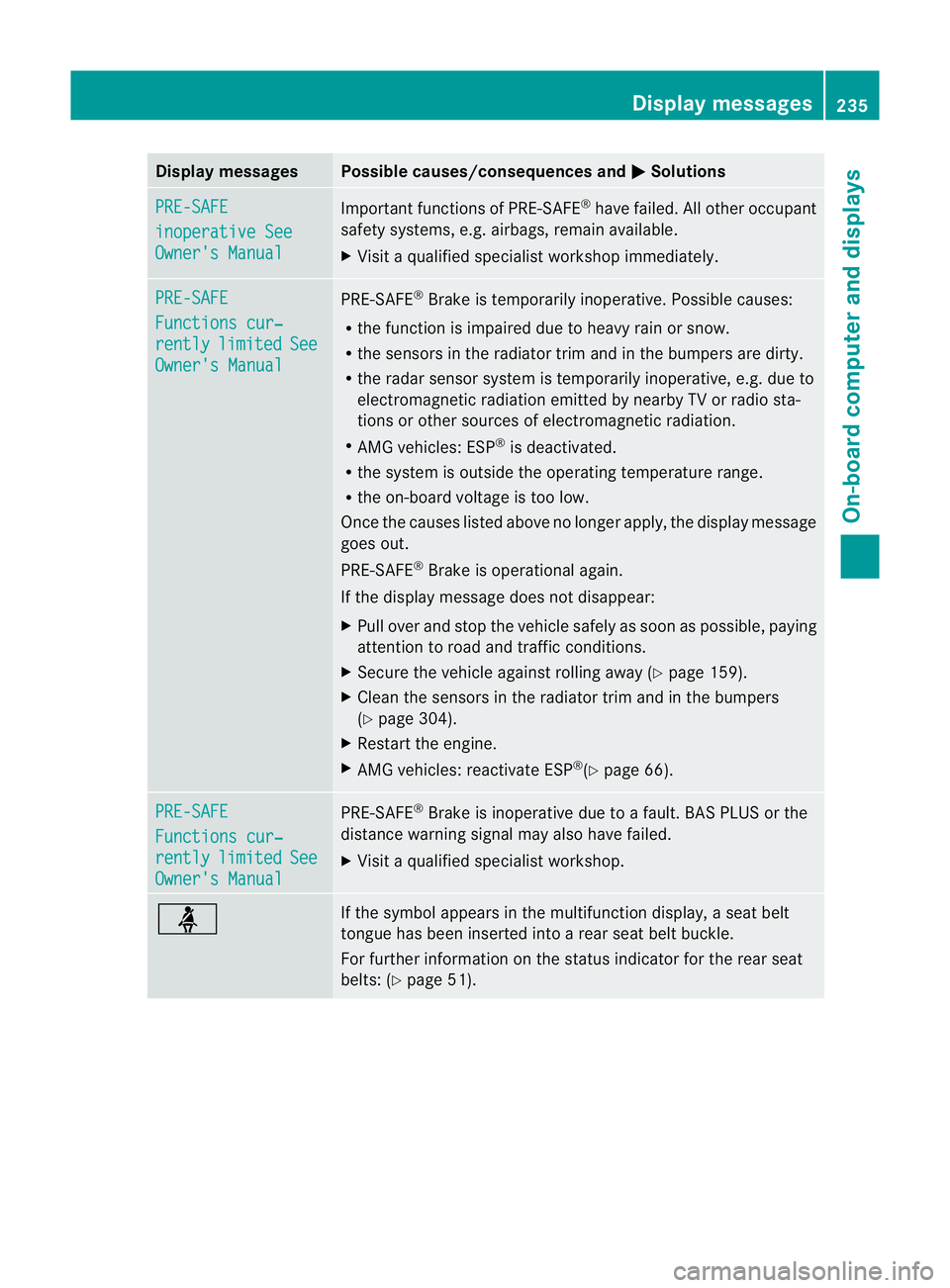
Display messages Possible causes/consequences and
M Solutions
PRE-SAFE
inoperative See
Owner'
sManual Importan
tfunction sofPRE-SAFE ®
have failed .All other occupant
safet ysystems, e.g. airbags, remain available.
X Visit aqualified specialist workshop immediately. PRE-SAFE
Function
scur‐ rently limited See
Owner's Manual PRE-SAFE
®
Brake is temporarily inoperative. Possible causes:
R the function is impaired due to heavy rain or snow.
R the sensors in the radiator trim and in the bumper sare dirty.
R the radar sensor system is temporarily inoperative, e.g. due to
electromagnetic radiation emitted by nearby TV or radio sta-
tion soro ther sources of electromagnetic radiation.
R AMG vehicles: ESP ®
is deactivated.
R the system is outside the operating temperature range.
R the on-board voltage is too low.
Onc ethe causes listed above no longer apply, the display message
goes out.
PRE-SAFE ®
Brake is operational again.
If the display message does not disappear:
X Pull over and stop the vehicle safely as soon as possible ,paying
attention to road and traffic conditions.
X Secure the vehicle against rollin gaway (Y page 159).
X Clean the sensors in the radiator trim and in the bumpers
(Y page 304).
X Restar tthe engine.
X AMG vehicles: reactivate ESP ®
(Y page 66). PRE-SAFE
Functions cur‐
rently limited See
Owner's Manual PRE-SAFE
®
Brake is inoperative due to afault. BAS PLUS or the
distance warning signal may also have failed.
X Visit aqualified specialist workshop. ü If the symbol appears in the multifunction display,
aseat belt
tongue has been inserted intoar ear seat belt buckle.
For further information on the status indicator for the rear seat
belts: (Y page 51). Display messages
235On-boardcomputer and displays Z
Page 239 of 373
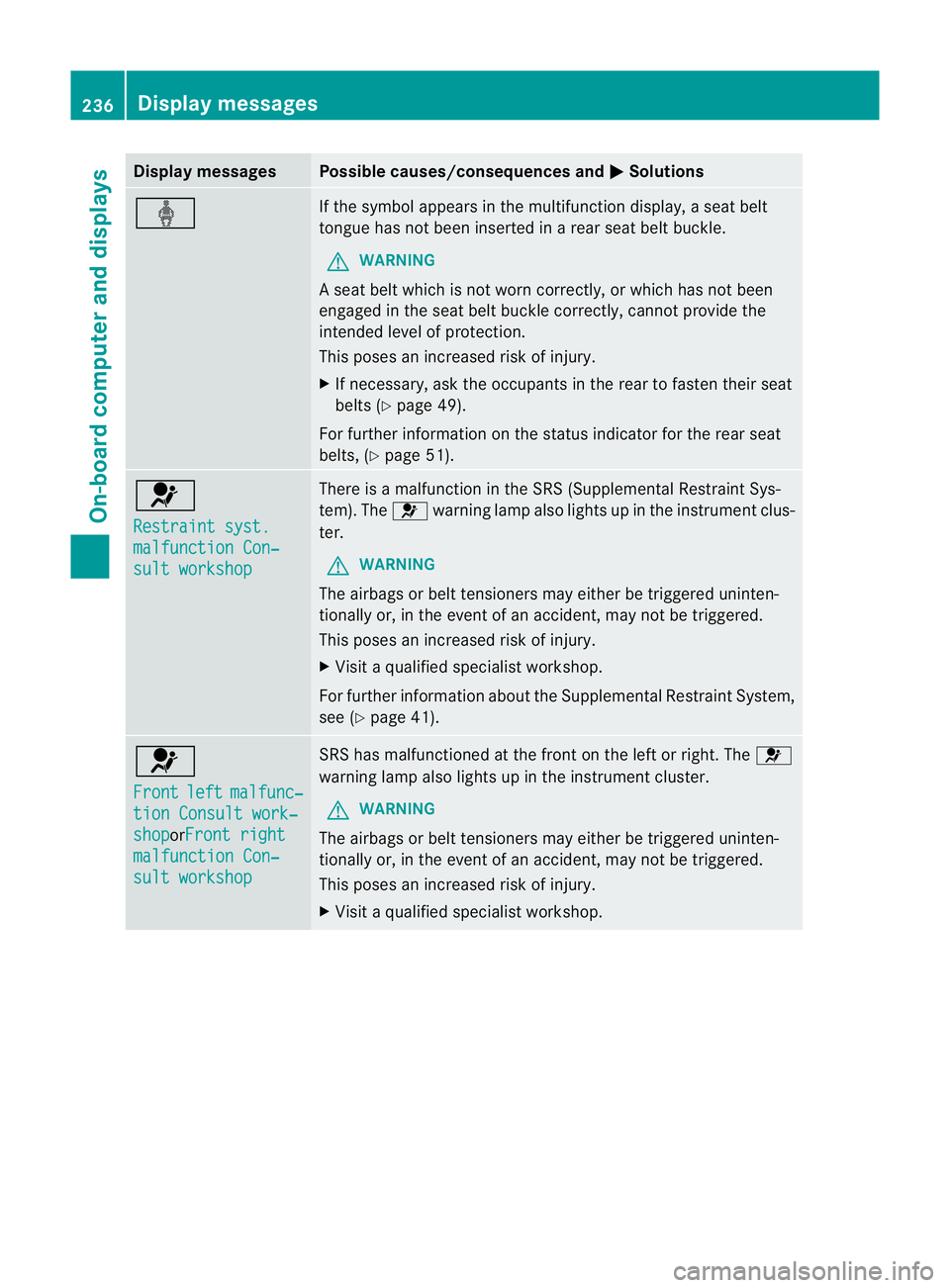
Display messages Possible causes/consequences and
M Solutions
ý If th
esymbol appears in th emultifunction display, aseat belt
tongue has not been inserted in arear seat belt buckle.
G WARNING
As eat belt which is not worn correctly, or which has not been
engaged in the seat belt buckle correctly, cannot provide the
intended level of protection.
This poses an increased risk of injury.
X If necessary, ask the occupants in the rear to fasten their seat
belts (Y page 49).
For further information on the status indicator for the rear seat
belts, (Y page 51). 6
Restraint syst.
malfunction Con‐
sult workshop There is
amalfunction in the SRS (Supplemental Restraint Sys-
tem). The 6warning lamp also lights up in the instrument clus-
ter.
G WARNING
The airbags or belt tensioners may either be triggered uninten-
tionally or, in the event of an accident, may not be triggered.
This poses an increased risk of injury.
X Visit aqualified specialist workshop.
For further information about the Supplemental Restraint System,
see (Y page 41). 6
Front
left malfunc‐
tion Consult work‐
shop orFront right
malfunction Con‐
sult workshop SRS has malfunctioned at the fron
tonthe left or right. The 6
warning lamp also lights up in the instrument cluster.
G WARNING
The airbags or belt tensioners may either be triggered uninten-
tionally or, in the event of an accident, may not be triggered.
This poses an increased risk of injury.
X Visit aqualified specialist workshop. 236
Display messagesOn-boar
dcomputer and displays