steering MERCEDES-BENZ CLS COUPE 2012 Owner's Guide
[x] Cancel search | Manufacturer: MERCEDES-BENZ, Model Year: 2012, Model line: CLS COUPE, Model: MERCEDES-BENZ CLS COUPE 2012Pages: 373, PDF Size: 9.12 MB
Page 162 of 373
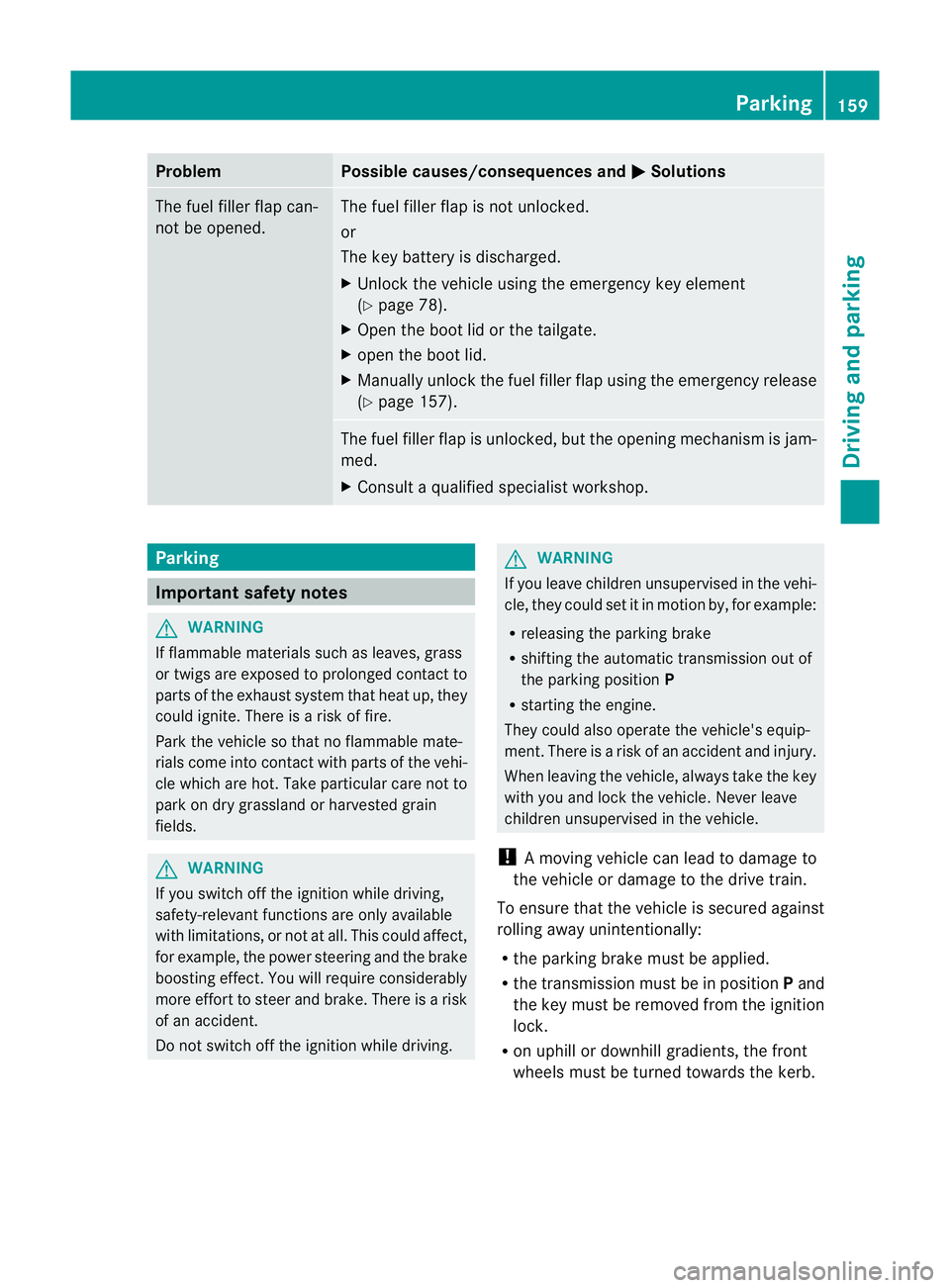
Problem Possible causes/consequences and
M Solutions
The fuel filler flap can-
not be opened. The fuel filler flap is not unlocked.
or
The key battery is discharged.
X
Unlock the vehicle using the emergency key element
(Y page 78).
X Open the boot lid or the tailgate.
X open the boot lid.
X Manuallyu nlock the fuel filler flap using the emergency release
(Y page 157). The fuel filler flap is unlocked, but the opening mechanism is jam-
med.
X
Consult aqualified specialist workshop. Parking
Important safety notes
G
WARNING
If flammable materials such as leaves, grass
or twigs are exposed to prolonged contact to
parts of the exhaust system that heat up, they
could ignite. There is arisk of fire.
Park the vehicle so that no flammable mate-
rials come into contact with parts of the vehi-
cle which are hot. Take particular care not to
park on dry grassland or harvested grain
fields. G
WARNING
If you switch off the ignition while driving,
safety-relevant functions are only available
with limitations, or not at all. This could affect,
for example, the power steering and the brake
boosting effect.Y ou will require considerably
more effort to steer and brake. There is arisk
of an accident.
Do not switch off the ignition while driving. G
WARNING
If you leave children unsupervised in the vehi-
cle, they could set it in motion by, for example:
R releasing the parking brake
R shifting the automatic transmission out of
the parking position P
R starting the engine.
They could also operate the vehicle's equip-
ment.T here isarisk of an accident and injury.
When leaving the vehicle, always take the key
with you and lock the vehicle. Never leave
children unsupervised in the vehicle.
! Am oving vehicle can lead to damage to
the vehicle or damage to the drive train.
To ensure that the vehicle is secured against
rolling away unintentionally:
R the parking brake must be applied.
R the transmission must be in position Pand
the key must be removed from the ignition
lock.
R on uphill or downhill gradients, the front
wheels must be turned towards the kerb. Parking
159Driving and parking Z
Page 168 of 373
Slippery road surfaces
G
WARNING
If you shift down on aslippery road surface in
an attempt to increase the engine's braking
effect,t he drive wheels could lose their grip.
This increases the risk of skidding and having
an accident.
Do not shift down for additional engine brak-
ing on aslippery road surface.
If the vehicle threaten stoskid or cannot be
stopped when moving at low speed:
X Move the transmission to position N.
X Try to bring the vehicle under control by
using corrective steering.
You should drive particularly carefully on slip-
pery road surfaces. Avoid sudden accelera-
tion, steering and braking manoeuvres.
i For more information on driving with
snow chains, see (Y page 331). Driving systems
Cruise control
Important safety notes G
WARNING
Do not change down for additional engine
braking on aslippery road surface. This could
cause the drive wheels to lose their grip and
the vehicle could skid. G
WARNING
Cruise control cannot take account of road
and traffic conditions.
Always pay attention to traffic conditions
even when cruise control is activated.
Cruise control is only an aid designed to assist
driving. You are responsible for the vehicle's
speed and for braking in good time. G
WARNING
Do not use cruise control
R in traffic condition sthat do not allow you to
drive at aconstant speed (e.g. heavy traffic
or winding roads). You may otherwise
cause an accident.
R on slippery roads. The drive wheels may
lose their grip when braking or accelerating
and the vehicle may skid.
R when there is low visibility, e.g. due to fog,
heavy rain or snow.
General notes Cruise control maintains
aconstant road
speed for you. It brakes automatically in order
to avoid exceeding the set speed. On long and
steep downhill gradients, especially if the
vehicle is laden, you must select shift range
1, 2or 3in good time. By doing so, you will
make use of the braking effect of the engine.
This relieves the load on the brake system and
preventst he brakes from overheating and
wearing too quickly.
Use cruise control only if road and traffic con-
ditions make it appropriate to maintain a
steady speed for aprolonged period. You can
store any road speed above 30 km/h.
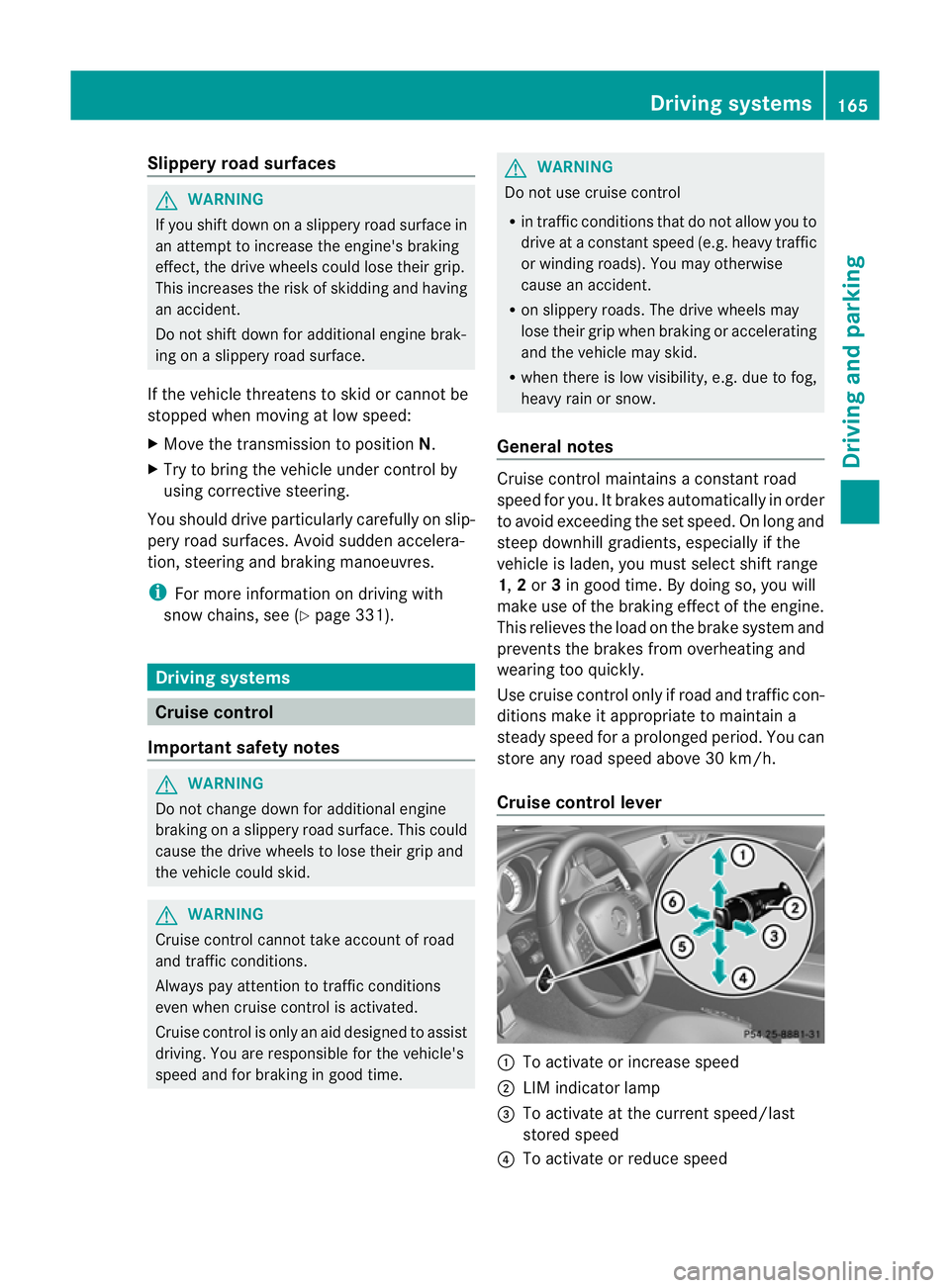
Cruise control lever :
To activate or increase speed
; LIM indicator lamp
= To activate at the current speed/last
stored speed
? To activate or reduce speed Driving systems
165Driving and parking Z
Page 191 of 373
G
WARNING
The front of the vehicl ewillv eer out in the
direction of the oncoming traffic during the
parking operation. In some cases the vehicle
willa lsot ake you onto sections of the oncom-
ing lane during the parking procedure.
You are responsibl efor safety at all times and
must pay attention to any road users
approaching or passing. Stop the vehicl eif
necessary or cancel the Active Parking Assist
parking procedure. G
WARNING
Make sure that no persons or animals are in
the manoeuvring range. Otherwise, they
coul dbei njured.
! If unavoidable,y ou should drive over
obstacles such as kerbs slowly and not at
as harp angle .Otherwise, yo umaydamage
the wheels or tyres.
Activ eParking Assist is an electroni cparking
aid wit hultrasound. Ultrasound is used to
measure th eroad on bot hsides of th evehicle.
As uitable parking spac eisindicated by the
parking symbol. Active steering intervention
can assis tyou during parking. You may also
use PARKTRONIC (Y page 185). When PARK-
TRONIC is switched off, Active Parking Assist
is also unavailable.
Use Active Parking Assist for parking spaces:
R that are parallel to the direction of travel
R that are on straight roads, not bends
R that are on the same level as the road, e.g.
not on the pavement
Parking tips:
R on narrow roads, drive as closely as possi-
ble past the parking space.
R parking spaces that are littered, overgrown
or partially occupied by trailer drawbars
might be identified incorrectly or not at all.
R snowfall or heavy rain may lead to aparking
space being measured inaccurately. R
pay attention to the PARKTRONIC
(Y page 186) warning messages during the
parking procedure.
R at any time, you can intervene in the steer-
ing procedure to correc tit. Active Parking
Assist will then be cancelled.
R when transporting aload which protrudes
from your vehicle, you should not use
Active Parking Assist.
R when snow chains or an emergenc yspare
wheel are fitted, you should not use Active
Parking Assist here either.
R make sure that the tyre pressures are
always correct. This has adirec tinfluence
on the parking characteristics of the vehi-
cle.
R the wa yyourv ehicl eisp ositioned in the
parking space after parking is dependent
on various factors .These include the posi-
tion and shape of the vehicles parked in
front and behind it and the conditionsoft he
location. It may be the case that Active
Parking Assist guides you too far into a
parking space, or not far enough into it. In
some cases, it may also lead you across or
onto the kerb. If necessary, you should can-
cel the parking procedure with Active Park-
ing Assist.
R you can also engage forward gear prema-
turely. The vehicle redirects and does not
drive as far into the parking space. Should
ag ear be changed too early to achieve a
sensible parking position, the parking pro-
cedure will be cancelled. 188
Driving systemsDriving and parking
Page 192 of 373
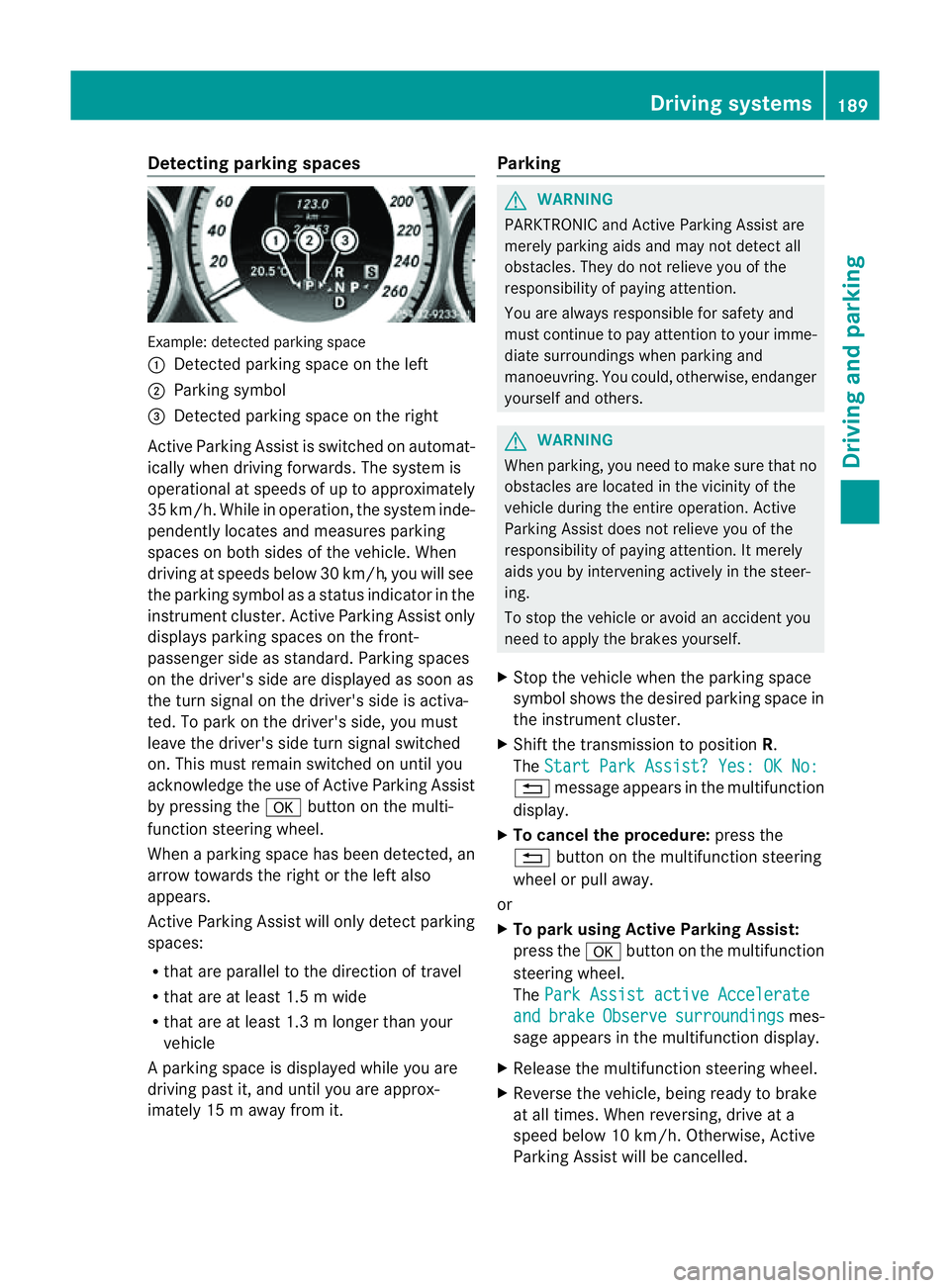
Detecting parking spaces
Example: detecte
dparking space
: Detected parking spac eontheleft
; Parking symbol
= Detected parking spac eontheright
Active Parking Assis tisswitched on automat-
ically when driving forwards. The system is
operational at speed sofuptoapproximately
35 km/h. While in operation, th esystem inde-
pendently locates and measures parking
spaces on bot hsides of th evehicle. When
driving at speeds below 30 km/h, you will see
th ep arkin gsymbol as astatu sind icator in the
instrumen tcluster .Active Parking Assist only
display sparking spaces on the front-
passenger sid easstandard .Parking spaces
on th edriver' sside are displayed as soon as
th et urns ignal on the driver's side is activa-
ted. To park on the driver's side, you must
leave the driver's side tur nsignal switched
on. This must remain switched on until you
acknowledge the use of Activ eParking Assist
by pressing the abutton on the multi-
function steerin gwheel.
When aparking space has been detected, an
arrow towards the right or the left also
appears.
Activ eParking Assist will only detect parking
spaces:
R that are parallel to the direction of travel
R that are at least 1. 5mwide
R that are at least 1. 3mlonger than your
vehicle
Ap arking spac eisdisplayed while you are
driving past it, and until you are approx-
imately 15 maway from it. Parking G
WARNING
PARKTRONIC and Activ eParking Assist are
merely parking aids and may no tdetec tall
obstacles. They do not reliev eyou of the
responsibilit yofpaying attention.
You are always responsible for safet yand
must continue to pay attention to your imme-
diate surroundings when parking and
manoeuvring. You could, otherwise, endanger
yourself and others. G
WARNING
When parking, you need to make sure that no
obstacles are located in the vicinity of the
vehicle durin gthe entire operation. Active
Parking Assist does not reliev eyou of the
responsibilit yofpaying attention. It merely
aids you by intervenin gactively in the steer-
ing.
To sto pthe vehicle or avoid an accident you
need to apply the brakes yourself.
X Stop the vehicle when the parking space
symbol shows the desired parking space in
the instrumen tcluster.
X Shif tthe transmission to position R.
The Start Park Assist? Yes: OK No: %
message appears in the multifunction
display.
X To cancel the procedure: press the
% button on the multifunction steering
wheel or pull away.
or
X To parku sing Active Parking Assist:
press the abutton on the multifunction
steerin gwheel.
The Park Assist active Accelerate and brake Observe surroundings mes-
sage appears in the multifunction display.
X Release the multifunction steerin gwheel.
X Reverse the vehicle, being ready to brake
at all times. When reversing, drive at a
speed below 10 km/h. Otherwise, Active
Parking Assist will be cancelled. Driving systems
189Driving and parking Z
Page 193 of 373
i
In tight parking spaces, you willa chieve
the best parking results by backing up as
far as possible. When doing so, also
observe the PARKTRONIC messages.
X Stop as soon as PARKTRONIC sounds the
continuous warning tone, if not before.
Manoeuvring may be required in tight park-
ing spaces.
The Park Assist active Select D Observe surroundings messag
eappears in
the multifunction display.
X Shift the transmission to position Dwhile
the vehicle is stationary.
Active Parking Assist immediately steers in
the other direction.
The Park Assist active Accelerate and brake Observe surroundings mes-
sage appears in the multifunction display.
i You willa chieve the best results by wait-
ing for the steering procedure to complete
before pulling away.
X Drive forward sand be ready to brake at all
times.
X Stop as soon as PARKTRONIC sounds the
continuous warning tone, if not before.
The Park Assist active Select R Observe surroundings messag
eappears in
the multifunction display.
Further transmission shifts may be neces-
sary.
As soon as the parking procedure is com-
plete, the Park Assist switched off mes-
sage appears in the multifunction display.
PARKTRONIC continues to be available.
X Manoeuvre if necessary.
X Alwayso bserve the warning messages dis-
played by PARKTRONIC (Y page 186).
Cancelling Active Parking Assist You can cancel Active Parking Assist at any
time. X
Stop the movement of the multifunction
steering wheelors teer yourself.
Active Parking Assist willbec ancelled at
once. The Park Assist cancelled mes-
sage appears in the multifunction display.
or
X Press the PARKTRONIC button on the
centre console (Y page 186).
PARKTRONIC is switched off and Active
Parking Assist is immediately cancelled.
The Park Assist cancelled message
appears in the multifunction display.
Active Parking Assist is cancelled automati-
cally if:
R the transmission is shifted too early.
R parking using Active Parking Assist is no
longer possible.
R you are driving faster than 10 km/h.
R aw hee lspins and ESP ®
intervenes or fails.
The ä warning lamp lights up in the
instrument cluster.
Aw arning tone sounds. The parking symbol
disappears and th emultifunction display
shows the ParkA ssist cancelled mes-
sage.
When Activ eParking Assist is cancelled, you
must steer again yourself. Reversing camera
Important safety notes G
WARNING
Mak esure that no person soranimals are in
th em anoeuvrin grange. Otherwise, they
could be injured. 190
Driving systemsDriving and parking
Page 195 of 373
G
WARNING
Please note that objects not at ground level
may appear to be further awayt han they
actually are. These include:
R the bumper of avehicl ethat is parked
behind yourv ehicle
R at railer drawbar
R the ball coupling of atrailer tow hitch
R the tail-en dofalorry
R slanted posts
The lines are only guides, not accurat emeas-
urement softhe distanc etoanobstacle.
Therefore, you should never pass the red line
when approaching an obstacle. You could oth-
erwise cause an acciden tand injure yourself
and others. Information in the COMAND display (example)
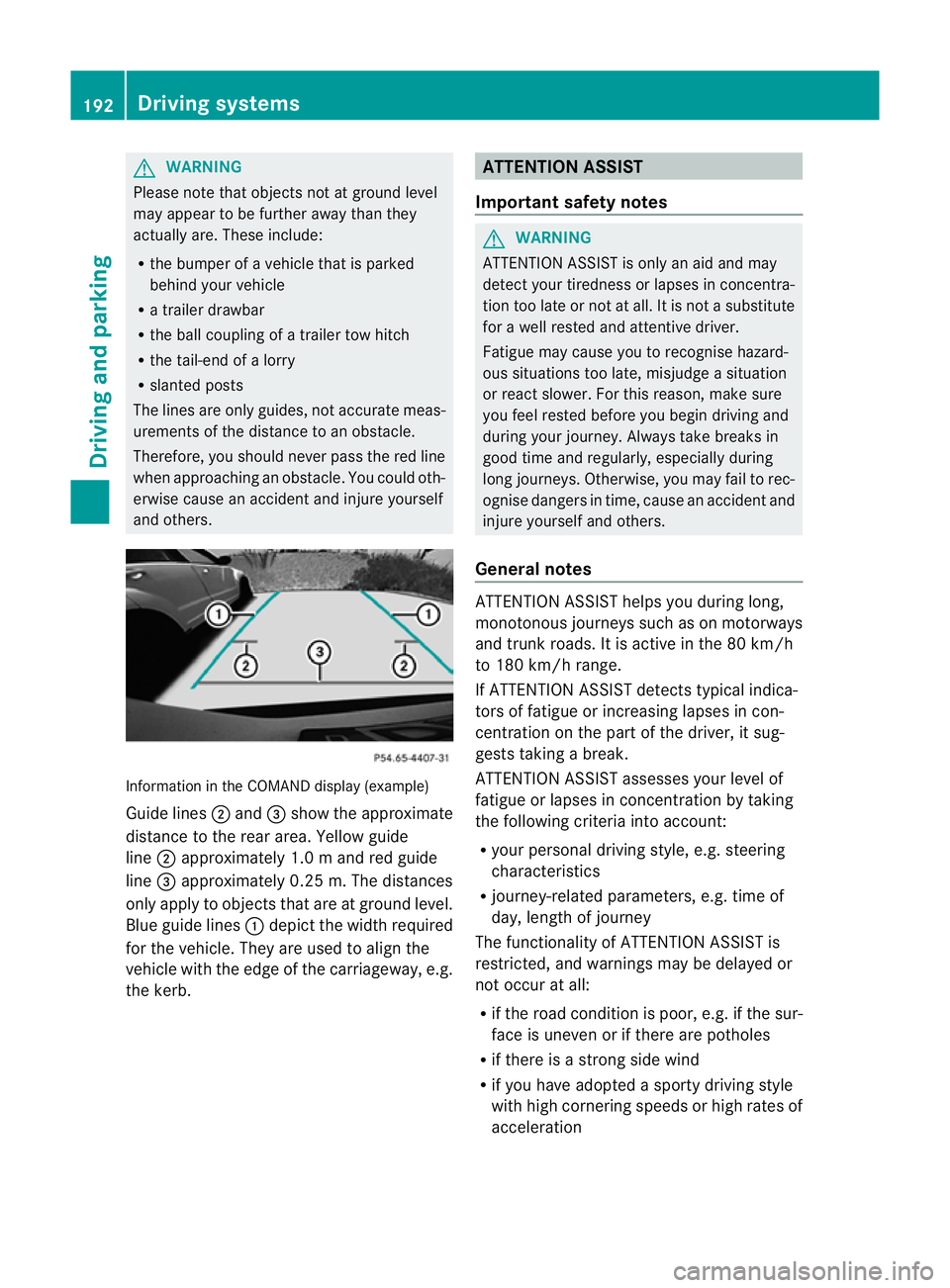
Guid elines ; and =sho wthe approximate
distance to the rea rarea. Yellow guide
line ;approximatel y1.0ma nd red guide
line =approximatel y0.25 m. Th edistances
only appl ytoobjects that are at ground level.
Blu eguide lines :depict the width required
for the vehicle .They are used to align the
vehicle with the edge of the carriageway ,e.g.
the kerb. ATTENTION ASSIST
Important safety notes G
WARNING
ATTENTIONA SSIST is only an aid and may
detect your tiredness or lapses in concentra-
tion too late or not at all. It is not asubstitute
for aw ell reste dand attentiv edriver.
Fatigue may caus eyou to recognise hazard-
ous situations to olate ,misjudge asituation
or reac tslower. For this reason ,makes ure
you fee lreste dbefore you begin driving and
durin gyour journey. Always tak ebreaks in
good tim eand regularly, especiall yduring
lon gjou rneys. Otherwise, you may fail to rec-
ognise danger sintime, caus eanacciden tand
injure yoursel fand others.
General notes ATTENTIO
NASSIST helps yo uduring long,
monotonou sjourney ssuchasonm otorways
and trunk roads. It is active in the 80 km/h
to 180 km/h range.
If ATTENTIO NASSIST detects typica lindica-
tors of fatigu eorincreasing lapse sincon-
centration on the part of the driver, it sug-
gests taking abreak.
ATTENTIO NASSIST assesses your level of
fatigu eorlapsesinc oncentration by taking
the following criteria into account:
R your persona ldriving style ,e.g. steering
characteristics
R journey-relate dparameters, e.g. time of
day, length of journey
The functionality of ATTENTIO NASSIST is
restricted, and warning smay be delaye dor
not occu ratall:
R if the roa dcondition is poor, e.g. if the sur-
face is uneven or if there are potholes
R if there is astrong sid ewind
R if you have adopted asport ydrivin gstyle
with high cornering speeds or high rates of
acceleration 192
Driving systemsDriving and parking
Page 202 of 373
If
av ehicle is detected within the monitoring
range of Blind Spot Assist at speedsa bove
30 km/h, warning lamp :on the corre-
sponding side lights up red. This warning
alwayso ccurs when avehicle enters the blind
spot monitoring range from behind or from
the side. When you overtake avehicle ,the
warning only occurs if the difference in speed
is less than 12 km/h.
The yellow indicator lamp goes out if reverse
gear is engaged. Blind Spot Assist is then
deactivated.
The brightness of the indicator/warning
lampsisa djusted automaticall yaccording to
the ambient light.
Collision warning
If av ehicle is detected in the monitoring range
of Blind Spot Assist and you switch on the
corresponding turn signal ,adouble warning
tone sounds. Red warning lamp :flashes. If
the turn signal remains on, detected vehicles
are indicated by the flashing of red warning
lamp :.There are no further warning tones.
Switching on Blind Spot Assist
X Make sure that the radar sensor system
(Y page 225) and Blind Spot Assist
(Y page 220) are activated in the on-board
computer.
X Turn the key to position 2in the ignition
lock.
Warning lamps :in the exterior mirrors
light up red for approximately
1.5 seconds and then turn yellow.
Lane Keeping Assist Important safety notes
G
WARNING
Lane Keeping Assist does not keep your vehi-
cle in its lane. It is only an aid and may detect
the lane markings on the road incorrectly or
not at all. The system may be impaired or may not func-
tion if:
R
there is poor visibility, e.g. due to insuffi-
cient illumination of the road, or due to
snow, rain, fog or spray.
R there is glare, e.g. from oncomingt raffic,
the sun, or reflection from other vehicles.
R the windscreen is dirty, misted up or cov-
ered, for instancebyas ticker, in the vicinity
of the camera
R several or no lane markings for asingle lane
are present.
R the lane markings are worn away,d ark or
covered up, e.g. by dirt or snow.
R the distance to the vehicle in front is too
small and the lane markings thus cannot be
detected.
R the lane markings on the road are unclear,
e.g. near roadworks.
R the lane markings change quickly, e.g.
lanes branch off, cross one another or
merge.
R the road is narrow and winding.
Lane Keeping Assist cannot detect road and
traffic conditions. It is not asubstitute for
attentive driving. You are responsible for the
vehicle's speed, braking in good time, and
steering correctly. Always adapt your driving
style to suit the prevailing road and weather
conditions. Always pay attention to traffic
conditionsa nd your surroundings. Otherwise,
you may fail to recognise dangers in time,
cause an accident and injure yourself and oth-
ers. Driving systems
199Driving and parking Z
Page 203 of 373
General notes
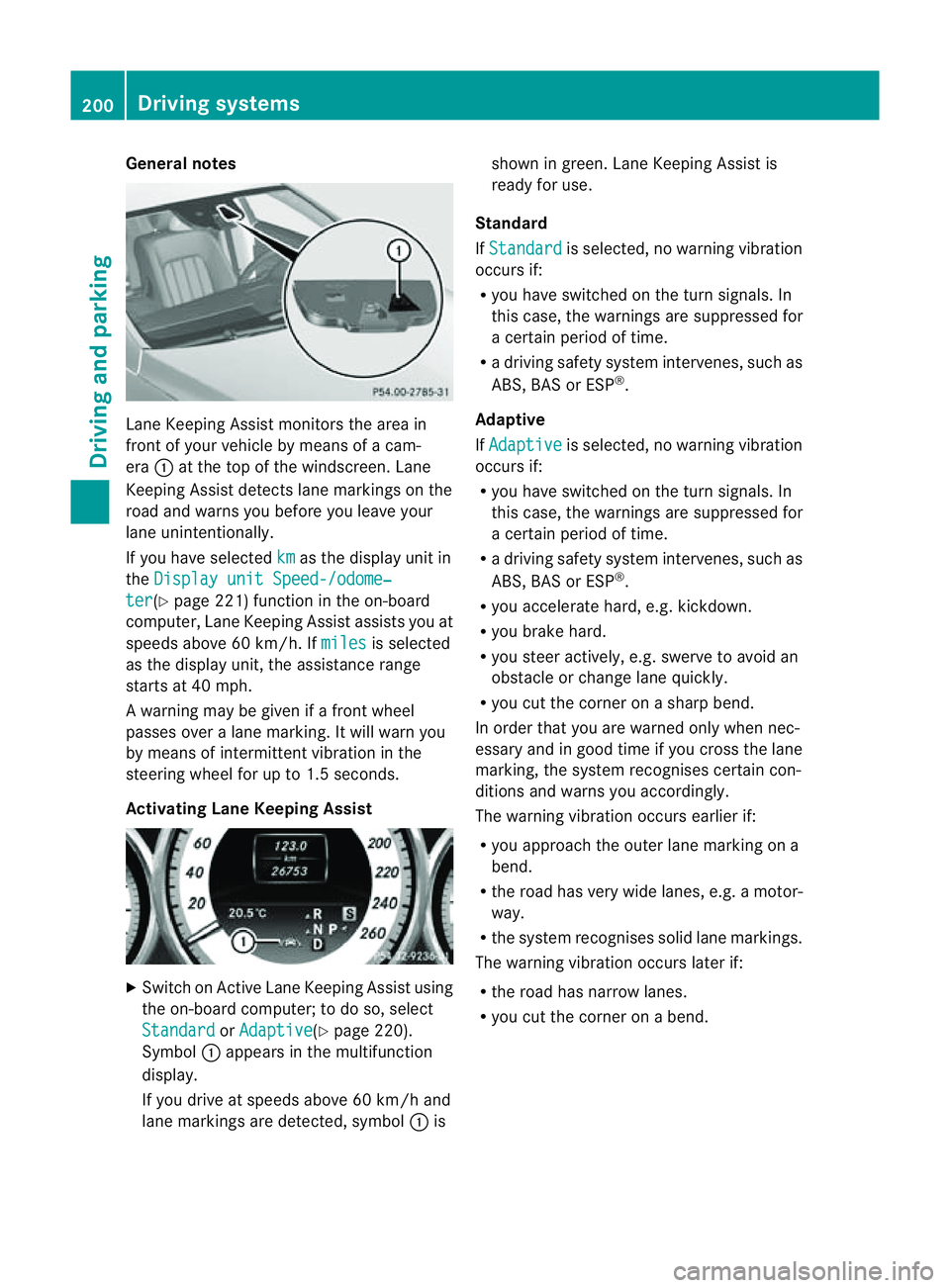
Lane Keeping Assist monitors the area in
front of yourv
ehicle by means of acam-
era :at the top of the windscreen. Lane
Keeping Assist detects lane markings on the
road and warns you before you leave your
lane unintentionally.
If you have selected km as the display unit in
the Display unit Speed-/odome‐ ter (Y
page 221) function in the on-board
computer, Lane Keeping Assist assists you at
speed sabove 60 km/h. If miles is selected
as the display unit, the assistance range
starts at 40 mph.
Aw arning may be given if afront wheel
passes over alane marking. It willw arn you
by means of intermittent vibration in the
steering wheelf or up to 1.5 seconds.
Activating Lane Keeping Assist X
Switch on Active Lane Keeping Assist using
the on-board computer; to do so, select
Standard or
Adaptive (Y
page 220).
Symbol :appears in the multifunction
display.
If you drive at speed sabove 60 km/h and
lane markings are detected, symbol :is shown in green. Lane Keeping Assist is
readyf or use.
Standard
If Standard is selected, no warning vibration
occurs if:
R you have switched on the turn signals. In
this case, the warnings are suppressed for
ac ertain perio doftime.
R ad riving safety system intervenes, such as
ABS, BAS or ESP ®
.
Adaptive
If Adaptive is selected, no warning vibration
occurs if:
R you have switched on the turn signals. In
this case, the warnings are suppressed for
ac ertain perio doftime.
R ad riving safety system intervenes, such as
ABS, BAS or ESP ®
.
R you accelerate hard, e.g. kickdown.
R you brake hard.
R you steer actively ,e.g. swerve to avoidan
obstacle or change lane quickly.
R you cut the corner on asharp bend.
In order that you are warned only when nec-
essary and in good time if you cross the lane
marking, the system recognises certain con-
ditions and warns you accordingly.
The warning vibration occurs earlier if:
R you approach the outer lane marking on a
bend.
R the road has very widel anes, e.g.amotor-
way.
R the system recognises solidl ane markings.
The warning vibration occurs later if:
R the road has narrow lanes.
R you cut the corner on abend. 200
Driving systemsDriving and parking
Page 204 of 373
Active Driving Assistance package
Genera lnotes The Active Drivin
gAssistance packag econ-
sists of DISTRONI CPLUS(Ypage 170), Active
Blind Spot Assist (Y page 201)and Active
Lane Keeping Assist (Y page 204).
Active Blind Spot Assist Important safet
ynotes G
WARNING
Active Blind Spot Assist is only an aid and may
detec tvehicles/obstacles incorrectly or not
at all.
The system may be impaired or may not func-
tion if:
R there is poor visibility, e.g. due to snow,
rain, fog or spray.
R the rear and/or fron tsensor sare dirty.
Active Blind Spot Assist may not detect nar-
row vehicles, such as motorcycles or bicycles,
or only detect them too late. It cannot detect
vehicles which are overtaken at asmall dis-
tanc eand then enter the blind spot area.
Active Blind Spot Assist cannot detect road
and traffic conditions .Itisnotas ubstitute for
attentive driving. You are responsible for the
vehicle's speed, braking in good time, and
steering correctly. Always adapty our driving
style to suit the prevailing road and weather
conditions. Always pay attention to traffic
conditions and your surroundings. Otherwise,
you may fail to recognise dangers in time,
cause an accident and injure yourself and oth-
ers.
General notes
Active Blind Spot Assist uses aradar sensor
system to monitor the area to the sides of
your vehicle which are behind the driver. A
warning display in the exterior mirrors draws
your attention to vehicles detected in the
monitored area. If you then switch on the cor-
responding turn signal to change lane, you
will also receive an optical and audible warn- ing. If
arisk of lateral collision is detected,
corrective braking may help you avoid acol-
lision. To support the course-correcting brake
application, Active Blind Spot Assist uses the
forward-facin gradar sensor system. The free
space in the direction of travel is then evalu-
ated.
Active Blind Spot Assist supports you from a
speed of approximately 30 km/h.
The radar sensor system is switched off auto-
matically in the vicinit yofradio telescope
facilities (Y page 368).
For Active Blind Spot Assist to assist you
when driving, the radar sensor system must
be activated (Y page 225) and operational.
Monitoring range G
WARNING
Active Blind Spot Assist monitors certain
areas in the immediate vicinit yofyour vehicle.
Vehicles that approach and drive past at high
speeds are not detected. No visual nor audi-
ble warnings are emitted and the system does
not brake the vehicle to correc tyour course.
If the lanes are very wide, it may not be pos-
sible to monitor the complete width of the
neighbouring lane. For this reason, vehicles in
the next lane may not be detected, especially
if they are driving in astaggered formation.
This may be the case if vehicles are driving at
the edge of their lane that is furthest away
from your vehicle.
Always pay attention to traffic conditions and
your surroundings. Otherwise, you may fail to
recognise dangers in time, cause an accident
and injure yourself and others. Driving systems
201Driving and parking Z
Page 206 of 373
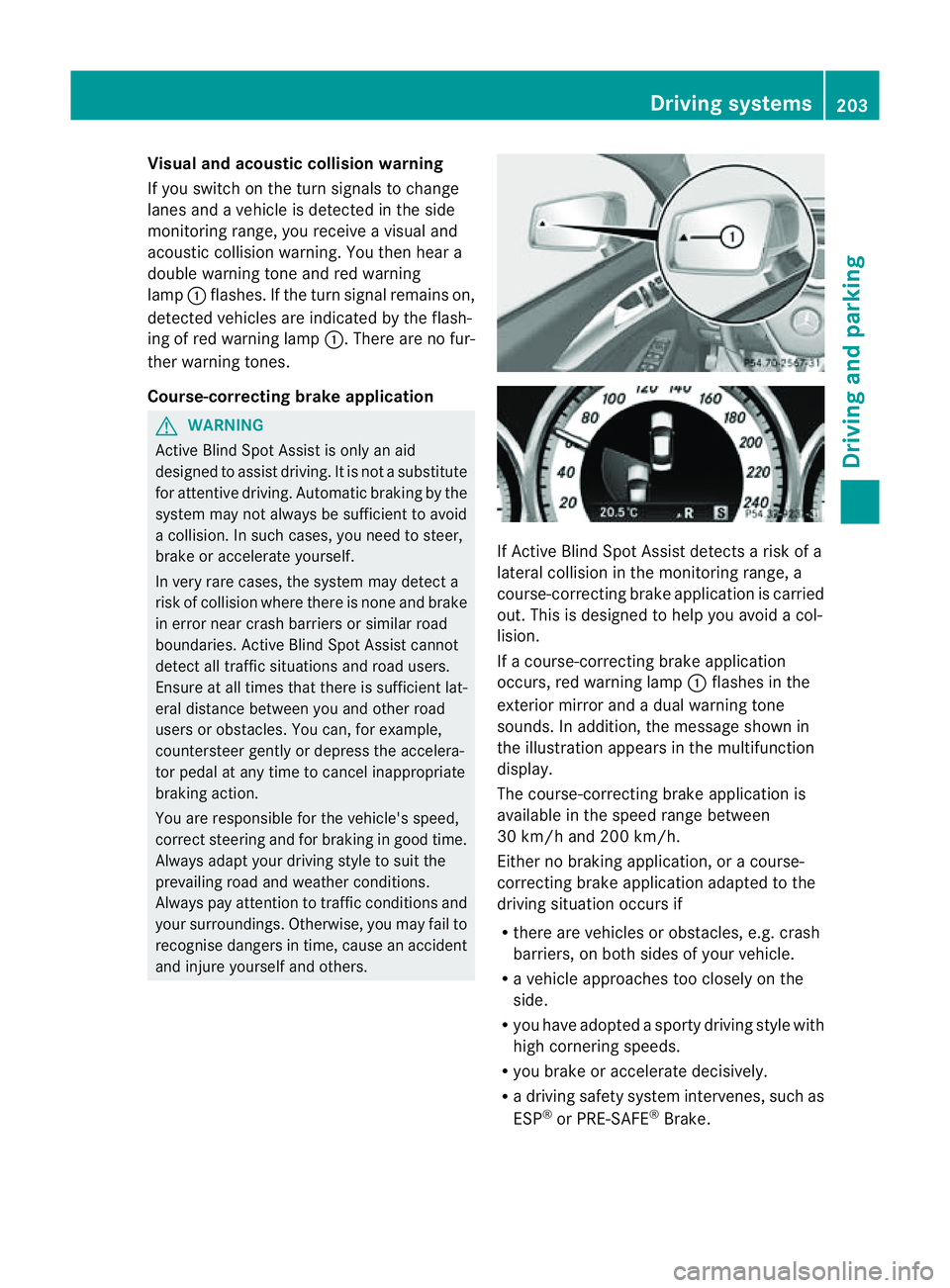
Visual and acousti
ccollision warning
If yo uswitch on the turn signals to change
lanes and avehicl eisd etected in the side
monitoring range, yo ureceive avisua land
acoustic collision warning .You then hear a
double warning tonea nd red warning
lamp :flashes. If the turn signal remains on,
detected vehicles are indicated by the flash-
ing of red warning lamp :.There are no fur-
ther warning tones.
Course-correcting brake application G
WARNING
Active Blind Spot Assist is only an aid
designed to assist driving. It is not asubstitute
for attentive driving. Automatic braking by the
system may not always be sufficient to avoid
ac ollision. In such cases, you need to steer,
brake or accelerate yourself.
In very rare cases, the system may detect a
risk of collision where there is none and brake
in error near crash barriers or similar road
boundaries. Active Blind Spot Assist cannot
detect all traffic situations and road users.
Ensure at all times that there is sufficient lat-
eral distance between you and other road
users or obstacles. You can, for example,
countersteer gently or depress the accelera-
tor pedal at any time to cancel inappropriate
braking action.
You are responsible for the vehicle's speed,
correct steering and for braking in good time.
Always adapt your driving style to suit the
prevailing road and weather conditions.
Always pay attention to traffic conditionsa nd
your surroundings. Otherwise, you may fail to
recognise dangers in time, cause an accident
and injure yourself and others. If Active Blind Spot Assist detectsar
isk of a
lateral collision in the monitoringr ange, a
course-correcting brake application is carried
out. This is designed to help you avoid acol-
lision.
If ac ourse-correcting brake application
occurs, red warning lamp :flashes in the
exterior mirror and adual warning tone
sounds. In addition, the message shown in
the illustration appears in the multifunction
display.
The course-correctingb rake application is
available in the speed range between
30 km/h and 200 km/h.
Either no braking application, or acourse-
correcting brake application adapted to the
driving situation occurs if
R there are vehicles or obstacles, e.g. crash
barriers, on both sides of your vehicle.
R av ehicle approaches too closely on the
side.
R you have adopted asporty driving style with
high cornering speeds.
R you brake or accelerate decisively.
R ad riving safety system intervenes, such as
ESP ®
or PRE-SAFE ®
Brake. Driving systems
203Driving and parking Z