warning light MERCEDES-BENZ CLS COUPE 2012 Service Manual
[x] Cancel search | Manufacturer: MERCEDES-BENZ, Model Year: 2012, Model line: CLS COUPE, Model: MERCEDES-BENZ CLS COUPE 2012Pages: 373, PDF Size: 9.12 MB
Page 146 of 373
sound of the engine may change during this
time.
Automatic transmission X
Shift the transmission to position P.
The transmission position displayint he
multifunction displays howsP.
i You can also start the engine when the
transmission is in position N.
Starting procedurew ith the keyi
To start the engine using the key instead
of KEYLESS-GO, pull the Start/Stop button
out of the ignition lock.
X To startap etrol engine: turn the key to
position 3in the ignition lock
(Y page 141) and release it as soon as the
engine is running.
X To startad iesel engine: turn the key to
position 2in the ignition lock
(Y page 141).
The % preglow indicator lamp in the
instrumen tcluster light sup.
X When the %erlischt, den Schlüssel auf
Stellung 3(Ypage 141 )and release it as
soon as the engine is running.
i You can start the engine without preglow
if the engine is warm.
Using KEYLESS-GO to start th eengine G
WARNING
Your vehicle can be started using avalid KEY-
LESS-GO key. For this reason ,children should
never be left unsupervised in the vehicle.
Always tak ethe key with you when leavin gthe
vehicle, even if you are only leavin gitfor a
shor ttime.
i The Start/Stop button can be used to
start the vehicle manually without inserting
the key int othe ignition lock .The key must
be in the vehicle and the Start/Stop button
must be inserted in the ignition lock. This mode for startingt
he engine operates inde-
pendently of the ECO start/stop automatic
engine start function.
X Depress the brake pedal and keep it
depressed.
X To startap etrol engine: pressthe Start/
Stop button (Y page 141) once.
The engine starts.
X To start adiesel engine: press the Start/
Stop button (Y page 141)once.
Preglow is activated and the engin estarts. Pulling away
Automatic transmission G
WARNING
If the engin espeed is above the idling speed
and you engage transmission position Dor
R,t he vehicle could pull away suddenly. There
is ar isk of an accident.
When engagin gtransmission position Dor R,
always firmly depress the brake pedal and do
not simultaneously accelerate.
X Depress the brake pedal and keep it
depressed.
X Shif tthe transmission to position Dor R.
X Release the parking brake (Y page 160).
X Release the brake pedal.
X Carefully depress the accelerator pedal.
i It is only possible to shift the transmission
from position Pto the desired position if
you depress the brake pedal. Only then is
the parking lock released.
i The vehicle locks centrally once you have
pulleda way.The locking knobs in the doors
drop down.
You can open the doors from the inside at
any time.
You can also deactivate the automatic lock-
ing feature (Y page 225). Driving
143Driving and parking Z
Page 151 of 373
Problem Possible causes/consequences and
M Solutions
Vehicles with
apetrol
engine:
The engine is not run-
ning smoothly and is
misfiring. There is
amalfunction in the engine electronics or in amechanical
componentoft he engine management system.
X Only depress the accelerator pedal slightly.
Otherwise, non-combusted fuel may get into the catalytic con-
verter and damage it.
X Have the cause rectified immediately at aqualified specialist
workshop. The coolant tempera-
ture display is showing
more than 120 †. The
coolant warning lamp
may also be lit and a
warning tone may
sound. The coolant level is too low. The coolant is too hot and the engine
is no longer being cooled sufficiently.
X
Stop as soon as possible and allow the engine and the coolant
to cool down.
X Check the coolant level (Y page 299). Observe the warning
notes as you do so and top up the coolant if necessary. If the coolant level is correct, the engine radiator fan may be faulty.
The coolant is too hot and the engine is no longer being cooled
sufficiently.
X
If the coolant temperature is below 120 †, you can continue
driving to the nearest qualified specialist workshop.
X Avoid heavy loads on the engine as you do so, e.g. driving in
mountainous terrain and stop-start traffic. Automatic transmission
Important safety notes
G
WARNING
If the engine speed is above the idling speed
and you engage transmission position Dor
R,t he vehicle could pull away suddenly. There
is ar isk of an accident.
When engaging transmission position Dor R,
always firmly depress the brake pedal and do
not simultaneously accelerate. Selector lever
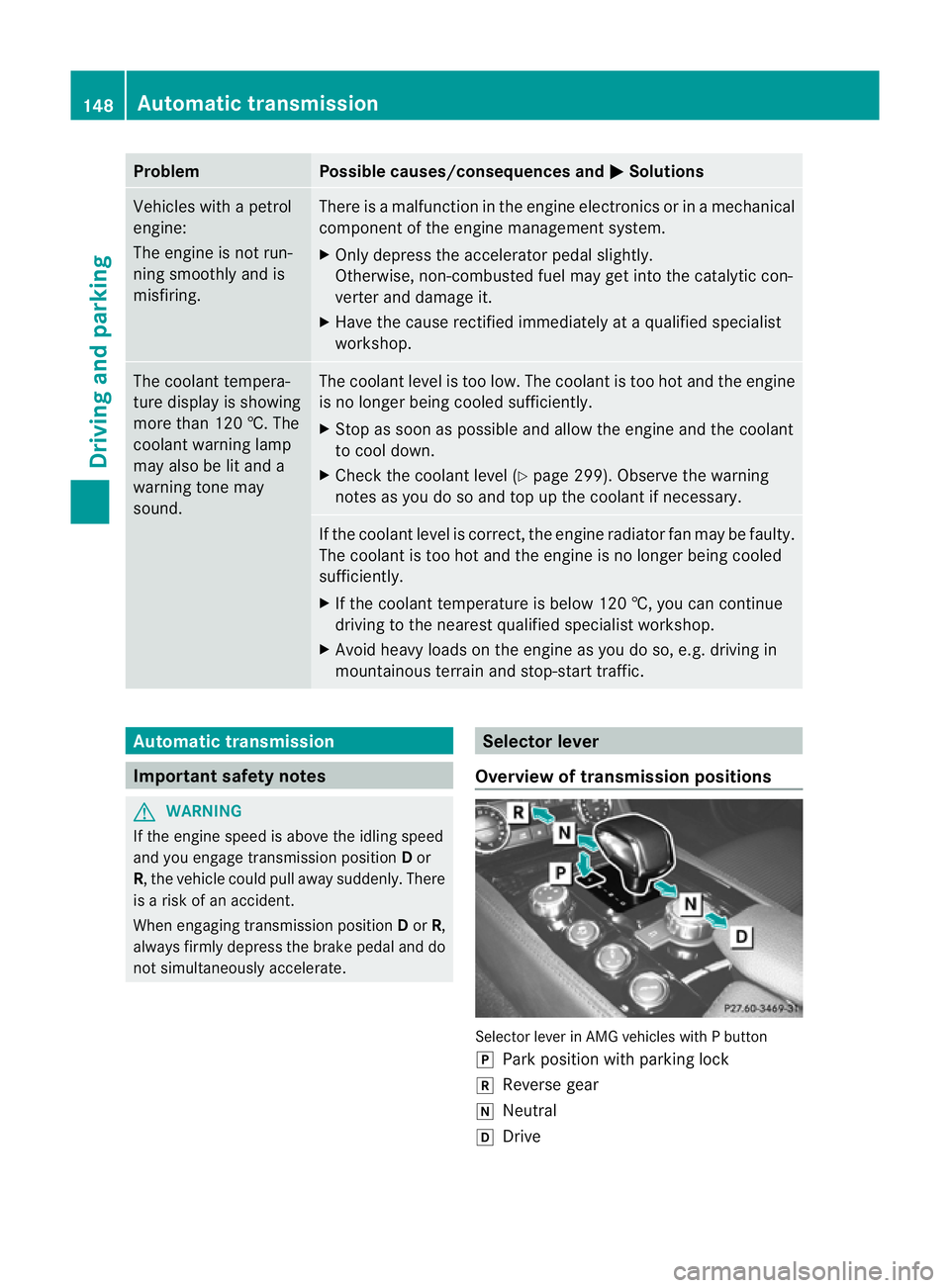
Overview of transmission positions Selector lever in AMG vehicles with
Pbutton
j Park position with parking lock
k Reverse gear
i Neutral
h Drive 148
Automatic transmissionDriving and parking
Page 164 of 373
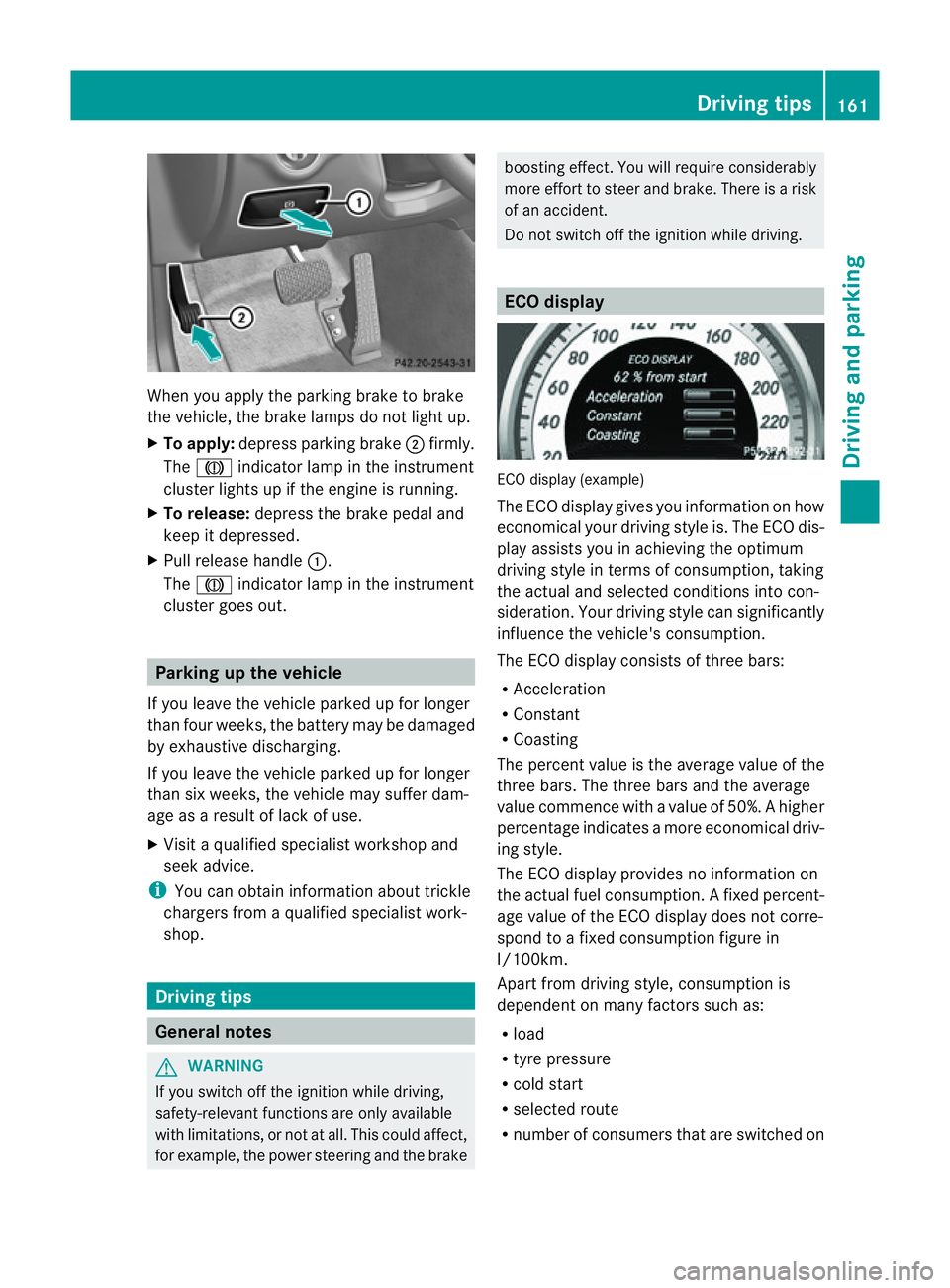
When you apply the parking brake to brake
the vehicle, the brake lamps do not light up.
X To apply: depress parking brake ;firmly.
The J indicato rlamp in the instrument
cluster lights up if the engine is running.
X To release: depress the brake pedal and
keep it depressed.
X Pull release handle :.
The J indicato rlamp in the instrument
cluster goes out. Parking up the vehicle
If you leave the vehicle parked up for longer
than four weeks, the batter ymay be damaged
by exhaustive discharging.
If you leave the vehicle parked up for longer
than six weeks, the vehicle may suffer dam-
age as aresult of lack of use.
X Visit aqualified specialist workshop and
seek advice.
i You can obtain information about trickle
chargers from aqualified specialist work-
shop. Driving tips
General notes
G
WARNING
If you switch off the ignition while driving,
safety-relevant functions are only available
with limitations, or not at all. This could affect,
for example, the power steerin gand the brake boostin
geffect. You will require considerably
more effort to steer and brake. There is arisk
of an accident.
Do not switch off the ignition while driving. ECO display
ECO display (example)
The ECO display gives you information on how
economical your driving style is. The ECO dis-
play assists you in achieving the optimum
driving style in term
sofconsumption ,taking
the actual and selected conditions into con-
sideration. Your driving style can significantly
influenc ethe vehicle's consumption.
The ECO display consists of three bars:
R Acceleration
R Constant
R Coasting
The percen tvalue is th eaverage value of the
three bars .The three bars and the average
value commence with avalue of 50%. Ahigher
percentage indicates amoree conomical driv-
ing style.
The ECO display provides no information on
the actual fue lconsumption. Afixed percent-
age value of the ECO display does not corre-
spon dtoaf ixed consumption figure in
l/100km.
Apar tfromd rivin gstyle, consumption is
dependent on many factors such as:
R load
R tyre pressure
R cold start
R selected route
R number of consumer sthat are switched on Driving tips
161Driving and parking Z
Page 166 of 373
i
This also applies if you have activated
cruise control, SPEEDTRONIC or DIS-
TRONIC PLUS.
This will use the braking effect of the engine,
so less braking will be required to prevent the
vehicle from gaining speed. This relieves the
load on the brake system and prevent sthe
brakes from overheatin gand wearing too
quickly.
Heavy and light loads G
WARNING
The braking system can overheat if you leave
your foot on the brake pedal while driving.
This increases the braking distanc eand could
even cause the braking system to fail. There
is ar isk of an accident.
Never use the brake pedal as afootrest. Do
not simultaneously depress both the brake
pedal and the accelerator pedal while driving.
! Depressin gthe brake pedal constantly
results in excessiv eand premature wear to
the brake pads.
If the brakes have been subjected to aheavy
load, do not stop the vehicle immediately, but
drive on for ashort while. This allows the air-
flow to cool the brakes more quickly.
If the brakes have been used only moderately,
you should occasionally test their effective-
ness. To do this, brake more firmly from a
higher speed. This improves the grip of the
brakes.
Wet road surfaces If you have driven for
along time in heavy rain
without braking, there may be adelayedr eac-
tion from the brakes when braking for the first
time. This may also occur after the vehicle has
been washed or driven through deep water.
You have to depress the brake pedal more
firmly. Maintain agreater distanc efrom the
vehicle in front.
After driving on awet road or having the vehi-
cle washed, brake firmly while paying atten- tion to the traffic conditions. This will warm
up the brake discs, thereby drying them more
quickly and protecting them against corro-
sion.
Limited braking performance on salt-
treated roads
If you drive on salted roads,
alayer of salt
residue may form on the brake discs and
brake pads. This can result in asignificantly
longer braking distance.
R Brake occasionally to remove any possible
salt residue. Make sure that you do not
endanger other road users when doing so.
R Carefully depress the brake pedal and the
beginnin gand end of ajourney.
R Maintain agreater distance to the vehicle
ahead.
New brake pads/linings New and replaced brake pads and discs only
reach their optimum braking effect after sev-
eral hundred kilometres of driving. Compen-
sate for this by applying greater force to the
brake pedal.
For safety reasons, Mercedes-Benz recom-
mends that you only have brake pads/linings
fitted to your vehicle which have been
approved for Mercedes-Benz vehicles or
which correspon dtoanequivalent quality
standard. Brake pads/linings which have not
been approved for Mercedes-Benz vehicles or
which are not of an equivalent quality could
affect your vehicle's operating safety.
AMG high-performance and ceramic
brakes The AMG brake systems are designed for
heavy loads. This may lead to noise when
braking. This is dependent on:
R
speed
R braking force
R environmental conditions, such as temper-
ature and humidity Driving tips
163Driving and parking Z
Page 169 of 373
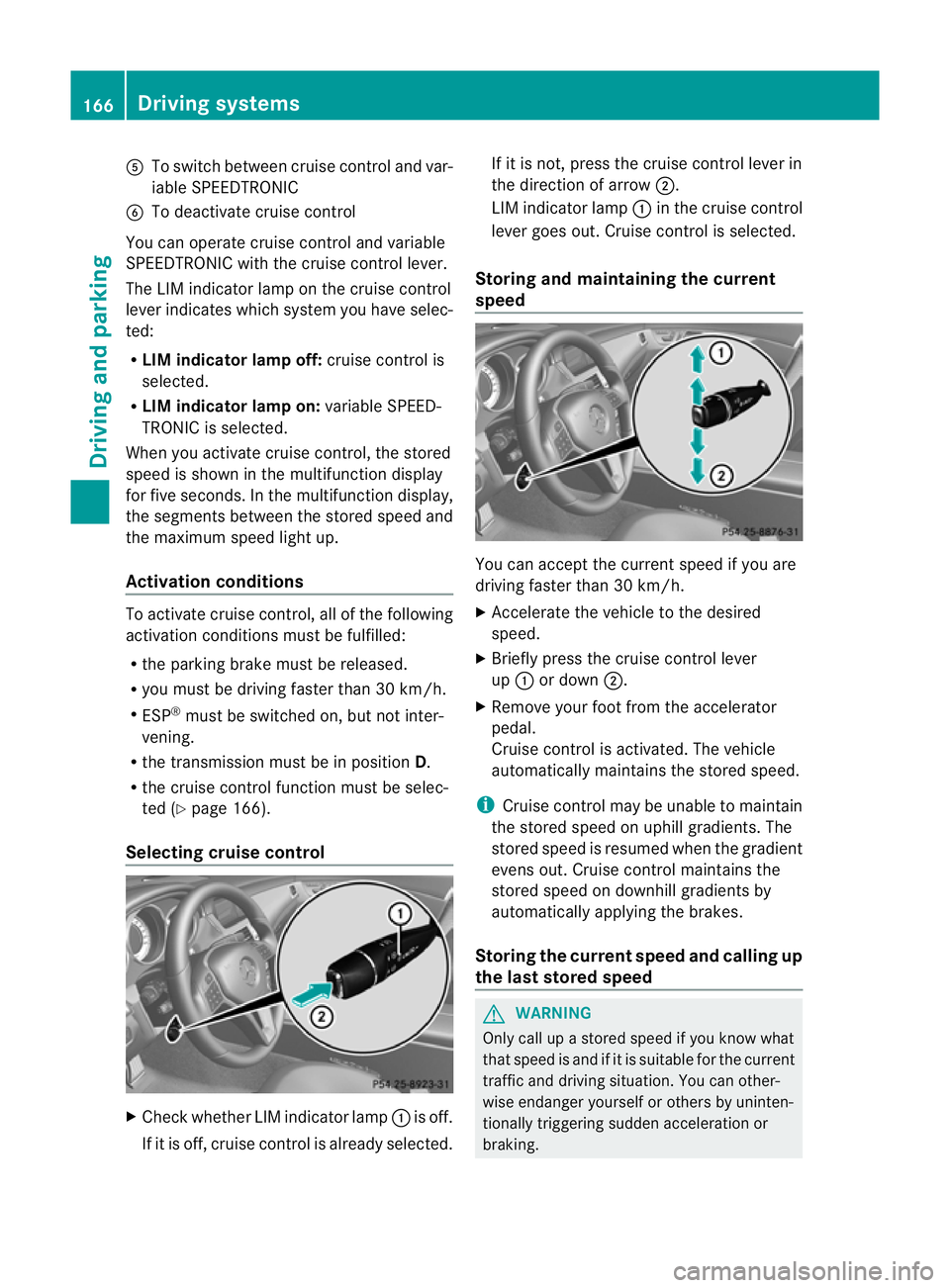
A
To switch between cruise control and var-
iable SPEEDTRONIC
B To deactivate cruise control
You can operate cruise control and variable
SPEEDTRONIC with the cruise control lever.
The LIM indicator lamp on the cruise control
lever indicates which system you have selec-
ted:
R LIM indicator lamp off: cruise control is
selected.
R LIM indicator lamp on: variable SPEED-
TRONIC is selected.
When you activat ecruise control, the stored
speed is shown in the multifunction display
for five seconds. In the multifunction display,
the segment sbetween the stored speed and
the maximum speed light up.
Activation conditions To activat
ecruise control, all of the following
activation conditions must be fulfilled:
R the parking brake must be released.
R you must be driving faster than 30 km/h.
R ESP ®
must be switched on, but not inter-
vening.
R the transmission must be in position D.
R the cruise control function must be selec-
ted (Y page 166).
Selecting cruise control X
Check whether LIM indicator lamp :is off.
If it is off, cruise control is already selected. If it is not,p
ress the cruise control lever in
the direction of arrow ;.
LIM indicator lamp :in the cruise control
lever goes out. Cruise control is selected.
Storing and maintaining the current
speed You can accept the curren
tspeed if you are
driving faster than 30 km/h.
X Accelerat ethe vehicle to the desired
speed.
X Briefly press the cruise contro llever
up : or down ;.
X Remove your foot from the accelerator
pedal.
Cruise contro lisactivated. The vehicle
automatically maintains the stored speed.
i Cruise contro lmay be unable to maintain
the stored speed on uphill gradients. The
stored speed is resumed when the gradient
evens out. Cruise contro lmaintains the
store dspee dond ownhill gradients by
automaticall yapplyin gthe brakes.
Storing th ecurren tspee dand calling up
the last stored speed G
WARNING
Only call up astored speed if you know what
that speed is and if it is suitable for the current
traffic and driving situation .You can other-
wise endanger yourself or other sbyuninten-
tionally triggering sudden acceleration or
braking. 166
Driving systemsDriving and parking
Page 171 of 373
control off message in the multifunction
displayf or approximately five seconds.
i The last speed stored is cleared when you
switch off the engine. SPEEDTRONIC
Important safety notes G
WARNING
Never depress the brake pedal continuously
while the vehicle is in motion, e.g. never cause
the brakes to rub by applying constant slight
pedal pressure. This causes the brake system
to overheat, increases the braking distance
and can lead to the brakes failing completely. G
WARNING
Do not change down for additional engine
braking on aslippery road surface. This could
cause the drive wheels to lose their grip and
the vehicle could skid. G
WARNING
SPEEDTRONIC is only an aid designed to
assist driving. You are responsible for the
vehicle's speed and for braking in good time.
SPEEDTRONIC brakes automaticallysot hat
you do not exceed the set speed. On long and
steep downhill gradients, especially if the
vehicle is laden, you must select shift range
1, 2or 3in good time. By doing so, you will
make use of the braking effect of the engine.
This relieves the load on the brake system and
prevents the brakes from overheating and
wearing too quickly. If you need additional
braking, depress the brake pedal repeatedly
rather than continuously.
You can set avariableorp ermanent limit
speed:
R variable for speed limits, e.g. in built-up
areas
R permanent for long-term speed restric-
tions, e.g. when driving with winter tyres
fitted (Y page 170) i
The speed indicated in the speedometer
may differ slightly from the limit speed
stored.
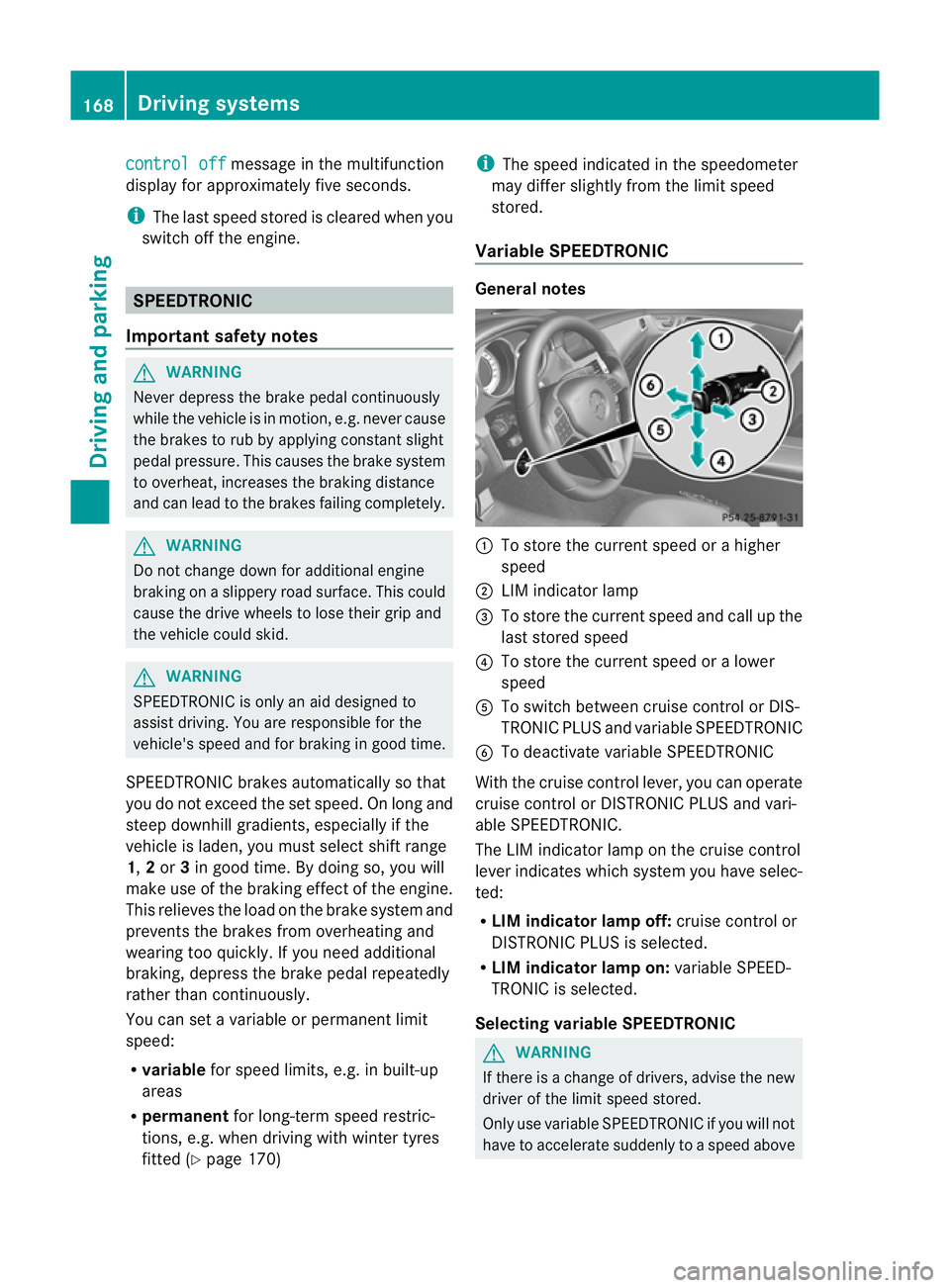
Variable SPEEDTRONIC General notes
:
To store the current speed or ahigher
speed
; LIM indicator lamp
= To store the current speed and call up the
last stored speed
? To store the current speed or alower
speed
A To switch between cruise control or DIS-
TRONIC PLUS and variableS PEEDTRONIC
B To deactivate variableS PEEDTRONIC
With the cruise control lever, you can operate
cruise control or DISTRONIC PLUS and vari-
able SPEEDTRONIC.
The LIM indicator lamp on the cruise control
lever indicates which system you have selec-
ted:
R LIM indicator lamp off: cruise control or
DISTRONIC PLUS is selected.
R LIM indicator lamp on: variableSPEED-
TRONIC is selected.
Selecting variable SPEEDTRONIC G
WARNING
If there is achange of drivers, advise the new
driver of the limit speed stored.
Only use variableS PEEDTRONIC if you will not
have to accelerate suddenly to aspeed above 168
Driving systemsDriving and parking
Page 172 of 373
tha
tstore dast he limi tspeed. You could oth-
erwise cause an accident.
You can only exceed the limit speed stored if
you deactivate variable SPEEDTRONIC:
R using the cruise control lever
R by depressin gthe accelerator pedal
beyond the pressure point (kickdown)
It is not possible to deactivate variable
SPEEDTRONIC by braking. X
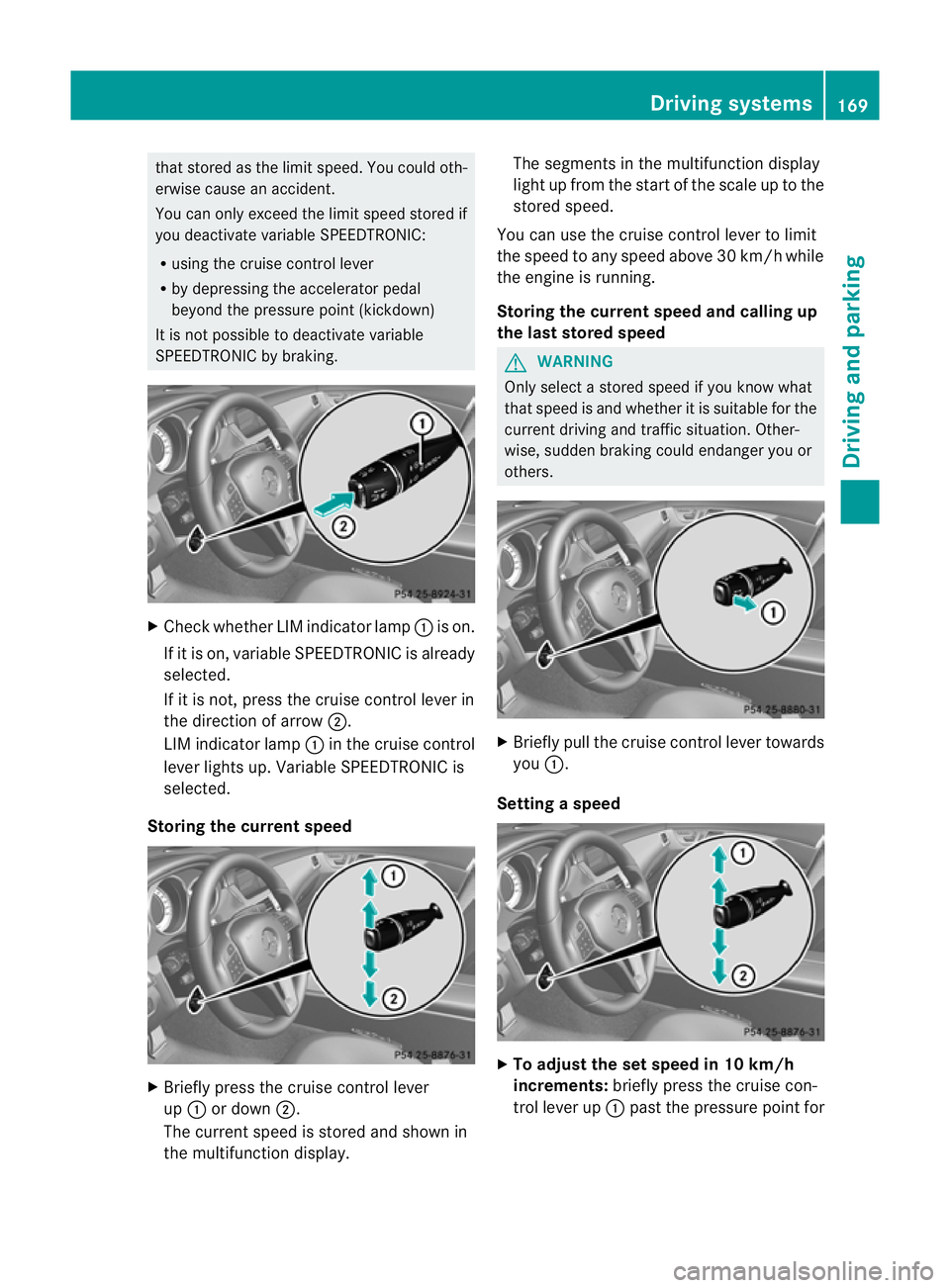
Check whether LIM indicator lamp :is on.
If it is on, variable SPEEDTRONIC is already
selected.
If it is not ,press the cruise contro llever in
the direction of arrow ;.
LIM indicator lamp :in the cruise control
lever lights up. Variable SPEEDTRONIC is
selected.
Storing the current speed X
Briefly press the cruise contro llever
up : or down ;.
The curren tspeed is stored and shown in
the multifunction display. The segments in the multifunction display
light up from the start of the scale up to the
stored speed.
You can use the cruise contro llever to limit
the speed to any speed above 30 km/ hwhile
the engine is running.
Storing the current speed and calling up
the last stored speed G
WARNING
Only select astored speed if you know what
that speed is and whether it is suitable for the
current driving and traffic situation. Other-
wise, sudden braking could endanger you or
others. X
Briefly pull the cruise control lever towards
you :.
Setting aspeed X
To adjust the se tspeed in 10 km/h
increments: brieflypress the cruise con-
trol lever up :past the pressure point for Drivin
gsystems
169Driving and parking Z
Page 174 of 373
G
WARNING
DISTRONIC PLUS cannot take account of road
and traffic conditions. If DISTRONIC does not
recognise or no longer recognise sthe vehicle
in front, do not activate DISTRONIC or, if it is
already active, deactivate it. This is especially
the case:
R before corners
R on filter lanes
R when changing to alane with faster moving
traffic
R in comple xdriving situations or where lanes
are diverted ,e.g. at roadworks on amotor-
way
DISTRONIC PLUS otherwise maintains the
current spee dset by you or accelerates up to
the set speed.
DISTRONIC PLUS cannot take account of
weather conditions. Deactivate, or do not
activate, DISTRONIC PLUS:
R if the road sare slippery ,snow-covered or
icy. The wheels could lose their grip when
braking or accelerating. The vehicl ecould
start to skid.
R if the sensors are dirty or there is poor vis-
ibility ,e.g. due to snow, rain or fog. Dis-
tance control may be impaired.
Always pay attention to traffic conditions
even when DISTRONIC PLUS is activated.
Otherwise, you may fail to recognise dangers
in time, caus eanaccident and injure yourself
and others. G
WARNING
DISTRONIC PLUS brakes yourv ehicle up to a
maximum of 4m/s2
depending on its speed.
This corresponds to approximately 40% of
your vehicle's maximum braking power. You
must also apply the brakes yourself if this
braking power is not sufficient.
If DISTRONIC PLUS detect sarisk of collision
with avehicle in front, an intermittent warning
tones ounds. In addition, the ·distance
warning lamp in the instrument cluster lights
up. Brak etoavoidacollision. General notes DISTRONIC PLUS regulates the speed and
automatically helps you maintain the dis-
tanc
etot he vehicle detected in front. DIS-
TRONIC PLUS brakes automatically so that
the set speed is not exceeded.
On long and steep downhill gradients, you
must select shift range 1,2or 3in good time.
By doing so, you will make use of the braking
effec tofthe engine. This relieves the load on
the brake system and prevents the brakes
from overheating and wearing too quickly.
If DISTRONIC PLUS detectsas lower-moving
vehicle in front,y our vehicle is braked in order
to maintain the preset distance to the vehicle
in front.
The radar sensor system is switched off auto-
matically in the vicinity of radio telescope
facilities (Y page 368).
If you want DISTRONIC PLUS to assist you,
the radar sensor system must be activated
(Y page 225) and operational.
If there is no vehicle in front,D ISTRONIC
PLUS operates in the same way as cruise
control in the speed range between
30 km/h and 200 km/h. If avehicle is driving
in fron tofyou, DISTRONIC operates in the
speed range between 0km/h and
200 km/h.
Do not use DISTRONIC PLUS on road swith
steep gradients. Driving systems
171Driving and parking Z
Page 182 of 373
Obstructions and stationary vehicles
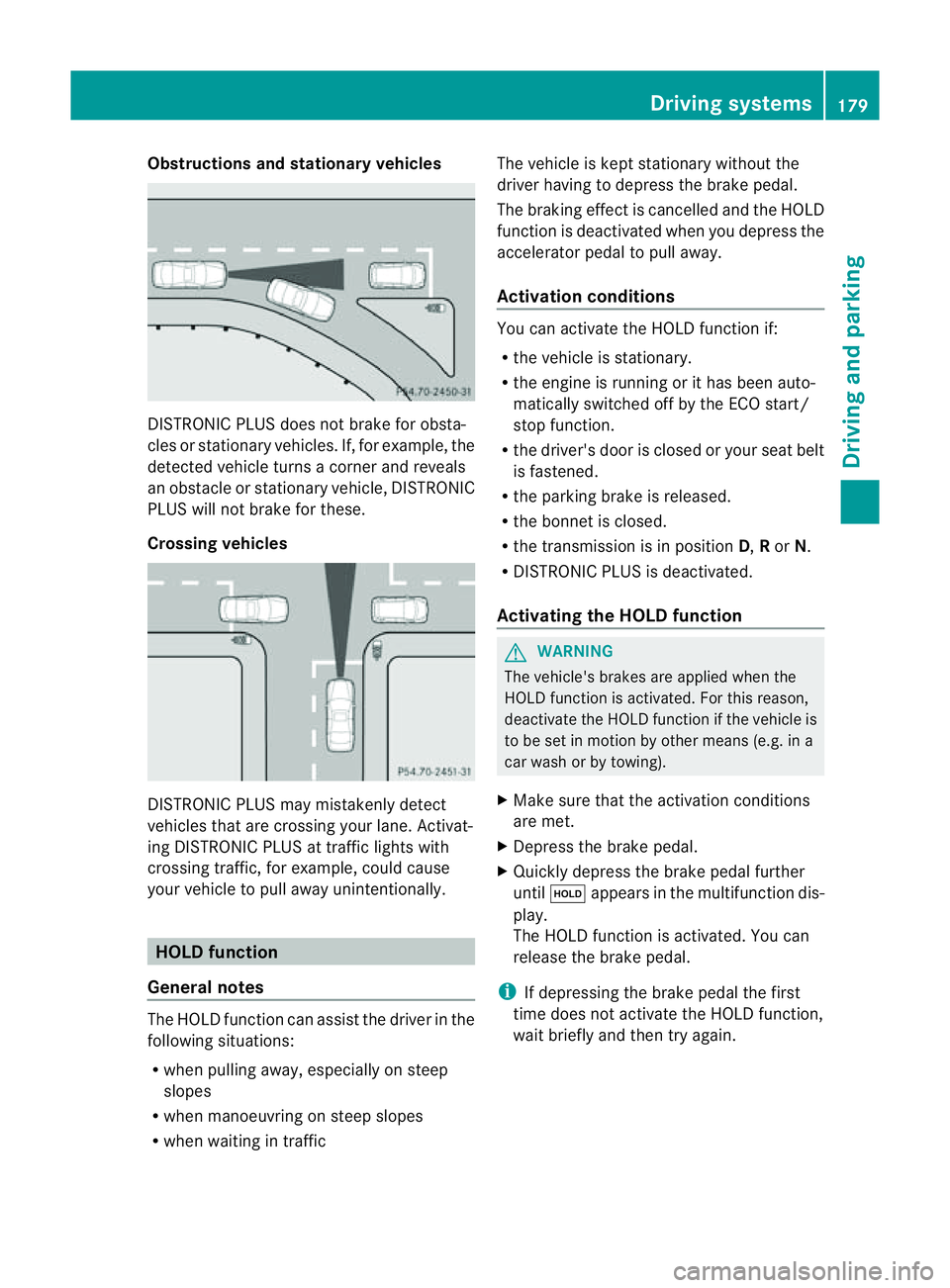
DISTRONIC PLUS does not brake for obsta-
cles or stationary vehicles. If, for example, the
detected vehicle turn sacorner and reveals
an obstacle or stationary vehicle, DISTRONIC
PLUS will not brake for these.
Crossing vehicles DISTRONIC PLUS may mistakenly detect
vehicles that are crossing your lane. Activat-
ing DISTRONIC PLUS at traffic lights with
crossing traffic, for example, could cause
your vehicle to pull away unintentionally. HOLD function
General notes The HOLD function can assist the driver in the
following situations:
R when pulling away ,especially on steep
slopes
R when manoeuvrin gonsteep slopes
R when waiting in traffic The vehicle is kept stationary without the
driver having to depress the brake pedal.
The braking effec tiscancelled and the HOLD
function is deactivated when you depress the
accelerator pedal to pull away.
Activation conditions You can activate the HOLD function if:
R
the vehicle is stationary.
R the engine is running or it has been auto-
matically switched off by the ECO start/
stop function.
R the driver's door is closed or your seat belt
is fastened.
R the parking brake is released.
R the bonnet is closed.
R the transmission is in position D,Ror N.
R DISTRONIC PLUS is deactivated.
Activating the HOLD function G
WARNING
The vehicle's brakes are applied when the
HOLD function is activated. For this reason,
deactivate the HOLD function if the vehicle is
to be set in motion by other means (e.g. in a
car wash or by towing).
X Make sure that the activation conditions
are met.
X Depress the brake pedal.
X Quickly depress the brake pedal further
until ë appears in the multifunction dis-
play.
The HOLD function is activated. You can
release the brake pedal.
i If depressing the brake pedal the first
time does not activate the HOLD function,
wait briefly and then try again. Driving systems
179Driving and parking Z
Page 184 of 373
Activating RACE START
X
Depress th ebrak epedal wit hyour left foot
and keep it depressed.
X Turn the drive program selector clockwise
(Y page 151) until the RSlamp lights up.
The RACE START Confirm: Paddle UP Cancel: Paddle DOWN message appears
in the multifunction display.
i If the activation conditions are no longer
fulfilled, RACE START is cancelled. The
RACE START cancelled message
appears in the multifunction display.
X To cancel: pull the left steerin gwheel shift
paddle (Y page 152).
or
X To confirm: pull the right steerin gwheel
shift paddle (Y page 152).
The RACE START available Depress accelerator message appears in the mul-
tifunction display.
i If you do not depress the accelerator
pedal fully within two seconds, RACE
START is cancelled. The RACE START not
possible See Owner's Manual message
appears in the multifunction display.
X Fully depress the accelerator pedal.
The engine speed rises to approximately
3500 rpm.
The RACE START Release brake to start message appears in the multifunc-
tion display.
i If you do not release the brake pedal
within five seconds, RACE START is cancel-
led. The RACE START cancelled mes-
sage appears in the multifunction display.
X Take your foot off the brake, but keep the
accelerator pedal depressed.
The vehicle pulls away at maximum accel-
eration.
The RACE START active message appears
in the multifunction display.
RACE START is deactivated when the vehicle
reaches aspeed of approximately 50 km/h. Drive program
S+is activated. SPORT han-
dling mode remains activated.
RACE START is deactivated immediately if
you release the accelerator pedal during
RACE START or if any of the activation condi-
tions are no longer fulfilled. The RACE START
not possible See Owner's Manual mes-
sage appears in the multifunction display.
i After using it several times in short suc-
cession, RACE START will be unavailable
until acertain distance has been driven. AIRMATIC
Vehicle level Important safety notes
G
WARNING
If you have selected "Comfort tuning", the
vehicle will be lowered if you lock it within
60 seconds of the engine being switched off.
Make sure, therefore, that nobody is in the
vicinit yofthe wheel housing or under the
vehicle when you lock the vehicle. Otherwise,
limbs could become trapped.
! The vehicle is lowered by about 15 mm if:
R you have selected "Comfort tuning"
R you switch off the engine and
R you lock the vehicle within approximately
60 seconds
When parking, position your vehicle so that
it does not make contact with the kerb as
the vehicle is lowered. Your vehicle could
otherwise be damaged.
Your vehicle regulates its height automati-
cally. All-round level control ensures the best
possible suspension and constant ground
clearance, even with aladen vehicle. When
you drive fast, the vehicle is lowered auto-
matically to improve driving safety and to
reduce fuel consumption. Driving systems
181Driving and parking Z