ignition MERCEDES-BENZ CLS COUPE 2012 Workshop Manual
[x] Cancel search | Manufacturer: MERCEDES-BENZ, Model Year: 2012, Model line: CLS COUPE, Model: MERCEDES-BENZ CLS COUPE 2012Pages: 373, PDF Size: 9.12 MB
Page 161 of 373
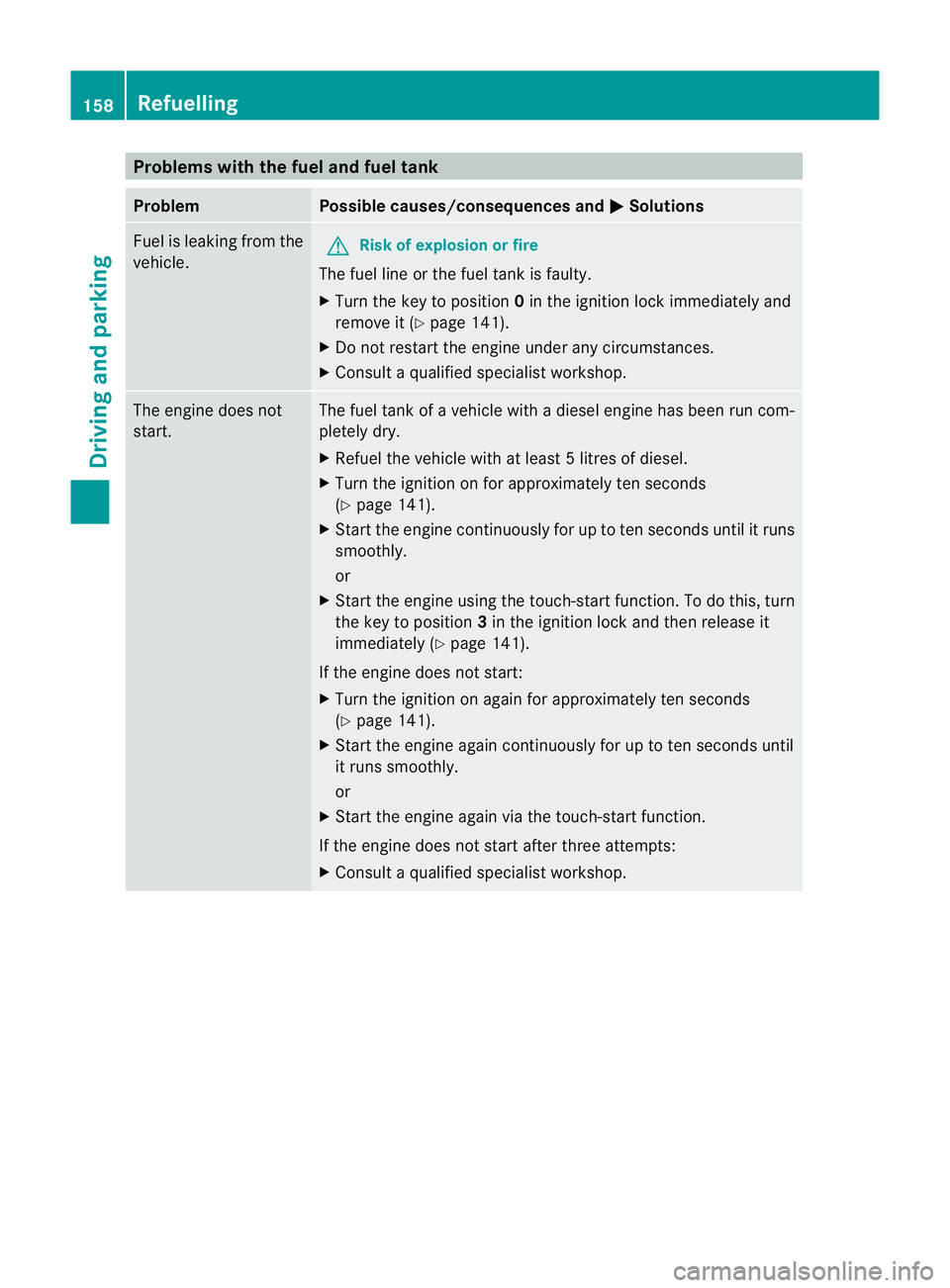
Problems with the fuel and fuel tank
Problem Possible causes/consequences and
M Solutions
Fuel is leaking from the
vehicle.
G
Risk of explosion or fire
The fuel line or the fuel tank is faulty.
X Turn the key to position 0in the ignition lock immediately and
remove it (Y page 141).
X Do not restart the engine under any circumstances.
X Consult aqualified specialist workshop. The engine does not
start. The fuel tank of
avehicle with adiesel engine has been run com-
pletely dry.
X Refuel the vehicle with at least 5litres of diesel.
X Turn the ignition on for approximately ten seconds
(Y page 141).
X Start the engine continuously for up to ten seconds until it runs
smoothly.
or
X Start the engine using the touch-star tfunction .Todot his, turn
the key to position 3in the ignition lock and then release it
immediately (Y page 141).
If the engine does not start:
X Turn the ignition on again for approximately ten seconds
(Y page 141).
X Start the engine again continuously for up to ten seconds until
it runs smoothly.
or
X Start the engine again via the touch-start function.
If the engine does not start after three attempts:
X Consult aqualified specialist workshop. 158
RefuellingDriving and parking
Page 162 of 373
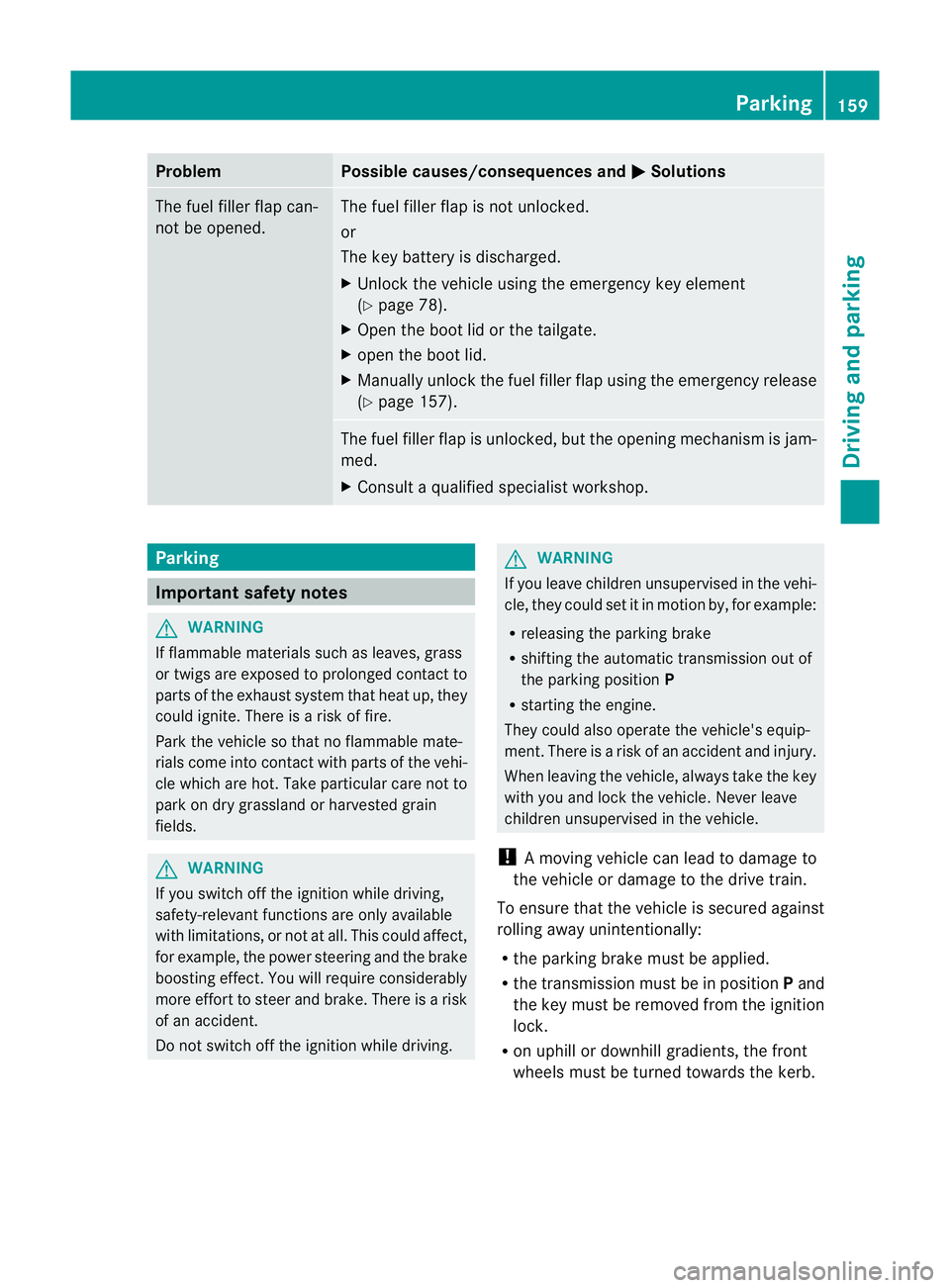
Problem Possible causes/consequences and
M Solutions
The fuel filler flap can-
not be opened. The fuel filler flap is not unlocked.
or
The key battery is discharged.
X
Unlock the vehicle using the emergency key element
(Y page 78).
X Open the boot lid or the tailgate.
X open the boot lid.
X Manuallyu nlock the fuel filler flap using the emergency release
(Y page 157). The fuel filler flap is unlocked, but the opening mechanism is jam-
med.
X
Consult aqualified specialist workshop. Parking
Important safety notes
G
WARNING
If flammable materials such as leaves, grass
or twigs are exposed to prolonged contact to
parts of the exhaust system that heat up, they
could ignite. There is arisk of fire.
Park the vehicle so that no flammable mate-
rials come into contact with parts of the vehi-
cle which are hot. Take particular care not to
park on dry grassland or harvested grain
fields. G
WARNING
If you switch off the ignition while driving,
safety-relevant functions are only available
with limitations, or not at all. This could affect,
for example, the power steering and the brake
boosting effect.Y ou will require considerably
more effort to steer and brake. There is arisk
of an accident.
Do not switch off the ignition while driving. G
WARNING
If you leave children unsupervised in the vehi-
cle, they could set it in motion by, for example:
R releasing the parking brake
R shifting the automatic transmission out of
the parking position P
R starting the engine.
They could also operate the vehicle's equip-
ment.T here isarisk of an accident and injury.
When leaving the vehicle, always take the key
with you and lock the vehicle. Never leave
children unsupervised in the vehicle.
! Am oving vehicle can lead to damage to
the vehicle or damage to the drive train.
To ensure that the vehicle is secured against
rolling away unintentionally:
R the parking brake must be applied.
R the transmission must be in position Pand
the key must be removed from the ignition
lock.
R on uphill or downhill gradients, the front
wheels must be turned towards the kerb. Parking
159Driving and parking Z
Page 163 of 373
Switching off the engine
Vehicles with automatic transmission X
Firmly depress the parking brake.
X All vehicles (except AMG vehicles): shift
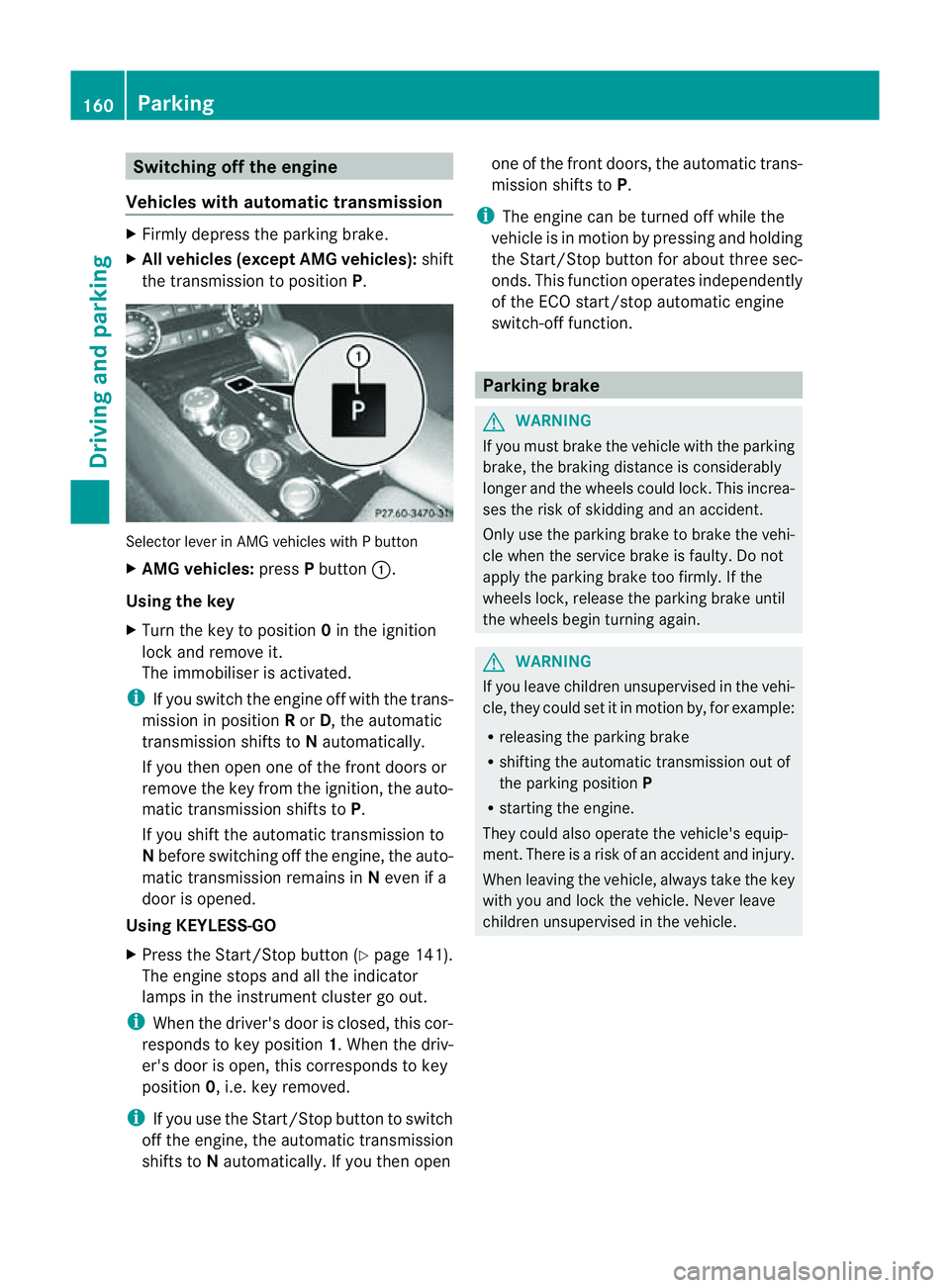
the transmission to position P.Selector lever in AMG vehicles with
Pbutton
X AMG vehicles: pressPbutton :.
Using the key
X Turn the key to position 0in the ignition
lock and remove it.
The immobiliser is activated.
i If you switch the engine off with the trans-
mission in position Ror D,t he automatic
transmission shifts to Nautomatically.
If you then open one of the front doors or
remove the key from the ignition, the auto-
matic transmission shifts to P.
If you shift the automatic transmission to
N before switching off the engine, the auto-
matic transmission remains in Neven if a
door is opened.
Using KEYLESS-GO
X Press the Start/Stop button (Y page 141).
The engine stops and all the indicator
lamps in the instrumen tcluster go out.
i When the driver's door is closed, this cor-
responds to key position 1.When the driv-
er's door is open ,this corresponds to key
position 0,i.e. key removed.
i If you use the Start/Stop button to switch
off the engine, the automatic transmission
shift stoNautomatically. If you the nopen one of the fron
tdoors, the automatic trans-
mission shifts to P.
i The engine can be turned off while the
vehicle is in motion by pressing and holding
the Start/Stop button for about three sec-
onds. This function operates independently
of the ECO start/stop automatic engine
switch-off function. Parking brake
G
WARNING
If you must brake the vehicle with the parking
brake, the braking distance is considerably
longer and the wheels could lock. This increa-
ses the risk of skidding and an accident.
Only use the parking brake to brake the vehi-
cle when the service brake is faulty. Do not
apply the parking brake too firmly. If the
wheels lock, release the parking brake until
the wheels begin turnin gagain. G
WARNING
If you leave children unsupervised in the vehi-
cle, they could set it in motion by, for example:
R releasing the parking brake
R shifting the automatic transmission out of
the parking position P
R starting the engine.
They could also operate the vehicle's equip-
ment.T here isarisk of an accident and injury.
When leaving the vehicle, always take the key
with you and lock the vehicle. Never leave
children unsupervised in the vehicle. 160
ParkingDriving and parking
Page 164 of 373
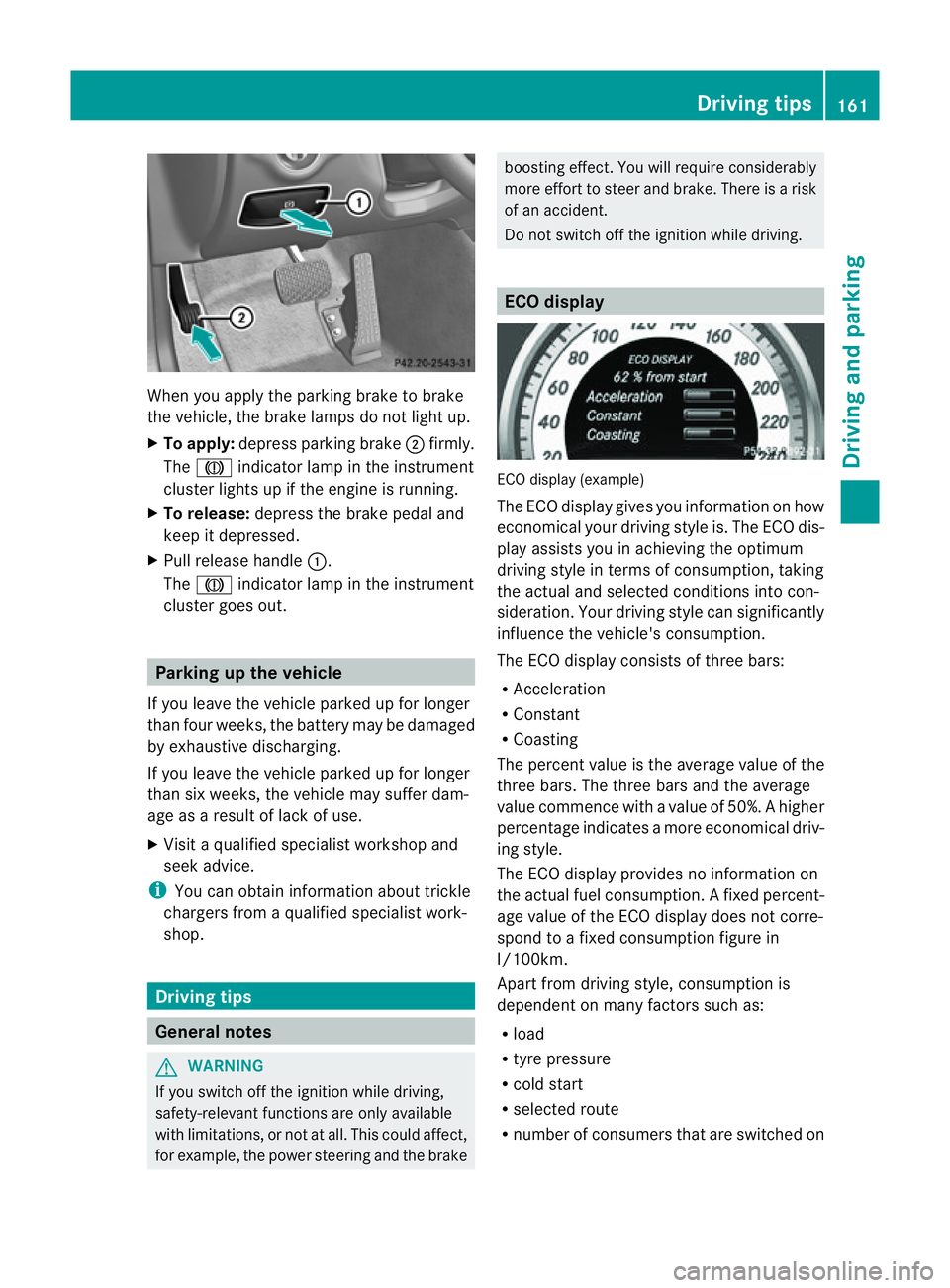
When you apply the parking brake to brake
the vehicle, the brake lamps do not light up.
X To apply: depress parking brake ;firmly.
The J indicato rlamp in the instrument
cluster lights up if the engine is running.
X To release: depress the brake pedal and
keep it depressed.
X Pull release handle :.
The J indicato rlamp in the instrument
cluster goes out. Parking up the vehicle
If you leave the vehicle parked up for longer
than four weeks, the batter ymay be damaged
by exhaustive discharging.
If you leave the vehicle parked up for longer
than six weeks, the vehicle may suffer dam-
age as aresult of lack of use.
X Visit aqualified specialist workshop and
seek advice.
i You can obtain information about trickle
chargers from aqualified specialist work-
shop. Driving tips
General notes
G
WARNING
If you switch off the ignition while driving,
safety-relevant functions are only available
with limitations, or not at all. This could affect,
for example, the power steerin gand the brake boostin
geffect. You will require considerably
more effort to steer and brake. There is arisk
of an accident.
Do not switch off the ignition while driving. ECO display
ECO display (example)
The ECO display gives you information on how
economical your driving style is. The ECO dis-
play assists you in achieving the optimum
driving style in term
sofconsumption ,taking
the actual and selected conditions into con-
sideration. Your driving style can significantly
influenc ethe vehicle's consumption.
The ECO display consists of three bars:
R Acceleration
R Constant
R Coasting
The percen tvalue is th eaverage value of the
three bars .The three bars and the average
value commence with avalue of 50%. Ahigher
percentage indicates amoree conomical driv-
ing style.
The ECO display provides no information on
the actual fue lconsumption. Afixed percent-
age value of the ECO display does not corre-
spon dtoaf ixed consumption figure in
l/100km.
Apar tfromd rivin gstyle, consumption is
dependent on many factors such as:
R load
R tyre pressure
R cold start
R selected route
R number of consumer sthat are switched on Driving tips
161Driving and parking Z
Page 185 of 373
The following vehicle levels are possible:
R
normal
R raised: the vehicle is raised by about
25 mm when compared with the normal
level.
R lowered: the vehicle is lowered by about
10 mm when compared with the normal
level.
The "Normal" and "Raised" vehicle levels can
be set manually.
The "Lowered" vehicle level is set automati-
cally:
R at speeds above 140 km/h
R if you have selected "Comfort tuning"
(Y page 182) and then lock the vehicle
within 60 seconds of the engine being
switched off
R if you have selected "Sports tuning"
(Y page 182)
Setting the vehicle level G
WARNING
Make sure that nobody is in the vicinit yofthe
wheel housing or under the vehicle while low-
ering the vehicle when it is stationary. Other-
wise, limbs could become trapped.
Select the "Normal" setting for normal road
surfaces and "Raised" for driving with snow
chains or on particularly poor road surfaces.
Your selection remains stored even if you
remove the key from the ignition lock.
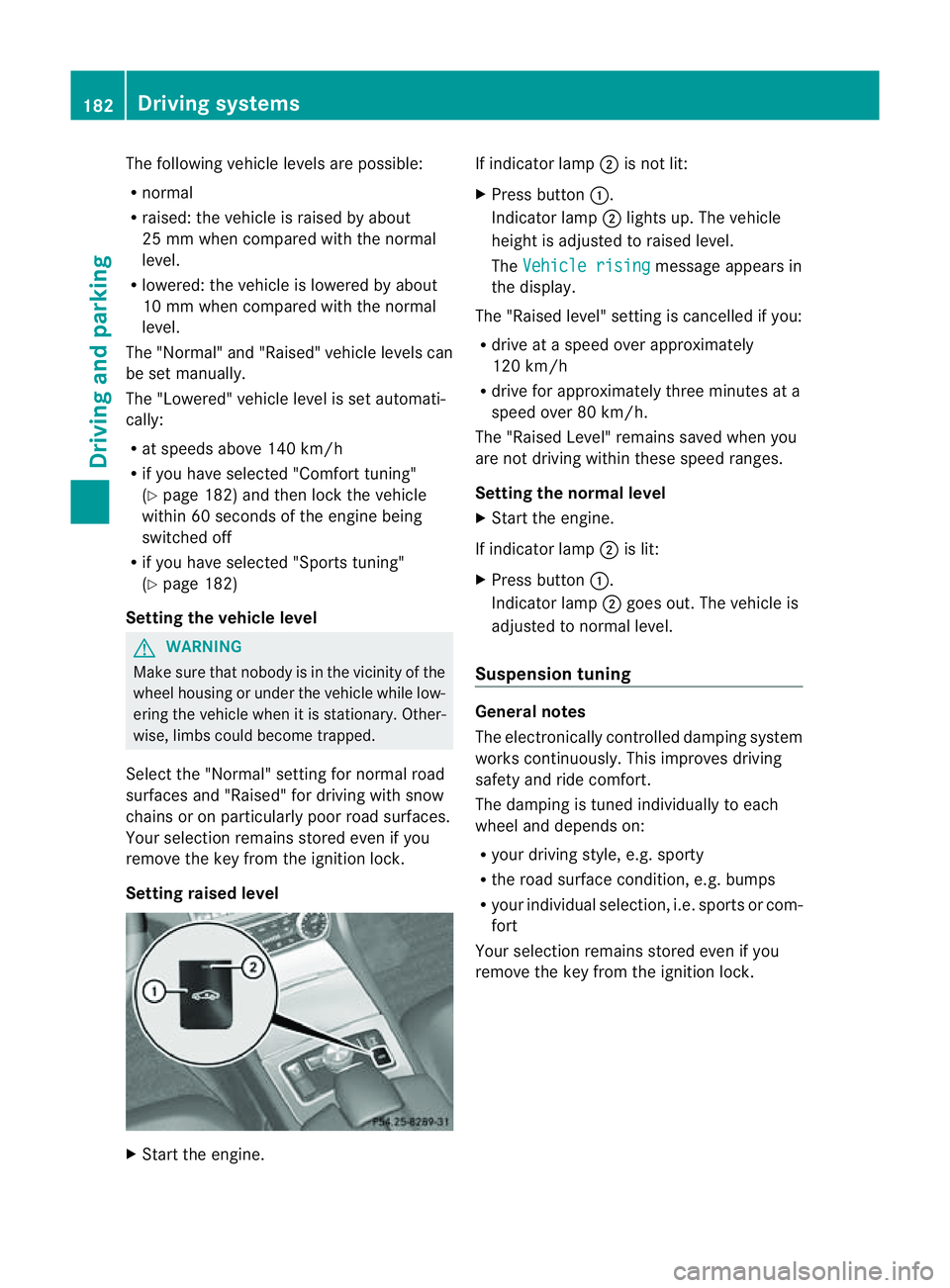
Setting raised level X
Start the engine. If indicator lamp
;is not lit:
X Press button :.
Indicator lamp ;lights up. The vehicle
height is adjusted to raised level.
The Vehicle rising message appears in
the display.
The "Raised level" setting is cancelled if you:
R drive at aspeed over approximately
120 km/h
R drive for approximately three minutes at a
speed over 80 km/h.
The "Raised Level" remains saved when you
are not driving within these speed ranges.
Setting the norma llevel
X Start the engine.
If indicator lamp ;is lit:
X Press button :.
Indicator lamp ;goes out. The vehicle is
adjusted to normal level.
Suspension tuning General notes
The electronically controlled damping system
works continuously. This improves driving
safety and ride comfort.
The damping is tuned individually to each
wheel and depends on:
R
your driving style, e.g. sporty
R the road surface condition, e.g. bumps
R your individual selection ,i.e. sports or com-
fort
Your selection remains stored even if you
remove the key from the ignition lock. 182
Driving systemsDriving and parking
Page 188 of 373
PARKTRONIC
Important safety notes G
WARNING
PARKTRONIC is only an aid and may not
detect all obstacles. It is not asubstitute for
attentive driving.
You are always responsible for safety and
must continue to pay attention to your imme-
diate surroundings when parking and
manoeuvring. You could otherwise endanger
yourself and others. G
WARNING
Make sure that no persons or animals are in
the manoeuvring range. Otherwise, they
could be injured.
PARKTRONIC is an electronic parking aid with
ultrasonic sensors. It indicates visuallya nd
audibly the distance between your vehicle
and an object.
PARKTRONIC is activated automatically if
you:
R switch on the ignition
R shift the transmission to position D,Ror N
R release the parking brake
PARKTRONIC is deactivated at speeds above
18 km/h. It is reactivated at lower speeds.
PARKTRONIC monitorst he area around your
vehicle using six sensors in the front bumper
and four sensors in the rear bumper.
Range of the sensors General notes
!
When parking, pay particular attention to
objectsa bove or below the sensors, such
as flower pots or trailer drawbars. PARK-
TRONIC does not detect such objectsw hen
they are in the immediate vicinity of the
vehicle. You could damage the vehicle or
the objects.
The sensors may not detect snow and
objectsw hich absorb ultrasonic sources. Ultrasonic sources, such as an automatic
car wash,
alorry's compressed-air brakes
or ap neumatic drill, could cause PARK-
TRONIC to malfunction.
PARKTRONIC may not function correctly on
uneven terrain. :
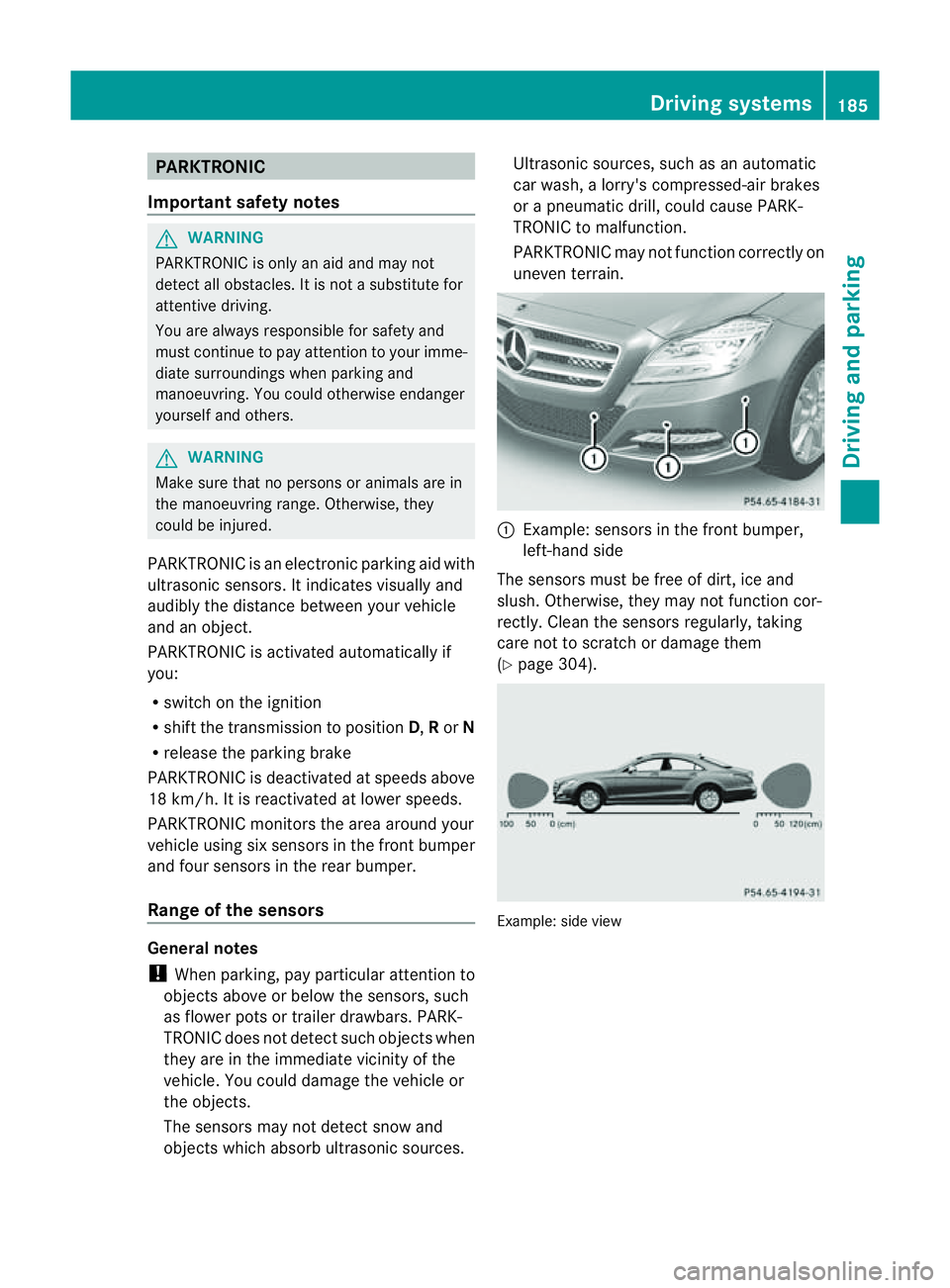
Example: sensors in the front bumper,
left-han dside
The sensors must be free of dirt, ice and
slush. Otherwise, they may not function cor-
rectly. Cleant he sensors regularly,t aking
care not to scratchord amage them
(Y page 304). Example: side view Driving systems
185Driving and parking Z
Page 189 of 373
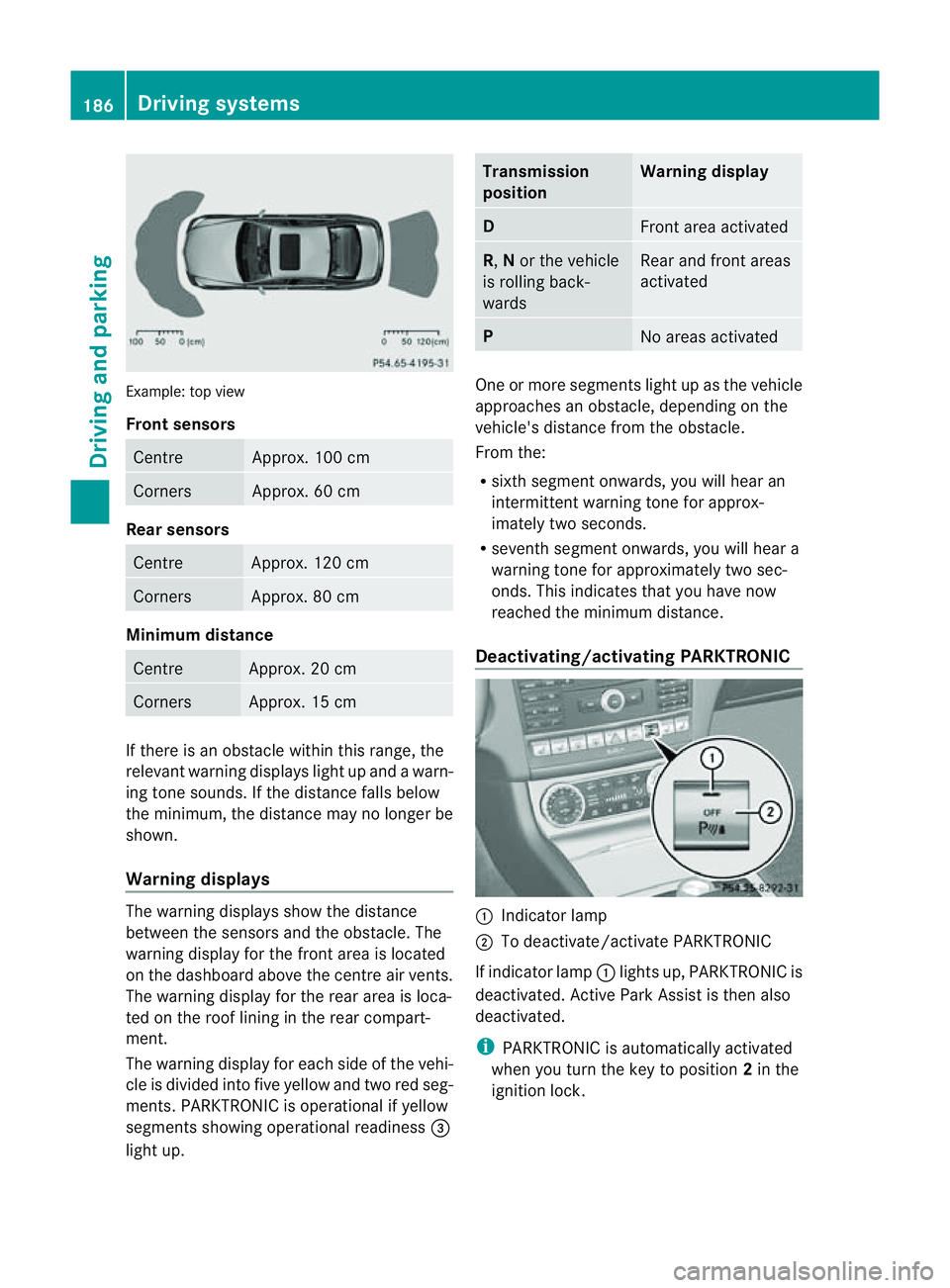
Example: top view
Front sensors
Centre Approx. 100 cm
Corners Approx. 60 cm
Rea
rsensors Centre Approx
.120 cm Corners Approx
.80cm Minimum distance
Centre Approx
.20cm Corners Approx
.15cm If there is an obstacle within this range, the
relevant warning displays light up and awarn-
ing tone sounds. If th edistanc efalls below
the minimum, the distanc emay no longer be
shown.
Warning displays The warning displays sho
wthe distance
between th esensor sand th eobstacle. The
warning display for the fron tarea is located
on the dashboard above the centre air vents.
The warning display for the rear area is loca-
ted on the roof lining in the rear compart-
ment.
The warning display for each side of the vehi-
cle is divided into five yellow and two red seg-
ments. PARKTRONIC is operational if yellow
segments showing operational readiness =
light up. Transmission
position Warning display
D
Front area activated
R,
Nor the vehicle
is rolling back-
wards Reara
nd front areas
activated P
No area
sactivated One or more segments light up as the vehicle
approache
sanobstacle, depending on the
vehicle's distance from the obstacle.
From the:
R sixth segment onwards, you willh earan
intermitten twarnin gtonef or approx-
imately two seconds.
R sevent hsegment onwards, you will hear a
warning tonef or approximately two sec-
onds. This indicates that you have now
reached the minimum distance.
Deactivating/activating PARKTRONIC :
Indicator lamp
; To deactivate/activate PARKTRONIC
If indicator lamp :lights up, PARKTRONIC is
deactivated. Active Park Assist is then also
deactivated.
i PARKTRONIC is automatically activated
when you turn the key to position 2in the
ignition lock. 186
Driving systemsDriving and parking
Page 190 of 373
Problems with PARKTRONIC
Problem Possible causes/consequences and
M Solutions
Only the red segments
in the PARKTRONIC
warning displaysa
re lit.
You also hear awarning
tone for approximately
two seconds.
PARKTRONIC is deacti-
vated after approx-
imately 20 seconds,
and the indicator lamp
in the PARKTRONIC
button lights up. PARKTRONIC has malfunctioned and has switched off.
X
If problems persist, have PARKTRONIC checked at aqualified
specialist workshop. Only the red segments
in the PARKTRONIC
warning displaysa
re lit.
PARKTRONIC is deacti-
vated after approx-
imately 20seconds. The PARKTRONIC sensors are dirty or there is interference.
X
Cleant he PARKTRONIC sensors (Y page 304).
X Switch the ignition back on. The problem may be caused by an external source of radio or
ultrasound waves.
X
See if PARKTRONIC functions in adifferent location. Active Parking Assist
Important safety notes G
WARNING
Active Parking Assist is merely an aid and may
sometimes recommendp arking spaces that
are not suitable for parking. For example,
these might be spaces where parking is pro-
hibited, driveways, unsuitable surfaces, etc.
Active Parking Assist measures the parking
space as you drive past it. Any later changes
to the parking space are not taken into
account. For instance, this may be the case
when the vehicle parked in front of or behind
the space changes its position or when an
obstacle is moved into the parking space.
Active Parking Assist does not relieve you of
the responsibility of paying attention. If you
rely solely on Active Parking Assist, you could cause an accident and injure yourself and oth-
ers.
You are always responsible for safety and
must continue to pay attention to your imme-
diate surroundings when parking and
manoeuvring.
G
WARNING
Objectsl ocated above the height range of
Active Parking Assist will not be detected
when the parking space is measured. These
are not taken into account when the parking
procedure is calculated, e. g. overhanging
loads, tail sections or loading ramps of goods
vehicles. In some circumstances, Active Park-
ing Assist may therefore guide you into the
parking space too early. This may lead to a
collision. For this reason, you should avoid
using Active Parking Assist in such situations. Driving systems
187Driving and parking Z
Page 194 of 373
General notes
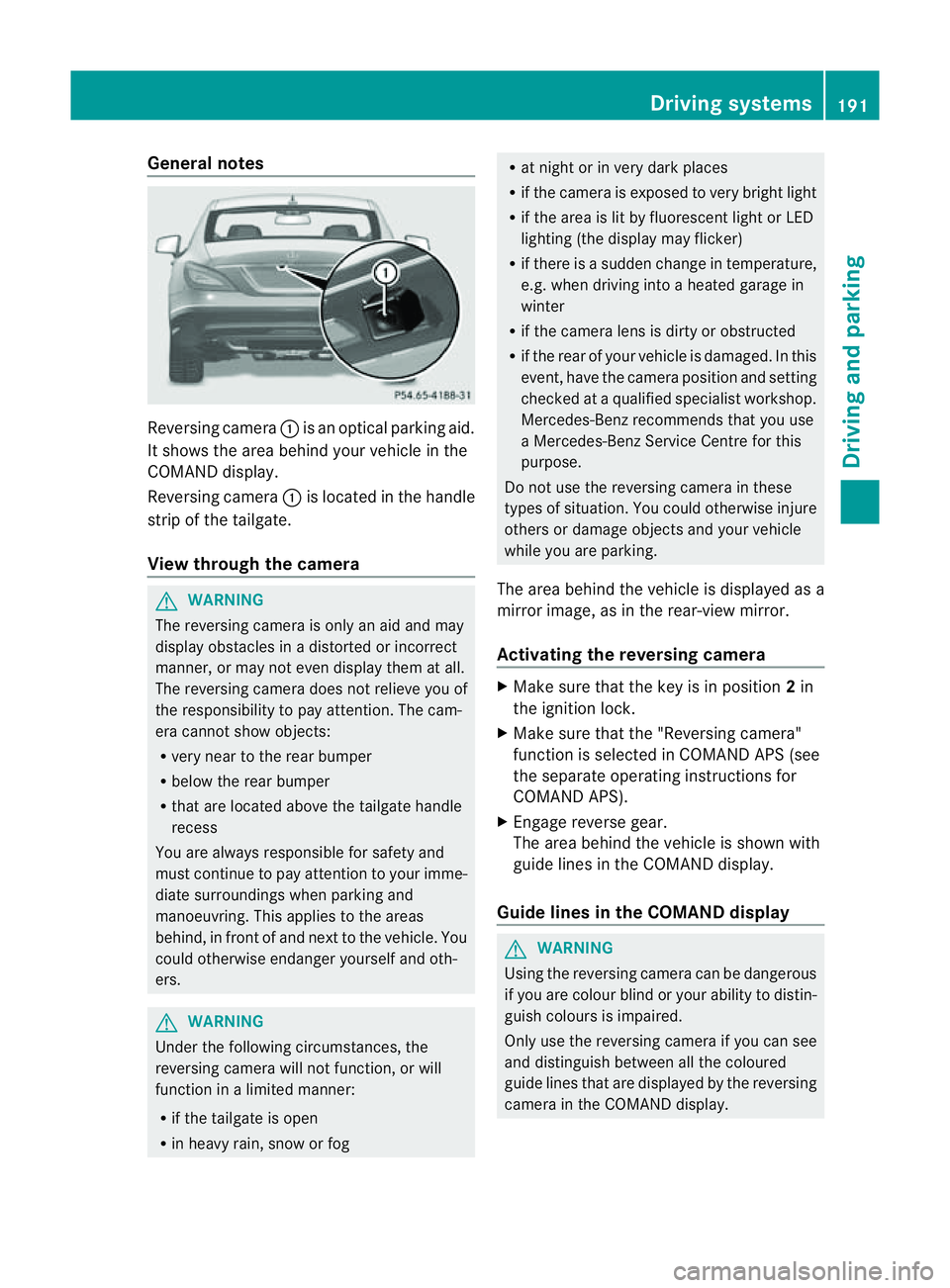
Reversing camera
:is an optical parking aid.
It shows the area behind yourv ehicle in the
COMAND display.
Reversing camera :is located in the handle
strip of the tailgate.
View through the camera G
WARNING
The reversing camera is only an aid and may
display obstacles in adistorted or incorrect
manner, or may not even display them at all.
The reversing camera does not relieve you of
the responsibility to pay attention .The cam-
era cannot show objects:
R very near to the rear bumper
R below the rear bumper
R that are located above the tailgate handle
recess
You are always responsible for safety and
must continue to pay attention to your imme-
diate surroundings when parking and
manoeuvring. This applies to the areas
behind, in front of and next to the vehicle. You
could otherwise endanger yourself and oth-
ers. G
WARNING
Under the following circumstances, the
reversing camera will not function, or will
function in alimited manner:
R if the tailgate is open
R in heavy rain, snow or fog R
at night or in very dark places
R if the camera is exposed to very bright light
R if the area is lit by fluorescent light or LED
lighting (the display may flicker)
R if there is asudden change in temperature,
e.g. when driving into aheated garage in
winter
R if the camera lens is dirty or obstructed
R if the rear of your vehicle is damaged. In this
event, have the camera position and setting
checked at aqualified specialist workshop.
Mercedes-Ben zrecommends that you use
aM ercedes-Benz Service Centr efor this
purpose.
Do not use the reversin gcamera in these
types of situation .You could otherwise injure
others or damage object sand your vehicle
while you are parking.
The area behind the vehicle is displayed as a
mirror image, as in the rear-view mirror.
Activating the reversing camera X
Make sure that the key is in position 2in
the ignition lock.
X Make sure that the "Reversing camera"
function is selected in COMAND APS (see
the separate operating instructions for
COMAND APS).
X Engage reverse gear.
The area behind the vehicle is shown with
guide lines in the COMAND display.
Guide lines in the COMAND display G
WARNING
Using the reversing camera can be dangerous
if you are colour blind or your ability to distin-
guish colours is impaired.
Only use the reversing camera if you can see
and distinguish between all the coloured
guide lines that are displayed by the reversing
camera in the COMAND display. Driving systems
191Driving and parking Z
Page 198 of 373
The system may be impaired or may not func-
tion if:
R there is poor visibility, e.g. due to snow,
rain, fog or spray.
R the windscreen is dirty, misted up or cov-
ered, for instance by asticker, in the vicinity
of the camera.
R on bends, on uphill gradients or downhill
gradients. G
WARNING
Night View Assist Plus does not detect
object sinthe immediate vicinit yofthe vehi-
cle. Look through the windscreen when
manoeuvring. Make sure that there are no
people or animals in the area in which you are
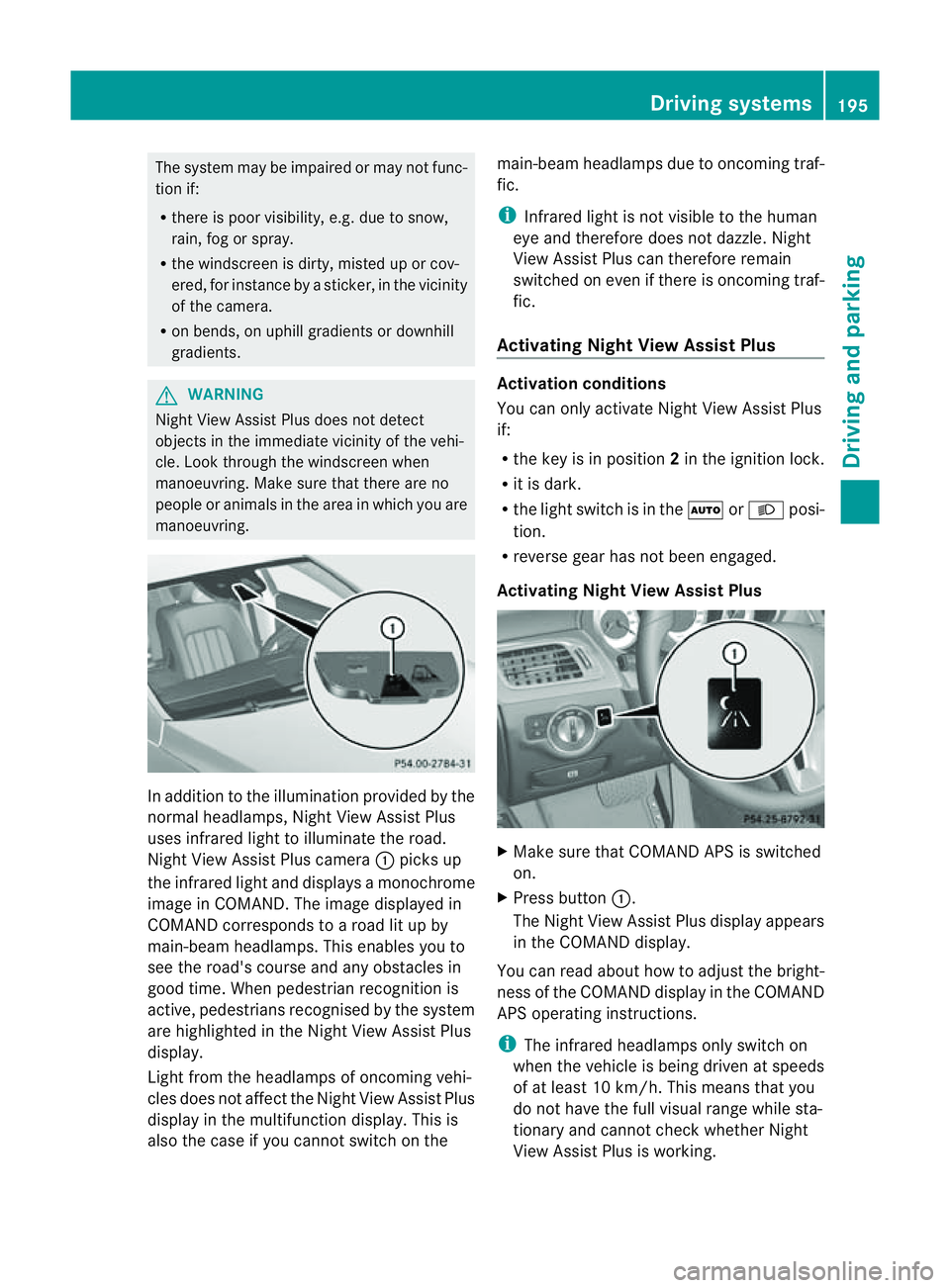
manoeuvring. In addition to the illumination provided by the
normal headlamps, Night View Assist Plus
uses infrared light to illuminate the road.
Night View Assist Plus camera :picks up
the infrared light and display samonochrome
image in COMAND .The image displayed in
COMAND corresponds to aroad lit up by
main-beam headlamps. This enables you to
see the road's course and any obstacles in
good time. When pedestrian recognition is
active, pedestrians recognised by the system
are highlighted in the Night View Assist Plus
display.
Light from the headlamps of oncomingv ehi-
cles does not affect the Night View Assist Plus
displayint he multifunction display. This is
also the case if you cannot switch on the main-beam headlamps due to oncomingt
raf-
fic.
i Infrared light is not visible to the human
eye and therefore does not dazzle. Night
View Assist Plus can therefore remain
switched on even if there is oncomingt raf-
fic.
Activating Night View Assist Plus Activation conditions
You can only activate Night View Assist Plus
if:
R
the key is in position 2in the ignition lock.
R it is dark.
R the light switch is in the ÃorL posi-
tion.
R reverse gear has not been engaged.
Activating Night View Assist Plus X
Make sure that COMAND APS is switched
on.
X Press button :.
The Night View Assist Plus displaya ppears
in the COMAND display.
You can read about how to adjust the bright-
ness of the COMAND displayint he COMAND
APS operating instructions.
i The infrared headlamps only switch on
when the vehicle is being driven at speeds
of at least 10 km/h. This means that you
do not have the full visual range while sta-
tionary and cannot check whether Night
View Assist Plus is working. Driving systems
195Driving and parking Z