cruise control MERCEDES-BENZ CLS COUPE 2012 Owners Manual
[x] Cancel search | Manufacturer: MERCEDES-BENZ, Model Year: 2012, Model line: CLS COUPE, Model: MERCEDES-BENZ CLS COUPE 2012Pages: 373, PDF Size: 9.12 MB
Page 11 of 373
Cruise control
Activatio ncondition s..................... 166
Cruise control leve r....................... 165
Deactivating ................................... 167
Display message ............................ 249
Driving system ............................... 165
Important safety notes ..................165
LIM indicator lamp .........................165
Selecting ........................................ 166
Setting aspeed .............................. 167
Storing and maintaining current
speed ............................................ .166
Cup holder
Centre console .............................. 279
Important safety notes ..................279
Rea rcentre console ....................... 280
Rea rcompartmen t......................... 280 D
Dashboard see Instrument cluster
Dashboard lighting
see Instrument cluster lighting
Data
see Technical data
Daytime drivin glights
Display message ............................ 239
Function/notes ............................. 111
Switching on/off (on-board com-
puter) ............................................. 222
Dealership
see Qualified specialist workshop
Delaye dswitch-off
Exterio rlighting (on-board com-
puter )............................................. 223
Interior lighting .............................. 224
Diagnostic sconnection ...................... 23
Diese lparticle filter .......................... 162
Digital speedometer .........................213
Dipped-beam headlamps Display message ............................ 237
Setting for driving abroad (sym-
metrical) ........................................ 110
Setting for driving on the right/
left ................................................. 223
Switching on/off ........................... 111DIRECT SELECTl
ever
see Automatic transmission
Displa ymessage
ASSYS TPLUS ................................ 300
General information .......................231
Hiding (on-board computer) ...........231
KEYLESS-GO .................................. 257
Display messages
Calling up (on-board computer) .....231
Driving systems ............................. 243
Engine ............................................ 240
Key ................................................ 256
Lights ............................................ .237
Safety systems .............................. 232
Tyres .............................................. 250
Vehicle .......................................... .254
Distanc edisplay (on-board com-
puter) ................................................. .219
Distanc ewarning signal (warning
lamp) .................................................. 269
DISTRONIC PLUS Deactivating ................................... 177
Display message ............................ 248
Displaysint he multifunctio ndis-
play ................................................ 176
Function/notes ............................. 170
Important safety notes ..................170
Setting the specified minimum
distance ......................................... 176
Warning lamp ................................. 269
Door
Automatic locking (on-board com-
puter) ............................................. 225
Automatic locking (switch) .............. .84
Central locking/unlocking (key) ......77
Control pane l................................... 38
Display message ............................ 255
Emergency locking ........................... 84
Emergency unlocking .......................84
Important safety notes ....................82
Opening (from the inside) ................82
Driv eprogram
Automatic ...................................... 152
Display ........................................... 149
Display (DIREC TSELECT lever) ......149
Manual .......................................... .154
Driv eprogram selector .....................1528
Index
Page 12 of 373
Driver's door
see Door
Drive system
Active Blind Spot Assis t................. 201
Driving abroad
Service24h .................................... 301
Symmetrical dipped bea m............. 110
Driving on flooded roads ..................164
Driving safety system BAS PLUS (Brake Assist System
PLUS) .............................................. .64
Electroni cBrake-force Distribu-
tio n.................................................. 68
ESP ®
(Electroni cStability Pro-
gram) ............................................... 65
ETS/4ETS (Electroni cTraction
System) ........................................... 66
Important safety guidelines .............62
Driving safety systems
ABS (Anti-lock Braking System) .......63
ADAPTIVE BRAKE ............................. 68
Adaptive brake lamps ......................65
BAS (Brake Assist System) ..............63
Overview .......................................... 62
PRE-SAFE ®
Brake ............................ .68
Driving system
Active Lan eKeepin gAssist. ........... 204
Active Parking Assist .....................187
Driving systems
Active Driving Assistance pack-
age ................................................. 201
AIRMATIC ...................................... 181
AMG RIDE CONTROL sports sus-
pension .......................................... 183
ATTENTION ASSIST ........................192
Blind Spot Assist ............................ 197
Cruise control ................................ 165
Display message ............................ 243
Distronic Plu s................................ 170
HOLD function ............................... 179
Lane Keeping Assist ......................199
Lane package ................................ 197
Nigh tView Assist Plus ...................194
PARKTRONI C................................. 185
RAC ESTART (AMG vehicles) ..........180
Reversing camera ..........................190Speed Limi
tAssist ......................... 193
SPEEDTRONIC ............................... 168
Driving tips
AMG cerami cbrakes ..................... 163
Aquaplaning ................................... 164
Automatic transmission .................151
Brakes ........................................... 162
Downhill gradient ........................... 162
Driving abroad ............................... 110
Driving in winter ............................ .164
Driving on flooded road s................ 164
Driving on wet road s...................... 164
General .......................................... 161
Icy road surfaces ........................... 165
Limited braking efficiency on sal-
ted road s....................................... 163
New brake pads/linings ................163
Running-in tips ............................... 140
Snow chains .................................. 331
Symmetrical dipped bea m............. 110
Wet road surface ........................... 163
DVD audio
Operating (on-board computer) .....216
DVD video
Operating (on-board computer) .....216 E
EASY-ENTRY feature Activating/deactivating .................226
Function/notes ............................. 104
EASY-EXIT feature
Crash-responsive ........................... 104
Function/notes ............................. 104
Switching on/off ........................... 226
EASY-PACKc onvenience box ...........277
EBD (electronic brake force distri-
bution) Display message ............................ 234
Function/notes ................................ 68
ECOd isplay
Function/notes ............................. 161
On-board computer .......................213
ECOs tart/stop function
Deactivating/activating .................145
General information .......................144
Electrical fuses
see Fuses Index
9
Page 16 of 373
L
Lamps see Warning and indicator lamps
Lane detection (automatic)
see Lan eKeeping Assist
Lane Keeping Assist
Activating/deactivating .................220
Display message ............................ 246
Function/informatio n.................... 199
Lane package ..................................... 197
Lap time (RACETIMER) ......................228
Lashing eyelets ................................. 276
Lighting see Lights
Lights
Activating/deactivating the Intel-
ligent Ligh tSystem ........................ 222
Activating/deactivating the inte-
rior lighting delayed switch-off .......224
Active light function .......................115
Automatic headlamp mode ............111
Cornering light function .................115
Dipped-bea mheadlamps ............... 111
Driving abroad ............................... 110
Foglamps (extende drange )........... 116
Hazard warning lamps ...................114
Headlamp flasher ........................... 114
Ligh tswitc h................................... 110
Main-beam headlamps ................... 113
Motorway mode ............................. 115
Parking lamps ................................ 113
Rea rfoglamp ................................. 112
Setting brightness for display/
switches (on-board computer) .......222
Setting the ambient lighting
brightness (on-board computer) ....223
Setting the ambient lighting col-
our (on-board computer) ................ 223
Side lamps ..................................... 112
Switching Adaptive Highbeam
Assist on/off ................................. 223
Switching the daytime driving
lights on/off (on-board computer) .222
Switching the exterio rlighting
delayed switch-off on/off (on-
board computer )............................ 223Switching the surround lighting
on/off (on-board computer)
..........223
Turn signals ................................... 113
see Changing bulbs
see Interior lighting
Light sensor (display message) .......239
LIMi ndicator lamp
Cruise control ................................ 165
DISTRONI CPLUS ........................... 172
Variabl eSPEEDTRONIC .................168
Limiting the speed
see SPEEDTRONIC
Loading guidelines ............................272
Locking see Centra llocking
Locking (doors)
Automatic ........................................ 84
Emergency locking ........................... 84
From insid e(central locking but-
ton) .................................................. 83
Locking centrally
see Centra llocking
Locking verification signal (on-
board computer) ............................... 225
Lumbar support Adjusting ....................................... 101
Adjusting the 4-way lumba rsup-
por t................................................ 101
Luxu ry head restraint .........................99 M
M+S tyres ........................................... 330
Main-beam headlamps Display message ............................ 238
Switching Adaptive Highbeam
Assist on/off ................................. 117
Switching on/off ........................... 113
Massag efunction (PULSE) ...............101
Matt finish (cleaning instructions) ..303
Memory card (audio) .........................216
Memory function ............................... 107
Mercedes-Benz Service Centre see Qualified specialist workshop
Message memory (on-board com-
puter) ................................................. .231
Messages see Display messages Index
13
Page 20 of 373
Short journeys (diesel particle fil-
ter)
...................................................... 162
Sidebag ................................................ 45
Side lamps Switching on/off ........................... 112
Side windows
Convenience closing ........................89
Convenience opening ......................89
Important safety notes ....................87
Opening/closing .............................. 88
Problem (malfunction) .....................91
resetting .......................................... 90
Sliding sunroof
Important safety information ...........91
Opening/closing .............................. 92
Problem (malfunction) .....................93
Rain closing feature .........................92
Resetting ......................................... 92
Sno wchains ...................................... 331
Socket Centre console .............................. 284
Rea rcompartmen t......................... 284
Under the armrest .........................284
Sockets
General notes ................................ 283
Spare wheel
Storing ........................................... 352
Specialist workshop ............................ 23
Spectacle scom partment ................. 273
Speed, controlling see Cruise control
Spee dLimit Assist
Activating/deactivatin gthe warn-
ing function .................................... 218
Displayin g...................................... 218
Display message ............................ 244
Display message in the multifunc-
tion displa y.................................... 194
Important safety notes ..................193
Speedometer
Digita l............................................ 213
In the Instrument cluster .........30, 209
Segments ...................................... 210
Selecting the unit of measure-
ment .............................................. 221
see Instrument cluster SPEEDTRONIC
Deactivating variabl e..................... 170
Display message ............................ 249
Function/notes ............................. 168
Important safety notes ..................168
LIM indicator lamp .........................168
Permanent ..................................... 170
Selecting ........................................ 168
Storing the current spee d.............. 169
Variabl e......................................... 168
SPORT handling mode
Activating/deactivating (AMG
vehicles) .......................................... 66
Warning lamp ................................. 264
SRS (Supplemental Restrain tSys-
tem) Display message ............................ 236
Introduction ..................................... 41
Warning lamp ................................. 266
Warning lamp (function) ................... 41
Starting (engine) ................................ 142
Steering (display message) ..............256
Steering wheel Adjusting (electrically). ..................103
Adjusting (manually). .....................103
Button overview ............................... 33
Buttons (on-board computer) ......... 210
Cleaning ......................................... 306
Gearshift paddle s........................... 152
Important safety notes ..................102
Steering wheel heating ..................103
Storing settings (memory func-
tion) ............................................... 107
Steering wheel gearshift paddles ....152
Steering wheel heating Problem (malfunction) ...................104
Switching on/off ........................... 103
Stopwatch (RACETIMER) ................... 228
Stowage areas ................................... 272
Stowage compartment Spectacles compartment ...............273
Stowage compartments
Armrest (under) ............................. 274
Centre console .............................. 273
Centre console (rea rcompart-
ment). ............................................ 275
Cuph older..................................... 279
Glove compartment .......................273 Index
17
Page 22 of 373
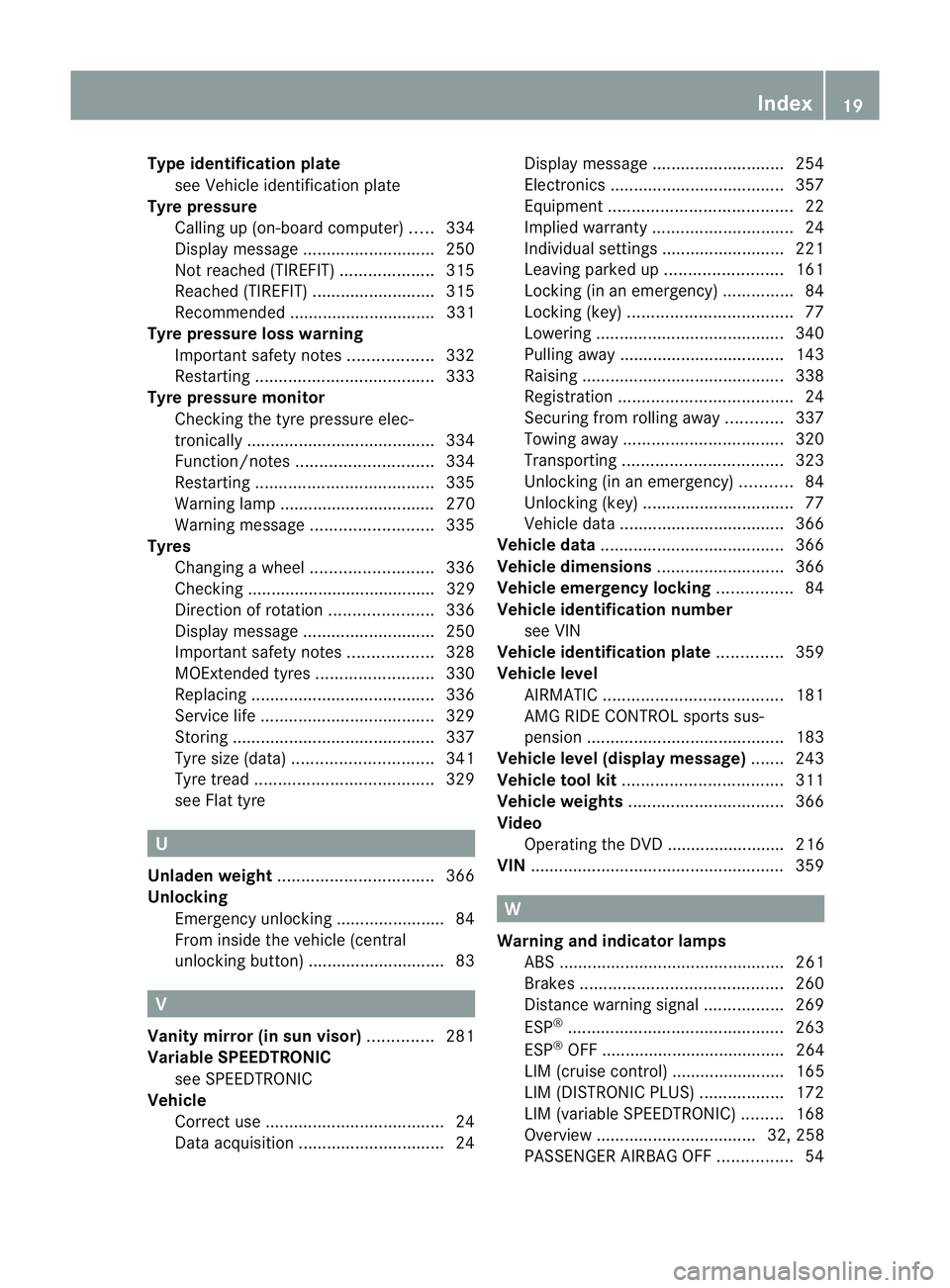
Type identificatio
nplate
see Vehicl eide ntificatio nplate
Tyr epressure
Calling up (on-board computer )..... 334
Display message ............................ 250
Not reached (TIREFIT) ....................315
Reached (TIREFIT) ..........................315
Recommended ............................... 331
Tyre pressure los swarning
Important safety notes ..................332
Restarting ...................................... 333
Tyre pressure monitor
Checking the tyre pressure elec-
tronically ........................................ 334
Function/notes ............................. 334
Restarting ...................................... 335
Warning lamp ................................. 270
Warning message .......................... 335
Tyres
Changing awheel .......................... 336
Checking ........................................ 329
Directio nofrotation ...................... 336
Display message ............................ 250
Important safety notes ..................328
MOExtended tyres .........................330
Replacing ....................................... 336
Service life ..................................... 329
Storing ........................................... 337
Tyr esize (data) .............................. 341
Tyr etread ...................................... 329
see Flat tyre U
Unladen weight ................................. 366
Unlocking Emergency unlocking .......................84
From insid ethe vehicle (central
unlocking button) ............................. 83 V
Vanity mirror (in sun visor) ..............281
Variable SPEEDTRONIC see SPEEDTRONIC
Vehicle
Correct use ...................................... 24
Data acquisition ............................... 24Display message
............................ 254
Electronics ..................................... 357
Equipment ....................................... 22
Implied warranty .............................. 24
Individua lsettings .......................... 221
Leaving parked up .........................161
Locking (in an emergency) ...............84
Locking (key )................................... 77
Lowering ........................................ 340
Pulling away ................................... 143
Raising ........................................... 338
Registration ..................................... 24
Securing from rolling away ............337
Towing away .................................. 320
Transporting .................................. 323
Unlocking (in an emergency) ...........84
Unlocking (key )................................ 77
Vehicle data ................................... 366
Vehicle data ....................................... 366
Vehicle dimensions ...........................366
Vehicle emergency locking ................84
Vehicle identification number see VIN
Vehicle identification plate ..............359
Vehicle level AIRMATIC ...................................... 181
AMG RIDE CONTROL sports sus-
pension .......................................... 183
Vehicle level (display message) .......243
Vehicle tool kit .................................. 311
Vehicle weights ................................. 366
Video Operating the DVD ......................... 216
VIN ...................................................... 359 W
Warning and indicator lamps ABS ................................................ 261
Brakes ........................................... 260
Distance warning signa l................. 269
ESP ®
.............................................. 263
ESP ®
OFF ....................................... 264
LIM (cruise control) ........................ 165
LIM (DISTRONIC PLUS) ..................172
LIM (variable SPEEDTRONIC )......... 168
Overview .................................. 32, 258
PASSENGER AIRBAG OFF ................54 Index
19
Page 31 of 373
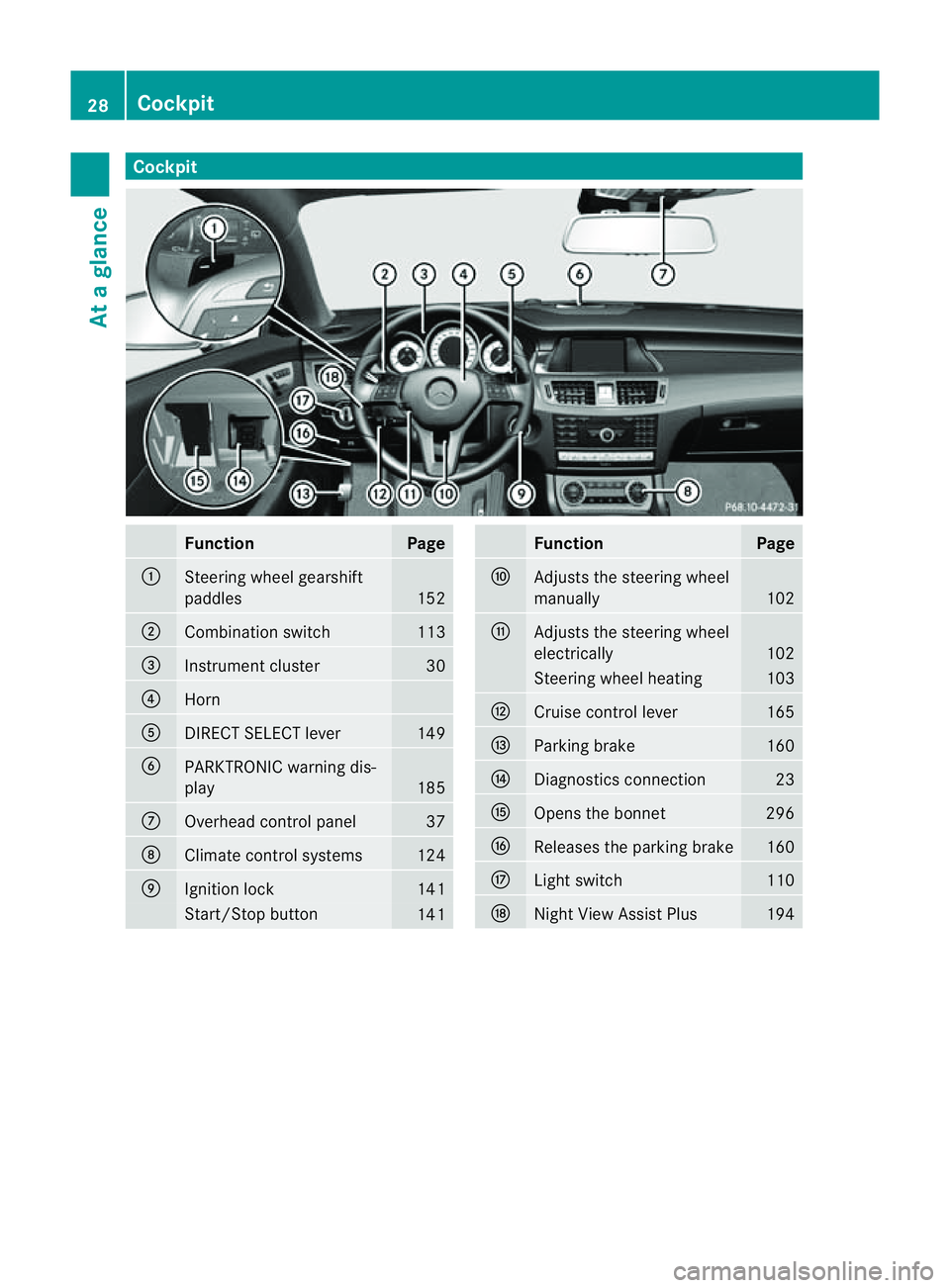
Cockpit
Function Page
:
Steering wheel gearshift
paddles
152
;
Combination switch 113
=
Instrumen
tcluster 30
?
Horn
A
DIRECT SELECT lever 149
B
PARKTRONIC warning dis-
play
185
C
Overhead control panel 37
D
Climat
econtro lsystems 124
E
Ignition lock 141
Start/Sto
pbutton 141 Function Page
F
Adjusts th
esteering wheel
manually 102
G
Adjusts th
esteering wheel
electrically 102
Steering wheel heating 103
H
Cruise control lever 165
I
Parking brake 160
J
Diagnostics connection 23
K
Open
sthe bonnet 296
L
Release
sthe parking brake 160
M
Ligh
tswitch 110
N
Night View Assist Plus 19428
CockpitAt
ag lance
Page 32 of 373
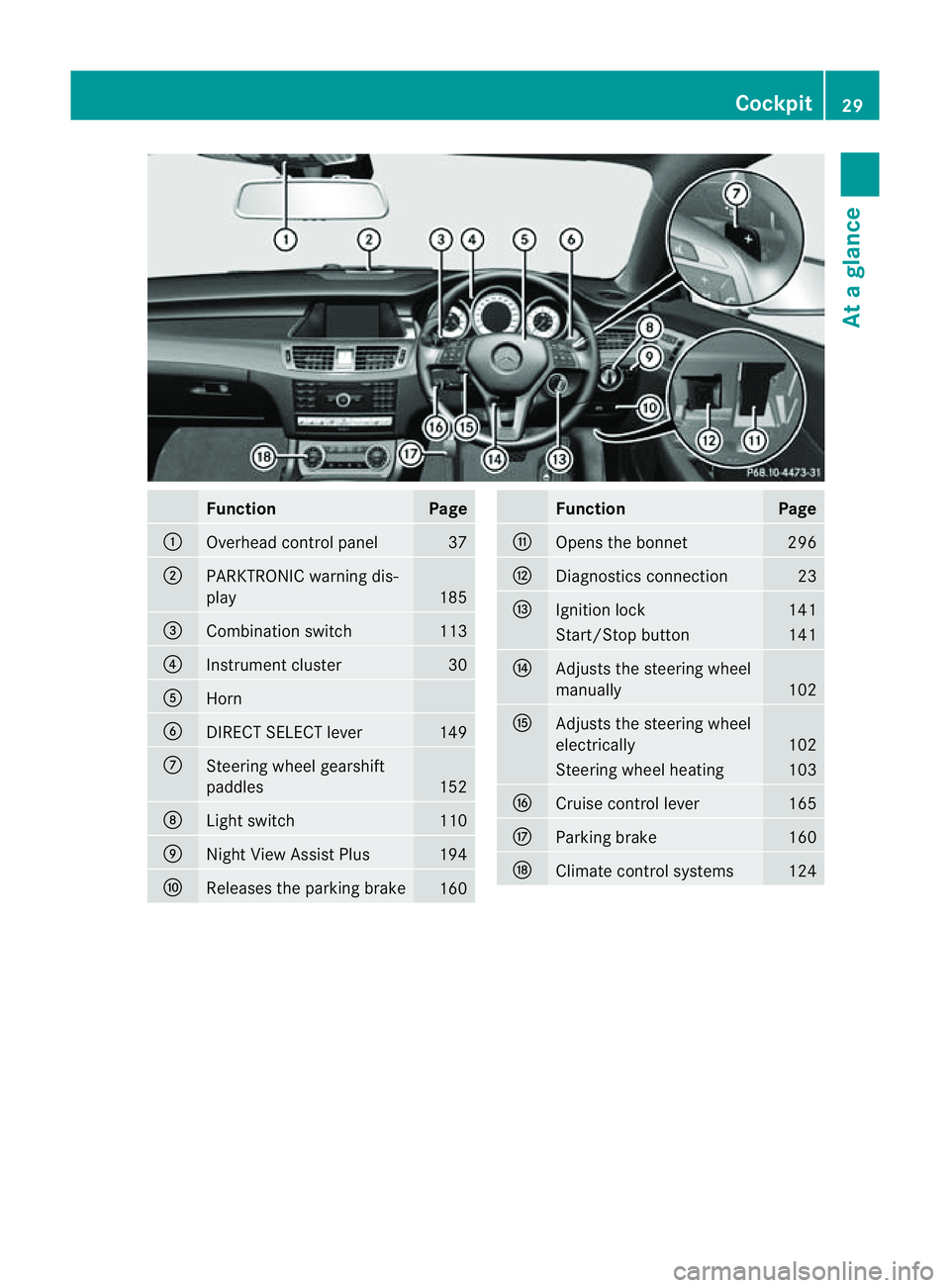
Function Page
:
Overhead control panel 37
;
PARKTRONIC warning dis-
play
185
=
Combination switch 113
?
Instrumen
tcluster 30
A
Horn
B
DIRECT SELECT lever 149
C
Steering wheel gearshift
paddles
152
D
Ligh
tswitch 110
E
Nigh
tView Assist Plus 194
F
Releases the parking brake
160 Function Page
G
Open
sthe bonnet 296
H
Diagnostics connection 23
I
Ignition lock 141
Start/Stop button 141
J
Adjusts the steerin
gwheel
manually 102
K
Adjusts the steerin
gwheel
electrically 102
Steerin
gwheel heating 103
L
Cruise control lever 165
M
Parking brake 160
N
Climate control systems 124Cockpit
29Atag lance
Page 166 of 373
i
This also applies if you have activated
cruise control, SPEEDTRONIC or DIS-
TRONIC PLUS.
This will use the braking effect of the engine,
so less braking will be required to prevent the
vehicle from gaining speed. This relieves the
load on the brake system and prevent sthe
brakes from overheatin gand wearing too
quickly.
Heavy and light loads G
WARNING
The braking system can overheat if you leave
your foot on the brake pedal while driving.
This increases the braking distanc eand could
even cause the braking system to fail. There
is ar isk of an accident.
Never use the brake pedal as afootrest. Do
not simultaneously depress both the brake
pedal and the accelerator pedal while driving.
! Depressin gthe brake pedal constantly
results in excessiv eand premature wear to
the brake pads.
If the brakes have been subjected to aheavy
load, do not stop the vehicle immediately, but
drive on for ashort while. This allows the air-
flow to cool the brakes more quickly.
If the brakes have been used only moderately,
you should occasionally test their effective-
ness. To do this, brake more firmly from a
higher speed. This improves the grip of the
brakes.
Wet road surfaces If you have driven for
along time in heavy rain
without braking, there may be adelayedr eac-
tion from the brakes when braking for the first
time. This may also occur after the vehicle has
been washed or driven through deep water.
You have to depress the brake pedal more
firmly. Maintain agreater distanc efrom the
vehicle in front.
After driving on awet road or having the vehi-
cle washed, brake firmly while paying atten- tion to the traffic conditions. This will warm
up the brake discs, thereby drying them more
quickly and protecting them against corro-
sion.
Limited braking performance on salt-
treated roads
If you drive on salted roads,
alayer of salt
residue may form on the brake discs and
brake pads. This can result in asignificantly
longer braking distance.
R Brake occasionally to remove any possible
salt residue. Make sure that you do not
endanger other road users when doing so.
R Carefully depress the brake pedal and the
beginnin gand end of ajourney.
R Maintain agreater distance to the vehicle
ahead.
New brake pads/linings New and replaced brake pads and discs only
reach their optimum braking effect after sev-
eral hundred kilometres of driving. Compen-
sate for this by applying greater force to the
brake pedal.
For safety reasons, Mercedes-Benz recom-
mends that you only have brake pads/linings
fitted to your vehicle which have been
approved for Mercedes-Benz vehicles or
which correspon dtoanequivalent quality
standard. Brake pads/linings which have not
been approved for Mercedes-Benz vehicles or
which are not of an equivalent quality could
affect your vehicle's operating safety.
AMG high-performance and ceramic
brakes The AMG brake systems are designed for
heavy loads. This may lead to noise when
braking. This is dependent on:
R
speed
R braking force
R environmental conditions, such as temper-
ature and humidity Driving tips
163Driving and parking Z
Page 168 of 373
Slippery road surfaces
G
WARNING
If you shift down on aslippery road surface in
an attempt to increase the engine's braking
effect,t he drive wheels could lose their grip.
This increases the risk of skidding and having
an accident.
Do not shift down for additional engine brak-
ing on aslippery road surface.
If the vehicle threaten stoskid or cannot be
stopped when moving at low speed:
X Move the transmission to position N.
X Try to bring the vehicle under control by
using corrective steering.
You should drive particularly carefully on slip-
pery road surfaces. Avoid sudden accelera-
tion, steering and braking manoeuvres.
i For more information on driving with
snow chains, see (Y page 331). Driving systems
Cruise control
Important safety notes G
WARNING
Do not change down for additional engine
braking on aslippery road surface. This could
cause the drive wheels to lose their grip and
the vehicle could skid. G
WARNING
Cruise control cannot take account of road
and traffic conditions.
Always pay attention to traffic conditions
even when cruise control is activated.
Cruise control is only an aid designed to assist
driving. You are responsible for the vehicle's
speed and for braking in good time. G
WARNING
Do not use cruise control
R in traffic condition sthat do not allow you to
drive at aconstant speed (e.g. heavy traffic
or winding roads). You may otherwise
cause an accident.
R on slippery roads. The drive wheels may
lose their grip when braking or accelerating
and the vehicle may skid.
R when there is low visibility, e.g. due to fog,
heavy rain or snow.
General notes Cruise control maintains
aconstant road
speed for you. It brakes automatically in order
to avoid exceeding the set speed. On long and
steep downhill gradients, especially if the
vehicle is laden, you must select shift range
1, 2or 3in good time. By doing so, you will
make use of the braking effect of the engine.
This relieves the load on the brake system and
preventst he brakes from overheating and
wearing too quickly.
Use cruise control only if road and traffic con-
ditions make it appropriate to maintain a
steady speed for aprolonged period. You can
store any road speed above 30 km/h.
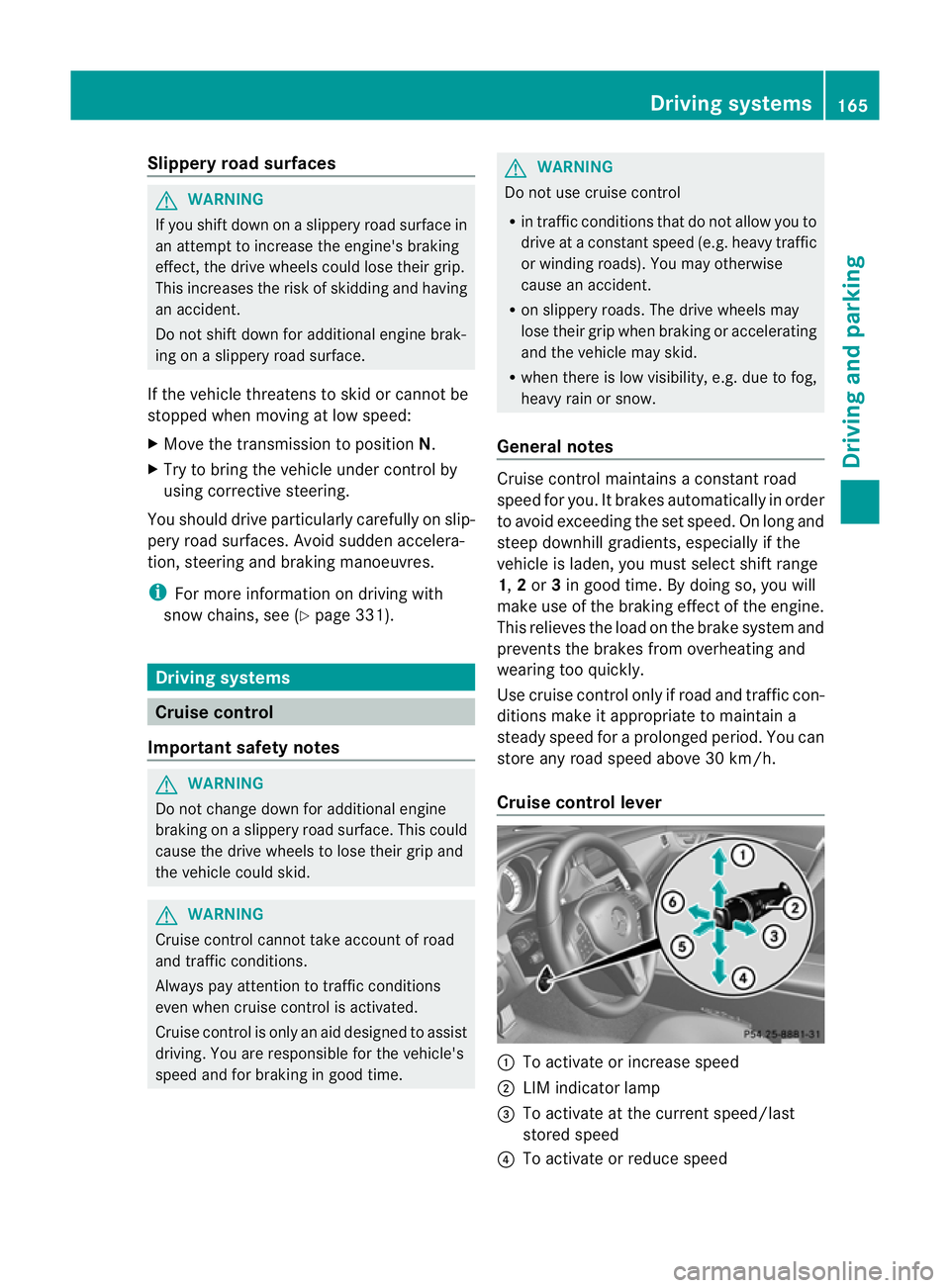
Cruise control lever :
To activate or increase speed
; LIM indicator lamp
= To activate at the current speed/last
stored speed
? To activate or reduce speed Driving systems
165Driving and parking Z
Page 169 of 373
A
To switch between cruise control and var-
iable SPEEDTRONIC
B To deactivate cruise control
You can operate cruise control and variable
SPEEDTRONIC with the cruise control lever.
The LIM indicator lamp on the cruise control
lever indicates which system you have selec-
ted:
R LIM indicator lamp off: cruise control is
selected.
R LIM indicator lamp on: variable SPEED-
TRONIC is selected.
When you activat ecruise control, the stored
speed is shown in the multifunction display
for five seconds. In the multifunction display,
the segment sbetween the stored speed and
the maximum speed light up.
Activation conditions To activat
ecruise control, all of the following
activation conditions must be fulfilled:
R the parking brake must be released.
R you must be driving faster than 30 km/h.
R ESP ®
must be switched on, but not inter-
vening.
R the transmission must be in position D.
R the cruise control function must be selec-
ted (Y page 166).
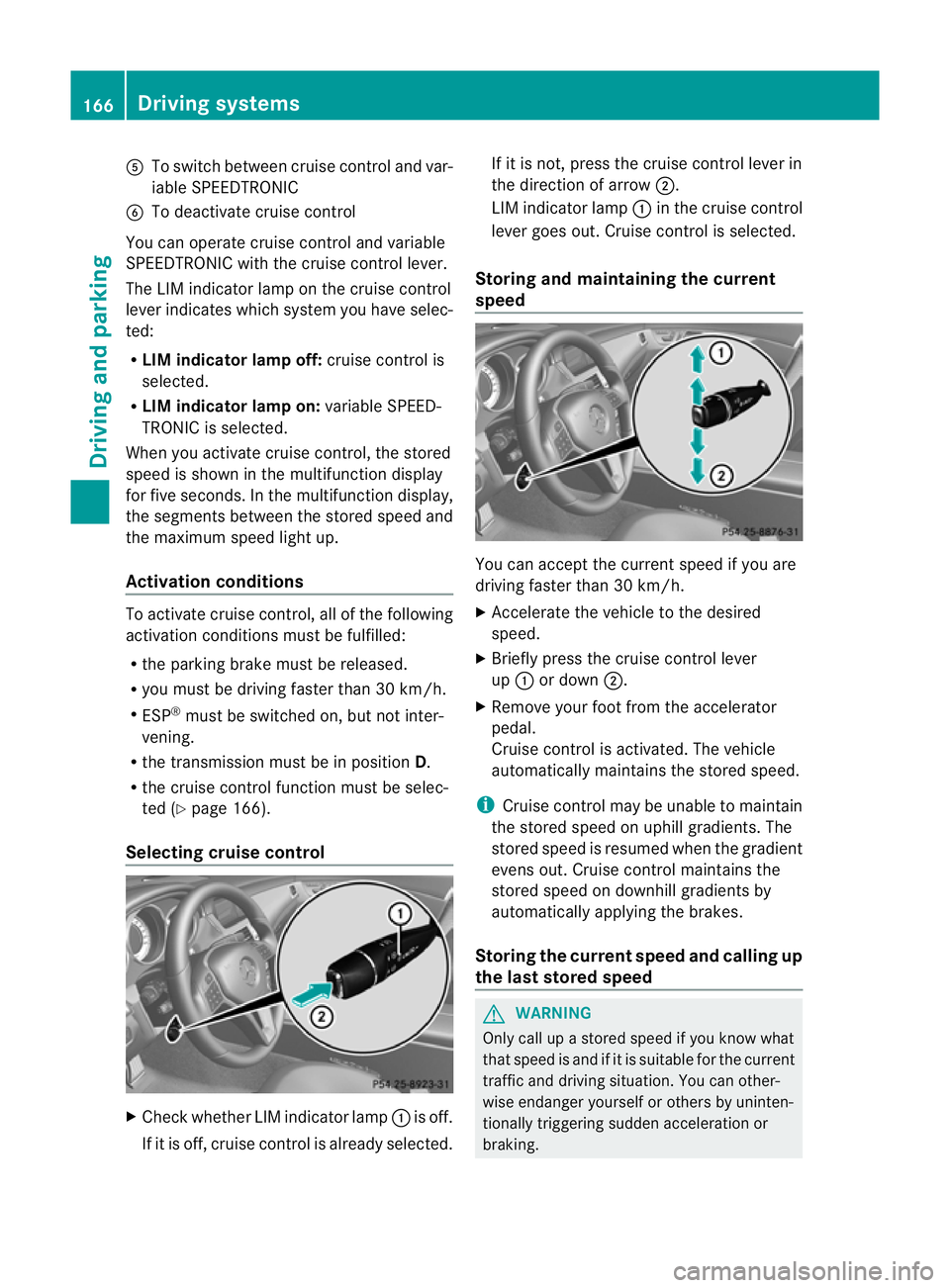
Selecting cruise control X
Check whether LIM indicator lamp :is off.
If it is off, cruise control is already selected. If it is not,p
ress the cruise control lever in
the direction of arrow ;.
LIM indicator lamp :in the cruise control
lever goes out. Cruise control is selected.
Storing and maintaining the current
speed You can accept the curren
tspeed if you are
driving faster than 30 km/h.
X Accelerat ethe vehicle to the desired
speed.
X Briefly press the cruise contro llever
up : or down ;.
X Remove your foot from the accelerator
pedal.
Cruise contro lisactivated. The vehicle
automatically maintains the stored speed.
i Cruise contro lmay be unable to maintain
the stored speed on uphill gradients. The
stored speed is resumed when the gradient
evens out. Cruise contro lmaintains the
store dspee dond ownhill gradients by
automaticall yapplyin gthe brakes.
Storing th ecurren tspee dand calling up
the last stored speed G
WARNING
Only call up astored speed if you know what
that speed is and if it is suitable for the current
traffic and driving situation .You can other-
wise endanger yourself or other sbyuninten-
tionally triggering sudden acceleration or
braking. 166
Driving systemsDriving and parking