keyless MERCEDES-BENZ CLS COUPE 2012 Owners Manual
[x] Cancel search | Manufacturer: MERCEDES-BENZ, Model Year: 2012, Model line: CLS COUPE, Model: MERCEDES-BENZ CLS COUPE 2012Pages: 373, PDF Size: 9.12 MB
Page 11 of 373
Cruise control
Activatio ncondition s..................... 166
Cruise control leve r....................... 165
Deactivating ................................... 167
Display message ............................ 249
Driving system ............................... 165
Important safety notes ..................165
LIM indicator lamp .........................165
Selecting ........................................ 166
Setting aspeed .............................. 167
Storing and maintaining current
speed ............................................ .166
Cup holder
Centre console .............................. 279
Important safety notes ..................279
Rea rcentre console ....................... 280
Rea rcompartmen t......................... 280 D
Dashboard see Instrument cluster
Dashboard lighting
see Instrument cluster lighting
Data
see Technical data
Daytime drivin glights
Display message ............................ 239
Function/notes ............................. 111
Switching on/off (on-board com-
puter) ............................................. 222
Dealership
see Qualified specialist workshop
Delaye dswitch-off
Exterio rlighting (on-board com-
puter )............................................. 223
Interior lighting .............................. 224
Diagnostic sconnection ...................... 23
Diese lparticle filter .......................... 162
Digital speedometer .........................213
Dipped-beam headlamps Display message ............................ 237
Setting for driving abroad (sym-
metrical) ........................................ 110
Setting for driving on the right/
left ................................................. 223
Switching on/off ........................... 111DIRECT SELECTl
ever
see Automatic transmission
Displa ymessage
ASSYS TPLUS ................................ 300
General information .......................231
Hiding (on-board computer) ...........231
KEYLESS-GO .................................. 257
Display messages
Calling up (on-board computer) .....231
Driving systems ............................. 243
Engine ............................................ 240
Key ................................................ 256
Lights ............................................ .237
Safety systems .............................. 232
Tyres .............................................. 250
Vehicle .......................................... .254
Distanc edisplay (on-board com-
puter) ................................................. .219
Distanc ewarning signal (warning
lamp) .................................................. 269
DISTRONIC PLUS Deactivating ................................... 177
Display message ............................ 248
Displaysint he multifunctio ndis-
play ................................................ 176
Function/notes ............................. 170
Important safety notes ..................170
Setting the specified minimum
distance ......................................... 176
Warning lamp ................................. 269
Door
Automatic locking (on-board com-
puter) ............................................. 225
Automatic locking (switch) .............. .84
Central locking/unlocking (key) ......77
Control pane l................................... 38
Display message ............................ 255
Emergency locking ........................... 84
Emergency unlocking .......................84
Important safety notes ....................82
Opening (from the inside) ................82
Driv eprogram
Automatic ...................................... 152
Display ........................................... 149
Display (DIREC TSELECT lever) ......149
Manual .......................................... .154
Driv eprogram selector .....................1528
Index
Page 13 of 373
Electronic Stability Program
see ESP ®
(Electronic Stabilit yProgram)
Electronic Traction System
see ETS/4ETS (Electronic Trac-
tionS ystem)
Emergency key
Unlocking th edriver's doo r.............. 84
Emergency key element
Function/notes ................................ 78
Locking vehicle ................................ 84
Emergency release
Driver's door .................................... 84
Fuel filler fla p................................. 157
Emergency spare wheel
Important safety notes ..................351
Inflating the collapsibl espare
wheel ............................................. 352
Points to remember .......................351
Removing ....................................... 351
Storage location ............................ 351
Stowing .......................................... 352
Technical data ............................... 354
Emergency unlocking
Vehicle ............................................. 84
Engine
Display message ............................ 240
ECO start/stop function ................144
Engine numbe r............................... 359
Jump-starting ................................. 319
Running irregularl y......................... 147
Starting problems ..........................147
Starting the engine with the key ....143
Starting with KEYLESS GO .............143
Stopping ........................................ 160
Tow-starting (vehicle )..................... 323
Warning lamp (engine diagnos-
tics) ............................................... 266
Engine electronics
Notes ............................................. 357
Problem (fault) ............................... 147
Engine oil
Additives ........................................ 364
Checking the oil leve l..................... 297
Checking the oil leve lusing the
dipstick .......................................... 298
Display message ............................ 242
Filling capacity ............................... 364Notes about oil grades ................... 363
Notes on oil level/consumption
....297
Temperature (on-board computer) .228
Topping up ..................................... 298
Viscosity ........................................ 364
Environmental protection
Returning an end-of-life vehicle .......21
ESP ®
(Electronic Stability Pro-
gram) AMG menu (on-board computer) ...228
Deactivating/activating (AMG
vehicles) .......................................... 66
Deactivating/activating (except
AMG vehicles) ................................ 219
Deactivating/activating (notes;
except AMG vehicles) ......................66
Display message ............................ 232
ETS/4ETS ........................................ 66
Function/notes ................................ 65
Important safety guidelines .............65
Warning lamp ................................. 263
ETS/4ETS (Electronic Traction Sys-
tem) ...................................................... 66
Exhaus ttail pipe (cleaning instruc-
tions) .................................................. 305
Exterior lighting Settings options ............................ .110
see Lights
Exterior mirrors
Adjusting ....................................... 105
Anti-dazzle mode (automatic) ........106
Folding in/ou t(automatically) .......106
Folding in/ou t(electrically) ...........105
Folding in whe nlocking( on-board
computer) ...................................... 227
Out of position (troubleshooting) ...106
Parking position ............................. 106
Resetting ....................................... 106
Storing settings (memory func-
tion) ............................................... 107 F
Faul tmessage
see Display messages
Filler cap
see Fuel filler flap
Fire extinguisher ............................... 31110
Index
Page 15 of 373
Heating
see Climate control
High-pressure cleaners ....................302
Hill start assist .................................. 144
HOLD function Display message ............................ 245
Function/notes ............................. 179I
Ignitio nlock
see Key positions
Immobiliser .......................................... 70
In-car hotspot see Separate operating instructions
Indicator and warning lamps
Coolant .......................................... 267
DISTRONI CPLUS ........................... 269
Engine diagnostics .........................266
Fuel tank ........................................ 267
SPORT handling mode ...................264
Indicator lamps
Display message ............................ 238
see Warning and indicator lamps
Insectp rotection on the radiator ....297
Inspection see ASSYST PLUS
Instrument cluster
Overview .................................. 30, 209
Settings ......................................... 221
Warning and indicator
lamps ...................................... .32, 258
Instrument cluster lighting ..............222
Intelligen tLight System
Activating/deactivatin g................. 222
Display message ............................ 239
Overview ........................................ 115
Setting the dipped-bea mhead-
lamps for driving on the right/left .223
Interior lighting ................................. 118
Automatic control system ..............118
Delayeds witch-off (on-board
computer) ...................................... 224
Emergency lighting ........................119
Manual control ............................... 119
Overview ........................................ 118
Reading lamp ................................. 118Setting brightness for display/
switches (on-board computer)
.......222
Setting the ambient lighting
brightness (on-board computer) ....223
Setting the ambient lighting col-
our (on-board computer) ................ 223
Interior motio nsensor ........................ 72
ISOFIXc hild seat securing system ....56 J
Jack Storage location ............................ 311
Using ............................................. 338
Jump start (engine)
see Jump starting (engine)
Jump starting (engine) ......................319 K
Key Changing the battery .......................79
Checking the battery .......................79
Convenience closing feature ............89
Convenience opening feature ..........89
Display message ............................ 256
Door central locking/unlocking .......77
Emergency key element ................... 78
Important safety notes ....................76
Loss ................................................. 81
Modifying the programming .............78
Positions (ignition lock) .................141
Problem (malfunction) .....................81
Starting the engine ........................143
KEYLESS-GO
Convenience closing ........................89
Display message ............................ 257
Locking ............................................ 77
Start/Stop button .......................... 141
Starting the engine ........................143
Unlocking ......................................... 77
Keyp ositions
Key ................................................ 141
KEYLESS GO .................................. 141
Kickdown
Driving tips .................................... 151
Manual drive program ....................154
Kneebag ............................................... 4412
Index
Page 43 of 373
Useful information
i This Owner's Manual describes all mod-
els, series and optional equipment for your
vehicle that were available at the time of
going to press. National variation sare pos-
sible. Not ethat your vehicle may not be
equipped with all of the function sdescri-
bed. This is also the case for system sand
function srelevan ttosafety.
i Read the information on qualified special-
ist workshops: (Y page 23). Panic alarm
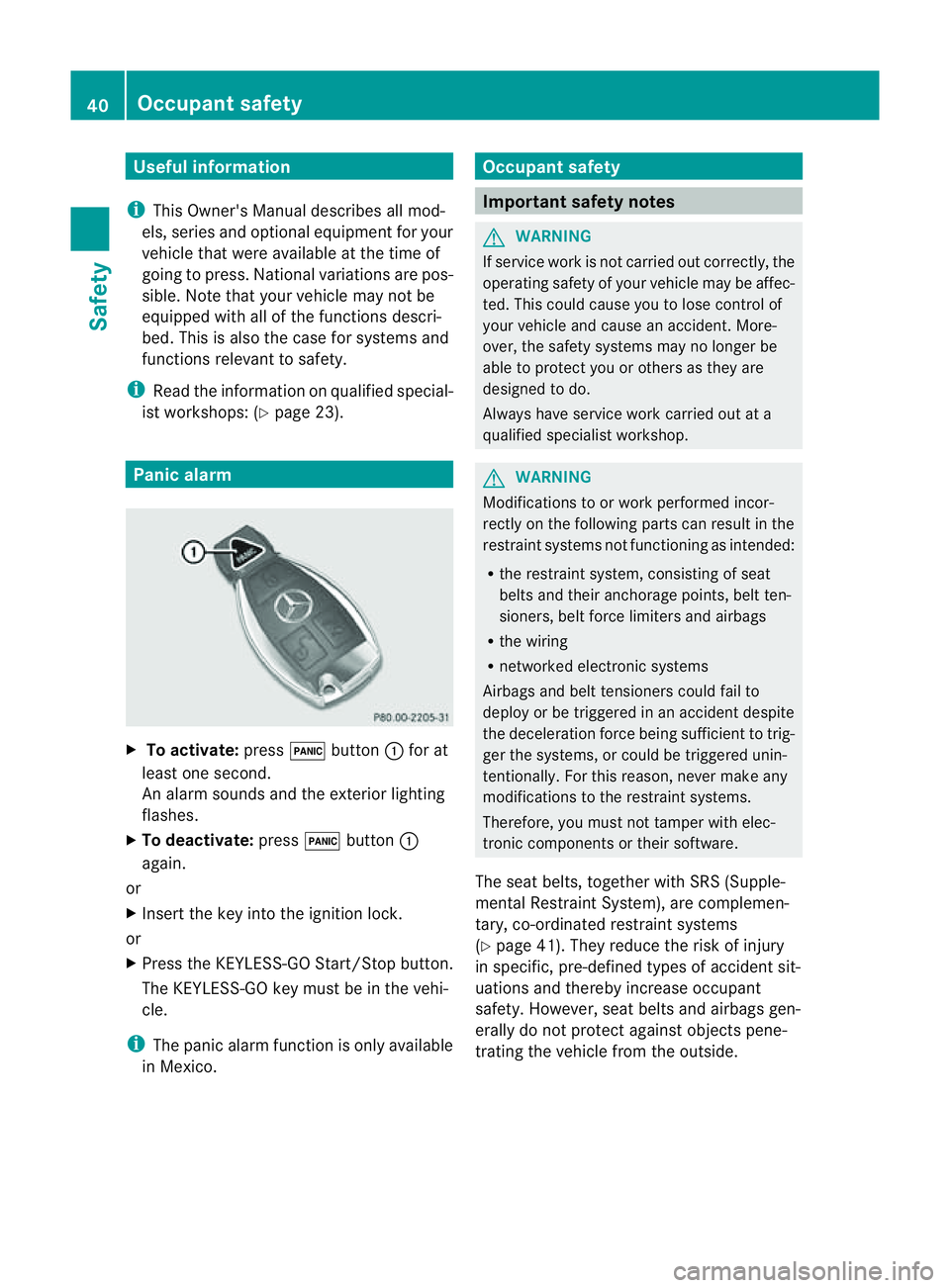
X
To activate: press!button :for at
least one second.
An alarm sounds and the exterior lighting
flashes.
X To deactivate: press!button :
again.
or
X Insert the key int othe ignition lock.
or
X Press the KEYLESS-GO Start/Stop button.
The KEYLESS-GO key must be in the vehi-
cle.
i The panic alarm function is only available
in Mexico. Occupant safety
Important safet
ynotes G
WARNING
If servic ework is not carried out correctly, the
operatin gsafet yofy our vehicle may be affec-
ted. This could cause you to lose contro lof
your vehicle and cause an accident. More-
over, the safet ysystem smay no longer be
able to protect you or other sastheya re
designed to do.
Always have servic ework carried out at a
qualified specialist workshop. G
WARNING
Modification stoorwork performed incor-
rectly on th efollowin gpartsc an result in the
restraint systems no tfunctionin gasintended:
R ther estraint system, consisting of seat
belt sand their anchorage points ,belt ten-
sioners ,belt force limiters and airbags
R thew iring
R networked electronic systems
Airbags and belt tensioners could fail to
deplo yorbet riggered in an acciden tdespite
the deceleration forc ebeing sufficien ttotrig-
ger the systems, or could be triggered unin-
tentionally. For this reason, never make any
modifications to the restraint systems.
Therefore, you must not tamper with elec-
tronic components or their software.
The seat belts, together with SRS (Supple-
mental Restraint System), are complemen-
tary, co-ordinated restraint systems
(Y page 41). They reduce the risk of injury
in specific, pre-defined types of accident sit-
uations and thereby increase occupant
safety. However, seat belts and airbags gen-
erally do not protect against object spene-
tratin gthe vehicle from the outside. 40
Occupant safetySafety
Page 73 of 373
In particular, the detection of obstacle
scan
be impaired if there is:
R dirt on the sensors or anything else cover-
ing the sensors
R snow or heavy rain
R interference by other radars ources
R the possibility of strongr adar reflections,
for example, in multi-storey car parks
R an arrow vehicle travelling in front,e .g. a
motorcycle
R av ehicle travelling in front on adifferent
line G
WARNING
PRE-SAFE ®
Brake does not react:
R to people or animals
R to oncoming vehicles
R to crossin gtraffic
R when cornering
As aresult, PRE-SAFE ®
Brake may neither
give warnings nor intervene in all critical sit-
uations. There is arisk of an accident.
Always pay careful attention to the traffic sit-
uation and be ready to brake.
In order to maintain the appropriate distance
to the vehicle in front and thus prevent acol-
lision, you must apply the brakes yourself.
X To activate/deactivate: activate or deac-
tivate PRE-SAFE ®
Brake in the on-board
computer (Y page 219).
When PRE-SAFE ®
Brake is activated, the
Ä symbol appears in multifunction dis-
play, as long as the HOLD function is deac-
tivated (Y page 179). On vehicles with the
Active Parking Assist driving system, the
Ä symbol is displayed when position P
is engaged or you are driving faster than
35 km/h.
For PRE-SAFE ®
Brake to assist you when driv-
ing, the radar sensor system must be
switched on (Y page 225) and be opera-
tional. The radar sensor system is switched off auto-
matically in the vicinit
yofradio telescope
facilities in the following vehicles:
R vehicles with COMAND Online and naviga-
tion
R vehicles with Audio 20 and Becker ®
MAP
PILOT
Becker ®
MAP PILOT must be connected;
see the separate operating instructions.
The radar sensor system must be switched off
using the on-board computer in the vicinit yof
radio telescope facilities in the following vehi-
cles:
R vehicles without COMAND Online and nav-
igation
R vehicles without Audio 20 and Becker ®
MAP PILOT
R vehicles for Australia
For information on switching off the radar
sensor system using the on-board computer,
see (Y page 225).
Following damage to the front end of the vehi-
cle, have the configuration and operation of
the radar sensors checked at aqualified spe-
cialist workshop. This also applies to colli-
sions at slow speeds where there is no visible
damage to the front of the vehicle. Anti-theft systems
Immobiliser
X To activat ewith th ekey: remove th ekey
fro mt heignitio nlock.
X To activat ewith KEYLESS-GO: switch the
ignitio noff and open the driver's door.
X To deactivate: switch on the ignition.
The immobiliser prevents you rvehicle from
being started without the correct key.
When leaving the vehicle, alway stake the key
with you and lock the vehicle. Anyone can
start the engin eifavalid key has been left
inside the vehicle. 70
Anti-theft systemsSafety
Page 74 of 373
i
The immobiliser is alway sdeactivated
when you start the engine. ATA (Anti-Theft Alarm system)
X
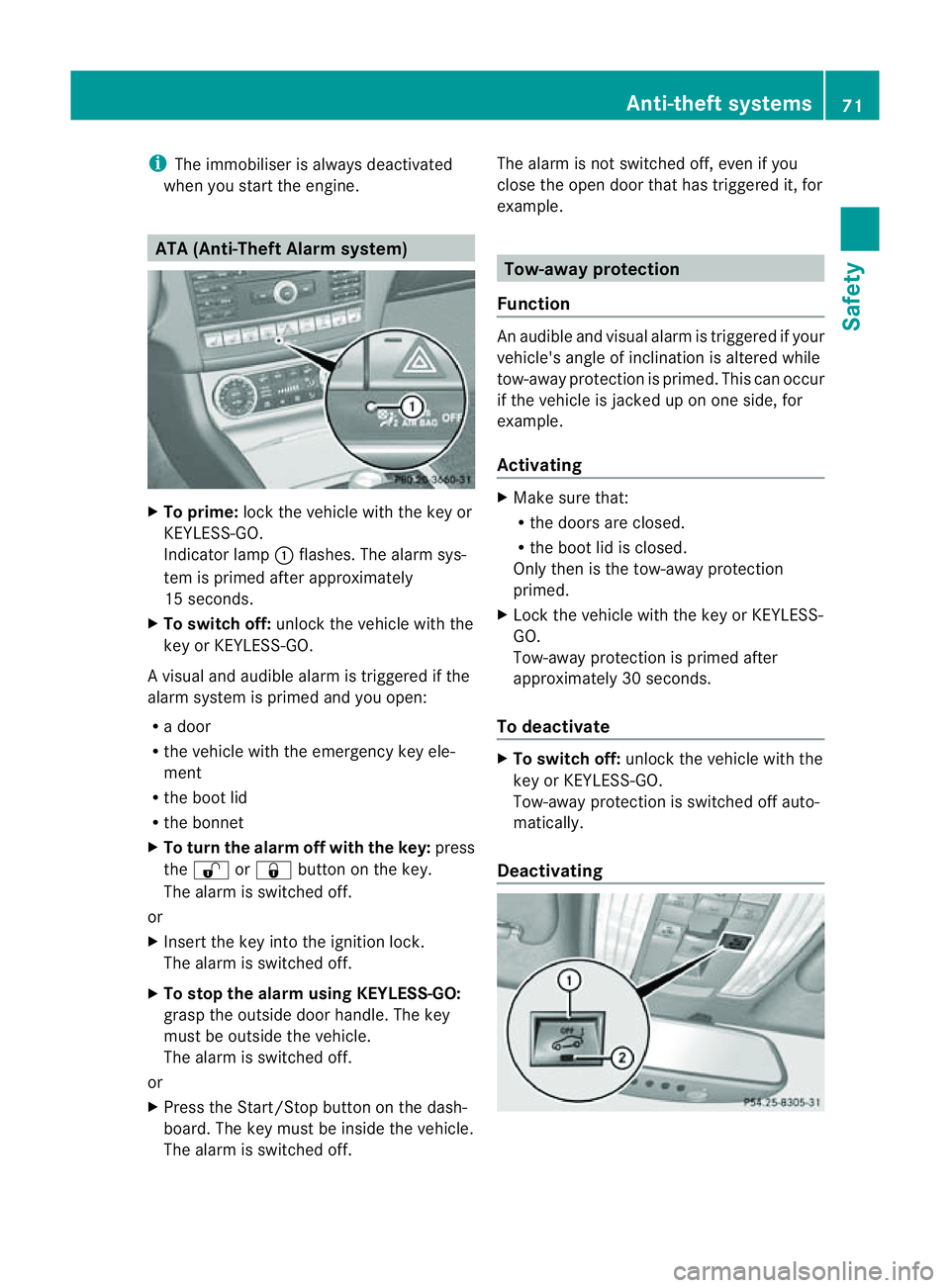
To prime: lock the vehicle with the key or
KEYLESS-GO.
Indicator lamp :flashes. The alarm sys-
tem is primed after approximately
15 seconds.
X To switch off: unlock the vehicle with the
key or KEYLESS-GO.
Av isual and audible alarm is triggere difthe
alarm system is prime dand you open:
R ad oor
R the vehicle with the emergency key ele-
ment
R the boot lid
R the bonnet
X To turn th ealarmo ff with th ekey: press
the % or& button on th ekey.
The alarm is switche doff.
or
X Insert th ekey int othe ignitio nlock.
The alarm is switche doff.
X To stop th ealarm using KEYLESS-GO:
grasp th eoutside door handle. The key
must be outside th evehicle.
The alarm is switche doff.
or
X Pres sthe Start/Sto pbutton on th edash-
board. The key must be inside th evehicle.
The alarm is switche doff. The alarm is not switche
doff,e ven if you
clos ethe open door that has triggered it, for
example. Tow-away protection
Function An audible and visual alarm is triggered if your
vehicle'
sangle of inclination is altered while
tow-away protection is primed. This can occur
if th evehicle is jacked up on one side, for
example.
Activating X
Make sure that:
R
thed oor sare closed.
R theb oot lid is closed.
Only then is th etow -away protection
primed.
X Loc kthe vehicle with th ekey or KEYLESS-
GO.
Tow-away protection is primed after
approximately 30 seconds.
To deactivate X
To switch off: unlockthe vehicle with the
key or KEYLESS-GO.
Tow-away protection is switched off auto-
matically.
Deactivating Anti-theft systems
71Safety Z
Page 75 of 373
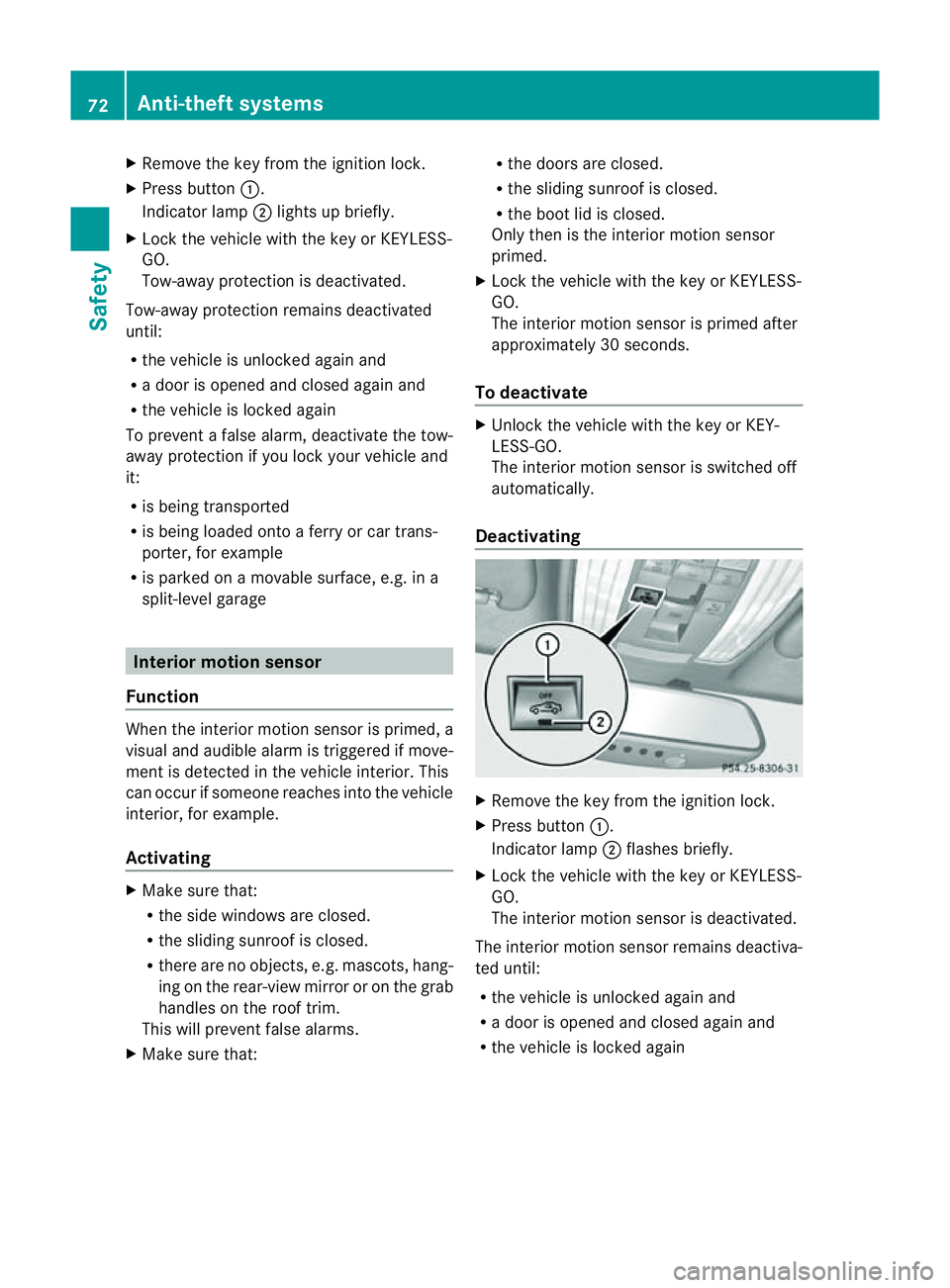
X
Remove th ekeyfrom th eignition lock.
X Press button :.
Indicato rlamp ;light supb riefly.
X Loc kthe vehicle wit hthe keyorK EYLESS-
GO.
Tow-away protection is deactivated.
Tow-away protection remains deactivated
until:
R thev ehicle is unlocked again and
R ad oor is opened and closed again and
R thev ehicle is locke dagain
To preven tafalse alarm, deactivate the tow-
away protection if you lock you rvehicle and
it:
R is being transported
R is being loaded ontoaf erry or car trans-
porter ,for example
R is parked on amovable surface, e.g. in a
split-level garage Interior motion sensor
Function When the interior motion sensor is primed, a
visual and audible alarm is triggered if move-
ment is detected in the vehicle interior. This
can occur if someon ereaches intot he vehicle
interior, for example.
Activating X
Make sure that:
R
the side windows are closed.
R the sliding sunroof is closed.
R ther eare no objects, e.g. mascots, hang-
ing on the rear-view mirror or on the grab
handles on the roof trim.
This will preven tfalse alarms.
X Mak esure that: R
thed oor sare closed.
R thes lidin gsunroo fisclosed.
R the boot lid is closed.
Only then is the interior motion sensor
primed.
X Lock the vehicle with the key or KEYLESS-
GO.
The interior motion sensor is primed after
approximately 30 seconds.
To deactivate X
Unlock the vehicle with the key or KEY-
LESS-GO.
The interior motion sensor is switched off
automatically.
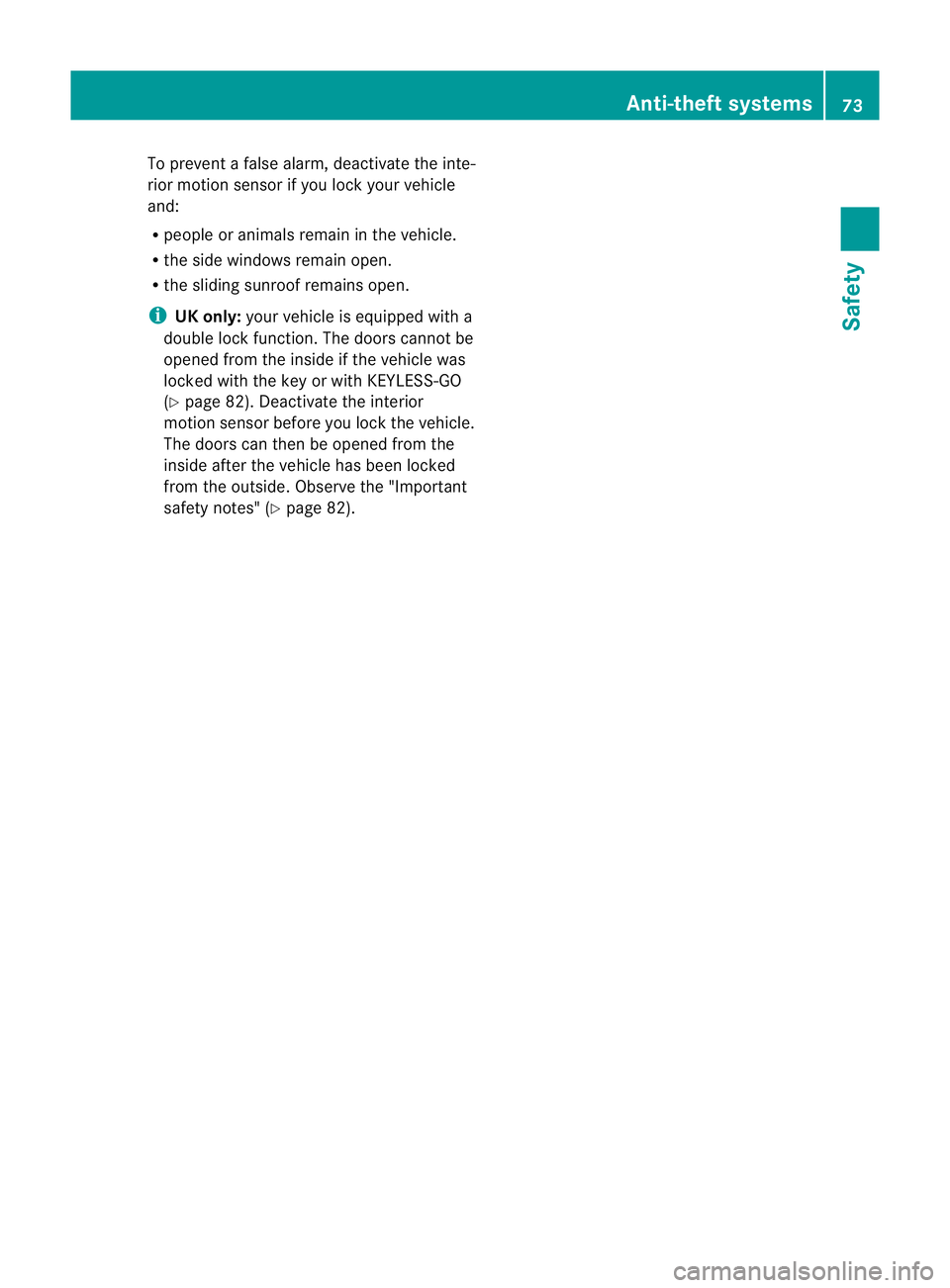
Deactivating X
Remove the key from the ignition lock.
X Press button :.
Indicator lamp ;flashes briefly.
X Lock the vehicle with the key or KEYLESS-
GO.
The interior motion sensor is deactivated.
The interior motion sensor remains deactiva-
ted until:
R the vehicle is unlocked againa nd
R ad ooriso peneda nd closed agai nand
R the vehicl eislocked again 72
Anti-theft systemsSafety
Page 76 of 373
To prevent
afalse alarm, deactivate the inte-
rior motion sensor if you lock your vehicle
and:
R people or animals remain in the vehicle.
R the side windows remain open.
R the sliding sunroof remains open.
i UK only: your vehicle is equipped with a
double lock function. The doors cannot be
opened from the inside if the vehicle was
locked with the key or with KEYLESS-GO
(Y page 82). Deactivate the interior
motion sensor before you lock the vehicle.
The doors can then be opened from the
inside after the vehicle has been locked
from the outside. Observe the "Important
safety notes" (Y page 82). Anti-theft systems
73Safety Z
Page 80 of 373
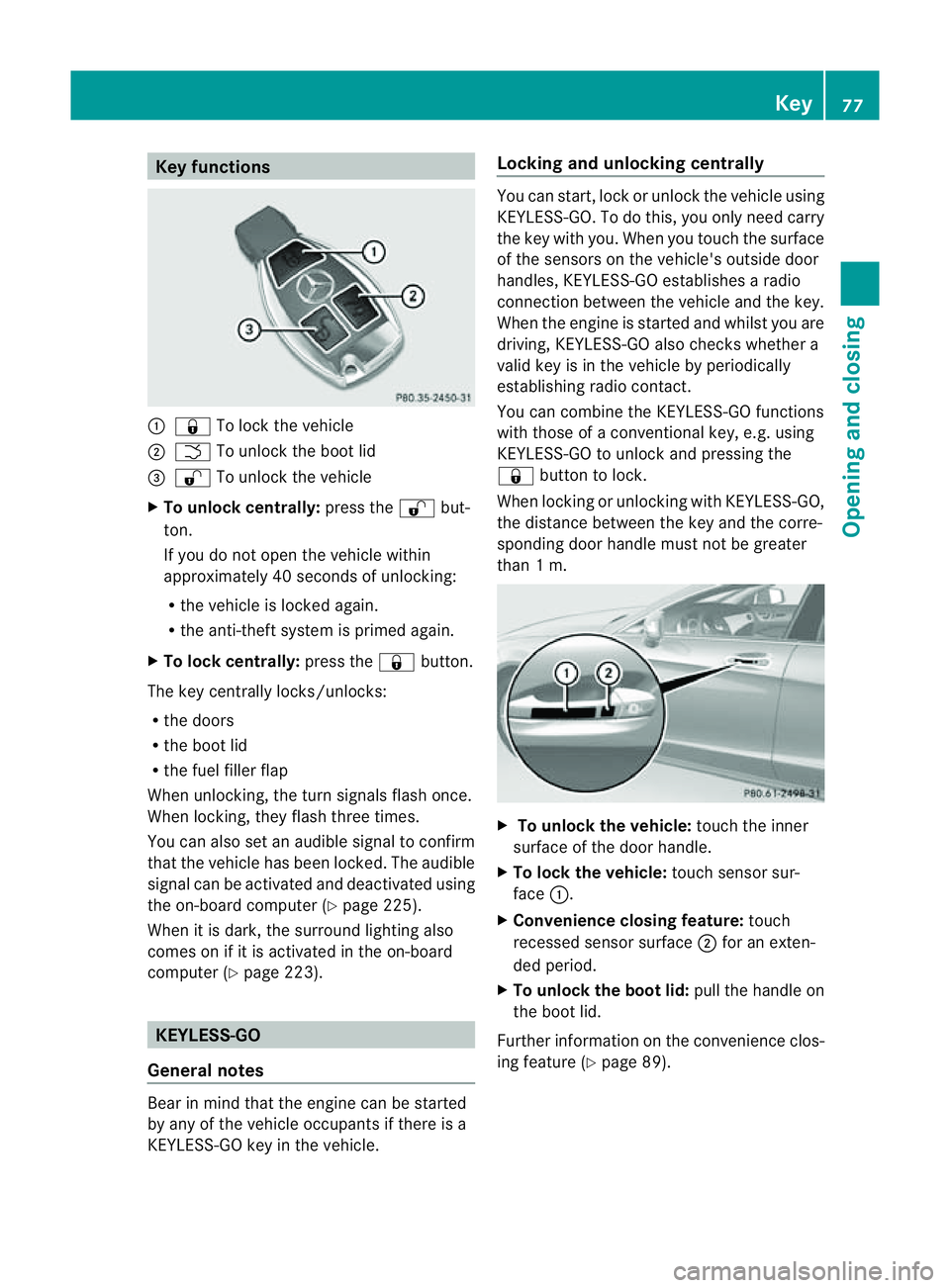
Key functions
:
& To loc kthe vehicle
; F To unlock the boot lid
= % To unlock the vehicle
X To unlock centrally: press the%but-
ton.
If you do not open the vehicle within
approximately 40 seconds of unlocking:
R the vehicle is locked again.
R the anti-theft system is primed again.
X To lock centrally: press the&button.
The key centrally locks/unlocks:
R the doors
R the boot lid
R the fuel filler flap
When unlocking, the turn signals flash once.
When locking, they flash three times.
You can also set an audible signal to confirm
that the vehicle has been locked. The audible
signal can be activated and deactivated using
the on-board computer (Y page 225).
When it is dark, the surround lighting also
comes on if it is activated in the on-board
computer (Y page 223). KEYLESS-GO
General notes Bear in mind that the engine can be started
by any of the vehicle occupants if there is a
KEYLESS-GO key in the vehicle. Locking and unlocking centrally You can start, lock or unlock the vehicle using
KEYLESS-GO. To do this, you only need carry
the key with you. When you touch the surface
of the sensors on the vehicle's outside door
handles, KEYLESS-GO establishes
aradio
connection between the vehicle and the key.
When the engine is started and whilst you are
driving, KEYLESS-GO also checksw hether a
valid key is in the vehicle by periodically
establishing radio contact.
You can combine the KEYLESS-GO functions
with those of aconventional key, e.g. using
KEYLESS-GO to unlock and pressing the
& button to lock.
When locking or unlocking with KEYLESS-GO,
the distance between the key and the corre-
sponding door handle must not be greater
than 1m. X
To unlock the vehicle: touch the inner
surface of the door handle.
X To lock the vehicle: touch sensor sur-
face :.
X Convenience closing feature: touch
recessed sensor surface ;for an exten-
ded period.
X To unlock the boot lid: pull the handle on
the boot lid.
Further information on the convenience clos-
ing feature (Y page 89). Key
77Opening and closing Z
Page 81 of 373
Changing th
esettings of th elocking
system
You can chang ethe settings of th elocking
system. This mean stha tonlyt he driver' sdoor
and th efuel fille rflap are unlocked when the
vehicle is unlocked. This is useful if you fre-
quently travel on your own.
X To chang ethe setting: press and hold
down the %and& buttons on the
key simultaneously for approximately six
seconds until the battery chec klamp
flashes twice ( Ypage 79).
i If th esettin goft helockin gsystem is
changed within th esignal range of th evehi-
cle ,pressin gthe & or% button:
R locks or
R unlock sthe vehicle
The ke ynow function sasfollows:
X To unlock th edriver's door: pressthe
% buttononce.
X To unlock centrally: pressthe % but-
to nt wice.
X To lock centrally: pressthe & button.
The KEYLESS-GO function is changed as fol-
lows:
X To unlock th edriver's door: touch the
inner surface of th edoor handle on the
driver' sdoor.
X To unlock centrally: touch theinner sur-
fac eoft hedoor handle on th efront-
passenger door or th erear door.
X To lock centrally: touch theouter sensor
surface on on eofthedoor handles.
X To restor ethe factor ysettings: press
and hold down the %and& buttons
simultaneousl yfor approximately six sec-
onds until th ebattery check lamp flashes
twice (Y page 79). Emergency key element
General notes If th
evehicle can no longer be locke dor
unlocked wit hthe key, use th eemergency
ke ye lement.
If you use th eemergenc ykey element to
unlock and open the driver's door or the boot
lid, the anti-thef talarm system will be trig-
gered (Y page 71).
There are several ways to tur noff the alarm:
X To turn the alarm off with the key: press
the % or& button on the key.
or
X Insert the key into the ignition lock.
or
X To deactivate the alarm with KEYLESS-
GO: press the Start/Stop button in the igni-
tion lock. The key must be in the vehicle.
or
X Lock or unlock the vehicle using KEYLESS-
GO. The key must be outside the vehicle.
If you unlock the vehicle using the emergency
key element, the fuel filler fla pwilln ot be
unlocked automatically.
X To unlock the fuel filler flap: insert the
key into the ignition lock.
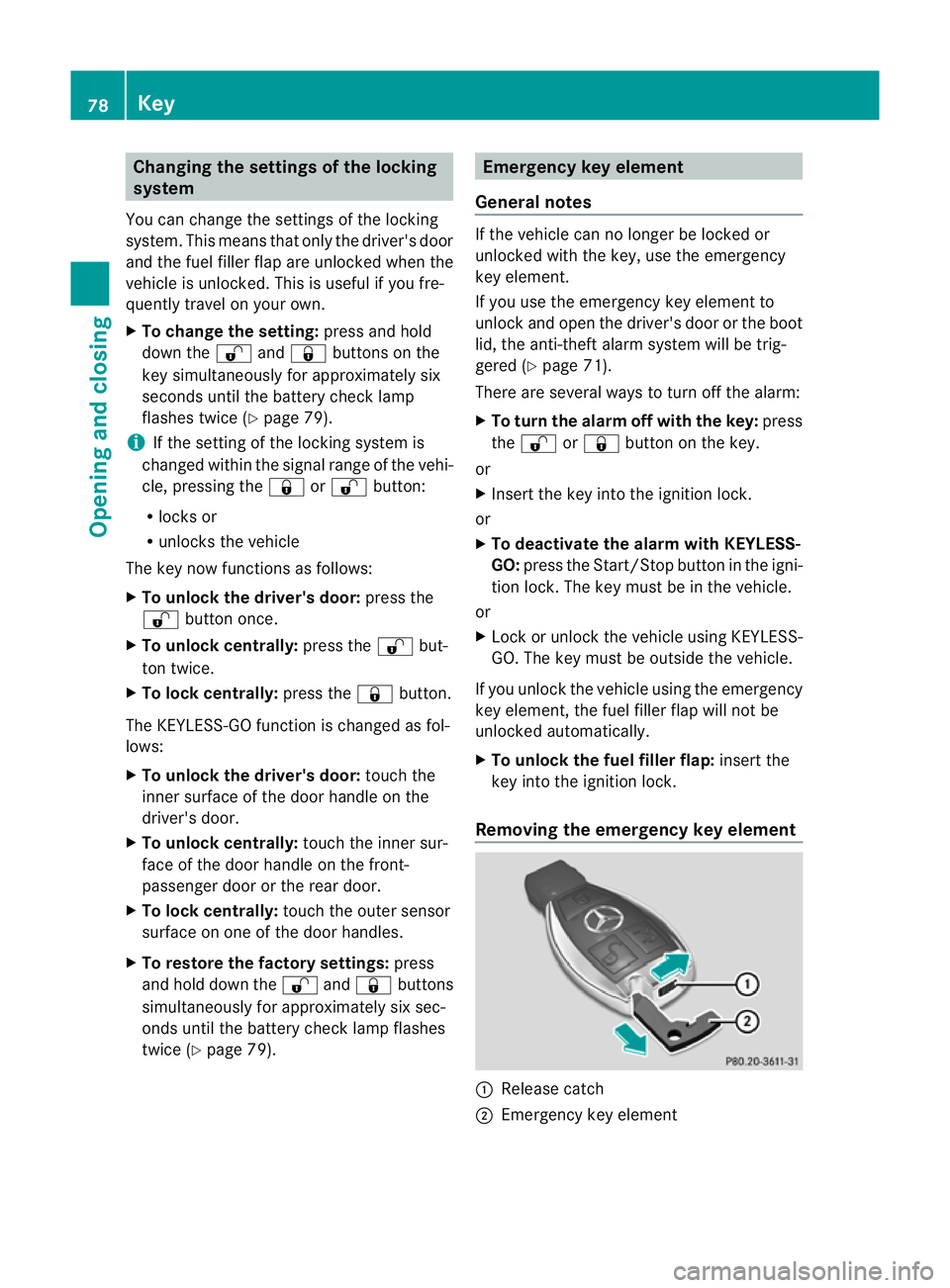
Removing the emergency key element :
Releas ecatch
; Emergency key element 78
KeyOpening and closing