buttons MERCEDES-BENZ CLS COUPE 2014 Owners Manual
[x] Cancel search | Manufacturer: MERCEDES-BENZ, Model Year: 2014, Model line: CLS COUPE, Model: MERCEDES-BENZ CLS COUPE 2014Pages: 417, PDF Size: 14.15 MB
Page 22 of 417
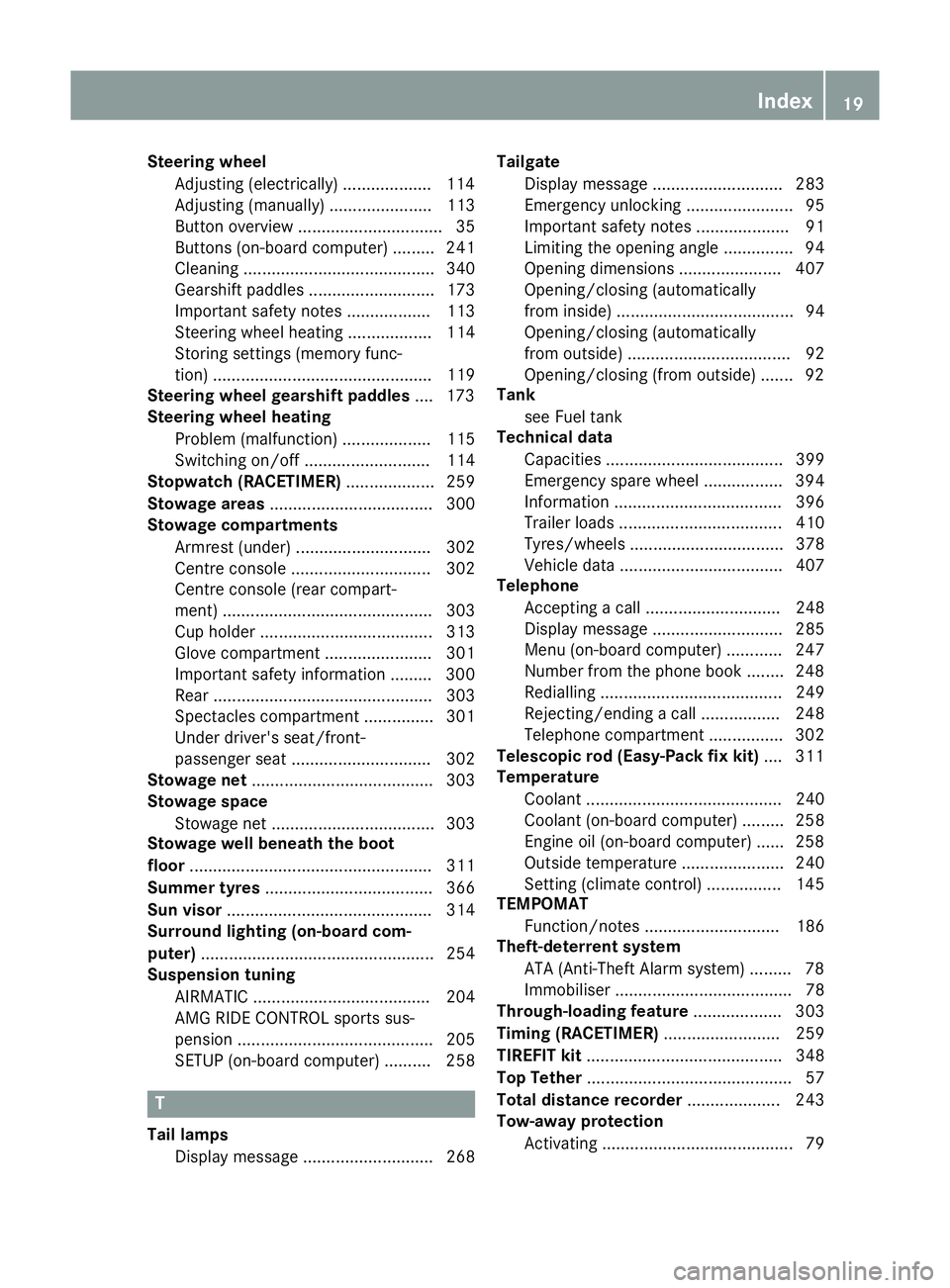
Steering wheel
Adjusting (electrically) ...................1 14
Adjusting (manually) ...................... 113
Button overview ............................... 35
Buttons (on-board computer) ......... 241
Cleaning ......................................... 340
Gearshift paddle s........................... 173
Important safety notes .................. 113
Steering wheel heating .................. 114
Storing settings (memory func-
tion) ............................................... 119
Steering wheel gearshift paddles .... 173
Steering wheel heating
Problem (malfunction) ................... 115
Switching on/of f........................... 114
Stopwatch (RACETIMER) ................... 259
Stowage areas ................................... 300
Stowage compartments
Armrest (under) ............................. 302
Centre console .............................. 302
Centre console (rear compart-
ment) ............................................. 303
Cup holde r..................................... 313
Glove compartment ....................... 301
Important safety information ......... 300
Rear ............................................... 303
Spectacles compartment ............... 301
Under driver's seat/front-
passenger sea t.............................. 302
Stowage net ....................................... 303
Stowage space
Stowage net ................................... 303
Stowage well beneath the boot
floor .................................................... 311
Summer tyres .................................... 366
Sun visor ............................................ 314
Surround lighting (on-board com-
puter) .................................................. 254
Suspension tuning
AIRMATIC ...................................... 204
AMG RIDE CONTROL sports sus-
pension .......................................... 205
SETUP (on-board computer) .......... 258 T
Tail lamps Display message ............................ 268 Tailgate
Display message ............................ 283
Emergency unlocking ....................... 95
Important safety notes .................... 91
Limiting the opening angle ............... 94
Opening dimensions ...................... 407
Opening/closing (automatically
from inside) ...................................... 94
Opening/closing (automatically
from outside) ................................... 92
Opening/closing (from outside) ....... 92
Tank
see Fuel tank
Technical data
Capacities ...................................... 399
Emergency spare wheel ................. 394
Information .................................... 396
Trailer load s................................... 410
Tyres/wheels ................................. 378
Vehicle data ................................... 407
Telephone
Accepting a cal l............................. 248
Display message ............................ 285
Menu (on-board computer) ............ 247
Number from the phone book ........ 248
Redialling ....................................... 249
Rejecting/ending a call ................. 248
Telephone compartment ................ 302
Telescopic rod (Easy-Pack fix kit) .... 311
Temperature
Coolant .......................................... 240
Coolant (on-board computer) ......... 258
Engine oil (on-board computer) ...... 258
Outside temperature ...................... 240
Setting (climate control )................ 145
TEMPOMAT
Function/note s............................. 186
Theft-deterrent system
ATA (Anti-Theft Alarm system )......... 78
Immobiliser ...................................... 78
Through-loading feature ................... 303
Timing (RACETIMER) ......................... 259
TIREFIT kit .......................................... 348
Top Tether ............................................ 57
Total distance recorder .................... 243
Tow-away protection
Activating ......................................... 79 Index
19
Page 42 of 417
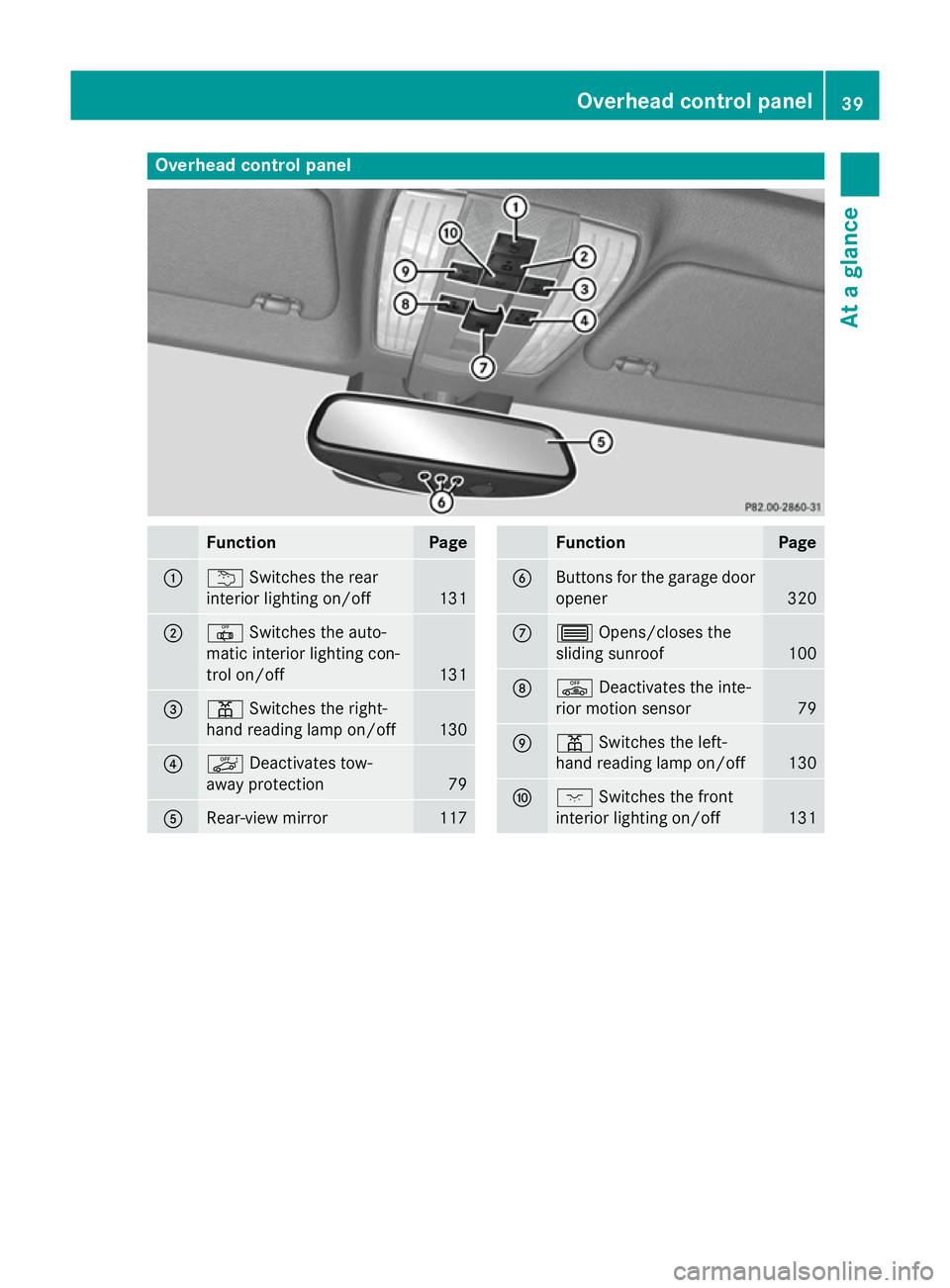
Overhead control panel
Function Page
:
u
Switches the rear
interior lighting on/off 131
;
|
Switches the auto-
matic interior lighting con-
trol on/off 131
=
p
Switches the right-
hand reading lamp on/off 130
?
ë
Deactivates tow-
away protection 79
A
Rear-view mirror 117 Function Page
B
Buttons for the garage door
opener 320
C
3
Opens/closes the
sliding sunroof 100
D
ê
Deactivates the inte-
rior motion sensor 79
E
p
Switches the left-
hand reading lamp on/off 130
F
c
Switches the front
interior lighting on/off 131Overhead control panel
39At a glance
Page 87 of 417
X
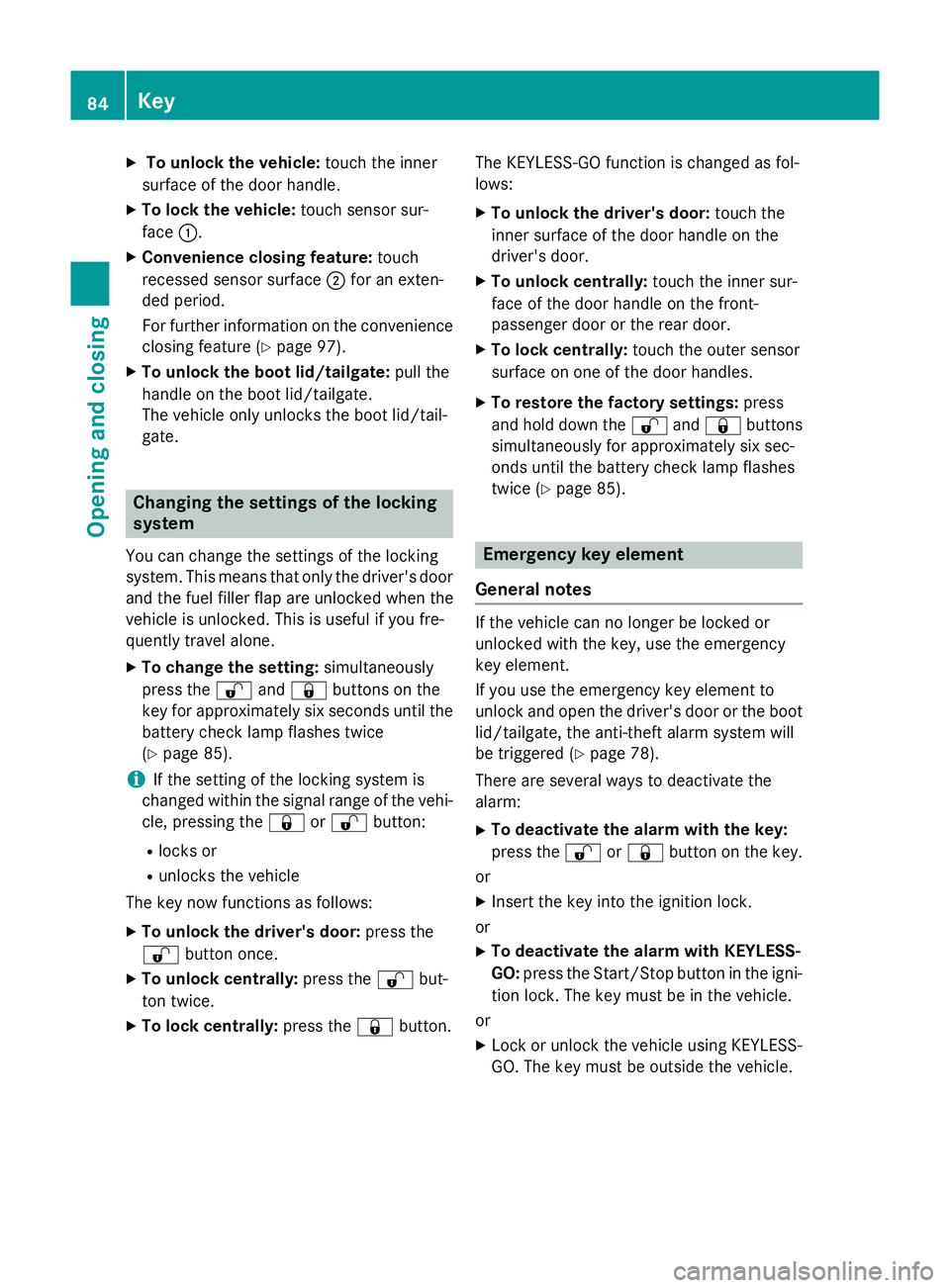
To unlock the vehicle: touch the inner
surface of the door handle.
X To lock the vehicle: touch sensor sur-
face :.
X Convenience closing feature: touch
recessed sensor surface ;for an exten-
ded period.
For further information on the convenience
closing feature (Y page 97).
X To unlock the boot lid/tailgate: pull the
handle on the boot lid/tailgate.
The vehicle only unlocks the boot lid/tail-
gate. Changing the settings of the locking
system
You can change the settings of the locking
system. This means that only the driver's door
and the fuel filler flap are unlocked when the
vehicle is unlocked. This is useful if you fre-
quently travel alone.
X To change the setting: simultaneously
press the %and& buttons on the
key for approximately six seconds until the
battery check lamp flashes twice
(Y page 85).
i If the setting of the locking system is
changed within the signal range of the vehi- cle, pressing the &or% button:
R locks or
R unlocks the vehicle
The key now functions as follows:
X To unlock the driver's door: press the
% button once.
X To unlock centrally: press the%but-
ton twice.
X To lock centrally: press the&button. The KEYLESS-GO function is changed as fol-
lows:
X To unlock the driver's door: touch the
inner surface of the door handle on the
driver's door.
X To unlock centrally: touch the inner sur-
face of the door handle on the front-
passenger door or the rear door.
X To lock centrally: touch the outer sensor
surface on one of the door handles.
X To restore the factory settings: press
and hold down the %and& buttons
simultaneously for approximately six sec-
onds until the battery check lamp flashes
twice (Y page 85). Emergency key element
General notes If the vehicle can no longer be locked or
unlocked with the key, use the emergency
key element.
If you use the emergency key element to
unlock and open the driver's door or the boot
lid/tailgate, the anti-theft alarm system will
be triggered (Y page 78).
There are several ways to deactivate the
alarm:
X To deactivate the alarm with the key:
press the %or& button on the key.
or
X Insert the key into the ignition lock.
or
X To deactivate the alarm with KEYLESS-
GO: press the Start/Stop button in the igni-
tion lock. The key must be in the vehicle.
or
X Lock or unlock the vehicle using KEYLESS-
GO. The key must be outside the vehicle. 84
KeyOpening and closing
Page 89 of 417
i
If the battery of the key is checked within
the signal reception range of the vehicle,
pressing the &or% button:
R locks or
R unlocks the vehicle
i You can obtain a battery from any quali-
fied specialist workshop.
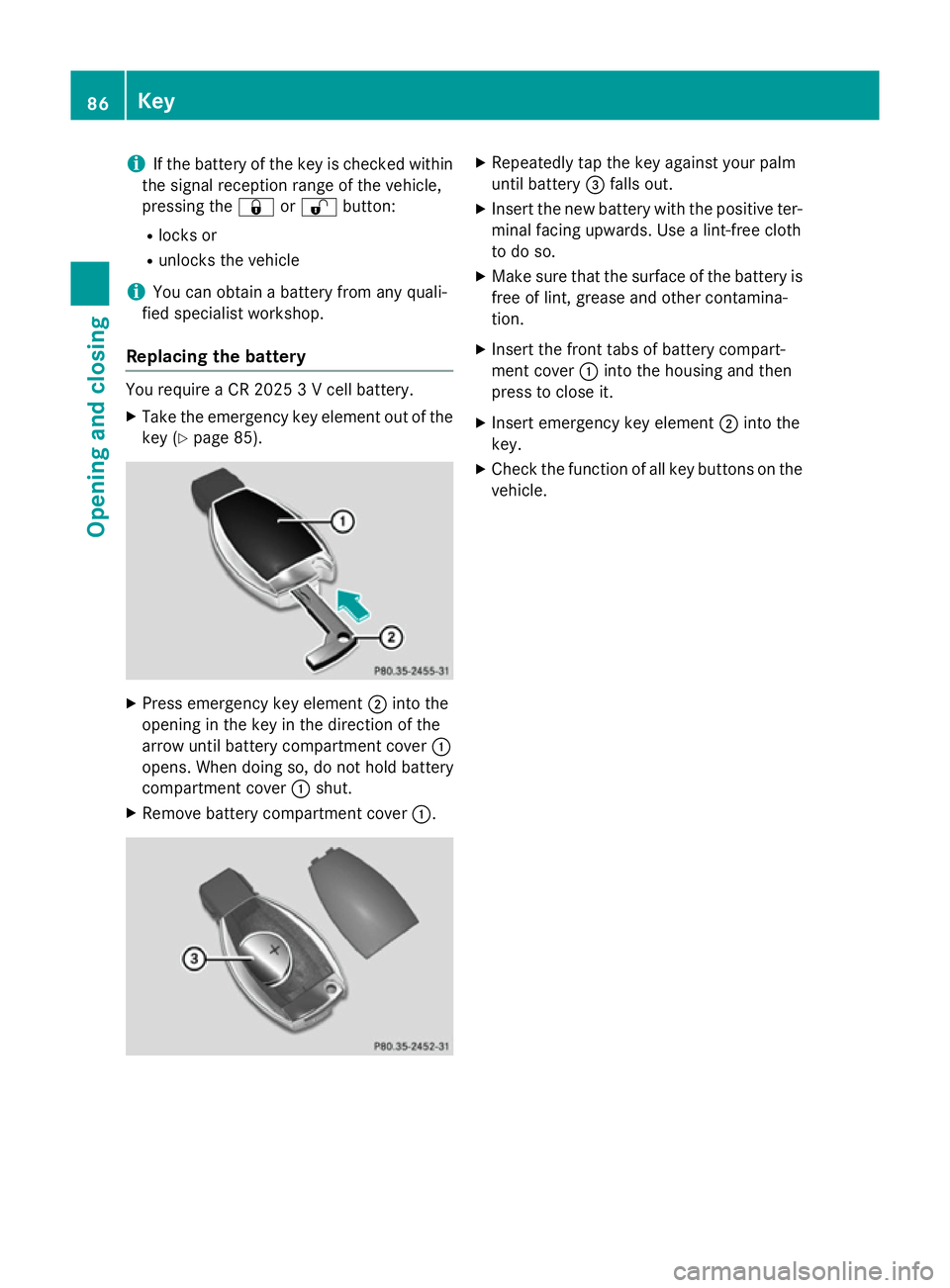
Replacing the battery You require a CR 2025 3 V cell battery.
X Take the emergency key element out of the
key (Y page 85). X
Press emergency key element ;into the
opening in the key in the direction of the
arrow until battery compartment cover :
opens. When doing so, do not hold battery
compartment cover :shut.
X Remove battery compartment cover :. X
Repeatedly tap the key against your palm
until battery =falls out.
X Insert the new battery with the positive ter-
minal facing upwards. Use a lint-free cloth
to do so.
X Make sure that the surface of the battery is
free of lint, grease and other contamina-
tion.
X Insert the front tabs of battery compart-
ment cover :into the housing and then
press to close it.
X Insert emergency key element ;into the
key.
X Check the function of all key buttons on the
vehicle. 86
KeyOpening and closing
Page 93 of 417
If the vehicle has been locked using the lock-
ing button for the central locking, or has been locked automatically, and a door is opened
from the inside:
R the vehicle will be fully unlocked if it had
previously been fully unlocked
R only the door which has been opened form
the inside is unlocked if only the driver's
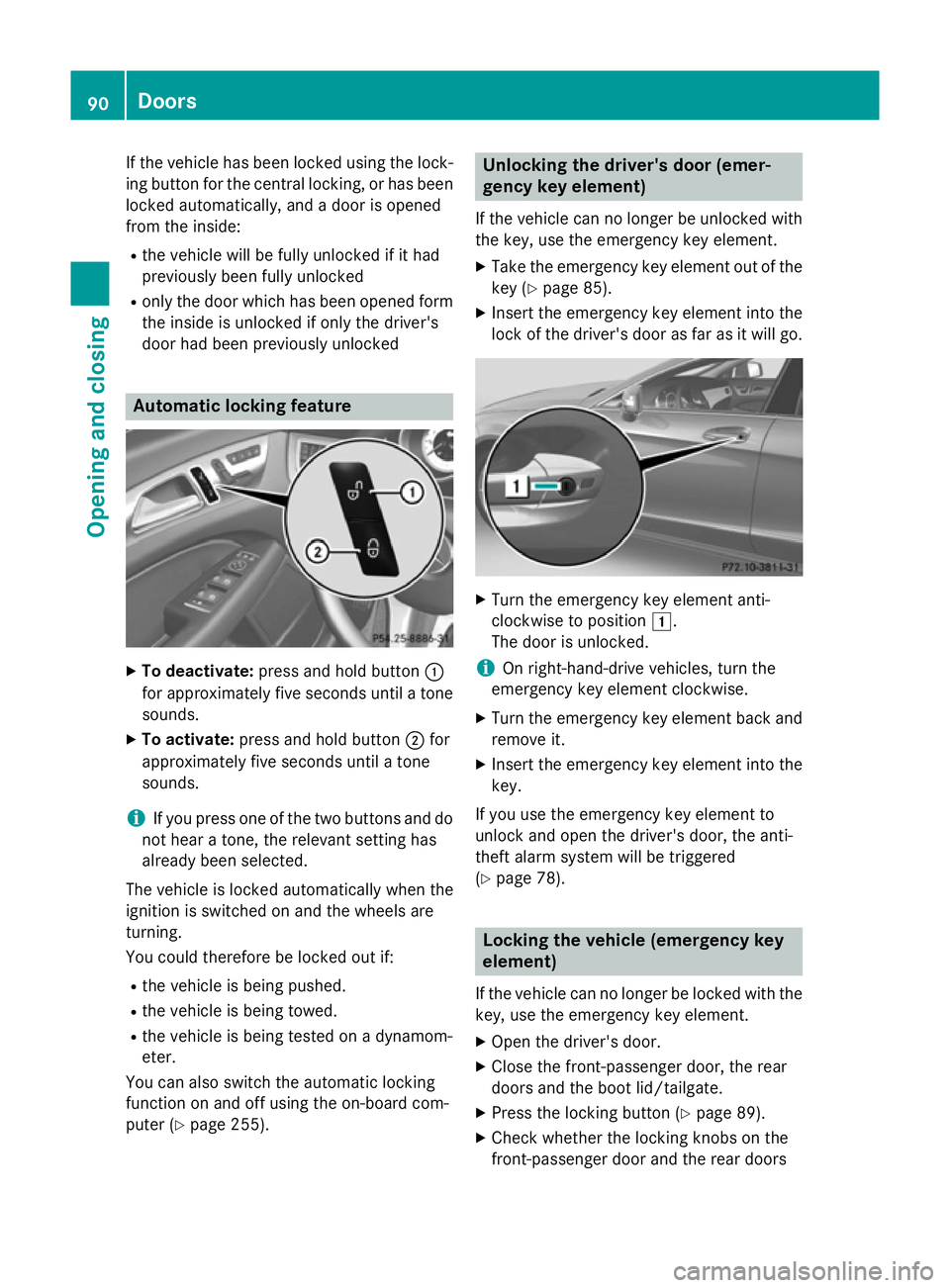
door had been previously unlocked Automatic locking feature
X
To deactivate: press and hold button :
for approximately five seconds until a tone sounds.
X To activate: press and hold button ;for
approximately five seconds until a tone
sounds.
i If you press one of the two buttons and do
not hear a tone, the relevant setting has
already been selected.
The vehicle is locked automatically when the
ignition is switched on and the wheels are
turning.
You could therefore be locked out if:
R the vehicle is being pushed.
R the vehicle is being towed.
R the vehicle is being tested on a dynamom-
eter.
You can also switch the automatic locking
function on and off using the on-board com-
puter (Y page 255). Unlocking the driver's door (emer-
gency key element)
If the vehicle can no longer be unlocked with
the key, use the emergency key element.
X Take the emergency key element out of the
key (Y page 85).
X Insert the emergency key element into the
lock of the driver's door as far as it will go. X
Turn the emergency key element anti-
clockwise to position 1.
The door is unlocked.
i On right-hand-drive vehicles, turn the
emergency key element clockwise.
X Turn the emergency key element back and
remove it.
X Insert the emergency key element into the
key.
If you use the emergency key element to
unlock and open the driver's door, the anti-
theft alarm system will be triggered
(Y page 78). Locking the vehicle (emergency key
element)
If the vehicle can no longer be locked with the
key, use the emergency key element.
X Open the driver's door.
X Close the front-passenger door, the rear
doors and the boot lid/tailgate.
X Press the locking button (Y page 89).
X Check whether the locking knobs on the
front-passenger door and the rear doors 90
DoorsOpening and closing
Page 108 of 417
The seat belt should:
R fit snugly across your body
R be routed across the middle of your shoul-
der
R be routed across your hips in the pelvic
area
X Before starting off, adjust the rear-view mir-
ror and the exterior mirrors so that you
have a good view of road and traffic condi-
tions (Y page 116).
X Vehicles with a memory function: save
the seat, steering wheel and exterior mirror
settings with the memory function
(Y page 119). Seats
Important safety notes
G
WARNING
If children adjust the seats, they could
become trapped, especially if they are unat-
tended. There is a risk of injury.
When leaving the vehicle, always take the key with you and lock the vehicle. Never leave
children unattended in the vehicle. G
WARNING
You could lose control of the vehicle while
driving if you:
R adjust the driver's seat, steering wheel or
mirrors
R fasten the seat belt
There is a risk of an accident.
Adjust the driver's seat, head restraint, steer-
ing wheel and mirrors and fasten your seat
belt before starting the engine. G
WARNING
If you adjust the seat height carelessly, you or other vehicle occupants could be trapped andthereby injured. Children in particular could
accidentally press the electrical seat adjust- ment buttons and become trapped. There is a
risk of injury.
While moving the seats, make sure that your
hands or other body parts do not get under the
lever assembly of the seat adjustment sys-
tem. G
WARNING
When adjusting a seat, you or another vehicle occupant could become trapped by the guiderail of the seat, for instance. There is a risk of
injury.
Make sure that no one has any part of their
body within the sweep of the seat when
adjusting it. G
WARNING
The head restraints cannot provide the inten-
ded protection unless they are fitted and
adjusted correctly. There is an increased risk of injury to the head and neck in the event of
an accident or sudden braking, for example.
Always drive with the head restraints fitted.
Ensure that the centre of the head restraints
support the back of each vehicle occupant's
head at eye level before driving off. G
WARNING
The seat belt does not offer the intended level of protection if you have not moved the back-
rest to an almost vertical position. When brak-
ing or in the event of an accident, you could
slide underneath the seat belt and sustain
abdomen or neck injuries, for example. This
poses an increased risk of injury or even fatal injury.
Adjust the seat properly before beginning
your journey. Always ensure that the backrest
is in an almost vertical position and that the
shoulder section of your seatbelt is routed
across the centre of your shoulder. Seats
105Seats, steering wheel and mirrors Z
Page 115 of 417
Problems with the seat heating
Problem
Possible causes/consequences and
M
MSolutions The seat heating has
switched off prema-
turely or cannot be
switched on. The on-board voltage is too low because too many electrical con-
sumers are switched on.
X Switch off electrical consumers that you do not need, such as
the rear window heating or interior lighting.
Once the battery is sufficiently charged, the seat heating will
switch back on automatically. Switching the seat ventilation on/off
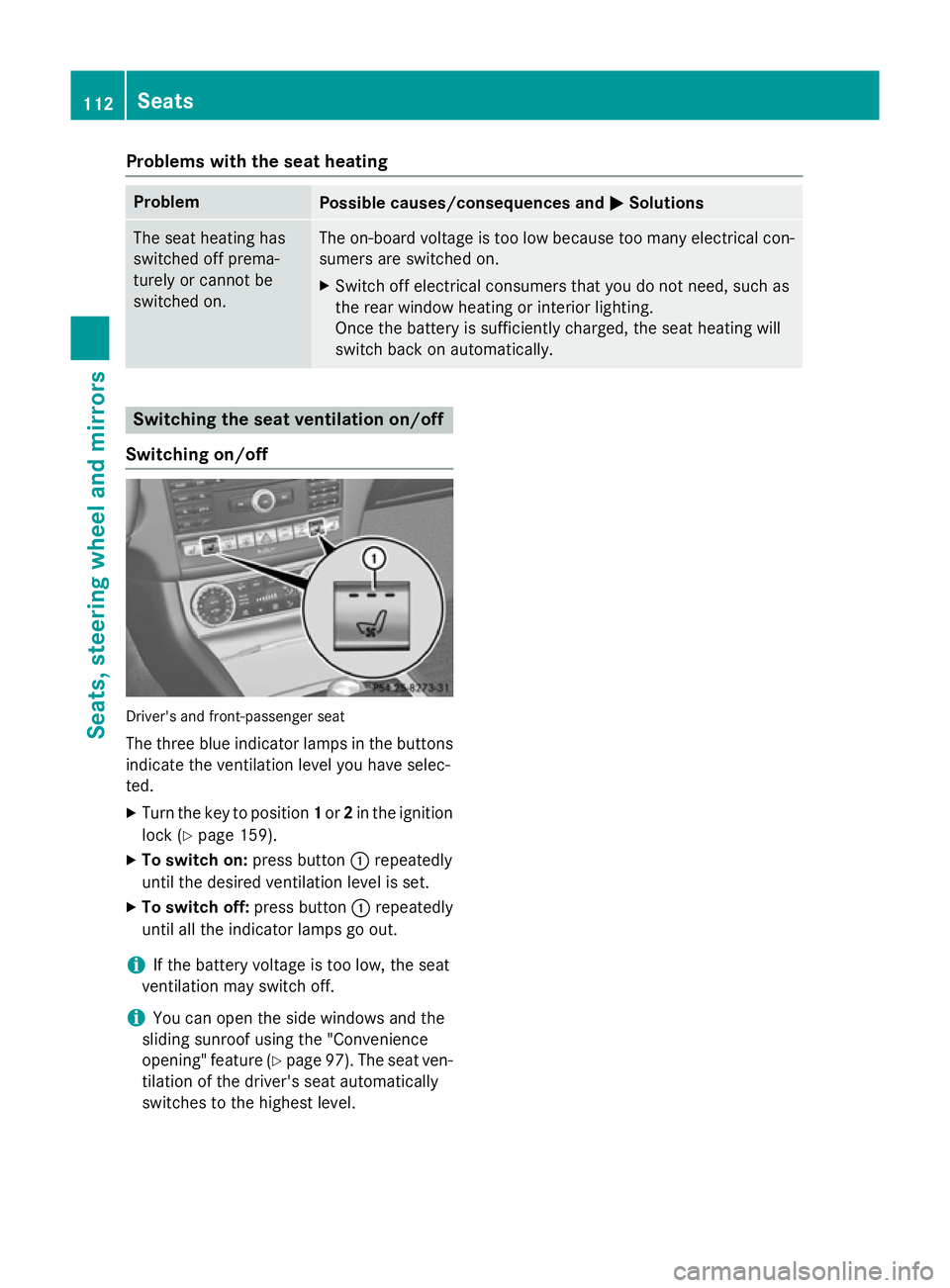
Switching on/off Driver's and front-passenger seat
The three blue indicator lamps in the buttons
indicate the ventilation level you have selec-
ted.
X Turn the key to position 1or 2in the ignition
lock (Y page 159).
X To switch on: press button:repeatedly
until the desired ventilation level is set.
X To switch off: press button:repeatedly
until all the indicator lamps go out.
i If the battery voltage is too low, the seat
ventilation may switch off.
i You can open the side windows and the
sliding sunroof using the "Convenience
opening" feature (Y page 97). The seat ven-
tilation of the driver's seat automatically
switches to the highest level. 112
SeatsSeats, steering wheel and mirrors
Page 118 of 417
Problems with the steering wheel heating
Problem
Possible causes/consequences and
M
MSolutions The steering wheel
heating has switched
itself off prematurely or
cannot be switched on. The on-board voltage is too low because too many electrical con-
sumers are switched on.
X Switch off electrical consumers that you do not need, such as
the rear window heating or interior lighting.
Once the battery is sufficiently charged, the steering wheel
heating will switch back on automatically. EASY-ENTRY/EXIT feature
Important safety notes G
WARNING
When the EASY-ENTRY/EXIT feature adjusts
the steering wheel, you and other vehicle
occupants – particularly children – could
become trapped. There is a risk of injury.
While the EASY-ENTRY/EXIT feature is mak-
ing adjustments, make sure that no one has
any body parts in the sweep of the steering
wheel.
If someone is trapped:
R press one of the memory function position
buttons, or
R move the switch for steering wheel adjust-
ment in the opposite direction to that in
which the steering wheel is moving.
The adjustment process is stopped. G
WARNING
If children activate the EASY-ENTRY/EXIT fea- ture, they can become trapped, particularly
when unattended. There is a risk of injury.
When leaving the vehicle, always take the key with you and lock the vehicle. Never leave
children unattended in the vehicle. G
WARNING
If you drive off while the EASY-ENTRY/EXIT
feature is making adjustments, you could lose
control of the vehicle. There is a risk of an
accident. Always wait until the adjustment process is
complete before driving off.
The EASY-ENTRY/EXIT feature makes getting in and out of your vehicle easier.
You can activate and deactivate the EASY-
ENTRY/EXIT feature in the on-board com-
puter (Y page 257).
Position of the steering wheel when the
EASY-ENTRY/EXIT feature is active The steering wheel tilts upwards if you:
R remove the key from the ignition lock
R with the key: open the driver's door; the
key must be in position 0or 1in the ignition
lock (Y page 159).
i The steering wheel only moves upwards if
it has not already reached the upper stop.
Position of the steering wheel for driv-
ing The steering wheel is moved to the previously
set position if:
R the driver's door is closed and
R with the key: you insert the key into the
ignition lock
If you close the driver's door with the key
inserted in the ignition lock, the steering
wheel is automatically moved to the previ-
ously set position.
The last position of the steering wheel is
stored when you switch off the ignition or Steering wheel
115Seats, steering wheel and mirrors Z
Page 142 of 417
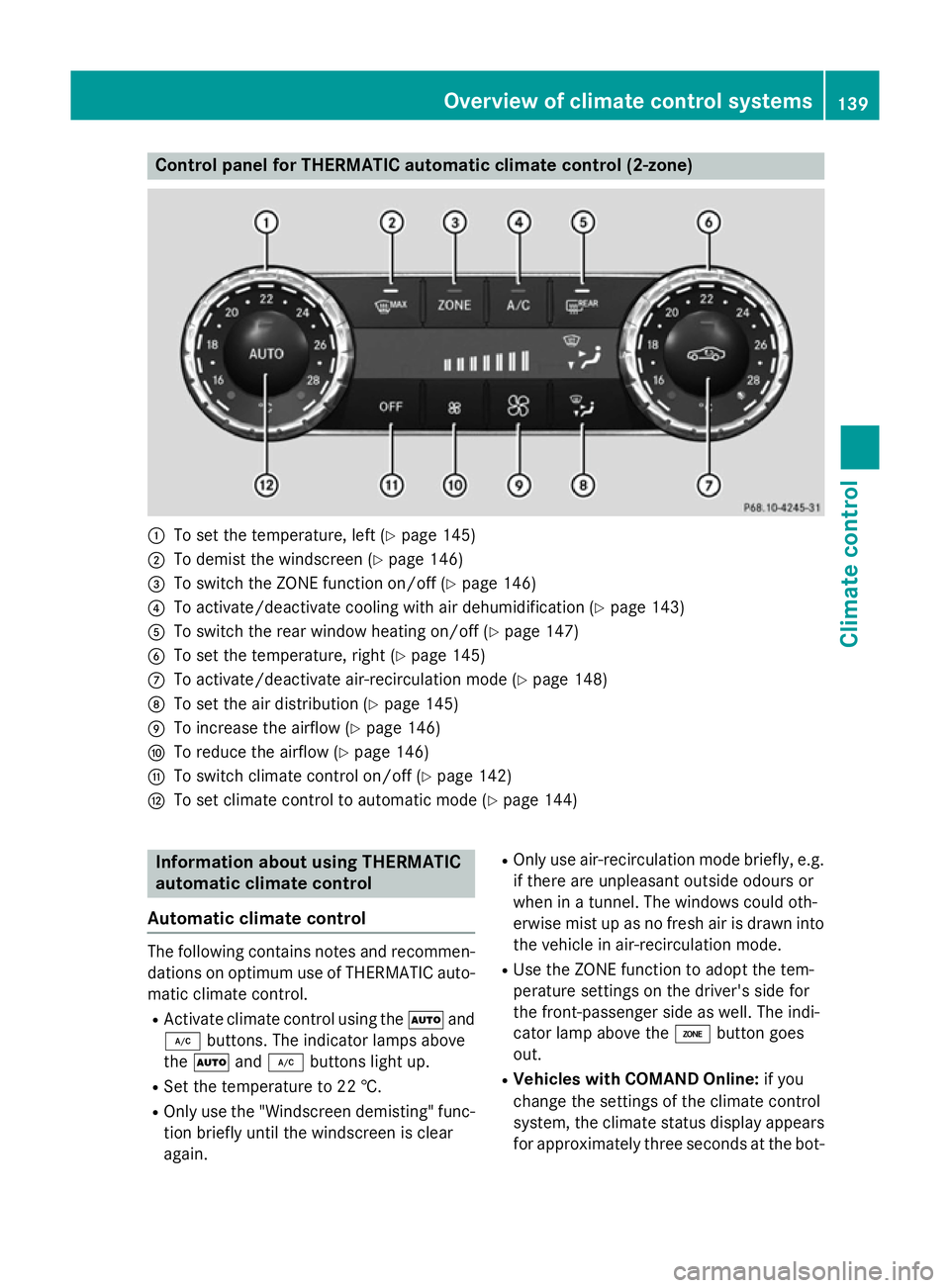
Control panel for THERMATIC automatic climate control (2-zone)
:
To set the temperature, left (Y page 145)
; To demist the windscreen (Y page 146)
= To switch the ZONE function on/off (Y page 146)
? To activate/deactivate cooling with air dehumidification (Y page 143)
A To switch the rear window heating on/off (Y page 147)
B To set the temperature, right (Y page 145)
C To activate/deactivate air-recirculation mode (Y page 148)
D To set the air distribution (Y page 145)
E To increase the airflow (Y page 146)
F To reduce the airflow (Y page 146)
G To switch climate control on/off (Y page 142)
H To set climate control to automatic mode (Y page 144)Information about using THERMATIC
automatic climate control
Automatic climate control The following contains notes and recommen-
dations on optimum use of THERMATIC auto- matic climate control.
R Activate climate control using the Ãand
¿ buttons. The indicator lamps above
the à and¿ buttons light up.
R Set the temperature to 22 †.
R Only use the "Windscreen demisting" func-
tion briefly until the windscreen is clear
again. R
Only use air-recirculation mode briefly, e.g.
if there are unpleasant outside odours or
when in a tunnel. The windows could oth-
erwise mist up as no fresh air is drawn into
the vehicle in air-recirculation mode.
R Use the ZONE function to adopt the tem-
perature settings on the driver's side for
the front-passenger side as well. The indi-
cator lamp above the ábutton goes
out.
R Vehicles with COMAND Online: if you
change the settings of the climate control
system, the climate status display appears for approximately three seconds at the bot- Overview of climate control systems
139Climate control
Page 145 of 417
Information about using
THERMOTRONIC automatic climate
control
Automatic climate control The following contains instructions and rec-
ommendations to enable you to get the most
out of your THERMOTRONIC automatic cli-
mate control.
R Activate climate control using the Ãand
¿ buttons. The indicator lamps above
the à and¿ buttons light up.
R In automatic mode, you can also use the
ñ button to adjust airflow (FOCUS/
MEDIUM/DIFFUSE). The MEDIUM level is
recommended.
R Set the temperature to 22 †.
R Only use the "Windscreen demisting" func-
tion briefly until the windscreen is clear
again.
R Only use air-recirculation mode briefly, e.g.
if there are unpleasant outside odours or
when in a tunnel. The windows could oth-
erwise mist up as no fresh air is drawn into
the vehicle in air-recirculation mode.
R Use the ZONE function to adopt the tem-
perature settings on the driver's side for
the front-passenger side and the rear com-
partment as well. The indicator lamp above
the á button goes out.
R Use the residual heat function if you want to
heat or ventilate the vehicle interior when
the ignition is switched off. The residual
heat function can only be activated or deac- tivated with the ignition switched off.
R Vehicles with COMAND Online: if you
change the settings of the climate control
system, the climate status display appears for approximately three seconds at the bot-
tom of the screen in the COMAND display. See also the separate COMAND Online
operating instructions. You will see the cur- rent settings of the various climate controlfunctions. ECO start/stop function During automatic engine switch-off, the cli-
mate control only operates at a reduced capa-
city. If you require the full climate control out-
put, you can switch off the ECO start/stop
function by pressing the ECO button
(Y page 164). Operating the climate control system
Switching climate control on/off
General notes When the climate control is switched off, the
air supply and air circulation are also
switched off. The windows could mist up.
Therefore, only switch off climate control
briefly.
i Activate climate control primarily using
the à button (Y page 144).
Switching on/off X
Turn the key to position 2in the ignition
lock (Y page 159).
X To switch on: press theÃbutton on
the control panel for the climate control.
The indicator lamp in the Ãbutton lights
up. Airflow and air distribution are set to
automatic mode.
or X Press the ^button.
The indicator lamp in the ^button goes
out. The previous settings are reactivated.
X To switch off: press the^button.
The indicator lamp in the ^button lights
up. 142
Operating the climate control systemClimate cont
rol