stop start MERCEDES-BENZ CLS COUPE 2014 Owners Manual
[x] Cancel search | Manufacturer: MERCEDES-BENZ, Model Year: 2014, Model line: CLS COUPE, Model: MERCEDES-BENZ CLS COUPE 2014Pages: 417, PDF Size: 14.15 MB
Page 8 of 417
Switching the function on/off
(ATA) ................................................ 78
Alarm system
see ATA (Anti-Theft Alarm system)
Ambient lighting
Setting the brightness (on-board
computer) ...................................... 253
Setting the colour (on-board com-
puter) ............................................. 254
AMG RIDE CONTROL sports sus-
pension ............................................... 204
Anti-glare film .................................... 326
Anti-lock braking system
see ABS (Anti-lock Braking System)
Anti-Theft Alarm system
see ATA (Anti-Theft Alarm system)
Aquaplaning ....................................... 185
Ashtray ............................................... 315
Assistance display (on-board com-
puter) .................................................. 249
Assistance menu (on-board com-
puter) .................................................. 249
ASSYST PLUS
Displaying a service message ........ 333
Hiding a service message .............. 333
Notes ............................................. 332
Resetting the service interval dis-
play ................................................ 333
Service message ............................ 332
Special service requirements ......... 333
ATA (Anti-Theft Alarm system)
Activating/deactivating ................... 78
Function ........................................... 78
Interior motion sensor ..................... 79
Switching off the alarm .................... 78
Tow-away protectio n ........................79
ATTENTION ASSIST
Activating/deactivating ................. 250
Display message ............................ 274
Function/notes ............................ .218
Authorised workshop
see Qualified specialist workshop
AUTO lights
Display message ............................ 269
see Lights
Automatic engine start (ECO start/
stop function) ................................... .164 Automatic engine switch-off (ECO
start/stop function)
.......................... 163
Automatic headlamp mode .............. 123
Automatic transmission
Accelerator pedal position ............. 171
Automatic drive program .............. .173
Changing gear ............................... 171
DIRECT SELECT lever ..................... 168
Display message ............................ 282
Drive program displa y.................... 169
Driving tips .................................... 171
Emergency running mod e.............. 177
Engaging drive position .................. 170
Engaging neutral ............................ 170
Engaging park position (AMG vehi- cles) ............................................... 168
Engaging reverse gear ................... 169
Engaging the park position ............ 169
Kickdown ....................................... 171
Manual drive progra m.................... 174
Manual drive program (AMG vehi-
cles) ............................................... 175
Manual drive program (vehicles
with Sports package AMG) ............ 175
Overview ........................................ 167
Problem (fault) ............................... 177
Program selector button ................ 171
Pulling away ................................... 162
Selector lever ................................ 168
Starting the engine ........................ 161
Steering wheel gearshift paddle s... 173
Trailer towing ................................. 171
Transmission position display ........ 168
Transmission position display
(DIRECT SELECT lever) ................... 169
Transmission positions .................. 170
Automatic transmission emer-
gency running mode ......................... 177
Auxiliary heating
Activating/deactivating ................. 150
Activating/deactivating (on the
centre console ).............................. 151
Display message ............................ 284
Important safety notes .................. 150
Problem (display message) ............ 154
Remote control .............................. 151
Setting ........................................... 256
Setting the departure time ............. 152 Index
5
Page 13 of 417
Brakes ........................................... 183
Downhill gradient ........................... 183
Driving abroad ............................... 122
Driving in winter ............................. 185
Driving on flooded roads ................ 185
Driving on wet roads ...................... 185
General .......................................... 182
Icy road surfaces ........................... 185
Limited braking efficiency on sal-
ted roads ....................................... 184
New brake pads/linings ................ 184
Running-in tips ............................... 158
Snow chains .................................. 367
Symmetrical dipped bea m............. 122
Towing a trailer .............................. 233
Wet road surface ........................... 184
DVD audio
Operating (on-board computer) ..... 246
DVD video
Operating (on-board computer) ..... 247 E
EASY-ENTRY feature Activating/deactivating ................. 257
Function/note s............................. 115
EASY-EXIT feature
Crash-responsive ........................... 116
Function/note s............................. 115
Switching on/of f........................... 257
EASY-PACK convenience box ........... 308
EASY-PACK load-securing kit
Components and storage .............. 310
Inserting the brackets into the
loading rai l..................................... 310
EASY-PACK luggage compartment
management system ........................ 310
EBD (electronic brake force distri-
bution)
Display message ............................ 264
Function/note s................................ 76
ECO display
Function/note s............................. 182
On-board computer ....................... 244
ECO start/stop function
Automatic engine switch-off .......... 163
Deactivating/activating ................. 164
General information ....................... 163 Important safety notes .................. 163
Introduction ................................... 163
Electrical fuses
see Fuses
Electromagnetic compatibility
Declaration of conformity ................ 25
Electronic Stability Program
see ESP® (Electronic Stability Program)
Emergency
Automatic measures after an acci-
dent ................................................. 55
Emergency key
Unlocking the driver's door .............. 90
Emergency key element
Function/note s................................ 84
Inserting .......................................... 85
Locking vehicle ................................ 90
Removing ......................................... 85
Emergency release
Driver's door .................................... 90
Fuel filler fla p................................. 179
Emergency spare wheel
General notes ................................ 391
Important safety notes .................. 390
Inflating the collapsible spare
wheel ............................................. 392
Removing ....................................... 391
Storage location ............................ 391
Stowing .......................................... 392
Technical data ............................... 394
Emergency unlocking
Tailgate ............................................ 95
Vehicle ............................................. 90
Engine
Display message ............................ 270
ECO start/stop function ................ 163
Engine number ............................... 399
Jump-starting ................................. 355
Running irregularly ......................... 166
Starting problems .......................... 166
Starting the engine with the key .... 161
Starting with KEYLESS GO ............. 162
Stopping ........................................ 181
Tow-starting (vehicle) ..................... 360
Warning lamp (engine diagnos-
tics) ............................................... 295
Engine electronics
Notes ............................................. 396 10
Index
Page 16 of 417
Insect protection on the radiator
.... 329
Instrument cluster
Overview .......................................... 32
Settings ........................................ .252
Warning and indicator lamps ........... 34
Instrument cluster lighting .............. 252
Intelligent Light System
Activating/deactivating ................. 253
Display message ............................ 269
Overview ........................................ 127
Setting the dipped-beam head-
lamps for driving on the right/left .. 253
Interior lighting
Automatic control system .............. 130
Delayed switch-off (on-board
computer) ...................................... 254
Emergency lighting ........................ 131
Manual control ............................... 131
Overview ........................................ 130
Reading lamp ................................. 130
Setting brightness for display/
switches (on-board computer) ....... 252
Setting the ambient lighting
brightness (on-board computer) .... 253
Setting the ambient lighting col-
our (on-board computer) ................ 254
Interior motion sensor
Deactivating ..................................... 80
Function .......................................... .79
Priming ............................................ 79
Switching off .................................... 80
ISOFIX child seat securing system ....57J
Jack Storage location ............................3 45
Using ............................................. 375
Jump starting (engine) ......................355 K
Key Changing the battery ....................... 86
Checking the battery ....................... 85
Convenience closing feature ............ 98
Convenience opening feature .......... 97
Display message ............................ 285 Door central locking/unlocking ....... 83
Emergency key element ................... 84
Important safety notes .................... 82
Loss ................................................. 87
Modifying the programming ............. 84
Overview .......................................... 82
Positions (ignition lock) ................. 159
Problem (malfunction) ..................... 87
Starting the engine ........................ 161
Key positions
Key ................................................ 159
KEYLESS GO .................................. 159
KEYLESS-GO
Convenience closing ........................ 98
Display message ............................ 285
Locking ............................................ 83
Removing the Start/Stop button ... 160
Start/Stop button .......................... 159
Starting the engine ........................ 162
Unlocking ......................................... 83
Kickdown
Driving tips ................................... .171
Manual drive program .................... 176
Kneebag ............................................... 49 L
Lamps see Warning and indicator lamps
Lane Keeping Assist
Activating/deactivating ................. 251
Display message ............................ 275
Function/informatio n.................... 225
Lane package ..................................... 223
Lap time (RACETIMER) ...................... 259
Lashing eyelets ................................. 306
Licence plate lamp (display mes-
sage) ................................................... 268
Light sensor (display message) ....... 269
Lighting
see Lights
Lights
Activating/deactivating the Intel-
ligent Light System ........................ 253
Activating/deactivating the inte-
rior lighting delayed switch-off ....... 254
Active light function ....................... 127
Adaptive Highbeam Assist ............. 128 Index
13
Page 21 of 417
Important safety notes .................. 105
Overview ........................................ 105
Seat heating problem .................... 112
Seat ventilation problem ................ 113
Storing settings (memory func-
tion) ............................................... 119
Switching seat heating on/off ....... 111
Switching the seat ventilation on/
off .................................................. 112
Selector lever
Cleaning .........................................3 40
Sensors (cleaning instructions) ....... 337
Service
see ASSYST PLUS
Service Centre
see Qualified specialist workshop
Service menu (on-board com-
puter) ................................................. .251
Service products
AdBlue® special additive s............. 403
Brake fluid ..................................... 405
Coolant (engine) ............................ 405
Engine oil ....................................... 404
Fuel ................................................ 399
Important safety notes .................. 399
Washer fluid ................................... 406
Setting the air distribution ............... 145
Setting the airflow ............................ 146
Settings
Factory (on-board computer) ......... 258
On-board compute r....................... 251
SETUP (on-board computer) ............. 258
Side lamps
Switching on/of f........................... 124
Side windows
Convenience closing ........................ 97
Convenience opening ...................... 97
Important safety notes .................... 96
Opening/closing .............................. 96
Problem (malfunction) ..................... 99
Resetting ......................................... 98
Sidebag ................................................ 50
Sliding sunroof
Important safety information ........... 99
Opening/closing ............................ 100
Problem (malfunction) ................... 102
Rain closing feature ....................... 101 Resetting ....................................... 101
Snow chains ...................................... 367
Socket
Luggage compartment ................... 319
Under the armrest ......................... 318
Sockets
Centre console .............................. 318
General notes ................................ 317
Rear compartment ......................... 318
Spare wheel
Storing ........................................... 392
Specialist workshop ............................ 26
Spectacles compartment ................. 301
Speed Limit Assist
Activating/deactivating the warn-ing function .................................... 249
Display message ............................ 275
Display message in the multifunc- tion display .................................... 220
Important safety notes .................. 219
Speed, controlling
see Cruise control
Speedometer
Digital ............................................ 244
In the Instrument cluster ................. 32
Segments ...................................... 241
Selecting the unit of measure-
ment .............................................. 252
see Instrument cluster
SPEEDTRONIC
Deactivating variable ..................... 191
Display message ............................ 278
Function/note s............................. 189
Important safety notes .................. 189
LIM indicator lamp ......................... 189
Permanent ..................................... 191
Selecting ........................................ 190
Storing the current speed .............. 190
Variabl e......................................... 189
SPORT handling mode
Activating/deactivating (AMG
vehicles) .......................................... 74
Warning lamp ................................. 292
Start/stop function
see ECO start/stop function
Starting (engine) ................................ 161
Steering (display message) .............. 28518
Index
Page 33 of 417
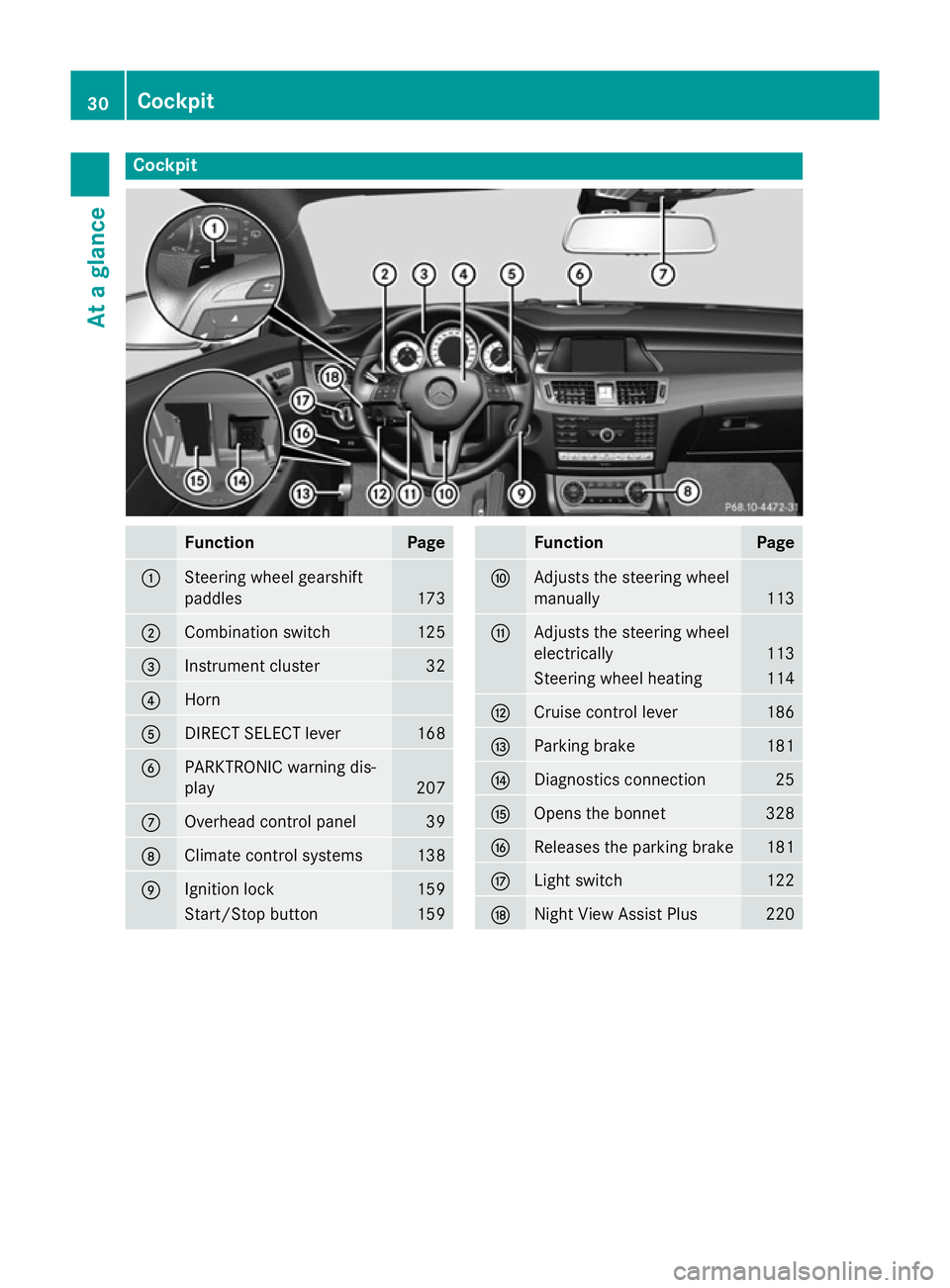
Cockpit
Function Page
:
Steering wheel gearshift
paddles
173
;
Combination switch 125
=
Instrument cluster 32
?
Horn
A
DIRECT SELECT lever 168
B
PARKTRONIC warning dis-
play
207
C
Overhead control panel 39
D
Climate control systems 138
E
Ignition lock 159
Start/Stop button 159 Function Page
F
Adjusts the steering wheel
manually
113
G
Adjusts the steering wheel
electrically
113
Steering wheel heating 114
H
Cruise control lever 186
I
Parking brake 181
J
Diagnostics connection 25
K
Opens the bonnet 328
L
Releases the parking brake 181
M
Light switch 122
N
Night View Assist Plus 22030
CockpitAt a glance
Page 34 of 417
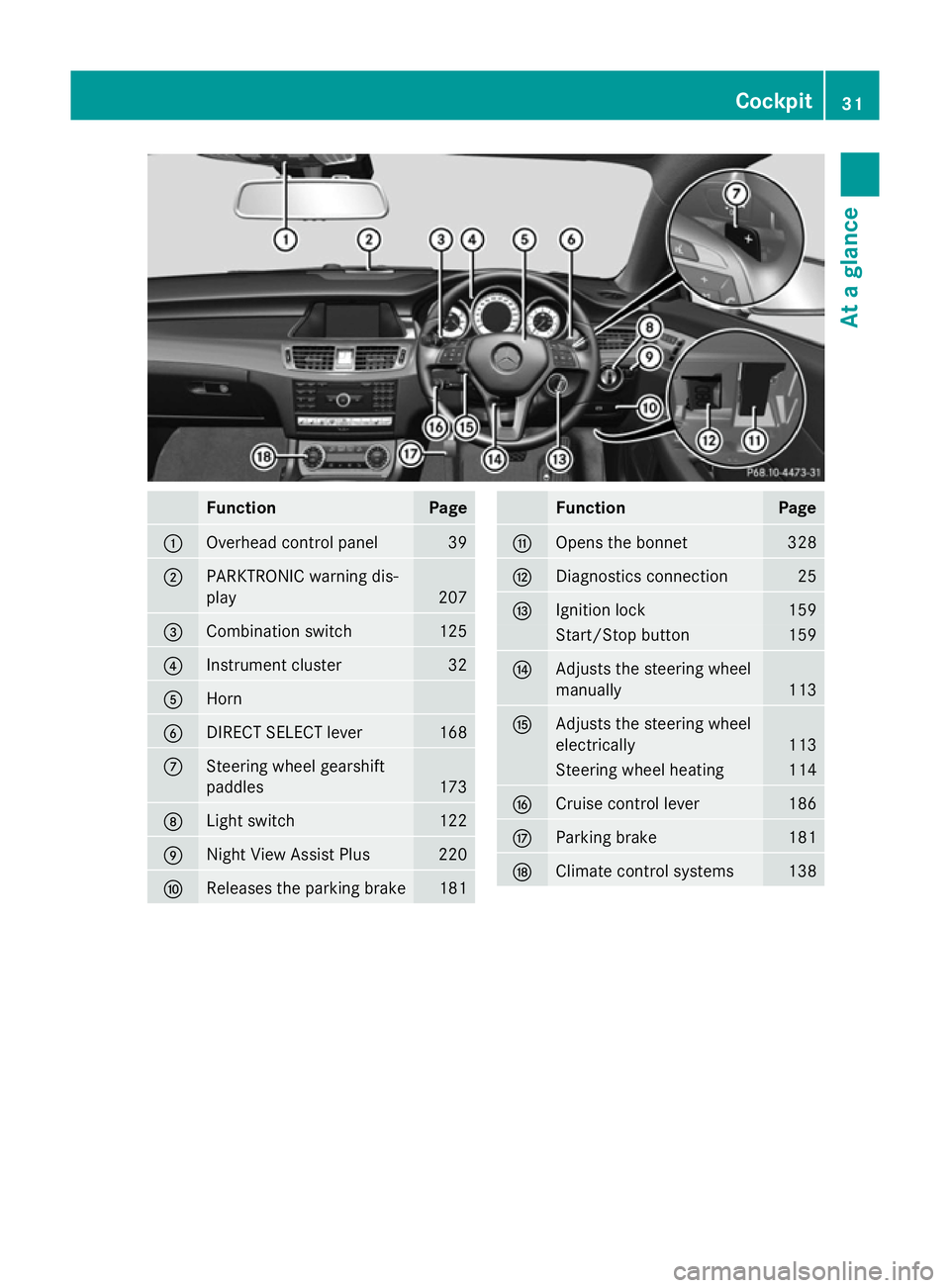
Function Page
:
Overhead control panel 39
;
PARKTRONIC warning dis-
play 207
=
Combination switch 125
?
Instrument cluster 32
A
Horn
B
DIRECT SELECT lever 168
C
Steering wheel gearshift
paddles
173
D
Light switch 122
E
Night View Assist Plus 220
F
Releases the parking brake 181 Function Page
G
Opens the bonnet 328
H
Diagnostics connection 25
I
Ignition lock 159
Start/Stop button 159
J
Adjusts the steering wheel
manually
113
K
Adjusts the steering wheel
electrically
113
Steering wheel heating 114
L
Cruise control lever 186
M
Parking brake 181
N
Climate control systems 138Cockpit
31At a glance
Page 39 of 417
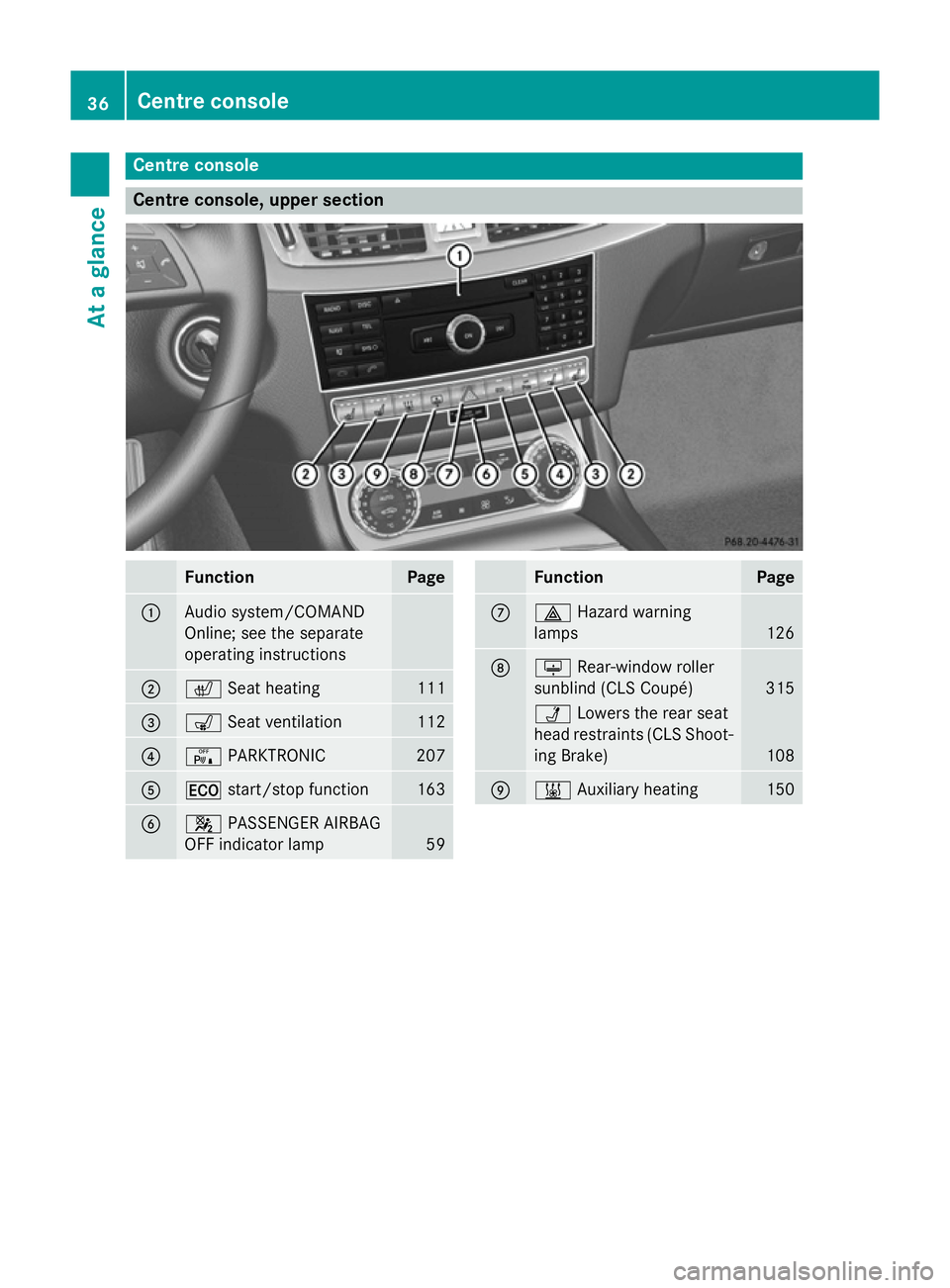
Centre console
Centre console, upper section
Function Page
:
Audio system/COMAND
Online; see the separate
operating instructions
;
c
Seat heating 111
=
s
Seat ventilation 112
?
c
PARKTRONIC 207
A
¤
start/stop function 163
B
4
PASSENGER AIRBAG
OFF indicator lamp 59 Function Page
C
£
Hazard warning
lamps 126
D
u
Rear-window roller
sunblind (CLS Coupé) 315
Ü
Lowers the rear seat
head restraints (CLS Shoot-
ing Brake) 108
E
&
Auxiliary heating 15036
Centre consoleAt a glance
Page 45 of 417
Useful information
i This Owner's Manual describes all mod-
els, series and optional equipment for your
vehicle that were available at the time of
going to press. National variations are pos- sible. Note that your vehicle may not be
equipped with all of the functions descri-
bed. This is also the case for systems and
functions relevant to safety.
i Read the information on qualified special-
ist workshops: (Y page 26). Panic alarm
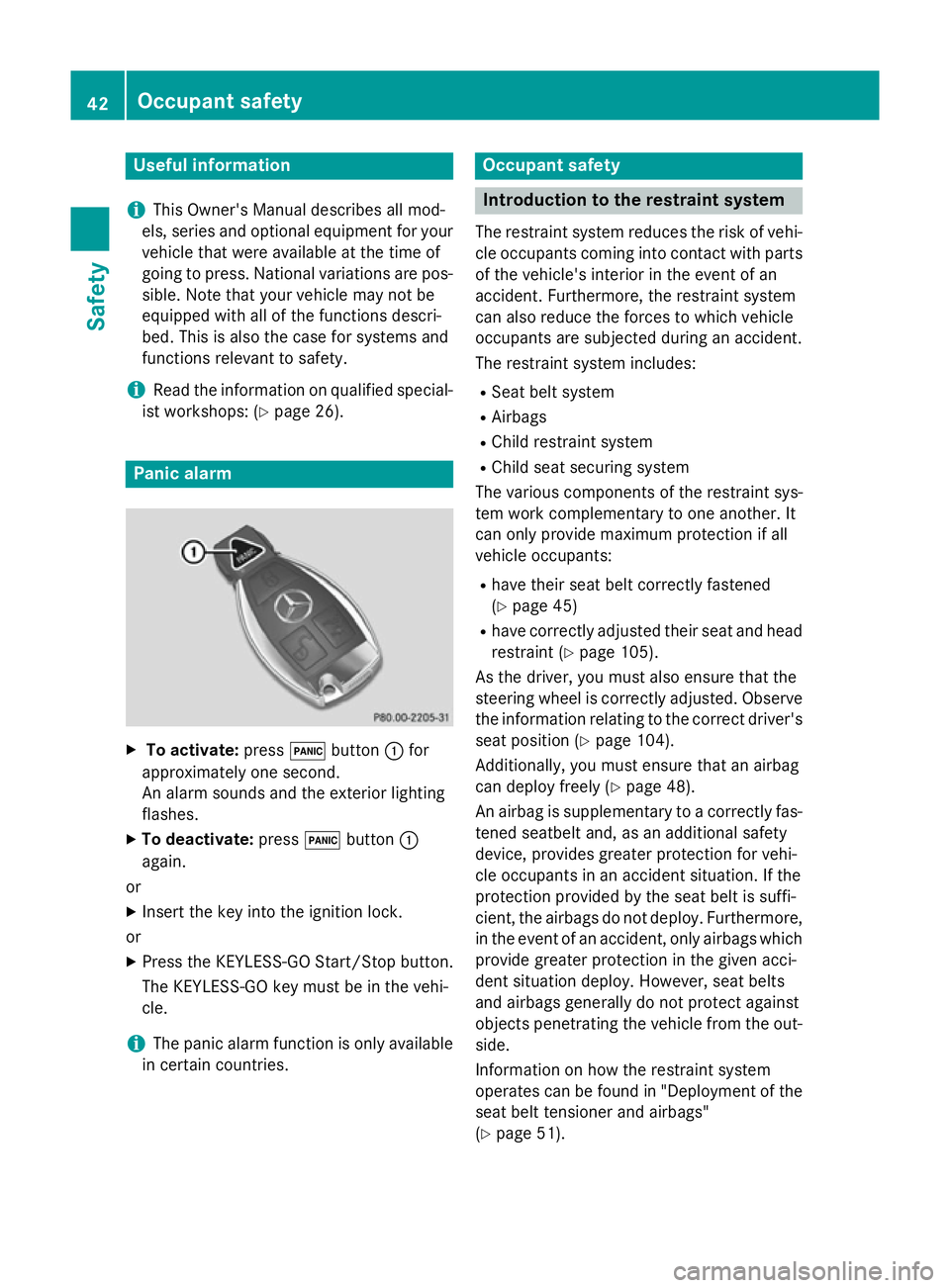
X
To activate: press!button :for
approximately one second.
An alarm sounds and the exterior lighting
flashes.
X To deactivate: press!button :
again.
or
X Insert the key into the ignition lock.
or X Press the KEYLESS-GO Start/Stop button.
The KEYLESS-GO key must be in the vehi-
cle.
i The panic alarm function is only available
in certain countries. Occupant safety
Introduction to the restraint system
The restraint system reduces the risk of vehi- cle occupants coming into contact with parts
of the vehicle's interior in the event of an
accident. Furthermore, the restraint system
can also reduce the forces to which vehicle
occupants are subjected during an accident.
The restraint system includes:
R Seat belt system
R Airbags
R Child restraint system
R Child seat securing system
The various components of the restraint sys-
tem work complementary to one another. It
can only provide maximum protection if all
vehicle occupants:
R have their seat belt correctly fastened
(Y page 45)
R have correctly adjusted their seat and head
restraint (Y page 105).
As the driver, you must also ensure that the
steering wheel is correctly adjusted. Observe
the information relating to the correct driver's
seat position (Y page 104).
Additionally, you must ensure that an airbag
can deploy freely (Y page 48).
An airbag is supplementary to a correctly fas- tened seatbelt and, as an additional safety
device, provides greater protection for vehi-
cle occupants in an accident situation. If the
protection provided by the seat belt is suffi-
cient, the airbags do not deploy. Furthermore,
in the event of an accident, only airbags which
provide greater protection in the given acci-
dent situation deploy. However, seat belts
and airbags generally do not protect against
objects penetrating the vehicle from the out- side.
Information on how the restraint system
operates can be found in "Deployment of the
seat belt tensioner and airbags"
(Y page 51). 42
Occupant safetySafety
Page 63 of 417
G
WARNING
If you secure a child in a forward-facing child
restraint system on the front-passenger seat
and you position the front-passenger seat too close to the dashboard, in the event of an
accident, the child could:
R come into contact with the vehicle's inte-
rior if the PASSENGER AIR BAG OFF indi-
cator lamp is lit, for example
R be struck by the airbag if the PASSENGER
AIR BAG OFF indicator lamp is off
This poses an increased risk of injury or even fatal injury.
Move the front-passenger seat as far back as
possible. Always make sure that the shoulder belt strap is correctly routed from the vehicle
belt sash guide to the shoulder belt guide on
the child restraint system. The shoulder belt
strap must be routed forwards and down-
wards from the vehicle belt sash guide. If nec-
essary, adjust the vehicle belt sash guide and the front-passenger seat accordingly. Always
observe the information about suitable posi-
tioning of the child restraint system in this
Owner's Manual as well as the child restraint system manufacturer's installation instruc-
tions.
i Ensure that your vehicle is equipped with
automatic child seat recognition for the
front-passenger seat (Y page 61). If this
is not the case, always fit the child restraint
system on a suitable rear seat
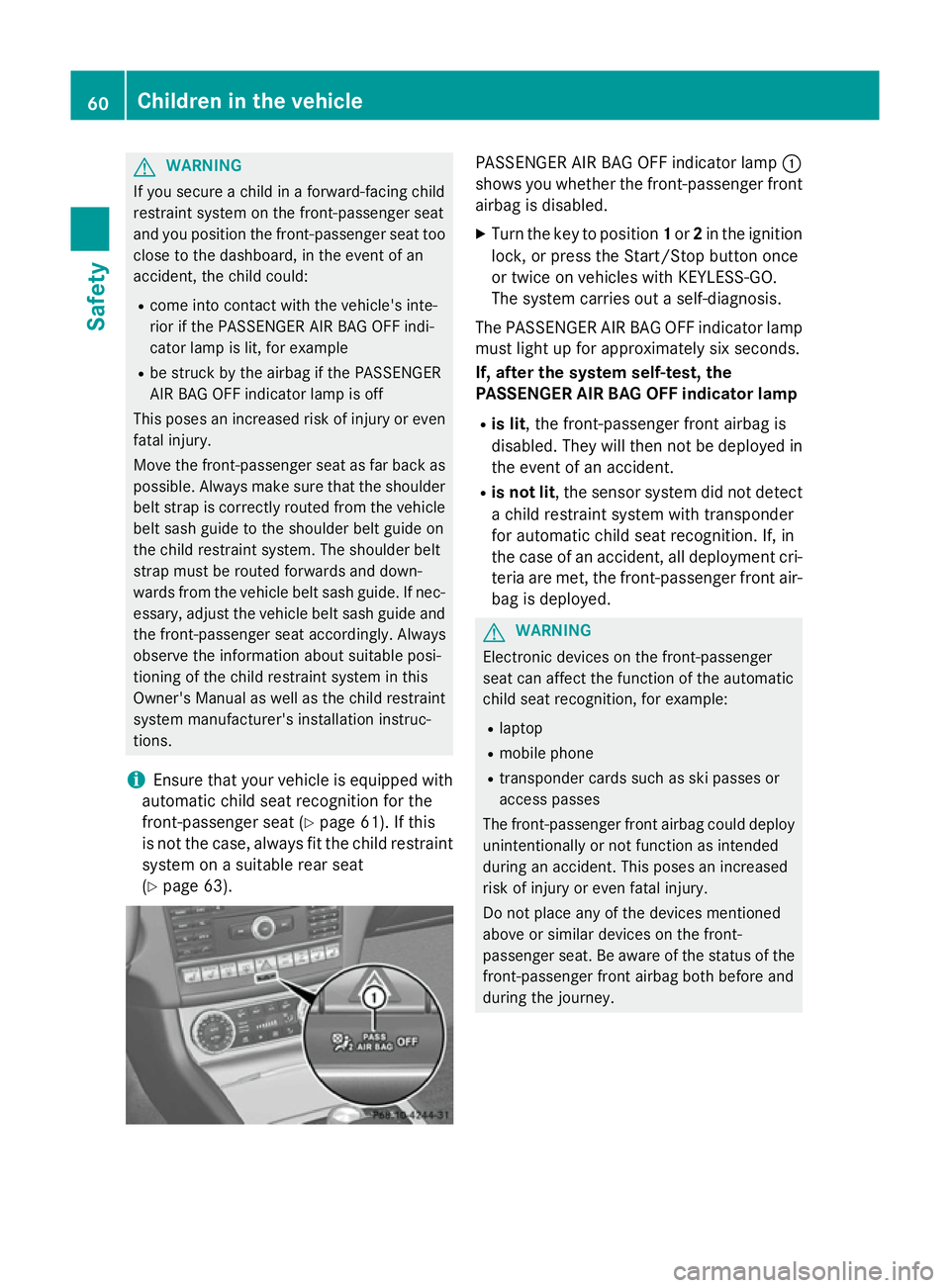
(Y page 63). PASSENGER AIR BAG OFF indicator lamp
:
shows you whether the front-passenger front airbag is disabled.
X Turn the key to position 1or 2in the ignition
lock, or press the Start/Stop button once
or twice on vehicles with KEYLESS-GO.
The system carries out a self-diagnosis.
The PASSENGER AIR BAG OFF indicator lamp
must light up for approximately six seconds.
If, after the system self-test, the
PASSENGER AIR BAG OFF indicator lamp
R is lit, the front-passenger front airbag is
disabled. They will then not be deployed in
the event of an accident.
R is not lit, the sensor system did not detect
a child restraint system with transponder
for automatic child seat recognition. If, in
the case of an accident, all deployment cri-
teria are met, the front-passenger front air-
bag is deployed. G
WARNING
Electronic devices on the front-passenger
seat can affect the function of the automatic
child seat recognition, for example:
R laptop
R mobile phone
R transponder cards such as ski passes or
access passes
The front-passenger front airbag could deploy unintentionally or not function as intended
during an accident. This poses an increased
risk of injury or even fatal injury.
Do not place any of the devices mentioned
above or similar devices on the front-
passenger seat. Be aware of the status of thefront-passenger front airbag both before and
during the journey. 60
Children in the vehicleSafety
Page 76 of 417
Important safety notes
i
Observe the "Important safety notes" sec-
tion (Y page 70). G
WARNING
If ESP ®
is malfunctioning, ESP ®
is unable to
stabilise the vehicle. In addition, other driving
safety systems are switched off. This increa-
ses the risk of skidding and an accident.
Drive on carefully. Have ESP ®
checked at a
qualified specialist workshop.
! Vehicles with 4MATIC: switch off the igni-
tion when the parking brake is being tested
using a dynamometer.
Application of the brakes by ESP ®
may oth-
erwise destroy the brake system.
! Vehicles with 4MATIC: function or per-
formance tests may only be carried out on
a 2-axle dynamometer. Before operating
the vehicle on such a dynamometer, please
consult a qualified specialist workshop.
You could otherwise damage the drive train
or the brake system.
Vehicles without 4MATIC: when towing your
vehicle with the rear axle raised, it is impor-
tant that you observe the notes on ESP ®
(Y page 359).
ESP ®
is deactivated if the åwarning lamp
in the instrument cluster lights up continu-
ously when the engine is running.
If the ÷ warning lamp and the åwarn-
ing lamp are lit continuously, ESP ®
is not
available due to a malfunction.
Observe the information on warning lamps
(Y page 291) and display messages which
may be shown in the instrument cluster
(Y page 262).
i Only use wheels with the recommended
tyre sizes. Only then will ESP ®
function
properly. Characteristics of ESP
® General notes
If the
÷ ESP warning lamp goes out before
beginning the journey, ESP ®
is automatically
active.
If ESP ®
intervenes, the ÷ESP®
warning
lamp flashes in the instrument cluster.
If ESP ®
intervenes:
X Do not deactivate ESP ®
under any circum-
stances.
X When pulling away, only depress the accel-
erator pedal as far as is necessary.
X Adapt your driving style to suit the prevail-
ing road and weather conditions.
ECO start/stop function
The ECO start/stop function switches the
engine off automatically if the vehicle stops
moving. When pulling away again, the engine
starts automatically. ESP ®
remains in its pre-
viously selected status. Example:if ESP®
was deactivated before the engine was
switched off, ESP ®
remains deactivated when
the engine is switched on again.
Deactivating/activating ESP ®
(except
AMG vehicles) Important safety notes
You can select between the following sta-
tuses of ESP:
R ESP ®
is activated
R ESP ®
is deactivated G
WARNING
If you deactivate ESP ®
, ESP ®
no longer sta-
bilises the vehicle. There is an increased risk
of skidding and an accident.
Only deactivate ESP ®
in the situations descri-
bed in the following. Driving safety systems
73Safety Z