ABS MERCEDES-BENZ CLS COUPE 2018 User Guide
[x] Cancel search | Manufacturer: MERCEDES-BENZ, Model Year: 2018, Model line: CLS COUPE, Model: MERCEDES-BENZ CLS COUPE 2018Pages: 589, PDF Size: 10.95 MB
Page 421 of 589
#
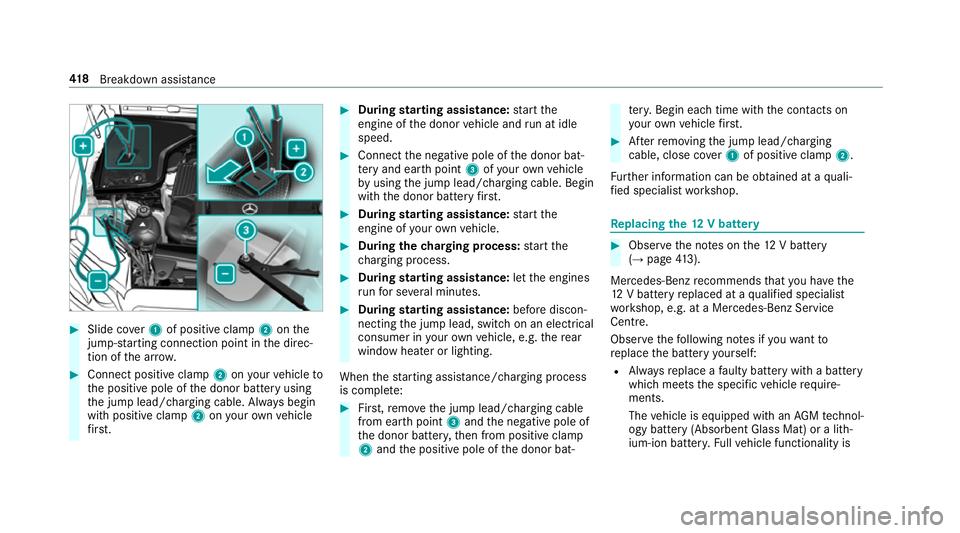
Slide co ver1 of positive clamp 2onthe
jump-s tarting connection point in the direc‐
tion of the ar row. #
Connect positive clamp 2onyour vehicle to
th e positive pole of the donor battery using
th e jump lead/charging cable. Alw ays begin
with positive clamp 2onyour ow nve hicle
fi rs t. #
During starting assi stance: start the
engine of the donor vehicle and run at idle
speed. #
Connect the negative pole of the donor bat‐
te ry and ear thpoint 3ofyour ow nve hicle
by using the jump lead/charging cable. Begin
with the donor battery firs t. #
During starting assi stance: start the
engine of your ow nve hicle. #
During thech arging process: start the
ch arging process. #
During starting assi stance: letthe engines
ru nfo r se veral minutes. #
During starting assi stance: before discon‐
necting the jump lead, switch on an electrical
consumer in your ow nve hicle, e.g. there ar
wind owheater or lighting.
When thest arting assis tance/charging process
is compl ete: #
First,re mo vethe jump lead/charging cable
from ear thpoint 3and the negative pole of
th e donor batter y,then from positive clamp
2 and the positive pole of the donor bat‐ te
ry. Begin ea chtime wi th the conta cts on
yo ur ow nve hicle firs t. #
Afterre moving the jump lead/charging
cable, close co ver1 of positive clamp 2.
Fu rther information can be obtained at a quali‐
fi ed specialist workshop. Re
placing the 12V battery #
Obser vethe no tes on the12 V battery
(→ page 413).
Me rcedes-Benz recommends that you ha vethe
12 V battery replaced at a qualified specialist
wo rkshop, e.g. at a Mercedes-Benz Service
Centre.
Obser vethefo llowing no tes if youwa ntto
re place the battery yourself:
R Alw aysre place a faulty bat tery with a battery
which meets the specific vehicle require‐
ments.
The vehicle is equipped with an AGMtech nol‐
ogy battery (Absorbent Glass Mat) or a li th‐
ium-ion batter y.Fu llve hicle functionality is 41 8
Breakdown assis tance
Page 440 of 589
#
Therefore, only use tyre types and sizes
appr ovedfo ryo ur vehicle model. #
Obser vethe tyre load-bearing capacity
ra ting and speed rating requ iredfor
yo ur vehicle. *
NO
TEVehicle and tyre damage thro ugh
tyre types and sizes that ha venot been
appr oved Fo
r saf etyre asons, on lyuse tyres, wheels
and accessories which ha vebeen specially
appr ovedby Mercedes-Benz foryo ur vehicle.
These tyres are specially adap tedto the con‐
trol sy stems, such as ABS, ESP ®
and
4MATIC, and mar ked as follo ws:
R MO = Mercedes-Benz Original
R MOE = Mercedes-Benz Original Extended
(run-flat tyres only for cer tain wheels)
R MO1 = Mercedes-Benz Original (only cer‐
tain AMG tyres) Cer
tain characteristics, such as handling,
ve hicle noise emissions, fuel consum ption,
et c. may otherwise be adversely af fected.
Fu rthermore, other tyre sizes could result in
th e tyres rubbing against the body and axle
components when loaded. This could result
in damage tothe tyre or theve hicle.
Only use tyres, wheels and accessories that
ha ve been checked and recommended by
Mercedes-Benz. *
NO
TERisk todriving saf ety from retrea‐
ded tyres Re
treaded tyres are nei ther tested nor rec‐
ommended byMercedes-Benz, since pr evi‐
ous damage cannot alw ays be de tected on
re treaded tyres.
Fo rth is reason driving saf ety cannot be guar‐
anteed. #
Do not use used tyres if you ha veno
information about their pr evious usage. *
NO
TEPossible damage towheels or
tyres when driving over obs tacles Large wheels ha
vea lo wer tyre section width.
The lo werth e tyre section width, the greater
is therisk of damage towheels or tyres when
driving over obs tacles. #
Avoid obs tacles or drive pa rticular ly
carefully. *
NO
TEDama getoelectronic component
parts from the use of tyre-fitting tools Ve
hicles with a tyre pressure monitoring
sy stem: electronic component parts are
located in the wheel. Tyre-fitting tools should
not be applied in the area of theva lve.
The tools could damage the electronic com‐
ponent parts. #
Have the tyres changed at a qualified
specialist workshop onl y. Wheels and tyres
437
Page 462 of 589
If
th e engine oils lis ted in theta ble are not avail‐
able, you may add a maximum of 1.0 litr e ofthe
fo llowing engine oils once only:
R petrol engines: MB-Freigabe or MB-Appr oval
229. 31orAC EA C3
R diesel engines:
- CLS 300 d: ACEA C3
- allother models: MB-F reigabe or MB-
Appr oval 229. 51orAC EA C3
The following values referto an oil change,
including the oil filter.
Re placement amount Mode
lR eplacement
amount
CLS 300 d6 .8 litres
CLS 350 d9 .0 litres
CLS 350 6.6 litres
CLS 350 4MATIC 6.0 litres Mode
lR eplacement
amount
CLS 450 4MATIC 8.5 litres
All other models 8.0 litres Note
s on brake fluid Obser
vethe no tes on operating fluids
(→ page 452). &
WARNING Risk of an accident due to
va pour poc kets form ing in the brake sys‐
tem
The brake fluid cons tantly absorbs moi sture
from the air. This lo wersthe boiling point of
th e brake fluid. If the boiling point is too lo w,
va pour poc kets may form inthe brake sys‐
te m when the brakes are applied hard.
This impairs the braking ef fect. #
Have the brake fluid rene we d at the
specified inter vals. Ha
ve the brake fluid regularly replaced at a
qu alified specialist workshop.
Only use brake fluid appr ovedby Mercedes-Benz
according toMB-F reigabe or MB-Appr oval 33 1.0.
Yo u can obtain fur ther information on brake fluid
in thefo llowing places:
R inthe Mercedes-Benz Specifications for
Operating Fluids
- at http://be vo.mercedes-benz.com
- inthe Mercedes-Benz BeVo app
R at a qualified specialist workshop Coolant
Note
s on coolant
Obser vethe no tes on operating fluids
(→ page 452). &
WARNING Risk offire ‑ and inju ryfrom
antifreeze
If antifreeze comes into contact with hot
component parts in the engine compart‐
ment, it may ignite. Te
ch nical da ta459
Page 469 of 589
Saf
ety sy stems Display messages
Possible causes/consequences and M
MSolutions
!
÷ currently unavailable See
Owner's Manual *
ABS and ESP ®
are temp orarily una vailable.
Other driving sy stems and driving saf ety sy stems may also be temp orarily una vailable.
The brake sy stem continues tooperate normally. The braking dis tance may increase in an emergency braking situa‐
tion. &
WARNING Risk of skidding if ABS and ESP ®
are malfunctioning
If ABS and ESP ®
are malfunctioning, the wheels could lock when braking and ESP ®
cann otcar ryout vehicle
st abilisation.
The steering capability and braking characteristics are thus se verely impaired. The br aking distance may
increase in an emergency braking situation. In addition, other driving saf ety sy stems are switched off. #
Drive on carefull y. #
Have ABS and ESP ®
ch ecked immediately at a qualified specialist workshop. #
Carefully drive on a suitable stre tch of road, making slight steering mo vements at a speed abo ve30 km/h. #
Ifth e display message does not disappear, consult a qualified specialist workshop immediately. Drive carefully. 466
Display messages and warning/indicator lamps
Page 470 of 589
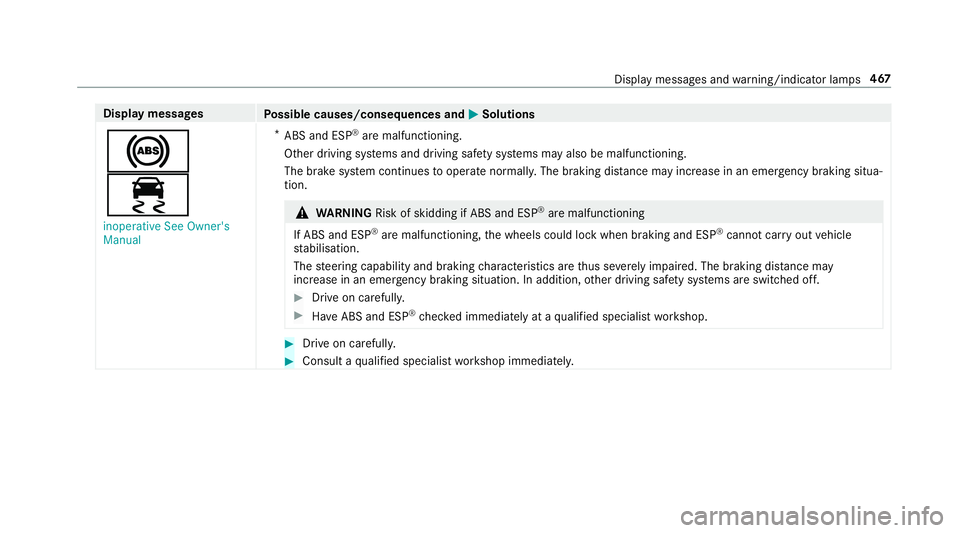
Display messages
Possible causes/consequences and M
MSolutions
!
÷ inoperative See Owner's
Manual *
ABS and ESP ®
are malfunctioning.
Other driving sy stems and driving saf ety sy stems may also be malfunctioning.
The brake sy stem continues tooperate normally. The braking dis tance may increase in an emergency braking situa‐
tion. &
WARNING Risk of skidding if ABS and ESP ®
are malfunctioning
If ABS and ESP ®
are malfunctioning, the wheels could lock when braking and ESP ®
cann otcar ryout vehicle
st abilisation.
The steering capability and braking characteristics are thus se verely impaired. The br aking distance may
increase in an emergency braking situation. In addition, other driving saf ety sy stems are switched off. #
Drive on carefull y. #
Have ABS and ESP ®
ch ecked immediately at a qualified specialist workshop. #
Drive on carefully. #
Consult a qualified specialist workshop immediatel y. Displ
aymessa ges and warning/indicator lamps 467
Page 473 of 589
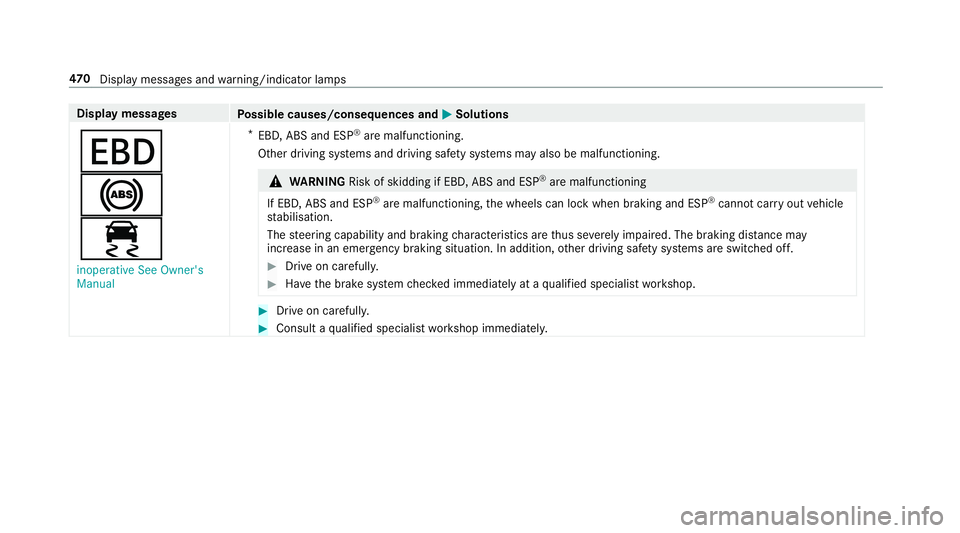
Display messages
Possible causes/consequences and M
MSolutions
T
!
÷ inoperative See Owner's
Manual *
EBD, ABS and ESP ®
are malfunctioning.
Other driving sy stems and driving saf ety sy stems may also be malfunctioning. &
WARNING Risk of skidding if EBD, ABS and ESP ®
are malfunctioning
If EBD, ABS and ESP ®
are malfunctioning, the wheels can lock when braking and ESP ®
cann otcar ryout vehicle
st abilisation.
The steering capability and braking characteristics are thus se verely impaired. The br aking distance may
increase in an eme rgency braking situation. In addition, other driving saf ety sy stems are switched off. #
Drive on carefull y. #
Have the brake sy stem checked immediately at a qualified specialist workshop. #
Drive on carefully. #
Consult a qualified specialist workshop immediatel y.47 0
Displaymessa ges and warning/indicator lamps
Page 527 of 589
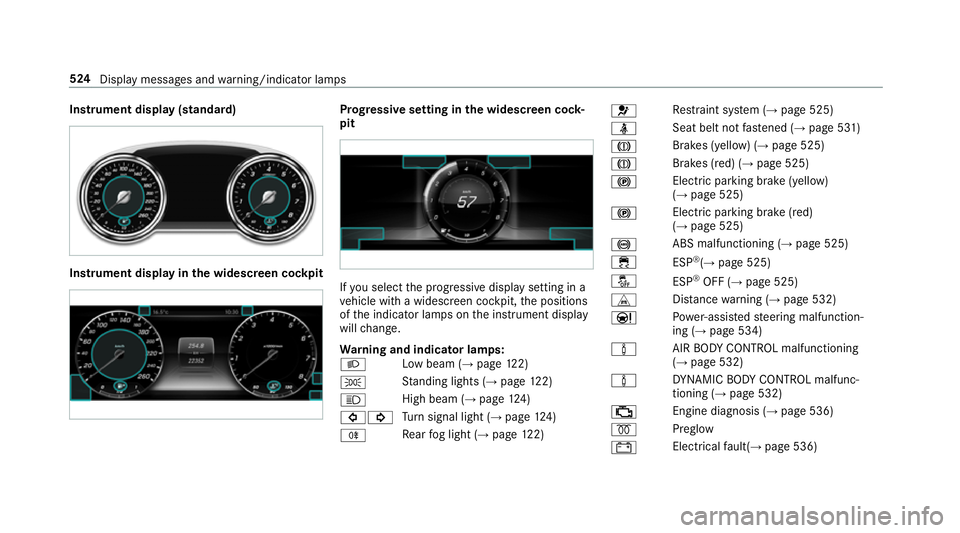
Instrument display (standard)
Instrument display in
the widescreen cockpit Prog
ressive setting in the widescreen cock‐
pit If
yo u select the progressive display setting in a
ve hicle with a widescreen cockpit, the positions
of the indicator lamps on the instrument display
will change.
Wa rning and indicator lamps:
L Low beam (→
page122)
T St
anding lights (→ page122)
K High beam (→
page124)
#! Tu
rn signal light (→ page124)
R Re
ar fog light (→ page122) 6
Re
stra int sy stem (→ page 525)
ü Seat belt not
fastened (→ page 531)
J Brakes (yellow) (→
page 525)
J Brakes (red) (→
page 525)
! Elect
ric pa rking brake (yellow)
(→ page 525)
! Electric parking brake (red)
(→
page 525)
! ABS malfunctioning (→
page 525)
÷ ESP®
(→ page 525)
å ESP®
OFF (→ page 525)
L Distance warning (→ page 532)
Ð Po
we r-assis tedsteering malfunction‐
ing (→ page 534)
à AIR
BODY CONTROL malfunctioning
(→ page 532)
à DY
NA MIC BODY CONTROL malfunc‐
tioning (→ page 532)
; Engine diagnosis (→
page 536)
% Preglow
# Electrical
fault( →page 536) 524
Display messages and warning/indicator lamps
Page 530 of 589
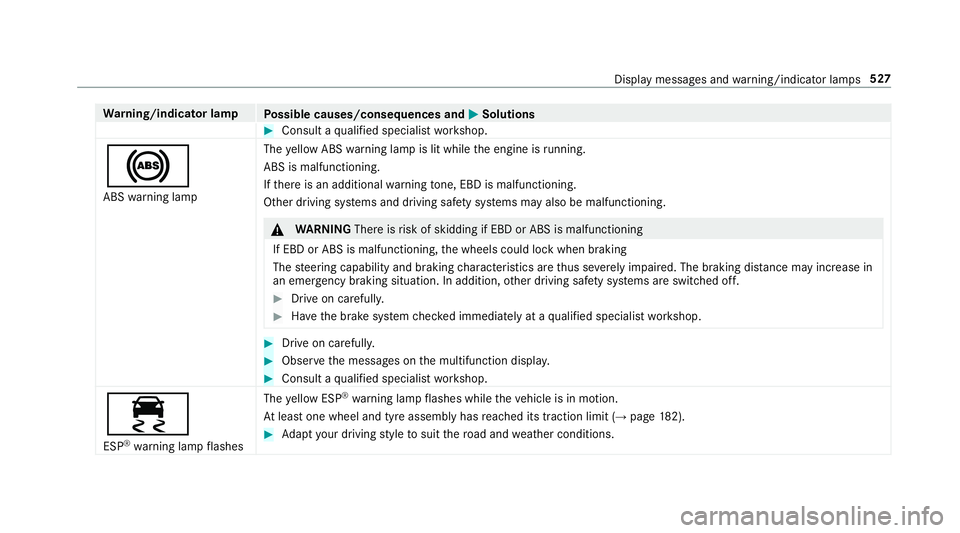
Wa
rning/indicator lamp
Possible causes/consequences and M
MSolutions #
Consult a qualified specialist workshop.
! ABS warning lamp The
yellow ABS warning lamp is lit while the engine is running.
ABS is malfunctioning.
If th ere is an additional warning tone, EBD is malfunctioning.
Other driving sy stems and driving saf ety sy stems may also be malfunctioning. &
WARNING Thereisrisk of skidding if EBD or ABS is malfunctioning
If EBD or ABS is malfunctioning, the wheels could lock when braking
The steering capability and braking characteristics are thus se verely impaired. The braking dis tance may increase in
an emergency braking situation. In addition, other driving saf ety sy stems are switched off. #
Drive on carefull y. #
Have the brake sy stem checked immediately at a qualified specialist workshop. #
Drive on carefully. #
Obser vethe messages on the multifunction displa y. #
Consult a qualified specialist workshop.
÷ ESP ®
wa rning lamp flashes The
yellow ESP ®
wa rning lamp flashes while theve hicle is in motion.
At least one wheel and tyre assembly has reached its traction limit (→ page182). #
Adapt your driving style to suit thero ad and weather conditions. Display messages and
warning/indicator lamps 527
Page 544 of 589
1,
2, 3 ...
12 V battery
see Battery (vehicle)
12 V so cket
see Soc ket (12 V)
48 V on-board electrical sy stem
Operating saf ety .................................... 23
230 V soc ket
see Soc ket (230 V)
360° Camera ........................................... 220
Ca re .................................................... 400
Fu nction .............................................. 220
Opening the camera co ver (r eve rsing
camera) .............................................. .223
Selecting a view .................................. 223
Setting favo urites ................................ 224
Swit ching automatic operation
on/off (r eversing camera) .................. .223 A
A/C function Activating/deactivating (multimedia
sy stem) ................................................ 13 8Switching on/off (control panel) .........
13 8
ABS (Anti-lock Braking Sy stem) ............ .182
Ac celeration
see Kickdown
Ac cess data
Editing (Blue tooth®
) .............................3 54
Setting (Blue tooth®
) ............................ 353
Ac oustic locking verification signal
Ac tivating/deactivating ......................... 68
Ac tivating/deactivating automatic
vo lume adjustment
Burmes ter®
sur round sound sy stem ... 384
Ac tive Blind Spot Assi st.......................... 241
Ac tivating/deactivating ...................... .243
Brake application ................................. 241
Fu nction ............................................... 241
Sy stem limitations ...............................2 41
Tr ailer operation .................................. .241
Ac tive bonn et(pedestrian pr otection) .. 388
Operation ............................................ 388
Re setting ............................................. 388
Ac tive Brake Assi st
Fu nction/no tes .................................... 187Setting .................................................
191
Ac tive Di stance Assist DISTRO NIC........ 19 6
Ac tive Emergency Stop Assist .............2 06
Ac tive Lane Change Assi st.................. 204
Calling up a speed ............................... 19 8
Displ ays in the Instrument Display ...... 206
Fu nction .............................................. 19 6
Increasing/decreasing speed .............. 19 8
Re quirements: .................................... .198
Ro ute-based speed adap tation ........... .201
Selecting ............................................. 19 8
St eering wheel buttons ........................ 19 8
St oring a speed ................................... 19 8
Switching off/deacti vating .................. 19 8
Switching on/activating ...................... 19 8
Sy stem limitations ...............................1 96
Ac tive Eme rgency Stop Assist ...............206
Ac tive headlamps .................................... 12 5
Ac tive Lane Change Assi st..................... 204
Fu nction .............................................. 204
Ac tive Lane Keeping Assist .................... 24 3
Ac tivating/deactivating ...................... .245
Ac tivating/deactivating thewa rning .... 24 6
Fu nction .............................................. 24 3 Index
541
Page 547 of 589
Anti-lock braking sy
stem
see ABS (Anti-lock Braking Sy stem)
Anti-skid chains
see Snow chains
Anti-theft ala rmsystem
see ATA (anti-theft alarm sy stem)
Anti-theft pr otection
Ad ditional door lock ...............................71
Immobiliser ...........................................89
Anti-theft pr otection
see ATA (anti-theft alarm sy stem)
Anticipatory occupant pr otection
see PRE- SAFE®
(anticipatory occu‐
pant pr otection)
see PRE-SAFE ®
PLUS (anticipatory
occupant pr otection plus)
Apple CarPlay™ ....................................... 341
Connecting an iPhone ®
....................... 342
Ending .................................................3 43
No tes .................................................. 342
Overview ..............................................3 41
Sound settings .................................... 343
Tr ans ferred vehicle data ......................3 45Ashtr
ay
Fr ont centre console ............................ 11 6
Re ar passenger compartment .............. 11 6
Assistance sy stems
see Driving saf ety sy stem
Assistant display Menu (on-board computer) .................. 258
ASS YST PLUS ........................................... 387
Battery disconnection pe riods .............3 88
Displ aying the service due date ........... 387
Fu nction/no tes ................................... 387
Re gular maintenance work .................. 387
Special service requ irements .............. 387
ATA (anti-theft ala rmsystem) .................. 89
Deactivating the alarm .......................... 90
Fu nction ................................................ 89
Fu nction of interior pr otection ............... 91
Priming/deactivating interior pr otec‐
tion ........................................................ 91
Priming/deactivating tow- aw ay pro‐
te ction ................................................... 91
To w- aw ay protection function ................90
AT TENTION ASSI ST.......................... 235, 237
Fu nction .............................................. 235 Setting ................................................. 237
Sy
stem limitations ...............................2 35
At tention assistant
see ATTENTION ASSIST
Au dio mode
Connecting USB devices ..................... 363
Co pyrights ...........................................3 61
Information ..........................................3 59
Inserting/removing an SD card ........... 361
Media sea rch ....................................... 366
Overview ............................................. 362
Pa use and playback function .............. .363
Selecting a track ................................. 363
Selecting playba ckoptions .................. 363
Switching on media mode ...................3 61
Tr ack list .............................................. 363
Au thorised workshop
see Qualified specialist workshop
Au tomatic distance control
see Active Dis tance Assi stDISTRONIC
Au tomatic driving lights .........................12 3
Au tomatic engine start (ECO start/
sto p function) .......................................... 15 6544
Index