boot MERCEDES-BENZ CLS COUPE 2018 Service Manual
[x] Cancel search | Manufacturer: MERCEDES-BENZ, Model Year: 2018, Model line: CLS COUPE, Model: MERCEDES-BENZ CLS COUPE 2018Pages: 589, PDF Size: 10.95 MB
Page 515 of 589
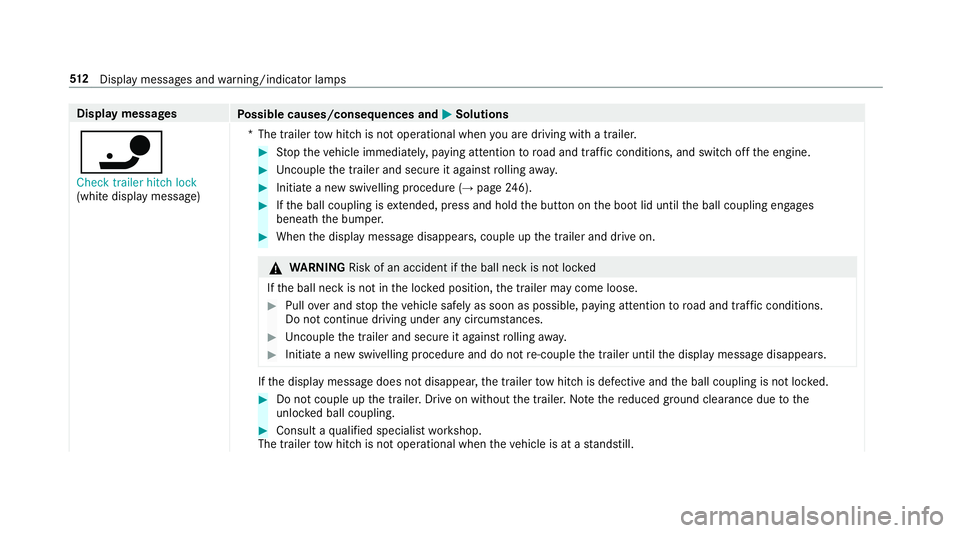
Display messages
Possible causes/consequences and M
MSolutions
ï Check trailer hitch lock
(white display message) *T
he trailer tow hit chis not operational when you are driving with a trailer. #
Stop theve hicle immediately, paying attention toroad and traf fic conditions, and switch off the engine. #
Uncouple the trailer and secure it against rolling away. #
Initiate a new swivelling procedure (→ page246). #
Ifth e ball coupling is extended, press and hold the button on the boot lid until the ball coupling engages
beneath the bumper. #
When the display message disappears, couple up the trailer and drive on. &
WARNING Risk of an accident if the ball neck is not loc ked
If th e ball neck is not in the loc ked position, the trailer may come loose. #
Pull over and stop theve hicle safely as soon as possible, paying attention toroad and traf fic conditions.
Do not continue driving under any circums tances. #
Uncouple the trailer and secure it against rolling away. #
Initiate a new swivelling procedure and do not re-couple the trailer until the display message disappears. If
th e display message does not disappear, the trailer tow hit chis defective and the ball coupling is not loc ked. #
Do not couple up the trailer. Drive on without the trailer. No tethere duced ground clearance due tothe
unlo cked ball coupling. #
Consult a qualified specialist workshop.
The trailer tow hit chis not operational when theve hicle is at a standstill. 512
Displaymessa ges and warning/indicator lamps
Page 516 of 589
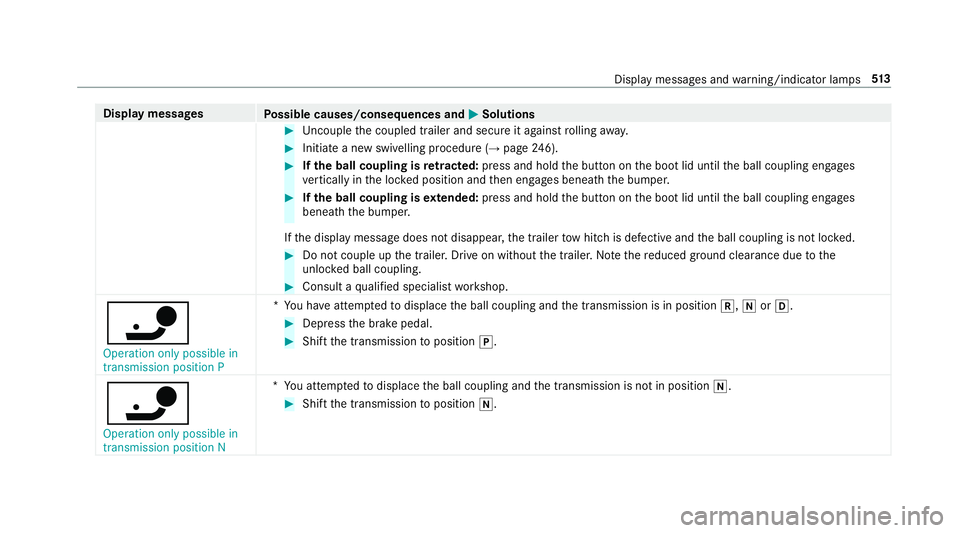
Display messages
Possible causes/consequences and M
MSolutions #
Uncouple the coupled trailer and secure it against rolling away. #
Initiate a new swivelling procedure (→ page246). #
Ifth e ball coupling is retracted: press and hold the button on the boot lid until the ball coupling engages
ve rtically in the loc ked position and then engages beneath the bumper. #
Ifth e ball coupling is extended: press and hold the button on the boot lid until the ball coupling engages
beneath the bumper.
If th e display message does not disappear, the trailer tow hit chis defective and the ball coupling is not loc ked. #
Do not couple up the trailer. Drive on without the trailer. No tethere duced ground clearance due tothe
unlo cked ball coupling. #
Consult a qualified specialist workshop.
ï Operation only possible in
transmission position P *
Yo u ha veattem ptedto displace the ball coupling and the transmission is in position k,iorh. #
Depress the brake pedal. #
Shift the transmission toposition j.
ï Operation only possible in
transmission position N *
Yo u attem ptedto displace the ball coupling and the transmission is not in position i. #
Shift the transmission toposition i. Display messages and
warning/indicator lamps 513
Page 522 of 589
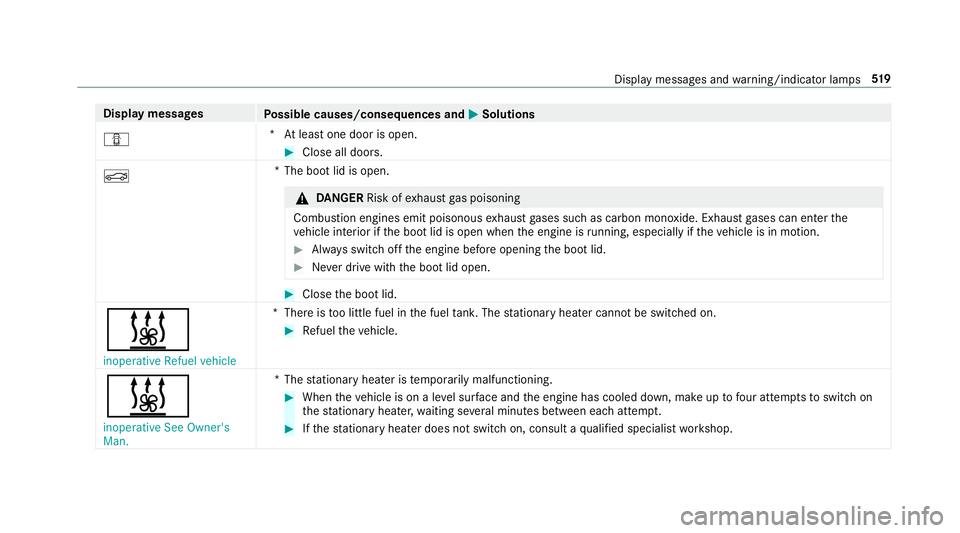
Display messages
Possible causes/consequences and M
MSolutions
C *A
t least one door is open. #
Close all doors.
N *T
he boot lid is open. &
DANG ER Risk of exhaust gas poisoning
Combustion engines emit poisonous exhaust gases such as carbon monoxide. Exhaust gases can enter the
ve hicle interior if the boot lid is open when the engine is running, especially if theve hicle is in motion. #
Alw ays switch off the engine before opening the boot lid. #
Never drive with the boot lid open. #
Close the boot lid.
& inoperative Refuel vehicle *T
here is too little fuel in the fuel tank. The stationary heater cannot be swit ched on. #
Refuel theve hicle.
&
inoperative See Owner's
Man. *T
hestationary heater is temp orarily malfunctioning. #
When theve hicle is on a le vel sur face and the engine has cooled down, make up tofour attem ptsto switch on
th est ationary heater, waiting se veral minutes between each attem pt. #
Ifth est ationary heater does not swit chon, consult a qualified specialist workshop. Display messages and
warning/indicator lamps 519
Page 549 of 589
Blue
tooth ®
audio
Ac tivating ............................................ .371
De-authorising (de-regis tering) the
device .................................................. 371
Information .......................................... 368
Overview ............................................. 369
Sear ching for a track ........................... 371
Sea rching for and auth orisingthe
device .................................................. 370
Selecting a music pl ayer ......................3 71
Switching device via NFC ..................... 371
Boot lid Activating/deactivating theta ilgate
opening limiter ...................................... .81
Closing .................................................. 77
HANDS-FREE ACCESS .......................... .79
Locking separa tely ................................ 80
Opening ................................................. 76
Opening dimensions ............................4 61
Brake Assi stSystem
see BAS (Brake Assi stSystem)
Brake fluid
No tes .................................................. 459 Brake
forc e distribution
EBD (Elect ronic Brake forc e Distribu‐
tion) ..................................................... 186
Brakes ABS (Anti-lo ckBraking Sy stem) ........... 182
Ac tive Brake Assi st.............................. 187
Ad aptive brake lights .......................... .192
BA S (Brake Assi stSystem) .................. 182
Driving tips .......................................... 154
EBD (Electronic Brake forc e Distribu‐
tion) ..................................................... 186
HOLD function .................................... .208
Limi ted braking ef fect (salt-trea ted
ro ads) .................................................. 154
New/replaced brakepads/brake
discs .................................................... 15 3
Ru nning-in no tes ..................................1 53
Braking assi stance
see BAS (Brake Assi stSystem)
Breakdown Overview of the help functions .............. 18
To w- starting ........................................ 424
To wing away ........................................ 420
Tr ansporting theve hicle ......................4 22
Wheel change ...................................... 440Breakdown
see Flat tyre
Breakdown assistance call see Mercedes me connect
Burmes ter®
high-end 3D sur round
sound sy stem
Ad justing the balance/fader ............... 385
Ad justing the sound optimisation ........ 386
Ad justing treble, mid-range and bass
settings ............................................... 385
Au tomatic volume adjustment ............ .385
Calling up the sound menu .................. 385
Information .......................................... 385
Setting the sound profile ..................... 386
Burmes ter®
sur round sound sy stem .....3 84
Ad justing the balance/fader ............... 384
Ad justing the sound focus ................... 385
Ad justing treble, mid-range and bass
settings ............................................... 384
Au tomatic volume adjustment ............ .384
Calling up the sound menu .................. 384
Information .......................................... 384
Switching the sur round sound on/off
............................................................ .385 546
Index
Page 561 of 589

Flat
towing
see Tow- bar sy stem
Flat tyre ....................................................4 07
MOExtended tyres ...............................4 08
No tes ................................................... 407
TIREFIT kit ...........................................4 09
Wheel change ...................................... 440
Floor mats ................................................ 121
Fo g light (extended range) ......................1 26
Fo il co vering ............................................. 181
Fr ag rance
see Fragrance sy stem
Fr ag rance sy stem .................................... 141
Inserting/removing theflacon ............ .141
Setting ................................................. 14 0
Fr ee software ............................................ .31
Fr equencies
Tw o-w ayradio .....................................4 49
Fr equency band
Dialling (on-board computer) .............. .262
Fr ont airbag (driver, front passenger) .....39 Fr
ont passenger seat
Ad justing from the driver's seat ............ 95
Fu el .......................................................... .455
Ad ditives .............................................4 55
Diesel ................................................. .455
E10 ...................................................... 454
Fu elreser ve ........................................ 456
Low outside temp eratures ...................4 55
Pe trol ................................................... 454
Quality (diesel) .................................... 455
Quality (p etro l) .................................... 454
Re fuelling ............................................ 16 6
Sulphur content ................................... 454
Ta nk content ....................................... 456
Fu el consum ption
On-board computer ............................ .259
Fu nction seat
see Door cont rol panel
Fu ses ........................................................ 424
Before replacing a fuse ........................ 424
Fu se assignment diagram .................... 424
Fu se box in the boot ............................4 26
Fu se box in the engine compartment .. 425 Fu
se box in the front passenger foot‐
we ll ...................................................... 426
Fu se box on the dashboard ................. 426
No tes ................................................... 424 G
Garage door opener Cleari ngthe memory ........................... 176
Opening or closing the door ................1 75
Programming buttons .......................... 173
Ra dio equipment appr oval numbers .... .176
Re solving problems ............................. 175
Synchronising thero lling code ............ .174
Gearshift recommendation ....................16 4
Genera l operating permit number
(EU) .......................................................... .450
Genuine parts ............................................ 22
Glide mode ............................................... 16 4
Glo vebox
Air vent ................................................ 14 8
Locking/unlocking .............................. 107558
Index
Page 565 of 589
High beam ...........................................
124
Intellige nt Light Sy stem ....................... 12 5
Light switch .........................................1 22
Mo torw ay mode ................................... 12 6
Pa rking lights ...................................... .122
Re sponsibility for lighting sy stems .......1 22
Setting the dipped beam ..................... 12 9
Setting the sur round lighting .............. .129
St anding lights .................................... .122
Tu rn signal lights ..................................1 24
Limiter ...................................................... 19 3
Ac tivating ............................................ .194
Buttons ................................................ 194
Calling up a speed .............................. .194
Deactivating ........................................ 194
Fu nction .............................................. 19 3
Pa ssive mode ...................................... 19 3
Pe rm anent setting .............................. .196
Re quirements: .................................... .194
Selecting .............................................. 194
Setting a speed .................................... 194
St oring a speed .................................... 194
Sy stem limitations ...............................1 93
Limiting speed see Limi ter LINGU
ATRO NIC ........................................ 267
Application specific voice commands
............................................................ .268
Au dible help functions .........................2 69
Global voice commands ...................... 268
Impr oving speech quality .................... 269
Language setting ................................ .269
Media pla yervo ice commands ............ .276
Message voice commands .................. 277
Multifunction steering wheel (operat‐
ing) ...................................................... 267
Na vigation voice commands ................ 271
Operable functions .............................. 268
Operating saf ety .................................. 267
Ra dio voice commands ........................ 275
Switch voice commands ...................... 270
Te lephone voice controls .................... .274
Te xt messa gevoice commands .......... .277
TV voice commands ............................ 275
Ty pes of voice commands .................. .268
Ve hicle voice commands .................... .278
Vo ice prom pting .................................. 268
Live Traf fic Information
Displaying subsc ript ion information .... .319
Displ aying the tra ffic map .................. .320 Displ
aying traf fic incidents .................. 321
Extending a subscription ...................... 319
Issuing hazard alert s ............................3 21
Re gis tering on Mercedes me ............... 319
Loading .................................................... .111
Bag hook .............................................. 11 2
No tes ................................................... 105
Ro ofrack ............................................. 11 4
St ow age space under the boot floor ....1 13
Ti e-down eyes ...................................... 111
Loading guidelines .................................. 105
Loads Securing .............................................. 105
Locator lighting see Sur round lighting
Locking/unlocking Activating/deactivating the auto‐
matic locking feature ............................ .75
Ad ditional door lock ...............................71
Digital Vehicle Keyst icke r .................... .72
Emergency key ...................................... 75
KEYLESS-GO .......................................... 73
Mobile phone ......................................... 72
Smartphone ........................................... 72562
Index
Page 569 of 589
St
arting theve hicle (Digital Vehicle
Ke yst icke r) .......................................... 151
St arting theve hicle (mobile phone) ..... 151
Switching Blu etoo th®
audio equip‐
ment .................................................... 371
Switching mobile phones .................... 333
Un locking theve hicle (digital vehicle
ke yst icke r) ............................................ 72
Un locking theve hicle (mobile phone) ....72
Using a mobile phone .......................... 333
Ne utral
Engaging .............................................. 16 2
NFC see Near Field Communication (NFC)
No n-operational time
Ac tivating/deactivating standby
mode .................................................. .180
St andby mode function ...................... .180 O
Occupant saf ety
Pe ts in theve hicle ................................. 65
Occupant saf ety
see Airbag see
Automatic front passenger front
airbag shutoff
see PRE-SAFE ®
(anticipatory occu‐
pant pr otection)
see PRE-SAFE ®
Impulse Side
see PRE-SAFE ®
PLUS (anticipatory
occupant pr otection plus)
see Restra int sy stem
see Seat belt
Odome ter
see Total dis tance
Oil see Engine oil
On-board co mputer ................................. 255
Assis tant displ aymenu ........................ 258
Displaying the service due date ........... 387
Head-up display menu .........................2 64
Media menu ........................................2 63
Menu designs ...................................... 256
Menu overview .................................... 255
Multifunction display .......................... .257
Na vigation menu .................................. 261
Operating ............................................ 255
Ra dio menu .........................................2 62Service menu ...................................... 258
Te lephone menu .................................. 263
Tr ip menu ............................................ 259
On-boa rddiagno stics inter face
see Diagno stics connection
On-boa rdelectronics
Engine electronics .............................. .448
No tes .................................................. 448
Tw o-w ayradios .................................... 448
Open-source software ...............................31
Opening the boot lid using your foot
HANDS-FREE ACCESS .......................... .79
Operating fluids
Ad Blue ®
............................................... 457
Ad ditives (fuel) .................................... 455
Brake fluid .......................................... .459
Coolant (engine) .................................. 459
Engine oil ............................................ 458
Fu el (diesel) ......................................... 455
Fu el (petrol) ......................................... 454
No tes .................................................. 452
Wi ndsc reen washer fluid .................... .460
Operating saf ety
48 V on-boa rdelectrical sy stem ............ 23 566
Index
Page 577 of 589
St
ow age comp artments
see Loading
see Stow age compartment
St ow age space under the boot floor ......11 3
Sulphur content ...................................... 454
Sun visor Operating ............................................ 13 6
Sur round lighting .................................... 12 9
Setting ................................................. 12 9
Sur round View
see 360° Camera
Suspension Adjusting thech assis le vel (AIR
BO DY CONTROL) .................................2 12
Suspension see AIR BODY CONTROL
Switch-off delay time Exterior ................................................ 12 9
Interior .................................................1 30
Switching the sur round sound on/off
Burmes ter®
sur round sound sy stem ... 385 Synchronisation function
Activating/deactivating (multimedia
sy stem) ................................................ 14 0
Switching on/off (control panel) ......... 13 9
Sy stem settings
Ac tivating/deactivating PIN pr otec‐
tion ...................................................... 296
Re set function (multimedia sy stem) ....2 99
Setting the dis tance unit ..................... 295
Setting the time and date automati‐
cally ..................................................... 290
Setting the time zone .......................... 290
Setting the time/date form at .............. 290
Swit ching transmission of theve hicle
position on/off .................................... 291
Sy stem settings
see Blue tooth®
see Data import/export
see Language
see Software update
see Wi-Fi T
Ta ilpipes (Care) ........................................ 400 Ta
ke -back of end-of-life vehicles .............. 21
Pr otection of the environment ............... 21
Ta nk content
Ad Blue ®
............................................... 457
Fu el ..................................................... 456
Re ser ve(fuel) ...................................... 456
Te ch nical data
Axle load (trailer operation) ................. 464
Fa stening points (trailer hitch) .............4 63
Information .......................................... 448
Mounting dimensions (trailer hitch) ..... 463
No tes (trailer hitch) ............................. 462
Overhang dimension (trailer hitch) ...... 463
To ngue weight .................................... .463
To wing capacity (trailer operation) ...... 463
Ty re pressure monitoring sy stem ........ 433
Ve hicle identification plate .................. 450
Te lephone ........................................ 263, 329
Ac tivating functions du ring a call ........ 334
Auth orising a mobile phone (Remo te
Pa rking Assist) .................................... 233
Call and ringtone volume .................... .334
Calls with se veral participants ............ .334
Connecting a mobile phone (Near
Field Communication (NFC)) .............. .333 574
Index