lock MERCEDES-BENZ E-Class 2001 W210 Workshop Manual
[x] Cancel search | Manufacturer: MERCEDES-BENZ, Model Year: 2001, Model line: E-Class, Model: MERCEDES-BENZ E-Class 2001 W210Pages: 421, PDF Size: 20.52 MB
Page 119 of 421
116 Instrument cluster
Te ch n ica l
data Instruments
and controlsOperationDrivingInstrument
cluster displayPractical hints Car care Index
Activating instrument cluster display
The instrument cluster is activated by:
•Opening the door
1.
•Pressing button Jon the instrument cluster
1.
•Turning the electronic key in starter switch to
position 1 or 2.
•Switching on the exterior lamps.
1 The instrument cluster is activated for approximately 30 seconds.Instrument cluster illumination
The instrument cluster illumination is dimmed or
brightened automatically to suit daylight lighting
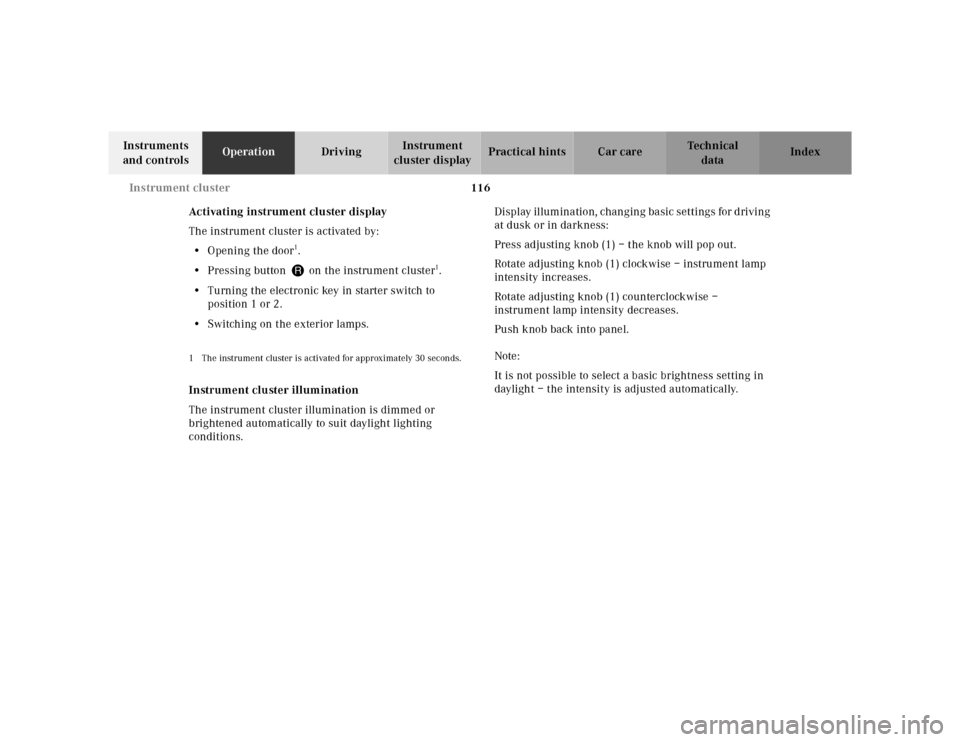
conditions.Display illumination, changing basic settings for driving
at dusk or in darkness:
Press adjusting knob (1) – the knob will pop out.
Rotate adjusting knob (1) clockwise – instrument lamp
intensity increases.
Rotate adjusting knob (1) counterclockwise –
instrument lamp intensity decreases.
Push knob back into panel.
Note:
It is not possible to select a basic brightness setting in
daylight – the intensity is adjusted automatically.
Page 144 of 421

141 Multifunction steering wheel, multifunction display
Te ch n ica l
data Instruments
and controlsOperationDrivingInstrument
cluster displayPractical hints Car care Index 1Preliminary display of the individual settings
2“SETTINGS” – the menu “INSTRUMENT CLUSTER”
can be called up in this option menu.
3Selection marker
Pressing buttonæ orç on the multifunction
steering wheel controls the selection marker.
4“TEMP. INDICATOR” – the unit set is displayed in
the outside temperature display, in the instrument
cluster and in the automatic air conditioner display.
5“DISPLAY VALUES IN” – the unit set is displayed in
the multifunction display
For setting clock, see separate COMAND
operator’s manual.
6“TEXT” – sets the language used in the
multifunction display
7Returning the setting menu “INSTRUMENT
CLUSTER” to the factory setting.
8Acknowledgment
Press the è or ÿ button repeatedly until the
individual setting preliminary display (1) appears.
Press the j or k button until the setting menu
“SETTINGS” (2) is displayed.Press buttonæ orç until the menu
“INSTRUMENT CLUSTER” is selected by the selection
marker (3).
Press the j or k button until the required
display (4 to 6) is displayed. Pressing the æ orç
button controls the selection marker. The settings made
are stored and applied immediately.
The individual setting preliminary display (1) will
appear again after you have run through all the setting
menus. Pressing the è or ÿ button displays the
next or previous system.
To return menu “INSTRUMENT CLUSTER” (4 to 6) to
its factory setting:
•Call up menu (4 to 6).
•Press the Jbutton in the instrument cluster for
approximately 3 seconds. Display (7) will appear.
•Press the Jbutton once more. The menu
“INSTR. CLUSTER” is reset to factory settings,
acknowledged by display (8).
The individual setting display “SETTINGS” (2) will
appear if you do not press the Jbutton within
about 5 seconds. The setting menus will not be
reset.
Page 147 of 421
144 Multifunction steering wheel, multifunction display
Te ch n ica l
data Instruments
and controlsOperationDrivingInstrument
cluster displayPractical hints Car care Index
“VEHICLE” (audio and central locking system)
R
5
Page 148 of 421

145 Multifunction steering wheel, multifunction display
Te ch n ica l
data Instruments
and controlsOperationDrivingInstrument
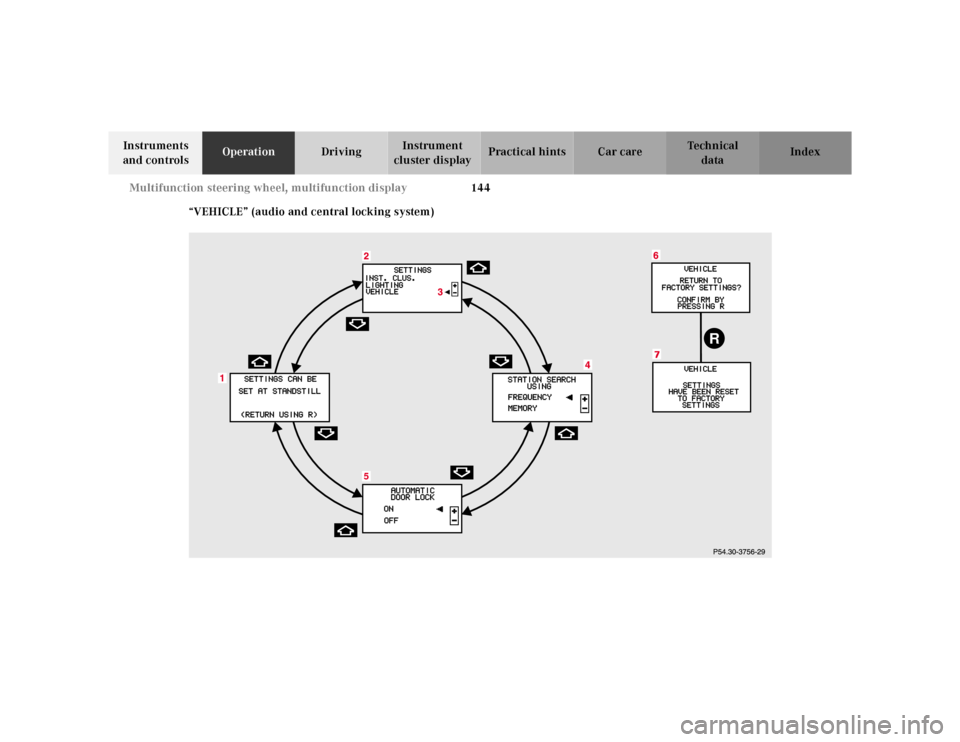
cluster displayPractical hints Car care Index 1Preliminary display of the individual settings
2“SETTINGS” – the menu “VEHICLE” can be called
up in this option menu
3Selection marker
Pressing buttonæ orç on the multifunction
steering wheel controls the selection marker.
4“STATION SEARCH USING”
– radio adjustment “FREQUENCY”: use the j
ork button to select a frequency.
– radio adjustment “MEMORY”: use the j
ork button to select a stored station (preset
memory).
5“AUTOMATIC DOOR LOCK”, see automatic central
locking on page 52.
6Returning the setting menu “VEHICLE” to the
factory setting.
7Acknowledgment
Press the è or ÿ button repeatedly until the
individual setting preliminary display (1) appears.
Press the j or k button until the setting menu
“SETTINGS” (2) is displayed.Press buttonæ orç until the menu “VEHICLE” is
selected by the selection marker (3).
Press the j or k button until the required
display (4 or 5) is displayed. Pressing the æ orç
button controls the selection marker. The settings made
are stored and applied immediately.
The individual setting preliminary display (1) will
appear again after you have run through all the setting
menus. Pressing the è or ÿ button displays the
next or previous system.
To return menu “VEHICLE” (4 and 5) to its factory
setting:
•Call up menu (4 or 5).
•Press the Jbutton in the instrument cluster for
approximately 3 seconds. Display (6) will appear.
•Press the Jbutton once more. The menu
“VEHICLE” is reset to factory settings,
acknowledged by display (7).
The individual setting display “SETTINGS” (2) will
appear if you do not press the Jbutton within
about 5 seconds. The setting menus will not be
reset.
Page 162 of 421
159 Exterior lamp switch
Te ch n ica l
data Instruments
and controlsOperationDrivingInstrument
cluster displayPractical hints Car care Index Locator lighting
After unlocking the vehicle with the electronic main key
during darkness, the fog lamps, parking lamps,
taillamps and license plate lamps switch on for a
approximately 40 seconds.
The exterior lamps will be switched off when opening
the driver’s door.
See “Individual settings” – “LIGHTING” on page 142 for
instructions on how to activate the function. Headlamp cleaning system
Turn the electronic key in starter switch to position 1
or 2.
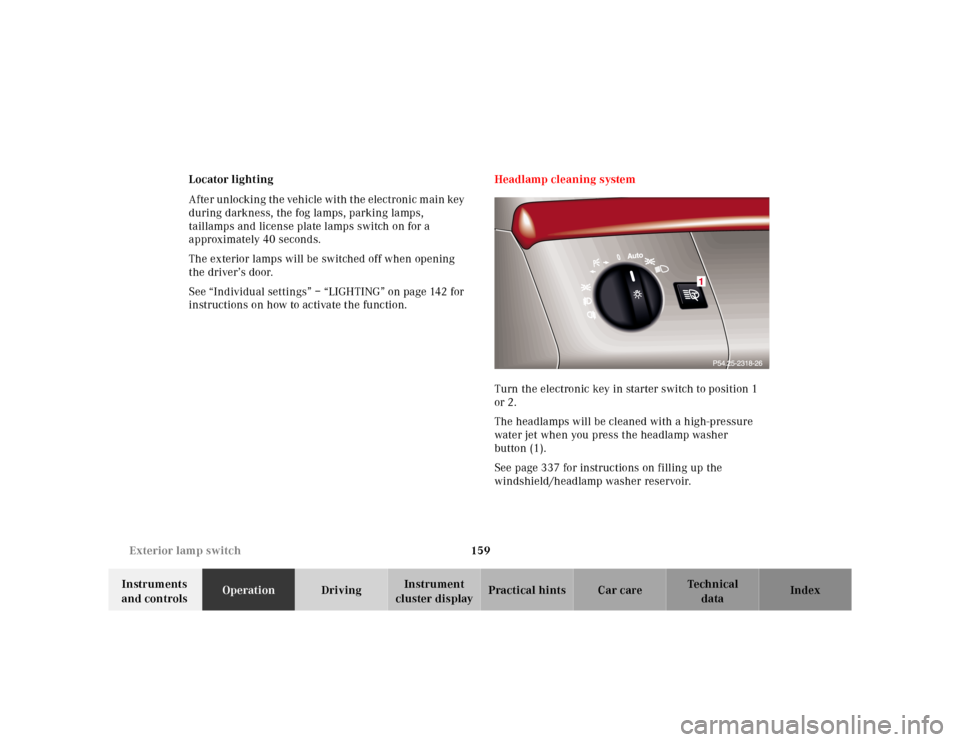
The headlamps will be cleaned with a high-pressure
water jet when you press the headlamp washer
button (1).
See page 337 for instructions on filling up the
windshield/headlamp washer reservoir.
Auto
1
Page 165 of 421
162 Combination switch
Te ch n ica l
data Instruments
and controlsOperationDrivingInstrument
cluster displayPractical hints Car care Index
Blocked windshield wipers
If the windshield wipers become blocked (for example,
due to snow), switch off the wipers.
For safety reasons before removing ice or snow, remove
electronic key from starter switch. Remove blockage.
Activate combination switch again (electronic key in
starter switch position 1).
Emergency operation of windshield wipers
In case of windshield wiper malfunction in switch
positions I or III, turn combination switch to wiper
setting II. Have the system checked at your authorized
Mercedes-Benz Center as soon as possible.Windshield wipers smear
If the windshield wipers smear the windshield, even
during rain, activate the washer system as often as
necessary. The fluid in the washer reservoir should be
mixed in the correct ratio.
See page 337 for instructions on filling up the
windshield washer reservoir.
Windshield and headlamp washer fluid mixing ratio
For temperatures above freezing:
MB Windshield Washer Concentrate “S” and water.
1 part “S” to 100 parts water
(40 ml “S” to 1 gallon water).
For temperature below freezing:
MB Windshield Washer Concentrate “S” and
commercially available premixed windshield washer
solvent / antifreeze.
1 part “S” to 100 parts solvent
(40 ml “S” to 1 gallon solvent).
Page 185 of 421
182 Interior equipment
Te ch n ica l
data Instruments
and controlsOperationDrivingInstrument
cluster displayPractical hints Car care Index
Express opening and closing of windows
Press k or j on the switch past resistance point
and release – window opens or closes completely.
To interrupt procedure, briefly press j or k.
If the upward movement of the window is blocked
during the closing procedure, the window will stop
during the last few inches before closure and open
slightly.
When pressing and holding the switch j to close the
window, and upward movement of the window is
blocked during the last few inches before closure, it will
stop but not
open slightly.
Note:
The power windows can also be opened and closed
using the convenience opening / closing function, see
page 45.
Wa r n i n g !
When closing the windows, be sure that there is no
danger of anyone being harmed by the closing
procedure.In case of obstruction, the automatic reversal will
not operate if a window is being closed by pressing
the switch to its resistance point and holding it
there, or when using a mechanical key or the
electronic key.The closing procedure of door windows can be
immediately reversed by either pressing the switch
or pressing buttonŒon the electronic main key
and holding it, or (vehicle with KEYLESS-GO) when
carrying the KEYLESS-GO-card, pull and hold a
door handle.When leaving the vehicle, always remove the
electronic key from starter switch, take the
KEYLESS-GO-card (if so equipped) with you, and
lock your vehicle. Do not leave children unattended
in the vehicle, or with access to an unlocked
vehicle. Unsupervised use of vehicle equipment
can cause serious personal injury.
Page 186 of 421

183 Interior equipment
Te ch n ica l
data Instruments
and controlsOperationDrivingInstrument
cluster displayPractical hints Car care Index Blocking of rear door window operation
If no operation of the rear windows by switch (for
instance by children) is desired, slide override
switch (3) to the right; the N symbol becomes
visible.
Operation of the rear windows with the switches located
in the driver’s door is still possible.Synchronizing power windows
If the power supply was interrupted, (battery
disconnected or low), the windows cannot be opened or
closed by the express feature.
To resynchronize the express feature, press j side of
power window switch until the window is completely
closed and hold down for approximately 1 second.
Repeat procedure for each window.
The automatic full opening and closing procedure of the
windows should now be restored.
Page 187 of 421
184 Interior equipment
Te ch n ica l
data Instruments
and controlsOperationDrivingInstrument
cluster displayPractical hints Car care Index
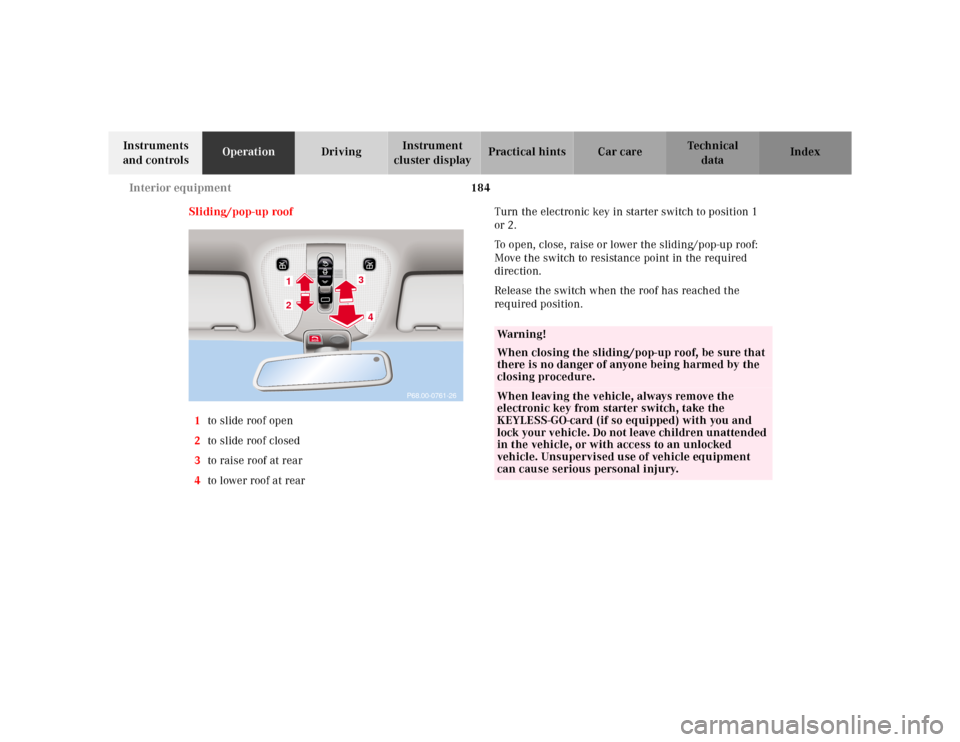
Sliding/pop-up roof
1to slide roof open
2to slide roof closed
3to raise roof at rear
4to lower roof at rearTurn the electronic key in starter switch to position 1
or 2.
To open, close, raise or lower the sliding/pop-up roof:
Move the switch to resistance point in the required
direction.
Release the switch when the roof has reached the
required position.
P68.00-0761-26
34
12
Wa r n i n g !
When closing the sliding/pop-up roof, be sure that
there is no danger of anyone being harmed by the
closing procedure.When leaving the vehicle, always remove the
electronic key from starter switch, take the
KEYLESS-GO-card (if so equipped) with you and
lock your vehicle. Do not leave children unattended
in the vehicle, or with access to an unlocked
vehicle. Unsupervised use of vehicle equipment
can cause serious personal injury.
Page 188 of 421
185 Interior equipment
Te ch n ica l
data Instruments
and controlsOperationDrivingInstrument
cluster displayPractical hints Car care Index Opening the sliding / pop-up roof automatically
To select a sunroof opening position, press the switch to
resistance point and release it when the sunroof has
reached the required position.
The sliding / pop-up roof now opens to the position set if
the switch is pressed past resistance point in the “open”
direction.
If you wish to change the opening position of the
sunroof, move the switch to resistance point in the
direction you require.
Stopping the sliding / pop-up roof:
Move the switch in any direction.
If the movement of the sliding / pop-up roof is blocked
during the closing procedure, the sunroof will stop and
reopen slightly.
Note:
Opening the sliding / pop-up roof automatically almost
fully (less approximately 1 inch [3 cm]), the sunroof
must have been opened first by pressing the switch to
resistance point and releasing it when the sunroof has
reached an almost fully open position.
Wa r n i n g !
When closing the sliding / pop-up roof, be sure that
there is no danger of anyone being harmed by the
closing procedure.In case of obstruction, the automatic reversal will
not operate if the sliding/pop-up roof is being
closed by moving the switch to its resistance point
and holding it there, or when using the electronic
main key or the lock button at each door handle
(vehicles with KEYLESS-GO).The closing procedure of the sliding / pop-up roof
can be immediately reversed by either moving the
switch in any direction, or pressing buttonŒon
the electronic main key and holding it; or (vehicles
with KEYLESS-GO) when carrying the KEYLESS-
GO-card, pull and hold a door handle.When leaving the vehicle, always remove the
electronic key from starter switch and take the
KEYLESS-GO-card (if so equipped) with you, and
lock your vehicle. Do not leave children unattended
in the vehicle, or with access to an unlocked
vehicle. Unsupervised use of vehicle equipment
can cause serious personal injury.