telephone MERCEDES-BENZ E-Class 2012 W212 Comand Manual
[x] Cancel search | Manufacturer: MERCEDES-BENZ, Model Year: 2012, Model line: E-Class, Model: MERCEDES-BENZ E-Class 2012 W212Pages: 234, PDF Size: 6.74 MB
Page 110 of 234
X
Sel ect SIRIUS Service and
pressW to
confi rm.
The window onthe right halfof the displ ay
sho wsthe telephone numb erofthe
pro vider(SIR IUSXM) andtheserialnumb er
of your ser vice module for rece iving traf fic
mes sages .
Reg isteri ngfor the SIRIU SXM traffic
repo rtse rvic e X
Ca llthe trafficrep ort provider'spho ne
numb ersho wnonthe scre en.
i Youcan also have the satel lite ser vice
acti vate donl ine.Todo so, visit theSIRIUS
XM Radio website at
htt <0010002C00210021001700170017002000130009001200090015001300200003
000F000DH (USA)or
htt <0010002C00210021001700170017002000130009001200090015001300030001
000E000100040001H .com
(Canada) .
Once theconn ection hasbeen established:
X Follow theinstr uctions ofthe operator.
The activation processmaytake uptoten
minutes.
If registrat ionisnot included when
purchasing thesystem, yourcredit card
details willberequired toactivate your
account . Compass
function
In the compass view,youcan seethecurrent
direction oftravel, thecurrent heightabove
sea level andthecoordinat esofthe vehicle
position, forexample.
X To switch onnavigation mode:pressthe
Ø functionbutton .
X To show themenu: pressWthe COMAND
cont roller.
X Select Pos. in
the navigation systemmenu
bar bysliding VÆandturnin gcVd the
COMAND controller andpress Wto
conf irm.
X Select Compass and
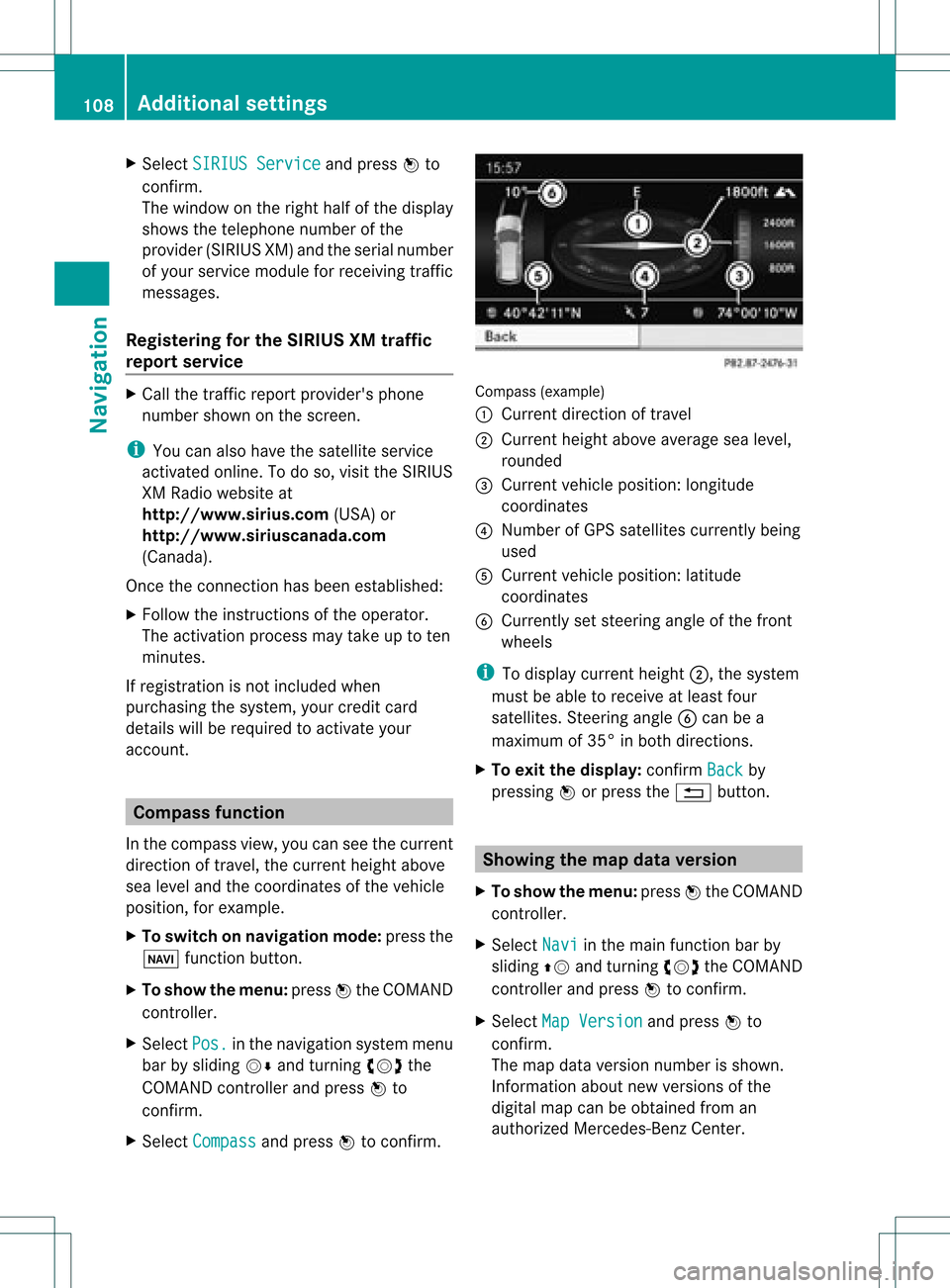
press Wtoconf irm. Compass
(example)
: Current direction oftravel
; Current heightaboveaverage sealevel,
rounded
= Current vehicleposition: longitude
coordinat es
? Number ofGPS satellites currentlybeing
used
A Current vehicleposition: latitude
coordinat es
B Currently setsteerin gangle ofthe front
wheels
i Todisplay current height;,thesystem
must beable toreceive atleast four
satellites. Steeringangle Bcan bea
maximum of35° inboth direction s.
X To exit thedisplay: confirmBack by
pressing Worpress the% button . Showing
themap dataversion
X To show themenu: pressWthe COMAND
cont roller.
X Select Navi in
the main functionbar by
sliding ZVandturnin gcVd theCOMAND
cont roller andpress Wtoconf irm.
X Select MapVersion and
press Wto
conf irm.
The map data version number isshown.
Infor mation aboutnewversions ofthe
digital mapcanbeobtained froman
authorized Mercedes-B enzCenter. 108
Additional
settingsNavigation
Page 115 of 234
COMAN
Dfea tures ........ .......... ........... 114
Gener alinfor mation <0021002100210021002100210021002100210021002100210021002100210021
002100210021002100210021002100210021V 114
Telephony viathe Bluet ooth®
inter-
face <0021002100210021002100210021002100210021002100210021002100210021
0021002100210021002100210021002100210021002100210021002100210021
0021002100210021002100210021002100210021002100210021002100210021
0021002100210021V 115
Reception andtransm ission volume 120
Telephone operation........ .......... ....... 120
Using thephone book<0021002100210021002100210021002100210021002100210021002100210021
002100210021002100210021V 125
Using calllists .................. ................. 129
Using thespeed diallist........ .......... . 131
Text message (SMS)<0021002100210021002100210021002100210021002100210021002100210021
002100210021002100210021002100210021V 133
Using theaddress book <0021002100210021002100210021002100210021002100210021002100210021
002100210021V 135 113Telephone
Page 116 of 234
COMAN
Dfea tures
Thes eOper atingIn st ruc tions desc ribeall
st andar dand optionalequipm enta vail able
for you rCOMAND systematthe time of
purcha se.Cou ntry-specifi cdeviation sare
possible. Pleasenotethat your COMAND
system maynotbeequipped withallthe
features described. General
information Introd
uction
COMAND offerstelephon yvia the
Bluetoot h®
int erface.
When connectingaBluetoot h®
-c apable
mobile phonewithPBAP(Phone BookAccess
Profile), contact sare automatic ally
downloaded toCOMAND .
With asuitable mobilephone, youcan usethe
hands- freesystem andreceive vCardsviathe
Bluetoot h®
int erface.
You canusethetextm essage (SMS)func tion
(receivin gand reading) ifthe mobile phone
supports theMAP (Message Access Profile)
Bluetoot h®
profile.
More detailed information onsuitable mobile
phones andoncon nectingwith Bluetoot h®
-
capable mobilephones withCOMAND canbe
found onthe Internet at
htt p://ww w.mbu sa-mobile.com. Orcall
the Mercedes- BenzCustome rAssistance
Center on
1-80 0-FOR-ME RCedes(1-800- 367-6372) for
the USA oron 1-80 0-387-0100for Canada . Safety
notes G
WARNING
A driver's attentiontothe road must always
be his/her primary focuswhendriving. For
your safety andthesafety ofothers, we
recommend thatyoupull over toasafe
location andstop before placing ortaking a telephone
call.Ifyou choose touse themobile
phone whiledriving, pleaseusethehandsfree
device andonly usethemobile phonewhen
weather, road,andtraffic conditions permit.
Some jurisdictions prohibitthedriver from
using acellula rmobile phone whiledriving a
vehicle.
Bear inmind thatataspeed ofjust 30mph
(approximately 50km/ h),your vehicle is
coverin gadistance of44 feet (approximately
14 m)every second. G
WARNING
Exc essive electrom agneticradiation may
const ituteahealth hazard toyourself and
others.
There isscient ificdiscussion surrounding the
possible healthrisksposed by
electrom agneticfields.Youcanreduce this
risk byusing anexter ioraerial.
Therefore, onlyusemobile communic ation
equipment ifit is conn ected tothe exter ior
aerial ofthe vehicle. Call
disconnec tionwhile thevehicle is
in motion
Ac allmay bedisc onnected if:
R there isins ufficie ntnetwo rkcover age in
cer tain areas .
R you mov efrom onetrans mitter/ rec eive r
area (cell)int oano ther and nochann elsare
fr ee.
R you useaSI M car dwhic his no tcompatible
with thenetwork available. Operat
ingoptions
You canoperate thetelephone by:
R using theCOMAND controller:
turn cVd.
slide XVY orZVÆ. 114
General
informationTelephone
Page 117 of 234
press
W.
R pressin gthe 6 or~ buttonand
using thetelephon ekeypad onCOMAND
R pressin gthe 6 or~ buttonon the
multifun ction steer ingwheel
R using theVoice Control(see theseparate
Voice Controloperatin ginst ruct ions)
Unless statedother wise, thedescript ionsand
illustration sin this sect ionrefer toCOMAND . Function
restrictions
The telephon eis not ready foruse inthe
following situations:
R the telephon eautomatic allytries tolog on
to anet work. Ifno net work isavailable, you
may notbeable tomake a"911"
emergen cycall. Ifyou attempt tomake an
outgoin gcall, theNo Servic
e message
will
appear forashort while. 911
emergency call G
WARN
ING
The 911 emergen cycall system isapublic
servic e.Using itwithout duecause isa
crimin aloffen se.
The following requiremen tsmust befulfilled
for a911 emergen cycall:
R the mobile phonemustbeswitc hedon.
R anet work must beavailable.
R avalid andoperation alSIM card must be
insert edinthe mobile phone.
R the mobile phoneiscon nected toCOMAND
via Bluetoot h®
.
If you cann otmake anemergen cycall, you
must arrange rescuemeasures yourself.
X En ter numbers onCOMAND (Ypage 121).
X Press the6 button.
The telephon emakes theconnection .
X Wait forthe emergen cycall centerto
respon dand then describe theemergen cy. Teleph
onyviathe Bluet ooth®
inter face Conditions
On the mobile phone For
telephon yvia COMAND 'sBluetoot h®
int erface, aBluetoot h®
-c apable mobile
phone isrequired.
i Not allmobile phones available onthe
mark etare equally suitable. Moredetailed
infor mation onsuitable mobilephones and
on con nectingBluetoot h®
-c apable mobile
phones withCOMAND canbefound onthe
Int ernet at
htt p://www .mbusa- mobile.com.
Alt ernat ively, calltheMercede s-Benz
Customer AssistanceCente rat
1-800-FOR-MERC edes(1-800-367-6372)
(for USA) orCu stomer Relatio nsat
1-800-387-0100 (forCanada ).
The battery ofthe mobi lephone should
al wa ysbe kept sufficiently chargedinorde r
to preve ntmal functions.
In prep aration fortelep honing viathe
Blue tooth ®
interfa ce,you shou ldcheck the
foll owi ngitems onyou rmobile phone (seethe
mobile phoneoperating instructions):
R Hands- FreeProfile
The mobile phonemustsupport Hands-
Free Profile 1.0orabove.
R Bluetooth ®
visibility
On cert ainmobile phones, thedevice itself
must bemade "visible" toother devices, as
well asactivatin gthe Bluetooth ®
funct ion
(see themobile phoneoperating
instr uctions).
R Bluetooth ®
device name
Every Bluetooth ®
device hasitsown
Bluetooth ®
device name.Thisdevice name
is freely definable, butcan beidentical for
all devices fromthesame manufacturer .It
is therefor erecomm endedthatyouchange
this name sothat youcan easily recogn ize Telephony
viathe Bluetooth ®
interfa ce115Telephone Z
Page 118 of 234

your
mobilepho ne(seeth emob ilepho ne
ope rating inst ruc tion s).
i Some disp lays (e.g.thesig nal stren gth)
depe ndonthesupp ortedver siono fthe
Hands-F reeProfile.
X Switch onthe mobile phoneandenter the
PIN when prompted todo so(see the
mobile phoneoperating instructions).
X Act ivate Bluetooth ®
funct ionsand, where
necessary, Bluetooth®
visibili tyon the
mobile phone(seethemobile phone
operating instructions).
On COMAND X
Act ivate theBluetooth ®
funct ionin
COMAND (Ypage 45). Conne
ctingamobile phone
Gener alinfor mation Bef
ore usin gyour mobilephon ewith
COMA NDforthefir st tim e,you willneedto
con nectit.
When youauth orizeanew mobi lephon e,itis
con nectedautom atically.
Conn ecting com prises:
R sear ching for aBluet ooth®
-c apable mobile
phon e
R subse quentlyauth orizing it
You canconnectupto 15 mobile phones.
If the mobile phonesupports thePBA P
(Phon eBook Access Profile) andMAP
(Message Access Profile) profiles, the
following contact sand messages are
downloaded intoCOMAND whenconnecting:
R phone book
R call lists
R tex tm essages
Inf ormat iononboth profiles canbefound in
the "General notes" sect ion(Ypage 114). Searching
foram obile phone X
Pres sth e% function butt onon
COMA ND.
X Sele ctPho ne in
thete lepho nebasic menu
by slidin gVÆ andturnin gcVd the
COMA NDcontroller andpres sW to
con firm.
X Sele ctBlu etooth Pho
nes and
pres sW to
con firm.
X Sele ctUpd ate and
pres sW tocon firm.
COMA NDsear chesfor Bluet ooth®
te lepho neswith inran geand adds them to
th eBluet ooth®
telepho nelist.
The durat ionofthesear chdepen dson the
num berofBluet ooth®
telepho neswith in
ran geand their char acteris tics. Ex
ample: Bluetooth®
phon elist
: Curre ntly con nected# and auth orized
mobi lephon eY
; Mobile phoneno tw ithin rangebut
pre viously authorized(L appear sin gray)
= Mobi lephon ein ran geand auth orized
(L appear sin blac k)
? Newly detectedmob ilephon ewit hin
ran gebut notyet authoriz ed(no Y icon
yet)
The Bluetoot h®
telephon elist shows all
mobile phones withinrangeandallpreviously
authoriz edmobile phones, whether ornot
they areinrange.
i Ifthe Bluetoot h®
telephon elist isalready
full, youwillberequested tode-author izea 116
Telephony viatheBluet ooth®
interf aceTelephone
Page 119 of 234
mobil
ephone (Ypag e119). IfCOMAND
does notfind yourmobile phone, external
authorization (Ypage 118)maybe
necessary.
i Ifyou callupthe telephone listagain, the
unauthorized devicesareremoved fromthe
list. Inthis case, startanew search to
update theBluetooth ®
telephone list.
Authoriz ing(registering) amobile
ph one Opt
ion1:usin gth epa sskey (access code)
X In theBluet ooth®
te lepho neslist,selec tthe
not yetauthorized mobilephonebyturning
cVd theCOMAND controller.
X Select thelistsymbol tothe right ofthe
entr yby sliding VYtheCOMAND
cont roller andpress Wtoconfirm .
X Select Authorize and
press Wtoconfirm .
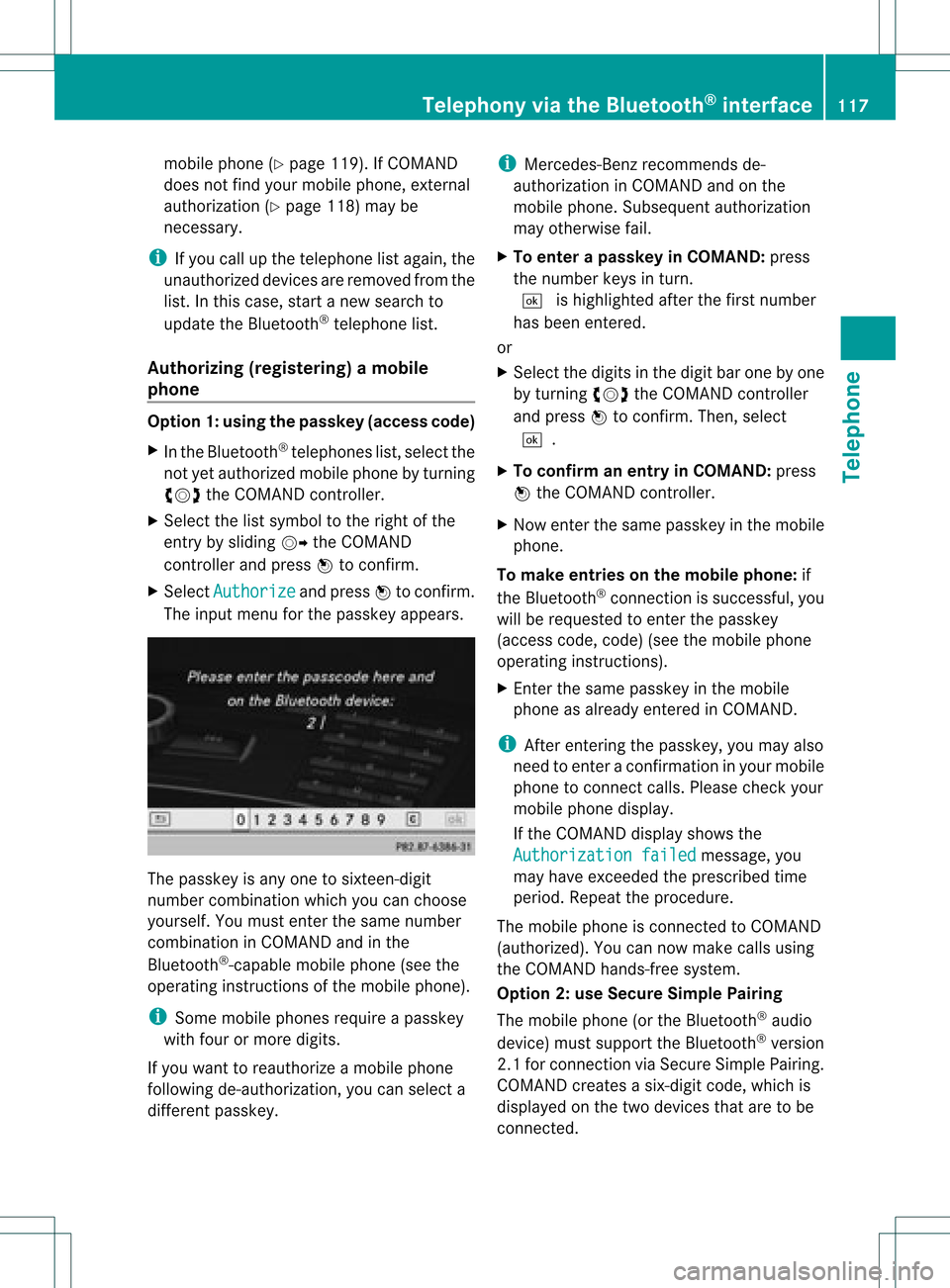
The input menu forthe passkey appears. The
passkey isany one tosixteen- digit
number combination whichyoucan choose
yourself. Youmust enter thesame number
combination inCOMAND andinthe
Bluetooth ®
-capable mobilephone(seethe
operating instructionsofthe mobile phone).
i Some mobile phones requireapasskey
with fourormore digits.
If you want toreauthorize amobile phone
following <0004000500250001001500140008000F00120009001C000100140009000F000E
0032V youcan select a
different passkey. i
Mercedes-Ben zrecomm endsde-
authoriz ationinCOMAND andonthe
mobile phone. Subsequent authorization
may other wisefail.
X To enter apassk eyinCOMAND: press
the number keysinturn .
¬ ishighlighted afterthefirst number
has been entered.
or
X Select thedigits inthe digit barone byone
by turn ingcVd theCOMAND controller
and press Wtocon firm. Then, select
¬.
X To confirm anentry inCOMAND: press
W the COMAND controller.
X Now enterthe same passkey inthe mobile
phone.
To mak eentries onthe mobile phone:if
the Bluetoot h®
con nection issuccess ful,you
will berequested toent erthe passkey
(access code,code) (seethemobile phone
operatin ginst ruct ions).
X En ter the same passkey inthe mobile
phone asalready entered inCOMAND .
i Afterent ering thepasskey, youmay also
need toent eracon firmat ioninyour mobile
phone tocon nectcalls. Pleas ech eck your
mob ilephon edispl ay.
If th eCOMA NDdispl aysho wsthe
Aut horizationfai led mes
sage, you
may have excee ded thepres cribed time
peri od.Repeat thepro ced ure.
The mob ilephon eis co nn ect edtoCOMA ND
(auth orized). Youcannowm ake calls using
th eCOMA NDhands-free syst em.
Opt ion 2:use Secur eSim plePairing
The mob ilephon e(or theBlue toot h®
audio
devi ce)must suppo rttheBlue tooth®
ver sion
2. 1f or conn ection viaSecure SimplePairing.
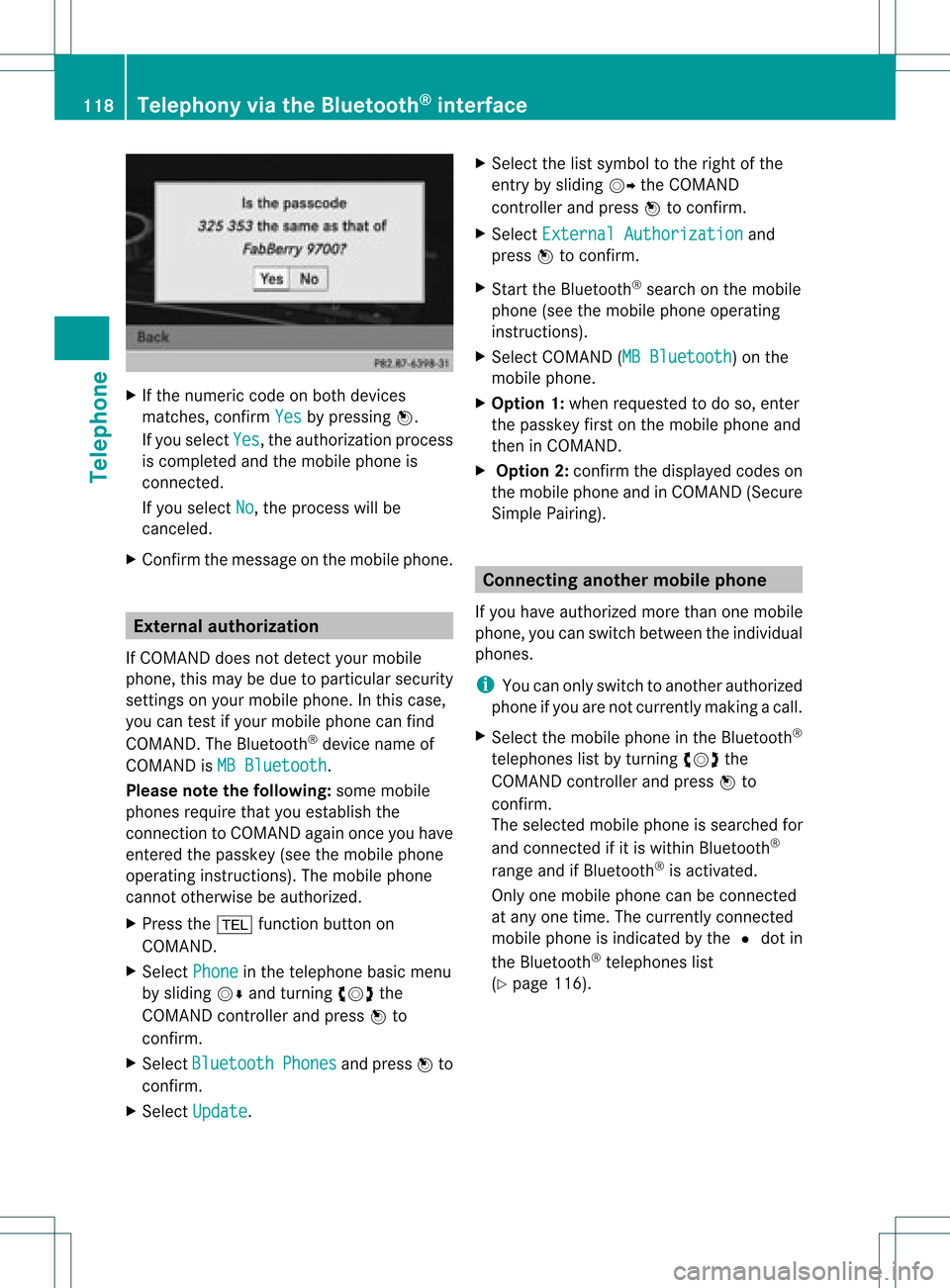
COMAND createsasix-digit code,which is
display edon the two devices thataretobe
conn ected. Telephony
viathe Bluetooth ®
interfa ce117Telephone Z
Page 120 of 234
X
Ifthe numeric codeonboth devices
matches, confirmYes by
pressi ngW.
If you select Yes ,
the authori zationprocess
is completed andthemobil ephone is
connect ed.
If you select No ,
the process willbe
canceled.
X Confirm themessag eon the mobil ephone. External
authorization
If COMAND doesnotdetect yourmobile
phone, thismay bedue toparticular security
sett ings onyour mobile phone. Inthis case,
you can test ifyour mobile phonecanfind
COMAND. TheBluetooth ®
device nameof
COMAND isMB Bluetooth .
Please notethefollowi ng:some mobile
phones requirethatyouestablish the
conn ection toCOMAND againonceyouhave
enter edthe passkey (seethemobile phone
operating instructions). Themobile phone
cann ototherwise beauthorized.
X Press the% functionbutton on
COMAND.
X Select Phone in
the telephone basicmenu
by sliding VÆandturnin gcVd the
COMAND controller andpress Wto
conf irm.
X Select Bluetooth Phones and
press Wto
conf irm.
X Select Update .X
Select thelistsymbol tothe right ofthe
entr yby sliding VYtheCOMAND
cont roller andpress Wtoconf irm.
X Select External Authorizatio n and
press Wtoconf irm.
X Start theBluetooth ®
search onthe mobile
phone (seethemobile phoneoperating
instr uctions).
X Select COMAND (MBBluetooth )
on the
mobile phone.
X Option 1:when requested todo so, enter
the passkey firstonthe mobile phoneand
then inCOMAND.
X Option 2:conf irmthedisplay edcodes on
the mobile phoneandinCOMAND (Secure
Simple Pairing). Connec
tinganother mobilephone
If you have authorized morethanonemobile
phone, youcan switch between theindividual
phones.
i You canonly switch toanother authorized
phone ifyou arenot current lymaking acall.
X Select themobile phoneinthe Bluetooth ®
telephones listbyturnin gcVd the
COMAND controller andpress Wto
conf irm.
The selected mobilephoneissearched for
and conn ected ifit is within Bluetooth ®
range andifBluetooth ®
is activated.
Only onemobile phonecanbeconn ected
at any one time. Thecurrent lyconn ected
mobile phoneisindicated bythe #dot in
the Bluetooth ®
telephones list
(Y page 116). 118
Telephony viathe Bluetooth ®
interfa ceTelephone
Page 121 of 234
Disp
laying details
X Press the% function buttonon
COM AND.
X Se lec tPho ne in
thete leph onebasi cmenu
by sliding VÆandturningcVd the
COMAND controller andpress Wto
con firm.
X Select Bluetoo th Phones and
press Wto
con firm.
X Select thedesired mobilephoneinthe
Bluetoot h®
telephon eslist.
X Select thelistsymbol tothe right ofthe
ent ryby sliding VYtheCOMAND
con troller andpress Wtocon firm.
X Select Details and
press Wtocon firm.
The following information concern ingthe
select edmobile phoneisshown:
R Bluetoot h®
name
R Bluetoot h®
address
R availabili tystat us(shown afteranew
search)
R authoriz ationstatus
X To close thedeta iledview: turncVd or
slide XVY theCOMAND controller. De-register
ing(de-au thorizing) a
mobile phone
i Mercedes- BenzUSA,LLC recom mends
de-author izationonboth COMAND andon
the mobile phone. Subsequent
authoriz ationmayother wisefail.
X Press the% function button on
COMAND .
X Select Phone in
the telephon ebasic menu
by sliding VÆandturningcVd the
COMAND controller andpress Wto
con firm.
X Select Bluetoo th Phones and
press Wto
con firm.
X Select thedesired mobilephoneinthe
Bluetoot h®
telephon eslist. X
Select thelistsymbol tothe right ofthe
ent ryby sliding VYtheCOMAND
con troller andpress Wtocon firm.
X Select Delete and
press Wtocon firm.
Ap rompt appears asking whethe ryou
really wishtode-authorize thisdevice.
X Select Yes or
No .
If you select Yes ,
the device willbedeleted
from theBluetooth ®
telephones list.
If you select No ,
the process willbe
canceled.
i Before re-authoriz ingthe mobile phone,
you should alsodelete thedevice nameMB Bluetooth from
yourmobile phone's
Bluetooth ®
list. Telephone
basicmenu (Bluetooth ®
interfa ce)
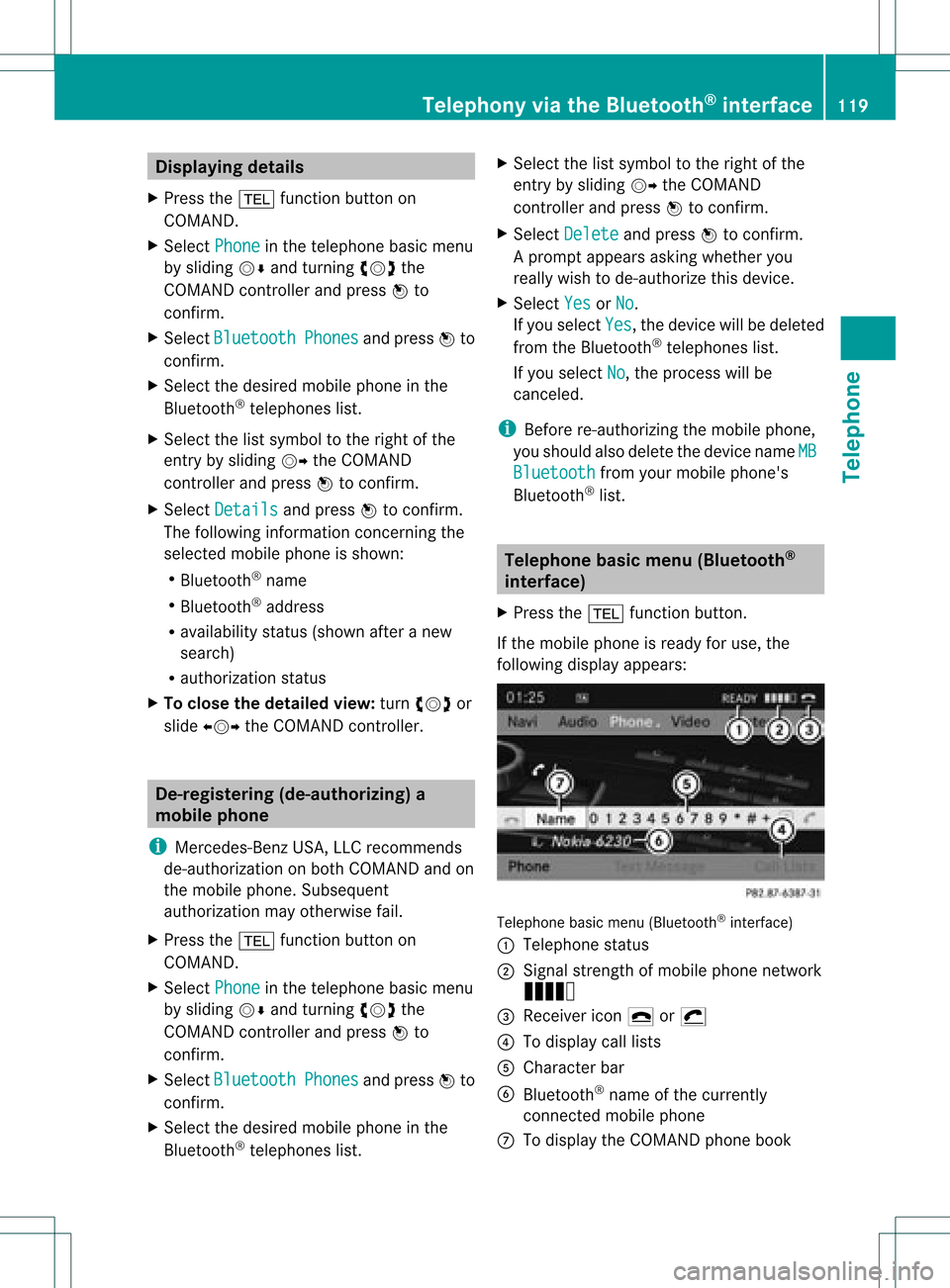
X Press the% functionbutton .
If the mobile phoneisready foruse, the
following displayappears: Telephone
basicmenu (Bluetooth ®
interf ace)
: Telephone status
; Signal strengthofmobile phonenetwork
Ä
= Receiver icon¢or¡
? Todisplay calllists
A Character bar
B Bluetooth ®
name ofthe current ly
conn ected mobile phone
C Todisplay theCOMAND phonebook Telephony
viathe Bluetooth ®
interfa ce119Telephone Z
Page 122 of 234
i
Display ; mayva ry,de pendi ng on the
mob ile ph one conne cted.
Bar s: disp laythe current signa lstre ngth
of the mob ile ph one netw ork.Ifallba rsare
fil led, youha ve optim um receptio n.
If no bars aresho wn, receptio niseither
very poor orthere isnone atall.
Receiver icon=shows whether acall is
active/being connected ¡ornot ¢. Text
message (SMS)display in
telephone basicmenu
The Text Message menu
itemisavail able if
the Bluetooth ®
telephone supportstheMAP
Bluetooth ®
profile (Message AccessProfile)
and thetext message hasbeen download ed
from theBluetooth ®
telephone. Themenu
item isotherwise grayedoutand isnot
avail able.
The 1mail icon isdispla yedwhen youhave
an unread textmessage. Thesymbol
disapp earsonce youhave readthetext
message. Theú mailsymbol isdispla yed
when thetext message memoryisfull. The
symbol disappearsonce youdelete atleast
one text message.
Further information canbefound inthe "Text
messages (SMS)"section (Ypage 133). Reception
andtransmission volume
Once themobile phonehasbeen authorized,
you can optimize thetransmission and
reception volumesettings. Findinformation
on the optimal settingforyour mobile phone
on the Intern etat
htt p://www .mbusa-mobile.com. Orcall
the Mercedes-Benz CustomerAssistance
Center at1-80 0-FOR-ME RCedes
(1-800 -367-6372)(for theUSA) orCustomer
Rela tions at1-80 0-387-01 00(for Canada ).
i Incorr ectsettings mayhave asignificant
impact onthe qual ityofcalls. X
Press the% function button.
X Select Phone in
the telephone basicmenu
by turning cVdtheCOMAND controller
and press Wtoconfirm.
X Select Bluetooth Phones and
press Wto
confirm.
X Select anauthorized mobilephonefrom
the listbyturning cVd.
X Select thelistsymbol tothe right ofthe
entry bysliding VYtheCOMAND
cont roller andpress Wtoconfirm.
X Select Reception Volume or
Transmission Volume and
press Wto
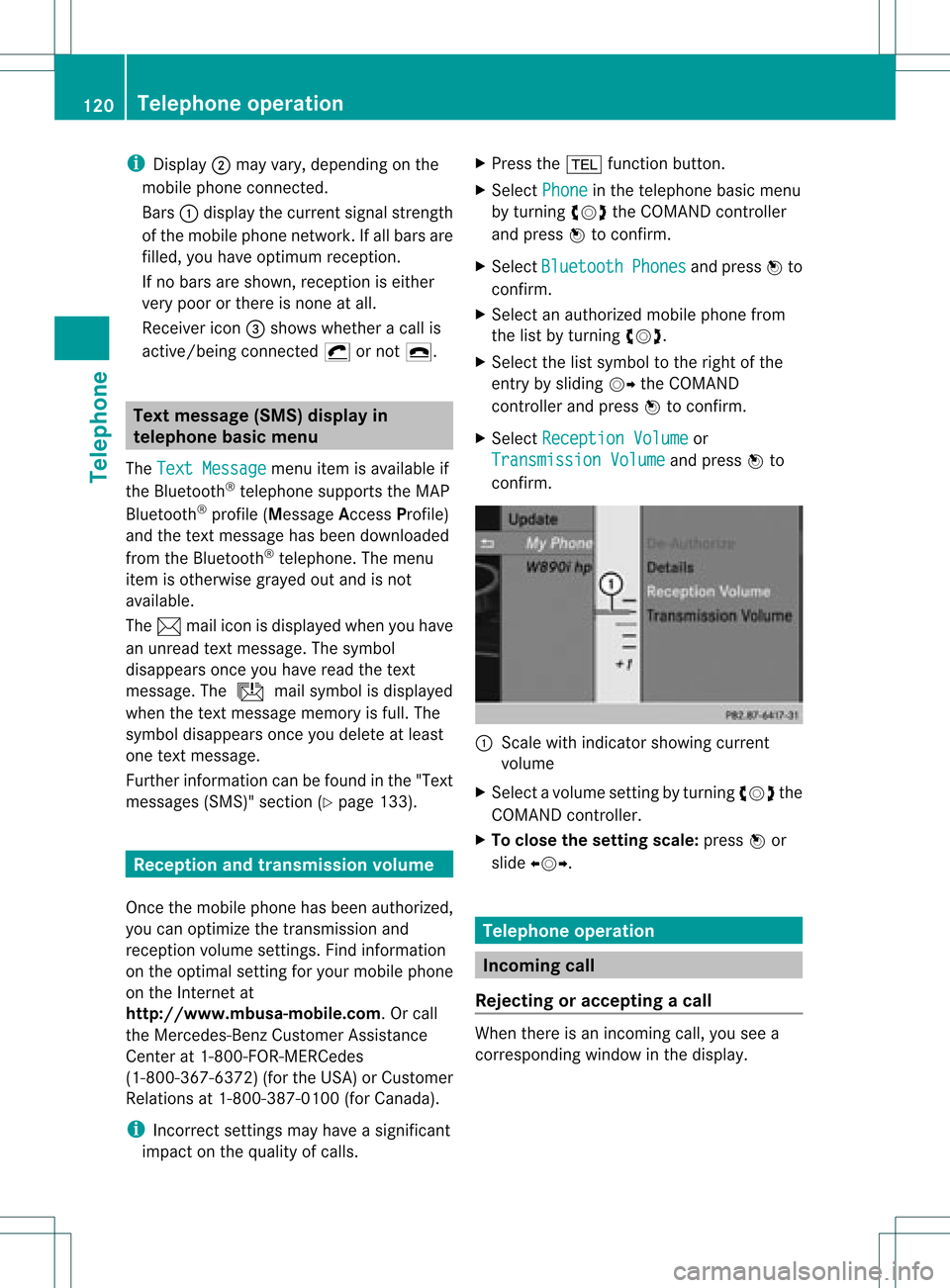
confirm. :
Scale withindicator showingcurrent
volume
X Select avolume settingbyturning cVdthe
COMAND controller.
X To clos ethe setting scale:pressWor
slide XVY. Telephone
operation Inco
ming call
Rejecting oraccepting acall When
thereisan incomi ngcall ,you seea
corresp ondingwindow inthe displa y. 120
Tele
phone operationTele phone
Page 123 of 234
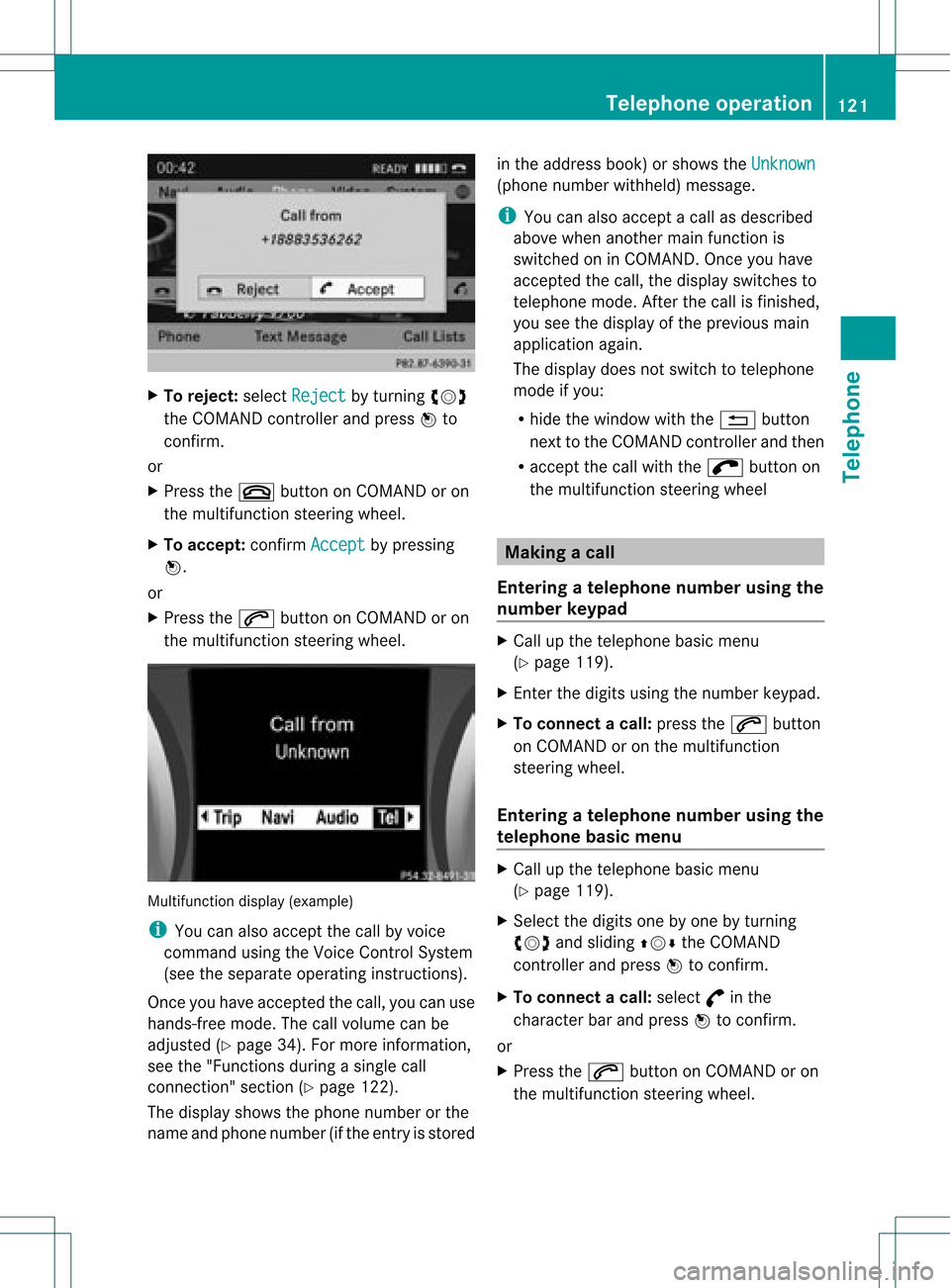
X
To reje ct:select Reject by
turning cVd
the COMAND controller and pressW to
confi rm.
or
X Pre ssthe ~ button onCOMAND oron
the multifu nctio nstee ring wheel.
X To acce pt: conf irm Acc ept by
pre ssing
W.
or
X Pre ssthe 6 button onCOMAND oron
the multifu nctio nstee ring wheel. Mu
ltifu ncti ondisp lay(e xam ple)
i Youcan also acc eptthe call byvoice
command usingtheVoice Control System
(see theseparate operating instructions).
Once youhave accepted thecall, youcan use
hands-free mode.Thecallvolume canbe
adjusted (Ypage 34).Formore information ,
see the"Function sduring asingle call
conn ection" section (Ypage 122).
The displa yshows thephone number orthe
name andphone number (ifthe entr yis stored in
the address book)orshows theUnknown (phone
number withheld) message.
i You canalso accept acall asdescribed
above whenanother mainfunctionis
switched oninCOMAND. Onceyouhave
accepted thecall, thedispla yswitches to
telephone mode.Afterthe call isfinished,
you seethedispla yof the previous main
appli cation again.
The displa ydoes notswitch totelephone
mode ifyou:
R hide thewindow withthe% button
next tothe COMAND controller andthen
R accept thecall with the; button on
the multifunction steeringwheel Making
acall
Entering ateleph onenum berusin gth e
num berkeyp ad X
Call upthete lepho nebasic menu
(Y page 119).
X En tert he digits usingthenumber keypad.
X To conne ctac all: press the6 button
on COM AND oron the multifunctio n
steeri ngwhe el.
Ente ring ateleph onenum berusin gth e
telep hone basicmen u X
Call upthete lepho nebasic menu
(Y page 119).
X Sele ctthedigit son eby oneby turnin g
cVd andslidin gZVÆ theCOMA ND
con troller andpres sW tocon firm.
X To connect acall: select °inthe
chara cterbarand press Wtoconfirm.
or
X Press the6 button onCOM AND oron
the multifunctio nstee ring wheel. Tel
eph oneope ratio n
121Tel eph one Z