wheel MERCEDES-BENZ E CLASS 2020 Workshop Manual
[x] Cancel search | Manufacturer: MERCEDES-BENZ, Model Year: 2020, Model line: E CLASS, Model: MERCEDES-BENZ E CLASS 2020Pages: 550, PDF Size: 20.08 MB
Page 228 of 550
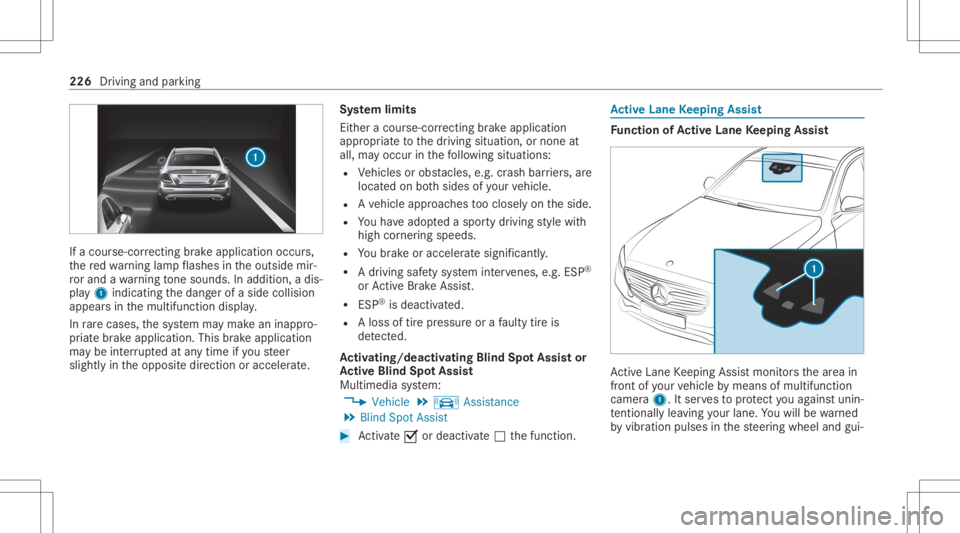
If
acour se-cor recting brak eap plica tion occu rs,
th ere dwa rning lam pflashes intheoutside mir‐
ro rand awa rning tone sou nds. Inadditio n,adi s‐
pl ay 1 indic atingth edang erofaside collision
appear sin themultifunc tiondispla y.
In rare case s,thesy stem maymak ean inappr o‐
pr iat ebr ak eapplication. Thisbrak eapplication
ma ybe interru pte dat anytime ifyo usteer
slightl yin theopposit edir ect ion oraccelera te. Sy
stem limit s
Eit her acour se-cor recting brak eap plica tion
ap propr iate to thedr iving situation ,or non eat
all, mayoccur inthefo llo wing situat ions:
R Vehicles orobs tacle s,e.g. crash barrier s,are
locat edon both sides ofyour vehicle.
R Ave hicle approaches tooclosely ontheside.
R Youha ve adop tedaspor tydriving style wit h
high corner ing speeds.
R Youbr ak eor acc elerat esign ifican tly.
R Adr ivi ng safety system interve nes, e.g.ESP ®
or ActiveBr ak eAssi st.
R ESP ®
is de acti vated.
R Aloss oftirepr essur eor afa ulty tireis
de tected.
Ac tiv atin g/deac tivatin gBli nd Spo tAs sist or
Ac tiv eBli nd Spo tAs sist
Multimedia system:
4 Vehicle 5
k Assist ance
5 Blind SpotAssist #
Activate0073 ordeacti vate 0053 thefunc tion. Ac
tiv eLan eKe eping Assist Fu
nction ofActiv eLan eKe eping Assist Ac
tiveLa ne Keeping Assistmonit orsth ear ea in
fr ont ofyour vehicle bymeans ofmultifu nction
camer a1. Itser vesto protect youag ains tunin ‐
te ntio nallylea vingyo ur lane .Yo uwill bewarned
by vibr ation pulses inthesteer ing wheel andgui‐ 226
Driving andparking
Page 229 of 550
ded
byacour se-cor recting brak eap plica tion
ba ck intoyo ur lane .
Yo uar ewa rned byvibr ation pulses inthesteer‐
ing wheel inthefo llo wing circums tances:
R ActiveLa ne Keeping Assistde tects alane
mar king.
R Afront whe eldrives ove rth is lane marking.
Yo uwill also beguided backint oyo ur lane by
means ofacour se-cor recting brak eap plica tion
if th efo llo wing condition sar eme t:
R ActiveLa ne Keeping Assistde tects lane
mar kings onboth edg esofthelane.
R Afront wheel drives over asolid lanemark‐
ing.
Yo ucan activat eor deac tivateth eAc tiveLa ne
Ke eping Assistwa rning.
Ac tiveLa ne Keeping Assistcan neither reduce
th erisk ofan accident ifyo ufa ilto adap tyo ur
dr ivin gst yle nor override thelaws ofphysics. It
can notta ke intoacc ount road, weather ortraf fic
condi tions.Ac tiveLa ne Keeping Assistis onl yan
aid. Youar ere sponsible formaint ainingasaf e
dis tance totheve hicle infront, forve hicle speed,
forbr aking ingood timeandforst ay ing
in lane.
Ve hicl eswith Drivin gAss istanc ePa ckag eor
Dr ivi ng Ass istan cePlus Packag e:Ac tiveLa ne
Ke eping Assistcan bring theve hicle backint o
th elane withalane-c orrecting brak eap plica tion.
In thecase ofabr ok en lane marking being
de tected, abr ak eap plica tion willonly bemad eif
a ve hicle hasbeen detected intheadjacen tlane.
Onc oming vehicles, overtakin gve hicles andvehi‐
cles inadjacent lanescanbedetected.
Ac tiveLa ne Keeping Assistis available inthe
speed rang ebe twee n37 mph(60 km/h) and
12 4mp h(200 km/h). If
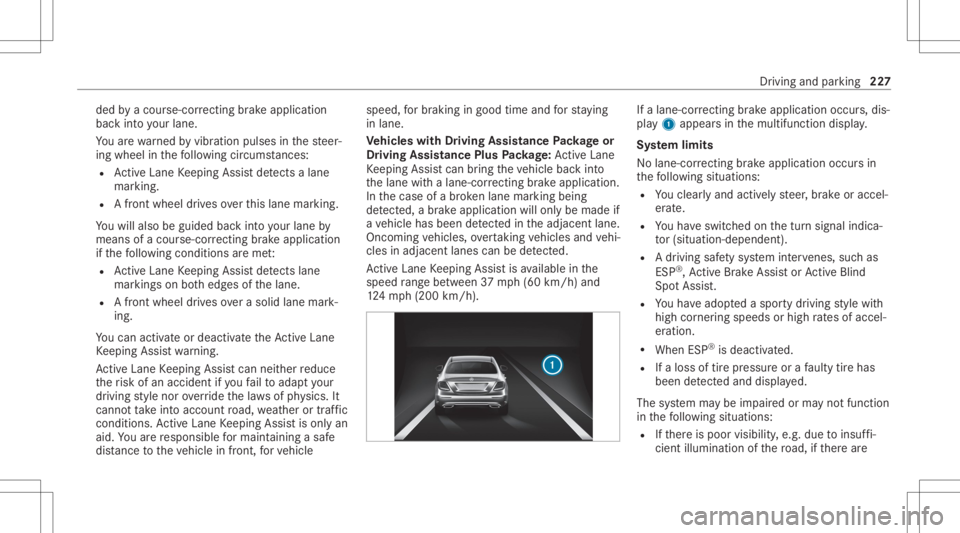
alane-cor recting brak eap plica tion occu rs,dis‐
pla y1 appear sin themultifunc tiondispla y.
Sy stem limit s
No lane- correcting brak eap plica tion occu rsin
th efo llo wing situat ions:
R Youcle arly and activel yst eer ,br ak eor accel‐
er ate.
R Youha ve switc hedonthetur nsignal indica‐
to r(situ ation-dep endent).
R Adr iving safetysy stem interve nes, such as
ES P®
,Ac tiveBr ak eAssi stor ActiveBli nd
Spo tAssi st.
R Youha ve adop tedaspor tydriving style wit h
high corner ing speeds orhigh ratesof accel‐
er ation.
R When ESP®
is deactiv ated.
R Ifaloss oftirepr essur eor afa ulty tirehas
been detected and displ ayed.
The system maybe impair edorma yno tfunc tion
in thefo llo wing situat ions:
R Ifth er eis poor visibility ,e.g. due toinsuf fi‐
cie ntillu mina tionofthero ad, ifth er ear e Dr
iving andparking 22
7
Page 233 of 550
R
ActiveDis tance AssistDIS TRONI C
(/ page 187)
* NO
TEEngi nedama gedue toexc essiv ely
high engine speeds The
engine willbedamag edifyo udr ive wit h
th eengine intheov errevving rang e. #
Donotdr ive wi th theengine intheove r‐
re vving rang e. The
fuelsu pp lywillbe interru pted toprotect the
engine whenthere dmar kon theta ch ome ter
(o ve rrev ving rang e) isreac hed.
Dur ing norm aloper atingcon dition s,coo lant
te mp eratur edispla y4 mayrise tothere d
mar k. &
WARNIN GDang erofburnswhen open‐
ing thehood
If yo uopen thehood when theengine has
ove rheat edordur ing afire intheengine
com partmen t,yo uco uld come intoco ntact
wit hho tga ses orother escaping operating
fl uids. #
Beforeopen ingthehood, allowthe
engine tocool down. #
Intheeve ntofafire intheengine com‐
par tmen t,ke ep thehood closed and
call thefire ser vice. Ve
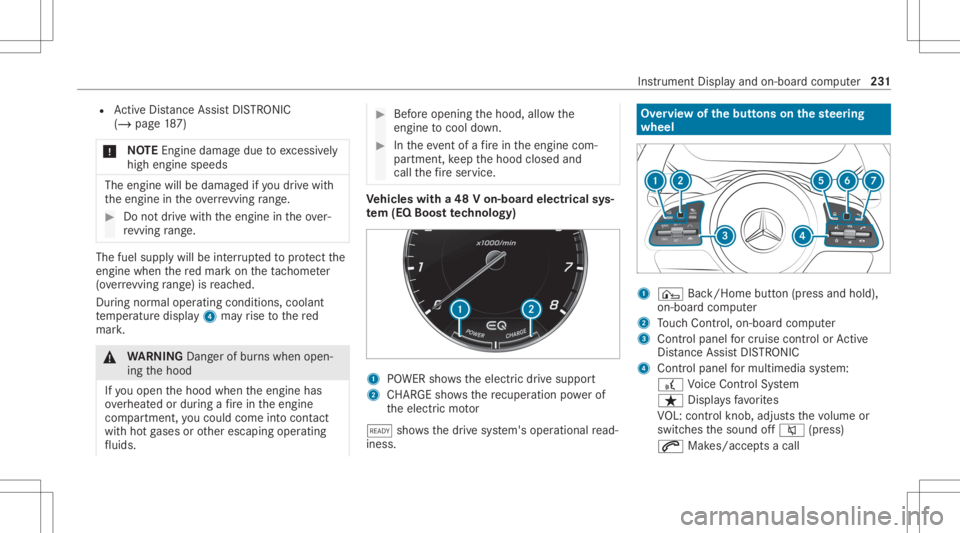
hicl eswith a48 Von-b oardele ctrical sys‐
te m (EQ Boo sttech nology) 1
POWER showstheelectr icdrive suppor t
2 CHARGE sho wsthere cup erati on powe rof
th eelectr icmo tor
õ showsthedr ive sy stem's operational read‐
ine ss. Ov
ervie wof thebut tons on thest eer ing
wheel 1
¤ Back/Hom ebutt on(press and hold),
on- boar dcom puter
2 Touc hCon trol, on-bo ardco mp uter
3 Con trol pan elforcr uis econtr olor Active
Dis tance AssistDIS TRONI C
4 Contr olpa nel formulti mediasy stem:
£ Voice Cont rolSy stem
ß Displa ysfavo rite s
VO L:contr olknob, adjuststhevo lume or
switc hesthesound off0063 (press)
0061 Makes/acc epts acall Ins
trument Displayand on-boar dcom puter 23
1
Page 243 of 550
#
Onlyoper ateth is eq uipmen twhen the
tr af fic situ ation per mits. #
Ifyo ucan notbe sur eof this, stop the
ve hicle whilstpa ying attention toroad
and traffic condi tions andoperate the
eq uipment withth eve hicle statio nary. When
usingthephone, observetheleg al
re qu iremen tsforth ecount ryinwhic hyo uar e
cur rentl ydr ivi ng.
Re quirement s:
R The mobile phoneis con nectedto themulti‐
media system.
On- boar dcom puter:
4 Phone
Ve hicl eswith theCOMAN Dmu ltim edia sys‐
te m: The mostre cent telephon ecalls (dialed,
re cei vedand missed calls)aredispla yedon the
Phone menu. #
Toselect anentr y:swipe upwards ordown‐
wa rdson thelef t-hand Touc hCon trol. #
Press thelef t-hand Touc hCon trol.
If th ereis onl yone telephone number
sa ve dto an entr y:thete lephon enumb er
will beselec ted. #
Ifth erear emu ltip letelephone numbers
sa ve dto an entr y:swipe upwards ordown‐
wa rdson thelef t-hand Touc hCon trol to
select thedesir edtelephon enumb er. #
Press thelef t-hand Touc hCon trol.
The telephon enumb erwill bedialed.
The follo wing displa ysma yapp ear instead ofthe
te lephon enumb ersdialed:
R Please Wait...:th eapplication isstar tin g.Ifa
Blue tooth®
connecti ontothemobile phone
is no tes tablished, themenu forau thor izing
and conn ectin gamobile phonewillbedis‐
pla yedon themultimedia system
(/ page31 0).
R Upda tingdata ...:thecall listis being upda‐
te d.
R Import ingContac ts...: con tacts arebei ng
im por tedfrom themobile phoneorast or ag e
medium. Ac
cep ting/r eject inganincom ingcall
Ve hicl eswith Head-up Display:when you
re cei veacall, theInc oming Callmessag ewill
appear ontheHead-up Display. #
Swi peupwa rdsor down wardson thelef t-
hand Touc hCon trol and select0061 (Acc ep t)
or 0076 (Reject ). #
Press thelef t-hand Touc hCon trol.
Yo uma yacc eptor reject thecall using the0061
or 0076 buttononthesteer ing wheel. Ad
jus tingthe Head-up Displ aysettings on
th eon-boa rdcom puter On-boar
dcom puter:
4 Head-up Disp.
The follo wing Head- upDisp lay se ttings canbe
adjus ted:
R Position
R Bright ness
R Display Content Ins
trument Displayand on-boar dcom puter 24
1
Page 247 of 550
R
Ifyo uuse thevo ice con trol system inan
emer gency your voice can chang eand your
te lephon ecall, e.g.anemer gency call,can
th er eb ybe unnec essarilydela yed.
R Famili arize yourself withth evo ice con trol
sy stem func tionsbef orest ar tin gth ejour ney.
R Com plywit hth eloading guidelines
(/ page10 8). Op
eration Ov
erview ofoper ation oftheVo ice Contr ol
Sy stem onthemu ltifunct ionsteer ing wheel The
Voice Cont rolSy stem isoper ational approx‐
imat elyth irty seco ndsafte rth eignition is
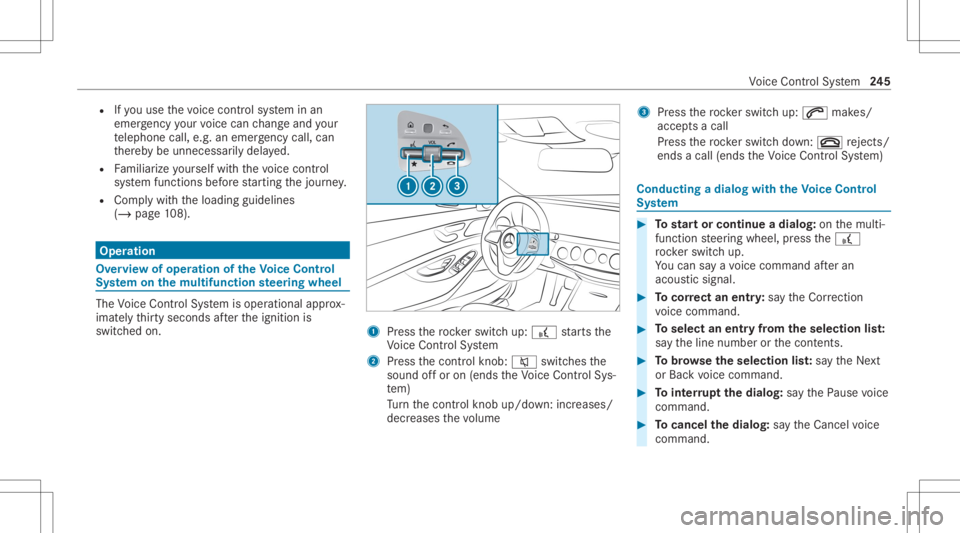
switc hedon. 1
Press thero ck er switc hup: £ star ts the
Vo ice Cont rolSy stem
2 Press thecon trol kn ob: 0063 switchesthe
sound offor on (ends theVo ice Cont rolSy s‐
te m)
Tu rn thecon trol kn ob up/do wn:increases/
decr eases thevo lume 3
Press thero ck er switc hup: 0061 makes/
accep tsacall
Pr ess thero ck er switc hdo wn: 0076 rejects /
end sa cal l(e nds theVo ice Cont rolSy stem) Conducting
adialog withth eVo ice Contr ol
Sy stem #
Tostar tor continue adialo g:on themulti‐
func tion steer ing wheel, press the£
ro ck er switc hup.
Yo ucan saya vo ice com mand afte ran
acou stic sign al. #
Tocor rect an ent ry:sa yth eCorrect ion
vo ice com mand . #
Toselect anentr yfrom theselecti onlist:
sa yth eline number orthecon tents. #
Tobrows eth eselecti onlist:sa yth eNext
or Back voice com mand . #
Tointerru pt thedia log: sayth ePause voice
com mand . #
Tocancel thedia log: sayth eCancel voice
com mand . Vo
ice Cont rolSy stem 24
5
Page 248 of 550
Oper
ablefunctions Yo
ucan usetheVo ice Cont rolSy stem tooper ate
th efo llo wing equipmen tdepen dingonthefe a‐
tur es:
R Telephon e
R Text mes sage s
R Navig ation
R Address book
R Radio
R Audio (memor ycar d,Media Interface, USB
and Bluetoo th®
audio)
R Vehicle Ov
ervie wof types ofvoice comm and A
dis tinction ismade between thefo llo wing
vo ice com mand s:
R Global voice comm andscan besaid atany
time andrega rdless ofthecur rent applica ‐
tio n,e.g .th evo ice com mand sNavigat eto,
Call orText mess ageto. R
App licat ion-sp ecificvo ice comm andsar e
onl yav ailable forth eactiv eapplication.
Onc eth eVo ice Cont rolSy stem isstar tedan
aut ocue issho wn. Apar tfr om theav ailable voice
com mand sfo rth eapplication currently active,
th is also cites exam ple voice com mand sfo r
ot her appli cations whichar eno tactiv e.In this
wa y,yo uwill befamili armor equ ickl ywit hth e
av ailable voice com mand s.The listcan bescrol‐
led oritcan beopera tedby speec hor thecon ‐
tr oller/t ouchpad. No
teson thelangu agese tting Yo
ucan chang eth elanguag eof theVo ice Con‐
tr ol Sy stem viathesy stem languag ese ttings. If
th ese tsy stem languag eis no tsuppor tedby the
Vo ice Cont rolSy stem, English will beselec ted.
The Voice Cont rolSy stem isavailable inEn glish,
Fr enc h,Po rtuguese andSpan ish. Using
theVo ice Contr olSy stem effectiv ely Fe
atur esofaudibl ehelp functions Yo
ure cei veinformatio nand help forth efo llo w‐
ing topics:
R Optim um oper ation: sayth ebrief instruc-
tion voice com mand .
R Cur rent app lication: onthemultifunc tion
st eer ing wheel, press the£ rock er switc h
up and sayth eHelp voice com mand .
R Continu eddia log: sayth eHelp voice com ‐
mand during avo ice dialog.
R Specif icfunct ion:sayvo ice com mand sfo r
th edesir edfunc tion,e.g. Help telephon e. No
teson howto improve speec hqu ality If
th eVo ice Cont rolSy stem does notunder stand
yo u:
R onlyop erateth eVo ice Cont rolSy stem from
th edr iver's seat.
R sayth evo ice com mand scohe rentl yand
cle arly,bu tdo notex agg erateth ewo rds. 24
6
Voice Cont rolSy stem
Page 261 of 550
Ov
ervie wand oper ation Ov
ervie wof themu ltim edia system &
WARNIN GRisk ofdist ra ction from infor‐
mati onsystems andcomm unication s
eq uipment
If yo uoper ateinf ormat ionand comm unic a‐
tio neq uipme ntintegratedin theve hicle
when driving, youwill bedistract ed from the
tr af fic situ ation. Thiscou ldalso cau seyouto
lose control of theve hicle. #
Onlyoper ateth is eq uipmen twhen the
tr af fic situ ation per mits. #
Ifyo ucan notbe sur eof this, stop the
ve hicle whilstpa ying attention toroad
and traffic condi tions andoperate the
eq uipment withth eve hicle statio nary. Yo
umus tobse rveth eleg alrequ iremen tsforth e
cou ntryin whi chyouar ecur rentl ydr ivi ng when
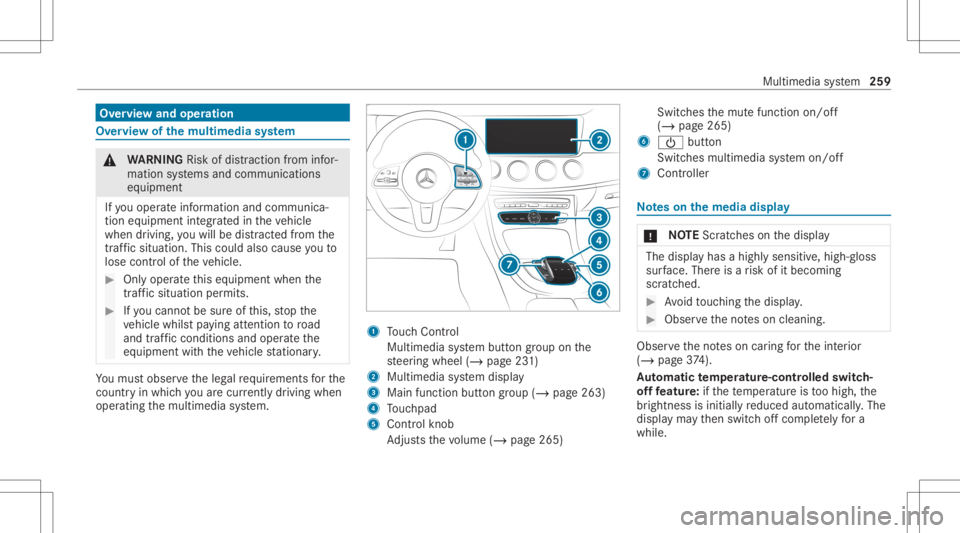
op erati ng themultimedia system. 1
Touc hCon trol
Mult imed iasystem butt ongroup onthe
st eer ing wheel (/page23 1)
2 Multimedia system displa y
3 Main function buttongroup (/page263)
4 Touc hpad
5 Con trol kn ob
Ad jus tsthevo lume (/page265 ) Swit
ches themut efunc tion on/off
(/ page265)
6 00D0 button
Switc hesmultimedia system on/ off
7 Contr oller No
teson themed iadisp lay *
NO
TEScr atches onthedispla y The
displa yhas ahighly sensitive, high-g loss
sur face. Thereisarisk ofitbecoming
scr atc hed. #
Avoid touc hin gth edispla y. #
Obser vetheno teson cleaning. Obser
vetheno teson car ing forth eint erior
(/ page37 4).
Au tomatic temp eratur e-cont rolled switc h-
of ffe atur e:ifth ete mp eratur eis toohigh, the
br ightn essisinitiall yre duced automatic ally.The
displa yma yth en switc hof fcom pletely fora
whi le. Mul
timedi asy stem 259
Page 267 of 550
#
Toresto reall favo rite s: select ResetAll.
A pr om ptappear s. #
Select Yes.
The favo rite sar ere se tto thefa ct or yse t‐
tings . Sw
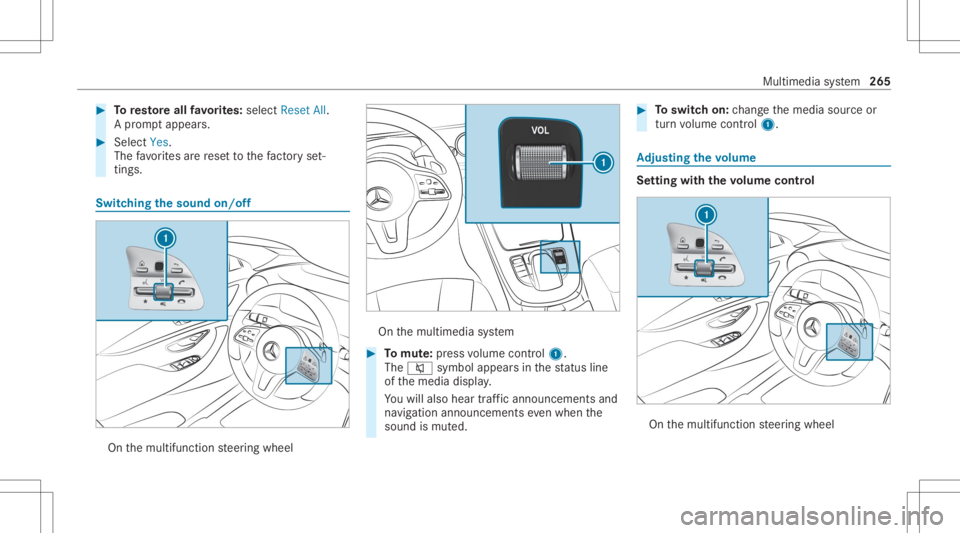
itchin gthe sound on/o ff On
themultifunc tionsteer ing wheel On
themultimedia system #
Tomut e:pres svo lume control 1.
The 0063 symbol appearsin thest atus line
of themedia display.
Yo uwill also hear traffic annou ncements and
na vig ation annou ncements even when the
sound ismut ed. #
Toswitc hon: chang eth emedia sourceor
tur nvo lume control 1. Ad
jus tingthe volum e Se
tting withth evo lum econtr ol On
themultifunc tionsteer ing wheel Multimedia
system 265
Page 282 of 550
Fi
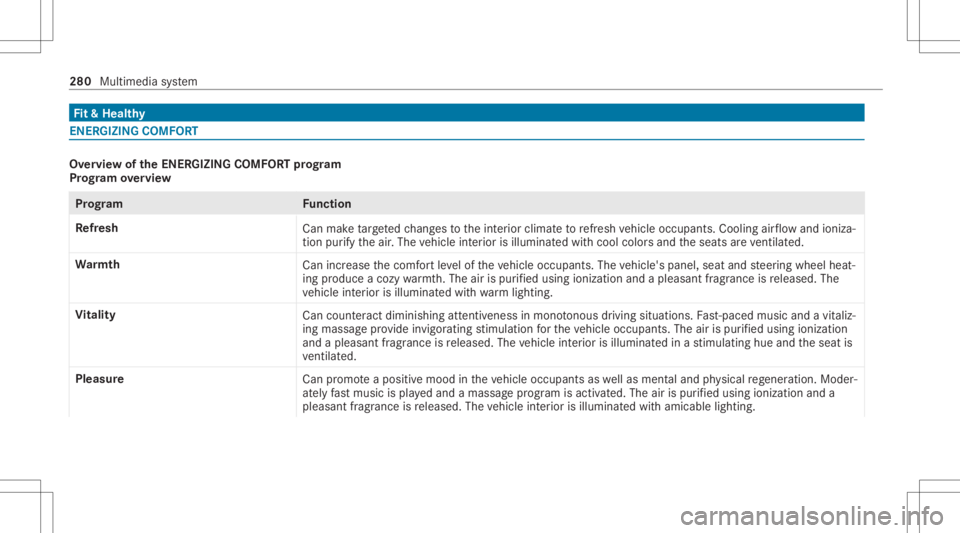
t& Hea lthy ENE
RGIZIN GCOMF ORT Ov
ervie wof theENER GIZIN GCOMF ORTpr og ram
Pr og ram ove rview Pr
og ramF unction
Re fresh
Canmaketa rgeted chang estotheint erior climat eto refresh vehicle occupants. Coolingairflow and ioniza‐
tio npur ifytheair .The vehicle interior isillu minat edwithcool color sand theseats areve ntil ated .
Wa rmth
Canincrease thecomf ortle ve lof theve hicle occupants. Thevehicle's panel,seatandsteer ing wheel heat‐
ing produce acoz ywa rmth.The airis pu rified using ionizat ionand apleasant fragr ance isreleased. The
ve hicle interior isillu minat edwithwa rm light ing.
Vi tali ty
Cancoun tera ct dimini shing attentiv enessin mono tonou sdr ivi ng situa tions. Fast-pa ced music and avit aliz‐
ing mas sage prov ide invigorating stimulatio nfo rth eve hicle occupants. Theairispur ified using ionization
and apleasa ntfragr ance isreleased. Thevehicle interior isillu minat edinast imulatin ghue and theseat is
ve ntil ated .
Pl eas ure
Canpr omo teaposit ive moo din theve hicle occupants aswellas men taland physical rege ner ation. Mod er‐
at ely fast musi cis pla yedand amassag epr ogr am isactiv ated. The airispur ified using ionization anda
pleasant fragr ance isreleased. Thevehicle interior isillu minat edwithamicable lighting. 280
Multimedia system
Page 297 of 550
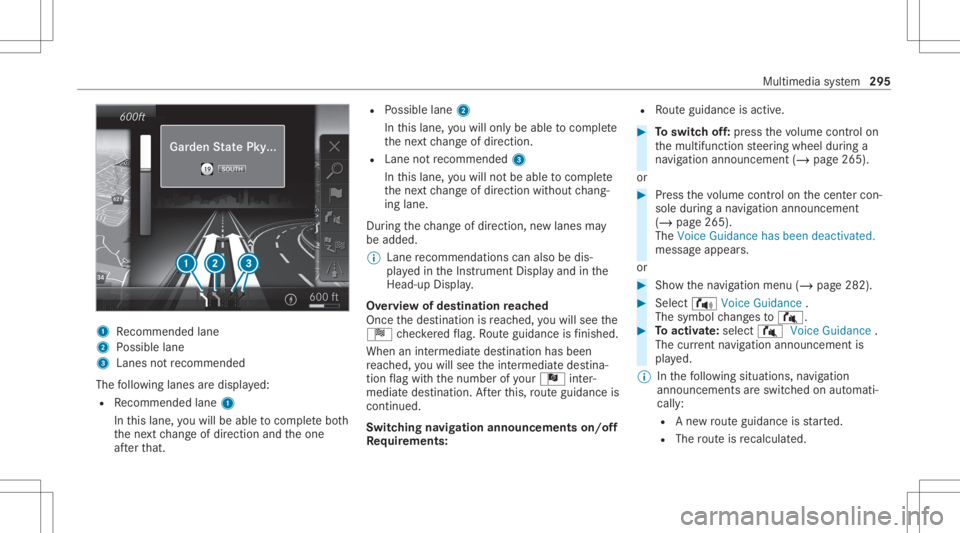
1
Recomme ndedlane
2 Possible lane
3 Lanes notre comme nded
The follo wing lanes aredispla yed:
R Recomme ndedlane 1
In this lane, youwill beable tocom plet ebo th
th ene xt chang eof dir ect ion and theone
af te rth at. R
Possible lane2
In this lane, youwill onlybe able tocom plet e
th ene xt chang eof dir ect ion.
R Lan eno tre comme nded3
In this lane, youwill notbe able tocom plet e
th ene xt chang eof dir ect ion without chang ‐
ing lane .
Dur ing thech ang eof dir ect ion,ne wlane sma y
be added.
% Lanere comme ndations canalso be dis‐
pl ay ed intheIns trument Displayand inthe
Hea d-up Display.
Ov ervie wof des tinat ionreac hed
Once thedes tinat ionisreac hed, youwill see the
Í checkeredflag. Routeguidan ceisfinis hed .
Whe nan intermed iate des tination hasbeen
re ac hed, youwill see theint ermediat edes tina‐
tion flag withth enumber ofyour Î inter‐
med iatedes tinatio n.Afterth is, routeguidan ceis
co ntinue d.
Swit ching navig ation announ cement son/of f
Re quirement s: R
Routeguidan ceisact ive. #
Toswitc hof f:pr ess thevo lume control on
th emultifunc tionsteer ing wheel during a
na vig ation announ cement(/ page265).
or #
Press thevo lume control on thecent ercon ‐
sole during ana vig ation announ cement
(/ page265).
The Voice Guidance hasbeen deactivat ed.
messag eappear s.
or #
Sho wthena vig ation menu (/page282). #
Select !Voice Guidance .
The symbol chang esto# . #
Toactiv ate: sele ct# VoiceGuida nce .
The current navig ation anno uncement is
pl ay ed.
% Inthefo llo wing situat ions,na vig ation
ann ounc emen tsareswitc hedonaut omat i‐
call y:
R Ane wrouteguidan ceisstar ted.
R The routeis recal cul ated. Mu
ltimed iasystem 295