brake light MERCEDES-BENZ E-CLASS CABRIOLET 2010 User Guide
[x] Cancel search | Manufacturer: MERCEDES-BENZ, Model Year: 2010, Model line: E-CLASS CABRIOLET, Model: MERCEDES-BENZ E-CLASS CABRIOLET 2010Pages: 333, PDF Size: 7.64 MB
Page 156 of 333

Problem Possible causes/consequences and
M Solutions
X
Consult aqualified specialist workshop. Parking
Important safety notes
G
Risk of accident
Only remove the key from the ignition lock
when the vehicle is stationary, as you cannot
steer the vehicle when the key is removed.
Never leave children unsupervised in the vehi-
cle. They could release the parking brake. This
could lead to aserious or fatal accident. G
Risk of fire
Make sure that the exhaust system does not
under any circumstances com einto contact
with easily ignitable material such as dry grass
or petrol .Otherwise, the flammable material
may ignite and set the vehicle on fire.
To ensure that the vehicle is secured against
rolling away unintentionally:
R the parking brake must be appl ied.
R on vehicles wit hmanual transmission,
engage first gear or reverse gear.
R on vehicles with automatic transmission,
the transmissio nmust be in position Pand
the key must be removed from the ignition
lock.
R on steep uphill or downhill gradients, turn
the front wheel stowards the kerb. Parking brake
X
To ap ply:depress parking brake ;firmly.
The J indicator lamp in the instrument
cluster lights up if the engine is running.
X To release: depress the brak epedal and
keep it depressed.
X Pull release handle :.
The J indicator lam pint he instrument
cluster goes out. Parking
153Driving and pa rking
BA 20 7ECE ÄJ 2010 /1a;1;2,e n-GB
mkalafa Version: 3.0.2.11 2010-01-26T13:03:22+01:00-Seite 153 Z
Page 158 of 333

Heav
yand light loads G
Risk of accident
Never depr esst he brake pedal continuously
while the vehicle is in motion ,e.g. never cause
the brakes to rub by applying cons tant slight
pedal pressure. Thi scauses the brake system
to overheat, increases the braking distance
and can lead to the brakes failing completely.
If the brakes have been subjected to aheavy
load, do not stop the vehicle immediately ,but
drive on for ashort while. This allow sthe air-
flo wtoc ool the brakes mor equickly.
If the brakes have been used only moderately,
you should occasionally test their effective-
ness. To do this, brake more firmly from a
higher speed. This improves the grip of the
brakes.
Wet roads If driving in heavy rain for
aprolonged period
of time without braking, there may be a
delayed reaction from th ebrake swhen brak-
ing for the first time. This ma yalso occur after
the vehicle has been washed.
You have to depress the brake pedal more
firmly. Maintain agreater distance from the
vehicl einfront.
After driving on awet road or havin gthe vehi-
cle washed, brake firml ywhile paying atten-
tion to the traffic conditions. This will warm
up the brake discs, thereby drying them more
quickly and protecting them against corro-
sion.
Limited braking perfo rmance on salt
treated roads G
Risk of accident
The layer of salt on the brake discs and the
brake pads/linings may cause adelay in the
braking effect ,resultin ginas ignifican tlyl on-
ger brakin gdistance, which could lead to an
accident.
To avoid this danger, you should: R
occasionally brake carefully, without put-
ting other road users at risk, when you are
drivin gons alted roads. This helps to
remove any salt that may have started to
build up on the brake discs and the brake
pads/linings.
R maintain agreater distance to th evehicle
ahead and driv ewith particular care.
R carefully apply the brakes at the end of a
trip and immediately after commencing a
new trip, so that salt residues are removed
from the brake discs.
New brake pads/linin gs G
Risk of accident
New brake pads/lining sonly reach thei ropti-
mum braking effect after severa lhundred kil-
ometres of driving. Before this optimum brak-
ing effect is reached, you should compensate
for the reduced braking effect by applying
greater pressure when braking. This also
applies after the brake discs or the brake
pads/lining shave been replaced.
For safety reasons, Mercedes-Benz recom-
mends that you only have brake pads/linings
fitted to your vehicle which have been
approved for Mercedes-Benz vehicles or
which correspond to an equivalent quality
standard. Brake pads/lining swhich hav enot
been approved for Mercedes-Benz vehicles or
which ar enot of an equivalent quality could
affect your vehicle' soperating safety. Ty
re traction G
Risk of accident
Whil ethe vehicle can be fully con trolled at a
cer tain speed on dry roads, you must reduce
your speed on wet or icy roads to achieve the
same road safety. Otherwise, you could cause
an accident.
Pay particular attention to the road conditions
at temperatures around freezin gpoint. Driving tips
155Driving and parking
BA 207ECE ÄJ 2010 /1a; 1; 2, en-GB
mkalafa Version: 3.0.2.11 2010-01-26T13:03:22+01:00 -Seite 155 Z
Page 161 of 333

On vehicle
swith Intelligent Light System the
headlamps can be conver tedint he on-board
compute r(Ypage 206).
Switching over dipped-beam headlamps
on vehicles with halogen headlamps :
Protec tive cap
; Switchover lever
X Turn protectiv ecap : anti-clockwise and
remove it.
X Push switchover lever ;down.
X Insert protective cap :and turn it clock-
wise.
When you are driving back on the same side
of the road as the country where the vehicle
is registered, have the headlamps changed
back to asymmetrical dippe dbeam as soon
as possibl eafter crossing th eborder. Driving systems
Cruise control
Import ants afety notes Cruise control maintain
saconstant road
speed for you. It brakes automatically in order
to avoid exceeding the set speed. On long and
steep downhil lgradients ,especially if the
vehicle is laden or towing atrailer, yo umust
shift to alower gear in good tim eorselect
shift range 1,2or 3on vehicles with auto-
matic transmission. By doing so, you will
mak euse of the brakin geffect of th eengine,
which relieves the load on the brake system and prevents the brakes from overheating
and wearing too quickly. G
Risk of accident
Do not change down for additional engine
braking on aslippery road surface. This could
cause the drive wheels to lose their grip and
the vehicle could skid.
Use cruise control only if road and traffic con-
ditions make it appropriate to maintain a
steady speed for aprolonged period. Yo ucan
store any road spee dabove 30 km/h. G
Risk of accident
Cruise control cannot take account of road
and traffic conditions.
Always pay atten tion to traffic conditions
even when cruise control is activated.
Cruise control is only an aid designed to assist
driving. You are responsible for the vehicle's
speed and for brakin gingood time. G
Risk of accident
Do not use cruise control:
R in road and traffic condition swhich do not
allow you to maintain aconstant speed (e.g.
heavy traffic or winding roads). You could
otherwise cause an accident.
R on slippery roads. Brakin goraccelerating
coul dcause the drive wheels to lose trac-
tion and the vehicle could then skid.
R when there is poor visibility, e.g. due to fog,
heavy rain or snow
Cruise control lever You can operate cruise control and variable
SPEEDTRONIC with the cruise control lever.
The LIM indicator lamp on the cruise control
lever indicates which system you have selec-
ted:
R
LIM indicator lamp off: cruise control is
selected.
R LIM indicator lamp on: variableSPEED-
TRONI Cisselected. 158
Driving systemsDriving and parking
BA 20
7ECE ÄJ 2010/1a; 1; 2, en-GB
mkalafa Version: 3.0.2.11
2010-01-26T13:03:22+01:00
-Seite 158
Page 162 of 333
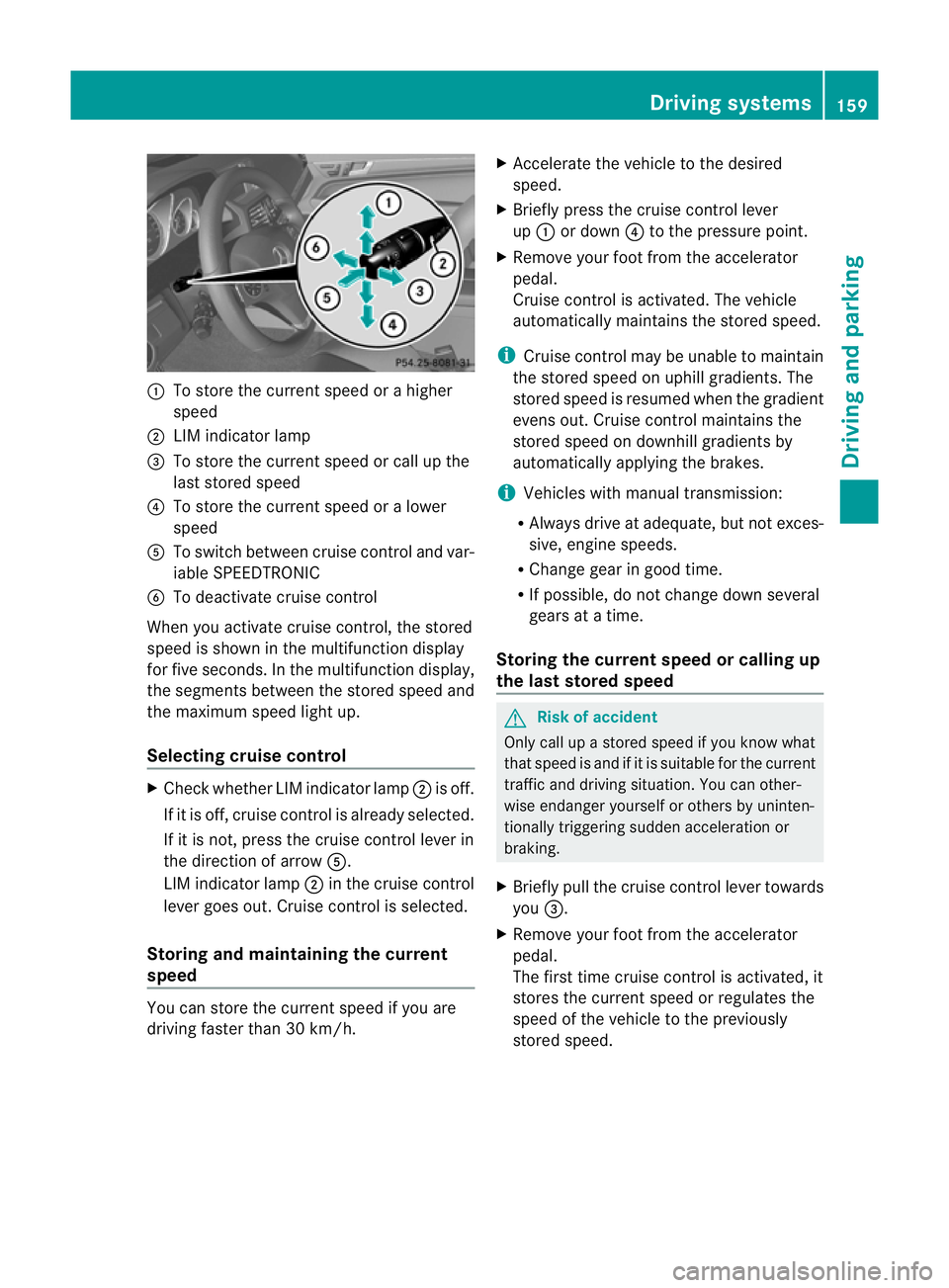
:
To store the curren tspeed or ahigher
speed
; LIMi ndicator lamp
= To sto rethe curren tspeed or call up the
last stored speed
? To stor ethe curren tspeed or alower
speed
A To switc hbetween cruise control and var-
iable SPEEDTRONIC
B To deactivate cruise control
When you activate cruise control ,the stored
speed is shown in the multifunction display
for fiv eseconds. In the multifunction display,
the segments between the stored speed and
the maximu mspeed light up.
Selecting cruise control X
Check whether LI Mindicator lamp ;is off.
If it is off, cruise contro lisalready selected.
If it is not ,pres sthe cruise contr ol leverin
the direction of arrow A.
LIM indicator lamp ;in the cruise control
lever goe sout. Cruise contro lisselected.
Storing and maintaining the cur rent
speed You can stor
ethe curren tspeed if you are
drivin gfaster than 30 km/h. X
Accelerat ethe vehicle to the desired
speed.
X Briefly press the cruise contr ol lever
up : or down ?to the pressure point.
X Remove your foot from the accelerator
pedal.
Cruise contr ol is activated. The vehicle
automatically maintains the stored speed.
i Cruise contr ol maybeu nable to maintain
the sto reds peed on uphill gradien ts.T he
stored speed is resumed when the gradient
even sout. Cruise contro lmaintains the
stored speed on downhill gradients by
automatically applying the brakes.
i Vehicles with manual transmission:
R Always driv eatadequate, but no texces-
sive, engine speeds.
R Chang egearing oodt ime.
R If possible, do not change down several
gears at atime.
Storin gthe curre nt speedorc allingup
the last stored speed G
Risk of accident
Only call up astored spe ed ifyou know what
that spee disand if it is suitable for the current
traffic and driving situation. You can other-
wise endanger yourself or others by uninten-
tionally triggering sudden acceleration or
braking.
X Briefly pull the cruise control lever towards
you =.
X Remove your foot from the accelerator
pedal.
Th ef irst time cruise control is activated, it
stores the current speed or regulates the
speed of the vehicle to the previously
stored speed. Drivin
gsystems
159Drivingand pa rking
BA 20 7ECE ÄJ 2010 /1a; 1; 2, en-GB
mkalafa Version: 3.0.2.11 2010-01-26T13:03:22+01:00 -Seite 159 Z
Page 165 of 333
mus
talsoa pply the brakes yourself if this
braking powe risnot sufficient.
If DISTRONIC PLU Sdetect sarisk of collision
with avehicle in front, an intermit tent warning
tone sounds. In addition, the ·distance
warning lamp in the instrument cluste rlights
up. Brak etoavoidac ollision.
Cruise control lever With the cruise control lever you can operate
DI ST RONIC PLUS and variable SPEE D-
TRONIC.
The LI Mindicator lamp on the cruise control
lever indicates which system you have selec-
ted:
R LIM indicator lamp off: DISTRONIC PLUS
is selected
R LIM indicator lamp on: variable SPEED-
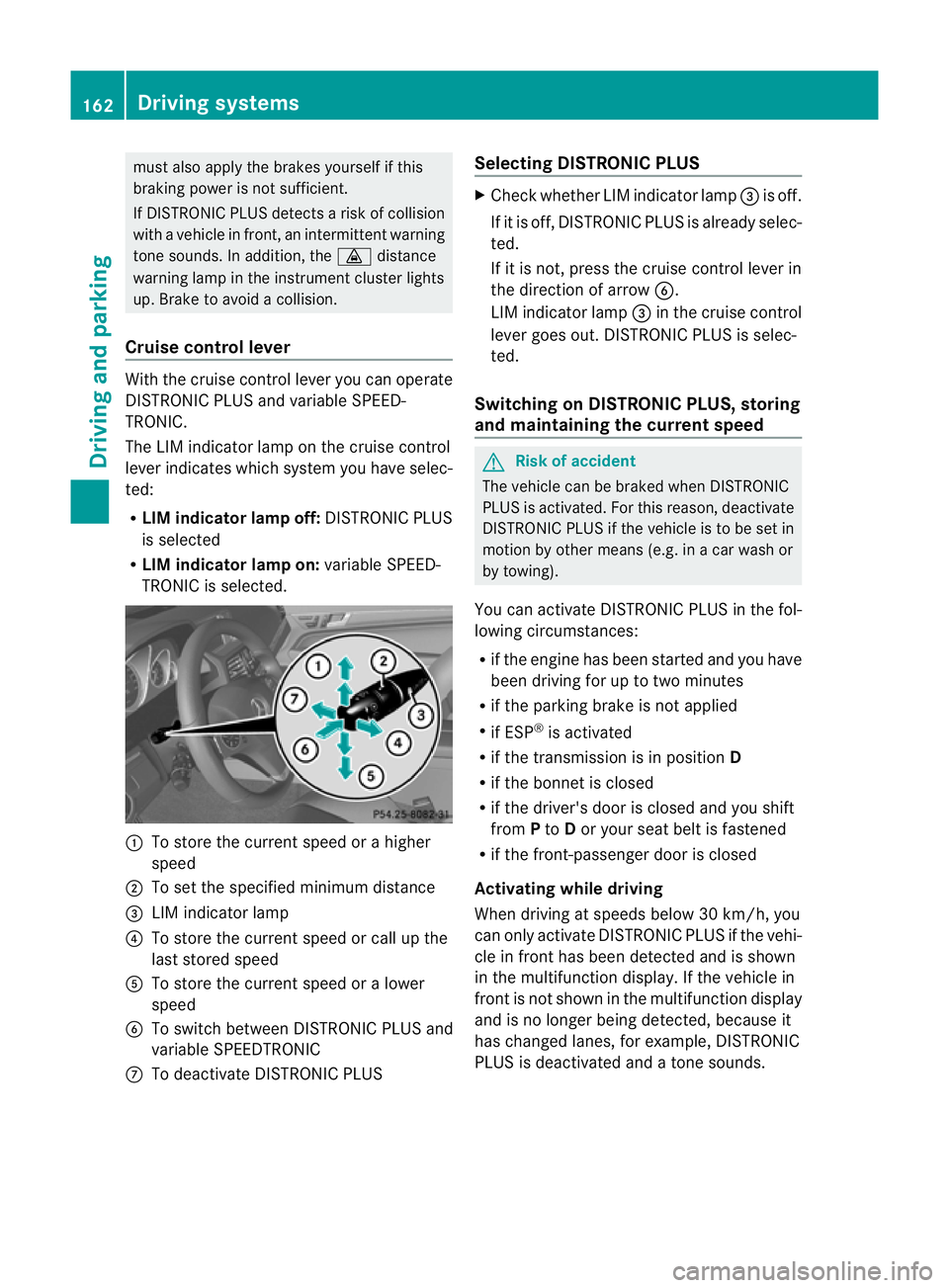
TRONIC is selected. :
To sto rethe curren tspeed or ahigher
speed
; To set the specified minimum distance
= LIMi ndicator lamp
? To sto rethe curren tspeed or call up the
last stored speed
A To stor ethe curren tspeed or alower
speed
B To switc hbetween DI STRONIC PLUS and
variable SPEEDTRONIC
C To deactivate DISTRONIC PLUS Selecting DISTRONIC PLUS X
Check whether LIM indicator lamp =is off.
If it is off, DISTRONIC PLUS is already selec-
ted.
If it is not ,pres sthe cruise contr ol leverin
the direction of arrow B.
LIM indicator lamp =in the cruise control
lever goe sout. DISTRONIC PLUS is selec-
ted.
Switching on DISTRONIC PLUS ,storing
and maintaining the current speed G
Risk of accident
The vehicle can be braked when DISTRONIC
PLUS is activated. For this reason, deactivate
DISTRONIC PLUS if the vehicle is to be set in
motion by othe rmeans (e.g. in acar wash or
by towing).
You can activate DISTRONIC PLUS in the fol-
lowing circumstances:
R if the engine has been started and you have
been drivin gfor up to two minutes
R if the parkin gbrake is not applied
R if ESP ®
is acti vated
R if the transmission is in position D
R if the bonnet is closed
R if the driver' sdoor is closed and you shift
from Pto Dor your seat belt is fastened
R if the front-passenger door is closed
Activating while driving
When drivin gatspeeds below 30 km/h, you
can only acti vate DISTRONIC PLUS if the vehi-
cle in fron thas been detected and is shown
in the multifunction display. If the vehicle in
front is not shown in the multifunction display
and is no longe rbeing detected, because it
has changed lanes, for example, DISTRONIC
PLU Sisd eactivated and atone sounds. 162
Driving systemsDriving and pa
rking
BA 20 7ECE ÄJ 2010 /1a; 1; 2, en-GB
mkalafa Version: 3.0.2.11 2010-01-26T13:03:22+01:00 -Seite 162
Page 169 of 333
Storing th
ecurrent speed or calling up
the stored speed G
Ris
kofa ccident
Only call up astored speed if you know what
that speed is and if it is suitable for the current
traffic and driving situation. You can other-
wise endanger yoursel forothers by uninten-
tionall ytriggering sudden acceleration or
braking.
X Briefly pull th ecruis econtrol leve rtowards
you ?.
X Remove your foot from the accelerator
pedal.
DIST RONIC PLUS is activated. The first
time it is activated, the current speed is
stored. Otherwise, it sets the vehicle cruise
speed to the previousl ystored value.
Settin gthe specified minimum distance Yo
uc an set the specified minimum distance
for DISTRONIC PLUS by varying the time span
between one and two seconds .With this func-
tion, you can set the minimum distance that
DISTRONIC PLU Skeeps to the vehicle in
front ,dependent on vehicle speed. You can
see this distance in the multifunc tion display
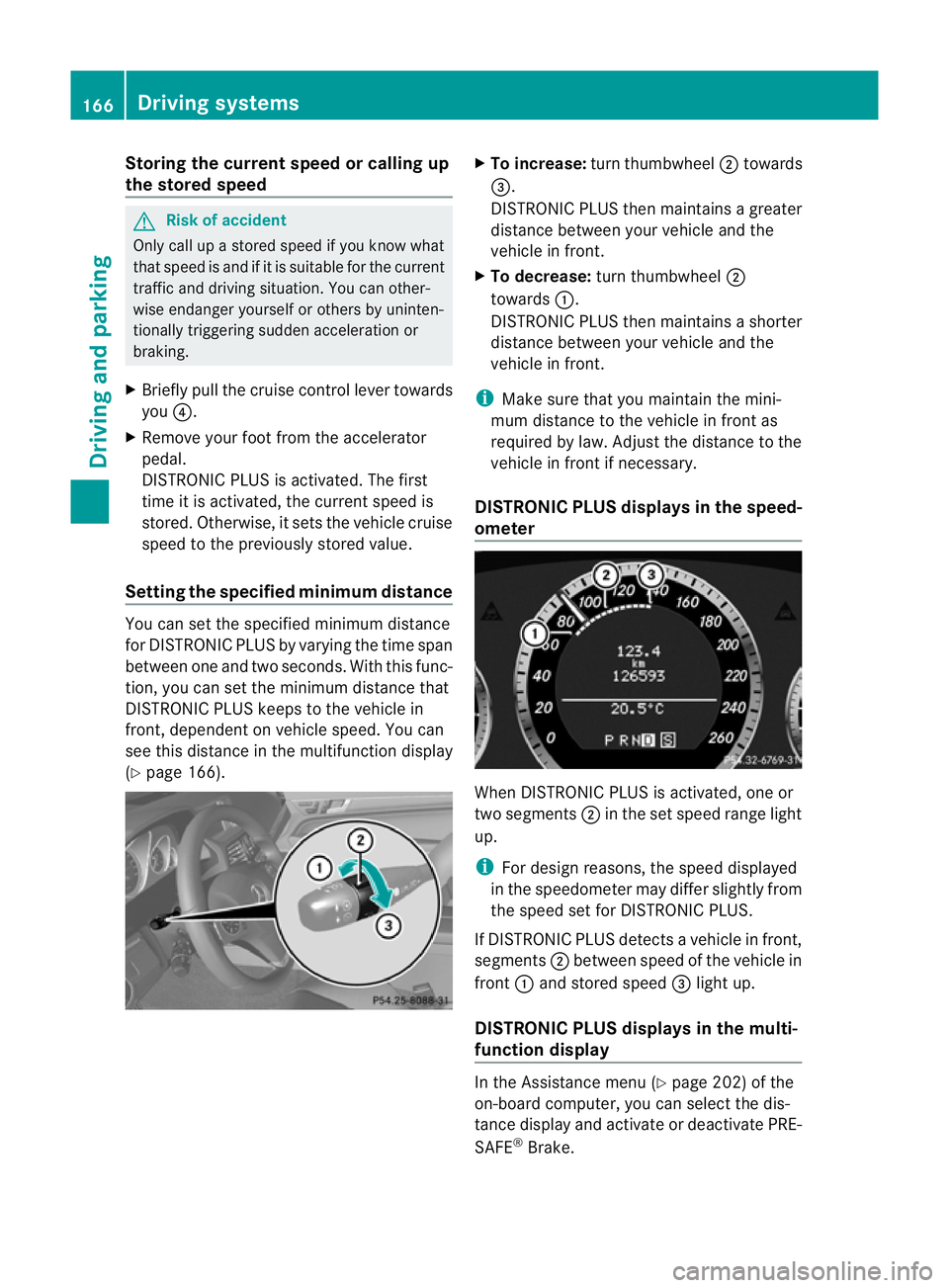
(Y page 166). X
To increase: turnthumbwheel ;towards
=.
DI ST RONIC PLUS then maintains agreater
distance between your vehicl eand the
vehicl einfront.
X To decrease: turn thumbwheel ;
towards :.
DISTRONIC PLUS then maintains ashorter
distanc ebetween your vehicle and the
vehicle in front.
i Make sure that you maintai nthe mini-
mu md istance to the vehicle in front as
required by law. Adjust the distance to the
vehicle in front if necessary.
DISTRONIC PLUS display sinthe speed-
ometer When DISTRONIC PLUS is activated, one or
two segments
;in th eset speed range light
up.
i For design reasons, the speed displayed
in the speedometer may differ slightly from
the speed set for DI STRONIC PLUS.
If DISTRONIC PLUS detects avehicle in front,
segments ;between speed of the vehicle in
front :and stored speed =light up.
DISTRONIC PLUS displays in the mul ti-
functio ndisplay In the Assistance menu (Y
page 202)of the
on-boar dcompu ter,you can select the dis-
tanc edisplay and activat eordeactivate PRE-
SAFE ®
Brake. 166
Driving systemsDriving and parking
BA 20
7ECE ÄJ 2010/1a; 1; 2, en-GB
mkalafa Version:3.0.2.11
2010-01-26T13:03:22+01:0
0-Seite 166
Page 170 of 333
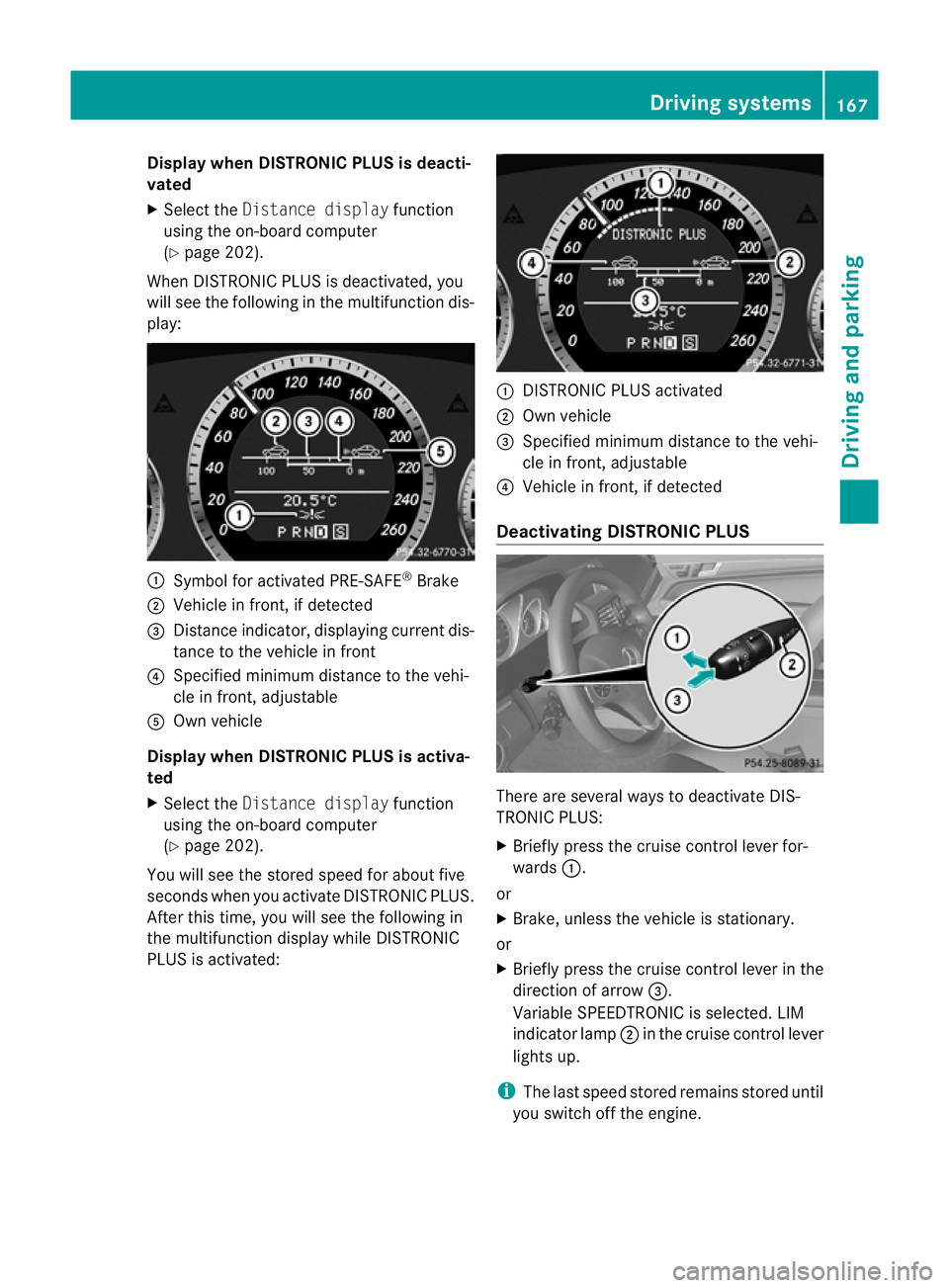
Displa
ywhen DIS TRONIC PLUS is deacti-
vated
X Selec tthe Distance display function
using the on-boar dcomputer
(Y page 202).
When DI STRONIC PLUS is deactivated, you
will see the following in the multifunction dis-
play: :
Symbol for activated PRE-SAFE ®
Brake
; Vehicle in front ,ifdetected
= Distan ceindicator ,displaying current dis-
tance to the vehicle in front
? Specified minimum distance to the vehi-
cle in front ,adjustable
A Own vehicle
Displa ywhen DISTRONIC PLUS is activa-
ted
X Select the Distance display function
using th eon-board computer
(Y pag e202).
Yo uw ill see the stored speed for about five
seconds when you activate DISTRONIC PLUS.
After this time, you will see the following in
the multifunction displa ywhile DI STRONIC
PLUS is activated: :
DISTRONIC PLUS activated
; Own vehicle
= Specified minimum distance to the vehi-
cle in front ,adjustable
? Vehicle in front ,ifdetected
Deactivating DISTRONIC PLUS There are several ways to deactivate DI
S-
TRONIC PLUS:
X Briefl ypres sthe cruise con trollever for-
wards :.
or
X Brake, unless the vehicle is stationary.
or
X Briefly press the cruise control lever in the
direction of arrow =.
Variable SPEEDTRONIC is selected. LIM
indicator lamp ;in the cruise control lever
lights up.
i The last speed stored remains stored until
you switch off the engine. Driving systems
167Driving and parking
BA 207ECE ÄJ 2010 /1a;1;2,e n-GB
mkalafa Version: 3.0.2.11 2010-01-26T13:03:22+01:00-Seite 167 Z
Page 172 of 333
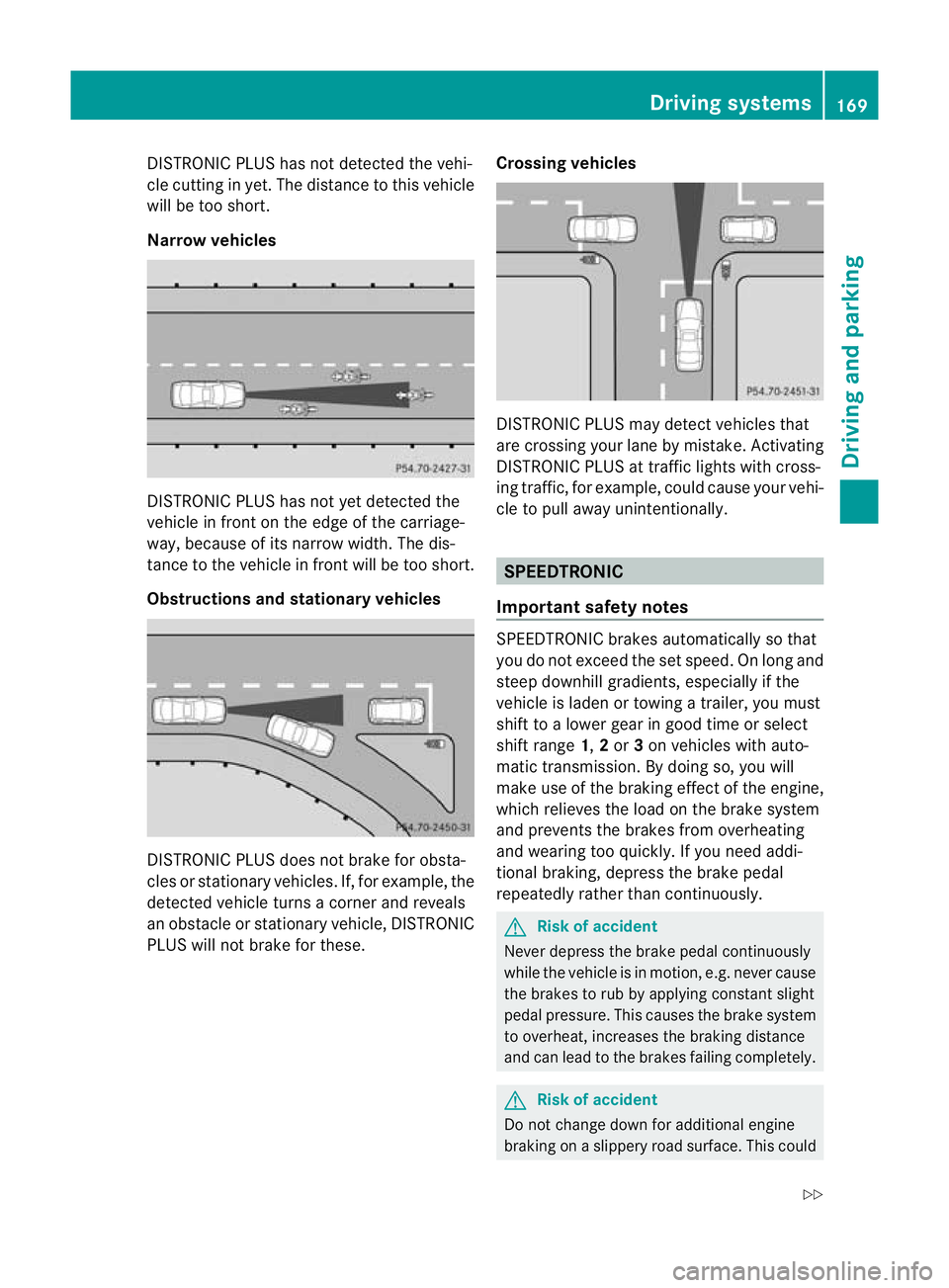
DISTRONIC PLUS ha
snot detected the vehi-
cle cutting in yet. Th edistance to thi svehicle
will be too short.
Narrow vehicles DISTRONIC PLUS ha
snot ye tdetected the
vehicl einfront on th eedgeoft he carriage-
way, because of its narrow width .The dis-
tance to the vehicle in front will be too short.
Obstruction sand sta tionary vehicles DISTRONIC PLUS does not brake for obsta-
cles or stationary vehicles. If, for example, the
detected vehicle turns acorner and reveals
an obstacle or stationar yvehicle, DI STRONIC
PLUS will not brake for these. Crossin
gvehicles DISTRONIC PLUS may detect vehicles that
are crossing your lane by mistake. Activating
DISTRONIC PLUS at traffic lights with cross-
ing traffic, for example, could cause your vehi-
cle to pull away unintentionally.
SPEEDTRONIC
Important safety notes SPEEDTRONIC brakes automatically so that
you do not exceed the set speed
.Onlong and
steep downhil lgradients ,especially if the
vehicle is laden or towing atrailer, yo umust
shift to alower gear in good tim eorselect
shift range 1,2or 3on vehicles with auto-
matic transmission. By doing so, you will
mak euse of the brakin geffect of th eengine,
which relieves the load on the brake system
and prevents the brakes from overheating
and wearing too quickly .Ifyou need addi-
tional braking, depress the brake pedal
repeatedly rather than con tinuously. G
Risk of accident
Never depress the brake pedal continuously
whil ethe vehicle is in motion, e.g. never cause
the brakes to ru bbyapplying constant slight
pedal pressure. This causes the brak esystem
to overheat, increases the braking distance
and can lead to the brakes failing completely. G
Risk of accident
Do not change down for additional engine
braking on aslippery road surface. This could Drivin
gsystems
169Drivingand pa rking
BA 20 7ECE ÄJ 2010 /1a;1;2,e n-GB
mkalafa Version: 3.0.2.11 2010-01-26T13:03:22+01:00-Seite 169 Z
Page 175 of 333
Permanen
tSPEEDTRONI Cremains active,
even if variable SPEEDTRONI Cisdeactiva ted.
You can note xceed the stored limit speed,
even if you depress the accelerator pedal
beyond the pressure point (kickdown). Dynamic handlin
gpackage with
sports mode
General notes Th
em ost importan tpart of the dynamic han-
dling package with sport smodeist he adjust-
able suspension system. This aut omatically
control sand adap tsthe suspension to the
respectiv edriving si tuation.
The calibration of the suspension depends
on:
R your driving style
R the road surface conditions
R your individual selection ;see th efollowing
descrip tion
If your vehicle is equippe dwitha utomatic
transmission ,the dynamic handlin gpackage
with sport smodea lso includes steering
wheel gearshif tpaddles (Y page 145) with a
manual driv eprogram (Y page 146). X
Start the engine.
Sports tuning Th
ef irmer settin gofthe suspension tuning in
sports mod eensure seven better contact
with the road. Select this mode whe nemploy- ing
asport ydriving style ,e.g. on winding
country roads.
You rselection remains stored until you
switc hoff th eengine.
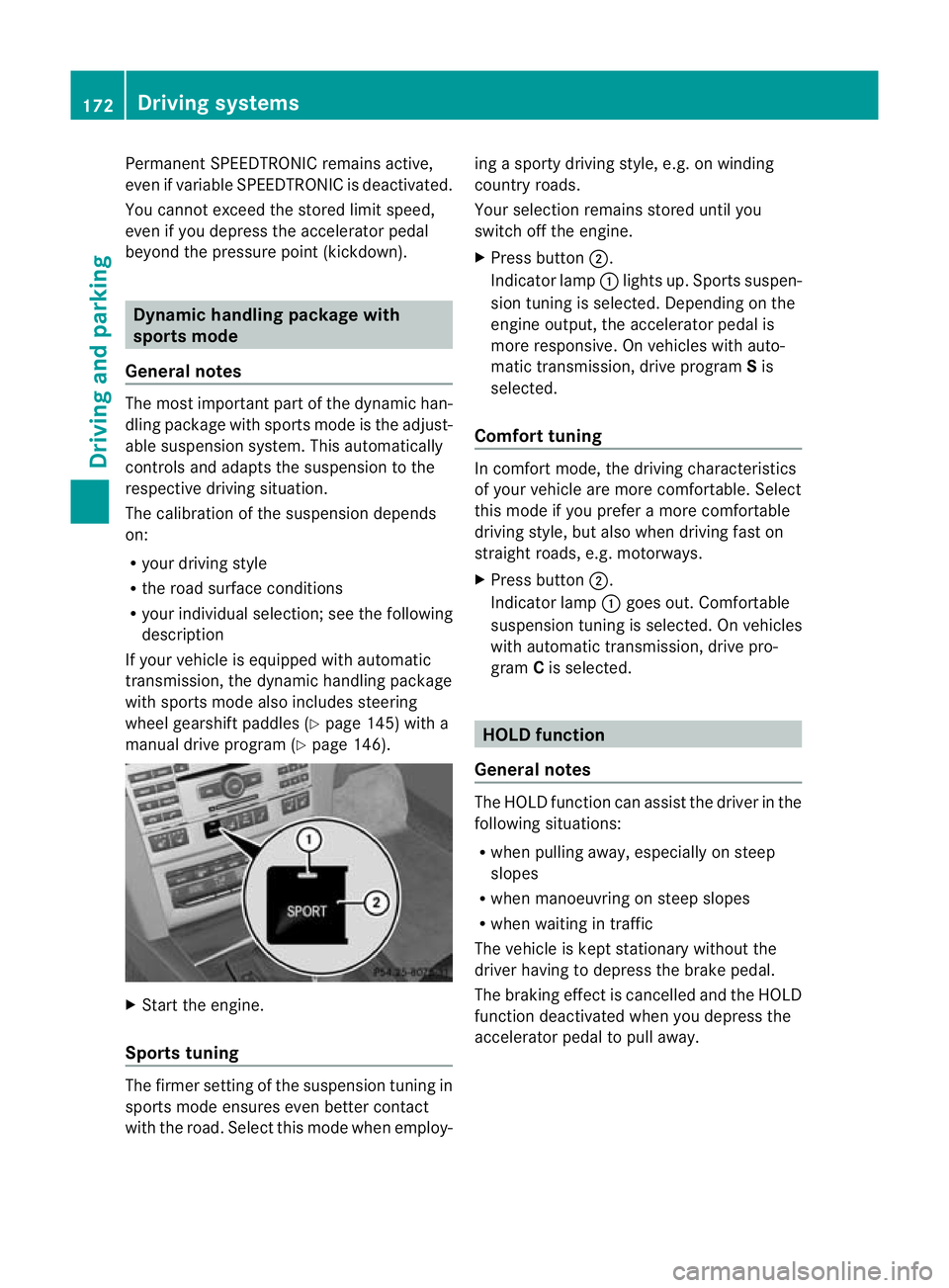
X Pres sbutton ;.
Indicator lamp :lights up. Sport ssuspen-
sion tunin gisselected. Depending on the
engin eoutput, the accelerator pedal is
more responsive. On vehicles with auto-
matic transmission, drive program Sis
selected.
Comfort tuning In comfort mode, the driving characteristics
of your vehicle are more comfortable. Select
this mode if you prefer
amore com fortable
driving style ,but also when driving fast on
straight roads, e.g. motorways.
X Press button ;.
Indicator lamp :goes out. Comfortable
suspensio ntunin giss elected. On vehicles
with automatic transmission ,drive pro-
gram Cis selected. HOL
Dfunction
Gen eral notes Th
eH OLD function ca nassist the driver in the
foll owing situations:
R when pulling away, especially on steep
slopes
R when manoeuvrin gonsteep slopes
R when waiting in traffic
The vehicle is kept stationary without the
driver having to depress the brake pedal.
The braking effect is cancelled and the HOLD
function deactivated when you depress the
accelerator peda ltop ull away. 172
Driving systemsDrivin
gand pa rking
BA 20 7ECE ÄJ 2010 /1a;1;2,e n-GB
mkalafa Version: 3.0.2.11 2010-01-26T13:03:22+01:00-Seite 172
Page 178 of 333
:
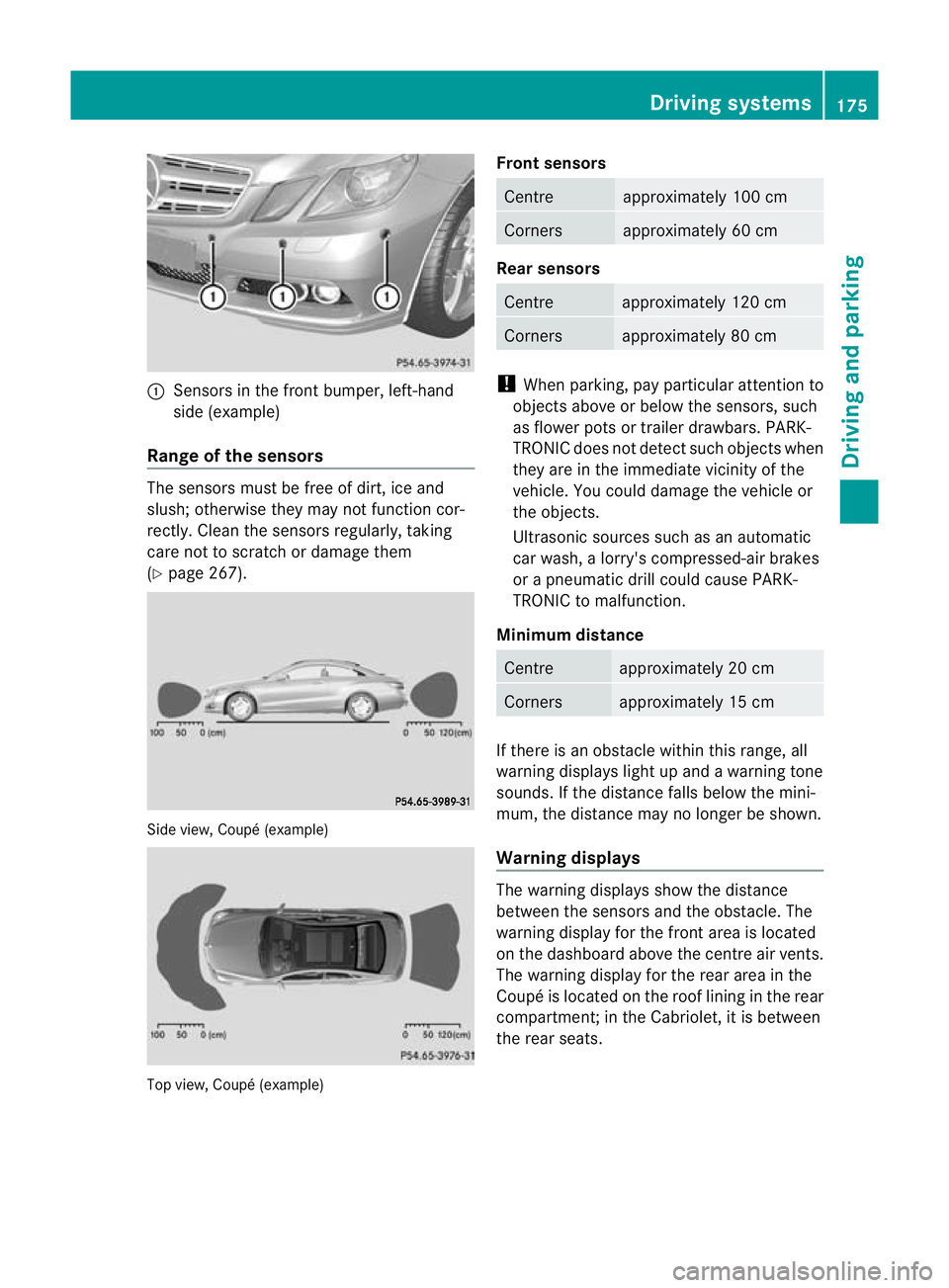
Sens orsint he front bumper, left-hand
sid e(example)
Rang eoft he sens ors The sensors mu
st befree of dirt, ice and
slush; otherwis ethey ma ynot function cor-
rec tly. Clean the sensor sregularly, taki ng
care not to scratch or damag ethem
(Y page 26 7). Side view, Coup
é(example) Top view, Coupé (example) Front sensors Centre approximately 10
0cm Corners approximately 60 cm
Rear sensors
Centre approximately 120 cm
Corners approximately 80 cm
!
When parking, pay particular attention to
objects above or below the senso rs,s uch
as flower pots or trailer drawbars. PARK-
TRONIC does not detect such ob jectswhen
they ar eintheimmediat evicinity of the
vehicle. You could damage the vehicle or
the objec ts.
Ultrasonic sources such as an automatic
car wash ,alorry' scompressed-ai rbrakes
or ap neumatic drill could cause PARK-
TRONI Ctom alfunction.
Minimum distance Centre approximately 20 cm
Corners approximately 15 cm
If ther
eisano bstacle within this ran ge,all
warnin gdisplays light up and awarnin gtone
sounds. If the distanc efalls below the mini-
mum, the distanc emay no longer be shown.
Warning displays The warnin
gdisplays show the distance
between the sensor sand the obs tacle. The
warning displa yfor the fr ont area is located
on the dashboar dabove the centr eair vents.
The warnin gdisplay for the rear area in the
Coupé is located on the roof linin ginthe rear
compar tment;inthe Cabriolet ,itisbetween
the rear seats. Driving systems
175Driving and parking
BA 207ECE ÄJ 2010/1a; 1; 2, en-GB
mkalafa Version: 3.0.2.11 2010-01-26T13:03:22+01:00-Seite1 75 Z