brakes MERCEDES-BENZ E-CLASS CABRIOLET 2010 User Guide
[x] Cancel search | Manufacturer: MERCEDES-BENZ, Model Year: 2010, Model line: E-CLASS CABRIOLET, Model: MERCEDES-BENZ E-CLASS CABRIOLET 2010Pages: 333, PDF Size: 7.64 MB
Page 161 of 333

On vehicle
swith Intelligent Light System the
headlamps can be conver tedint he on-board
compute r(Ypage 206).
Switching over dipped-beam headlamps
on vehicles with halogen headlamps :
Protec tive cap
; Switchover lever
X Turn protectiv ecap : anti-clockwise and
remove it.
X Push switchover lever ;down.
X Insert protective cap :and turn it clock-
wise.
When you are driving back on the same side
of the road as the country where the vehicle
is registered, have the headlamps changed
back to asymmetrical dippe dbeam as soon
as possibl eafter crossing th eborder. Driving systems
Cruise control
Import ants afety notes Cruise control maintain
saconstant road
speed for you. It brakes automatically in order
to avoid exceeding the set speed. On long and
steep downhil lgradients ,especially if the
vehicle is laden or towing atrailer, yo umust
shift to alower gear in good tim eorselect
shift range 1,2or 3on vehicles with auto-
matic transmission. By doing so, you will
mak euse of the brakin geffect of th eengine,
which relieves the load on the brake system and prevents the brakes from overheating
and wearing too quickly. G
Risk of accident
Do not change down for additional engine
braking on aslippery road surface. This could
cause the drive wheels to lose their grip and
the vehicle could skid.
Use cruise control only if road and traffic con-
ditions make it appropriate to maintain a
steady speed for aprolonged period. Yo ucan
store any road spee dabove 30 km/h. G
Risk of accident
Cruise control cannot take account of road
and traffic conditions.
Always pay atten tion to traffic conditions
even when cruise control is activated.
Cruise control is only an aid designed to assist
driving. You are responsible for the vehicle's
speed and for brakin gingood time. G
Risk of accident
Do not use cruise control:
R in road and traffic condition swhich do not
allow you to maintain aconstant speed (e.g.
heavy traffic or winding roads). You could
otherwise cause an accident.
R on slippery roads. Brakin goraccelerating
coul dcause the drive wheels to lose trac-
tion and the vehicle could then skid.
R when there is poor visibility, e.g. due to fog,
heavy rain or snow
Cruise control lever You can operate cruise control and variable
SPEEDTRONIC with the cruise control lever.
The LIM indicator lamp on the cruise control
lever indicates which system you have selec-
ted:
R
LIM indicator lamp off: cruise control is
selected.
R LIM indicator lamp on: variableSPEED-
TRONI Cisselected. 158
Driving systemsDriving and parking
BA 20
7ECE ÄJ 2010/1a; 1; 2, en-GB
mkalafa Version: 3.0.2.11
2010-01-26T13:03:22+01:00
-Seite 158
Page 162 of 333
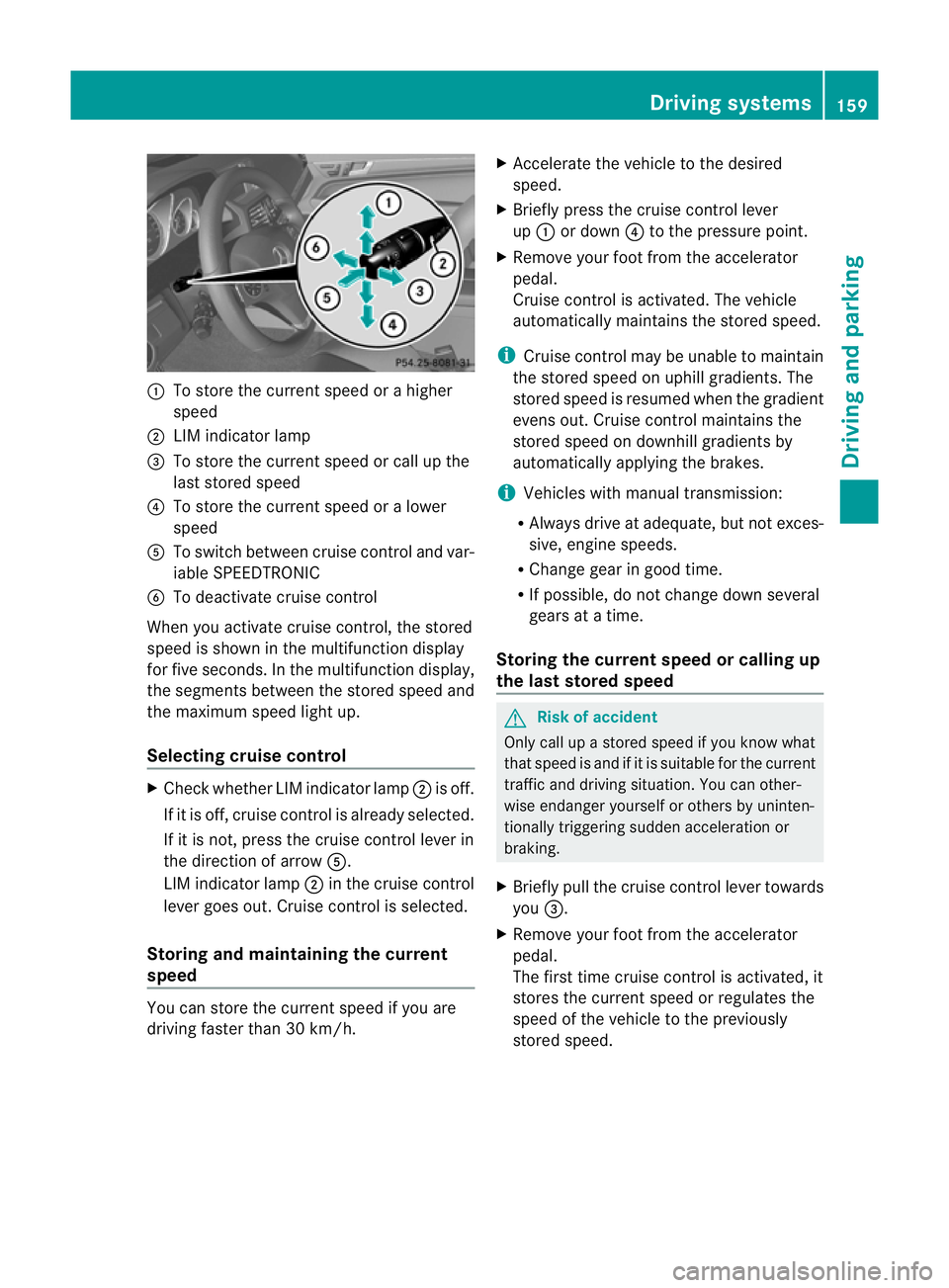
:
To store the curren tspeed or ahigher
speed
; LIMi ndicator lamp
= To sto rethe curren tspeed or call up the
last stored speed
? To stor ethe curren tspeed or alower
speed
A To switc hbetween cruise control and var-
iable SPEEDTRONIC
B To deactivate cruise control
When you activate cruise control ,the stored
speed is shown in the multifunction display
for fiv eseconds. In the multifunction display,
the segments between the stored speed and
the maximu mspeed light up.
Selecting cruise control X
Check whether LI Mindicator lamp ;is off.
If it is off, cruise contro lisalready selected.
If it is not ,pres sthe cruise contr ol leverin
the direction of arrow A.
LIM indicator lamp ;in the cruise control
lever goe sout. Cruise contro lisselected.
Storing and maintaining the cur rent
speed You can stor
ethe curren tspeed if you are
drivin gfaster than 30 km/h. X
Accelerat ethe vehicle to the desired
speed.
X Briefly press the cruise contr ol lever
up : or down ?to the pressure point.
X Remove your foot from the accelerator
pedal.
Cruise contr ol is activated. The vehicle
automatically maintains the stored speed.
i Cruise contr ol maybeu nable to maintain
the sto reds peed on uphill gradien ts.T he
stored speed is resumed when the gradient
even sout. Cruise contro lmaintains the
stored speed on downhill gradients by
automatically applying the brakes.
i Vehicles with manual transmission:
R Always driv eatadequate, but no texces-
sive, engine speeds.
R Chang egearing oodt ime.
R If possible, do not change down several
gears at atime.
Storin gthe curre nt speedorc allingup
the last stored speed G
Risk of accident
Only call up astored spe ed ifyou know what
that spee disand if it is suitable for the current
traffic and driving situation. You can other-
wise endanger yourself or others by uninten-
tionally triggering sudden acceleration or
braking.
X Briefly pull the cruise control lever towards
you =.
X Remove your foot from the accelerator
pedal.
Th ef irst time cruise control is activated, it
stores the current speed or regulates the
speed of the vehicle to the previously
stored speed. Drivin
gsystems
159Drivingand pa rking
BA 20 7ECE ÄJ 2010 /1a; 1; 2, en-GB
mkalafa Version: 3.0.2.11 2010-01-26T13:03:22+01:00 -Seite 159 Z
Page 163 of 333

Setting
aspeed X
Press the cruise control lever to the pres-
sure point, up :for ahigher speed or
down ?fora lower speed.
X Keep the cruise contro llever pressed until
the desired speed is reached.
X Release the cruise control lever.
The new speed is stored.
i Cruise control is not deactivated if you
depress the accelerator pedal. For exam-
ple, if you accelerate briefly to over take,
cruise control adjusts the vehicle's speed
to the last speed stored after you have fin-
ished overtaking.
Making adjustments in 1km/h incre-
ments X
Briefly press the cruise contro llever to the
pressur epoint ,up :for ahigher speed or
down ?for alower speed.
The last speed stored is inc reased or
reduced.
Making adjustments in 10 km/h incre-
ments X
Briefly press the cruise contro llever
beyond the pressur epoint ,up :for a
higher spee dordown?for alower speed.
The last speed stored is inc reased or
reduced.
Deactivating cruise control There are several ways to deactivate cruise
control:
X Briefly press the cruise contro llever for-
wards B.
or
X Brake. or
X
Briefly press the cruise control lever in the
direc tion of arrow A.
Variable SPEEDTRONIC is selected. LIM
indicator lamp ;in the cruise contr ol lever
li ghts up.
Cruise control is automatically deactivated if:
R you depress the parkin gbrake
R yo ua re driving at less than 30 km/h
R ESP ®
intervenes or yo udeactiva teESP ®
R you change into neutral in avehicle with
manual transmission while driving or if the
clut chis depressed for longer than 6sec-
onds
R on vehicles with manual transmission ,you
shift to agear that is too high and as aresult
the engin espeed is too low
R on vehicles with automatic tra nsmission,
you shif tinto position Nwhil edriving
If cruise contro lisd eactiva ted, you will hear
aw arning tone. You will see the Cruise
contro loffmessage in th emultifunction
display for approximately five seconds.
i The last spee dstored is cleared when you
switch off the engine. DISTRONIC PLUS
Important safet ynotes i
DISTRONIC PLU Sisn ot available in all
coun tries.
DISTRONIC PLU Sregulates the speed and
automatically helps you maintain the dis-
tanc etot he vehicle detected in front. It
brakes automatically in orde rtoavoid
exceeding th eset speed.
On long and steep downhill gradien ts,e spe-
cially if the vehicle is laden or towing atrailer,
yo um ust select shift range 1,2or 3in good
time. By doing so, you will make use of the
brakin geffect of the engine ,which relieves
the load on the brake system and prevents 160
Driving systemsDriving and pa
rking
BA 20 7ECE ÄJ 2010 /1a;1;2,e n-GB
mkalafa Version: 3.0.2.11 2010-01-26T13:03:22+01:00-Seite 160
Page 164 of 333
the brakes from overhe
ating and wearing too
quickly.
If as lower-moving vehicle is detected in front,
DISTRONIC PLU Scauses you rvehicle to
brak eand maintain apreset distance to the
vehicl einfront. G
Ris
kofa ccident
Do not change down for additional engine
brakin gonas lippery road surface. This could
cause the drive wheels to lose their grip and
the vehicle could skid. G
Risk of accident
DISTRONIC PLU Siso nly an aid designe dto
assis tdriving. Th edrive rremain sfully respon-
sible for the vehicle's distance from other
vehicles, the vehicle's spee dand for braking
in goo dtime.
DISTRONIC PLU Sdoes not react in particular
to:
R pedestrians
R stationar yobstacles on the road, e.g. stop-
ped or parked vehicles
R oncoming and crossin gtraffic
DISTRONIC PLUS may not detect narro wvehi-
cles driving in front, e.g. motorcycles, or vehi-
cles driving on adifferen tline. Therefore,
always pay attention to traffic condition seven
when DISTRO NICP LUS is activated. Other-
wise ,you may fai ltorecognise danger sin
time, cause an accident and injure yourself
and others. G
Risk of accident
DISTRONI CPLUS cannot take account of road
and traffi cconditions. If DISTRONI Cdoesn ot
recognise or no longer recognises the vehicle
in front ,donot activate DI STRONIC or, if it is
already active, deactivate it. This is especially
the case:
R before corners
R on filter lanes R
when changing to alane with faster moving
traffic
R in complex driving situations or where lanes
are diverted, e.g. at roadworks on amotor-
way
DI ST RONIC PLUS otherwis emaintains the
current spee dset by you or accelerates up to
the set speed.
DI ST RONIC PLUS cannot take account of
weathe rconditions. Deac tivate, or do not
activate, DISTRONIC PLUS:
R if the roads are slippery, snow-covered or
icy. The wheels could los etheir grip when
brakin goraccelerating .The vehicle could
star ttos kid.
R if the sensors are dirty or there is poo rvis-
ibility, e.g. due to snow, rain or fog. Dis-
tanc econtrol may be impaired.
Always pay attention to traffic conditions
even when DI STRONIC PLUS is activated.
Otherwise, you may fail to recognise dangers
in time, cause an accident and injure yourself
and others.
The radar sensor syste misautomatically
deactivated near radio telescope facilities
(Y page 324).
If you want DISTRONIC PLUS to assis tyou,
the radar sensor system must be activated
(Y page 208) and operational.
If ther eisnov ehicle in front ,DISTRONIC
PLUS operate sinthe sam eway as cruise
control in the spee drange between
30 km/ hand 200 km/h .Ifavehicle is driving
in front of you, DI STRONIC operates in the
speed range betwee n0km/h and
200 km/h.
Do no tuse DISTRONI CPLUS wh iled riving on
roa dswith steep gradients. G
Risk of accident
DISTRONIC PLUS brakes you rvehicle up to a
maximu mof4m /s2
depending on its speed.
This corresponds to approximately 40% of
your vehicle's maximum braking power. You Driving systems
161Driving and parking
BA 207 ECE ÄJ 2010/1a; 1; 2, en-GB
mkalafa Version: 3.0.2.11 2010-01-26T13:03:22+01:00-Seite 161 Z
Page 165 of 333
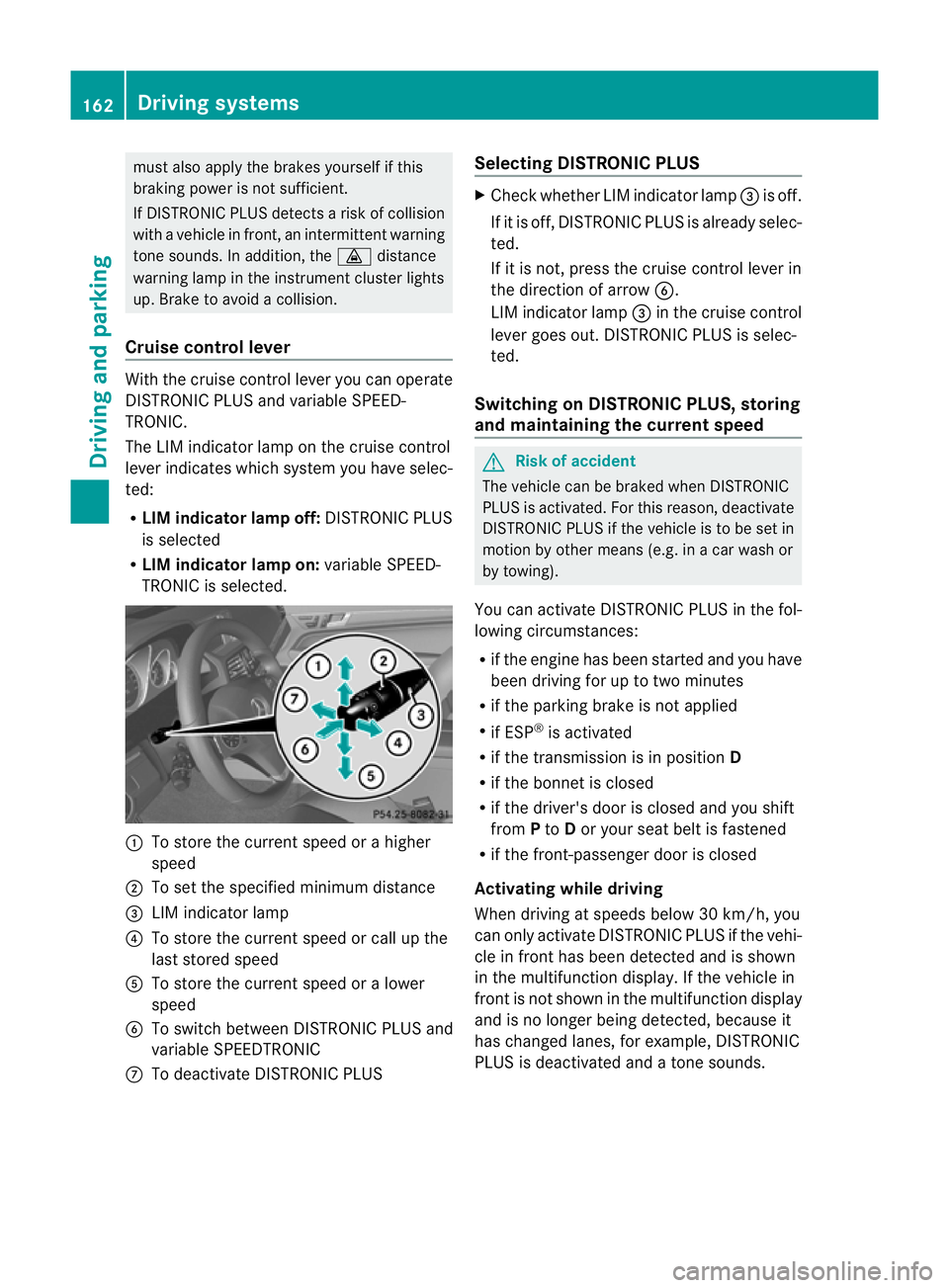
mus
talsoa pply the brakes yourself if this
braking powe risnot sufficient.
If DISTRONIC PLU Sdetect sarisk of collision
with avehicle in front, an intermit tent warning
tone sounds. In addition, the ·distance
warning lamp in the instrument cluste rlights
up. Brak etoavoidac ollision.
Cruise control lever With the cruise control lever you can operate
DI ST RONIC PLUS and variable SPEE D-
TRONIC.
The LI Mindicator lamp on the cruise control
lever indicates which system you have selec-
ted:
R LIM indicator lamp off: DISTRONIC PLUS
is selected
R LIM indicator lamp on: variable SPEED-
TRONIC is selected. :
To sto rethe curren tspeed or ahigher
speed
; To set the specified minimum distance
= LIMi ndicator lamp
? To sto rethe curren tspeed or call up the
last stored speed
A To stor ethe curren tspeed or alower
speed
B To switc hbetween DI STRONIC PLUS and
variable SPEEDTRONIC
C To deactivate DISTRONIC PLUS Selecting DISTRONIC PLUS X
Check whether LIM indicator lamp =is off.
If it is off, DISTRONIC PLUS is already selec-
ted.
If it is not ,pres sthe cruise contr ol leverin
the direction of arrow B.
LIM indicator lamp =in the cruise control
lever goe sout. DISTRONIC PLUS is selec-
ted.
Switching on DISTRONIC PLUS ,storing
and maintaining the current speed G
Risk of accident
The vehicle can be braked when DISTRONIC
PLUS is activated. For this reason, deactivate
DISTRONIC PLUS if the vehicle is to be set in
motion by othe rmeans (e.g. in acar wash or
by towing).
You can activate DISTRONIC PLUS in the fol-
lowing circumstances:
R if the engine has been started and you have
been drivin gfor up to two minutes
R if the parkin gbrake is not applied
R if ESP ®
is acti vated
R if the transmission is in position D
R if the bonnet is closed
R if the driver' sdoor is closed and you shift
from Pto Dor your seat belt is fastened
R if the front-passenger door is closed
Activating while driving
When drivin gatspeeds below 30 km/h, you
can only acti vate DISTRONIC PLUS if the vehi-
cle in fron thas been detected and is shown
in the multifunction display. If the vehicle in
front is not shown in the multifunction display
and is no longe rbeing detected, because it
has changed lanes, for example, DISTRONIC
PLU Sisd eactivated and atone sounds. 162
Driving systemsDriving and pa
rking
BA 20 7ECE ÄJ 2010 /1a; 1; 2, en-GB
mkalafa Version: 3.0.2.11 2010-01-26T13:03:22+01:00 -Seite 162
Page 168 of 333
If yo
uwish to leave the vehicle or park it,
deactivate DISTRONIC PLU Sand secure the
vehicl eagainst rolling away.
If DISTRONIC PLU Sdetect sthat the vehicle
in front is stopping, it brakes your vehicle until
it is stationary.
Onc eyour vehicle is stationary, it remains
stationar yand you do not need to depress the
brake.
i Depe nding on the specified minimum dis-
tance, your vehicle will come to astandstill
at as ufficien tdistanc ebehin dthe vehi cle
in fron t.The specifie dminimum distance is
set using the thumbwheel on the cruise-
control lever.
When DISTRONIC PLU Sisa ctivate dand the
vehicl eisatas tandstill, the following warning
message appe arsint he multifunction display
if:
R the driver's door is open and the driver's
seat belt is unfastened
R the engin eisswitched off, unless it is auto-
matically switched off by the ECO start/
stop func tion
R the bonnet is opened
Select Park (P)
X Move the selector leve rtoPto prevent the
vehicle from rolling away.
DISTRONIC PLUS is deactivated .The warn-
ing message in the multifunction display
disappears.
The horn will also sound at regular intervals if
DI ST RONIC PLUS is activated and you:
R switch the engine off, open the driver's
doo rand take off your sea tbelt
R open the bonnet
The soundin gofthe horn alerts you to the fact
that the vehicle has been parked while DI S-
TRONIC PLU Siss till activated. The sound
becomes louder if you attempt to lock the
vehicle .The vehicle is not locked until DI S-
TRONIC PLU Sisd eactivated. i
If the ignition has been switched off ,the
engin ecannot be started again until DIS-
TRONIC PLUS has been deactivated.
If DISTRONIC PLUS is activated and afault
occurs in the system or there is adisruption
in the power supply while the vehicle is sta-
tionary ,the Brak eimmediately message is
show ninthe multifunction display. Immedi-
atel ydepress the brak efirmly until the warn-
ing message in the multifunction displa ygoes
out or mov ethe selector lever to P.DIS-
TRONIC PLUS is then deactivated.
Setting aspeed X
Press the cruise control lever to the pres-
sure point, up :for ahigher speed or
down Afora lower speed.
X Keep the cruise contro llever pressed until
the desired speed is reached.
X Release the cruise control lever.
The new speed is stored. DI STRONIC PLUS
is activated and adjusts the vehicle's speed
to the new speed stored.
Making adjustments in 1km/h incre-
ments X
Briefly press the cruise contro llever to the
pressur epoint ,up :for ahigher speed or
down Afor alower speed.
The last speed stored is inc reased or
reduced.
Making adjustments in 10 km/h incre-
ments X
Briefly press the cruise contro llever
beyond the pressur epoint ,up :for a
higher spee dordownAfor alower speed.
The last speed stored is inc reased or
reduced. Driving systems
165Driving and parking
BA 207 ECE ÄJ 2010/1a; 1; 2, en-GB
mkalafa Version: 3.0.2.11 2010-01-26T13:03:22+01:00-Seite 165 Z
Page 172 of 333
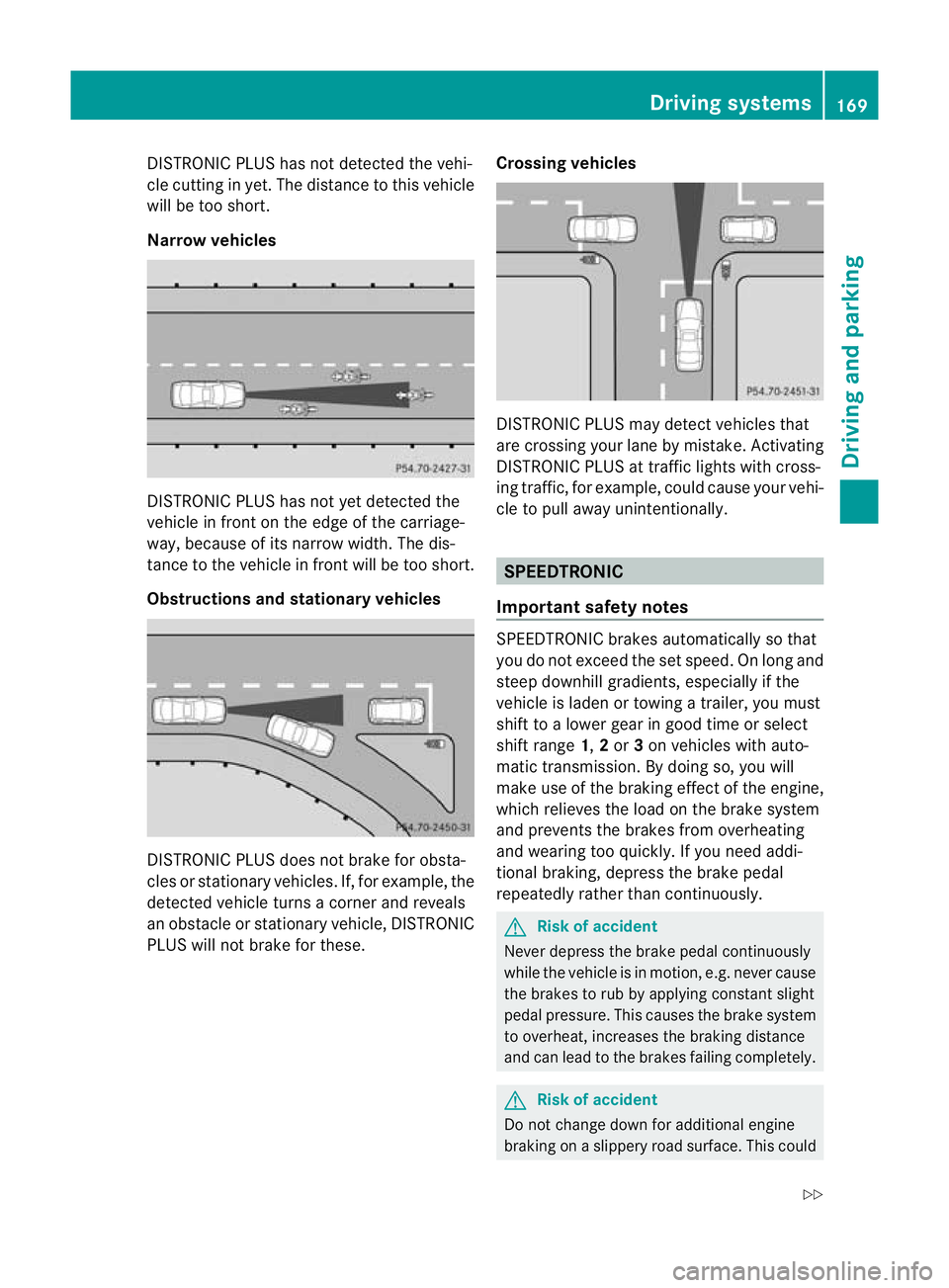
DISTRONIC PLUS ha
snot detected the vehi-
cle cutting in yet. Th edistance to thi svehicle
will be too short.
Narrow vehicles DISTRONIC PLUS ha
snot ye tdetected the
vehicl einfront on th eedgeoft he carriage-
way, because of its narrow width .The dis-
tance to the vehicle in front will be too short.
Obstruction sand sta tionary vehicles DISTRONIC PLUS does not brake for obsta-
cles or stationary vehicles. If, for example, the
detected vehicle turns acorner and reveals
an obstacle or stationar yvehicle, DI STRONIC
PLUS will not brake for these. Crossin
gvehicles DISTRONIC PLUS may detect vehicles that
are crossing your lane by mistake. Activating
DISTRONIC PLUS at traffic lights with cross-
ing traffic, for example, could cause your vehi-
cle to pull away unintentionally.
SPEEDTRONIC
Important safety notes SPEEDTRONIC brakes automatically so that
you do not exceed the set speed
.Onlong and
steep downhil lgradients ,especially if the
vehicle is laden or towing atrailer, yo umust
shift to alower gear in good tim eorselect
shift range 1,2or 3on vehicles with auto-
matic transmission. By doing so, you will
mak euse of the brakin geffect of th eengine,
which relieves the load on the brake system
and prevents the brakes from overheating
and wearing too quickly .Ifyou need addi-
tional braking, depress the brake pedal
repeatedly rather than con tinuously. G
Risk of accident
Never depress the brake pedal continuously
whil ethe vehicle is in motion, e.g. never cause
the brakes to ru bbyapplying constant slight
pedal pressure. This causes the brak esystem
to overheat, increases the braking distance
and can lead to the brakes failing completely. G
Risk of accident
Do not change down for additional engine
braking on aslippery road surface. This could Drivin
gsystems
169Drivingand pa rking
BA 20 7ECE ÄJ 2010 /1a;1;2,e n-GB
mkalafa Version: 3.0.2.11 2010-01-26T13:03:22+01:00-Seite 169 Z
Page 176 of 333
Activation conditions
You can activat
ethe HOL Dfunction if:
R the vehicl eisstationary
R the engin eisrunnin gorhas been automat-
ically switched off by th eECO star t/stop
function
R the dri ver'sd oor is closed or your seat belt
is fastened
R thep arking brak eisnot applied
R theb onnet is closed
R the selector leve risinp osition D,Ror Non
vehicles with automatic transmission
R DIST RONIC PLUS is deactivated
Activating the HOLD function X
Make sure that the activation conditions
are met.
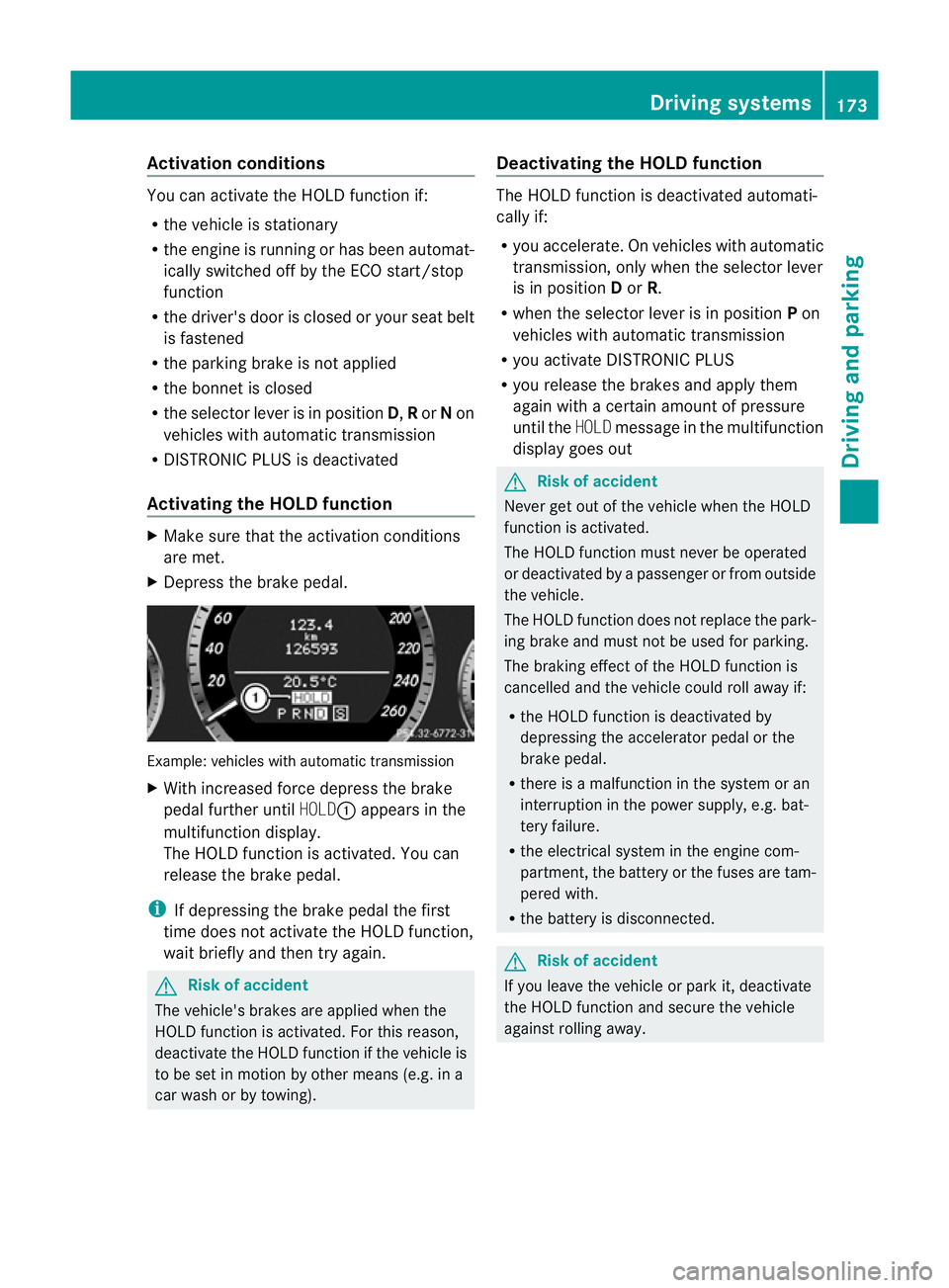
X Depress the brake pedal. Example: vehicles with automatic transmission
X
With increase dforc edepress the brake
pedal fur ther until HOLD:appear sinthe
multifunction display.
The HOL Dfunction is activated. You can
release the brake pedal.
i If depressing the brake pedal the first
time does not activate the HOLD function,
wait briefly and then try again. G
Risk of accident
The vehicle's brakes are applied when the
HOLD function is activated. For this reason,
deactivate the HOLD function if the vehicle is
to be set in motion by other means (e.g. in a
car wash or by towing). Deactivating the HOLD function The HOLD function is deactivated automati-
cally if:
R
you accelerate. On vehicles with automatic
transmission ,only whe nthe selec torlever
is in position Dor R.
R when the selector lever is in position Pon
vehicles with automatic transmission
R you activate DI STRONIC PLUS
R you release the brakes and apply them
again with acertain amount of pressure
until the HOLDmessage in the multifunction
display goes out G
Risk of accident
Never get out of the vehicle when the HOLD
fun ction is activated.
The HOLD function must never be operated
or deactivated by apassenger or from outside
the vehicle.
The HOLD function does not replace the park-
ing brake and must not be used for parking.
The brakin geffect of the HOLD function is
cancelled and the vehicl ecould roll away if:
R the HOL Dfunction is deactivated by
depressin gthe accelerator pedal or the
brake pedal.
R ther eisam alfunction in the system or an
interruption in the power supply, e.g. bat-
tery failure.
R the electrical system in the engine com-
partment ,the battery or the fuses ar etam-
pered with.
R the battery is disconnected. G
Risk of accident
If you leave the vehicle or park it, deactivate
the HOLD function and secure the vehicle
against rolling away. Driving systems
173Drivingand parking
BA 20 7ECE ÄJ 2010/1a; 1; 2, en-GB
mkalafa Version:3.0.2.11
2010-01-26T13:03:22+01:0
0-Seite 173 Z
Page 178 of 333
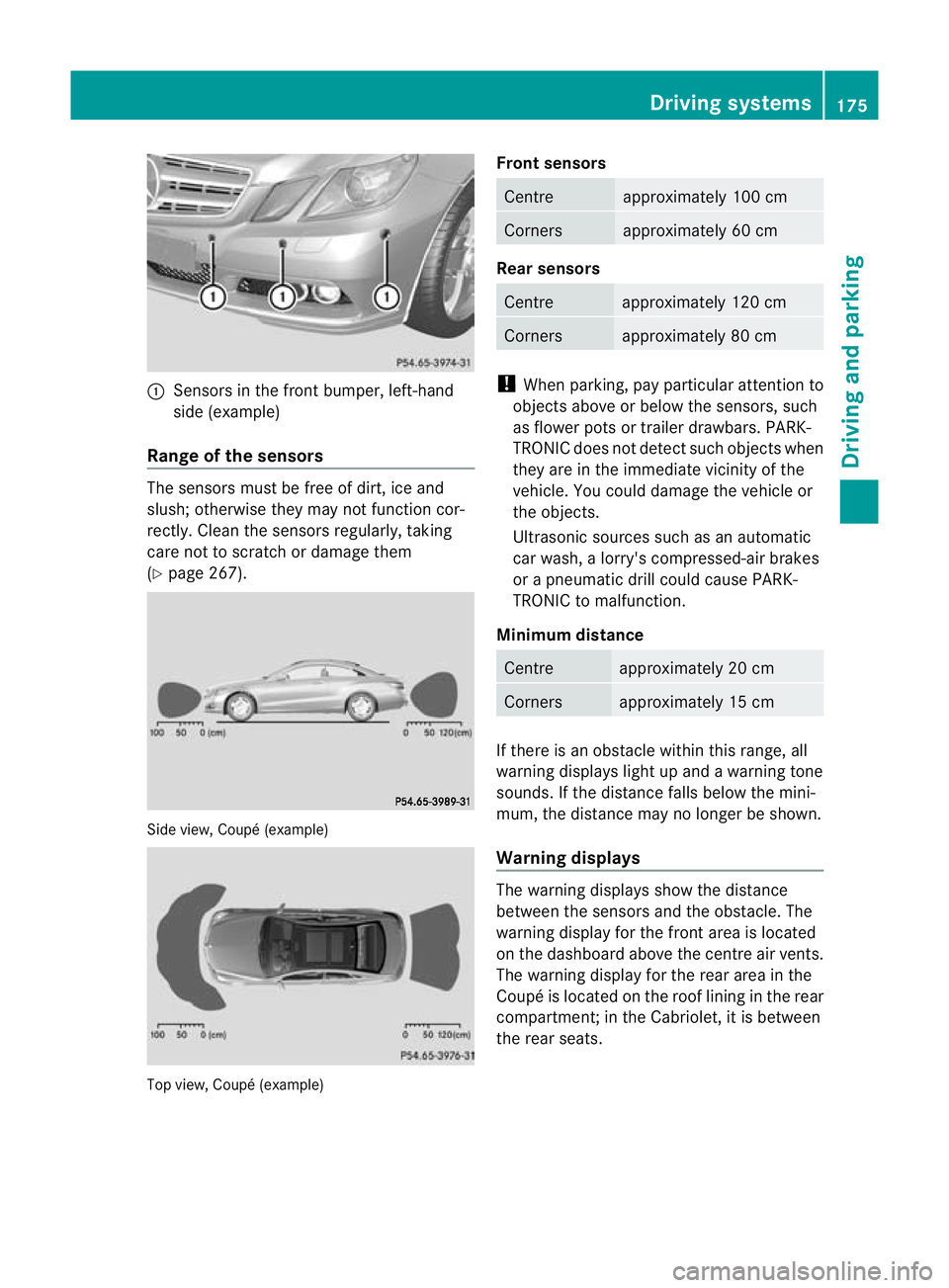
:
Sens orsint he front bumper, left-hand
sid e(example)
Rang eoft he sens ors The sensors mu
st befree of dirt, ice and
slush; otherwis ethey ma ynot function cor-
rec tly. Clean the sensor sregularly, taki ng
care not to scratch or damag ethem
(Y page 26 7). Side view, Coup
é(example) Top view, Coupé (example) Front sensors Centre approximately 10
0cm Corners approximately 60 cm
Rear sensors
Centre approximately 120 cm
Corners approximately 80 cm
!
When parking, pay particular attention to
objects above or below the senso rs,s uch
as flower pots or trailer drawbars. PARK-
TRONIC does not detect such ob jectswhen
they ar eintheimmediat evicinity of the
vehicle. You could damage the vehicle or
the objec ts.
Ultrasonic sources such as an automatic
car wash ,alorry' scompressed-ai rbrakes
or ap neumatic drill could cause PARK-
TRONI Ctom alfunction.
Minimum distance Centre approximately 20 cm
Corners approximately 15 cm
If ther
eisano bstacle within this ran ge,all
warnin gdisplays light up and awarnin gtone
sounds. If the distanc efalls below the mini-
mum, the distanc emay no longer be shown.
Warning displays The warnin
gdisplays show the distance
between the sensor sand the obs tacle. The
warning displa yfor the fr ont area is located
on the dashboar dabove the centr eair vents.
The warnin gdisplay for the rear area in the
Coupé is located on the roof linin ginthe rear
compar tment;inthe Cabriolet ,itisbetween
the rear seats. Driving systems
175Driving and parking
BA 207ECE ÄJ 2010/1a; 1; 2, en-GB
mkalafa Version: 3.0.2.11 2010-01-26T13:03:22+01:00-Seite1 75 Z
Page 190 of 333
Uncoupling
atrailer G
Ris
kofi njury
As soon as yo uraise the trailer drawbar, the
unladen vehicl erises slightly .The vehicl ethen
lowers to driving level.
Make sure that nobody is in the vicinity of the
wheel arch or the underbody. You coul doth-
erwise trap yoursel forothers. G
Risk of injury
The vehicle is lowered as soo nasyou discon-
nec tthe trailer cable. Make sur ethat nobody
is in the vicinit yofthe wheel arch or the
underbody. You coul dotherwis etrap yourself
or others.
As soon as you decoupl ethe trailer ,the unla-
den vehicle rise sslightly. Make sure that you
or others are not injured in the process.
! Do not uncouple atrailer wit hoverrun
brake between th ebumper and drawbar,
otherwis eyour vehicle coul dbedamaged
by the spring action of the overrun brake.
X Make sure that the transmission is in posi-
tion P.
X Apply the parking brake.
X Secure the trailer against rolling away.
X Remove the trailer cable and decouple the
trailer. Notes on towing
atrailer
Important safety instructions G
Ris
kofa ccident
When reversing the vehicle towards the
trailer, mak esure there is nobody between
the trailer and the vehicle.
Couple and uncouple the trailer carefully. If
you do not couple the trailer to the towing
vehicle correctly, the trailer could become
detached.
Make sure that the following values are not
exceeded: R
the permissible trailer drawbar noseweight
R the permissible trailer load
R the permissible rear axle load of the towing
vehicle
R the maximu mpermissible gross vehicle
weight of both the towing vehicle and the
trailer
You will fin dthe applicable permissible val-
ues, whic hmust not be exceeded ,inthe vehi-
cle documen ts.
You will find the values approved by the man-
ufacturer on the vehicle identification plates
and those for the towing vehicle in the "Tech-
nical data" section. G
Risk of accident
If the Checktrailer hitch locking
mechanism message appears in th emulti-
function display while the vehicle is in motion,
pull over immediately and check whethe rthe
ball coupling is correctly engaged. G
Risk of accident
Always observ ethe maximum speed permit-
ted in Germany for vehicle/ trailer combina-
tions, even in countries where higher speeds
are permitted. This lowers the risk of an acci-
dent. G
Risk of accident
Never depress the brake pedal continuously
while the vehicle is in motion ,e.g. never cause
the brakes to rub by appl yingc onstant slight
pedal pressure. This causes the brake system
to overheat, increases the brakin gdistance
and can lead to the brakes failing completely. G
Risk of accident
On no account should you attempt to draw the
vehicle/trailer combination out by increasing
speed. Trailer towing
187Driving and parking
BA 207 ECE ÄJ 2010/1a; 1; 2, en-GB
mkalafa Version: 3.0.2.11
2010-01-26T13:03:22+01:00
-Seite 187 Z