change time MERCEDES-BENZ E-CLASS CABRIOLET 2010 User Guide
[x] Cancel search | Manufacturer: MERCEDES-BENZ, Model Year: 2010, Model line: E-CLASS CABRIOLET, Model: MERCEDES-BENZ E-CLASS CABRIOLET 2010Pages: 333, PDF Size: 7.64 MB
Page 164 of 333
the brakes from overhe
ating and wearing too
quickly.
If as lower-moving vehicle is detected in front,
DISTRONIC PLU Scauses you rvehicle to
brak eand maintain apreset distance to the
vehicl einfront. G
Ris
kofa ccident
Do not change down for additional engine
brakin gonas lippery road surface. This could
cause the drive wheels to lose their grip and
the vehicle could skid. G
Risk of accident
DISTRONIC PLU Siso nly an aid designe dto
assis tdriving. Th edrive rremain sfully respon-
sible for the vehicle's distance from other
vehicles, the vehicle's spee dand for braking
in goo dtime.
DISTRONIC PLU Sdoes not react in particular
to:
R pedestrians
R stationar yobstacles on the road, e.g. stop-
ped or parked vehicles
R oncoming and crossin gtraffic
DISTRONIC PLUS may not detect narro wvehi-
cles driving in front, e.g. motorcycles, or vehi-
cles driving on adifferen tline. Therefore,
always pay attention to traffic condition seven
when DISTRO NICP LUS is activated. Other-
wise ,you may fai ltorecognise danger sin
time, cause an accident and injure yourself
and others. G
Risk of accident
DISTRONI CPLUS cannot take account of road
and traffi cconditions. If DISTRONI Cdoesn ot
recognise or no longer recognises the vehicle
in front ,donot activate DI STRONIC or, if it is
already active, deactivate it. This is especially
the case:
R before corners
R on filter lanes R
when changing to alane with faster moving
traffic
R in complex driving situations or where lanes
are diverted, e.g. at roadworks on amotor-
way
DI ST RONIC PLUS otherwis emaintains the
current spee dset by you or accelerates up to
the set speed.
DI ST RONIC PLUS cannot take account of
weathe rconditions. Deac tivate, or do not
activate, DISTRONIC PLUS:
R if the roads are slippery, snow-covered or
icy. The wheels could los etheir grip when
brakin goraccelerating .The vehicle could
star ttos kid.
R if the sensors are dirty or there is poo rvis-
ibility, e.g. due to snow, rain or fog. Dis-
tanc econtrol may be impaired.
Always pay attention to traffic conditions
even when DI STRONIC PLUS is activated.
Otherwise, you may fail to recognise dangers
in time, cause an accident and injure yourself
and others.
The radar sensor syste misautomatically
deactivated near radio telescope facilities
(Y page 324).
If you want DISTRONIC PLUS to assis tyou,
the radar sensor system must be activated
(Y page 208) and operational.
If ther eisnov ehicle in front ,DISTRONIC
PLUS operate sinthe sam eway as cruise
control in the spee drange between
30 km/ hand 200 km/h .Ifavehicle is driving
in front of you, DI STRONIC operates in the
speed range betwee n0km/h and
200 km/h.
Do no tuse DISTRONI CPLUS wh iled riving on
roa dswith steep gradients. G
Risk of accident
DISTRONIC PLUS brakes you rvehicle up to a
maximu mof4m /s2
depending on its speed.
This corresponds to approximately 40% of
your vehicle's maximum braking power. You Driving systems
161Driving and parking
BA 207 ECE ÄJ 2010/1a; 1; 2, en-GB
mkalafa Version: 3.0.2.11 2010-01-26T13:03:22+01:00-Seite 161 Z
Page 166 of 333
X
Briefly pull the cruise contro llev er towards
you ?or press it up :or down Ato the
pressure point.
DISTRONIC PLU Sisselected.
X Keep the cruise control lever pressed
up : or down Auntil the desired speed
is set.
X Remove your foot from the acc elerator
pedal.
You rvehicle adapts its speed to that of the
vehicle in front, but only up to the desired
stored speed.
i If you do not fully release the accelera tor
pedal, the DISTRONICP LUS suspen‐
ded message appears in th emultifunction
display. The set distance to aslower-mov-
ing vehicle in fron twill then not be main-
tained. You will be drivin gatthe speed you
deter mine by the positio nofthe accelera-
tor pedal.
Activating when driving towards asta-
tionary vehicle
If the vehicl einfront of yo uisstationary, you
can onl yactivate DISTRONI CPLUSo nce your
vehicl eisstationary as well.
X Briefl ypullt he cruis econtr ollever towards
you ?.
DISTRONIC PLUS is selected.
i DISTRONIC PLUS can onl ybeactivate dat
under 30 km/h if avehicle in front has been
detected. Therefore, the DISTRONIC PLUS
distance display in the instrumen tcluster
should be activated.
X Keep the cruise control lever pressed
up : or down Auntil the desired speed
is set.
i You can use the cruise control lever to set
the stored speed and the thumbwheel on
the cruise control lever to set the specified
minimum distance (Y page 166). Pulling away
X
If the vehicle in front pulls away: remove
your foot from the brake pedal.
X Briefly pull the cruise control lever towards
you ?.
or
X Accelerate briefly.
Your vehicle pull sawaya nd adapts its
speed to that of the vehicl einfront.
Driving
If there is no vehicl einfront, DISTRONIC
PLUS operates in th esame way as cruise
control.
If as lower-moving vehicle is detected in front,
DISTRONIC PLU Scauses your vehicle to
brake and maintain apreset distance to the
vehicl einfront.
If DISTRONIC PLUS detects afaster-moving
vehicle in front ,itincrease sthe drivin gspeed,
but only up to the desired speed you have
stored. G
Risk of accident
If you depress the brake, DISTRONIC PLU Sis
deactivated unless your vehicl eisstationary.
DISTRONIC PLUS then no longe rbrake syour
vehicle. In such cases, control the distance
from vehicles travelling in front with the brake
alone. You coul dotherwis ecause an accident
and thereby injure yoursel fand others. The
driver rema insf ully responsibl efor the vehi-
cle's distance from other vehicles ,the speed
being driven and for brakin gingood time.
Changing lanes
If you wish to change to the passing lane (in
left -hand-drive vehicles, the passing lane is
the left-hand lane), DISTRONIC PLUS sup-
ports you if:
R you are driving faster than 60 km/h
R DISTRONIC PLUS is maintaining the dis-
tanc etoav ehicle in front
R you switc honthe appropriate tur nsignals
R DISTRONIC PLU Sdoes not detec tadanger
of collision Driving systems
163Driving and parking
BA 207 ECE ÄJ 2010/1a; 1; 2, en-GB
mkalafa Version: 3.0.2.11 2010-01-26T13:03:22+01:00-Seite 163 Z
Page 173 of 333
cause the drive wheel
stoloset heir grip and
the vehicle coul dskid.
You can set avariable or permanent limit
speed:
R Variable for speedlimits, e.g. in built-up
areas
R permanent for long-term speed restric-
tions, e.g. when drivin gwith winter tyres
fitted (Y page 171) G
Risk of accident
Speedtronic is only an aid designed to assist
driving. You are responsible for the vehicle's
speed and for brakin gingood time.
i The speed indicated in the speedometer
may differ slightly from the limi tspeed
stored.
Variable SPEEDTRONIC General notes
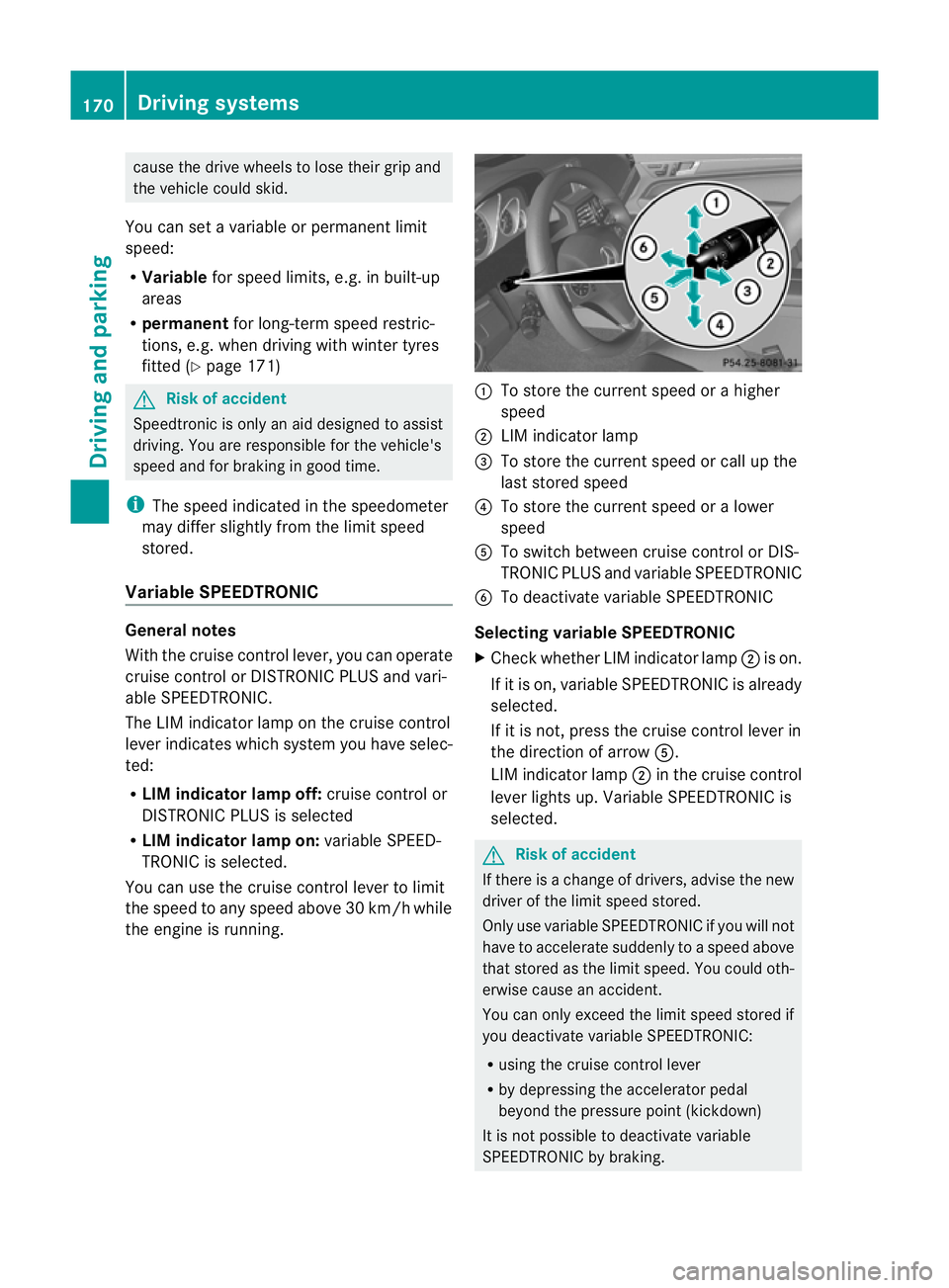
With the cruise control lever
,you can operate
cruise con trolorD ISTRONIC PLUS and vari-
able SPEEDTRONIC.
Th eL IM indicato rlamp on the cruise control
lever indicates which system you have selec-
ted:
R LIM indicator lamp off: cruise control or
DISTRONIC PLUS is selected
R LIM indicator lamp on: variable SPEED-
TRONIC is selected.
You can use the cruise control lever to limit
the spee dtoany speed above 30 km/h while
the engine is running. :
To store the current speed or ahigher
speed
; LIMi ndicato rlamp
= To store the current spee dorcall up the
last stored speed
? To store the current spee doral ower
speed
A To switc hbetween cruise control or DI S-
TRONIC PLU Sand variable SPEEDTRONIC
B To deactivate variable SPEEDTRONIC
Selecting variabl eSPEEDTRONIC
X Chec kwhether LI Mindicato rlamp ;is on.
If it is on, variable SPEEDTRONIC is already
selected.
If it is not, press the cruise control lever in
the direction of arrow A.
LIM indicator lamp ;in the cruise control
lever lights up. Variable SPEEDTRONIC is
selected. G
Risk of accident
If there is achange of drivers, advise the new
driver of the limit speed stored.
Only use variable SPE EDTRONI Cifyou will not
have to accelerate suddenl ytoaspeed above
that stored as the limit speed. You could oth-
erwise cause an accident.
You can only exceed the limit speed stored if
you deactivate variable SPE EDTRONIC:
R using the cruise control lever
R by depressin gthe accelerator pedal
beyon dthe pressure point (kickdown)
It is not possible to deactivate variable
SPE EDTRONI Cbybraking. 170
Dri
ving systemsDriving and pa rking
BA 20 7ECE ÄJ 2010/1a; 1; 2, en-GB
mkalafa Version: 3.0.2.11 2010-01-26T13:03:22+01:00 -Seite 170
Page 184 of 333
R
if the area is lit by fluorescen tlight (the dis-
play may flicker)
R if ther eisas udden change in temperature,
e.g. when drivin gintoah eatedgarage in
winter
R if the camer alens is dirt yorobstruc ted
R if the rear of your vehicle is damaged. In this
even thave the camera position and setting
checked at aqualified specialist workshop.
Mercedes-Ben zrecom mends that you use
aM ercedes-Benz Ser vice Centre for this
purpose.
Do not use the reversing camera in these
type sofs ituation .You could, otherwise,
injure other sordamage objects and your
vehicle while you are parking.
Activating the reversing camera X
Make sure that the key is in position 2in
the ignition lock.
X Make sure that the "Reversing camera"
function is selected in COMAND APS (see
the separate operating instructions for
COMAND APS).
X Engage reverse gear.
The area behind the vehicle is shown in the
COMAND APS display.
Guide lines in the COMAND APS display
Depending on the date of manufacture of the
vehicle, the guide lines are shown in the
COMAND APS display. G
Risk of accident
Please note that objects not on ground level
may appear to be further away than they
actually are. Thes einclude:
R the bumper of the vehicl eparked behind
R trailer tow bars
R the tail-end of alorry
R slanted posts
The lines are only guides, not accurate meas-
urements of the distance to an obstacle.
Therefore, you should never pass the red line
when approachin ganobstacle. You could oth- erwise cause an accident and injur
eyourself
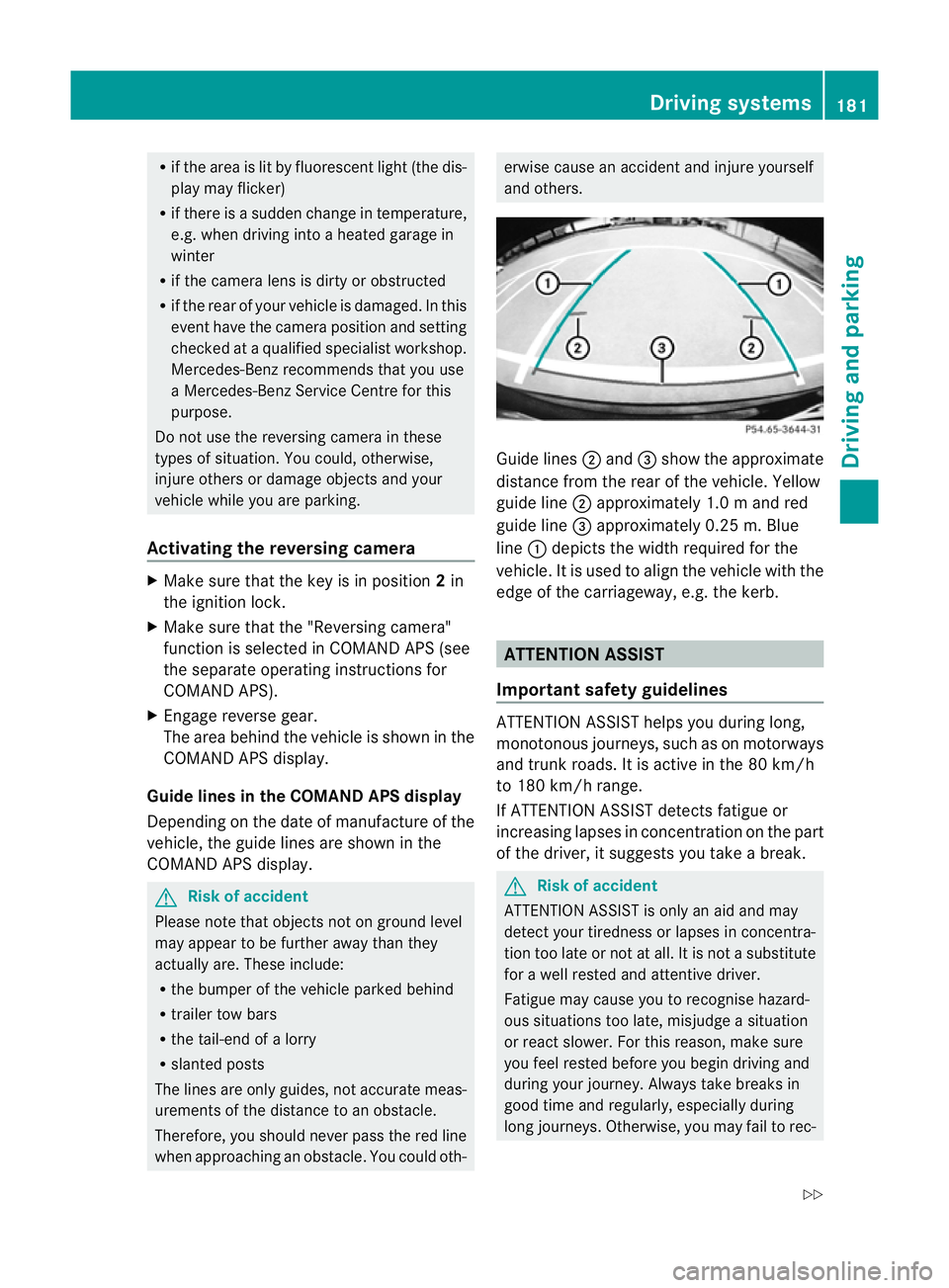
and others. Guide lines
;and =show the approximate
distance from the rear of the vehicle. Yellow
guide line ;approximately 1. 0mand red
guid eline =approximately 0.2 5m.Blue
line :depicts the width required for the
vehicle. It is used to align the vehicle with the
edge of the carriageway, e.g. the kerb. ATTENTION ASSIST
Important safet yguidelines ATTENTION ASSIST help
syou during long,
monotonous journeys, such as on motorways
and trunk roads. It is active in the 80 km /h
to 180 km/ hrange.
If ATTENTION ASSIST detects fatigue or
increasing lapses in concentration on the part
of the driver, it suggests you take abreak. G
Ris
kofa ccident
ATTENTION ASSIST is only an aid and may
detect your tiredness or lapses in concentra-
tion too late or not at all. It is not asubstitute
for aw ell reste dand attentiv edriver.
Fatigue may cause yo utorecognise hazard-
ous situations to olate ,misjudge asituation
or reac tslower .For this rea son, make sure
you fee lreste dbefore you begin driving and
duri ngyour jour ney. Always tak ebreaks in
good time and regularly ,especiall yduring
long jour neys. Otherwise ,you may fai ltorec- Driving systems
181Driving and parking
BA 207 ECE ÄJ 2010/1a; 1; 2, en-GB
mkalafa Version: 3.0.2.11 2010-01-26T13:03:22+01:00-Seite 181 Z
Page 185 of 333
ognise danger
sintime, cause an accident and
injur eyoursel fand others.
ATTE NTION ASSIST assesses your level of
fatigu eorlapses in concentration by taking
the following criteria into account:
R your personal driving style, e.g. steering
characteristics
R journey conditions, e.g. time of day and
length of journey
The functionality of ATTENTION ASSIST is
restricted and warnings may be delayed or
not occur at all:
R if the road condition is poor, e.g. the sur-
face is uneven or there are potholes
R if there is astron gside wind
R if you have adopted asporty driving style
with high cor nering speeds or hig hrates of
acceleration
R if you are predominantly driving slower
than 80 km/ horfaster than 180 km/h
R if you are currently using COMAND APS or
making atelephone call with it
R if the tim ehas been set incorrectly
R in active driving situations, such as when
you change lanes or change your speed
Warning and display messages in the
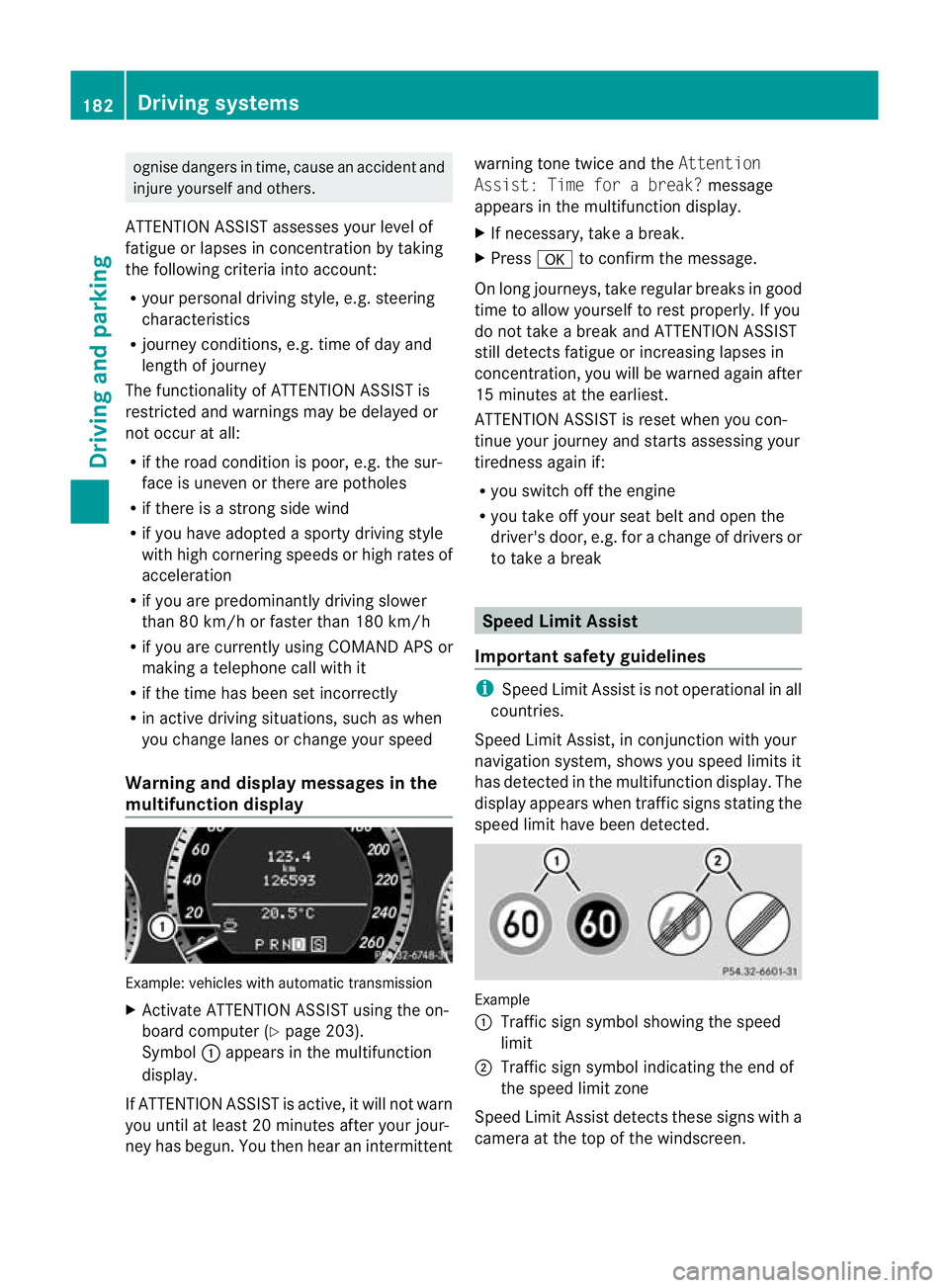
multifunction display Example: vehicles with automatic transmission
X Activate ATTENTION ASSIST using the on-
board computer (Y page 203).
Symbol :appears in the multifunc tion
display.
If ATTENTION ASSIS Tisactive, it wil lnot warn
you until at least 20 minutes after your jour-
ney has begun. You then hear an intermittent warnin
gtonet wice and the Attention
Assist :Time for abreak? message
appears in th emultifunction display.
X If necessary, take abreak.
X Press ato con firm th emessage.
On long journeys, take regula rbreaks in good
time to allow yoursel ftorest properly. If you
do not take abrea kand ATTENTION ASSIST
stil ldetect sfatigue or increasing lapses in
concentration, you will be warned again after
15 minutes at the earliest.
ATTENTION ASSIST is reset when you con-
tinue your journey and start sassessing your
tiredness agai nif:
R you switch off th eengine
R you take off your sea tbelt and open the
driver' sdoor, e.g. for achange of driver sor
to take abreak Spee
dLimit Assist
Impor tant safety guidelines i
Speed Limit Assist is not operational in all
coun tries.
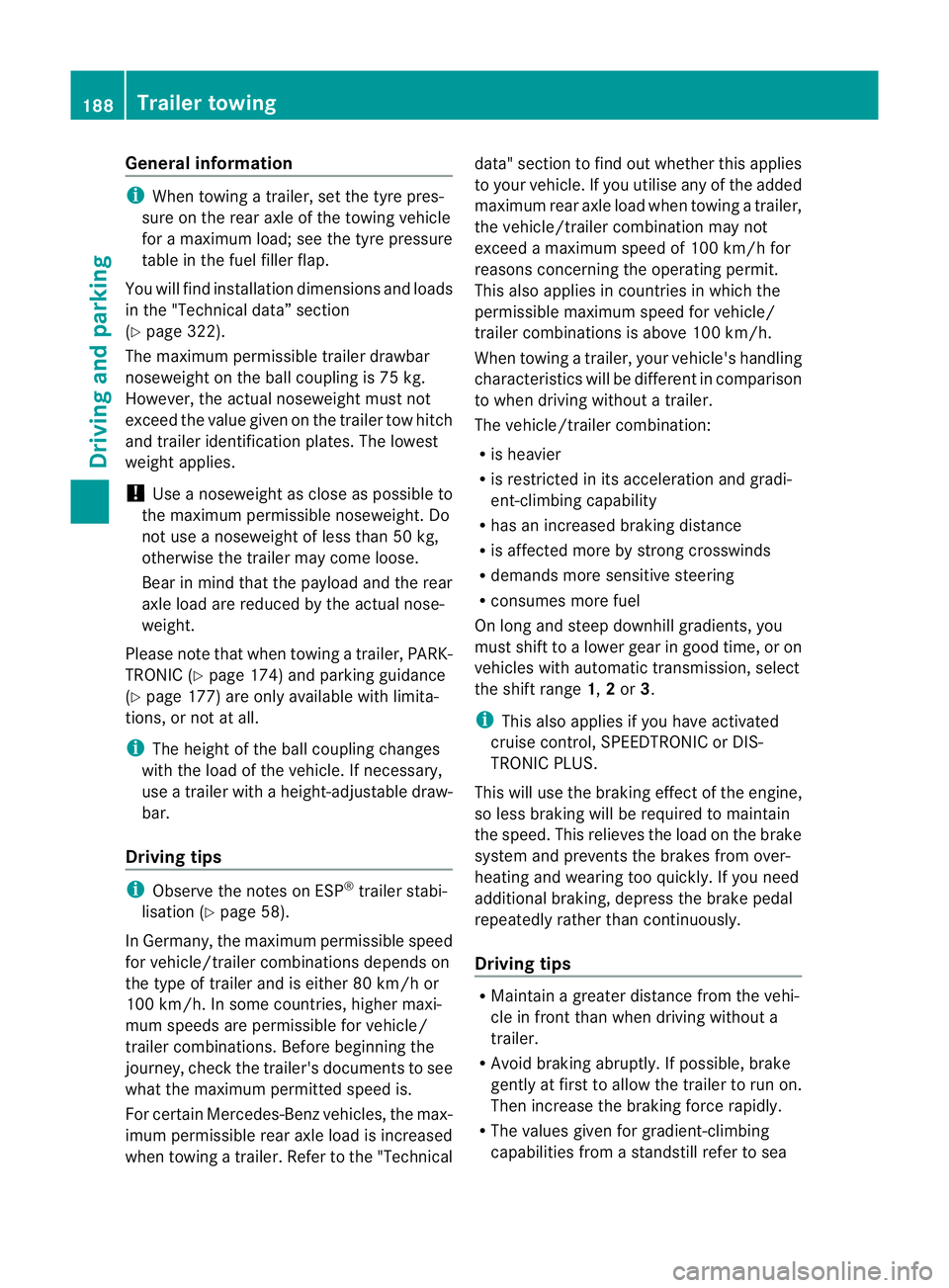
Speed Limit Assist ,inconjunc tion with your
navigation system ,shows you speed limits it
has detec tedint he multifunc tion display. The
display appears when traffic signs stating the
speed limit hav ebeen detected. Example
:
Traffic sign symbol showing the speed
limit
; Traffic sign symbol indicatin gthe end of
the speed limit zone
Speed Limi tAssist detec ts these signs with a
camera at the top of the windscreen. 182
Driving systemsDriving and parking
BA 20
7ECE ÄJ 2010 /1a;1;2,e n-GB
mkalafa Version: 3.0.2.11 2010-01-26T13:03:22+01:00-Seite 182
Page 191 of 333
Gen
eral information i
When towing atrail er,s et the tyr epres-
sure on th erear axle of the towing vehicle
for am aximum load; se ethe tyr epressure
table in th efuel filler flap.
You will find installatio ndimensions and loads
in the "Technical data” section
(Y page 322).
The maximum permissible trailer drawbar
noseweight on the ball coupling is 75 kg.
However ,the actual noseweight must not
exceed the value given on the trailer tow hitch
and trailer identification plates. The lowest
weight applies.
! Use anoseweight as close as possible to
the maximum permissible noseweight .Do
not use anoseweight of less than 50 kg,
otherwise the trailer ma ycome loose.
Bear in min dthat the payload and the rear
axl eload ar ereduced by the actual nose-
weight.
Please not ethat when towing atrailer, PARK-
TRONIC (Y page 174) and parkin gguidance
(Y page 177 )are onl yavail ablew ith limita-
tions, or not at all.
i The height of the ball coupling changes
with the load of the vehicle. If necessary,
use atrailer wit haheight-adjustable draw-
bar.
Driving tips i
Observ ethe notes on ESP ®
trailer stabi-
lisation (Y page 58).
In Germany, the maximum permissible speed
for vehicle/ trailer combinations depends on
the type of trailer and is either 80 km/ hor
100 km/h. In some countries ,higher maxi-
mum speeds are permissible for vehicle/
trailer combinations. Befor ebeginnin gthe
journey ,check the trailer's documen tsto see
what the maximum permitted speed is.
For certain Mercedes-Benz vehicles, the max-
imum permissible rear axle load is increased
when towing atrailer. Refer to th e"Technical data
"section to fin dout whether this applies
to your vehicle. If you utilise any of the added
maximum rear axle load when towing atrailer,
th ev ehicle/ trailer combination may not
exceed amaximum spee dof100 km/h for
reasons concerning the operating permit.
This als oapplies in countries in which the
permissible maximum speed for vehicle/
trailer combinations is above 10 0km/h.
When towing atrailer, your vehicle's handling
characteristics wil lbedifferent in comparison
to when drivin gwithout atrailer.
Th ev ehicle/ trailer combination:
R is heavier
R is restricted in its acceleration and gradi-
ent-climbin gcapability
R has an increased braking distance
R is affected more by stron gcrosswinds
R demand smore sensitive steering
R consume smore fuel
On long and steep downhil lgradients ,you
must shift to alower gear in good time, or on
vehicles with automatic transmission ,select
the shift range 1,2or 3.
i This also applies if you have activated
cruise control, SPEEDTRONIC or DI S-
TRONIC PLUS.
This will use the brakin geffect of th eengine,
so les sbraking wil lberequired to maintain
the speed. This relieves the load on the brake
system and prevent sthe brakes from over-
heating and wearing too quickly .Ifyou need
additional braking, depress the brake pedal
repeatedly rather than con tinuously.
Driving tips R
Maintain agreater distance from th evehi-
cle in front than when driving without a
trailer.
R Avoid braking abruptly. If possible, brake
gently at first to allow the trailer to run on.
Then increase the braking force rapidly.
R The values given for gradient-climbing
capabilities from astandstill refer to sea 188
Trailer towingDrivin
gand pa rking
BA 20 7ECE ÄJ 2010 /1a; 1; 2, en-GB
mkalafa Version: 3.0.2.11 2010-01-26T13:03:22+01:00 -Seite 188
Page 205 of 333
X
If only one telep hone number is stored
for aname: press the 6ora button
to start dialling.
or
X If there is more than on enumbe rfor a
particula rname: press the 6ora
button to display the numbers.
X Press the 9or: button to select the
number you want to dial.
X Press the 6ora button to start dial-
ling.
or
X If you do not want to mak eacall:press
the ~ button.
Redialling Th
eo n-board compute rsaves the last names
or numbers dialle dinthe redial memory.
X Press the =or; button on the steer-
ing wheel to selec tthe Tel menu.
X Press the 6button to switc htothe
redial memory.
X Press the 9or: button to selec tthe
desired nam eornumber.
X Press the 6ora button to start dial-
ling. Assistance menu
Speed Limit Assist Displaying Speed Limit Assist
In the
SpeedLim. Asst. function,adetec-
ted speed limi tisdisplayed under certain
conditions. You can set Speed Limit Assist
(Y page 182 )todisplay adetected speed limit
automatically for fiv eseconds. Other mes-
sages in the multifunc tion display will be hid-
den for this lengt hoftime. X
Press the =or; button on the steer-
ing wheel to select the Assist.menu.
X Press the 9or: button to select
Spee dLim. Asst.
X Press a.
Th em ultifunction display shows Speed
Limit Assis t.
When alimit speed is detected, this is
shown in the multifunction display until:
R the speed limit ceases to apply.
R you pass city limits.
R the type of road changes, e.g. motorway
or country road.
R the speed limit is no longer detected
after acertain distance.
Activating/deactiva ting th eSpeed Limit
Assist message function
X Pres sthe = or; button on the steer-
ing wheel to selec tthe Assist. menu.
X Press the 9or: button to select
Spee dLim. Asst.
X Press a.
Th em ultifunction display shows Speed
Limit Assis t.
X Press :.
The curren tselection is displayed.
X To activat eordeactivate: pressa.
Ad etected speed limi tappears automati-
cally for fiv eseconds.
When Speed Limit Assist is operational and
the message fun ction is activated, the multi-
function display shows the Äsymbol
when the ignition is switched on.
Showing the distance display This function is only available with DIS-
TRONIC PLUS.202
Menus and submenusOn-boar
dcomputer and displays
BA 20 7ECE ÄJ 2010/1a; 1; 2, en-GB
mkalafa Version:3.0.2.11
2010-01-26T13:03:22+01:0
0-Seite 202
Page 208 of 333
X
Press the =or; button on the steer-
ing wheel to select the Settingsmenu.
X Press the :or9 button to select the
Inst .cluster submenu.
X Press the abuttontoc onfirm.
X Press the :or9 button to select the
Dig. speedo [mph]: function.
You will see the selected setting: onor
off.
X Press the abutton to save the setting.
Selecting th epermanent display function
Only vehicles with automatic transmission
have this func tion.
i Vehicles for the United Kingdom: this
func tion is not available.
The Permanen tdisplay: function allows
yo utoc hoose whether the multifunction dis-
play always shows the outside temperature
or the speed in mph.
X Press the =or; button on the steer-
ing wheel to selec tthe Settings menu.
X Press the :or9 button to selec tthe
Inst .cluster submenu.
X Press the abuttontoc onfirm.
X Press :or9 to select the Perma‐
nent display function.
You will see the selected setting: outside
temperat ureorDig. speedo m[mph].
X Press the abuttontos ave the setting.
Time/date This submenu is only availabl
eonvehicles
with Audio 20.
In the Time/date submenu, you can set the
tim eand date.
Your vehicl ecould have the following audio
equipment:
A: Audi o20
B: Audi o50A PS
C: COMAN DAPS X
Refer to the separate operating instruc-
tions to fin dout which audio system is fit-
ted in your vehicle.
Depending on the audio system, the time and
date are received from GPS satellites and
cannot be set using the on-board computer
(see the following table). A B C
Setting using the on-board com-
puter X
Automatic GPS satellite recep-
tion X X
Set the time zone once; see the
separate operating instructions X X
X
Press the =or; button on the steer-
ing wheel to select the Settingsmenu.
X Press the :or9 button to select the
Time/date submenu.
X Press the abutton to confirm.
X Press the :or9 button to select
Time: orDate:.
The curren ttime or date set is displayed.
X Press ato change the setting.
X Press the =or; button to select the
display you wan ttochange :hour ,minute,
day, month, year.
X Press the :or9 button to set the
selected display.
X Press the abutton to store the entry.
Lights Switching the day
time drivin glights on/
off
If you have activated the Daytimedriving
lights: functionand the light switch is in the
c position, the daytime driving lights are
switched on automatically whe nthe engin eis
running. When it is dark, th eside lamps and
the dipped-bea mheadlamps are switched on
automatically. Menus and submenus
205On-boardcomputer and displays
BA 20 7ECE ÄJ 2010/1a; 1; 2, en-GB
mkalafa Version:3.0.2.11
2010-01-26T13:03:22+01:0
0-Seite 205 Z
Page 223 of 333
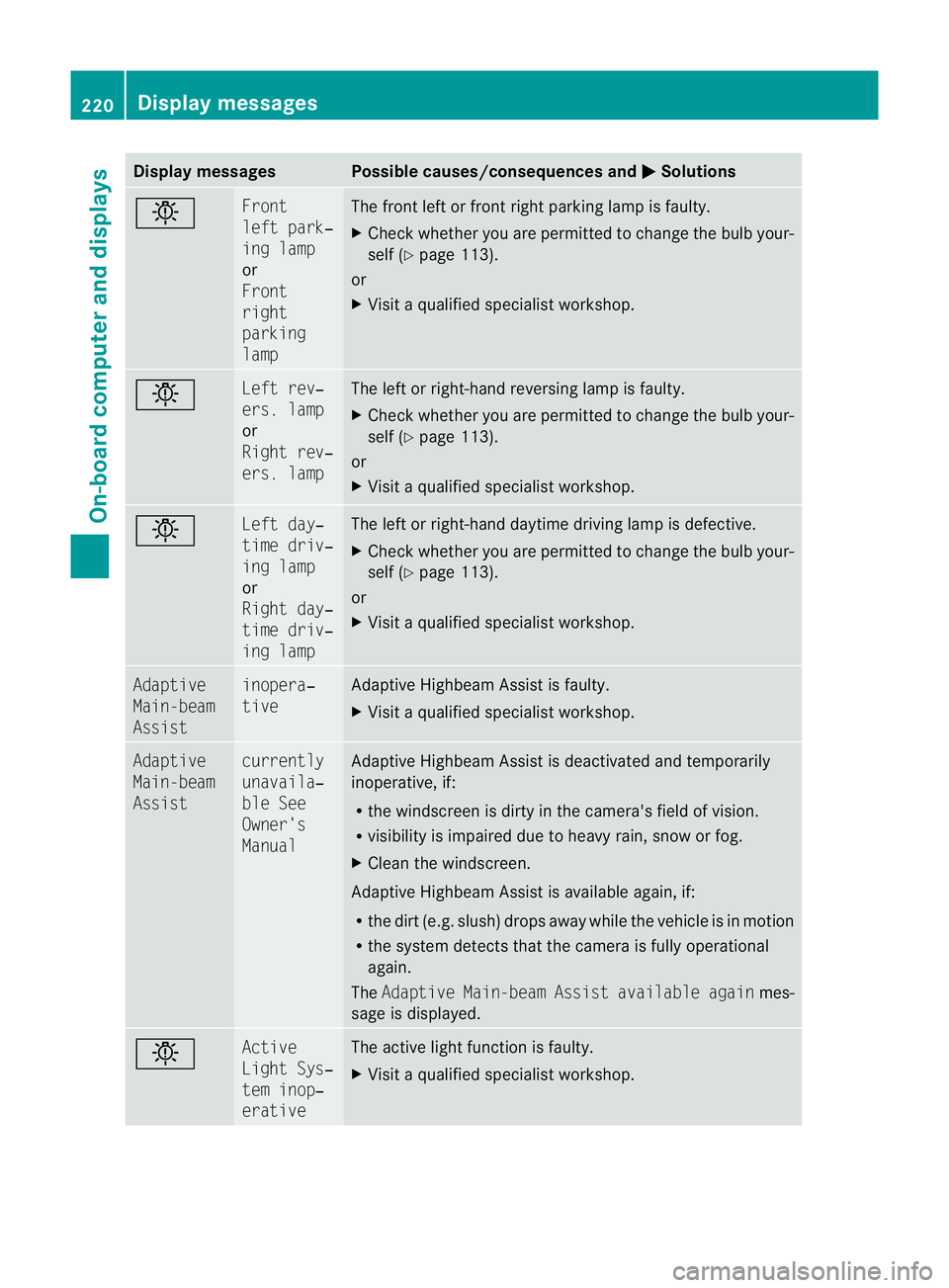
Displa
ymessages Possible causes/consequences and
M Solutions
b Fr
ont
lef tp ark‐
ing lamp
or
Front
right
parking
lamp Th
ef ront leftorf rontright parking lamp is faul ty.
X Chec kwhether you ar epermitted to change the bulb your-
self (Y page 113).
or
X Visit aqualified specialist workshop. b Left rev‐
ers. lamp
or
Righ
trev‐
ers. lamp Th
eleft or right-hand reversin glamp is faulty.
X Check whethe ryou ar epermitted to change the bulb your-
self (Y page 113).
or
X Visit aqualified specialist workshop. b Left day‐
time driv‐
in
gl amp
or
Right day‐
time driv‐
ing lamp Th
eleft or right-hand daytime driving lam pisdefective.
X Check whether you are permitted to change the bulb your-
self (Y page 113).
or
X Visit aqualified specialist workshop. Adaptive
Main-beam
Assist inopera‐
tive Adaptive Highbeam Assis
tisf aulty.
X Visit aqualified specialist workshop. Adaptive
Main-beam
Assist currently
unavaila‐
bl
eS ee
Owner's
Manual Adaptive Highbea
mAssist is deactivate dand temporarily
inoperative, if:
R the windscreen is dirty in the camera's field of vision.
R visibility is impaired due to heavy rain, sno worfog.
X Clean the windscreen.
Adaptive Highbea mAssist is available again, if:
R the dir t(e.g. slush) drops away while the vehicle is in motion
R the system detect sthat the camera is fully operational
again.
The Adaptive Main-bea mAssist available again mes-
sage is displayed. b Active
Light Sys‐
tem inop‐
erative Th
ea ctive light function is faulty.
X Visi taq ualified specialist workshop. 220
Display messagesOn-board computer and displays
BA 207 ECE ÄJ 2010/1a; 1; 2, en-GB
mkalaf
aV ersion: 3.0.2.11
2010-01-26T13:03:22+01:0
0-Seite 220
Page 237 of 333
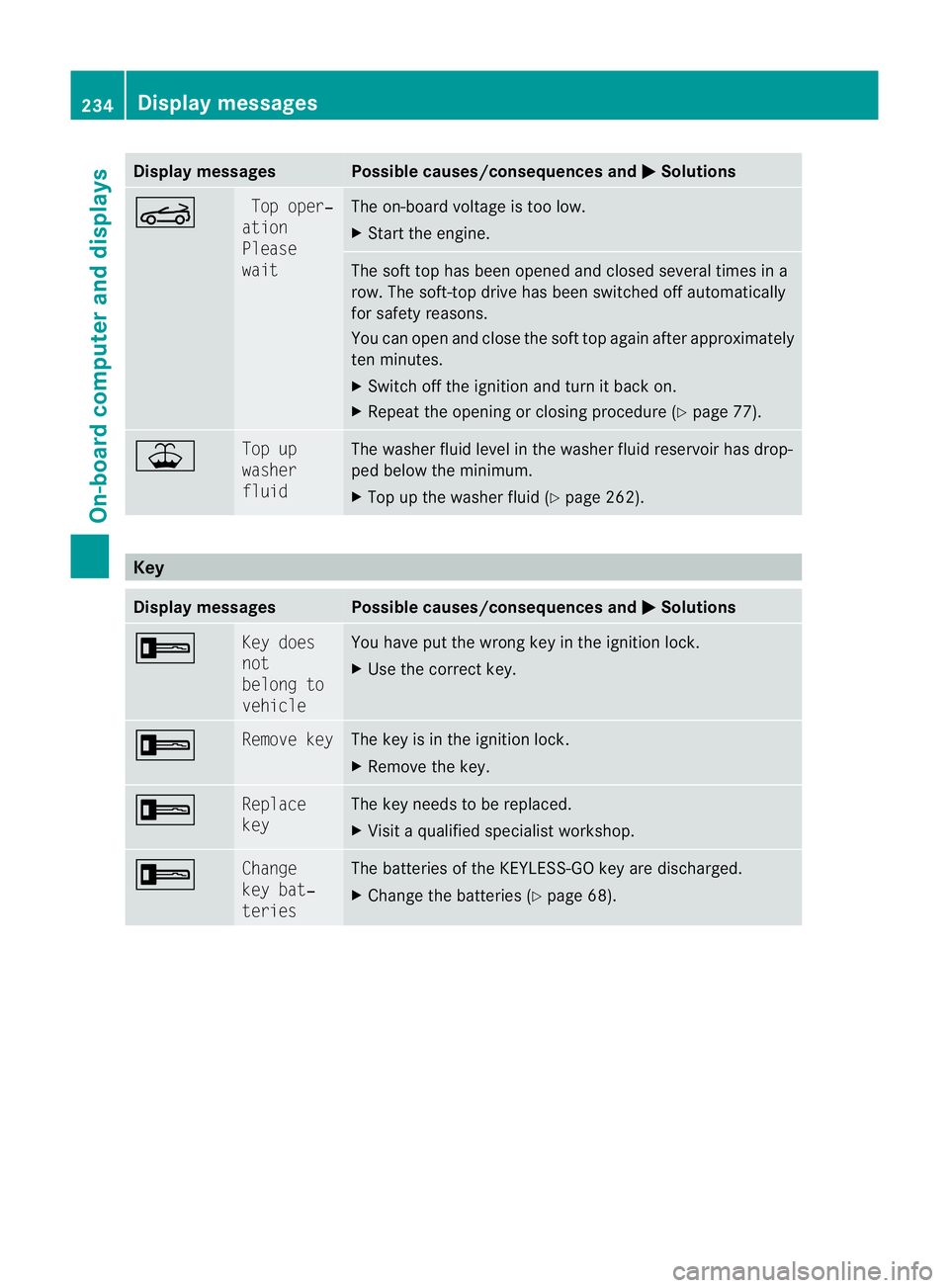
Displa
ymessages Possible causes/consequences and
M Solutions
K To
po per‐
ation
Please
wait Th
eo n-bo ardv oltag eistoo low.
X Start th eengine. The soft top has bee
nopened and closed several times in a
row. The soft-top driv ehas been switched off automatically
for safety reasons.
You can open and close the soft top again after approximately
ten minutes.
X Switch off the ignition and turn it back on.
X Repeat the opening or closing procedure (Y page 77).¥ To
pup
washer
fluid Th
ew asher fluid level in the washe rfluid reservoir has drop-
ped below the minimum.
X Top up the washer fluid (Y page 262).Key
Display messages Possible causes/consequences and
M Solutions
+ Ke
yd oes
not
belong to
vehicle Yo
uh ave put the wrong key in the ignition lock.
X Use the correc tkey. + Remove key The key is in the ignition lock.
X
Remov ethe key. + Replace
key The key needs to be replaced.
X
Visit aqualified specialist workshop. + Change
ke
yb at‐
teries Th
eb atteries of the KEYLESS-GO key are discharged.
X Change the batteries (Y page 68).234
Display messagesOn-board computer and displays
BA 207 ECE ÄJ 2010/1a; 1; 2, en-GB
mkalafa
Version:3.0.2.11
2010-01-26T13:03:22+01:00
-Seite 234