warning lights MERCEDES-BENZ E-CLASS CABRIOLET 2010 User Guide
[x] Cancel search | Manufacturer: MERCEDES-BENZ, Model Year: 2010, Model line: E-CLASS CABRIOLET, Model: MERCEDES-BENZ E-CLASS CABRIOLET 2010Pages: 333, PDF Size: 7.64 MB
Page 62 of 333
under full braking. This coul
dcause you to
lose control of your vehicle and cause an acci-
dent. You shoul dtherefore adapt your driving
styl etot he different handling characteristics. ADAPTIVE BRAKE
ADAPTIV EBRAKE enhances braking safety
and offers increased braking comfort .Inaddi-
tion to the brakin gfunction ,ADAPTIVE BRAKE
also ha sthe HOL Dfunctio n(Ypage 17 2)and
hill start assist (Y page137).For further
inf ormation, se eDriving tip s(Ypage 154). PRE-SAFE
®
Brake (vehicles with DIS-
TRON IC PLUS)
PRE-SAFE ®
Brake can hel pyou to minimise
the ris kofaf rontal col lisionwithavehicle
ahead or reduce the effects of such acolli-
sion.
This function will issu eawarning at spe edsof
around 30 km/h or more if:
R for aperiod of sever alseconds, the dis-
tance to the vehicl einfront is to oshort for
the speed at which you ar etrave lling. The
· distance warning lamp in the instru-
ment cluster lights up.
R you are approaching the vehicle in front too
rapidly .Anintermittent warning tone
so unds and the ·distance warning
lamp lights up in the instrument cluster.
Due to the nature of the system, particularly
complicated driving conditions may caus ethe
system to displa yanunneces sary warning. G
Ris
kofa ccident
Pay particula rattention to the traffic condi-
tions if the ·distance warning lam pinthe
instrument clu ster lights up or an intermittent
warning tone sounds. If necessary, brak eor
manoeuvre to avo idan obstacle. If the driver and passengers have fastened
thei
rseat belts, PRE-SAFE ®
Brak ecan also
can also perform the following at speeds of
above approximately 30 km/h:
R brake the vehicle automatically from a
spee dofuptoa pproximately 20 0km/h
R trigge rpreventative passenge rprote ction
measures (PRE-SAFE ®
) G
Risk of accident
PRE-SAFE ®
Brak eiso nly an aid to assist you
whe ndriving. Yo uare responsible for main-
taining asafe distanc efrom other vehicles,
th ev ehicle' sspeed and for braking in good
time. Alway spay attention to the traffic con-
ditions. Otherwise, you may recognise dan-
gers too late, cause an acciden tand injure
yoursel fand others.
With the hel pofthe radar sensor system,
PRE-SAFE ®
Brak ecan detect obstacles that
are in fron tofyour vehicle for an extended
period of time. If you approach an obstacle
and PRE- SAFE®
Brake detects arisk of acol-
lision, the system will initially aler tyou both
visually and acoustically .Ify ou do not brake
or steer ,the vehicle will at first automatically
brake slightly. In the even tofanincreased
risk of acollision ,PRE-SAFE ®
is activated
(Y page 39). If the risk of collision remains
and you do not brake, take evasive action or
accelerat esignificantly, the vehicle may per-
form automatic emergency braking. G
Risk of accident
Only clearl ydetected obstacles will trigger a
warning and initiat ebraking assistance by
PRE-SAFE ®
Brake.
In particular, th edetection of obstacles can
be impaired if there is:
R dirt on the sensor sorthe sensor sare cov-
ered
R snow or heavy rain Dri
ving sa fety systems
59Safety
BA 207 ECE ÄJ 2010/1a; 1; 2, en-GB
mkalafa Version: 3.0.2.11 2010-01-26T13:03:22+01:00 -Seite 59 Z
Page 109 of 333
Vehicl
eequipment
i Thismanua ldesc ribe sallthe standard
and optional equipment of your vehicle
which wa savailable at th etime of pur-
chase. Countr y-specif ic differences are
possible. Bear in mind tha tyour vehicle
ma ynot featur eall function sdescribed
here. Exterio
rlighting Important safet
ynotes
For reasons of safety, Mercedes-Ben zrecom-
mends that you driv ewith the lights switched
on even during the daytime. In some coun-
tries, operation of the headlamps varies due
to legal requirement sand self-imposed obli-
gations. In these countries, the daytime driv-
ing lights are automatically switche donwhen
the engin eisstarted. Notes on driving abroad
Converting to symmetrical dipped beam
when drivin gabroad: switch the headlamps
to symmetrical dipped beam in countries in
which traffic drives on the opposite side of the
road to the countr ywhere the vehicle is reg-
istered. This prevents oncomi ngtraffic from
being dazzled .Symmetrical lights do not illu-
minate as large an area of the edg eofthe
carriageway.
Convert the headlamps as close to the border
as possible before drivin ginthese countries
(Y page 206).
Converting to asymmetrica ldipped beam
after retu rning: conver tthe headlamps back
to asymmetrical dipped beam as soon as pos-
sible after crossing the border when returning
(Y page 206).
Vehicle swith Intelligent Light System: if
the headlamps are converted to symmetrical
dipped beam, not all light functions are avail- able. "Motorway mode" and the "extended
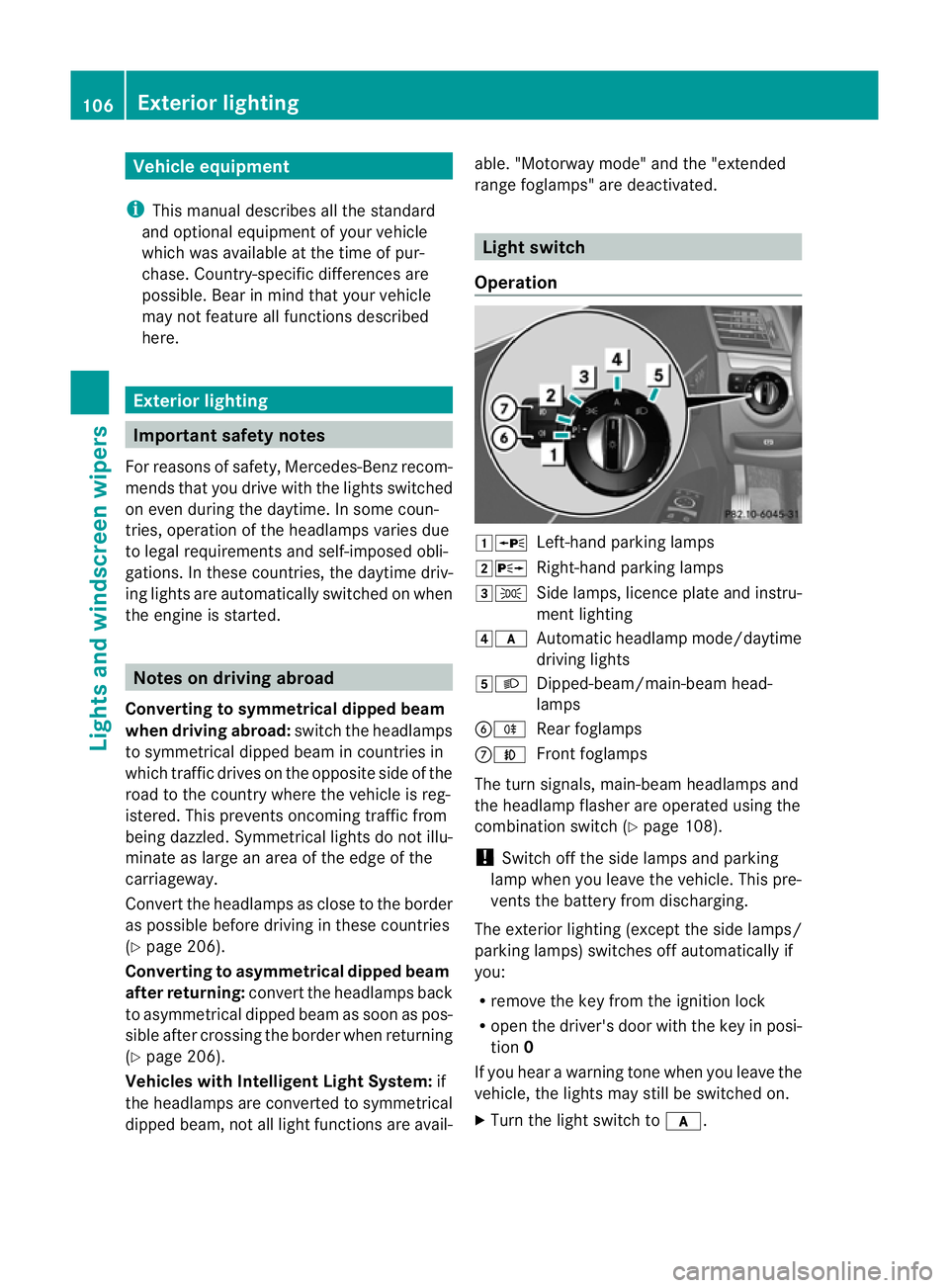
range foglamps" are deactivated. Light switch
Opera tion 1W
Left-hand parking lamps
2X Right-hand parking lamps
3T Side lamps, licence plate and instru-
ment lighting
4c Automatic headlamp mode/daytime
driving lights
5L Dipped-beam/main-beam head-
lamps
BR Rear foglamps
CN Front foglamps
The turn signals ,main-beam headlamps and
the headlamp flasher are operated using the
combination switch (Y page 108).
! Switch off the side lamps and parking
lamp when you leave the vehicle. This pre-
vent sthe battery from discharging.
The exterior lighting (except the side lamps/
parkin glamps) switches off automatically if
you:
R remove the key from the ignition lock
R open the driver' sdoor with the key in posi-
tion 0
If you hear awarning tone when you leave the
vehicle, the lights may still be switched on.
X Turn the light switch to c.106
Exterior lightingLights and windscree
nwipers
BA 207ECE ÄJ 2010 /1a;1;2,e n-GB
mkalafa Version: 3.0.2.11 2010-01-26T13:03:22+01:00-Seite 106
Page 113 of 333
indicator lamp in the instrumen
tcluster
stays on.
X To deactivate: movethe combina tion
switc hback to its normal posi tion.
The _ indicator lam pinthe instrument
cluster goes out.
Headlam pflasher X
To switch on: turnthe key in the igni tion
lock to position 1or 2or star tthe engine.
X Pull the combina tion switc hbrieflyint he
direction of arrow =.Ha
zard warning lamps The hazar
dwarnin glamps automatically
switc hon:
R if an airbag is deployed
R if the vehicle decelerates rapidl yfrom a
speed of more than 70 km/h and comes to
as tandstill
X To switch on the hazar dwarning lamps:
press button :.
All turn signals flash. If you now switch on
at urn signal using the combination switch,
only the turn signal lamp on the corre-
sponding side of the vehicle will flash.
X To switch off the haza rdwarning
lamps: press button :.
The hazard warning lamp switche soff auto-
matically if th evehicle reaches aspeed of
over 10 km/ hagain after full brake applica-
tion. i
The hazard warnin glamps still operate if
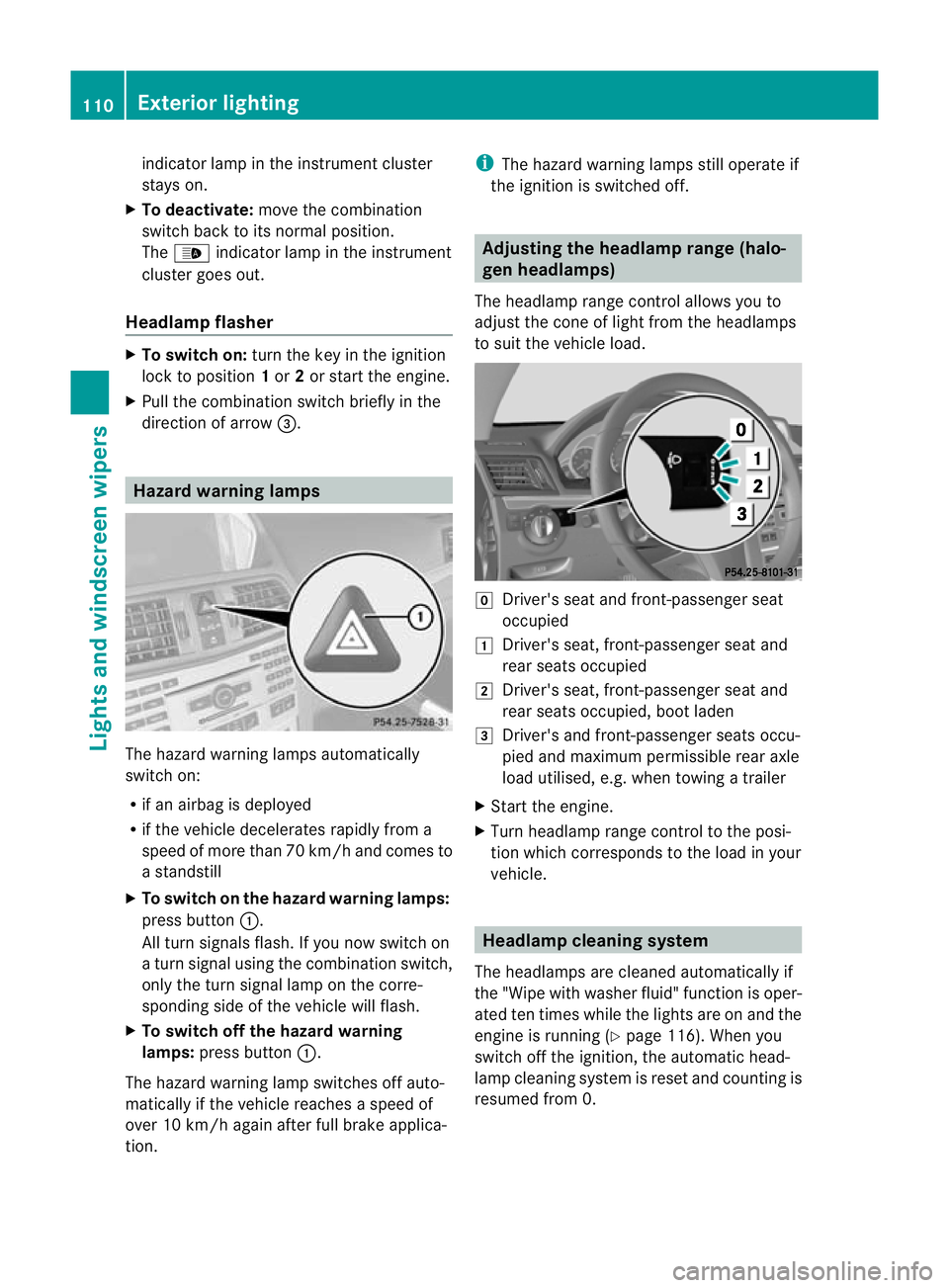
the ignition is switched off. Adjusting the headlamp range (halo-
gen headlamps)
The headlamp range control allow syou to
adjust the con eoflight from the headlamps
to suit the vehicle load. g
Driver' sseat and front-passenger seat
occupied
1 Driver's seat, front-passenger seat and
rear seats occupied
2 Driver's seat, front-passenger seat and
rear seats occupied, boot laden
3 Driver's and front-passenger seats occu-
pied and maximu mpermissible rear axle
load utilised, e.g. when towing atrailer
X Start th eengine.
X Turn headlamp range control to the posi-
tion which corresponds to the load in your
vehicle. Headlamp clean
ings ystem
Th eh eadlamps are cleaned automatically if
the "Wipe with washer fluid" function is oper-
ated ten times while the lights are on and the
engine is running (Y page 116). When you
switc hoff th eignition, the automatic head-
lam pcleaning system is reset and countin gis
resume dfrom 0. 110
Exterior lightingLi
gh ts and windscreen wipers
BA 207 ECE ÄJ 2010/1a; 1; 2, en-GB
mkalafa Version:3.0.2.11
2010-01-26T13:03:22+01:0
0-Seite 110
Page 115 of 333
Active:
if you are driving at speeds below
70 km/h and you switc honthe rear foglamp.
No tactive: if you are driving at speeds above
10 0k m/h or yo uswitch off the rear foglamp
following activat ion. Interior lighting
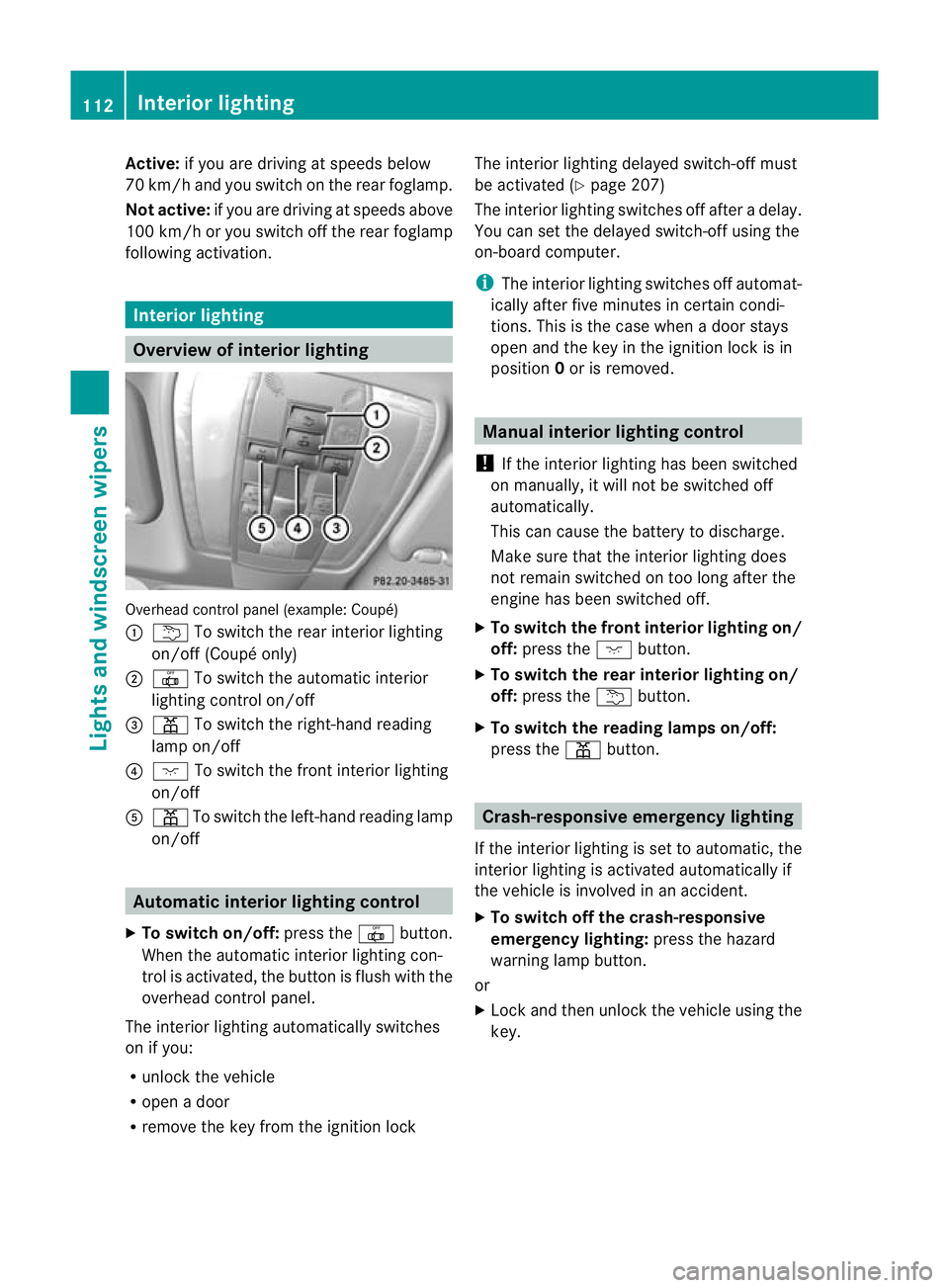
Overv
iewofi nterio rlighting Overhead control panel (example: Coupé)
:
u To switc hthe rea rinterior lighting
on/off (Coupé only)
; | To switc hthe automa tici nterior
lighting control on/off
= p To switc hthe right-han dreading
lam pon/off
? c To switch the fron tinterior lighting
on/off
A p To switch the left-hand reading lamp
on/off Automatic interior lighting control
X To switch on/off: pressthe | button.
When the automatic interior lighting con-
trol is activa ted, the button is flush with the
overhead control panel.
The interior lighting automatically switches
on if you:
R unloc kthe vehicle
R open adoor
R remove the key from the ignition lock The interior lightin
gdelayed switch-off must
be activated (Y page 207)
The interior lightin gswitches off after adelay.
You can set the delayed switch-off using the
on-board computer.
i The interior lighting switches off automat-
icall yafter five minutes in certain condi-
tions. This is th ecase when adoor stays
open and the key in the ignition lock is in
position 0or is removed. Manua
linterior lighting control
! If the interior lightin ghas been switched
on manually, it will not be switched off
automatically.
This can cause the batter ytodischarge.
Make sure that the interior lighting does
not remain switched on too long after the
engine has been switched off.
X To switch the front interior lighting on/
off: press the cbutton.
X To switch the rear interior lighting on/
off: press the ubutton.
X To switch the reading lamp son/off:
press the pbutton. Crash-responsive emergency lighting
If the interior lightin gisset to automatic ,the
interior lighting is activated automatically if
the vehicle is involved in an accident.
X To switch of fthe crash-responsive
emergenc ylighting: press the hazard
warning lamp button.
or
X Lock and then unlock the vehicle using the
key. 112
Interior lightingLights and windscreen wipers
BA 20
7ECE ÄJ 2010 /1a; 1; 2, en-GB
mkalafa Version: 3.0.2.11 2010-01-26T13:03:22+01:00 -Seite 112
Page 165 of 333
mus
talsoa pply the brakes yourself if this
braking powe risnot sufficient.
If DISTRONIC PLU Sdetect sarisk of collision
with avehicle in front, an intermit tent warning
tone sounds. In addition, the ·distance
warning lamp in the instrument cluste rlights
up. Brak etoavoidac ollision.
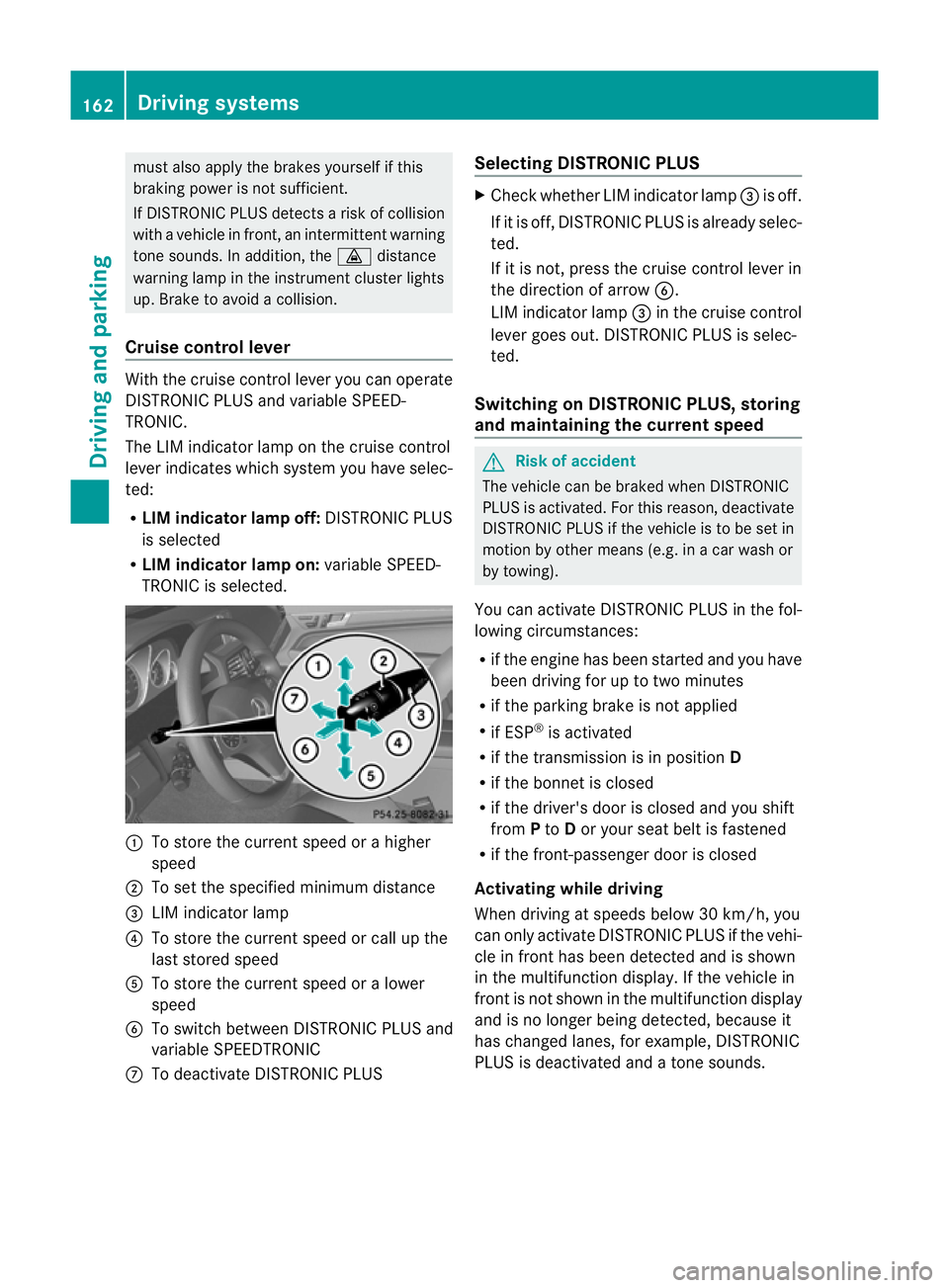
Cruise control lever With the cruise control lever you can operate
DI ST RONIC PLUS and variable SPEE D-
TRONIC.
The LI Mindicator lamp on the cruise control
lever indicates which system you have selec-
ted:
R LIM indicator lamp off: DISTRONIC PLUS
is selected
R LIM indicator lamp on: variable SPEED-
TRONIC is selected. :
To sto rethe curren tspeed or ahigher
speed
; To set the specified minimum distance
= LIMi ndicator lamp
? To sto rethe curren tspeed or call up the
last stored speed
A To stor ethe curren tspeed or alower
speed
B To switc hbetween DI STRONIC PLUS and
variable SPEEDTRONIC
C To deactivate DISTRONIC PLUS Selecting DISTRONIC PLUS X
Check whether LIM indicator lamp =is off.
If it is off, DISTRONIC PLUS is already selec-
ted.
If it is not ,pres sthe cruise contr ol leverin
the direction of arrow B.
LIM indicator lamp =in the cruise control
lever goe sout. DISTRONIC PLUS is selec-
ted.
Switching on DISTRONIC PLUS ,storing
and maintaining the current speed G
Risk of accident
The vehicle can be braked when DISTRONIC
PLUS is activated. For this reason, deactivate
DISTRONIC PLUS if the vehicle is to be set in
motion by othe rmeans (e.g. in acar wash or
by towing).
You can activate DISTRONIC PLUS in the fol-
lowing circumstances:
R if the engine has been started and you have
been drivin gfor up to two minutes
R if the parkin gbrake is not applied
R if ESP ®
is acti vated
R if the transmission is in position D
R if the bonnet is closed
R if the driver' sdoor is closed and you shift
from Pto Dor your seat belt is fastened
R if the front-passenger door is closed
Activating while driving
When drivin gatspeeds below 30 km/h, you
can only acti vate DISTRONIC PLUS if the vehi-
cle in fron thas been detected and is shown
in the multifunction display. If the vehicle in
front is not shown in the multifunction display
and is no longe rbeing detected, because it
has changed lanes, for example, DISTRONIC
PLU Sisd eactivated and atone sounds. 162
Driving systemsDriving and pa
rking
BA 20 7ECE ÄJ 2010 /1a; 1; 2, en-GB
mkalafa Version: 3.0.2.11 2010-01-26T13:03:22+01:00 -Seite 162
Page 179 of 333
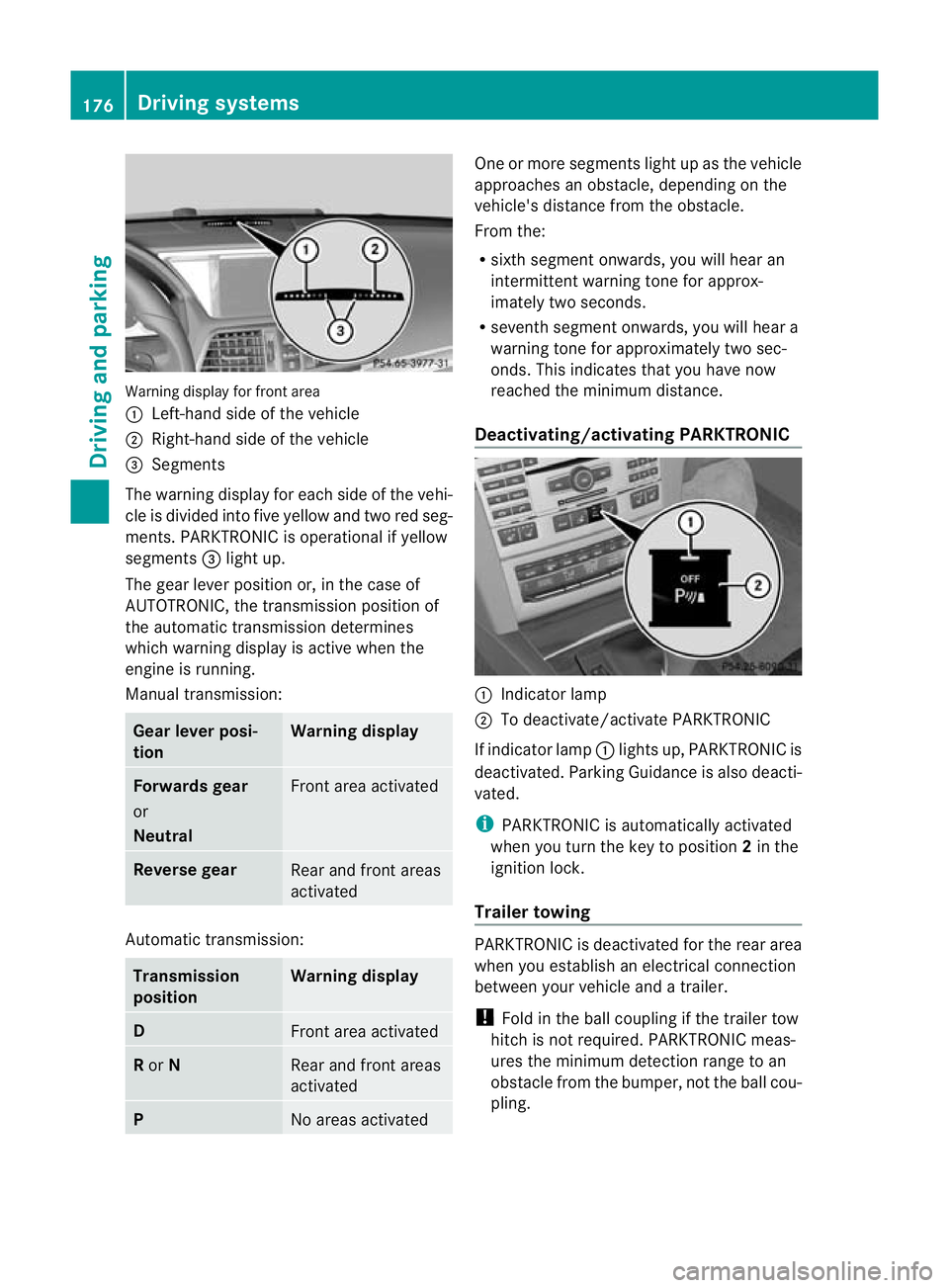
Warning display for fron
tarea
: Left-hand side of th evehicle
; Right-hand side of the vehicle
= Segments
The warning display for each side of the vehi-
cle is divided into fiv eyellow and two red seg-
ments. PARKTRONI Cisoperational if yellow
segments =ligh tup.
The gear lever position or, in the case of
AUTOTRO NIC, the transmission position of
the automatic transmission determines
which warning display is active when the
engine is running.
Manual transmission: Gear lever posi-
tion Warning display
Forward
sgear
or
Neutral Fron
tarea activated Revers
egear Rear and fron
tareas
activated Auto
matic transmission: Transmission
position Warning display
D
Fron
tarea activated R
or N Rear and front areas
activated
P
No areas activated On
eorm ore segments light up as the vehicle
approaches an obstacle, depending on the
vehicle' sdistanc efrom th eobstacle.
From the:
R sixt hsegmen tonwards ,you will hea ran
intermitten twarnin gtonef or approx-
imately two seconds.
R seven thsegment onwards, you will hear a
warnin gtonef or approximately two sec-
onds. This indicates that you have now
reached the minimu mdistance.
Deactivating/activating PARKTRONIC :
Indicator lamp
; To deactivate/activate PARKTRONIC
If indicator lamp :lights up, PARKTRONIC is
deactivated. Parking Guidance is also deacti-
vated.
i PARKTRONIC is automatically activated
when you turn the key to position 2in the
ignition lock.
Trailer towing PARKTRONIC is deactivated for the rear area
when you establish an electrical connection
between your vehicle and
atrailer.
! Foldint he ball couplin gifthe trailer tow
hitc hisn ot required .PARKTRONIC meas-
ures the minimum detection range to an
obstacle from the bumper, not the ball cou-
pling. 176
Drivin
gsystemsDrivin gand pa rking
BA 20 7ECE ÄJ 2010 /1a; 1; 2, en-GB
mkalafa Version: 3.0.2.11 2010-01-26T13:03:22+01:00 -Seite 176
Page 180 of 333
Problems wit
hPARKTRONIC Problem Possible causes/consequences and
M Solutions
Only the red segments
in the PARKTRONIC
warning display
sare lit.
Yo ua lso hear awarning
tone for approximately
two seconds.
PARKTRONIC is deacti-
vated after approx-
imately 20 seconds and
the indicator lamp in
the PARKTRONIC but-
ton lights up. PARKTRONIC has malfunctioned and has switched itself off.
X
If problems persist, have PARKTRONIC checked at aqualified
specialist workshop. Only the red segments
in the PARKTRONIC
warning display
sare lit.
PARKTRONIC is deacti-
vate dafter approx-
imatel y20seconds. The PARKTRONI
Csensors are dirt yorthere is interference.
X Clean the PARKTRONI Csensors (Y page 267).
X Switch the ignition back on. The problem may be caused by an exter
nalsource of radio or
ultrasoun dwaves.
X See if PARKTRONIC functions in adifferent location. Parking Guidance
Important safet ynotes Parking Guidance is an electronic parking aid
with ultrasound. Ultrasound is used to meas-
ure the road on both sides of the vehicle. A
suitable parking space is indicated by the
parking symbol. You receiv esteering instruc-
tions when parking. You may also use PARK-
TRONIC (Y page 174). G
Risk of accident
Parking Guidance is merely an aid and may
recommen dparking spaces that are not suit-
able for parking. For example, these might be
spaces where parking is prohibited ,drive-
ways, unsuitabl esurfaces, etc.
Parking Guidance measures the parking
space as you drive past it. Any later changes
to the parking space are not taken into
account. For instance, this may be the case when the vehicle parked in front of or behind
the space changes its position or when an
obstacle is moved into the parking space.
Parking Guidance does not relieve you of the
responsibility for paying attention. If you rely
solely on Parking Guidance, you could cause
an accident and injure yourself and others.
You are always responsible for safety and
must continue to pay attention to your imme-
diate surroundings when parking and
manoeuvring.
G
Risk of accident
Objects located above the height range of
Parking Guidance will not be detected when
the parking space is measured. Thes eare not
take ninto account whe nthe parkin gproce-
dure is calculated, e.g .overhanging loads ,tail
sections or loading ramps of good svehicles.
In some circumstances, Parking Guidance Driving systems
177Drivingand pa rking
BA 20 7ECE ÄJ 2010 /1a;1;2,e n-GB
mkalafa Version: 3.0.2.11 2010-01-26T13:03:22+01:00-Seite 177 Z
Page 188 of 333
lar, this may be the case if the vehicles are
drivin gatthe edge of their lan enearest your
vehicle. Due to the nature of the system,
warnings may be issued in err or when driving
clos etoc rashb arriers or similar solid lane
borders.
The two sensors for Blind Spot Assis tare
integrate dinto the sides of the rear bumper.
Make sure that the bumpe risfree from dirt,
ice or slus haround th esensors. For example,
the rada rsensors must not be covered by
cycle racks or overhanging loads. Followin ga
severe impac torinthe even tofdamage to
the bumpers, have the function of the radar
sensors checked at aqualified specialist
workshop, e.g. aMercedes-Ben zService
Cent re.B lind Spot Assist may otherwise not
work properly.
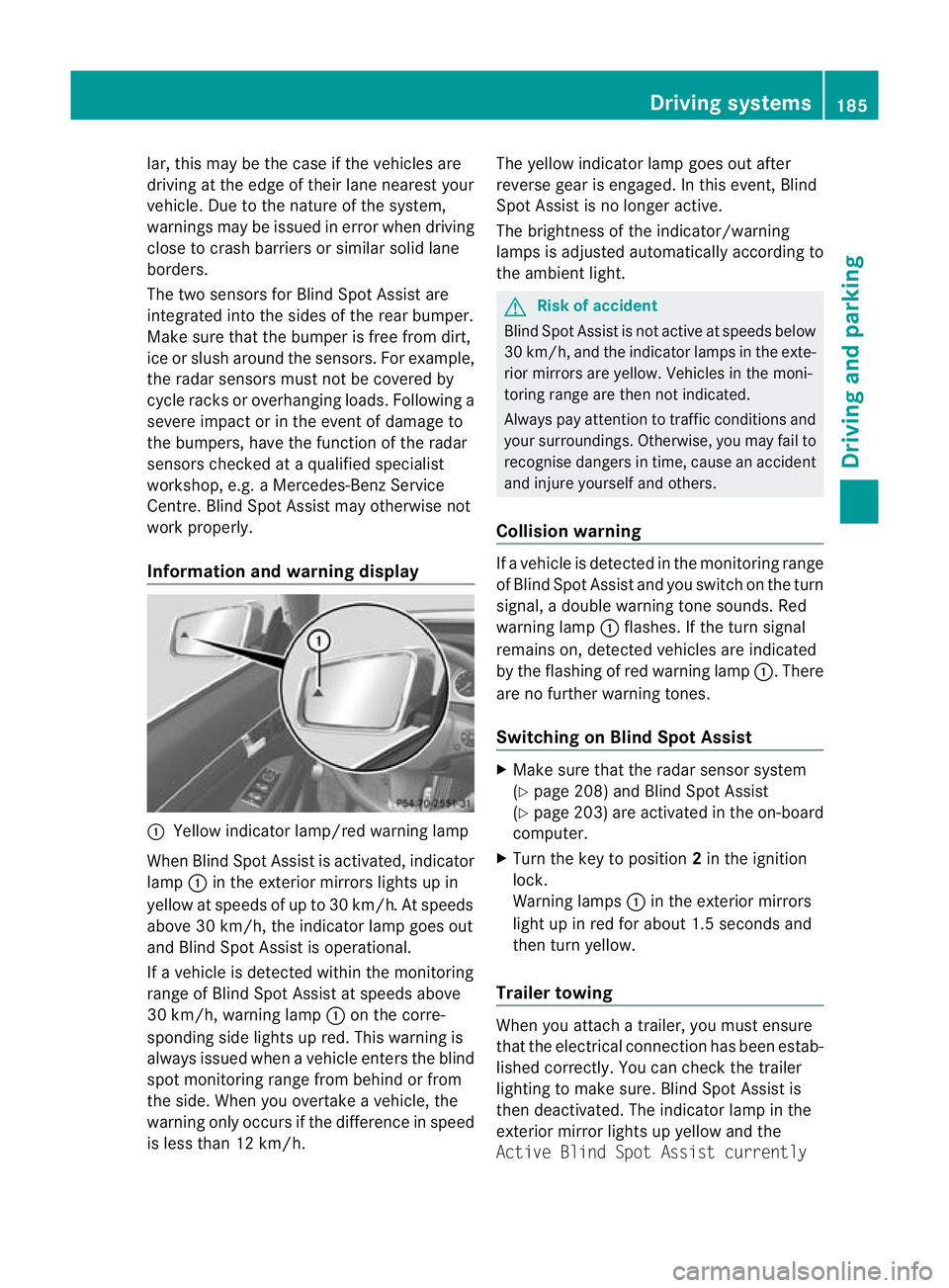
Information and warning display :
Yellow indicator lamp/red warnin glamp
When Blind Spot Assis tisa ctivated, indicator
lamp :in the exterior mirrors lights up in
yellow at speed sofupto30km/ h.At speeds
above 30 km/h, the indicator lamp goe sout
and Blind Spo tAssist is operational.
If av ehicle is detected within the monitoring
range of Blin dSpot Assist at speeds above
30 km/h, warning lamp :on the corre-
sponding side lights up red. This warning is
always issued when avehicle enter sthe blind
spot monitoring range from behind or from
the side. When you overtak eavehicle, the
warning only occurs if the difference in speed
is less than 12 km/h. The yellow indicator lam
pgoes out after
reverse gear is engaged. In this event, Blind
Spot Assist is no longer active.
The brightness of the indicator/warning
lamps is adjusted automatically according to
the ambient light. G
Risk of accident
Blind Spot Assist is not active at speeds below
30 km/h, and the indicator lamps in the exte-
rio rm irror sare yel low.Vehicles in the moni-
toring range are then not indicated.
Alway spay attention to traffic conditions and
your surroundings. Otherwise ,you may fai lto
recognise dangers in time ,cause an accident
and injure yoursel fand others.
Collisio nwarning If
av ehicle is detected in the mon itoring range
of Blind Spot Assis tand you switch on the turn
signal, adouble warnin gtone sounds. Red
warnin glamp :flashes .Ifthe tur nsignal
remains on, detected vehicles are indicated
by the flashing of red warnin glamp :.T here
ar enof urther warning tones.
Switching on Blind Spot Assist X
Make sure that the radar senso rsystem
(Y page 208) and Blind Spot Assist
(Y page 203) are activated in the on-board
computer.
X Turn the key to position 2in the ignition
lock.
Warning lamps :in the exterior mirrors
ligh tupinr ed for about 1. 5seconds and
then tur nyellow.
Trailer towing When you attach
atrailer, yo umust ensure
that the electrical connection has been estab-
lished correctly. You can check the trailer
lighting to make sure. Blind Spot Assis tis
then deactivated .The indicator lam pint he
exterior mirror lights up yellow and the
Active Blin dSpot Assist currently Drivin
gsystems
185Drivingand pa rking
BA 20 7ECE ÄJ 2010 /1a;1;2,e n-GB
mkalafa Version: 3.0.2.11 2010-01-26T13:03:22+01:00-Seite 185 Z
Page 206 of 333
X
Press the =or; button on the steer-
ing wheel to select the Assist.menu.
X Press the 9or: button to select
Distance display.
X Press a.
The DI STRONIC PLUS distance display
(Y page 166) appears in the multifunction
display.
Deactivating/activating ESP ®G
Risk of accident
If the ä warning lamp in the instrument
cluster flashes ,proceed as follows:
R do not deactivate ESP ®
under any circum-
stances.
R onl ydepress the accelerator pedal as far as
necessary when pullin gaway.
R adapt your driving style to suit the prevail-
ing road and weather conditions.
Otherwise, the vehicle could skid.
ESP ®
cannot reduce the risk of an accident if
you drive too fast. ESP ®
cannot override the
laws of physics.
Further information about ESP ®
(Y page 57).
X Start the engine.
X Press the =or; button on the steer-
ing wheel to select the Assist.menu.
X Press 9or: to select ESP.
X Press a.
X To deactivate: pressaagain.
The å warning lamp in the instrument
cluster comes on. G
Risk of accident
If the å warning lamp in the instrument
cluster lights up when the engine is running,
ESP ®
is deactivated or is unavailable due to a
malfunction. The risk that your vehicle may
start to skid then increases in certain situa-
tions.
Always adapt your driving style to the prevail-
ing road and weather conditions. X
To activate: pressaagain.
The å warning lamp in the instrument
cluster goes out.
Activating/deactivating the PRE-SAFE ®
Brake This function is only availabl
ewith DIS-
TRONIC PLUS.
X Press the =or; button on the steer-
ing wheel to select the Assist.menu.
X Press 9or: to select PRE-SAFE
Brake.
X Press a.
The curren tselection is displayed.
X To activate/deac tivate: press a
again.
When PRE-SAFE ®
Brak e(Ypage 59 )isacti-
vated ,the multifunction displa yshows the
Ä symbol.
Activating/deactiva ting Attention
Assist X
Press the =or; button on the steer-
ing wheel to select the Assist.menu.
X Press the 9or: button to select
Attent ionA sst.
X Press a.
Th ec urren tselection is displayed.
X To activate/deac tivate: press a
again.
When ATTENTION ASSI ST (Ypage 18 1)is
activated, the Àsymbol appears in the
multifunction display when the ignition is on.
Activating/deactivating Blind Spot
Assist You can use the
BlindSpot Asst. function
to activate or deactivate Blind Spot Assist
(Y page 184). Menus an
dsubmenus
203On-board computer and displays
BA 207 ECE ÄJ 2010/1a; 1; 2, en-GB
mkalafa Version:3.0.2.11
2010-01-26T13:03:22+01:00
-Seite 203 Z
Page 216 of 333

Displa
ymessages Possible causes/consequences and
M Solutions
Ch
ilds eat in wrong
position
See Own‐
er'
sM an‐
ual G
Risk of in
jury
Vehicles with automatic child seat recognition on the front-
passenge rseat: the child seat is positioned incorrectly.
X Fit the child seat in the correc tposition. G
Risk of injury
Vehicles with automatic child seat recognition on the front-
passenger seat: the automatic child seat recognition sensor
is faulty.
X Visit aqualified specialist workshop. 6 Restraint
sys. mal‐
function
Consult
workshop
G
Risk of injury
There is amalfunction in the SRS (Supplemental Restraint
System). The 6warning lamp also lights up in the instru-
ment cluster.
X Visit aqualified specialist workshop. 6 Front
left mal‐
function
Consult
workshop
or
Front
righ
tmal‐
function
Consult
workshop G
Ris
kofi njury
SRS has malfunctioned at the front on the left or right. The
6 warning lamp also lights up in the instrumen tcluster.
X Visit aqualified specialist workshop. Display mess
ages
213On-board computer and displays
BA 207ECE ÄJ 2010/1a; 1; 2, en-GB
mkalafa Version: 3.0.2.11 2010-01-26T13:03:22+01:00-Seite2 13 Z