ECU MERCEDES-BENZ E-CLASS CABRIOLET 2010 Owner's Manual
[x] Cancel search | Manufacturer: MERCEDES-BENZ, Model Year: 2010, Model line: E-CLASS CABRIOLET, Model: MERCEDES-BENZ E-CLASS CABRIOLET 2010Pages: 333, PDF Size: 7.64 MB
Page 156 of 333

Problem Possible causes/consequences and
M Solutions
X
Consult aqualified specialist workshop. Parking
Important safety notes
G
Risk of accident
Only remove the key from the ignition lock
when the vehicle is stationary, as you cannot
steer the vehicle when the key is removed.
Never leave children unsupervised in the vehi-
cle. They could release the parking brake. This
could lead to aserious or fatal accident. G
Risk of fire
Make sure that the exhaust system does not
under any circumstances com einto contact
with easily ignitable material such as dry grass
or petrol .Otherwise, the flammable material
may ignite and set the vehicle on fire.
To ensure that the vehicle is secured against
rolling away unintentionally:
R the parking brake must be appl ied.
R on vehicles wit hmanual transmission,
engage first gear or reverse gear.
R on vehicles with automatic transmission,
the transmissio nmust be in position Pand
the key must be removed from the ignition
lock.
R on steep uphill or downhill gradients, turn
the front wheel stowards the kerb. Parking brake
X
To ap ply:depress parking brake ;firmly.
The J indicator lamp in the instrument
cluster lights up if the engine is running.
X To release: depress the brak epedal and
keep it depressed.
X Pull release handle :.
The J indicator lam pint he instrument
cluster goes out. Parking
153Driving and pa rking
BA 20 7ECE ÄJ 2010 /1a;1;2,e n-GB
mkalafa Version: 3.0.2.11 2010-01-26T13:03:22+01:00-Seite 153 Z
Page 168 of 333
If yo
uwish to leave the vehicle or park it,
deactivate DISTRONIC PLU Sand secure the
vehicl eagainst rolling away.
If DISTRONIC PLU Sdetect sthat the vehicle
in front is stopping, it brakes your vehicle until
it is stationary.
Onc eyour vehicle is stationary, it remains
stationar yand you do not need to depress the
brake.
i Depe nding on the specified minimum dis-
tance, your vehicle will come to astandstill
at as ufficien tdistanc ebehin dthe vehi cle
in fron t.The specifie dminimum distance is
set using the thumbwheel on the cruise-
control lever.
When DISTRONIC PLU Sisa ctivate dand the
vehicl eisatas tandstill, the following warning
message appe arsint he multifunction display
if:
R the driver's door is open and the driver's
seat belt is unfastened
R the engin eisswitched off, unless it is auto-
matically switched off by the ECO start/
stop func tion
R the bonnet is opened
Select Park (P)
X Move the selector leve rtoPto prevent the
vehicle from rolling away.
DISTRONIC PLUS is deactivated .The warn-
ing message in the multifunction display
disappears.
The horn will also sound at regular intervals if
DI ST RONIC PLUS is activated and you:
R switch the engine off, open the driver's
doo rand take off your sea tbelt
R open the bonnet
The soundin gofthe horn alerts you to the fact
that the vehicle has been parked while DI S-
TRONIC PLU Siss till activated. The sound
becomes louder if you attempt to lock the
vehicle .The vehicle is not locked until DI S-
TRONIC PLU Sisd eactivated. i
If the ignition has been switched off ,the
engin ecannot be started again until DIS-
TRONIC PLUS has been deactivated.
If DISTRONIC PLUS is activated and afault
occurs in the system or there is adisruption
in the power supply while the vehicle is sta-
tionary ,the Brak eimmediately message is
show ninthe multifunction display. Immedi-
atel ydepress the brak efirmly until the warn-
ing message in the multifunction displa ygoes
out or mov ethe selector lever to P.DIS-
TRONIC PLUS is then deactivated.
Setting aspeed X
Press the cruise control lever to the pres-
sure point, up :for ahigher speed or
down Afora lower speed.
X Keep the cruise contro llever pressed until
the desired speed is reached.
X Release the cruise control lever.
The new speed is stored. DI STRONIC PLUS
is activated and adjusts the vehicle's speed
to the new speed stored.
Making adjustments in 1km/h incre-
ments X
Briefly press the cruise contro llever to the
pressur epoint ,up :for ahigher speed or
down Afor alower speed.
The last speed stored is inc reased or
reduced.
Making adjustments in 10 km/h incre-
ments X
Briefly press the cruise contro llever
beyond the pressur epoint ,up :for a
higher spee dordownAfor alower speed.
The last speed stored is inc reased or
reduced. Driving systems
165Driving and parking
BA 207 ECE ÄJ 2010/1a; 1; 2, en-GB
mkalafa Version: 3.0.2.11 2010-01-26T13:03:22+01:00-Seite 165 Z
Page 169 of 333
Storing th
ecurrent speed or calling up
the stored speed G
Ris
kofa ccident
Only call up astored speed if you know what
that speed is and if it is suitable for the current
traffic and driving situation. You can other-
wise endanger yoursel forothers by uninten-
tionall ytriggering sudden acceleration or
braking.
X Briefly pull th ecruis econtrol leve rtowards
you ?.
X Remove your foot from the accelerator
pedal.
DIST RONIC PLUS is activated. The first
time it is activated, the current speed is
stored. Otherwise, it sets the vehicle cruise
speed to the previousl ystored value.
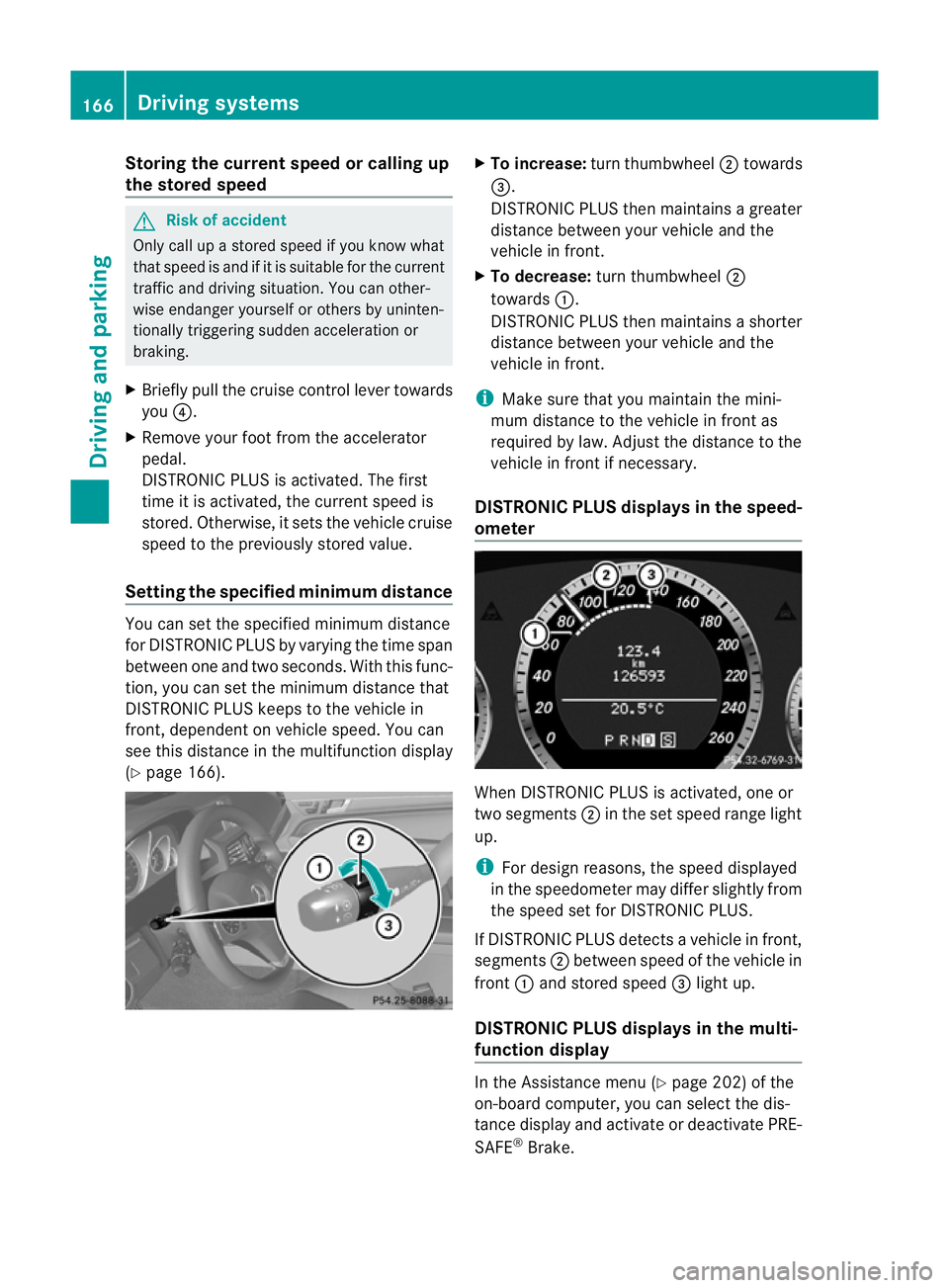
Settin gthe specified minimum distance Yo
uc an set the specified minimum distance
for DISTRONIC PLUS by varying the time span
between one and two seconds .With this func-
tion, you can set the minimum distance that
DISTRONIC PLU Skeeps to the vehicle in
front ,dependent on vehicle speed. You can
see this distance in the multifunc tion display
(Y page 166). X
To increase: turnthumbwheel ;towards
=.
DI ST RONIC PLUS then maintains agreater
distance between your vehicl eand the
vehicl einfront.
X To decrease: turn thumbwheel ;
towards :.
DISTRONIC PLUS then maintains ashorter
distanc ebetween your vehicle and the
vehicle in front.
i Make sure that you maintai nthe mini-
mu md istance to the vehicle in front as
required by law. Adjust the distance to the
vehicle in front if necessary.
DISTRONIC PLUS display sinthe speed-
ometer When DISTRONIC PLUS is activated, one or
two segments
;in th eset speed range light
up.
i For design reasons, the speed displayed
in the speedometer may differ slightly from
the speed set for DI STRONIC PLUS.
If DISTRONIC PLUS detects avehicle in front,
segments ;between speed of the vehicle in
front :and stored speed =light up.
DISTRONIC PLUS displays in the mul ti-
functio ndisplay In the Assistance menu (Y
page 202)of the
on-boar dcompu ter,you can select the dis-
tanc edisplay and activat eordeactivate PRE-
SAFE ®
Brake. 166
Driving systemsDriving and parking
BA 20
7ECE ÄJ 2010/1a; 1; 2, en-GB
mkalafa Version:3.0.2.11
2010-01-26T13:03:22+01:0
0-Seite 166
Page 174 of 333
Storing th
ecurren tspeed
You can use the cruise control leve rtolimit
the speed to any speed above 30 km/ hwhile
the engin eisrunning.
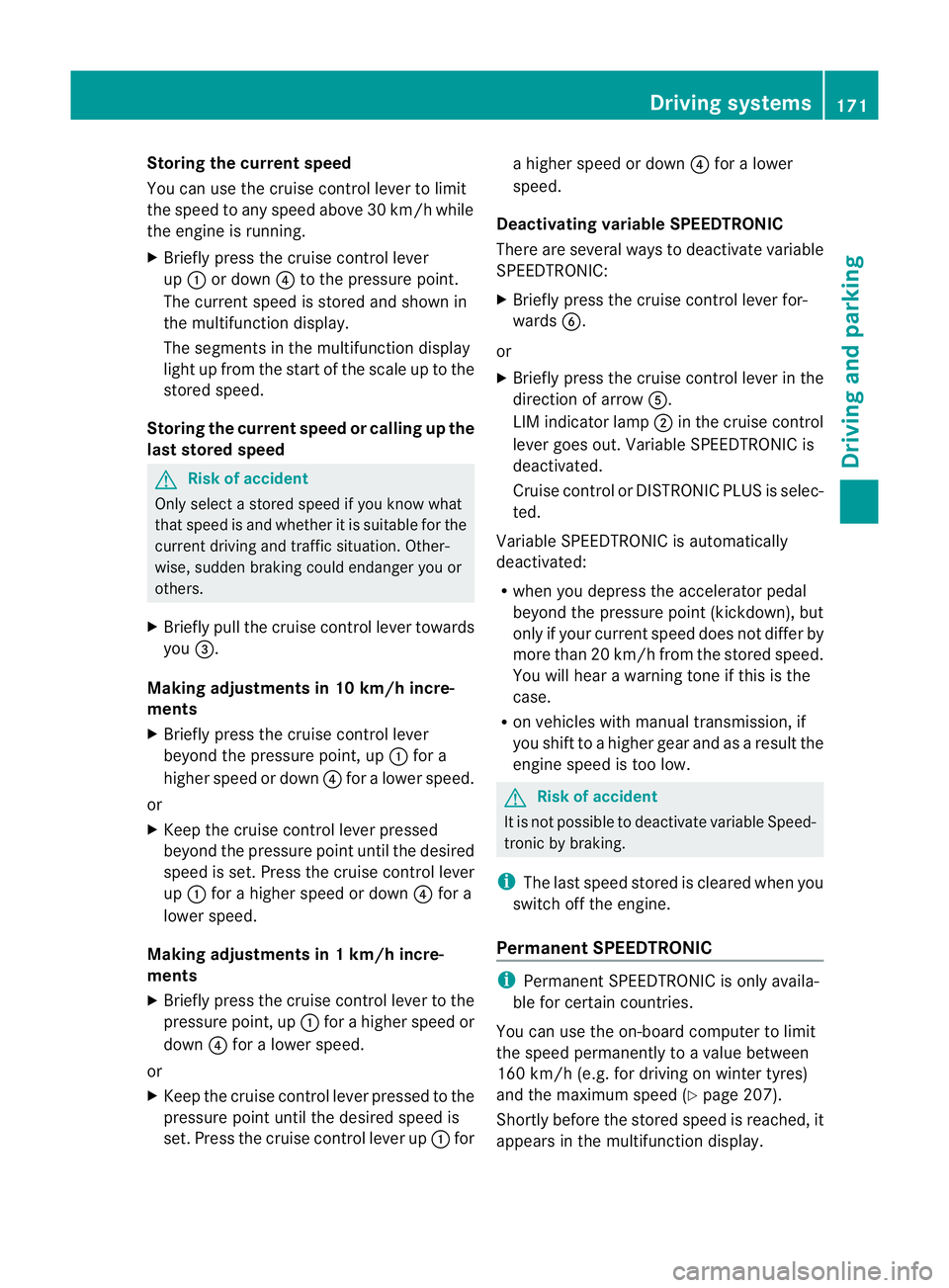
X Briefly press the cruise control lever
up : or down ?to the pressure point.
The current spee disstored and shown in
the multifunction display.
The segments in the multifunction display
ligh tupf rom th estart of the scale up to the
stored speed.
Storin gthe current speed or callin gupthe
las tstored speed G
Risk of accident
Only select astored speed if you know what
that speed is and whether it is suitable for the
current driving and traffic situation. Other-
wise ,sudden braking could endanger you or
others.
X Briefly pull the cruise control lever towards
you =.
Making adjustments in 10 km/h incre-
ments
X Briefly press the cruise control lever
beyond the pressure point, up :for a
higher spee dordown ?for alower speed.
or
X Keep the cruise con trollever pressed
beyond the pressur epoint until the desired
speed is set. Press the cruise con trollever
up : for ahigher speed or down ?for a
lower speed.
Making adjustments in 1km/h incre-
ments
X Briefly press the cruise control lever to the
pressure point, up :for ahigher speed or
down ?for alower speed.
or
X Keep the cruise con trollever pressed to the
pressur epoint until the desire dspeed is
set. Press the cruise control lever up :for ah
igher speed or down ?for alower
speed.
Deactivating variabl eSPEEDTRONIC
There ar eseveral ways to deactivate variable
SPEEDTRONIC:
X Briefly press the cruise control lever for-
wards B.
or
X Briefly press the cruise control lever in the
direction of arrow A.
LI Mi ndicato rlamp ;in the cruise control
lever goes out. Variable SPEEDTRONIC is
deactivated.
Cruise control or DISTRONIC PLUS is selec-
ted.
Variable SPEEDTRONIC is automatically
deactivated:
R when you depress the accelerator pedal
beyond the pressure point (kickdown), but
only if your current spee ddoes not differ by
mor ethan 20 km/h from the stored speed.
You will hear awarning tone if this is the
case.
R on vehicles with manual transmission, if
you shift to ahigher gear and as aresult the
engine speed is too low. G
Risk of accident
It is not possible to deactivate variable Speed-
tronic by braking.
i The last speed stored is cleared when you
switc hoff th eengine.
Permanent SPEEDTRONIC i
Permanent SPEEDTRONIC is only availa-
ble for certain countries.
You can use the on-board compute rtolimit
the speed permanently to avalue between
16 0k m/ h(e.g. for driving on winter tyres)
and th emaximum speed ( Ypage 207).
Shor tlyb efore th estore dspeed is reached, it
appear sinthe multifunction display. Driving systems
171Driving and parking
BA 207ECE ÄJ 2010/1a; 1; 2, en-GB
mkalafa Version:3.0.2.11
2010-01-26T13:03:22+01:0
0-Seite 171 Z
Page 176 of 333
Activation conditions
You can activat
ethe HOL Dfunction if:
R the vehicl eisstationary
R the engin eisrunnin gorhas been automat-
ically switched off by th eECO star t/stop
function
R the dri ver'sd oor is closed or your seat belt
is fastened
R thep arking brak eisnot applied
R theb onnet is closed
R the selector leve risinp osition D,Ror Non
vehicles with automatic transmission
R DIST RONIC PLUS is deactivated
Activating the HOLD function X
Make sure that the activation conditions
are met.
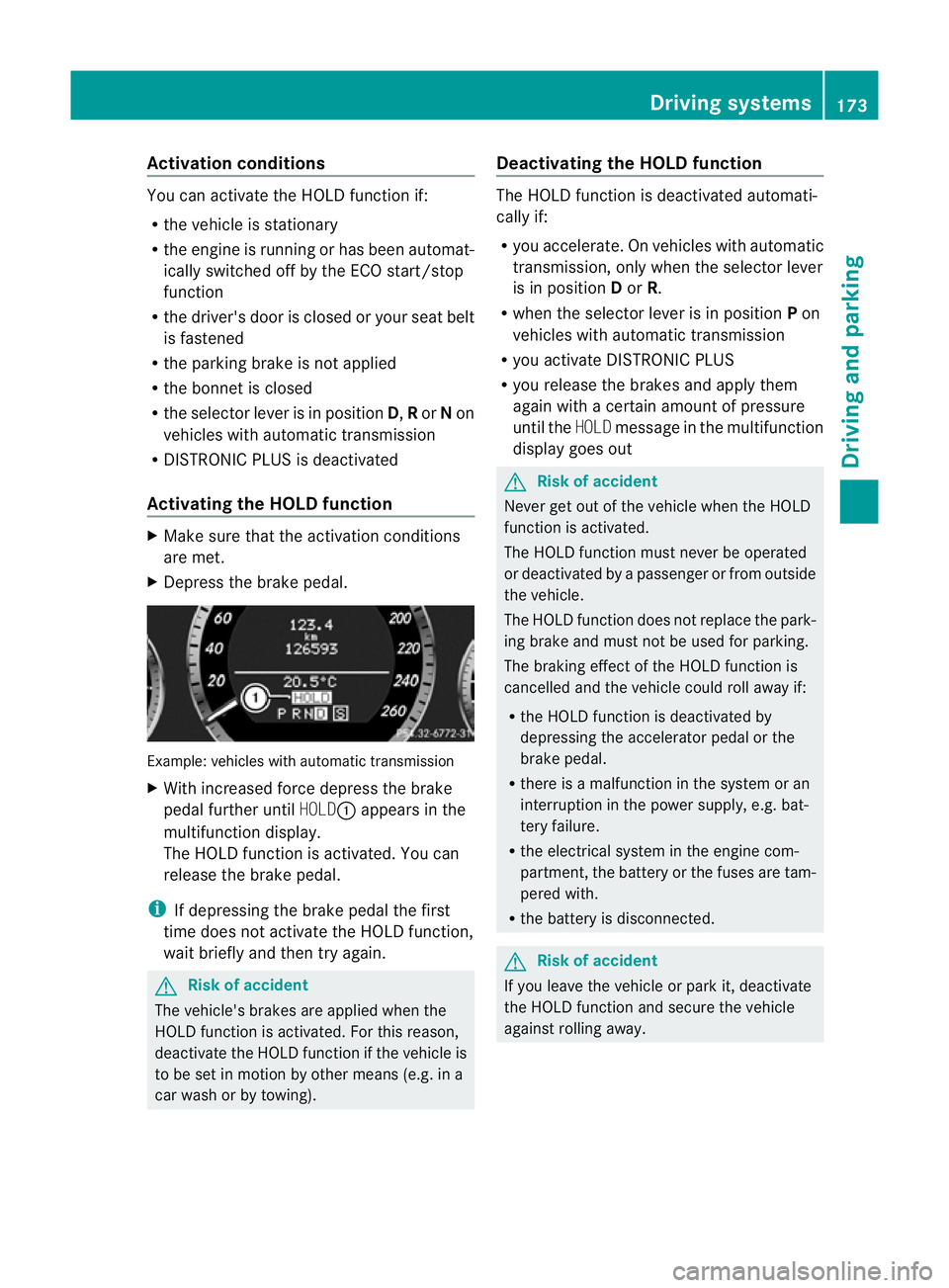
X Depress the brake pedal. Example: vehicles with automatic transmission
X
With increase dforc edepress the brake
pedal fur ther until HOLD:appear sinthe
multifunction display.
The HOL Dfunction is activated. You can
release the brake pedal.
i If depressing the brake pedal the first
time does not activate the HOLD function,
wait briefly and then try again. G
Risk of accident
The vehicle's brakes are applied when the
HOLD function is activated. For this reason,
deactivate the HOLD function if the vehicle is
to be set in motion by other means (e.g. in a
car wash or by towing). Deactivating the HOLD function The HOLD function is deactivated automati-
cally if:
R
you accelerate. On vehicles with automatic
transmission ,only whe nthe selec torlever
is in position Dor R.
R when the selector lever is in position Pon
vehicles with automatic transmission
R you activate DI STRONIC PLUS
R you release the brakes and apply them
again with acertain amount of pressure
until the HOLDmessage in the multifunction
display goes out G
Risk of accident
Never get out of the vehicle when the HOLD
fun ction is activated.
The HOLD function must never be operated
or deactivated by apassenger or from outside
the vehicle.
The HOLD function does not replace the park-
ing brake and must not be used for parking.
The brakin geffect of the HOLD function is
cancelled and the vehicl ecould roll away if:
R the HOL Dfunction is deactivated by
depressin gthe accelerator pedal or the
brake pedal.
R ther eisam alfunction in the system or an
interruption in the power supply, e.g. bat-
tery failure.
R the electrical system in the engine com-
partment ,the battery or the fuses ar etam-
pered with.
R the battery is disconnected. G
Risk of accident
If you leave the vehicle or park it, deactivate
the HOLD function and secure the vehicle
against rolling away. Driving systems
173Drivingand parking
BA 20 7ECE ÄJ 2010/1a; 1; 2, en-GB
mkalafa Version:3.0.2.11
2010-01-26T13:03:22+01:0
0-Seite 173 Z
Page 190 of 333
Uncoupling
atrailer G
Ris
kofi njury
As soon as yo uraise the trailer drawbar, the
unladen vehicl erises slightly .The vehicl ethen
lowers to driving level.
Make sure that nobody is in the vicinity of the
wheel arch or the underbody. You coul doth-
erwise trap yoursel forothers. G
Risk of injury
The vehicle is lowered as soo nasyou discon-
nec tthe trailer cable. Make sur ethat nobody
is in the vicinit yofthe wheel arch or the
underbody. You coul dotherwis etrap yourself
or others.
As soon as you decoupl ethe trailer ,the unla-
den vehicle rise sslightly. Make sure that you
or others are not injured in the process.
! Do not uncouple atrailer wit hoverrun
brake between th ebumper and drawbar,
otherwis eyour vehicle coul dbedamaged
by the spring action of the overrun brake.
X Make sure that the transmission is in posi-
tion P.
X Apply the parking brake.
X Secure the trailer against rolling away.
X Remove the trailer cable and decouple the
trailer. Notes on towing
atrailer
Important safety instructions G
Ris
kofa ccident
When reversing the vehicle towards the
trailer, mak esure there is nobody between
the trailer and the vehicle.
Couple and uncouple the trailer carefully. If
you do not couple the trailer to the towing
vehicle correctly, the trailer could become
detached.
Make sure that the following values are not
exceeded: R
the permissible trailer drawbar noseweight
R the permissible trailer load
R the permissible rear axle load of the towing
vehicle
R the maximu mpermissible gross vehicle
weight of both the towing vehicle and the
trailer
You will fin dthe applicable permissible val-
ues, whic hmust not be exceeded ,inthe vehi-
cle documen ts.
You will find the values approved by the man-
ufacturer on the vehicle identification plates
and those for the towing vehicle in the "Tech-
nical data" section. G
Risk of accident
If the Checktrailer hitch locking
mechanism message appears in th emulti-
function display while the vehicle is in motion,
pull over immediately and check whethe rthe
ball coupling is correctly engaged. G
Risk of accident
Always observ ethe maximum speed permit-
ted in Germany for vehicle/ trailer combina-
tions, even in countries where higher speeds
are permitted. This lowers the risk of an acci-
dent. G
Risk of accident
Never depress the brake pedal continuously
while the vehicle is in motion ,e.g. never cause
the brakes to rub by appl yingc onstant slight
pedal pressure. This causes the brake system
to overheat, increases the brakin gdistance
and can lead to the brakes failing completely. G
Risk of accident
On no account should you attempt to draw the
vehicle/trailer combination out by increasing
speed. Trailer towing
187Driving and parking
BA 207 ECE ÄJ 2010/1a; 1; 2, en-GB
mkalafa Version: 3.0.2.11
2010-01-26T13:03:22+01:00
-Seite 187 Z
Page 193 of 333
!
You can connect consumer swithapower
ratin gofupto2 40Wtot he permanent
power supply and up to 18 0Wto the power
supp lythat is switched on via the ignition
lock.
You must not charge atrailer battery using
th ep ower supply.
The trailer's permanen tpower supply is
switched off in the even toflow vehicle supply
voltage and after six hour satthe latest.
You can obtai nfurther information about
installing the trailer electrics from aqualified
specialist workshop, e.g. aMercedes-Benz
Ser vice Centre.
X To switch the connected power supply
on or off: turn the key in the ignitio nlock
to position 2or 0respec tively. Bulb failur
eindicator for LEDs
i If LE Dlamps are fitted in the trailer, an
error message may appear in the multi-
function display –even if there is no fault –
if th ecorrespondin gLED chain's current
draw drops below 50 milliamperes (mA).
To ensure reliabl eoperation of the bulb failure
indic ator,am inimum current of 50 mA must
be guaranteed by the manufacturer of each
LED chain in the trailer lighting. Trailer with 7-pin connector
General information If you
rtrailer ha sa7-pin connector, you can
connect it to the 13-pin socket on the ball
coupling using an adapter or, if necessary, an
adapter cable. Both of thes ecan be obtained
at aq ualified specialist workshop, e.g. at a
Mercedes-Benz Service Centre. Fittin
gthe adapter X
Open th esocke tcover.
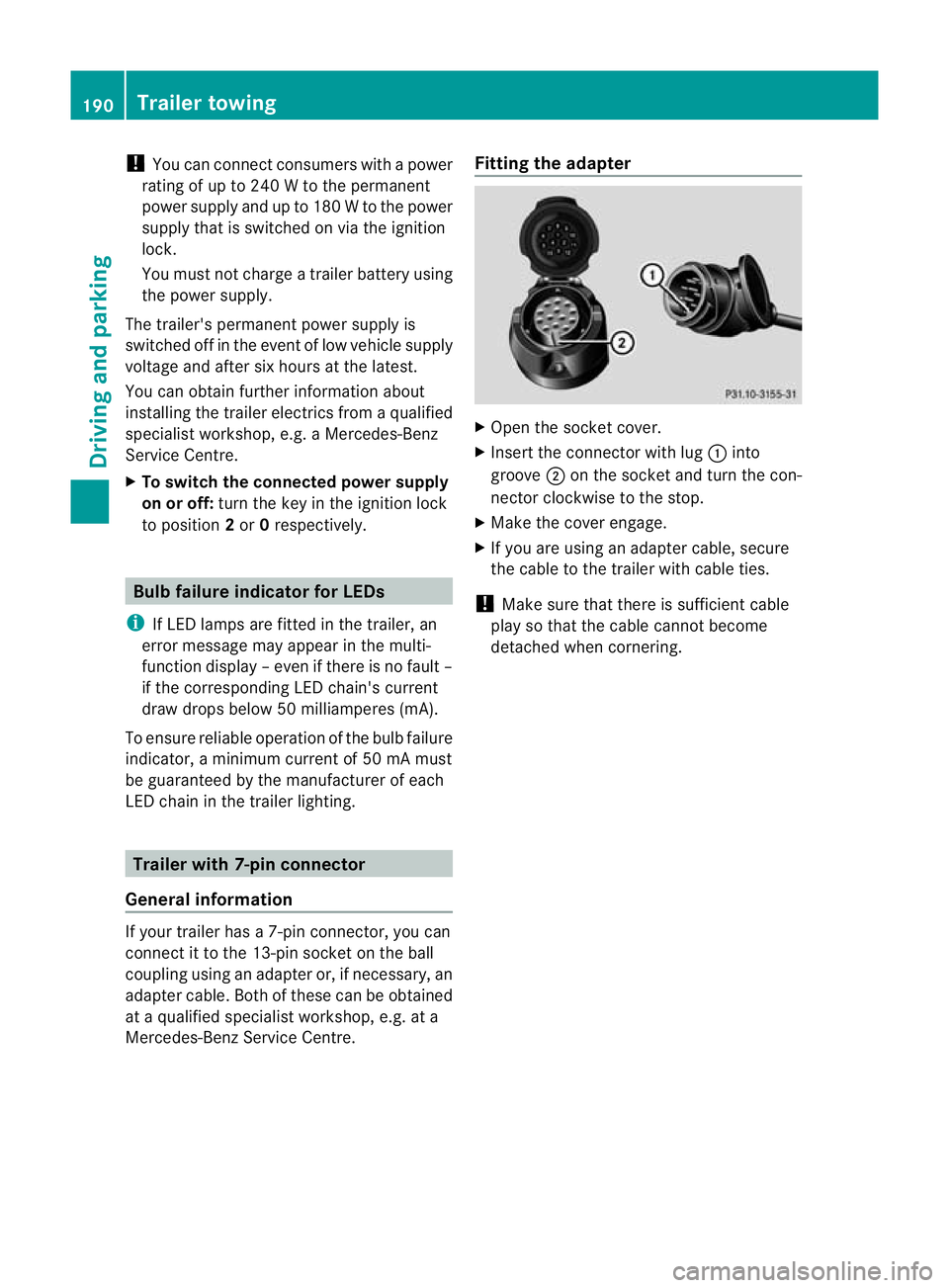
X Insert the connector with lug :into
groove ;on the socket and tur nthe con-
nector clockwi seto the stop.
X Make the cover engage.
X If you are using an adapter cable, secure
the cabl etothe trailer with cable ties.
! Make sur ethat ther eissufficient cable
pla ysot hat the cable cannot become
detached when cornering. 190
Trailer towingDriving and parking
BA 20
7ECE ÄJ 2010/1a; 1; 2, en-GB
mkalafa Version: 3.0.2.11 2010-01-26T13:03:22+01:00-Seite 190
Page 212 of 333

vating th
eEASY-ENTRY/EXIT feature, make
sure that nobody can become trapped.
Do not leave children unsupervise dinthe
vehicle, even if they ar esecur edinac hild
restraint system .The chil dren could open the
driver's door and thereby unintentionally acti-
vat ethe EASY-ENTRY/EXIT feature and
becom etrapp ed.
X Press the =or; button on the steer-
ing whee ltoselect the Settings menu.
X Press the :or9 button to select the
Convenience submenu.
X Press the abutton to confirm.
X Press the :or9 button to select the
Easy Entry/Exit feature.
You will see the selected setting: onor
off.
X Press the abutton to save the setting.
Switching th ebelta djustmen ton/off
Fur ther information on belt adjust ment
(Y pag e42).
X Press the =or; button on the steer-
ing whee ltoselect the Settings menu.
X Press the :or9 button to select the
Convenience submenu.
X Press the abutton to confirm.
X Press the :or9 button to select the
Belt adjustment: function.
You will see the selected setting: onor
off.
X Press the abutton to save the setting.
Switching the fold in mirrors when lock-
ing function on/off
If you switch on the Fold mirrorsinwhen
locking: function, th eexterior mirror sfold
in when you lock the vehicle. When you
unloc kthe vehicle and then open adoor, the
exterior mirror sfold out again.
If you have switched the function on and you
fold the exterior mirror sinusing the button
on the door (Y page 101), they will not fold
out automatically. The exterior mirrors can then only be folded out usin
gthe button on
the door.
X Press the =or; button on the steer-
ing wheel to selec tthe Settings menu.
X Press the :or9 button to selec tthe
Convenience submenu.
X Press the abutton to confirm.
X Press the :or9 button to selec tthe
Fold mirror sinwhen locking: func-
tion.
Yo uw ill see the selected setting: onor
off.
X Press the abutton to save the setting.
Resetting to factory settings For safety reasons, not all function
sare reset:
the Limit speed (winter tyres): func-
tio ninp ermanen tSPEEDTRONIC can only be
set in the Vehiclesubmenu. If you want to
reset the Daytimedriving lamps: in the
Light submenu, yo umust turn the key in the
ignition lock to position 1.
X Press the =or; button on the steer-
ing wheel to select the Settingsmenu.
X Press the :or9 button to select the
Factor ysetting submenu.
X Press the abuttontoc onfirm.
The Rese tall settings? message
appe ars.
X Pres sthe : or9 button to select
No orYes.
X Press the abutton to confir mthe selec-
tion.
If you hav eselected Yes,the multifunction
display shows aconfirmation message. Menu
sand submenus
209On-board computer and displays
BA 207ECE ÄJ 2010/1a; 1; 2, en-GB
mkalafa Version: 3.0.2.11 2010-01-26T13:03:22+01:00-Seite 209 Z
Page 240 of 333
Problem Possible causes/consequences and
M Solutions
7
The red seat belt warn-
ing lam
plights up after
the engine starts, as
soon as the driver's or
the front-passenger
door is closed. G
Risk of injury
The driver or front passenger has not fastened their seat belt.
X Fasten your seat belt (Y page 40).
The warnin glamp goes out. G
Risk of injury
There are objects on the front-passenger seat.
X Remove the objects from the front-passenger seat and stow
them in asecur eplace.
The warnin glamp goes out. 7
The red seat belt warn-
ing lamp flashes and an
intermitten
taudible
warning sounds. G
Ris
kofi njury
The driver or fron tpassenger has not fastened their seat belt. At
th es am etime, yo uare dr ivingfaster than25k m/h or have briefly
driven faster than 25 km/h.
X Fasten your seat belt (Y page 40).
Th ew arning lamp goes out and the intermittent audible warning
ceases. G
Risk of injury
There are objects on the front-passenger seat. At the same time,
you are driving faster than 25 km/h or have briefly driven faster
than 25 km/h.
X Remove the objects from the front-passenger seat and stow
them in asecur eplace.
The warnin glamp goes out and the intermittent audible warning
ceases. Warnin
gand indicator lam psin th einstru ment cluster
237On-board computer and displays
BA 207ECE ÄJ 2010 /1a;1;2,e n-GB
mkalafa Version: 3.0.2.11 2010-01-26T13:03:22+01:00-Seite 237 Z
Page 247 of 333

Vehicl
eequipment
i Thismanua ldesc ribe sallthe standard
and optional equipment of your vehicle
which wa savailable at th etime of pur-
chase. Countr y-specif ic differences are
possible. Bear in mind tha tyour vehicle
ma ynot featur eall function sdescribed
here. Loading guidelines (Coupé)
G
Risk of inju
ry
Secure and positio nthe load as described in
the loadin gguidelines.
Otherwise, vehicle occupant scould
be injured by the load being thr own around in
the even tofsharpbraking, asudden change
in direction or an accident.
You will find further information in the "Secur-
ing aload" section.
Even if you follow all the loadin gguidelines,
the load will increase the risk of injur yinthe
even tofa naccide nt. G
Risk of poisoning
Keep the boo tlid closed while the vehicle is
in operation .Otherwi se,y ou could be pois-
one dbye xhaust fumes enterin gthe vehicle.
Th eh andling character istics of aladen vehi-
cl ea re dependent on the distributio nofthe
load withi nthe vehicle. For this reason, you
should observe the followin gnotes when
transpor ting aload:
R When transpor ting aload, never exceed the
maximum permissible gross vehicle weight
or the permissible axle loads for the vehicle
(includin goccupants).
R Position heavy loads as far forward saspos-
sible and as low down in the boot as pos-
sible.
R The load must not protrude abov ethe
upper edge of the seat backrests. R
always plac ethe load against the rea ror
front seat backrests .Make sure that the
seat backrests are securely locked into
place.
R Always place the load behind unoccupied
seats if possible.
R Secure the load with sufficiently stron gand
wear-resistant lashing material. Pad sharp
edges for protection.
i Load restraints are available at any quali-
fied specialis tworkshop, e.g. aMercedes-
Benz Servic eCentre. Stowage compartments
Important safety notes
G
Risk of injury
The stowage compartments must be closed
when item sare store dinthem. Luggage nets
ar en ot designed to secur eheavy item sof
luggage.
You or other vehicle occupant scould be
injure dbyo bjectsbeing thrown around if you:
R brak esharply
R change direction suddenly
R arei nvolved in an accident
Sharp-edge dand fragile object smust not be
placed in the luggag enet.
Do not place hard object sinthe ma ppockets.
Object smust not protrude from the map
pockets. Front stowage compartments
Glove compartment i
Depending on the vehicle equipment, an
AUX IN connection or aMedia In terface is
installed in the glove compartment. A
Media Interface is auniversal interface for
mobil eaudi od evices, such as iPods ®
or
US Bd evices; see the separate Audio or
COMAN DAPS operating instructions. 244
Stowage compa
rtmentsLoading, stowing and features
BA 207ECE ÄJ 2010 /1a;1;2,e n-GB
mkalafa Version: 3.0.2.11 2010-01-26T13:03:22+01:00-Seite 244