Sport MERCEDES-BENZ E-CLASS CABRIOLET 2011 Owners Manual
[x] Cancel search | Manufacturer: MERCEDES-BENZ, Model Year: 2011, Model line: E-CLASS CABRIOLET, Model: MERCEDES-BENZ E-CLASS CABRIOLET 2011Pages: 353, PDF Size: 8.42 MB
Page 12 of 353
Drinks holder
see Cup holders
Drive program
Automati c...................................... 157
Display ........................................... 155
Manual .......................................... .158
Driver's door
see Door
Driver's seat
see Seats
Driv esystem
Active Blind Spot Assist .................199
Driving abroad
Service24h .................................... 285
Symmetrical dipped bea m............. 114
Driving on flooded roads ..................168
Driving safety system BAS PLUS (Brake Assist System
PLUS) .............................................. .62
Electroni cBrake-force Distribu-
tio n.................................................. 65
ESP ®
(Electroni cStability Pro-
gram) ............................................... 64
Important safety guidelines .............61
Driving safety systems
ABS (Anti-lock Braking System) .......62
ADAPTIVE BRAKE ............................. 66
Adaptive brake lamps ......................63
BAS (Brake Assist System) ..............62
ETS (Electroni cTraction System) .....64
Overview .......................................... 61
PRE-SAFE ®
Brake ............................ .66
Driving system
Active Lan eKeepin gAssist. ........... 202
Driving systems
Active Driving Assistance pack-
age ................................................. 199
ATTENTION ASSIST ........................194
Blind Spot Assist ............................ 196
Cruise control ................................ 169
Display message ............................ 244
Distronic Plu s................................ 171
Dynami chandlin gpackage with
sports mod e.................................. 183
HOLD function ............................... 184
Lane Keeping Assist ......................198
Lane package ................................ 196Parking Guidance ........................... 189
Parktroni
c...................................... 185
Reversing camera ..........................192
Speed Limi tAssist ......................... 195
Speedtronic ................................... 180
Driving tips
Aquaplaning ................................... 168
Automatic transmission .................155
Brakes ........................................... 167
DISTRONI CPLUS ........................... 179
Downhill gradient ........................... 167
Driving abroad ............................... 114
Driving in winter ............................ .168
Driving on flooded road s................ 168
Driving on wet road s...................... 168
General .......................................... 166
Icy road surfaces ........................... 169
Limited braking efficiency on sal-
ted road s....................................... 167
New brake pads/linings ................168
Running-in tips ............................... 146
Snow chains .................................. 320
Symmetrical dipped bea m............. 114
Towing atrailer .............................. 204
Tyr egrip ........................................ 168
Wet road surface ........................... 167
DVD audio (on-board computer) ......220
Dynamic handling package with
sports mode ....................................... 183 E
EASY-ENTRY feature .........................104
Activating/deactivating .................230
Function/notes ............................. 108
EASY-EXIT feature
Crash-responsive ........................... 109
Function/notes ............................. 108
Switching on/off ........................... 230
EBD (electronic brake force distri-
bution)
Display message ............................ 234
Function/notes ................................ 65
ECOs tart/stop function
Deactivating/activating .................151
General information .......................150
Electrical fuses
see Fuses Index
9
Page 21 of 353
Supplement Restraint System
see SRS (Supplemental Restraint
System)
Surround lighting (on-board com-
puter) .................................................. 227
Switching off the alarm (ATA) ............68 T
Tail lamps Display message ............................ 239
Tank
see Fuel tank
Technical data
E200 BlueEFFICIENCY ..................337
E2 20 CDI BlueEFFICIENCY ...........341
E2 50 BlueEFFICIENCY ..................338
E2 50 CDI BlueEFFICIENCY ...........342
E3 00 BlueEFFICIENCY ..................339
E3 50 BlueEFFICIENCY ..................339
E3 50 CDI BlueEFFICIENCY ...........342
E5 00 BlueEFFICIENCY ..................340
Notes ............................................. 330
Trailer loads ................................... 344
Tyres/wheel s................................. 324
Telephone
Accepting acall............................. 221
Display message ............................ 252
Menu (on-board computer) ............221
Number from the phone book ....... .221
Redialling ....................................... 222
Rejecting/ending acall................. 221
Telephone compartment ................265
Temperature
Coolant .......................................... 212
Outside temperature ..................... .213
Setting (climate control) ................133
TEMPOMAT
Function/notes ............................. 169
Through-loading ................................ 266
Through-loading feature ...................266
Time (on-board computer) ................226
TIREFIT kit .......................................... 297
Top Tether ............................................ 55
Total distanc erecorder .................... 217
Tow-away protection ..........................68Towing
Important safety notes ..................310
With the rear axle raised ................312
Towing atrailer
Activ eBlind Spot Assist .................202
Active Lane Keeping Assist ............204
Axle load, permissible ....................345
Bulb failure indicator for LED
lamps ............................................. 209
Trailer tow hitch displa ymessage ..251
Towing away
Fitting the towing eye. ...................311
Removing the towing eye. ..............312
With both axle sonthe ground .......312
Tow-starting
Emergency engine starting ............313
Fitting the towing eye. ...................311
Important safety notes ..................310
Removing the towing eye. ..............312
Trailer coupling
see Towing atrailer
Trailer towing
7-pin connector ............................. 209
Blind Spot Assist ............................ 198
Cleaning the trailer tow hitch ......... 291
Coupling up atrailer ...................... 207
Decoupling atrailer ....................... 207
Driving tips .................................... 204
ESP ®
................................................ 65
Folding in the bal lcoupling ............ 208
Folding out the bal lcoupling .......... 206
Important safety notes ..................204
Lights displa ymessage .................. 238
Mounting dimensions ....................343
Parking Guidance ........................... 192
Parktroni c...................................... 188
Power supply ................................. 208
Shift range ..................................... 156
Trailer loads ................................... 344
Transmission
see Automatic transmission
see Manual transmission
Transporting the vehicle ..................313
Trim pieces (cleaning instructions) .292
Trip computer (on-board com-
puter) ................................................. .217 18
Index
Page 22 of 353
Trip meter
Calling up ....................................... 217
Resetting (on-boar dcomputer) ......218
Trip odometer
see Trip meter
Turn signals
Changing bulbs (front) ...................123
Switching on/off ........................... 116
TV
Operating (on-board computer) .....220
see Separate operating instructions
Two-way radio
Frequencies ................................... 331
Installatio n..................................... 331
Transmission output (maximum ).... 331
Type identification plate
see Vehicle identification plate
Tyre pressure
Display message ............................ 249
Not reached (TIREFIT) ....................299
Pressure loss warning ....................322
Reached (TIREFIT) ..........................300
Recommended ............................... 321
Tyres
Checking ........................................ 318
Directio nofrotation ...................... 324
Display message ............................ 249
Gri p................................................ 168
Important safety notes ..................318
Replacing ....................................... 323
Service life ..................................... 319
Storing ........................................... 324
Tyr esize (data) .............................. 324
Tyr etread ...................................... 319
see Flat tyre U
Unladen weight see Technical data
Unlocking
Emergency unlocking .......................79
From insid ethe vehicle (central
unlocking button) ............................. 78 V
Vanity mirror (in sun visor) ..............271
Vehicle Correct use ...................................... 23
Data acquisition ............................... 23
Display message ............................ 250
Electronics ..................................... 331
Equipment ....................................... 21
Implied warranty .............................. 23
Individua lsettings .......................... 224
Leaving parked up .........................166
Locking (in an emergency) ...............79
Locking (key )................................... 72
Lowering ........................................ 304
Pulling away ................................... 149
Raising ........................................... 302
Registration ..................................... 22
Towing away .................................. 310
Tow-starting ................................... 310
Transporting .................................. 313
Unlocking (in an emergency) ...........79
Unlocking (key )................................ 72
Vehicle battery
see Battery (vehicle)
Vehicle data
see Technical data
Vehicle dimensions
see Technical data
Vehicle emergency locking ................79
Vehicle identification number see VIN
Vehicle identification plate ..............333
Vehicle tool kit .................................. 295
Vehicle weights see Technical data
Vents
see Air vents
Video DVD (on-board computer) ......220
VIN ...................................................... 333 W
Warning and indicator lamps ABS ................................................ 257
Brakes ........................................... 257
Distance warning signa l................. 262
ESP ®
.............................................. 258 Index
19
Page 35 of 353
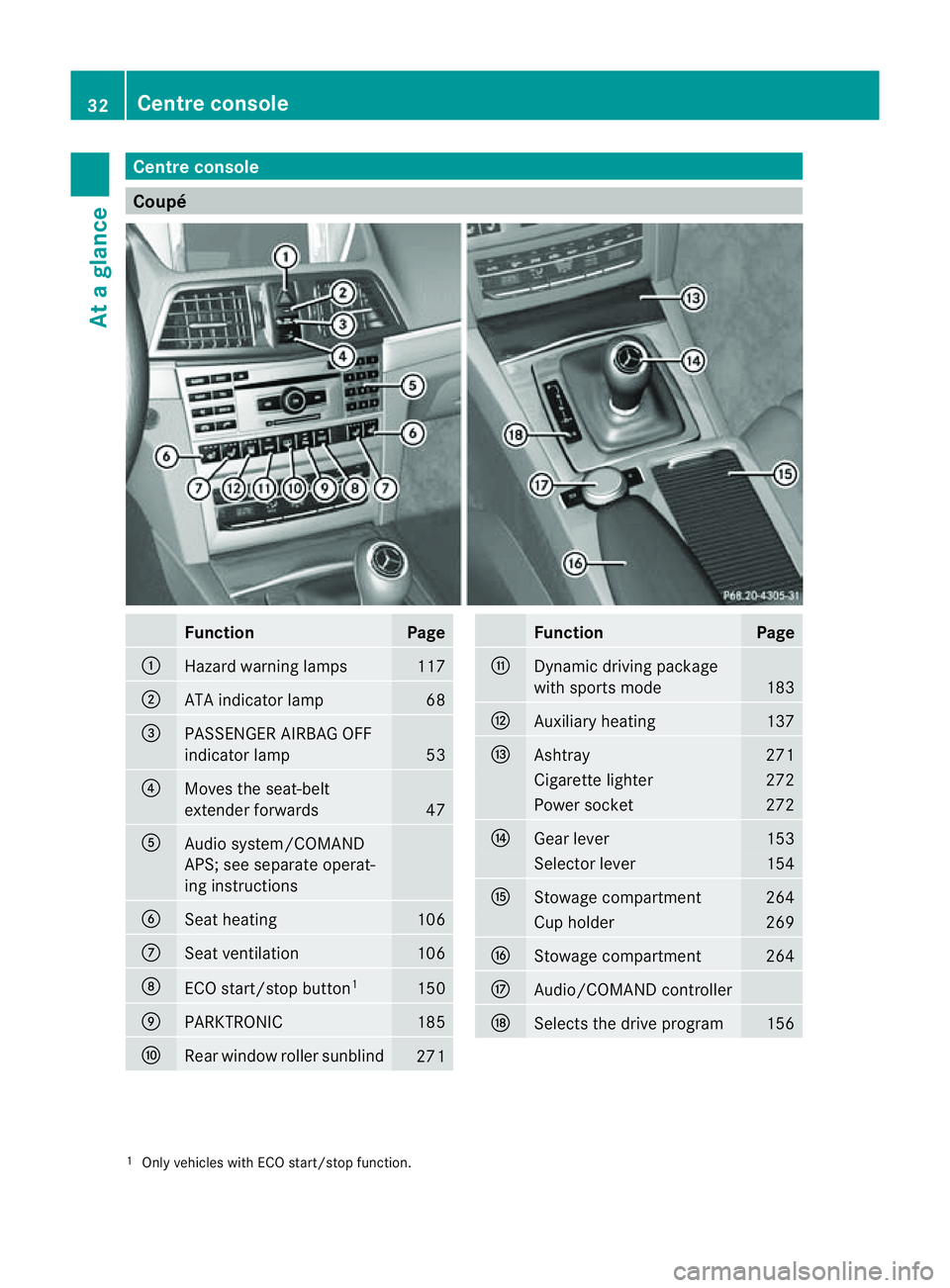
Centre console
Coupé
Function Page
:
Hazard warning lamps 117
;
AT
Ai ndicator lamp 68
=
PASSENGER AIRBA
GOFF
indicator lamp 53
?
Moves th
eseat-belt
extender forwards 47
A
Audi
osystem/COMAND
APS; see separate operat-
ing instructions B
Seat heating 106
C
Seat ventilation 106
D
ECO start/sto
pbutton 1 150
E
PARKTRONIC 185
F
Rear window roller sunblind
271 Function Page
G
Dynamic driving package
wit
hsports mode 183
H
Auxiliary heating 137
I
Ashtray 271
Cigarett
elighter 272
Power socket 272
J
Gear lever 153
Selector lever 154
K
Stowage compartment 264
Cup holder 269
L
Stowage compartment 264
M
Audio/COMAND controller
N
Select
sthe driv eprogram 156
1
Only vehicle swithE CO start/sto pfunction. 32
Centre consoleAt
ag lance
Page 36 of 353
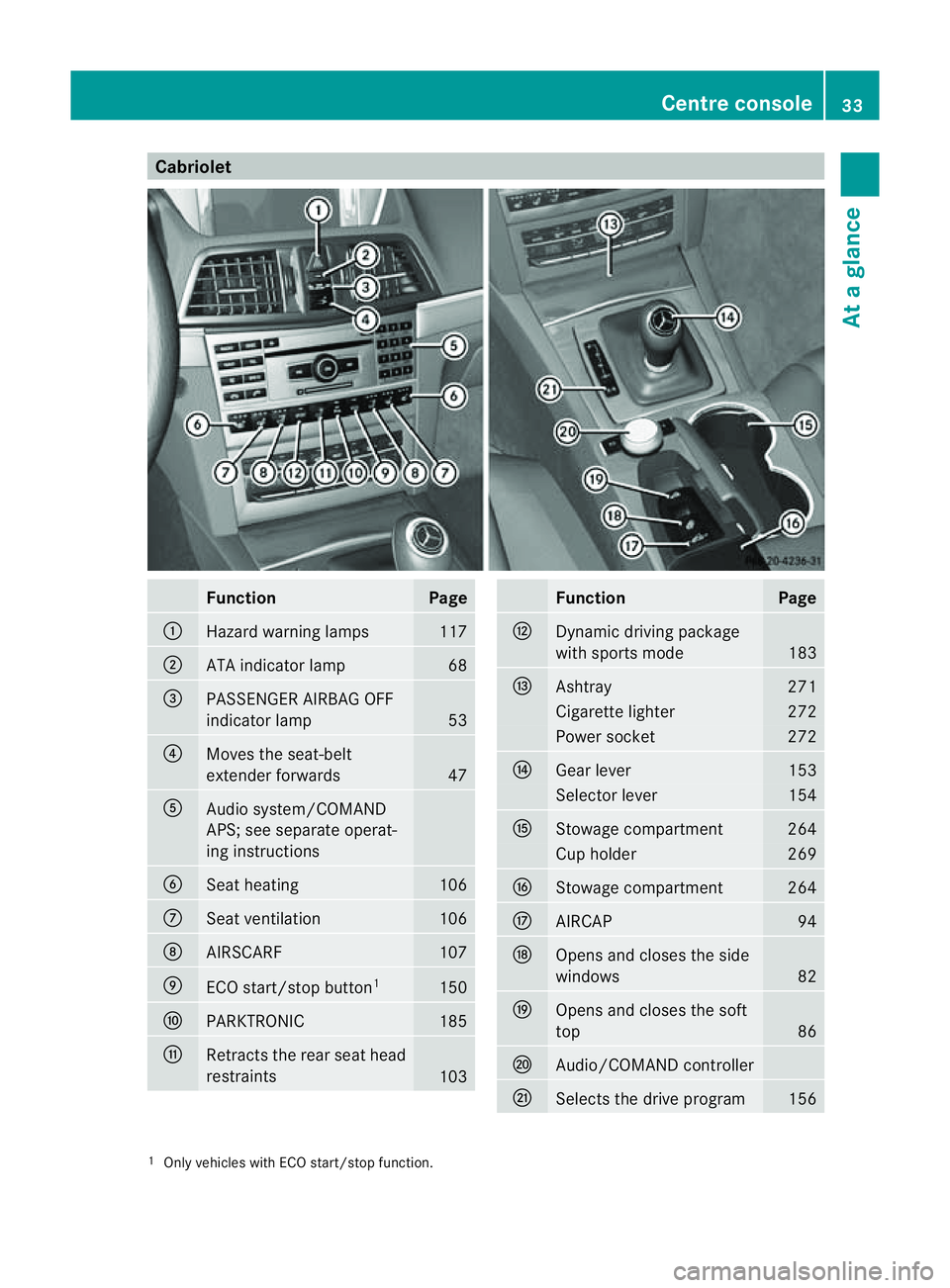
Cabriolet
Function Page
:
Hazard warning lamps 117
;
AT
Ai ndicator lamp 68
=
PASSENGER AIRBA
GOFF
indicator lamp 53
?
Moves th
eseat-belt
extender forwards 47
A
Audi
osystem/COMAND
APS; see separate operat-
ing instructions B
Seat heating 106
C
Seat ventilation 106
D
AIRSCARF 107
E
ECO start/sto
pbutton 1 150
F
PARKTRONIC 185
G
Retracts th
erear seat head
restraints 103 Function Page
H
Dynamic driving package
wit
hsports mode 183
I
Ashtray 271
Cigarett
elighter 272
Power socket 272
J
Gear lever 153
Selector lever 154
K
Stowage compartment 264
Cup holder 269
L
Stowage compartment 264
M
AIRCAP 94
N
Open
sand closes th eside
windows 82
O
Open
sand closes th esoft
top 86
P
Audio/COMAND controller
Q
Select
sthe driv eprogram 156
1
Only vehicle swithE CO start/sto pfunction. Centre console
33Atag lance
Page 71 of 353
Anti-thef
tsystems Immobiliser
The immobiliser prevents your vehicl efrom
bein gstarted without th ecorrect key.
X To activat ewith the key: remove the key
from the ignition lock.
X To activate with KEYLESS-GO: switch the
ignition off and open the driver's door.
X To deactivate: switch on the ignition.
i The immobiliser is alway sdeactivated
when you start the engine. ATA (Anti-Theft Alarm system)
Av isual and audible alarm is triggere difthe
alarm system is prime dand you open:
R ad oor
R the vehicle with the emergency key ele-
ment
R the boot lid
R the bonnet
The alarm is not switched off ,even if you
clos ethe open door that has triggere dit, for
example. X
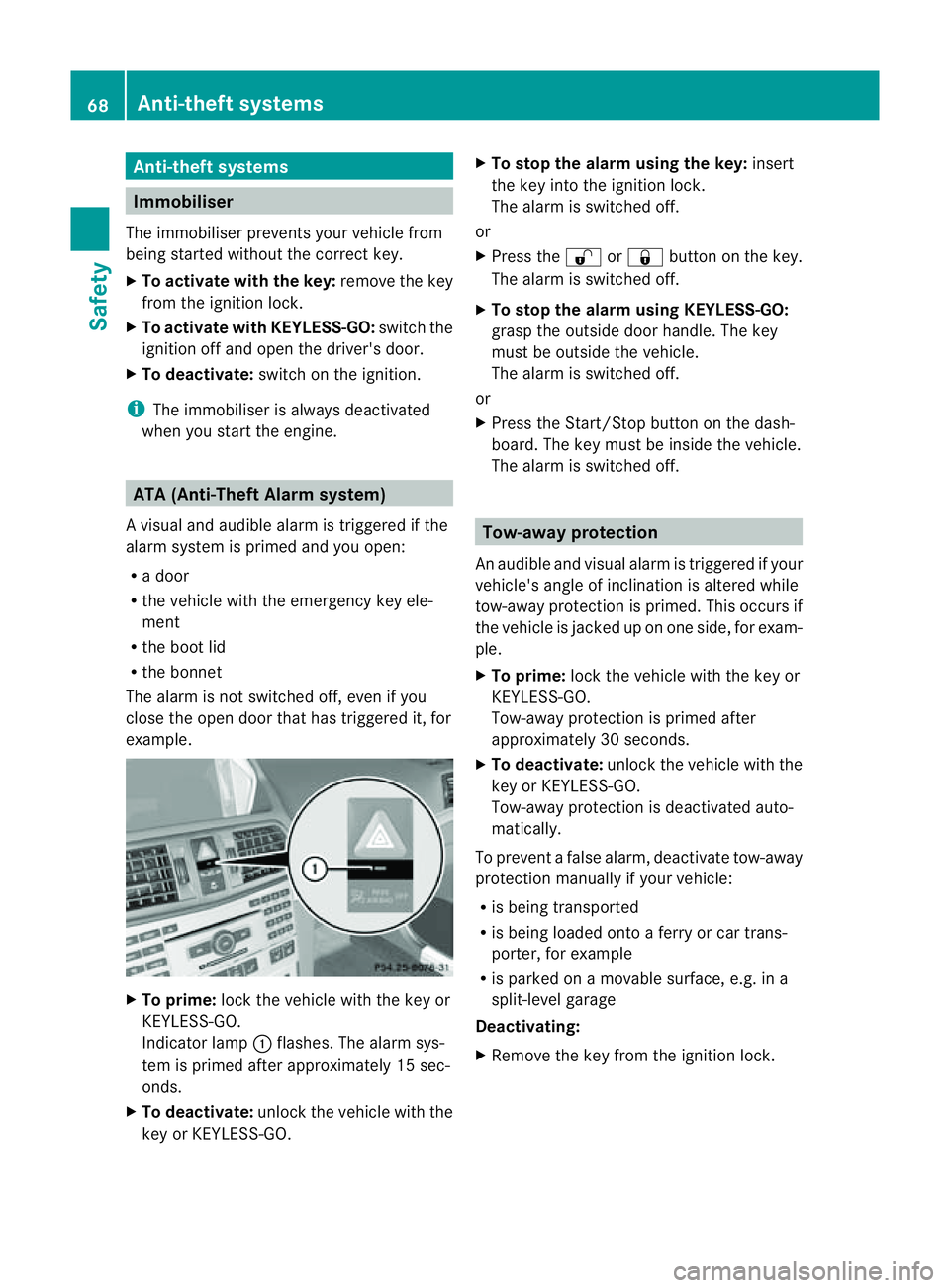
To prime: lock the vehicle with the key or
KEYLESS-GO.
Indicator lamp :flashes .The alarm sys-
tem is primed after approximately 15 sec-
onds.
X To deactivate: unlock the vehicle with the
key or KEYLESS-GO. X
To stop the alarm using the key: insert
the key into the ignition lock.
The alarm is switched off.
or
X Press the %or& button on the key.
The alarm is switched off.
X To stop the alarm using KEYLESS-GO:
grasp the outside door handle. The key
must be outside the vehicle.
The alarm is switched off.
or
X Press the Start/Stop button on the dash-
board. The key must be inside the vehicle.
The alarm is switched off. Tow-away protection
An audible and visual alarm is triggered if your
vehicle's angle of inclination is altered while
tow-away protection is primed. This occurs if
the vehicle is jacked up on one side, for exam-
ple.
X To prime: lock the vehicle with the key or
KEYLESS-GO.
Tow-away protection is primed after
approximately 30 seconds.
X To deactivate: unlock the vehicle with the
key or KEYLESS-GO.
Tow-away protection is deactivated auto-
matically.
To prevent afalse alarm, deactivate tow-away
protection manually if your vehicle:
R is being transported
R is being loaded onto aferry or car trans-
porter, for example
R is parked on amovable surface, e.g. in a
split-level garage
Deactivating:
X Remove the key from the ignition lock. 68
Anti-theft systemsSafety
Page 104 of 353
The seat belt should:
R
fit snugly across your body
R be routed across the middle of your
shoulder
R be routed in your pelvic area across the
hip joints
X Before starting off, adjust the rear-view mir-
ror and the exterior mirrors (Y page 109)
in such away that you have agood view of
road and traffic conditions.
X Vehicles with amemor yfunction: save
the seat, steerin gwheel and exterior mirror
settings (Y page 112). Seats
Important safety notes
G
WARNING
The seats can still be adjusted when there is
no key in the ignition lock. For this reason,
children should never be left unsupervised in
the vehicle. They could adjust the seats and
become trapped. G
WARNING
Only adjust the driver's seat when the vehicle
is stationary. You will otherwise be distracted
from the road and traffic conditions and you
could lose control of the vehicle as aresult of
the seat moving. This could cause an acci-
dent. G
WARNING
If you adjust the seat height carelessly, you or
others could be trapped and thereby injured.
Children in particular could unintentionally
press the button stoelectrically adjust the
seats and become trapped.
Take care that:
R while moving the seats, your hands do not
get under the lever assembly of the seat
adjustmen tsystem.
R children in th evehicl edon ot slide their
hands under the levers. G
WARNING
Make sure that nobody can becom etrapped
when adjusting the seats.
Observe the notes on airbags.
Secure children as recommended; see the
"Children in the vehicle" section. G
WARNING
Make sure that the back of your head is sup-
ported at eye level by the central area of the
head restraint .Ifyour head is not supported
correctly by the head restraint ,you could suf-
fer asevere neck injury in the event of an
accident .Never drive if the head restraints are
not engaged and set correctly. G
WARNING
As eat belt can only offer its intended degree
of protection when the backrest is almost ver-
tical and the occupant is sitting upright. Avoid
seat position sthat do not allow the seat belt
to be routed correctly. Adjust the backrest so
that it is as upright as possible. Never travel
with the backrest reclined too far backwards.
You could otherwise be seriously or even
fatally injured in the event of an acciden tor
sudden braking.
! To avoid damage to the seats and the seat
heating, observe the following information:
R do not spill any liquids on the seats. If
liquid is spilled on the seats, dry them as
soon as possible.
R if the seat cover sare damp or wet, do not
switch on the seat heating. The seat
heating should also not be used to dry
the seats.
R clean the seat cover sasrecommended;
see the "Interior care" section.
R do not transport heavy loads on the
seats. Do not place sharp objects on the
seat cushions ,e.g. knives, nails or tools.
The seats should only be occupied by
passengers, if possible.
R when the seat heating is in operation ,do
not cover the seats with insulating mate- Seats
101Seats, steering wheel and mirrors Z
Page 159 of 353
Double-clutch function
E3
50 an dE500 only: when shifting down,
the double-clutch function is activ eregard-
less of the currently selected drive program.
The double-clutch function reduces load
chang ereactions and is conducive to asporty
driving style. The sound generated by the
double-clutch function depends on the drive
program selected.
Kickdown Use kickdown for maximum acceleration.
X
Depres sthe accelerator pedal beyond the
pressure point.
The transmission shift stoalower gear
dependin gonthe engin espeed.
X Ease off the accelerator pedal onc ethe
desired speed is reached.
The automatic transmission shift sback up.
Trailer towing X
Driv eint he middle of the engin espeed
range on uphill gradients.
X Shift down to shift range 3or
2(Y page 157 )dependin gonthe uphill or
downhill gradient ,even if cruise control,
DISTRONIC PLUS or SPEEDTRONIC is acti-
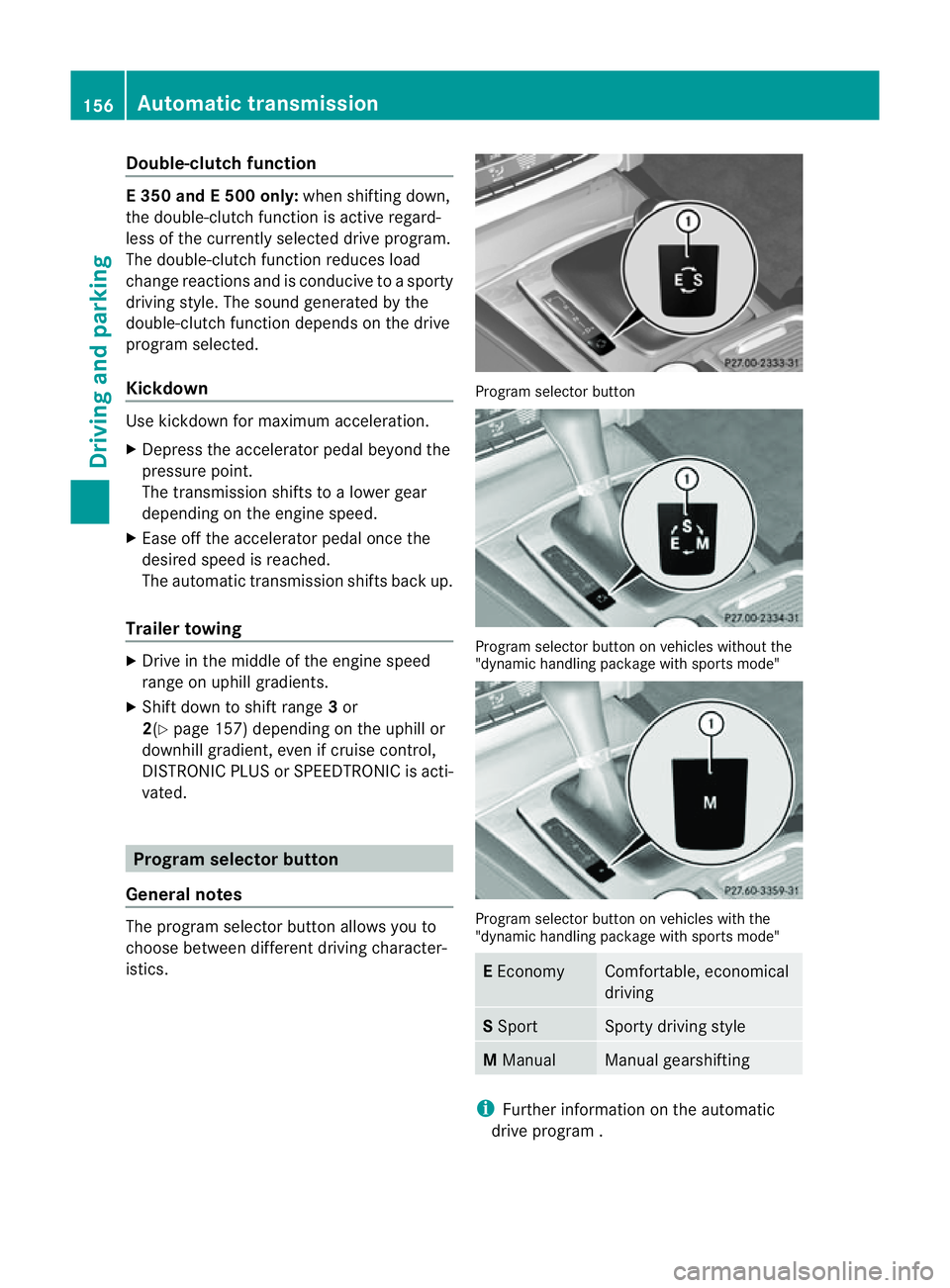
vated. Program selector button
General notes The program selector butto
nallows you to
choose between differen tdriving character-
istics. Progra
mselector button Program selecto
rbutton on vehicle swithout the
"dynamic handlin gpackage with sports mode" Program selecto
rbutton on vehicle swith the
"dynamic handlin gpackage with sports mode" E
Economy Comfortable, economical
driving
S
Sport Sport
ydriving style M
Manual Manual gearshifting
i
Further informatio nontheautomatic
driv eprogram . 156
Automatic transmissionDriving and parking
Page 160 of 353
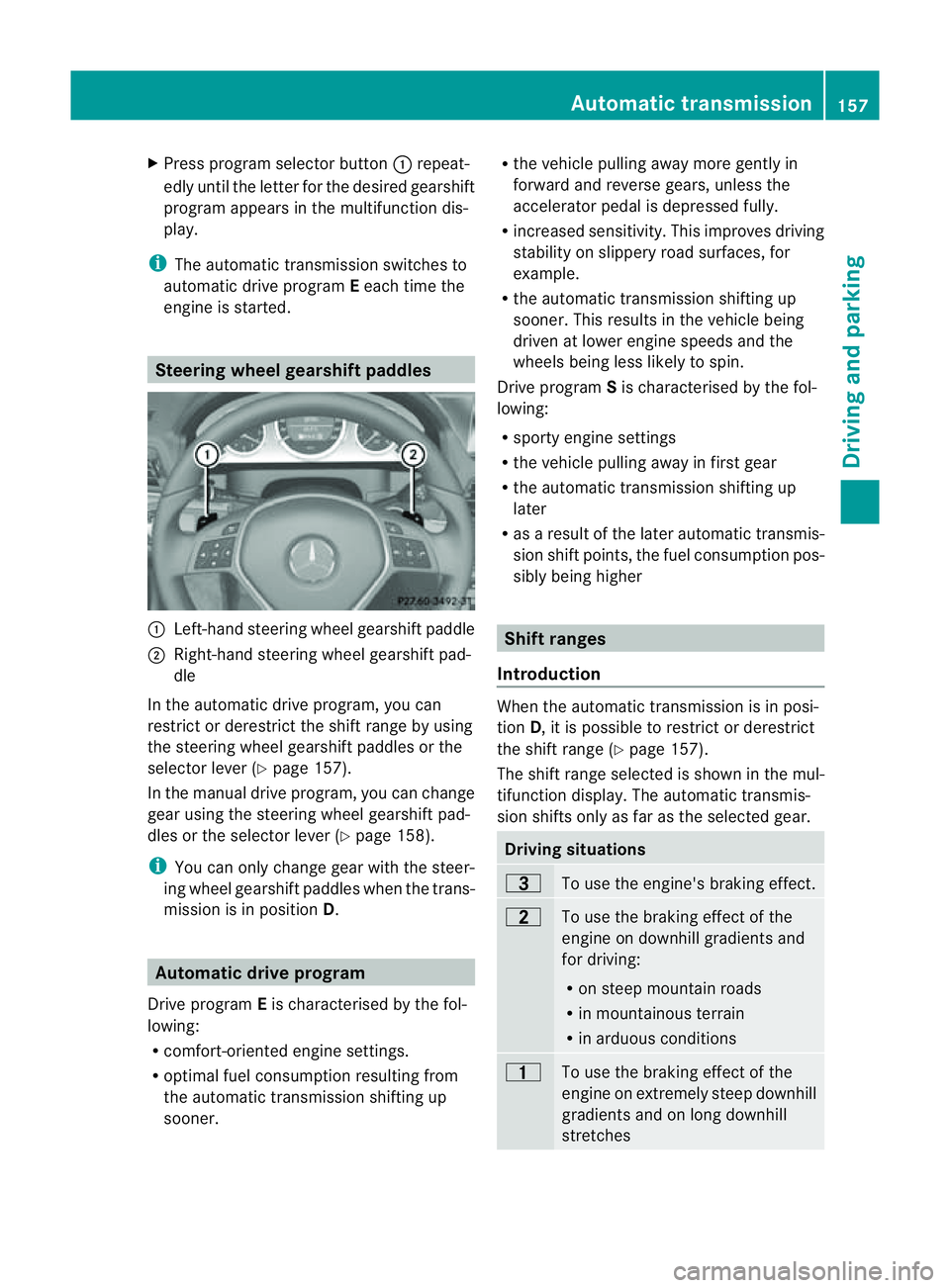
X
Press program selector button :repeat-
edly until the letter for the desired gearshift
program appears in the multifunction dis-
play.
i The automatic transmission switches to
automatic drive program Eeach time the
engine is started. Steering wheel gearshift paddles
:
Left-hand steerin gwheel gearshift paddle
; Right-hand steerin gwheel gearshift pad-
dle
In the automatic drive program, you can
restrict or derestrict the shift range by using
the steerin gwheel gearshift paddles or the
selector lever (Y page 157).
In the manual drive program, you can change
gear using the steerin gwheel gearshift pad-
dles or the selector lever (Y page 158).
i You can only change gear with the steer-
ing wheel gearshift paddles when the trans-
mission is in position D.Automatic drive program
Drive program Eis characterised by the fol-
lowing:
R comfort-oriented engine settings.
R optimal fuel consumption resulting from
the automatic transmission shiftin gup
sooner. R
the vehicle pulling away more gently in
forward and reverse gears, unless the
accelerator pedal is depressed fully.
R increased sensitivity. This improves driving
stability on slippery road surfaces, for
example.
R the automatic transmission shiftin gup
sooner. This results in the vehicle being
driven at lower engine speeds and the
wheels being less likely to spin.
Drive program Sis characterised by the fol-
lowing:
R sporty engine settings
R the vehicle pulling away in first gear
R the automatic transmission shiftin gup
later
R as aresult of the later automatic transmis-
sion shift points, the fuel consumption pos-
sibly being higher Shift ranges
Introduction When the automatic transmission is in posi-
tion
D,itisp ossible to restrict or derestrict
the shift range (Y page 157).
The shift range selected is shown in the mul-
tifunction display. The automatic transmis-
sion shifts only as far as the selected gear. Driving situations
=
To use the engine's braking effect.
5
To use the braking effect of the
engine on downhill gradients and
for driving:
R
on steep mountain roads
R in mountainous terrain
R in arduous conditions 4
To use the braking effect of the
engine on extremely steep downhill
gradients and on long downhill
stretches Automatic transmission
157Driving and parking Z
Page 162 of 353
the left-hand steering whee
lgearshift pad-
dle until the transmission shift stothe opti-
mal gear for the curren tspeed.
Kickdown You can also use kickdown for maximum
acceleration in manual drive program
M.
X Depres sthe accelerator pedal beyond the
pressure point.
The transmission shift stoalower gear
dependin gonthe engin espeed.
Switching off the manual drive program X
Vehicles without the dynamic handling
package with sports mode: press the
program selector button (Y page 156)
repeatedly until Eor Sappears in the mul-
tifunction display.
X Vehicles with the dynamic handling
package with sports mode: press the
program selector button (Y page 156).M
is no longer shown in the multifunction dis-
play. Automatic transmission
159Driving and parking Z