low beam MERCEDES-BENZ E-Class CABRIOLET 2016 C207 User Guide
[x] Cancel search | Manufacturer: MERCEDES-BENZ, Model Year: 2016, Model line: E-Class CABRIOLET, Model: MERCEDES-BENZ E-Class CABRIOLET 2016 C207Pages: 322, PDF Size: 7.97 MB
Page 116 of 322
Lamps are an important aspect of vehicle safety.
You must therefore make sure that these func-
tion correctly at all times. Have the headlamp
setting checked regularly.
Overview: changing bulbs/bulb types
You can replace the following bulbs. The bulb
type can be found in the legend.
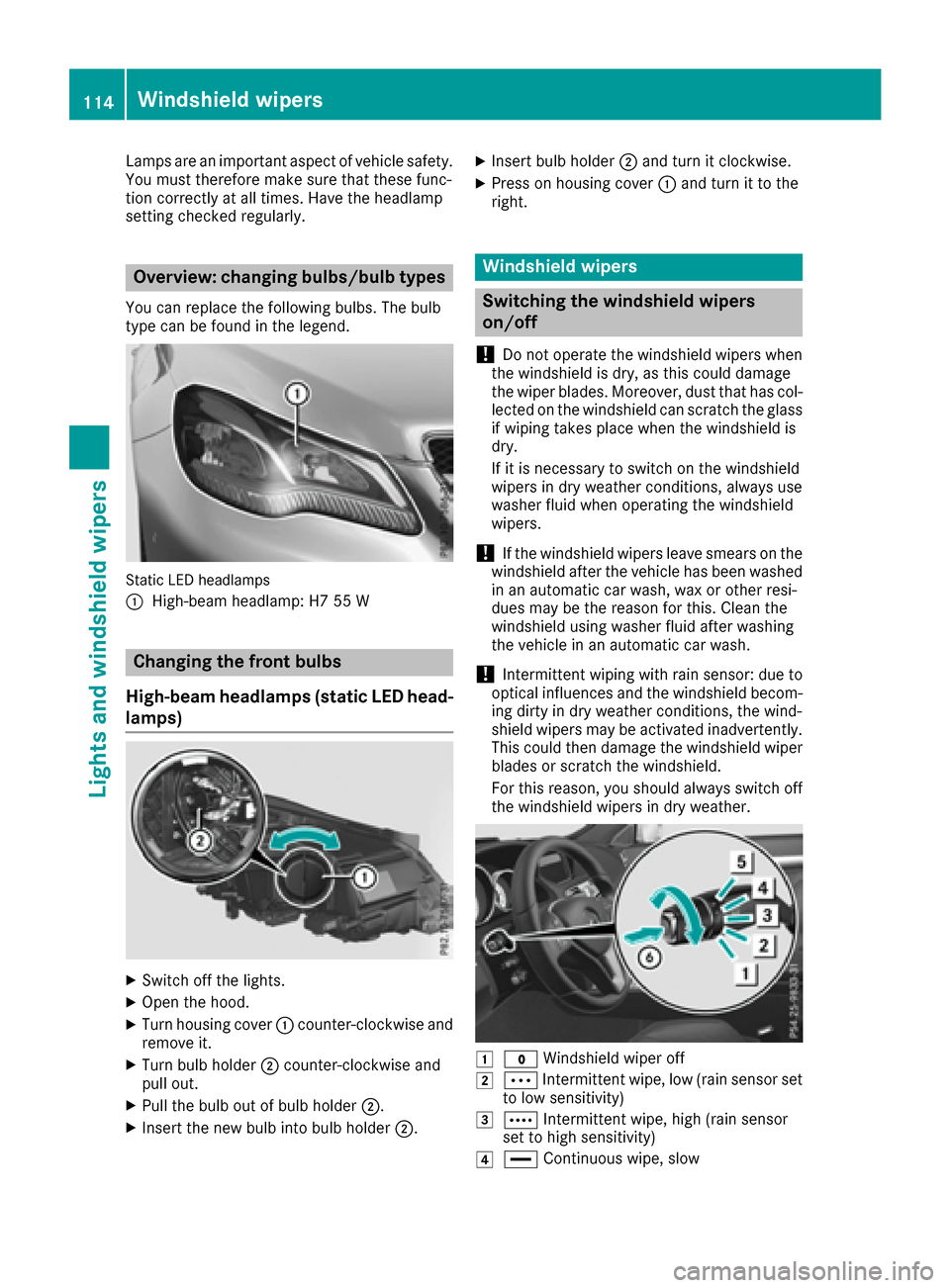
Static LED headlamps
:
High-beam headlamp: H7 55 W
Changing the front bulbs
High-beam headlamps (static LED head-
lamps)
XSwitch off the lights.
XOpen the hood.
XTurn housing cover :counter-clockwise and
remove it.
XTurn bulb holder ;counter-clockwise and
pull out.
XPull the bulb out of bulb holder ;.
XInsert the new bulb into bulb holder ;.
XInsert bulb holder;and turn it clockwise.
XPress on housing cover :and turn it to the
right.
Windshield wipers
Switching the windshield wipers
on/off
!
Do not operate the windshield wipers when
the windshield is dry, as this could damage
the wiper blades. Moreover, dust that has col-
lected on the windshield can scratch the glass
if wiping takes place when the windshield is
dry.
If it is necessary to switch on the windshield
wipers in dry weather conditions, always use
washer fluid when operating the windshield
wipers.
!If the windshield wipers leave smears on the
windshield after the vehicle has been washed
in an automatic car wash, wax or other resi-
dues may be the reason for this. Clean the
windshield using washer fluid after washing
the vehicle in an automatic car wash.
!Intermittent wiping with rain sensor: due to
optical influences and the windshield becom-
ing dirty in dry weather conditions, the wind-
shield wipers may be activated inadvertently.
This could then damage the windshield wiper
blades or scratch the windshield.
For this reason, you should always switch off
the windshield wipers in dry weather.
1$ Windshield wiper off
2ÄIntermittent wipe, low (rain sensor set
to low sensitivity)
3Å Intermittent wipe, high (rain sensor
set to high sensitivity)
4° Continuous wipe, slow
114Windshield wipers
Lights and windshield wipers
Page 193 of 322
Back button
%Press briefly:
RBack
RSwitches off voice-operated navi-
gation or the Voice Control System
RHides display messages or calls up
the lastTripmenu function used
RExits the telephone book/redial
memory
%Press and hold:
RCalls up the standard display in the
Tripmenu
Multifunction display
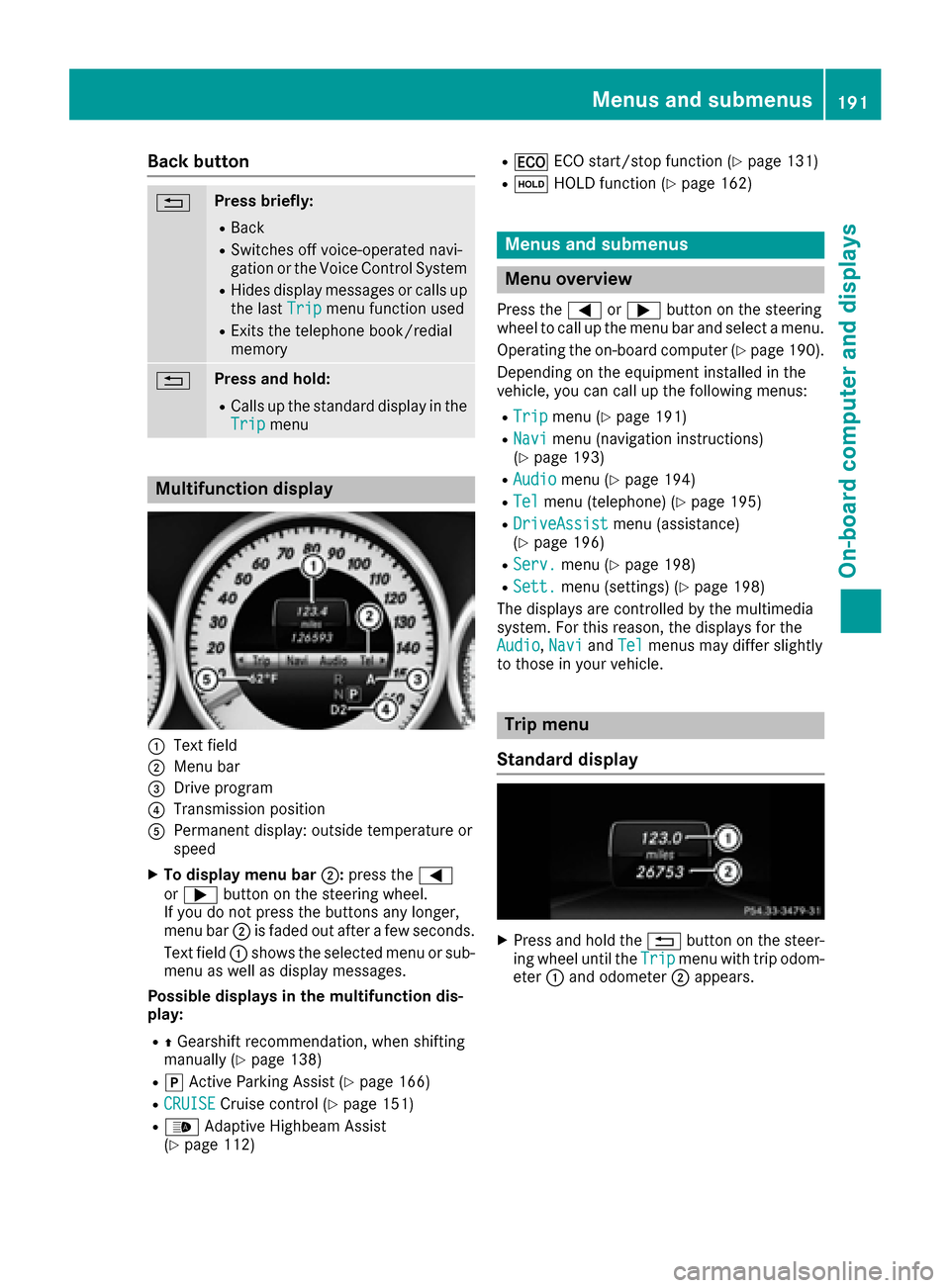
:Text field
;Menu bar
=Drive program
?Transmission position
APermanent display: outside temperature or
speed
XTo display menu bar ;:press the =
or ; button on the steering wheel.
If you do not press the buttons any longer,
menu bar ;is faded out after a few seconds.
Text field :shows the selected menu or sub-
menu as well as display messages.
Possible displays in the multifunction dis-
play:
RZ Gearshift recommendation, when shifting
manually (Ypage 138)
Rj Active Parking Assist (Ypage 166)
RCRUISECruise control (Ypage 151)
R_ Adaptive Highbeam Assist
(Ypage 112)
R¤ ECO start/stop function (Ypage 131)
RëHOLD function (Ypage 162)
Menus and submenus
Menu overview
Press the =or; button on the steering
wheel to call up the menu bar and select a menu.
Operating the on-board computer (
Ypage 190).
Depending on the equipment installed in the
vehicle, you can call up the following menus:
RTripmenu (Ypage 191)
RNavimenu (navigation instructions)
(Ypage 193)
RAudiomenu (Ypage 194)
RTelmenu (telephone) (Ypage 195)
RDriveAssistmenu (assistance)
(Ypage 196)
RServ.menu (Ypage 198)
RSett.menu (settings) (Ypage 198)
The displays are controlled by the multimedia
system. For this reason, the displays for the
Audio
, Naviand Telmenus may differ slightly
to those in your vehicle.
Trip menu
Standard display
XPress and hold the %button on the steer-
ing wheel until the Tripmenu with trip odom-
eter :and odometer ;appears.
Menus and submenus191
On-board computer and displays
Z
Page 213 of 322
Lights
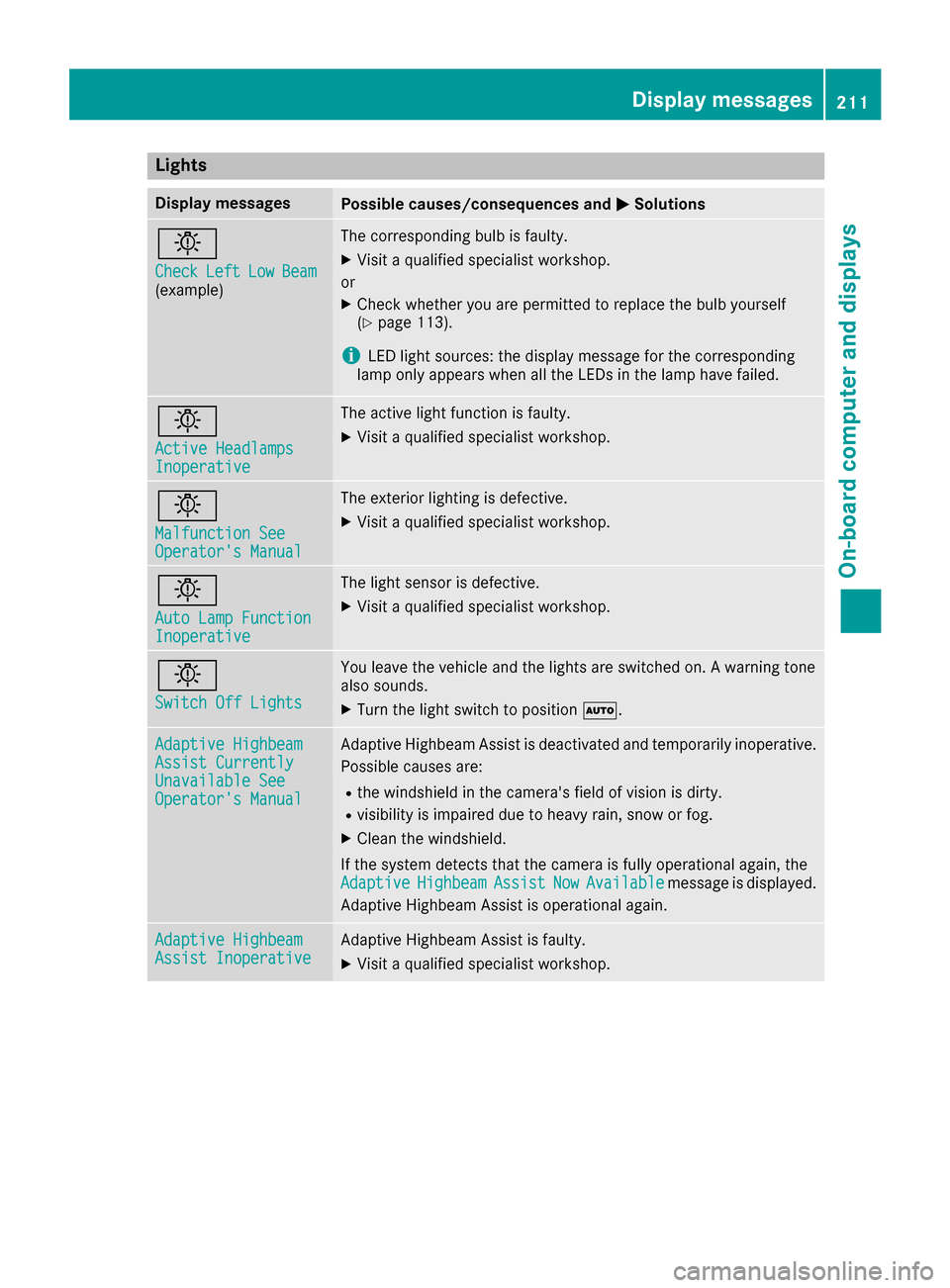
Display messagesPossible causes/consequences andMSolutions
b
CheckLeftLowBeam(example)
The corresponding bulb is faulty.
XVisit a qualified specialist workshop.
or
XCheck whether you are permitted to replace the bulb yourself
(Ypage 113).
iLED light sources: the display message for the corresponding
lamp only appears when all the LEDs in the lamp have failed.
b
Active HeadlampsInoperative
The active light function is faulty.
XVisit a qualified specialist workshop.
b
Malfunction SeeOperator's Manual
The exterior lighting is defective.
XVisit a qualified specialist workshop.
b
Auto Lamp FunctionInoperative
The light sensor is defective.
XVisit a qualified specialist workshop.
b
Switch Off Lights
You leave the vehicle and the lights are switched on. A warning tone
also sounds.
XTurn the light switch to position Ã.
Adaptive HighbeamAssist CurrentlyUnavailable SeeOperator's Manual
Adaptive Highbeam Assist is deactivated and temporarily inoperative.
Possible causes are:
Rthe windshield in the camera's field of vision is dirty.
Rvisibility is impaired due to heavy rain, snow or fog.
XClean the windshield.
If the system detects that the camera is fully operational again, the
Adaptive
HighbeamAssistNowAvailablemessage is displayed.
Adaptive Highbeam Assist is operational again.
Adaptive HighbeamAssist InoperativeAdaptive Highbeam Assist is faulty.
XVisit a qualified specialist workshop.
Display messages211
On-board computer and displays
Z