heater MERCEDES-BENZ E-CLASS CABRIOLET 2017 User Guide
[x] Cancel search | Manufacturer: MERCEDES-BENZ, Model Year: 2017, Model line: E-CLASS CABRIOLET, Model: MERCEDES-BENZ E-CLASS CABRIOLET 2017Pages: 521, PDF Size: 10.64 MB
Page 141 of 521
Problems with
there mo tecont rolfo r the stationary heater/stationary ventilation Problem
Possible causes/consequences and M
MSolutions
FA IL¨ The signal transmission between
the transmit ter and theve hicle is faulty. #
Chan geyour position in relation totheve hicle, moving closer if necessar y.
FA IL Thestar ter battery is not suf ficiently charge d. #
Char gethest ar ter batter y.
The fuel tank content is below there ser vefuel le vel. #
Refuel at the nearest filling station.
FA IL¯ The
stationary heater is malfunctioning. #
Have thest ationary heater checked at a qualified specialist workshop. Air
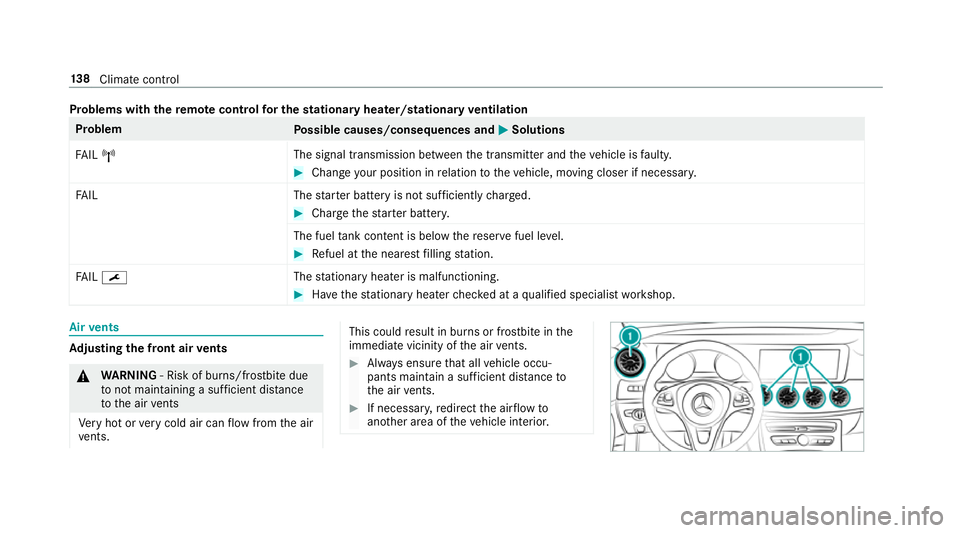
vents Ad
justing the front air vents &
WARNING ‑ Risk of bu rns/frostbite due
to not maintaining a su fficient dis tance
to the air vents
Ve ry hot or very cold air can flow from the air
ve nts. This could
result in burns or frostbite in the
immediate vicinity of the air vents. #
Alw ays ensure that all vehicle occu‐
pants maintain a suf ficient di stance to
th e air vents. #
If necessa ry,re direct the air flow to
ano ther area of theve hicle interior. 13 8
Climate cont rol
Page 148 of 521
This jeopardises
the operating and road
saf ety of theve hicle. #
Stow all objects in theve hicle securely
so that they cannot getinto the driver's
fo ot we ll. #
Ensure floor mats and carpets cannot
slip and pr ovide suf ficient room forthe
pedals. #
Do not lay multiple floor mats or car‐
pets on top of one ano ther. &
WARNING Risk of accident due to
unsuitable foot we ar
Operating the pedals may be impaired by
we aring unsuitable foot we ar, e.g.:
R plat form shoes
R high-heeled shoes
R slippers #
Alw ayswe ar suitable foot we ar when
driving so that you can operate the ped‐
als safel y. &
WARNING Risk of accident if the ignition
is switched off while driving
If yo u swit choff the ignition while driving,
functions releva nt tosaf ety are restricted or
no longer available. This may ef fect, for
ex ample, the po werst eering sy stem and the
brake forc e boosting.
Yo u will then need touse considerably more
fo rc eto steer and brake. #
Do not switch off the ignition while driv‐
ing. &
WARNING Risk ofexhaust gas poisoning
Combustion engines emit poisonous exhaust
ga ses such as carbon monoxide. Inhaling
th ese exhaust gases causes poisoning. #
Never lea vethe engine running in an
enclosed space wi thout suf ficient venti‐
lation. &
WARNING Risk of skidding and of an
accident due toshifting down on slippery
ro ad sur faces
If yo u shift down on slippery road sur faces to
inc rease the engine braking ef fect, the drive
wheels may lose traction. #
Do not shift down on slippery road sur‐
fa ces toinc rease the engine braking
ef fect. &
DANG ER Risk of fata l injuries due topoi‐
sonous exhaust gases
If th eta ilpipe is bloc ked or suf ficient ventila‐
tion is not possible, poisonous exhaust gases
such as carbon monoxide may enter theve hi‐
cle. This is the case, forex ample, if theve hi‐
cle is stuck in sn ow. #
When the engine or thest ationary
heater are running, keep theta ilpipe
and the area around theve hicle clear of
sno w. Driving and pa
rking 14 5
Page 378 of 521
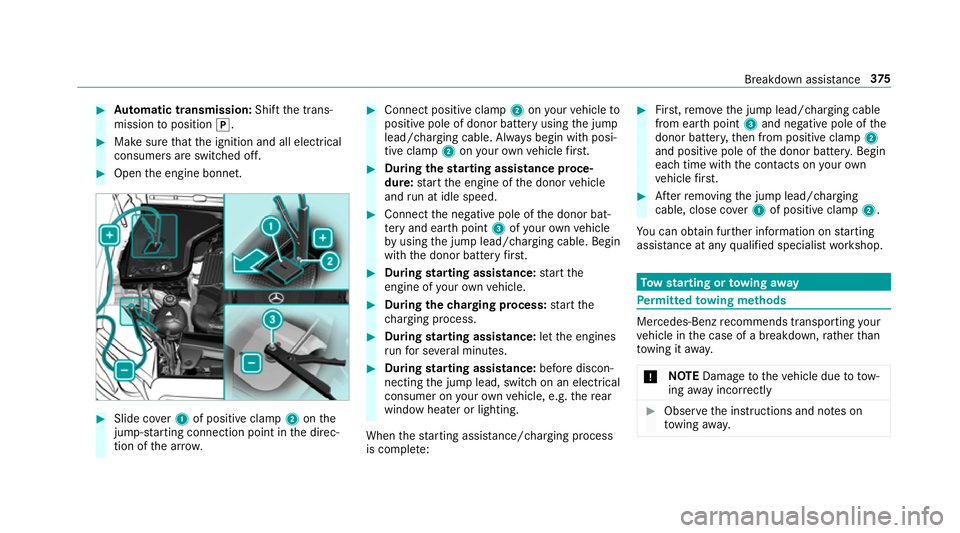
#
Automatic transmission: Shiftthe trans‐
mission toposition j. #
Make sure that the ignition and all electrical
consumers are switched off. #
Open the engine bonn et. #
Slide co ver1 of positive clamp 2onthe
jump-s tarting connection point in the direc‐
tion of the ar row. #
Connect positive clamp 2onyour vehicle to
positive pole of donor battery using the jump
lead/charging cable. Alw ays begin with posi‐
tive clamp 2onyour ow nve hicle firs t. #
During thest arting assi stance proce‐
dure: start the engine of the donor vehicle
and run at idle speed. #
Connect the negative pole of the donor bat‐
te ry and ear thpoint 3ofyour ow nve hicle
by using the jump lead/charging cable. Begin
with the donor battery firs t. #
During starting assi stance: start the
engine of your ow nve hicle. #
During thech arging process: start the
ch arging process. #
During starting assi stance: letthe engines
ru nfo r se veral minutes. #
During starting assi stance: before discon‐
necting the jump lead, switch on an electrical
consumer on your ow nve hicle, e.g. there ar
wind owheater or lighting.
When thest arting assis tance/charging process
is compl ete: #
First,re mo vethe jump lead/charging cable
from ear thpoint 3and negative pole of the
donor batter y,then from positive clamp 2
and positive pole of the donor batter y.Begin
ea ch time wi th the conta cts onyour own
ve hicle firs t. #
Afterre moving the jump lead/charging
cable, close co ver1 of positive clamp 2.
Yo u can obtain fur ther information on starting
assis tance at any qualified specialist workshop. To
w starting or towing away Pe
rm itted towing me thods Mercedes-Benz
recommends transporting your
ve hicle in the case of a breakdown, rath er than
to wing it away.
* NO
TEDama getotheve hicle due to tow‐
ing away incor rectly #
Obser vethe instructions and no tes on
to wing away. Breakdown assis
tance 375
Page 454 of 521
Display messages
Possible causes/consequences and M
MSolutions
d Vehicle is operational
Switch off the ignition
before exiting *Y
ou are leaving theve hicle when it is in a ready-to-drive state. #
When you lea vetheve hicle, switch off the ignition and take theke y with you. #
Ifyo u do not lea vetheve hicle, switch off the electrical consumers, e.g. the seat heater. Otherwise, the12 V
battery might dischar geand it will then only be possible tostart theve hicle using a donor battery (s tarting
assis tance).
Transmission Malfunction
Stop *
The transmission is malfunctioning. The transmission shi fts to position iautomaticall y. #
Pull over and stop theve hicle safely as soon as possible, paying attention toroad and traf fic conditions. #
Switch the transmission toposition j. #
Consult a qualified specialist workshop.
Reversing not poss. Con-
sult workshop *T
he transmission is malfunctioning. Reversege ar can no lon ger be engaged. #
Consult a qualified specialist workshop.
Stop vehicle Leave engine
running Wait Transmission
cooling *T
he transmission has overheated. Pulling away can be temp orarily impaired or not possible. #
Pull over and stop theve hicle safely as soon as possible, paying attention toroad and traf fic conditions. Do not
continue driving under any circums tances. #
Start the engine. #
Wait until the display message disappears before pulling away. Displ
aymessa ges and warning/indicator lamps 451
Page 458 of 521
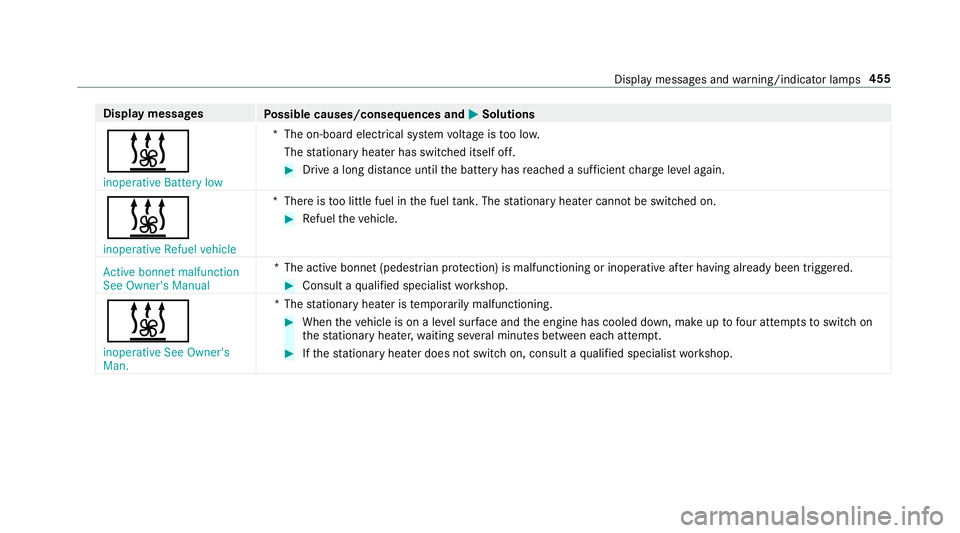
Display messages
Possible causes/consequences and M
MSolutions
& inoperative Battery low *T
he on-board electrical sy stem voltage is too lo w.
The stationary heater has swit ched itself off. #
Drive a long dis tance until the battery has reached a suf ficient charge leve l again.
& inoperative Refuel vehicle *T
here is too little fuel in the fuel tank. The stationary heater cannot be swit ched on. #
Refuel theve hicle.
Active bonnet malfunction
See Owner's Manual *T
he active bonnet (pedestrian pr otection) is malfunctioning or inoperative af ter having already been triggered. #
Consult a qualified specialist workshop.
& inoperative See Owner's
Man. *T
hestationary heater is temp orarily malfunctioning. #
When theve hicle is on a le vel sur face and the engine has cooled down, make up tofour attem ptsto switch on
th est ationary heater, waiting se veral minutes between each attem pt. #
Ifth est ationary heater does not swit chon, consult a qualified specialist workshop. Display messages and
warning/indicator lamps 455
Page 485 of 521
Selecting pa
rkposition ........................ 151
Shifting toneutral ................................ 15 0
St eering wheel gearshift paddles ........ .151
Tr ansmission position display .............. 14 9
Tr ansmission positions ........................ 14 9
Axle load Perm issible .......................................... 406
Tr ailer operation .................................. .418 B
Bag hook .................................................. 106
Ball ne ck
Fo lding in/out ...................................... 219
BA S (Brake Assist Sy stem) .................... .168
Battery Key ........................................................ .61
Re mo tecontrol (s tationary heater) ...... 137
Battery (vehicle) Charging .............................................. 373
No tes ................................................... 371
St arting assis tance .............................. 373
Belt see Seat belt Bic
ycle rack
Tr ailer operation .................................. 222
Blind Spot Assist ...................................... 213
Ac tivating/deactivating ...................... .215
Fu nction/no tes .................................... 213
Sy stem limits ....................................... 213
Blind Spot Assi st
see Active Blind Spot Assi st
Blo wer
see Climate control
BlueTEC see AdBlue ®
Blue tooth ®
Ac tivating/deactivating ...................... .259
Setting up an Internet connection ....... .313
Settings ............................................... 259
Switching profile (DUN/PAN) .............. 314
Blue tooth ®
Au dio
Ac tivating ............................................ 331
De-authorising (de-regis tering) the
device .................................................. 331
Information .......................................... 328
Overview .............................................3 29Sear
ching for and auth orisingthe
device .................................................. 330
Switching device via NFC .................... 331
Boot lid .......................................................68
Ac tivating/deactivating the boot lid
opening limiter ...................................... 73
Closing .................................................. 69
HANDS-FREE ACCESS .......................... .71
Loc ked separately .................................73
Opening .................................................68
Opening dimensions ............................4 15
Boot lid see Boot lid
see Locking/unlocking
Boot separator Closing .................................................. 80
Opening ................................................. 80
Brake Assi stSystem
see BAS (Brake Assi stSystem)
Brake fluid Notes ................................................... 413
Brake forc e distribution
EBD (Elect ronic Brake forc e Distribu‐
tion) ..................................................... 171482
Index
Page 488 of 521
Ac
tivating/deactivating the synchro‐
nisation function (multimedia sys‐
te m) ..................................................... 13 2
Air di stribution settings ........................ 131
Air-reci rculation mode ........................ .132
Au tomatic control ................................ 131
Climate style function .......................... 131
Demi sting the windo ws....................... 13 2
Demi sting the windscreen ...................1 29
Fr ont air vents ..................................... 13 8
Glo vebox air vent ................................ 13 9
Inserting/removing theflacon (fra‐
gr ance sy stem) .................................... 13 3
ionisation ............................................ .132
Re ar air vents ...................................... 13 9
Re ar operating unit .............................. 12 9
Re sidual heat ....................................... 13 2
Setting the air distribution ...................1 29
Setting the air flow ............................... 12 9
Setting the climate style ......................1 31
Setting the fragrance sy stem ............... 13 2
Setting thete mp erature ......................1 29
St ationary heater/ ventilation .............. 13 4
Switching on/off ................................. 13 0
Switching there ar wind owheater
on/off .................................................1 29THERMATIC control panel ....................
12 9
THERMOTRONIC contro l panel ............12 9
Ve ntilating theve hicle (con venience
opening) ................................................ 75
Climate style
Fu nction ............................................... 131
Setting ................................................. 131
Cockpit ........................................................ .5
Overview .................................................5
COMAND Online see Multimedia sy stem
COMAND Touch ....................................... 262
Child saf ety lock .................................. 262
Managing devices ................................ 262
COMAND Touch App
see COMAND Touch
Combination swit ch
see Turn signal light
Compass .................................................. 287
Computer .................................................2 27
Connection status
Displ ays ............................................... 315
Overview ..............................................3 15Contacts
.................................................. .294
Calling up ............................................ 294
Deleting .............................................. .296
Downloading (from mobile phone) ....... 294
Importing ............................................ 295
Information .......................................... 294
Making a call ....................................... 295
Na me form at ...................................... .295
Options ................................................ 295
Saving ................................................. 295
Controller Operating ............................................. 251
Conv enience closing ................................ .76
Con venience opening ................................ 75
Coolant (engine) Levelch eck .......................................... 351
No tes ................................................... 414
Cooling see Climate control
Copyright .................................................... 24
Cornering light ........................................ .117
Cross Traf fic Alert .................................. .208 Index
485
Page 507 of 521

Displ
aying information ........................ .334
Editing station presets ........................ .333
Fr equency fix ....................................... 334
Menu (on-boa rdcompu ter) .................. 233
Moving stations .................................. .333
Overview ............................................. 332
Sear ching forst ations ........................ .333
Setting a station .................................. 333
Setting station tracking ...................... .334
Setting the frequency band ................. 333
Setting the traf fic information
service volume inc rease ...................... 334
St oring stations .................................. .333
Switching traf fic announcements
on/off ................................................. 334
Ta gging music trac ks........................... 334
To display radio text ............................ 334
Vo ice commands (LINGU ATRO NIC) .....2 46
Ra dio stations
Selecting (on-boa rdcompu ter) ............ 233
Ra nge
Displaying ............................................ 230
Re ading lamp
see Interior lighting Re
ar fog light ............................................ 11 5
Re ar seat
see Seat
Re ar seat belt
St atus display ........................................ 32
Re ar seat belt status display .................... 32
Re ar window heater ................................ 12 9
Re ar-view mir ror
see Outside mir rors
Re cycling
see Take -ba ckof end-of-life vehicles
Re ducing agent
see AdBlue ®
Re fuelling
Re fuelling theve hicle .......................... 15 3
To pping up AdBlue ®
............................. 157
Re gistration
Ve hicle .................................................. 23
Re mo tecont rol (stationa ryheater)
Displ ays ............................................... 13 6
Problems ............................................. 13 8
Re placing the battery .......................... 137Setting .................................................
13 5
Re scue card ............................................... 24
Re ser ve
Fu el ...................................................... 411
Re set function (multimedia sy stem) .....2 65
Re sidual heat ...........................................1 32
Re storing (factory settings)
see Reset function (multimedia sy stem)
Re stra int sy stem ...................................... .25
Children ................................................ .41
Fu nction in an accident ........................ .26
Fu nctionality .......................................... 26
Malfunction ........................................... 26
Pr otection ..............................................25
Re duced pr otection ...............................25
Sy stem self-test .....................................26
Wa rning lamp ........................................ 26
Re versege ar
Selecting ............................................. 15 0
Re versing camera .................................... 19 8
Assigning as a favo urite ...................... .204
Care .................................................... 358
Fu nction .............................................. 19 8504
Index
Page 509 of 521

Seat belt adjustment
Activating/deactivating ......................... 32
Fu nction ................................................ 30
Seat belt extender .....................................30
Seat belt tensioners
Ac tivation .............................................. 26
Seat belt warning
see Seat belt
Seat co ver (Care) .................................... .360
Seat heater Switching on/off ................................... 96
Seat settings Configu ring ............................................ 93
Seat ventilation
Switching on/o ff................................... 97
Selecting a gear
see Shifting gears
Selecting a POI see De stination ent ry
Selecto r lever
see DIRECT SELECT le ver
Sensors (Care) ......................................... 358 Service
Menu (on-board computer) .................. 229
Service see ASS YST PLUS
Service call ..............................................3 08
Breakd own assi stance call .................. 308
MB In focall ......................................... 307
Service centre see Quali fied specialist workshop
Service inter val display
see AS SYST PLUS
Setting a speed see Cruise control
Setting summer time .............................. 259
Setting the da teform at .......................... 259
Setting the distance unit ........................ 263
Setting the map scale
see Map
Setting up a hotsp ot(Wi-Fi) .................... 261
Shifting gears .......................................... .151
Gearshift recommendation .................. 15 2
Manual .................................................1 51Short
text messages
see Text messa ges
Side impact airbag .................................... 32
Side impact pr otection .......................... .195
Side windo ws............................................. 73
Child saf ety lock in there ar .................. .56
Closing .................................................. 73
Closing (all) ............................................ 73
Closing with theke y .............................. .76
Con venience closing .............................. 75
Con venience opening ............................ 75
Opening .................................................73
Opening (all) .......................................... 73
Opening with theke y ............................ .75
Problem .................................................76
Skid chains
see Snow chains
Smartphone see Android Auto
see Apple CarPlay™
see Telephone
Snow chains ............................................ 384 506
Index
Page 510 of 521
Soc
ket (12 V) ............................................ 11 0
Fr ont centre console ............................ 11 0
Re ar passenger compartment .............. 11 0
Soft top
Care .................................................... 356
Closing (soft- top switch) ........................ 78
Closing with theke y .............................. .76
Opening (soft-top switch) ......................78
Opening with theke y ............................ .75
Problem .................................................83
Re locking .............................................. .79
Soft-top switch .......................................... 78
Software update Information .......................................... 265
Pe rforming .......................................... 265
Sound PRE-SAFE ®
Sound ................................. 40
wheels and tyres ................................. 384
Sound see Burmes ter®
sur round sound sy stem
see Tone settings
Spare wheel see Emergency spa rewheel Spectacles compa
rtment ...................... .104
Spee chdialogue sy stem
see LINGU ATRO NIC
Speed limit for winter tyres
Setting ................................................. 180
Speed Limit Pilot .............................. 180, 212
Displ ay................................................. 180
Setting ................................................. 212
Speedome ter
Digital .................................................. 230
St andby mode
Ac tivating/deactivating ...................... .166
Fu nction .............................................. 16 6
St anding lights ......................................... 11 4
St art/S top button
St arting theve hicle ............................. 14 2
Switching off theve hicle ..................... 15 8
Switching on the po wer supply or
ignition ................................................. 141
St art/s top function
see ECO start/ stop function
St arting assi stance
see Jump -sta rt connection St
arting the engine
see Vehicle
St arting-o ffaid
see Hill start assist
St ation
Deleting ............................................... 333
Direct frequency entry ........................ 333
Fr equency fix ....................................... 334
Moving ................................................ 333
Sea rching ............................................ 333
Setting .................................................3 33
St oring ................................................ 333
St ation list
Calling up ............................................ 333
St ation presets
Editing ................................................. 333
St ationary heater/ventilation
Displ ays (remo tecontrol) .................... 13 6
Problems (remo tecontrol) ................... 13 8
Setting (remo tecontrol) ...................... 13 5
Setting (using the multimedia sys‐
te m) ..................................................... 13 5
Switching on/off (control panel) ......... 13 4 Index
507