stop start MERCEDES-BENZ E-CLASS CABRIOLET 2017 User Guide
[x] Cancel search | Manufacturer: MERCEDES-BENZ, Model Year: 2017, Model line: E-CLASS CABRIOLET, Model: MERCEDES-BENZ E-CLASS CABRIOLET 2017Pages: 521, PDF Size: 10.64 MB
Page 192 of 521
display along with a
warning tone prom pting you
to take control of theve hicle. Ste
ering and contact de tection
St eering Pilot requ ires you as the driver, tokeep
yo ur hands on thesteering wheel at all times so
th at you are able tointer vene at any time tocor‐
re ct the course of theve hicle and keep it in lane.
The driver must expect a change from active to
passive mode or vice versa at any time.
If yo u are not steering yourself or if you take
yo ur hands off thesteering wheel for a pro‐
longed period of time, the sy stem will, depend‐
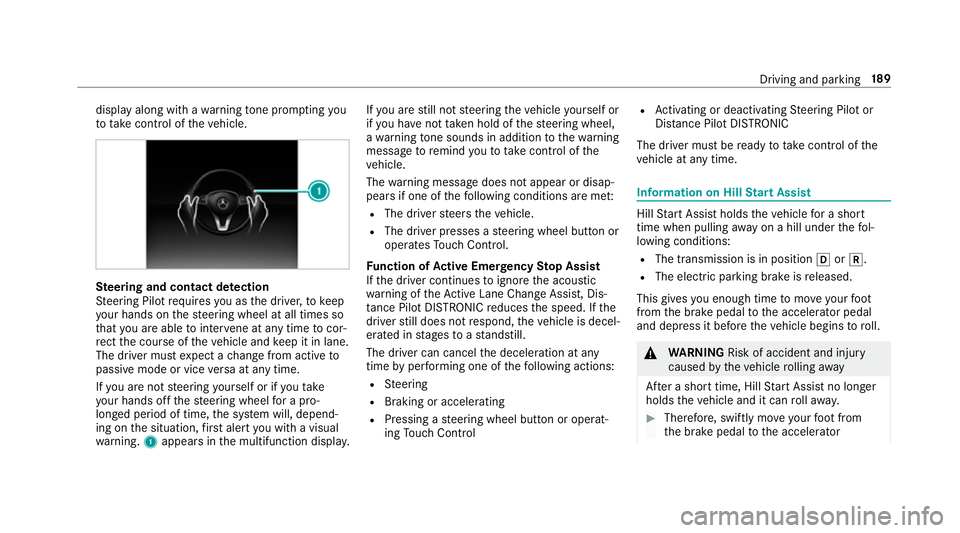
ing on the situation, firs t alert you with a visual
wa rning. 1appears in the multifunction displa y.If
yo u are still not steering theve hicle yourself or
if yo u ha venot take n hold of thesteering wheel,
a wa rning tone sounds in addition tothewa rning
message toremind youto take control of the
ve hicle.
The warning message does not appear or disap‐
pears if one of thefo llowing conditions are me t:
R The driver steers theve hicle.
R The driver presses a steering wheel button or
operates Touch Control.
Fu nction of Active Eme rgency Stop Assist
If th e driver continues toigno rethe acoustic
wa rning of theAc tive Lane Change Assi st, Dis‐
ta nce Pilot DISTRONIC reduces the speed. If the
driver still does not respond, theve hicle is decel‐
erated in stages toast andstill.
The driver can cancel the deceleration at any
time byper form ing one of thefo llowing actions:
R Steering
R Braking or accelerating
R Pressing a steering wheel button or operat‐
ing Touch Control R
Activating or deacti vating Steering Pilot or
Dis tance Pilot DISTRONIC
The driver mu stbe ready totake control of the
ve hicle at any time. Information on Hill
Start Assist Hill
Start Assist holds theve hicle for a short
time when pulling away on a hill under thefo l‐
lowing conditions:
R The transmission is in position hork.
R The elect ric pa rking brake is released.
This gives you enough time tomo veyour foot
from the brake pedal tothe accelerator pedal
and depress it before theve hicle begins toroll. &
WARNING Risk of accident and inju ry
caused bytheve hicle rolling away
Af ter a short time, Hill Start Assist no lon ger
holds theve hicle and it can rollaw ay. #
Therefore, swiftly mo veyour foot from
th e brake pedal tothe accelerator Driving and parking
18 9
Page 193 of 521
pedal. Ne
ver attem pttolea vetheve hi‐
cle if it is being held byHill Start Assist. HOLD function
HOLD function
The HOLD function holds theve hicle at a stand‐
st ill without requ iring youto depress the brake
pedal, such as when pulling away on steep
slopes.
Sy stem limits
The incline must not be greaterth an 30%.
Ac tivating/deactivating the HOLD function &
WARNING Risk of an accident due tothe
HOLD function being activated when you
lea vetheve hicle
If yo u lea vetheve hicle while only the HOLD
function is braking theve hicle, theve hicle
can rollaw ay inthefo llowing situations:
R Ifth ere is a malfunction in the sy stem or
in the po wer supp ly. R
Ifth e HOLD function is deactivated by
depressing the accelera tor pedal or the
brake pedal, e.g. byave hicle occupant.
R Ifth e electrics in the engine compart‐
ment, the battery or the fuses are tam‐
pered with or if the battery is disconnec‐
te d. #
Alw ays deactivate the HOLD function
and secure theve hicle against rolling
aw ay before leaving theve hicle. *
NO
TEDama gefrom auto matic braking If
Ac tive Brake Assi st, Dis tance Pilot
DISTRONIC or the HOLD function is activa‐
te d, theve hicle brakes automatically in cer‐
ta in situations.
To avo id damage totheve hicle, deactivate
th ese sy stems in thefo llowing or similar sit‐
uations: #
During towing #
In a car wash Re
quirements:
R The vehicle is stationar y.
R The driver's door is closed or the seat belt on
th e driver's side is fastened.
R The engine is running or has been au tomati‐
cally switched off bythe ECO start/ stop
function.
R The electric parking brake is released.
R Distance Pilot DISTRONIC is not acti vated.
R The transmission is in position h,kori.
Ac tivating the HOLD function #
Dep ress the brake pedal and af ter a short
time depress fur ther until theë display
appears in the multifunction displa y. #
Release the brake pedal.
Deactivating the HOLD function #
Depress the accelerator pedal topull away.
or #
Depress the brake pedal until theë dis‐
play disappears from the multifunction dis‐
pla y. 19 0
Driving and pa rking
Page 210 of 521
#
Start theve hicle. #
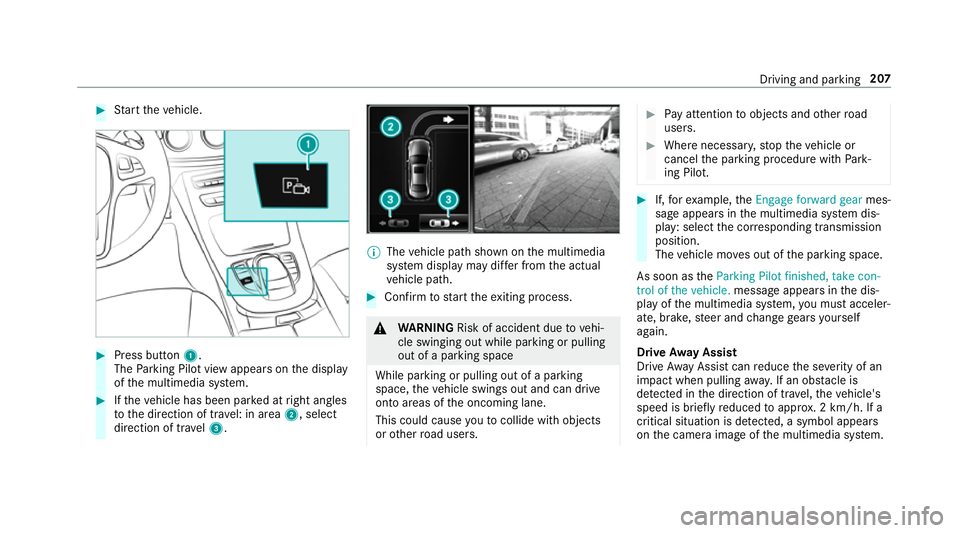
Press button 1.
The Parking Pilot view appears on the display
of the multimedia sy stem. #
Ifth eve hicle has been par ked at right angles
to the direction of tra vel: in area 2, select
direction of tra vel3. %
The vehicle path shown on the multimedia
sy stem display may dif fer from the actual
ve hicle path. #
Confirm tostart theex iting process. &
WARNING Risk of accident due tovehi‐
cle swinging out while parking or pulling
out of a parking space
While parking or pulling out of a parking
space, theve hicle swings out and can drive
onto areas of the oncoming lane.
This could cause youto collide wi thobjects
or other road users. #
Pay attention toobjects and other road
users. #
Where necessar y,stop theve hicle or
cancel the parking procedure with Park‐
ing Pilot. #
If,forex ample, theEngage forward gear mes‐
sage appears in the multimedia sy stem dis‐
play: select the cor responding transmission
position.
The vehicle mo ves out of the parking space.
As soon as theParking Pilot finished, take con-
trol of the vehicle. message appears in the dis‐
play of the multimedia sy stem, you must acceler‐
ate, brake, steer and change gears yourself
again.
Drive Away Assist
Drive AwayAssi stcan reduce the se verity of an
impact when pulling away. If an obs tacle is
de tected in the direction of tr avel, theve hicle's
speed is brief lyreduced toappr ox. 2 km/h. If a
critical situation is de tected, a symbol appea rs
on the camera image of the multimedia sy stem. Driving and parking
207
Page 231 of 521
#
Toscroll in the menu bar: swipetothe left
or right on the left-hand Touch Control. #
Tocall up the menu or confirm the selec‐
tion: press the left-hand Touch Control. #
Toscroll through displa ysor lists in the
menu: swipe upwards or down wards on the
left-hand Touch Control. #
Tocall up the submenu or confirm the
selection: pressthe left-hand Touch Control. #
Toexitth e submenu: pressthe back button
on the left.
If yo u are br owsing a submenu and you press
and hold the back button on the left, the menu
bar appears. Displa
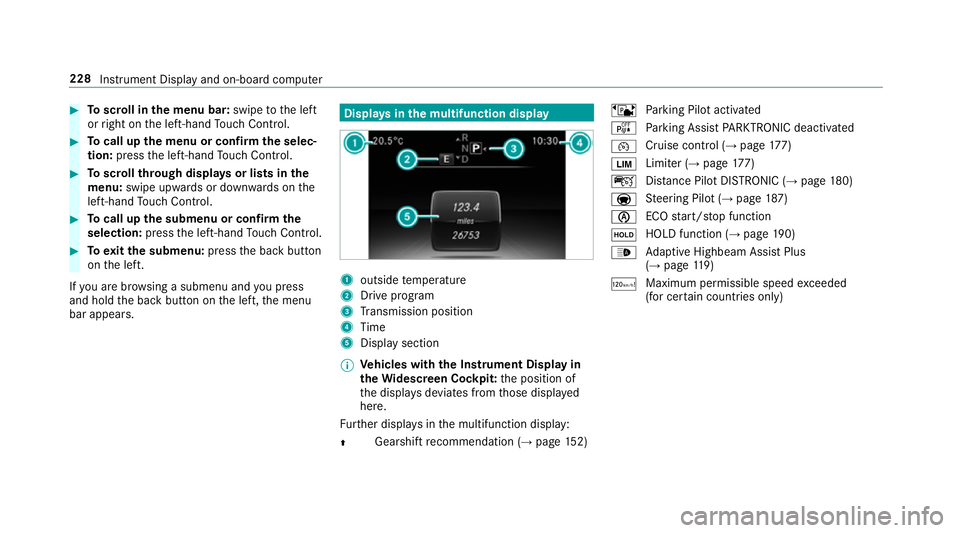
ysinthe multifunction display 1
outside temp erature
2 Drive prog ram
3 Transmission position
4 Time
5 Display section
% Ve
hicles with the Instrument Display in
th eWi descreen Co ckpit: the position of
th e displa ysdeviates from those displa yed
here.
Fu rther displa ysinthe multifunction display:
Z Gearshift
recommendation (→ page 152) ë
Parking Pilot activated
é Parking Assist PARKTRONIC deacti vated
¯ Cruise cont
rol (→ page 177)
È Limi
ter (→ page 177)
ç Distance Pilot DISTRONIC (→ page 180)
a St
eering Pilot (→ page187)
è ECO
start/ stop function
ë HOLD function (→
page190)
_ Ad
aptive Highbeam Assist Plus
(→ page 119)
ð Ma
ximum pe rmissible speed exceeded
(for cer tain countries only) 228
Instrument Display and on-board computer
Page 242 of 521
Operating saf
ety &
WARNING Risk of di stra ction from infor‐
mation sy stems and communications
equipment
If yo u operate information and communica‐
tion equipment integ rated in theve hicle
when driving, you will be distracted from the
traf fic situation. This could also cause youto
lose control of theve hicle. #
Only operate this equipment when the
traf fic situation permits. #
Ifyo u cannot be sure of this, stop the
ve hicle whilst paying attention toroad
and traf fic conditions and ope rate the
equipment with theve hicle stationar y. &
WARNING Risk of di stra ction from oper‐
ating mobile communication equipment
while theve hicle is in motion
If yo u operate communication equipment
integrated in theve hicle when driving, you
will be distracted from the tra ffic situation. This could also cause
youto lose control of
th eve hicle.
Only operate this equipment when theve hi‐
cle is stationar y. Fo
ryo ur ow n sa fety, al ways obser vethefo llow‐
ing points when operating mobile communica‐
tions equipment and especially your voice con‐
trol sy stem:
R Obser vethe legal requ irements forth e coun‐
try in which you are driving.
R While driving, on ly operate mobile communi‐
cations equipment and your voice control
sy stem when the tra ffic conditions permit it.
Yo u may otherwise be distracted from the
traf fic conditions and cause an accident,
inju ring yourself and others.
R Do not use thevo ice control sy stem in an
emer gency as your voice can change and
yo ur telephone call can be unnecessarily
dela yed.
R Familiarise yourself with thevo ice control
sy stem functions before starting the journe y. Operation
Operating
the multifunction steering wheel LINGU
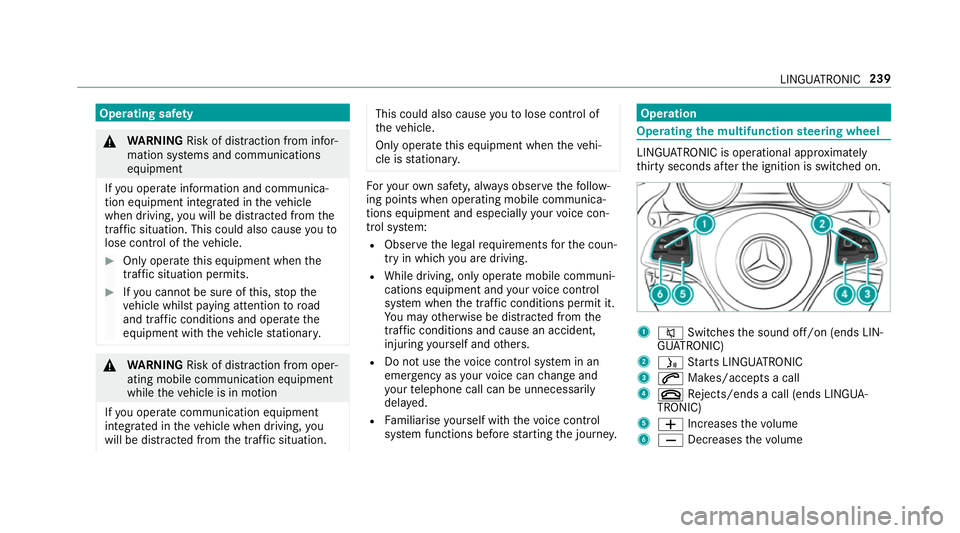
ATRO NIC is operational appr oximately
th irty seconds af terth e ignition is switched on. 1
8 Switches the sound off/on (ends LIN‐
GU ATRO NIC)
2 ó Starts LINGU ATRO NIC
3 6 Makes/accepts a call
4 ~ Rejects/ends a call (ends LINGUA‐
TRONIC)
5 W Increases thevo lume
6 X Decreases thevo lume LINGU
ATRO NIC 239
Page 428 of 521
Display messages
Possible causes/consequences and M
MSolutions
Active Lane Keeping Assist
Camera view restricted
See Owner's Manual *
Ve hicles without Steering Pilo t:the camera view is restricted.
Po ssible causes:
R dirt on the windscreen in the camera's field of vision
R heavy rain, snow or fog
Driving sy stems and driving saf ety sy stems may be malfunctioning or temp orarily una vailable.
Once the cause of the problem is no longer present, driving sy stems and driving saf ety sy stems are available again.
If th e display message does not disappear: #
Pull over and stop theve hicle safely as soon as possible, paying attention toroad and traf fic conditions. #
Clean the windscreen.
Blind Spot Assist currently
unavailable See Owner's
Manual *B
lind Spot Assist is temp orarily una vailable.
The sy stem borders ha vebeen reached (→ page213). #
Drive on.
Once the cause of the problem is no longer present, the sy stem will be available again.
or #
Ifth e display message does not disappear, stop theve hicle while paying attention toroad and traf fic conditions
and restart the engine. #
If necessar y,clean there ar bumper. If the bumper is extreme lydirty, the sensors in the bumper may be mal‐
functioning. Display messages and
warning/indicator lamps 425
Page 429 of 521
Display messages
Possible causes/consequences and M
MSolutions
Active Blind Spot Assist
currently unavailable See
Owner's Manual *A
ctive Blind Spot Assi stistemp orarily una vailable.
The sy stem borders ha vebeen reached (→ page213). #
Drive on.
Once the cause of the problem is no longer present, the sy stem will be available again. #
Ifth e display message does not disappear, stop theve hicle while paying attention toroad and traf fic conditions
and restart the engine.
Blind Spot Assist not availa-
ble when towing a trailer
See Owner's Manual *W
hen you es tablish the electrical connection tothe trailer, Blind Spot Assist is una vailable. #
Press the left-hand side of Touch Control and confirm the display message.
Active Blind Spot Assist
not available when towing
a trailer See Owner's Man-
ual *W
hen you es tablish the electrical connection tothe trailer, Active Blind Spot Assi stis una vailable. #
Press the left-hand side of Touch Control and confirm the display message.
Blind Spot Assist inopera-
tive *B
lind Spot Assist is malfunctioning. #
Consult a qualified specialist workshop.
Active Blind Spot Assist
inoperative *A
ctive Blind Spot Assi stis malfunctioning. #
Consult a qualified specialist workshop. 426
Display messages and warning/indicator lamps
Page 430 of 521
Display messages
Possible causes/consequences and M
MSolutions
Example:Parking Pilot Park-
ing cancelled *T
he parking assis tance sy stems of Parking Pilot wereinter rupte d.You ha veopened the driver's door or touched the
st eering wheel, forex ample. #
Steer and brake manuall y.
Parking Pilot and
PARKTRONIC inoperative
See Owner's Manual *P
arking Pilot and Parking Assist PARKTRONIC are malfunctioning. #
Stop theve hicle, paying attention toroad and traf fic conditions, and restart the engine. #
Ifth e display message continues tobe displa yed, consult a qualified specialist workshop.
Parking Pilot Manoeuvring
assistance limited See
Owner's Manual *P
arking Pilot and Parking Assist PARKTRONIC are temp orarily una vailable. The ambient conditions are outside the
sy stem borders (→ page 204). Bewareofthe entire vehicle sur roundings. #
As soon as the ambient conditions are within the sy stem borders, the sy stem will become available again.
Traffic Sign Assist currently
unavailable See Owner's
Manual *T
raffic Sign Assist is temp orarily una vailable. #
Drive on.
Once the cause of the problem is no longer present, the sy stem will be available again. Display messages and
warning/indicator lamps 427
Page 436 of 521
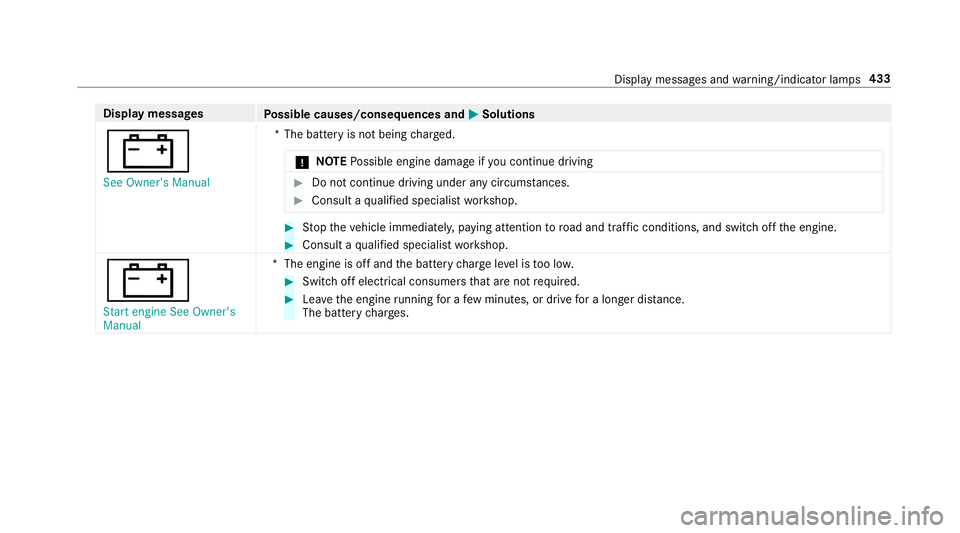
Display messages
Possible causes/consequences and M
MSolutions
# See Owner's Manual *T
he battery is not being charge d.
* NO
TEPossible engine damage if you continue driving #
Do not continue driving under any circum stances. #
Consult a qualified specialist workshop. #
Stop theve hicle immediately, paying attention toroad and traf fic conditions, and switch off the engine. #
Consult a qualified specialist workshop.
# Start engine See Owner's
Manual *T
he engine is off and the battery charge leve l is too lo w. #
Switch off electrical consumers that are not required. #
Lea vethe engine running for a few minutes, or drive for a longer dis tance.
The battery charge s. Display messages and
warning/indicator lamps 433
Page 437 of 521
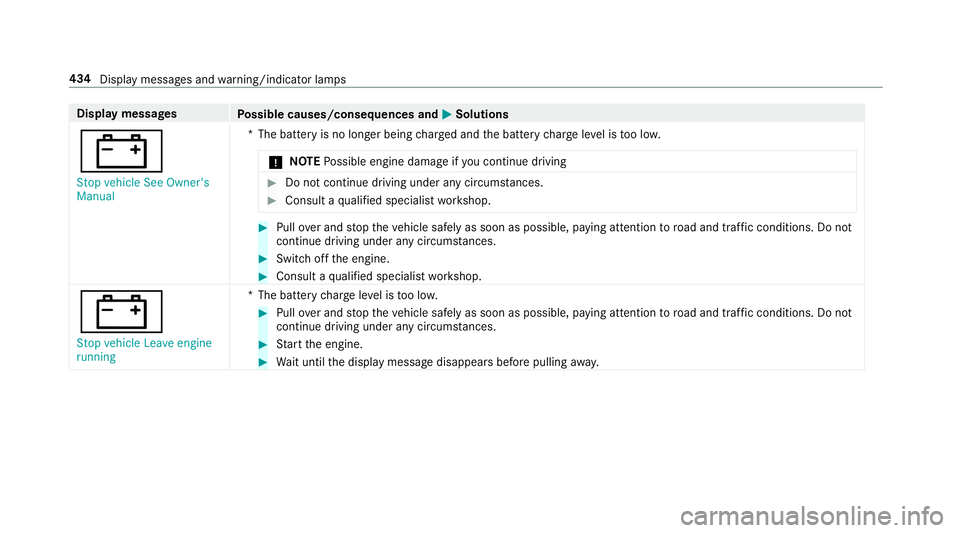
Display messages
Possible causes/consequences and M
MSolutions
# Stop vehicle See Owner's
Manual *T
he battery is no longer being charge d and the battery charge leve l is too lo w.
* NO
TEPossible engine damage if you continue driving #
Do not continue driving under any circum stances. #
Consult a qualified specialist workshop. #
Pull over and stop theve hicle safely as soon as possible, paying attention toroad and traf fic conditions. Do not
continue driving under any circums tances. #
Switch off the engine. #
Consult a qualified specialist workshop.
# Stop vehicle Leave engine
running *T
he battery charge leve l is too lo w. #
Pull over and stop theve hicle safely as soon as possible, paying attention toroad and traf fic conditions. Do not
continue driving under any circums tances. #
Start the engine. #
Wait until the display message disappears before pulling away. 434
Display messages and warning/indicator lamps