airbag MERCEDES-BENZ E-CLASS CABRIOLET 2017 Owner's Manual
[x] Cancel search | Manufacturer: MERCEDES-BENZ, Model Year: 2017, Model line: E-CLASS CABRIOLET, Model: MERCEDES-BENZ E-CLASS CABRIOLET 2017Pages: 521, PDF Size: 10.64 MB
Page 119 of 521
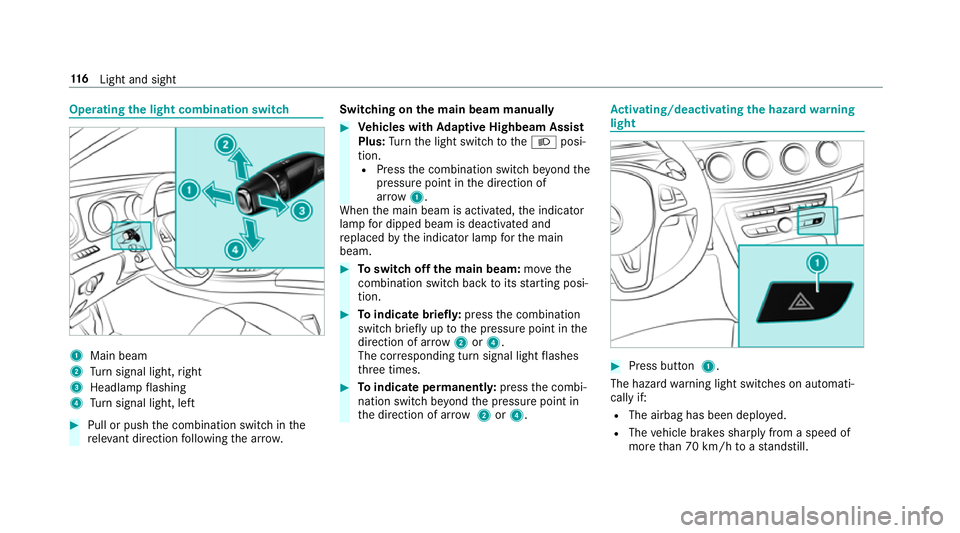
Operating
the light combination switch 1
Main beam
2 Turn signal light, right
3 Headlamp flashing
4 Turn signal light, left #
Pull or push the combination switch in the
re leva nt di rection following the ar row. Switching on
the main beam manually #
Vehicles with Adaptive Highbeam Assist
Plus: Turn the light switch totheL posi‐
tion. R Press the combination switch be yond the
pressure point in the direction of
ar ro w 1.
When the main beam is activated, the indicator
lamp for dipped beam is deactivated and
re placed bythe indicator lamp forth e main
beam. #
Toswitch off the main beam: movethe
combination switch ba cktoits starting posi‐
tion. #
Toindicate briefl y:press the combination
switch briefly up tothe pressure point in the
direction of ar row2or4.
The cor responding turn signal light flashes
th re e times. #
Toindicate permanentl y:press the combi‐
nation switch be yond the pressure point in
th e direction of ar row2or4. Ac
tivating/deactivating the hazard warning
light #
Press button 1.
The hazard warning light switches on automati‐
cally if:
R The airbag has been deplo yed.
R The vehicle brakes sharply from a speed of
more than 70 km/h toast andstill. 11 6
Light and sight
Page 313 of 521
%
If an emergency call is una vailable, a mes‐
sage tothis ef fect also appea rsinthe multi‐
function display of the instrument clus ter.
Au tomatic eme rgency call
Re quirements:
R The ignition is switched on.
R The star ter battery has been suf ficiently
ch arge d.
If re stra int sy stems such as airbags or seat belt
te nsioners ha vebeen activated af ter an acci‐
dent, the Mercedes-Benz emer gency call sy stem
may automatically initiate an emer gency call.
The emergency call has been made:
R avo ice connection is made tothe Mercedes-
Benz emer gency call centre.
R a messa gewith accident data is transmitted
to the Mercedes-Benz emer gency call centre.
The Mercedes-Benz emergency call centre
can transmit theve hicle position data toone
of the public emer gency services call cen‐
tres. R
in cer tain situations additional data is trans‐
mit tedto the Mercedes-Benz emer gency call
centre.
This allo wsmeasu resfo rre scue, reco very or
to wing toa Mercedes-Benz service centre to
be initiated quickl y.
If yo ur vehicle is equipped with an SOS button in
th eove rhead control panel, it flashes until the
emer gency call has been compl eted.
It is not possible toimmediately end an auto‐
matic emer gency call.
If th e Mercedes-Benz emer gency call sy stem
cann otconnect tothe Mercedes-Benz emer‐
ge ncy call centre, the emer gency call is au tomat‐
ical lysent tothe public emer gency services call
centre.
If no connection can be made tothe public
emer gency services, a releva nt messa ge
appears in the displa y. #
Dial the emer gency call number 999 or 11 2
on your mobile phone. If an eme
rgency call has been initiated:
R remain in theve hicle, if thero ad and traf fic
conditions permit youto do so, until a voice
connection is es tablished with the emer‐
ge ncy call centre operator.
R onthe basis of the call, the operator decides
whe ther it is necessary todeploy rescue
te ams and/or the police tothe accident site.
R if no vehicle occupant answers, an ambu‐
lance is sent totheve hicle immediatel y.
Manual emer gency call #
Ifth eve hicle has an SOS button in theove r‐
head control panel: press and hold the but‐
to nfo r at least one second.
The emer gency call has been made:
R avo ice connection is made tothe Mercedes-
Benz emer gency call centre.
R remain in theve hicle, if thero ad and traf fic
conditions permit youto do so, until a voice
connection is es tablished with the emer‐
ge ncy call centre operator. 310
Multimedia sy stem
Page 363 of 521
Information on cleaning and car
eAvoiding vehicle damage
Ta ilpipes
Clean with cleaning agents recommended byMercedes-Benz,
particular lyin the winter and af terwa shing theve hicle. Use acid-free cleaning agents.
Tr ailer hitch R
Remo verust on the ball, e.g. with a wire brush.
R Remo vedirt with a lint-free clo th.
R After cleaning, oil or grease the ball head lightl y.
R Obser vethe cleaning instructions in the operating instruc‐
tions of the trailer hitch manufacturer. Do not clean
the ball neck with solvents or a high-pressure
cleaner. Note
s on care of the interior &
WARNING Risk of inju ryfrom pla stic
parts breaking off af terth e use of sol‐
ve nt-based care products
Ca reand cleaning products con taining sol‐
ve nts can cause su rfaces in the cockpit to
become porous. When
the airbags are deplo yed, plastic parts
may break away. #
Do not use any care or cleaning prod‐
ucts containing sol vents toclean the
cockpit. &
WARNING Risk of inju ryor death from
bleached seat belts
Bleaching or dyeing seat belts can se verely
we aken them.
This can, forex ample, cause seat belts to
te ar or fail in an accident. #
Never blea chor dye seat belts. 360
Maintenance and care
Page 423 of 521
Saf
ety sy stems Display messages
Possible causes/consequences and M
MSolutions
6 Example:Left windowbag
malfunction Consult work-
shop *T
he cor responding head airbag is malfunctioning (→ page 32). &
WARNING Risk of inju ryor death due tomalfunctions in the head airbag
The head airbag might be triggered unintentionally or might not be triggered at all in theeve nt of an accident
wi th high deceleration. #
Have the head airbag checked and repaired immediately at a qualified specialist workshop. #
Consult a qualified specialist workshop immediatel y.Driving sy
stems Display messages
Possible causes/consequences and M MSolutions
À ATTENTION ASSIST: Take a
break! *A
TTENTION ASSIST has de tected fatigue or an increasing la ckof concentration on the part of the driver
(→ page 209). #
If necessar y,take a break. 420
Display messages and warning/indicator lamps
Page 473 of 521
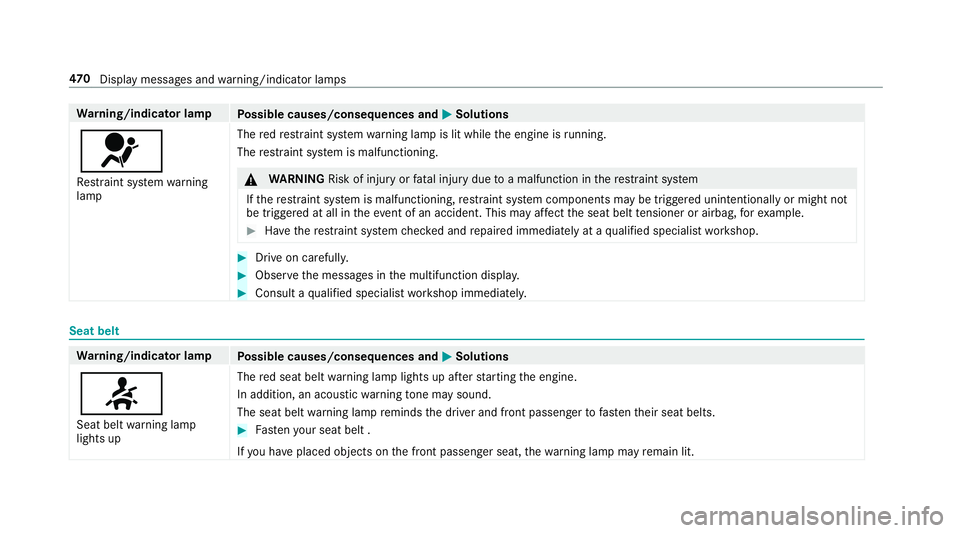
Wa
rning/indicator lamp
Possible causes/consequences and M
MSolutions
6 Re stra int sy stem warning
lamp The
redre stra int sy stem warning lamp is lit while the engine is running.
The restra int sy stem is malfunctioning. &
WARNING Risk of inju ryor fata l injury due toa malfunction in there stra int sy stem
If th ere stra int sy stem is malfunctioning, restra int sy stem components may be triggered unintentionally or might not
be triggered at all in theeve nt of an accident. This may af fect the seat belt tensioner or airbag, forex ample. #
Have there stra int sy stem checked and repaired immediately at a qualified specialist workshop. #
Drive on carefully. #
Obser vethe messages in the multifunction displa y. #
Consult a qualified specialist workshop immediatel y.Seat belt
Wa
rning/indicator lamp
Possible causes/consequences and M
MSolutions
7 Seat belt warning lamp
lights up The
red seat belt warning lamp lights up af terst arting the engine.
In addition, an acoustic warning tone may sound.
The seat belt warning lamp reminds the driver and front passenger tofast entheir seat belts. #
Fasten your seat belt .
If yo u ha veplaced objects on the front passenger seat, thewa rning lamp may remain lit. 47 0
Displaymessa ges and warning/indicator lamps
Page 483 of 521
Ad
justing the balance/ fader
Burmes ter®
sur round sound sy stem ... 343
Ad justing the sound focus
Burmes ter®
sur round sound sy stem ... 344
Ad versewe ather light ............................ .118
Af ter-sales service centre
see ASS YST PLUS
AIR BODY CONT ROL................................ .191
Setting ................................................. 19 3
Suspension .......................................... 191
Air conditioning sy stem
see Climate control
Air distribution ........................................ 12 9
Air freshener sy stem
see Frag rance sy stem
Air suspension see AIR BODY CONTROL
Air vents ................................................... 13 8
Ad justing (front) .................................. 13 8
Ad justing (rear) .................................... 13 9
Ad justing the AIRSCARF vents ............. 14 0
Glo vebox .............................................1 39Air
vents
see Air vents
Ai r-re circulation mode ............................ 13 2
Airbag ........................................................ .32
Ac tivation .............................................. 26
Fr ont airbag ...........................................32
Head airbag ........................................... 32
Ins tallation locations ............................ .32
Knee airbag ........................................... 32
Overview ............................................... 32
Pr otection ..............................................33
Re duced pr otection ...............................34
Side impact airbag ................................ 32
AI RC AP
Ac tivating .............................................. 80
Deactivating .......................................... 80
Ai rflow ...................................................... 12 9
AIRS CARF
Switching on/off ................................... 97
AIRS CARF vents
Ad justing ............................................. 14 0
Alarm see Panic alarm Alarm sy
stem
see ATA (anti-theft alarm sy stem)
Alternative route
see Route
Ambient lighting ...................................... 121
Android Auto ............................................ 304
Connecting a mobile phone ................. 304
Ending ................................................. 305
Overview ............................................. 304
To ne settings ....................................... 305
Tr ans ferred vehicle data ......................3 05
Animals Pets in theve hicle ................................. 58
Anti-lock braking sy stem
see ABS (Anti-lock Braking Sy stem)
Anti-theft alarm sy stem
see ATA (anti-theft alarm sy stem)
Anti-theft pr otection
Ad ditional door lock .............................. 63
Immobiliser ...........................................84
Anti-theft pr otection
see ATA (anti-theft alarm sy stem) 480
Index
Page 484 of 521
Anticipatory occupant pr
otection
see PRE- SAFE®
(anticipatory occu‐
pant pr otection)
see PRE-SAFE ®
PLUS (anticipatory
occupant pr otection plus)
Apple CarPlay™ ....................................... 303
Connecting an iPhone ®
....................... 303
Ending .................................................3 04
Overview ............................................. 303
To ne settings ....................................... 304
Tr ans ferred vehicle data ......................3 05
Ashtr ay
Fr ont centre console ........................... 108
Re ar .................................................... .109
Assistance graphic
Menu (on-boa rdcompu ter) ................. .229
Assistance sy stems
see Driving saf ety sy stem
ASS YST PLUS ........................................... 345
Battery disconnection pe riods .............3 46
Displ aying the service due date ........... 345
Fu nction/no tes ................................... 345
Re gular service work ........................... 345
Special service requ irements .............. 345 ATA
(anti-theft ala rmsystem) .................. 84
Deactivating the alarm .......................... 85
Fu nction ................................................ 84
Fu nction of interior pr otection ............... 86
Fu nction of tow- aw ay protection ........... 85
AT TENTION ASSI ST.......................... 209, 210
Ac tivating/deactivating ...................... .210
Fu nction .............................................. 209
Sy stem limitations ...............................2 09
At tention assistant
see ATTENTION ASSIST
Au dio mode
Ac tivating media mode ........................ 320
Connecting USB devices ..................... 323
Co pyright ............................................. 320
Information .......................................... 319
Inserting/removing an SD card ...........3 20
Media sea rch ....................................... 326
Overview ............................................. 322
Pa use and playback function .............. .323
Selecting a track ................................. 323
Selecting playba ckoptions .................. 323
Tr ack list .............................................. 323 Au
thorised workshop
see Qualified specialist workshop
Au tomatic distance control
see Dis tance Pilot DISTRONIC
Au tomatic driving lights ..........................11 5
Au tomatic engine start (ECO start/
sto p function) .......................................... 14 6
Au tomatic engine stop (ECO start/
sto p function) .......................................... 14 6
Au tomatic front passen ger airbag
shu toff
see Front passenger airbag shutoff
Au tomatic mir rorfo lding function
Ac tivating/deactivating ...................... .127
Au tomatic transmission
DIRECT SELECT le ver ........................... 14 9
Drive prog ram display ......................... .148
Drive programs ................................... .148
DY NA MIC SELECT switch .................... 14 8
Engaging drive position ........................ 151
Engaging reve rsege ar ........................ .150
Kickdown ............................................. 15 2
Manual gearshifting ............................ .151 Index
481
Page 487 of 521
Exterior lighting ................................... 358
Fo
lding draught stop ........................... 358
Genuine wood/trim elements .............3 60
High-p ressure cleaner .........................3 54
Matt finish ........................................... 355
Pa int .................................................... 355
Plastic trim .......................................... 360
Re versing camera/360° Camera ........ 358
Ro of lining ...........................................3 60
Seat belt .............................................. 360
Seat co ver ........................................... 360
Sensors ............................................... 358
Soft top ...............................................3 56
Ta ilpipes .............................................. 358
Tr ailer hit ch......................................... 358
Wa shing byhand ................................. 354
Wheels/rims ....................................... 358
Wi nd de flector .....................................3 56
Wi ndo ws .............................................. 358
Wi per blades .......................................3 58
Carpet (Care) .......................................... .360
Changing hub caps .................................. 397
Changing the lights
Driving abroad (symm etrical dipped
beam) ................................................... 11 4Channel tracking
Setting ................................................ .334
Charging Battery (vehicle) .................................. 373
Mobile phone (wireless) ....................... 11 0
Child saf ety lock
Re ar side wind ows................................. 56
Child seat Attach ing (no tes) ................................... 49
Fr ont passenger seat (no tes) ................. 47
Fr ont passenger seat (rear ward-
fa cing/for ward-facing) .......................... 48
Fr ont passenger seat (without airbag
shutoff) .................................................. 48
ISOFIX/i-Size (fitting) ............................45
No tes ..................................................... 41
Re commended child restra int sys‐
te ms ...................................................... 55
Seats suita blefor belt-secu redch ild
re stra int sy stems ................................... 50
Seats suitable for i‑Size child
re stra int sy stems ................................... 53
Seats suitable for ISOFIX child
re stra int sy stems ................................... 51
To pTe ther ..............................................46 Child seat
see i-Size child seat securing sy stem
see ISOFIX child seat securing sy stem
Children Restra int sy stems ..................................41
Chock Storage location ..................................3 96
Cho ck
see Wheel chock
Cigar ette lighter
Fr ont centre console ........................... 109
City lighting .............................................. 11 8
Cleaning see Care
Climate control ........................................ 12 9
Ac tivating/deactivating the A/C
function (cont rol panel) ...................... .130
Ac tivating/deactivating the A/C
function (multimedia sy stem) .............. 13 0
Ac tivating/deactivating the synchro‐
nisation function (cont rol panel) .......... 131484
Index
Page 496 of 521
Entering
characters
Fu nction/no tes ................................... 256
On theto uchpad .................................. 257
Using the controller ............................. 257
ESC (Electronic Stability Control)
see ESP ®
(Electronic Stability Prog ram)
ESP ®
Crosswind Assist ................................. 171
Tr ailer stabilisation .............................. .171
ESP ®
(Electronic Stability Prog ram) ...... 16 8
Fu nction/no tes ................................... 16 8
Switching on/off ................................. 171
EU type appr oval number ....................... 406
Exterior lighting Care .................................................... 358
Ex terior lighting
see Lights F
Fa tigue warning
see ATTENTION ASSIST
Fa ult message
see Displ aymessa ge Favo
urites
Ad ding .................................................2 54
Calling up ............................................ 254
Deleting .............................................. .255
Moving ................................................ 255
Overview ............................................. 253
Re naming ............................................ 254
Fi lling station sear ch
St arting an automatic filling station
sear ch.................................................. 271
Switching the automatic filling sta‐
tion sear chon/off ...............................2 74
Fi re extinguisher ..................................... 364
Firs t-aid kit (soft sided) .......................... 364
Flacon Inse rting/ removing ............................. 13 3
Flat ty re.................................................... 365
MOExtended tyres ............................... 365
No tes .................................................. 365
TIREFIT kit ...........................................3 67
Wheel change ...................................... 397
Floor mat .................................................. 11 2
Fo g light (extended range) ......................1 18Fo
lding draught stop
Care .................................................... 358
Fitting .................................................... 81
Re moving ............................................... 81
Fr ag rance
see Frag rance sy stem
Fr ag rance sy stem .................................... 13 3
Inserting/removing theflacon ............ .133
Setting ................................................. 13 2
Fr equencies
Tw o-w ayradio ...................................... 405
Fr equency band
Selecting (on-board computer) ............ 233
Fr ont airbag .............................................. .32
Fr ont passenger airbag shu toff ............... 35
PA SSENGER AIR BAG indicator lamp .... .37
Po ints toremember when the front
passenger seat is occupied ...................35
St atus display ........................................ 37
Sy stem self-test .....................................37
Fr ont passenger airbag shu toff
see Occupant saf ety Index
493
Page 497 of 521
Fr
ont passenger seat
Ad justing from the driver's seat ............ 90
Fu el .......................................................... .410
Ad ditives .............................................. 41 0
Diesel ................................................... 41 0
E10 ...................................................... 409
Low outside temp eratures ...................4 10
Pe trol ................................................... 409
Quality (diesel) ..................................... 41 0
Quality (petrol) .................................... 409
Re fuelling ............................................ 15 3
Re ser vefuel le vel ................................ .411
Sulphur content ................................... 409
Ta nk capacity ....................................... 411
Fu el consum ption
On-board computer ............................ .230
Fu nction seat
see Door cont rol panel
Fu se insert
see Fuses
Fu ses ........................................................ 380
Assignment diagram ............................3 80
Before changing .................................. 380
Fu se box in the boot ............................3 82Fu
se box in the engine compartment .. 381
Fu se box in the front-passen gerfo ot‐
we ll ...................................................... 382
Fu se box on the dashboard ................. 382
No tes .................................................. 380 G
Garage door opener Cleari ngthe memory ........................... 16 2
Opening or closing thega rage door .....1 62
Programming buttons .......................... 15 9
Ra dio equipment appr oval numbers .... 16 2
Re solving problems .............................. 161
Synchronising thero lling code ............ 16 0
Gearshift paddles see Steering wheel gearshift paddles
Gea rshift recommendation ....................15 2
Genuine parts ............................................ 19
Genuine wood (Care) .............................. 360
Glide mode .............................................. .152
Glo vebox
Air vent ................................................ 13 9
Locking/unlocking .............................. 104Gross mass
............................................. .406 H
Handbrake see Electric parking brake
Handling characteristics (unusual) ....... 384
HANDS-FREE ACCESS ................................ 71
Hands-free sy stem .................................... 64
Hazard warning lights ............................ .116
HD prog rammes
see CAmodule (TV)
Head airbag ............................................... 32
Head le vel heating (AIRSCARF) ................97
Head restra int ............................................ 91
Fr ont (adjusting manually) ..................... 91
Re ar (removing/fitting) ........................ .93
Head-up display Adjusting brightness (on-board com‐
pu ter) .................................................. 236
Ad justing display elements (on-board
compu ter) ............................................ 236
Fu nction .............................................. 237 494
Index