display MERCEDES-BENZ E-CLASS CABRIOLET 2017 Owner's Manual
[x] Cancel search | Manufacturer: MERCEDES-BENZ, Model Year: 2017, Model line: E-CLASS CABRIOLET, Model: MERCEDES-BENZ E-CLASS CABRIOLET 2017Pages: 521, PDF Size: 10.64 MB
Page 134 of 521
#
Activate Oor deacti vate ª the function. Setting climate control
toautomatic mode In auto
matic mode, the set temp erature is con‐
trolled and maintained at a const ant levelby the
air suppl y. #
Press the à button. #
Toswitch tomanual mode: presstheH
or _ button. Climate
style Climate
style function
In automatic mode you can select thefo llowing
climate style settings forth e driver's and front
passenger areas:
R FOCUS: high air flow , slightly cooler setting
R MEDIUM: medium air flow ,st andard setting
R DIFFUSE: low airflow , slightly warmer and
draught-f ree setting Setting
the clima testyle
Requ irements:
R THERMOTRONIC automatic climate control is
fi tted.
R The à button has been pressed.
Multimedia sy stem:
, Vehicle .
b Climate control .
Cli-
mate mode #
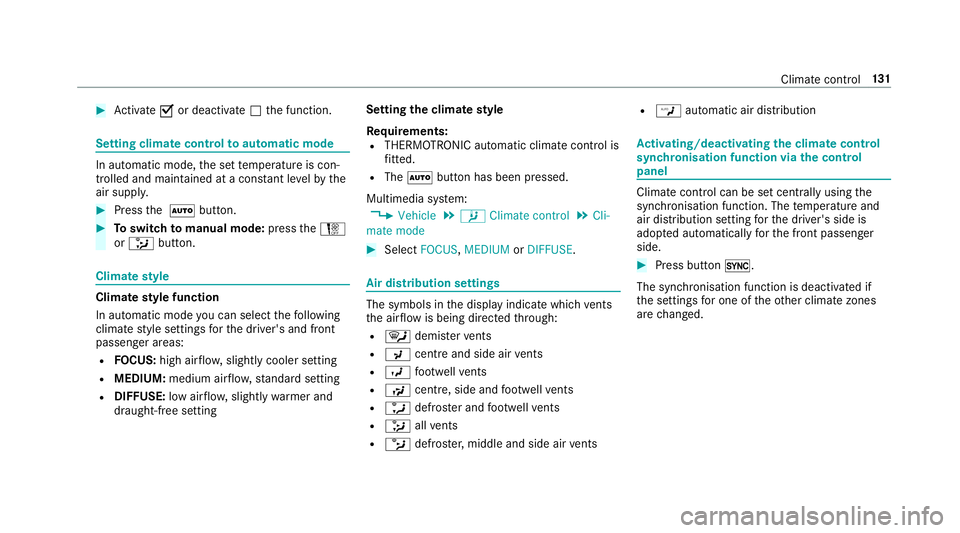
Select FOCUS, MEDIUM orDIFFUSE . Air distribution settings
The symbols in
the display indicate which vents
th e air flow is being directed thro ugh:
R ¯ demis terve nts
R P centre and side air vents
R O foot we llve nts
R S centre, side and foot we llve nts
R a defros ter and foot we llve nts
R _ allvents
R b defros ter,middle and side air vents R
W automatic air distribution Ac
tivating/deactivating the climate control
syn chro nisation function via the control
panel Climate control can be set centrally using
the
synchronisation function. The temp erature and
air distribution setting forth e driver's side is
adop ted automatically forth e front passenger
side. #
Press button 0.
The synchronisation function is deactivated if
th e settings for one of theot her climate zones
are changed. Climate control
131
Page 145 of 521
#
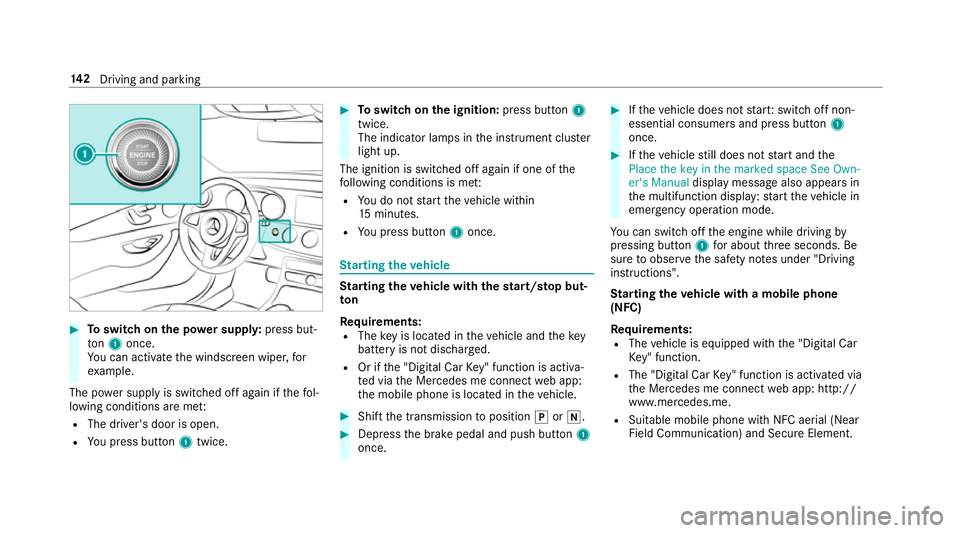
Toswitch on the po wer supp ly:press but‐
to n1 once.
Yo u can activate the windscreen wiper, for
ex ample.
The po wer supp lyis switched off again if thefo l‐
lowing conditions are me t:
R The driver's door is open.
R You press but ton1 twice. #
Toswitch on the ignition: press button 1
twice.
The indicator lamps in the instrument clus ter
light up.
The ignition is switched off again if one of the
fo llowing conditions is me t:
R You do not start theve hicle within
15 minutes.
R You press but ton1 once. St
arting theve hicle St
arting theve hicle with thest art/s top but‐
ton
Requ irements:
R The key is located in theve hicle and thekey
battery is not dischar ged.
R Or if the "Digital Car Key" function is activa‐
te d via the Mercedes me connect web app:
th e mobile phone is located in theve hicle. #
Shift the transmission toposition jori. #
Depress the brake pedal and push button 1
once. #
Ifth eve hicle does not star t:switch off non-
essential consumers and press button 1
once. #
Ifth eve hicle still does not start and the
Place the key in the marked space See Own-
er's Manual display message also appears in
th e multifunction display: start theve hicle in
emer gency operation mode.
Yo u can swit choff the engine while driving by
pressing button 1for about thre e seconds. Be
sure toobser vethe saf ety no tes under "Driving
instructions".
St arting theve hicle with a mobile phone
(NFC)
Re quirements:
R The vehicle is equipped with the "Digital Car
Ke y" function.
R The "Digital Car Key" function is activated via
th e Mercedes me connect web app: http://
www.mercedes.me.
R Suitable mobile phone with NFC aerial (Near
Field Communication) and Secure Element. 14 2
Driving and pa rking
Page 146 of 521
R
Suf ficient charge leve l of the mobile
phone. On some mobile phones, the function
is also available when the battery is dis‐
ch arge d.
% You can check the suitability of your mobile
phone byentering the phone number at
http://www.mercedes.me.
Information about suitable mobile phones
can be obtained from your Mercedes-Benz
service centre or at http://www.mercedes-
benz.com/connect.
% Mercedes-Benz recommends that you car ry
th e emer gency key in case of function
re strictions.
% The function is only available in combination
with Mercedes me connect and on lyin cer‐
ta in countries.
% Protective cases around the mobile phone
can impair the functionality. #
Make sure that thech arge leve l of the mobile
phone is suf ficient. If necessar y,ch arge the
mobile phone before starting the journe y. St
arting theve hicle for the firs t time af ter
activating the function #
Make sure that there is a valid vehicle key in
th eve hicle. #
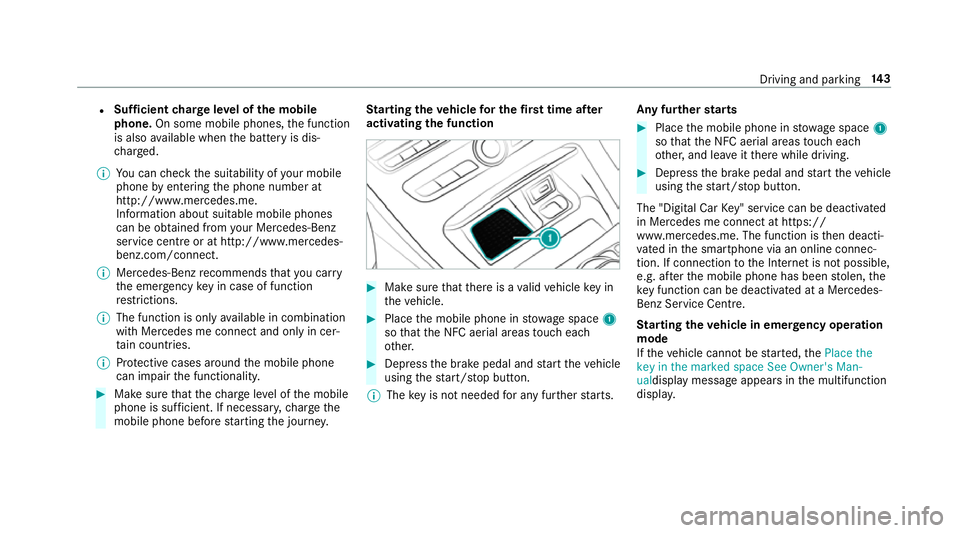
Place the mobile phone in stowage space 1
so that the NFC aerial areas touch each
ot her. #
Depress the brake pedal and start theve hicle
using thest art/ stop button.
% The key is not needed for any fur ther starts. Any fu
rther starts #
Place the mobile phone in stowage space 1
so that the NFC aerial areas touch each
ot her, and lea veitth ere while driving. #
Depress the brake pedal and start theve hicle
using thest art/ stop button.
The "Digital Car Key" service can be deacti vated
in Mercedes me connect at https://
www.me rcedes.me. The function is then deacti‐
va ted in the smartphone via an online connec‐
tion. If connection tothe Internet is not possible,
e.g. af terth e mobile phone has been stolen, the
ke y function can be deacti vated at a Mercedes-
Benz Service Centre.
St arting theve hicle in emer gency operation
mode
If th eve hicle cannot be star ted, thePlace the
key in the marked space See Owner's Man-
ualdisplay message appears in the multifunction
displa y. Driving and pa
rking 14 3
Page 150 of 521
The
è symbol appears in the multifunction
display when theve hicle is stationar y.If not all
th eve hicle conditions are met, theç symbol
appears in the multifunction displa y.
The engine is restar ted automatically if:
R Youre lease the brake pedal with the trans‐
mission in position hwhen the HOLD func‐
tion is not active.
R You shift from transmission position j.
R You en gage transmission position hork.
R You depress the accelerator pedal.
R Youch ange theve hicle le vel.
R You open or close the soft top.
R An automatic engine start is necessar y.
If th e engine was switched off bythe ECO start/
st op function and you lea vetheve hicle, a warn‐
ing tone sounds. The Vehicle is operational
Switch off the ignition before exiting display
messa gealso appears in the multifunction dis‐
pla y.Ifyo u do not swit choff the ignition, the
ignition is automatically switched off af ter one
minute. Switching
the ECO start/s top function
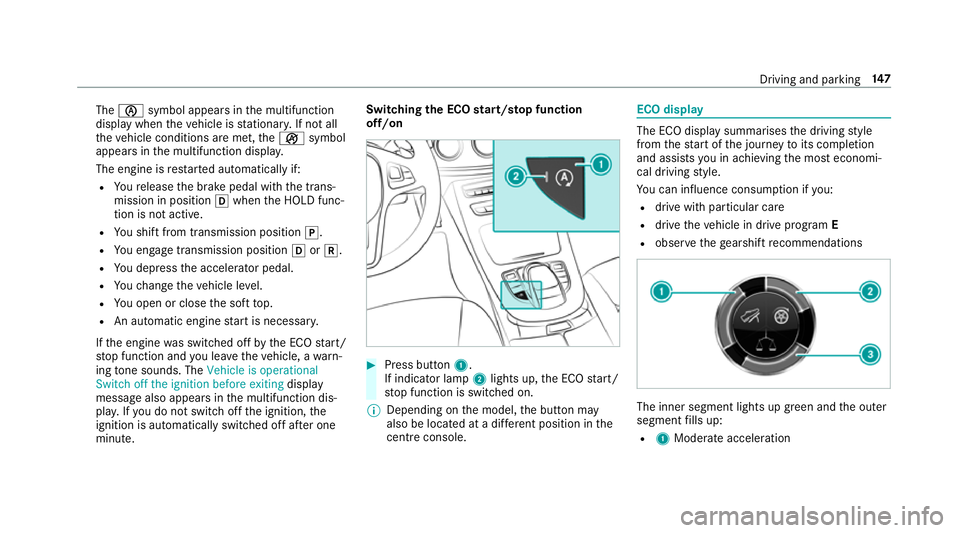
off/on #
Press button 1.
If indicator la mp2lights up, the ECO start/
st op function is switched on.
% Depending on the model, the button may
also be located at a dif fere nt position in the
centre console. ECO displ
ay The ECO display summarises
the driving style
from thest art of the journey toits completion
and assists you in achieving the most economi‐
cal driving style.
Yo u can influence consum ption if you:
R drive with particular care
R drive theve hicle in drive program E
R obser vethege arshift recommendations The inner segment lights up green and
the outer
segment fills up:
R 1 Moderate acceleration Driving and parking
147
Page 151 of 521
R
2 Gentle deceleration and rolling
R 3 Consis tent speed
The inner segment is gr eyand the outer seg‐
ment em pties:
R 1 Sporty acceleration
R 2 Heavy braking
R 3 Fluctuations in speed
Yo u ha vedriven economically when:
R theth re e outer segments are comple tely fil‐
led simultaneousl y.
R the ECO display border lights up.
The additional range achi eved as a result of your
driving style in comparison toa driver with a
ve ry sporty driving style is shown under Bonus
from start. The range displ ayed does not indicate
a fixe dre duction in consum ption. DY
NA MIC SELECT switch Fu
nction of theDY NA MIC SELECT switch Use
theDY NA MIC SELECT switch tochange
between thefo llowing drive programs:
R I (Individual): individual settings
R S+ (Sport Plus): particularlysporty driving
st yle
R S (Sport): sporty driving style
R C (Comfort): comfortable and economical
driving style
R E (Eco): particular lyeconomical driving style
Depending on the drive program selected, the
fo llowing vehicle characteristics will change:
R Drive sy stem
- Engine and transmission management
- ESP ®
- Distance Pilot DISTRONIC
R Vehicles with AIR BODY CONT ROL or
DY NA MIC BODY CONT ROL:Suspension
R Steering %
Time until the next vehicle star t:
R Less than four hours: the last selected
drive program is active.
R More than four hours: drive program Cis
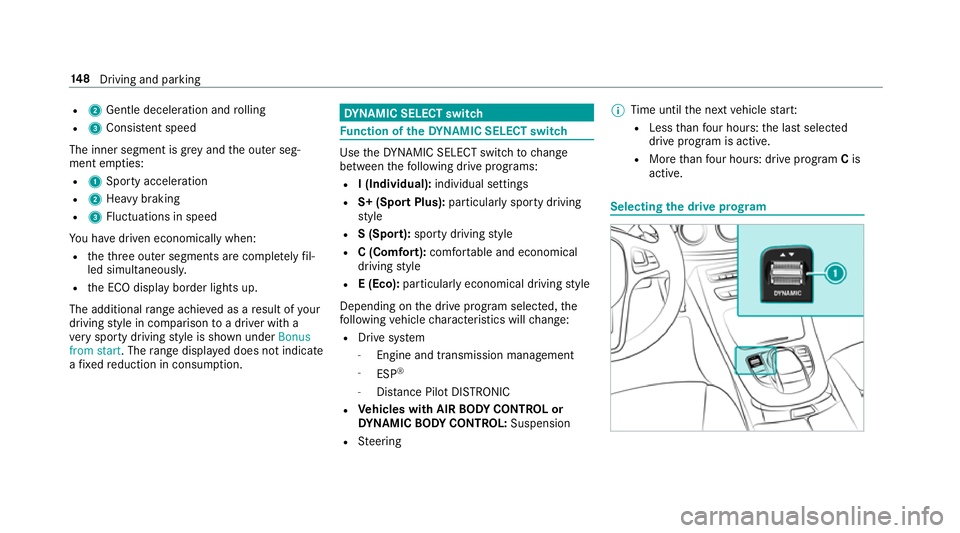
active. Selecting
the drive prog ram 14 8
Driving and pa rking
Page 152 of 521
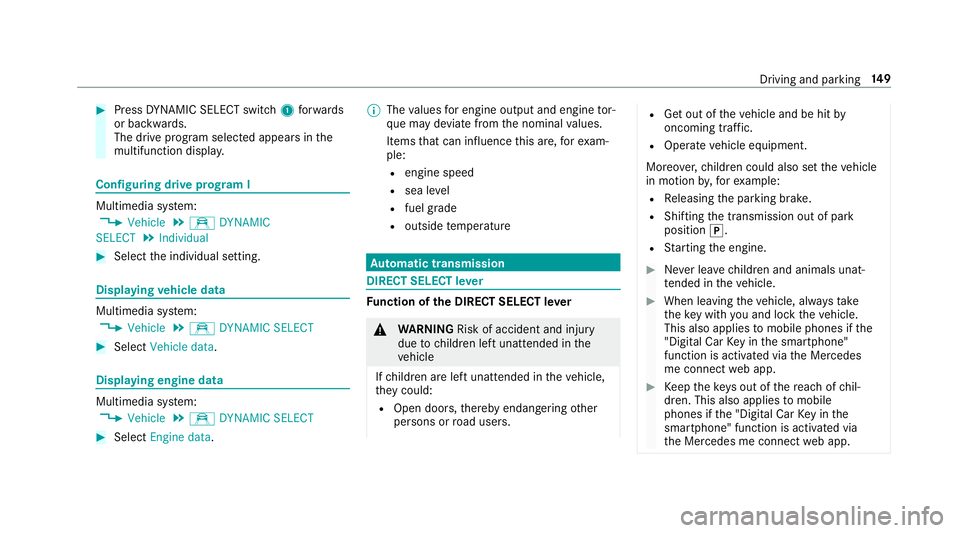
#
Press DYNA MIC SELECT switch 1forw ards
or backwards.
The drive prog ram selected appears in the
multifunction displa y.Configuring drive prog
ram I Multimedia sy
stem:
, Vehicle .
e DYNAMIC
SELECT .
Individual #
Select the individual setting. Displaying
vehicle data Multimedia sy
stem:
, Vehicle .
e DYNAMIC SELECT #
Select Vehicle data. Displaying engine data
Multimedia sy
stem:
, Vehicle .
e DYNAMIC SELECT #
Select Engine data. %
The values for engine output and engine tor‐
qu e may deviate from the nominal values.
Items that can influence this are, forex am‐
ple:
R engine speed
R sea le vel
R fuel grade
R outside temp erature Au
tomatic transmission DIRECT SELECT le
ver Fu
nction of the DIRECT SELECT le ver &
WARNING Risk of accident and inju ry
due tochildren left unat tended in the
ve hicle
If ch ildren are left unat tended in theve hicle,
th ey could:
R Open doo rs,th ereby endangering other
persons or road users. R
Get out of theve hicle and be hit by
oncoming traf fic.
R Ope rate ve hicle equipment.
Moreo ver,ch ildren could also set theve hicle
in motion by,fo rex ample:
R Releasing the parking brake.
R Shifting the transmission out of park
position j.
R Starting the engine. #
Never lea vechildren and animals unat‐
te nded in theve hicle. #
When leaving theve hicle, alw aysta ke
th eke y with you and lock theve hicle.
This also applies tomobile phones if the
"Digital Car Key in the smartphone"
function is activated via the Mercedes
me connect web app. #
Keep theke ys out of there ach of chil‐
dren. This also applies tomobile
phones if the "Digital Car Key in the
smartphone" function is activated via
th e Mercedes me connect web app. Driving and parking
14 9
Page 154 of 521
%
Ifyo uth en exitth eve hicle leaving theke y in
th eve hicle, the automatic transmission
re mains in neutral i
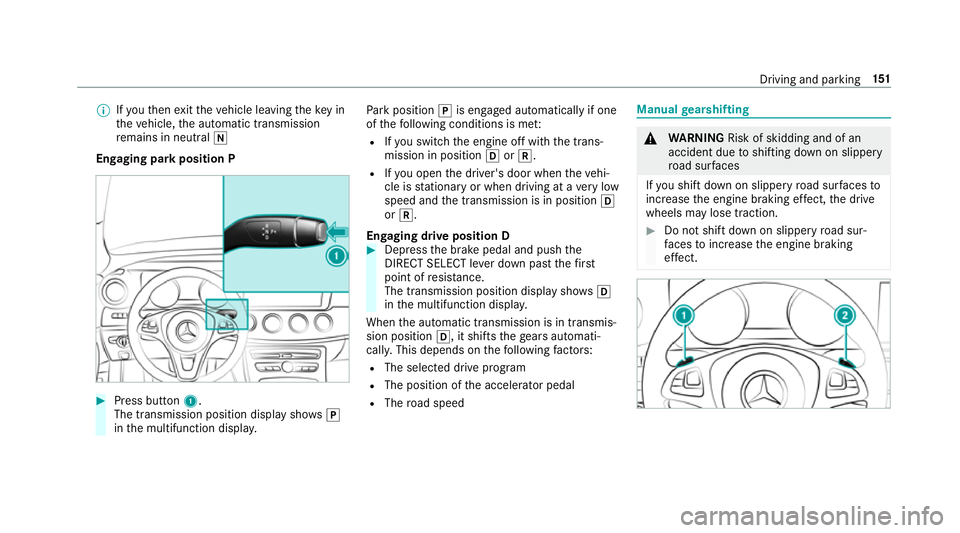
Engaging park position P #
Press button 1.
The transmission position display sho wsj
in the multifunction displa y. Pa
rk position jis engaged automatically if one
of thefo llowing conditions is me t:
R Ifyo u swit chthe engine off with the trans‐
mission in position hork.
R Ifyo u open the driver's door when theve hi‐
cle is stationary or when driving at a very low
speed and the transmission is in position h
or k.
Engaging drive position D #
Depress the brake pedal and push the
DIRECT SELECT le ver down past thefirst
point of resis tance.
The transmission position displ aysho wsh
in the multifunction displa y.
When the automatic transmission is in transmis‐
sion position h, it shiftsthege ars automati‐
call y.This depends on thefo llowing factors:
R The selected drive program
R The position of the accelera tor pedal
R The road speed Manual
gearshifting &
WARNING Risk of skidding and of an
accident due toshifting down on slippery
ro ad sur faces
If yo u shift down on slippery road sur faces to
inc rease the engine braking ef fect, the drive
wheels may lose traction. #
Do not shift down on slippery road sur‐
fa ces toinc rease the engine braking
ef fect. Driving and pa
rking 151
Page 160 of 521
Ad
Blue ®
av ailability:
R AdBlue ®
may be topped up byfast service at
a qu alified specialist workshop, e.g. a
Mercedes-Benz Service Centre.
R AdBlue ®
is available at many filling stations
from AdBlue ®
filling pumps.
R Alternativel y,Ad Blue ®
is available at qualified
specialist workshops, e.g. Mercedes-Benz
Service Centres, and at many filling stations
in Ad Blue ®
re fill canis ters or AdBlue ®
re fill
bottles.
% Ensure the connection between there fill
con tainer and vehicle filler neck does not
drip.
To pping up AdBlue ®
* NOTEEngine dama gedue toAd Blue ®
in
th e fuel #
AdBlue ®
must not be used tofill the
fuel tank. #
Only use AdBlue ®
to fill th eAd Blue ®
ta nk. #
Do not overfill theAd Blue ®
tank. *
NO
TEContamination of theve hicle inte‐
ri or due toAd Blue ®
lea kage #
Afterto pping up, carefully close the
Ad Blue ®
re fill con tainer. #
Avoid car rying AdBlue ®
re fill con tainers
permanently in theve hicle. Re
quirements:
R The vehicle must be unloc ked.
The following announcements appear in order in
th e multifunction display when theAd Blue ®
tank
requ iresrefilling:
R Refill AdBlue See Owner's Manual . The
Ad Blue ®
re ser voir is down tothere ser ve
le ve l.
R Refill AdBlue No start in XXX km .Yo u can still
drive theve hicle overth e dis tance shown.
To p up AdBlue ®
as soon as possible. R
Refill AdBlue Start not possible. The vehicle
can no longer be star ted.
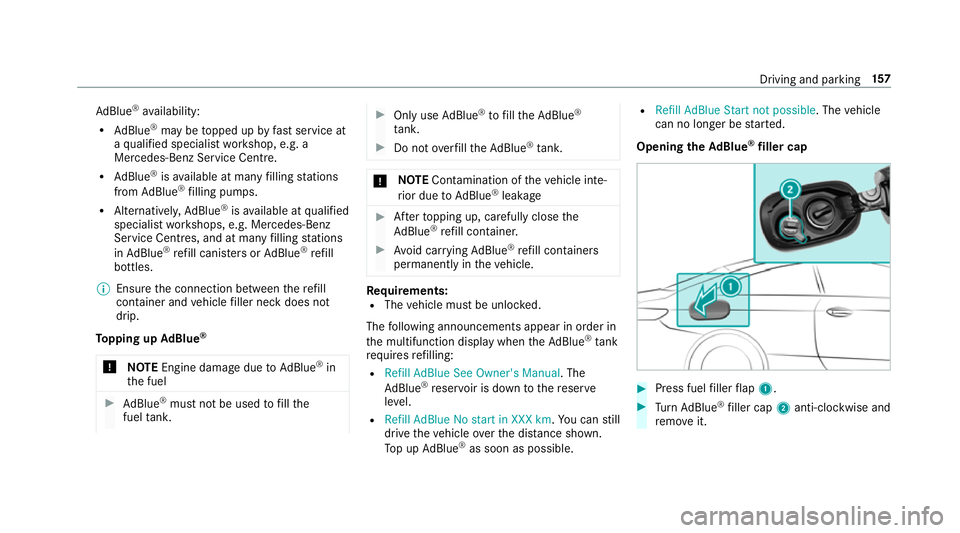
Opening theAd Blue ®
filler cap #
Press fuel filler flap 1. #
Turn AdBlue ®
filler cap 2anti-clockwise and
re mo veit. Driving and parking
157
Page 172 of 521
R
ETS/4ETS traction control is still active.
% Even when ESP ®
is deactivated, you are still
assis tedby ESP ®
when braking.
ESP ®
is inter vening if the ESP ®
÷ warning
lamp flashes in the instrument clus ter:
R Do not deacti vate ESP ®
.
R Only depress the accelera tor pedal as far as
is necessar y.
R Adapt your driving style to suit the cur rent
ro ad and weather conditions.
Deactivate ESP ®
in thefo llowing situations to
impr ovetraction:
R When using snow chains R
In deep sn ow
R On sand or gr avel
% Spinning the wheels results in a cutting
action which pr ovides better grip.
ESP ®
is deactivated if theå ESP®
OFF warn‐
ing lamp lights up continuously in the instrument
clus ter.
If th e ESP ®
÷ warning lamp lights up continu‐
ousl y,ESP ®
is not available due toa malfunction.
Obse rve any information which may be displa yed
in the instrument clus ter:
R Warning and indicator lamps (→ page 463)
R Display messages (→ page419) ETS/4ETS (Electronic
Traction Sy stem)
ETS/4E TStraction control is pa rtof ESP ®
.
ETS/4ETS can impr ovetheve hicle's traction by
inter vening in thefo llowing ways:
R The drive wheels are braked individually if
th ey spin.
R More drive torque is transferred tothe wheel
or wheels with traction.
Influence of drive prog rams on ESP ®
The drive prog rams enable ESP ®
to adapt todif‐
fe re nt we ather and road conditions as well as
th e driver's prefer red driving style. You can
select the drive prog rams using theDY NA MIC
SELECT switch. Driving and parking
16 9
Page 174 of 521
Ac
tivating/deactivating ESP ®
(Electronic Sta‐
bility Prog ram) Multimedia sy
stem:
, Vehicle .
k Assistance .
ESP #
Activate Oor deacti vate ª the function.
ESP ®
is deactivated if theå ESP®
OFF warn‐
ing lamp lights up continuously in the instrument
clus ter.
Obser vethe information on warning lamps and
display messages which may be shown in the
instrument clus ter. Fu
nctions of ESP ®
Crosswind Assist ESP
®
Crosswind Assist de tects sudden gu sts of
side wind and helps the driver tokeep theve hi‐
cle in the lane:
R ESP ®
Crosswind Assist is active at vehicle
speeds between 80 km/h and 200 km/h
when driving stra ight ahead or cornering
slight ly. R
The vehicle is stabilised bymeans of individ‐
ual brake application on one side. Fu
nctions of ESP ®
trailer stabilisation &
WARNING Risk of accident in poor road
and weather conditions
In poor road and weather conditions, the
trailer stabilisation cannot pr event lu rching of
th eve hicle/trailer combination. Trailers with
a high centre of grav ity may tip over before
ESP ®
de tects this. #
Alw ays adapt your driving style to suit
th e cur rent road and weather condi‐
tions. When driving with a trailer, ESP
®
can stabilise
yo ur vehicle if the trailer begins toswer vefrom
side toside:
R ESP ®
trailer stabilisation is active abo ve
speeds of 65 km/h. R
Slight swerving is reduced bymeans of a tar‐
ge ted, individual brake application on one
side.
R Intheeve nt of se vere swerving, the engine
output is also reduced and all wheels are
braked.
ESP ®
trailer stabilisation may be impaired or
may not function if:
R The trailer is not connec ted cor rectly or is
not de tected prope rly by theve hicle. Fu
nction of EBD (Electronic Brake forc e Dis‐
tribution) EBD is
characterised bythefo llowing:
R Monitoring and regulating the brake pressure
on there ar wheels.
R Impr oved driving stability when braking,
especially on bends. Driving and parking
171