phone MERCEDES-BENZ E-CLASS CABRIOLET 2017 Service Manual
[x] Cancel search | Manufacturer: MERCEDES-BENZ, Model Year: 2017, Model line: E-CLASS CABRIOLET, Model: MERCEDES-BENZ E-CLASS CABRIOLET 2017Pages: 521, PDF Size: 10.64 MB
Page 293 of 521
This could also cause
youto lose control of
th eve hicle.
Only operate this equipment when theve hi‐
cle is stationar y. Yo
u must obse rveth e legal requ irements forthe
country in whi chyou are cur rently driving when
operating mobile communication equipment in
th eve hicle.
Te lephony is possible via:
R the Blue tooth®
inter face
R thete lephone module with Blue tooth®
(SAP
profile) Blue
tooth ®
profile overview Blue
tooth ®
profile
of the mobile phone Fu
nction
PBAP (Phone Book
Access Profile) Contacts are auto‐
matically displa
yed in
th e multimedia sys‐
tem
MAP (Message
Access Profile) Message functions
can be used Fu
rther information can be obtained from a
Mercedes-Benz service centre or at: http://
www.mercedes-benz.com/connect.
HD Voice ®
R Toimpr ove vo icequalit y,the multimedia sys‐
te m supports telephone calls in HD Voice ®
.
R In order touse this function, the mobile
phones and the mobile phone network pro‐
vider of the person you are calling must sup‐
port HD Voice ®
.
Depending on thequ ality of the connection, the
vo ice quality may fluctuate. The
following situations can lead tothe call
being disconnected while theve hicle is in
motion:
R there is insuf ficient network co verage inthe
area
R you mo vefrom one GSM or UMTS transmit‐
te r/receiver area (cell) into ano ther and no
communication channels are free
R the SIM card used is not compatible with the
network available
R a mobile phone with "Twincard" is logged into
th e network with the second SIM card at the
same time
Connecting a mobile phone (authorising)
Re quirements:
Blue tooth ®
is activated on the mobile phone (see
th e manufacturer's operating instructions).
Blue tooth ®
is activated on the multimedia sys‐
te m (→ page 259). 290
Multimedia sy stem
Page 294 of 521
Multimedia sy
stem:
, Telephone .
á Connect device - no
device connected
Sear ching for a mobile phone #
Select Connect new device .#
Select Start search .
The available mobile phones are displa yed. If
a new mobile phone is found, it is indicated
by theá symbol.
Connecting a mobile phone (authorisation
using Secure Simple Pairing) #
Select the mobile phone.
A code is displa yed in the multimedia sy stem
and on the mobile phone. #
Ifth e codes match: confirm the code on
th e mobile phone.
Connecting a mobile phone (authorisation by
entering a passk ey) #
Select the Blue tooth®
name of the mobile
phone. #
Choose a one tosixteen-digit number combi‐
nation as a passk ey. #
Multimedia sy stem: enter the passk eyand
select a. #
Mobile phone: enterthe passk eyagain and
con firm.
% Upto15 mobile phones can be auth orised
on the multimedia sy stem.
All telephones are automatically reconnec‐
te d.
Disconnecting a mobile phone (de-au thoris‐
ing)
Multimedia sy stem:
, Telephone .
á Connect device -
Mobile phone #
Select the mobile phone from the device list. #
Select ¥. #
Select De-authorise. #
Select Yes. Switching mobile phones
Re
quirement:
R The mobile phones are authorised
(→ page 290).
Multimedia sy stem:
, Telephone .
á Connect device -
Mobile phone #
Select the mobile phone from the device list.
% Only one mobile phone can be connected at
any one time. The connected mobile phone
is displa yed at theto p of the list.
Using the mobile phone with NearField Com‐
munication (NFC)
Re quirements:
R NFC is activated on the mobile phone (see
th e manufacturer's operating instructions)
R the mobile phone's screen is switched on
and unloc ked (see the manufacturer's oper‐
ating instructions)
NFC enables short-ra nge wireless data transfer. Multimedia sy
stem 291
Page 295 of 521
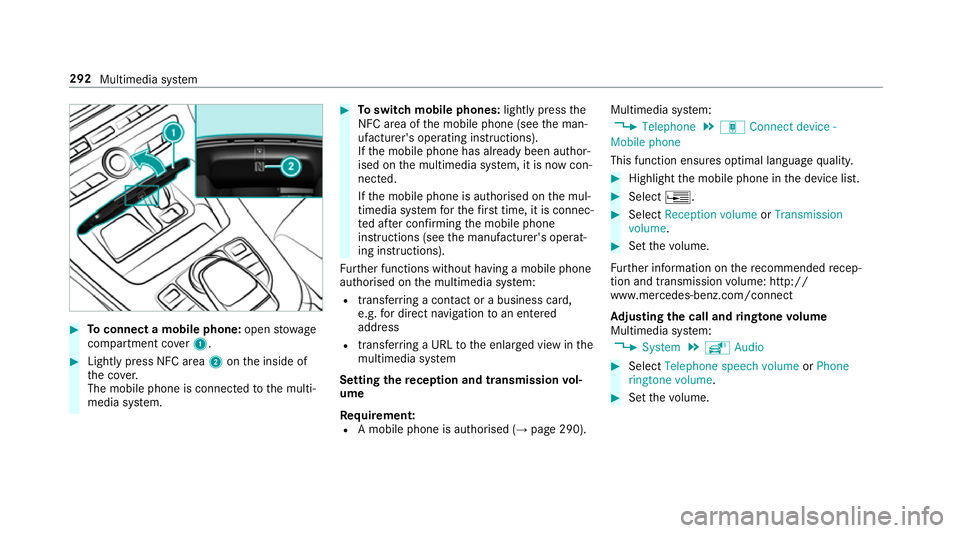
#
Toconnect a mobile phone: openstowage
compartment co ver1. #
Lightly press NFC area 2onthe inside of
th e co ver.
The mobile phone is connected tothe multi‐
media sy stem. #
Toswitch mobile phones: lightly pressthe
NFC area of the mobile phone (see the man‐
ufacturer's operating instructions).
If th e mobile phone has already been author‐
ised on the multimedia sy stem, it is now con‐
nected.
If th e mobile phone is authorised on the mul‐
timedia sy stem forth efirs t time, it is connec‐
te d af ter confirming the mobile phone
instructions (see the manufacturer's operat‐
ing instructions).
Fu rther functions without having a mobile phone
authorised on the multimedia sy stem:
R transfer ring a contact or a business card,
e.g. for direct navigation toan entered
address
R transfer ring a URL tothe enlar ged view in the
multimedia sy stem
Setting there ception and transmission vol‐
ume
Re quirement:
R A mobile phone is authorised (→ page 290).Multimedia sy
stem:
, Telephone .
á Connect device -
Mobile phone
This function ensures optimal language qualit y. #
Highlight the mobile phone in the device list. #
Select ¥. #
Select Reception volume orTransmission
volume . #
Set thevo lume.
Fu rther information on there commended recep‐
tion and transmission volume: http://
www.me rcedes-benz.com/connect
Ad justing the call and ringtone volume
Multimedia sy stem:
, System .
õ Audio #
Select Telephone speech volume orPhone
ringtone volume. #
Set thevo lume. 292
Multimedia sy stem
Page 296 of 521
St
arting/ stopping mobile phone voice recog‐
nition
Re quirement:
R the mobile phone is connected tothe multi‐
media sy stem (→ page 290).
St arting mobile phone voice recognition #
Press and hold theó button on the multi‐
function steering wheel for more than one
second.
Yo u can use mobile phone voice recognition.
St opping mobile phone voice recognition #
Press the8 or~ button on the multi‐
function steering wheel. Calls
Te
lephone operation
Multimedia sy stem:
, Telephone .
ª Contacts
Making a call #
Ente r a number. #
Select Dial number.
The call is made.
Ac cepting a call #
Select Accept.
Re jecting a call #
Select Reject.
Ending a call #
Select =.
Ac tivating functions during a call #
Toshow all functions, navigate down.
The following functions are available during a
call:
R End call
R Make additional call
R Keyboard (showtosend DTMF tones)
R Microphone off orMicrophone on
R Private Mode (an activecall in hands-free
mode is transfer redov er tothete lephone) Conducting calls with se
veral participants
Re quirements:
R there is an active call (→ page 293)
R ano ther call is being made
Switching between calls #
Select call #.
The selected call is active. The other call is
on hold.
Ac tivating or ending a call on hold #
Select Continue call orEnd call.
Conducting a conference call #
Select Create conference call inthete le‐
phone menu.
The new participant is included in the confe r‐
ence call.
Ending an active call #
Select =.
% On some mobile phones, the call on hold is
activated as soon as the active call is ended. Multimedia sy
stem 293
Page 297 of 521
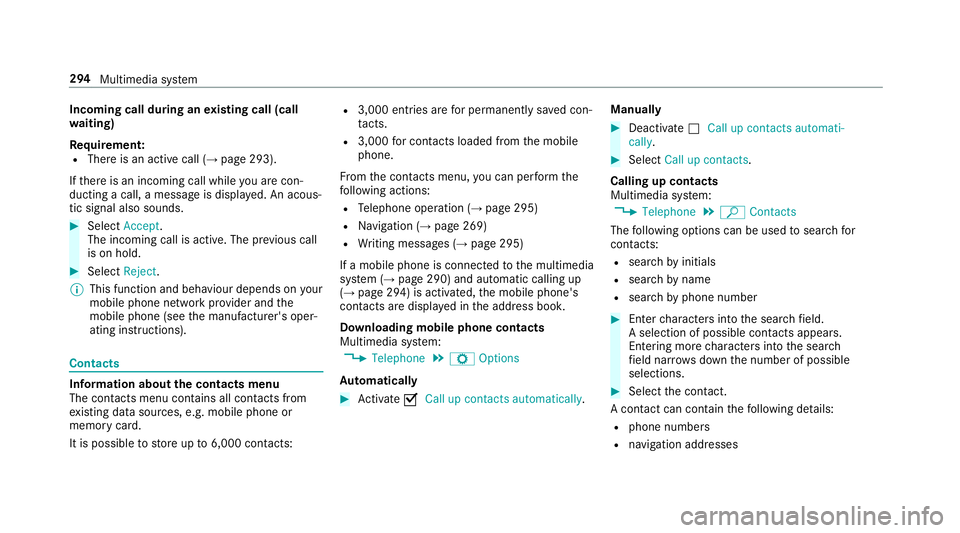
Incoming call du
ring an existing call (call
wa iting)
Re quirement:
R There is an active call (→ page 293).
If th ere is an incoming call while you are con‐
ducting a call, a message is displ ayed. An acous‐
tic signal also sounds. #
Select Accept .
The incoming call is active. The pr evious call
is on hold. #
Select Reject.
% This function and behaviour depends on your
mobile phone network pr ovider and the
mobile phone (see the manufacturer's oper‐
ating instructions). Contacts
Information about
the contacts menu
The con tacts menu contains all contacts from
ex isting data sources, e.g. mobile phone or
memo rycard.
It is possible tostore up to6,000 contacts: R
3,000 entries are for permanently sa ved con‐
ta cts.
R 3,000 for contacts loaded from the mobile
phone.
Fr om the contac ts menu, you can per form the
fo llowing actions:
R Telephone operation (→ page 295)
R Navigation (→ page 269)
R Writing messages (→ page 295)
If a mobile phone is connec tedto the multimedia
sy stem (→ page 290) and automatic calling up
(→ page 294) is activated, the mobile phone's
conta cts are displ ayed in the address book.
Downloading mobile phone contacts
Multimedia sy stem:
, Telephone .
Z Options
Au tomatically #
Activate OCall up contacts automatically .Manual
ly #
Deactivate ªCall up contacts automati-
cally. #
Select Call up contacts.
Calling up contacts
Multimedia sy stem:
, Telephone .
ª Contacts
The following options can be used tosear chfor
contacts:
R searchby initials
R sear chbyname
R searchby phone number #
Ente rch aracters into the sear chfield.
A selection of possible conta cts appears.
Entering more characters into the sear ch
fi eld nar rows down the number of possible
selections. #
Select the conta ct.
A contact can contain thefo llowing de tails:
R phone numbers
R navigation addresses 294
Multimedia sy stem
Page 298 of 521
R
geo-coordinates
Editing thefo rm at of a contact's name
Multimedia sy stem:
, Telephone .
Z Options .
Name
format
The following options are available:
R Surname, first name
R Surname First name
R First name Surname #
Select an option.
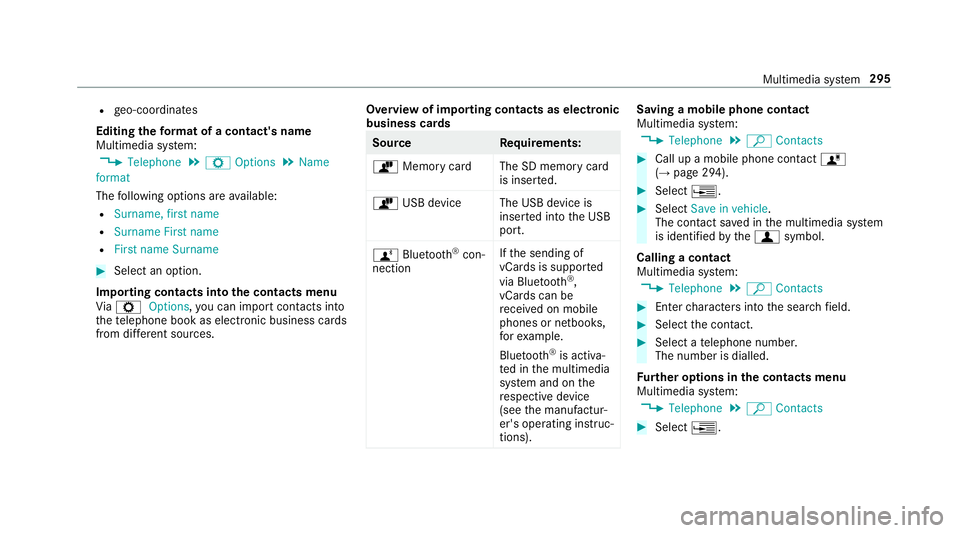
Importing contacts into the contacts menu
Vi aZ Options, you can import contacts into
th ete lephone book as elect ronic business cards
from di fferent sources. Overview of importing contacts as electronic
business cards Source
Requirements:
ò Memory car dThe SD memory card
is inser ted.
ò USB device The USB device is
inserted into the USB
port.
ñ Bluetooth ®
con‐
nection If
th e sending of
vCards is suppor ted
via Blue tooth®
,
vCard s can be
re cei ved on mobile
phones or netbooks,
fo rex ample.
Blue tooth ®
is activa‐
te d in the multimedia
sy stem and on the
re spective device
(see the manufactur‐
er's operating instruc‐
tions). Saving a mobile phone contact
Multimedia sy
stem:
, Telephone .
ª Contacts #
Call up a mobile phone conta ctó
(→ page 294). #
Select ¥. #
Select Save in vehicle.
The contact sa ved in the multimedia sy stem
is identified bythef symbol.
Calling a contact
Multimedia sy stem:
, Telephone .
ª Contacts #
Ente rch aracters into the sear chfield. #
Select the conta ct. #
Select a telephone number.
The number is dialled.
Fu rther options in the contacts menu
Multimedia sy stem:
, Telephone .
ª Contacts #
Select ¥. Multimedia sy
stem 295
Page 299 of 521
The
following options are available:
R Contact details
R Save in vehicle
R Delete contact
Wi thin contact details #
Select ¥.
The following options are available:
R Call
R Send text message
R Save as global favourite
R Show website (when aweb address is
st ored)
R Navigate (when an address is stored)
R Send DTMF tones (for a number with DTMF
to nes)
Deleting a contact
Multimedia sy stem:
, Telephone .
ª Contacts
Yo u can dele tecontacts stored in theve hicle. #
Sear chfor a contact. #
Select the conta ct. #
Select ¥. #
Select Delete contact . #
Select Yes. Call li
st Call list
overview
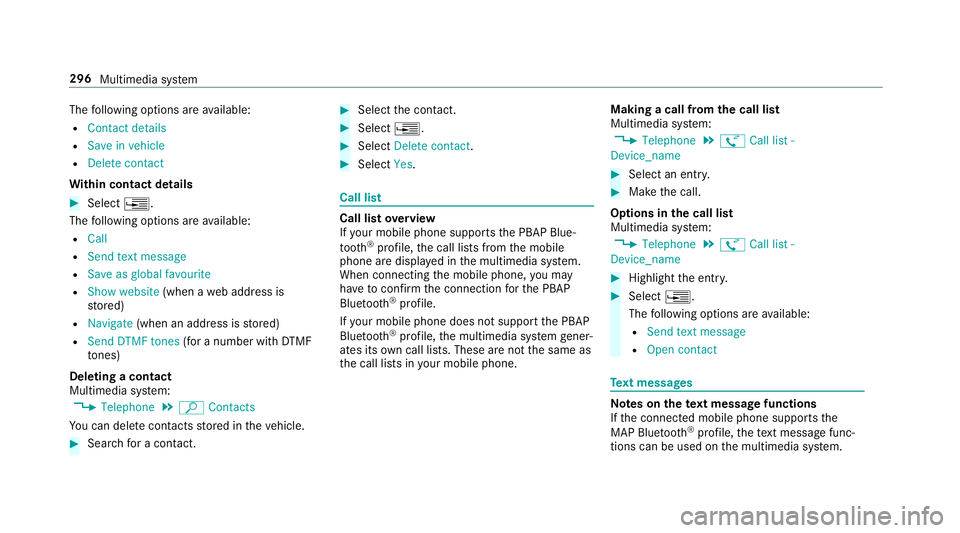
If yo ur mobile phone suppo rts th e PBAP Blue‐
tooth ®
profile, the call lists from the mobile
phone are displa yed in the multimedia sy stem.
When connecting the mobile phone, you may
ha ve toconfirm the connection forth e PBAP
Blue tooth ®
profile.
If yo ur mobile phone does not suppo rtthe PBAP
Blue tooth ®
profile, the multimedia sy stem gener‐
ates its own call li sts. These are not the same as
th e call lists in your mobile phone. Making a call from
the call list
Multimedia sy stem:
, Telephone .
ø Call list -
Device_name #
Select an entry. #
Make the call.
Options in the call list
Multimedia sy stem:
, Telephone .
ø Call list -
Device_name #
Highlight the entry. #
Select ¥.
The following options are available:
R Send text message
R Open contact Te
xt messages Note
s onthete xt message functions
If th e connected mobile phone supports the
MAP Blue tooth®
profile, thete xt messa gefunc‐
tions can be used on the multimedia sy stem. 296
Multimedia sy stem
Page 300 of 521
Yo
u can obtain fur ther information about set‐
tings and suppor ted functions of Blue tooth®
-
capable mobile phones from a Mercedes-Benz
service centre or at: http://www.mercedes-
benz.com/connect
Some mobile phones require fur ther settings
af te r being connected tothe multimedia sy stem
(see manufacturer's Owner's Manual).
New messages are identified bythe1 symbol
in the multimedia sy stem's display and an audi‐
ble signal.
R The multimedia sy stem displa ys the100
ne we sttext messa ges.
R The ú symbol is displa yed when the
mobile phone's messa gememory is full.
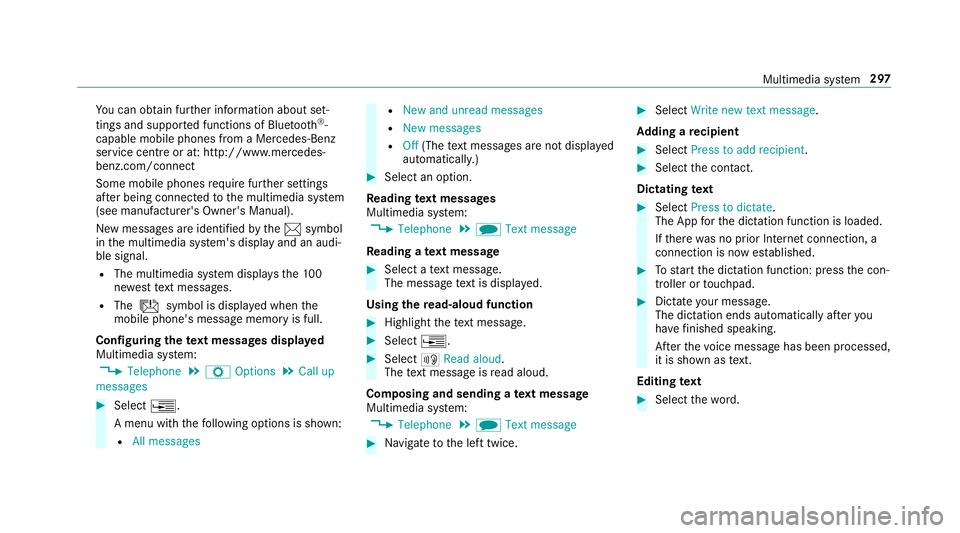
Confi guring thete xt messages displa yed
Multimedia sy stem:
, Telephone .
Z Options .
Call up
messages #
Select ¥.
A menu with thefo llowing options is shown:
R All messages R
New and unread messages
R New messages
R Off (The text messa ges are not displa yed
automaticall y.) #
Select an option.
Re ading text messages
Multimedia sy stem:
, Telephone .
i Text message
Re ading a text message #
Select a text messa ge.
The message text is displ ayed.
Using there ad-aloud function #
Highlight thete xt messa ge. #
Select ¥. #
Select +Read aloud .
The text messa geisread aloud.
Composing and sending a text message
Multimedia sy stem:
, Telephone .
i Text message #
Navigate tothe left twice. #
Select Write new text message.
Ad ding a recipient #
Select Press to add recipient. #
Select the conta ct.
Dictating text #
Select Press to dictate.
The App forth e dictation function is loaded.
If th ere was no prior Internet connection, a
connection is now es tablished. #
Tostart the dictation function: press the con‐
troller or touchpad. #
Dictate your message.
The dic tation ends au tomatical lyafte ryou
ha ve finished speaking.
Af terth evo ice message has been processed,
it is shown as text.
Editing text #
Select thewo rd. Multimedia sy
stem 297
Page 301 of 521
#
Tocall up the cor rection menu: press the
controller or touchpad.
The following options are available:
R adjusting the capitalisation of words (if
suppor tedby thech aracter set)
R expanding thech oice of words
R deleting the selection
R recording a new dictation #
Tolea vethe menu: select Done.
Sending text messages #
Select Send text message .
Re plying toate xt message
Multimedia sy stem:
, Telephone .
i Text message #
Select a text messa ge. #
Select ¥. #
Select Reply. Calling a
text message sender
Multimedia sy stem:
, Telephone .
i Text message #
Select a text messa ge. #
Select ¥. #
Select Call sender.
Deleting text messages
Multimedia sy stem:
, Telephone .
i Text message #
Select ¥. #
Select Delete. Te
lephone module with Blue tooth ®
(SAP pro‐
fi le) Fi
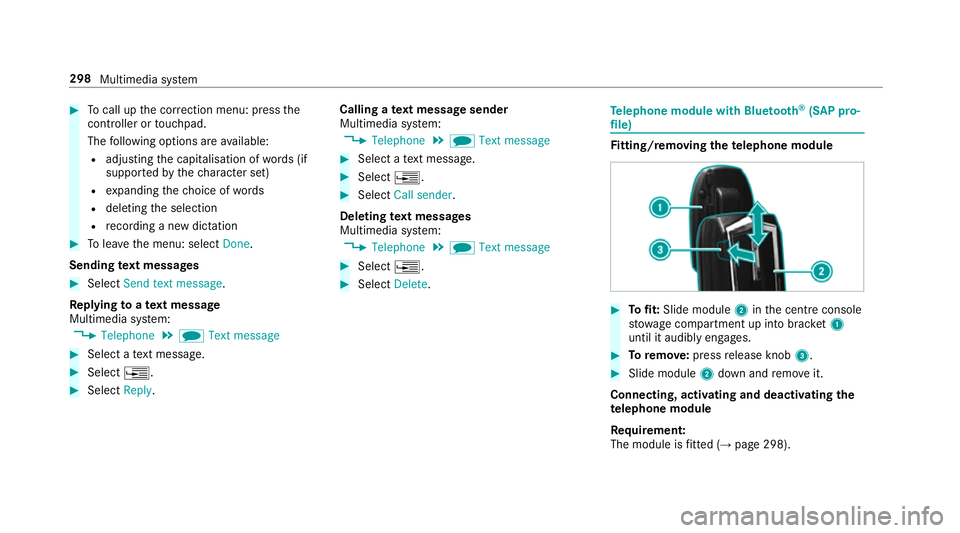
tting/ removing the telephone module #
Tofit: Slide module 2inthe cent reconsole
stow age compartment up into brac ket1
until it audibly engages. #
Toremo ve: press release knob 3. #
Slide module 2down and remo veit.
Connecting, acti vating and deactivating the
te lephone module
Re quirement:
The module is fitted (→ page 298). 298
Multimedia sy stem
Page 302 of 521
Multimedia sy
stem:
, Telephone
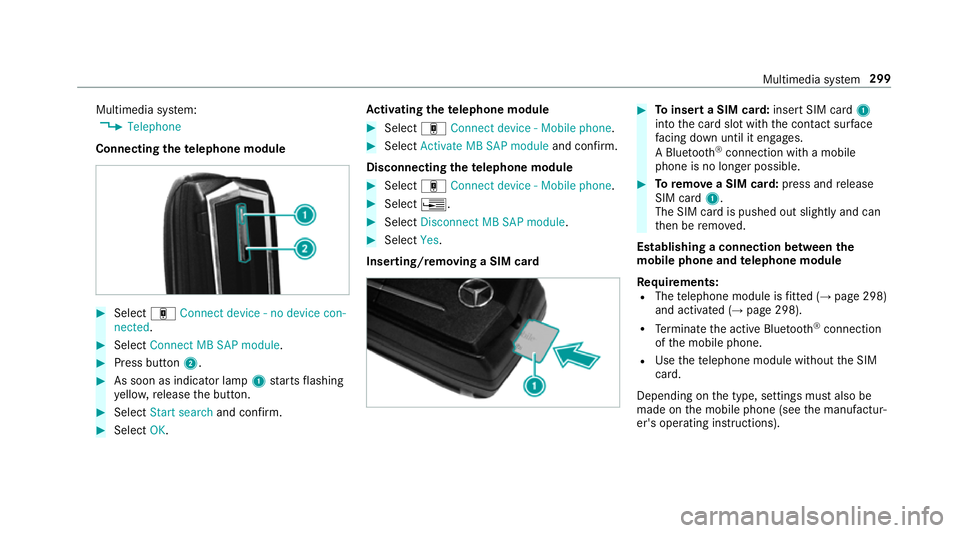
Connecting thete lephone module #
Select áConnect device - no device con-
nected. #
Select Connect MB SAP module. #
Press button 2. #
As soon as indicator lamp 1starts flashing
ye llo w, release the button. #
Select Start search and confirm. #
Select OK. Ac
tivating the telephone module #
Select áConnect device - Mobile phone . #
Select Activate MB SAP module and confirm.
Disconnecting thete lephone module #
Select áConnect device - Mobile phone . #
Select ¥. #
Select Disconnect MB SAP module. #
Select Yes.
Inserting/removing a SIM card #
Toinsert a SIM card: insert SIM card1
into the card slot with the conta ct surface
fa cing down until it engages.
A Blu etoo th®
connection wi tha mobile
phone is no lon ger possible. #
Toremo vea SIM card: press andrelease
SIM card 1.
The SIM card is pushed out slightly and can
th en be remo ved.
Establishing a connection between the
mo bile phone and telephone module
Re quirements:
R The telephone module is fitted (→ page 298)
and activated (→ page 298).
R Term inate the active Blue tooth ®
connection
of the mobile phone.
R Use thete lephone module without the SIM
card.
Depending on the type, settings must also be
made on the mobile phone (see the manufactur‐
er's operating instructions). Multimedia sy
stem 299