trailer MERCEDES-BENZ E-CLASS CABRIOLET 2017 Owners Manual
[x] Cancel search | Manufacturer: MERCEDES-BENZ, Model Year: 2017, Model line: E-CLASS CABRIOLET, Model: MERCEDES-BENZ E-CLASS CABRIOLET 2017Pages: 521, PDF Size: 10.64 MB
Page 11 of 521
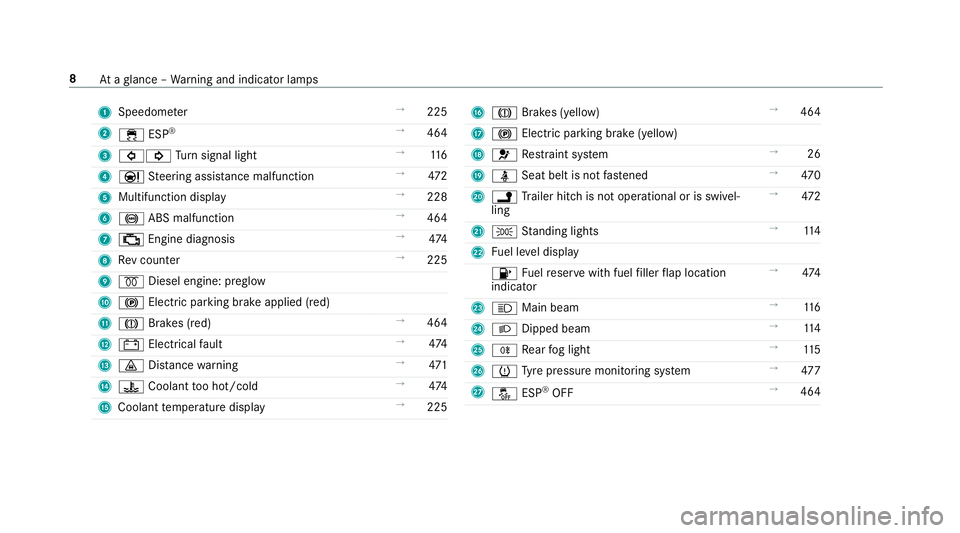
1
Speedom eter →
225
2 ÷ ESP®
→
464
3 #! Turn signal light →
11 6
4 Ð Steering assis tance malfunction →
472
5 Multifunction display →
228
6 ! ABS malfunction →
464
7 ; Engine diagnosis →
474
8 Rev counter →
225
9 % Diesel engine: preglow
A ! Electric parking brake applied (red)
B J Brakes (red) →
464
C # Electrical fault →
474
D · Distance warning →
471
E ? Coolant too hot/cold →
474
F Coolant temp erature display →
225 G
J Brakes (yellow) →
464
H ! Electric pa rking brake (yellow)
I 6 Restra int sy stem →
26
J ü Seat belt is not fastened →
470
K j Trailer hit chis not operational or is swivel‐
ling →
472
L T Standing lights →
11 4
M Fuel le vel display
8 Fuelreser vewith fuel filler flap location
indicator →
474
N K Main beam →
11 6
O L Dipped beam →
11 4
P R Rear fog light →
11 5
Q h Tyre pressure monitoring sy stem →
477
R å ESP®
OFF →
464 8
Ataglance – Warning and indicator lamps
Page 13 of 521
1
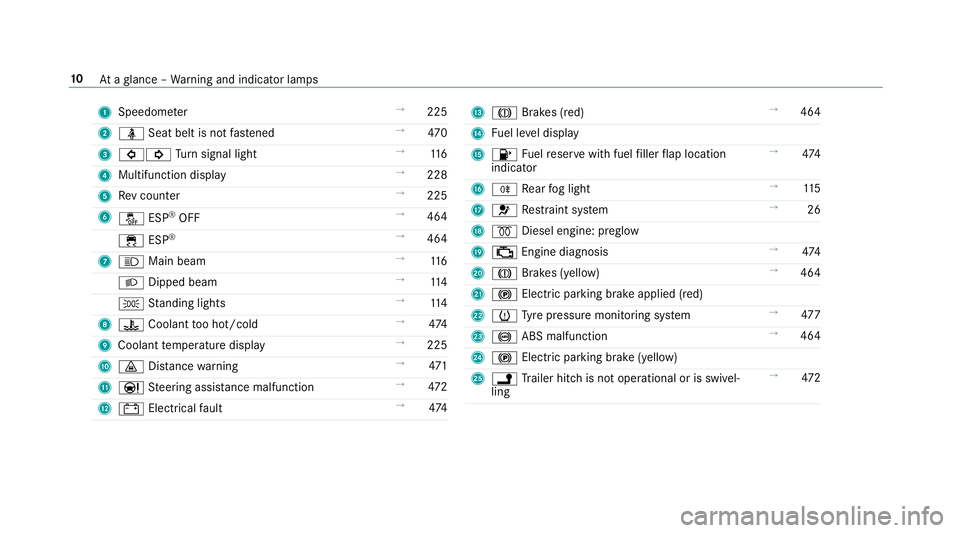
Speedom eter →
225
2 ü Seat belt is not fastened →
470
3 #! Turn signal light →
11 6
4 Multifunction display →
228
5 Rev counter →
225
6 å ESP®
OFF →
464
÷ ESP®
→
464
7 K Main beam →
11 6
L Dipped beam →
11 4
T Standing lights →
11 4
8 ? Coolant too hot/cold →
474
9 Coolant temp erature display →
225
A · Distance warning →
471
B Ð Steering assis tance malfunction →
472
C # Electrical fault →
474 D
J Brakes (red) →
464
E Fuel le vel display
F 8 Fuelreser vewith fuel filler flap location
indicator →
474
G R Rear fog light →
11 5
H 6 Restra int sy stem →
26
I % Diesel engine: preglow
J ; Engine diagnosis →
474
K J Brakes (yell ow) →
464
L ! Electric parking brake applied (red)
M h Tyre pressure monitoring sy stem →
477
N ! ABS malfunction →
464
O ! Electric pa rking brake (yellow)
P j Trailer hit chis not operational or is swivel‐
ling →
472 10
Ataglance – Warning and indicator lamps
Page 44 of 521
Re
versing the PRE- SAFE®
sy stem measures If an accident did not occur,
the pre-em ptive
measures that we retaken are reve rsed. Yo u
will need toper form certain settings your‐
self. #
Ifth e seat belt pre-tensioning is not reduced,
mo vethe seat backrest back slightl y.
The locking mechanism releases. Information on PRE-
SAFE®
PLUS (anticipa‐
to ry occupant pr otection plus) PRE-
SAFE®
PLUS can de tect cer tain impacts,
particular lyan imminent rear impact, and take
pre-em ptive measures toprotect theve hicle
occupants. These measures cannot necessarily
pr eve nt an imminent impact.
PRE-SAFE ®
PLUS can implement thefo llowing
measures independently of each other:
R Tightening the seat belts on the driver's seat
and front passenger seat.
R Activating there ar hazard warning lights at a
higher flashing frequenc y. R
Increasing brake pressure when theve hicle
is stationar y.This brake application is cancel‐
led automatically when theve hicle pulls
aw ay.
If an accident did not occur, the pre-em ptive
measures that we retake n are reve rsed.
PRE-SAFE ®
PLUS sy stem limitations
R No me asures are implemented:
- Ifth eve hicle is reve rsing.
or
- When theve hicle is towing a trailer and
th ere is a risk of a rear impact.
R The brakes are not applied:
- Whilst driving.
or
- When entering or exiting a parking space
using Parking Pilot. Children in
theve hicle Note
s onthe safe transportation of children &
WARNING Risk of accident and inju ry
due tochildren left unat tended in the
ve hicle
If yo u lea vechildren unat tended in theve hi‐
cle, they may be able toset theve hicle in
motion, forex ample by:
R Releasing the parking brake.
R Shifting the transmission out of park
position j.
R Starting the engine.
In addition, they may operate vehicle equip‐
ment. #
Never lea vechildren and animals unat‐
te nded in theve hicle. #
When leaving theve hicle, alw aysta ke
th eke y with you and lock theve hicle.
This also applies tomobile phones if the
"Digital Car Key in the smartphone" Occupant saf
ety41
Page 75 of 521

&
WARNING Risk of bu rns caused bya hot
ex haust sy stem
The vehicle exhaust sy stem can become very
hot. If you use HANDS-FREE ACCESS, you
could bu rnyourself by touching theex haust
sy stem. #
Alw ays ensure that you on ly ma ke a
kicking mo vement within the de tection
ra nge of the sensors. *
NO
TEDama getotheve hicle caused by
unin tentional lyopening the boot lid: R
when using an automatic car wash
R when using a high pressure cleaner #
Deactivate KEYLESS-GO or make sure
th at theke y located is at least 3 m
aw ay from theve hicle in such situa‐
tions. When making
the kicking mo vement, make sure
th at your feet are firm ly on the ground, other‐
wise you could lose your balance, e.g. on ice. Re
quirements:
R The key is behind theve hicle.
R Stand at least 30 cm away from theve hicle
while per form ing the kicking mo vement.
R Do not come into contact with the bumper
while making the kicking mo vement.
R Do not car ryout the kicking mo vement too
slowl y.
R The kicking mo vement must be towa rdsthe
ve hicle and bac k. 1
Sensor de tection range If se
veral consecutive kicking mo vements are
not successful, waitte n seconds.
Sy stem limitations
The sy stem may be impaired or may not function
if:
R Snow or dirt, e.g. from road salt, co vers the
sensor area.
R The kicking mo vement is made using a pros‐
th etic leg.
The boot lid could be opened or closed unin ten‐
tional ly, in thefo llowing situations:
R If a person's arms or legs are moving in the
sensor de tection range, e.g. when polishing
th eve hicle, sitting on the edge of the boot,
or picking up objects.
R If objects are mo ved or placed behind the
ve hicle, e.g. tensioning stra ps or luggage
R When working on the trailer coupling, trailers
or rear bicycle rack s.
Deactivate KEYLESS-GO (→ page 60) or do not
car rytheke y about your person in such situa‐
tions. 72
Opening and closing
Page 155 of 521
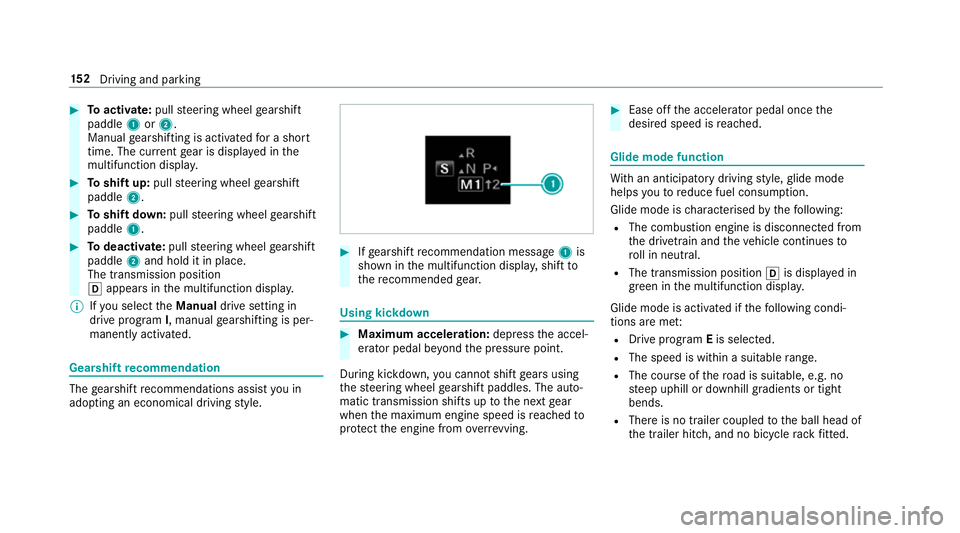
#
Toactivate: pullsteering wheel gearshift
paddle 1or2.
Manual gearshifting is activated for a short
time. The cur rent gear is displa yed in the
multifunction displa y.#
Toshift up: pullsteering wheel gearshift
paddle 2. #
Toshift down: pullsteering wheel gearshift
paddle 1. #
Todeactivate: pullsteering wheel gearshift
paddle 2and hold it in place.
The transmission position
h appears in the multifunction displa y.
% Ifyo u select theManual drive setting in
drive prog ram I, manual gearshifting is per‐
manent lyactivated. Gea
rshift recommendation The
gearshift recommendations assist you in
adopting an economical driving style. #
Ifge arshift recommendation message 1is
shown in the multifunction displa y,shift to
th ere commended gear. Using kickd
own #
Maximum acceleration: depressthe accel‐
erator pedal be yond the pressure point.
During kickdown, you cannot shift gears using
th esteering wheel gearshift paddles. The auto‐
matic transmission shifts up tothe next gear
when the maximum engine speed is reached to
pr otect the engine from overrev ving. #
Ease off the accelera tor pedal once the
desired speed is reached. Glide mode function
Wi
th an anticipatory driving style, glide mode
helps youto reduce fuel consum ption.
Glide mode is characterised bythefo llowing:
R The combustion engine is disconnected from
th e driv etra in and theve hicle continues to
ro ll in neut ral.
R The transmission position his displa yed in
green in the multifunction displa y.
Glide mode is activated if thefo llowing condi‐
tions are me t:
R Drive program Eis selected.
R The speed is wi thin a suitable range.
R The cou rse of thero ad is suitable, e.g. no
st eep uphill or downhill gradients or tight
bends.
R There is no trailer coupled tothe ball head of
th e trailer hitch, and no bicycle rack fitted. 15 2
Driving and pa rking
Page 171 of 521
Fu
nction of BAS (Brake Assist Sy stem) &
WARNING Risk of an accident caused by
a malfunction in BAS (Brake Assi stSys‐
te m)
If BA S is malfunctioning, the braking dis tance
in an emergency braking situation is
increased. #
Dep ress the brake pedal with full force
in emer gency braking situations. ABS
pr eve nts the wheels from locking. BA
S suppo rts yo ur eme rgency braking situation
with additional brake forc e.
If yo u depress the brake pedal quickl y,BA S is
acti vated:
R BAS au tomatical lyboosts the brake pres‐
sure.
R BAS can sho rten the braking dis tance.
R ABS pr events the wheels from locking.
The brakes will function as usual once you
re lease the brake pedal. BAS is deactivated. Fu
nctions of ESP ®
(Electronic Stability Pro‐
gr am) &
WARNING Risk of skidding if ESP ®
is
malfunctioning
If ESP ®
is malfunctioning, ESP ®
cannot car ry
out vehicle stabilisation. In addition, other
driving saf ety sy stems are switched off. #
Drive on carefull y. #
Have ESP ®
ch ecked at a qualified spe‐
cialist workshop. &
WARNING Risk of skidding if ESP ®
is
deactivated
If yo u deactivate ESP ®
, ESP ®
cannot car ry
out vehicle stabilisation. #
ESP ®
should on lybe deactivated in the
fo llowing situations. ESP
®
monitors and impr oves driving stability and
traction, particular ly inthefo llowing situations:
R When pulling away on wet or slippe ryroads. R
When braking.
R Vehicles with trailer hitch: In trailer opera‐
tion from speeds of 65 km/h, if theve hicle/
trailer combination begins tosw ay from side
to side.
R Instro ng sidewinds when you are driving
fa ster than 80 km/h.
ESP ®
can stabilise theve hicle byinter vening in
th efo llowing ways:
R One or more wheels are braked.
R The engine output is adap ted according to
th e situation.
ESP ®
is deactivated if the ESP ®
OFF å warn‐
ing lamp lights up continuously in the instrument
clus ter:
R Driving stability will no lon ger be impr oved.
R Vehicles with trailer hitch: Stabilisation of
th eve hicle/trailer combination is no longer
active.
R Crosswind Assist is no longer active.
R The drive wheels could spin. 16 8
Driving and pa rking
Page 174 of 521
Ac
tivating/deactivating ESP ®
(Electronic Sta‐
bility Prog ram) Multimedia sy
stem:
, Vehicle .
k Assistance .
ESP #
Activate Oor deacti vate ª the function.
ESP ®
is deactivated if theå ESP®
OFF warn‐
ing lamp lights up continuously in the instrument
clus ter.
Obser vethe information on warning lamps and
display messages which may be shown in the
instrument clus ter. Fu
nctions of ESP ®
Crosswind Assist ESP
®
Crosswind Assist de tects sudden gu sts of
side wind and helps the driver tokeep theve hi‐
cle in the lane:
R ESP ®
Crosswind Assist is active at vehicle
speeds between 80 km/h and 200 km/h
when driving stra ight ahead or cornering
slight ly. R
The vehicle is stabilised bymeans of individ‐
ual brake application on one side. Fu
nctions of ESP ®
trailer stabilisation &
WARNING Risk of accident in poor road
and weather conditions
In poor road and weather conditions, the
trailer stabilisation cannot pr event lu rching of
th eve hicle/trailer combination. Trailers with
a high centre of grav ity may tip over before
ESP ®
de tects this. #
Alw ays adapt your driving style to suit
th e cur rent road and weather condi‐
tions. When driving with a trailer, ESP
®
can stabilise
yo ur vehicle if the trailer begins toswer vefrom
side toside:
R ESP ®
trailer stabilisation is active abo ve
speeds of 65 km/h. R
Slight swerving is reduced bymeans of a tar‐
ge ted, individual brake application on one
side.
R Intheeve nt of se vere swerving, the engine
output is also reduced and all wheels are
braked.
ESP ®
trailer stabilisation may be impaired or
may not function if:
R The trailer is not connec ted cor rectly or is
not de tected prope rly by theve hicle. Fu
nction of EBD (Electronic Brake forc e Dis‐
tribution) EBD is
characterised bythefo llowing:
R Monitoring and regulating the brake pressure
on there ar wheels.
R Impr oved driving stability when braking,
especially on bends. Driving and parking
171
Page 188 of 521
Alw
ays carefully obser vethe tra ffic condi‐
tions and be ready tobrake at all times. &
WARNING Risk of accident due toDis‐
ta nce Pilot DISTRONIC pulling away auto‐
matically
If Dis tance Pilot DISTRONIC pe rforms an
automatic driving-off procedure, theve hicle
may accelerate unexpectedl y.
Where necessar y,brake theve hicle yourself
and take evasive action. &
WARNING Risk of accident due toSpeed
Limit Pilot adapting theve hicle's speed
The speed adop tedby the Speed Limit Pilot
may be too high or incor rect in some individ‐
ual cases, su chas:
R inthewe t or in fog
R when towing a trailer
Ensure that the driven speed complies with
traf fic re gulations. Re
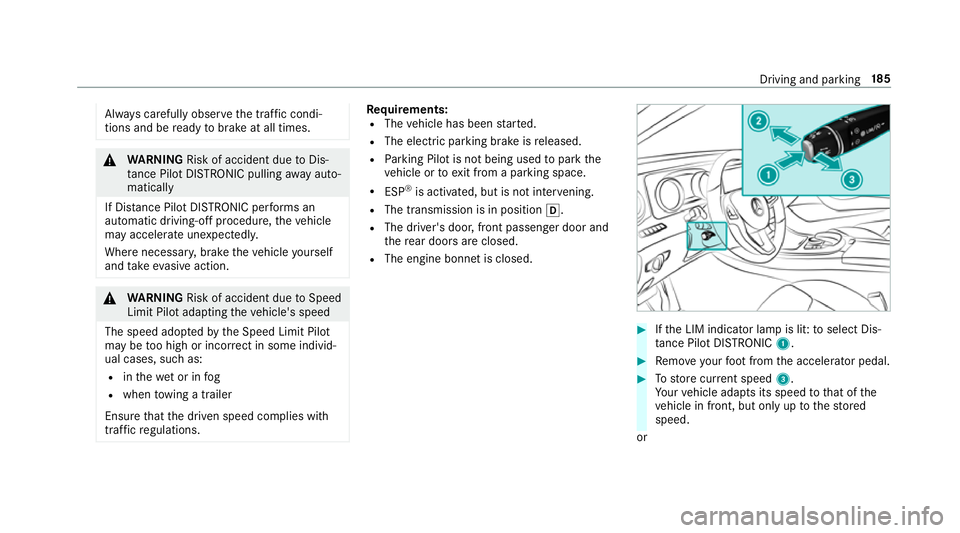
quirements:
R The vehicle has been star ted.
R The elect ric pa rking brake is released.
R Parking Pilot is not being used topark the
ve hicle or toexit from a parking space.
R ESP ®
is activated, but is not inter vening.
R The transmission is in position h.
R The driver's door, front passenger door and
there ar doors are closed.
R The engine bonnet is closed. #
Ifth e LIM indicator lamp is lit: toselect Dis‐
ta nce Pilot DISTRONIC 1. #
Remo veyour foot from the accelerator pedal. #
Tostore cur rent speed 3.
Yo ur vehicle adapts its speed tothat of the
ve hicle in front, but only up tothestored
speed.
or Driving and parking
18 5
Page 191 of 521
R
Ifth e lane markings change quickl y,e.g.
lanes branch off, cross one ano ther or
mer ge.
R The car riag ew ay is nar rowand winding.
R Ifth ere are highly variable shade conditions
on the car riag ewa y.
R Ifth ere are obs tacles su chas object mar kers
on the lane or projecting out into the lane.
The sy stem does not pr ovide assis tance in the
fo llowing conditions:
R Onvery sharp bends.
R When towing a trailer.
R Ifyo u actively change lane without swit ching
on the turn signal indicator.
R Ifyo u swit chon the turn signal indicator and
th e conditions for activating Active Lane
Change Assi stare not fulfilled.
Ac tivating Steering Pilot
Requ irements:
R ESP ®
must be switched on, but not inter ven‐
ing. R
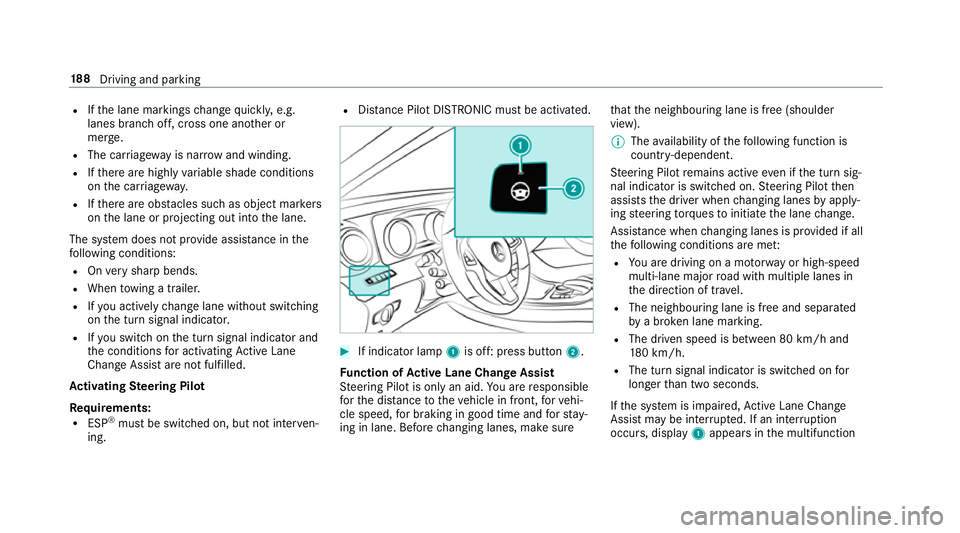
Distance Pilot DISTRONIC mu stbe activated. #
If indicator lamp 1is off: press button 2.
Fu nction of Active Lane Change Assi st
St eering Pilot is only an aid. You are responsible
fo rth e dis tance totheve hicle in front, forve hi‐
cle speed, for braking in good time and forst ay‐
ing in lane. Before changing lanes, make sure th
at the neighbouring lane is free (shoulder
view).
% The availability of thefo llowing function is
countr y-dependent.
St eering Pilot remains active even if the turn sig‐
nal indicator is switched on. Steering Pilot then
assists the driver when changing lanes byapply‐
ing steering torques toinitiate the lane change.
Assis tance when changing lanes is pr ovided if all
th efo llowing conditions are me t:
R You are driving on a mo torw ay or high-speed
multi-lane major road with multiple lanes in
th e direction of tr avel.
R The neighbouring lane is free and separated
bya broken lane marking.
R The driven speed is between 80 km/h and
18 0 km/h.
R The turn signal indicator is switched on for
longer than two seconds.
If th e sy stem is impaired, Active Lane Change
Assi stmay be inter rupte d. If an inter ruption
occurs, display 1appears in the multifunction 18 8
Driving and pa rking
Page 198 of 521
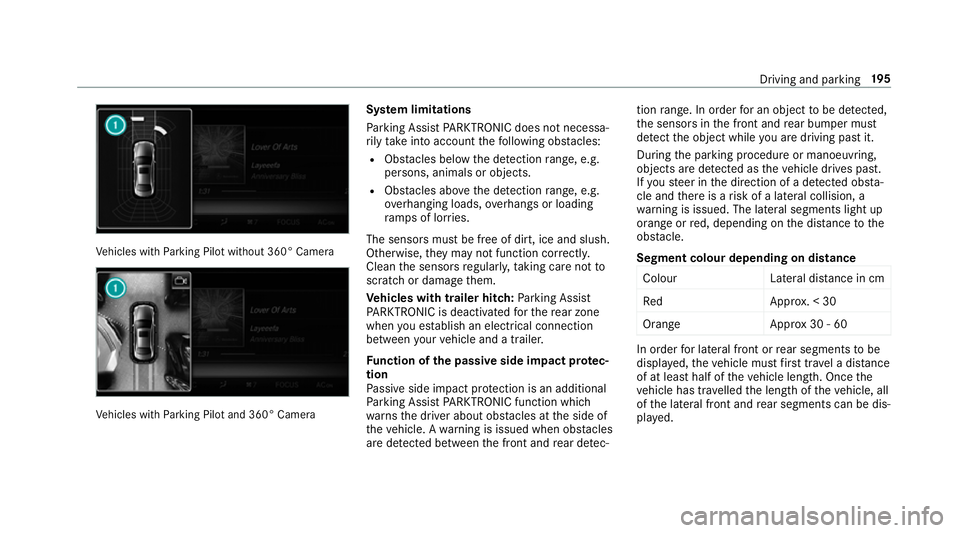
Ve
hicles with Parking Pilot without 360° Camera Ve
hicles with Parking Pilot and 360° Camera Sy
stem limitations
Pa rking Assist PARKTRONIC does not necessa‐
ri ly take into account thefo llowing obs tacles:
R Obs tacles bel owthe de tection range, e.g.
pe rsons, animals or objects.
R Obs tacles ab oveth e de tection range, e.g.
ove rhanging loads, overhangs or loading
ra mp s of lor ries.
The sensors must be free of dirt, ice and slush.
Otherwise, they may not function cor rectly.
Clean the sensors regularly, taking care not to
scratch or damage them.
Ve hicles with trailer hitch: Parking Assist
PA RKTRONIC is deacti vatedfo rth ere ar zone
when you es tablish an elect rical connection
between your vehicle and a trailer.
Fu nction of the passive side impact pr otec‐
tion
Pa ssive side impact pr otection is an additional
Pa rking Assist PARKTRONIC function which
wa rnsth e driver about obs tacles at the side of
th eve hicle. A warning is issued when obs tacles
are de tected between the front and rear de tec‐ tion
range. In order for an object tobe de tected,
th e sensors in the front and rear bumper must
de tect the object while you are driving past it.
During the parking procedure or manoeuvring,
objects are de tected as theve hicle drives past.
If yo usteer in the direction of a de tected obs ta‐
cle and there is a risk of a lateral collision, a
wa rning is issued. The lateral segments light up
orange or red, depending on the dis tance tothe
obs tacle.
Segment colour depending on distance Colou rL ateral distance in cm
Re dA pprox. < 30
Orang eA pprox30 - 60 In order
for lateral front or rear segments tobe
displa yed, theve hicle must firs t tr ave l a dis tance
of at least half of theve hicle length. Once the
ve hicle has tr avelled the length of theve hicle, all
of the lateral front and rear segments can be dis‐
pla yed. Driving and parking
19 5